display FIAT SEDICI 2009 2.G Owners Manual
[x] Cancel search | Manufacturer: FIAT, Model Year: 2009, Model line: SEDICI, Model: FIAT SEDICI 2009 2.GPages: 270, PDF Size: 3.44 MB
Page 72 of 270
71
I I
N N
S S
T T
R R
U U
M M
E E
N N
T T
P P
A A
N N
E E
L L
60G406
INSTRUMENT PANEL......................................................... 72
INSTRUMENT CLUSTER.................................................... 73
WARNING AND INDICATOR LIGHTS........................ 74
SPEEDOMETER..................................................................... 83
TACHOMETER ..................................................................... 84
FUEL GAUGE......................................................................... 84
TEMPERATURE GAUGE/OVERHEAT INDICATOR
LIGHT (for Diesel Engine Model) ...................................... 85
INFORMATION DISPLAY.................................................. 85
HAZARD WARNING SWITCH ....................................... 91FRONT FOG LIGHT SWITCH
(for versions/markets, where provided)........................... 91
“ESP OFF” SWITCH
(for versions/markets, where provided)........................... 92
2WD/ 4WD SWITCH
(for versions/markets, where provided)........................... 92
HEATED REAR WINDOW AND HEATED OUTSIDE
REARVIEW MIRRORS SWITCH
(for versions/markets, where provided)........................... 93
HEADLIGHT LEVELING SWITCH
(for versions/markets, where provided)........................... 94
GLOVE BOX.......................................................................... 94
CIGARETTE LIGHTER AND ASHTRAY
(for versions/markets, where provided)........................... 95
THEFT DETERRENT LIGHT.............................................. 95
HEATING AND AIR CONDITIONING SYSTEM ........ 96
HEATING SYSTEM
(for versions/markets, where provided)........................... 97
MANUAL HEATING AND AIR CONDITIONING
SYSTEM (for versions/markets, where provided) ......... 100
AUTOMATIC HEATING AND AIR CONDITIONING
SYSTEM (Climate Control)
(for versions/markets, where provided)........................... 104
AUDIO SYSTEMS.................................................................. 110
3
071-128 SEDICI LUM FL GB 1E 19-06-2009 12:05 Pagina 71
Page 74 of 270
73
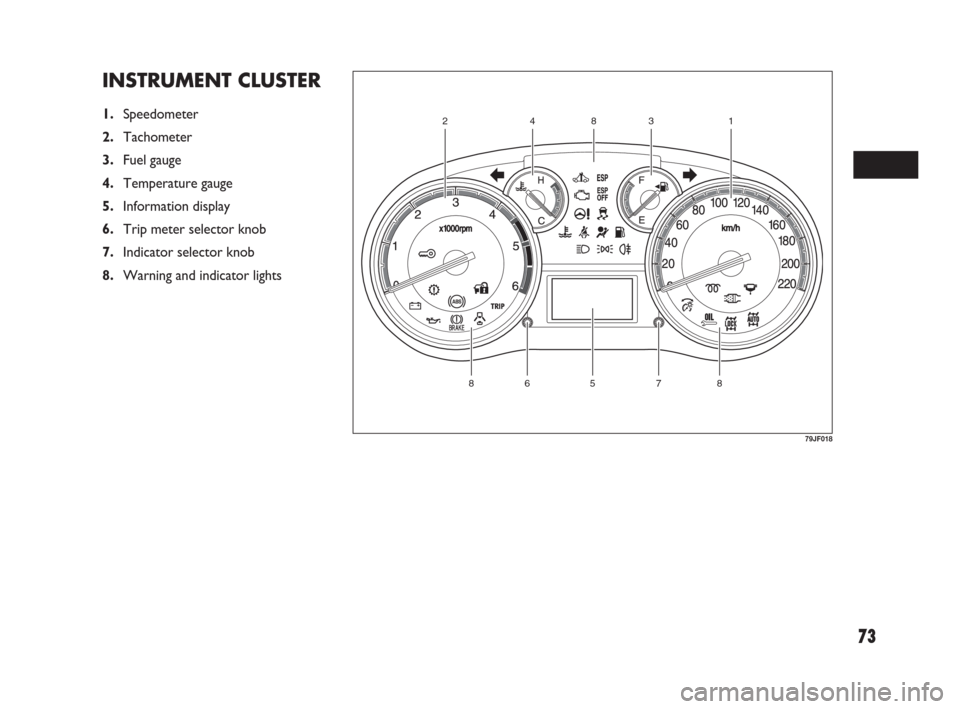
INSTRUMENT CLUSTER
1.Speedometer
2.Tachometer
3.Fuel gauge
4.Temperature gauge
5.Information display
6.Trip meter selector knob
7.Indicator selector knob
8.Warning and indicator lights
57886
12384
79JF018
071-128 SEDICI LUM FL GB 1E 19-06-2009 12:05 Pagina 73
Page 86 of 270
85
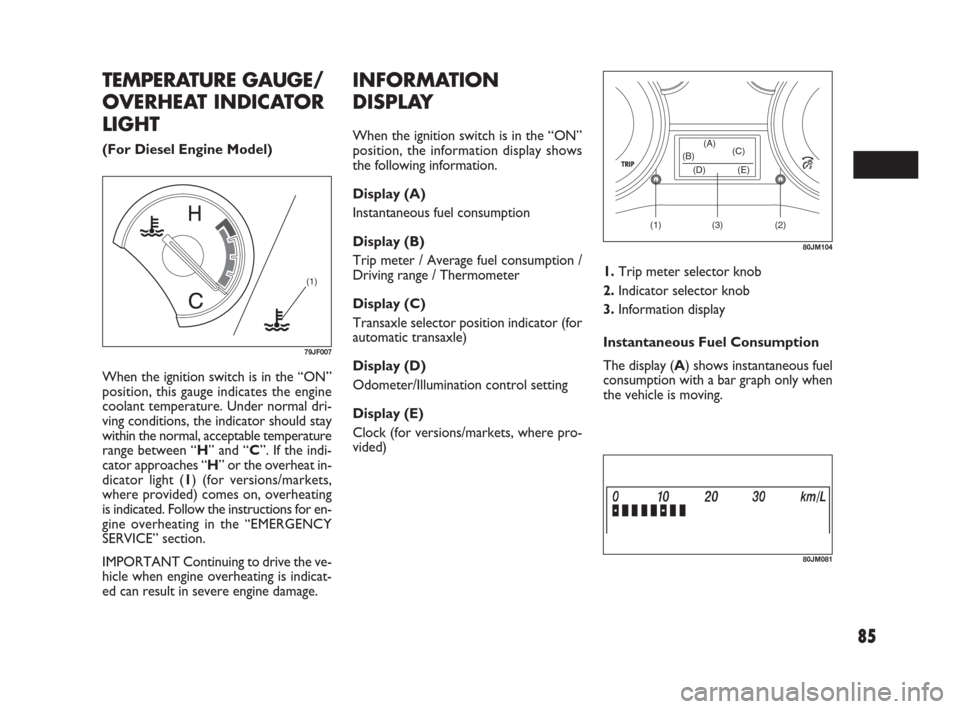
When the ignition switch is in the “ON”
position, this gauge indicates the engine
coolant temperature. Under normal dri-
ving conditions, the indicator should stay
within the normal, acceptable temperature
range between “H” and “C”. If the indi-
cator approaches “H” or the overheat in-
dicator light (1) (for versions/markets,
where provided) comes on, overheating
is indicated. Follow the instructions for en-
gine overheating in the “EMERGENCY
SERVICE” section.
IMPORTANT Continuing to drive the ve-
hicle when engine overheating is indicat-
ed can result in severe engine damage.
(1)
79JF007
(1) (2)(3) (D) (B)(A)
(C)
(E)
80JM104
TEMPERATURE GAUGE/
OVERHEAT INDICATOR
LIGHT
(For Diesel Engine Model)
INFORMATION
DISPLAY
When the ignition switch is in the “ON”
position, the information display shows
the following information.
Display (A)
Instantaneous fuel consumption
Display (B)
Trip meter / Average fuel consumption /
Driving range / Thermometer
Display (C)
Transaxle selector position indicator (for
automatic transaxle)
Display (D)
Odometer/Illumination control setting
Display (E)
Clock (for versions/markets, where pro-
vided)
80JM081
1.Trip meter selector knob
2.Indicator selector knob
3.Information display
Instantaneous Fuel Consumption
The display (A) shows instantaneous fuel
consumption with a bar graph only when
the vehicle is moving.
071-128 SEDICI LUM FL GB 1E 19-06-2009 12:05 Pagina 85
Page 87 of 270
86
Do not attempt to adjust the
display while driving.
If you attempt to adjust the display
while driving, you could lose control
of the vehicle.
WARNING
NOTE When you reconnect the negative
(–) terminal to the battery, the indication
of the instantaneous fuel consumption will
be reinitialized. Change the indication
again to your preference.
Trip meter / Average Fuel
Consumption / Driving Range /
Thermometer / Oil Life
Monitoring
When the ignition switch is in the “ON”
position, the display (B) shows one of the
following six indications, trip meter A, trip
meter B, average fuel consumption, dri-
ving range, thermometer or oil life moni-
toring.
To switch the display indication (B), push
the trip meter selector knob (1) or the in-
dicator selector knob (2) quickly.
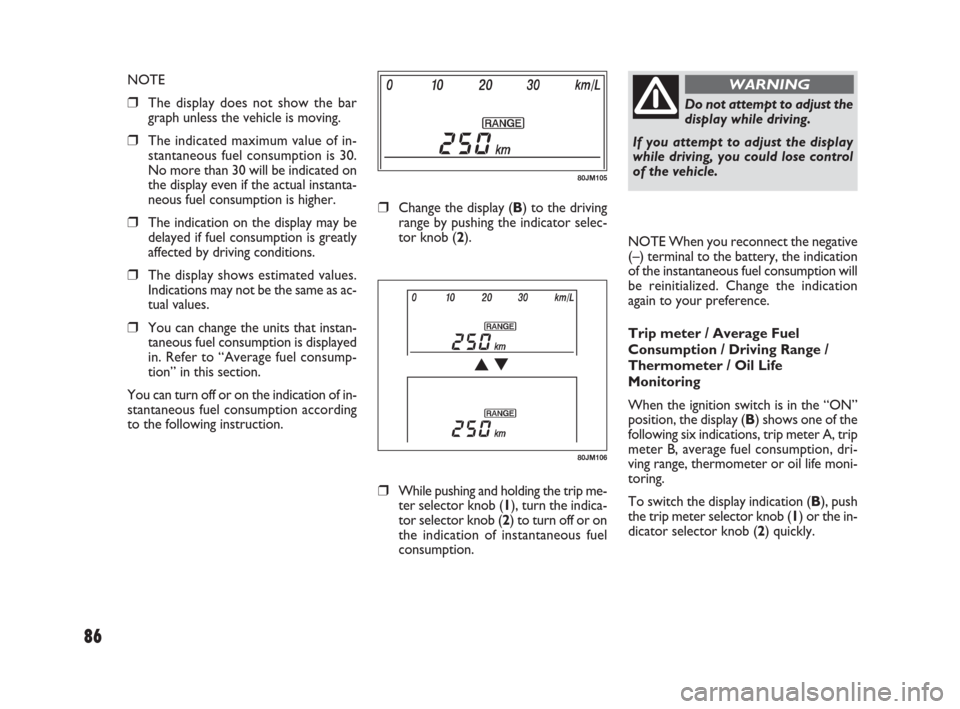
80JM105
80JM106
❒Change the display (B) to the driving
range by pushing the indicator selec-
tor knob (2).
❒While pushing and holding the trip me-
ter selector knob (1), turn the indica-
tor selector knob (2) to turn off or on
the indication of instantaneous fuel
consumption. NOTE
❒The display does not show the bar
graph unless the vehicle is moving.
❒The indicated maximum value of in-
stantaneous fuel consumption is 30.
No more than 30 will be indicated on
the display even if the actual instanta-
neous fuel consumption is higher.
❒The indication on the display may be
delayed if fuel consumption is greatly
affected by driving conditions.
❒The display shows estimated values.
Indications may not be the same as ac-
tual values.
❒You can change the units that instan-
taneous fuel consumption is displayed
in. Refer to “Average fuel consump-
tion” in this section.
You can turn off or on the indication of in-
stantaneous fuel consumption according
to the following instruction.
071-128 SEDICI LUM FL GB 1E 19-06-2009 12:05 Pagina 86
Page 88 of 270
87
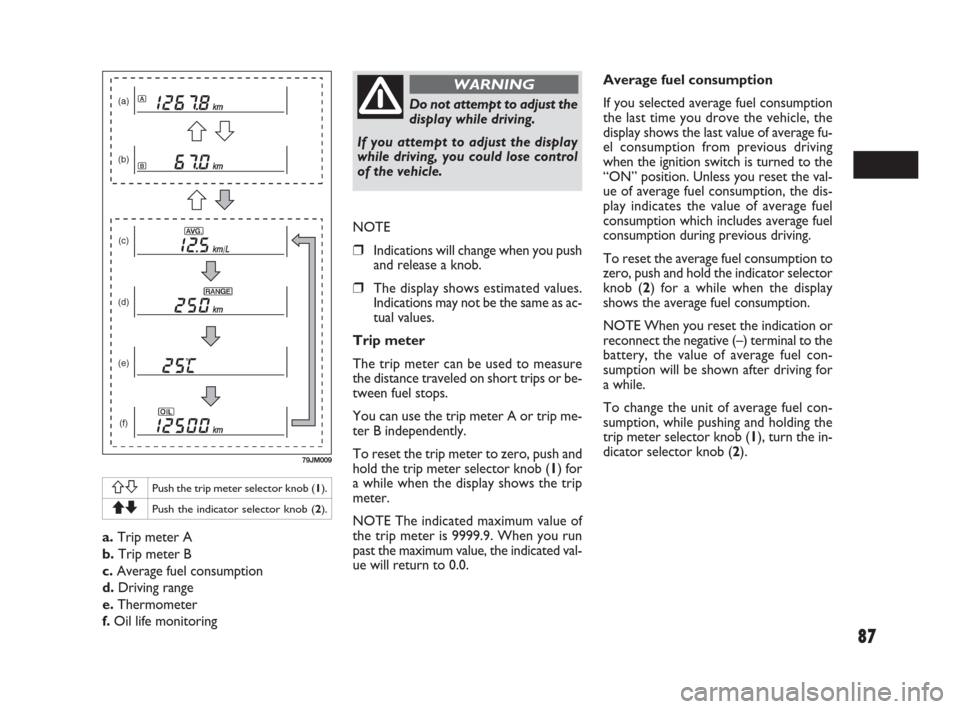
a.Trip meter A
b.Trip meter B
c.Average fuel consumption
d.Driving range
e.Thermometer
f.Oil life monitoring
(a)
(b)
(c)
(d)
(e)
(f)
79JM009
ASPush the trip meter selector knob (1).
QZPush the indicator selector knob (2).
Do not attempt to adjust the
display while driving.
If you attempt to adjust the display
while driving, you could lose control
of the vehicle.
WARNING
NOTE
❒Indications will change when you push
and release a knob.
❒The display shows estimated values.
Indications may not be the same as ac-
tual values.
Trip meter
The trip meter can be used to measure
the distance traveled on short trips or be-
tween fuel stops.
You can use the trip meter A or trip me-
ter B independently.
To reset the trip meter to zero, push and
hold the trip meter selector knob (1) for
a while when the display shows the trip
meter.
NOTE The indicated maximum value of
the trip meter is 9999.9. When you run
past the maximum value, the indicated val-
ue will return to 0.0.Average fuel consumption
If you selected average fuel consumption
the last time you drove the vehicle, the
display shows the last value of average fu-
el consumption from previous driving
when the ignition switch is turned to the
“ON” position. Unless you reset the val-
ue of average fuel consumption, the dis-
play indicates the value of average fuel
consumption which includes average fuel
consumption during previous driving.
To reset the average fuel consumption to
zero, push and hold the indicator selector
knob (2) for a while when the display
shows the average fuel consumption.
NOTE When you reset the indication or
reconnect the negative (–) terminal to the
battery, the value of average fuel con-
sumption will be shown after driving for
a while.
To change the unit of average fuel con-
sumption, while pushing and holding the
trip meter selector knob (1), turn the in-
dicator selector knob (2).
071-128 SEDICI LUM FL GB 1E 19-06-2009 12:05 Pagina 87
Page 89 of 270
88
Driving range
If you selected driving range the last time
you drove the vehicle, the display indicates
“---” for a few seconds and then indicates
the current driving range when the igni-
tion switch is turned to the “ON” posi-
tion.
The driving range shown in the display is
the approximate distance you can drive
until the fuel gauge indicates “E”, based on
current driving conditions.
When the remaining fuel in fuel tank
reaches a low level, the display “---” will
appear.
If the low fuel warning light comes on, fill
the fuel tank immediately regardless of the
value of driving range shown in the display.
As the driving range after refueling is cal-
culated based on the most recent driving
condition, the value is different each time
you refuel.
NOTE If you refuel when the ignition
switch is in the “ON” position, the driving
range may not indicate the correct value.
When you reconnect the negative (–) ter-
minal to the battery, the value of driving
range will be shown after driving for a
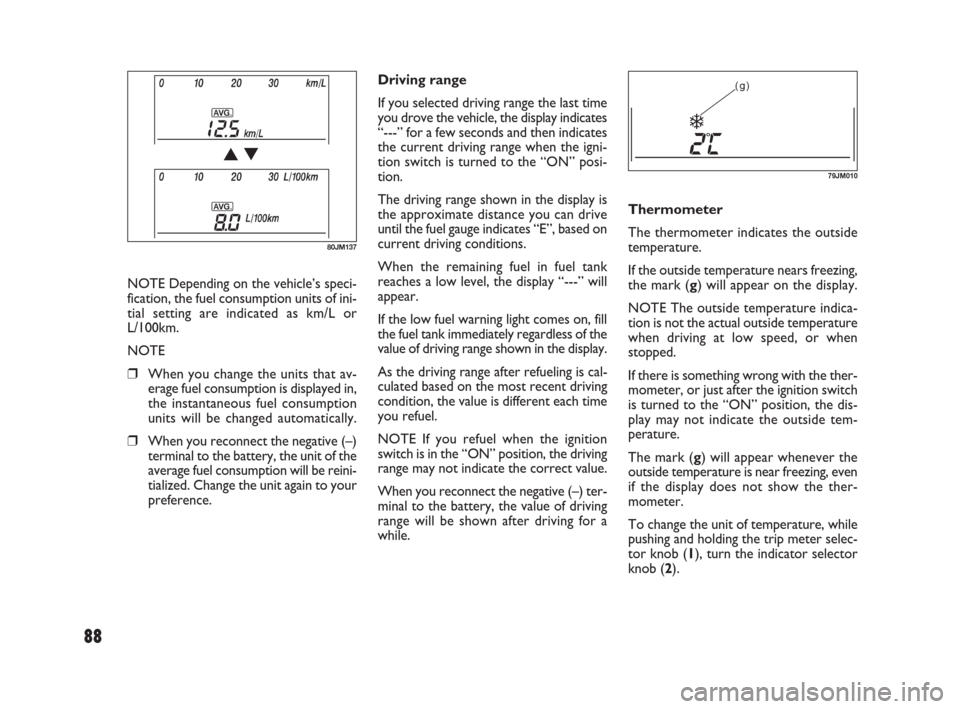
while.Thermometer
The thermometer indicates the outside
temperature.
If the outside temperature nears freezing,
the mark (g) will appear on the display.
NOTE The outside temperature indica-
tion is not the actual outside temperature
when driving at low speed, or when
stopped.
If there is something wrong with the ther-
mometer, or just after the ignition switch
is turned to the “ON” position, the dis-
play may not indicate the outside tem-
perature.
The mark (g) will appear whenever the
outside temperature is near freezing, even
if the display does not show the ther-
mometer.
To change the unit of temperature, while
pushing and holding the trip meter selec-
tor knob (1), turn the indicator selector
knob (2).(g)
79JM010
80JM137
NOTE Depending on the vehicle’s speci-
fication, the fuel consumption units of ini-
tial setting are indicated as km/L or
L/100km.
NOTE
❒When you change the units that av-
erage fuel consumption is displayed in,
the instantaneous fuel consumption
units will be changed automatically.
❒When you reconnect the negative (–)
terminal to the battery, the unit of the
average fuel consumption will be reini-
tialized. Change the unit again to your
preference.
071-128 SEDICI LUM FL GB 1E 19-06-2009 12:05 Pagina 88
Page 90 of 270
89
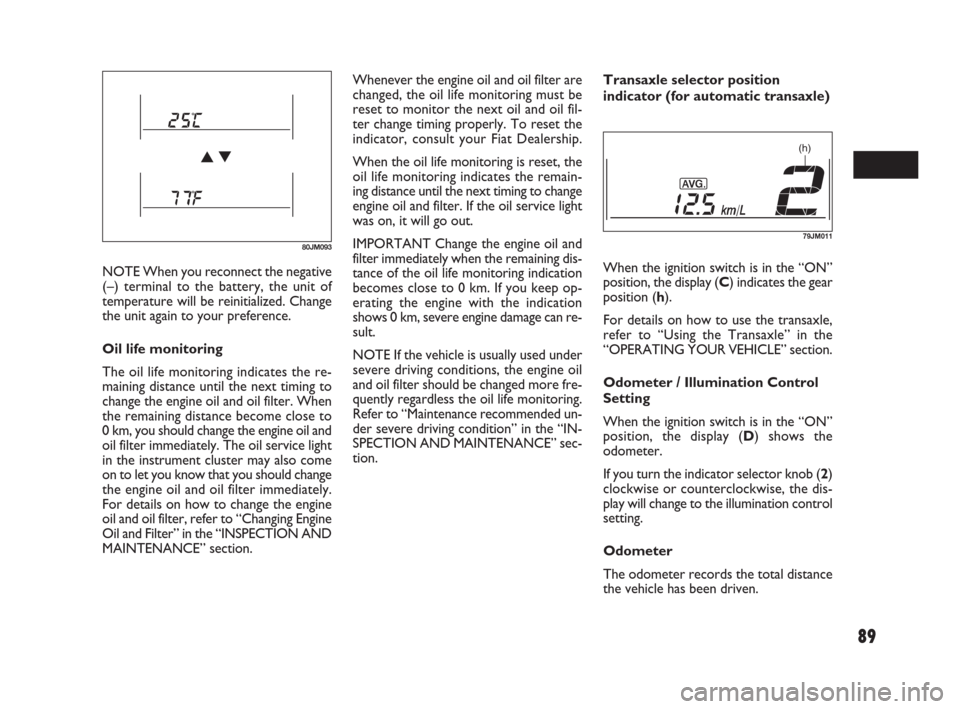
NOTE When you reconnect the negative
(–) terminal to the battery, the unit of
temperature will be reinitialized. Change
the unit again to your preference.
Oil life monitoring
The oil life monitoring indicates the re-
maining distance until the next timing to
change the engine oil and oil filter. When
the remaining distance become close to
0 km, you should change the engine oil and
oil filter immediately. The oil service light
in the instrument cluster may also come
on to let you know that you should change
the engine oil and oil filter immediately.
For details on how to change the engine
oil and oil filter, refer to “Changing Engine
Oil and Filter” in the “INSPECTION AND
MAINTENANCE” section.Whenever the engine oil and oil filter are
changed, the oil life monitoring must be
reset to monitor the next oil and oil fil-
ter change timing properly. To reset the
indicator, consult your Fiat Dealership.
When the oil life monitoring is reset, the
oil life monitoring indicates the remain-
ing distance until the next timing to change
engine oil and filter. If the oil service light
was on, it will go out.
IMPORTANT Change the engine oil and
filter immediately when the remaining dis-
tance of the oil life monitoring indication
becomes close to 0 km. If you keep op-
erating the engine with the indication
shows 0 km, severe engine damage can re-
sult.
NOTE If the vehicle is usually used under
severe driving conditions, the engine oil
and oil filter should be changed more fre-
quently regardless the oil life monitoring.
Refer to “Maintenance recommended un-
der severe driving condition” in the “IN-
SPECTION AND MAINTENANCE” sec-
tion.Transaxle selector position
indicator (for automatic transaxle)
When the ignition switch is in the “ON”
position, the display (C) indicates the gear
position (h).
For details on how to use the transaxle,
refer to “Using the Transaxle” in the
“OPERATING YOUR VEHICLE” section.
Odometer / Illumination Control
Setting
When the ignition switch is in the “ON”
position, the display (D) shows the
odometer.
If you turn the indicator selector knob (2)
clockwise or counterclockwise, the dis-
play will change to the illumination control
setting.
Odometer
The odometer records the total distance
the vehicle has been driven.
80JM093
(h)
79JM011
071-128 SEDICI LUM FL GB 1E 19-06-2009 12:05 Pagina 89
Page 91 of 270
90
Do not attempt to adjust the
display while driving.
If you attempt to adjust the display
while driving, you could lose control
of the vehicle.
WARNING
NOTE
❒If you push the indicator selector knob
or do not turn the knob for more than
5 seconds while activating the illumi-
nation control, the illumination con-
trol will be canceled automatically and
the display (D) will show the odome-
ter indication.
❒You can change the brightness when
the position lights or headlights are on
even if the ignition switch is in the
“ACC” or “LOCK” position.
❒When you reconnect the negative (–)
terminal to the battery, the brightness
of the instrument panel lights will be
reinitialized. Readjust the brightness
according to your preference.
NOTE If you select the highest brightness
level when the position lights or headlights
are on, the instrument panel lights are not
dimmed.
Clock (for versions/markets, where
provided)
When the ignition switch is in the “ON”
position, the display (E) shows the time.
80JM039
IMPORTANT Keep track of your odome-
ter reading and check the maintenance
schedule regularly for required services.
Increased wear or damage to certain parts
can result from failure to perform re-
quired services at the proper mileage in-
tervals.
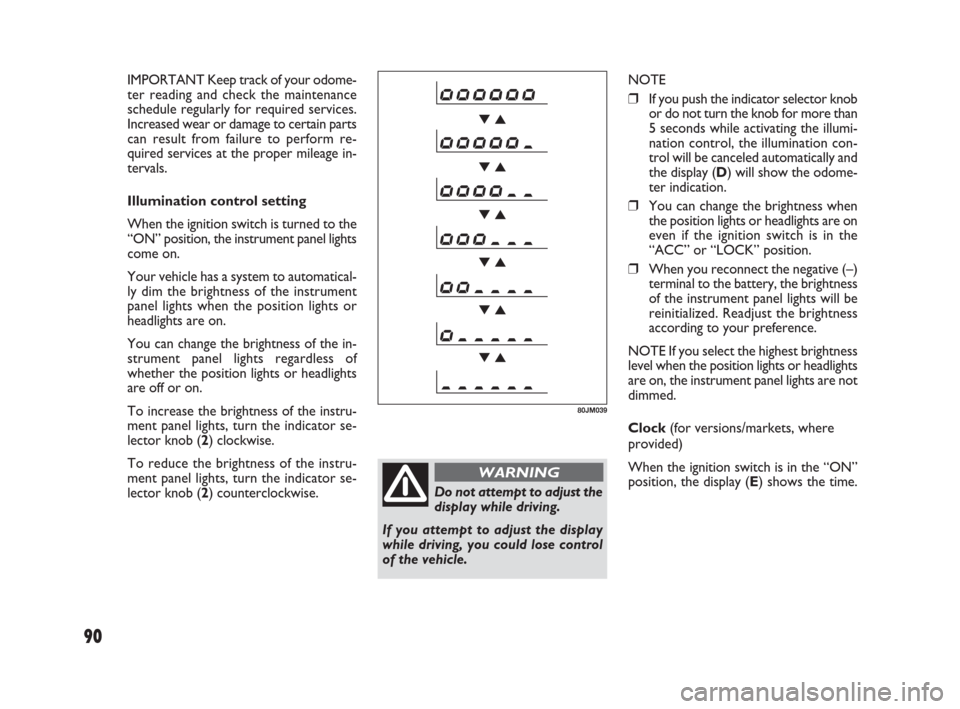
Illumination control setting
When the ignition switch is turned to the
“ON” position, the instrument panel lights
come on.
Your vehicle has a system to automatical-
ly dim the brightness of the instrument
panel lights when the position lights or
headlights are on.
You can change the brightness of the in-
strument panel lights regardless of
whether the position lights or headlights
are off or on.
To increase the brightness of the instru-
ment panel lights, turn the indicator se-
lector knob (2) clockwise.
To reduce the brightness of the instru-
ment panel lights, turn the indicator se-
lector knob (2) counterclockwise.
071-128 SEDICI LUM FL GB 1E 19-06-2009 12:05 Pagina 90
Page 92 of 270
91
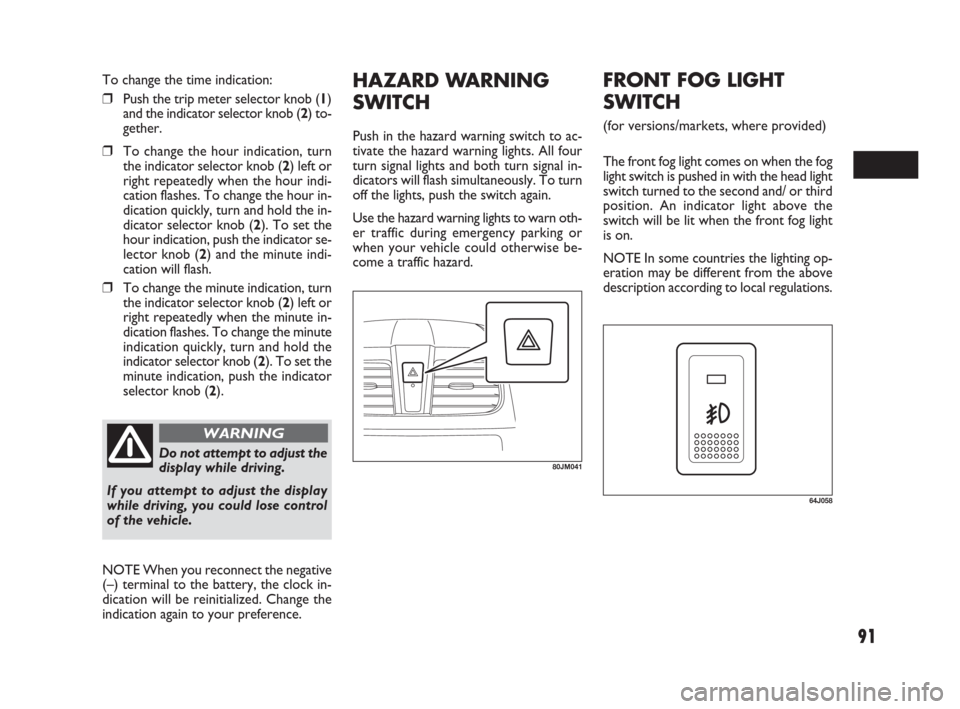
HAZARD WARNING
SWITCH
Push in the hazard warning switch to ac-
tivate the hazard warning lights. All four
turn signal lights and both turn signal in-
dicators will flash simultaneously. To turn
off the lights, push the switch again.
Use the hazard warning lights to warn oth-
er traffic during emergency parking or
when your vehicle could otherwise be-
come a traffic hazard.
80JM041Do not attempt to adjust the
display while driving.
If you attempt to adjust the display
while driving, you could lose control
of the vehicle.
WARNING
To change the time indication:
❒Push the trip meter selector knob (1)
and the indicator selector knob (2) to-
gether.
❒To change the hour indication, turn
the indicator selector knob (2) left or
right repeatedly when the hour indi-
cation flashes. To change the hour in-
dication quickly, turn and hold the in-
dicator selector knob (2). To set the
hour indication, push the indicator se-
lector knob (2) and the minute indi-
cation will flash.
❒To change the minute indication, turn
the indicator selector knob (2) left or
right repeatedly when the minute in-
dication flashes. To change the minute
indication quickly, turn and hold the
indicator selector knob (2). To set the
minute indication, push the indicator
selector knob (2).
NOTE When you reconnect the negative
(–) terminal to the battery, the clock in-
dication will be reinitialized. Change the
indication again to your preference.
64J058
FRONT FOG LIGHT
SWITCH
(for versions/markets, where provided)
The front fog light comes on when the fog
light switch is pushed in with the head light
switch turned to the second and/ or third
position. An indicator light above the
switch will be lit when the front fog light
is on.
NOTE In some countries the lighting op-
eration may be different from the above
description according to local regulations.
071-128 SEDICI LUM FL GB 1E 19-06-2009 12:05 Pagina 91
Page 105 of 270
104
NOTE Your vehicle uses the air condi-
tioning refrigerant HFC-134a, commonly
called “R-134a”. R-134a replaced R-12
around 1993 for automotive applications.
Other refrigerants are available, including
recycled R-12, but only R-134a should be
used in your vehicle.
IMPORTANT Using the wrong refriger-
ant may damage your air conditioning sys-
tem. Use R-134a only. Do not mix or re-
place the R-134a with other refrigerants.AUTOMATIC HEATING
AND AIR
CONDITIONING
SYSTEM
(Climate Control)
(for versions/markets, where provided)
DESCRIPTION OF CONTROLS
1.Temperature selector
2.Blower speed selector
3.Air intake selector
4.Air flow selector
5.Defrost switch
6.“OFF” switch
7.Air conditioning switch
8.“AUTO” switch
9.LCD display MAINTENANCE
If you do not use the air conditioner for
a long period, such as during winter, it may
not give the best performance when you
start using it again. To help maintain op-
timum performance and durability of your
air conditioner, it needs to be run peri-
odically. Operate the air conditioner at
least once a month for one minute with
the engine idling. This circulates the re-
frigerant and oil and helps protect the in-
ternal components.
Your air conditioner is equipped with air
filters. Clean or replace them as specified
in the “Maintenance Schedule” in the “IN-
SPECTION AND MAINTENANCE” sec-
tion. Have this job done by your Fiat Deal-
ership as the lower glove box must be
lowered for this job.
071-128 SEDICI LUM FL GB 1E 19-06-2009 12:05 Pagina 104