battery FIAT SPIDER ABARTH 2017 User Guide
[x] Cancel search | Manufacturer: FIAT, Model Year: 2017, Model line: SPIDER ABARTH, Model: FIAT SPIDER ABARTH 2017Pages: 292, PDF Size: 9.24 MB
Page 30 of 292
Double Locking System
— If Equipped
The double locking system is designed
to prevent someone who has broken
into your vehicle from opening the door
from the inside. If you have any
problems with the double locking
system, contact an authorized dealer.
System Activation
Proceed as follows:
1. Close both the windows and the
convertible top.
2. Place the ignition in the OFF position
and take the key fob with you.
3. Close both doors and trunk lid.
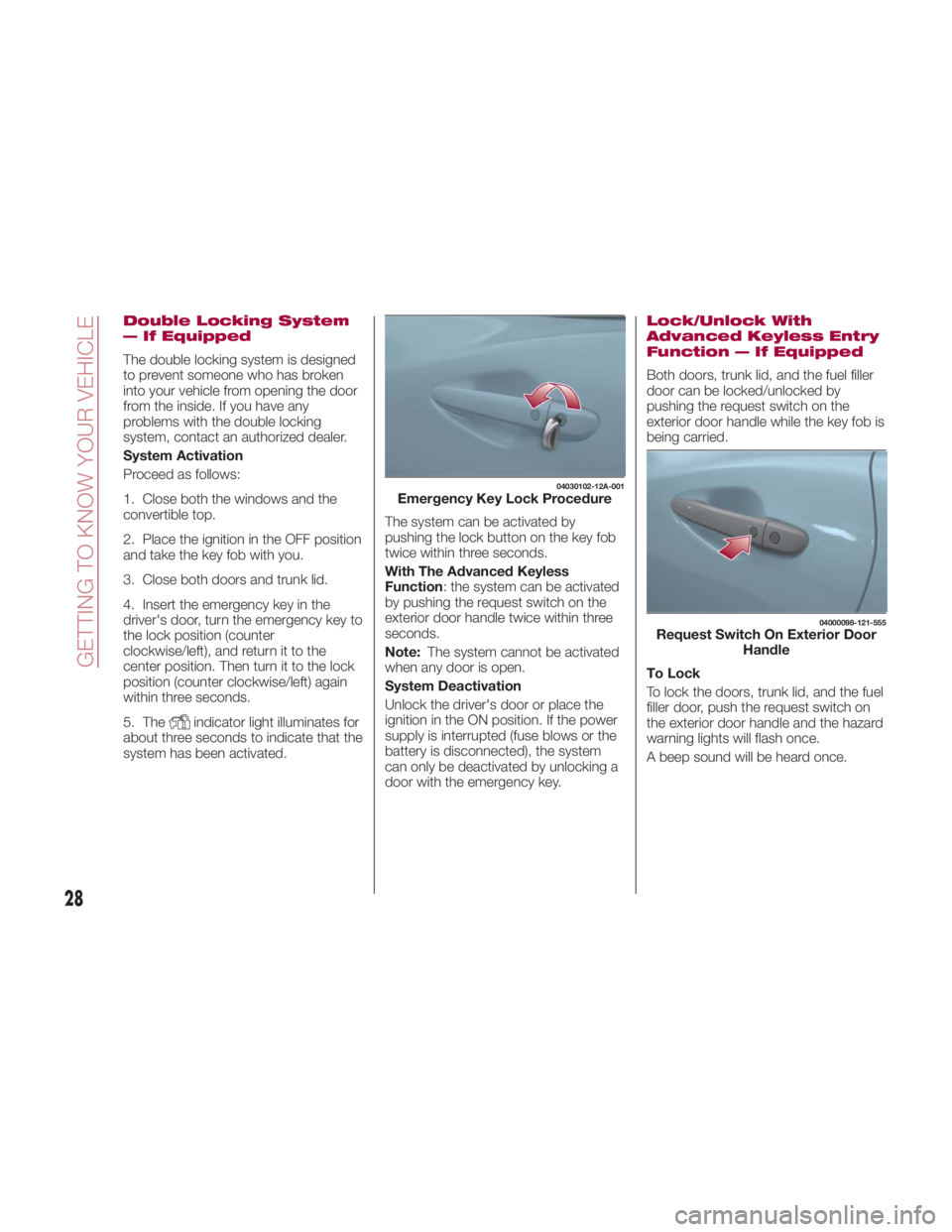
4. Insert the emergency key in the
driver's door, turn the emergency key to
the lock position (counter
clockwise/left), and return it to the
center position. Then turn it to the lock
position (counter clockwise/left) again
within three seconds.
5. The
indicator light illuminates for
about three seconds to indicate that the
system has been activated. The system can be activated by
pushing the lock button on the key fob
twice within three seconds.
With The Advanced Keyless
Function : the system can be activated
by pushing the request switch on the
exterior door handle twice within three
seconds.
Note: The system cannot be activated
when any door is open.
System Deactivation
Unlock the driver's door or place the
ignition in the ON position. If the power
supply is interrupted (fuse blows or the
battery is disconnected), the system
can only be deactivated by unlocking a
door with the emergency key. Lock/Unlock With
Advanced Keyless Entry
Function — If Equipped
Both doors, trunk lid, and the fuel filler
door can be locked/unlocked by
pushing the request switch on the
exterior door handle while the key fob is
being carried.
To Lock
To lock the doors, trunk lid, and the fuel
filler door, push the request switch on
the exterior door handle and the hazard
warning lights will flash once.
A beep sound will be heard once. 04030102-12A-001
Emergency Key Lock Procedure 04000098-121-555
Request Switch On Exterior Door
Handle
28
GETTING TO KNOW YOUR VEHICLE
Page 34 of 292
Settings Changing
Settings can be changed using the
following procedure:
1. Safely park the vehicle. Both doors
must remain closed.
2. Place the ignition in the ON position.
3. Push and hold the lock side of the
driver's door-lock switch within
20 seconds of placing the ignition in the
ON position, and make sure a beep
sound is heard about eight seconds
afterwards.
4. Refer to the auto lock/unlock
function setting table, determine the
function number for the desired setting.
Push the unlock side of the driver's
door-lock switch the same number of
times as the selected function number
(example: if you select function 2, push
the unlock side of the switch only two
times).
5. Three seconds after the function
setting has been changed, a beep
sound will beep in the amount of the
selected function number (example:
Function numbe r 3 = three beep
sounds).
Automatic Transmission Vehicles
The doors cannot be locked or
unlocked while the setting function is
being performed. The procedure can be cancelled by
pushing the lock side of the door-lock
switch.
Note:
The vehicle lock-out prevention
feature prevents you from locking
yourself out of the vehicle. Both doors,
trunk lid, and the fuel filler door will
automatically unlock if they are locked
using the power door locks with any
door open. If both the doors are closed
even though the trunk lid is open, both
the doors and the fuel filler door will
lock.
Door Unlock (Control) System
With Collision Detection — If
Equipped : this system automatically
unlocks the doors, trunk lid, and the
fuel filler door in the event the vehicle is
involved in an accident to allow
passengers to get out of the vehicle
immediately and prevent being trapped
inside. While the ignition is placed in
the ON position and in the event the
vehicle receives an impact strong
enough to inflate the air bags, both the
doors, the trunk lid, and fuel filler door
are automatically unlocked after about
six seconds have elapsed from the
time of the accident. The doors, trunk
lid, and the fuel filler door may not
unlock depending on how an impact is
applied, the force of the impact, and
other conditions of the accident. If
door-related systems or the battery is malfunctioning, the doors, trunk lid,
and the fuel filler door will not unlock.
When opening a door, the power
windows open a little automatically.
When closing the door, the power
windows close automatically. This is a
function for improving the sealing of
the window, and it does not mean
there is a problem. If the vehicle battery
is disconnected for vehicle
maintenance or other reasons, the
power windows will not open or close
automatically. If the power windows do
not open or close, the automatic
open/close mechanism for the
windows must be reset.
32
GETTING TO KNOW YOUR VEHICLE
Page 35 of 292
SEATS Manual Adjustment
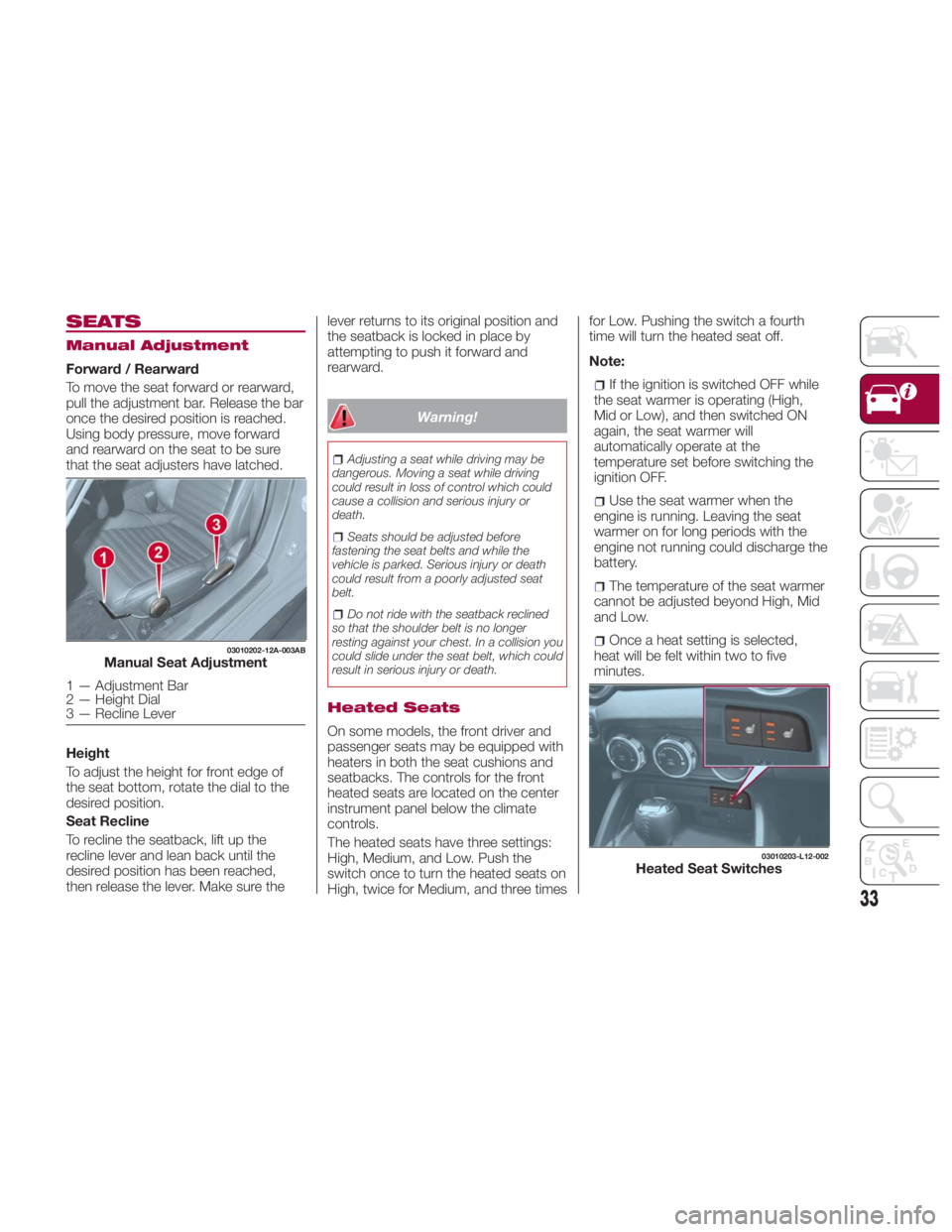
Forward / Rearward
To move the seat forward or rearward,
pull the adjustment bar. Release the bar
once the desired position is reached.
Using body pressure, move forward
and rearward on the seat to be sure
that the seat adjusters have latched.
Height
To adjust the height for front edge of
the seat bottom, rotate the dial to the
desired position.
Seat Recline
To recline the seatback, lift up the
recline lever and lean back until the
desired position has been reached,
then release the lever. Make sure the lever returns to its original position and
the seatback is locked in place by
attempting to push it forward and
rearward.
Warning!Adjusting a seat while driving may be
dangerous. Moving a seat while driving
could result in loss of control which could
cause a collision and serious injury or
death.
Seats should be adjusted before
fastening the seat belts and while the
vehicle is parked. Serious injury or death
could result from a poorly adjusted seat
belt.
Do not ride with the seatback reclined
so that the shoulder belt is no longer
resting against your chest. In a collision you
could slide under the seat belt, which could
result in serious injury or death.
Heated Seats
On some models, the front driver and
passenger seats may be equipped with
heaters in both the seat cushions and
seatbacks. The controls for the front
heated seats are located on the center
instrument panel below the climate
controls.
The heated seats have three settings:
High, Medium, and Low. Push the
switch once to turn the heated seats on
High, twice for Medium, and three times for Low. Pushing the switch a fourth
time will turn the heated seat off.
Note:
If the ignition is switched OFF while
the seat warmer is operating (High,
Mid or Low), and then switched ON
again, the seat warmer will
automatically operate at the
temperature set before switching the
ignition OFF.
Use the seat warmer when the
engine is running. Leaving the seat
warmer on for long periods with the
engine not running could discharge the
battery.
The temperature of the seat warmer
cannot be adjusted beyond High, Mid
and Low.
Once a heat setting is selected,
heat will be felt within two to five
minutes.03010202-12A-003AB
Manual Seat Adjustment
1 — Adjustment Bar
2 — Height Dial
3 — Recline Lever 03010203-L12-002
Heated Seat Switches
33
Page 40 of 292
EXTERIOR LIGHTS Headlights
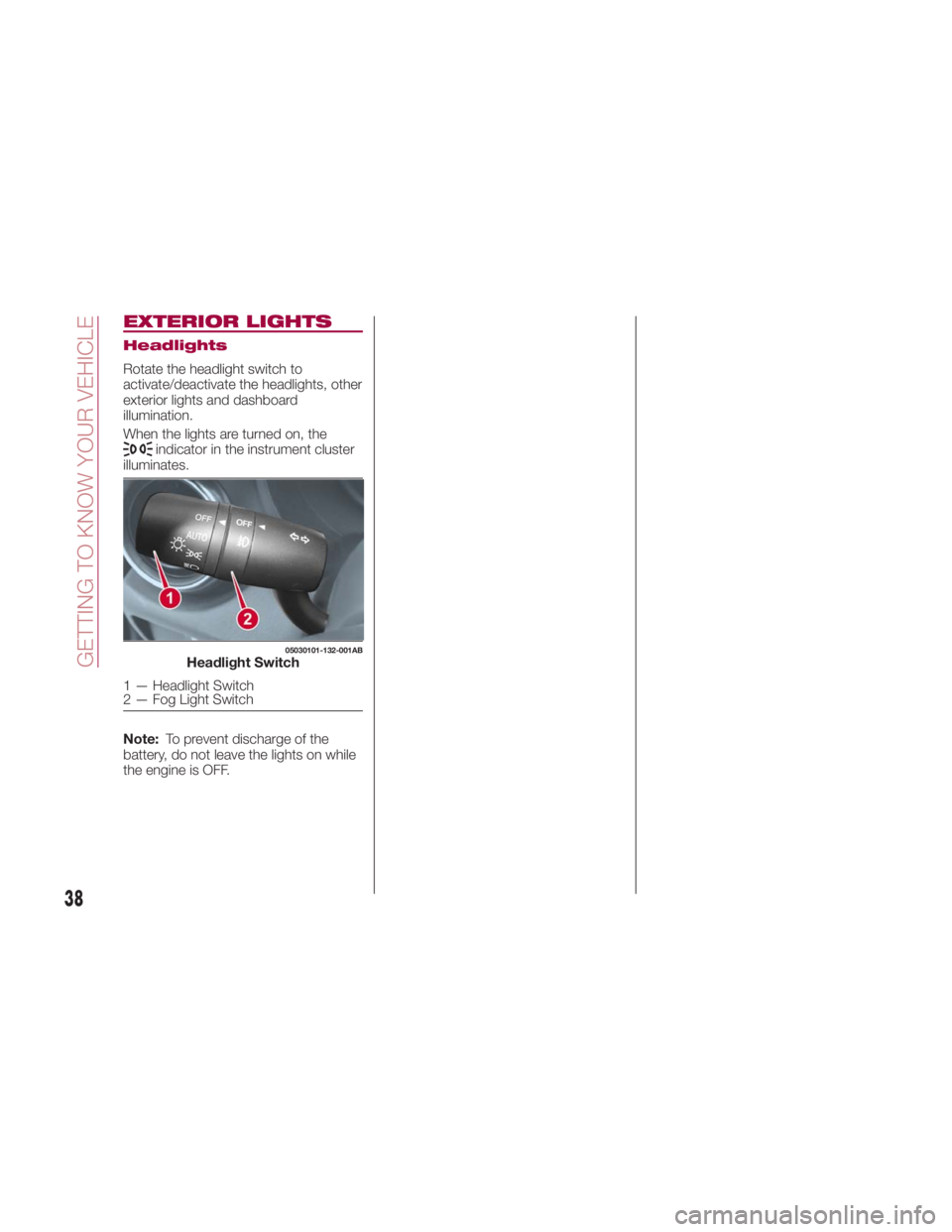
Rotate the headlight switch to
activate/deactivate the headlights, other
exterior lights and dashboard
illumination.
When the lights are turned on, the
indicator in the instrument cluster
illuminates.
Note: To prevent discharge of the
battery, do not leave the lights on while
the engine is OFF. 05030101-132-001AB
Headlight Switch
1 — Headlight Switch
2 — Fog Light Switch
38
GETTING TO KNOW YOUR VEHICLE
Page 47 of 292
CLIMATE CONTROL
SYSTEM Operating Tips
The air conditioning system will only
operate with the engine running.
To prevent the battery from being
discharged while the engine is off, do
not leave the Blower Control Knob on
for extended periods of time.
To improve system efficiency, clear all
obstructions (leaves, snow and ice)
from the hood and the air inlet in the
grille.
Use the air conditioning system to
defog the windows and dehumidify the
air.
Recirculation mode should be used
when driving through tunnels, while in a
traffic jam, or when you would like to
quickly cool the interior.
Use the outside air position for
ventilation or windshield defrosting.
If the vehicle has been parked in direct
sunlight during hot weather, open the
windows to let warm air escape, and
then run the air conditioning system. To keep the internal parts lubricated
and the system running smoothly, run
the air conditioner about 10 minutes at
least once a month.
Have the air conditioner checked before
the weather gets hot. A lack of
refrigerant may make the air conditioner
less efficient. The refrigerant
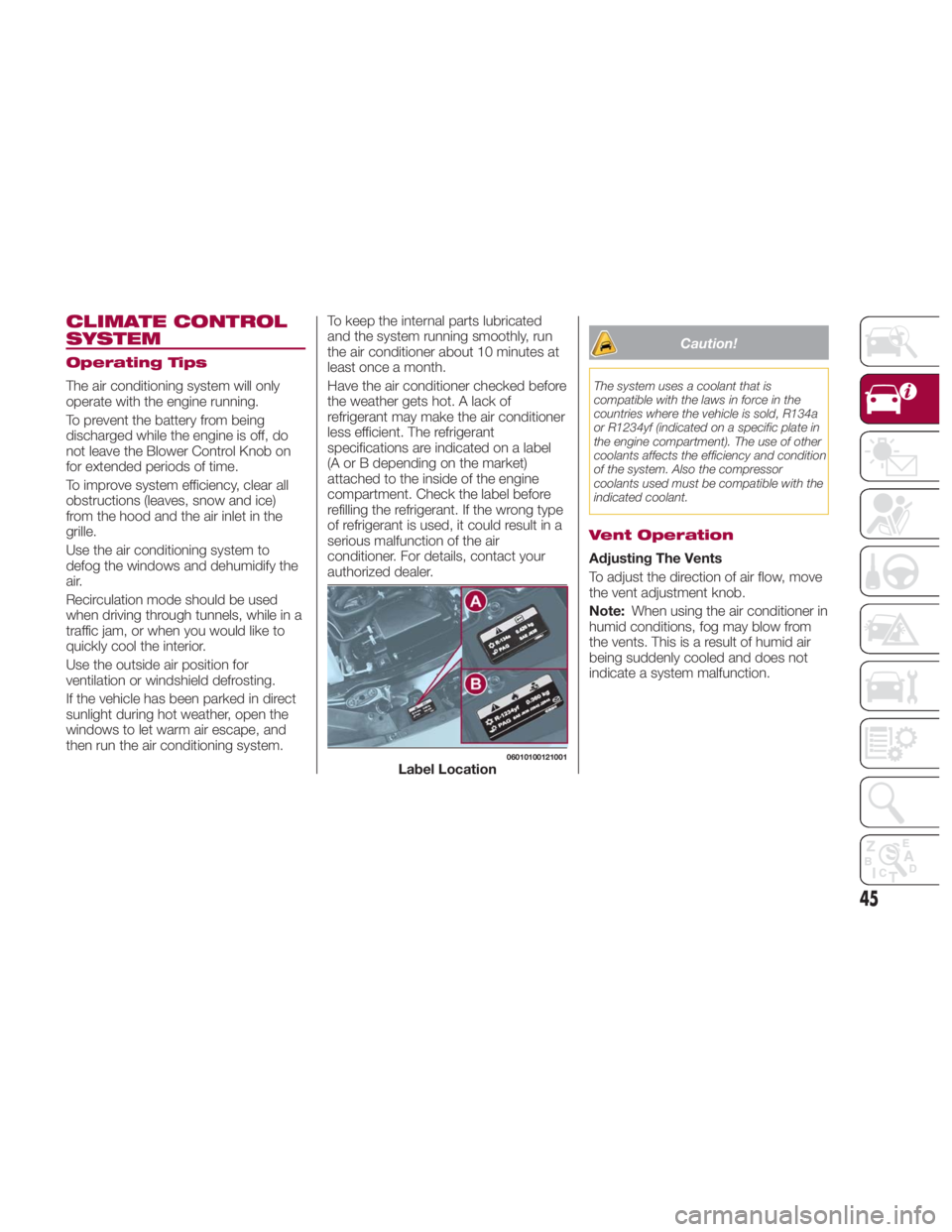
specifications are indicated on a label
(A or B depending on the market)
attached to the inside of the engine
compartment. Check the label before
refilling the refrigerant. If the wrong type
of refrigerant is used, it could result in a
serious malfunction of the air
conditioner. For details, contact your
authorized dealer. Caution!The system uses a coolant that is
compatible with the laws in force in the
countries where the vehicle is sold, R134a
or R1234yf (indicated on a specific plate in
the engine compartment). The use of other
coolants affects the efficiency and condition
of the system. Also the compressor
coolants used must be compatible with the
indicated coolant.
Vent Operation
Adjusting The Vents
To adjust the direction of air flow, move
the vent adjustment knob.
Note: When using the air conditioner in
humid conditions, fog may blow from
the vents. This is a result of humid air
being suddenly cooled and does not
indicate a system malfunction. 06010100121001
Label Location
45
Page 59 of 292
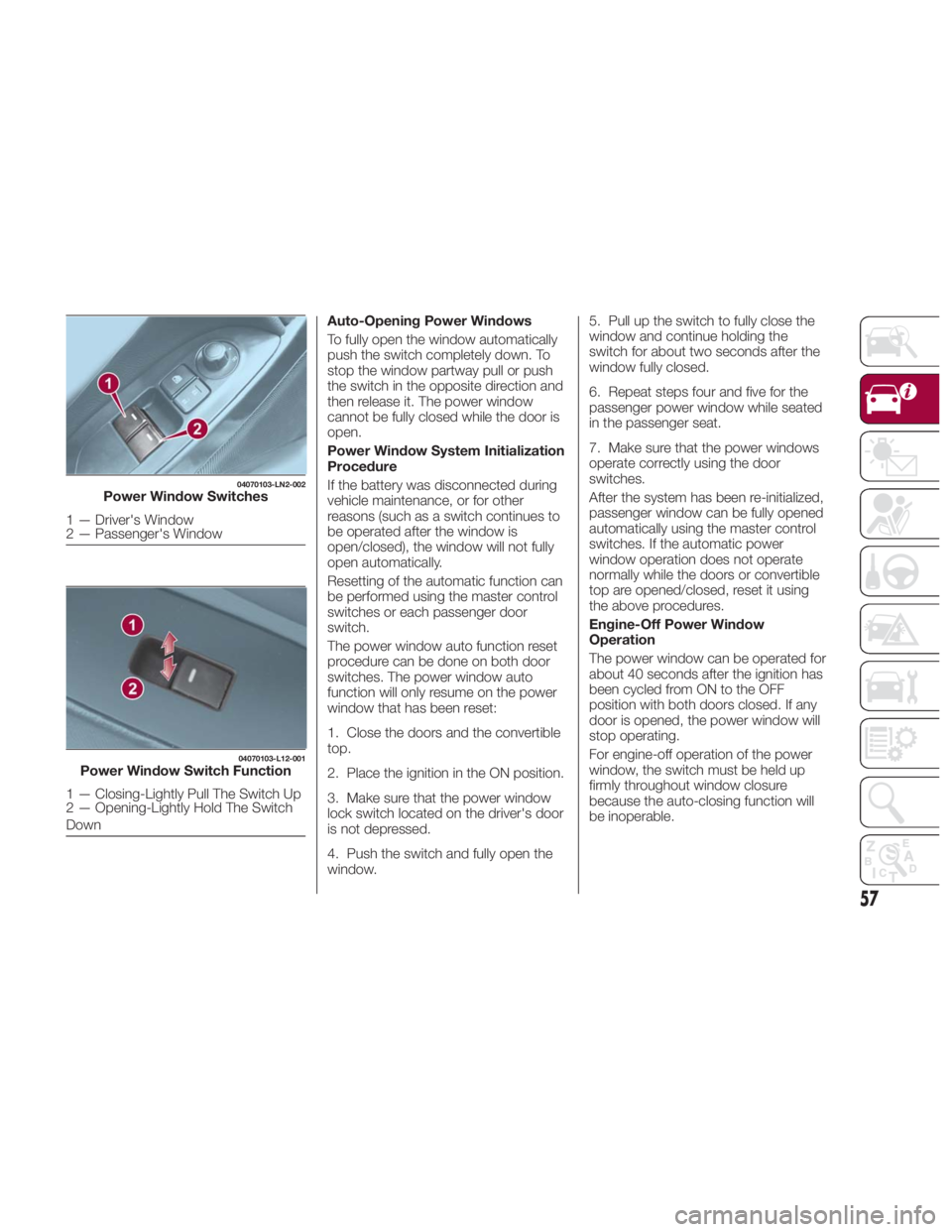
Auto-Opening Power Windows
To fully open the window automatically
push the switch completely down. To
stop the window partway pull or push
the switch in the opposite direction and
then release it. The power window
cannot be fully closed while the door is
open.
Power Window System Initialization
Procedure
If the battery was disconnected during
vehicle maintenance, or for other
reasons (such as a switch continues to
be operated after the window is
open/closed), the window will not fully
open automatically.
Resetting of the automatic function can
be performed using the master control
switches or each passenger door
switch.
The power window auto function reset
procedure can be done on both door
switches. The power window auto
function will only resume on the power
window that has been reset:
1. Close the doors and the convertible
top.
2. Place the ignition in the ON position.
3. Make sure that the power window
lock switch located on the driver's door
is not depressed.
4. Push the switch and fully open the
window. 5. Pull up the switch to fully close the
window and continue holding the
switch for about two seconds after the
window fully closed.
6. Repeat steps four and five for the
passenger power window while seated
in the passenger seat.
7. Make sure that the power windows
operate correctly using the door
switches.
After the system has been re-initialized,
passenger window can be fully opened
automatically using the master control
switches. If the automatic power
window operation does not operate
normally while the doors or convertible
top are opened/closed, reset it using
the above procedures.
Engine-Off Power Window
Operation
The power window can be operated for
about 40 seconds after the ignition has
been cycled from ON to the OFF
position with both doors closed. If any
door is opened, the power window will
stop operating.
For engine-off operation of the power
window, the switch must be held up
firmly throughout window closure
because the auto-closing function will
be inoperable.04070103-LN2-002
Power Window Switches
1 — Driver's Window
2 — Passenger's Window 04070103-L12-001
Power Window Switch Function
1 — Closing-Lightly Pull The Switch Up
2 — Opening-Lightly Hold The Switch
Down
57
Page 61 of 292
Pre-Programming The
System
Note: It is recommended that a new
battery be placed in the hand-held
transmitter of the device being
programmed to HomeLink for quicker
training and accurate transmission of
the radio-frequency signal.
Proceed as follows:
1. Verify that there is a remote control
transmitter available for the device you
would like to program.
2. Disconnect the power to the device.
Programming The
System
Note: When programming a garage
door opener or a gate, disconnect the
power to these devices before
programming. Continuous operation of
the devices could damage the motor.
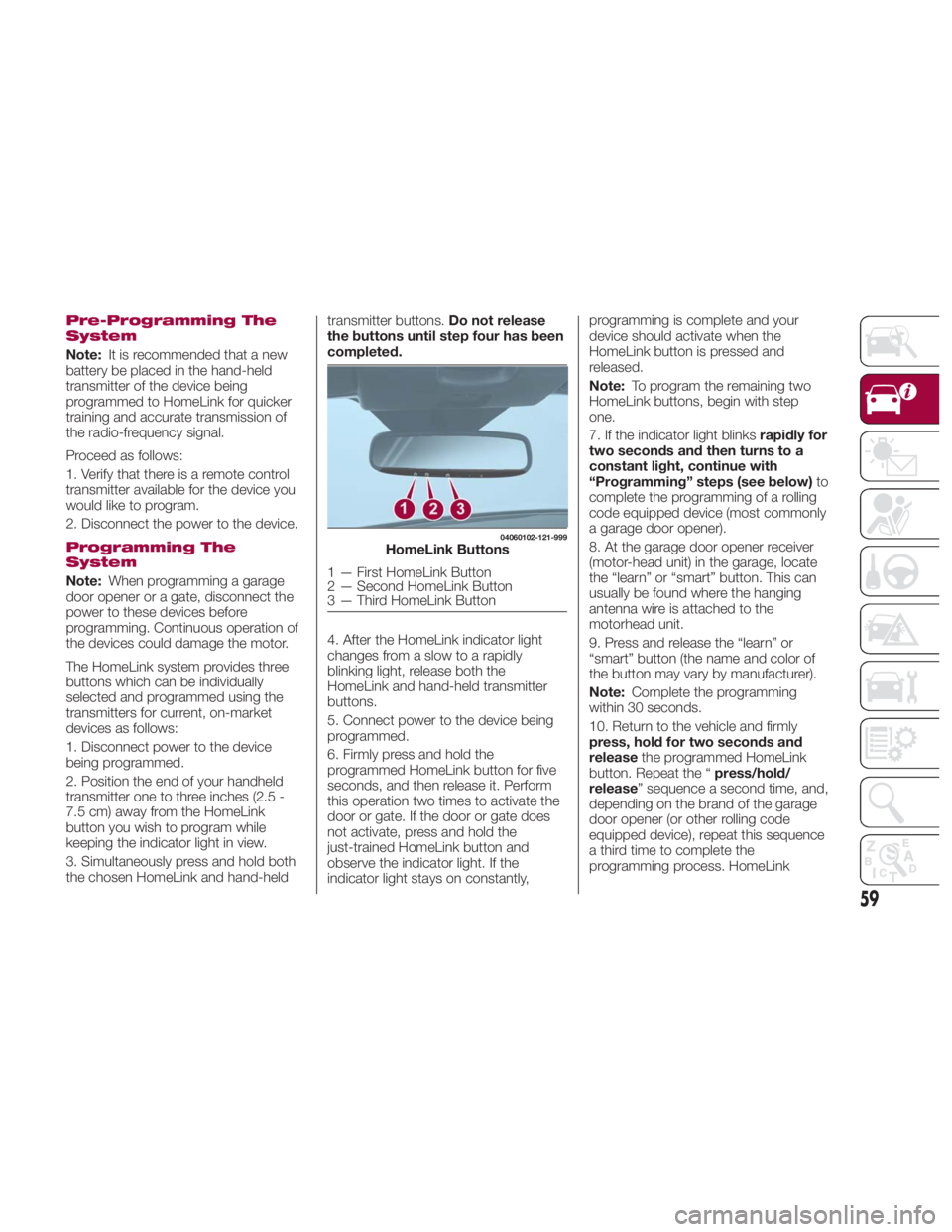
The HomeLink system provides three
buttons which can be individually
selected and programmed using the
transmitters for current, on-market
devices as follows:
1. Disconnect power to the device
being programmed.
2. Position the end of your handheld
transmitter one to three inches (2.5 -
7.5 cm) away from the HomeLink
button you wish to program while
keeping the indicator light in view.
3. Simultaneously press and hold both
the chosen HomeLink and hand-held transmitter buttons. Do not release
the buttons until step four has been
completed.
4. After the HomeLink indicator light
changes from a slow to a rapidly
blinking light, release both the
HomeLink and hand-held transmitter
buttons.
5. Connect power to the device being
programmed.
6. Firmly press and hold the
programmed HomeLink button for five
seconds, and then release it. Perform
this operation two times to activate the
door or gate. If the door or gate does
not activate, press and hold the
just-trained HomeLink button and
observe the indicator light. If the
indicator light stays on constantly, programming is complete and your
device should activate when the
HomeLink button is pressed and
released.
Note: To program the remaining two
HomeLink buttons, begin with step
one.
7. If the indicator light blinks rapidly for
two seconds and then turns to a
constant light, continue with
“Programming” steps (see below) to
complete the programming of a rolling
code equipped device (most commonly
a garage door opener).
8. At the garage door opener receiver
(motor-head unit) in the garage, locate
the “learn” or “smart” button. This can
usually be found where the hanging
antenna wire is attached to the
motorhead unit.
9. Press and release the “learn” or
“smart” button (the name and color of
the button may vary by manufacturer).
Note: Complete the programming
within 30 seconds.
10. Return to the vehicle and firmly
press, hold for two seconds and
release the programmed HomeLink
button. Repeat the “ press/hold/
release ” sequence a second time, and,
depending on the brand of the garage
door opener (or other rolling code
equipped device), repeat this sequence
a third time to complete the
programming process. HomeLink 04060102-121-999
HomeLink Buttons
1 — First HomeLink Button
2 — Second HomeLink Button
3 — Third HomeLink Button
59
Page 64 of 292
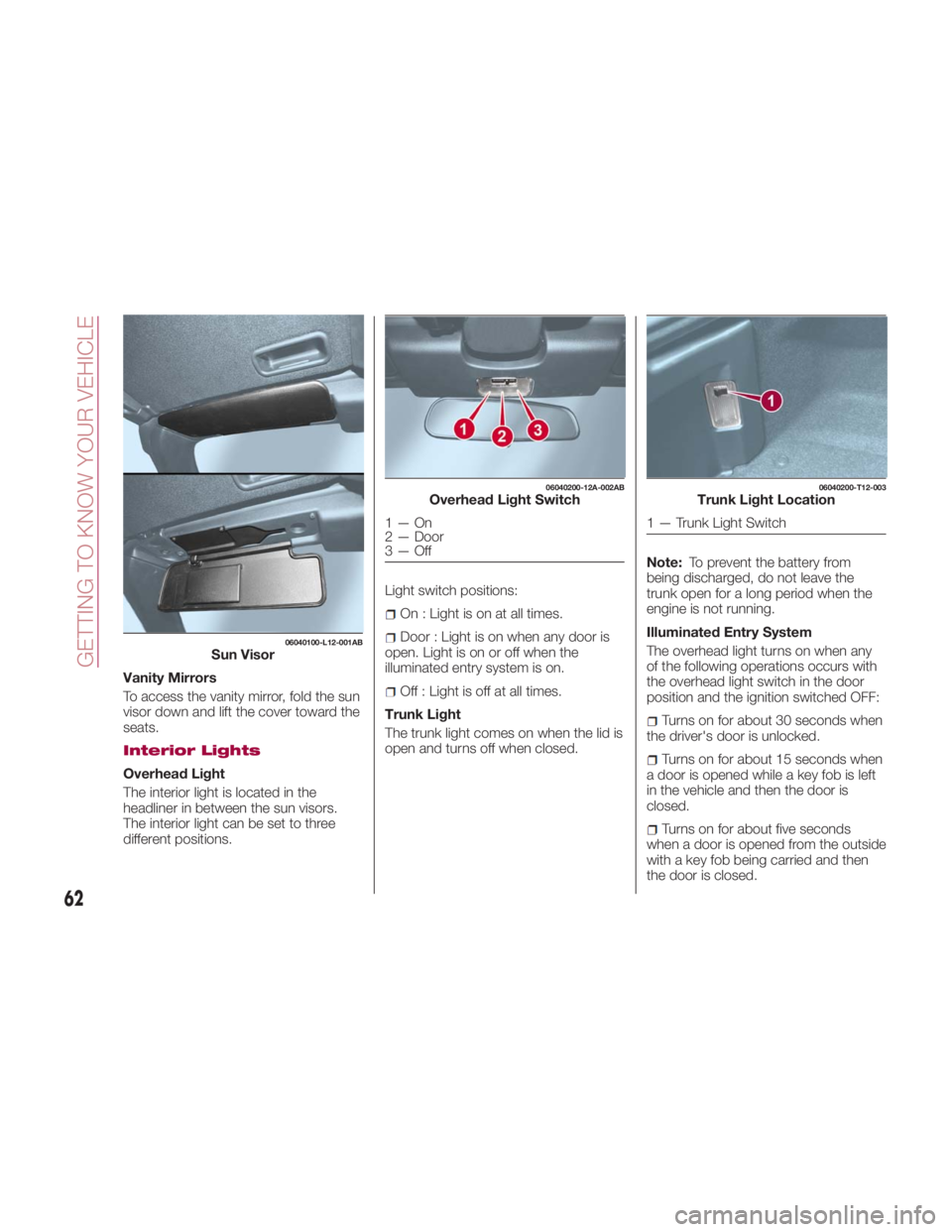
Vanity Mirrors
To access the vanity mirror, fold the sun
visor down and lift the cover toward the
seats.
Interior Lights
Overhead Light
The interior light is located in the
headliner in between the sun visors.
The interior light can be set to three
different positions. Light switch positions:
On : Light is on at all times.
Door : Light is on when any door is
open. Light is on or off when the
illuminated entry system is on.
Off : Light is off at all times.
Trunk Light
The trunk light comes on when the lid is
open and turns off when closed. Note: To prevent the battery from
being discharged, do not leave the
trunk open for a long period when the
engine is not running.
Illuminated Entry System
The overhead light turns on when any
of the following operations occurs with
the overhead light switch in the door
position and the ignition switched OFF:
Turns on for about 30 seconds when
the driver's door is unlocked.
Turns on for about 15 seconds when
a door is opened while a key fob is left
in the vehicle and then the door is
closed.
Turns on for about five seconds
when a door is opened from the outside
with a key fob being carried and then
the door is closed.06040100-L12-001AB
Sun Visor 06040200-12A-002AB
Overhead Light Switch
1—On
2 — Door
3—Off 06040200-T12-003
Trunk Light Location
1 — Trunk Light Switch
62
GETTING TO KNOW YOUR VEHICLE
Page 65 of 292
The overhead light turns on for about
15 seconds when the ignition is
switched OFF with the overhead light
switch in the door position.
The overhead light turns off immediately
in the following cases:
The ignition is switched ON and both
doors are closed.
The driver's door is locked.
Battery Saver
If any door is left open with the
overhead light switch in the door
position or the trunk lid is left open, the
overhead light or trunk light turns off
after about 30 minutes to prevent
discharge of the battery.
To prevent discharge of the battery, if
the interior lights remain on (the interior
light switch is in the on position), they
will turn off automatically under the
following conditions:
No operations are done for about
30 minutes after the ignition is switched
OFF.
The button on the key fob is
pushed, or the request switch located
on the exterior door handle is pushed to
lock the doors (vehicles with the
advanced keyless function) after the
ignition is switched OFF.
In addition, if the following operations
are performed after turning the interior
lights off, they will turn on again if: The ignition is switched to a position
other than OFF.
A door is opened.
A door is unlocked.
The operation of the illuminated entry
system can be changed through the
Connect system.
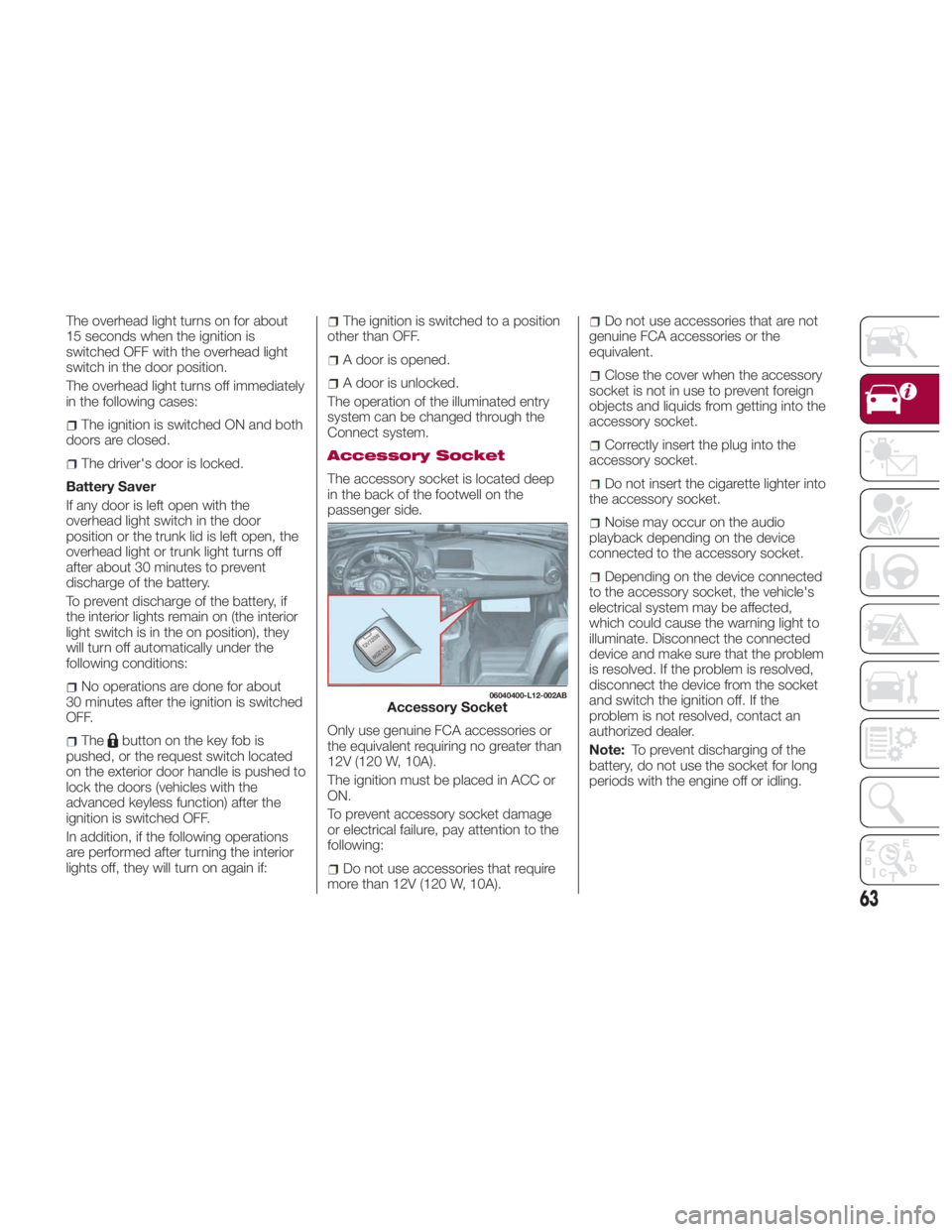
Accessory Socket
The accessory socket is located deep
in the back of the footwell on the
passenger side.
Only use genuine FCA accessories or
the equivalent requiring no greater than
12V (120 W, 10A).
The ignition must be placed in ACC or
ON.
To prevent accessory socket damage
or electrical failure, pay attention to the
following:
Do not use accessories that require
more than 12V (120 W, 10A). Do not use accessories that are not
genuine FCA accessories or the
equivalent.
Close the cover when the accessory
socket is not in use to prevent foreign
objects and liquids from getting into the
accessory socket.
Correctly insert the plug into the
accessory socket.
Do not insert the cigarette lighter into
the accessory socket.
Noise may occur on the audio
playback depending on the device
connected to the accessory socket.
Depending on the device connected
to the accessory socket, the vehicle's
electrical system may be affected,
which could cause the warning light to
illuminate. Disconnect the connected
device and make sure that the problem
is resolved. If the problem is resolved,
disconnect the device from the socket
and switch the ignition off. If the
problem is not resolved, contact an
authorized dealer.
Note: To prevent discharging of the
battery, do not use the socket for long
periods with the engine off or idling. 06040400-L12-002AB
Accessory Socket
63
Page 69 of 292
With The Advanced Keyless Entry
Function
A locked trunk lid can also be opened
while the key fob is being carried. When
opening the trunk lid with the doors
locked, it may require a few seconds for
the trunk lid latch to release after the
electric trunk lid opener is pushed.
The trunk lid can be closed when the
doors are locked with the key fob left in
the vehicle. However, to prevent locking
the key fob in the vehicle, the trunk lid
can be opened by pushing the electric
trunk lid opener. If the trunk lid cannot
be opened despite doing this
procedure, push the electric trunk lid
opener to fully open the trunk lid after
pushing the trunk lid completely closed.
If the vehicle battery is discharged or
there is a malfunction in the electrical
system and the trunk lid cannot be
unlocked, the trunk lid can be opened
by performing the emergency
procedure.
When Trunk Lid Cannot
Be Opened
If the battery is discharged, the trunk lid
cannot be unlocked and opened. In this
case, the trunk can be unlocked by
taking care of the discharged battery
situation.
If the trunk lid cannot be unlocked even
if the discharged battery situation has
been resolved, the electrical system
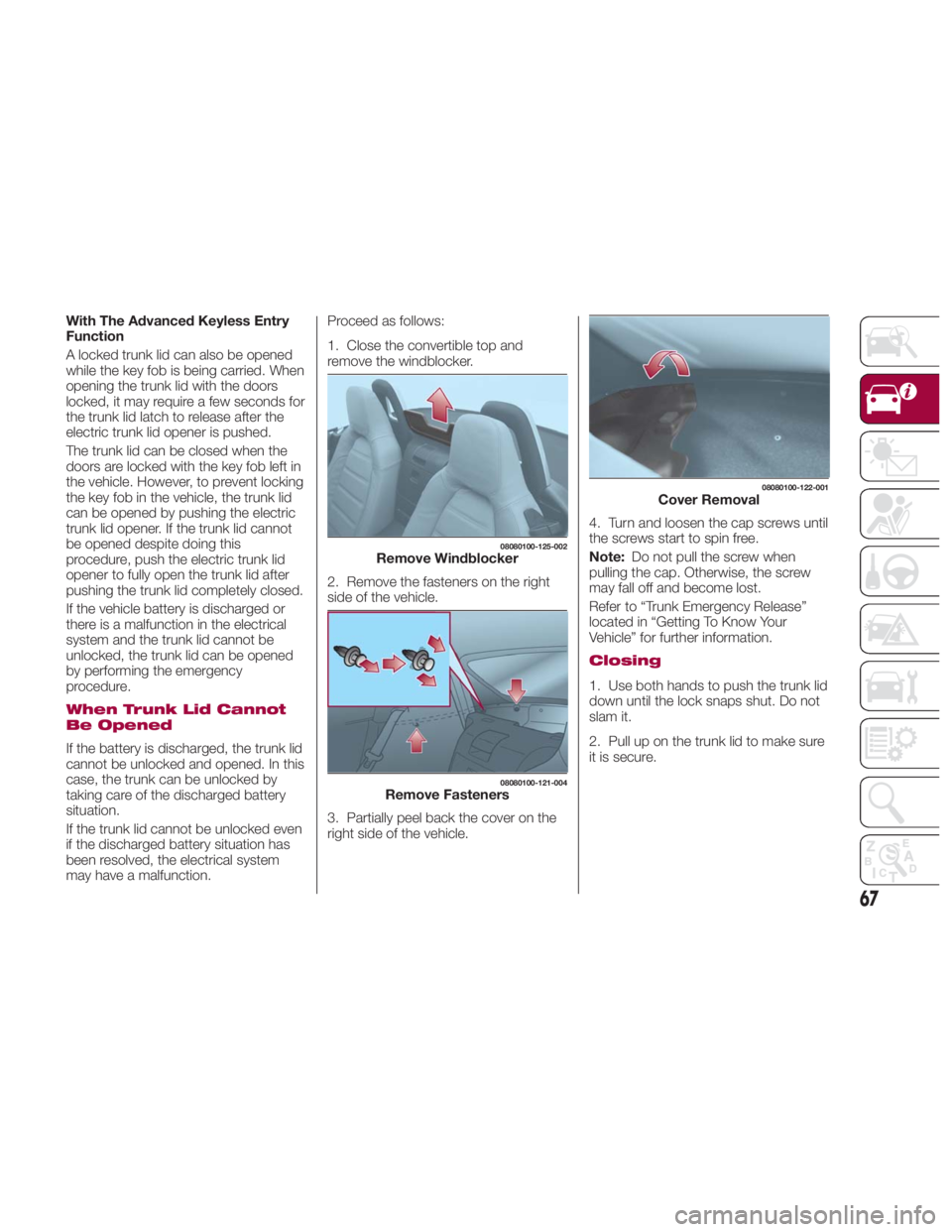
may have a malfunction. Proceed as follows:
1. Close the convertible top and
remove the windblocker.
2. Remove the fasteners on the right
side of the vehicle.
3. Partially peel back the cover on the
right side of the vehicle. 4. Turn and loosen the cap screws until
the screws start to spin free.
Note: Do not pull the screw when
pulling the cap. Otherwise, the screw
may fall off and become lost.
Refer to “Trunk Emergency Release”
located in “Getting To Know Your
Vehicle” for further information.
Closing
1. Use both hands to push the trunk lid
down until the lock snaps shut. Do not
slam it.
2. Pull up on the trunk lid to make sure
it is secure. 08080100-125-002
Remove Windblocker 08080100-121-004
Remove Fasteners 08080100-122-001
Cover Removal
67