instrument cluster FIAT SPIDER ABARTH 2017 User Guide
[x] Cancel search | Manufacturer: FIAT, Model Year: 2017, Model line: SPIDER ABARTH, Model: FIAT SPIDER ABARTH 2017Pages: 292, PDF Size: 9.24 MB
Page 80 of 292
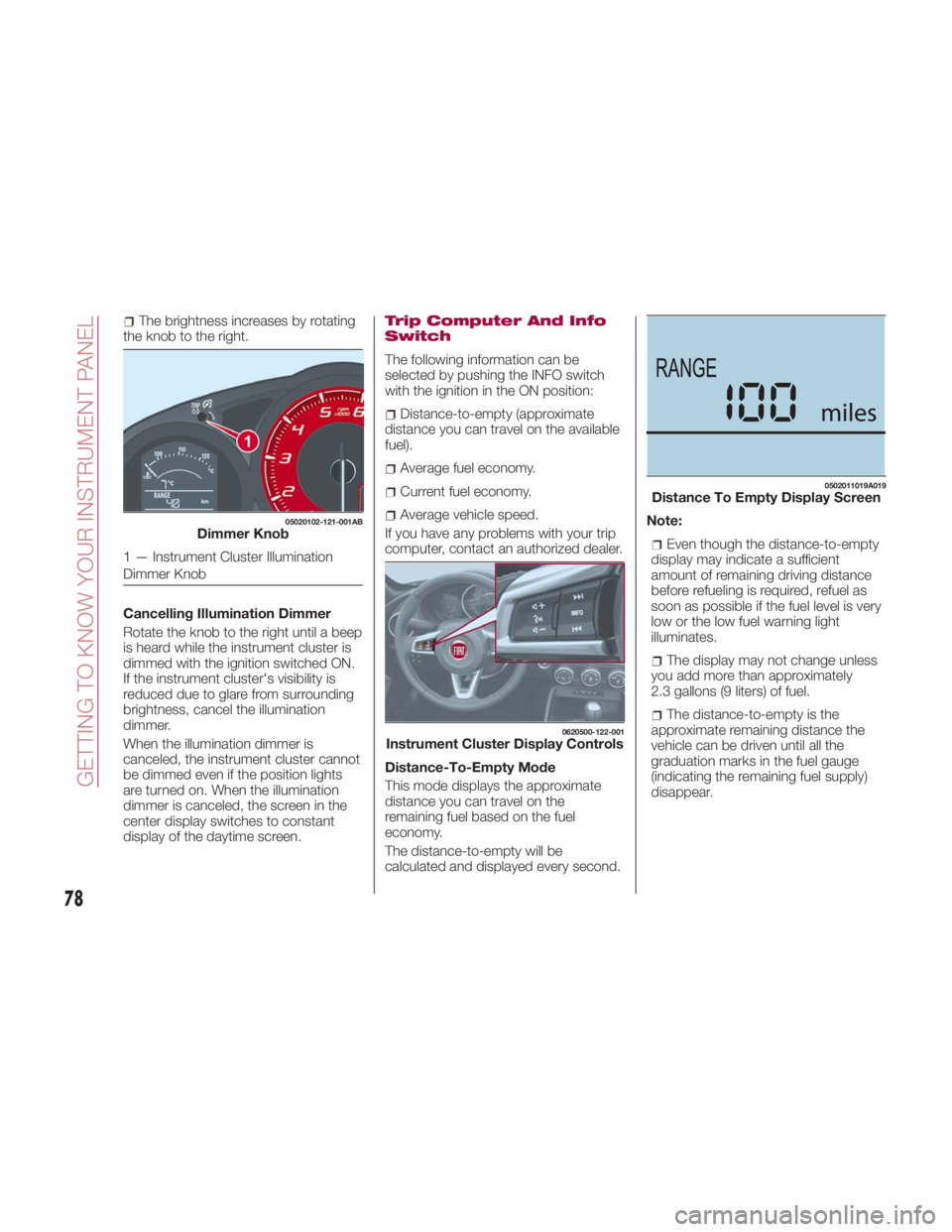
The brightness increases by rotating
the knob to the right.
Cancelling Illumination Dimmer
Rotate the knob to the right until a beep
is heard while the instrument cluster is
dimmed with the ignition switched ON.
If the instrument cluster's visibility is
reduced due to glare from surrounding
brightness, cancel the illumination
dimmer.
When the illumination dimmer is
canceled, the instrument cluster cannot
be dimmed even if the position lights
are turned on. When the illumination
dimmer is canceled, the screen in the
center display switches to constant
display of the daytime screen. Trip Computer And Info
Switch
The following information can be
selected by pushing the INFO switch
with the ignition in the ON position:
Distance-to-empty (approximate
distance you can travel on the available
fuel).
Average fuel economy.
Current fuel economy.
Average vehicle speed.
If you have any problems with your trip
computer, contact an authorized dealer.
Distance-To-Empty Mode
This mode displays the approximate
distance you can travel on the
remaining fuel based on the fuel
economy.
The distance-to-empty will be
calculated and displayed every second. Note:
Even though the distance-to-empty
display may indicate a sufficient
amount of remaining driving distance
before refueling is required, refuel as
soon as possible if the fuel level is very
low or the low fuel warning light
illuminates.
The display may not change unless
you add more than approximately
2.3 gallons (9 liters) of fuel.
The distance-to-empty is the
approximate remaining distance the
vehicle can be driven until all the
graduation marks in the fuel gauge
(indicating the remaining fuel supply)
disappear.05020102-121-001AB
Dimmer Knob
1 — Instrument Cluster Illumination
Dimmer Knob 0620500-122-001
Instrument Cluster Display Controls 0502011019A019
Distance To Empty Display Screen
78
GETTING TO KNOW YOUR INSTRUMENT PANEL
Page 84 of 292
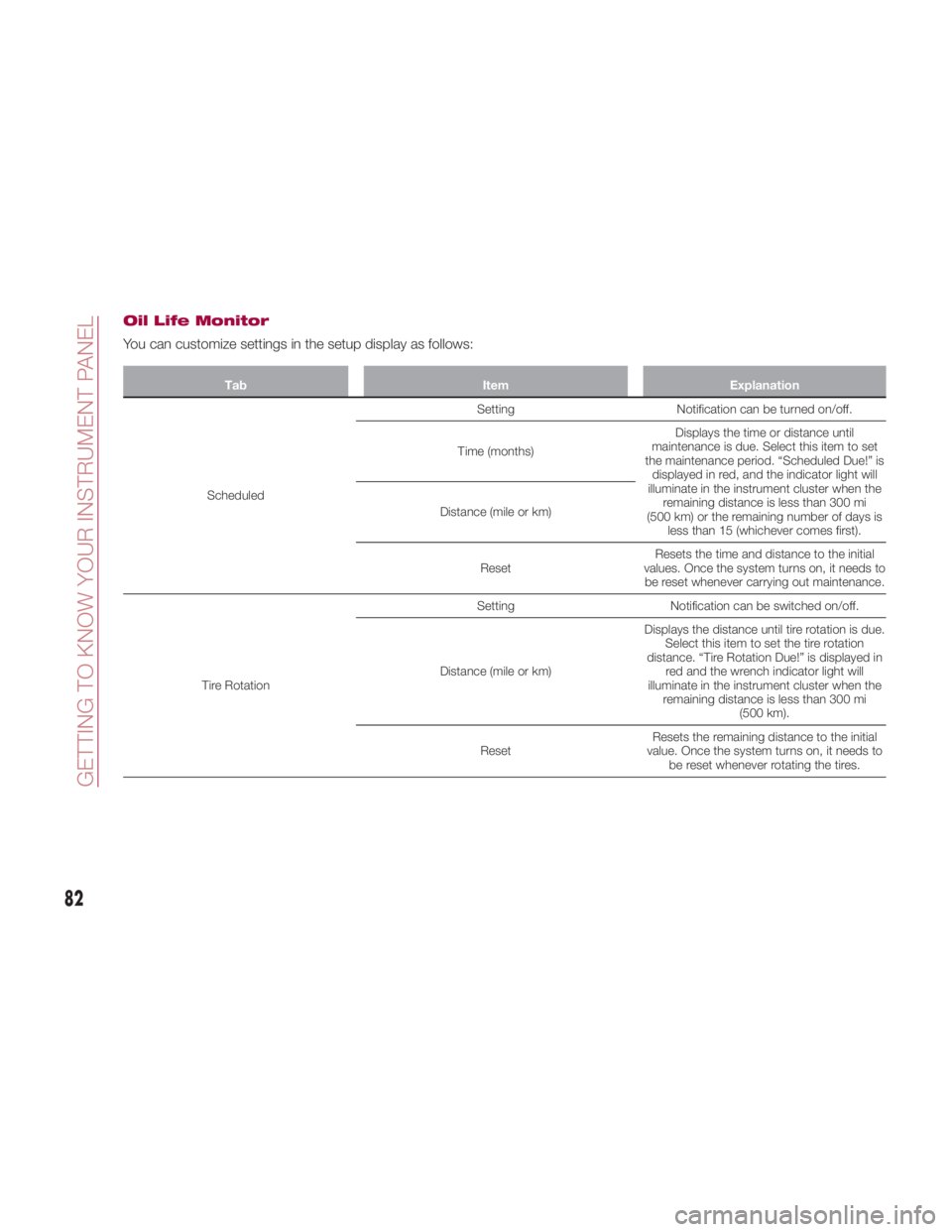
Oil Life Monitor
You can customize settings in the setup display as follows: Tab Item Explanation
Scheduled Setting Notification can be turned on/off.
Time (months) Displays the time or distance until
maintenance is due. Select this item to set
the maintenance period. “Scheduled Due!” is
displayed in red, and the indicator light will
illuminate in the instrument cluster when the
remaining distance is less than 300 mi
(500 km) or the remaining number of days is
less than 15 (whichever comes first).Distance (mile or km)
Reset Resets the time and distance to the initial
values. Once the system turns on, it needs to
be reset whenever carrying out maintenance.
Tire Rotation Setting Notification can be switched on/off.
Distance (mile or km) Displays the distance until tire rotation is due.
Select this item to set the tire rotation
distance. “Tire Rotation Due!” is displayed in
red and the wrench indicator light will
illuminate in the instrument cluster when the
remaining distance is less than 300 mi
(500 km).
Reset Resets the remaining distance to the initial
value. Once the system turns on, it needs to
be reset whenever rotating the tires.
82
GETTING TO KNOW YOUR INSTRUMENT PANEL
Page 85 of 292
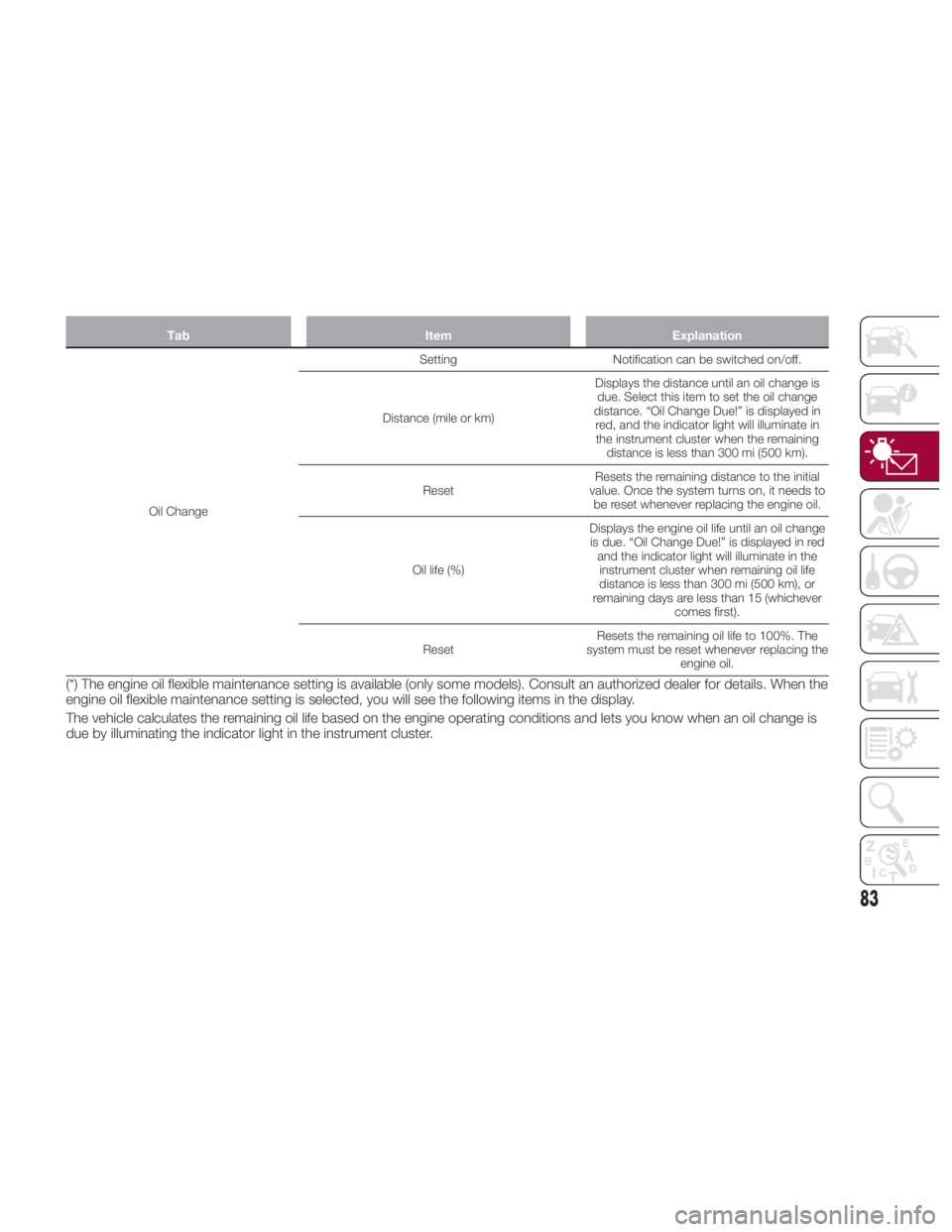
Tab Item Explanation
Oil Change Setting Notification
can be switched on/off.
Distance (mile or km) Displays the distance until an oil change is
due. Select this item to set the oil change
distance. “Oil Change Due!” is displayed in
red, and the indicator light will illuminate in
the instrument cluster when the remaining
distance is less than 300 mi (500 km).
Reset Resets the remaining distance to the initial
value. Once the system turns on, it needs to
be reset whenever replacing the engine oil.
Oil life (%) Displays the engine oil life until an oil change
is due. “Oil Change Due!” is displayed in red
and the indicator light will illuminate in the
instrument cluster when remaining oil life
distance is less than 300 mi (500 km), or
remaining days are less than 15 (whichever
comes first).
Reset Resets the remaining oil life to 100%. The
system must be reset whenever replacing the
engine oil.
(*) The engine oil flexible maintenance setting is available (only some models). Consult an authorized dealer for details. When the
engine oil flexible maintenance setting is selected, you will see the following items in the display.
The vehicle calculates the remaining oil life based on the engine operating conditions and lets you know when an oil change is
due by illuminating the indicator light in the instrument cluster.
83
Page 98 of 292
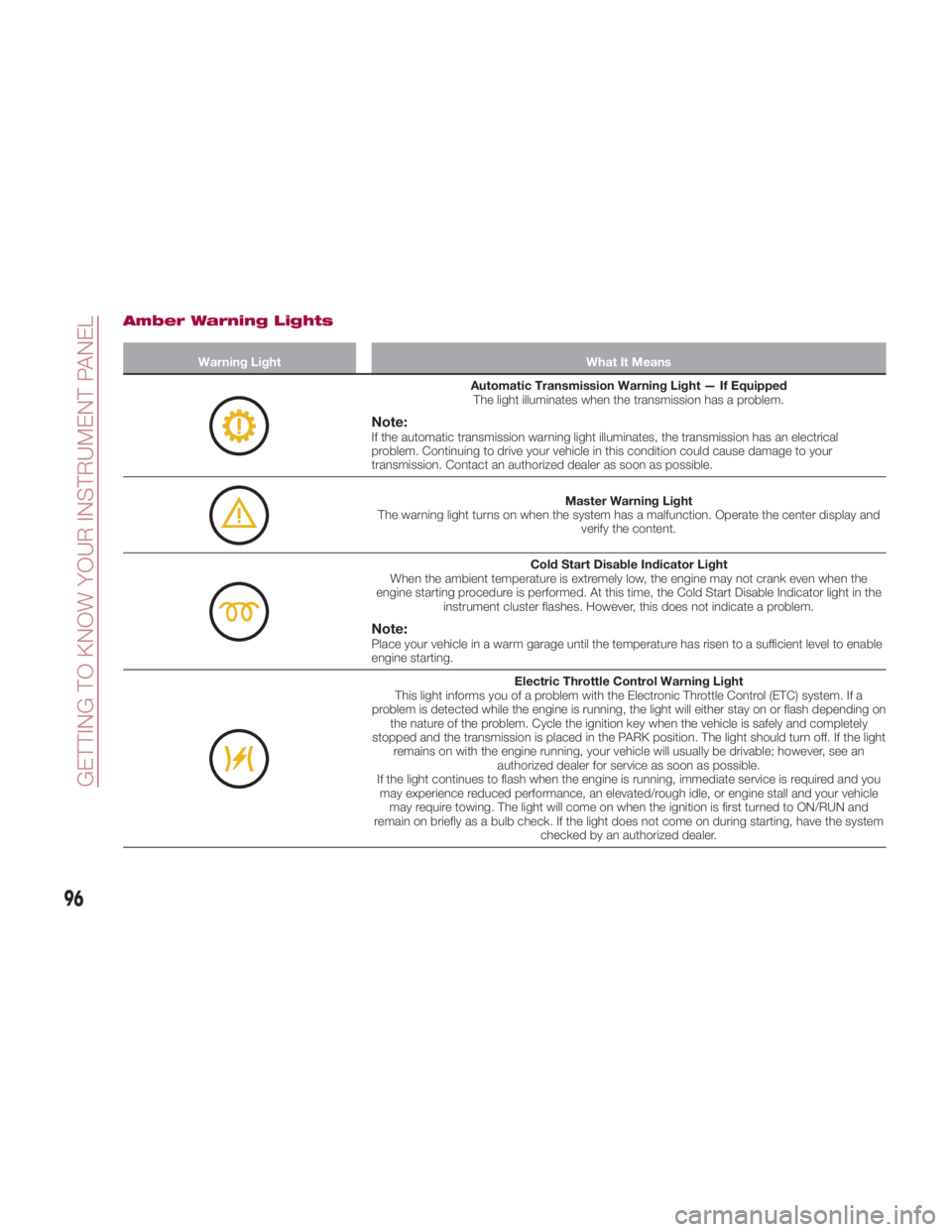
Amber Warning Lights Warning Light What It Means
Automatic Transmission Warning Light — If Equipped
The light illuminates when the transmission has a problem.
Note: If the automatic transmission warning light illuminates, the transmission has an electrical
problem. Continuing to drive your vehicle in this condition could cause damage to your
transmission. Contact an authorized dealer as soon as possible.
Master Warning Light
The warning light turns on when the system has a malfunction. Operate the center display and
verify the content.
Cold Start Disable Indicator Light
When the ambient temperature is extremely low, the engine may not crank even when the
engine starting procedure is performed. At this time, the Cold Start Disable Indicator light in the
instrument cluster flashes. However, this does not indicate a problem.
Note: Place your vehicle in a warm garage until the temperature has risen to a sufficient level to enable
engine starting.
Electric Throttle Control Warning Light
This light informs you of a problem with the Electronic Throttle Control (ETC) system. If a
problem is detected while the engine is running, the light will either stay on or flash depending on
the nature of the problem. Cycle the ignition key when the vehicle is safely and completely
stopped and the transmission is placed in the PARK position. The light should turn off. If the light
remains on with the engine running, your vehicle will usually be drivable; however, see an
authorized dealer for service as soon as possible.
If the light continues to flash when the engine is running, immediate service is required and you
may experience reduced performance, an elevated/rough idle, or engine stall and your vehicle
may require towing. The light will come on when the ignition is first turned to ON/RUN and
remain on briefly as a bulb check. If the light does not come on during starting, have the system
checked by an authorized dealer.
96
GETTING TO KNOW YOUR INSTRUMENT PANEL
Page 103 of 292
Warning Light (Red Color) On Dashboard Trim Warning Light What It Means
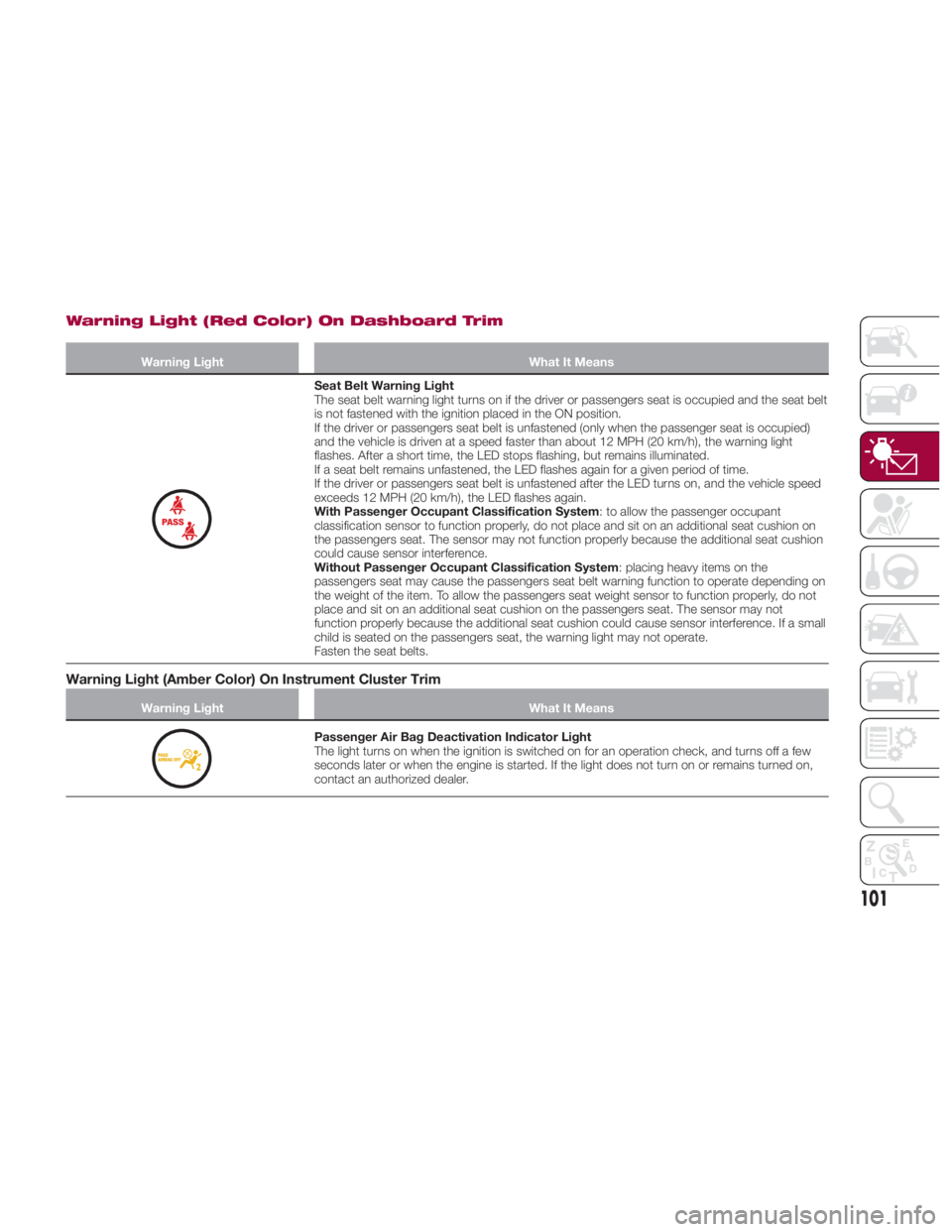
Seat Belt Warning Light
The seat belt warning light turns on if the driver or passengers seat is occupied and the seat belt
is not fastened with the ignition placed in the ON position.
If the driver or passengers seat belt is unfastened (only when the passenger seat is occupied)
and the vehicle is driven at a speed faster than about 12 MPH (20 km/h), the warning light
flashes. After a short time, the LED stops flashing, but remains illuminated.
If a seat belt remains unfastened, the LED flashes again for a given period of time.
If the driver or passengers seat belt is unfastened after the LED turns on, and the vehicle speed
exceeds 12 MPH (20 km/h), the LED flashes again.
With Passenger Occupant Classification System : to allow the passenger occupant
classification sensor to function properly, do not place and sit on an additional seat cushion on
the passengers seat. The sensor may not function properly because the additional seat cushion
could cause sensor interference.
Without Passenger Occupant Classification System : placing heavy items on the
passengers seat may cause the passengers seat belt warning function to operate depending on
the weight of the item. To allow the passengers seat weight sensor to function properly, do not
place and sit on an additional seat cushion on the passengers seat. The sensor may not
function properly because the additional seat cushion could cause sensor interference. If a small
child is seated on the passengers seat, the warning light may not operate.
Fasten the seat belts.
Warning Light (Amber Color) On Instrument Cluster Trim Warning Light What It Means
Passenger Air Bag Deactivation Indicator Light
The light turns on when the ignition is switched on for an operation check, and turns off a few
seconds later or when the engine is started. If the light does not turn on or remains turned on,
contact an authorized dealer.
101
Page 106 of 292
Key Left-In-Vehicle Warning Beep
(with the advanced keyless function)
If a key fob is left in the vehicle and all
the doors and the trunk are locked
using a separate key fob, a beep sound
is heard for about ten seconds to
remind the driver that the key fob has
been left in the vehicle.
If this happens, open the door and
remove the key fob. A key fob removed
from the vehicle this way may not
function because its functions may
have been temporarily suspended.
Perform the applicable procedure to
restore the functions of the key fob (see
paragraph “Keys” in “Getting To Know
Your Vehicle” chapter).
Vehicle Speed Alarm — If Equipped
The vehicle speed alarm function is
designed to alarm the driver via a single
beep sound and a warning indication in
the instrument cluster that the
previously set vehicle speed has been
exceeded.
You can change the vehicle speed
setting at which the warning is triggered
(see paragraph “Trip Computer” in
“Getting To Know Your Vehicle”
chapter). Tire Inflation Pressure Warning
Beep — If Equipped
Vehicle With Conventional Tires :the
warning beep sound will be heard for
about three seconds when there is any
abnormality in tire inflation pressures
(see “TMPS” in “Safety” chapter).
Vehicle With Run-Flat Tires (If
Equipped): the warning beep sound will
be heard for about three seconds if the
tire pressures decrease. If the tire
pressure decreases extremely, a beep
sound will be heard for approximately
30 seconds (see “TMPS” in “Safety”
chapter).
Blind Spot Monitoring (BSM)
System Warning Beep — If
Equipped
Driving Forward : the warning beep
operates when the direction indicator
lever is operated to the side where the
Blind Spot Monitoring (BSM) warning
light is illuminated.
Note: A personalized function is
available to change the Blind Spot
Monitoring (BSM) warning beep sound
volume. Reversing : if a moving object such as
a vehicle or two-wheeled vehicle
approaches on the left or right from
behind your vehicle, the Blind Spot
Monitoring (BSM) warning sound is
activated.
Electronic Steering Lock Warning
Beep
The warning beep operates if the
steering wheel is not unlocked after the
keyless ignition START/STOP button is
pushed.
Speed Limiter Warning Beep — If
Equipped
If the vehicle speed exceeds the set
speed by about 2 MPH (3 km/h) or
more, a warning beep operates
continuously.
The warning beep operates until the
vehicle speed decreases to the set
speedorless.
104
GETTING TO KNOW YOUR INSTRUMENT PANEL
Page 115 of 292
power to the drive wheels, limiting
wheel spin and loss of traction.
The indicator light turns on when the
system has a malfunction. Refer to
“Warning Lights And Messages” in
“Getting To Know Your Instrument
Panel” for further information.
TCS / DSC Indicator Light
The
indicator light stays on for a few
seconds when the ignition is placed in
the ON mode.
If the TCS or DSC is operating, the
indicator light flashes.
If the
indicator light stays on, the
TCS, DSC or the brake assist system
may have a malfunction and they may
not operate correctly. Contact your
authorized dealer.
Note:
In addition to the indicator light
flashing, a slight sound will come from
the engine. This indicates that the
TCS/DSC is operating properly.
On slippery surfaces, such as fresh
snow, it will be impossible to achieve
high rpm when the TCS is on. DSC System (Dynamic
Stability Control)
The Dynamic Stability Control (DSC)
automatically controls braking and
engine torque in conjunction with
systems such as ABS and TCS to help
control side slip when driving on
slippery surfaces, or during sudden or
evasive maneuvering, enhancing vehicle
safety. Refer to “ABS System (Antilock
Brake System)” and “TCS System
(Traction Control System)” in this
chapter for further information.
DSC operation is possible at speeds
greater than 12 mph (20 km/h).
The indicator light turns on when the
system has a malfunction. Refer to
“Warning Lights And Messages” in
“Getting To Know Your Instrument
Panel” for further information.
Note: The DSC may not operate
correctly unless the following are
observed:
Use tires of the correct size
specified for your vehicle on all four
wheels.
Use tires of the same manufacturer,
brand and tread pattern on all four
wheels.
Do not mix worn tires.
Note: The DSC may not operate
correctly when tire chains are used. TCS / DSC Indicator Light
The
indicator light stays on for a few
seconds when the ignition is placed in
the ON mode. It also illuminates when
the DSC OFF switch is pressed and
TCS/DSC is switched off.
If the light stays on, the TCS, DSC or
the brake assist system may have a
malfunction and they may not operate
correctly. Take your vehicle to an
authorized dealer.
DSC OFF Indicator Light
The
indicator light stays on for a few
seconds when the ignition is placed in
the ON mode. It also illuminates when
the DSC OFF switch is pressed and
TCS/DSC is switched off.
If the light remains illuminated and the
TCS/DSC is not switched off, contact
your authorized dealer. The DSC may
have a malfunction.
DSC OFF Switch
Push the switch to turn off the
TCS/DSC. The
indicator light in the
instrument cluster will illuminate. Push
the switch again to turn the TCS/DSC
back on. The indicator light will turn off.
113
Page 117 of 292
Activation / Deactivation
The Blind Spot Monitoring (BSM)
system will operate when all of the
following conditions are met:
The ignition is ON.
The BSM switch is pushed and the
warning light in the instrument cluster is
turned off.
The vehicle speed is 19 mph
(30km/h)orfaster. The BSM system will not operate under
the following conditions:
The vehicle speed falls below about
15 mph (25 km/h) even though the
warning light is turned off.
The gear selector is shifted to
REVERSE.
In the following cases, the warning light
in the instrument cluster illuminates and
operation of the BSM system is
deactivated.
A problem with the system (including
the BSM warning lights) is detected.
A large change in position of a rear
radar sensor on the vehicle has
occurred.
There is a large accumulation of
snow or ice on the rear bumper near a
rear radar sensor . Remove any snow,
ice or mud on the rear bumper.
Driving on snow covered roads for
long periods.
The temperature near the rear radar
sensors becomes extremely hot due to
driving for long periods on inclines
during warm weather.
The battery voltage has decreased.
If the warning light in the instrument
cluster remains illuminated, have the
vehicle inspected at an authorized
dealer as soon as possible.
Note: Under the following conditions,
the rear radar sensors cannot detect objects, or it may be difficult to detect
them:
A vehicle is in the detection area at
the rear in an adjacent driving lane but
it does not approach. The BSM system
determines the condition based on
radar detection data.
A vehicle is traveling alongside your
vehicle at nearly the same speed for an
extended period of time.
Vehicles approaching in the
opposite direction.
A vehicle in an adjacent driving lane
is attempting to pass your vehicle.
A vehicle is in an adjacent lane on a
road with extremely wide driving lanes.
The detection area of the rear radar
sensors is set at the road width of
expressways.
In the following cases, the activation of
the BSM warning lights and the audible
alert may not occur, or they may be
delayed:
A vehicle makes a lane change from
a driving lane two lanes over to an
adjacent lane.
Driving on steep inclines.
Crossing the summit of a hill or
mountain pass.
The turning radius is small (making a
sharp turn or turning at intersections).1 0528070012A002
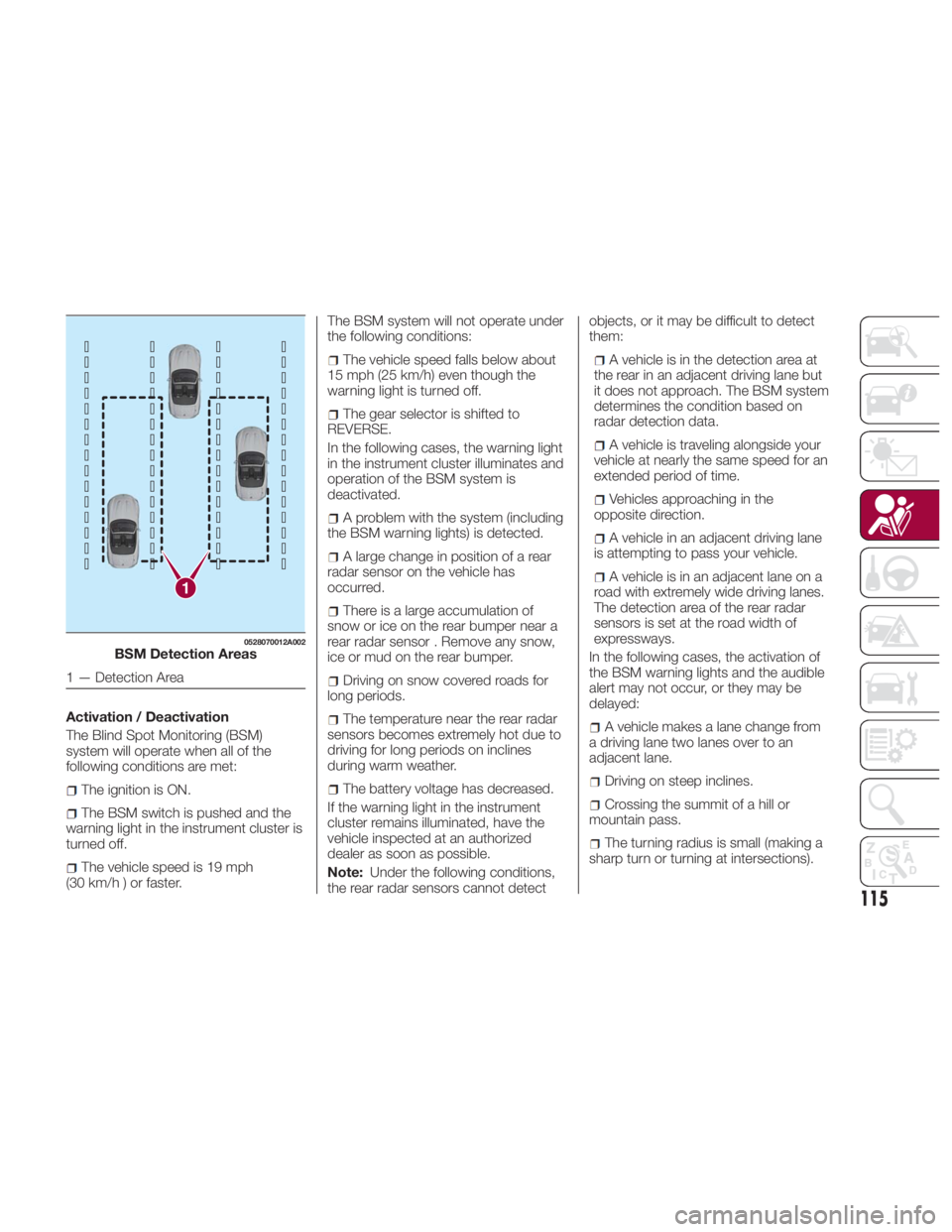
BSM Detection Areas
1 — Detection Area
115
Page 118 of 292
Whenthereisadifferenceinthe
height between your driving lane and
the adjacent lane.
Immediately after pushing the BSM
switch and the system becomes
operable.
If the road width is extremely narrow,
vehicles two lanes over may be
detected. The detection area of the rear
radar sensors is set according to the
road width of expressways.
The BSM warning lights may turn on in
reaction to stationary objects on the
road or the roadside such as guardrails,
tunnels, sidewalls, and parked vehicles.
A BSM warning light may flash or the
audible alert may be activated several
times when making a turn at a city
intersection.
Turn off the BSM system while pulling a
trailer or while an accessory such as a
bicycle carrier is installed to the rear of
the vehicle. Otherwise, the radar’s
sound system waves will be blocked
causing the system to not operate
normally.
In the following cases, it may be difficult
to view the illumination/flashing of the
BSM warning lights equipped on the
door mirrors:
Snow or ice is adhering to the door
mirrors.
The door glass is fogged or covered
in snow, frost or dirt. The system switches to the Rear Cross
Traffic Alert function when the gear
selector is shifted to the REVERSE
position.
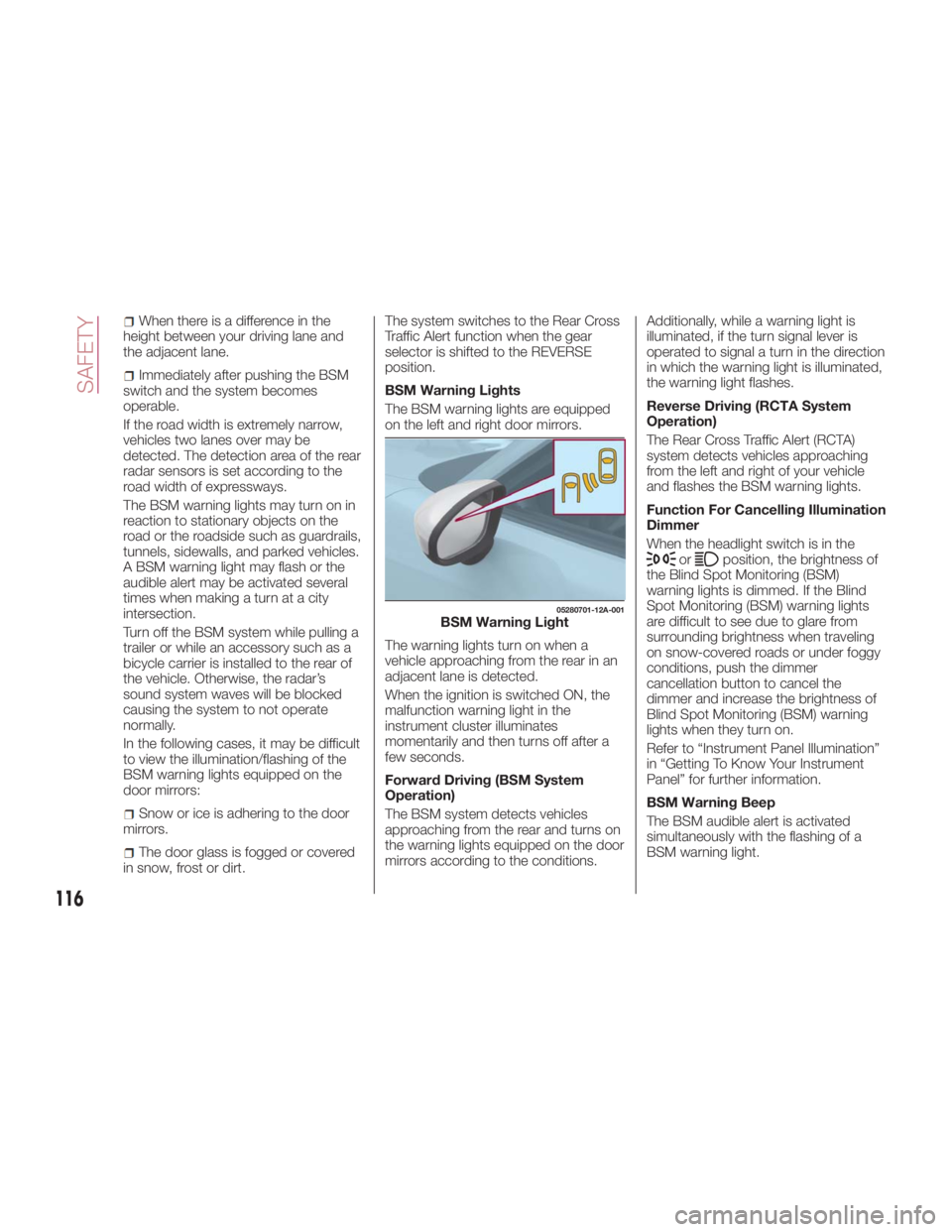
BSM Warning Lights
The BSM warning lights are equipped
on the left and right door mirrors.
The warning lights turn on when a
vehicle approaching from the rear in an
adjacent lane is detected.
When the ignition is switched ON, the
malfunction warning light in the
instrument cluster illuminates
momentarily and then turns off after a
few seconds.
Forward Driving (BSM System
Operation)
The BSM system detects vehicles
approaching from the rear and turns on
the warning lights equipped on the door
mirrors according to the conditions. Additionally, while a warning light is
illuminated, if the turn signal lever is
operated to signal a turn in the direction
in which the warning light is illuminated,
the warning light flashes.
Reverse Driving (RCTA System
Operation)
The Rear Cross Traffic Alert (RCTA)
system detects vehicles approaching
from the left and right of your vehicle
and flashes the BSM warning lights.
Function For Cancelling Illumination
Dimmer
When the headlight switch is in the
or position, the brightness of
the Blind Spot Monitoring (BSM)
warning lights is dimmed. If the Blind
Spot Monitoring (BSM) warning lights
are difficult to see due to glare from
surrounding brightness when traveling
on snow-covered roads or under foggy
conditions, push the dimmer
cancellation button to cancel the
dimmer and increase the brightness of
Blind Spot Monitoring (BSM) warning
lights when they turn on.
Refer to “Instrument Panel Illumination”
in “Getting To Know Your Instrument
Panel” for further information.
BSM Warning Beep
The BSM audible alert is activated
simultaneously with the flashing of a
BSM warning light. 05280701-12A-001
BSM Warning Light
116
SAFETY
Page 119 of 292
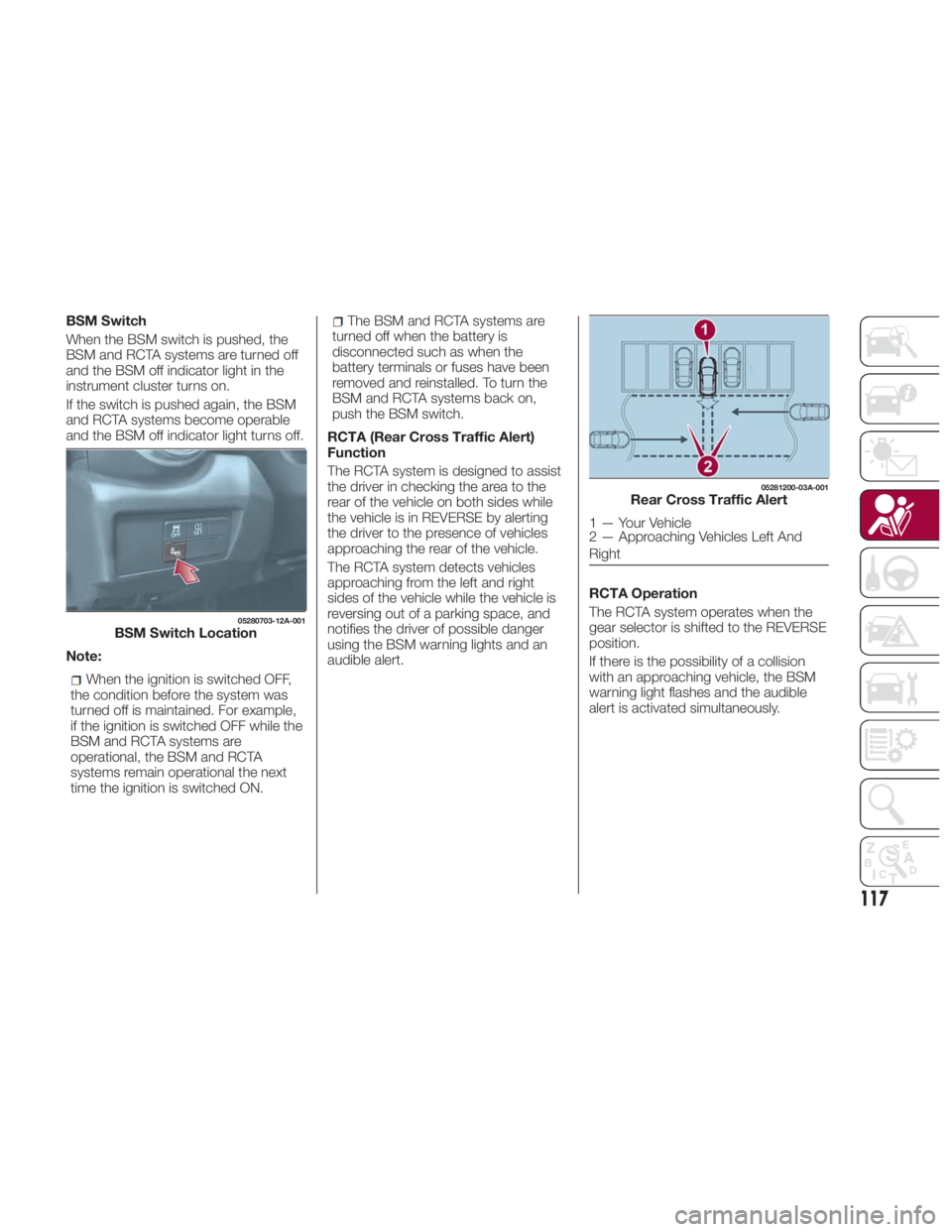
BSM Switch
When the BSM switch is pushed, the
BSM and RCTA systems are turned off
and the BSM off indicator light in the
instrument cluster turns on.
If the switch is pushed again, the BSM
and RCTA systems become operable
and the BSM off indicator light turns off.
Note:
When the ignition is switched OFF,
the condition before the system was
turned off is maintained. For example,
if the ignition is switched OFF while the
BSM and RCTA systems are
operational, the BSM and RCTA
systems remain operational the next
time the ignition is switched ON. The BSM and RCTA systems are
turned off when the battery is
disconnected such as when the
battery terminals or fuses have been
removed and reinstalled. To turn the
BSM and RCTA systems back on,
push the BSM switch.
RCTA (Rear Cross Traffic Alert)
Function
The RCTA system is designed to assist
the driver in checking the area to the
rear of the vehicle on both sides while
the vehicle is in REVERSE by alerting
the driver to the presence of vehicles
approaching the rear of the vehicle.
The RCTA system detects vehicles
approaching from the left and right
sides of the vehicle while the vehicle is
reversing out of a parking space, and
notifies the driver of possible danger
using the BSM warning lights and an
audible alert. RCTA Operation
The RCTA system operates when the
gear selector is shifted to the REVERSE
position.
If there is the possibility of a collision
with an approaching vehicle, the BSM
warning light flashes and the audible
alert is activated simultaneously.05280703-12A-001
BSM Switch Location 05281200-03A-001
Rear Cross Traffic Alert
1 — Your Vehicle
2 — Approaching Vehicles Left And
Right
117