transmission FIAT SPIDER ABARTH 2017 User Guide
[x] Cancel search | Manufacturer: FIAT, Model Year: 2017, Model line: SPIDER ABARTH, Model: FIAT SPIDER ABARTH 2017Pages: 292, PDF Size: 9.24 MB
Page 33 of 292
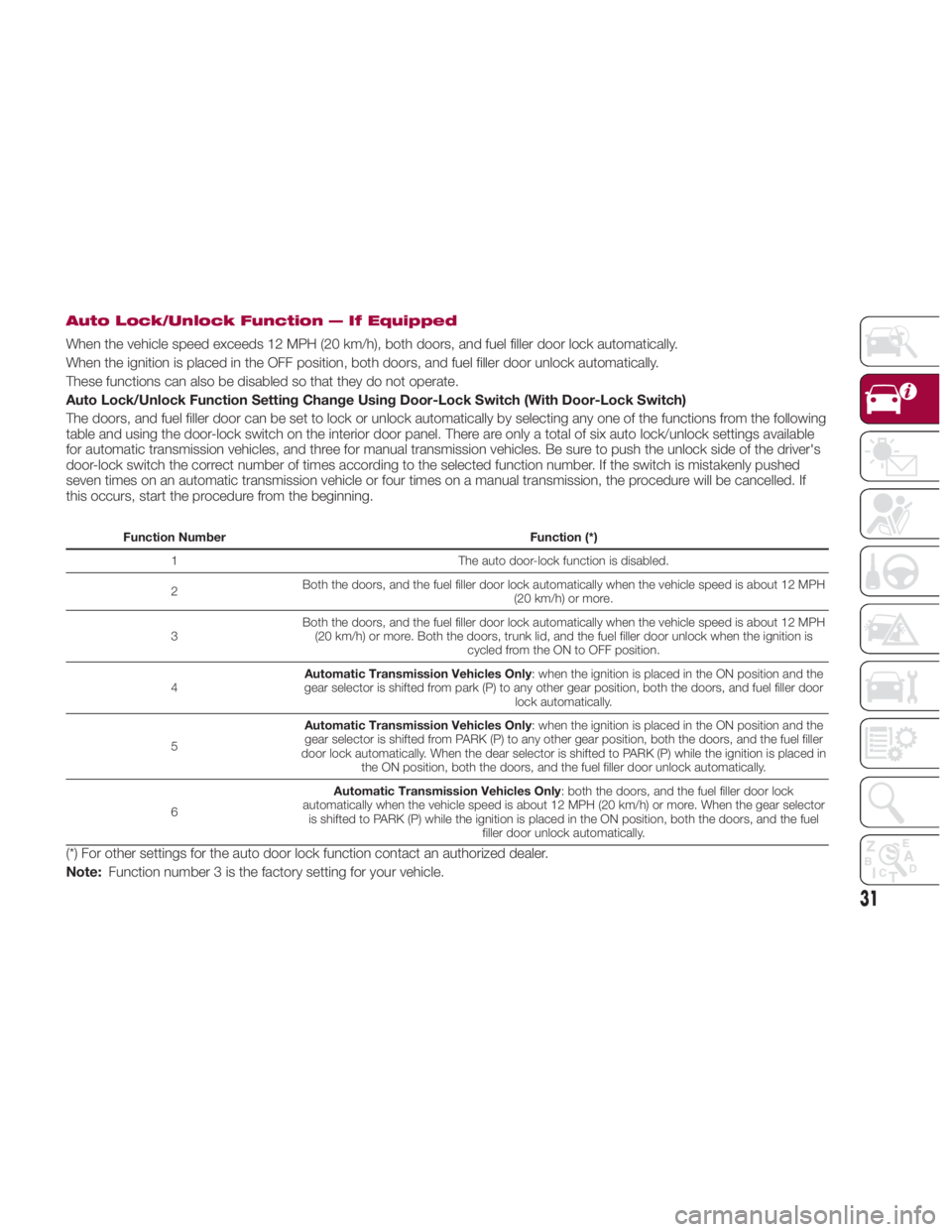
Auto Lock/Unlock Function — If Equipped
When the vehicle speed exceeds 12 MPH (20 km/h), both doors, and fuel filler door lock automatically.
When the ignition is placed in the OFF position, both doors, and fuel filler door unlock automatically.
These functions can also be disabled so that they do not operate.
Auto Lock/Unlock Function Setting Change Using Door-Lock Switch (With Door-Lock Switch)
The doors, and fuel filler door can be set to lock or unlock automatically by selecting any one of the functions from the following
table and using the door-lock switch on the interior door panel. There are only a total of six auto lock/unlock settings available
for automatic transmission vehicles, and three for manual transmission vehicles. Be sure to push the unlock side of the driver's
door-lock switch the correct number of times according to the selected function number. If the switch is mistakenly pushed
seven times on an automatic transmission vehicle or four times on a manual transmission, the procedure will be cancelled. If
this occurs, start the procedure from the beginning. Function Number Function (*)
1 The auto door-lock function is disabled.
2 Both the doors, and the fuel filler door lock automatically when the vehicle speed is about 12 MPH
(20 km/h) or more.
3 Both the doors, and the fuel filler door lock automatically when the vehicle speed is about 12 MPH
(20 km/h) or more. Both the doors, trunk lid, and the fuel filler door unlock when the ignition is
cycled from the ON to OFF position.
4 Automatic Transmission Vehicles Only : when the ignition is placed in the ON position and the
gear selector is shifted from park (P) to any other gear position, both the doors, and fuel filler door
lock automatically.
5 Automatic Transmission Vehicles Only : when the ignition is placed in the ON position and the
gear selector is shifted from PARK (P) to any other gear position, both the doors, and the fuel filler
door lock automatically. When the dear selector is shifted to PARK (P) while the ignition is placed in
the ON position, both the doors, and the fuel filler door unlock automatically.
6 Automatic Transmission Vehicles Only : both the doors, and the fuel filler door lock
automatically when the vehicle speed is about 12 MPH (20 km/h) or more. When the gear selector
is shifted to PARK (P) while the ignition is placed in the ON position, both the doors, and the fuel
filler door unlock automatically.
(*) For other settings for the auto door lock function contact an authorized dealer.
Note: Function number 3 is the factory setting for your vehicle.
31
Page 34 of 292
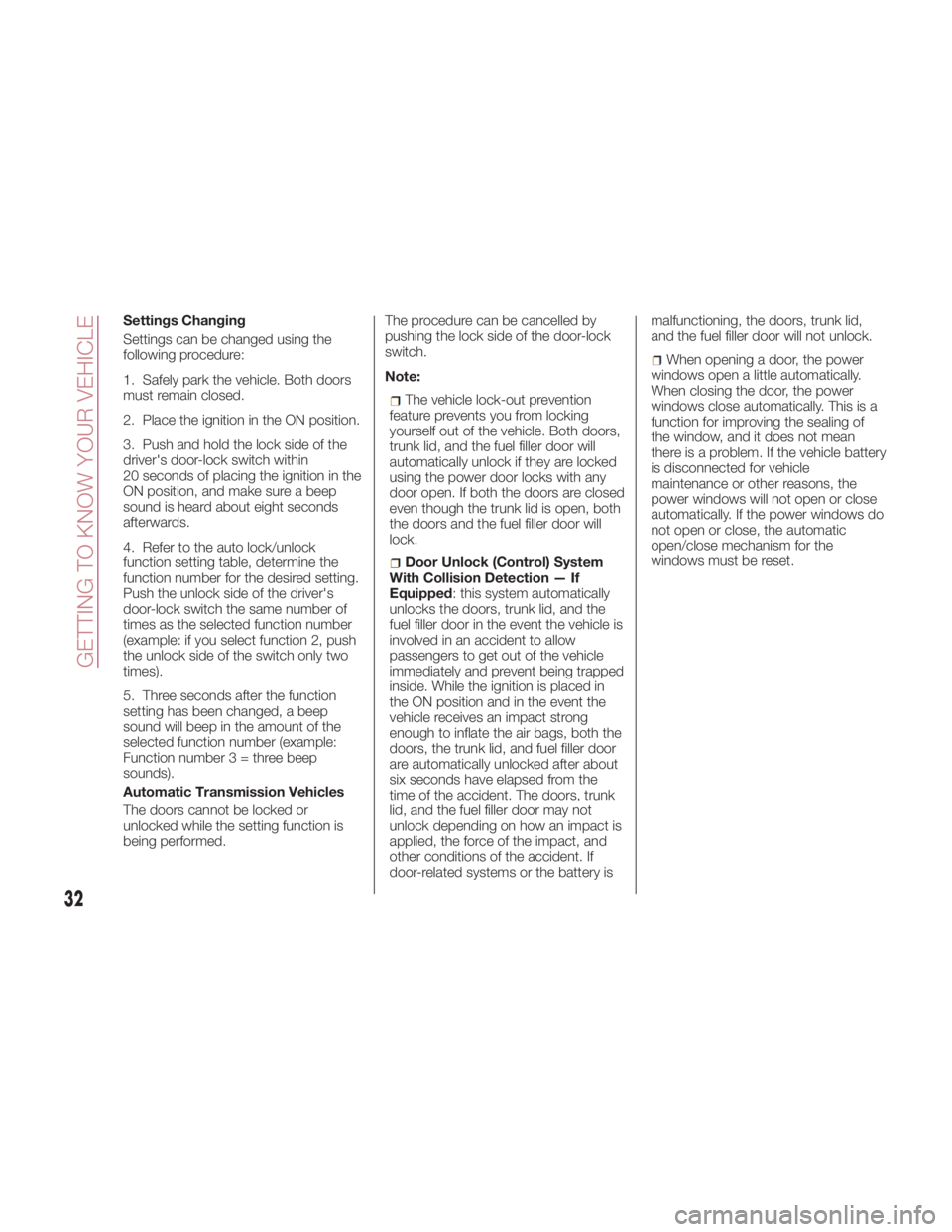
Settings Changing
Settings can be changed using the
following procedure:
1. Safely park the vehicle. Both doors
must remain closed.
2. Place the ignition in the ON position.
3. Push and hold the lock side of the
driver's door-lock switch within
20 seconds of placing the ignition in the
ON position, and make sure a beep
sound is heard about eight seconds
afterwards.
4. Refer to the auto lock/unlock
function setting table, determine the
function number for the desired setting.
Push the unlock side of the driver's
door-lock switch the same number of
times as the selected function number
(example: if you select function 2, push
the unlock side of the switch only two
times).
5. Three seconds after the function
setting has been changed, a beep
sound will beep in the amount of the
selected function number (example:
Function numbe r 3 = three beep
sounds).
Automatic Transmission Vehicles
The doors cannot be locked or
unlocked while the setting function is
being performed. The procedure can be cancelled by
pushing the lock side of the door-lock
switch.
Note:
The vehicle lock-out prevention
feature prevents you from locking
yourself out of the vehicle. Both doors,
trunk lid, and the fuel filler door will
automatically unlock if they are locked
using the power door locks with any
door open. If both the doors are closed
even though the trunk lid is open, both
the doors and the fuel filler door will
lock.
Door Unlock (Control) System
With Collision Detection — If
Equipped : this system automatically
unlocks the doors, trunk lid, and the
fuel filler door in the event the vehicle is
involved in an accident to allow
passengers to get out of the vehicle
immediately and prevent being trapped
inside. While the ignition is placed in
the ON position and in the event the
vehicle receives an impact strong
enough to inflate the air bags, both the
doors, the trunk lid, and fuel filler door
are automatically unlocked after about
six seconds have elapsed from the
time of the accident. The doors, trunk
lid, and the fuel filler door may not
unlock depending on how an impact is
applied, the force of the impact, and
other conditions of the accident. If
door-related systems or the battery is malfunctioning, the doors, trunk lid,
and the fuel filler door will not unlock.
When opening a door, the power
windows open a little automatically.
When closing the door, the power
windows close automatically. This is a
function for improving the sealing of
the window, and it does not mean
there is a problem. If the vehicle battery
is disconnected for vehicle
maintenance or other reasons, the
power windows will not open or close
automatically. If the power windows do
not open or close, the automatic
open/close mechanism for the
windows must be reset.
32
GETTING TO KNOW YOUR VEHICLE
Page 42 of 292
Daytime Running Lights
(DRL)
The daytime running lights turn on
automatically when the vehicle starts
moving.
They turn off when the parking brake is
engaged or the gear selector is shifted
to the PARK position (if equipped with
automatic transmission).
Note: In some markets, the daytime
running lights can be deactivated. Refer
to “Personalization Features” in “Getting
To Know Your Instrument Panel” for
further information.
High Beams
The headlights can be switched
between high and low beams by
pushing the headlight switch lever
forward for high beams, and pulling the
lever rearward to return to low beams.
When the headlight high beams are on,
the
high beam indicator is
illuminated in the instrument cluster.
Flash To Pass
You can signal another vehicle with your
headlights by partially pulling the
headlight lever toward the steering
wheel. This will cause the high beam
headlights to turn on until the lever is
released.
The
high beam indicator in the
instrument cluster illuminates while the
high beams are active. Automatic Lighting
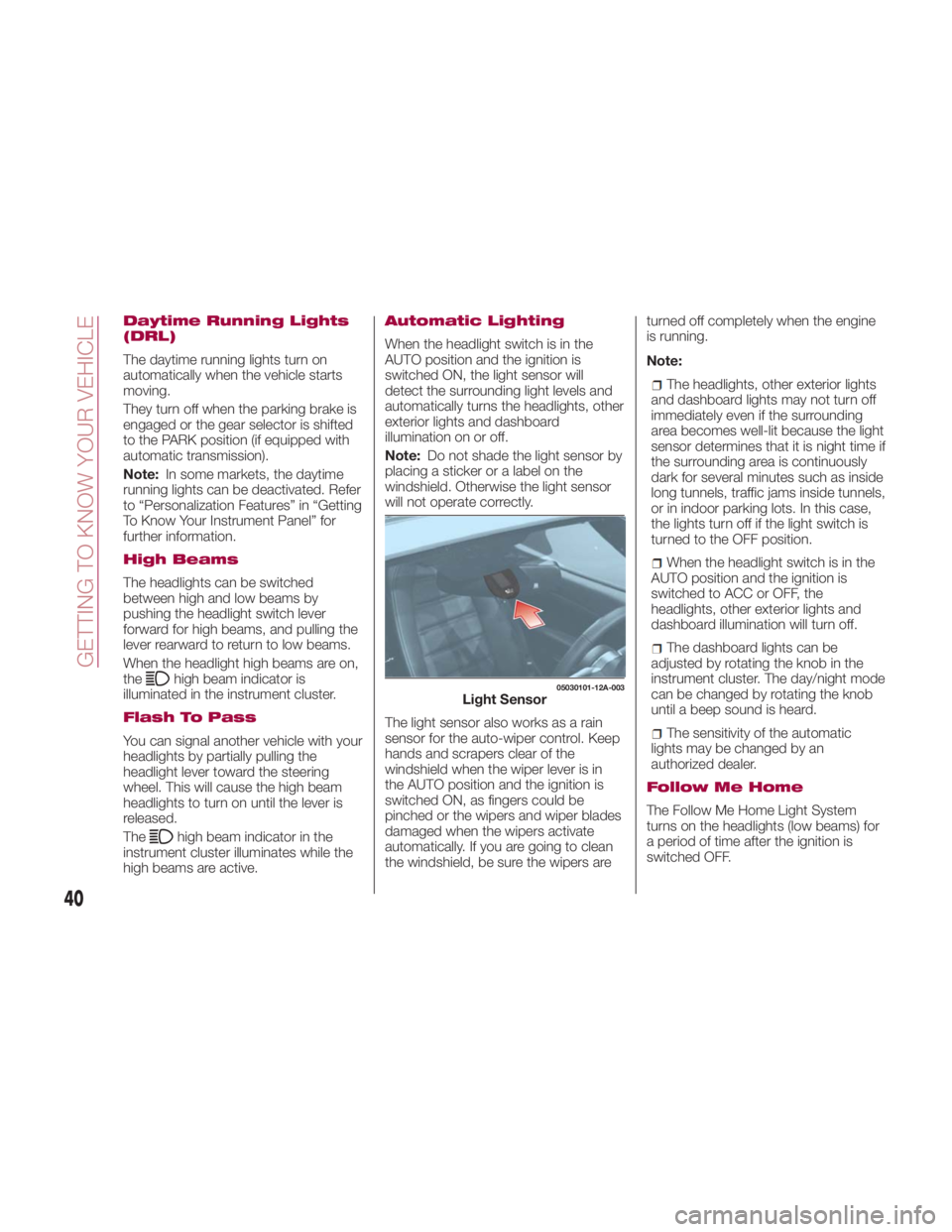
When the headlight switch is in the
AUTO position and the ignition is
switched ON, the light sensor will
detect the surrounding light levels and
automatically turns the headlights, other
exterior lights and dashboard
illumination on or off.
Note: Do not shade the light sensor by
placing a sticker or a label on the
windshield. Otherwise the light sensor
will not operate correctly.
The light sensor also works as a rain
sensor for the auto-wiper control. Keep
hands and scrapers clear of the
windshield when the wiper lever is in
the AUTO position and the ignition is
switched ON, as fingers could be
pinched or the wipers and wiper blades
damaged when the wipers activate
automatically. If you are going to clean
the windshield, be sure the wipers are turned off completely when the engine
is running.
Note:
The headlights, other exterior lights
and dashboard lights may not turn off
immediately even if the surrounding
area becomes well-lit because the light
sensor determines that it is night time if
the surrounding area is continuously
dark for several minutes such as inside
long tunnels, traffic jams inside tunnels,
or in indoor parking lots. In this case,
the lights turn off if the light switch is
turned to the OFF position.
When the headlight switch is in the
AUTO position and the ignition is
switched to ACC or OFF, the
headlights, other exterior lights and
dashboard illumination will turn off.
The dashboard lights can be
adjusted by rotating the knob in the
instrument cluster. The day/night mode
can be changed by rotating the knob
until a beep sound is heard.
The sensitivity of the automatic
lightsmaybechangedbyan
authorized dealer.
Follow Me Home
The Follow Me Home Light System
turns on the headlights (low beams) for
a period of time after the ignition is
switched OFF. 05030101-12A-003
Light Sensor
40
GETTING TO KNOW YOUR VEHICLE
Page 61 of 292
Pre-Programming The
System
Note: It is recommended that a new
battery be placed in the hand-held
transmitter of the device being
programmed to HomeLink for quicker
training and accurate transmission of
the radio-frequency signal.
Proceed as follows:
1. Verify that there is a remote control
transmitter available for the device you
would like to program.
2. Disconnect the power to the device.
Programming The
System
Note: When programming a garage
door opener or a gate, disconnect the
power to these devices before
programming. Continuous operation of
the devices could damage the motor.
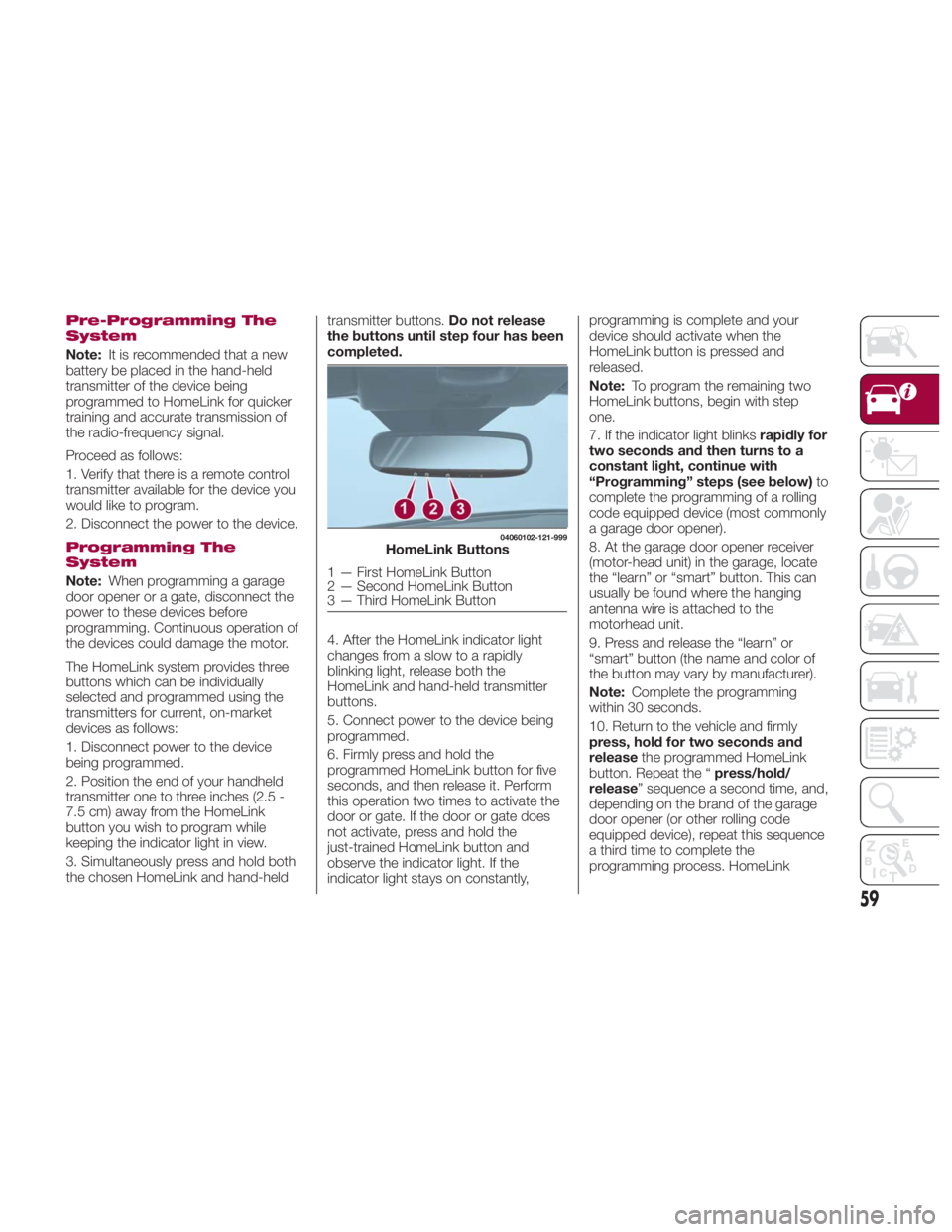
The HomeLink system provides three
buttons which can be individually
selected and programmed using the
transmitters for current, on-market
devices as follows:
1. Disconnect power to the device
being programmed.
2. Position the end of your handheld
transmitter one to three inches (2.5 -
7.5 cm) away from the HomeLink
button you wish to program while
keeping the indicator light in view.
3. Simultaneously press and hold both
the chosen HomeLink and hand-held transmitter buttons. Do not release
the buttons until step four has been
completed.
4. After the HomeLink indicator light
changes from a slow to a rapidly
blinking light, release both the
HomeLink and hand-held transmitter
buttons.
5. Connect power to the device being
programmed.
6. Firmly press and hold the
programmed HomeLink button for five
seconds, and then release it. Perform
this operation two times to activate the
door or gate. If the door or gate does
not activate, press and hold the
just-trained HomeLink button and
observe the indicator light. If the
indicator light stays on constantly, programming is complete and your
device should activate when the
HomeLink button is pressed and
released.
Note: To program the remaining two
HomeLink buttons, begin with step
one.
7. If the indicator light blinks rapidly for
two seconds and then turns to a
constant light, continue with
“Programming” steps (see below) to
complete the programming of a rolling
code equipped device (most commonly
a garage door opener).
8. At the garage door opener receiver
(motor-head unit) in the garage, locate
the “learn” or “smart” button. This can
usually be found where the hanging
antenna wire is attached to the
motorhead unit.
9. Press and release the “learn” or
“smart” button (the name and color of
the button may vary by manufacturer).
Note: Complete the programming
within 30 seconds.
10. Return to the vehicle and firmly
press, hold for two seconds and
release the programmed HomeLink
button. Repeat the “ press/hold/
release ” sequence a second time, and,
depending on the brand of the garage
door opener (or other rolling code
equipped device), repeat this sequence
a third time to complete the
programming process. HomeLink 04060102-121-999
HomeLink Buttons
1 — First HomeLink Button
2 — Second HomeLink Button
3 — Third HomeLink Button
59
Page 62 of 292
should now activate your rolling code
equipped device.
Note: To program the remaining two
HomeLink buttons, begin with step
one.
For questions or comments, please
contact HomeLink at
www.homelink.com or
1-800-355-3515 .
Gate Operator/Canadian
Programming
Canadian radio-frequency laws require
transmitter signals to “time-out” (or quit)
after several seconds of transmission -
which may not be long enough for
HomeLink to pick up the signal during
programming.
Similar to this Canadian law, some U.S.
gate operators are designed to
“time-out” in the same manner.
If you live in Canada or you are having
difficulties programming a gate operator
by using the “Programming”
procedures (regardless of where you
live), replace “Programming The
System” step three with the following:
Note: If programming a garage door
opener or gate operator, it is advised to
unplug the device during the “cycling”
process to prevent possible
overheating.
1. Continue to press and hold the
HomeLink button while you press and
release - every two seconds (“cycle”)
your hand-held transmitter until the frequency signal has successfully been
accepted by HomeLink (the indicator
light will flash slowly and then rapidly).
2. Proceed with the “Programming”
steps to complete.
Operating The System
Push the programmed HomeLink
button to operate a programmed
device.
The code will continue being
transmitted for a maximum of
20 seconds.
Reprogramming The
System
To program a device to HomeLink using
a HomeLink button previously trained,
follow these steps:
1. Push and hold the desired HomeLink
button. DO NOT release the button;
2. The indicator light will begin to flash
after 20 seconds. Without releasing the
HomeLink button, proceed with
“Programming The System” step one.
Erasing Programmed
HomeLink Buttons
To erase the existing programming from
all three operating channels, push and
hold the two outside buttons 1 and
3 on the auto-dimming mirror until the
HomeLink indicator light begins to flash
after approximately 10 seconds.
Verify that the programming has been
erased when you resell the vehicle. INTERNAL
EQUIPMENT Storage Compartments
Center Console
The center console is located between
the driver’s and passenger’s seats.
Warning!Keep storage compartments closed when
driving. Driving with the storage
compartments open is dangerous. To
reduce the possibility of injury in an
accident or a sudden stop, keep the
storage compartments closed when
driving.
Caution!Do not leave lighters or eyeglasses in the
storage compartments while parked under
the sun. A lighter could explode or the
plastic material in eyeglasses could deform
and crack from high temperature.
60
GETTING TO KNOW YOUR VEHICLE
Page 78 of 292
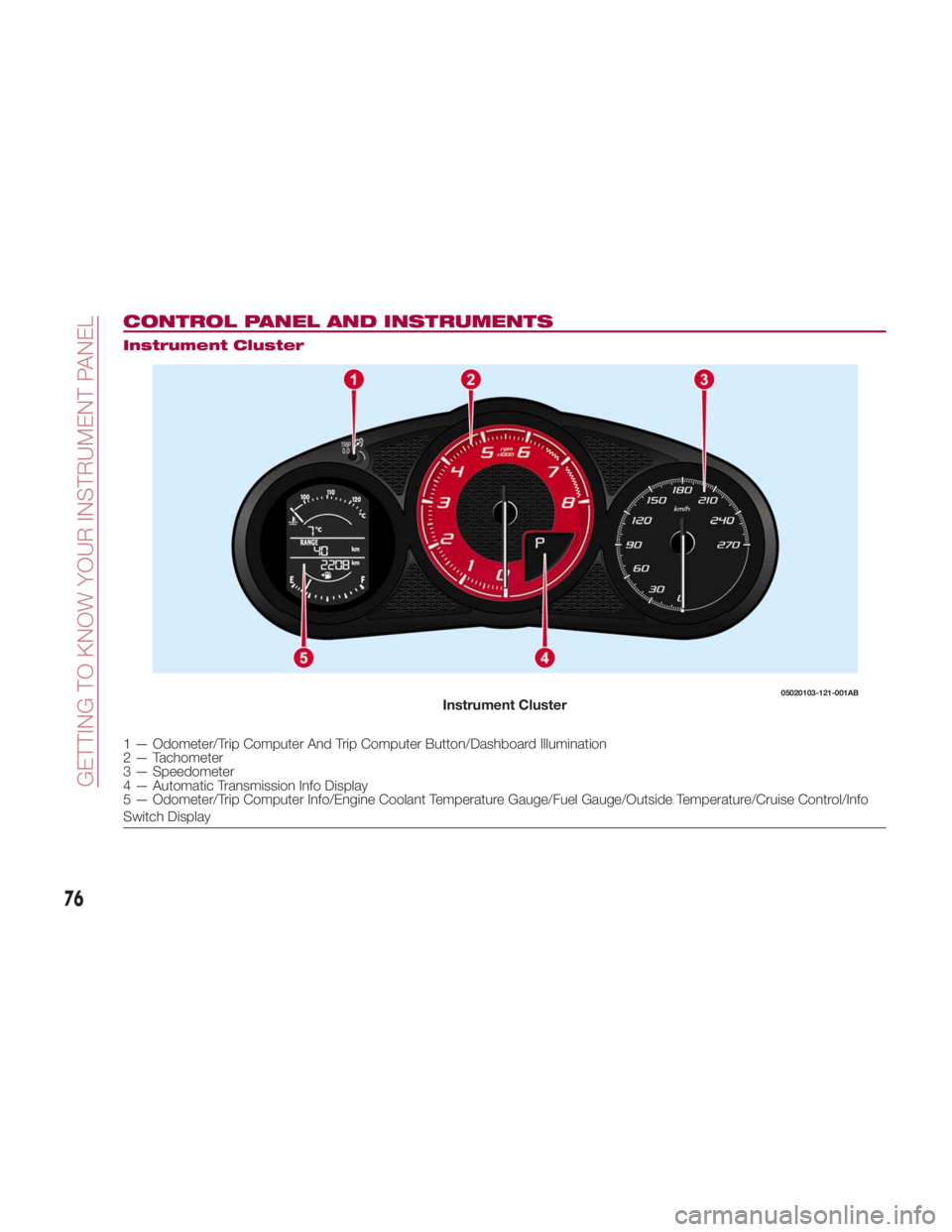
CONTROL PANEL AND INSTRUMENTS Instrument Cluster
1 — Odometer/Trip Computer And Trip Computer Button/Dashboard Illumination
2 — Tachometer
3 — Speedometer
4 — Automatic Transmission Info Display
5 — Odometer/Trip Computer Info/Engine Coolant Temperature Gauge/Fuel Gauge/Outside Temperature/Cruise Control/Info
Switch Display 05020103-121-001AB
Instrument Cluster
76
GETTING TO KNOW YOUR INSTRUMENT PANEL
Page 88 of 292
WARNING LIGHTS
AND MESSAGES Warning Lights And
Messages
Note:
The warning light in the instrument
panel appears together with a
dedicated message and/or acoustic
signal when applicable. These
indications are indicative and
precautionary and as such must not be
considered as exhaustive and/or
alternative to the information contained
in the Owner’s Manual, which you are
advised to read carefully in all cases.
Always refer to the information in this
chapter in the event of a failure
indication.
Failure indications displayed are
divided into two categories: serious
and less serious failures. Serious
failures are indicated by a repeated
and prolonged warning "cycle". Less
serious failures are indicated by a
warning "cycle" with a shorter duration.
The display cycle of both categories
can be interrupted. The instrument
panel warning light will stay on until the
cause of the failure is eliminated.
The warning contents can be verified
on the audio system. Proceed as follows:
1. If the warning light is turned on,
select
icon on the home screen to
display the application screen.
2. Select “ Warning Guidance ”to
display the current warnings.
3. Select the applicable warning to
view the warning details.
For the following warning/indicator
lights:
Master Warning Light
Brake System Warning Light
ABS Warning Light
Charging System Warning Light
Engine Oil Warning Light
Electric Throttle Warning Light
Cold Start Warning Light
Check Engine Warning Light
Coolant Temperature Warning Light
Automatic Transmission Warning
Light
Power Steering Malfunction Indicator
Light
Air Bag/Seat Belt Pretensioner
System Warning Light
Check Fuel Cap Warning Light
Low Fuel Warning Light Seat Belt Warning Light
Door Ajar Warning Light
Low Washer Fluid Level Warning
Light
Tire Pressure Monitoring System
Warning Light
KEY Warning Light
LED Headlight KEY Warning Light
BSM (Blind Spot Monitoring) OFF
Indicator Light
TCS/DSC Indicator Light
DSC OFF Indicator Light
Security Indicator Light
Indicator Light
Passenger Air Bag Deactivation
Warning Light
The light turns on when the ignition is
switched on for an operation check,
and turns off a few seconds later or
when the engine is started. If the light
does not turn on or remains turned on,
have the vehicle inspected at an
authorized dealer.
Note: Only for “Brake System Warning
Light:” the light turns on continuously
when the parking brake is applied.
86
GETTING TO KNOW YOUR INSTRUMENT PANEL
Page 98 of 292
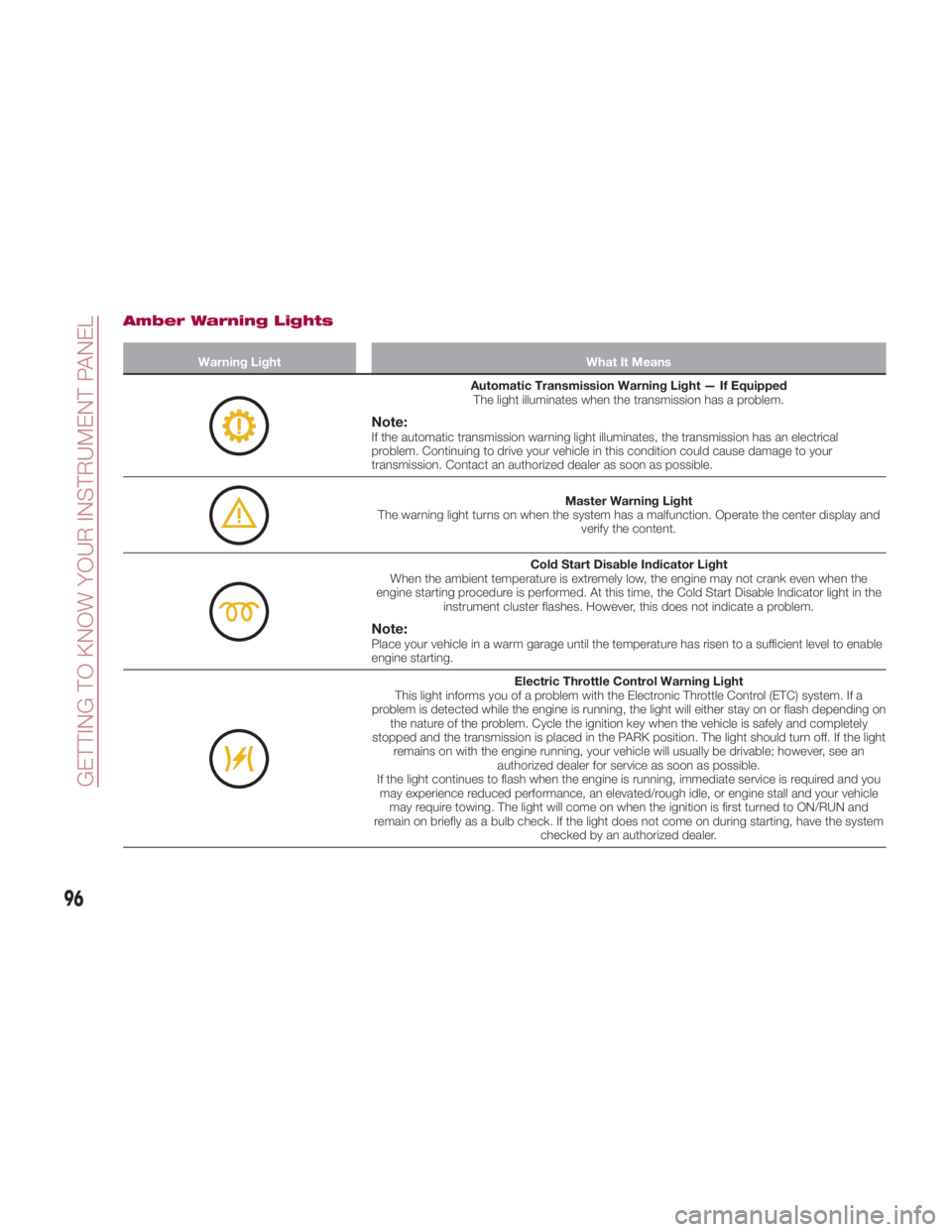
Amber Warning Lights Warning Light What It Means
Automatic Transmission Warning Light — If Equipped
The light illuminates when the transmission has a problem.
Note: If the automatic transmission warning light illuminates, the transmission has an electrical
problem. Continuing to drive your vehicle in this condition could cause damage to your
transmission. Contact an authorized dealer as soon as possible.
Master Warning Light
The warning light turns on when the system has a malfunction. Operate the center display and
verify the content.
Cold Start Disable Indicator Light
When the ambient temperature is extremely low, the engine may not crank even when the
engine starting procedure is performed. At this time, the Cold Start Disable Indicator light in the
instrument cluster flashes. However, this does not indicate a problem.
Note: Place your vehicle in a warm garage until the temperature has risen to a sufficient level to enable
engine starting.
Electric Throttle Control Warning Light
This light informs you of a problem with the Electronic Throttle Control (ETC) system. If a
problem is detected while the engine is running, the light will either stay on or flash depending on
the nature of the problem. Cycle the ignition key when the vehicle is safely and completely
stopped and the transmission is placed in the PARK position. The light should turn off. If the light
remains on with the engine running, your vehicle will usually be drivable; however, see an
authorized dealer for service as soon as possible.
If the light continues to flash when the engine is running, immediate service is required and you
may experience reduced performance, an elevated/rough idle, or engine stall and your vehicle
may require towing. The light will come on when the ignition is first turned to ON/RUN and
remain on briefly as a bulb check. If the light does not come on during starting, have the system
checked by an authorized dealer.
96
GETTING TO KNOW YOUR INSTRUMENT PANEL
Page 111 of 292
ONBOARD
DIAGNOSTIC
SYSTEM — OBD II Your vehicle is equipped with a
sophisticated Onboard Diagnostic
system called OBD II. This system
monitors the performance of the
emissions, engine, and automatic
transmission control systems. When
these systems are operating properly,
your vehicle will provide excellent
performance and fuel economy, as well
as engine emissions well within current
government regulations.
If any of these systems require service,
the OBD II system will turn on the
Malfunction Indicator Light (MIL). It will
also store diagnostic codes and other
information to assist your service
technician in making repairs. Although
your vehicle will usually be drivable and
not need towing, see your authorized
dealer for service as soon as possible. Caution!Prolonged driving with the MIL on could
cause further damage to the emission
control system. It could also affect fuel
economy and driveability. The vehicle must
be serviced before any emissions tests can
be performed.
If the MIL is flashing while the vehicle is
running, severe catalytic converter damage
and power loss will soon occur. Immediate
service is required.
Onboard Diagnostic
System (OBD II)
Cybersecurity
Your vehicle is required to have an
Onboard Diagnostic system (OBD II)
and a connection port to allow access
to information related to the
performance of your emissions
controls. Authorized service technicians
may need to access this information to
assist with the diagnosis and service of
your vehicle and emissions system. Warning! ONLY an authorized service technician
should connect equipment to the OBD II
connection port in order to diagnose or
service your vehicle.
If unauthorized equipment is connected
to the OBD II connection port, such as a
driver-behavior tracking device, it may:
Be possible that vehicle systems,
including safety related systems, could be
impaired or a loss of vehicle control could
occur that may result in an accident
involving serious injury or death.
Access, or allow others to access,
information stored in your vehicle systems,
including personal information.
For further information, refer to “Privacy
Practices” and “Uconnect
CyberSecurity” in “All About Uconnect
Access” in your Owner’s Manual Radio
Supplement.
109
Page 150 of 292
STARTING AND OPERATINGSTARTINGTHEENGINE ...... .149
BRAKE SYSTEM ........... .150
MANUAL TRANSMISSION ..... .152
AUTOMATIC TRANSMISSION — IF
EQUIPPED ............... .153
SPORT MODE ............ .158
SPEED CONTROL .......... .159
RADAR SENSORS — IF
EQUIPPED ............... .162
REAR PARK ASSIST — IF
EQUIPPED ............... .163
PARKVIEW REAR BACKUP CAMERA
— IF EQUIPPED ........... .167
REFUELING THE VEHICLE ..... .173
VEHICLELOADING ......... .176
TOWING TRAILERS ......... .178
DRIVING TIPS ............. .178
148
STARTING AND OPERATING