warning FIAT SPIDER ABARTH 2017 Owner's Manual
[x] Cancel search | Manufacturer: FIAT, Model Year: 2017, Model line: SPIDER ABARTH, Model: FIAT SPIDER ABARTH 2017Pages: 292, PDF Size: 9.24 MB
Page 36 of 292
Warning!Persons who are unable to feel pain to
the skin because of advanced age, chronic
illness, diabetes, spinal cord injury,
medication, alcohol use, exhaustion or
other physical condition must exercise care
when using the seat heater. It may cause
burns even at low temperatures, especially
if used for long periods of time.
Do not place anything on the seat or
seatback that insulates against heat, such
as a blanket or cushion. This may cause
the seat heater to overheat. Sitting in a seat
that has been overheated could cause
serious burns due to the increased surface
temperature of the seat.
Caution!Do not use organic solvents to clean the
seat. It may damage the seat surface and
the heater. NON-ADJUSTABLE
HEAD RESTRAINTS The non-adjustable head restraints are
form fitted into the upper structure of
the seatback, and are designed to
reduce the risk of injury by restricting
head movement in the event of a rear
impact. The seatback should be
properly adjusted to an upright position
where the head restraint is positioned
as close as possible to the back of the
occupant’s head.
Warning!Be certain that the seatback is locked
securely into position. Otherwise, the seat
will not provide the proper stability for
passengers. An improperly latched
seatback could cause serious injury. Driver And Passenger
Head Restraints
Your vehicle is equipped with
non-adjustable head restraints on the
driver's and passenger's seatbacks.
The non-adjustable head restraints
consist of a trimmed foam covering
over the upper structure of the
seatbacks and are intended to help
protect occupants from neck injury.
Adjust the seatbacks to their upright,
on-road positions so that the head
restraint is positioned as close as
possible to the back of the occupant’s
head.
Warning!Be certain that the seatback is locked
securely into position. Otherwise, the seat
will not provide the proper stability for
passengers. An improperly latched
seatback could cause serious injury.
34
GETTING TO KNOW YOUR VEHICLE
Page 37 of 292
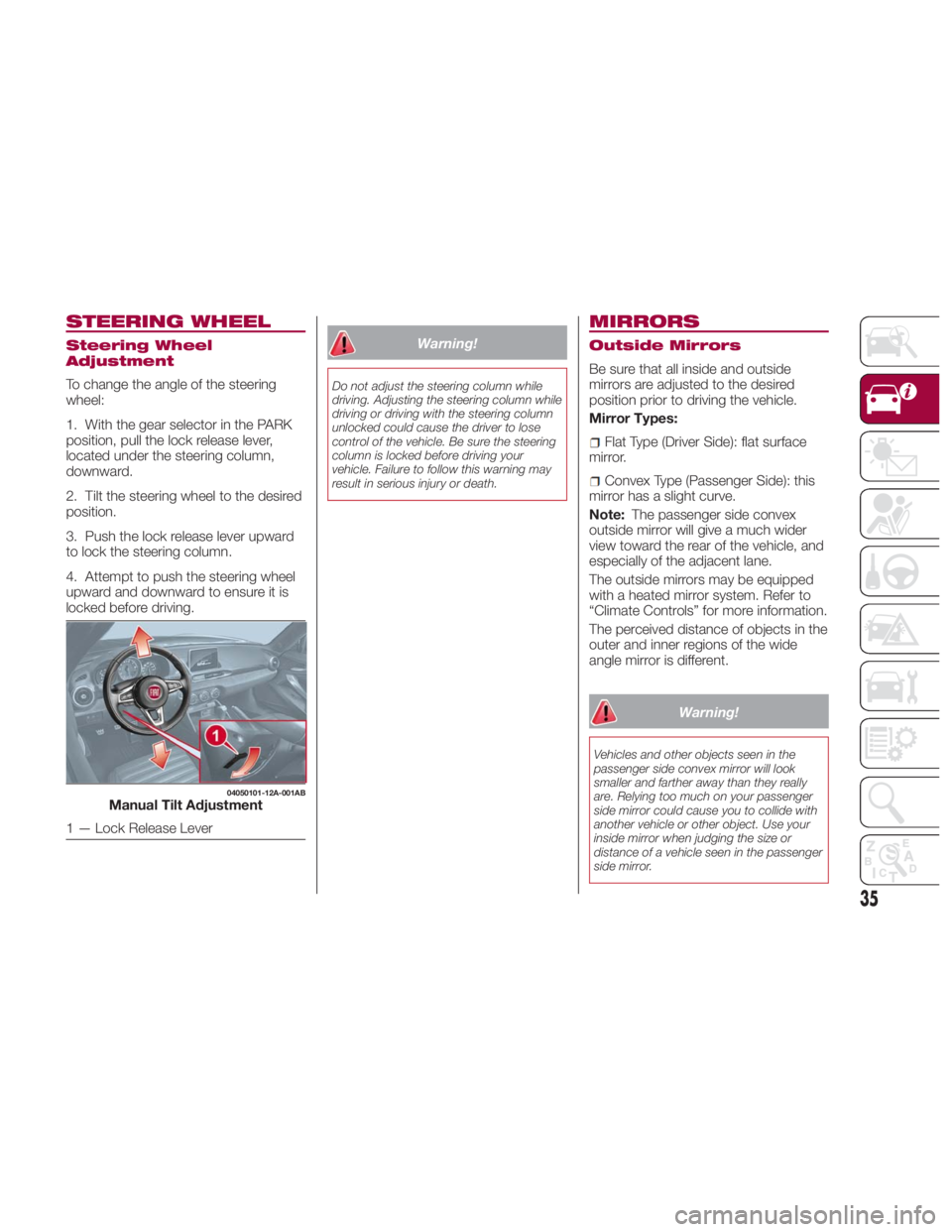
STEERING WHEEL Steering Wheel
Adjustment
To change the angle of the steering
wheel:
1. With the gear selector in the PARK
position, pull the lock release lever,
located under the steering column,
downward.
2. Tilt the steering wheel to the desired
position.
3. Push the lock release lever upward
to lock the steering column.
4. Attempt to push the steering wheel
upward and downward to ensure it is
locked before driving. Warning!Do not adjust the steering column while
driving. Adjusting the steering column while
driving or driving with the steering column
unlocked could cause the driver to lose
control of the vehicle. Be sure the steering
column is locked before driving your
vehicle. Failure to follow this warning may
result in serious injury or death.
MIRRORS Outside Mirrors
Be sure that all inside and outside
mirrors are adjusted to the desired
position prior to driving the vehicle.
Mirror Types:
Flat Type (Driver Side): flat surface
mirror.
Convex Type (Passenger Side): this
mirror has a slight curve.
Note: The passenger side convex
outside mirror will give a much wider
view toward the rear of the vehicle, and
especially of the adjacent lane.
The outside mirrors may be equipped
with a heated mirror system. Refer to
“Climate Controls” for more information.
The perceived distance of objects in the
outer and inner regions of the wide
angle mirror is different.
Warning!Vehicles and other objects seen in the
passenger side convex mirror will look
smaller and farther away than they really
are. Relying too much on your passenger
side mirror could cause you to collide with
another vehicle or other object. Use your
inside mirror when judging the size or
distance of a vehicle seen in the passenger
side mirror.04050101-12A-001AB
Manual Tilt Adjustment
1 — Lock Release Lever
35
Page 45 of 292
With Auto-Wiper Control
When the wiper lever is in the AUTO
position, the rain sensor will sense the
amount of rainfall on the windshield and
turns the wipers on or off automatically
(off/intermittent/low speed/high speed).
Switch positions:
or MIST : operation while
pulling up lever
OFF : stop
AUTO : auto control operation
— or LO : low speed operation
= or HI : high speed operation
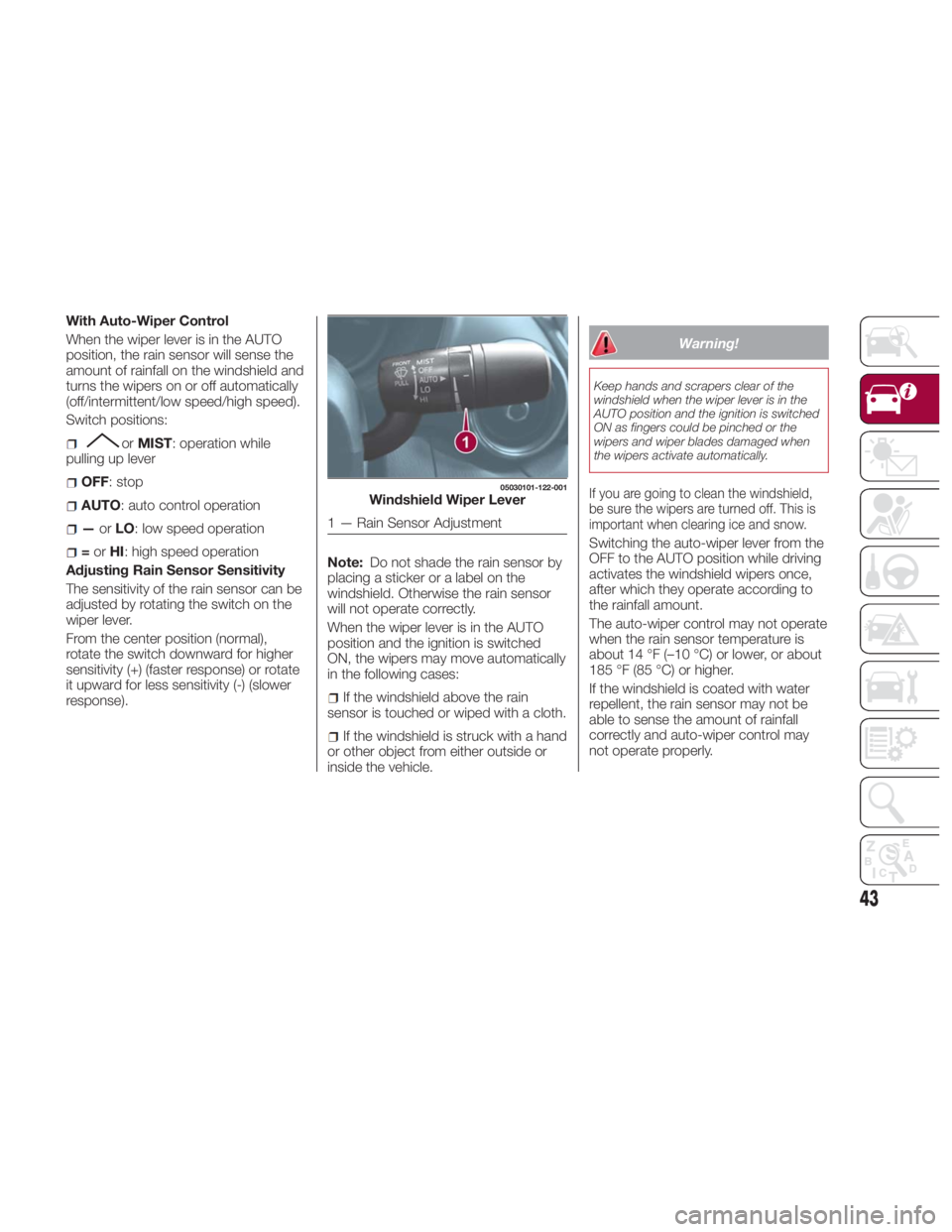
Adjusting Rain Sensor Sensitivity
The sensitivity of the rain sensor can be
adjusted by rotating the switch on the
wiper lever.
From the center position (normal),
rotate the switch downward for higher
sensitivity (+) (faster response) or rotate
it upward for less sensitivity (-) (slower
response). Note: Do not shade the rain sensor by
placing a sticker or a label on the
windshield. Otherwise the rain sensor
will not operate correctly.
When the wiper lever is in the AUTO
position and the ignition is switched
ON, the wipers may move automatically
in the following cases:
If the windshield above the rain
sensor is touched or wiped with a cloth.
If the windshield is struck with a hand
or other object from either outside or
inside the vehicle. Warning!Keep hands and scrapers clear of the
windshield when the wiper lever is in the
AUTO position and the ignition is switched
ON as fingers could be pinched or the
wipers and wiper blades damaged when
the wipers activate automatically.
If you are going to clean the windshield,
be sure the wipers are turned off. This is
important when clearing ice and snow.
Switching the auto-wiper lever from the
OFF to the AUTO position while driving
activates the windshield wipers once,
after which they operate according to
the rainfall amount.
The auto-wiper control may not operate
when the rain sensor temperature is
about 14 °F (–10 °C) or lower, or about
185 °F (85 °C) or higher.
If the windshield is coated with water
repellent, the rain sensor may not be
able to sense the amount of rainfall
correctly and auto-wiper control may
not operate properly. 05030101-122-001
Windshield Wiper Lever
1 — Rain Sensor Adjustment
43
Page 46 of 292
If dirt or debris (such as ice or debris
containing salt water) adheres to the
windshield above the rain sensor or if
the windshield is iced, it could cause
the wipers to move automatically.
However, if the wipers cannot remove
this ice, dirt or debris, the auto-wiper
control will stop operation. In this case,
set the wiper lever to the low speed
position or high speed position for
manual operation, or remove the ice,
dirt or debris by hand to restore the
auto-wiper operation.
If the auto-wiper lever is left in the
AUTO position, the wipers could
operate automatically from the effect of
strong light sources, electromagnetic
waves, or infrared light because the rain
sensor uses an optical sensor.
It is recommended that the auto-wiper
lever be switched to the OFF position
other than when driving the vehicle
under rainy conditions.
The auto-wiper control functions can be
turned off. Because heavy ice and snow can jam
the wiper blades, the wiper motor is
protected from motor breakdown,
overheating and possible fire by a
circuit breaker. This mechanism will
automatically stop operation of the
blades, but only for about five minutes.
If this happens, turn off the wiper switch
and park off the road and remove the
snow and ice. After five minutes, turn
on the switch and the blades should
operate normally. If they do not resume
functioning, contact an authorized
dealer as soon as possible. Pull off to
the side of the road to a safe location.
Wait until the weather clears before
trying to drive with the wipers
inoperative.
Windshield Washer
Pull the wiper/washer lever rearward
and hold it to spray washer fluid onto
the windshield.
With the wiper lever in the OFF,
intermittent, or AUTO position, the
wipers will operate continuously until
the lever is released. Warning!Sudden loss of visibility through the
windshield could lead to a collision. You
might not see other vehicles or other
obstacles. To avoid sudden icing of the
windshield during freezing weather, warm
the windshield with defroster before and
during windshield washer use.
If the fluid level is normal and the
washer does not work, contact an
authorized dealer.
With Headlight Washers
When the headlights are on, the
headlight washers operate
automatically once every fifth time the
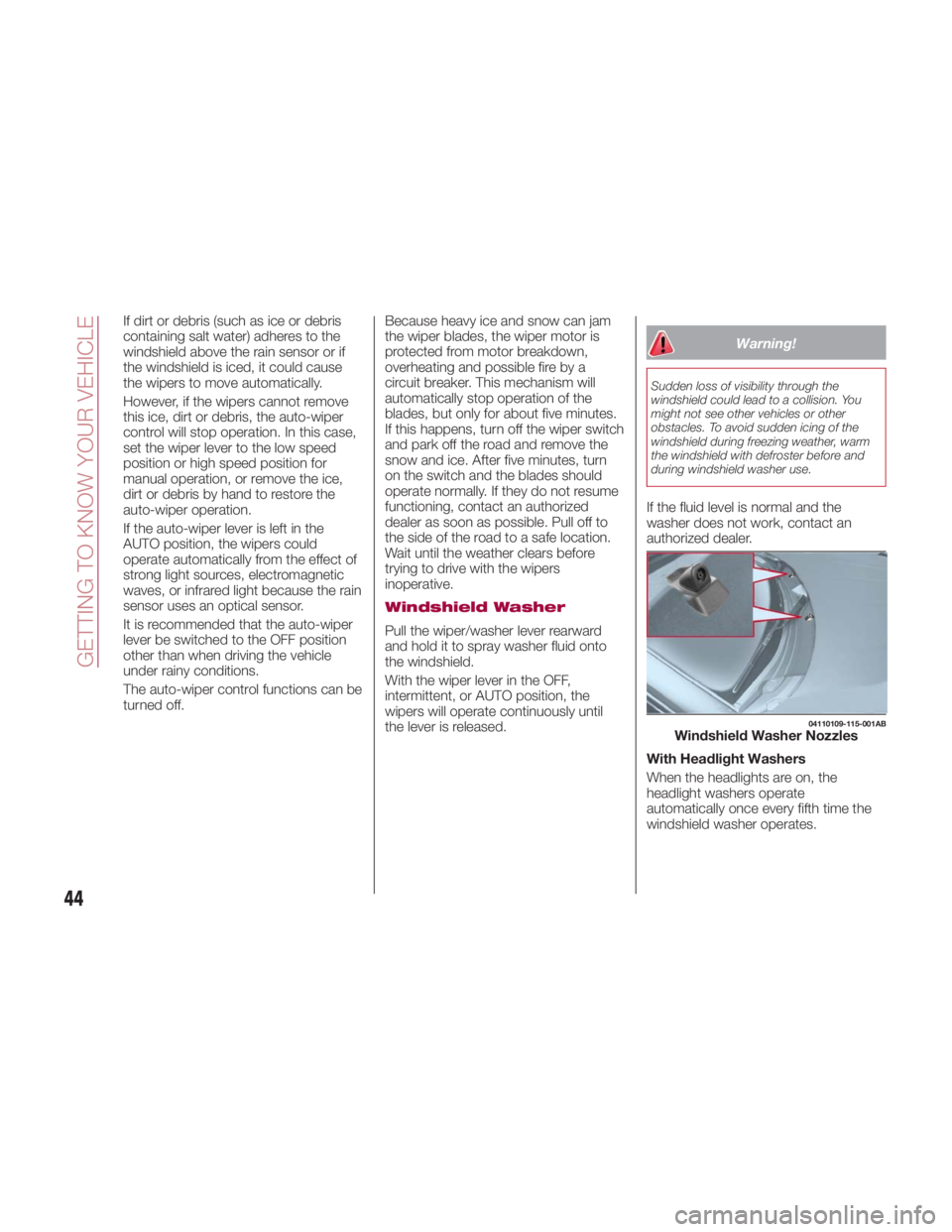
windshield washer operates. 04110109-115-001AB
Windshield Washer Nozzles
44
GETTING TO KNOW YOUR VEHICLE
Page 52 of 292
Note: Do not use the Outside Air
Position in cold or rainy weather is
dangerous as it will cause the windows
to fog up. Your vision will be hampered,
which could lead to a serious accident.
6 – A/C Button
Push the A/C Button to turn on the air
conditioner.
The LED on the switch will illuminate
when the Blower Control Knob is in any
position except the OFF position.
Push the button again to turn off the air
conditioner.
Note: The air conditioner may not
function when the outside temperature
approaches 32 °F (0 °C).
Heating
Proceed as follows:
1. Set the Mode Selector Knob to the
position.
2. Set the Air Recirculation Button to
the outside air position.
3. Set the Temperature Control Dial to
the hot position.
4. Set the Blower Control Knob to the
desired speed. 5. If dehumidified heating is desired,
turn on the air conditioner.
If the windshield fogs up easily, set the
Mode Selector Knob to the
position.
If cooler air is desired at face level, set
the Mode Selector Knob to the
position and adjust the Temperature
Control Knob to maintain comfort.
The floor vents will blow warmer air
while the side air vents will blow cooler
air (except when the temperature
control dial is set at the maximum hot
or cold position).
Cooling (With Air
Conditioner)
Proceed as follows:
1. Set the Mode Selector Knob to the
position.
2. Set the Temperature Control Knob
to the cold position.
3. Set the Blower Control Knob to the
desired speed.
4. Turn on the air conditioner by
pushing the A/C Button.
5. After cooling begins, adjust the
Blower Control Knob and Temperature
Control Knob as needed to maintain
comfort. Note:
If the air conditioner is used while
driving up large hills or in heavy traffic,
monitor the Engine Coolant
Temperature Warning Light to see if it
is illuminated or flashing. The air
conditioner may cause engine
overheating in these situations. If the
warning light is illuminated or flashing,
turn the air conditioning off
immediately.
When maximum cooling is desired,
set the Temperature Control Knob to
the extreme cold position, push the Air
Recirculation Button to activate the
recirculated air position, and then turn
the fan control dial fully clockwise.
If warmer air is desired at floor level,
set the Mode Selector Knob to the
position, and adjust the
Temperature Control Knob to maintain
comfort.
The floor vents will blow warmer air
while the side air vents will blow cooler
air (except when the temperature
control dial is set at the maximum hot
or cold position).
50
GETTING TO KNOW YOUR VEHICLE
Page 53 of 292
Ventilation
Proceed as follows:
1. Set the Mode Selector Knob to the
position.
2. Set the Air Recirculation Button to
the outside air position.
3. Set the Temperature Control Knob
to the desired position.
4. Set the Blower Control Knob to the
desired speed.
Windshield Defrosting
And Defogging
Proceed as follows:
1. Set the Mode Selector Knob to the
Front Defrost
position.
2. Set the Temperature Control Knob to
the desired position.
3. Set the Blower Control Knob to the
desired speed.
4. If dehumidified heating is desired,
turn on the air conditioner. Warning!Set the temperature control to the hot or
warm position when defogging (Front
Defrost position). Using the Front Defrost
position with the temperature control set to
the cold position is dangerous as it will
cause the outside of the windshield to fog
up. Your vision will be hampered, which
could lead to a serious accident.
Note:
For maximum defrosting, turn on
the air conditioner, set the Temperature
Control Knob to the extreme hot
position, and turn the Blower Control
Knob fully clockwise.
If warm air is desired from the floor
vents, set the Mode Selector Knob to
the position.
If equipped with MAX A/C, the
Recirculation Button can be set to the
Recirculated Air position, when the
Blower Control Knob is ON, and the
Mode Selector Knob is set to the Front
Defrost position. Dehumidifying (With Air
Conditioner)
Operate the air conditioner in cool or
cold weather to help defog the
windshield and side windows.
Proceed as follows:
1. Set the Mode Selector Knob to the
desired position.
2. Set the Air Recirculation Knob to the
outside air position.
3. Set the Temperature Control Knob
to the desired position.
4. Set the Blower Control Knob to the
desired speed.
5. Turn on the air conditioner by
pressing the A/C Button.
Note: One of the functions of the air
conditioner is dehumidifying the air. To
use this function, the temperature does
not have to be set to cold. Set the
Temperature Control Knob to the
desired position (hot or cold), and turn
on the air conditioner to dehumidify the
cabin air.
51
Page 57 of 292
5 – Air Recirculation Button
Press the Air Recirculation Button to
select between outside air and
recirculated air positions.
Recirculated Air Position : (LED On)
Outside air is shut off when this position
has been activated. Use this position
when going through tunnels, driving in
congested traffic (high engine exhaust
areas), or when quick cooling of the
vehicle is desired.
Outside Air Position : (LED Off)
Outside air is allowed to enter the
cabin. Use this mode for ventilation or
windshield defrosting.
Note: Do not use the Recirculated Air
Position in cold or rainy weather. Using
the Recirculated Air Position in cold or
rainy weather is dangerous as it will
cause the windows to fog up. Your
vision will be hampered, which could
lead to a serious accident.
6 – A/C Button
Push the A/C Button to turn on the air
conditioner.
The LED on the switch will illuminate
when the Blower Control Knob is in any
position except the off position.
Push the button again to turn off the air
conditioner.
Note: The air conditioner may not
function when the outside temperature
approaches 32 ° F(0°C). Operation Of Automatic
Air Conditioning
Proceed as follows:
1. Set the mode selector knob to the
AUTO position.
2. Set the Air Recirculation Button to
the outside air position (indicator light
turned off).
Note: If the recirculated air position is
used for long periods in cold weather or
high humidity, the windshield may fog
up more easily.
3. Set the Blower Control Knob to the
AUTO position.
4. Push the A/C button to operate the
air conditioning (indicator light on).
5. Set the Temperature Control Knob
to the desired position.
6. To turn off the system, set the
blower control knob to the 0 position.
Setting the temperature to maximum
hot or cold will not provide the desired
temperature at a faster rate.
When selecting heat, the system will
restrict air flow until it has warmed to
prevent cold air from blowing out of the
vents.
For an optimal cabin temperature, set
the temperature close to 77º. Adjust to
the desired temperature if necessary. Windshield Defrosting
And Defogging
Set the mode selector knob to the
position and turn the blower control
knob to the desired speed.
In this position, the outside air position
is automatically selected, and when the
blower control knob is on, the air
conditioner automatically turns on. The
air conditioner will directly dehumidify
the air to the front windshield and side
windows. Air flow amount will be
increased.
Use the temperature control knob to
increase the air flow temperature and
defog the windshield more quickly.
Warning!Set the temperature control to the hot or
warm position when defogging (Front
Defrost position). Using the Front Defrost
position with the temperature control set to
the cold position is dangerous as it will
cause the outside of the windshield to fog
up. Your vision will be hampered, which
could lead to a serious accident.
55
Page 60 of 292
Warning!Never leave children unattended in a
vehicle, and do not let children play with
power windows. Do not leave the key fob
in or near the vehicle, or in a location
accessible to children, and do not leave the
ignition of a vehicle equipped with the
Keyless Entry System in the ACC or
ON/RUN mode. Occupants, particularly
unattended children, can become
entrapped by the windows while operating
the power window switches. Such
entrapment may result in serious injury or
death.
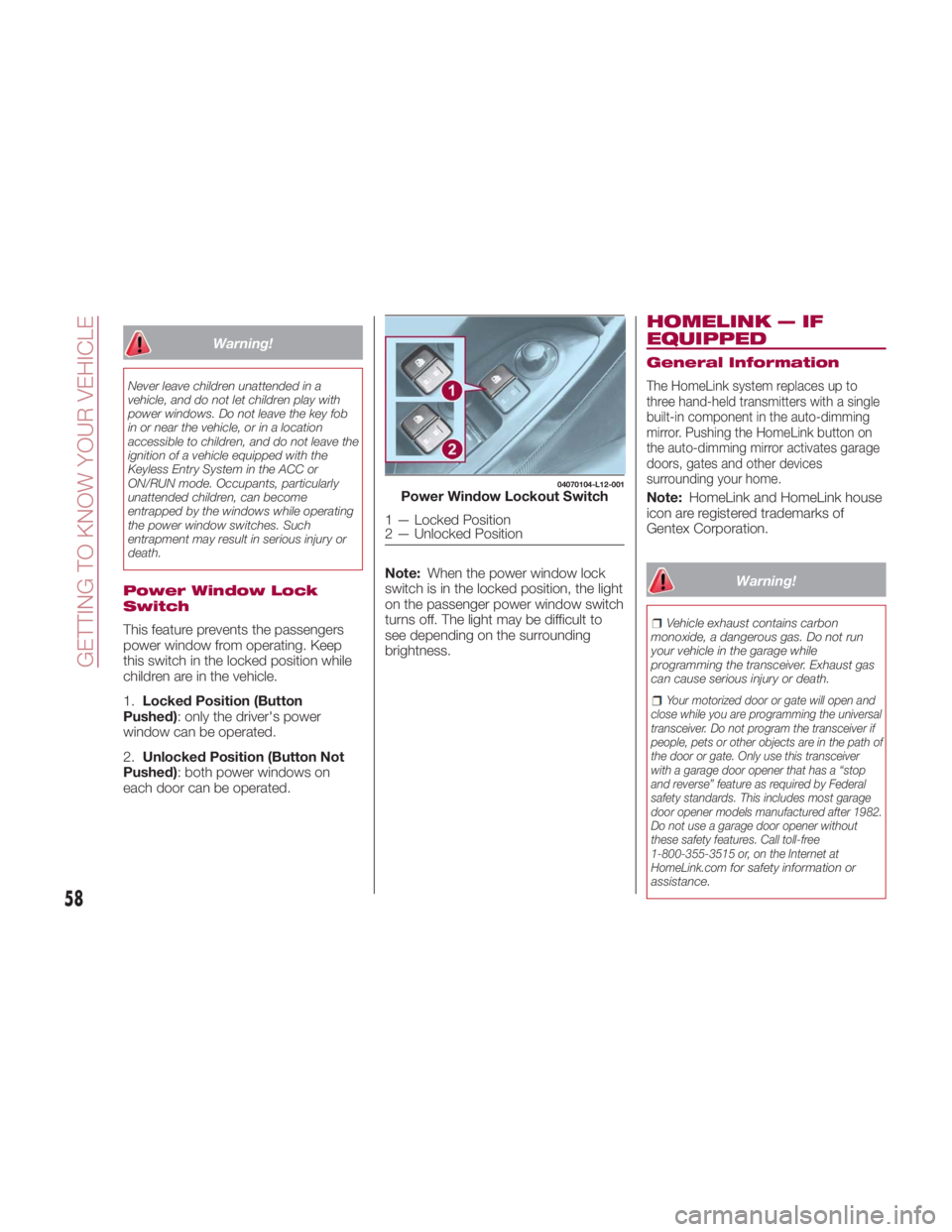
Power Window Lock
Switch
This feature prevents the passengers
power window from operating. Keep
this switch in the locked position while
children are in the vehicle.
1. Locked Position (Button
Pushed) : only the driver's power
window can be operated.
2. Unlocked Position (Button Not
Pushed) : both power windows on
each door can be operated. Note: When the power window lock
switch is in the locked position, the light
on the passenger power window switch
turns off. The light may be difficult to
see depending on the surrounding
brightness. HOMELINK — IF
EQUIPPED General Information
The HomeLink system replaces up to
three hand-held transmitters with a single
built-in component in the auto-dimming
mirror. Pushing the HomeLink button on
the auto-dimming mirror activates garage
doors, gates and other devices
surrounding your home.
Note: HomeLink and HomeLink house
icon are registered trademarks of
Gentex Corporation.
Warning! Vehicle exhaust contains carbon
monoxide, a dangerous gas. Do not run
your vehicle in the garage while
programming the transceiver. Exhaust gas
can cause serious injury or death.
Your motorized door or gate will open and
close while you are programming the universal
transceiver. Do not program the transceiver if
people, pets or other objects are in the path of
the door or gate. Only use this transceiver
with a garage door opener that has a “stop
and reverse” feature as required by Federal
safety standards. This includes most garage
door opener models manufactured after 1982.
Do not use a garage door opener without
these safety features. Call toll-free
1-800-355-3515 or, on the Internet at
HomeLink.com
for safety information or
assistance. 04070104-L12-001
Power Window Lockout Switch
1 — Locked Position
2 — Unlocked Position
58
GETTING TO KNOW YOUR VEHICLE
Page 62 of 292
should now activate your rolling code
equipped device.
Note: To program the remaining two
HomeLink buttons, begin with step
one.
For questions or comments, please
contact HomeLink at
www.homelink.com or
1-800-355-3515 .
Gate Operator/Canadian
Programming
Canadian radio-frequency laws require
transmitter signals to “time-out” (or quit)
after several seconds of transmission -
which may not be long enough for
HomeLink to pick up the signal during
programming.
Similar to this Canadian law, some U.S.
gate operators are designed to
“time-out” in the same manner.
If you live in Canada or you are having
difficulties programming a gate operator
by using the “Programming”
procedures (regardless of where you
live), replace “Programming The
System” step three with the following:
Note: If programming a garage door
opener or gate operator, it is advised to
unplug the device during the “cycling”
process to prevent possible
overheating.
1. Continue to press and hold the
HomeLink button while you press and
release - every two seconds (“cycle”)
your hand-held transmitter until the frequency signal has successfully been
accepted by HomeLink (the indicator
light will flash slowly and then rapidly).
2. Proceed with the “Programming”
steps to complete.
Operating The System
Push the programmed HomeLink
button to operate a programmed
device.
The code will continue being
transmitted for a maximum of
20 seconds.
Reprogramming The
System
To program a device to HomeLink using
a HomeLink button previously trained,
follow these steps:
1. Push and hold the desired HomeLink
button. DO NOT release the button;
2. The indicator light will begin to flash
after 20 seconds. Without releasing the
HomeLink button, proceed with
“Programming The System” step one.
Erasing Programmed
HomeLink Buttons
To erase the existing programming from
all three operating channels, push and
hold the two outside buttons 1 and
3 on the auto-dimming mirror until the
HomeLink indicator light begins to flash
after approximately 10 seconds.
Verify that the programming has been
erased when you resell the vehicle. INTERNAL
EQUIPMENT Storage Compartments
Center Console
The center console is located between
the driver’s and passenger’s seats.
Warning!Keep storage compartments closed when
driving. Driving with the storage
compartments open is dangerous. To
reduce the possibility of injury in an
accident or a sudden stop, keep the
storage compartments closed when
driving.
Caution!Do not leave lighters or eyeglasses in the
storage compartments while parked under
the sun. A lighter could explode or the
plastic material in eyeglasses could deform
and crack from high temperature.
60
GETTING TO KNOW YOUR VEHICLE
Page 65 of 292
The overhead light turns on for about
15 seconds when the ignition is
switched OFF with the overhead light
switch in the door position.
The overhead light turns off immediately
in the following cases:
The ignition is switched ON and both
doors are closed.
The driver's door is locked.
Battery Saver
If any door is left open with the
overhead light switch in the door
position or the trunk lid is left open, the
overhead light or trunk light turns off
after about 30 minutes to prevent
discharge of the battery.
To prevent discharge of the battery, if
the interior lights remain on (the interior
light switch is in the on position), they
will turn off automatically under the
following conditions:
No operations are done for about
30 minutes after the ignition is switched
OFF.
The button on the key fob is
pushed, or the request switch located
on the exterior door handle is pushed to
lock the doors (vehicles with the
advanced keyless function) after the
ignition is switched OFF.
In addition, if the following operations
are performed after turning the interior
lights off, they will turn on again if: The ignition is switched to a position
other than OFF.
A door is opened.
A door is unlocked.
The operation of the illuminated entry
system can be changed through the
Connect system.
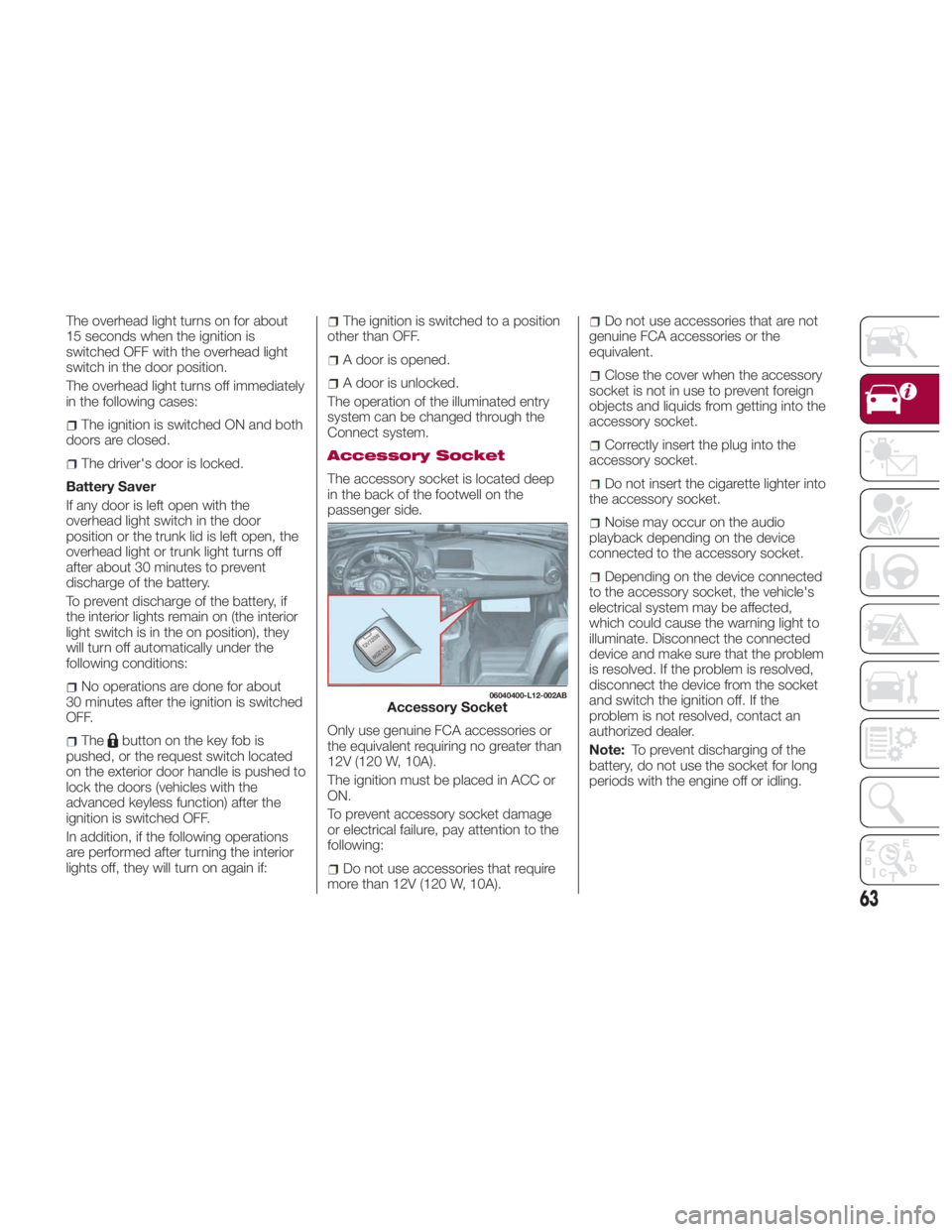
Accessory Socket
The accessory socket is located deep
in the back of the footwell on the
passenger side.
Only use genuine FCA accessories or
the equivalent requiring no greater than
12V (120 W, 10A).
The ignition must be placed in ACC or
ON.
To prevent accessory socket damage
or electrical failure, pay attention to the
following:
Do not use accessories that require
more than 12V (120 W, 10A). Do not use accessories that are not
genuine FCA accessories or the
equivalent.
Close the cover when the accessory
socket is not in use to prevent foreign
objects and liquids from getting into the
accessory socket.
Correctly insert the plug into the
accessory socket.
Do not insert the cigarette lighter into
the accessory socket.
Noise may occur on the audio
playback depending on the device
connected to the accessory socket.
Depending on the device connected
to the accessory socket, the vehicle's
electrical system may be affected,
which could cause the warning light to
illuminate. Disconnect the connected
device and make sure that the problem
is resolved. If the problem is resolved,
disconnect the device from the socket
and switch the ignition off. If the
problem is not resolved, contact an
authorized dealer.
Note: To prevent discharging of the
battery, do not use the socket for long
periods with the engine off or idling. 06040400-L12-002AB
Accessory Socket
63