oil FIAT SPIDER ABARTH 2017 Owners Manual
[x] Cancel search | Manufacturer: FIAT, Model Year: 2017, Model line: SPIDER ABARTH, Model: FIAT SPIDER ABARTH 2017Pages: 292, PDF Size: 9.24 MB
Page 71 of 292
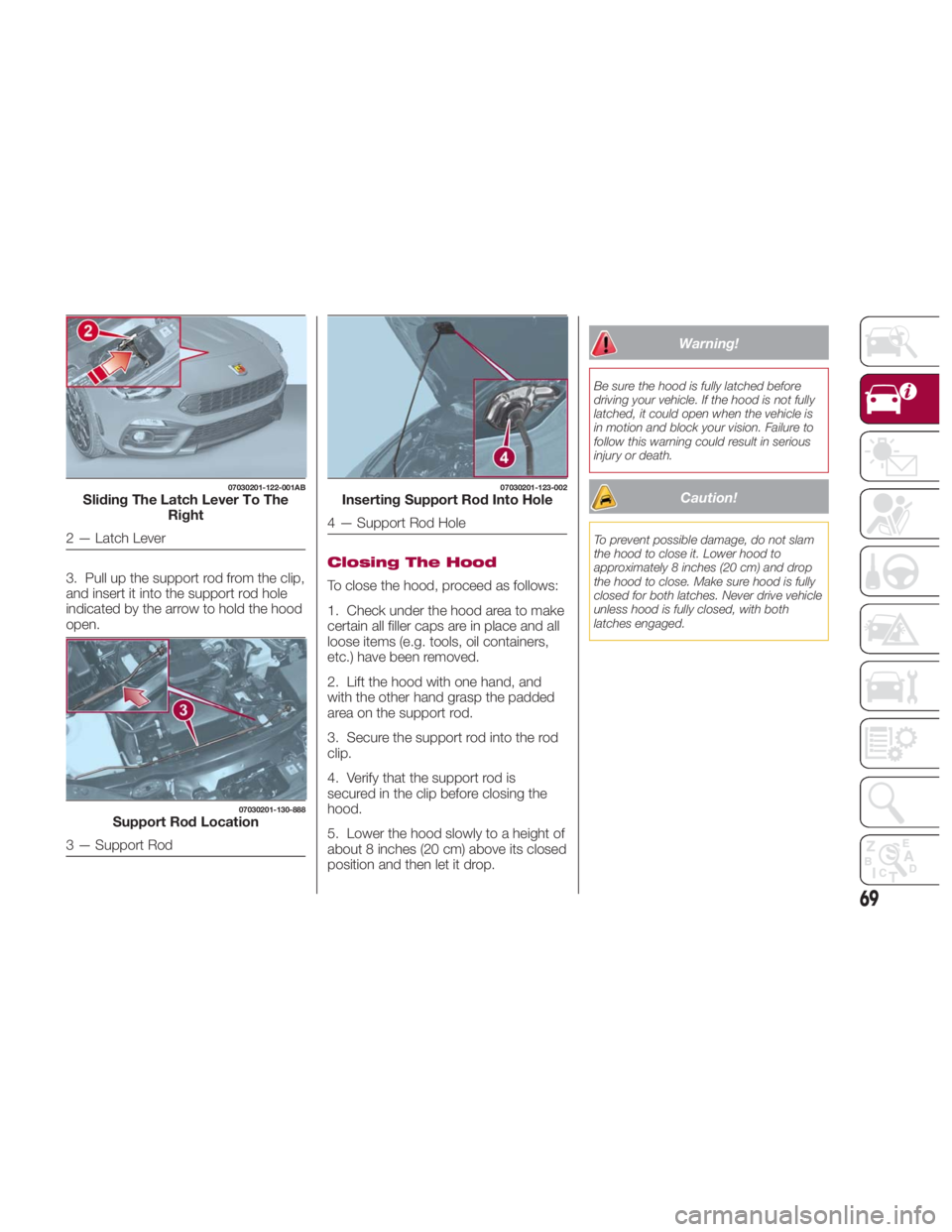
3. Pull up the support rod from the clip,
and insert it into the support rod hole
indicated by the arrow to hold the hood
open. Closing The Hood
To close the hood, proceed as follows:
1. Check under the hood area to make
certain all filler caps are in place and all
loose items (e.g. tools, oil containers,
etc.) have been removed.
2. Lift the hood with one hand, and
with the other hand grasp the padded
area on the support rod.
3. Secure the support rod into the rod
clip.
4. Verify that the support rod is
secured in the clip before closing the
hood.
5. Lower the hood slowly to a height of
about 8 inches (20 cm) above its closed
position and then let it drop. Warning!Be sure the hood is fully latched before
driving your vehicle. If the hood is not fully
latched, it could open when the vehicle is
in motion and block your vision. Failure to
follow this warning could result in serious
injury or death.
Caution!To prevent possible damage, do not slam
the hood to close it. Lower hood to
approximately 8 inches (20 cm) and drop
the hood to close. Make sure hood is fully
closed for both latches. Never drive vehicle
unless hood is fully closed, with both
latches engaged.07030201-122-001AB
Sliding The Latch Lever To The
Right
2 — Latch Lever 07030201-130-888
Support Rod Location
3 — Support Rod 07030201-123-002
Inserting Support Rod Into Hole
4 — Support Rod Hole
69
Page 83 of 292
Outside Temperature
Display
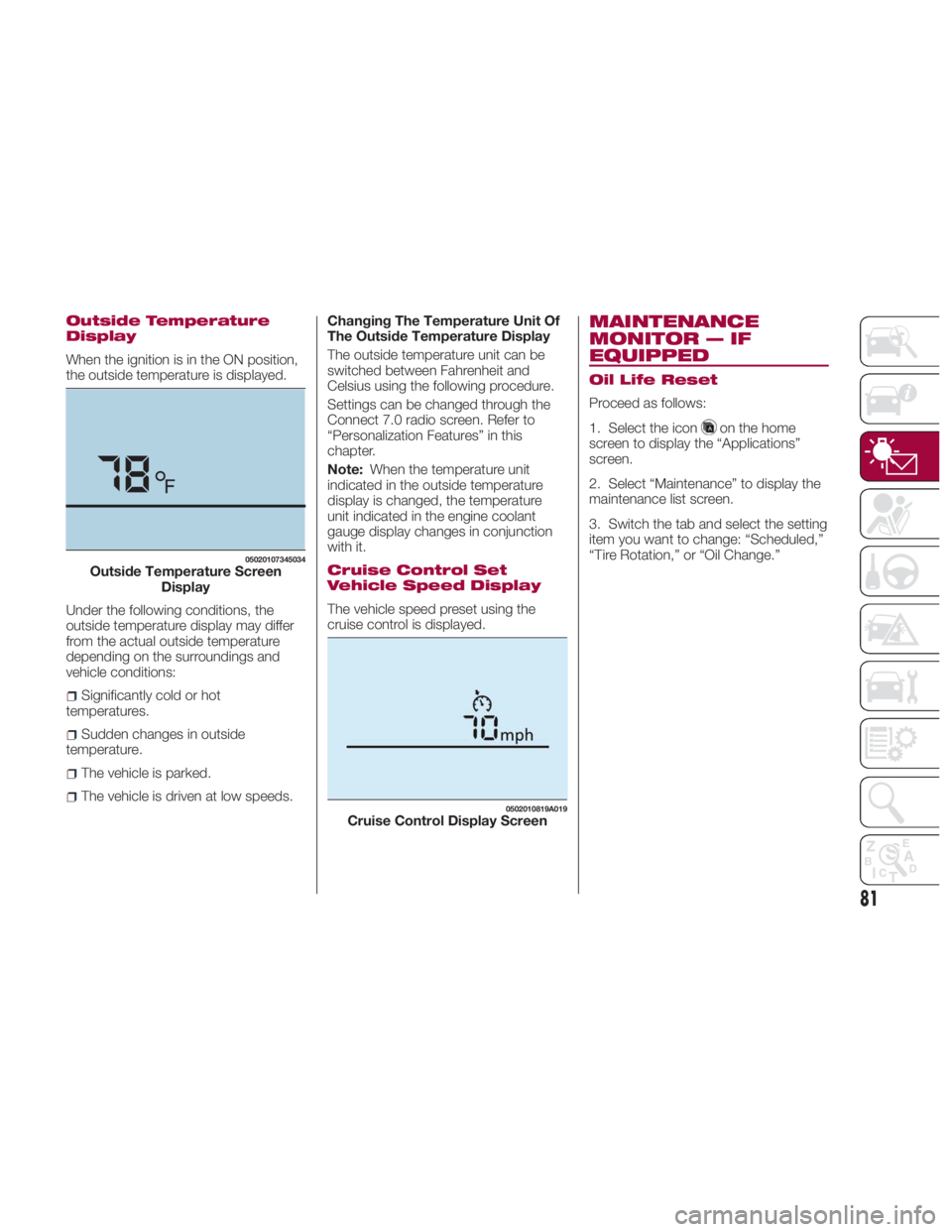
When the ignition is in the ON position,
the outside temperature is displayed.
Under the following conditions, the
outside temperature display may differ
from the actual outside temperature
depending on the surroundings and
vehicle conditions:
Significantly cold or hot
temperatures.
Sudden changes in outside
temperature.
The vehicle is parked.
The vehicle is driven at low speeds. Changing The Temperature Unit Of
The Outside Temperature Display
The outside temperature unit can be
switched between Fahrenheit and
Celsius using the following procedure.
Settings can be changed through the
Connect 7.0 radio screen. Refer to
“Personalization Features” in this
chapter.
Note: When the temperature unit
indicated in the outside temperature
display is changed, the temperature
unit indicated in the engine coolant
gauge display changes in conjunction
with it.
Cruise Control Set
Vehicle Speed Display
The vehicle speed preset using the
cruise control is displayed. MAINTENANCE
MONITOR — IF
EQUIPPED Oil Life Reset
Proceed as follows:
1. Select the icon on the home
screen to display the “Applications”
screen.
2. Select “Maintenance” to display the
maintenance list screen.
3. Switch the tab and select the setting
item you want to change: “Scheduled,”
“Tire Rotation,” or “Oil Change.”05020107345034
Outside Temperature Screen
Display 0502010819A019
Cruise Control Display Screen
81
Page 84 of 292
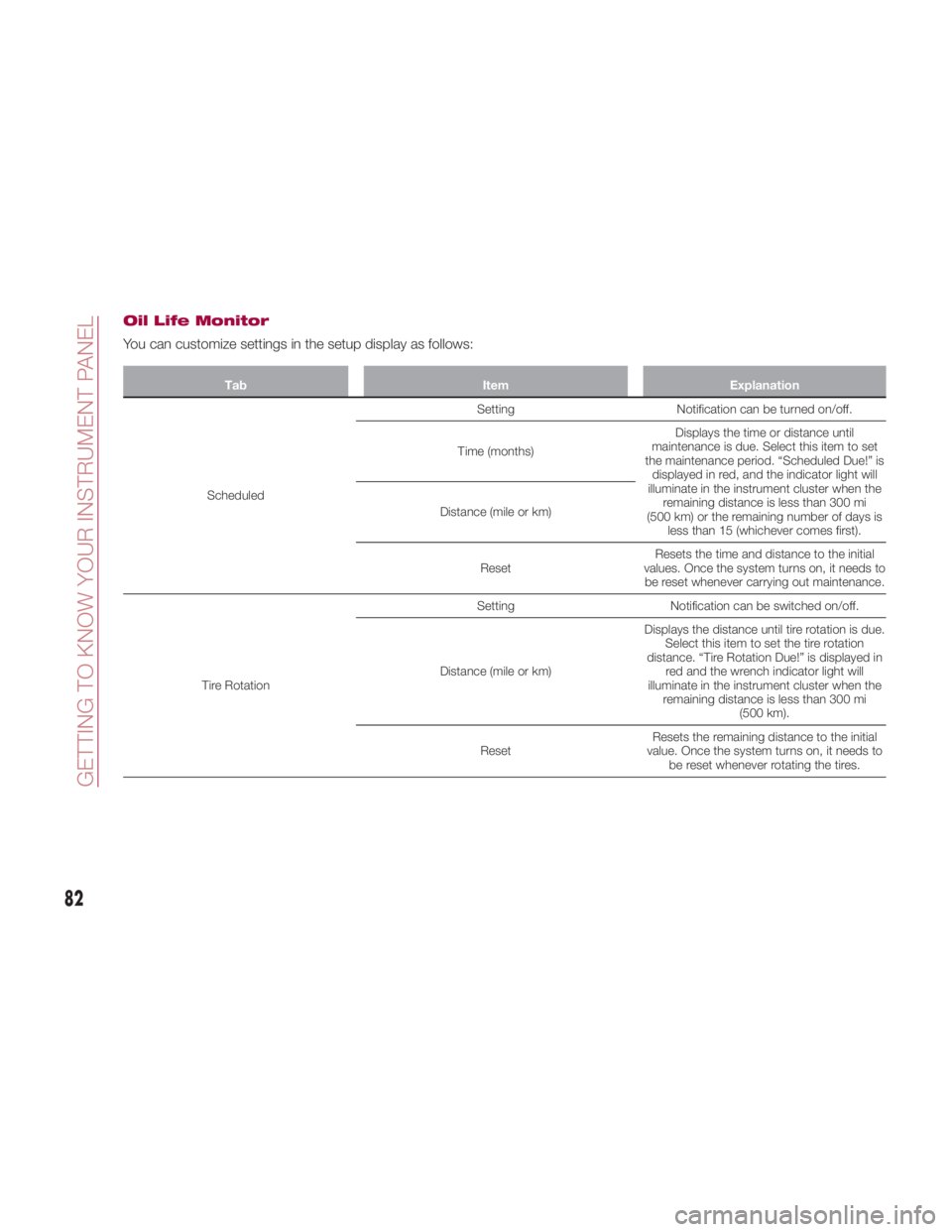
Oil Life Monitor
You can customize settings in the setup display as follows: Tab Item Explanation
Scheduled Setting Notification can be turned on/off.
Time (months) Displays the time or distance until
maintenance is due. Select this item to set
the maintenance period. “Scheduled Due!” is
displayed in red, and the indicator light will
illuminate in the instrument cluster when the
remaining distance is less than 300 mi
(500 km) or the remaining number of days is
less than 15 (whichever comes first).Distance (mile or km)
Reset Resets the time and distance to the initial
values. Once the system turns on, it needs to
be reset whenever carrying out maintenance.
Tire Rotation Setting Notification can be switched on/off.
Distance (mile or km) Displays the distance until tire rotation is due.
Select this item to set the tire rotation
distance. “Tire Rotation Due!” is displayed in
red and the wrench indicator light will
illuminate in the instrument cluster when the
remaining distance is less than 300 mi
(500 km).
Reset Resets the remaining distance to the initial
value. Once the system turns on, it needs to
be reset whenever rotating the tires.
82
GETTING TO KNOW YOUR INSTRUMENT PANEL
Page 85 of 292
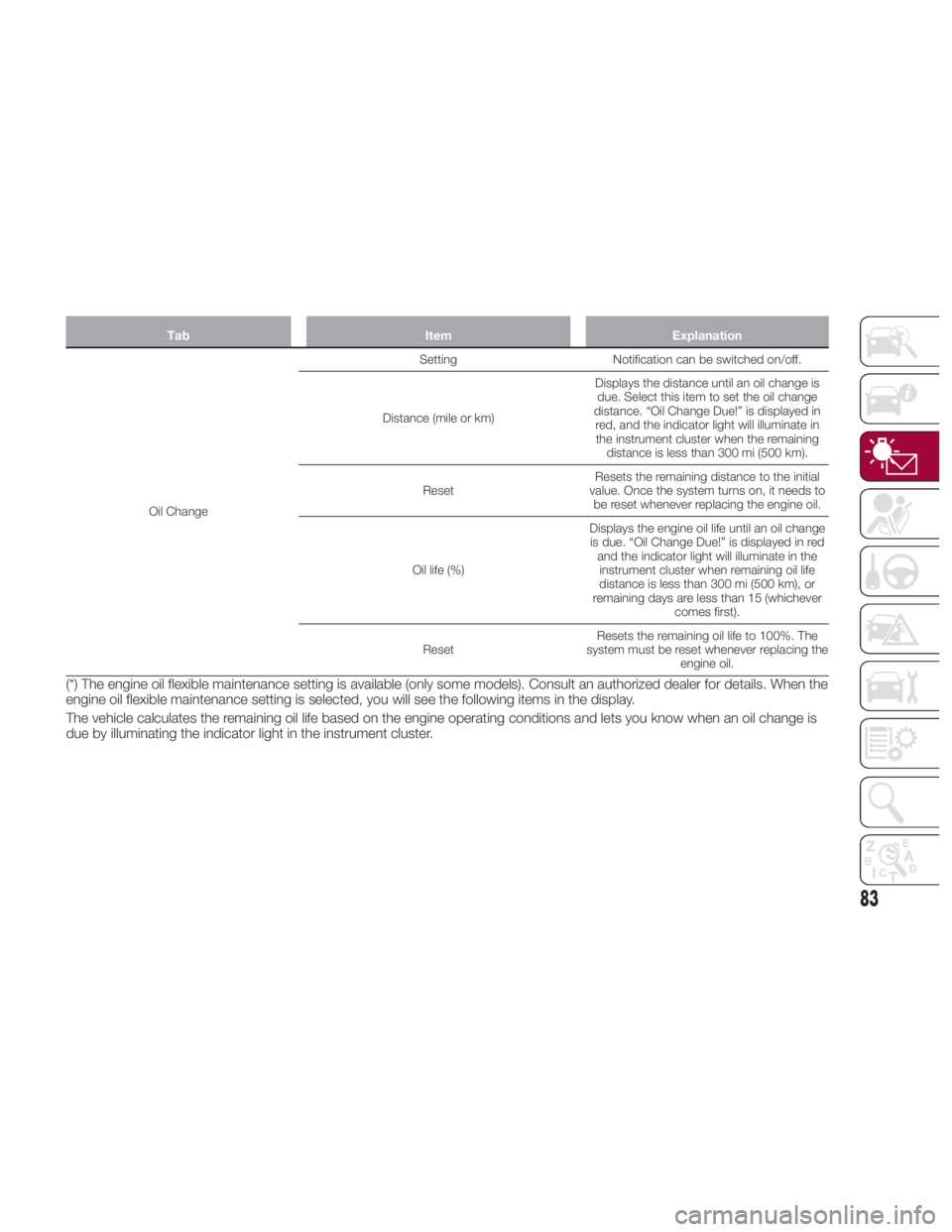
Tab Item Explanation
Oil Change Setting Notification
can be switched on/off.
Distance (mile or km) Displays the distance until an oil change is
due. Select this item to set the oil change
distance. “Oil Change Due!” is displayed in
red, and the indicator light will illuminate in
the instrument cluster when the remaining
distance is less than 300 mi (500 km).
Reset Resets the remaining distance to the initial
value. Once the system turns on, it needs to
be reset whenever replacing the engine oil.
Oil life (%) Displays the engine oil life until an oil change
is due. “Oil Change Due!” is displayed in red
and the indicator light will illuminate in the
instrument cluster when remaining oil life
distance is less than 300 mi (500 km), or
remaining days are less than 15 (whichever
comes first).
Reset Resets the remaining oil life to 100%. The
system must be reset whenever replacing the
engine oil.
(*) The engine oil flexible maintenance setting is available (only some models). Consult an authorized dealer for details. When the
engine oil flexible maintenance setting is selected, you will see the following items in the display.
The vehicle calculates the remaining oil life based on the engine operating conditions and lets you know when an oil change is
due by illuminating the indicator light in the instrument cluster.
83
Page 88 of 292
WARNING LIGHTS
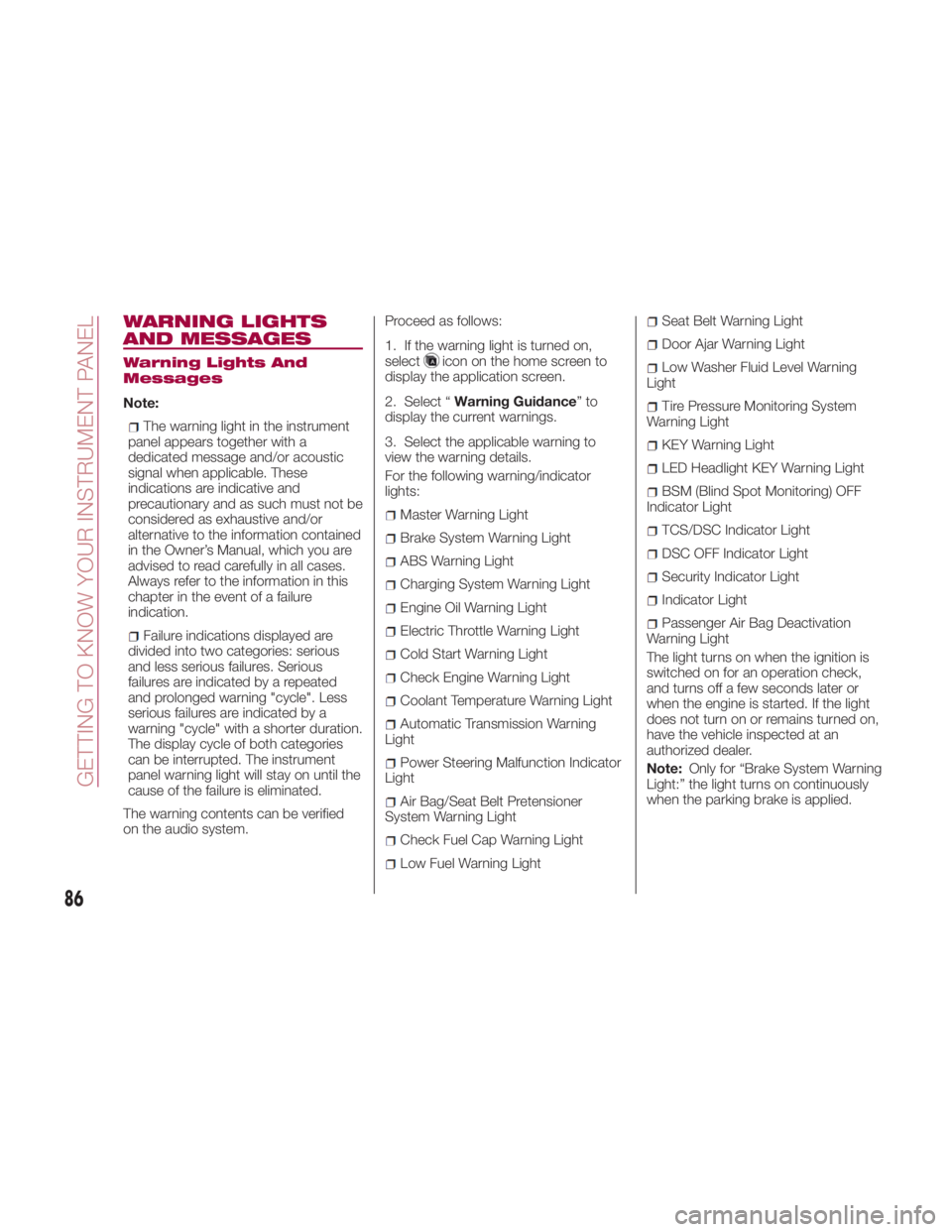
AND MESSAGES Warning Lights And
Messages
Note:
The warning light in the instrument
panel appears together with a
dedicated message and/or acoustic
signal when applicable. These
indications are indicative and
precautionary and as such must not be
considered as exhaustive and/or
alternative to the information contained
in the Owner’s Manual, which you are
advised to read carefully in all cases.
Always refer to the information in this
chapter in the event of a failure
indication.
Failure indications displayed are
divided into two categories: serious
and less serious failures. Serious
failures are indicated by a repeated
and prolonged warning "cycle". Less
serious failures are indicated by a
warning "cycle" with a shorter duration.
The display cycle of both categories
can be interrupted. The instrument
panel warning light will stay on until the
cause of the failure is eliminated.
The warning contents can be verified
on the audio system. Proceed as follows:
1. If the warning light is turned on,
select
icon on the home screen to
display the application screen.
2. Select “ Warning Guidance ”to
display the current warnings.
3. Select the applicable warning to
view the warning details.
For the following warning/indicator
lights:
Master Warning Light
Brake System Warning Light
ABS Warning Light
Charging System Warning Light
Engine Oil Warning Light
Electric Throttle Warning Light
Cold Start Warning Light
Check Engine Warning Light
Coolant Temperature Warning Light
Automatic Transmission Warning
Light
Power Steering Malfunction Indicator
Light
Air Bag/Seat Belt Pretensioner
System Warning Light
Check Fuel Cap Warning Light
Low Fuel Warning Light Seat Belt Warning Light
Door Ajar Warning Light
Low Washer Fluid Level Warning
Light
Tire Pressure Monitoring System
Warning Light
KEY Warning Light
LED Headlight KEY Warning Light
BSM (Blind Spot Monitoring) OFF
Indicator Light
TCS/DSC Indicator Light
DSC OFF Indicator Light
Security Indicator Light
Indicator Light
Passenger Air Bag Deactivation
Warning Light
The light turns on when the ignition is
switched on for an operation check,
and turns off a few seconds later or
when the engine is started. If the light
does not turn on or remains turned on,
have the vehicle inspected at an
authorized dealer.
Note: Only for “Brake System Warning
Light:” the light turns on continuously
when the parking brake is applied.
86
GETTING TO KNOW YOUR INSTRUMENT PANEL
Page 90 of 292
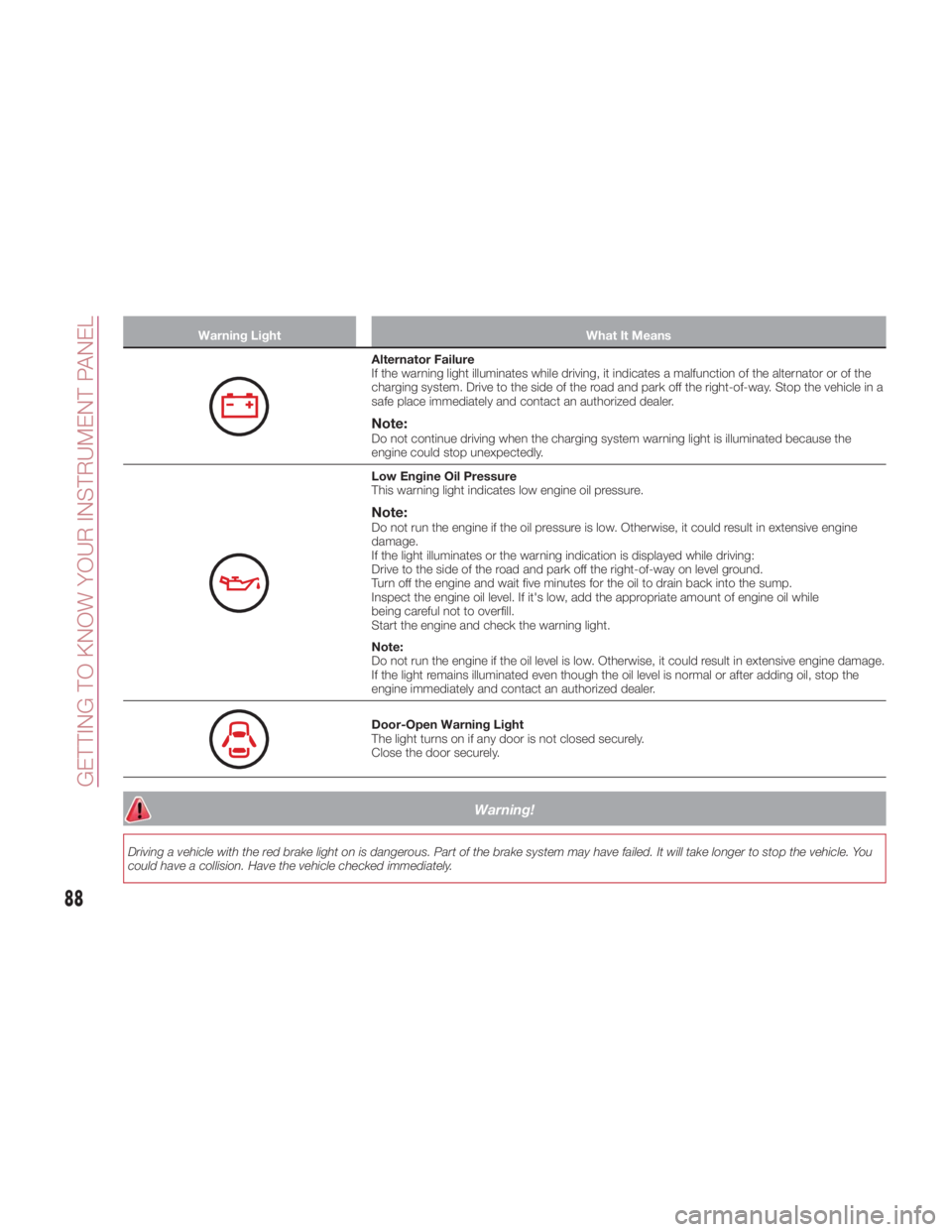
Warning Light What It Means
Alternator Failure
If the warning light illuminates while driving, it indicates a malfunction of the alternator or of the
charging system. Drive to the side of the road and park off the right-of-way. Stop the vehicle in a
safe place immediately and contact an authorized dealer.
Note: Do not continue driving when the charging system warning light is illuminated because the
engine could stop unexpectedly.
Low Engine Oil Pressure
This warning light indicates low engine oil pressure.
Note: Do not run the engine if the oil pressure is low. Otherwise, it could result in extensive engine
damage.
If the light illuminates or the warning indication is displayed while driving:
Drive to the side of the road and park off the right-of-way on level ground.
Turn off the engine and wait five minutes for the oil to drain back into the sump.
Inspect the engine oil level. If it's low, add the appropriate amount of engine oil while
being careful not to overfill.
Start the engine and check the warning light.
Note:
Do not run the engine if the oil level is low. Otherwise, it could result in extensive engine damage.
If the light remains illuminated even though the oil level is normal or after adding oil, stop the
engine immediately and contact an authorized dealer.
Door-Open Warning Light
The light turns on if any door is not closed securely.
Close the door securely.
Warning!Driving a vehicle with the red brake light on is dangerous. Part of the brake system may have failed. It will take longer to stop the vehicle. You
could have a collision. Have the vehicle checked immediately.
88
GETTING TO KNOW YOUR INSTRUMENT PANEL
Page 125 of 292
Seat Belt Precautions
Seat belts help to decrease the
possibility of severe injury during
accidents and sudden stops. FCA
recommends that the driver and
passengers always wear seat belts.
Mexico
All the seats have lap/shoulder belts.
These belts have retractors with inertia
locks that keep them out of the way
when not in use.
The locks allow the belts to remain
comfortable on users, but they will lock
in position during a collision.
Except Mexico
All of the seat belt retractors are
designed to keep the lap/shoulder belts
out of the way when not in use.
The driver's seat belt has no provisions
for child-restraint systems and has only
an emergency locking mode.
The driver may wear it comfortably, and
it will lock during a collision.
However, the passenger's seat
lap/shoulder belt retractor operates in
two modes: emergency locking mode,
and for child-restraint systems,
automatic locking mode. If you must
use the passenger seat for a child, slide
the passenger seat as far back as
possible and make sure any child
restraint system is secured properly.
Belt retraction may become difficult if
the belts and seat belt guides are
soiled, so try to keep them clean. Refer to “Lap/Shoulder Belt” in ”Interiors,”
found in Servicing And Maintenance”
for further information.
Warning!Relying on the air bags alone could lead
to more severe injuries in a collision. The air
bags work with your seat belt to restrain
you properly. In some collisions, the air
bags won’t deploy at all. Always wear your
seat belt even though you have air bags.
In a collision, you and your passengers
can suffer much greater injuries if you are
not properly buckled up. You can strike the
interior of your vehicle or other passengers,
or you can be thrown out of the vehicle.
Always be sure you and others in your
vehicle are buckled up properly.
It is dangerous to ride in a cargo area,
inside or outside of a vehicle. In a collision,
people riding in these areas are more likely
to be seriously injured or killed. Do not allow people to ride in any area
of your vehicle that is not equipped with
seats and seat belts.
Be sure everyone in your vehicle is in a
seat and using a seat belt properly.
Occupants, including the driver, should
always wear their seat belts whether or not
an air bag is also provided at their seating
position to minimize the risk of severe injury
or death in the event of a crash.
Wearing your seat belt incorrectly could
make your injuries in a collision much
worse. You might suffer internal injuries, or
you could even slide out of the seat belt.
Follow these instructions to wear your seat
belt safely and to keep your passengers
safe, too.
Two people should never be belted into
a single seat belt. People belted together
can crash into one another in a collision,
hurting one another badly. Never use a
lap/shoulder belt or a lap belt for more than
one person, no matter what their size.
A lap belt worn too high can increase
the risk of injury in a collision. The seat belt
forces won’t be at the strong hip and pelvic
bones, but across your abdomen. Always
wear the lap part of your seat belt as low
as possible and keep it snug.
A twisted seat belt may not protect you
properly. In a collision, it could even cut into
you. Be sure the seat belt is flat against
your body, without twists. If you can’t
straighten a seat belt in your vehicle, take it
to your authorized dealer immediately and
have it fixed. 03020100-12A-001
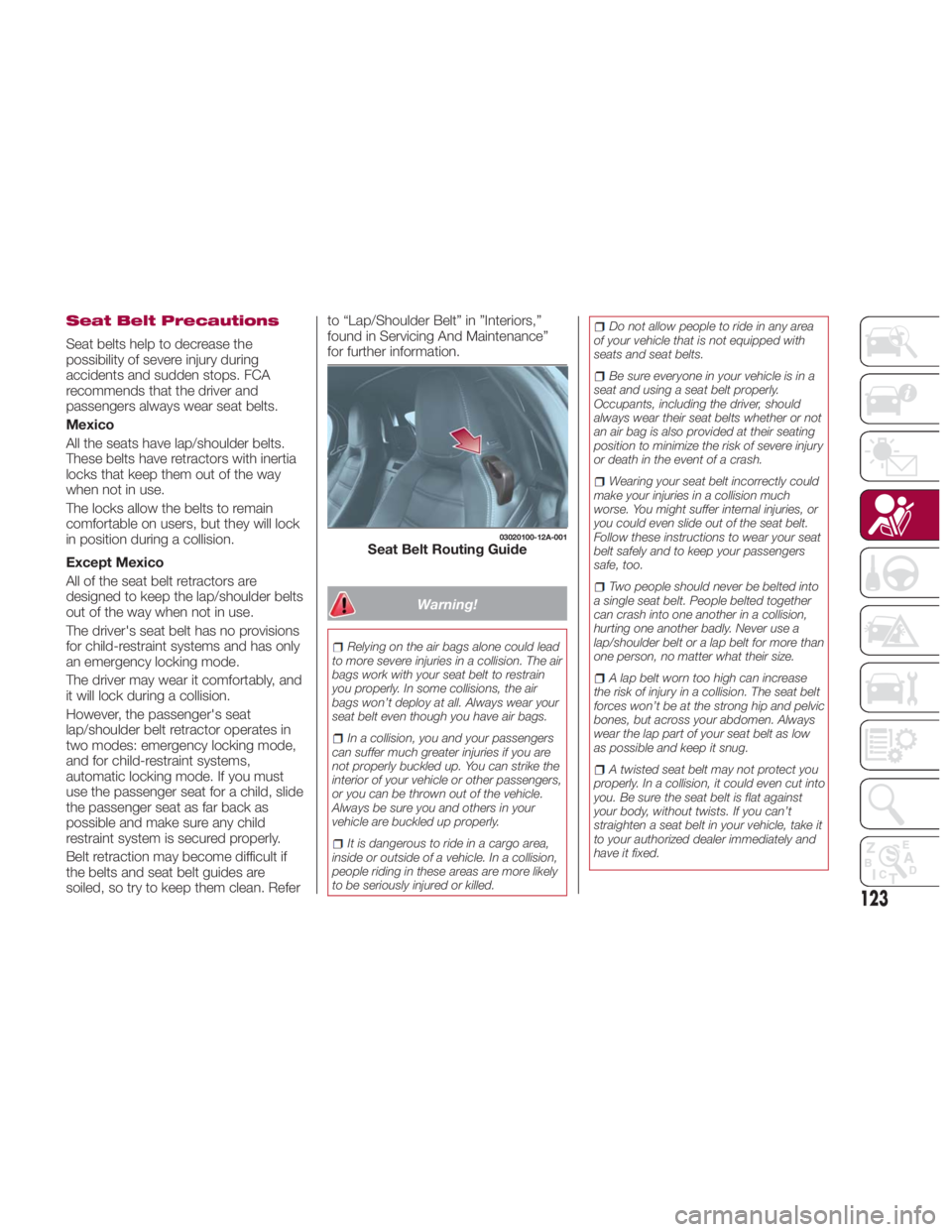
Seat Belt Routing Guide
123
Page 182 of 292

Warning!Fast spinning tires can be dangerous.
Forces generated by excessive wheel
speeds may cause damage, or even
failure, of the axle and tires. A tire could
explode and injure someone. Do not spin
your vehicle's wheels faster than 30 mph
(48 km/h) or for longer than 30 seconds
continuously without stopping when you
are stuck and do not let anyone near a
spinning wheel, no matter what the speed.
Caution!When “rocking” a stuck vehicle by
shifting between DRIVE and REVERSE, do
not spin the wheels faster than 15 mph
(24 km/h), or drivetrain damage may result.
Revving the engine or spinning the
wheels too fast may lead to transmission
overheating and failure. It can also damage
the tires. Do not spin the wheels above
30 mph (48 km/h) while in gear (no
transmission shifting occurring).
Winter Driving
Carry emergency gear, including tire
chains, window scraper, flares, a small
shovel, jumper leads, and a small bag
of sand or salt. Contact an authorized dealer to check
the following:
Have the proper ratio of antifreeze in
the radiator.
Inspect the battery and its leads.
Cold reduces battery capacity.
Use an engine oil appropriate for the
lowest ambient temperatures that the
vehicle will be driven in.
Inspect the ignition system for
damage and loose connections.
Use winter windshield washer fluid
that will not freeze.
Note:
Remove snow before driving. Snow
left on the windshield is dangerous as
it could obstruct vision.
Drive slowly. Braking performance
can be adversely affected if snow or
ice adheres to the brake components.
If this situation occurs, drive the vehicle
slowly, releasing the accelerator pedal
and lightly applying the brakes several
times until the brake performance
returns to normal.
Do not open or close the soft top when
the temperature is 41 °F (5 °C) or less.
The material of the soft top could be
damaged by freezing. Do not apply excessive force to a
window scraper when removing ice or
frozen snow on the mirror glass and
windshield.
Never use warm or hot water for
removing snow or ice from windows
and mirrors as it could result in the
glass cracking.
Snow Tires
If your vehicle is equipped with the tire
pressure monitoring system (vehicle
with run-flat tires), the system may not
function correctly when using tires with
steel wire reinforcement in the
sidewalls.
Use Snow Tires on all Four Wheels :
Do not exceed the maximum
permissible speed for your snow tires or
legal speed limits.
When snow tires are used, select the
specified size and pressure.
Tire Chains
Check local regulations before using tire
chains.
If your vehicle is equipped with the
TPMS system, the system may not
function correctly when using tire
chains.
180
STARTING AND OPERATING
Page 184 of 292
Caution!Always check the depth of the standing
water before driving through it. Never drive
through standing water that is deeper than
the bottom of the tire rims mounted on the
vehicle.
Determine the condition of the road or
the path that is under water and if there are
any obstacles in the way before driving
through the standing water.
Do not exceed 5 mph (8 km/h) when
driving through standing water. This will
minimize wave effects.
Driving through standing water may
cause damage to your vehicle’s drivetrain
components. Always inspect your vehicle’s
fluids (i.e., engine oil, transmission, axle,
etc.) for signs of contamination (i.e., fluid
that is milky or foamy in appearance) after
driving through standing water. Do not
continue to operate the vehicle if any fluid
appears contaminated, as this may result in
further damage. Such damage is not
covered by the New Vehicle Limited
Warranty.
Getting water inside your vehicle’s
engine can cause it to lock up and stall out,
and cause serious internal damage to the
engine. Such damage is not covered by
the New Vehicle Limited Warranty. Overloading
Note: Be careful not to overload your
vehicle. The gross axle weight rating
(GAWR) and the gross vehicle weight
rating (GVWR) of the vehicle are on the
Motor Vehicle Safety Standard Label on
the driver's door frame. Exceeding
these ratings can cause an accident or
vehicle damage. You can estimate the
weight of the load by weighing the
items (or people) before putting them in
the vehicle.
Driving On Uneven Road
Your vehicle's suspension and
underbody can be damaged if driven
on rough/uneven roads or over speed
bumps at excessive speeds.
Use care and reduce speed when
traveling on rough/uneven roads or over
speed bumps.
Use care not to damage the vehicle's
underbody, bumpers or muffler(s) when
driving under the following conditions:
Ascending or descending a slope
with a sharp transition angle.
Ascending or descending a driveway
or trailer ramp with a sharp transition
angle. This vehicle is equipped with low profile
tires allowing class-leading performance
and handling. As a result, the sidewall
of the tires are very thin and the tires
and wheels can be damaged if driven
through potholes or on rough/uneven
roads at excessive speeds.
Use care and reduce speed when
traveling on rough/uneven roads or
through potholes.
182
STARTING AND OPERATING
Page 226 of 292
INTRODUCTION Be extremely careful and prevent injury
to yourself and others or damage to
your vehicle when using this Owner’s
Manual for inspection and maintenance.
If you are unsure about any procedure it
describes, we strongly urge you to have
a reliable and qualified service shop
perform the work, preferably at your
authorized dealer.
Factory-trained FCA technicians and
genuine FCA parts are best for your
vehicle. Without this expertise and the
parts that have been designed and
made especially for your vehicle,
inadequate, incomplete, and insufficient
servicing may result in problems. This
could lead to vehicle damage or an
accident and injuries.
For expert advice and quality service,
contact your authorized dealer.
Note: Under no circumstances should
oil change intervals exceed 10,000
miles (16,000 kilometers) or 1 year.
To continue New Vehicle Limited
Warranty eligibility and to protect your
investment, it is your responsibility to
properly maintain your vehicle
according to factory recommended
schedules outlined in this Owner’s
Manual. As part of this you must keep
your maintenance records, receipts,
repair orders and any other documents
as evidence this maintenance was
performed. You must present these
documents, should any New Vehicle Limited Warranty coverage
disagreement occur. Failure to do so
can result in your New Vehicle Limited
Warranty being voided either in whole
or in part.
This evidence may consist of the
following:
The FCA Scheduled Maintenance
Record, refer to the Warranty Booklet,
must be completely filled out showing
mileage, repair order number, date for
each service, and signed by a qualified
automotive service technician who
service vehicles.
Original copies of repair orders or
other receipts that include the mileage
and date the vehicle was serviced.
Each receipt should be signed by a
qualified automotive service technician.
For self maintenance, a statement
that you completed the maintenance
yourself, displaying mileage and the
date the work was performed. Also,
receipts for the replacement parts (fluid,
filters, etc.) indicating the date and
mileage must accompany this
statement.
Note: If you elect to perform
maintenance yourself or have your
vehicle serviced at a location other than
an authorized dealer, FCA requires that
all fluids, parts and materials must meet
FCA standards for durability and
performance as described in this
Owner’s Manual. Claims against the warranty resulting
from lack of maintenance, as opposed
to defective materials or authorized FCA
workmanship, will not be honored.
Any auto repair shop using parts
equivalent to your vehicle's original
equipment may perform maintenance.
But we recommend that it always be
done by an authorized dealer using
genuine FCA parts. Selecting
“Maintenance Monitor” enables the
system to notify you of your vehicle's
approaching inspection/servicing
period.
Owner Maintenance
Precautions
The owner or a qualified service
technician should make these vehicle
inspections at the indicated intervals to
ensure safe and dependable operation.
Bring any problem to the attention of an
authorized dealer or qualified service
technician as soon as possible.
When refueling perform inspection
of:
Brake and clutch fluid level
Engine coolant level
Engine oil level
Washer fluid level
224
SERVICING AND MAINTENANCE