lights FIAT SPIDER ABARTH 2017 Workshop Manual
[x] Cancel search | Manufacturer: FIAT, Model Year: 2017, Model line: SPIDER ABARTH, Model: FIAT SPIDER ABARTH 2017Pages: 292, PDF Size: 9.24 MB
Page 151 of 292
STARTING THE
ENGINE Starting The Engine
Before starting the engine, adjust the
seat, the interior rear view mirrors, and
the door mirrors, and fasten the seat
belt correctly.
Warning!When leaving the vehicle, always remove
the key fob from the vehicle and lock your
vehicle.
Never leave children alone in a vehicle,
or with access to an unlocked vehicle.
Allowing children to be in a vehicle
unattended is dangerous for a number of
reasons. A child or others could be
seriously or fatally injured. Children should
be warned not to touch the parking brake,
brake pedal or the transmission gear
selector.
Do not leave the key fob in or near the
vehicle, or in a location accessible to
children, and do not leave the ignition of a
vehicle equipped with Advanced Keyless
Entry in the ACC or ON/RUN mode. A child
could operate power windows, other
controls, or move the vehicle.
Do not leave children or animals inside
parked vehicles in hot weather. Interior heat
build-up may cause serious injury or death. Never press the accelerator pedal for
starting the engine.
Models Equipped With A
Manual Transmission
Proceed as follows:
1. Engage the parking brake and place
the gear selector in NEUTRAL.
2. Place the start button in the ACC
mode.
3. Fully depress the clutch pedal
without touching the accelerator.
4. Place the start button in the ON
mode, push and release it as soon as
the engine starts. If the engine does not
start within 10 seconds, push the start
button to OFF mode and wait for
10-15 seconds before repeating the
starting procedure.
Models Equipped With
An Automatic
Transmission
Proceed as follows:
1. Engage the parking brake and place
the gear selector to P (PARK) or N
(NEUTRAL).
2. Fully depress the brake pedal
without touching the accelerator.
3. Place the start button in the ACC
mode. 4. Place the start button in the ON
mode, push and release it as soon as
the engine starts. If the engine does not
start within 10 seconds, push the start
button to OFF mode and wait for
10-15 seconds before repeating the
starting procedure.
Cold Weather Operation
Regarding Cold Start Disable
When the ambient temperature is
extremely low, the engine may not
crank even when the engine starting
procedure is performed. At this time,
the Cold Start Disable Indicator light in
the instrument cluster flashes. However,
this does not indicate a problem.
Perform the necessary procedures (see
“Warning lights And Messages”
paragraph in “Getting To Know Your
Instrument Panel” chapter).
Regarding Ice Breaker
When the ambient temperature is low,
the start of cranking may be delayed
after engine starting procedure is
performed. At this time, the Cold Start
Disable Indicator light in the instrument
cluster illumintes. However, this does
not indicate a problem.
Refer to your authorized dealer
regarding other related parts which are
to be input such as function name,
operating scenario (condition) of each
function, indicator operation, and user
operation/procedure information.
149
Page 153 of 292
Warning!Riding the brakes can lead to brake
failure and possibly a collision. Driving with
your foot resting or riding on the brake
pedal can result in abnormally high brake
temperatures, excessive lining wear, and
possible brake damage. You would not
have your full braking capacity in an
emergency.
Driving a vehicle with the “Brake
Warning Light” on is dangerous. A
significant decrease in braking performance
or vehicle stability during braking may
occur. It will take you longer to stop the
vehicle or will make your vehicle harder to
control. You could have a collision. Have
the vehicle checked immediately.
Caution!Wear shoes appropriate for driving in order
to avoid your shoe contacting the brake
pedal when depressing the accelerator
pedal.
Parking Brake
Note: Driving with the parking brake on
will cause excessive wear of the brake
parts. Warning!Never leave children alone in a vehicle,
or with access to an unlocked vehicle.
Allowing children to be in a vehicle
unattended is dangerous for a number of
reasons. A child or others could be
seriously or fatally injured. Children should
be warned not to touch the park brake,
brake pedal or the gear selector.
Do not leave the key fob in or near the
vehicle or in a location accessible to
children. A child could operate power
windows, other controls, or move the
vehicle.
Be sure the park brake is fully
disengaged before driving; failure to do so
can lead to brake failure and a collision.
Always fully apply the park brake when
leaving your vehicle, or it may roll and
cause damage or injury. Also be certain to
leave a manual transmission in REVERSE
(R) or FIRST (1st) gear. Failure to do so may
allow the vehicle to roll and cause damage
or injury.
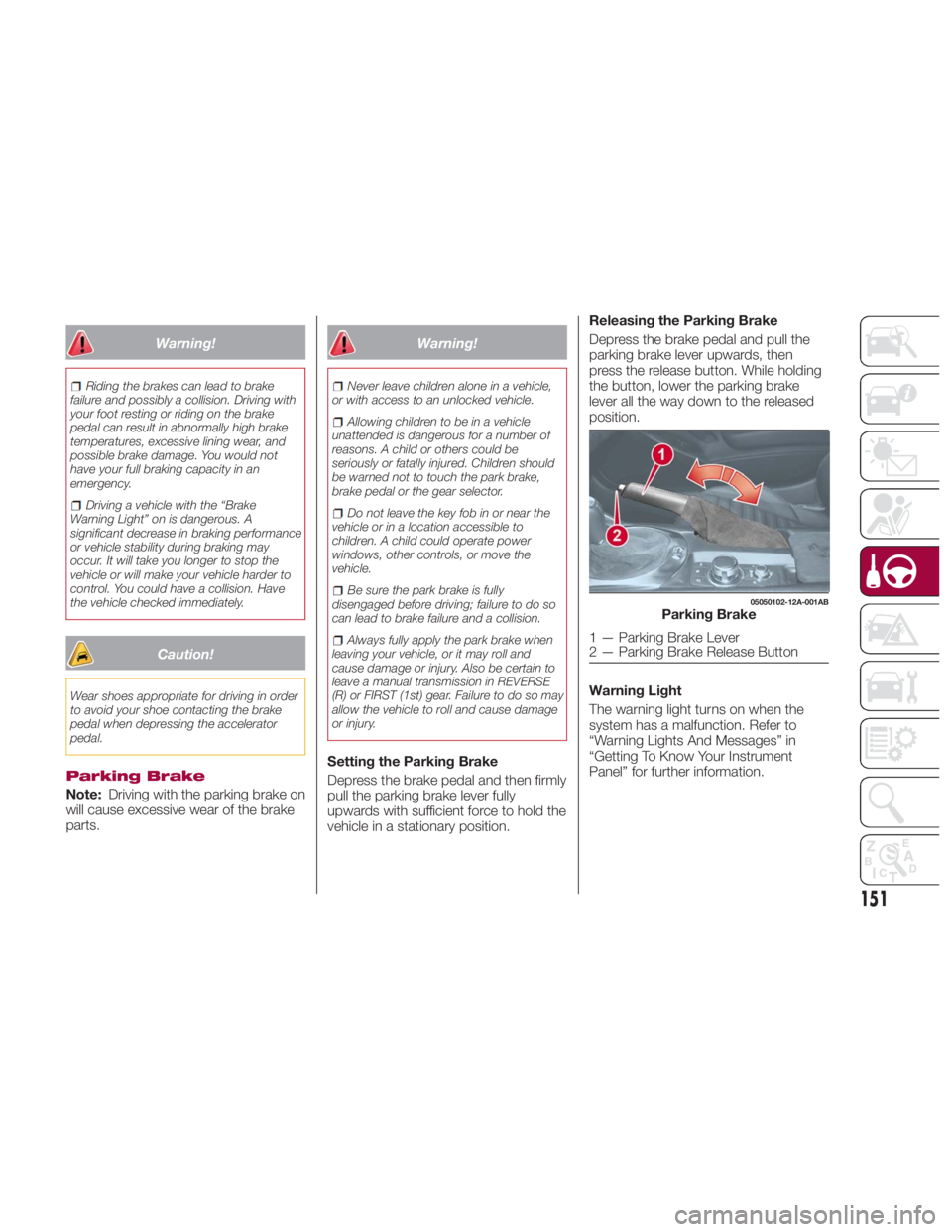
Setting the Parking Brake
Depress the brake pedal and then firmly
pull the parking brake lever fully
upwards with sufficient force to hold the
vehicle in a stationary position. Releasing the Parking Brake
Depress the brake pedal and pull the
parking brake lever upwards, then
press the release button. While holding
the button, lower the parking brake
lever all the way down to the released
position.
Warning Light
The warning light turns on when the
system has a malfunction. Refer to
“Warning Lights And Messages” in
“Getting To Know Your Instrument
Panel” for further information. 05050102-12A-001AB
Parking Brake
1 — Parking Brake Lever
2 — Parking Brake Release Button
151
Page 170 of 292
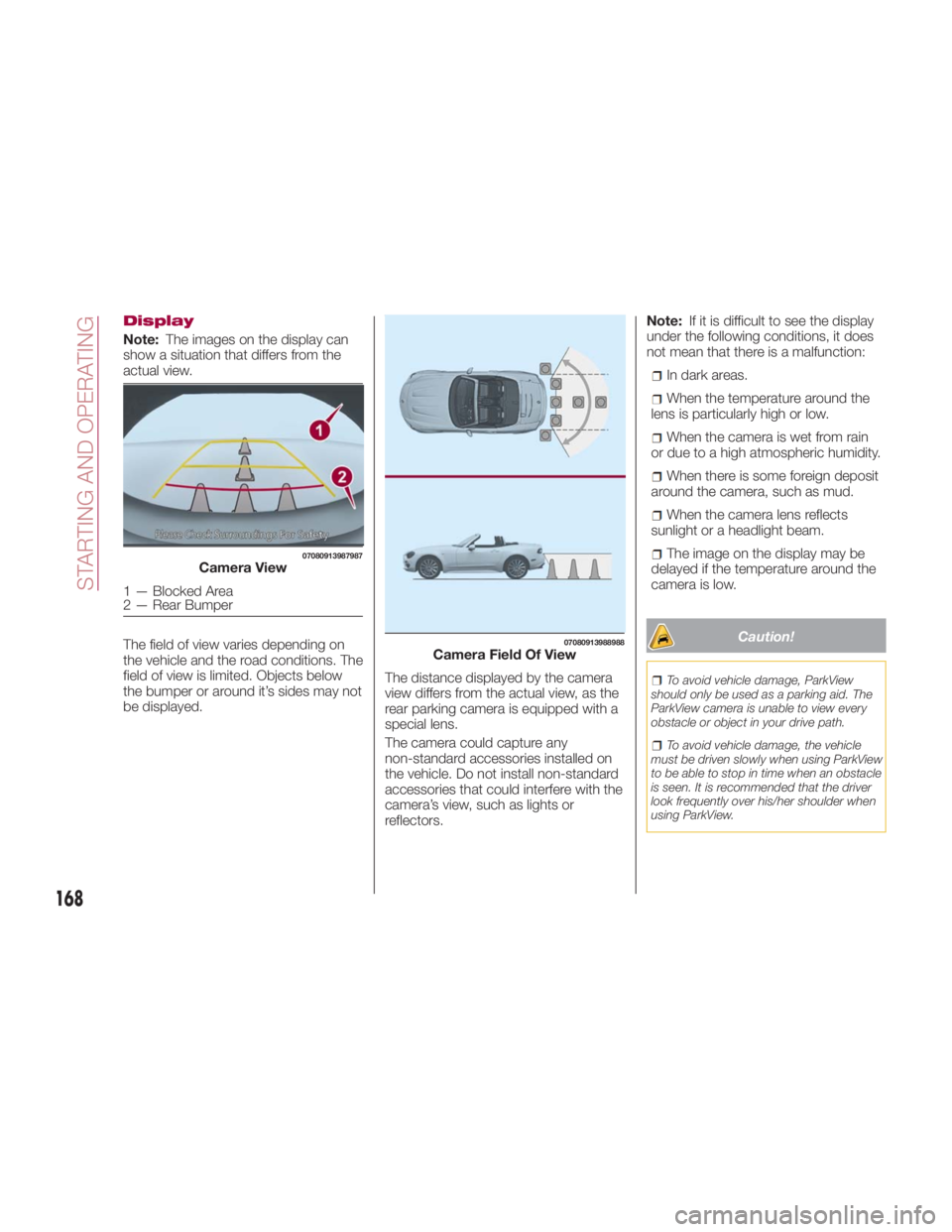
Display
Note: The images on the display can
show a situation that differs from the
actual view.
The field of view varies depending on
the vehicle and the road conditions. The
field of view is limited. Objects below
the bumper or around it’s sides may not
be displayed. The distance displayed by the camera
view differs from the actual view, as the
rear parking camera is equipped with a
special lens.
The camera could capture any
non-standard accessories installed on
the vehicle. Do not install non-standard
accessories that could interfere with the
camera’s view, such as lights or
reflectors. Note: If it is difficult to see the display
under the following conditions, it does
not mean that there is a malfunction:
In dark areas.
When the temperature around the
lens is particularly high or low.
When the camera is wet from rain
or due to a high atmospheric humidity.
When there is some foreign deposit
around the camera, such as mud.
When the camera lens reflects
sunlight or a headlight beam.
The image on the display may be
delayed if the temperature around the
camera is low.
Caution! To avoid vehicle damage, ParkView
should only be used as a parking aid. The
ParkView camera is unable to view every
obstacle or object in your drive path.
To avoid vehicle damage, the vehicle
must be driven slowly when using ParkView
to be able to stop in time when an obstacle
is seen. It is recommended that the driver
look frequently over his/her shoulder when
using ParkView.07080913987987
Camera View
1—BlockedArea
2 — Rear Bumper 07080913988988
Camera Field Of View
168
STARTING AND OPERATING
Page 185 of 292
IN CASE OF EMERGENCYHAZARD WARNING LIGHTS . . . .184
REPLACING A BULB ......... .184
REPLACING FUSES ......... .194
JACKING AND TIRE CHANGING . .203
TIRE SERVICE KIT .......... .208
JUMPSTARTING........... .217
IF YOUR ENGINE OVERHEATS . . .219
TOWINGTHEVEHICLE....... .220
EVENT DATA RECORDER (EDR) . .222
183
Page 186 of 292
HAZARD WARNING
LIGHTS Control
The Hazard Warning Lights should
always be used when you stop on or
near a roadway in an emergency.
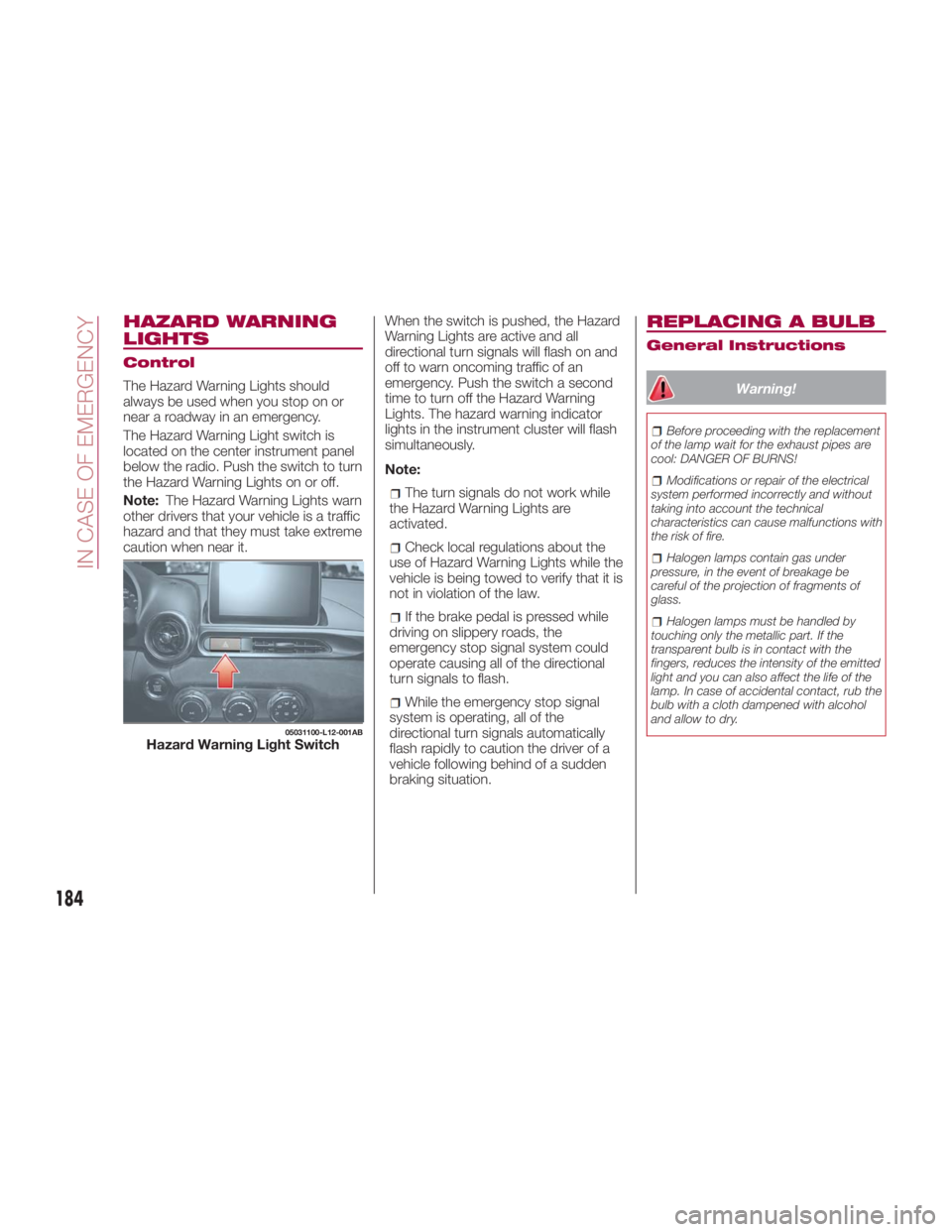
The Hazard Warning Light switch is
located on the center instrument panel
below the radio. Push the switch to turn
theHazardWarningLightsonoroff.
Note: The Hazard Warning Lights warn
other drivers that your vehicle is a traffic
hazard and that they must take extreme
caution when near it. When the switch is pushed, the Hazard
Warning Lights are active and all
directional turn signals will flash on and
off to warn oncoming traffic of an
emergency. Push the switch a second
time to turn off the Hazard Warning
Lights. The hazard warning indicator
lights in the instrument cluster will flash
simultaneously.
Note:
The turn signals do not work while
the Hazard Warning Lights are
activated.
Check local regulations about the
use of Hazard Warning Lights while the
vehicle is being towed to verify that it is
not in violation of the law.
If the brake pedal is pressed while
driving on slippery roads, the
emergency stop signal system could
operate causing all of the directional
turn signals to flash.
While the emergency stop signal
system is operating, all of the
directional turn signals automatically
flash rapidly to caution the driver of a
vehicle following behind of a sudden
braking situation. REPLACING A BULB General Instructions
Warning! Before proceeding with the replacement
of the lamp wait for the exhaust pipes are
cool: DANGER OF BURNS!
Modifications or repair of the electrical
system performed incorrectly and without
taking into account the technical
characteristics can cause malfunctions with
the risk of fire.
Halogen lamps contain gas under
pressure, in the event of breakage be
careful of the projection of fragments of
glass.
Halogen lamps must be handled by
touching only the metallic part. If the
transparent bulb is in contact with the
fingers, reduces the intensity of the emitted
light and you can also affect the life of the
lamp. In case of accidental contact, rub the
bulb with a cloth dampened with alcohol
and allow to dry.05031100-L12-001AB
Hazard Warning Light Switch
184
IN CASE OF EMERGENCY
Page 187 of 292
Before replacing a bulb check the
contacts for oxidation.
Replace blown bulbs with others of
the same type and power.
After replacing a headlight bulb,
always check its alignment.
To replace the bulb, contact your
authorized dealer.
When a light is not working, check
that the corresponding fuse is intact
before replacing the bulb. For the
location of fuses, refer to the section on
“Replacing Fuses” in this chapter.
Caution!Use the protective cover and carton for the
replacement bulb to dispose of the old bulb
promptly and out of the reach of children. Note:
When removing the lens or light unit
using a flathead screwdriver, make
sure that the flathead screwdriver does
not contact the interior terminal. If the
flathead screwdriver contacts the
terminal, a short circuit may occur.
When the weather is cold or damp
or after heavy rain or washing, the
surface of headlights or rear lights may
steam up and/or form drops of
condensation on the inside. This is a
natural phenomenon due to the
difference in temperature and humidity
between the inside and the outside of
the glass which does not indicate a
fault and does not compromise the
normal operation of lighting devices.
The mist disappears quickly when the
lights are turned on, starting from the
center of the diffuser, extending
progressively towards the edges.
185
Page 188 of 292
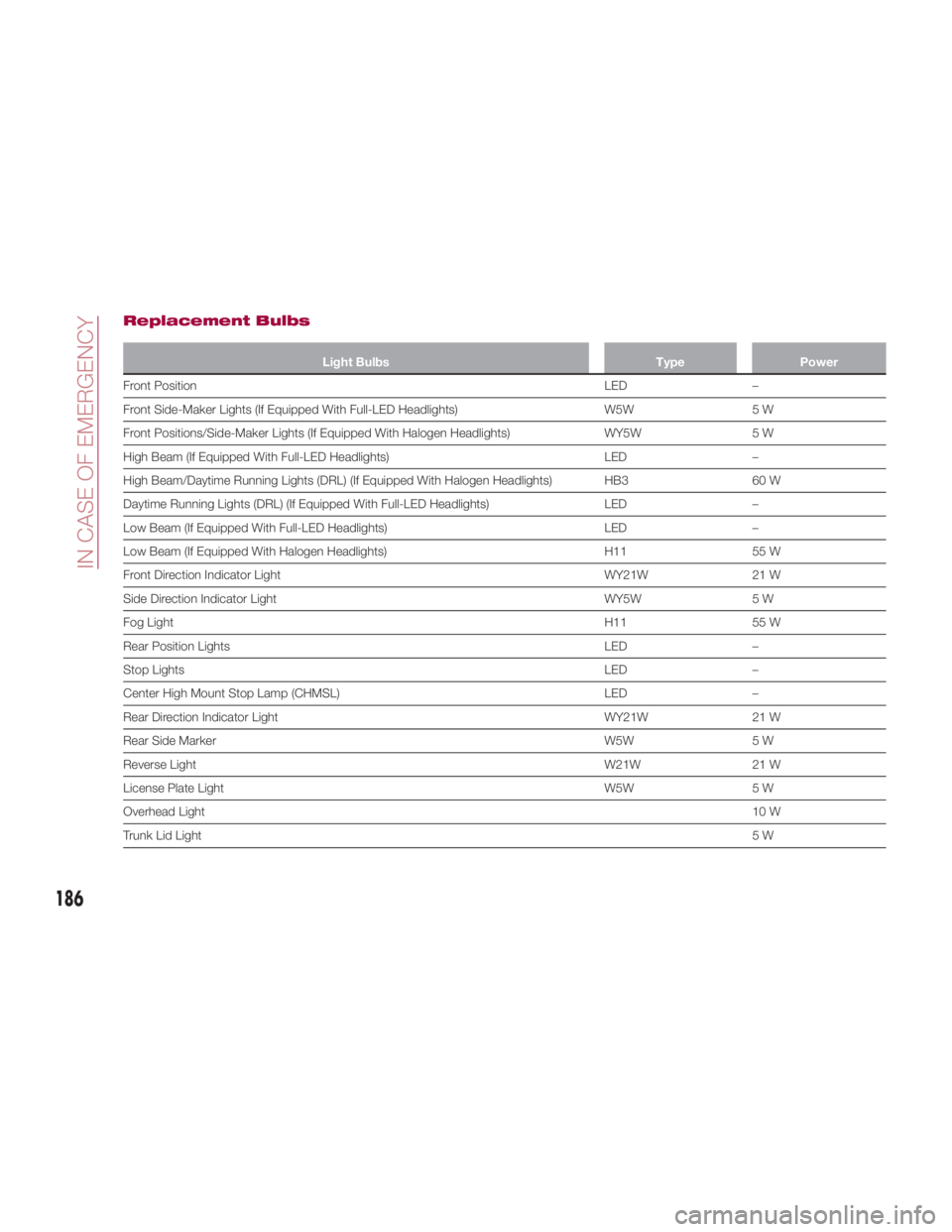
Replacement Bulbs Light Bulbs Type Power
Front Position LED –
Fr
ont Side-Maker Lights (If Equipped With Full-LED Headlights) W5W 5 W
Front Positions/Side-Maker Lights (If Equipped With Halogen Headlights) WY5W 5 W
High Beam (If Equipped With Full-LED Headlights) LED –
High Beam/Daytime Running Lights (DRL) (If Equipped With Halogen Headlights) HB3 60 W
Daytime Running Lights (DRL) (If Equipped With Full-LED Headlights) LED –
Low Beam (If Equipped With Full-LED Headlights) LED –
Low Beam (If Equipped With Halogen Headlights) H11 55 W
Front Direction Indicator Light WY21W 21 W
Side Direction Indicator Light WY5W 5 W
Fog Light H11 55 W
Rear Position Lights LED –
Stop Lights LED –
Center High Mount Stop Lamp (CHMSL) LED –
Rear Direction Indicator Light WY21W 21 W
Rear Side Marker W5W 5 W
Reverse Light W21W 21 W
License Plate Light W5W 5 W
Overhead Light 10 W
Trunk Lid Light 5W
186
IN CASE OF EMERGENCY
Page 189 of 292
Light Bulbs
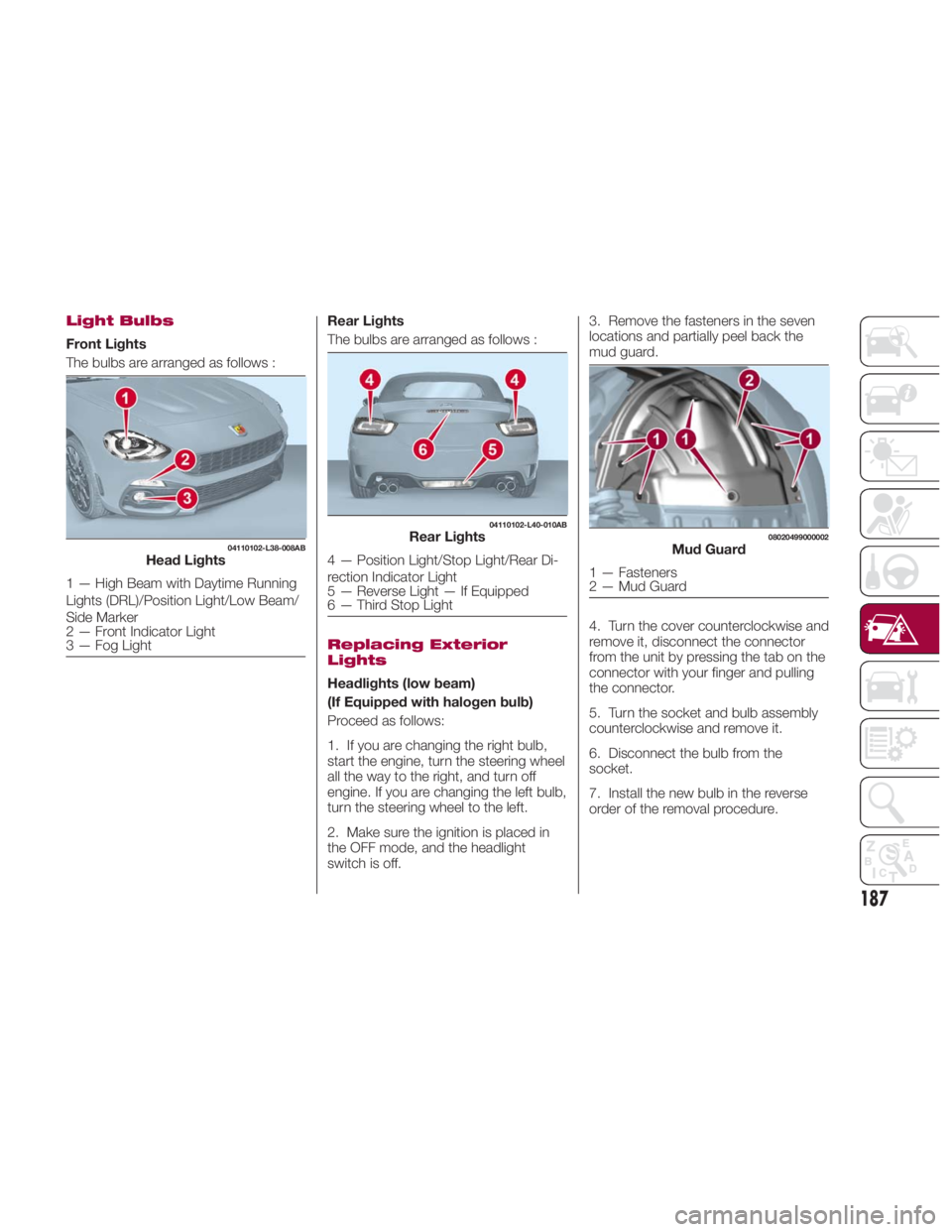
Front Lights
The bulbs are arranged as follows : Rear Lights
The bulbs are arranged as follows :
Replacing Exterior
Lights
Headlights (low beam)
(If Equipped with halogen bulb)
Proceed as follows:
1. If you are changing the right bulb,
start the engine, turn the steering wheel
all the way to the right, and turn off
engine. If you are changing the left bulb,
turn the steering wheel to the left.
2. Make sure the ignition is placed in
the OFF mode, and the headlight
switch is off. 3. Remove the fasteners in the seven
locations and partially peel back the
mud guard.
4. Turn the cover counterclockwise and
remove it, disconnect the connector
from the unit by pressing the tab on the
connector with your finger and pulling
the connector.
5. Turn the socket and bulb assembly
counterclockwise and remove it.
6. Disconnect the bulb from the
socket.
7. Install the new bulb in the reverse
order of the removal procedure.04110102-L38-008AB
Head Lights
1 — High Beam with Daytime Running
Lights (DRL)/Position Light/Low Beam/
Side Marker
2 — Front Indicator Light
3 — Fog Light 04110102-L40-010AB
Rear Lights
4 — Position Light/Stop Light/Rear Di-
rection Indicator Light
5 — Reverse Light — If Equipped
6 — Third Stop Light 08020499000002
Mud Guard
1 — Fasteners
2 — Mud Guard
187
Page 190 of 292
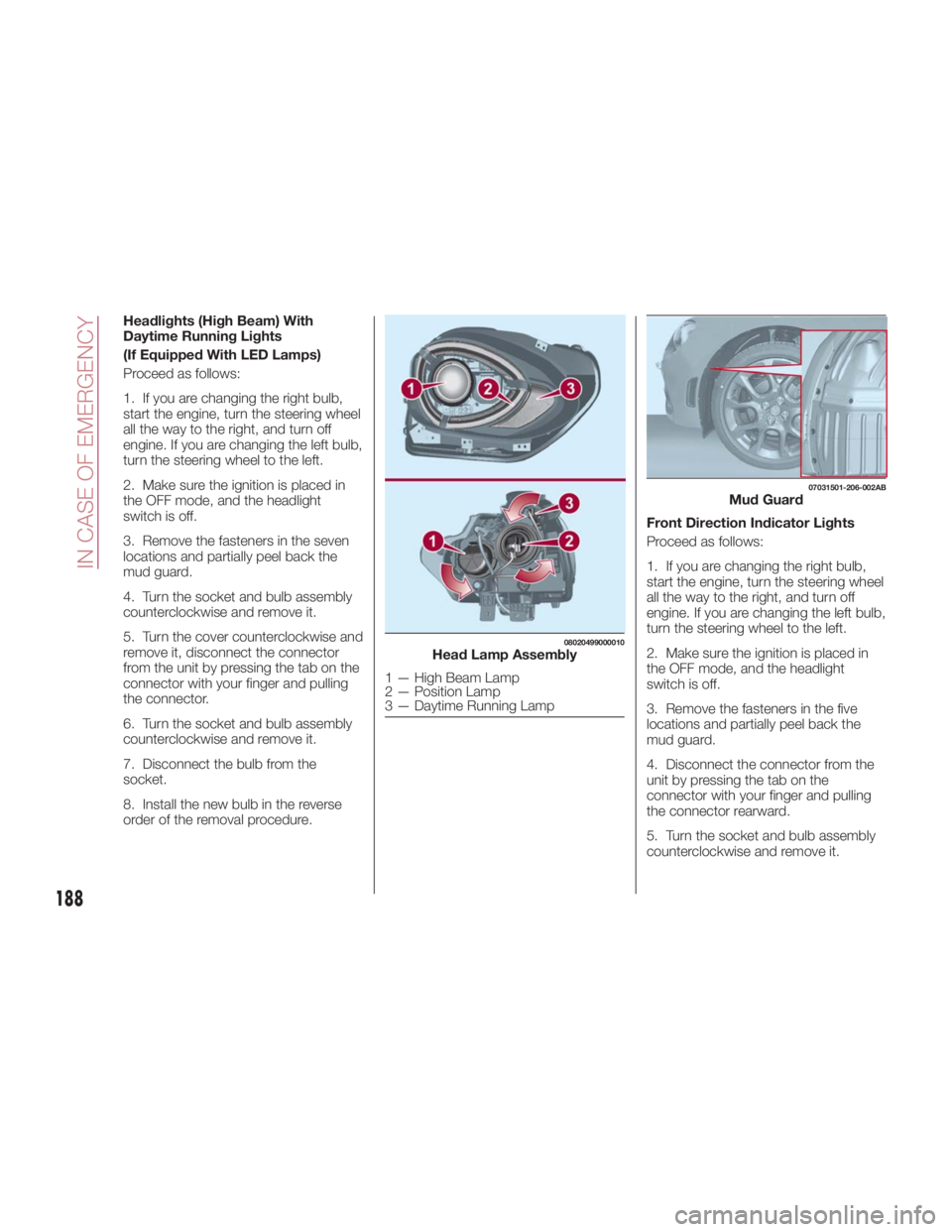
Headlights (High Beam) With
Daytime Running Lights
(If Equipped With LED Lamps)
Proceed as follows:
1. If you are changing the right bulb,
start the engine, turn the steering wheel
all the way to the right, and turn off
engine. If you are changing the left bulb,
turn the steering wheel to the left.
2. Make sure the ignition is placed in
the OFF mode, and the headlight
switch is off.
3. Remove the fasteners in the seven
locations and partially peel back the
mud guard.
4. Turn the socket and bulb assembly
counterclockwise and remove it.
5. Turn the cover counterclockwise and
remove it, disconnect the connector
from the unit by pressing the tab on the
connector with your finger and pulling
the connector.
6. Turn the socket and bulb assembly
counterclockwise and remove it.
7. Disconnect the bulb from the
socket.
8. Install the new bulb in the reverse
order of the removal procedure. Front Direction Indicator Lights
Proceed as follows:
1. If you are changing the right bulb,
start the engine, turn the steering wheel
all the way to the right, and turn off
engine. If you are changing the left bulb,
turn the steering wheel to the left.
2. Make sure the ignition is placed in
the OFF mode, and the headlight
switch is off.
3. Remove the fasteners in the five
locations and partially peel back the
mud guard.
4. Disconnect the connector from the
unit by pressing the tab on the
connector with your finger and pulling
the connector rearward.
5. Turn the socket and bulb assembly
counterclockwise and remove it. 08020499000010
Head Lamp Assembly
1 — High Beam Lamp
2 — Position Lamp
3 — Daytime Running Lamp 07031501-206-002AB
Mud Guard
188
IN CASE OF EMERGENCY
Page 191 of 292
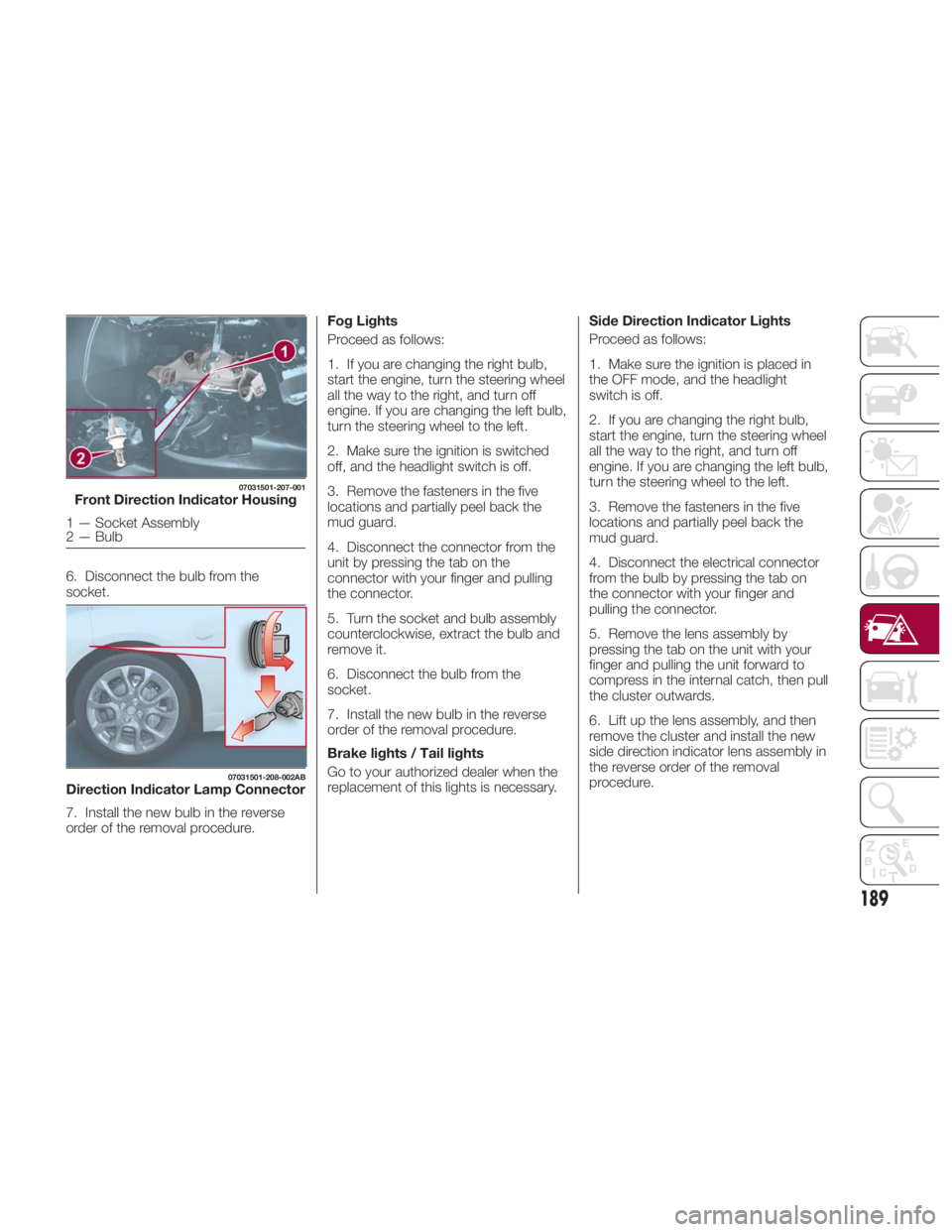
6. Disconnect the bulb from the
socket.
7. Install the new bulb in the reverse
order of the removal procedure. Fog Lights
Proceed as follows:
1. If you are changing the right bulb,
start the engine, turn the steering wheel
all the way to the right, and turn off
engine. If you are changing the left bulb,
turn the steering wheel to the left.
2. Make sure the ignition is switched
off, and the headlight switch is off.
3. Remove the fasteners in the five
locations and partially peel back the
mud guard.
4. Disconnect the connector from the
unit by pressing the tab on the
connector with your finger and pulling
the connector.
5. Turn the socket and bulb assembly
counterclockwise, extract the bulb and
remove it.
6. Disconnect the bulb from the
socket.
7. Install the new bulb in the reverse
order of the removal procedure.
Brake lights / Tail lights
Go to your authorized dealer when the
replacement of this lights is necessary. Side Direction Indicator Lights
Proceed as follows:
1. Make sure the ignition is placed in
the OFF mode, and the headlight
switch is off.
2. If you are changing the right bulb,
start the engine, turn the steering wheel
all the way to the right, and turn off
engine. If you are changing the left bulb,
turn the steering wheel to the left.
3. Remove the fasteners in the five
locations and partially peel back the
mud guard.
4. Disconnect the electrical connector
from the bulb by pressing the tab on
the connector with your finger and
pulling the connector.
5. Remove the lens assembly by
pressing the tab on the unit with your
finger and pulling the unit forward to
compress in the internal catch, then pull
the cluster outwards.
6. Lift up the lens assembly, and then
remove the cluster and install the new
side direction indicator lens assembly in
the reverse order of the removal
procedure.07031501-207-001
Front Direction Indicator Housing
1 — Socket Assembly
2 — Bulb 07031501-208-002AB
Direction Indicator Lamp Connector
189