change time FIAT TALENTO 2016 2.G Owners Manual
[x] Cancel search | Manufacturer: FIAT, Model Year: 2016, Model line: TALENTO, Model: FIAT TALENTO 2016 2.GPages: 232, PDF Size: 5.01 MB
Page 2 of 232

We really know your vehicle because we invented,
designed and built it: we really know every single detail. At Fiat Professional Service authorised workshops you can find technicians directly trained by us, offering quality and pr\
ofessionalism for all service operations.
Fiat Professional workshops are always close to you for the regular serv\
icing operations, season checks and practical recommendations by our experts.
With Fiat Professional Genuine Parts you keep the reliability, comfort a\
nd performance features of your new vehicle unchanged in time: that's why you bought it for.
Always ask for Genuine Parts for the components used on our vehicles; we\
recommend them because they come from our steady commitment in research and development of highly innovative t\
echnologies. For all these reasons: rely on Genuine Parts,
because they are the only ones designed by Fiat Professional for your ve\
hicle.
WHY CHOOSING GENUINE PARTS
SAFETY: BRAKING
SYSTEMENVIRONMENT: PARTICULATE FILTERS,
CLIMATE CONTROL SYSTEM MAINTENANCECOMFORT:
SUSPENSION AND WINDSCREEN WIPERSPERFORMANCE:
SPARK PLUGS, INJECTORS AND BATTERIESLINEACCESSORI:
ROOF RACK BARS, WHEEL RIMS
COP TALENTO LUM GB.qxp 29/04/16 12:11 Pagina 2
Page 6 of 232
WARNINGS AND PRECAUTIONS
While reading this Owner Handbook you will find a series ofWARNINGSto prevent procedures that could damage your
vehicle.
There are alsoPRECAUTIONSthat must be carefully followed to prevent incorrect use of the components of the vehicle,
which could cause accidents or injuries.
Therefore allWARNINGSandPRECAUTIONSmust always be carefully followed.
WARNINGSandPRECAUTIONSare recalled in the text with the following symbols:
personal safety;
vehicle integrity;
environmental protection.
NOTE These symbols, when necessary, are indicated besides the title or at the end of the line and are followed by a number.
That number recalls the corresponding warning at the end of the relevant section.
IMPORTANT
This Owner Handbook describes all Fiat Talento versions. Options, equipment dedicated to specific markets or
versions are not explicitly indicated in the text: as a consequence, you should only consider the information which
is related to the trim level, engine and version that you have purchased. Any content introduced throughout the
production of the model, outside the explicit request of options at the time of purchase, will be identified with the
wording (for versions/markets, where provided).
All data contained in this publication are intended to help you use your vehicle in the best possible way. FCA Italy
S.p.A. aims at a constant improvement of the vehicles produced. For this reason it reserves the right to make
changes to the model described for technical and/or commercial reasons.
For further information, contact a Fiat Dealership.
SYMBOLS
Some vehicle components have coloured labels whose symbols indicate precautions to be observed when using this
component. Under the bonnet there is also a label that summarises all the symbols.
4
Page 43 of 232
REAR LIGHT
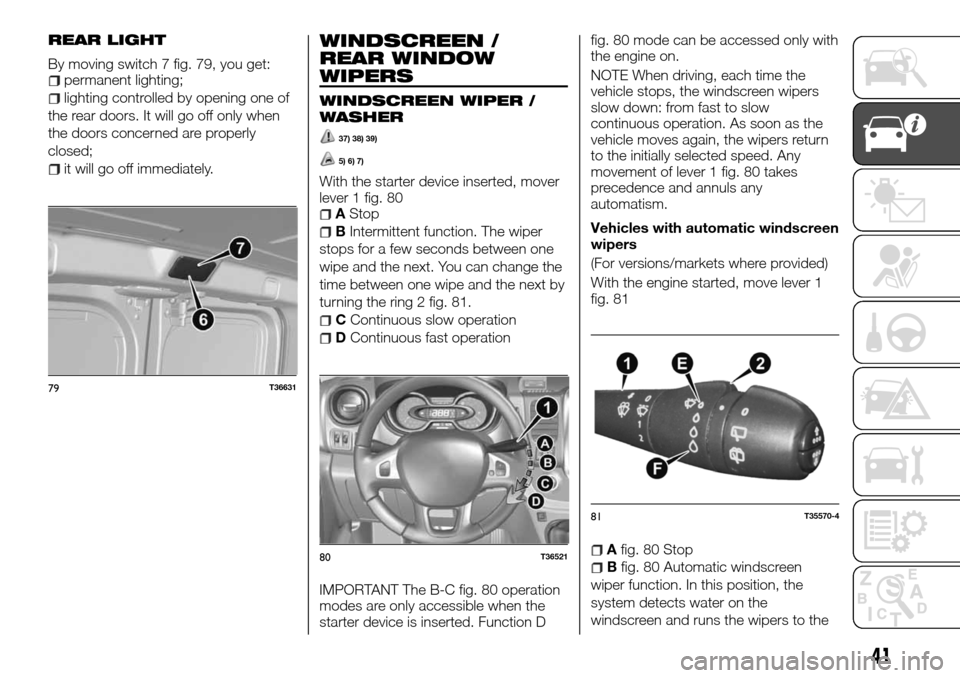
By moving switch 7 fig. 79, you get:permanent lighting;
lighting controlled by opening one of
the rear doors. It will go off only when
the doors concerned are properly
closed;
it will go off immediately.
WINDSCREEN /
REAR WINDOW
WIPERS
WINDSCREEN WIPER /
WASHER
37) 38) 39)
5) 6) 7)
With the starter device inserted, mover
lever 1 fig. 80
AStop
BIntermittent function. The wiper
stops for a few seconds between one
wipe and the next. You can change the
time between one wipe and the next by
turning the ring 2 fig. 81.
CContinuous slow operation
DContinuous fast operation
IMPORTANT The B-C fig. 80 operation
modes are only accessible when the
starter device is inserted. Function Dfig. 80 mode can be accessed only with
the engine on.
NOTE When driving, each time the
vehicle stops, the windscreen wipers
slow down: from fast to slow
continuous operation. As soon as the
vehicle moves again, the wipers return
to the initially selected speed. Any
movement of lever 1 fig. 80 takes
precedence and annuls any
automatism.
Vehicles with automatic windscreen
wipers
(For versions/markets where provided)
With the engine started, move lever 1
fig. 81
Afig. 80 Stop
Bfig. 80 Automatic windscreen
wiper function. In this position, the
system detects water on the
windscreen and runs the wipers to the
79T36631
80T36521
81T35570-4
41
Page 44 of 232
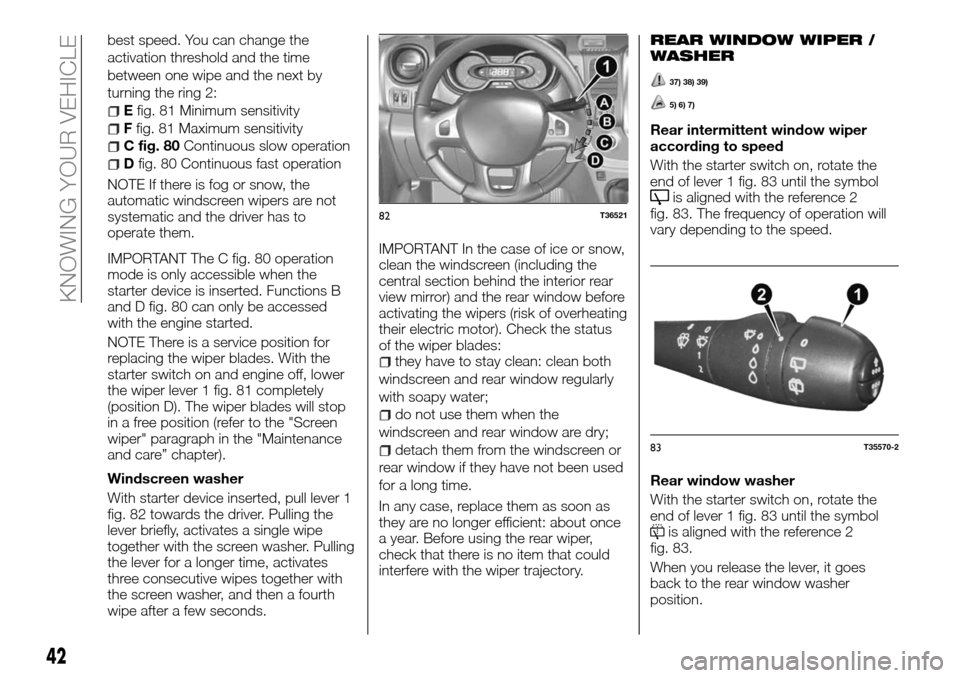
best speed. You can change the
activation threshold and the time
between one wipe and the next by
turning the ring 2:
Efig. 81 Minimum sensitivity
Ffig. 81 Maximum sensitivity
C fig. 80Continuous slow operation
Dfig. 80 Continuous fast operation
NOTE If there is fog or snow, the
automatic windscreen wipers are not
systematic and the driver has to
operate them.
IMPORTANT The C fig. 80 operation
mode is only accessible when the
starter device is inserted. Functions B
and D fig. 80 can only be accessed
with the engine started.
NOTE There is a service position for
replacing the wiper blades. With the
starter switch on and engine off, lower
the wiper lever 1 fig. 81 completely
(position D). The wiper blades will stop
in a free position (refer to the "Screen
wiper" paragraph in the "Maintenance
and care” chapter).
Windscreen washer
With starter device inserted, pull lever 1
fig. 82 towards the driver. Pulling the
lever briefly, activates a single wipe
together with the screen washer. Pulling
the lever for a longer time, activates
three consecutive wipes together with
the screen washer, and then a fourth
wipe after a few seconds.IMPORTANT In the case of ice or snow,
clean the windscreen (including the
central section behind the interior rear
view mirror) and the rear window before
activating the wipers (risk of overheating
their electric motor). Check the status
of the wiper blades:
they have to stay clean: clean both
windscreen and rear window regularly
with soapy water;
do not use them when the
windscreen and rear window are dry;
detach them from the windscreen or
rear window if they have not been used
for a long time.
In any case, replace them as soon as
they are no longer efficient: about once
a year. Before using the rear wiper,
check that there is no item that could
interfere with the wiper trajectory.
REAR WINDOW WIPER /
WASHER
37) 38) 39)
5) 6) 7)
Rear intermittent window wiper
according to speed
With the starter switch on, rotate the
end of lever 1 fig. 83 until the symbol
is aligned with the reference 2
fig. 83. The frequency of operation will
vary depending to the speed.
Rear window washer
With the starter switch on, rotate the
end of lever 1 fig. 83 until the symbol
is aligned with the reference 2
fig. 83.
When you release the lever, it goes
back to the rear window washer
position.
82T36521
83T35570-2
42
KNOWING YOUR VEHICLE
Page 90 of 232
CONTROL PANEL
AND ON-BOARD
INSTRUMENTS
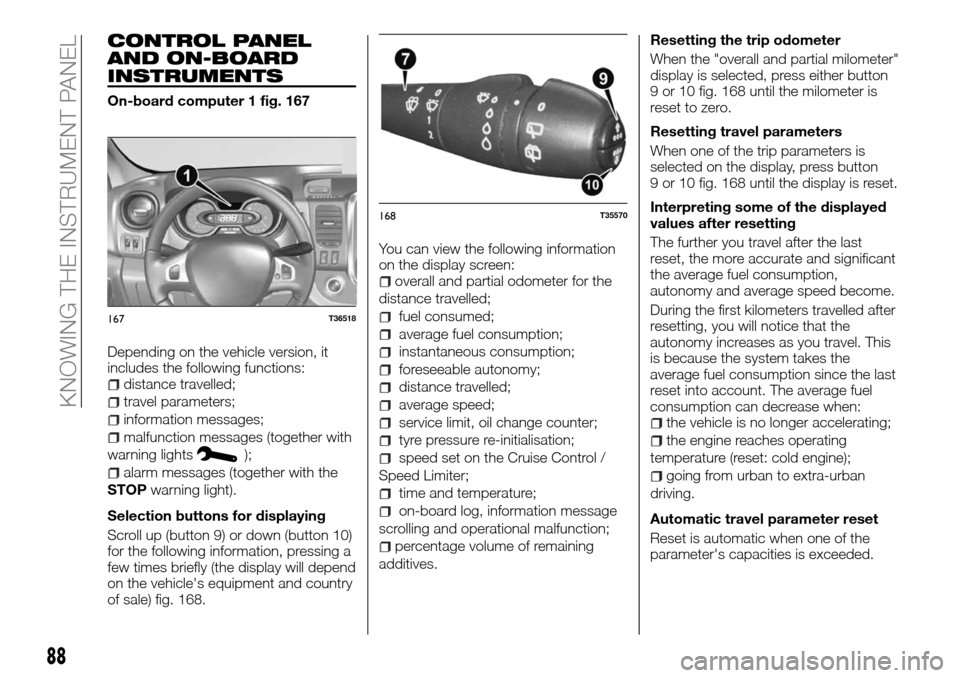
On-board computer 1 fig. 167
Depending on the vehicle version, it
includes the following functions:
distance travelled;
travel parameters;
information messages;
malfunction messages (together with
warning lights
);
alarm messages (together with the
STOPwarning light).
Selection buttons for displaying
Scroll up (button 9) or down (button 10)
for the following information, pressing a
few times briefly (the display will depend
on the vehicle's equipment and country
of sale) fig. 168.You can view the following information
on the display screen:
overall and partial odometer for the
distance travelled;
fuel consumed;
average fuel consumption;
instantaneous consumption;
foreseeable autonomy;
distance travelled;
average speed;
service limit, oil change counter;
tyre pressure re-initialisation;
speed set on the Cruise Control /
Speed Limiter;
time and temperature;
on-board log, information message
scrolling and operational malfunction;
percentage volume of remaining
additives.Resetting the trip odometer
When the "overall and partial milometer"
display is selected, press either button
9 or 10 fig. 168 until the milometer is
reset to zero.
Resetting travel parameters
When one of the trip parameters is
selected on the display, press button
9 or 10 fig. 168 until the display is reset.
Interpreting some of the displayed
values after resetting
The further you travel after the last
reset, the more accurate and significant
the average fuel consumption,
autonomy and average speed become.
During the first kilometers travelled after
resetting, you will notice that the
autonomy increases as you travel. This
is because the system takes the
average fuel consumption since the last
reset into account. The average fuel
consumption can decrease when:
the vehicle is no longer accelerating;
the engine reaches operating
temperature (reset: cold engine);
going from urban to extra-urban
driving.
Automatic travel parameter reset
Reset is automatic when one of the
parameter's capacities is exceeded.
167T36518
168T35570
88
KNOWING THE INSTRUMENT PANEL
Page 92 of 232
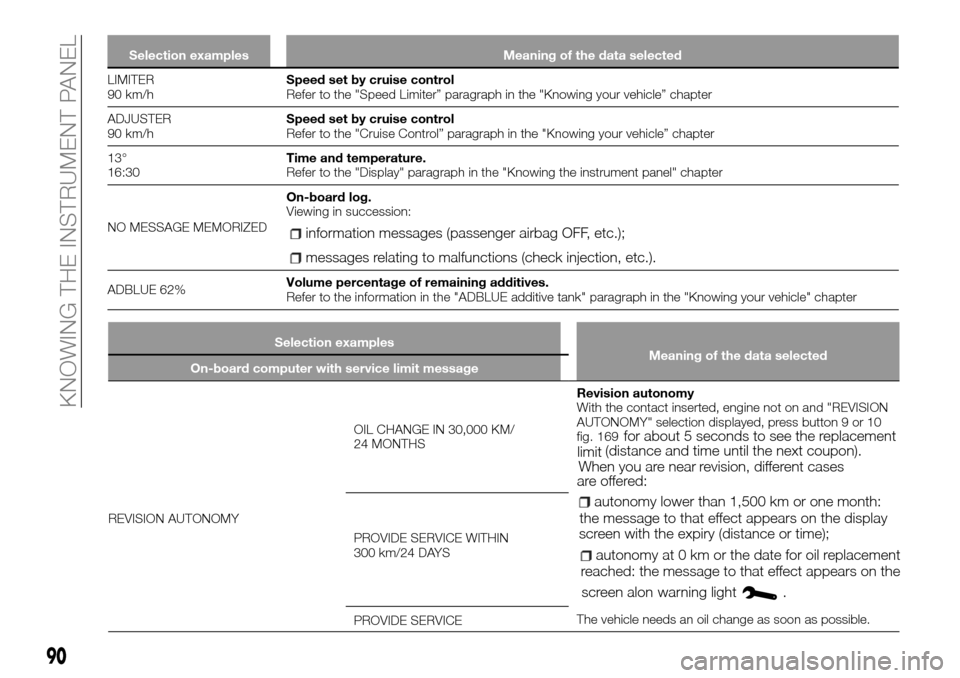
Selection examples Meaning of the data selected
LIMITER
90 km/hSpeed set by cruise control
Refer to the "Speed Limiter” paragraph in the "Knowing your vehicle” chapter
ADJUSTER
90 km/hSpeed set by cruise control
Refer to the "Cruise Control” paragraph in the "Knowing your vehicle” chapter
13°
16:30Time and temperature.
Refer to the "Display" paragraph in the "Knowing the instrument panel" chapter
NO MESSAGE MEMORIZEDOn-board log.
Viewing in succession:
information messages (passenger airbag OFF, etc.);
messages relating to malfunctions (check injection, etc.).
ADBLUE 62%Volume percentage of remaining additives.
Refer to the information in the "ADBLUE additive tank" paragraph in the "Knowing your vehicle" chapter
90
KNOWING THE INSTRUMENT PANEL
Selection examples
Meaning of the data selected
On-board computer with service limit message
REVISION AUTONOMYOIL CHANGE IN 30,000 KM/
24 MONTHSRevision autonomy
With the contact inserted, engine not on and "REVISION
AUTONOMY" selection displayed, press button 9 or 10
fig. 169
for about 5 seconds to see the replacement
limit(distance and time until the next coupon).
When you are nearrevision, different cases
are offered:
autonomy lower than 1,500 km or one month:
the message to that effect appears on the display
screen with theexpiry (distance or time);
autonomy at 0 km or the date for oil replacement
reached: the message to that effect appears on the
screen alonwarning light
.
The vehicle needs an oil change as soon as possible. PROVIDE SERVICE WITHIN
300 km/24 DAYS
PROVIDE SERVICE
Page 93 of 232
Selection examples
Meaning of the data selected
On-board computer with service limit message
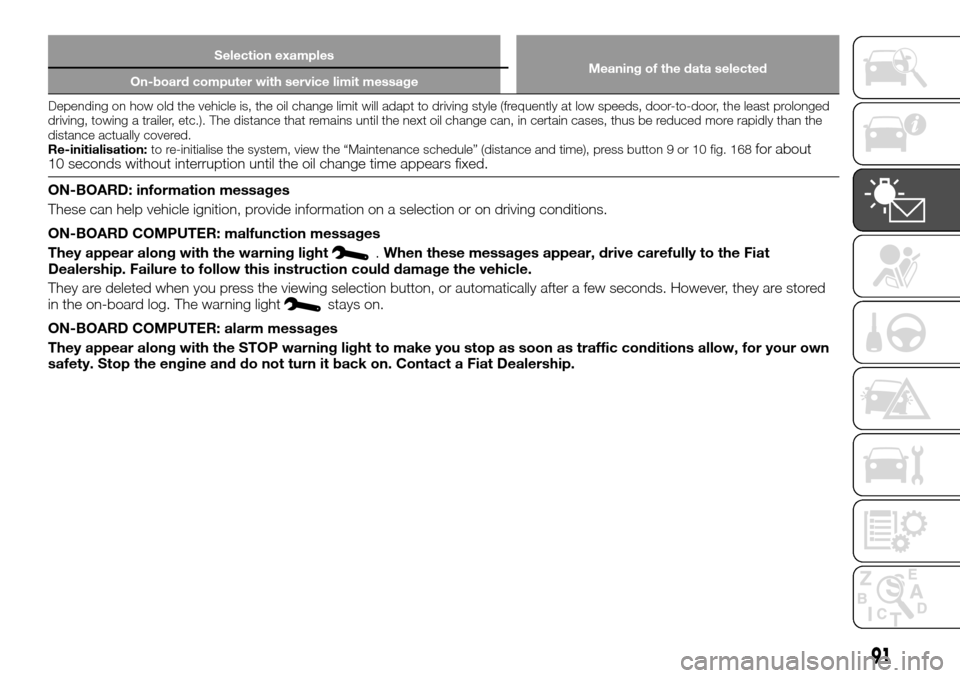
Depending on how old the vehicle is, the oil change limit will adapt to driving style (frequently at low speeds, door-to-door, the least prolonged
driving, towing a trailer, etc.). The distance that remains until the next oil change can, in certain cases, thus be reduced more rapidly than the
distance actually covered.
Re-initialisation:to re-initialise the system, view the “Maintenance schedule” (distance and time), press button 9 or 10 fig. 168
for about
10 seconds without interruption until the oil change time appears fixed.
ON-BOARD: information messages
These can help vehicle ignition, provide information on a selection or on driving conditions.
ON-BOARD COMPUTER: malfunction messages
They appear along with the warning light
.When these messages appear, drive carefully to the Fiat
Dealership. Failure to follow this instruction could damage the vehicle.
They are deleted when you press the viewing selection button, or automatically after a few seconds. However, they are stored
in the on-board log. The warning light
stays on.
ON-BOARD COMPUTER: alarm messages
They appear along with the STOP warning light to make you stop as soon as traffic conditions allow, for your own
safety. Stop the engine and do not turn it back on. Contact a Fiat Dealership.
91
Page 136 of 232
IMPORTANT
23)When the engine is stopped, never
leave the ignition device in the "M" position
to prevent useless current absorption from
draining the battery.
24)A quick burst on the accelerator before
turning off the engine serves absolutely no
practical purpose; it wastes fuel and is
especially damaging to turbocharged
engines.
USING THE
GEARBOX
144)
25)
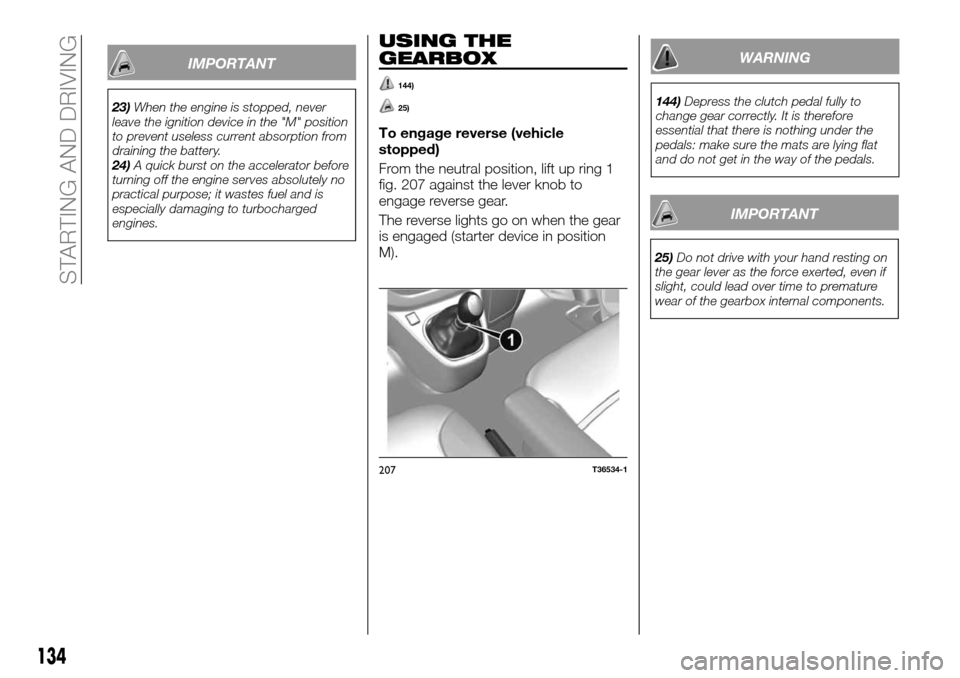
To engage reverse (vehicle
stopped)
From the neutral position, lift up ring 1
fig. 207 against the lever knob to
engage reverse gear.
The reverse lights go on when the gear
is engaged (starter device in position
M).
WARNING
144)Depress the clutch pedal fully to
change gear correctly. It is therefore
essential that there is nothing under the
pedals: make sure the mats are lying flat
and do not get in the way of the pedals.
IMPORTANT
25)Do not drive with your hand resting on
the gear lever as the force exerted, even if
slight, could lead over time to premature
wear of the gearbox internal components.
207T36534-1
134
STARTING AND DRIVING
Page 141 of 232
SUGGESTIONS FOR
DRIVING
SAVING FUEL
Fuel consumption is approved in
compliance with a standard and
regulated method that is identical for all
manufacturers, allowing vehicles to be
compared with each other. The real fuel
consumption depends on the vehicle's
usage, equipment and driving style.
Depending on the vehicle, you can have
different functions available that let you
reduce your fuel consumption:
gear change indicator;
driving style indicator;
route summary and ecological advice
through a multi-media display panel;
the ECOMODE function that can be
activated by the ECO button.If the vehicle has one, the navigation
system completes this information.
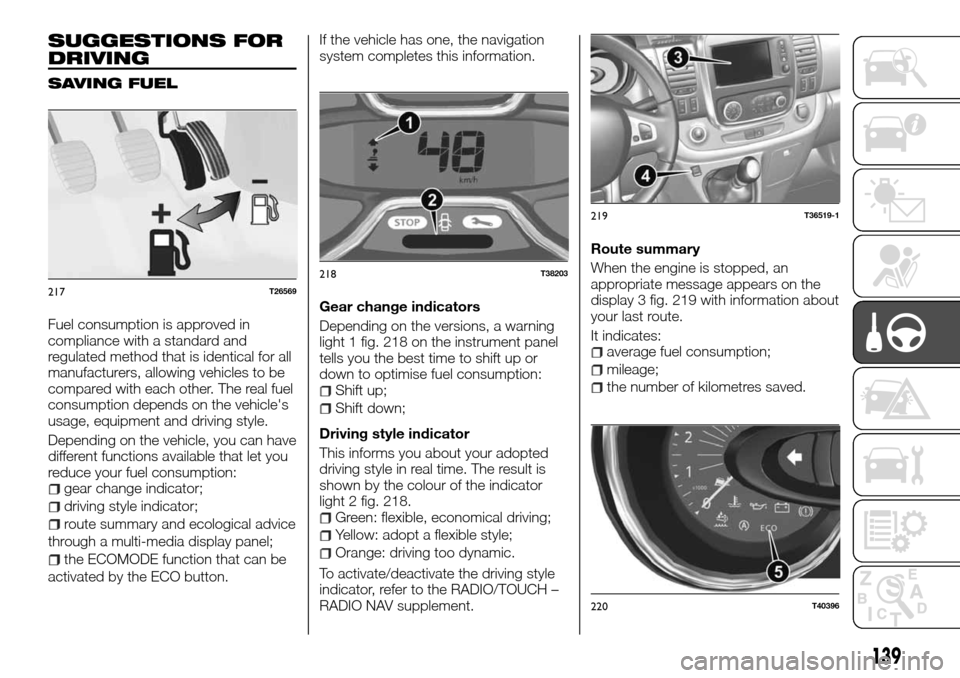
Gear change indicators
Depending on the versions, a warning
light 1 fig. 218 on the instrument panel
tells you the best time to shift up or
down to optimise fuel consumption:
Shift up;
Shift down;
Driving style indicator
This informs you about your adopted
driving style in real time. The result is
shown by the colour of the indicator
light 2 fig. 218.
Green: flexible, economical driving;
Yellow: adopt a flexible style;
Orange: driving too dynamic.
To activate/deactivate the driving style
indicator, refer to the RADIO/TOUCH –
RADIO NAV supplement.Route summary
When the engine is stopped, an
appropriate message appears on the
display 3 fig. 219 with information about
your last route.
It indicates:
average fuel consumption;
mileage;
the number of kilometres saved.
217T26569
218T38203
219T36519-1
220T40396
139
Page 172 of 232
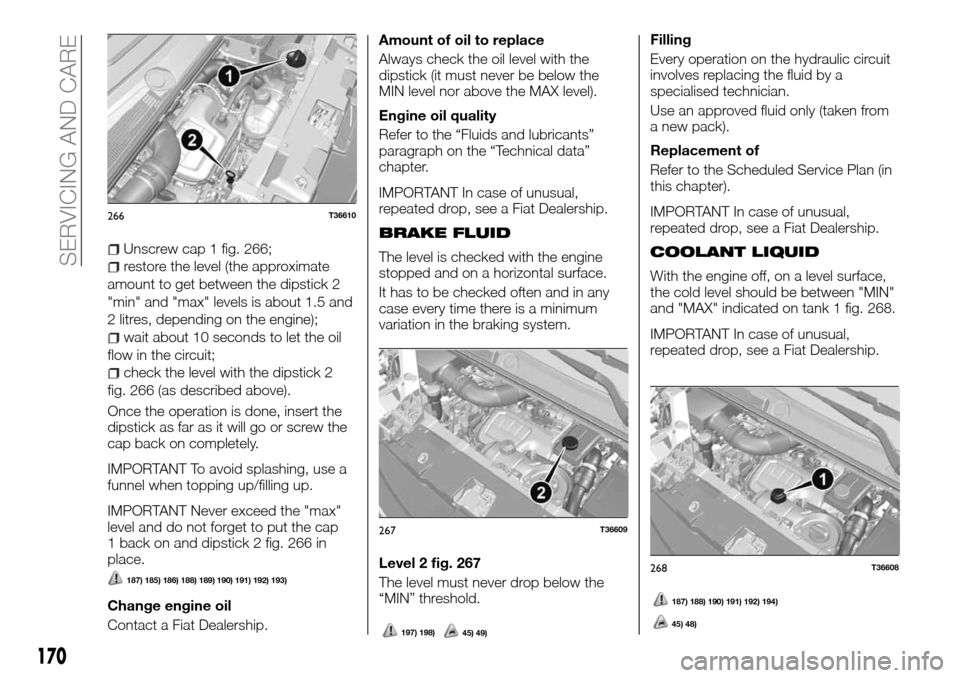
Unscrew cap 1 fig. 266;
restore the level (the approximate
amount to get between the dipstick 2
"min" and "max" levels is about 1.5 and
2 litres, depending on the engine);
wait about 10 seconds to let the oil
flow in the circuit;
check the level with the dipstick 2
fig. 266 (as described above).
Once the operation is done, insert the
dipstick as far as it will go or screw the
cap back on completely.
IMPORTANT To avoid splashing, use a
funnel when topping up/filling up.
IMPORTANT Never exceed the "max"
level and do not forget to put the cap
1 back on and dipstick 2 fig. 266 in
place.
187) 185) 186) 188) 189) 190) 191) 192) 193)
Change engine oil
Contact a Fiat Dealership.Amount of oil to replace
Always check the oil level with the
dipstick (it must never be below the
MIN level nor above the MAX level).
Engine oil quality
Refer to the “Fluids and lubricants”
paragraph on the “Technical data”
chapter.
IMPORTANT In case of unusual,
repeated drop, see a Fiat Dealership.
BRAKE FLUID
The level is checked with the engine
stopped and on a horizontal surface.
It has to be checked often and in any
case every time there is a minimum
variation in the braking system.
Level 2 fig. 267
The level must never drop below the
“MIN” threshold.
197) 198)45) 49)
Filling
Every operation on the hydraulic circuit
involves replacing the fluid by a
specialised technician.
Use an approved fluid only (taken from
a new pack).
Replacement of
Refer to the Scheduled Service Plan (in
this chapter).
IMPORTANT In case of unusual,
repeated drop, see a Fiat Dealership.
COOLANT LIQUID
With the engine off, on a level surface,
the cold level should be between "MIN"
and "MAX" indicated on tank 1 fig. 268.
IMPORTANT In case of unusual,
repeated drop, see a Fiat Dealership.
266T36610
267T36609
268T36608
170
SERVICING AND CARE
187) 188) 190) 191) 192) 194)
45) 48)