Menu FIAT TIPO 4DOORS 2016 1.G User Guide
[x] Cancel search | Manufacturer: FIAT, Model Year: 2016, Model line: TIPO 4DOORS, Model: FIAT TIPO 4DOORS 2016 1.GPages: 204, PDF Size: 4.94 MB
Page 43 of 204
some Menu items are shown and
managed on the display of the latter
and not on the instrument panel display
(refer to the dedicated Multimedia
chapter or to the supplement available
online).TRIP COMPUTER
The "Trip computer" is used to display
information on vehicle operation when
the ignition device is at MAR.
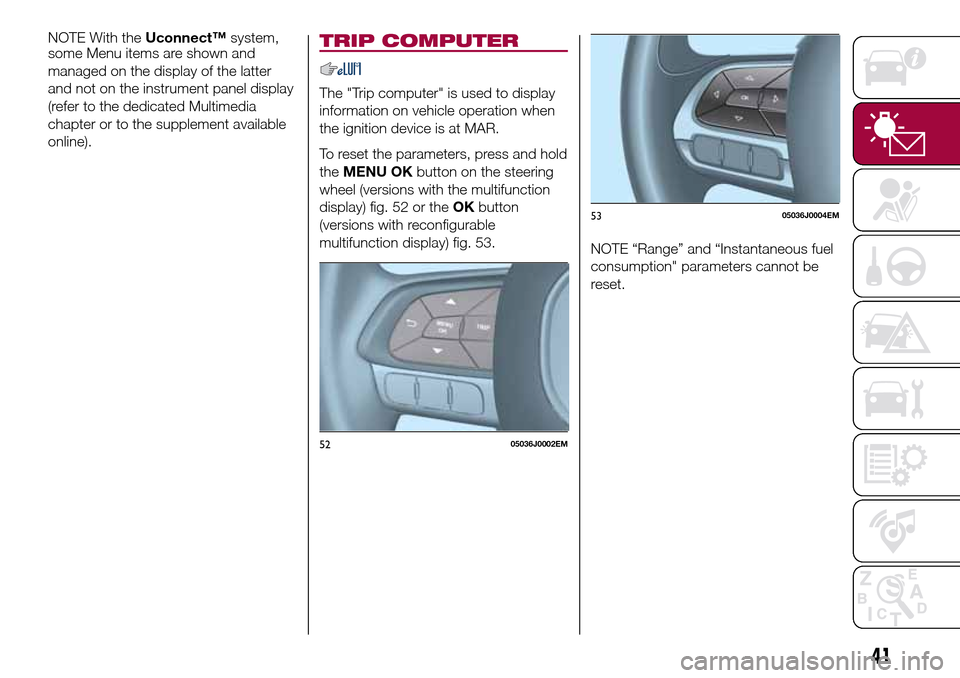
To reset the parameters, press and hold
theMENU OKbutton on the steering
wheel (versions with the multifunction
display) fig. 52 or theOKbutton
(versions with reconfigurable
multifunction display) fig. 53.
NOTE “Range” and “Instantaneous fuel
consumption" parameters cannot be
reset.
5205036J0002EM
5305036J0004EM
41
NOTE With theUconnect™system,
Page 57 of 204
Symbol What it means
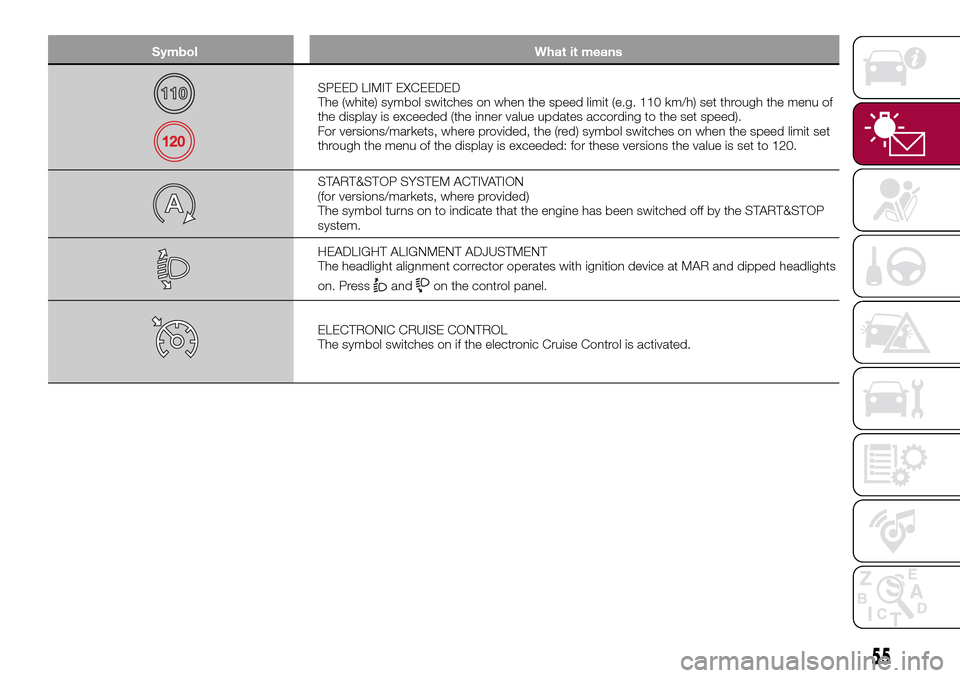
SPEED LIMIT EXCEEDED
The (white) symbol switches on when the speed limit (e.g. 110 km/h) set through the menu of
the display is exceeded (the inner value updates according to the set speed).
For versions/markets, where provided, the (red) symbol switches on when the speed limit set
through the menu of the display is exceeded: for these versions the value is set to 120.
START&STOP SYSTEM ACTIVATION
(for versions/markets, where provided)
The symbol turns on to indicate that the engine has been switched off by the START&STOP
system.
HEADLIGHT ALIGNMENT ADJUSTMENT
The headlight alignment corrector operates with ignition device at MAR and dipped headlights
on. Press
andon the control panel.
ELECTRONIC CRUISE CONTROL
The symbol switches on if the electronic Cruise Control is activated.
55
Page 66 of 204
63)Remember that, in the event of an
accident, the rear seat passengers not
wearing seat belts are exposed to a very
serious risk and also represent a serious
danger for the front seat occupants.
64)Make height adjustment of the seat
belts when the car is stationary.
65)After the height adjustment, always
check that the grip is locked in one of the
preset positions. To do this, with buttons 1
released, exert further pressure
downwards to allow the locking device to
click if the grip has not been released in
one of the possible positions.SBR (SEAT BELT
REMINDER) SYSTEM
(for versions/markets, where provided)
The SBR system informs the driver that
his/her safety belt is not fastened.
The system signals unfastened seat
belts with visual warnings ( warning light
on in the instrument panel) and an
acoustic signal (see the following
paragraphs).
NOTE To deactivate the acoustic
warning permanently go to a Fiat
Dealership. The acoustic warning can
be reactivated at any time through the
display Menu (see the "Display"
paragraph in the “Knowing the
instrument panel” chapter).
FRONT SEAT BELT
WARNING LIGHT
BEHAVIOUR
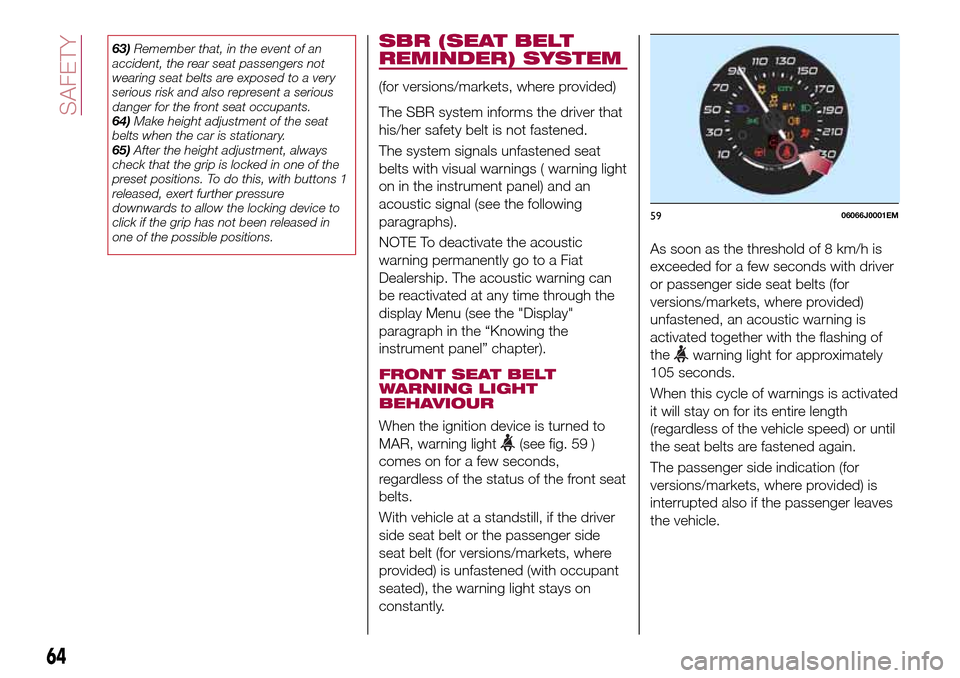
When the ignition device is turned to
MAR, warning light
(see fig. 59 )
comes on for a few seconds,
regardless of the status of the front seat
belts.
With vehicle at a standstill, if the driver
side seat belt or the passenger side
seat belt (for versions/markets, where
provided) is unfastened (with occupant
seated), the warning light stays on
constantly.As soon as the threshold of 8 km/h is
exceeded for a few seconds with driver
or passenger side seat belts (for
versions/markets, where provided)
unfastened, an acoustic warning is
activated together with the flashing of
the
warning light for approximately
105 seconds.
When this cycle of warnings is activated
it will stay on for its entire length
(regardless of the vehicle speed) or until
the seat belts are fastened again.
The passenger side indication (for
versions/markets, where provided) is
interrupted also if the passenger leaves
the vehicle.
5906066J0001EM
64
SAFETY
Page 78 of 204
Main recommendations to carry
children safely
Install the child restraint systems on
the rear seat, which is the most
protected position in the event of an
impact.
Keep children in rearward facing child
restraint systems for as long as
possible, until 3–4 years old if possible.
If the passenger's front airbag is
deactivated always check the
dedicated warning light on the trim
located on the dashboard to make sure
that it has actually been deactivated.
Carefully follow the instructions
supplied with the child restraint system.
Keep the instructions in the vehicle
along with the other documents and
this handbook. Do not use
second-hand child restraint systems
without instructions.
Only one child is to be strapped into
each restraint system; never carry two
children using one child restraint
system.
Always check that the seat belts do
not rest on the child’s neck.
Always check that the seat belt is
well fastened by pulling on it.
While travelling, do not let the child
sit incorrectly or unfasten the belts.
Never allow a child to put the belt's
diagonal section under an arm or
behind their back.
Never carry children on your lap,
even newborns. No one can hold a
child in the case of an accident.
In the event of an accident, replace
the child restraint system with a new
one. In addition, and depending on the
type of child restraint system installed,
replace the seat belt with which the
child restraint system was connected.
WARNING
70)SEVERE DANGER When a front
passenger airbag is fitted, do not install
rearward facing child restraint systems on
the front passenger seat. Deployment of
the airbag in an accident could cause fatal
injuries to the child regardless of the
severity of the collision. It is advisable to
always carry children in a child restraint
system on the rear seat, which is the most
protected position in the event of a
collision.
71)On the sun visor there is a label with
suitable symbols reminding the user that it
is compulsory to deactivate the airbag if a
rearward facing child restraint system is
fitted. Always comply with the instructions
on the passenger side sun visor (see the
"Supplementary Restraint System (SRS) -
Airbag" paragraph).72)Should it be necessary to carry a child
on the passenger side front seat in a rear
facing child restraint system, the passenger
side front airbag and side bag must be
deactivated through the Connect system
main menu (see the "Supplementary
Restraint System (SRS) - Airbag"
paragraph), verifying deactivation by
checking whether the
LED has
illuminated on the front ceiling light. Move
the passenger's seat as far back as
possible to avoid contact between the
child seat and the dashboard.
73)Do not move the front or rear seat if a
child is seated on it or on the dedicated
child restraint system
74)Incorrect fitting of the child restraint
system may result in an inefficient
protection system. In the event of an
accident the child restraint system may
become loose and the child may be
injured, even fatally. When fitting a restraint
system for newborns or children, strictly
comply with the instructions provided by
the Manufacturer.
75)When the child restraint system is not
used, secure it with the seat belt or with
the ISOFIX anchorages, or remove it from
the vehicle. Do not leave it unsecured
inside the passenger compartment. In this
way, in the case of sudden braking or an
accident, it will not cause injuries to the
occupants.
76)After installing a child restraint system,
do not move the seat: always remove the
child restraint system before making any
adjustment.
76
SAFETY
Page 80 of 204
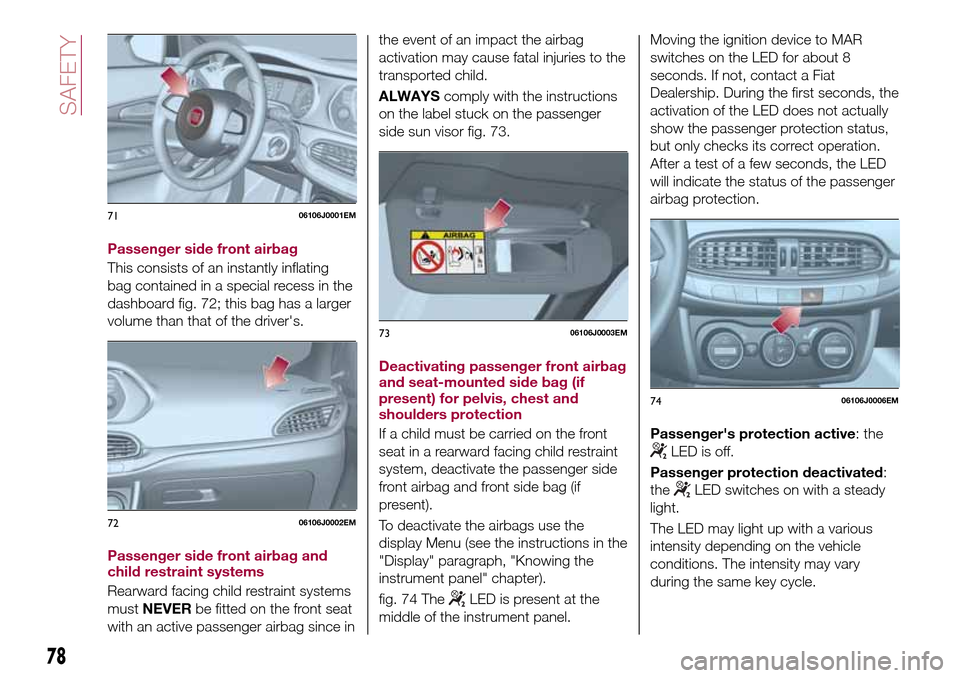
Passenger side front airbag
This consists of an instantly inflating
bag contained in a special recess in the
dashboard fig. 72; this bag has a larger
volume than that of the driver's.
Passenger side front airbag and
child restraint systems
Rearward facing child restraint systems
mustNEVERbe fitted on the front seat
with an active passenger airbag since inthe event of an impact the airbag
activation may cause fatal injuries to the
transported child.
ALWAYScomply with the instructions
on the label stuck on the passenger
side sun visor fig. 73.
Deactivating passenger front airbag
and seat-mounted side bag (if
present) for pelvis, chest and
shoulders protection
If a child must be carried on the front
seat in a rearward facing child restraint
system, deactivate the passenger side
front airbag and front side bag (if
present).
To deactivate the airbags use the
display Menu (see the instructions in the
"Display" paragraph, "Knowing the
instrument panel" chapter).
fig. 74 The
LED is present at the
middle of the instrument panel.Moving the ignition device to MAR
switches on the LED for about 8
seconds. If not, contact a Fiat
Dealership. During the first seconds, the
activation of the LED does not actually
show the passenger protection status,
but only checks its correct operation.
After a test of a few seconds, the LED
will indicate the status of the passenger
airbag protection.
Passenger's protection active: the
LED is off.
Passenger protection deactivated:
the
LED switches on with a steady
light.
The LED may light up with a various
intensity depending on the vehicle
conditions. The intensity may vary
during the same key cycle.
7106106J0001EM
7206106J0002EM
7306106J0003EM
7406106J0006EM
78
SAFETY
Page 83 of 204
84)Always drive with your hands on the
rim of the steering wheel so that the airbag
can inflate freely if required. Do not drive
with your body bent forward. Keep your
back straight against the backrest.
85)When there is an active passenger
airbag, DO NOT install rearward facing
child restraint systems on the front seat.
Deployment of the airbag in an accident
could cause fatal injuries to the child
regardless of the severity of the impact.
Therefore, always deactivate the passenger
side airbag when a rearward facing child
restraint system is installed on the front
passenger seat. The front passenger seat
must also be positioned back as far as
possible in order to prevent the child
restraint system from coming into contact
with the dashboard. Immediately reactivate
the passenger airbag as soon as the child
restraint system has been removed.
86)To deactivate the airbags using the
instrument panel menu, see the description
in the "Knowing the instrument panel"
chapter, "Menu Options" paragraph.
87)Do not affix rigid objects to the
garment hooks or support handles.
88)Do not rest your head, arms or elbows
on the door, windows or the area in which
the Window bag is located to avoid
possible injury during airbag inflation.
89)Never lean your head, arms or elbows
out of the window.90)If, when the ignition device is turned to
MAR, thewarning light does not switch
on or stays on whilst driving, a fault may
have occurred in the restraint systems. In
this case the airbags or pretensioners may
not be deployed in an impact or, in a lower
number of cases, they may be deployed
accidentally. Contact a Fiat Dealership
immediately to have the system checked.
91)In some versions, in case of a LED
failure (located on the plate of the
instrument panel), thewarning light on
the instrument panel turns on and the
passenger side airbags are deactivated.
92)On cars with side bags, do not cover
the front seat backrests with extra covers.
93)Do not travel carrying objects in your
lap, in front of your chest or between your
lips (pipe, pencils, etc.): they could cause
severe injury if the airbag is deployed.
94)If the car has been stolen or in the case
of attempt to steal it, if it has been
subjected to vandalism or floods, have the
airbag system checked by a Fiat
Dealership.95)If the ignition device is at MAR, even if
the engine is switched off, airbags may be
deployed when the vehicle is stationary
and hit by another vehicle. Therefore, even
if the vehicle is stationary, when an active
front passenger airbag is fitted, DO NOT
install rearward facing child restraint
systems on the front passenger seat.
Deployment of the airbag following an
impact could cause fatal injuries to the
child. Therefore, always deactivate the
passenger side airbag when a rearward
facing child restraint system is installed on
the front passenger seat. The front
passenger seat must also be positioned
back as far as possible in order to prevent
the child restraint system from coming into
contact with the dashboard. Immediately
reactivate the passenger airbag as soon as
the child restraint system has been
removed. Also remember that, if the
ignition device is set to STOP, none of the
safety devices (airbags or pretensioners)
will be deployed in the event of collision.
Non-deployment in such cases does not
indicate a system malfunction.
96)Malfunction of the
warning light is
indicated by the activation of an airbag
failure icon and a dedicated message on
the instrument panel display (or, for
versions where provided, by the activation
of a blinking generic failure warning light).
The pyrotechnic charges are not disabled.
Contact a Fiat Dealership immediately to
have the system checked.
97)The airbag deployment threshold is
higher than that of the pretensioners. For
collisions in the range between the two
thresholds, it is normal for only the
pretensioners to be activated.
81
Page 94 of 204
distance from the obstacle behind the
vehicle decreases, the frequency of the
acoustic signal increases.
Acoustic signal
When reverse is engaged and there is
an obstacle behind the vehicle, an
acoustic signal is activated and the
signal varies as the distance of the
obstacle from the bumper varies.
The frequency of the acoustic signal:
increases as the distance between
the vehicle and the obstacle decreases;
becomes continuous when the
distance separating the vehicle from the
obstacle is less than about 30 cm;
is constant if the distance between
the vehicle and the obstacle is
unchanged. If this situation concerns
the side sensors, the signal will stop
after approximately 3 seconds to avoid,
for example, indications in the event of
manoeuvres along a wall.
stops immediately if the distance of
the obstacle increases.
When the system emits the acoustic
signal, the volume of theUconnect™
system (where provided) is
automatically lowered.
Detection distances
If several obstacles are detected by the
sensors, only the nearest one is
considered.Signals on the reconfigurable
multifunction display
The indications regarding the Park
Assist system are shown only on the
reconfigurable multifunction display and
only if the "Acoustic signal and display"
item in the "Settings" menu of the
Uconnect™system (where provided)
was previously selected (for more
information, see the description in the
dedicated chapter).
The system indicates the presence of
an obstacle by displaying a single arc in
one of the possible areas, in
accordance with the distance of the
object and the position in relation to the
vehicle. If the obstacle is detected in the
rear central area, a single arc will be
displayed as the obstacle approaches,
first constant, then flashing, in addition
to an acoustic signal.
OPERATION WITH A
TRAILER
The operation of the sensors is
automatically deactivated when the
trailer's electrical connection is inserted
in the vehicle's tow hook socket.
Sensors are reactivated on removing
the trailer's electrical connection. Before
using the Park Assist system, it is
recommended to remove the tow hook
ball assembly and the relevant
attachment from the vehicle. Failure tocomply with this prescription may
cause personal injuries or damage to
vehicles or obstacles since, when the
continuous acoustic signal is emitted,
the tow hook ball is already in a position
that is much closer to the obstacle than
the rear bumper. In addition, the
sensors may provide a false indication,
interpreting the tow hook ball assembly
and the relevant attachment as an
obstacle in the area behind the vehicle.
If you wish to leave the tow hook fitted
without towing a trailer, it is advisable to
contact a Fiat Dealership to have the
system updated and prevent detection
by the central sensors.
IMPORTANT NOTES
When parking, take the utmost care
over obstacles that may be above or
under the sensor. Objects close to the
vehicle are not detected under certain
circumstances and could therefore
cause damage to the vehicle or be
damaged.
Some conditions may influence the
performance of the parking system:
reduced sensor sensitivity and a
reduction in the parking assistance
system performance could be due to
the presence of: ice, snow, mud, paint,
etc. on the surface of the sensor;
the sensor may detect a
non-existent obstacle ("echo
92
STARTING AND DRIVING
Page 173 of 204
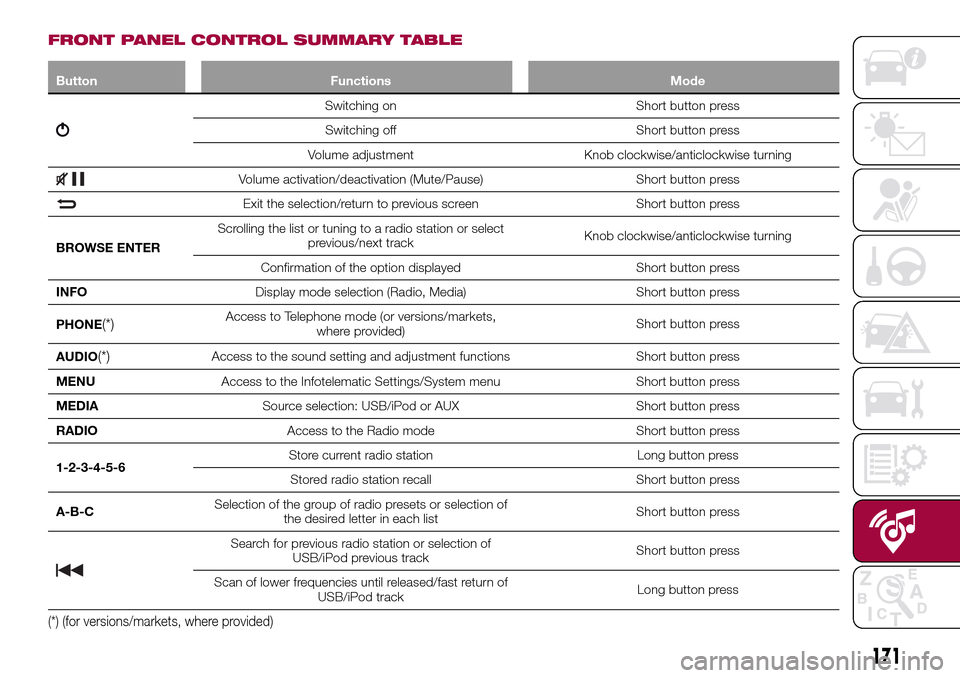
FRONT PANEL CONTROL SUMMARY TABLE
Button Functions Mode
Switching on Short button press
Switching off Short button press
Volume adjustment Knob clockwise/anticlockwise turning
Volume activation/deactivation (Mute/Pause) Short button press
Exit the selection/return to previous screen Short button press
BROWSE ENTERScrolling the list or tuning to a radio station or select
previous/next trackKnob clockwise/anticlockwise turning
Confirmation of the option displayed Short button press
INFODisplay mode selection (Radio, Media) Short button press
PHONE
(*)Access to Telephone mode (or versions/markets,
where provided)Short button press
AUDIO
(*)Access to the sound setting and adjustment functions Short button press
MENUAccess to the Infotelematic Settings/System menu Short button press
MEDIASource selection: USB/iPod or AUX Short button press
RADIOAccess to the Radio mode Short button press
1-2-3-4-5-6Store current radio station Long button press
Stored radio station recall Short button press
A-B-CSelection of the group of radio presets or selection of
the desired letter in each listShort button press
Search for previous radio station or selection of
USB/iPod previous trackShort button press
Scan of lower frequencies until released/fast return of
USB/iPod trackLong button press
(*) (for versions/markets, where provided)
171
Page 180 of 204
deactivate the microphone audio for
private conversations.
The mobile phone audio is transmitted
through the vehicle’s audio system; the
system automatically mutes the radio
when the Phone function is used.
Pairing a mobile phone
To pair the mobile phone, proceed as
follows:
activate theBluetooth®function on
the mobile phone;
press thePHONEbutton on the
front panel;
if no phone is paired with the system
yet, the display shows a dedicated
screen;
select "Connect Phone" to start the
pairing procedure then search for the
Uconnect™device on the mobile
phone (if "No" is selected, the Phone
main screen is displayed);
when prompted by the mobile
phone, use the phone keypad to enter
the PIN code shown on the system
display or confirm on the mobile phone
the PIN displayed;
from the "Settings" menu you can
always pair a mobile phone by selecting
"Phone menu/Add phone", then
proceed as described above;
during the pairing stage a screen is
displayed showing the progress of the
operation.NOTE After updating the telephone
software, it is advisable for correct
operation to remove the telephone from
the list of devices paired to the radio,
delete the previous pairing of the
system also from the available
Bluetooth device list on the telephone
and pair it again.
Making a phone call
The operations described below can
only be accessed if supported by the
mobile phone in use.
A call can be made by:
selecting "Contacts" (Phonebook
......);
selecting "Recent Calls list";
selecting "Keypad".
Dialling the phone number using
the "keypad" on the display
Enter the phone number using the
graphic keypad displayed.
Proceed as follows:
press thePHONEbutton on the
front panel;
select "Keypad" on the display and
use the "BROWSE/ENTER" right knob
to enter the number;
select theicon to call.
Dialling the phone number using
the mobile phone
It is possible to dial a phone number
with the mobile phone and continueusing the system (never allow yourself
to be distracted while driving).
When a phone number is dialled with
the keypad of the mobile phone, the
audio of the call is played over your
vehicle's sound system.
178
MULTIMEDIA
Page 182 of 204
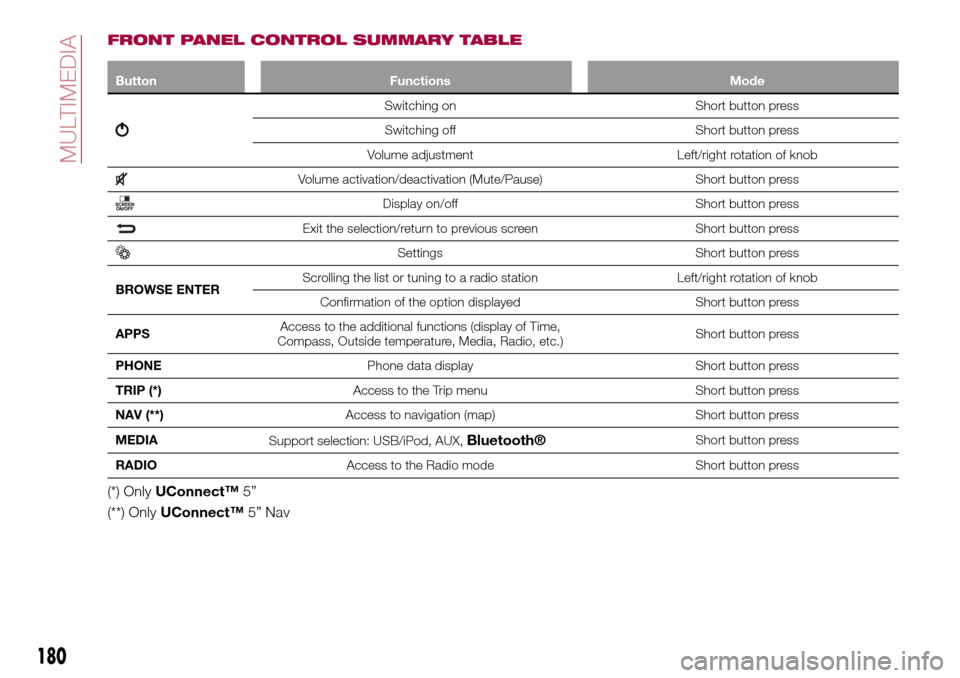
FRONT PANEL CONTROL SUMMARY TABLE
Button Functions Mode
Switching on Short button press
Switching off Short button press
Volume adjustment Left/right rotation of knob
Volume activation/deactivation (Mute/Pause) Short button press
Display on/off Short button press
Exit the selection/return to previous screen Short button press
Settings Short button press
BROWSE ENTERScrolling the list or tuning to a radio station Left/right rotation of knob
Confirmation of the option displayed Short button press
APPSAccess to the additional functions (display of Time,
Compass, Outside temperature, Media, Radio, etc.)Short button press
PHONEPhone data display Short button press
TRIP (*)Access to the Trip menu Short button press
NAV (**)Access to navigation (map) Short button press
MEDIA
Support selection: USB/iPod, AUX,
Bluetooth®Short button press
RADIOAccess to the Radio mode Short button press
(*) OnlyUConnect™5”
(**) OnlyUConnect™5” Nav
180
MULTIMEDIA