Time FIAT TIPO 4DOORS 2017 1.G Owner's Manual
[x] Cancel search | Manufacturer: FIAT, Model Year: 2017, Model line: TIPO 4DOORS, Model: FIAT TIPO 4DOORS 2017 1.GPages: 240, PDF Size: 4.15 MB
Page 49 of 240
DISPLAY
DESCRIPTION
The vehicle is equipped with a display
that can show useful information to the
driver while driving.
GEAR SHIFT INDICATOR
The Gear Shift Indicator (GSI) system
advises the driver to change gear
through a special indication on the
display.
Through the GSI, the driver is informed
that the gear change will allow a
reduction in fuel consumption.
When the
icon appears on the
display, the GSI suggests switching to a
higher gear, while when the
icon is
displayed, the GSI suggests changing
to a lower gear.
The indication in the display remains
until a gear is shifted or the driving
conditions go back to a situation where
gearshifting is not required to improve
consumption.
MULTIFUNCTION
DISPLAY
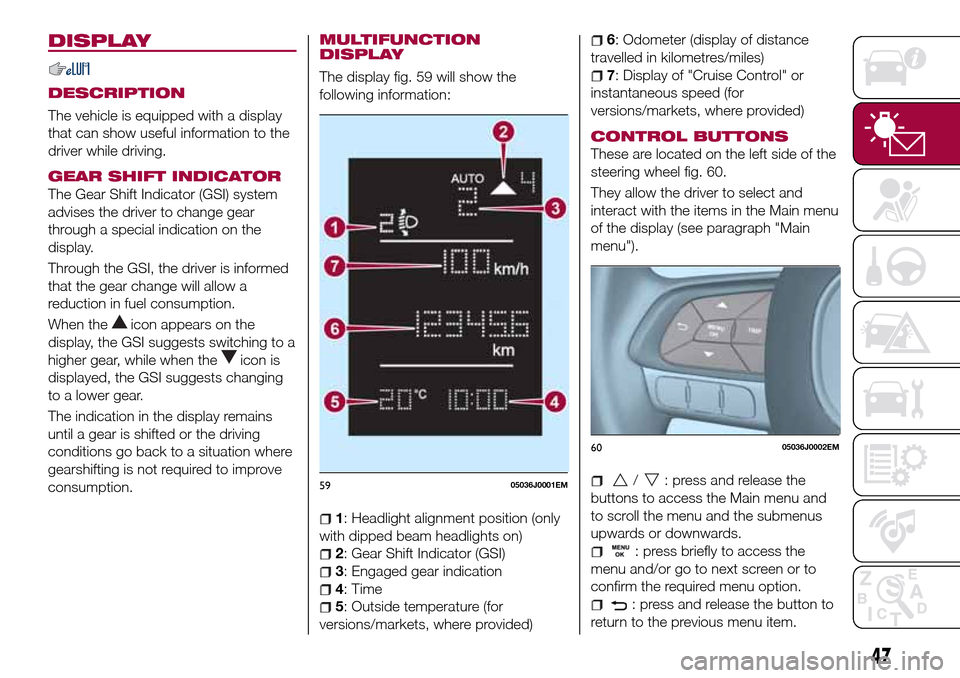
The display fig. 59 will show the
following information:
1: Headlight alignment position (only
with dipped beam headlights on)
2: Gear Shift Indicator (GSI)
3: Engaged gear indication
4: Time
5: Outside temperature (for
versions/markets, where provided)
6: Odometer (display of distance
travelled in kilometres/miles)
7: Display of "Cruise Control" or
instantaneous speed (for
versions/markets, where provided)
CONTROL BUTTONS
These are located on the left side of the
steering wheel fig. 60.
They allow the driver to select and
interact with the items in the Main menu
of the display (see paragraph "Main
menu").
/: press and release the
buttons to access the Main menu and
to scroll the menu and the submenus
upwards or downwards.
: press briefly to access the
menu and/or go to next screen or to
confirm the required menu option.
: press and release the button to
return to the previous menu item.
5905036J0001EM
6005036J0002EM
47
Page 50 of 240
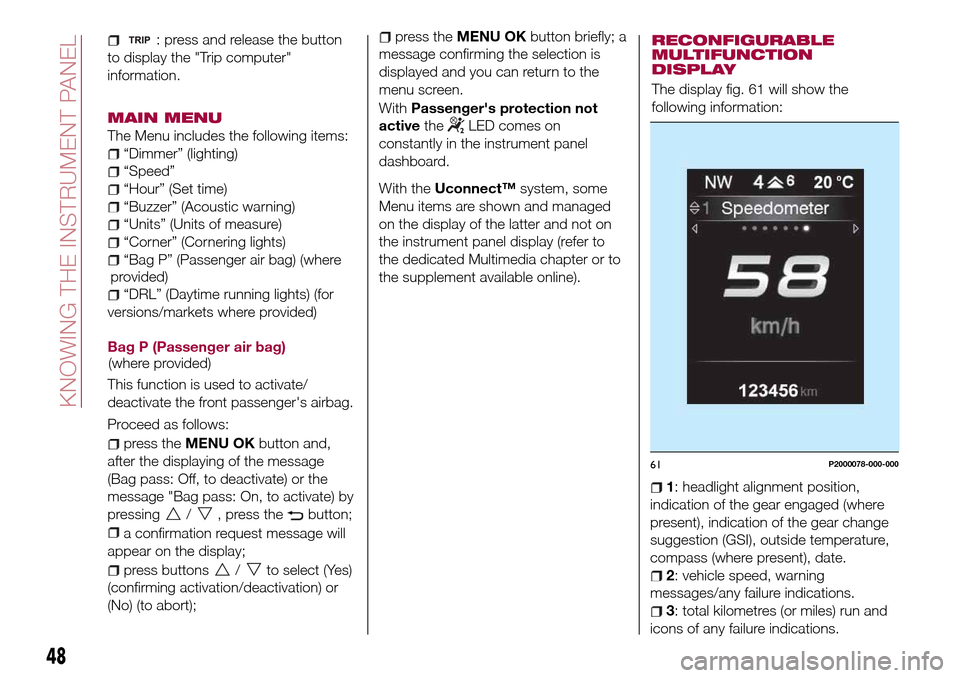
: press and release the button
to display the "Trip computer"
information.
MAIN MENU
The Menu includes the following items:
“Dimmer” (lighting)
“Speed”
“Hour” (Set time)
“Buzzer” (Acoustic warning)
“Units” (Units of measure)
“Corner” (Cornering lights)
“Bag P” (Passenger air bag)
“DRL” (Daytime running lights) (for
versions/markets where provided)
Bag P (Passenger air bag)
This function is used to activate/
deactivate the front passenger's airbag.
Proceed as follows:
press theMENU OKbutton and,
after the displaying of the message
(Bag pass: Off, to deactivate) or the
message "Bag pass: On, to activate) by
pressing
/, press thebutton;
a confirmation request message will
appear on the display;
press buttons/to select (Yes)
(confirming activation/deactivation) or
(No) (to abort);
press theMENU OKbutton briefly; a
message confirming the selection is
displayed and you can return to the
menu screen.
WithPassenger's protection not
activethe
LED comes on
constantly in the instrument panel
dashboard.
With theUconnect™system, some
Menu items are shown and managed
on the display of the latter and not on
the instrument panel display (refer to
the dedicated Multimedia chapter or to
the supplement available online).RECONFIGURABLE
MULTIFUNCTION
DISPLAY
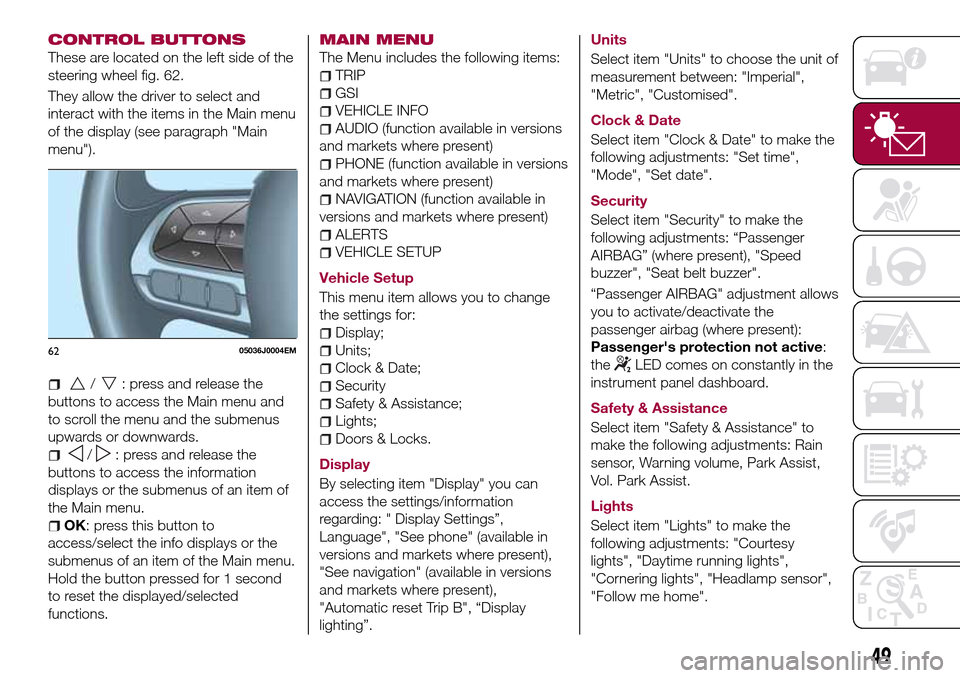
The display fig. 61 will show the
following information:
1: headlight alignment position,
indication of the gear engaged (where
present), indication of the gear change
suggestion (GSI), outside temperature,
compass (where present), date.
2: vehicle speed, warning
messages/any failure indications.
3: total kilometres (or miles) run and
icons of any failure indications.
61P2000078-000-000
48
KNOWING THE INSTRUMENT PANEL
(where provided)(where
provided)
Page 51 of 240
CONTROL BUTTONS
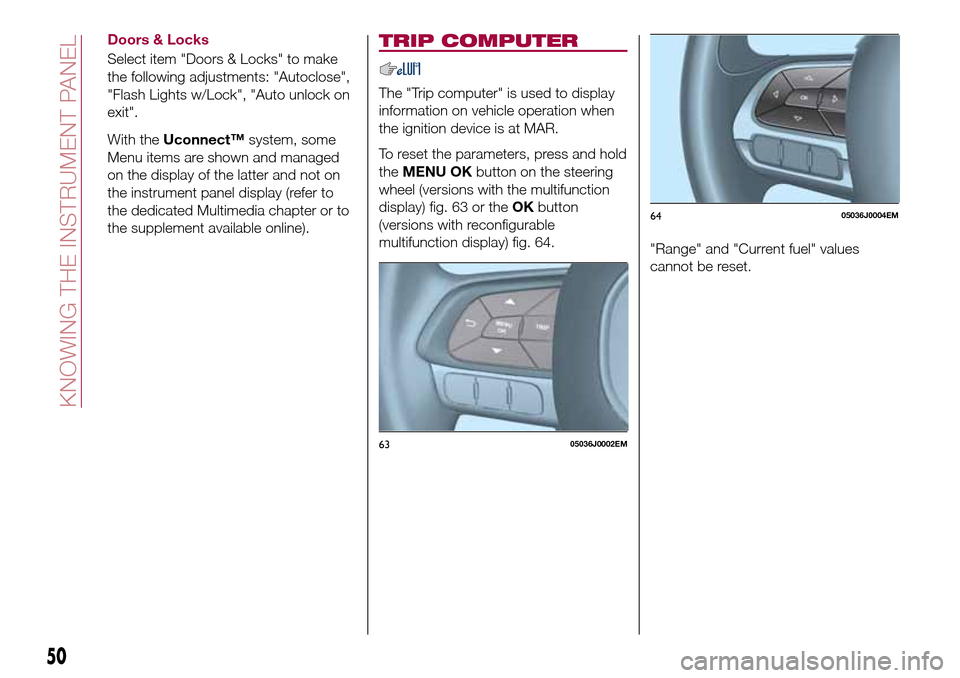
These are located on the left side of the
steering wheel fig. 62.
They allow the driver to select and
interact with the items in the Main menu
of the display (see paragraph "Main
menu").
/: press and release the
buttons to access the Main menu and
to scroll the menu and the submenus
upwards or downwards.
/: press and release the
buttons to access the information
displays or the submenus of an item of
the Main menu.
OK: press this button to
access/select the info displays or the
submenus of an item of the Main menu.
Hold the button pressed for 1 second
to reset the displayed/selected
functions.
MAIN MENU
The Menu includes the following items:
TRIP
GSI
VEHICLE INFO
AUDIO (function available in versions
and markets where present)
PHONE (function available in versions
and markets where present)
NAVIGATION (function available in
versions and markets where present)
ALERTS
VEHICLE SETUP
Vehicle Setup
This menu item allows you to change
the settings for:
Display;
Units;
Clock & Date;
Security
Safety & Assistance;
Lights;
Doors & Locks.
Display
By selecting item "Display" you can
access the settings/information
regarding: " Display Settings”,
Language", "See phone" (available in
versions and markets where present),
"See navigation" (available in versions
and markets where present),
"Automatic reset Trip B", “Display
lighting”.Units
Select item "Units" to choose the unit of
measurement between: "Imperial",
"Metric", "Customised".
Clock & Date
Select item "Clock & Date" to make the
following adjustments: "Set time",
"Mode", "Set date".
Security
Select item "Security" to make the
following adjustments: “Passenger
AIRBAG” (where present), "Speed
buzzer", "Seat belt buzzer".
“Passenger AIRBAG" adjustment allows
you to activate/deactivate the
passenger airbag (where present):
Passenger's protection not active:
the
LED comes on constantly in the
instrument panel dashboard.
Safety & Assistance
Select item "Safety & Assistance" to
make the following adjustments: Rain
sensor, Warning volume, Park Assist,
Vol. Park Assist.
Lights
Select item "Lights" to make the
following adjustments: "Courtesy
lights", "Daytime running lights",
"Cornering lights", "Headlamp sensor",
"Follow me home".6205036J0004EM
49
Page 52 of 240
Doors & Locks
Select item "Doors & Locks" to make
the following adjustments: "Autoclose",
"Flash Lights w/Lock", "Auto unlock on
exit".
With theUconnect™system, some
Menu items are shown and managed
on the display of the latter and not on
the instrument panel display (refer to
the dedicated Multimedia chapter or to
the supplement available online).
TRIP COMPUTER
The "Trip computer" is used to display
information on vehicle operation when
the ignition device is at MAR.
To reset the parameters, press and hold
theMENU OKbutton on the steering
wheel (versions with the multifunction
display) fig. 63 or theOKbutton
(versions with reconfigurable
multifunction display) fig. 64.
"Range" and "Current fuel" values
cannot be reset.
6305036J0002EM
6405036J0004EM
50
KNOWING THE INSTRUMENT PANEL
Page 61 of 240
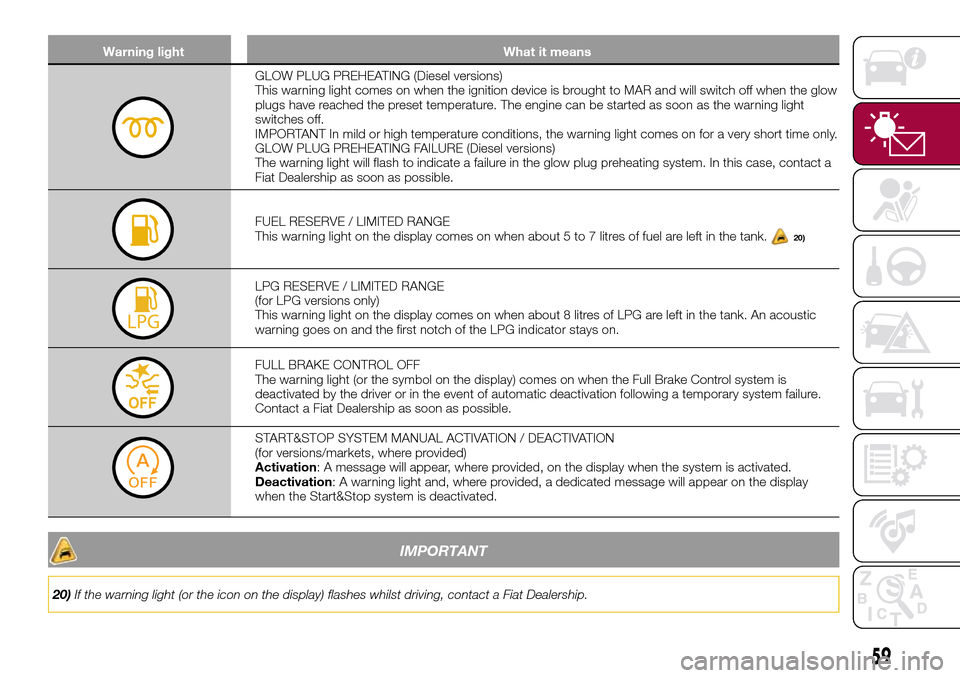
Warning light What it means
GLOW PLUG PREHEATING (Diesel versions)
This warning light comes on when the ignition device is brought to MAR and will switch off when the glow
plugs have reached the preset temperature. The engine can be started as soon as the warning light
switches off.
IMPORTANT In mild or high temperature conditions, the warning light comes on for a very short time only.
GLOW PLUG PREHEATING FAILURE (Diesel versions)
The warning light will flash to indicate a failure in the glow plug preheating system. In this case, contact a
Fiat Dealership as soon as possible.
FUEL RESERVE / LIMITED RANGE
This warning light on the display comes on when about 5 to 7 litres of fuel are left in the tank.20)
LPG RESERVE / LIMITED RANGE
(for LPG versions only)
This warning light on the display comes on when about 8 litres of LPG are left in the tank. An acoustic
warning goes on and the first notch of the LPG indicator stays on.
FULL BRAKE CONTROL OFF
The warning light (or the symbol on the display) comes on when the Full Brake Control system is
deactivated by the driver or in the event of automatic deactivation following a temporary system failure.
Contact a Fiat Dealership as soon as possible.
START&STOP SYSTEM MANUAL ACTIVATION / DEACTIVATION
(for versions/markets, where provided)
Activation: A message will appear, where provided, on the display when the system is activated.
Deactivation: A warning light and, where provided, a dedicated message will appear on the display
when the Start&Stop system is deactivated.
IMPORTANT
20)If the warning light (or the icon on the display) flashes whilst driving, contact a Fiat Dealership.
59
Page 62 of 240
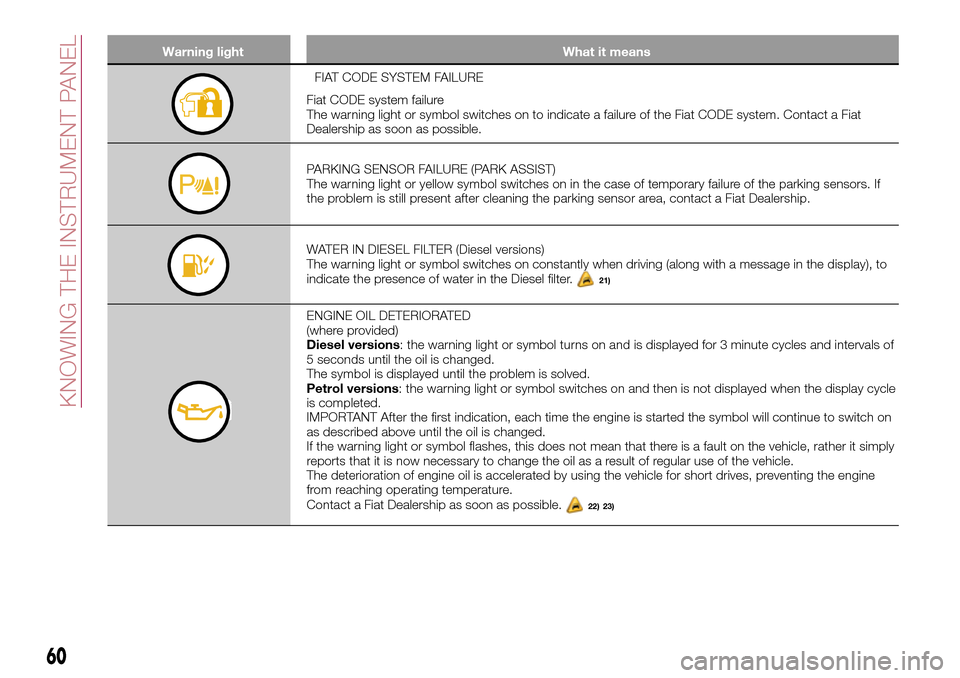
Warning light What it means
FIAT CODE SYSTEM FAILURE
Fiat CODE system failure
The warning light or symbol switches on to indicate a failure of the Fiat CODE system. Contact a Fiat
Dealership as soon as possible.
PARKING SENSOR FAILURE (PARK ASSIST)
The warning light or yellow symbol switches on in the case of temporary failure of the parking sensors. If
the problem is still present after cleaning the parking sensor area, contact a Fiat Dealership.
WATER IN DIESEL FILTER (Diesel versions)
The warning light or symbol switches on constantly when driving (along with a message in the display), to
indicate the presence of water in the Diesel filter.
21)
ENGINE OIL DETERIORATED
(where provided)
Diesel versions: the warning light or symbol turns on and is displayed for 3 minute cycles and intervals of
5 seconds until the oil is changed.
The symbol is displayed until the problem is solved.
Petrol versions: the warning light or symbol switches on and then is not displayed when the display cycle
is completed.
IMPORTANT After the first indication, each time the engine is started the symbol will continue to switch on
as described above until the oil is changed.
If the warning light or symbol flashes, this does not mean that there is a fault on the vehicle, rather it simply
reports that it is now necessary to change the oil as a result of regular use of the vehicle.
The deterioration of engine oil is accelerated by using the vehicle for short drives, preventing the engine
from reaching operating temperature.
Contact a Fiat Dealership as soon as possible.
22) 23)
60
KNOWING THE INSTRUMENT PANEL
Page 66 of 240
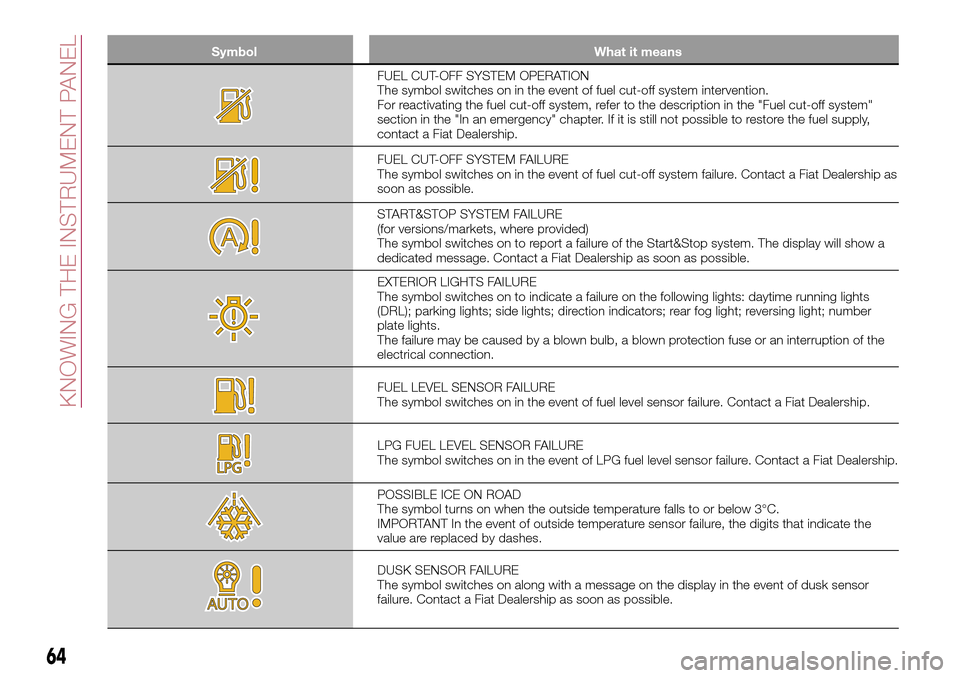
Symbol What it means
FUEL CUT-OFF SYSTEM OPERATION
The symbol switches on in the event of fuel cut-off system intervention.
For reactivating the fuel cut-off system, refer to the description in the "Fuel cut-off system"
section in the "In an emergency" chapter. If it is still not possible to restore the fuel supply,
contact a Fiat Dealership.
FUEL CUT-OFF SYSTEM FAILURE
The symbol switches on in the event of fuel cut-off system failure. Contact a Fiat Dealership as
soon as possible.
START&STOP SYSTEM FAILURE
(for versions/markets, where provided)
The symbol switches on to report a failure of the Start&Stop system. The display will show a
dedicated message. Contact a Fiat Dealership as soon as possible.
EXTERIOR LIGHTS FAILURE
The symbol switches on to indicate a failure on the following lights: daytime running lights
(DRL); parking lights; side lights; direction indicators; rear fog light; reversing light; number
plate lights.
The failure may be caused by a blown bulb, a blown protection fuse or an interruption of the
electrical connection.
FUEL LEVEL SENSOR FAILURE
The symbol switches on in the event of fuel level sensor failure. Contact a Fiat Dealership.
LPG FUEL LEVEL SENSOR FAILURE
The symbol switches on in the event of LPG fuel level sensor failure. Contact a Fiat Dealership.
POSSIBLE ICE ON ROAD
The symbol turns on when the outside temperature falls to or below 3°C.
IMPORTANT In the event of outside temperature sensor failure, the digits that indicate the
value are replaced by dashes.
DUSK SENSOR FAILURE
The symbol switches on along with a message on the display in the event of dusk sensor
failure. Contact a Fiat Dealership as soon as possible.
64
KNOWING THE INSTRUMENT PANEL
Page 67 of 240
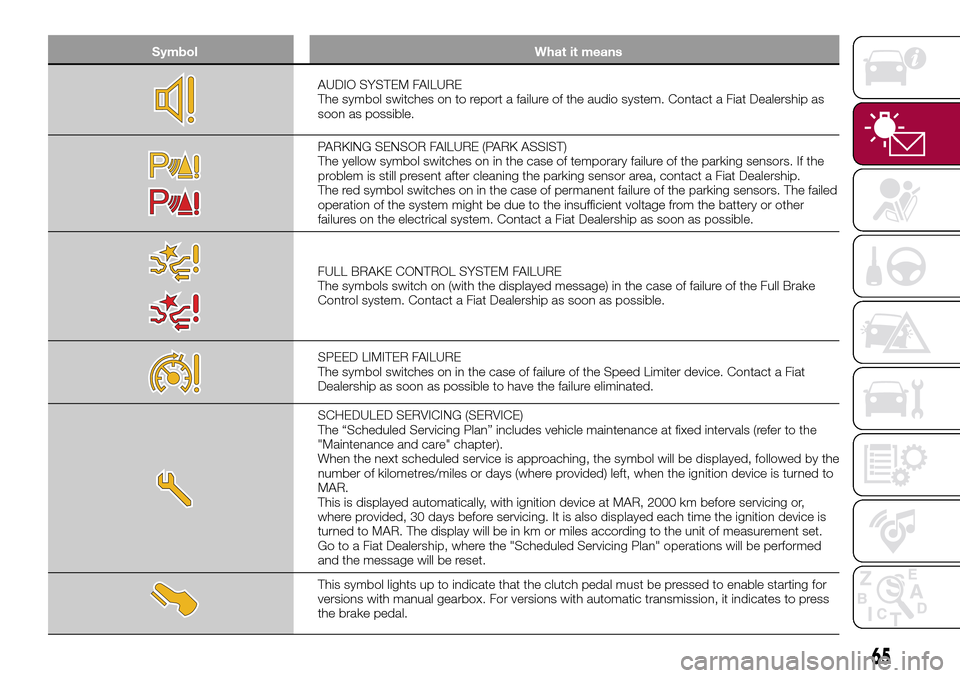
Symbol What it means
AUDIO SYSTEM FAILURE
The symbol switches on to report a failure of the audio system. Contact a Fiat Dealership as
soon as possible.
PARKING SENSOR FAILURE (PARK ASSIST)
The yellow symbol switches on in the case of temporary failure of the parking sensors. If the
problem is still present after cleaning the parking sensor area, contact a Fiat Dealership.
The red symbol switches on in the case of permanent failure of the parking sensors. The failed
operation of the system might be due to the insufficient voltage from the battery or other
failures on the electrical system. Contact a Fiat Dealership as soon as possible.
FULL BRAKE CONTROL SYSTEM FAILURE
The symbols switch on (with the displayed message) in the case of failure of the Full Brake
Control system. Contact a Fiat Dealership as soon as possible.
SPEED LIMITER FAILURE
The symbol switches on in the case of failure of the Speed Limiter device. Contact a Fiat
Dealership as soon as possible to have the failure eliminated.
SCHEDULED SERVICING (SERVICE)
The “Scheduled Servicing Plan” includes vehicle maintenance at fixed intervals (refer to the
"Maintenance and care" chapter).
When the next scheduled service is approaching, the symbol will be displayed, followed by the
number of kilometres/miles or days (where provided) left, when the ignition device is turned to
MAR.
This is displayed automatically, with ignition device at MAR, 2000 km before servicing or,
where provided, 30 days before servicing. It is also displayed each time the ignition device is
turned to MAR. The display will be in km or miles according to the unit of measurement set.
Go to a Fiat Dealership, where the "Scheduled Servicing Plan" operations will be performed
and the message will be reset.
This symbol lights up to indicate that the clutch pedal must be pressed to enable starting for
versions with manual gearbox. For versions with automatic transmission, it indicates to press
the brake pedal.
65
Page 74 of 240
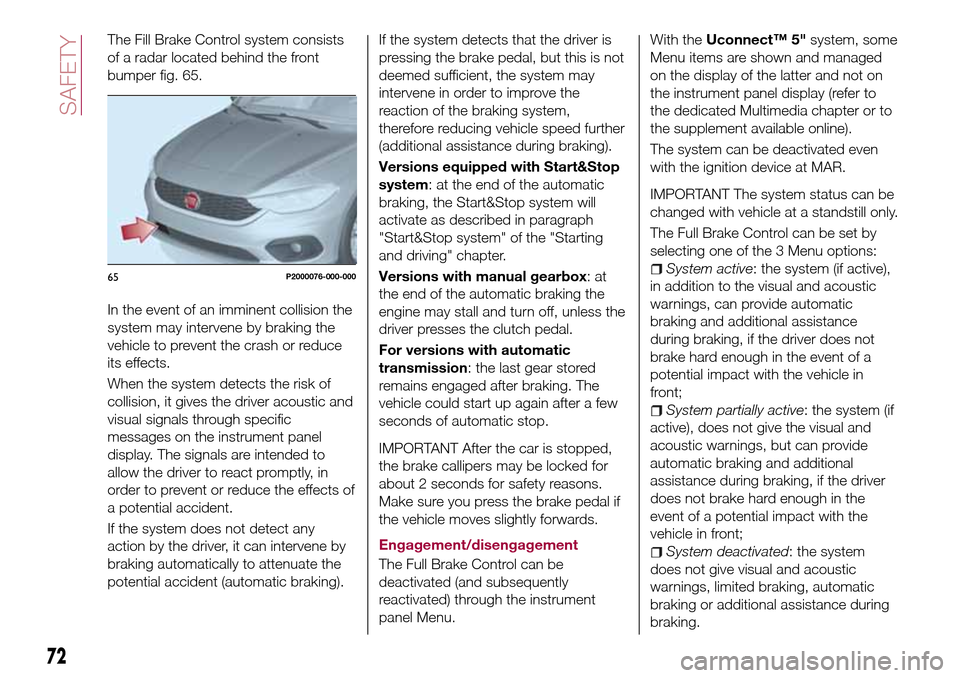
The Fill Brake Control system consists
of a radar located behind the front
bumper fig. 65.
In the event of an imminent collision the
system may intervene by braking the
vehicle to prevent the crash or reduce
its effects.
When the system detects the risk of
collision, it gives the driver acoustic and
visual signals through specific
messages on the instrument panel
display. The signals are intended to
allow the driver to react promptly, in
order to prevent or reduce the effects of
a potential accident.
If the system does not detect any
action by the driver, it can intervene by
braking automatically to attenuate the
potential accident (automatic braking).If the system detects that the driver is
pressing the brake pedal, but this is not
deemed sufficient, the system may
intervene in order to improve the
reaction of the braking system,
therefore reducing vehicle speed further
(additional assistance during braking).
Versions equipped with Start&Stop
system: at the end of the automatic
braking, the Start&Stop system will
activate as described in paragraph
"Start&Stop system" of the "Starting
and driving" chapter.
Versions with manual gearbox:at
the end of the automatic braking the
engine may stall and turn off, unless the
driver presses the clutch pedal.
For versions with automatic
transmission: the last gear stored
remains engaged after braking. The
vehicle could start up again after a few
seconds of automatic stop.
IMPORTANT After the car is stopped,
the brake callipers may be locked for
about 2 seconds for safety reasons.
Make sure you press the brake pedal if
the vehicle moves slightly forwards.
Engagement/disengagement
The Full Brake Control can be
deactivated (and subsequently
reactivated) through the instrument
panel Menu.
With theUconnect™ 5"system, some
Menu items are shown and managed
on the display of the latter and not on
the instrument panel display (refer to
the dedicated Multimedia chapter or to
the supplement available online).
The system can be deactivated even
with the ignition device at MAR.
IMPORTANT The system status can be
changed with vehicle at a standstill only.
The Full Brake Control can be set by
selecting one of the 3 Menu options:
System active: the system (if active),
in addition to the visual and acoustic
warnings, can provide automatic
braking and additional assistance
during braking, if the driver does not
brake hard enough in the event of a
potential impact with the vehicle in
front;
System partially active: the system (if
active), does not give the visual and
acoustic warnings, but can provide
automatic braking and additional
assistance during braking, if the driver
does not brake hard enough in the
event of a potential impact with the
vehicle in front;
System deactivated: the system
does not give visual and acoustic
warnings, limited braking, automatic
braking or additional assistance during
braking.
65P2000076-000-000
72
SAFETY
Page 75 of 240
The system will therefore provide no
indication of a possible accident.
Activation/deactivation
If the Full Brake Control system has
been correctly activated from the Menu,
it will be active each time the engine is
started.
Following a deactivation, the system will
not warn the driver about the possible
collision with the preceding vehicle.
The system deactivation status will not
be stored when the engine is switched
off: if the system is deactivated when
the engine is switched off, it will be
active when it is next started.
This function is not active at a speed
lower than 7 km/h or higher than
200 km/h.
The system is only active if:
– it is correctly activated through the
Menu;
– the ignition device is at MAR;
– the vehicle speed is between
7 and 200 km/h;
– the front seat belts are fastened.Changing the system sensitivity
The sensitivity of the system can be
changed through the Menu, choosing
from one of the following three options:
"Near", "Average" or "Far". See the
description in theUconnect™ 5"
supplement for how to change the
settings.
The pre-set option is "Near". With this
setting, the system will warn the driver
of a possible collision with the vehicle in
front when it is close. This setting offers
the driver a lower reaction time
compared to the "Average" and "Far"
settings, in the event of a potential
collision, but permits more dynamic
driving of the vehicle.
With the system sensitivity set to "Far",
the system will warn the driver of a
possible collision with the vehicle in
front when that vehicle is at a greater
distance, thus providing the possibility
of acting on the brakes more lightly and
gradually. This setting provides the
drivers with the maximum possible
reaction time to prevent a potential
accident.
Changing the setting to “Average”, the
system warns the driver of a possible
collision with the vehicle in front when it
is at a standard distance, between that
of the other two settings.The system sensitivity setting is kept in
the memorywhen the engine is
switched off.
System failure signalling
If the system switches off and a
dedicated message is shown on the
display, it means that there is a fault on
the system.
In this case, it is still possible to drive
the vehicle, but you are advised to
contact a Fiat Dealership as soon as
possible.
Radar indication not available
If conditions are such that the radar
cannot detect obstacles correctly, the
system is deactivated and a dedicated
message appears on the display. This
generally occurs in the event of poor
visibility, such as when it is snowing or
raining heavily.
The system can also be temporarily
dimmed due to obstructions such as
mud, dirt or ice on the bumper. In such
cases, a dedicated message will be
shown on the display and the system
will be deactivated. This message can
sometimes appear in conditions of high
reflectivity (e.g. tunnels with reflective
tiles or ice or snow). When the
conditions limiting the system functions
end, this will go back to normal and
complete operation.
73