tow FIAT TIPO 4DOORS 2017 1.G Owner's Guide
[x] Cancel search | Manufacturer: FIAT, Model Year: 2017, Model line: TIPO 4DOORS, Model: FIAT TIPO 4DOORS 2017 1.GPages: 240, PDF Size: 4.15 MB
Page 160 of 240
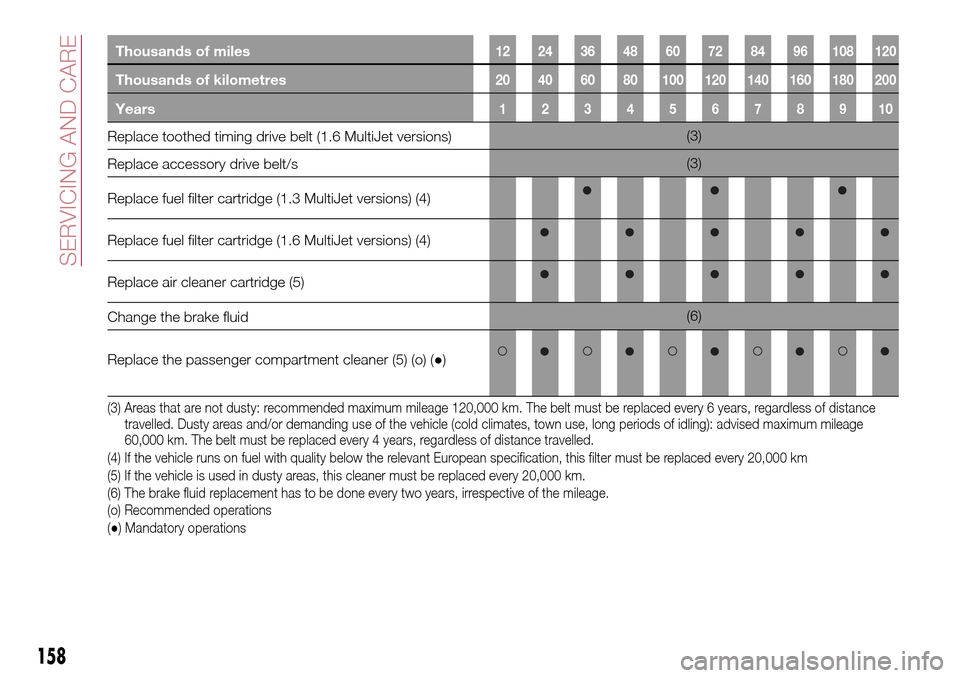
Thousands of miles12 24 36 48 60 72 84 96 108 120
Thousands of kilometres20 40 60 80 100 120 140 160 180 200
Years12345678910
Replace toothed timing drive belt (1.6 MultiJet versions)(3)
Replace accessory drive belt/s(3)
Replace fuel filter cartridge (1.3 MultiJet versions) (4)
Replace fuel filter cartridge (1.6 MultiJet versions) (4)
Replace air cleaner cartridge (5)
Change the brake fluid(6)
Replace the passenger compartment cleaner (5) (o) (●)
(3) Areas that are not dusty: recommended maximum mileage 120,000 km. The belt must be replaced every 6 years, regardless of distance
travelled. Dusty areas and/or demanding use of the vehicle (cold climates, town use, long periods of idling): advised maximum mileage
60,000 km. The belt must be replaced every 4 years, regardless of distance travelled.
(4) If the vehicle runs on fuel with quality below the relevant European specification, this filter must be replaced every 20,000 km
(5) If the vehicle is used in dusty areas, this cleaner must be replaced every 20,000 km.
(6) The brake fluid replacement has to be done every two years, irrespective of the mileage.
(o) Recommended operations
(●) Mandatory operations
158
SERVICING AND CARE
Page 191 of 240
WEIGHTS
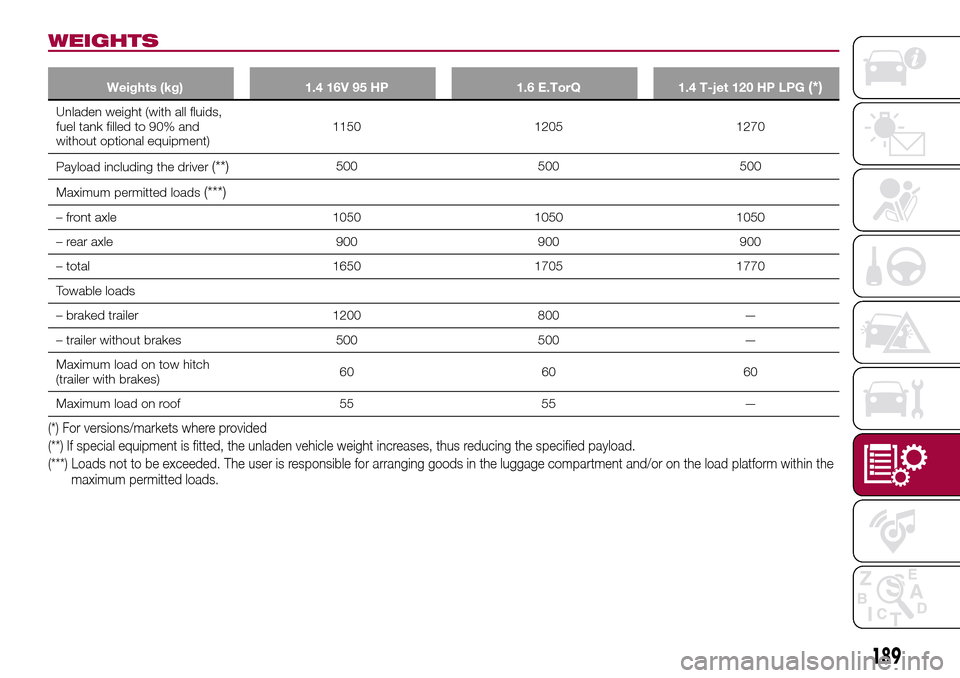
Weights (kg) 1.4 16V 95 HP 1.6 E.TorQ 1.4 T-jet 120 HP LPG(*)
Unladen weight (with all fluids,
fuel tank filled to 90% and
without optional equipment)1150 1205 1270
Payload including the driver
(**)500 500 500
Maximum permitted loads
(***)
– front axle 1050 1050 1050
– rear axle 900 900 900
– total 1650 1705 1770
Towable loads
– braked trailer 1200 800 —
– trailer without brakes 500 500 —
Maximum load on tow hitch
(trailer with brakes)60 60 60
Maximum load on roof 55 55 —
(*) For versions/markets where provided
(**) If special equipment is fitted, the unladen vehicle weight increases, thus reducing the specified payload.
(***) Loads not to be exceeded. The user is responsible for arranging goods in the luggage compartment and/or on the load platform within the
maximum permitted loads.
189
Page 192 of 240
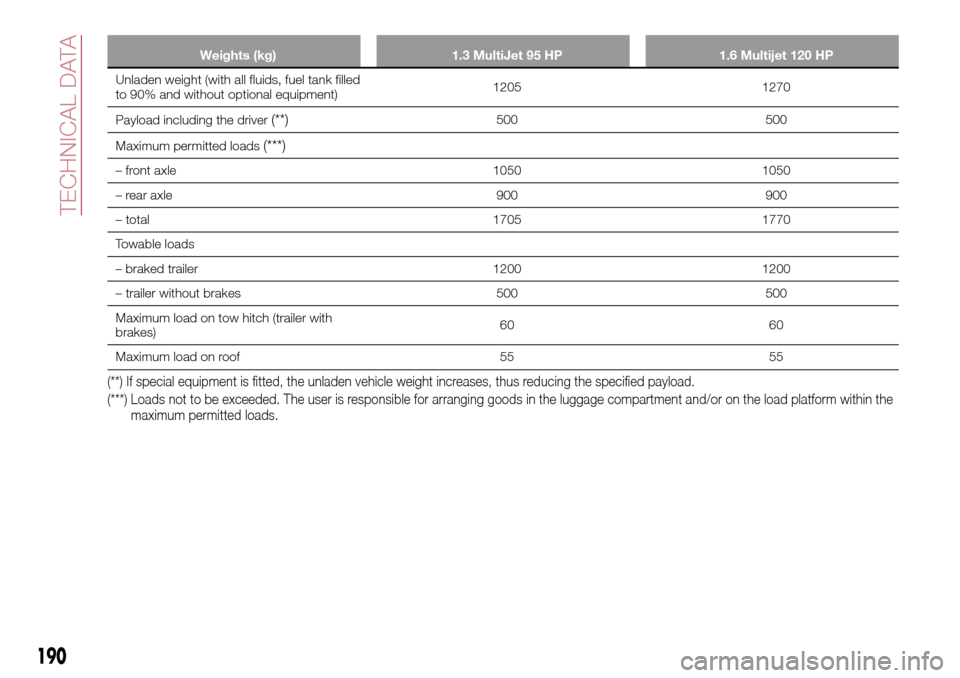
Weights (kg) 1.3 MultiJet 95 HP 1.6 Multijet 120 HP
Unladen weight (with all fluids, fuel tank filled
to 90% and without optional equipment)1205 1270
Payload including the driver
(**)500 500
Maximum permitted loads
(***)
– front axle 1050 1050
– rear axle 900 900
– total 1705 1770
Towable loads
– braked trailer 1200 1200
– trailer without brakes 500 500
Maximum load on tow hitch (trailer with
brakes)60 60
Maximum load on roof 55 55
(**) If special equipment is fitted, the unladen vehicle weight increases, thus reducing the specified payload.
(***) Loads not to be exceeded. The user is responsible for arranging goods in the luggage compartment and/or on the load platform within the
maximum permitted loads.
190
TECHNICAL DATA
Page 226 of 240
"Lane Assist Strength"(where
provided): this function can be used to
select the force to apply to the steering
wheel to put the vehicle back in the
lane through the electric steering
system, in the event of Lane Assist
system intervention.
"Blind Spot Alert"(where provided):
this function can be used to select the
type of warning ("Sound Only" or
"Sound & Display") to indicate the
presence of objects in the blind spot of
the door mirror.
"Rain sensor"(where provided): this
function can be used to activate/
deactivate the automatic operation of
the wipers in the event of rain.
"Brakes"(where provided): this
function can be used to select the
following submenus:
- "Brake Service" (where provided):
allows you to activate the procedure for
carrying out braking system servicing;
- "Auto Park Brake" (where provided):
allows you to activate/deactivate the
automatic park brake engagement.
NAVIGATION(only UConnect™ 5” Nav)
Programming a route
WARNING In the interest of safety and
to reduce distractions while you are
driving, you should always plan a route
before you start driving.
Using the destination search function, it
is possible to find and reach your
destinations in different ways: searching
for a specific address, a partial address,
a specific type of location (for example
a service station or a restaurant), a
postal code, a POI (Point Of Interest)
near your current position (for example,
a restaurant with the search type set to
"nearby"), a pair of latitude and
longitude coordinates, or by selecting a
point on the map.
Select “Search” in the Main menu and
set the search for a destination.
While entering the information, the list
displays the corresponding addresses
and POIs in two separate lists. The
corresponding address and city are
displayed in the Address list and the
POI, the type of POIs and the locations
are displayed in the Point of Interest
lists.
To plan a route towards the destination,
select the “Guide” button.A route is planned and you are guided
to your destination, using spoken
instructions and on-screen directions.
VOICE COMMANDS
NoteFor languages not supported by
the system, voice commands are not
available.
To use the voice commands, press the
button on the steering wheel ("Voice"
button) and say out loud the command
you want to activate.
224
MULTIMEDIA
Page 237 of 240
Steering wheel...............18
Stop/Start system............109
Symbols....................3
TC (system)................69
Technical data..............180
Third brake light (bulb
replacement)..............127
Towing the vehicle............147
Towing trailers..............117Trip Computer...............50
TSC (system)................70
Tyres (inflation pressure)........186Uconnect 5” Nav............215
Uconnect Radio.............206
Use of the Owner Handbook.......4
Vehicle changes/alterations.......3
Version with LPG system........36
Warning lights and messages.....52
Weights..................189
Wheels...................184
Wheels and tyres.............174
Window bag...............100
Windows (cleaning)...........176
Windscreen wiper
replacing blades...........172