display FIAT TIPO 5DOORS STATION WAGON 2016 1.G Service Manual
[x] Cancel search | Manufacturer: FIAT, Model Year: 2016, Model line: TIPO 5DOORS STATION WAGON, Model: FIAT TIPO 5DOORS STATION WAGON 2016 1.GPages: 240, PDF Size: 5.43 MB
Page 105 of 240
in mph) by pressing the accelerator
pedal. In this situation, the device does
not turn off automatically, but the
device’s functions are limited: it is
therefore recommended to turn it off.
CHANGING SPEED
Increasing speed
After having set the device, the stored
speed can be stored by holding the
SET + button pressed.
Press the SET + button once, the set
speed will increase by 1 km/h (or the
equivalent in mph). Each subsequent
touch of the button will increase the
speed by 1 km/h (or the equivalent
in mph).
Hold the SET + button down, the set
speed will increase in 10 km/h steps (or
the equivalent in mph) until the button is
released. The set speed increase is
shown on the display.
Decreasing speed
After having set the device, the stored
speed can be reduced by holding the
SET –. button down.
Press the SET – button once, the set
speed will decrease by 1 km/h (or the
equivalent in mph). Each subsequent
touch of the button will reduce the
speed by 1 km/h (or the equivalent
in mph).Hold the SET – button down, the set
speed will decrease in 10 km/h steps
(or the equivalent in mph) until the
button is released. The set speed
decrease is shown on the display.
IMPORTANT NOTES
By keeping the accelerator pedal
depressed, the vehicle can continue to
accelerate beyond the set speed. In this
case, press SET + (or SET–)tosetthe
speed to the current speed of the
vehicle.
When the SET – button is pressed to
reduce the speed, the braking system
intervenes automatically if the engine
brake does not slow the vehicle down
sufficiently to reach the set speed.
The device holds the set speed uphill
and downhill; however a slight variation
is entirely normal, particularly on slight
gradients.
Gears can be shifted during operation
of the device to allow to select the gear
suited to the set speed and keep the
device set. The device is cancelled
when you press and hold the clutch
pedal down or putting the gear lever in
the neutral position for more than a
certain time limit.
The device is switched off while driving
if the brakes overheat.
ACCELERATING WHEN
OVERTAKING
When driving with the device active and
following a vehicle, the device provides
additional acceleration to facilitate
overtaking, when travelling over a given
speed and switches on the left direction
indicator (of the right indicator for
right-hand drive versions).
In left-hand traffic, the overtaking assist
function is only active when the
left-hand lane is used for overtaking the
vehicle ahead (the opposite activation
logic is used in right-hand traffic
countries).
The device detects the direction of
traffic automatically when the vehicle
passes from left-hand traffic to
right-hand traffic. In this case, the
overtaking assist function is only active
when the reference vehicle is overtaken
on the right.
The additional acceleration is activated
when the driver uses the right direction
indicator.
In this condition, the device no longer
provides the overtaking assist function
on the left-hand side until it determines
that the vehicle has returned to
left-hand traffic conditions.
103
Page 106 of 240
RECALLING THE SPEED
Once the system has been cancelled
but not deactivated, if a speed was
previously set simply press the RES
(Resume) button and remove your foot
from the accelerator to recall it.
The system will be set to the last stored
speed.
Before returning to the previously set
speed, bring the speed close to that
value, press the RES (Resume) button
and then release it.
IMPORTANT The recall function must
only be used if the road and traffic
conditions so allow. Recalling an
excessively high or low speed for the
current traffic and road conditions could
cause an acceleration or a deceleration
of the vehicle. Failure to comply with
these precautions may cause serious
accidents and fatal injuries.
SETTING THE DISTANCE
BETWEEN VEHICLES
The distance between your vehicle and
the vehicle ahead may be set to 1 bar
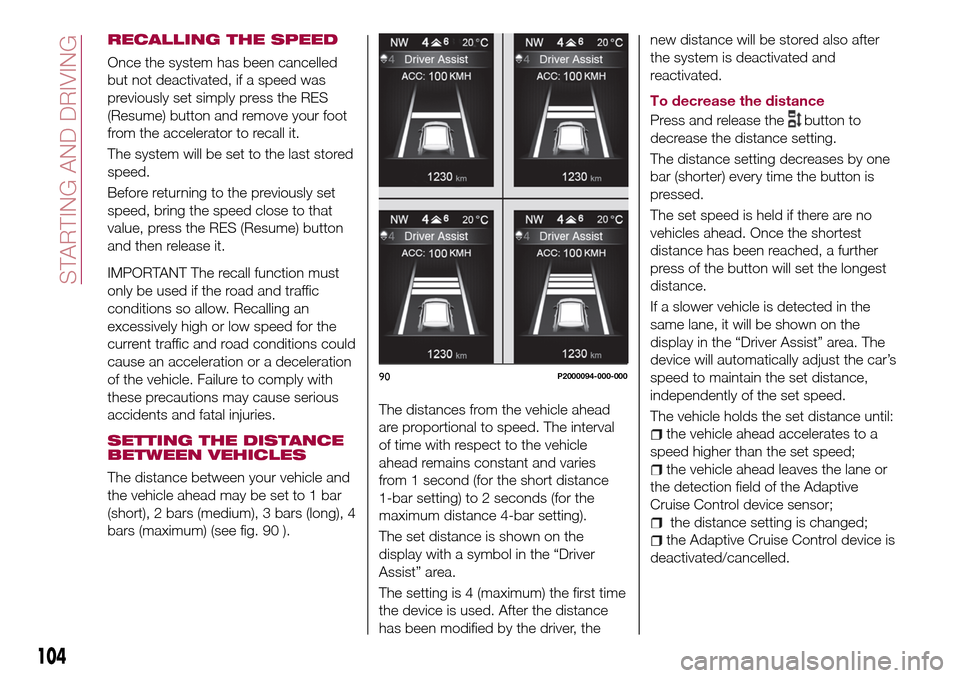
(short), 2 bars (medium), 3 bars (long), 4
bars (maximum) (see fig. 90 ).The distances from the vehicle ahead
are proportional to speed. The interval
of time with respect to the vehicle
ahead remains constant and varies
from 1 second (for the short distance
1-bar setting) to 2 seconds (for the
maximum distance 4-bar setting).
The set distance is shown on the
display with a symbol in the “Driver
Assist” area.
The setting is 4 (maximum) the first time
the device is used. After the distance
has been modified by the driver, thenew distance will be stored also after
the system is deactivated and
reactivated.
To decrease the distance
Press and release the
button to
decrease the distance setting.
The distance setting decreases by one
bar (shorter) every time the button is
pressed.
The set speed is held if there are no
vehicles ahead. Once the shortest
distance has been reached, a further
press of the button will set the longest
distance.
If a slower vehicle is detected in the
same lane, it will be shown on the
display in the “Driver Assist” area. The
device will automatically adjust the car’s
speed to maintain the set distance,
independently of the set speed.
The vehicle holds the set distance until:
the vehicle ahead accelerates to a
speed higher than the set speed;
the vehicle ahead leaves the lane or
the detection field of the Adaptive
Cruise Control device sensor;
the distance setting is changed;
the Adaptive Cruise Control device is
deactivated/cancelled.
90P2000094-000-000
104
STARTING AND DRIVING
Page 107 of 240
IMPORTANT The maximum breaking
applied by the device is limited. The
driver may apply the brakes in all cases
if needed.
IMPORTANT If the device predicts that
the braking level is not sufficient to hold
the set distance, the driver is warned by
a message indicating that the vehicle
ahead is too close. An acoustic signal is
also emitted. In this case, it is advisable
to brake immediately as necessary to
hold a safe distance from the vehicle
ahead.
IMPORTANT The driver is responsible
for ensuring that there are no
pedestrians, other vehicles or
objectives along the direction of the
vehicle. Failure to comply with these
precautions may cause serious
accidents and injuries.
IMPORTANT The driver is fully
responsible for holding a safe distance
from the vehicle ahead respecting the
highway code in force in the respective
country.
DEACTIVATION
The device is deactivated and the set
speed is cancelled if:
thebutton is pressed on the
Adaptive Cruise Control;
thebutton is pressed on the
electronic Cruise Control;
the Speed Limiter button is pressed;
the ignition device is in the STOP
position.
The device is cancelled (the set speed
and distance are stored):
when the CANC button is pressed;
when the conditions shown in the
“Setting the desired speed” paragraph
occur;
when the vehicle speed drops under
the minimum set speed (e.g. in
presence of slow vehicles).
If these conditions occur while the
system is decelerating with respect to a
vehicle ahead, the system could
continue the deceleration, if necessary,
also after it is cancelled or deactivated
within the minimum speed settable on
the system.
SYSTEM LIMITED
OPERATION SIGNAL
If the dedicated message is shown on
the display, a condition limiting the
system operation may have occurred.
The possible cause of this limitation is a
failure.
When the conditions limiting the system
functions end, this will go back to
normal and complete operation. Should
the fault persist, contact a Fiat
Dealership.
PRECAUTIONS WHILE
DRIVING
The device may not work correctly in
some driving conditions (see below):
the driver must control the vehicle at all
times.
Towing a trailer
Use of the device is not recommended
while towing a trailer.
Vehicle not aligned
The device may not detect a vehicle
travelling on the same lane but which is
not aligned along the same direction of
travel or a vehicle which is cutting in
from a side lane. Sufficient distance
from the vehicles ahead may not be
guaranteed in these cases.
The non-aligned vehicle can weave in
and out of the driving direction causing
the vehicle to brake or accelerate
unexpectedly.
Steering and curves
On curves fig. 91 with the device set, it
could limit speed and acceleration to
guarantee vehicle stability even if no
vehicles are detected ahead. When
leaving the curve, the device resets the
previously set speed.
105
Page 109 of 240
ELECTRONIC CRUISE
CONTROL MODE
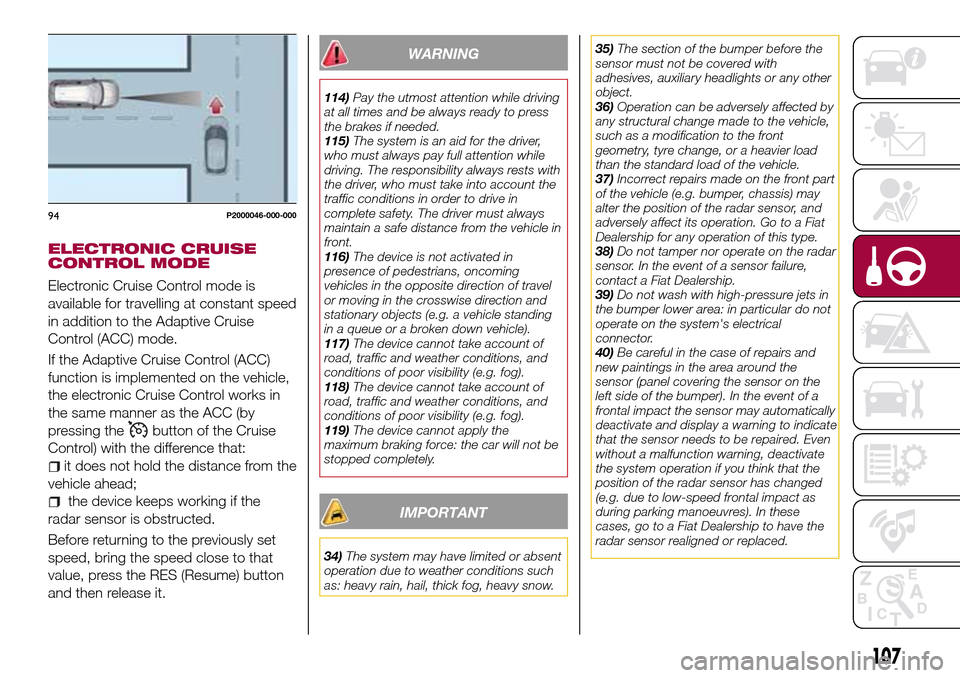
Electronic Cruise Control mode is
available for travelling at constant speed
in addition to the Adaptive Cruise
Control (ACC) mode.
If the Adaptive Cruise Control (ACC)
function is implemented on the vehicle,
the electronic Cruise Control works in
the same manner as the ACC (by
pressing the
button of the Cruise
Control) with the difference that:
it does not hold the distance from the
vehicle ahead;
the device keeps working if the
radar sensor is obstructed.
Before returning to the previously set
speed, bring the speed close to that
value, press the RES (Resume) button
and then release it.
WARNING
114)Pay the utmost attention while driving
at all times and be always ready to press
the brakes if needed.
115)The system is an aid for the driver,
who must always pay full attention while
driving. The responsibility always rests with
the driver, who must take into account the
traffic conditions in order to drive in
complete safety. The driver must always
maintain a safe distance from the vehicle in
front.
116)The device is not activated in
presence of pedestrians, oncoming
vehicles in the opposite direction of travel
or moving in the crosswise direction and
stationary objects (e.g. a vehicle standing
in a queue or a broken down vehicle).
117)The device cannot take account of
road, traffic and weather conditions, and
conditions of poor visibility (e.g. fog).
118)The device cannot take account of
road, traffic and weather conditions, and
conditions of poor visibility (e.g. fog).
119)The device cannot apply the
maximum braking force: the car will not be
stopped completely.
IMPORTANT
34)The system may have limited or absent
operation due to weather conditions such
as: heavy rain, hail, thick fog, heavy snow.35)The section of the bumper before the
sensor must not be covered with
adhesives, auxiliary headlights or any other
object.
36)Operation can be adversely affected by
any structural change made to the vehicle,
such as a modification to the front
geometry, tyre change, or a heavier load
than the standard load of the vehicle.
37)Incorrect repairs made on the front part
of the vehicle (e.g. bumper, chassis) may
alter the position of the radar sensor, and
adversely affect its operation. Go to a Fiat
Dealership for any operation of this type.
38)Do not tamper nor operate on the radar
sensor. In the event of a sensor failure,
contact a Fiat Dealership.
39)Do not wash with high-pressure jets in
the bumper lower area: in particular do not
operate on the system's electrical
connector.
40)Be careful in the case of repairs and
new paintings in the area around the
sensor (panel covering the sensor on the
left side of the bumper). In the event of a
frontal impact the sensor may automatically
deactivate and display a warning to indicate
that the sensor needs to be repaired. Even
without a malfunction warning, deactivate
the system operation if you think that the
position of the radar sensor has changed
(e.g. due to low-speed frontal impact as
during parking manoeuvres). In these
cases, go to a Fiat Dealership to have the
radar sensor realigned or replaced.
94P2000046-000-000
107
Page 110 of 240
PARKING SENSORS
(where provided)
SENSORS
120)
41) 42) 43)
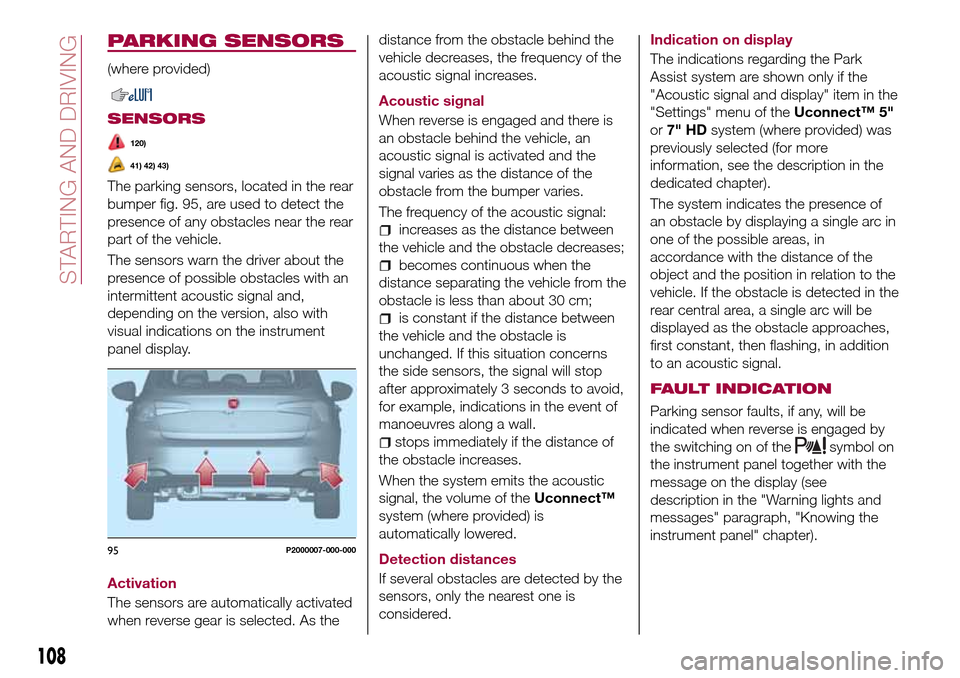
The parking sensors, located in the rear
bumper fig. 95, are used to detect the
presence of any obstacles near the rear
part of the vehicle.
The sensors warn the driver about the
presence of possible obstacles with an
intermittent acoustic signal and,
depending on the version, also with
visual indications on the instrument
panel display.
Activation
The sensors are automatically activated
when reverse gear is selected. As thedistance from the obstacle behind the
vehicle decreases, the frequency of the
acoustic signal increases.
Acoustic signal
When reverse is engaged and there is
an obstacle behind the vehicle, an
acoustic signal is activated and the
signal varies as the distance of the
obstacle from the bumper varies.
The frequency of the acoustic signal:
increases as the distance between
the vehicle and the obstacle decreases;
becomes continuous when the
distance separating the vehicle from the
obstacle is less than about 30 cm;
is constant if the distance between
the vehicle and the obstacle is
unchanged. If this situation concerns
the side sensors, the signal will stop
after approximately 3 seconds to avoid,
for example, indications in the event of
manoeuvres along a wall.
stops immediately if the distance of
the obstacle increases.
When the system emits the acoustic
signal, the volume of theUconnect™
system (where provided) is
automatically lowered.
Detection distances
If several obstacles are detected by the
sensors, only the nearest one is
considered.Indication on display
The indications regarding the Park
Assist system are shown only if the
"Acoustic signal and display" item in the
"Settings" menu of theUconnect™ 5"
or7" HDsystem (where provided) was
previously selected (for more
information, see the description in the
dedicated chapter).
The system indicates the presence of
an obstacle by displaying a single arc in
one of the possible areas, in
accordance with the distance of the
object and the position in relation to the
vehicle. If the obstacle is detected in the
rear central area, a single arc will be
displayed as the obstacle approaches,
first constant, then flashing, in addition
to an acoustic signal.
FAULT INDICATION
Parking sensor faults, if any, will be
indicated when reverse is engaged by
the switching on of the
symbol on
the instrument panel together with the
message on the display (see
description in the "Warning lights and
messages" paragraph, "Knowing the
instrument panel" chapter).
95P2000007-000-000
108
STARTING AND DRIVING
Page 112 of 240
REAR VIEW CAMERA
(where provided)
DESCRIPTION
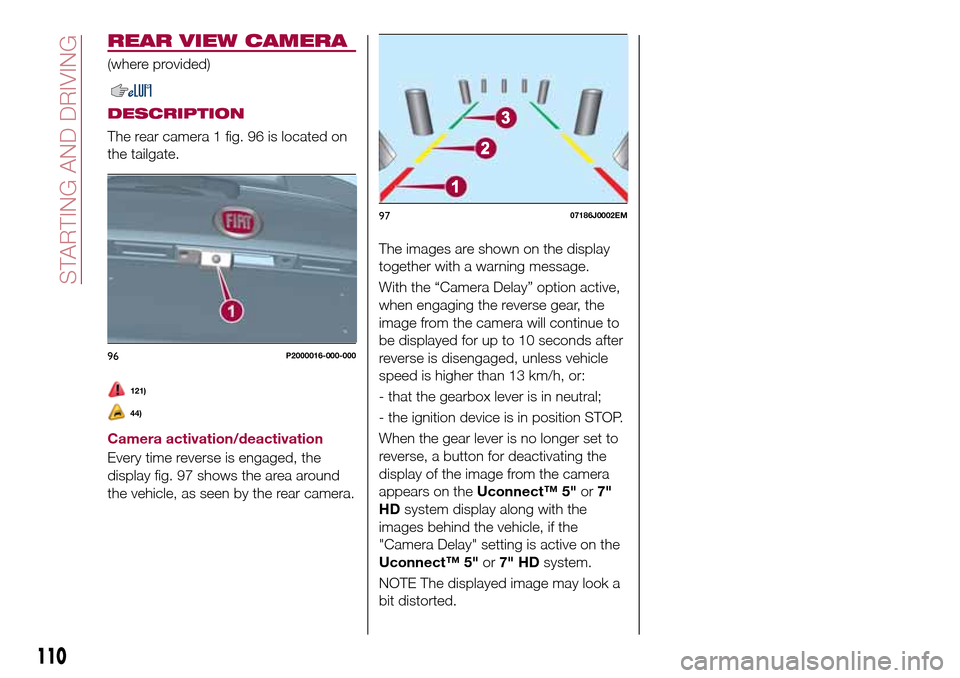
The rear camera 1 fig. 96 is located on
the tailgate.
121)
44)
Camera activation/deactivation
Every time reverse is engaged, the
display fig. 97 shows the area around
the vehicle, as seen by the rear camera.The images are shown on the display
together with a warning message.
With the “Camera Delay” option active,
when engaging the reverse gear, the
image from the camera will continue to
be displayed for up to 10 seconds after
reverse is disengaged, unless vehicle
speed is higher than 13 km/h, or:
- that the gearbox lever is in neutral;
- the ignition device is in position STOP.
When the gear lever is no longer set to
reverse, a button for deactivating the
display of the image from the camera
appears on theUconnect™ 5"or7"
HDsystem display along with the
images behind the vehicle, if the
"Camera Delay" setting is active on the
Uconnect™ 5"or7" HDsystem.
NOTE The displayed image may look a
bit distorted.
96P2000016-000-000
9707186J0002EM
110
STARTING AND DRIVING
Page 113 of 240
SYMBOLS AND MESSAGES ON THE DISPLAY
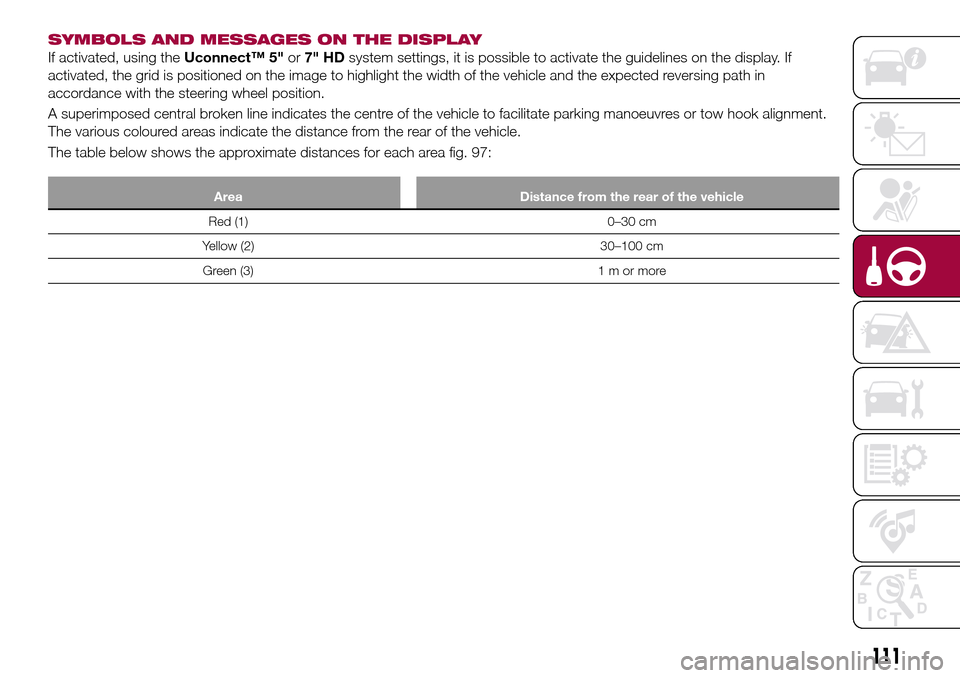
If activated, using theUconnect™ 5"or7" HDsystem settings, it is possible to activate the guidelines on the display. If
activated, the grid is positioned on the image to highlight the width of the vehicle and the expected reversing path in
accordance with the steering wheel position.
A superimposed central broken line indicates the centre of the vehicle to facilitate parking manoeuvres or tow hook alignment.
The various coloured areas indicate the distance from the rear of the vehicle.
The table below shows the approximate distances for each area fig. 97:
Area Distance from the rear of the vehicle
Red (1) 0–30 cm
Yellow (2) 30–100 cm
Green (3) 1 m or more
111
Page 142 of 240
WARNING
141)Before opening the bonnet, make
sure that the engine is off and that the
ignition key is in the STOP position. Follow
the indications on the plate underneath the
bonnet. We recommend that you remove
the key from the ignition if other people
remain in the vehicle. The vehicle should
always be left after the key has been
removed or turned to the STOP position.
During refuelling, make sure that the engine
is off (and that the ignition key is in the
STOP position).
142)Do not get too close to the radiator
cooling fan: the electric fan may start;
danger of injury. Scarves, ties and other
loose clothing might be pulled by moving
parts.
143)Remove any metal objects (e.g. rings,
watches, bracelets), that might cause an
accidental electrical contact and cause
serious injury.
144)The batteries contain acid that can
burn skin or eyes. Batteries produce
hydrogen, which is easily flammable and
explosive. Therefore, keep away flames or
devices which may cause sparks.
IMPORTANT
53)Never use a fast battery-charger to
start the engine as this could damage the
electronic systems of your vehicle,
particularly the ignition and engine fuel
supply control units.54)Do not connect the cable to the
negative terminal (–) of the flat battery. The
following spark could lead to battery
explosion and cause serious harm. Only
use the specific earth point; do not use any
other exposed metallic part.
FUEL CUT-OFF
SYSTEM
DESCRIPTION
This intervenes in the case of an impact
causing:
the interruption of the fuel supply
with the engine consequently switching
off;
the automatic unlocking of the
doors;
turning on of the lights inside the
vehicle;
deactivation of climate control
system ventilation;
switching on of the hazard warning
lights (to deactivate the lights press the
button on the dashboard).
On some versions, the intervention of
the system is indicated by a message
shown on the display. In the same way,
a dedicated message on the display
warns the driver if system operation is
compromised.
IMPORTANT Carefully check the vehicle
for fuel leaks, for instance in the engine
compartment, under the vehicle or near
the tank area. After a collision, bring the
ignition device to STOP to prevent the
battery from running down.
140
IN AN EMERGENCY
Page 143 of 240
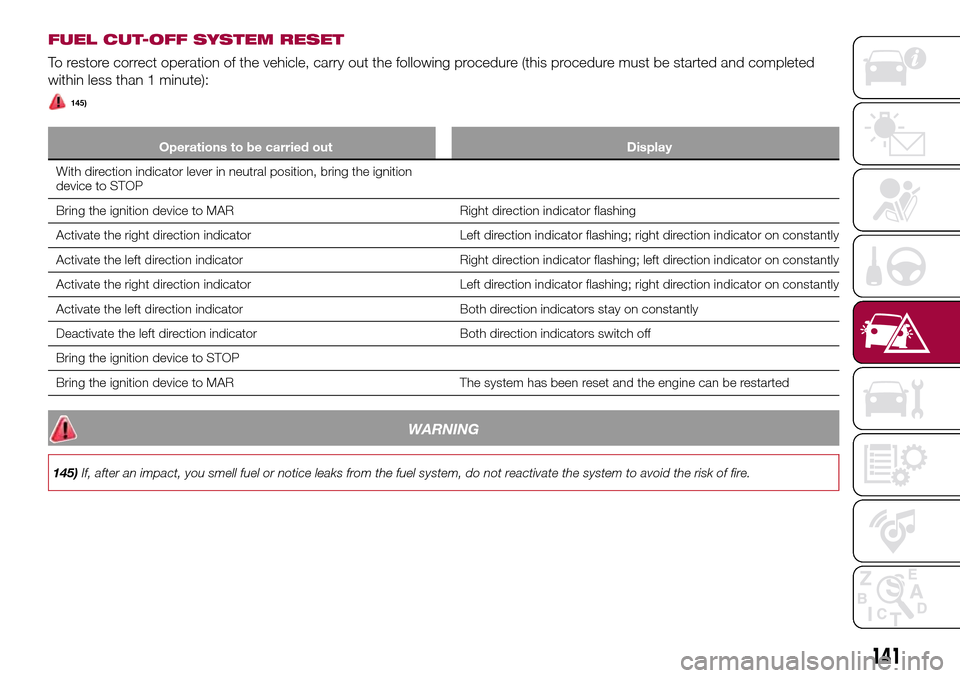
FUEL CUT-OFF SYSTEM RESET
To restore correct operation of the vehicle, carry out the following procedure (this procedure must be started and completed
within less than 1 minute):
145)
Operations to be carried out Display
With direction indicator lever in neutral position, bring the ignition
device to STOP
Bring the ignition device to MAR Right direction indicator flashing
Activate the right direction indicator Left direction indicator flashing; right direction indicator on constantly
Activate the left direction indicator Right direction indicator flashing; left direction indicator on constantly
Activate the right direction indicator Left direction indicator flashing; right direction indicator on constantly
Activate the left direction indicator Both direction indicators stay on constantly
Deactivate the left direction indicator Both direction indicators switch off
Bring the ignition device to STOP
Bring the ignition device to MAR The system has been reset and the engine can be restarted
WARNING
145)If, after an impact, you smell fuel or notice leaks from the fuel system, do not reactivate the system to avoid the risk of fire.
141
Page 159 of 240
USEFUL ADVICE FOR
EXTENDING THE LIFE OF
YOUR BATTERY
Useful advice for extending the life
of your battery
To avoid draining your battery and
make it last longer, observe the
following instructions:
when you park the car, ensure that
the doors, tailgate and bonnet are
closed properly, to prevent any lights
from remaining on inside the
passenger's compartment;
switch off all roof lights inside the car:
the car is however equipped with a
system which switches all internal lights
off automatically;
do not keep accessories (e.g. radio,
hazard warning lights, etc.) switched on
for a long time when the engine is not
running;
before performing any operation on
the electrical system, disconnect the
negative battery cable.
If, after purchasing the vehicle, you wish
to install electrical accessories which
require permanent electrical supply (e.g.
alarm, etc.) or accessories which
influence the electrical supply
requirements, contact a Fiat Dealership,
whose qualified staff will evaluate the
overall electrical consumption.
61)
IMPORTANT After the battery is
disconnected, the steering must be
initialised. The
warning light on the
instrument panel (or symbol on the
display) switches on to indicate this. To
carry out this procedure, simply turn the
steering wheel all the way from one end
to the other or drive in a straight line for
about a hundred metres.
IMPORTANT If the charge level remains
under 50% for a long time, the battery
is damaged by sulphation, reducing its
capacity and efficiency at start-up. The
battery is also more prone to the risk of
freezing (at temperatures as high as
-10°C). Refer to the "Vehicle inactivity"
paragraph in "Starting and driving"
chapter if the vehicle is left parked for a
long time.
WARNING
149)Never smoke while working in the
engine compartment: gas and inflammable
vapours may be present, with the risk of
fire.
150)Be very careful when working in the
engine compartment when the engine is
hot: you may get burned. Do not get too
close to the radiator cooling fan: the
electric fan may start; danger of injury.
Scarves, ties and other loose clothing
might be pulled by moving parts.151)If the engine oil is being topped up,
wait for the engine to cool down before
loosening the filler cap, particularly for
vehicles with aluminium cap (where
provided). WARNING: risk of burns!
152)The cooling system is pressurised. If
the cap needs replacing, do so with
another original or the effectiveness of the
system may be compromised. Do not
remove the reservoir plug when the engine
is hot: you risk scalding yourself.
153)Do not travel if the windscreen
washer reservoir is empty: using the
windscreen washer is essential for
improving visibility. Repeated operation of
the system without fluid could damage or
cause rapid deterioration of some system
components.
154)Some commercial additives for
windscreen washer fluid are flammable.
The engine compartment contains hot
components which may start a fire.
155)Brake fluid is poisonous and highly
corrosive. In the event of accidental
contact, immediately wash the affected
parts with water and mild soap. Then rinse
thoroughly. Call a doctor immediately if
swallowed.
156)The symbol, on the brake fluid
container indicates if a brake fluid is
synthetic or mineral-based. Use of mineral
type fluids will damage the special rubber
seals of the braking system beyond repair.
157)Battery fluid is poisonous and
corrosive. Avoid contact with the skin and
eyes. Keep open flames away from the
battery and do not use objects that might
create sparks: risk of explosion and fire.
158)Using the battery with insufficient fluid
irreparably damages the battery and may
cause an explosion.
157