service FIAT TIPO 5DOORS STATION WAGON 2017 1.G Owners Manual
[x] Cancel search | Manufacturer: FIAT, Model Year: 2017, Model line: TIPO 5DOORS STATION WAGON, Model: FIAT TIPO 5DOORS STATION WAGON 2017 1.GPages: 264, PDF Size: 4.53 MB
Page 2 of 264

This Owner Handbook is intended to show the vehicle's operating conditio\
ns.
For the enthusiast user who wants to have insights, curiosities and deta\
iled information about the characteristics and functions
of the vehicle, Fiat gives the opportunity to consult a dedicated sectio\
n which is available in electronic format.
ONLINE VEHICLE OWNER HANDBOOK
The following symbol is reported within the text of the Owner Handbook, next to the subjects \
for which details are provided.
Go to the www.mopar.eu/owner
website and access your personal area.
The “Maintenance and care” page includes all the information about\
your vehicle and the link to access eLUM, where you will find
all the details of the Owner Handbook.
Alternatively, to access this information, go to the Internet website at\
http://aftersales.fiat.com/elum/
.
The eLUM website is free and will allow you, among many other things, to easily c\
onsult the on-board documents
of all the other vehicles of the Group.
Have a nice reading and happy motoring!
We really know your car because we invented, designed and built it: we r\
eally know every single detail.
At Fiat Service authorised workshops you can find technicians directly trained by us,
offering quality and professionalism for all service operations.
Fiat workshops are always close to you for the regular servicing operati\
ons, season checks and practical recommendations by our experts.
With Original Parts distributed by MOPAR
®, you maintain the reliability, comfort
and performance features that you bought your new car for over time.
Always ask for Genuine Parts for the components used on our cars; we rec\
ommend them because
they come from our steady commitment in research and development of high\
ly innovative technologies. For all these reasons: rely on Genuine Parts, because they are the only ones designed by FCA for your car.
SAFETY:
BRAKING SYSTEMENVIRONMENT: PARTICULATE FILTERS, CLIMATE CONTROL MAINTENANCECOMFORT: SUSPENSION
AND WINDSCREEN WIPERS PERFORMANCE: SPARK PLUGS, INJECTORS AND BATTERIESLINEACCESSORI
ROOF RACK BARS, WHEEL RIMS
WHY CHOOSING GENUINE PARTS
COP TIPO 5 DOORS UM SW GB.qxp_500 UM ITA 31/05/16 17:11 Pagina 2
Page 3 of 264
Dear Customer,
We would like to congratulate and thank you for choosing a Fiat.
We have written this handbook to help you get to know all the features of your vehicle and use it in the best possible way.
Here you will find information, advice and important warnings regarding use of your vehicle and how to achieve the best
performance from its technical features.
You are advised to read it right through before taking to the road for the first time, to become familiar with the controls and
above all with those concerning brakes, steering and gearbox; at the same time, you can understand the vehicle behaviour on
different road surfaces.
This document also provides a description of special features and tips, as well as essential information for the safe driving, care
and maintenance of your vehicle over time.
After reading it, you are advised to keep the handbook inside the vehicle, for an easy reference and for making sure it remains
on board the vehicle should it be sold.
In the attached Warranty Booklet you will also find a description of the Services that Fiat offers to its customers, the Warranty
Certificate and the detail of the terms and conditions for maintaining its validity.
We are sure that these will help you to get in touch with and appreciate your new vehicle and the service provided by the
people at Fiat.
Enjoy reading. Happy motoring!
This Owner Handbook describes all vehicle versions. Options, equipment dedicated to specific markets or
versions are not explicitly indicated in the text: as a consequence, you should only consider the information which
is related to the trim level, engine and version that you have purchased. Any content introduced throughout the
production of the model, outside the specific request of options at the time of purchase, will be identified with the
wording(where provided).
All data contained in this publication are intended to help you use your vehicle in the best possible way. FCA Italy
S.p.A. aims at a constant improvement of the vehicles produced. For this reason it reserves the right to make
changes to the model described for technical and/or commercial reasons.
For further information, contact a Fiat Dealership.
Page 29 of 264
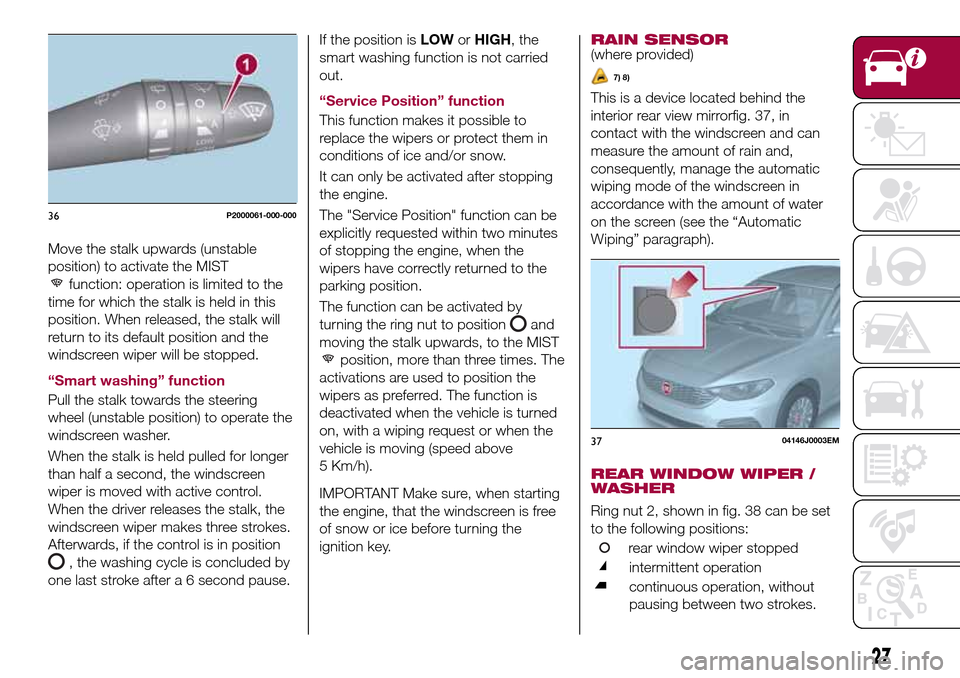
Move the stalk upwards (unstable
position) to activate the MIST
function: operation is limited to the
time for which the stalk is held in this
position. When released, the stalk will
return to its default position and the
windscreen wiper will be stopped.
“Smart washing” function
Pull the stalk towards the steering
wheel (unstable position) to operate the
windscreen washer.
When the stalk is held pulled for longer
than half a second, the windscreen
wiper is moved with active control.
When the driver releases the stalk, the
windscreen wiper makes three strokes.
Afterwards, if the control is in position
, the washing cycle is concluded by
one last stroke after a 6 second pause.If the position isLOWorHIGH, the
smart washing function is not carried
out.
“Service Position” function
This function makes it possible to
replace the wipers or protect them in
conditions of ice and/or snow.
It can only be activated after stopping
the engine.
The "Service Position" function can be
explicitly requested within two minutes
of stopping the engine, when the
wipers have correctly returned to the
parking position.
The function can be activated by
turning the ring nut to position
and
moving the stalk upwards, to the MIST
position, more than three times. The
activations are used to position the
wipers as preferred. The function is
deactivated when the vehicle is turned
on, with a wiping request or when the
vehicle is moving (speed above
5 Km/h).
IMPORTANT Make sure, when starting
the engine, that the windscreen is free
of snow or ice before turning the
ignition key.RAIN SENSOR
(where provided)
7) 8)
This is a device located behind the
interior rear view mirrorfig. 37, in
contact with the windscreen and can
measure the amount of rain and,
consequently, manage the automatic
wiping mode of the windscreen in
accordance with the amount of water
on the screen (see the “Automatic
Wiping” paragraph).
REAR WINDOW WIPER /
WASHER
Ring nut 2, shown in fig. 38 can be set
to the following positions:
rear window wiper stopped
intermittent operation
continuous operation, without
pausing between two strokes.
36P2000061-000-000
3704146J0003EM
27
Page 57 of 264
to reset the displayed/selected
functions.
MAIN MENU
The Main menu comprises a series of
items which can be selected using the
control buttons to access the different
selection and setting options given in
the following paragraphs.
REMARKS
Some options have a submenu.
With theUconnect™ 5"or7" HD
system, some Menu items are shown
and managed on the display of the
latter and not on the instrument panel
display (refer to the dedicated
Multimedia chapter or to the
supplement available online).
MENU OPTIONS
The Menu includes the following items:
TRIP
GSI
VEHICLE INFO
DRIVER ASSIST
AUDIO (function available in versions
and markets where present)
PHONE (function available in versions
and markets where present)
NAVIGATION (function available in
versions and markets where present)
ALERTS
VEHICLE SETTINGSTrip
This menu item displays the information
on the "Trip computer" (for further
information, see the description of the
"Trip computer" paragraph in this
chapter).
The information shown on the display is
as follows:
Instant info: distance (km or miles),
instantaneous consumption (mpg,
l/100 km or km/l);
Trip A: distance A (km or miles), trip
time A (hours/minutes/seconds),
average consumption A (mpg, or
l/100 km or km/l), average speed A
(km/h or mph);
Trip B: distance B (km or miles),
average consumption B (mpg, or
l/100 km or km/l), trip time B
(hours/minutes/seconds), average
speed B (km/h or mph).
Speedometer: km or miles displayed.
By pressing theOKbutton with
speedometer display active, you can
change the measurement unit (km/h
or mph). On leaving this screen, the
measurement unit set will take effect.
GSI
This menu item makes it possible to
see the gear shift indicator provided by
the GSI (gear shift indicator) system on
the display.Vehicle info
This menu item displays the information
on the vehicle conditions.
Press the
orbutton to select the
items listed below.
Tyre pressure: information displayed on
the iTPMS (where provided) (for further
information, see the description in
paragraph "Auxiliary driving systems" in
the "Safety" chapter).
Engine oil temperature: engine oil
temperature displayed.
Change engine oil: indication for engine
oil change.
Battery voltage: display of the battery
voltage value (charge level).
Service (Scheduled servicing):Number
of kilometres (or miles) and days until
the next Scheduled Servicing operation.
WARNING
The “Scheduled Servicing Plan”
includes vehicle maintenance at fixed
intervals (refer to the "Maintenance and
care" chapter).
This is displayed automatically, with
ignition device at MAR, 2000 km before
servicing or, where provided, 30 days
before servicing. It is also displayed
each time the ignition device is turned
to MAR or, for some versions, every
200 km. Below this threshold servicing
indications are more frequent. The
55
Page 58 of 264
display will be in km or miles according
to the unit of measurement set.
When the following scheduled servicing
is approaching ("coupon"), the word
"Service" will be displayed, followed by
the number of kilometres/miles or days
left, when the ignition device is turned
to MAR. Go to a Fiat Dealership, where
the "Scheduled Servicing Plan"
operations will be performed and the
message will be reset.
Driver Assist
This menu item allows you to view and
change the Adaptive Cruise Control
(ACC) settings on the instrument panel
display.
Audio
(function available in versions and
markets where present)
This Menu item allows some
information displayed on the
Uconnect™system to be repeated on
the instrument panel display (for further
information see the dedicated chapter).
Phone
(function available in versions and
markets where present)
This Menu item allows some
information displayed on the
Uconnect™system to be repeated on
the instrument panel display (for further
information see the dedicated chapter).The information displayed includes the
mobile pairing condition (mobile paired
or not paired), active/incoming/on hold
calls and the management of double
calls (first incoming, second on hold,
etc.).
In the phone menu, you can also select
3 sub-menus “SMS reader”, “recent
calls” and “favourite numbers” (available
with theUconnect™7'' HDsystem),
which can be selected with the arrows
or. This menu can also be used
to select and manage the last 10 calls
or the last 10 SMS using the directional
buttons on the steering wheel.
Navigation
(function available in versions and
markets where present)
This Menu item allows some
information displayed on the
Uconnect™ 5"o7" HDsystem to be
shown on the instrument panel display
(for further information see the
dedicated chapter).
Alerts
This menu item displays information/
failure messages stored by the system.
Vehicle Settings
This menu item allows you to change
the settings for:
Display;
Units;
Clock & Date;
Security;
Safety & Assistance;
Lights;
Doors & Locks.
Display
By selecting item "Display" you can
access the following settings:
Display Settings (changing
instrument panel display settings): this
menu item makes it possible to change
the displaying of the information, for
example the Compass (where present),
Outside temperature, Date (day/month),
Time (hours/minutes), Audio information
(where present). Selecting “Reset of the
default settings” makes it possible to
reset and restore the default settings;
Language: allows you to select the
language for showing the
information/warnings;
See phone: used to activate/
deactivate the display of pop-ups on
the instrument panel when there are
incoming calls, outgoing calls, on hold
calls, audio conference and incoming
SMS (available in versions and markets
where present);
See navigation: allows you to display
the information about the Navigation
mode on the instrument panel (available
in versions and markets where present);
56
KNOWING THE INSTRUMENT PANEL
Page 71 of 264
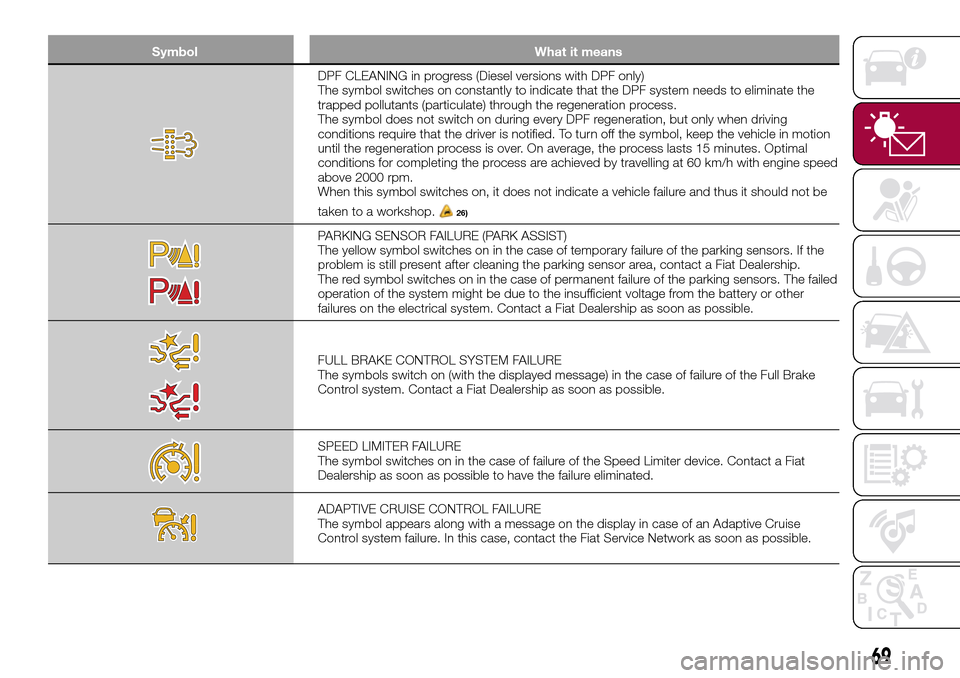
Symbol What it means
DPF CLEANING in progress (Diesel versions with DPF only)
The symbol switches on constantly to indicate that the DPF system needs to eliminate the
trapped pollutants (particulate) through the regeneration process.
The symbol does not switch on during every DPF regeneration, but only when driving
conditions require that the driver is notified. To turn off the symbol, keep the vehicle in motion
until the regeneration process is over. On average, the process lasts 15 minutes. Optimal
conditions for completing the process are achieved by travelling at 60 km/h with engine speed
above 2000 rpm.
When this symbol switches on, it does not indicate a vehicle failure and thus it should not be
taken to a workshop.
26)
PARKING SENSOR FAILURE (PARK ASSIST)
The yellow symbol switches on in the case of temporary failure of the parking sensors. If the
problem is still present after cleaning the parking sensor area, contact a Fiat Dealership.
The red symbol switches on in the case of permanent failure of the parking sensors. The failed
operation of the system might be due to the insufficient voltage from the battery or other
failures on the electrical system. Contact a Fiat Dealership as soon as possible.
FULL BRAKE CONTROL SYSTEM FAILURE
The symbols switch on (with the displayed message) in the case of failure of the Full Brake
Control system. Contact a Fiat Dealership as soon as possible.
SPEED LIMITER FAILURE
The symbol switches on in the case of failure of the Speed Limiter device. Contact a Fiat
Dealership as soon as possible to have the failure eliminated.
ADAPTIVE CRUISE CONTROL FAILURE
The symbol appears along with a message on the display in case of an Adaptive Cruise
Control system failure. In this case, contact the Fiat Service Network as soon as possible.
69
Page 72 of 264
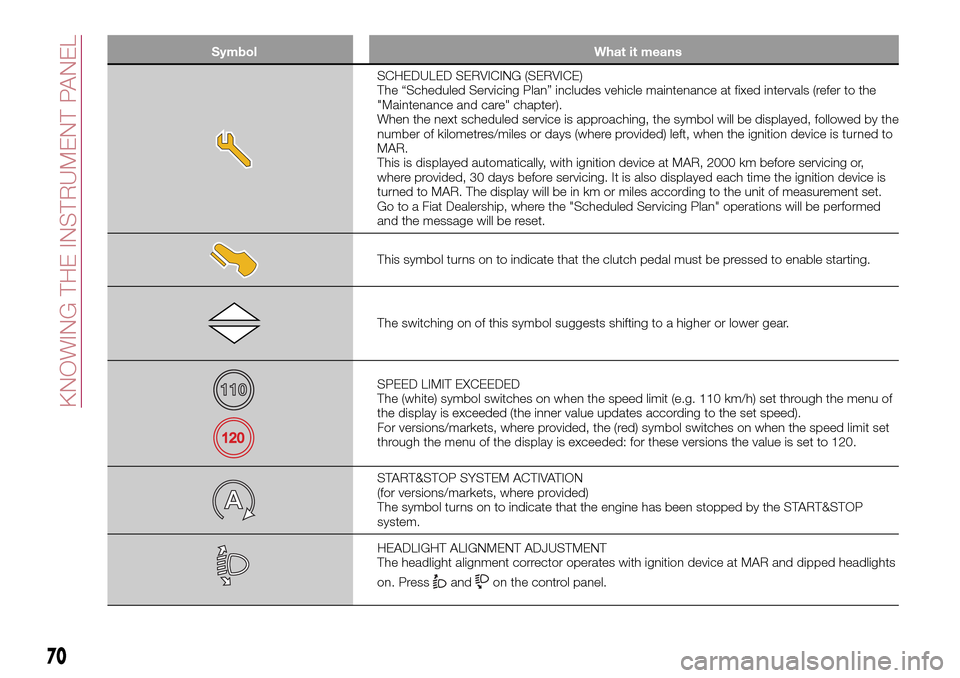
Symbol What it means
SCHEDULED SERVICING (SERVICE)
The “Scheduled Servicing Plan” includes vehicle maintenance at fixed intervals (refer to the
"Maintenance and care" chapter).
When the next scheduled service is approaching, the symbol will be displayed, followed by the
number of kilometres/miles or days (where provided) left, when the ignition device is turned to
MAR.
This is displayed automatically, with ignition device at MAR, 2000 km before servicing or,
where provided, 30 days before servicing. It is also displayed each time the ignition device is
turned to MAR. The display will be in km or miles according to the unit of measurement set.
Go to a Fiat Dealership, where the "Scheduled Servicing Plan" operations will be performed
and the message will be reset.
This symbol turns on to indicate that the clutch pedal must be pressed to enable starting.
The switching on of this symbol suggests shifting to a higher or lower gear.
SPEED LIMIT EXCEEDED
The (white) symbol switches on when the speed limit (e.g. 110 km/h) set through the menu of
the display is exceeded (the inner value updates according to the set speed).
For versions/markets, where provided, the (red) symbol switches on when the speed limit set
through the menu of the display is exceeded: for these versions the value is set to 120.
START&STOP SYSTEM ACTIVATION
(for versions/markets, where provided)
The symbol turns on to indicate that the engine has been stopped by the START&STOP
system.
HEADLIGHT ALIGNMENT ADJUSTMENT
The headlight alignment corrector operates with ignition device at MAR and dipped headlights
on. Press
andon the control panel.
70
KNOWING THE INSTRUMENT PANEL
Page 163 of 264

SCHEDULED
SERVICING
Correct servicing is crucial for
guaranteeing a long life for the vehicle
under the best conditions.
For this reason, Fiat has planned a
series of checks and services at fixed
distance intervals and, for
versions/markets, where provided, at
fixed time intervals, as described in the
Scheduled Servicing Plan.
Regardless of the above, it is always
necessary to carefully follow the
instructions in the Scheduled Servicing
Plan (e.g. periodically check level of
liquids, tyre pressure, etc.).
Scheduled Servicing is offered by all
Fiat Dealerships according to fixed time
or kilometres/miles intervals. If, during
each operation, in addition to the ones
scheduled, the need arises for further
replacements or repairs, these may be
carried out with the owner's explicit
agreement only. If your vehicle is used
frequently for towing, the interval
between one service operation and the
next should be reduced.
IMPORTANT NOTES
Scheduled Servicing interventions are
set out by the Manufacturer. Failure to
comply with the schedule may
invalidate the warranty.It is advisable to inform a Fiat
Dealership of any small operating
irregularities without waiting for the next
service.
161
Page 181 of 264
AIR FILTER
163)
Replacing the air cleaner
See the "Scheduled servicing plan" for
the correct servicing intervals.
It is advisable to replace it with a
genuine spare part, specifically
designed for this vehicle.
AIR CONDITIONING
SYSTEM MAINTENANCE
75) 76)
To ensure the best possible
performance, the air conditioning
system must be checked and undergo
maintenance at a Fiat Dealership at the
beginning of the summer.
WINDSCREEN / REAR
WINDOW WIPERS
164)
Periodically clean the windscreen and
rear window and rubber profile of the
windscreen/rear window wiper blades,
using a sponge or a soft cloth and a
non-abrasive detergent. This eliminates
the salt or impurities accumulated when
driving.
Prolonged operation of the windscreen
window wipers with dry glass may
cause the deterioration of the blades, in
addition to abrasion of the surface of
the glass. To eliminate the impurities onthe dry glass, always operate the
windscreen/rear window washers.
In the case of very low outdoor
temperatures (below 0 °C), ensure that
the movement of the rubber part in
contact with the glass is not
obstructed, before activating the
windscreen/rear window wiper. Use a
suitable deicing product to release it if
required.
Do not use the windscreen wipers to
remove frost or ice.
Also avoid contact of the rubber profile
of the blades with petroleum derivatives
such as engine oil, petrol, etc.
IMPORTANT The envisaged life of the
windscreen and rear window wiper
blades varies according to the usage
frequency. In any case, it is advisable to
replace the blades approximately once
a year. When the blades are worn,
noise, marks on the glass or streaks of
water may be noticed. In the presence
of these conditions, clean the wiper
blades or, if necessary, replace them.
IMPORTANT Driving with worn
windscreen/rear window wiper blades
is a serious hazard, because visibility is
reduced in bad weather.
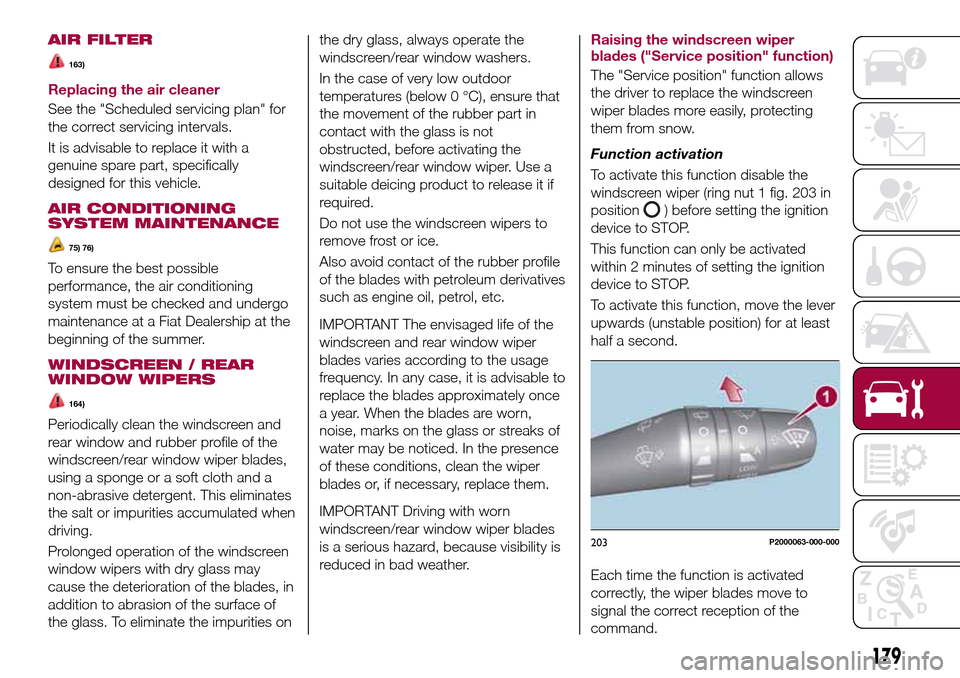
Raising the windscreen wiper
blades ("Service position" function)
The "Service position" function allows
the driver to replace the windscreen
wiper blades more easily, protecting
them from snow.
Function activation
To activate this function disable the
windscreen wiper (ring nut 1 fig. 203 in
position
) before setting the ignition
device to STOP.
This function can only be activated
within 2 minutes of setting the ignition
device to STOP.
To activate this function, move the lever
upwards (unstable position) for at least
half a second.
Each time the function is activated
correctly, the wiper blades move to
signal the correct reception of the
command.
203P2000063-000-000
179
Page 183 of 264
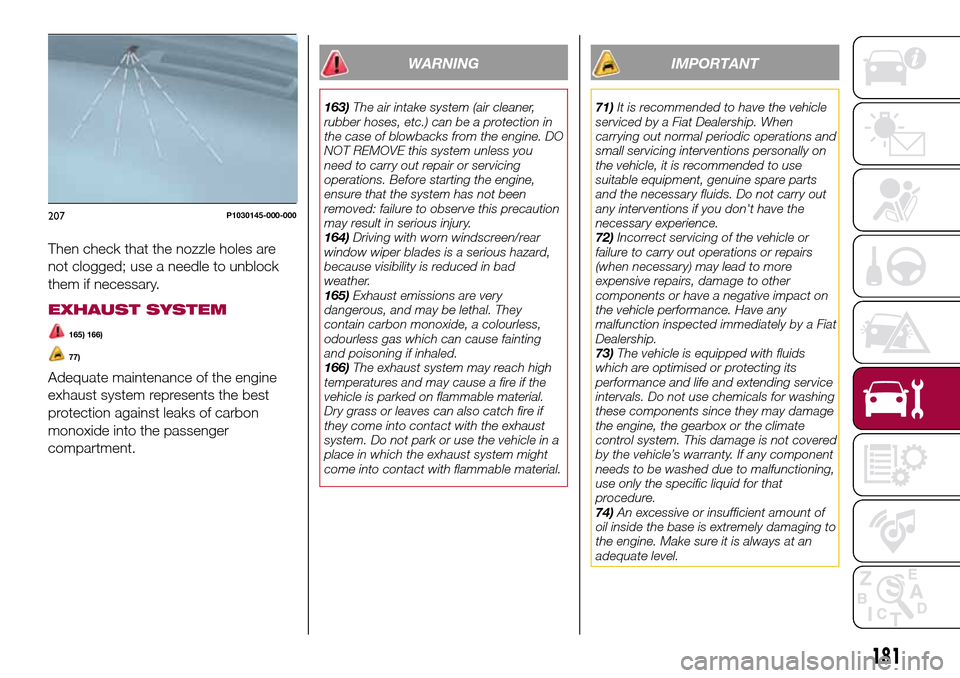
Then check that the nozzle holes are
not clogged; use a needle to unblock
them if necessary.
EXHAUST SYSTEM
165) 166)
77)
Adequate maintenance of the engine
exhaust system represents the best
protection against leaks of carbon
monoxide into the passenger
compartment.
WARNING
163)The air intake system (air cleaner,
rubber hoses, etc.) can be a protection in
the case of blowbacks from the engine. DO
NOT REMOVE this system unless you
need to carry out repair or servicing
operations. Before starting the engine,
ensure that the system has not been
removed: failure to observe this precaution
may result in serious injury.
164)Driving with worn windscreen/rear
window wiper blades is a serious hazard,
because visibility is reduced in bad
weather.
165)Exhaust emissions are very
dangerous, and may be lethal. They
contain carbon monoxide, a colourless,
odourless gas which can cause fainting
and poisoning if inhaled.
166)The exhaust system may reach high
temperatures and may cause a fire if the
vehicle is parked on flammable material.
Dry grass or leaves can also catch fire if
they come into contact with the exhaust
system. Do not park or use the vehicle in a
place in which the exhaust system might
come into contact with flammable material.
IMPORTANT
71)It is recommended to have the vehicle
serviced by a Fiat Dealership. When
carrying out normal periodic operations and
small servicing interventions personally on
the vehicle, it is recommended to use
suitable equipment, genuine spare parts
and the necessary fluids. Do not carry out
any interventions if you don't have the
necessary experience.
72)Incorrect servicing of the vehicle or
failure to carry out operations or repairs
(when necessary) may lead to more
expensive repairs, damage to other
components or have a negative impact on
the vehicle performance. Have any
malfunction inspected immediately by a Fiat
Dealership.
73)The vehicle is equipped with fluids
which are optimised or protecting its
performance and life and extending service
intervals. Do not use chemicals for washing
these components since they may damage
the engine, the gearbox or the climate
control system. This damage is not covered
by the vehicle’s warranty. If any component
needs to be washed due to malfunctioning,
use only the specific liquid for that
procedure.
74)An excessive or insufficient amount of
oil inside the base is extremely damaging to
the engine. Make sure it is always at an
adequate level.
207P1030145-000-000
181