ECO mode FORD AEROSTAR 1996 1.G User Guide
[x] Cancel search | Manufacturer: FORD, Model Year: 1996, Model line: AEROSTAR, Model: FORD AEROSTAR 1996 1.GPages: 353, PDF Size: 2.87 MB
Page 152 of 353
![FORD AEROSTAR 1996 1.G User Guide 171
*
[AS05325(ALL)08/95]
How to eject the tape
*
[AS05350(ALL)08/95]
To stop the tape and eject the cassette, press the
ªEJCTº button. The radio will resume playing if
the radio power is on. The ta](/img/11/4751/w960_4751-151.png "FORD AEROSTAR 1996 1.G User Guide 171
*
[AS05325(ALL)08/95]
How to eject the tape
*
[AS05350(ALL)08/95]
To stop the tape and eject the cassette, press the
ªEJCTº button. The radio will resume playing if
the radio power is on. The ta")
171
*
[AS05325(ALL)08/95]
How to eject the tape
*
[AS05350(ALL)08/95]
To stop the tape and eject the cassette, press the
ªEJCTº button. The radio will resume playing if
the radio power is on. The tape cartridge can be
ejected with radio power (and/or ignition) on or
off.
*
[AS05375(ALL)08/95]
How to store the tape
*
[AS05400(ALL)08/95]
Press the ªAM/FMº button to stop the tape
player and resume radio play. The cassette will
be stored in the tape player and the
Xsymbol
in the display will be lit until you push the
ªPLAY PROGº button to resume tape play. Fast
forward and fast rewind can be used while the
tape is in storage mode without interrupting
radio play.
*
[AS05425(ALL)08/95]
Using the DolbyHB noise reduction feature
*
[AS05450(ALL)08/95]
NOTE: Noise reduction system manufactured
under license from Dolby Labs
Licensing Corporation. ªDolbyº and
double-D symbol are trademarks of
Dolby Laboratories Licensing
Corporation.
*
[AS05475(ALL)08/95]
Push thekbutton to activate. When on, the
ksymbol above the button will be lit.
%*
[AS05500(ALL)08/95]
Clock Operation
*
[AS05525(ALL)08/95]
How to view the clock mode
*
[AS05550(ALL)08/95]
Press the ªCLOCKº button to alternate the
frequency and time in the display. In the clock
mode, pressing any radio function will
automatically display the radio frequency for
approximately ten seconds before changing back
to the clock mode.
File:09cpasa.ex
Update:Tue Aug 29 17:42:51 1995
Page 154 of 353
![FORD AEROSTAR 1996 1.G User Guide 173
*
[AS05825(ALL)08/95]
Tips on Caring for the Cassette Player and
Tapes
*
[AS05850(ALL)08/95]
In order to keep your cassette tape player
performing the way it was meant to, read and
follow these si](/img/11/4751/w960_4751-153.png "FORD AEROSTAR 1996 1.G User Guide 173
*
[AS05825(ALL)08/95]
Tips on Caring for the Cassette Player and
Tapes
*
[AS05850(ALL)08/95]
In order to keep your cassette tape player
performing the way it was meant to, read and
follow these si")
173
*
[AS05825(ALL)08/95]
Tips on Caring for the Cassette Player and
Tapes
*
[AS05850(ALL)08/95]
In order to keep your cassette tape player
performing the way it was meant to, read and
follow these simple precautions:
*
[AS05875(ALL)08/95]
q
Using a Ford Cassette Cleaning Cartridge to
clean the tape player head after 10-12 hours
of play will help maintain the best playback
sound and proper tape operation.
*
[AS05900(ALL)08/95]
q
Only cassettes that are 90 minutes long or
less should be used. Tapes longer than 90
minutes are thinner and subject to breakage
or may jam the tape player mechanism.
*
[AS05925(ALL)08/95]
q
Protect cassettes from exposure to direct
sunlight, high humidity and extreme heat or
cold. If they are exposed to extreme
conditions, allow them to reach a moderate
temperature before playing.
*
[AS05950(ALL)08/95]
q
If a tape is loose inside the cassette, tighten it
before playing by putting your finger or a
pencil into one of the holes and turning the
hub until the tape is tight.
*
[AS05975(ALL)08/95]
q
Loose labels on cassette tapes can become
lodged in the mechanism. Remove any loose
label material before inserting cassette.
*
[AS06000(ALL)08/95]
q
Do not leave a tape in the cassette tape
player. High heat in the vehicle can cause the
cassette to warp.
File:09cpasa.ex
Update:Tue Aug 29 17:42:51 1995
Page 158 of 353
![FORD AEROSTAR 1996 1.G User Guide 177
*
[AS06825(ALL)08/95]
q
Using the ªAMSº function to manually tune
your radio (Stereo Cassette Radio)
[AS06850(ALL)08/95]
You can change the frequency up or down
one increment at a time by first](/img/11/4751/w960_4751-157.png "FORD AEROSTAR 1996 1.G User Guide 177
*
[AS06825(ALL)08/95]
q
Using the ªAMSº function to manually tune
your radio (Stereo Cassette Radio)
[AS06850(ALL)08/95]
You can change the frequency up or down
one increment at a time by first")
177
*
[AS06825(ALL)08/95]
q
Using the ªAMSº function to manually tune
your radio (Stereo Cassette Radio)
[AS06850(ALL)08/95]
You can change the frequency up or down
one increment at a time by first pressing the
ªAMSº button (display shows ªTUNEº) then
within approximately five seconds pressing
and releasing either the right (
a) or left (
b)
side of the ªSEEKº button. To change
frequencies quickly, press andhold down
either the right or left side of the ªSEEKº
button.
*
[AS06875(ALL)08/95]
q
Using the ªSEEKº function
[AS06900(ALL)08/95]
Press the right (
a) side of the ªSEEKº
button to select the next listenable station up
the frequency band. Press the left (
b) side of
the button to select the next listenable station
down the frequency band. By holding the
button down, listenable stations can be
passed over to reach the desired station.
*
[AS07000(ALL)08/95]
q
Using the ªSCANº function (Stereo Cassette
Radio)
*
[AS07025(ALL)08/95]
Press the ªSCANº button to enter the scan
mode. The radio will begin scanning up the
frequency band, stopping on each listenable
station for approximately a five-second
sampling. This continues until you press the
ªSCANº button a second time.
%*
[AS07050(ALL)08/95]
Using the Controls of Your Cassette Tape
Player
*
[AS07075(ALL)08/95]
How to insert a tape
*
[AS07100(ALL)08/95]
Insert a cassette (with the open edge to the
right) firmly into the tape door opening, making
sure the cassette is completely in and ªseated.º
*
[AS07125(ALL)08/95]
NOTE: A cassette tape can be loaded with the
ignition on whether or not the radio
power is on.
File:09cpasa.ex
Update:Tue Aug 29 17:42:51 1995
Page 159 of 353
![FORD AEROSTAR 1996 1.G User Guide 178
*
[AS07150(ALL)08/95]
How to locate a desired track on the tape
*
[AS07175(ALL)08/95]
q
Using the Automatic Music Search (ªAMSº)
[AS07200(ALL)08/95]
Press and hold the ªAMSº button (ªAMSº
wi](/img/11/4751/w960_4751-158.png "FORD AEROSTAR 1996 1.G User Guide 178
*
[AS07150(ALL)08/95]
How to locate a desired track on the tape
*
[AS07175(ALL)08/95]
q
Using the Automatic Music Search (ªAMSº)
[AS07200(ALL)08/95]
Press and hold the ªAMSº button (ªAMSº
wi")
178
*
[AS07150(ALL)08/95]
How to locate a desired track on the tape
*
[AS07175(ALL)08/95]
q
Using the Automatic Music Search (ªAMSº)
[AS07200(ALL)08/95]
Press and hold the ªAMSº button (ªAMSº
will appear in the display). Then, push the
left (
h) button to rewind to the beginning
of the current selection or press the right
(
g) button to fast forward to the beginning
of the next selection.
*
[AS07225(ALL)08/95]
q
How to change the side of the tape being
played
[AS07250(ALL)08/95]
The alternate track (other side) of the tape
can be selected at any time by pushing both
fast-wind buttons (
hand
g) at the
same time.
*
[AS07275(ALL)08/95]
How to eject the tape
*
[AS07300(ALL)08/95]
To stop the tape and eject the cassette, press the
ªEJECTº button. The radio will resume playing.
*
[AS07325(ALL)08/95]
Using the DolbyHB noise reduction feature
*
[AS07350(ALL)08/95]
Push thek/memory preset #3 button to
activate. Push again to deactivate.
*
[AS07375(ALL)08/95]
NOTE: Noise reduction system manufactured
under license from Dolby Labs
Licensing Corporation. ªDolbyº and
double-D symbol are trademarks of
Dolby Laboratories Licensing
Corporation.
*
[AS07400(ALL)08/95]
How to view the clock mode
*
[AS07425(ALL)08/95]
Press the ªCLOCKº button to alternate the
frequency and time in the display. In the clock
mode, pressing any radio function will
automatically display the radio frequency for
approximatedly ten seconds before changing
back to the clock mode.
File:09cpasa.ex
Update:Tue Aug 29 17:42:51 1995
Page 160 of 353
![FORD AEROSTAR 1996 1.G User Guide 179
*
[AS07450(ALL)08/95]
How to set the clock
*
[AS07475(ALL)08/95]
1. Turn the radio on.
*
[AS07500(ALL)08/95]
2. Press and hold in the ªCLOCKº button,
press the ªSEEKº button left (
b) to advan](/img/11/4751/w960_4751-159.png "FORD AEROSTAR 1996 1.G User Guide 179
*
[AS07450(ALL)08/95]
How to set the clock
*
[AS07475(ALL)08/95]
1. Turn the radio on.
*
[AS07500(ALL)08/95]
2. Press and hold in the ªCLOCKº button,
press the ªSEEKº button left (
b) to advan")
179
*
[AS07450(ALL)08/95]
How to set the clock
*
[AS07475(ALL)08/95]
1. Turn the radio on.
*
[AS07500(ALL)08/95]
2. Press and hold in the ªCLOCKº button,
press the ªSEEKº button left (
b) to advance
the hours and right (
a) to advance the
minutes.
*
[AS07525(ALL)08/95]
NOTE: The clock displays 12-hour time with
no AM/PM indications.
*
[AS07550(ALL)08/95]
Tips on Caring for the Cassette Player and
Tapes
*
[AS07575(ALL)08/95]
In order to keep your cassette tape player
performing the way it was meant to, read and
follow these simple precautions:
*
[AS07600(ALL)08/95]
q
Using a Ford Cassette Cleaning Cartridge to
clean the tape player head after 10-12 hours
of play will help maintain the best playback
sound and proper tape operation.
*
[AS07625(ALL)08/95]
q
Only cassettes that are 90 minutes long or
less should be used. Tapes longer than 90
minutes are thinner and subject to breakage
or may jam the tape player mechanism.
*
[AS07650(ALL)08/95]
q
Protect cassettes from exposure to direct
sunlight, high humidity and extreme heat or
cold. If they are exposed to extreme
conditions, allow them to reach a moderate
temperature before playing.
*
[AS07675(ALL)08/95]
q
If a tape is loose inside the cassette, tighten it
before playing by putting your finger or a
pencil into one of the holes and turning the
hub until the tape is tight.
*
[AS07700(ALL)08/95]
q
Loose labels on cassette tapes can become
lodged in the mechanism. Remove any loose
label material before inserting a cassette.
*
[AS07725(ALL)08/95]
q
Do not leave a tape in the cassette tape
player when not in use. High heat in the
vehicle can cause the cassette to warp.
File:09cpasa.ex
Update:Tue Aug 29 17:42:51 1995
Page 170 of 353
189
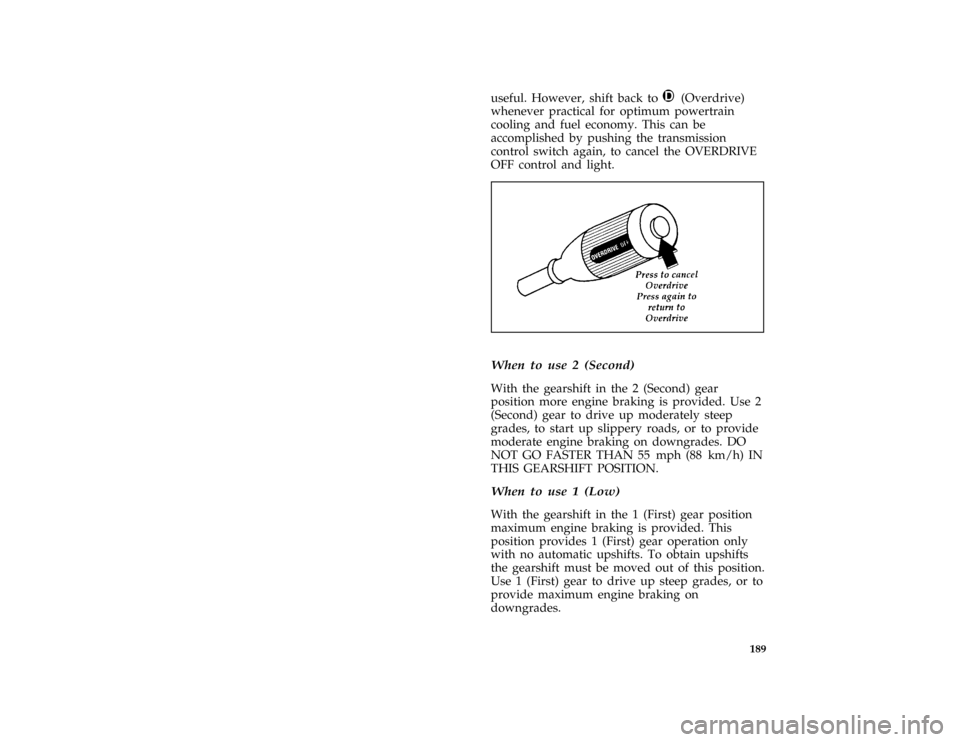
useful. However, shift back toj(Overdrive)
whenever practical for optimum powertrain
cooling and fuel economy. This can be
accomplished by pushing the transmission
control switch again, to cancel the OVERDRIVE
OFF control and light.
[DR06850(ALL)06/95]
one third page art:0095028-A*
[DR07100(ALL)01/95]
When to use 2 (Second)
[DR07200(ALL)06/92]
With the gearshift in the 2 (Second) gear
position more engine braking is provided. Use 2
(Second) gear to drive up moderately steep
grades, to start up slippery roads, or to provide
moderate engine braking on downgrades. DO
NOT GO FASTER THAN 55 mph (88 km/h) IN
THIS GEARSHIFT POSITION.
*
[DR07400(ALL)01/95]
When to use 1 (Low)
[DR07500(ALL)06/92]
With the gearshift in the 1 (First) gear position
maximum engine braking is provided. This
position provides 1 (First) gear operation only
with no automatic upshifts. To obtain upshifts
the gearshift must be moved out of this position.
Use 1 (First) gear to drive up steep grades, or to
provide maximum engine braking on
downgrades.
File:10cpdra.ex
Update:Tue Aug 29 17:45:28 1995
Page 176 of 353
![FORD AEROSTAR 1996 1.G User Guide 195
*
[DR22900(ALL)05/95]
RWARNING
If the anti-lock brake system warning
light remains on or comes on while
driving, have the braking system checked
by a qualified service technician as soon
as possib](/img/11/4751/w960_4751-175.png "FORD AEROSTAR 1996 1.G User Guide 195
*
[DR22900(ALL)05/95]
RWARNING
If the anti-lock brake system warning
light remains on or comes on while
driving, have the braking system checked
by a qualified service technician as soon
as possib")
195
*
[DR22900(ALL)05/95]
RWARNING
If the anti-lock brake system warning
light remains on or comes on while
driving, have the braking system checked
by a qualified service technician as soon
as possible.
*
[DR22910(ALL)07/95]
NOTE: If a fault occurs in the anti-lock
system, and the brake warning light is
not lit, the anti-lock system is disabled
but normal brake function remains
operational.
%*
[DR23000(ALL)12/89]
If Brakes Do Not Grip Well or Pedal is
ªLowº
%*
[DR23200(ALL)07/95]
If brakes do not grip well, it may indicate the
rear drum brakes need adjustment. To do this,
drive the vehicle in reverse at 5 mph (8 km/h)
on level, dry pavement. Stop the vehicle by
firmly applying the brakes. Repeat this
procedure four or five times.
*
[DR23250(ALL)11/89]
If during normal operation the brake pedal
seems ªlowº, it may indicate the need for a
brake system inspection and/or service. You
should have your brakes checked as soon as
possible.
%*
[DR23300(ALL)07/95]
Occasional brake squeal during light to moderate
stops does not affect the function of the brake
system and is normal. However, if the squeal
becomes louder or more frequent, have your
brakes inspected by your dealer or a qualified
service technician.
File:10cpdra.ex
Update:Tue Aug 29 17:45:28 1995
Page 177 of 353
![FORD AEROSTAR 1996 1.G User Guide 196
*
[DR23400(ALL)11/89]
RWARNING
Modifications to the suspension spring
rates and/or vehicle ride height may
adversely affect vehicle stopping ability.
*
[DR23500(ALL)07/92]
If Brakes Pull
*
[DR2360](/img/11/4751/w960_4751-176.png "FORD AEROSTAR 1996 1.G User Guide 196
*
[DR23400(ALL)11/89]
RWARNING
Modifications to the suspension spring
rates and/or vehicle ride height may
adversely affect vehicle stopping ability.
*
[DR23500(ALL)07/92]
If Brakes Pull
*
[DR2360")
196
*
[DR23400(ALL)11/89]
RWARNING
Modifications to the suspension spring
rates and/or vehicle ride height may
adversely affect vehicle stopping ability.
*
[DR23500(ALL)07/92]
If Brakes Pull
*
[DR23600(ALL)05/95]
q
Check tire pressure.
*
[DR23700(ALL)07/95]
q
Perform the self-adjustment procedure
described underIf Brakes Do Not Grip Well or
Pedal is ªLow.º
*
[DR23800(ALL)05/95]
If pull occurs during the first 500 miles
(800 km), make 10 moderately fast stops from
40 mph (65 km/h) and then perform the
self-adjustment procedure above. It may be
necessary to repeat this operation to properly
seat new brake linings and pads.
%*
[DR24000(ALL)01/93]
Stopping Distances
*
[DR24100(ALL)11/89]
Stopping distances vary with different loads and
driving conditions. Use caution when
encountering new conditions and acquaint
yourself with vehicle performance. Take full
advantage of engine braking power when
slowing down.
%*
[DR24200(ALL)01/95]
Applying the Brakes
*
[DR24300(ALL)05/95]
Apply the brake pedal gradually. Use the
ªsqueezeº technique Ð push on the brake pedal
with a steadily increasing force. This allows the
wheels to continue to roll while you are slowing
down, which lets you steer properly.
*
[DR24500(ALL)05/95]
NOTE: If you are driving down a long or
steep hill, shift to a lower gear and do
not apply your brakes continuously. If
you apply your brakes continuously,
they may overheat and become less
effective.
File:10cpdra.ex
Update:Tue Aug 29 17:45:28 1995
Page 185 of 353
![FORD AEROSTAR 1996 1.G User Guide 204
*
[DR29151(ALL)01/95]
q
Use extra caution when driving your vehicle
while you tow. (SeeDriving while you towin
this chapter.)
*
[DR29201(ALL)01/95]
q
Service your vehicle more frequently if you
to](/img/11/4751/w960_4751-184.png "FORD AEROSTAR 1996 1.G User Guide 204
*
[DR29151(ALL)01/95]
q
Use extra caution when driving your vehicle
while you tow. (SeeDriving while you towin
this chapter.)
*
[DR29201(ALL)01/95]
q
Service your vehicle more frequently if you
to")
204
*
[DR29151(ALL)01/95]
q
Use extra caution when driving your vehicle
while you tow. (SeeDriving while you towin
this chapter.)
*
[DR29201(ALL)01/95]
q
Service your vehicle more frequently if you
tow a trailer. (SeeServicing your vehicle if you
towin this chapter.)
[DR29250(ALL)03/90]
Standard length vehicles adapted for trailer tow
may require relocation of the underbody spare
tire. It is recommended that you secure the tire
under the rear-most seat using the hold-down
hardware located with the jack.
[DR29301(ALL)03/91]
one third page art:0020268-A
Spare tire stowage (standard length model)
*
[DR29350(ALL)05/94]
Do not tow a trailer until your vehicle has been
driven at least 500 miles (800 km).
File:10cpdra.ex
Update:Tue Aug 29 17:45:28 1995
Page 189 of 353
![FORD AEROSTAR 1996 1.G User Guide 208
*
[DR30301(ALL)01/93]
q
GAWR (Gross Axle Weight Rating)
[DR30305(ALL)08/95]
q
GAWR F (Gross Axle Weight Rating Front)
[DR30307(ALL)08/95]
q
GAWR R (Gross Axle Weight Rating Rear)
*
[DR30310(ALL)06](/img/11/4751/w960_4751-188.png "FORD AEROSTAR 1996 1.G User Guide 208
*
[DR30301(ALL)01/93]
q
GAWR (Gross Axle Weight Rating)
[DR30305(ALL)08/95]
q
GAWR F (Gross Axle Weight Rating Front)
[DR30307(ALL)08/95]
q
GAWR R (Gross Axle Weight Rating Rear)
*
[DR30310(ALL)06")
208
*
[DR30301(ALL)01/93]
q
GAWR (Gross Axle Weight Rating)
[DR30305(ALL)08/95]
q
GAWR F (Gross Axle Weight Rating Front)
[DR30307(ALL)08/95]
q
GAWR R (Gross Axle Weight Rating Rear)
*
[DR30310(ALL)06/92]
q
GCWR (Gross Combined Weight Rating)
*
[DR30320(ALL)06/92]
q
Maximum Trailer Weight Rating
*
[DR30330(ALL)06/92]
q
Maximum Trailer Weight
*
[DR30340(ALL)06/92]
q
Trailer Weight Range
*
[DR30351(ALL)03/91]
Base Curb Weight
*
[DR30401(ALL)03/94]
The Base Curb Weight is the weight of the
vehicle including fuel, coolants, lubricants,
emergency tools, spare wheel and tire. It also
includes any equipment that isstandardon that
model. It does not include passengers, cargo or
optional equipment installed by factory, dealer,
aftermarket supplier or customer.
*
[DR30451(ALL)03/91]
Payload
*
[DR30501(ALL)03/91]
Payload is the combined, maximum allowable
weight of cargo, occupants and optional
equipment that the truck is designed to carry. It
is Gross Vehicle Weight Rating minus the base
curb weight.
*
[DR30550(ALL)03/91]
Gross Vehicle Weight (GVW)
*
[DR30650(ALL)08/95]
It is important to remember that GVWis not a
limit or a specification.If an owner loads up a
vehicle and weighs it, that's the GVW at that
moment. If the owner piles on more of a load
and weighs it again, that becomes the GVW.
File:10cpdra.ex
Update:Tue Aug 29 17:45:28 1995