door lock FORD B MAX 2012 1.G User Guide
[x] Cancel search | Manufacturer: FORD, Model Year: 2012, Model line: B MAX, Model: FORD B MAX 2012 1.GPages: 256, PDF Size: 19.67 MB
Page 35 of 256
Downloaded from www.Manualslib.com manuals search engine Note:If a second valid passive key islocated within the liftgate detection range,the liftgate can be closed.
Unlocking Your Vehicle
Note:When your vehicle remains lockedfor longer than three days, the system willenter an energy-saving mode. This is toprevent your vehicle battery running out ofcharge. When your vehicle is unlocked whilein this mode, the reaction time of the systemmay be a little longer than normal. To exitthe energy-saving mode, unlock yourvehicle.
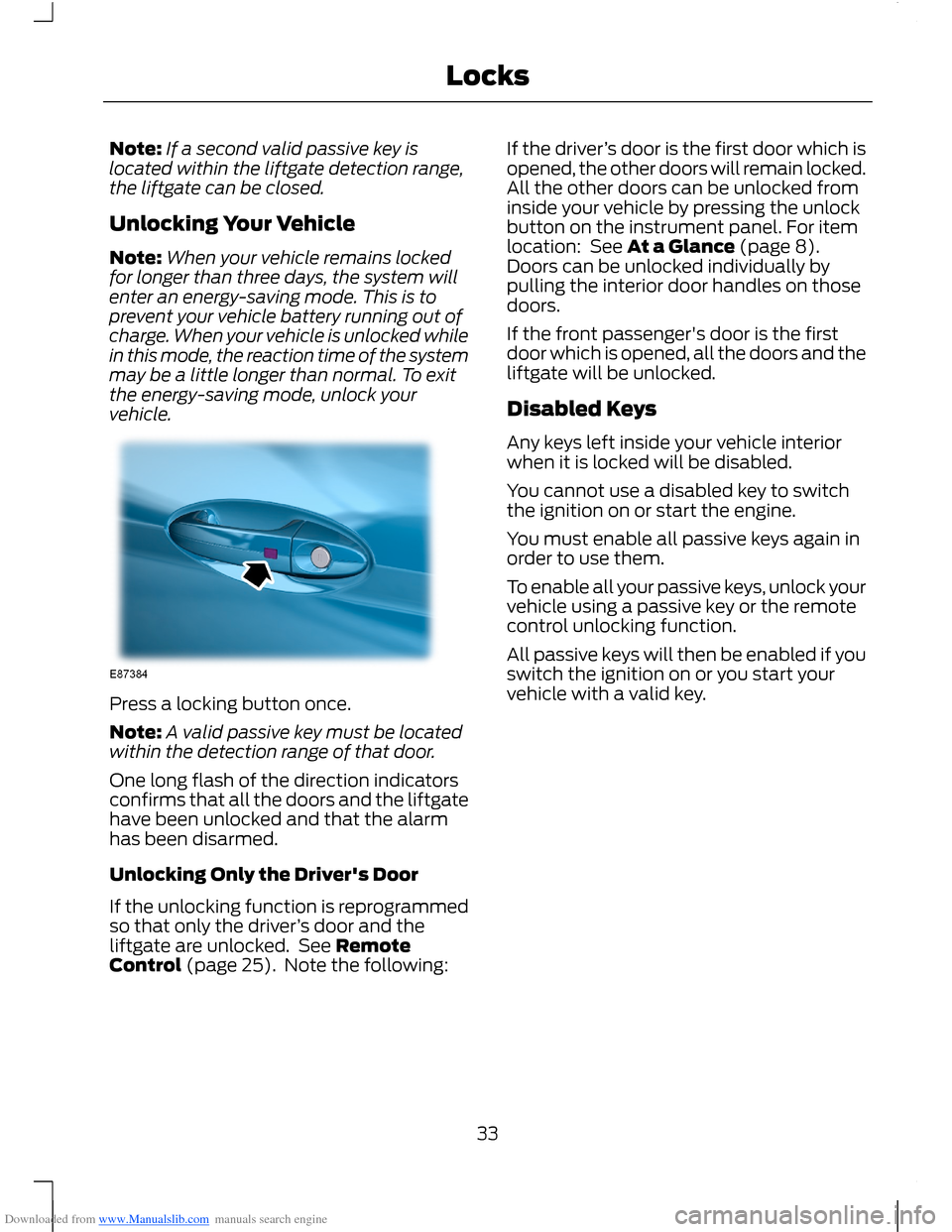
Press a locking button once.
Note:A valid passive key must be locatedwithin the detection range of that door.
One long flash of the direction indicatorsconfirms that all the doors and the liftgatehave been unlocked and that the alarmhas been disarmed.
Unlocking Only the Driver's Door
If the unlocking function is reprogrammedso that only the driver’s door and theliftgate are unlocked. See RemoteControl (page 25). Note the following:
If the driver’s door is the first door which isopened, the other doors will remain locked.All the other doors can be unlocked frominside your vehicle by pressing the unlockbutton on the instrument panel. For itemlocation: See At a Glance (page 8).Doors can be unlocked individually bypulling the interior door handles on thosedoors.
If the front passenger's door is the firstdoor which is opened, all the doors and theliftgate will be unlocked.
Disabled Keys
Any keys left inside your vehicle interiorwhen it is locked will be disabled.
You cannot use a disabled key to switchthe ignition on or start the engine.
You must enable all passive keys again inorder to use them.
To enable all your passive keys, unlock yourvehicle using a passive key or the remotecontrol unlocking function.
All passive keys will then be enabled if youswitch the ignition on or you start yourvehicle with a valid key.
33Locks
Page 36 of 256
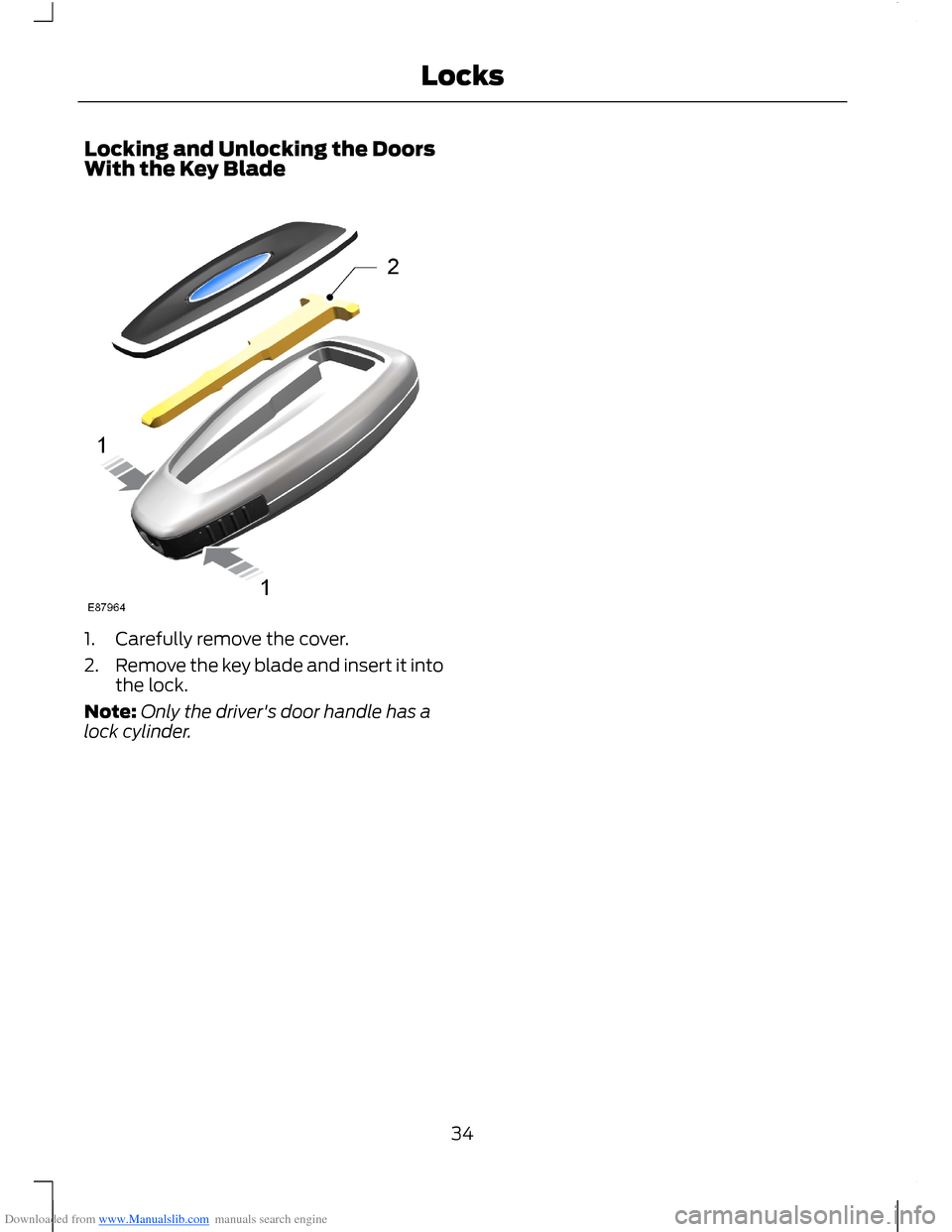
Downloaded from www.Manualslib.com manuals search engine Locking and Unlocking the DoorsWith the Key Blade
1.Carefully remove the cover.
2.Remove the key blade and insert it intothe lock.
Note:Only the driver's door handle has alock cylinder.
34Locks
Page 38 of 256
Downloaded from www.Manualslib.com manuals search engine Battery Back-up Sounder
The battery back-up sounder is an extraalarm system which will sound a sirenwhen the alarm is triggered. When you lockyour vehicle the system is armed. Thesounder has its own battery and will soundan alarm siren even if someonedisconnects your vehicle battery or thebattery back-up sounder itself.
Triggering the Alarm
Once armed, the alarm is triggered in anyof the following ways:
•If someone opens a door, the liftgateor the hood without a valid key orremote control.
•If someone removes the audio ornavigation system.
•If you switch the ignition on without avalid key.
•If the interior sensors detect movementwithin your vehicle.
•On vehicles with a battery back-upsounder, if someone disconnects yourvehicle battery or the battery back-upsounder itself.
If the alarm is triggered, the alarm horn willsound for 30 seconds and the hazardwarning flasher will flash for five minutes.
Any further attempts to perform one of theabove will trigger the alarm again.
Full and Reduced Guard
Full Guard
Full guard is the standard setting.
In full guard, the interior sensors are onwhen you arm the alarm.
Note:This may result in false alarms ifanimals or moving objects are inside yourvehicle.
Reduced Guard
In reduced guard, the interior sensors areoff when you arm the alarm.
Note:You can set the alarm to reducedguard for the current ignition cycle only. Thealarm will reset to full guard the next timeyou switch the ignition on.
Ask on Exit
You can set the information display to askyou each time which level of guard youwish to set.
If you select Ask on Exit, the messageReduced guard? appears in theinformation display each time you switchthe ignition off. See InformationMessages (page 62).
If you wish to arm the alarm with reducedguard, press the OK button when thismessage appears.
If you wish to arm the alarm with full guard,leave your vehicle without pressing the OKbutton.
Selecting Full or Reduced Guard
Note:Selecting Reduced does not set thealarm permanently to reduced guard. It setsit to reduced guard only for the currentignition cycle. If you regularly set the alarmto reduced guard, select Ask on Exit.
You can select full or reduced guard usingthe information display. See GeneralInformation (page 58).
Arming the Alarm
To arm the alarm, lock your vehicle. SeeLocks (page 29).
36Security
Page 39 of 256
Downloaded from www.Manualslib.com manuals search engine Disarming the Alarm
Vehicles Without Keyless Entry
Perimeter Alarm
Disarm and silence the alarm by unlockingthe doors with the key and switching theignition on with a correctly coded key orunlocking the doors with the remotecontrol.
Category One Alarm
Disarm and silence the alarm by unlockingthe doors with the key and switching theignition on with a correctly coded keywithin 12 seconds or unlocking the doorswith the remote control.
Vehicles with Keyless Entry
Note:A valid passive key must be locatedwithin the detection range of that door forkeyless entry. See Keyless Entry (page 32).
Perimeter Alarm
Disarm and silence the alarm by unlockingthe doors and switching the ignition on orunlocking the doors with the remotecontrol.
Category One Alarm
Disarm and silence the alarm by unlockingthe doors and switching the ignition onwithin 12 seconds or unlocking the doorsor the liftgate with the remote control.
37Security
Page 49 of 256
Downloaded from www.Manualslib.com manuals search engine DIRECTION INDICATORS
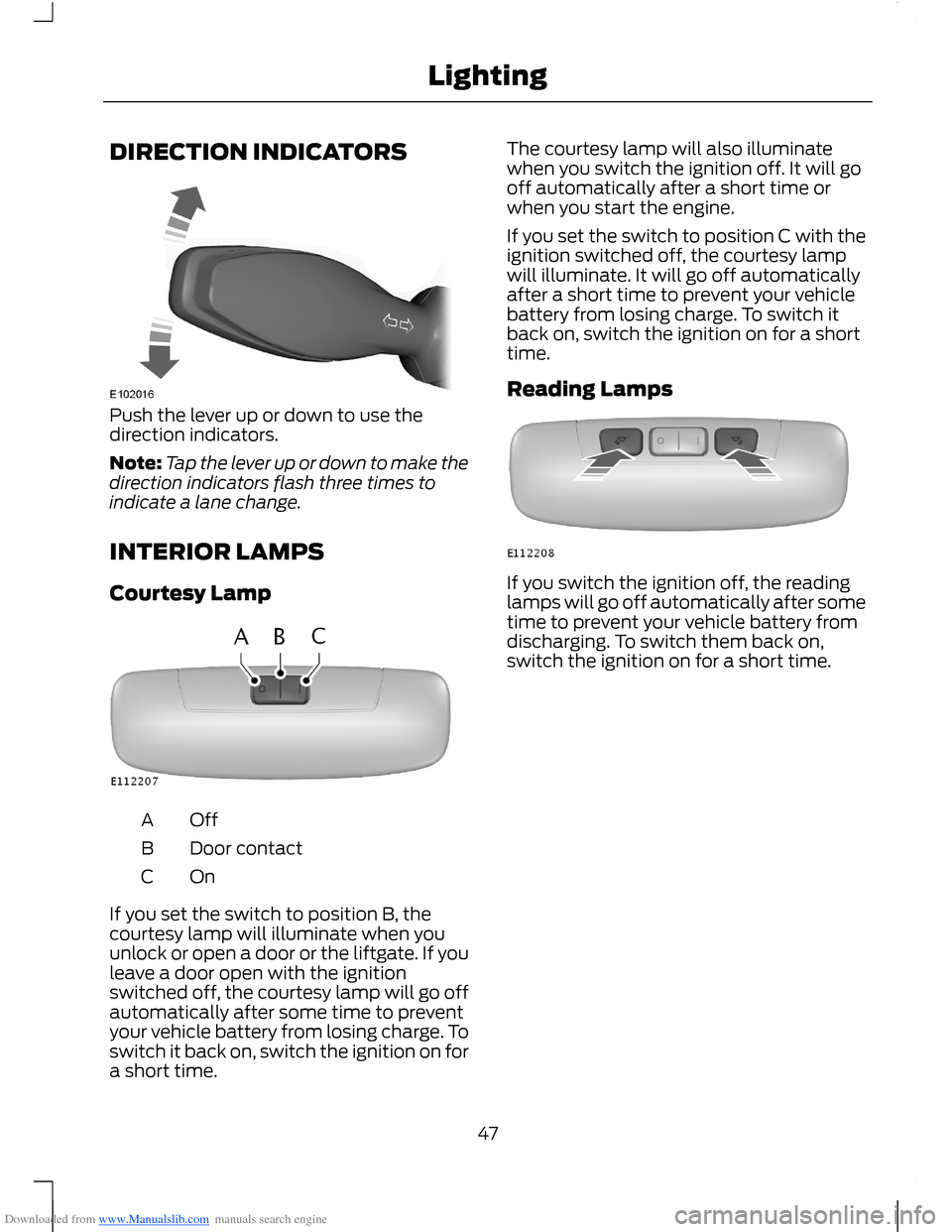
Push the lever up or down to use thedirection indicators.
Note:Tap the lever up or down to make thedirection indicators flash three times toindicate a lane change.
INTERIOR LAMPS
Courtesy Lamp
OffA
Door contactB
OnC
If you set the switch to position B, thecourtesy lamp will illuminate when youunlock or open a door or the liftgate. If youleave a door open with the ignitionswitched off, the courtesy lamp will go offautomatically after some time to preventyour vehicle battery from losing charge. Toswitch it back on, switch the ignition on fora short time.
The courtesy lamp will also illuminatewhen you switch the ignition off. It will gooff automatically after a short time orwhen you start the engine.
If you set the switch to position C with theignition switched off, the courtesy lampwill illuminate. It will go off automaticallyafter a short time to prevent your vehiclebattery from losing charge. To switch itback on, switch the ignition on for a shorttime.
Reading Lamps
If you switch the ignition off, the readinglamps will go off automatically after sometime to prevent your vehicle battery fromdischarging. To switch them back on,switch the ignition on for a short time.
47Lighting
Page 51 of 256
Downloaded from www.Manualslib.com manuals search engine Resetting the Bounce-Back Feature
WARNING
The bounce-back function remainsdeactivated until you have reset thememory.
If you have disconnected the battery, youmust reset the bounce-back memoryseparately for each window.
1.Lift and hold the switch until thewindow is fully closed.
2.Release the switch.
3.Lift the switch again for one moresecond.
4.Press and hold the switch until thewindow is fully open.
5.Release the switch.
6.Lift and hold the switch until thewindow is fully closed.
7.Open the window and then try to closeit automatically.
8.Reset and repeat the procedure if thewindow does not close automatically.
Accessory Delay (If Equipped)
You can use the window switches forseveral minutes after you have switchedthe ignition off or until either front door isopened.
EXTERIOR MIRRORS
Power Exterior Mirrors
WARNING
Do not adjust the mirrors when yourvehicle is moving.
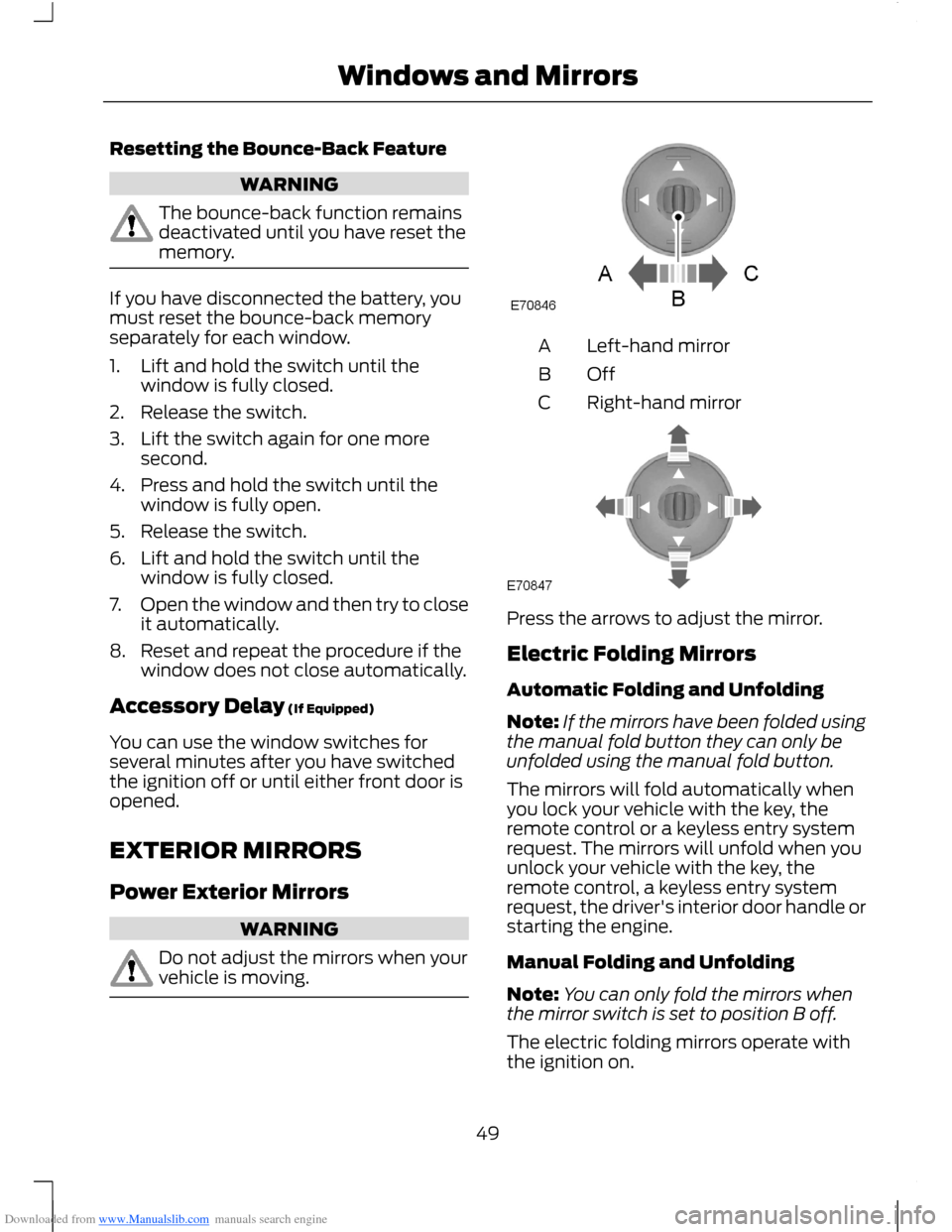
Left-hand mirrorA
OffB
Right-hand mirrorC
Press the arrows to adjust the mirror.
Electric Folding Mirrors
Automatic Folding and Unfolding
Note:If the mirrors have been folded usingthe manual fold button they can only beunfolded using the manual fold button.
The mirrors will fold automatically whenyou lock your vehicle with the key, theremote control or a keyless entry systemrequest. The mirrors will unfold when youunlock your vehicle with the key, theremote control, a keyless entry systemrequest, the driver's interior door handle orstarting the engine.
Manual Folding and Unfolding
Note:You can only fold the mirrors whenthe mirror switch is set to position B off.
The electric folding mirrors operate withthe ignition on.
49Windows and Mirrors
Page 52 of 256
Downloaded from www.Manualslib.com manuals search engine Note:You can operate the mirrors (mirrortilting and folding) for several minutes afteryou switch the ignition off. If you open a dooryou can no longer operate the mirrors.
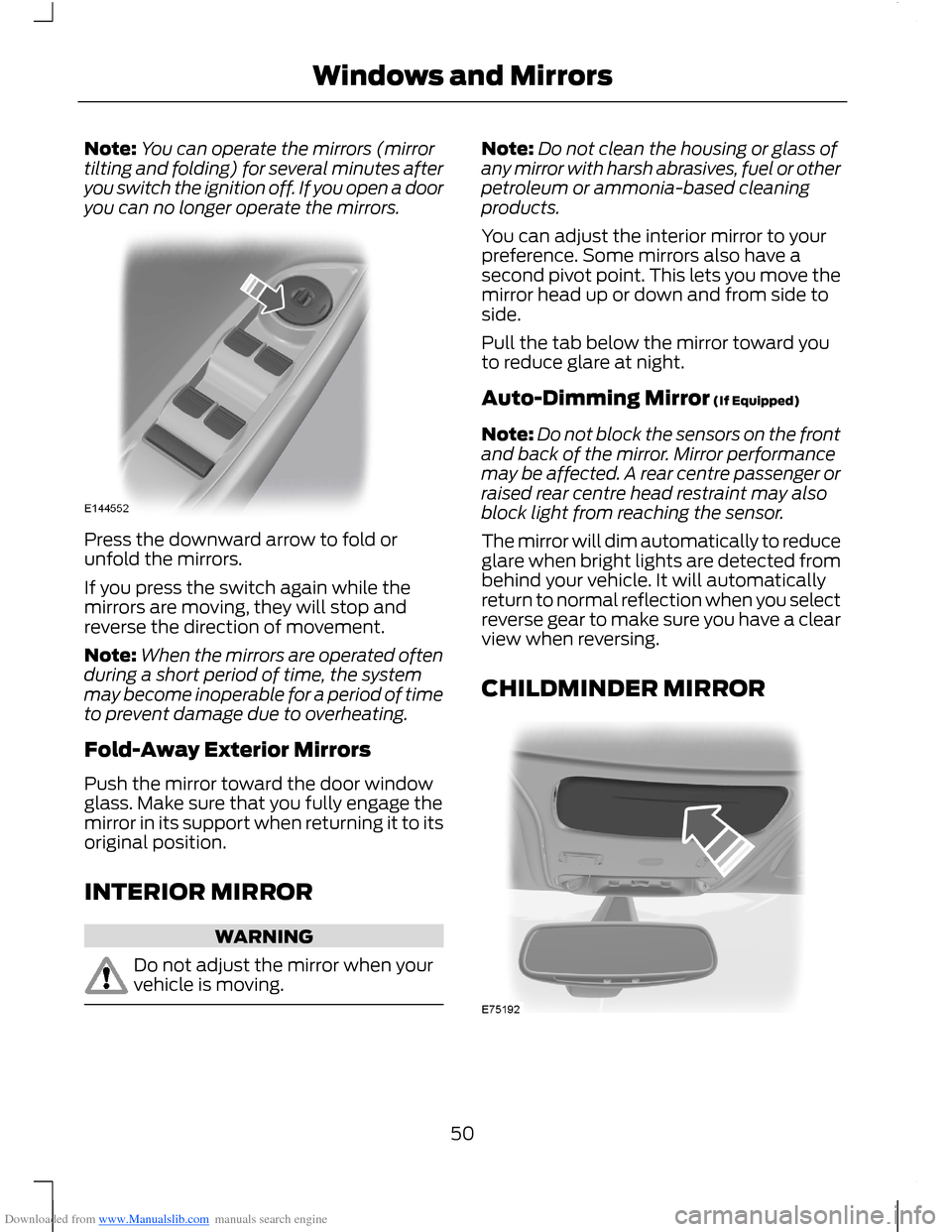
Press the downward arrow to fold orunfold the mirrors.
If you press the switch again while themirrors are moving, they will stop andreverse the direction of movement.
Note:When the mirrors are operated oftenduring a short period of time, the systemmay become inoperable for a period of timeto prevent damage due to overheating.
Fold-Away Exterior Mirrors
Push the mirror toward the door windowglass. Make sure that you fully engage themirror in its support when returning it to itsoriginal position.
INTERIOR MIRROR
WARNING
Do not adjust the mirror when yourvehicle is moving.
Note:Do not clean the housing or glass ofany mirror with harsh abrasives, fuel or otherpetroleum or ammonia-based cleaningproducts.
You can adjust the interior mirror to yourpreference. Some mirrors also have asecond pivot point. This lets you move themirror head up or down and from side toside.
Pull the tab below the mirror toward youto reduce glare at night.
Auto-Dimming Mirror (If Equipped)
Note:Do not block the sensors on the frontand back of the mirror. Mirror performancemay be affected. A rear centre passenger orraised rear centre head restraint may alsoblock light from reaching the sensor.
The mirror will dim automatically to reduceglare when bright lights are detected frombehind your vehicle. It will automaticallyreturn to normal reflection when you selectreverse gear to make sure you have a clearview when reversing.
CHILDMINDER MIRROR
50Windows and Mirrors
Page 54 of 256
Downloaded from www.Manualslib.com manuals search engine WARNING
Take care when using global closing.In an emergency, touch a doorhandle lock sensor to stop.
Note:Global closing can be switched onusing the driver’s door handle. Globalopening and closing can also be switchedon using the buttons on the passive key.
To close all the windows, press and holdthe driver’s door handle for at least threeseconds. The bounce-back function is alsoon during global closing.
52Windows and Mirrors
Page 55 of 256
Downloaded from www.Manualslib.com manuals search engine GAUGES
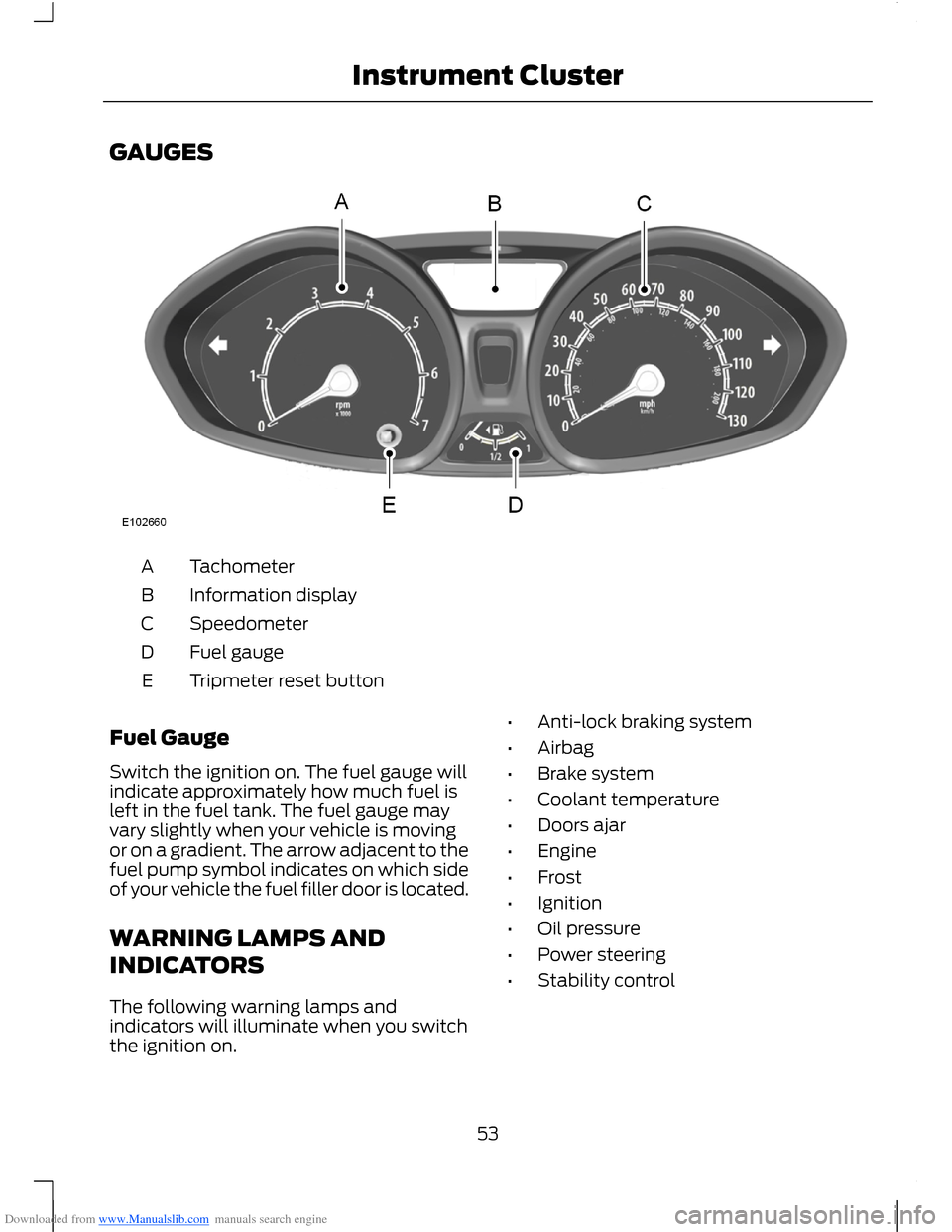
TachometerA
Information displayB
SpeedometerC
Fuel gaugeD
Tripmeter reset buttonE
Fuel Gauge
Switch the ignition on. The fuel gauge willindicate approximately how much fuel isleft in the fuel tank. The fuel gauge mayvary slightly when your vehicle is movingor on a gradient. The arrow adjacent to thefuel pump symbol indicates on which sideof your vehicle the fuel filler door is located.
WARNING LAMPS AND
INDICATORS
The following warning lamps andindicators will illuminate when you switchthe ignition on.
•Anti-lock braking system
•Airbag
•Brake system
•Coolant temperature
•Doors ajar
•Engine
•Frost
•Ignition
•Oil pressure
•Power steering
•Stability control
53Instrument Cluster
Page 56 of 256
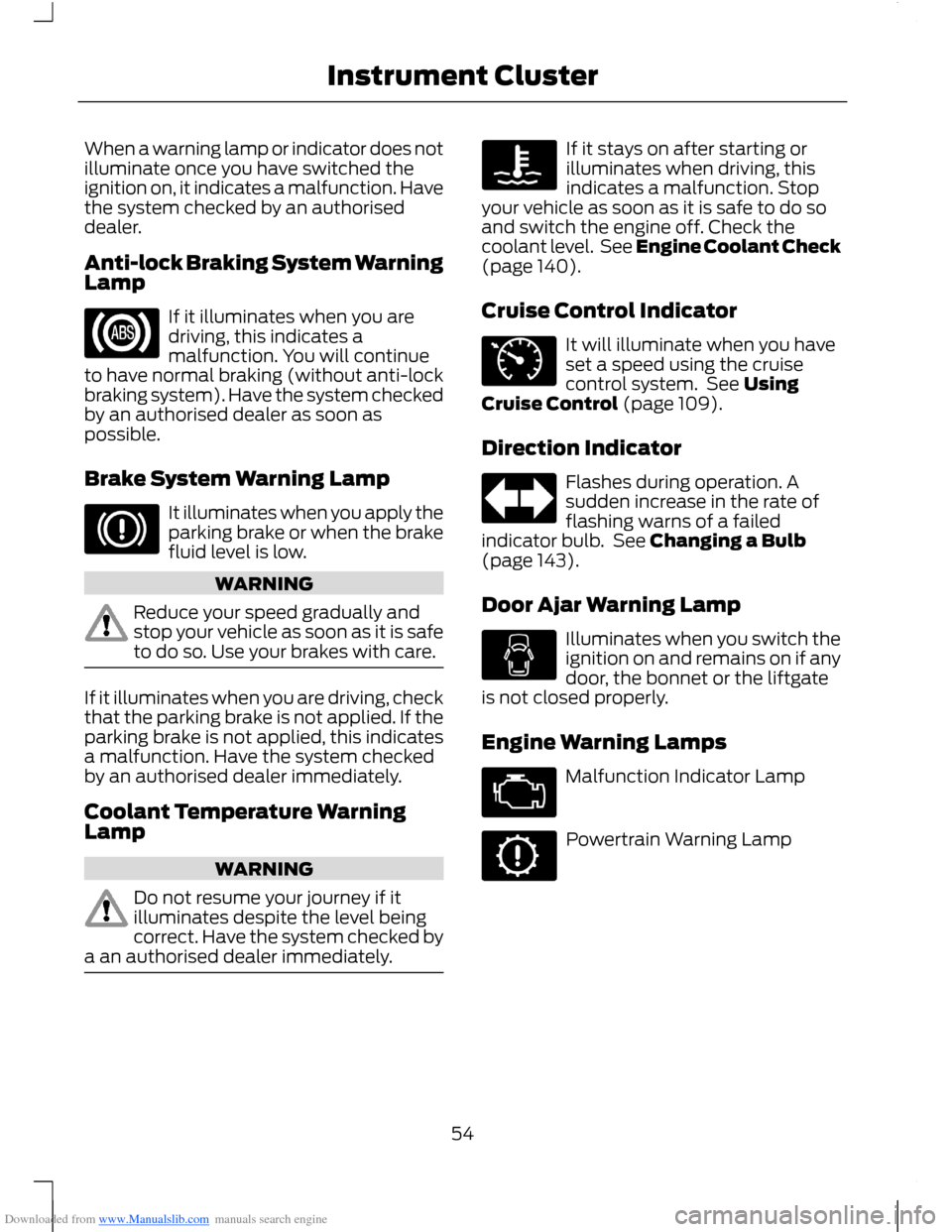
Downloaded from www.Manualslib.com manuals search engine When a warning lamp or indicator does notilluminate once you have switched theignition on, it indicates a malfunction. Havethe system checked by an authoriseddealer.
Anti-lock Braking System WarningLamp
If it illuminates when you aredriving, this indicates amalfunction. You will continueto have normal braking (without anti-lockbraking system). Have the system checkedby an authorised dealer as soon aspossible.
Brake System Warning Lamp
It illuminates when you apply theparking brake or when the brakefluid level is low.
WARNING
Reduce your speed gradually andstop your vehicle as soon as it is safeto do so. Use your brakes with care.
If it illuminates when you are driving, checkthat the parking brake is not applied. If theparking brake is not applied, this indicatesa malfunction. Have the system checkedby an authorised dealer immediately.
Coolant Temperature WarningLamp
WARNING
Do not resume your journey if itilluminates despite the level beingcorrect. Have the system checked bya an authorised dealer immediately.
If it stays on after starting orilluminates when driving, thisindicates a malfunction. Stopyour vehicle as soon as it is safe to do soand switch the engine off. Check thecoolant level. See Engine Coolant Check(page 140).
Cruise Control Indicator
It will illuminate when you haveset a speed using the cruisecontrol system. See UsingCruise Control (page 109).
Direction Indicator
Flashes during operation. Asudden increase in the rate offlashing warns of a failedindicator bulb. See Changing a Bulb(page 143).
Door Ajar Warning Lamp
Illuminates when you switch theignition on and remains on if anydoor, the bonnet or the liftgateis not closed properly.
Engine Warning Lamps
Malfunction Indicator Lamp
Powertrain Warning Lamp
54Instrument Cluster