light FORD B MAX 2012 1.G User Guide
[x] Cancel search | Manufacturer: FORD, Model Year: 2012, Model line: B MAX, Model: FORD B MAX 2012 1.GPages: 256, PDF Size: 19.67 MB
Page 50 of 256
Downloaded from www.Manualslib.com manuals search engine POWER WINDOWS
WARNINGS
Do not leave children unattended inthe vehicle and do not let them playwith the power windows. They mayseriously injure themselves.
When closing the power windows,you should verify they are free ofobstructions and make sure thatchildren and pets are not in the proximityof the window openings.
Note:You may hear a rumbling noise whenjust one of the windows are open. Lower theopposite window slightly to reduce thisnoise.
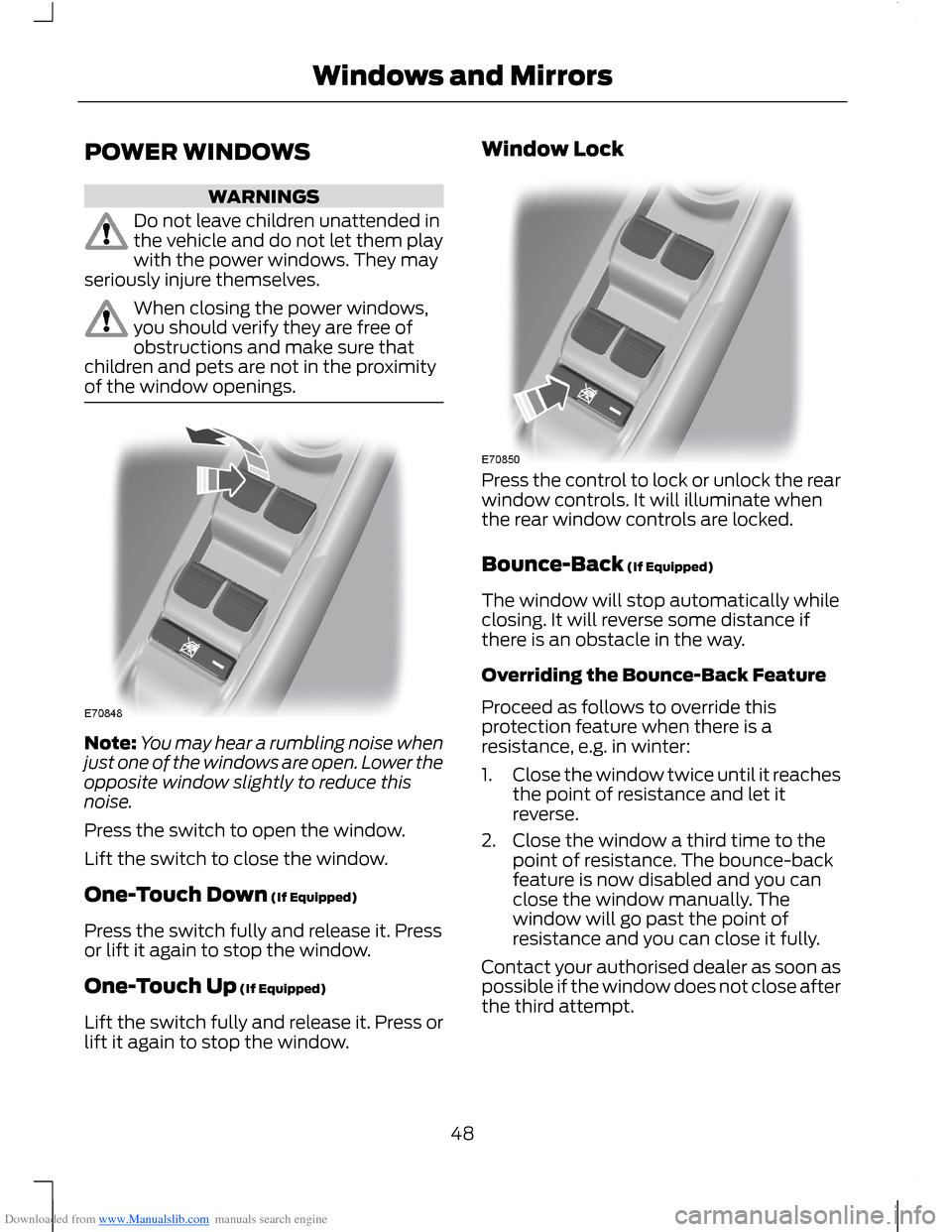
Press the switch to open the window.
Lift the switch to close the window.
One-Touch Down (If Equipped)
Press the switch fully and release it. Pressor lift it again to stop the window.
One-Touch Up (If Equipped)
Lift the switch fully and release it. Press orlift it again to stop the window.
Window Lock
Press the control to lock or unlock the rearwindow controls. It will illuminate whenthe rear window controls are locked.
Bounce-Back (If Equipped)
The window will stop automatically whileclosing. It will reverse some distance ifthere is an obstacle in the way.
Overriding the Bounce-Back Feature
Proceed as follows to override thisprotection feature when there is aresistance, e.g. in winter:
1.Close the window twice until it reachesthe point of resistance and let itreverse.
2.Close the window a third time to thepoint of resistance. The bounce-backfeature is now disabled and you canclose the window manually. Thewindow will go past the point ofresistance and you can close it fully.
Contact your authorised dealer as soon aspossible if the window does not close afterthe third attempt.
48Windows and Mirrors
Page 52 of 256
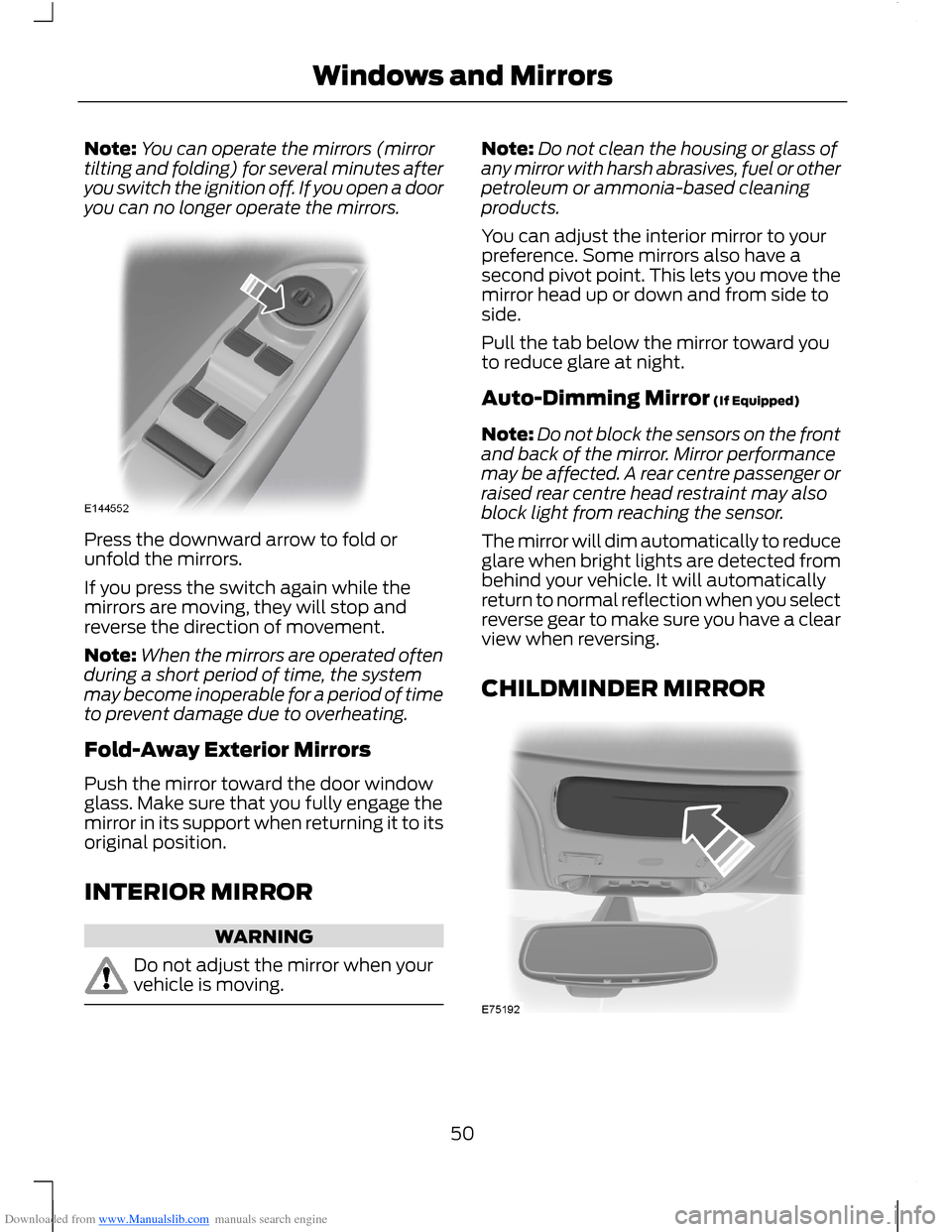
Downloaded from www.Manualslib.com manuals search engine Note:You can operate the mirrors (mirrortilting and folding) for several minutes afteryou switch the ignition off. If you open a dooryou can no longer operate the mirrors.
Press the downward arrow to fold orunfold the mirrors.
If you press the switch again while themirrors are moving, they will stop andreverse the direction of movement.
Note:When the mirrors are operated oftenduring a short period of time, the systemmay become inoperable for a period of timeto prevent damage due to overheating.
Fold-Away Exterior Mirrors
Push the mirror toward the door windowglass. Make sure that you fully engage themirror in its support when returning it to itsoriginal position.
INTERIOR MIRROR
WARNING
Do not adjust the mirror when yourvehicle is moving.
Note:Do not clean the housing or glass ofany mirror with harsh abrasives, fuel or otherpetroleum or ammonia-based cleaningproducts.
You can adjust the interior mirror to yourpreference. Some mirrors also have asecond pivot point. This lets you move themirror head up or down and from side toside.
Pull the tab below the mirror toward youto reduce glare at night.
Auto-Dimming Mirror (If Equipped)
Note:Do not block the sensors on the frontand back of the mirror. Mirror performancemay be affected. A rear centre passenger orraised rear centre head restraint may alsoblock light from reaching the sensor.
The mirror will dim automatically to reduceglare when bright lights are detected frombehind your vehicle. It will automaticallyreturn to normal reflection when you selectreverse gear to make sure you have a clearview when reversing.
CHILDMINDER MIRROR
50Windows and Mirrors
Page 55 of 256
Downloaded from www.Manualslib.com manuals search engine GAUGES
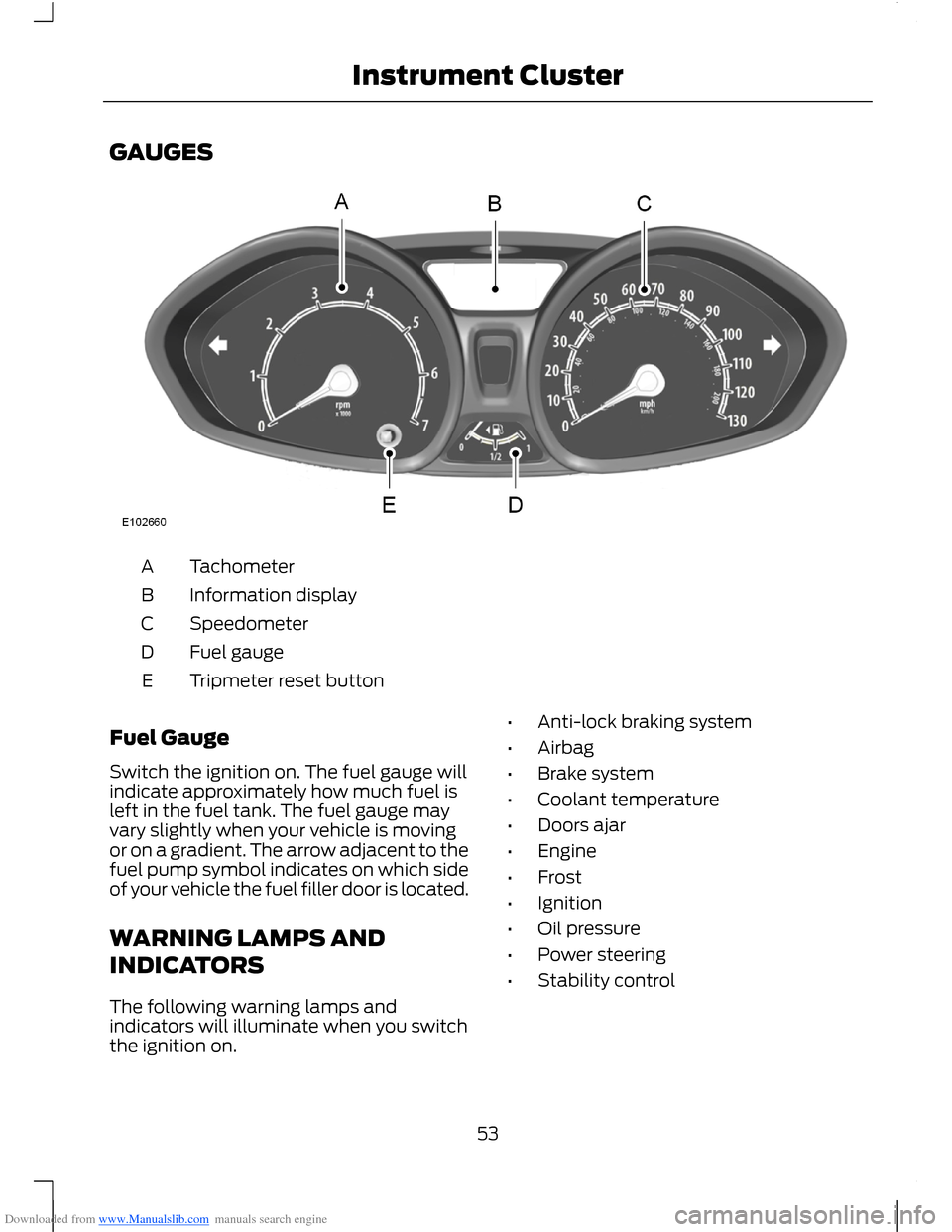
TachometerA
Information displayB
SpeedometerC
Fuel gaugeD
Tripmeter reset buttonE
Fuel Gauge
Switch the ignition on. The fuel gauge willindicate approximately how much fuel isleft in the fuel tank. The fuel gauge mayvary slightly when your vehicle is movingor on a gradient. The arrow adjacent to thefuel pump symbol indicates on which sideof your vehicle the fuel filler door is located.
WARNING LAMPS AND
INDICATORS
The following warning lamps andindicators will illuminate when you switchthe ignition on.
•Anti-lock braking system
•Airbag
•Brake system
•Coolant temperature
•Doors ajar
•Engine
•Frost
•Ignition
•Oil pressure
•Power steering
•Stability control
53Instrument Cluster
Page 60 of 256
Downloaded from www.Manualslib.com manuals search engine GENERAL INFORMATION
WARNING
Driving while distracted can result inloss of vehicle control, accident andinjury. We strongly recommend thatyou use extreme caution when using anydevice or feature that may take your focusoff the road. Your primary responsibility isthe safe operation of your vehicle. Werecommend against the use of anyhandheld device while driving and that youcomply with all applicable laws.
Note:The information display will remainon for several minutes after you switch theignition off.
Various systems on your vehicle can becontrolled using the information displaycontrols on your audio unit. Correspondinginformation is displayed in the informationdisplay.
Device List
The icon changes to show the currentfunction in use.
CD
Radio
Auxiliary input
Information Display Controls
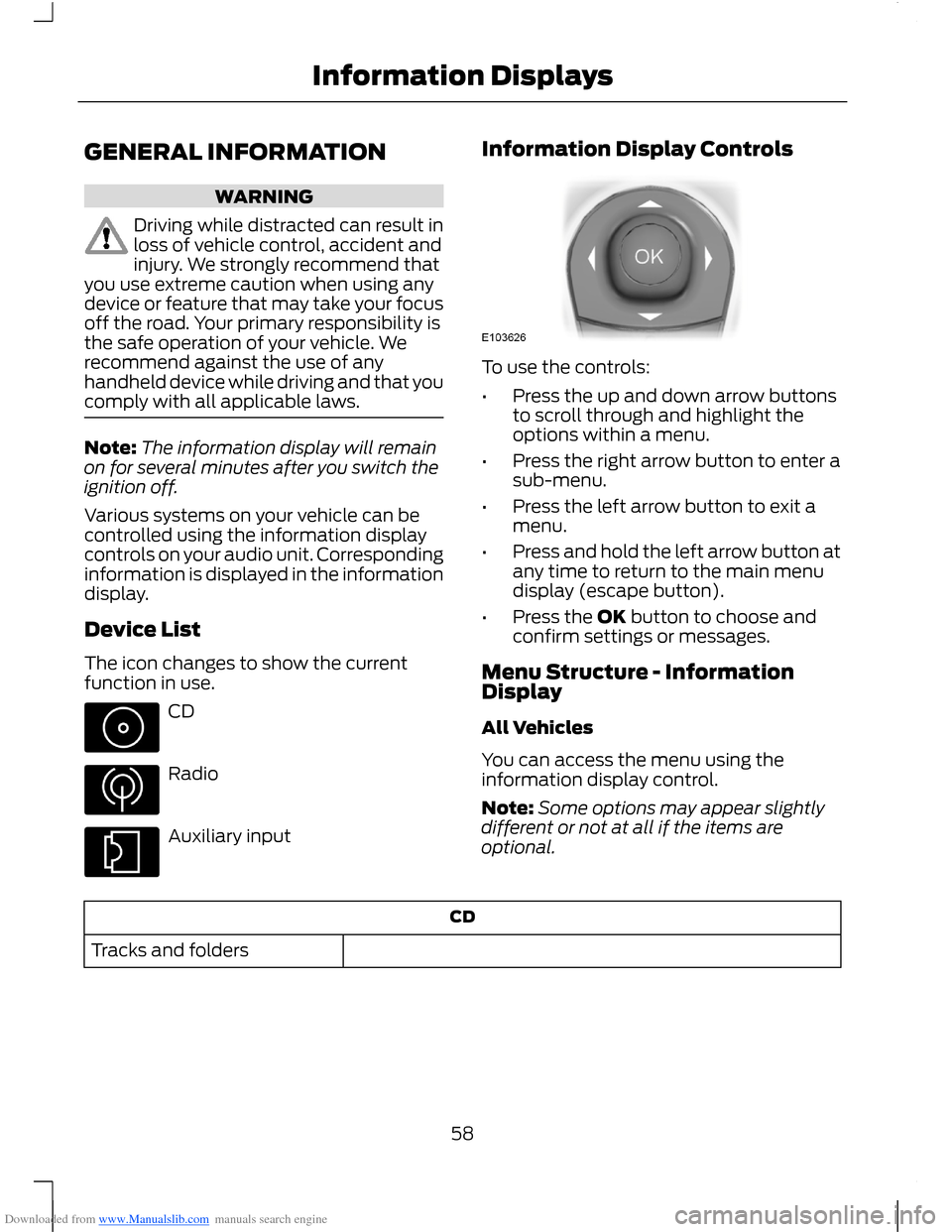
To use the controls:
•Press the up and down arrow buttonsto scroll through and highlight theoptions within a menu.
•Press the right arrow button to enter asub-menu.
•Press the left arrow button to exit amenu.
•Press and hold the left arrow button atany time to return to the main menudisplay (escape button).
•Press the OK button to choose andconfirm settings or messages.
Menu Structure - InformationDisplay
All Vehicles
You can access the menu using theinformation display control.
Note:Some options may appear slightlydifferent or not at all if the items areoptional.
CD
Tracks and folders
58Information Displays
Page 62 of 256
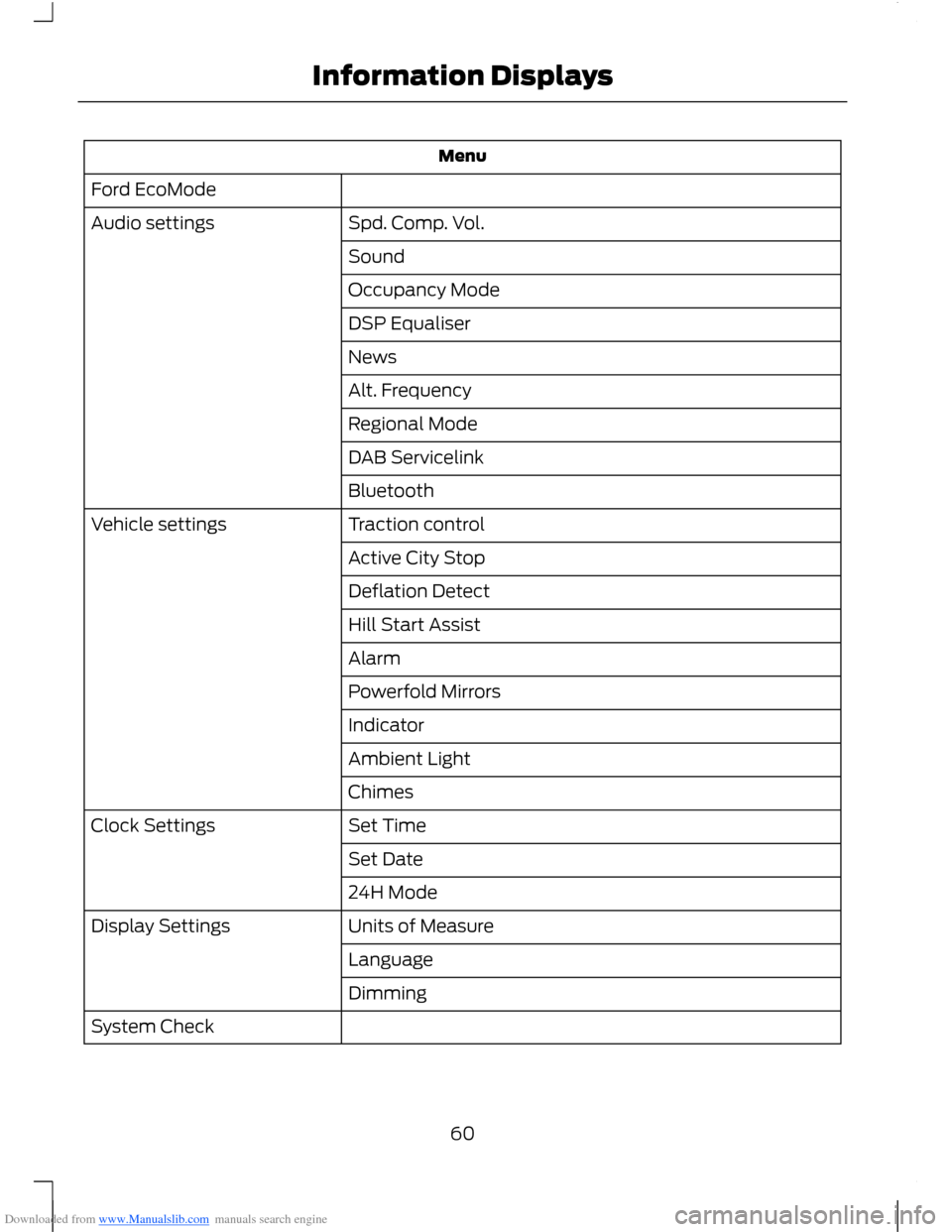
Downloaded from www.Manualslib.com manuals search engine Menu
Ford EcoMode
Spd. Comp. Vol.Audio settings
Sound
Occupancy Mode
DSP Equaliser
News
Alt. Frequency
Regional Mode
DAB Servicelink
Bluetooth
Traction controlVehicle settings
Active City Stop
Deflation Detect
Hill Start Assist
Alarm
Powerfold Mirrors
Indicator
Ambient Light
Chimes
Set TimeClock Settings
Set Date
24H Mode
Units of MeasureDisplay Settings
Language
Dimming
System Check
60Information Displays
Page 67 of 256
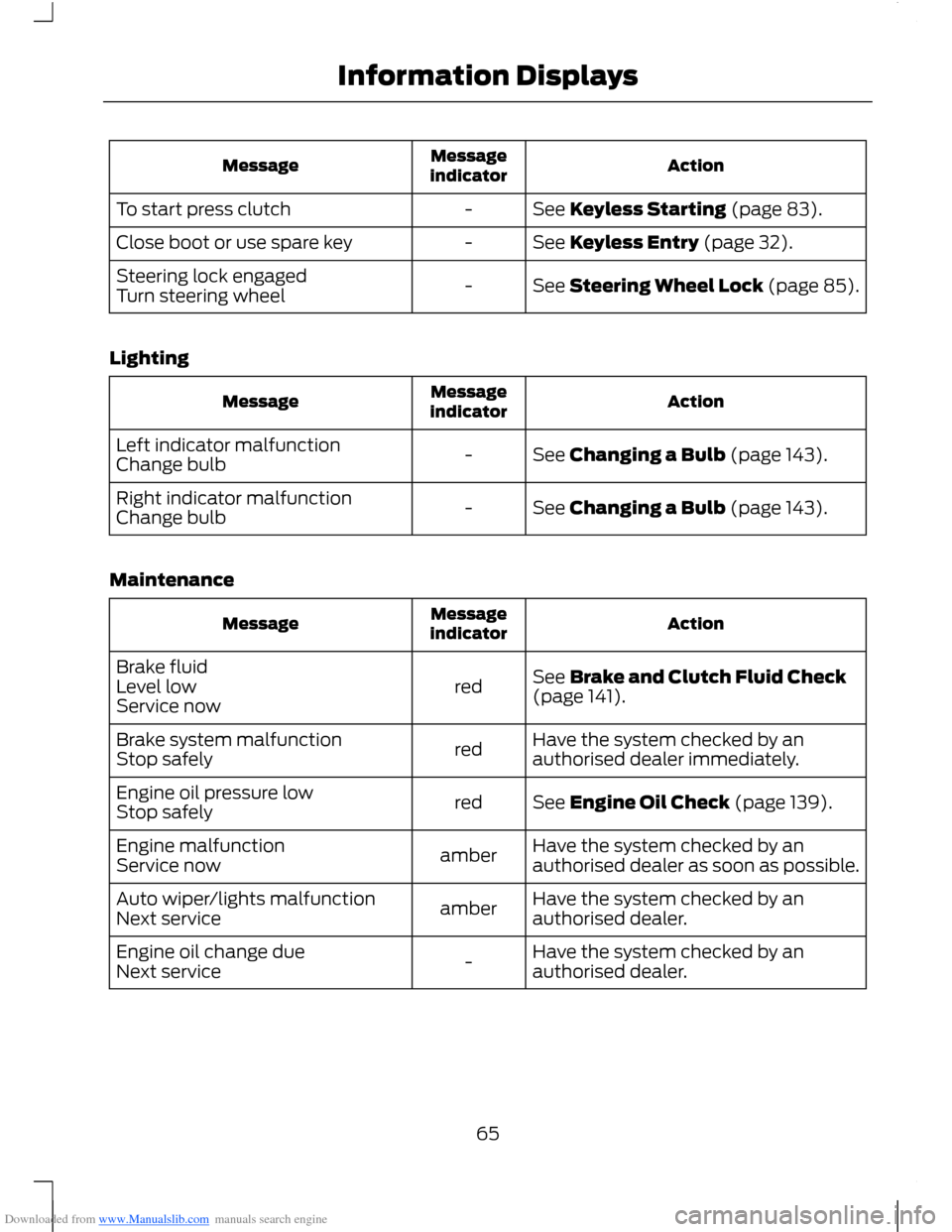
Downloaded from www.Manualslib.com manuals search engine ActionMessageindicatorMessage
See Keyless Starting (page 83).-To start press clutch
See Keyless Entry (page 32).-Close boot or use spare key
See Steering Wheel Lock (page 85).-Steering lock engagedTurn steering wheel
Lighting
ActionMessageindicatorMessage
See Changing a Bulb (page 143).-Left indicator malfunctionChange bulb
See Changing a Bulb (page 143).-Right indicator malfunctionChange bulb
Maintenance
ActionMessageindicatorMessage
See Brake and Clutch Fluid Check(page 141).redBrake fluidLevel lowService now
Have the system checked by anauthorised dealer immediately.redBrake system malfunctionStop safely
See Engine Oil Check (page 139).redEngine oil pressure lowStop safely
Have the system checked by anauthorised dealer as soon as possible.amberEngine malfunctionService now
Have the system checked by anauthorised dealer.amberAuto wiper/lights malfunctionNext service
Have the system checked by anauthorised dealer.-Engine oil change dueNext service
65Information Displays
Page 72 of 256
Downloaded from www.Manualslib.com manuals search engine Heated front seats: Press the button to turn the heated seats on. See HeatedSeats (page 80).H
Air conditioning: Press the button to switch the air conditioning on or off. Airconditioning cools your vehicle using outside air. To improve air conditioningwhen starting your vehicle, drive with the windows slightly open for two to threeminutes.
I
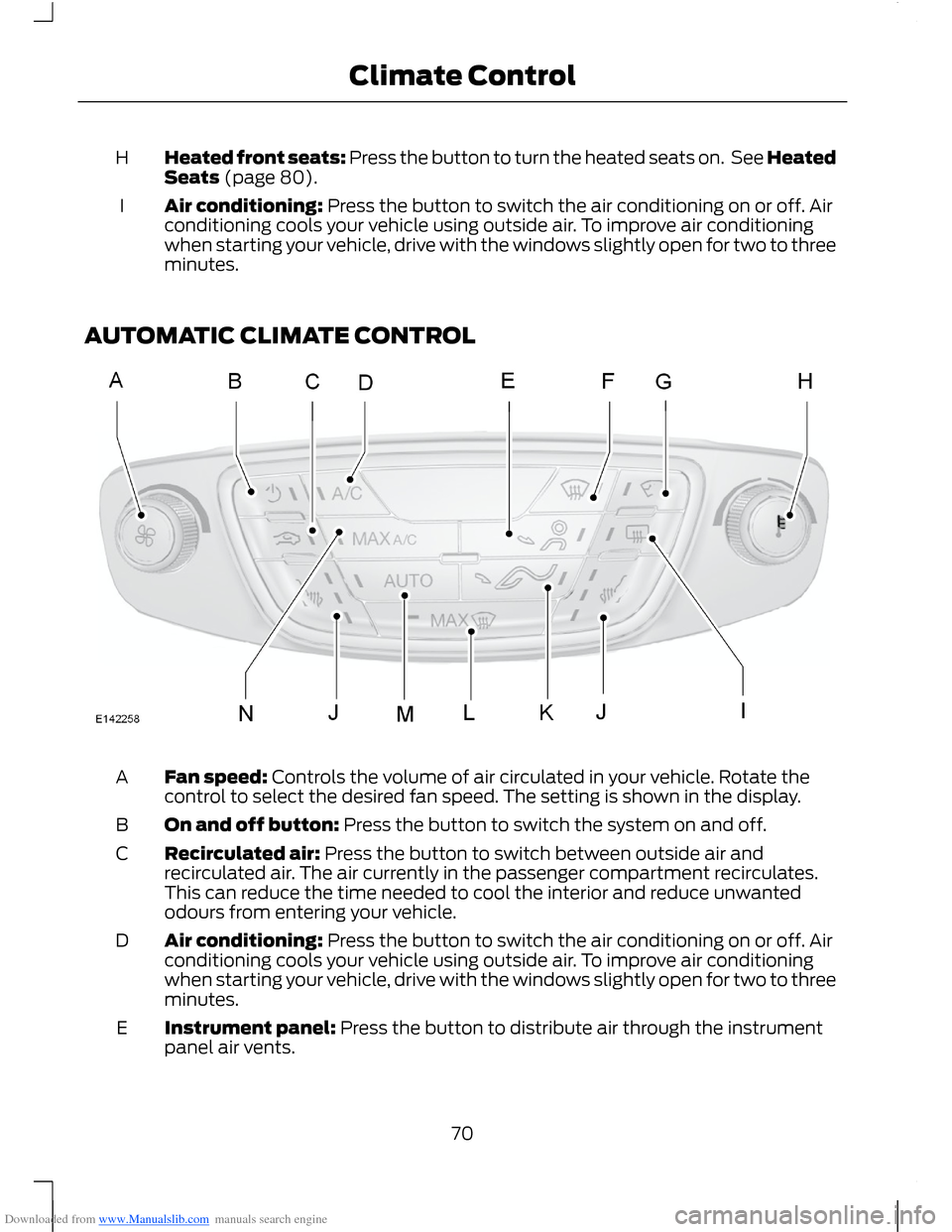
AUTOMATIC CLIMATE CONTROL
Fan speed: Controls the volume of air circulated in your vehicle. Rotate thecontrol to select the desired fan speed. The setting is shown in the display.A
On and off button: Press the button to switch the system on and off.B
Recirculated air: Press the button to switch between outside air andrecirculated air. The air currently in the passenger compartment recirculates.This can reduce the time needed to cool the interior and reduce unwantedodours from entering your vehicle.
C
Air conditioning: Press the button to switch the air conditioning on or off. Airconditioning cools your vehicle using outside air. To improve air conditioningwhen starting your vehicle, drive with the windows slightly open for two to threeminutes.
D
Instrument panel: Press the button to distribute air through the instrumentpanel air vents.E
70Climate Control
Page 78 of 256
Downloaded from www.Manualslib.com manuals search engine SITTING IN THE CORRECT
POSITION
WARNINGS
Do not recline the seatback too faras this can cause the occupant toslide under the seat belt, resulting inserious injury in the event of a collision.
Sitting improperly, out of position orwith the seatback reclined too far,can result in serious injury or deathin the event of a collision. Always situpright against your seatback, with yourfeet on the floor.
Do not place objects higher than theseatback to reduce the risk of seriousinjury in the event of a collision orduring heavy braking.
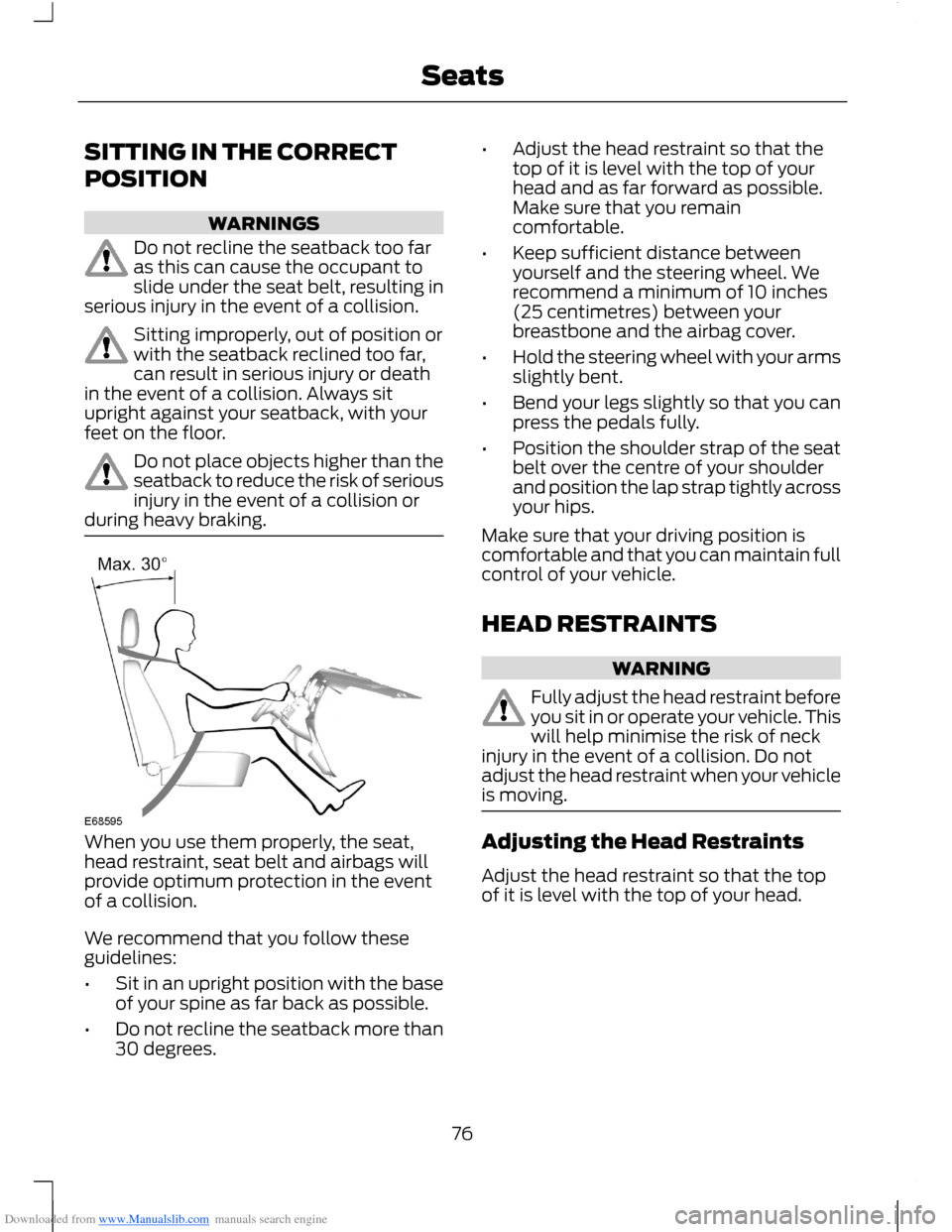
When you use them properly, the seat,head restraint, seat belt and airbags willprovide optimum protection in the eventof a collision.
We recommend that you follow theseguidelines:
•Sit in an upright position with the baseof your spine as far back as possible.
•Do not recline the seatback more than30 degrees.
•Adjust the head restraint so that thetop of it is level with the top of yourhead and as far forward as possible.Make sure that you remaincomfortable.
•Keep sufficient distance betweenyourself and the steering wheel. Werecommend a minimum of 10 inches(25 centimetres) between yourbreastbone and the airbag cover.
•Hold the steering wheel with your armsslightly bent.
•Bend your legs slightly so that you canpress the pedals fully.
•Position the shoulder strap of the seatbelt over the centre of your shoulderand position the lap strap tightly acrossyour hips.
Make sure that your driving position iscomfortable and that you can maintain fullcontrol of your vehicle.
HEAD RESTRAINTS
WARNING
Fully adjust the head restraint beforeyou sit in or operate your vehicle. Thiswill help minimise the risk of neckinjury in the event of a collision. Do notadjust the head restraint when your vehicleis moving.
Adjusting the Head Restraints
Adjust the head restraint so that the topof it is level with the top of your head.
76Seats
Page 83 of 256
Downloaded from www.Manualslib.com manuals search engine Note:When you switch the ignition on, youcan use the socket to power 12 voltappliances with a maximum current ratingof 20 amps.
After you switch the ignition off the powersupply will only work for a maximum of 30minutes.Note:Do not insert objects other than anaccessory plug into the power point. Thiswill damage the outlet and blow the fuse.
Note:Do not hang any type of accessory oraccessory bracket from the plug.
Note:Do not use the power point foroperating a cigar lighter element.
Note:Incorrect use of the power point cancause damage not covered by yourwarranty.
Note:Always keep the power point capsclosed when not in use.
Run the engine for full capacity use of thepower point. To prevent the battery fromlosing charge:
•Do not use the power point longer thannecessary when the engine is notrunning.
•Do not leave devices plugged inovernight or when the vehicle is parkedfor extended periods.
Location
Power points may be found:
•on the rear of the centre console
•on the centre console.
CIGAR LIGHTER
Note:Do not hold the cigar lighter elementpressed in.
Note:If you use the socket when the engineis not running, the battery may lose charge.
Note:When you switch the ignition on, youcan use the socket to power 12 voltappliances with a maximum current ratingof 20 amps.
Note:After you switch the ignition off thepower supply will only work for a maximumof 30 minutes.
Note:Use only Ford accessory connectorsor connectors specified for use with SAEstandard sockets.
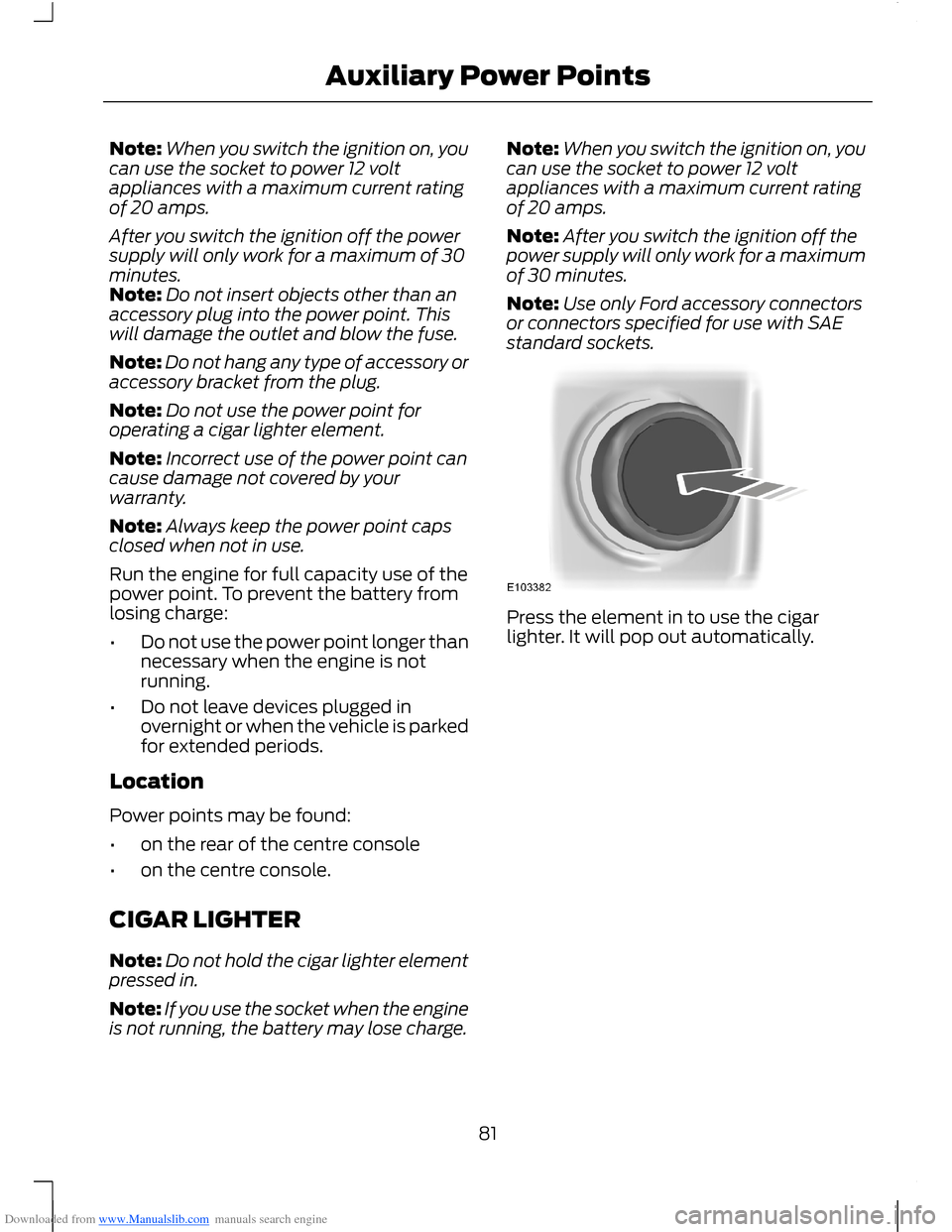
Press the element in to use the cigarlighter. It will pop out automatically.
81Auxiliary Power Points
Page 87 of 256
Downloaded from www.Manualslib.com manuals search engine Stopping the Engine With YourVehicle Stationary
Note:The ignition, all electrical circuitswarning lamps and indicators will beswitched off.
Manual Transmission
Briefly press the button.
Automatic Transmission
1.Move the transmission selector leverto position P.
2.Press the button.
Stopping the Engine When YourVehicle is Moving
WARNING
Switching off the engine when thevehicle is still moving will result in aloss of brake and steering assistance.The steering will not lock, but higher effortwill be required. With the ignition switchedoff some electrical circuits, warning lampsand indicators may also be off.
1.Press and hold the button for at leastone second or press it three timeswithin two seconds.
2.Move the transmission selector leverto position N and use the brakes tobring your vehicle to a safe stop.
3.When your vehicle has stopped, movethe transmission selector lever toposition P or N and switch the ignitionoff.
STEERING WHEEL LOCK
WARNING
Always check that the steering isunlocked before attempting to moveyour vehicle.
Vehicles Without Keyless Starting
To lock the steering wheel:
1.Remove the key from the ignitionswitch.
2.Rotate the steering wheel slightly toengage the lock.
Vehicles With Keyless Starting
Note:The steering wheel lock will notengage when the ignition is on or yourvehicle is moving.
Your vehicle has an electronicallycontrolled steering wheel lock. Thisoperates automatically.
The steering wheel lock will engage aftera short period of time once you haveparked your vehicle and the passive key isoutside of your vehicle.
Unlocking the Steering Wheel
Vehicles With Automatic Transmission
Switch the ignition on or press the brakepedal.
Vehicles With Manual Transmission
Switch the ignition on or press the clutchpedal.
STARTING A PETROL ENGINE
Note:You can only operate the starter fora limited period of time, for example 10seconds. The number of start attempts islimited to approximately six. If you exceedthis limit, the system will not allow you totry again until a period of time has elapsed,for example 30 minutes.
Cold or Hot Engine
Vehicles with Manual Transmission
Note:Do not touch the accelerator pedal.
85Starting and Stopping the Engine