light FORD B MAX 2012 1.G Owner's Manual
[x] Cancel search | Manufacturer: FORD, Model Year: 2012, Model line: B MAX, Model: FORD B MAX 2012 1.GPages: 256, PDF Size: 19.67 MB
Page 91 of 256
Downloaded from www.Manualslib.com manuals search engine START-STOP
Note:For vehicles with start-stop thebattery requirement is different. It must bereplaced by one of exactly the samespecification as the original.
The system reduces fuel consumption andCO2 emissions by shutting down theengine when your vehicle is idling, forexample at traffic lights. The engine willautomatically restart when you press theclutch pedal or when required by a vehiclesystem, for example to recharge thebattery.
To obtain maximum benefit from thesystem, move the transmission selectorlever to neutral and release the clutchpedal during any stop of longer than threeseconds.
Using Start-Stop
WARNINGS
The engine may restartautomatically if required by thesystem.
Switch the ignition off beforeopening the bonnet or carrying outany maintenance.
Always switch the ignition off beforeleaving your vehicle, as the systemmay have shut down the engine butthe ignition will still be live.
Note:The system only operates when theengine is warm and the outside temperatureis between 32°F (0°C) and 86°F (30°C).
Note:If you stall the engine, and thendepress the clutch pedal within a shortperiod of time, the system will automaticallyrestart the engine.
Note:The start-stop indicator willilluminate green when the engine shutsdown. See Warning Lamps and Indicators(page 53).
Note:When the start-stop indicator flashesamber, move the transmission selector leverto neutral or depress the clutch pedal.
Note:If the system detects a malfunction,it will switch off. Have the system checkedby an authorised dealer.
Note:When you switch the system off, theswitch will illuminate.
Note:The system automatically turns onevery time you switch the ignition on. Toswitch the system off, press the switch inthe instrument panel. The system will onlybe switched off for the current ignition cycle.To turn it on, press the switch again. For itemlocation See At a Glance (page 8).
To Stop the Engine
1.Stop your vehicle.
2.Move the transmission selector leverto neutral.
3.Release the clutch pedal.
4.Release the accelerator pedal.
The system may not shut down the engineunder certain conditions, for example:
•To maintain the interior climate.
•Low battery voltage.
•The outside temperature is too low ortoo high.
•The driver's door has been opened.
•Low engine operating temperature.
•Low brake system vacuum.
•If a road speed of 3 mph (5 km/h) hasnot been exceeded.
•The driver's seat belt has not beenfastened.
89Unique Driving Characteristics
Page 97 of 256
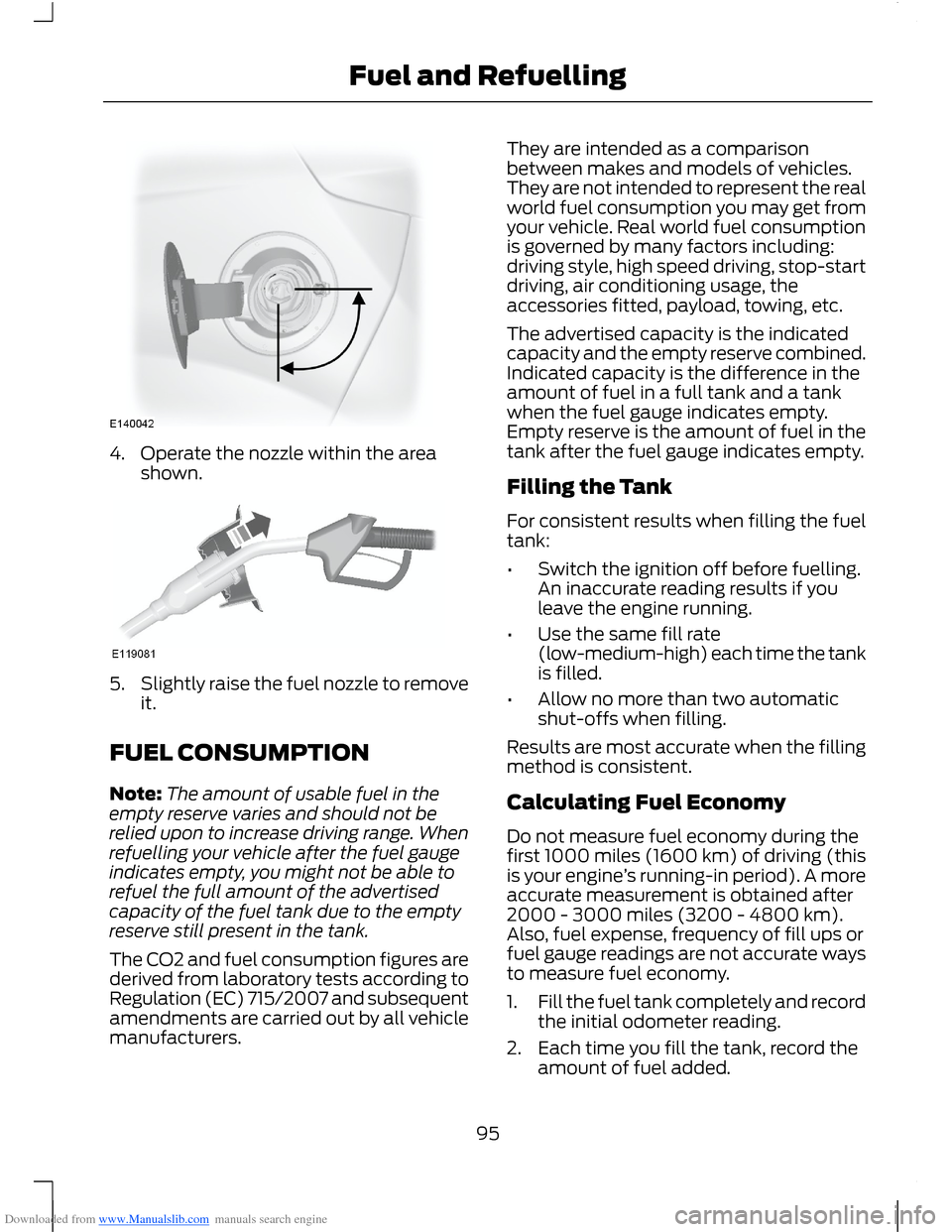
Downloaded from www.Manualslib.com manuals search engine 4.Operate the nozzle within the areashown.
5.Slightly raise the fuel nozzle to removeit.
FUEL CONSUMPTION
Note:The amount of usable fuel in theempty reserve varies and should not berelied upon to increase driving range. Whenrefuelling your vehicle after the fuel gaugeindicates empty, you might not be able torefuel the full amount of the advertisedcapacity of the fuel tank due to the emptyreserve still present in the tank.
The CO2 and fuel consumption figures arederived from laboratory tests according toRegulation (EC) 715/2007 and subsequentamendments are carried out by all vehiclemanufacturers.
They are intended as a comparisonbetween makes and models of vehicles.They are not intended to represent the realworld fuel consumption you may get fromyour vehicle. Real world fuel consumptionis governed by many factors including:driving style, high speed driving, stop-startdriving, air conditioning usage, theaccessories fitted, payload, towing, etc.
The advertised capacity is the indicatedcapacity and the empty reserve combined.Indicated capacity is the difference in theamount of fuel in a full tank and a tankwhen the fuel gauge indicates empty.Empty reserve is the amount of fuel in thetank after the fuel gauge indicates empty.
Filling the Tank
For consistent results when filling the fueltank:
•Switch the ignition off before fuelling.An inaccurate reading results if youleave the engine running.
•Use the same fill rate(low-medium-high) each time the tankis filled.
•Allow no more than two automaticshut-offs when filling.
Results are most accurate when the fillingmethod is consistent.
Calculating Fuel Economy
Do not measure fuel economy during thefirst 1000 miles (1600 km) of driving (thisis your engine’s running-in period). A moreaccurate measurement is obtained after2000 - 3000 miles (3200 - 4800 km).Also, fuel expense, frequency of fill ups orfuel gauge readings are not accurate waysto measure fuel economy.
1.Fill the fuel tank completely and recordthe initial odometer reading.
2.Each time you fill the tank, record theamount of fuel added.
95Fuel and Refuelling
Page 101 of 256
Downloaded from www.Manualslib.com manuals search engine If Your Vehicle Gets Stuck In Mud orSnow
Note:Do not rock your vehicle if the engineis not at normal operating temperature ordamage to the transmission may occur.
Note:Do not rock your vehicle for morethan a minute or damage to thetransmission and tyres may occur, or theengine may overheat.
If your vehicle gets stuck in mud or snow,it may be rocked out by shifting betweenforward and reverse gears, stoppingbetween shifts in a steady pattern. Presslightly on the accelerator in each gear.
Emergency Park Position ReleaseLever
WARNINGS
Do not drive your vehicle until youverify that the brake lamps areworking.
If the parking brake is fully released,but the brake warning lamp remainsilluminated, the brakes may not beworking correctly. See an authoriseddealer.
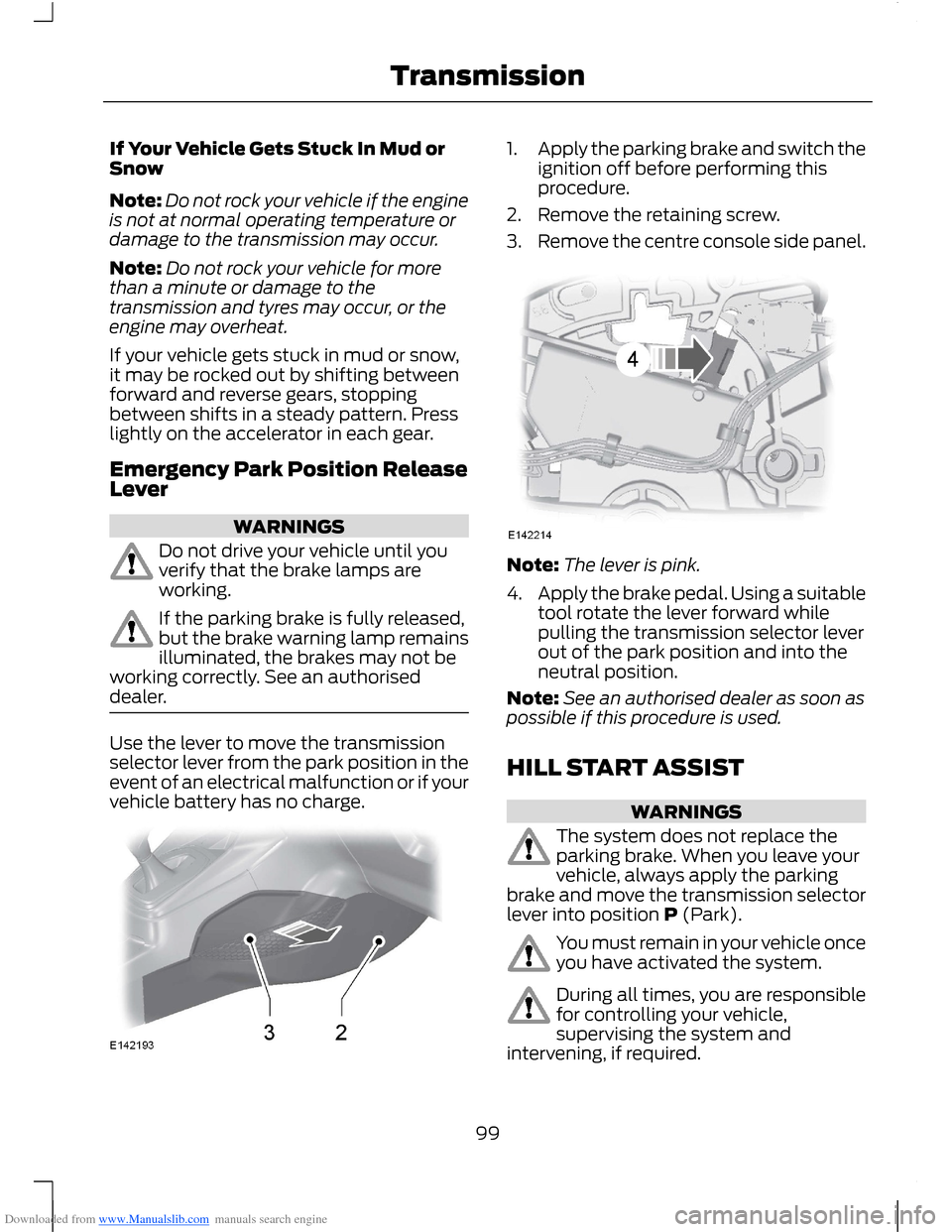
Use the lever to move the transmissionselector lever from the park position in theevent of an electrical malfunction or if yourvehicle battery has no charge.
1.Apply the parking brake and switch theignition off before performing thisprocedure.
2.Remove the retaining screw.
3.Remove the centre console side panel.
Note:The lever is pink.
4.Apply the brake pedal. Using a suitabletool rotate the lever forward whilepulling the transmission selector leverout of the park position and into theneutral position.
Note:See an authorised dealer as soon aspossible if this procedure is used.
HILL START ASSIST
WARNINGS
The system does not replace theparking brake. When you leave yourvehicle, always apply the parkingbrake and move the transmission selectorlever into position P (Park).
You must remain in your vehicle onceyou have activated the system.
During all times, you are responsiblefor controlling your vehicle,supervising the system andintervening, if required.
99Transmission
Page 102 of 256
Downloaded from www.Manualslib.com manuals search engine WARNINGS
If the engine is revved excessively, orif a malfunction is detected, thesystem will be deactivated.
The system makes it easier to pull awaywhen your vehicle is on a slope without theneed to use the parking brake.
When the system is active, your vehicle willremain stationary on the slope for two tothree seconds after you release the brakepedal. This allows you time to move yourfoot from the brake to the acceleratorpedal. The brakes are releasedautomatically once the engine hasdeveloped sufficient drive to prevent yourvehicle from rolling down the slope. Thisis an advantage when pulling away on aslope, (for example from a car park ramp,traffic lights or when reversing uphill intoa parking space).
The system will activate automatically onany slope which can result in significantvehicle rollback.
Using Hill Start Assist
1.Press the brake pedal to bring yourvehicle to a complete standstill. Keepthe brake pedal pressed.
2.If the sensors detect that your vehicleis on a slope, the system will beactivated automatically.
3.When you remove your foot from thebrake pedal, your vehicle will remainon the slope without rolling away forapproximately two or three seconds.This hold time will automatically beextended if you are in the process ofdriving off.
4.Drive off in the normal manner. Thebrakes will be released automatically.
Switching the System On and Off
Note:The system can only be switched onand off for manual transmissions.
Note:Once you have switched off thesystem, it will remain off until you switch iton again.
Your vehicle comes with the systemalready enabled. If desired, you can disablethe feature: See General Information(page 58).
100Transmission
Page 104 of 256
Downloaded from www.Manualslib.com manuals search engine All Vehicles
Note:Do not press the release button whilepulling the lever up.
To apply the parking brake:
1.Press the foot brake pedal firmly.
2.Pull the parking brake lever up to itsfullest extent.
To release the parking brake:
1.Press the brake pedal firmly.
2.Pull the lever up slightly.
3.Press the release button and push thelever down.
102Brakes
Page 106 of 256
Downloaded from www.Manualslib.com manuals search engine PRINCIPLE OF OPERATION
WARNINGS
The system does not relieve you ofyour responsibility to drive with duecare and attention.
If your vehicles has a trailer towmodule not approved by us, thesystem may not correctly detectobstacles.
The sensors may not detect objectsin heavy rain or other conditions thatcause disruptive reflections.
The sensors may not detect objectswith surfaces that absorb ultrasonicwaves.
The system does not detectobstacles moving away from yourvehicle. They will only be detectedshortly after they start to move towardyour vehicle.
Take particular care when reversingwith a tow ball arm or rear fittedaccessories e.g. a bicycle carrier, asthe rear parking aid will only indicate thedistance from the bumper to the obstacle.
If you use a high pressure spray towash your vehicle, only spray thesensors briefly from a distance notless than 8 inches (20 centimetres).
Note:If your vehicle has a tow ball arm, thesystem is switched off automatically whenany trailer lamps (or lighting boards) areconnected to the 13-pin socket via a trailertow module we have approved.
Note:Keep the sensors free from dirt, iceand snow. Do not clean with sharp objects.
Note:The system may emit false tones ifit detects a signal using the same frequencyas the sensors or if your vehicle is fully laden.
Note:The outer sensors may detect theside walls of a garage. If the distancebetween the outer sensor and the side wallremains constant for three seconds, thetone will switch off. As you continue, theinner sensors will detect rearward objects.
PARKING AID
WARNINGS
To help avoid personal injury, readand understand the limitations of thesystem as contained in this section.Sensing is only an aid for some (generallylarge and fixed) objects when moving inreverse on a flat surface at parking speeds.Traffic control systems, inclementweather, air brakes and external motorsand fans may also affect the function ofthe sensing system. This may includereduced performance or a false activation.
To help avoid personal injury, alwaysuse caution when moving in reverseand when using the sensing system.
This system is not designed toprevent contact with small or movingobjects. The system is designed toprovide a warning to assist the driver indetecting large stationary objects to avoiddamaging the vehicle. The system may notdetect smaller objects, particularly thoseclose to the ground.
Certain add-on devices such as largetrailer hitches, bike or surfboard racksand any device that may block thenormal detection zone of the system, maycreate false audible warnings.
Note:Keep the sensors located on thebumper or fascia free from snow, ice andlarge accumulations of dirt. If the sensorsare covered, the system’s accuracy can beaffected. Do not clean the sensors withsharp objects.
104Parking Aids
Page 109 of 256
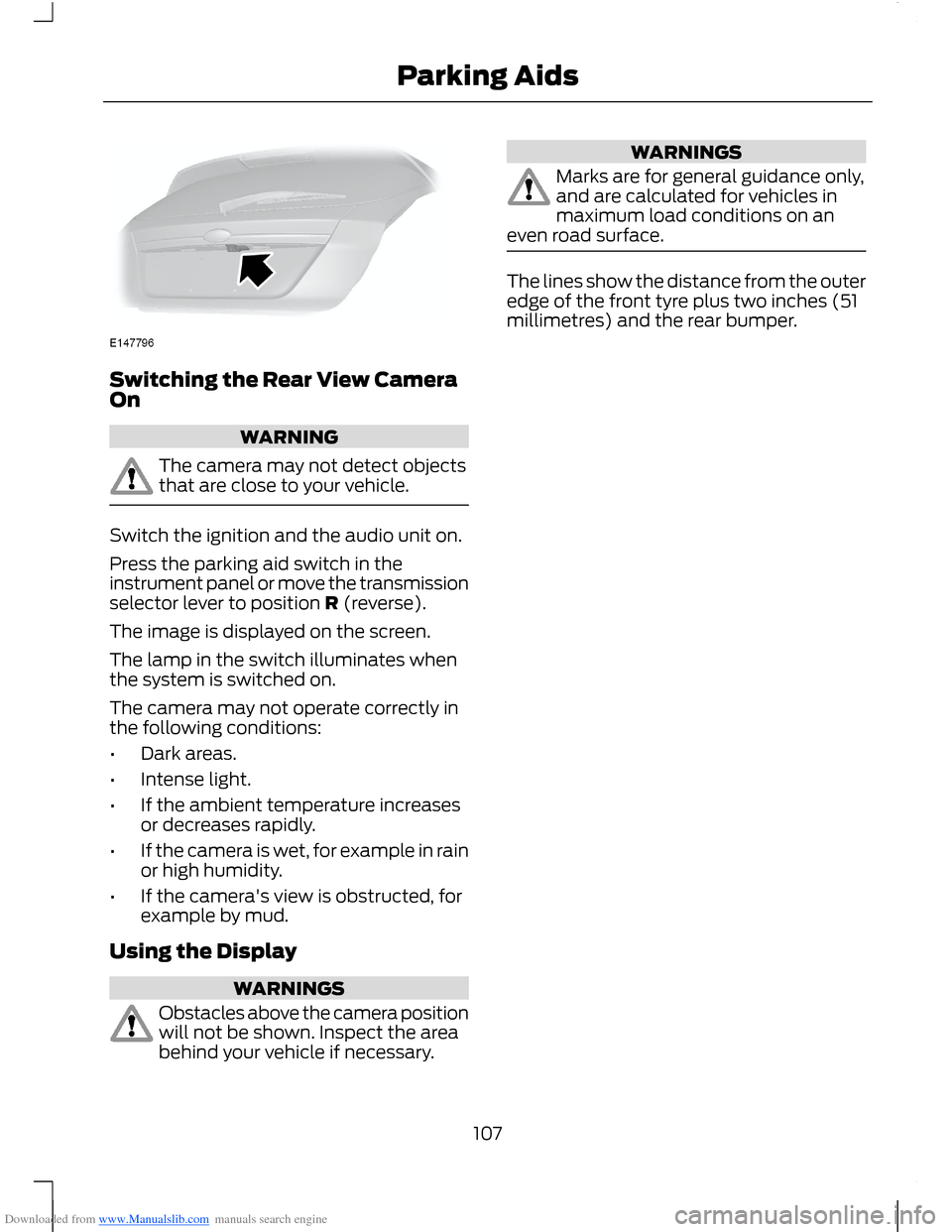
Downloaded from www.Manualslib.com manuals search engine Switching the Rear View CameraOn
WARNING
The camera may not detect objectsthat are close to your vehicle.
Switch the ignition and the audio unit on.
Press the parking aid switch in theinstrument panel or move the transmissionselector lever to position R (reverse).
The image is displayed on the screen.
The lamp in the switch illuminates whenthe system is switched on.
The camera may not operate correctly inthe following conditions:
•Dark areas.
•Intense light.
•If the ambient temperature increasesor decreases rapidly.
•If the camera is wet, for example in rainor high humidity.
•If the camera's view is obstructed, forexample by mud.
Using the Display
WARNINGS
Obstacles above the camera positionwill not be shown. Inspect the areabehind your vehicle if necessary.
WARNINGS
Marks are for general guidance only,and are calculated for vehicles inmaximum load conditions on aneven road surface.
The lines show the distance from the outeredge of the front tyre plus two inches (51millimetres) and the rear bumper.
107Parking Aids
Page 123 of 256
Downloaded from www.Manualslib.com manuals search engine RUNNING-IN
Tyres
WARNING
New tyres need to be run-in forapproximately 300 miles (500kilometres). During this time, youmay experience different drivingcharacteristics.
Brakes and Clutch
WARNING
Avoid heavy use of the brakes andclutch if possible for the first 100miles (150 kilometres) in town andfor the first 1000 miles (1500 kilometres)on motorways.
Engine
WARNING
Avoid driving too fast during the first1000 miles (1500 kilometres). Varyyour speed frequently and changeup through the gears early. Do not labourthe engine.
COLD WEATHER
PRECAUTIONS
The functional operation of somecomponents and systems can be affectedat temperatures below -13°F (-25°C).
DRIVING THROUGH WATER
WARNINGS
Drive through water in an emergencyonly and not as part of normaldriving.
WARNINGS
Engine damage can occur if waterenters the air filter.
In an emergency, you can drive your vehiclethrough water to a maximum depth of 8inches (200 millimetres) and at amaximum speed of 6 mph (10 km/h). Youmust take extra care when driving throughflowing water.
When driving in water, maintain a lowspeed and do not stop your vehicle. Afterdriving through water and as soon as it issafe to do so:
•Depress the brake pedal lightly tocheck that the brakes are functioningcorrectly.
•Check that the horn works.
•Check that your vehicle's lamps arefully operational.
•Check the power assistanceof the steering system.
FLOOR MATS
WARNING
Make sure that the floor mat issecured properly using theappropriate fixings, and do notposition the floor mat so that it interfereswith the operation of the pedals.
121Driving Hints
Page 128 of 256
Downloaded from www.Manualslib.com manuals search engine Circuits protectedFuse ratingFuse
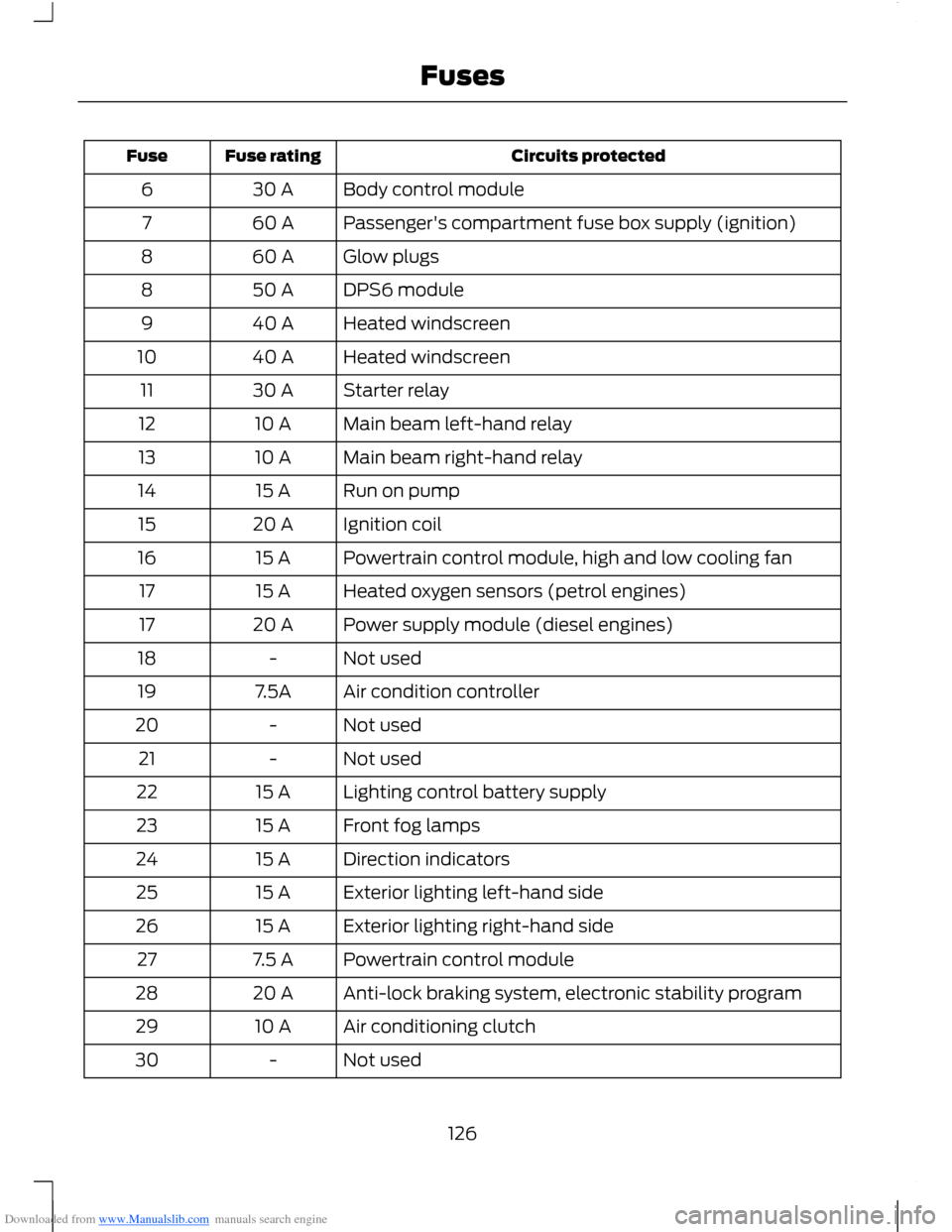
Body control module30 A6
Passenger's compartment fuse box supply (ignition)60 A7
Glow plugs60 A8
DPS6 module50 A8
Heated windscreen40 A9
Heated windscreen40 A10
Starter relay30 A11
Main beam left-hand relay10 A12
Main beam right-hand relay10 A13
Run on pump15 A14
Ignition coil20 A15
Powertrain control module, high and low cooling fan15 A16
Heated oxygen sensors (petrol engines)15 A17
Power supply module (diesel engines)20 A17
Not used-18
Air condition controller7.5A19
Not used-20
Not used-21
Lighting control battery supply15 A22
Front fog lamps15 A23
Direction indicators15 A24
Exterior lighting left-hand side15 A25
Exterior lighting right-hand side15 A26
Powertrain control module7.5 A27
Anti-lock braking system, electronic stability program20 A28
Air conditioning clutch10 A29
Not used-30
126Fuses
Page 134 of 256
Downloaded from www.Manualslib.com manuals search engine Circuits protectedFuse ratingFuse
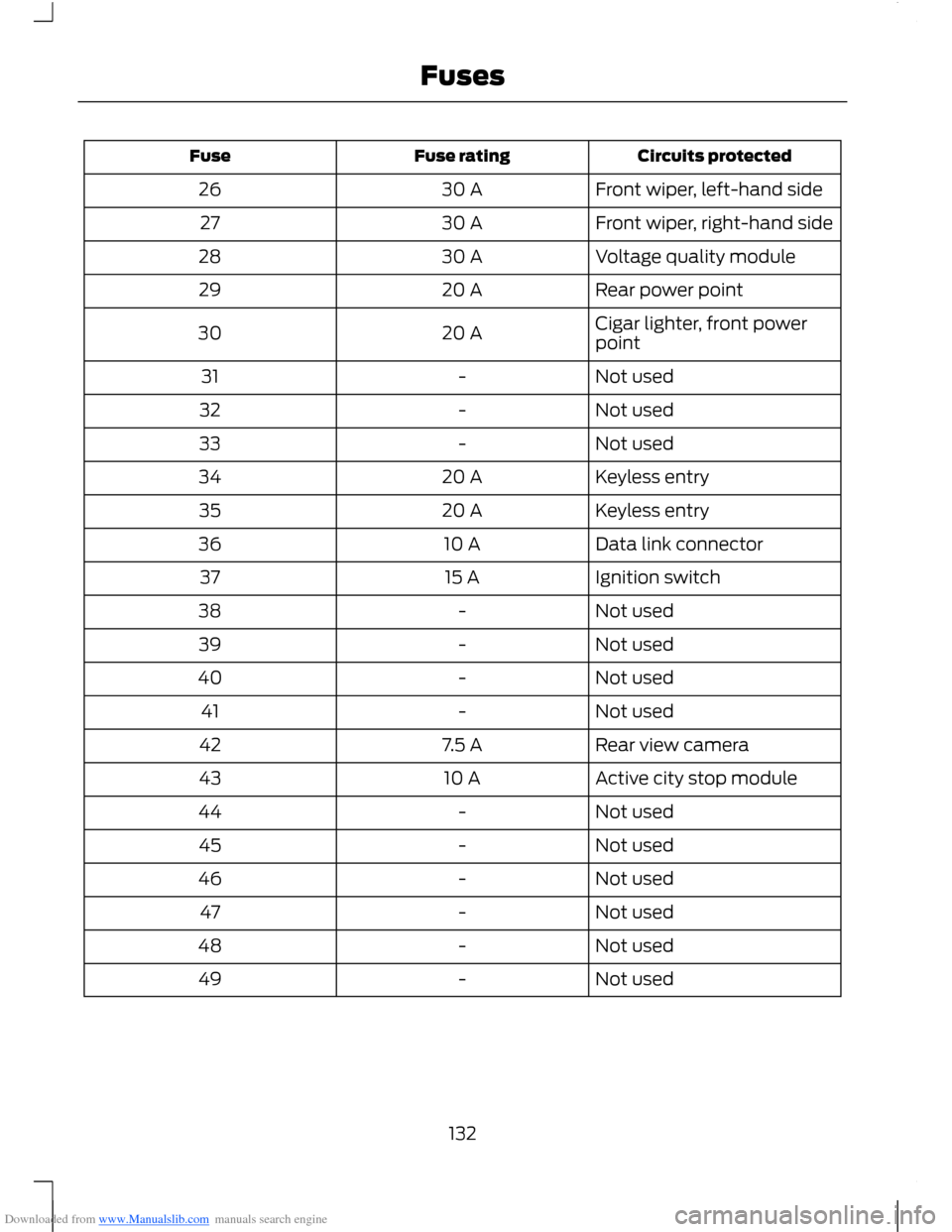
Front wiper, left-hand side30 A26
Front wiper, right-hand side30 A27
Voltage quality module30 A28
Rear power point20 A29
Cigar lighter, front powerpoint20 A30
Not used-31
Not used-32
Not used-33
Keyless entry20 A34
Keyless entry20 A35
Data link connector10 A36
Ignition switch15 A37
Not used-38
Not used-39
Not used-40
Not used-41
Rear view camera7.5 A42
Active city stop module10 A43
Not used-44
Not used-45
Not used-46
Not used-47
Not used-48
Not used-49
132Fuses