position FORD B MAX 2012 1.G User Guide
[x] Cancel search | Manufacturer: FORD, Model Year: 2012, Model line: B MAX, Model: FORD B MAX 2012 1.GPages: 256, PDF Size: 19.67 MB
Page 27 of 256
Downloaded from www.Manualslib.com manuals search engine GENERAL INFORMATION ON
RADIO FREQUENCIES
Note:Changes or modifications notexpressly approved by the party responsiblefor compliance could void the user’sauthority to operate the equipment.
The typical operating range for yourtransmitter is approximately 33 feet (10metres). A decrease in operating rangecould be caused by:
•weather conditions
•nearby radio towers
•structures around your vehicle
•other vehicles parked next to yourvehicle.
The radio frequency used by your remotecontrol can also be used by other shortdistance radio transmissions (e.g. amateurradios, medical equipment, wirelessheadphones, remote controls and alarmsystems). If the frequencies are jammed,you will not be able to use your remotecontrol. You can lock and unlock the doorswith the key.
Note:Make sure your vehicle is lockedbefore leaving it unattended.
Note:If you are in range, the remote controlwill operate if you press any buttonunintentionally.
REMOTE CONTROL
You can program a maximum of eightremote controls to your vehicle. Thisincludes any that were supplied with yourvehicle. The remote controls must remaininside your vehicle during the programmingprocedure. Fasten the front seat belts andclose all doors to make sure thatconflicting chimes do not sound duringprogramming.
Programming a New RemoteControl
1.Turn the ignition key from position 0 toposition II four times within sixseconds.
2.Turn the ignition to position 0. A tonesounds to indicate that it is nowpossible to program a remote control.
3.Press any button on a new remotecontrol within 10 seconds. A tone willsound as confirmation.
4.Repeat step three within 10 secondsfor each new remote control. Do notremove the key from the ignition whenpressing the button on the remotecontrol.
5.Switch the ignition back on (positionII) or wait for 10 seconds withoutprogramming another remote controlto end the key programming. Only theremote controls which you have justprogrammed are now able to lock andunlock your vehicle.
Reprogramming the UnlockingFunction
Note:When you press the unlock buttoneither all the doors are unlocked or only thedriver’s door and the tailgate are unlocked.Pressing the unlock button again unlocksall the doors.
Press and hold the unlock and lock buttonson the remote control simultaneously forat least four seconds with the ignition off.The direction indicators will flash twice toconfirm the change.
To return to the original unlocking function,repeat the process.
25Keys and Remote Controls
Page 28 of 256
Downloaded from www.Manualslib.com manuals search engine Changing the Remote ControlBattery
Make sure that you dispose ofold batteries in anenvironmentally friendly way.Seek advice from your local authorityregarding recycling.
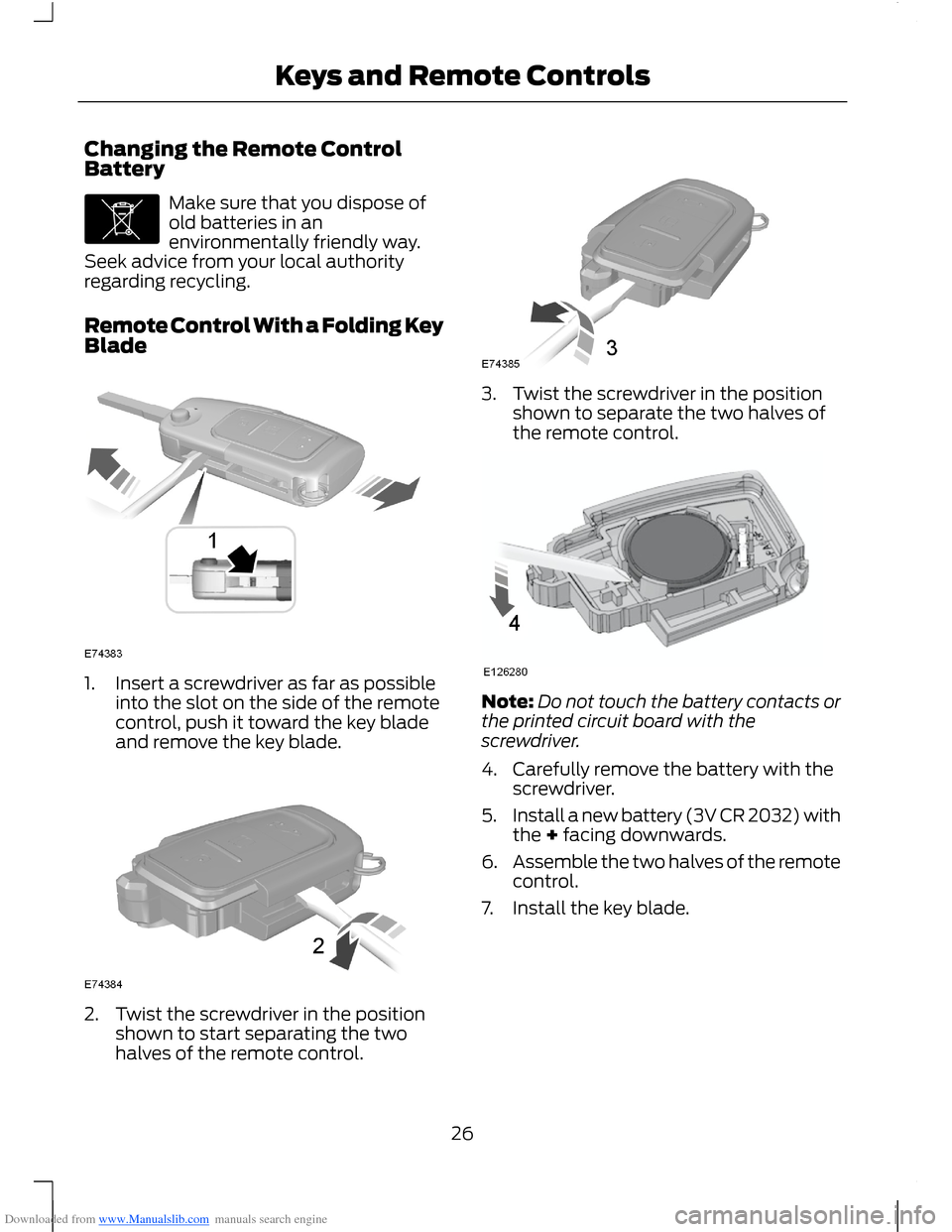
Remote Control With a Folding KeyBlade
1.Insert a screwdriver as far as possibleinto the slot on the side of the remotecontrol, push it toward the key bladeand remove the key blade.
2.Twist the screwdriver in the positionshown to start separating the twohalves of the remote control.
3.Twist the screwdriver in the positionshown to separate the two halves ofthe remote control.
Note:Do not touch the battery contacts orthe printed circuit board with thescrewdriver.
4.Carefully remove the battery with thescrewdriver.
5.Install a new battery (3V CR 2032) withthe + facing downwards.
6.Assemble the two halves of the remotecontrol.
7.Install the key blade.
26Keys and Remote Controls
Page 29 of 256
Downloaded from www.Manualslib.com manuals search engine Remote Control Without a FoldingKey Blade
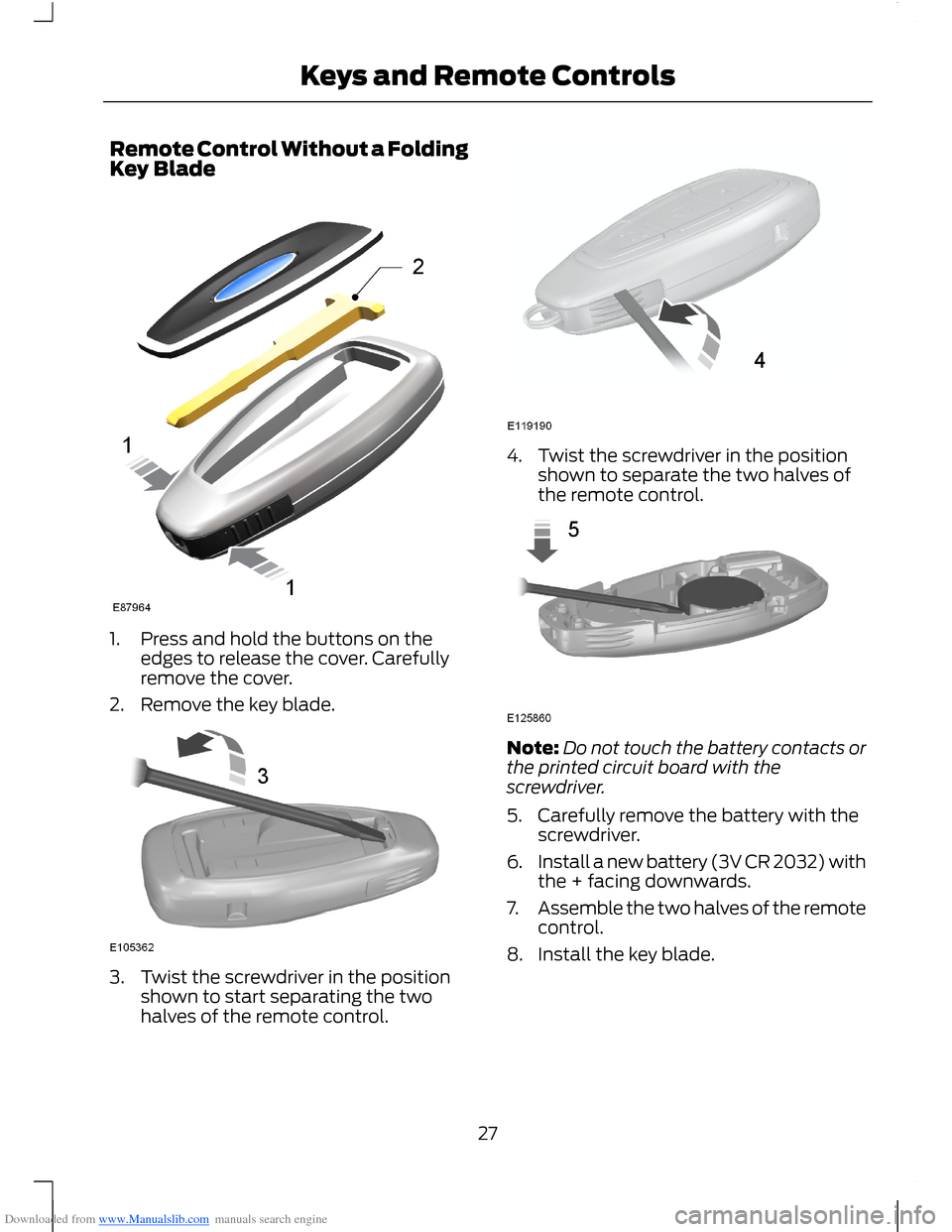
1.Press and hold the buttons on theedges to release the cover. Carefullyremove the cover.
2.Remove the key blade.
3.Twist the screwdriver in the positionshown to start separating the twohalves of the remote control.
4.Twist the screwdriver in the positionshown to separate the two halves ofthe remote control.
Note:Do not touch the battery contacts orthe printed circuit board with thescrewdriver.
5.Carefully remove the battery with thescrewdriver.
6.Install a new battery (3V CR 2032) withthe + facing downwards.
7.Assemble the two halves of the remotecontrol.
8.Install the key blade.
27Keys and Remote Controls
Page 32 of 256
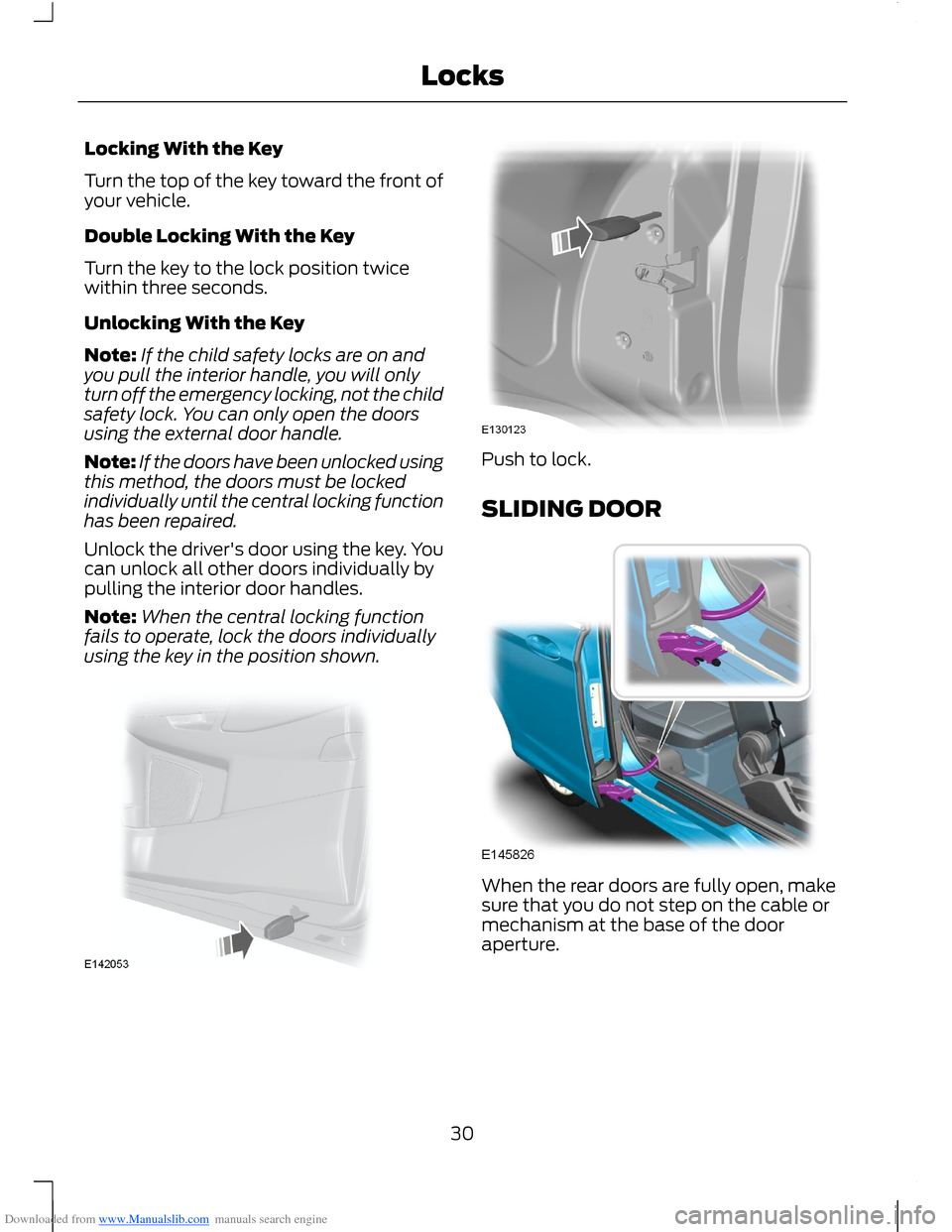
Downloaded from www.Manualslib.com manuals search engine Locking With the Key
Turn the top of the key toward the front ofyour vehicle.
Double Locking With the Key
Turn the key to the lock position twicewithin three seconds.
Unlocking With the Key
Note:If the child safety locks are on andyou pull the interior handle, you will onlyturn off the emergency locking, not the childsafety lock. You can only open the doorsusing the external door handle.
Note:If the doors have been unlocked usingthis method, the doors must be lockedindividually until the central locking functionhas been repaired.
Unlock the driver's door using the key. Youcan unlock all other doors individually bypulling the interior door handles.
Note:When the central locking functionfails to operate, lock the doors individuallyusing the key in the position shown.
Push to lock.
SLIDING DOOR
When the rear doors are fully open, makesure that you do not step on the cable ormechanism at the base of the dooraperture.
30Locks
Page 40 of 256
Downloaded from www.Manualslib.com manuals search engine ADJUSTING THE STEERING
WHEEL
WARNING
Do not adjust the steering wheelwhen your vehicle is moving.
Note:Make sure that you are sitting in thecorrect position. See Sitting in the CorrectPosition (page 76).
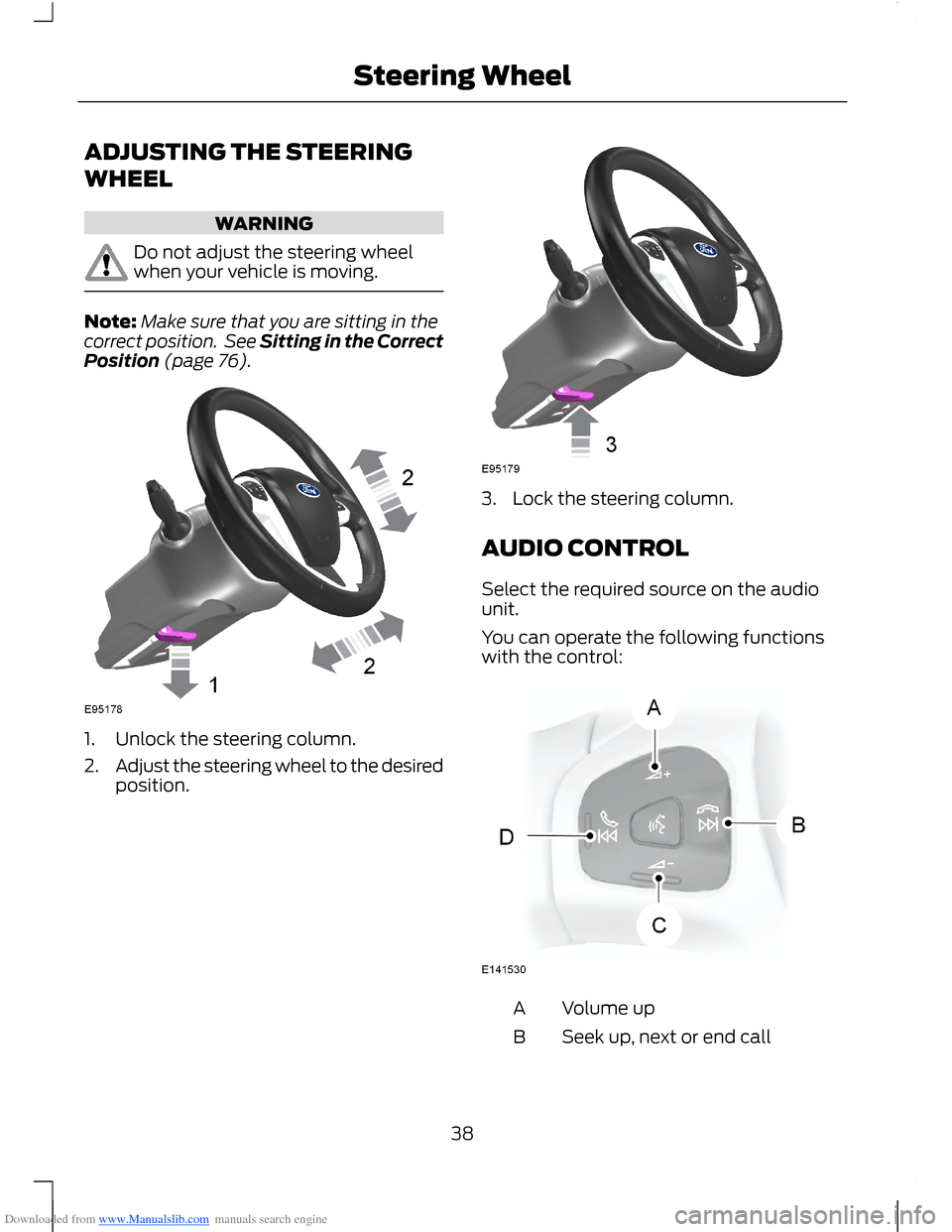
1.Unlock the steering column.
2.Adjust the steering wheel to the desiredposition.
3.Lock the steering column.
AUDIO CONTROL
Select the required source on the audiounit.
You can operate the following functionswith the control:
Volume upA
Seek up, next or end callB
38Steering Wheel
Page 44 of 256
Downloaded from www.Manualslib.com manuals search engine Reverse Gear Wipe
The rear wiper will turn on automaticallywhen selecting reverse gear if:
•the rear wiper is not already switchedon
•the wiper lever is in position A, B, C orD
•the front wiper is operating (when setto position B).
The rear wiper will follow the front wiperinterval (at intermittent or normal speed).
Rear Window Washer
Note:Do not operate the washers whenthe washer reservoir is empty. This maycause the washer pump to overheat.
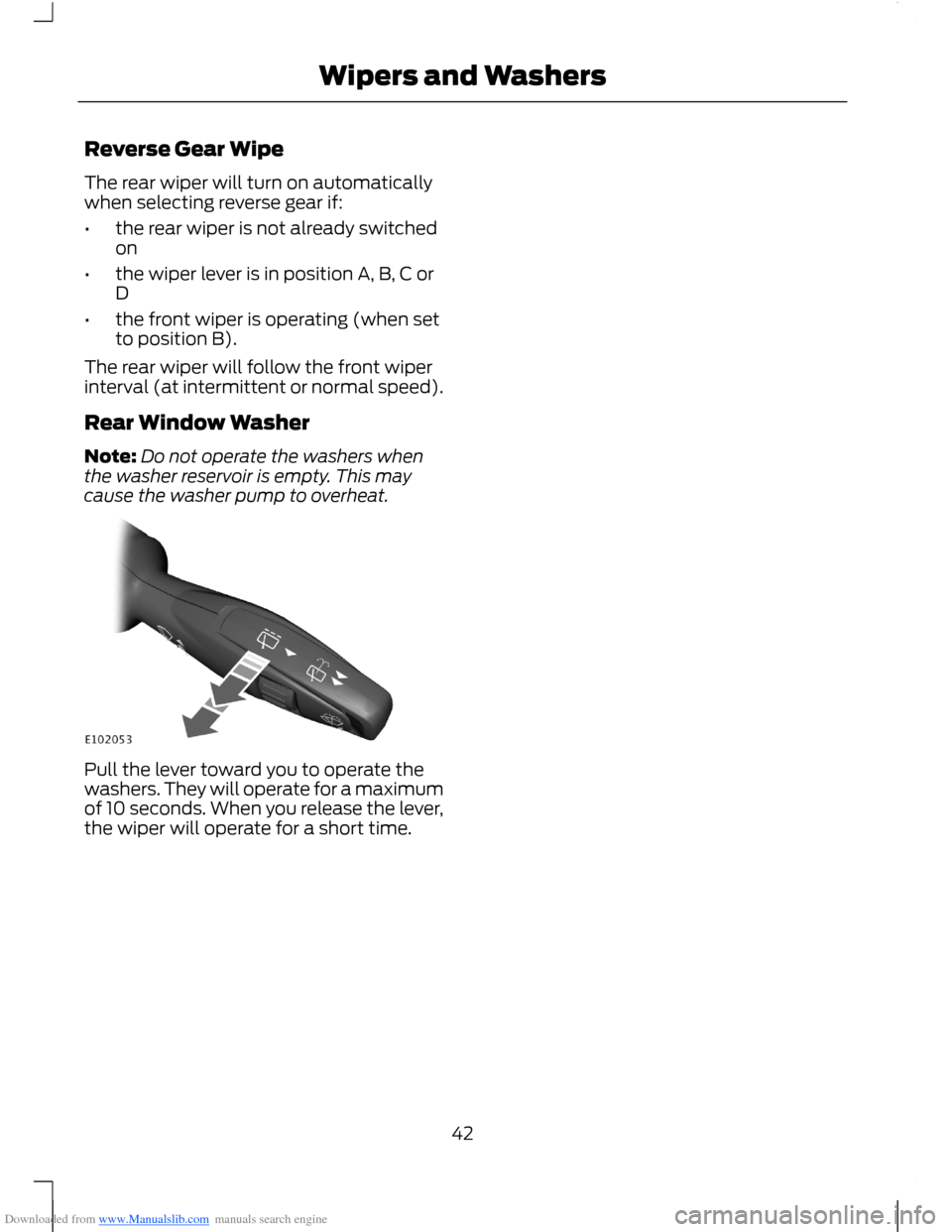
Pull the lever toward you to operate thewashers. They will operate for a maximumof 10 seconds. When you release the lever,the wiper will operate for a short time.
42Wipers and Washers
Page 45 of 256
Downloaded from www.Manualslib.com manuals search engine LIGHTING CONTROL
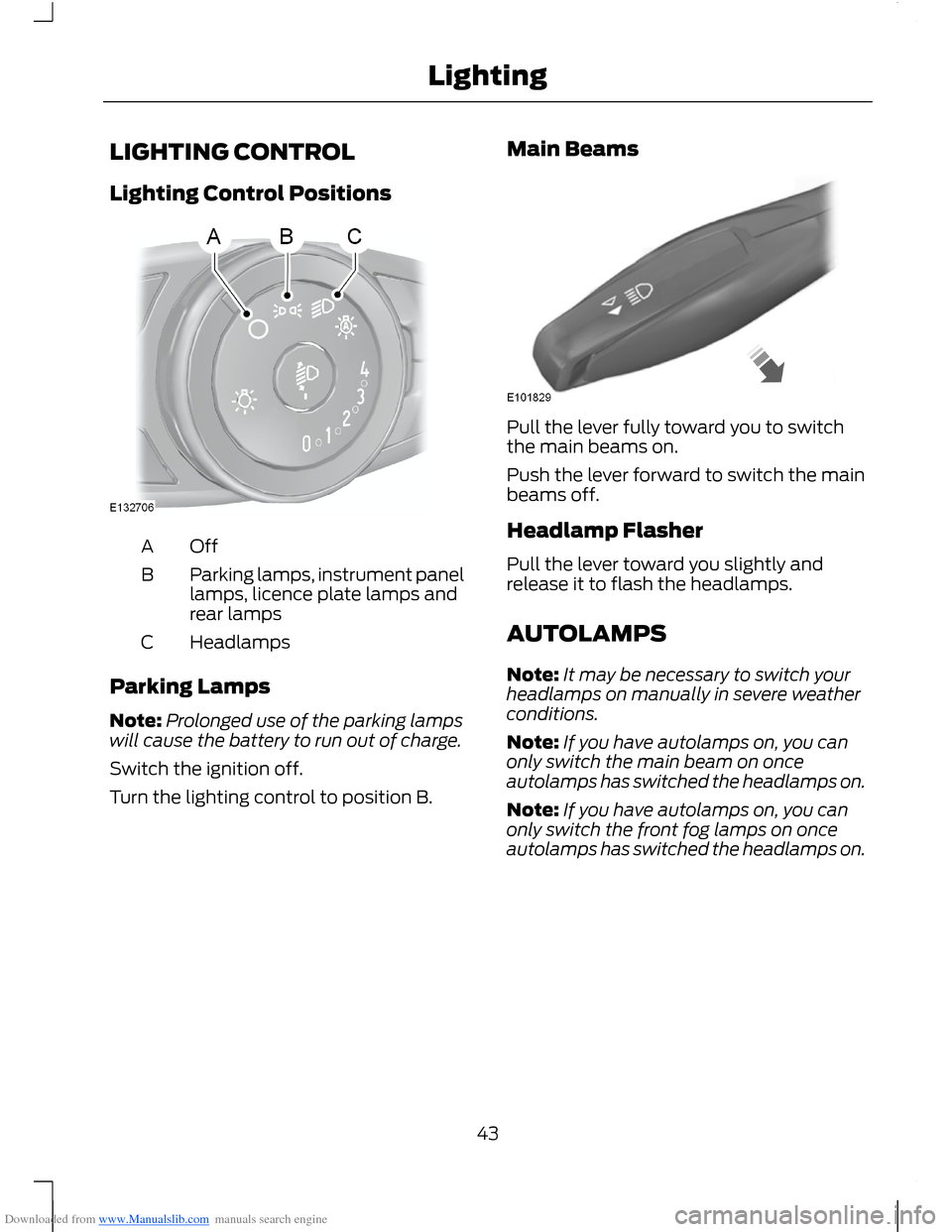
Lighting Control Positions
OffA
Parking lamps, instrument panellamps, licence plate lamps andrear lamps
B
HeadlampsC
Parking Lamps
Note:Prolonged use of the parking lampswill cause the battery to run out of charge.
Switch the ignition off.
Turn the lighting control to position B.
Main Beams
Pull the lever fully toward you to switchthe main beams on.
Push the lever forward to switch the mainbeams off.
Headlamp Flasher
Pull the lever toward you slightly andrelease it to flash the headlamps.
AUTOLAMPS
Note:It may be necessary to switch yourheadlamps on manually in severe weatherconditions.
Note:If you have autolamps on, you canonly switch the main beam on onceautolamps has switched the headlamps on.
Note:If you have autolamps on, you canonly switch the front fog lamps on onceautolamps has switched the headlamps on.
43Lighting
Page 47 of 256
Downloaded from www.Manualslib.com manuals search engine DAYTIME RUNNING LAMPS
WARNING
Always remember to switch yourheadlamps on in low light situationsor during inclement weather. Thesystem does not turn on the tail lamps andmay not provide adequate lighting duringthese conditions. Failure to switch theheadlamps on under these conditions mayresult in a collision.
The system switches the headlamps on inlow light situations.
To switch the system on:
1.Switch the ignition on.
2.Turn the lighting control to the off,autolamp or parking lamp position.
3.Make sure the transmission selectorlever is not in position P.
FRONT FOG LAMPS
WARNING
Only use the front fog lamps whenvisibility is considerably restricted byfog, snow or rain.
Note:If you switch autolamps on, you canonly switch the front fog lamps on onceautolamps has switched the headlamps on.
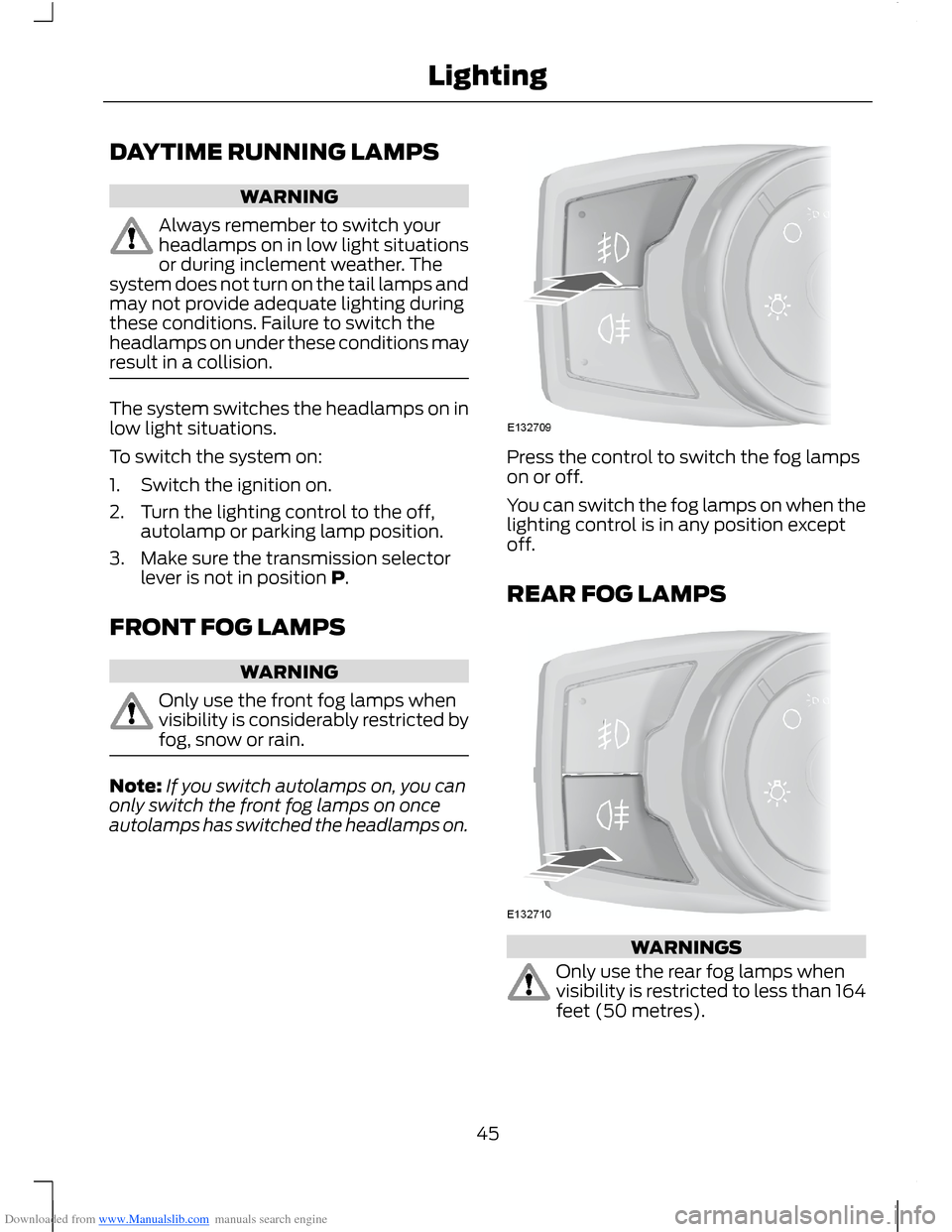
Press the control to switch the fog lampson or off.
You can switch the fog lamps on when thelighting control is in any position exceptoff.
REAR FOG LAMPS
WARNINGS
Only use the rear fog lamps whenvisibility is restricted to less than 164feet (50 metres).
45Lighting
Page 48 of 256
Downloaded from www.Manualslib.com manuals search engine WARNINGS
Do not use the rear fog lamps whenit is raining or snowing and visibilityis more than 164 feet (50 metres).
Press the control to switch the fog lampson or off.
You can switch the fog lamps on wheneither the front fog lamps or dipped beamheadlamps are on.
HEADLAMP LEVELLING
Note:Vehicles with Xenon headlamps haveautomatic headlamp levelling.
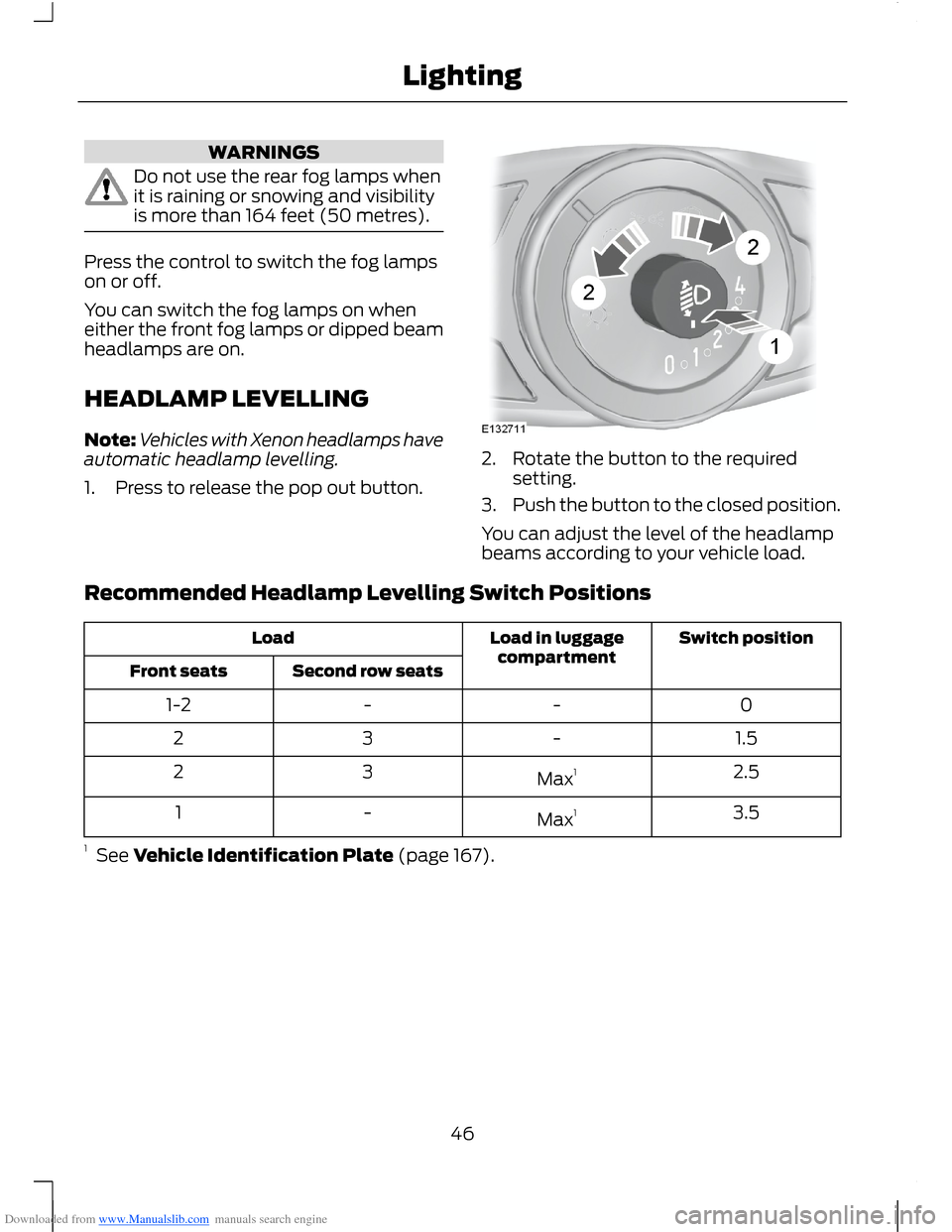
1.Press to release the pop out button.
2.Rotate the button to the requiredsetting.
3.Push the button to the closed position.
You can adjust the level of the headlampbeams according to your vehicle load.
Recommended Headlamp Levelling Switch Positions
Switch positionLoad in luggagecompartmentLoad
Second row seatsFront seats
0--1-2
1.5-32
2.5Max132
3.5Max1-1
1 See Vehicle Identification Plate (page 167).
46Lighting
Page 49 of 256
Downloaded from www.Manualslib.com manuals search engine DIRECTION INDICATORS
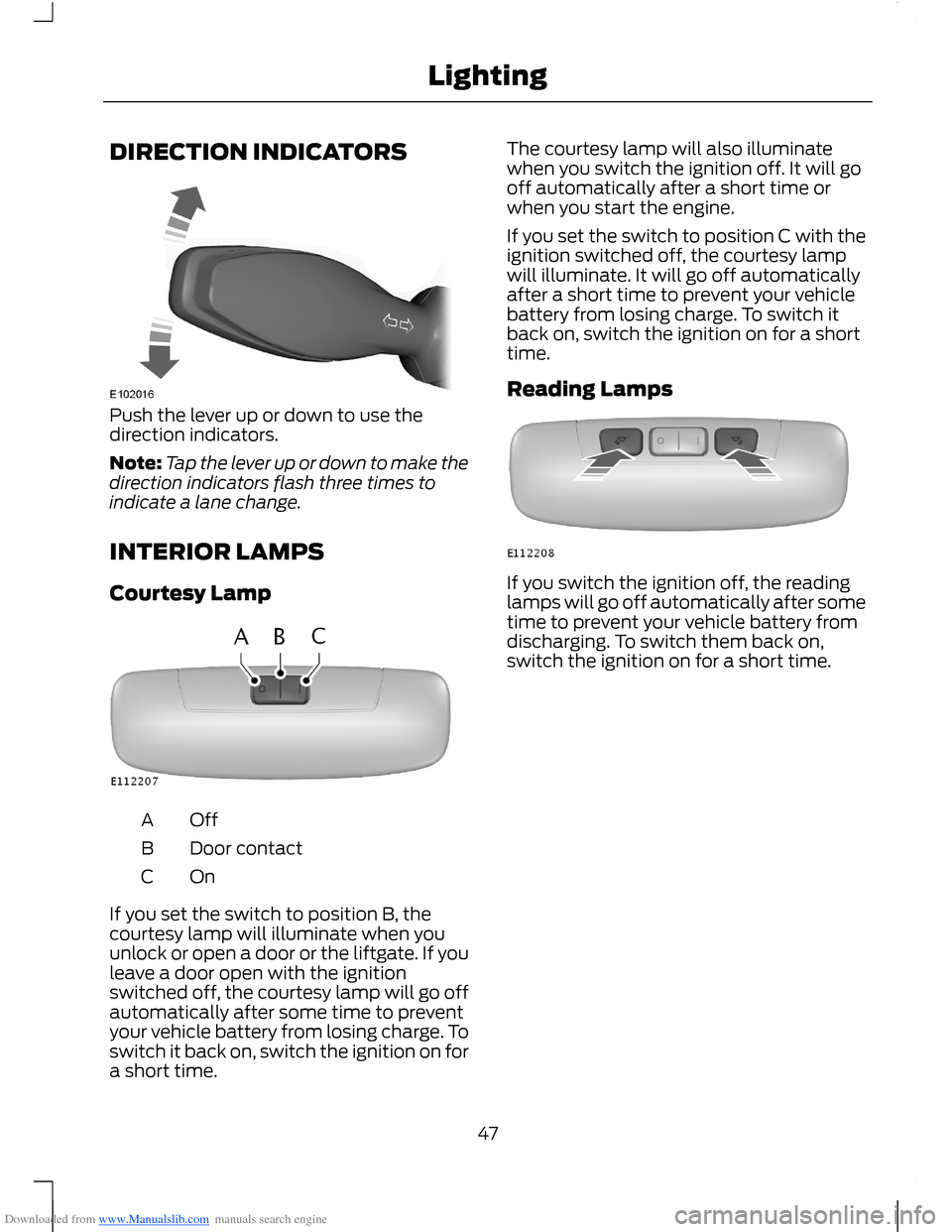
Push the lever up or down to use thedirection indicators.
Note:Tap the lever up or down to make thedirection indicators flash three times toindicate a lane change.
INTERIOR LAMPS
Courtesy Lamp
OffA
Door contactB
OnC
If you set the switch to position B, thecourtesy lamp will illuminate when youunlock or open a door or the liftgate. If youleave a door open with the ignitionswitched off, the courtesy lamp will go offautomatically after some time to preventyour vehicle battery from losing charge. Toswitch it back on, switch the ignition on fora short time.
The courtesy lamp will also illuminatewhen you switch the ignition off. It will gooff automatically after a short time orwhen you start the engine.
If you set the switch to position C with theignition switched off, the courtesy lampwill illuminate. It will go off automaticallyafter a short time to prevent your vehiclebattery from losing charge. To switch itback on, switch the ignition on for a shorttime.
Reading Lamps
If you switch the ignition off, the readinglamps will go off automatically after sometime to prevent your vehicle battery fromdischarging. To switch them back on,switch the ignition on for a short time.
47Lighting