position FORD B MAX 2012 1.G Workshop Manual
[x] Cancel search | Manufacturer: FORD, Model Year: 2012, Model line: B MAX, Model: FORD B MAX 2012 1.GPages: 256, PDF Size: 19.67 MB
Page 144 of 256
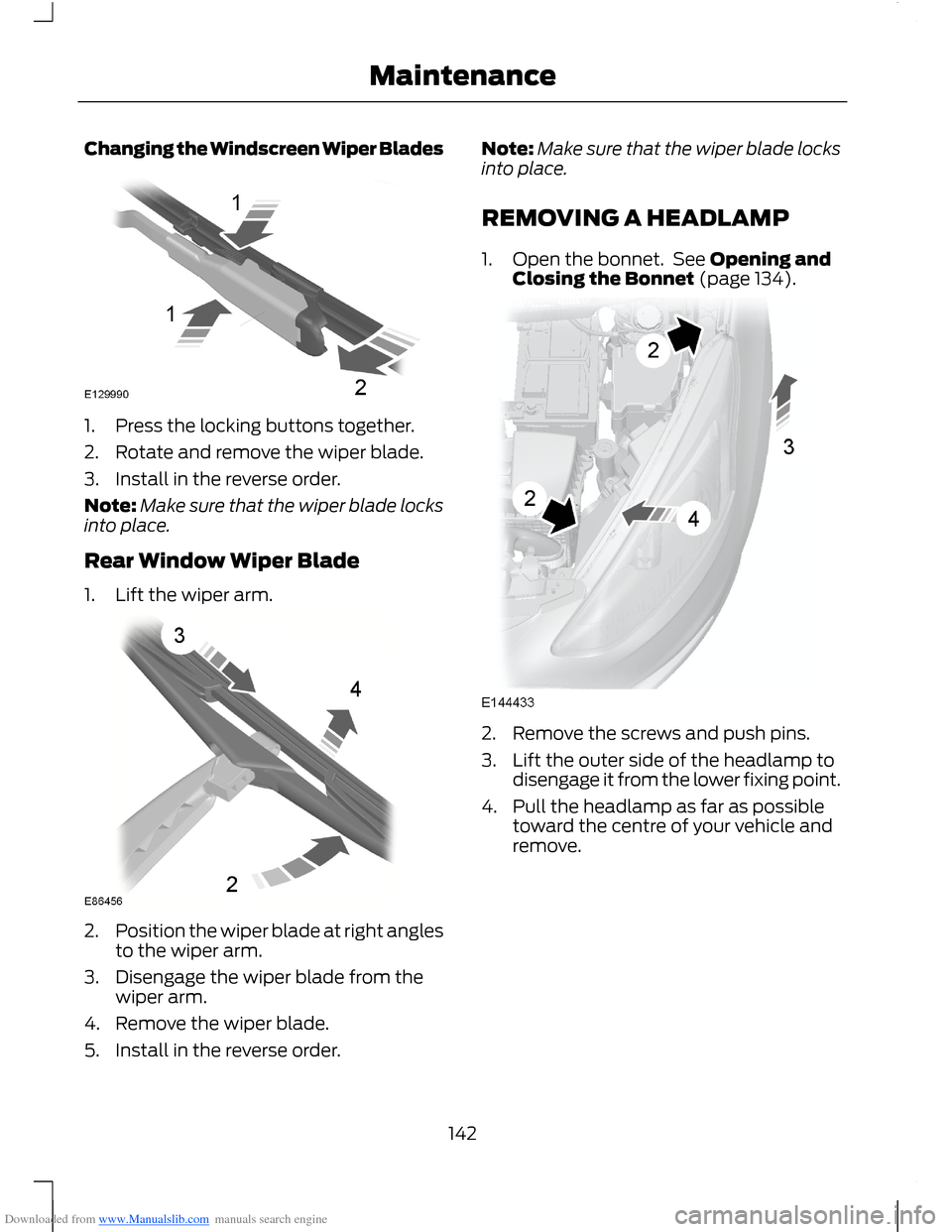
Downloaded from www.Manualslib.com manuals search engine Changing the Windscreen Wiper Blades
1.Press the locking buttons together.
2.Rotate and remove the wiper blade.
3.Install in the reverse order.
Note:Make sure that the wiper blade locksinto place.
Rear Window Wiper Blade
1.Lift the wiper arm.
2.Position the wiper blade at right anglesto the wiper arm.
3.Disengage the wiper blade from thewiper arm.
4.Remove the wiper blade.
5.Install in the reverse order.
Note:Make sure that the wiper blade locksinto place.
REMOVING A HEADLAMP
1.Open the bonnet. See Opening andClosing the Bonnet (page 134).
2.Remove the screws and push pins.
3.Lift the outer side of the headlamp todisengage it from the lower fixing point.
4.Pull the headlamp as far as possibletoward the centre of your vehicle andremove.
142Maintenance
Page 147 of 256
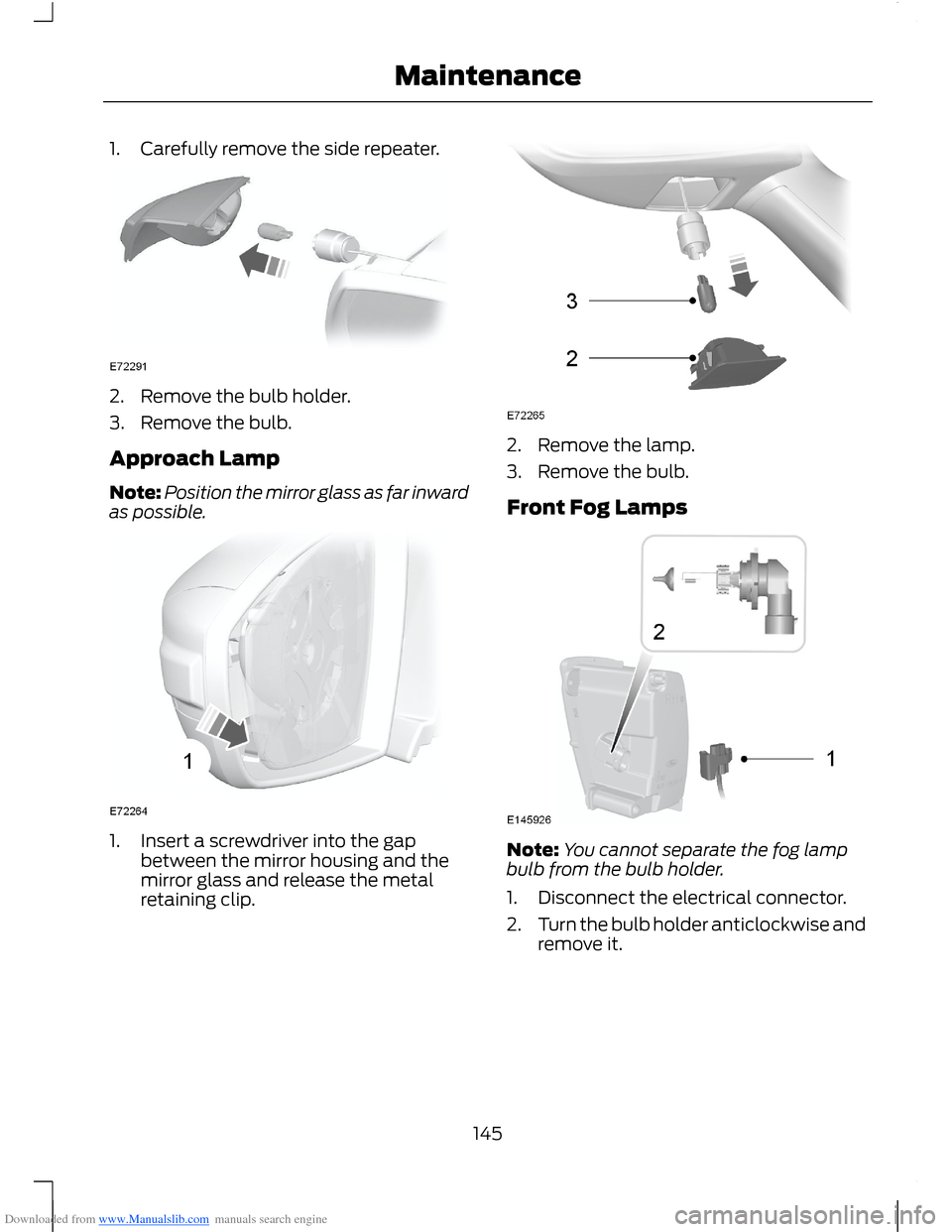
Downloaded from www.Manualslib.com manuals search engine 1.Carefully remove the side repeater.
2.Remove the bulb holder.
3.Remove the bulb.
Approach Lamp
Note:Position the mirror glass as far inwardas possible.
1.Insert a screwdriver into the gapbetween the mirror housing and themirror glass and release the metalretaining clip.
2.Remove the lamp.
3.Remove the bulb.
Front Fog Lamps
Note:You cannot separate the fog lampbulb from the bulb holder.
1.Disconnect the electrical connector.
2.Turn the bulb holder anticlockwise andremove it.
145Maintenance
Page 159 of 256
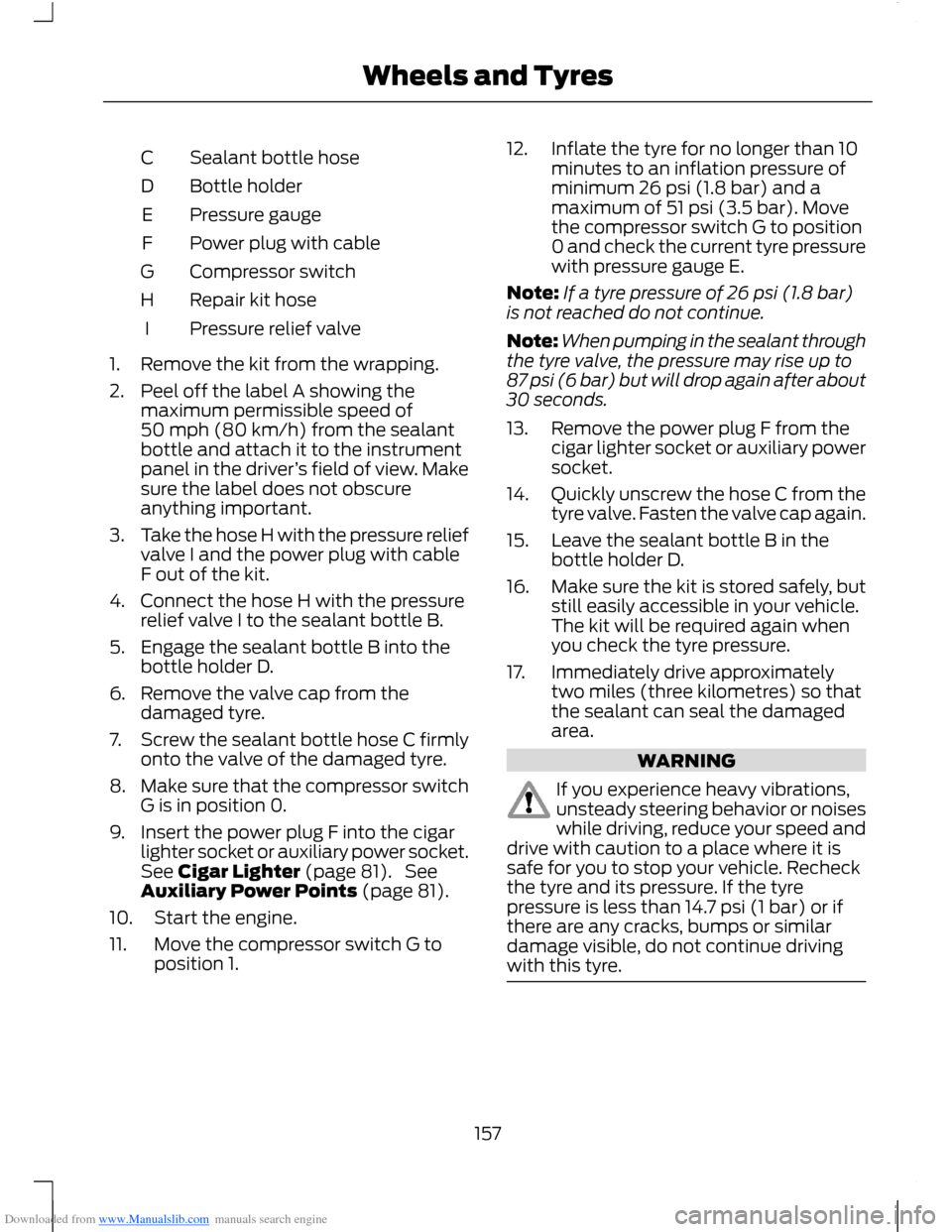
Downloaded from www.Manualslib.com manuals search engine Sealant bottle hoseC
Bottle holderD
Pressure gaugeE
Power plug with cableF
Compressor switchG
Repair kit hoseH
Pressure relief valveI
1.Remove the kit from the wrapping.
2.Peel off the label A showing themaximum permissible speed of50 mph (80 km/h) from the sealantbottle and attach it to the instrumentpanel in the driver’s field of view. Makesure the label does not obscureanything important.
3.Take the hose H with the pressure reliefvalve I and the power plug with cableF out of the kit.
4.Connect the hose H with the pressurerelief valve I to the sealant bottle B.
5.Engage the sealant bottle B into thebottle holder D.
6.Remove the valve cap from thedamaged tyre.
7.Screw the sealant bottle hose C firmlyonto the valve of the damaged tyre.
8.Make sure that the compressor switchG is in position 0.
9.Insert the power plug F into the cigarlighter socket or auxiliary power socket.See Cigar Lighter (page 81). SeeAuxiliary Power Points (page 81).
10.Start the engine.
11.Move the compressor switch G toposition 1.
12.Inflate the tyre for no longer than 10minutes to an inflation pressure ofminimum 26 psi (1.8 bar) and amaximum of 51 psi (3.5 bar). Movethe compressor switch G to position0 and check the current tyre pressurewith pressure gauge E.
Note:If a tyre pressure of 26 psi (1.8 bar)is not reached do not continue.
Note:When pumping in the sealant throughthe tyre valve, the pressure may rise up to87 psi (6 bar) but will drop again after about30 seconds.
13.Remove the power plug F from thecigar lighter socket or auxiliary powersocket.
14.Quickly unscrew the hose C from thetyre valve. Fasten the valve cap again.
15.Leave the sealant bottle B in thebottle holder D.
16.Make sure the kit is stored safely, butstill easily accessible in your vehicle.The kit will be required again whenyou check the tyre pressure.
17.Immediately drive approximatelytwo miles (three kilometres) so thatthe sealant can seal the damagedarea.
WARNING
If you experience heavy vibrations,unsteady steering behavior or noiseswhile driving, reduce your speed anddrive with caution to a place where it issafe for you to stop your vehicle. Recheckthe tyre and its pressure. If the tyrepressure is less than 14.7 psi (1 bar) or ifthere are any cracks, bumps or similardamage visible, do not continue drivingwith this tyre.
157Wheels and Tyres
Page 160 of 256
Downloaded from www.Manualslib.com manuals search engine 18.Stop your vehicle after drivingapproximately two miles (threekilometres). Check, and wherenecessary, adjust the pressure of thedamaged tyre.
19.Attach the kit and read the tyrepressure from the pressure gauge E.
20.Adjust it to the specified pressure.See Technical Specifications(page 164).
21.Once you have inflated the tyre to itscorrect tyre pressure, move thecompressor switch G to position 0,remove the power plug F from thesocket, unscrew the hose C andfasten the valve cap.
22.Leave hose C and H connected to thesealant bottle B and store the kitaway safely.
23.Go to the nearest tyre specialist toget the damaged tyre replaced.Before the tyre is removed from therim, inform your tyre dealer that thetyre contains sealant. You mustrenew the sealant bottle B and hoseC as soon as possible once used.
Note:Remember that emergency roadsidekits only provide temporary mobility.Regulations concerning tyre repair afterusage of the kit may differ from country tocountry. You should consult a tyre specialistfor advice.
WARNING
You must, make sure the tyre isadjusted to the recommendedinflation pressure. See TechnicalSpecifications (page 164). You must,monitor the tyre pressure until the sealedtyre is replaced.
Empty sealant bottles can be disposed oftogether with normal household waste.Return remains of sealant to your dealeror dispose of it in compliance with localwaste disposal regulations.
TYRE CARE
To make sure the front and rear tyres ofyour vehicle wear evenly and last longer,we recommend that you swap the tyresfrom front to rear and vice versa at regularintervals of between 3000 and 6000 miles(5000 and 10000 kilometres).
WARNING
Do not scrub the sidewalls of thetyres when you are parking.
If you have to mount a kerb, do so slowlyand approach it with the wheels atright-angles to the curb.
Examine the tyres regularly for cuts, foreignobjects and uneven wear of the tread.Uneven wear could mean that the wheelalignment is outside specification.
Check the tyre pressures (including thespare) when cold, every two weeks.
158Wheels and Tyres
Page 163 of 256
Downloaded from www.Manualslib.com manuals search engine Note:Vehicles with a temporary mobilitykit do not have a vehicle jack or a wheelbrace.
It is recommended to use a workshop typehydraulic jack for changing betweensummer and winter tyres.
Note:Use a jack with a minimum liftingcapacity of 1.5 tonnes and a lifting plate witha minimum diametre of 3.1 inches (80millimetres).
Vehicles With a Spare Wheel
Your vehicle jack, wheel brace, screw-intowing eye and wheel trim remover arelocated in the spare wheel well.
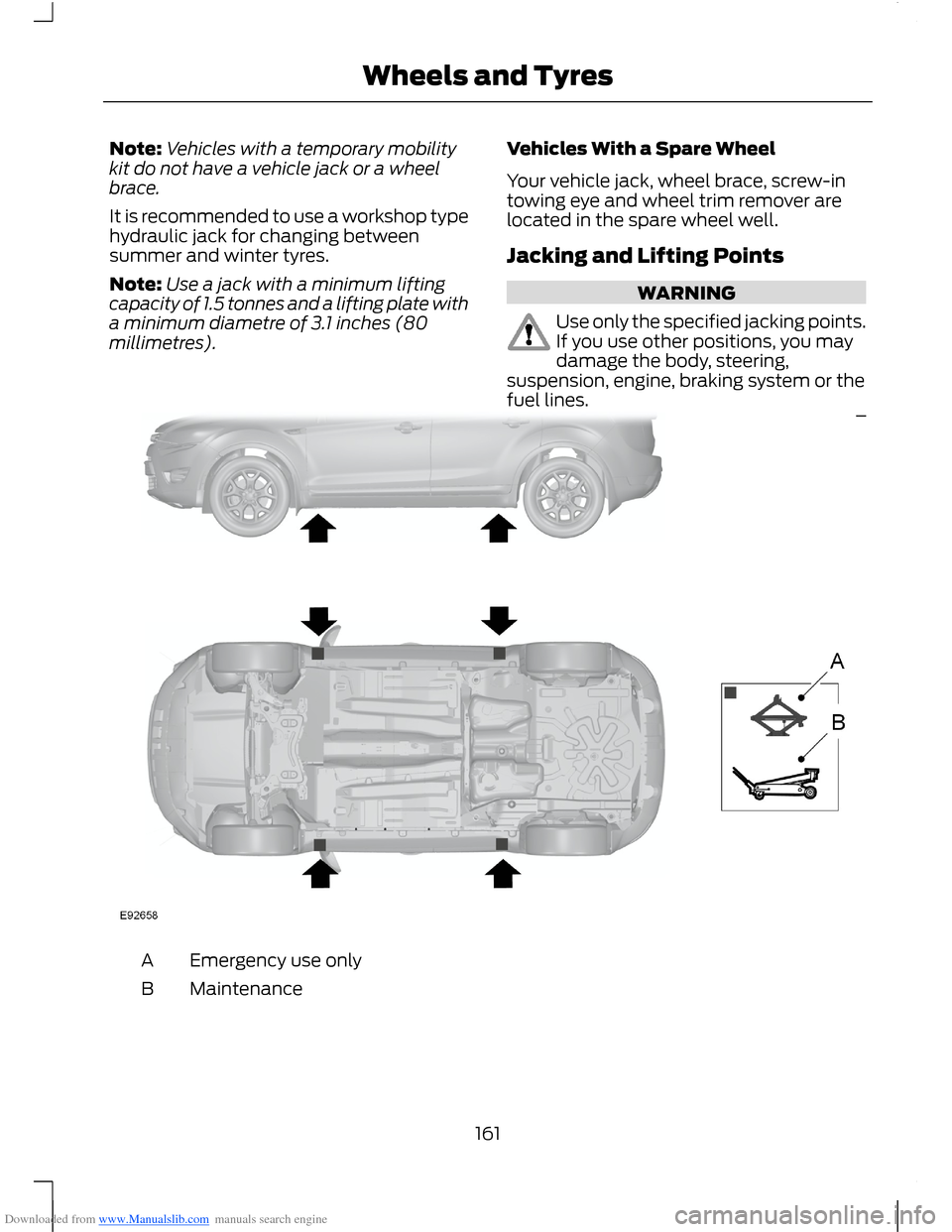
Jacking and Lifting Points
WARNING
Use only the specified jacking points.If you use other positions, you maydamage the body, steering,suspension, engine, braking system or thefuel lines.
Emergency use onlyA
MaintenanceB
161Wheels and Tyres
Page 165 of 256
Downloaded from www.Manualslib.com manuals search engine Note:Make sure that you pull the wheeltrim remover at right angles to the trim.
Removing a Road Wheel
WARNINGS
Park your vehicle in such a positionthat neither the traffic nor you arehindered or endangered.
Set up a warning triangle.
Make sure that your vehicle is on firm,level ground with the wheels pointingstraight ahead.
Switch the ignition off and apply theparking brake.
If your vehicle has a manualtransmission, move the selector leverto first or reverse gear. If it has anautomatic transmission, move the selectorlever to position (P).
Have the passengers leave yourvehicle.
Secure the diagonally oppositewheel with an appropriate block orwheel chock.
Make sure that the arrows ondirectional tyres point in the directionof rotation when your vehicle ismoving forward. If you have to fit a sparewheel with the arrows pointing in theopposite direction, have the tyre refittedin the correct direction by an authoriseddealer.
Do not work underneath your vehiclewhen it is supported only by a jack.
Make sure that the jack is vertical tothe jacking point and the base is flaton the ground.
Note:Do not lay alloy wheels face downon the ground, this will damage the paint.
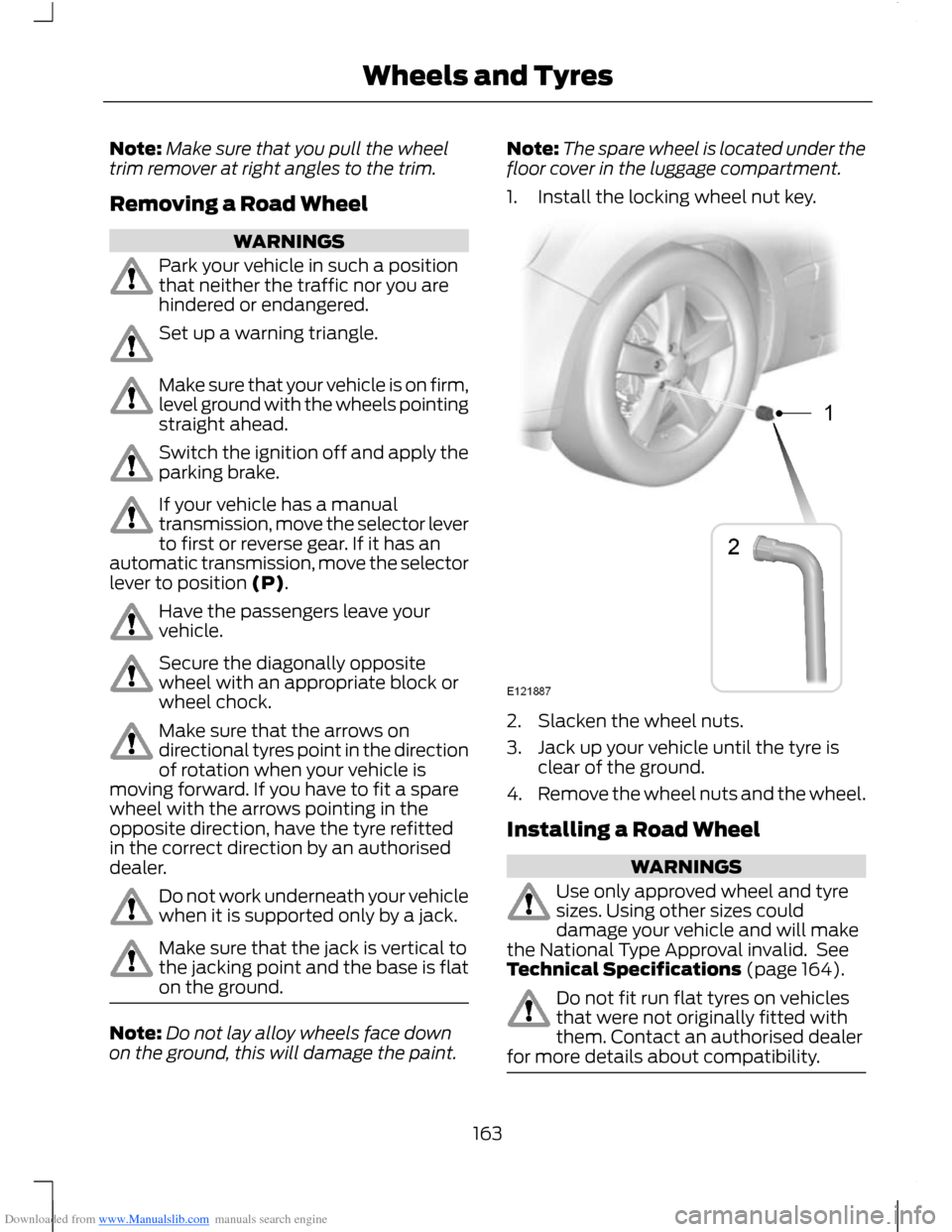
Note:The spare wheel is located under thefloor cover in the luggage compartment.
1.Install the locking wheel nut key.
2.Slacken the wheel nuts.
3.Jack up your vehicle until the tyre isclear of the ground.
4.Remove the wheel nuts and the wheel.
Installing a Road Wheel
WARNINGS
Use only approved wheel and tyresizes. Using other sizes coulddamage your vehicle and will makethe National Type Approval invalid. SeeTechnical Specifications (page 164).
Do not fit run flat tyres on vehiclesthat were not originally fitted withthem. Contact an authorised dealerfor more details about compatibility.
163Wheels and Tyres
Page 188 of 256
Downloaded from www.Manualslib.com manuals search engine Automatic Volume Control
When available, automatic volume controladjusts the volume level to compensatefor engine noise and road speed noise.
1.Press the MENU button and selectAUDIO.
2.Select AVC LEVEL or ADAPTIVEVOL.
3.Use the left or right arrow button toadjust the setting.
4.Press the OK button to confirm yourselection.
5.Press the MENU button to return.
Digital Signal Processing
Digital Signal Processing Occupancy
This feature takes into account thedifferences in distance from the variousspeakers in your vehicle to each seat. Youmust select the correct sitting position forthe audio to be correctly set.
Digital Signal Processing Equaliser
Select the music category that most suitsyour listening preference. The audio outputwill change to enhance the particular styleof music chosen.
Changing the Digital Signal ProcessingSettings
1.Press the MENU button.
2.Select AUDIO or AUDIO SETTINGS.
3.Scroll to the required digital signalprocessing function.
4.Use the up and down arrow buttons toselect the required setting.
5.Press the OK button to confirm yourselection.
6.Press the MENU button to return.
News Broadcasts
Your audio unit may interrupt normalreception to broadcast news bulletins fromstations on the FM waveband, radio datasystem or other enhanced network linkedstations.
The display will indicate there is anincoming announcement, during newsbroadcasts. When the audio unit interruptsfor a news broadcast the preset volumelevel will be the same as trafficannouncements.
1.Press the MENU button.
2.Select AUDIO or AUDIO SETTINGS.
3.Scroll to NEWS and turn on or off withthe OK button.
4.Press the MENU button to return.
Alternative Frequencies
The majority of programs that broadcaston the FM waveband have a programidentification code, it can be recognised byaudio units.
When your vehicle moves from onetransmission area to another with thealternative frequencies tuning switchedon, this function will search for thestrongest station signal.
Under certain conditions, however,alternative frequencies tuning maytemporarily disrupt normal reception.
When selected, the unit continuallyevaluates signal strength and, if a bettersignal becomes available, the unit willswitch to that alternative. It mutes whileit checks a list of alternative frequenciesand if necessary, it will search once acrossthe selected waveband for a genuinealternative frequency.
It will restore radio reception when it findsone or if one is not found, the unit willreturn to the original stored frequency.
186Audio System
Page 196 of 256
Downloaded from www.Manualslib.com manuals search engine AUXILIARY INPUT SOCKET
WARNINGS
Driving while distracted can result inloss of vehicle control, accident andinjury. We strongly recommend thatyou use extreme caution when using anydevice or feature that may take your focusoff the road. Your primary responsibility isthe safe operation of your vehicle. Werecommend against the use of anyhandheld device while driving andencourage the use of voice-operatedsystems when possible. Make sure you areaware of all applicable local laws that mayaffect the use of electronic devices whiledriving.
For safety reasons, do not connector adjust the settings on yourportable music player while yourvehicle is moving.
Store the portable music player in asecure location, such as the centreconsole or the glove box, when yourvehicle is in moving. Hard objects maybecome projectiles in a collision or suddenstop, which may increase the risk of seriousinjury. The audio extension cable must belong enough to allow the portable musicplayer to be safely stored while yourvehicle is moving.
The auxiliary input jack allows you toconnect and play music from your portablemusic player through your vehicle speakers.You can use any portable music playerdesigned for use with headphones. Youraudio extension cable must have maleone-eighth inch (three and one-halfmillimetre) connectors at each end.
1.Make sure your vehicle, radio andportable music player are turned offand move the transmission selectorlever to position P.
2.Plug the extension cable from theportable music player into the auxiliaryinput jack.
3.Switch the radio on. Select either atuned FM station or a CD.
4.Adjust the volume as desired.
5.Switch the portable music player onand adjust its volume to half itsmaximum level.
6.Press AUX until LINE or LINE INappears in the display. You should hearmusic from your device even if it is low.
7.Adjust the volume on your portablemusic player until it reaches the volumelevel of the FM station or CD. Do thisby switching back and forth betweenthe AUX and FM or CD controls.
194Audio System
Page 227 of 256
Downloaded from www.Manualslib.com manuals search engine ELECTROMAGNETIC
COMPATIBILITY
WARNINGS
Your vehicle has been tested andcertified to legislations relating toelectromagnetic compatibility(72/245/EEC, UN ECE Regulation 10 orother applicable local requirements). It isyour responsibility to make sure that anyequipment you have fitted complies withapplicable local legislations. Have anyequipment fitted by an authorised dealer.
WARNINGS
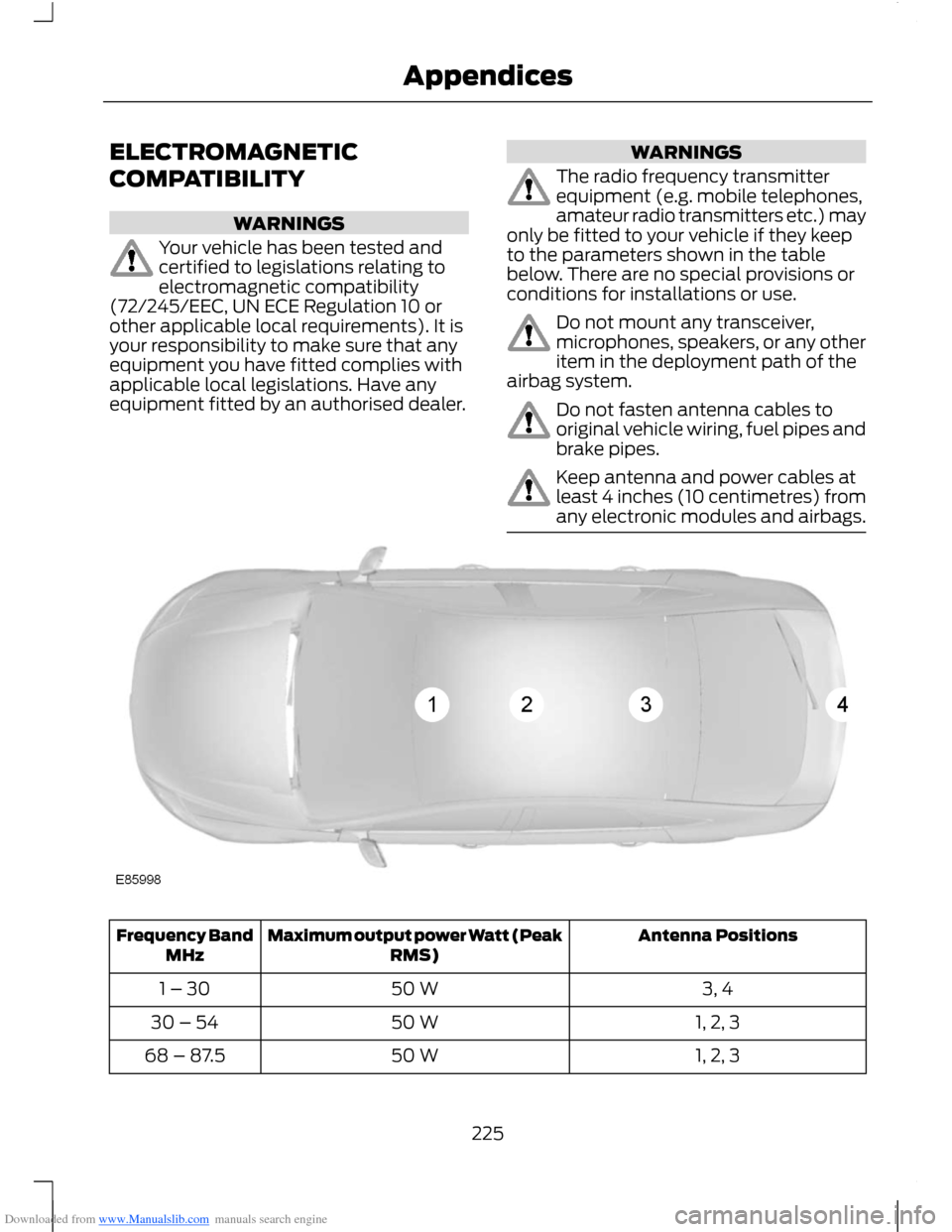
The radio frequency transmitterequipment (e.g. mobile telephones,amateur radio transmitters etc.) mayonly be fitted to your vehicle if they keepto the parameters shown in the tablebelow. There are no special provisions orconditions for installations or use.
Do not mount any transceiver,microphones, speakers, or any otheritem in the deployment path of theairbag system.
Do not fasten antenna cables tooriginal vehicle wiring, fuel pipes andbrake pipes.
Keep antenna and power cables atleast 4 inches (10 centimetres) fromany electronic modules and airbags.
Antenna PositionsMaximum output power Watt (PeakRMS)Frequency BandMHz
3, 450 W1 – 30
1, 2, 350 W30 – 54
1, 2, 350 W68 – 87.5
225Appendices
Page 228 of 256
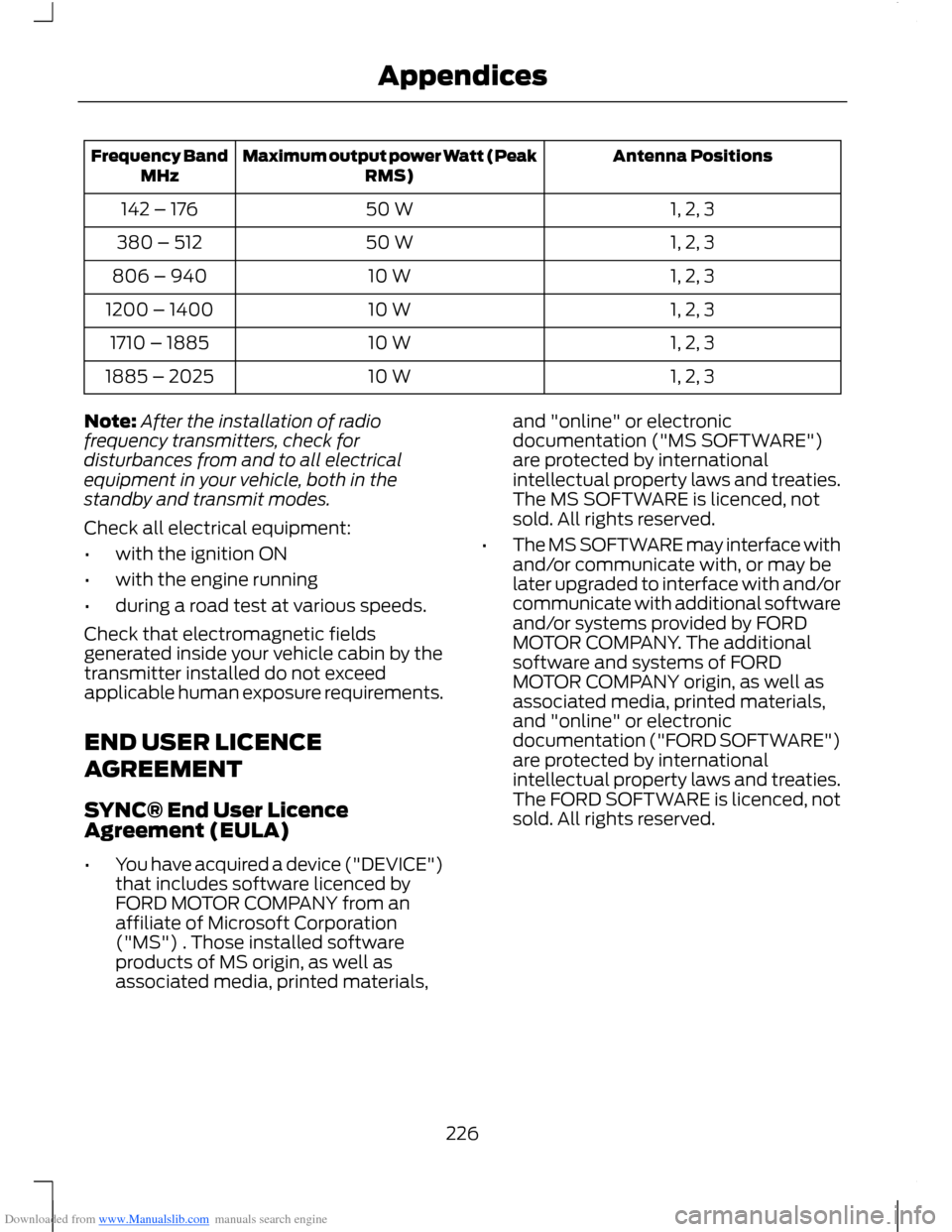
Downloaded from www.Manualslib.com manuals search engine Antenna PositionsMaximum output power Watt (PeakRMS)Frequency BandMHz
1, 2, 350 W142 – 176
1, 2, 350 W380 – 512
1, 2, 310 W806 – 940
1, 2, 310 W1200 – 1400
1, 2, 310 W1710 – 1885
1, 2, 310 W1885 – 2025
Note:After the installation of radiofrequency transmitters, check fordisturbances from and to all electricalequipment in your vehicle, both in thestandby and transmit modes.
Check all electrical equipment:
•with the ignition ON
•with the engine running
•during a road test at various speeds.
Check that electromagnetic fieldsgenerated inside your vehicle cabin by thetransmitter installed do not exceedapplicable human exposure requirements.
END USER LICENCE
AGREEMENT
SYNC® End User LicenceAgreement (EULA)
•You have acquired a device ("DEVICE")that includes software licenced byFORD MOTOR COMPANY from anaffiliate of Microsoft Corporation("MS") . Those installed softwareproducts of MS origin, as well asassociated media, printed materials,
and "online" or electronicdocumentation ("MS SOFTWARE")are protected by internationalintellectual property laws and treaties.The MS SOFTWARE is licenced, notsold. All rights reserved.
•The MS SOFTWARE may interface withand/or communicate with, or may belater upgraded to interface with and/orcommunicate with additional softwareand/or systems provided by FORDMOTOR COMPANY. The additionalsoftware and systems of FORDMOTOR COMPANY origin, as well asassociated media, printed materials,and "online" or electronicdocumentation ("FORD SOFTWARE")are protected by internationalintellectual property laws and treaties.The FORD SOFTWARE is licenced, notsold. All rights reserved.
226Appendices