audio FORD B MAX 2012 1.G Owner's Guide
[x] Cancel search | Manufacturer: FORD, Model Year: 2012, Model line: B MAX, Model: FORD B MAX 2012 1.GPages: 256, PDF Size: 19.67 MB
Page 190 of 256
Downloaded from www.Manualslib.com manuals search engine 1.Press the MENU button and select CDMODE.
2.Select SHUFFLE. This enables thefunction to be switched on or off.
When an MP3 CD is playing, optionsinclude SHUFFLE for the whole CD, or toplay all the tracks in the folder in a randomorder.
Repeat Compact Disc Tracks
1.Press the MENU button and select CDMODE.
2.Select REPEAT. This enables thefunction to be switched on or off. Thetrack will replay once ended.
When an MP3 or WMA CD is playing,options include REPEAT for the track, orto repeat all the tracks in the folder.
Compact Disc Track Scanning
The SCAN function allows you to previeweach track for approximately five seconds.
Various scan modes are possible,according to the type of CD currentlyplaying.
1.Press the MENU button and select CDMODE.
2.Select SCAN. This enables thefunction to be switched on or off.
Note:When an MP3 or WMA CD is playing,options include SCAN for the CD or just thetracks in the folder.
3.Press the OK button to stop the scanmode.
MP3 and WMA File Playback
MP3 (MPEG 1 Audio Layer-3) or WMA(Windows media audio) is a standardtechnology and format for compressingaudio data. This allows a more efficientuse of the media.
You can play MP3 files recorded onCD-ROM, CD-R and CD-RW formats. Thedisc must be in the ISO 9660 level 1 or level2 format, or Joliet or Romeo in theexpansion format. You can also use a discrecorded in multi session.
ISO 9660 Format
This is the most common internationalstandard for the logical format of files andfolders on a CD-ROM.
There are several specification levels. InLevel 1, file names must be in the 8.3format (no more than eight characters inthe name, no more than three charactersin the extension .MP3 and . WMA) and incapital letters.
Folder names can be no longer than eightcharacters. There can be no more thaneight folder levels (trees). Level 2specifications allow file names up to 31characters long.
Each folder can have up to eight trees.
For Joliet or Romeo in the expansionformat, consider these restrictions whenconfiguring your CD writing software.
Multi Session
This is a recording method that enablesadding of data using the track-at-oncemethod.
Conventional CDs begin at a CD controlarea called the lead-in and end at an areacalled lead-out. A multi session CD is a CDhaving multiple sessions, with eachsegment from lead-in to lead-out regardedas a single session.
CD-Extra: The format that records audio(audio CD data) as tracks on session 1, andrecords data as tracks on session 2.
Mixed CD: In this format, data is recordedas track 1 and audio (audio CD data) isrecorded as track 2.
188Audio System
Page 191 of 256
Downloaded from www.Manualslib.com manuals search engine File Formats
With formats other than ISO 9660 level 1and level 2, folder names or file names maynot be displayed correctly.
When naming, be sure to add the fileextension .MP3 or . WMA to the file name.
If you put the extension .MP3 or . WMA toa file other than MP3 or WMA, the unitcannot recognise the file correctly and willgenerate random noise that could damageyour speakers.
The following discs take a longer time tostart playback.
•A disc recorded with complicated treestructure.
•A disc recorded in multi session.
•A non-finalised disc to which data canbe added.
Playing a Multi Session Disc
When the first track of the first session isaudio CD data only, the audio CD data ofthe first session is played back. Non-audioCD data, MP3 or WMA file information(track number, time, etc.) is displayed withno sound.
When the first track of the first session isnot audio CD data:
•If an MP3 or WMA file is on the disc,only MP3, WMA or other data isskipped. Audio CD data is notrecognised.
•If no MP3 or WMA file is in the disc,nothing is played back. Audio CD datais not recognised.
MP3 and WMA Files Playback Order
The playback order of the folders and filesare as shown.
Note:A folder that does not include an MP3or WMA file is skipped.
To specify a desired playback order beforethe folder or file name. Input the order bynumber (e.g., 01, 02) then record contentsonto a disc. The order differs dependingon the writing software.
ID3 Tag Version 2
The following occurs when an MP3 orWMA file containing a tag is played:
•When skipping a portion of a tag (atthe beginning of the track) there is nosound output. Skip time changesdepending the tag capacity. Example:At 64 kbytes, it is about 2 seconds(with RealJukebox).
•The displayed elapsed playing timewhen skipping a portion of the tag isinaccurate. For MP3 files of a bit rateother than 128 kbps, time is notdisplayed accurately during playback.
•When an MP3 file is created with MP3conversion software (e.g. RealJukebox- a registered trademark ofRealNetworks Inc), the tag willautomatically be written.
189Audio System
Page 192 of 256
Downloaded from www.Manualslib.com manuals search engine MP3 or WMA Navigation
MP3 tracks may be recorded on the CD inseveral ways. They can all be placed in theroot directory like a conventional audio CD,or they can be placed in folders that mayrepresent, for example, an album, artist, orgenre.
The normal playing sequence on CDs withmultiple folders is:
•Play the tracks within the root (toplevel) first
•Then the tracks in any folder(s) withinthe root
•Then move onto the second folder, andso forth.
To navigate to a track.
1.Press the up or down arrow buttons toenter the track list.
2.Navigate the hierarchy using the arrowbuttons to select another folder ortrack (file).
3.Press OK to select a highlighted track.
MP3 and WMA Display Options
When an MP3 or WMA disc is playing,certain information encoded in each trackcan be displayed. Such information willnormally include:
•The file name.
•The folder name.
•ID3 information which might be thealbum or artist’s name.
The unit will normally show the file namethat is playing. To select one of the otheritems of information, press the INFObutton repeatedly until the required itemis shown in the display.
Note:If the ID3 information selected isunavailable,NO MP3 or WMA TAG will beshown in the display.
CD Text Display Options
When an audio disc with CD text is playing,limited information encoded in each trackcan be displayed. Such information willnormally include:
•The disc name.
•The artist name.
•The track name.
Note:These display options are selectedin the same way as MP3 displays.NO DISCNAME or NO TRACK NAME will be shownin the display if no information has beenencoded.
Ending Compact Disc Playback
To restore radio reception on all units,press the RADIO button.
Note:The CD will not be ejected. The discwill pause at the point where radio receptionwas restored.
To resume CD playback, press the CDbutton again.
COMPACT DISC PLAYER -
VEHICLES WITH:
AM/FM/CD/BLUETOOTH/SONY
AM/FM/CD
Compact Disc Playback
Note:During playback, the display indicatesthe disc, track and time that has elapsedsince the start of the track.
During radio reception, press the CD buttononce to start CD playback.
After a disc is loaded, playback will startimmediately.
190Audio System
Page 193 of 256
Downloaded from www.Manualslib.com manuals search engine Track Selection
•Press the seek down button once toreplay the current track. If pressedwithin two seconds of the start of atrack, the previous track will beselected.
•Press the up or down arrow buttons toselect the required track, then pressthe OK button.
The desired track number may be enteredusing the numeric keypad. Dial the requiredtrack number until complete (for example1 then 2 for track 12), or dial the numberand directly press OK.
Fast Forward and Reverse
Press and hold the seek down or upbuttons to search backward or forwardwithin the tracks on the disc.
Shuffle and Random
Random track playback, also known asshuffle, plays all tracks on the CD inrandom order.
Press function button 2.
Note:When an MP3 CD is playing, optionsinclude shuffle for the whole CD, or to playall the tracks in the folder in a random order.Repeat presses of function button 2 willtoggle these options.
Use the seek up or down button to selectthe next track to shuffle if required.
Repeat Compact Disc Tracks
Press function button 1.
When an MP3 or WMA CD is playing,options include REPEAT for the track, orto repeat all the tracks in the folder. Repeatpresses of function button 1 will togglethese options.
Compact Disc Track Scanning
1.Press function button 3.
Note:When an MP3 or WMA CD is playing,options include SCAN for the CD, or just thetracks in the folder. Repeat presses offunction button 3 will toggle these options.
2.Press function button 3 again to stopthe scan mode.
MP3 and WMA File Playback
MP3 (MPEG 1 Audio Layer-3) or WMA(Windows media audio) is a standardtechnology and format for compressingaudio data. This allows a more efficientuse of the media.
You can play MP3 files recorded onCD-ROM, CD-R and CD-RW formats. Thedisc must be in the ISO 9660 level 1 or level2 format, or Joliet or Romeo in theexpansion format. You can also use a discrecorded in multi session.
ISO 9660 Format
This is the most common internationalstandard for the logical format of files andfolders on a CD-ROM.
There are several specification levels. InLevel 1, file names must be in the 8.3format (no more than eight characters inthe name, no more than three charactersin the extension .MP3 and . WMA) and incapital letters.
Folder names can be no longer than eightcharacters. There can be no more thaneight folder levels (trees). Level 2specifications allow file names up to 31characters long.
Each folder can have up to eight trees.
For Joliet or Romeo in the expansionformat, consider these restrictions whenconfiguring your CD writing software.
191Audio System
Page 194 of 256
Downloaded from www.Manualslib.com manuals search engine Multi Session
This is a recording method that enablesadding of data using the track-at-oncemethod.
Conventional CDs begin at a CD controlarea called the lead-in and end at an areacalled lead-out. A multi session CD is a CDhaving multiple sessions, with eachsegment from lead-in to lead-out regardedas a single session.
CD-Extra: The format that records audio(audio CD data) as tracks on session 1, andrecords data as tracks on session 2.
Mixed CD: In this format, data is recordedas track 1 and audio (audio CD data) isrecorded as track 2.
File Formats
With formats other than ISO 9660 level 1and level 2, folder names or file names maynot be displayed correctly.
When naming, be sure to add the fileextension .MP3 or . WMA to the file name.
If you put the extension .MP3 or . WMA toa file other than MP3 or WMA, the unitcannot recognise the file correctly and willgenerate random noise that could damageyour speakers.
The following discs take a longer time tostart playback.
•A disc recorded with complicated treestructure.
•A disc recorded in multi session.
•A non-finalised disc to which data canbe added.
Playing a Multi Session Disc
When the first track of the first session isaudio CD data only, the audio CD data ofthe first session is played back. Non-audioCD data, MP3 or WMA file information(track number, time, etc.) is displayed withno sound.
When the first track of the first session isnot audio CD data:
•If an MP3 or WMA file is on the disc,only MP3, WMA or other data isskipped. Audio CD data is notrecognised.
•If no MP3 or WMA file is in the disc,nothing is played back. Audio CD datais not recognised.
MP3 and WMA Files Playback Order
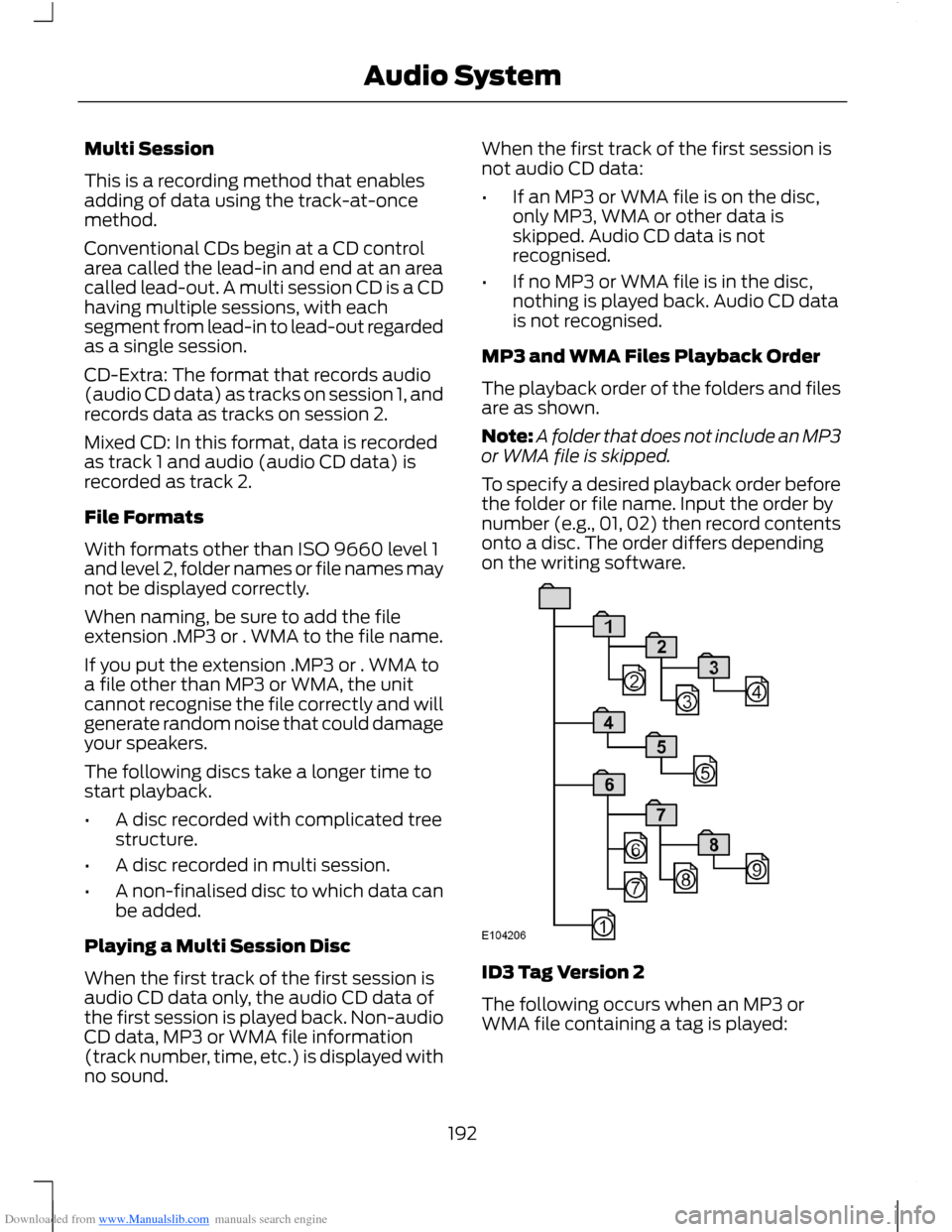
The playback order of the folders and filesare as shown.
Note:A folder that does not include an MP3or WMA file is skipped.
To specify a desired playback order beforethe folder or file name. Input the order bynumber (e.g., 01, 02) then record contentsonto a disc. The order differs dependingon the writing software.
ID3 Tag Version 2
The following occurs when an MP3 orWMA file containing a tag is played:
192Audio System
Page 195 of 256
Downloaded from www.Manualslib.com manuals search engine •When skipping a portion of a tag (atthe beginning of the track) there is nosound output. Skip time changesdepending the tag capacity. Example:At 64 kbytes, it is about 2 seconds(with RealJukebox).
•The displayed elapsed playing timewhen skipping a portion of the tag isinaccurate. For MP3 files of a bit rateother than 128 kbps, time is notdisplayed accurately during playback.
•When an MP3 file is created with MP3conversion software (e.g. RealJukebox- a registered trademark ofRealNetworks Inc), the tag willautomatically be written.
MP3 or WMA Navigation
MP3 tracks may be recorded on the CD inseveral ways. They can all be placed in theroot directory like a conventional audio CD,or they can be placed in folders that mayrepresent, for example, an album, artist, orgenre.
The normal playing sequence on CDs withmultiple folders is:
•Play the tracks within the root (toplevel) first
•Then the tracks in any folder(s) withinthe root
•Then move onto the second folder, andso forth.
To navigate to a track.
1.Press the up or down arrow buttons toenter the track list.
2.Navigate the hierarchy using the arrowbuttons to select another folder ortrack (file).
3.Press OK to select a highlighted track.
MP3 and WMA Display Options
When an MP3 or WMA disc is playing,certain information encoded in each trackcan be displayed. Such information willnormally include:
•The file name.
•The folder name.
•ID3 information which might be thealbum or artist’s name.
The unit will normally show the file namethat is playing. To select one of the otheritems of information, press the INFObutton repeatedly until the required itemis shown in the display.
Note:If the ID3 information selected isunavailable,NO MP3 or WMA TAG will beshown in the display.
CD Text Display Options
When an audio disc with CD text is playing,limited information encoded in each trackcan be displayed. Such information willnormally include:
•The disc name.
•The artist name.
•The track name.
Note:These display options are selectedin the same way as MP3 displays.NO DISCNAME or NO TRACK NAME will be shownin the display if no information has beenencoded.
Ending Compact Disc Playback
To restore radio reception on all units,press the RADIO button.
Note:The CD will not be ejected. The discwill pause at the point where radio receptionwas restored.
To resume CD playback, press the CDbutton again.
193Audio System
Page 196 of 256
Downloaded from www.Manualslib.com manuals search engine AUXILIARY INPUT SOCKET
WARNINGS
Driving while distracted can result inloss of vehicle control, accident andinjury. We strongly recommend thatyou use extreme caution when using anydevice or feature that may take your focusoff the road. Your primary responsibility isthe safe operation of your vehicle. Werecommend against the use of anyhandheld device while driving andencourage the use of voice-operatedsystems when possible. Make sure you areaware of all applicable local laws that mayaffect the use of electronic devices whiledriving.
For safety reasons, do not connector adjust the settings on yourportable music player while yourvehicle is moving.
Store the portable music player in asecure location, such as the centreconsole or the glove box, when yourvehicle is in moving. Hard objects maybecome projectiles in a collision or suddenstop, which may increase the risk of seriousinjury. The audio extension cable must belong enough to allow the portable musicplayer to be safely stored while yourvehicle is moving.
The auxiliary input jack allows you toconnect and play music from your portablemusic player through your vehicle speakers.You can use any portable music playerdesigned for use with headphones. Youraudio extension cable must have maleone-eighth inch (three and one-halfmillimetre) connectors at each end.
1.Make sure your vehicle, radio andportable music player are turned offand move the transmission selectorlever to position P.
2.Plug the extension cable from theportable music player into the auxiliaryinput jack.
3.Switch the radio on. Select either atuned FM station or a CD.
4.Adjust the volume as desired.
5.Switch the portable music player onand adjust its volume to half itsmaximum level.
6.Press AUX until LINE or LINE INappears in the display. You should hearmusic from your device even if it is low.
7.Adjust the volume on your portablemusic player until it reaches the volumelevel of the FM station or CD. Do thisby switching back and forth betweenthe AUX and FM or CD controls.
194Audio System
Page 197 of 256
Downloaded from www.Manualslib.com manuals search engine AUDIO TROUBLESHOOTING
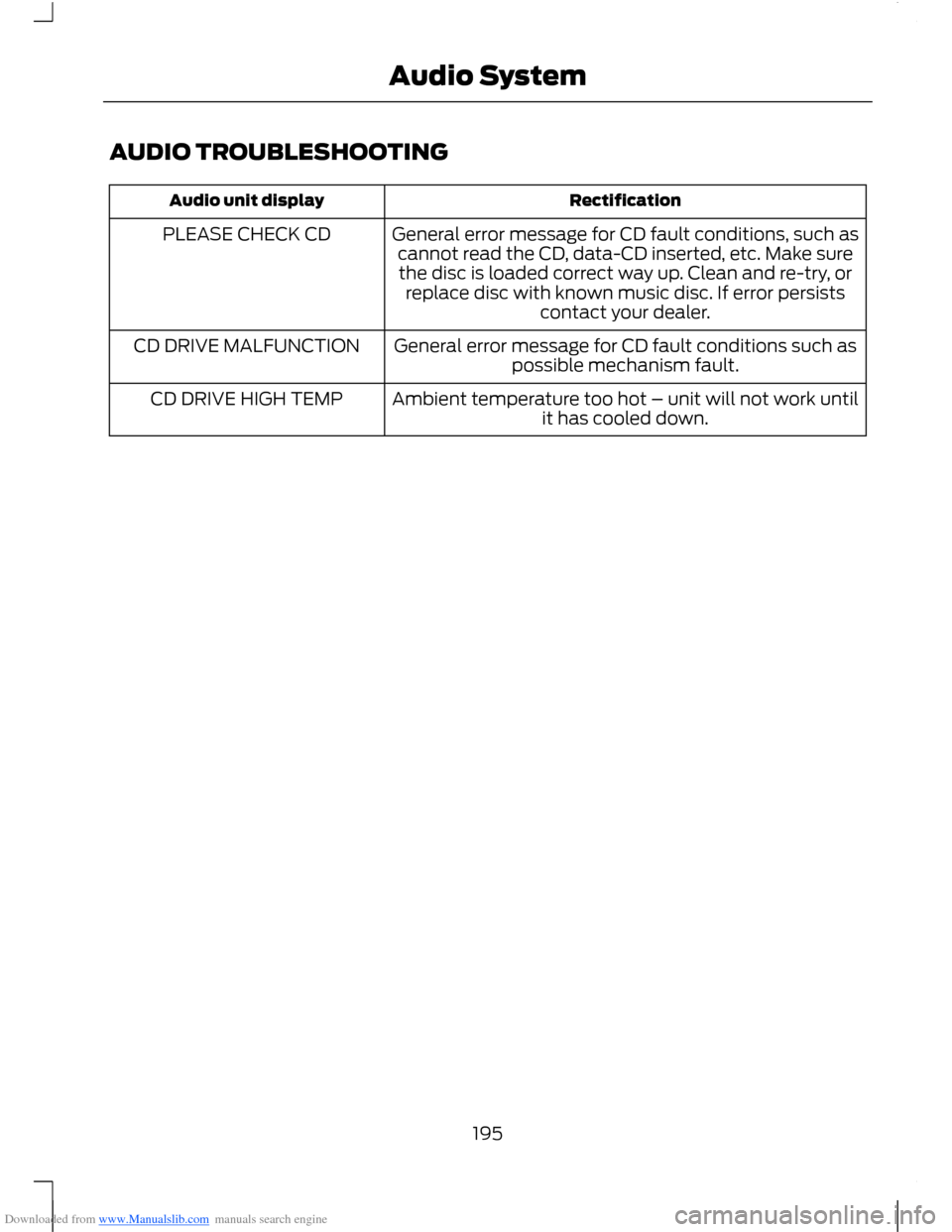
RectificationAudio unit display
General error message for CD fault conditions, such ascannot read the CD, data-CD inserted, etc. Make surethe disc is loaded correct way up. Clean and re-try, orreplace disc with known music disc. If error persistscontact your dealer.
PLEASE CHECK CD
General error message for CD fault conditions such aspossible mechanism fault.CD DRIVE MALFUNCTION
Ambient temperature too hot – unit will not work untilit has cooled down.CD DRIVE HIGH TEMP
195Audio System
Page 200 of 256
Downloaded from www.Manualslib.com manuals search engine USING VOICE RECOGNITION
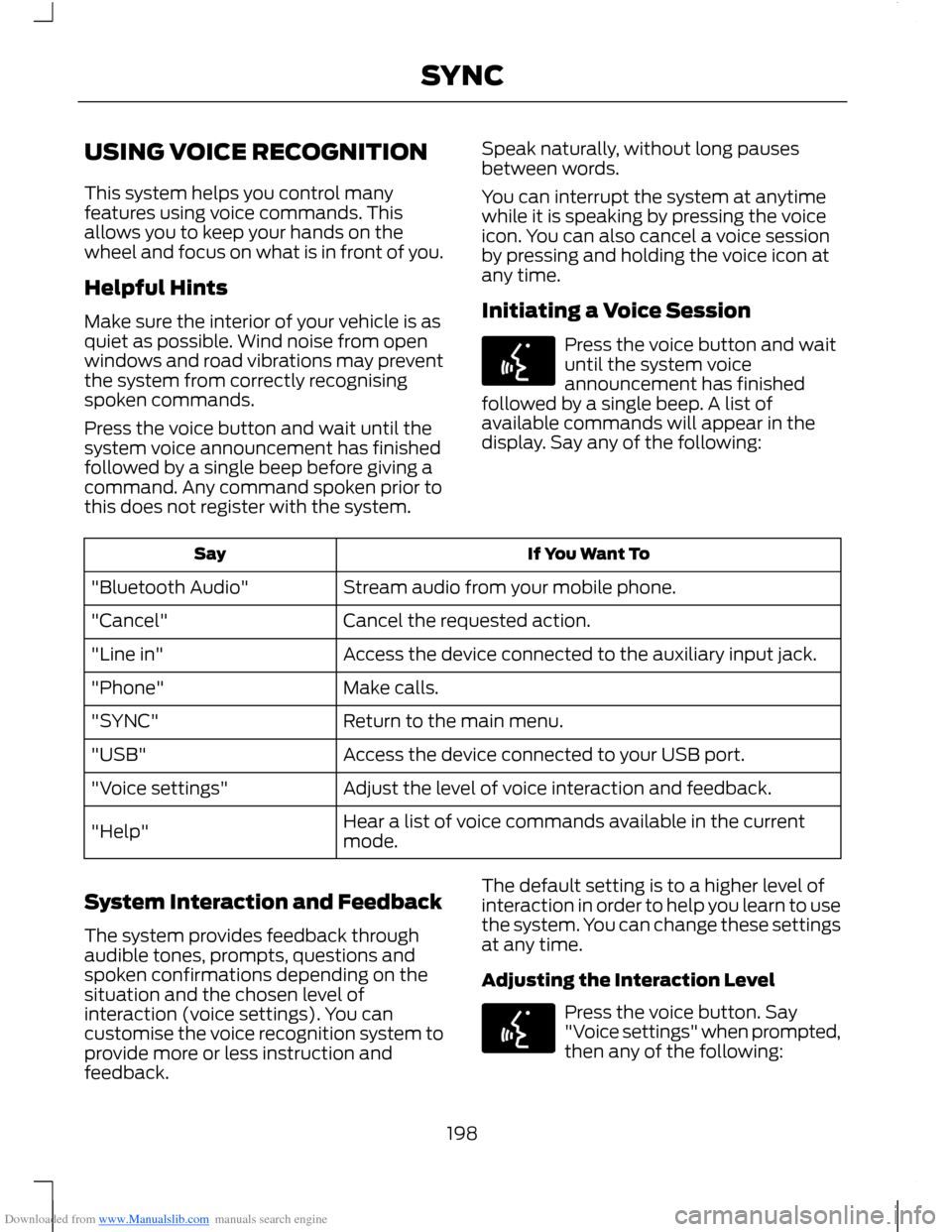
This system helps you control manyfeatures using voice commands. Thisallows you to keep your hands on thewheel and focus on what is in front of you.
Helpful Hints
Make sure the interior of your vehicle is asquiet as possible. Wind noise from openwindows and road vibrations may preventthe system from correctly recognisingspoken commands.
Press the voice button and wait until thesystem voice announcement has finishedfollowed by a single beep before giving acommand. Any command spoken prior tothis does not register with the system.
Speak naturally, without long pausesbetween words.
You can interrupt the system at anytimewhile it is speaking by pressing the voiceicon. You can also cancel a voice sessionby pressing and holding the voice icon atany time.
Initiating a Voice Session
Press the voice button and waituntil the system voiceannouncement has finishedfollowed by a single beep. A list ofavailable commands will appear in thedisplay. Say any of the following:
If You Want ToSay
Stream audio from your mobile phone."Bluetooth Audio"
Cancel the requested action."Cancel"
Access the device connected to the auxiliary input jack."Line in"
Make calls."Phone"
Return to the main menu."SYNC"
Access the device connected to your USB port."USB"
Adjust the level of voice interaction and feedback."Voice settings"
Hear a list of voice commands available in the currentmode."Help"
System Interaction and Feedback
The system provides feedback throughaudible tones, prompts, questions andspoken confirmations depending on thesituation and the chosen level ofinteraction (voice settings). You cancustomise the voice recognition system toprovide more or less instruction andfeedback.
The default setting is to a higher level ofinteraction in order to help you learn to usethe system. You can change these settingsat any time.
Adjusting the Interaction Level
Press the voice button. Say"Voice settings" when prompted,then any of the following:
198SYNC
Page 202 of 256
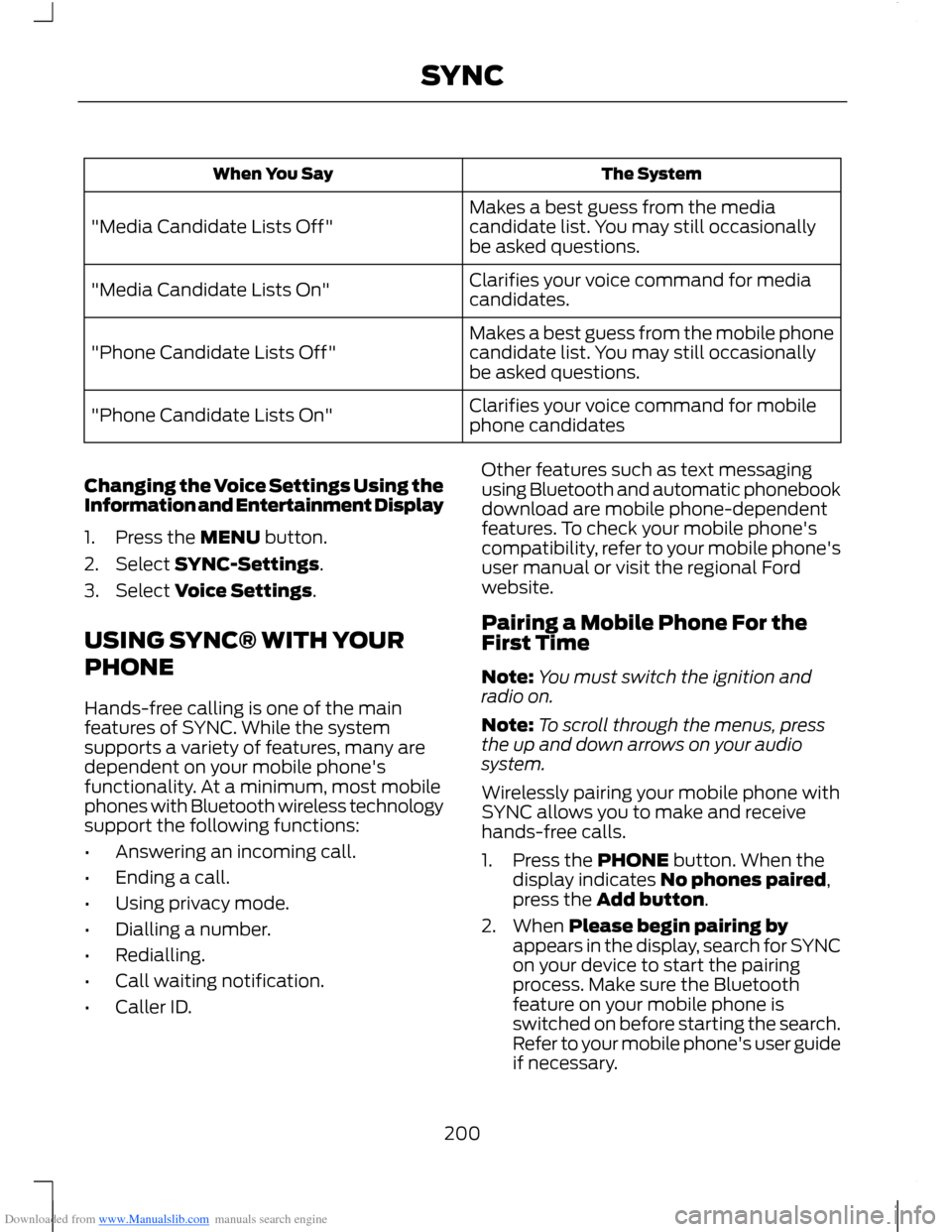
Downloaded from www.Manualslib.com manuals search engine The SystemWhen You Say
Makes a best guess from the mediacandidate list. You may still occasionallybe asked questions."Media Candidate Lists Off"
Clarifies your voice command for mediacandidates."Media Candidate Lists On"
Makes a best guess from the mobile phonecandidate list. You may still occasionallybe asked questions."Phone Candidate Lists Off"
Clarifies your voice command for mobilephone candidates"Phone Candidate Lists On"
Changing the Voice Settings Using theInformation and Entertainment Display
1.Press the MENU button.
2.Select SYNC-Settings.
3.Select Voice Settings.
USING SYNC® WITH YOUR
PHONE
Hands-free calling is one of the mainfeatures of SYNC. While the systemsupports a variety of features, many aredependent on your mobile phone'sfunctionality. At a minimum, most mobilephones with Bluetooth wireless technologysupport the following functions:
•Answering an incoming call.
•Ending a call.
•Using privacy mode.
•Dialling a number.
•Redialling.
•Call waiting notification.
•Caller ID.
Other features such as text messagingusing Bluetooth and automatic phonebookdownload are mobile phone-dependentfeatures. To check your mobile phone'scompatibility, refer to your mobile phone'suser manual or visit the regional Fordwebsite.
Pairing a Mobile Phone For theFirst Time
Note:You must switch the ignition andradio on.
Note:To scroll through the menus, pressthe up and down arrows on your audiosystem.
Wirelessly pairing your mobile phone withSYNC allows you to make and receivehands-free calls.
1.Press the PHONE button. When thedisplay indicates No phones paired,press the Add button.
2.When Please begin pairing byappears in the display, search for SYNCon your device to start the pairingprocess. Make sure the Bluetoothfeature on your mobile phone isswitched on before starting the search.Refer to your mobile phone's user guideif necessary.
200SYNC