audio FORD B MAX 2012 1.G Service Manual
[x] Cancel search | Manufacturer: FORD, Model Year: 2012, Model line: B MAX, Model: FORD B MAX 2012 1.GPages: 256, PDF Size: 19.67 MB
Page 203 of 256
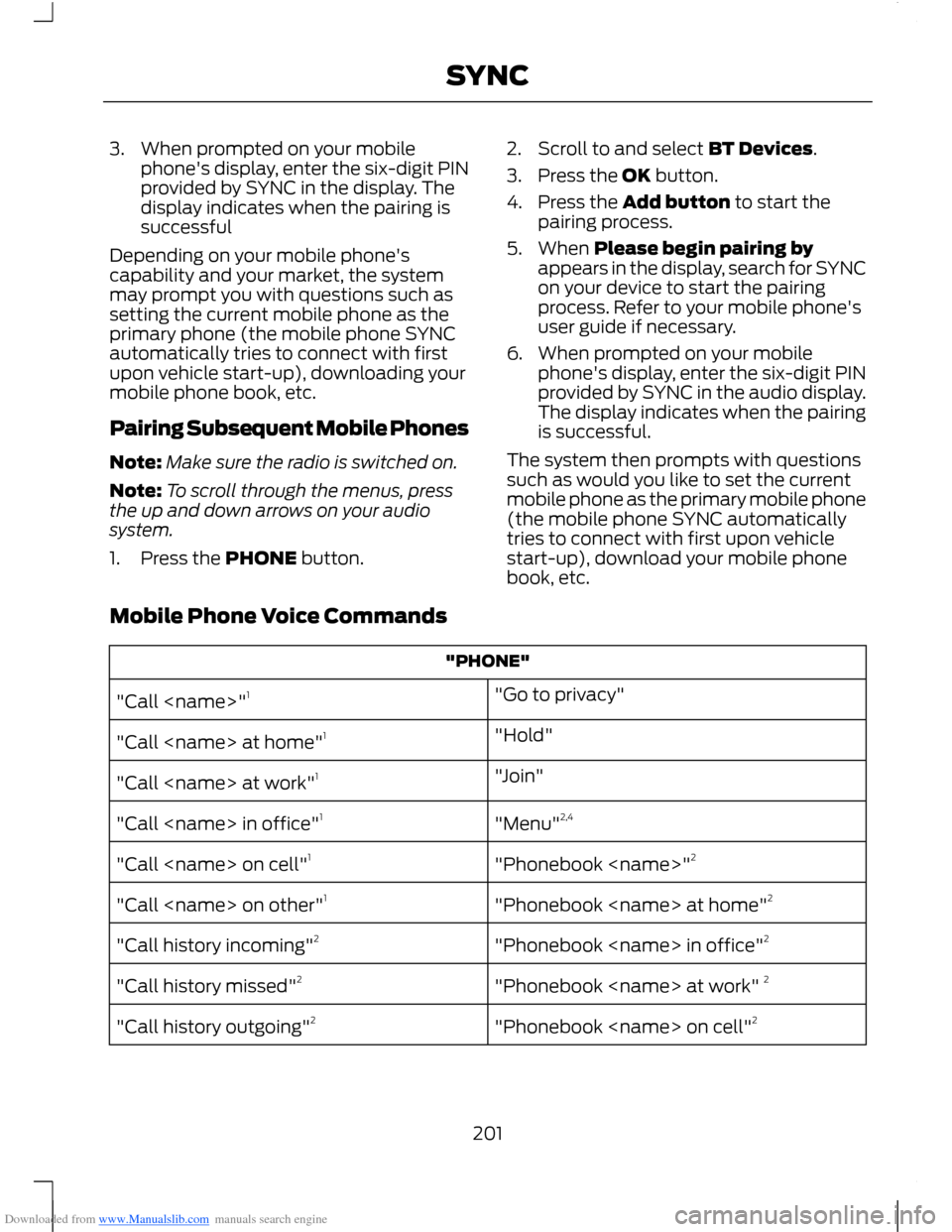
Downloaded from www.Manualslib.com manuals search engine 3.When prompted on your mobilephone's display, enter the six-digit PINprovided by SYNC in the display. Thedisplay indicates when the pairing issuccessful
Depending on your mobile phone'scapability and your market, the systemmay prompt you with questions such assetting the current mobile phone as theprimary phone (the mobile phone SYNCautomatically tries to connect with firstupon vehicle start-up), downloading yourmobile phone book, etc.
Pairing Subsequent Mobile Phones
Note:Make sure the radio is switched on.
Note:To scroll through the menus, pressthe up and down arrows on your audiosystem.
1.Press the PHONE button.
2.Scroll to and select BT Devices.
3.Press the OK button.
4.Press the Add button to start thepairing process.
5.When Please begin pairing byappears in the display, search for SYNCon your device to start the pairingprocess. Refer to your mobile phone'suser guide if necessary.
6.When prompted on your mobilephone's display, enter the six-digit PINprovided by SYNC in the audio display.The display indicates when the pairingis successful.
The system then prompts with questionssuch as would you like to set the currentmobile phone as the primary mobile phone(the mobile phone SYNC automaticallytries to connect with first upon vehiclestart-up), download your mobile phonebook, etc.
Mobile Phone Voice Commands
"PHONE"
"Go to privacy""Call
"Hold""Call
"Join""Call
"Menu"2,4"Call
"Phonebook
"Phonebook
"Phonebook
"Phonebook
"Phonebook
201SYNC
Page 211 of 256
Downloaded from www.Manualslib.com manuals search engine You CanIf You Select
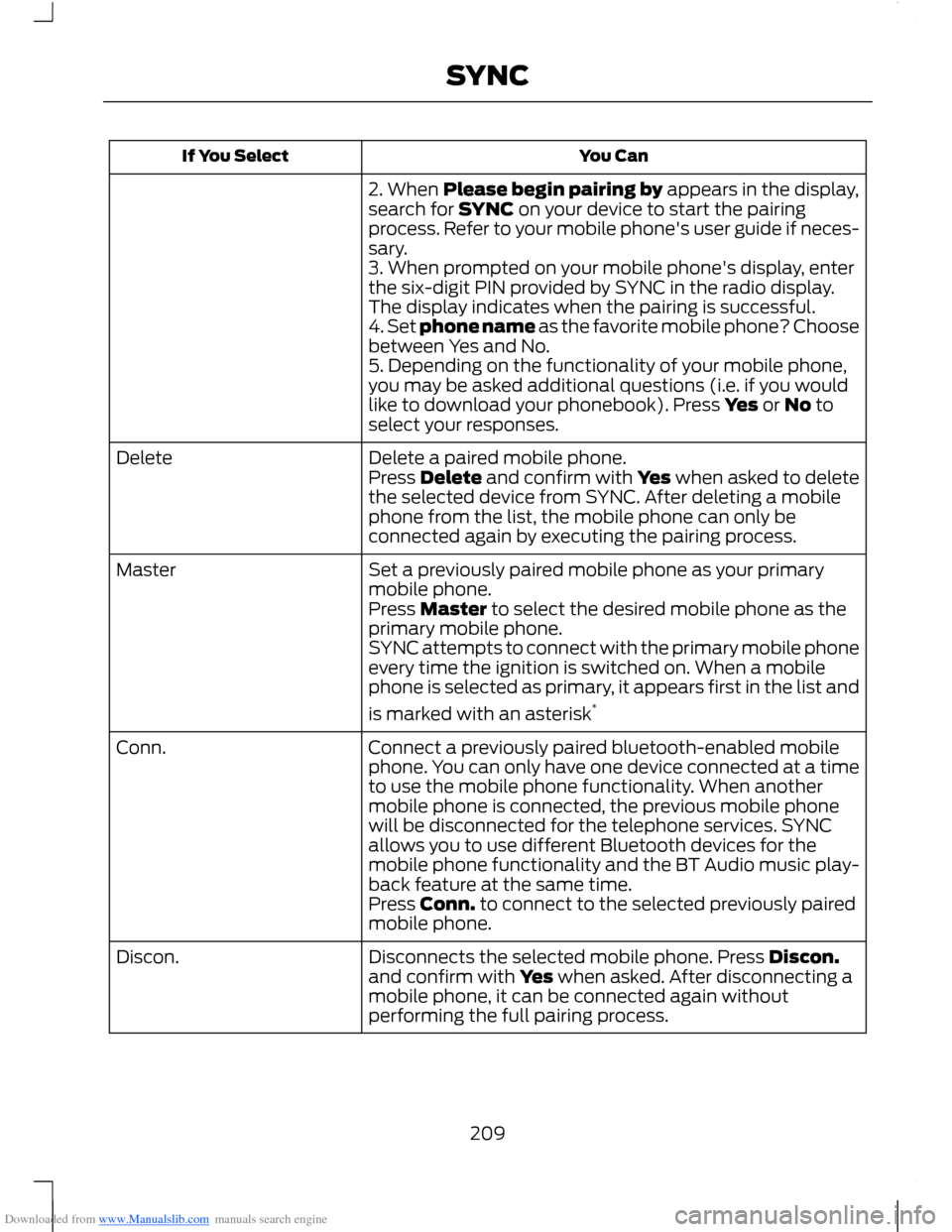
2. When Please begin pairing by appears in the display,search for SYNC on your device to start the pairingprocess. Refer to your mobile phone's user guide if neces-sary.3. When prompted on your mobile phone's display, enterthe six-digit PIN provided by SYNC in the radio display.The display indicates when the pairing is successful.4. Set phone name as the favorite mobile phone? Choosebetween Yes and No.5. Depending on the functionality of your mobile phone,you may be asked additional questions (i.e. if you wouldlike to download your phonebook). Press Yes or No toselect your responses.
Delete a paired mobile phone.DeletePress Delete and confirm with Yes when asked to deletethe selected device from SYNC. After deleting a mobilephone from the list, the mobile phone can only beconnected again by executing the pairing process.
Set a previously paired mobile phone as your primarymobile phone.Master
Press Master to select the desired mobile phone as theprimary mobile phone.SYNC attempts to connect with the primary mobile phoneevery time the ignition is switched on. When a mobilephone is selected as primary, it appears first in the list and
is marked with an asterisk*
Connect a previously paired bluetooth-enabled mobilephone. You can only have one device connected at a timeto use the mobile phone functionality. When anothermobile phone is connected, the previous mobile phonewill be disconnected for the telephone services. SYNCallows you to use different Bluetooth devices for themobile phone functionality and the BT Audio music play-back feature at the same time.
Conn.
Press Conn. to connect to the selected previously pairedmobile phone.
Disconnects the selected mobile phone. Press Discon.and confirm with Yes when asked. After disconnecting amobile phone, it can be connected again withoutperforming the full pairing process.
Discon.
209SYNC
Page 215 of 256
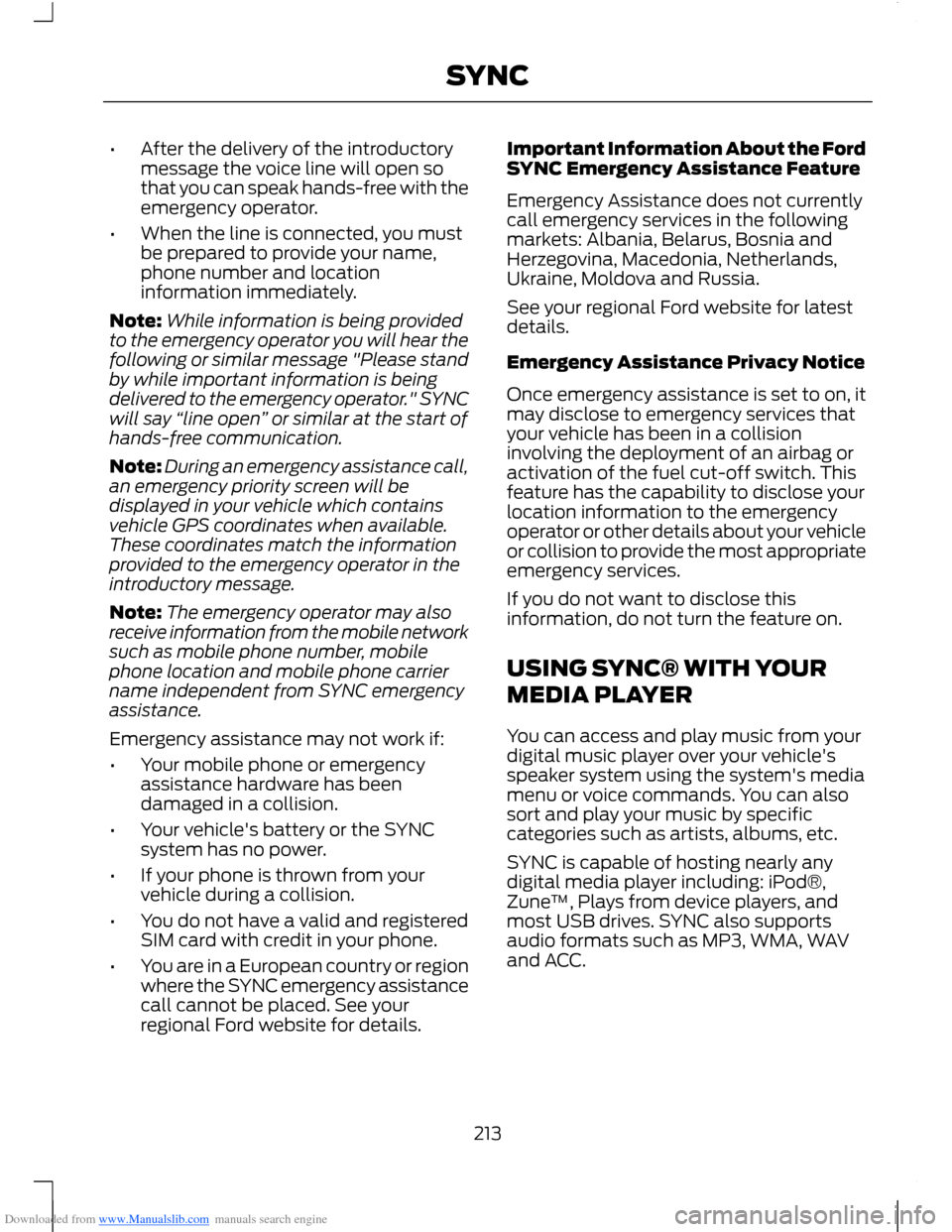
Downloaded from www.Manualslib.com manuals search engine •After the delivery of the introductorymessage the voice line will open sothat you can speak hands-free with theemergency operator.
•When the line is connected, you mustbe prepared to provide your name,phone number and locationinformation immediately.
Note:While information is being providedto the emergency operator you will hear thefollowing or similar message "Please standby while important information is beingdelivered to the emergency operator." SYNCwill say “line open” or similar at the start ofhands-free communication.
Note:During an emergency assistance call,an emergency priority screen will bedisplayed in your vehicle which containsvehicle GPS coordinates when available.These coordinates match the informationprovided to the emergency operator in theintroductory message.
Note:The emergency operator may alsoreceive information from the mobile networksuch as mobile phone number, mobilephone location and mobile phone carriername independent from SYNC emergencyassistance.
Emergency assistance may not work if:
•Your mobile phone or emergencyassistance hardware has beendamaged in a collision.
•Your vehicle's battery or the SYNCsystem has no power.
•If your phone is thrown from yourvehicle during a collision.
•You do not have a valid and registeredSIM card with credit in your phone.
•You are in a European country or regionwhere the SYNC emergency assistancecall cannot be placed. See yourregional Ford website for details.
Important Information About the FordSYNC Emergency Assistance Feature
Emergency Assistance does not currentlycall emergency services in the followingmarkets: Albania, Belarus, Bosnia andHerzegovina, Macedonia, Netherlands,Ukraine, Moldova and Russia.
See your regional Ford website for latestdetails.
Emergency Assistance Privacy Notice
Once emergency assistance is set to on, itmay disclose to emergency services thatyour vehicle has been in a collisioninvolving the deployment of an airbag oractivation of the fuel cut-off switch. Thisfeature has the capability to disclose yourlocation information to the emergencyoperator or other details about your vehicleor collision to provide the most appropriateemergency services.
If you do not want to disclose thisinformation, do not turn the feature on.
USING SYNC® WITH YOUR
MEDIA PLAYER
You can access and play music from yourdigital music player over your vehicle'sspeaker system using the system's mediamenu or voice commands. You can alsosort and play your music by specificcategories such as artists, albums, etc.
SYNC is capable of hosting nearly anydigital media player including: iPod®,Zune™, Plays from device players, andmost USB drives. SYNC also supportsaudio formats such as MP3, WMA, WAVand ACC.
213SYNC
Page 217 of 256
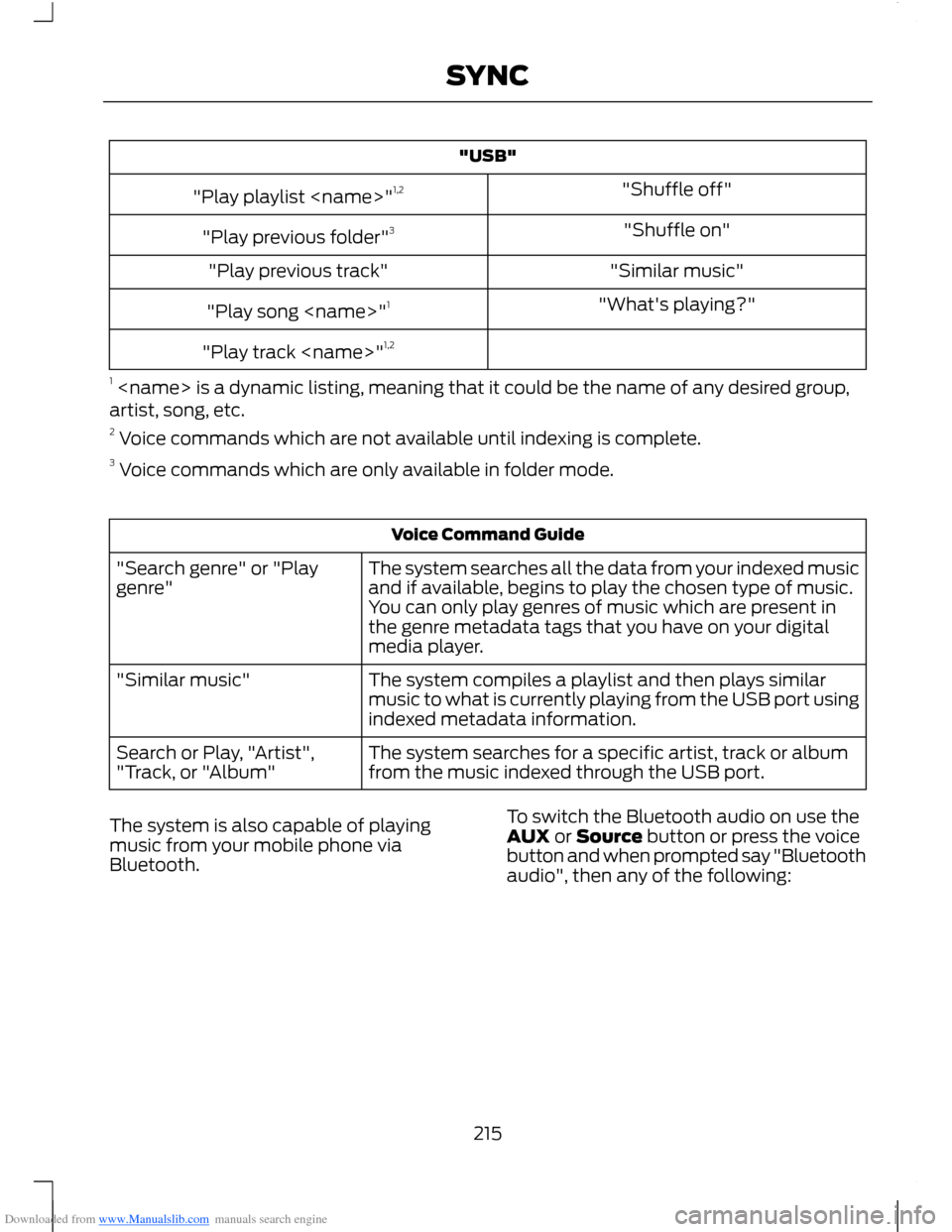
Downloaded from www.Manualslib.com manuals search engine "USB"
"Shuffle off""Play playlist
"Shuffle on""Play previous folder"3
"Similar music""Play previous track"
"What's playing?""Play song
"Play track
1
Voice Command Guide
The system searches all the data from your indexed musicand if available, begins to play the chosen type of music.You can only play genres of music which are present inthe genre metadata tags that you have on your digitalmedia player.
"Search genre" or "Playgenre"
The system compiles a playlist and then plays similarmusic to what is currently playing from the USB port usingindexed metadata information.
"Similar music"
The system searches for a specific artist, track or albumfrom the music indexed through the USB port.Search or Play, "Artist","Track, or "Album"
The system is also capable of playingmusic from your mobile phone viaBluetooth.
To switch the Bluetooth audio on use theAUX or Source button or press the voicebutton and when prompted say "Bluetoothaudio", then any of the following:
215SYNC
Page 218 of 256
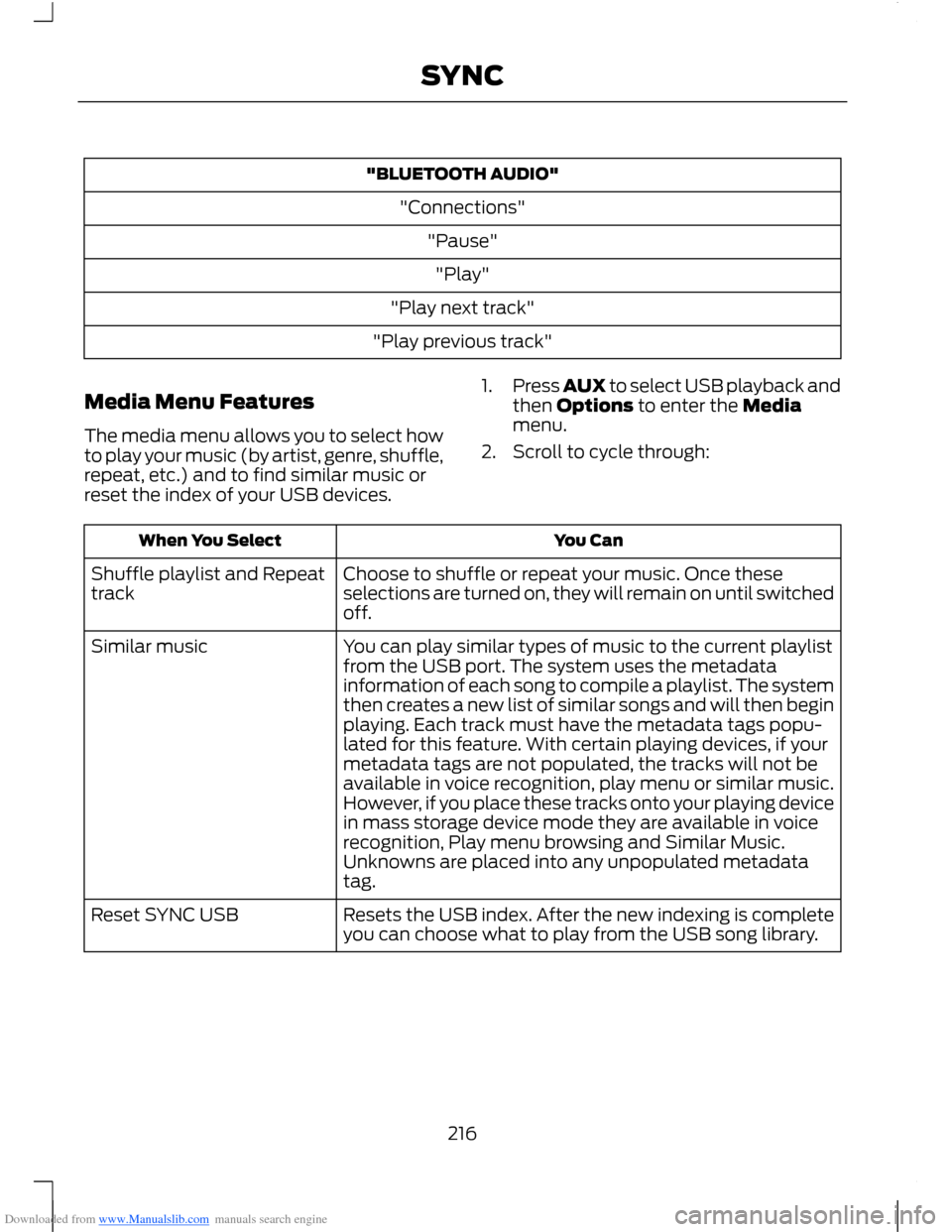
Downloaded from www.Manualslib.com manuals search engine "BLUETOOTH AUDIO"
"Connections"
"Pause"
"Play"
"Play next track"
"Play previous track"
Media Menu Features
The media menu allows you to select howto play your music (by artist, genre, shuffle,repeat, etc.) and to find similar music orreset the index of your USB devices.
1.Press AUX to select USB playback andthen Options to enter the Mediamenu.
2.Scroll to cycle through:
You CanWhen You Select
Choose to shuffle or repeat your music. Once theseselections are turned on, they will remain on until switchedoff.
Shuffle playlist and Repeattrack
You can play similar types of music to the current playlistfrom the USB port. The system uses the metadatainformation of each song to compile a playlist. The systemthen creates a new list of similar songs and will then beginplaying. Each track must have the metadata tags popu-lated for this feature. With certain playing devices, if your
Similar music
metadata tags are not populated, the tracks will not beavailable in voice recognition, play menu or similar music.However, if you place these tracks onto your playing devicein mass storage device mode they are available in voicerecognition, Play menu browsing and Similar Music.Unknowns are placed into any unpopulated metadatatag.
Resets the USB index. After the new indexing is completeyou can choose what to play from the USB song library.Reset SYNC USB
216SYNC
Page 220 of 256
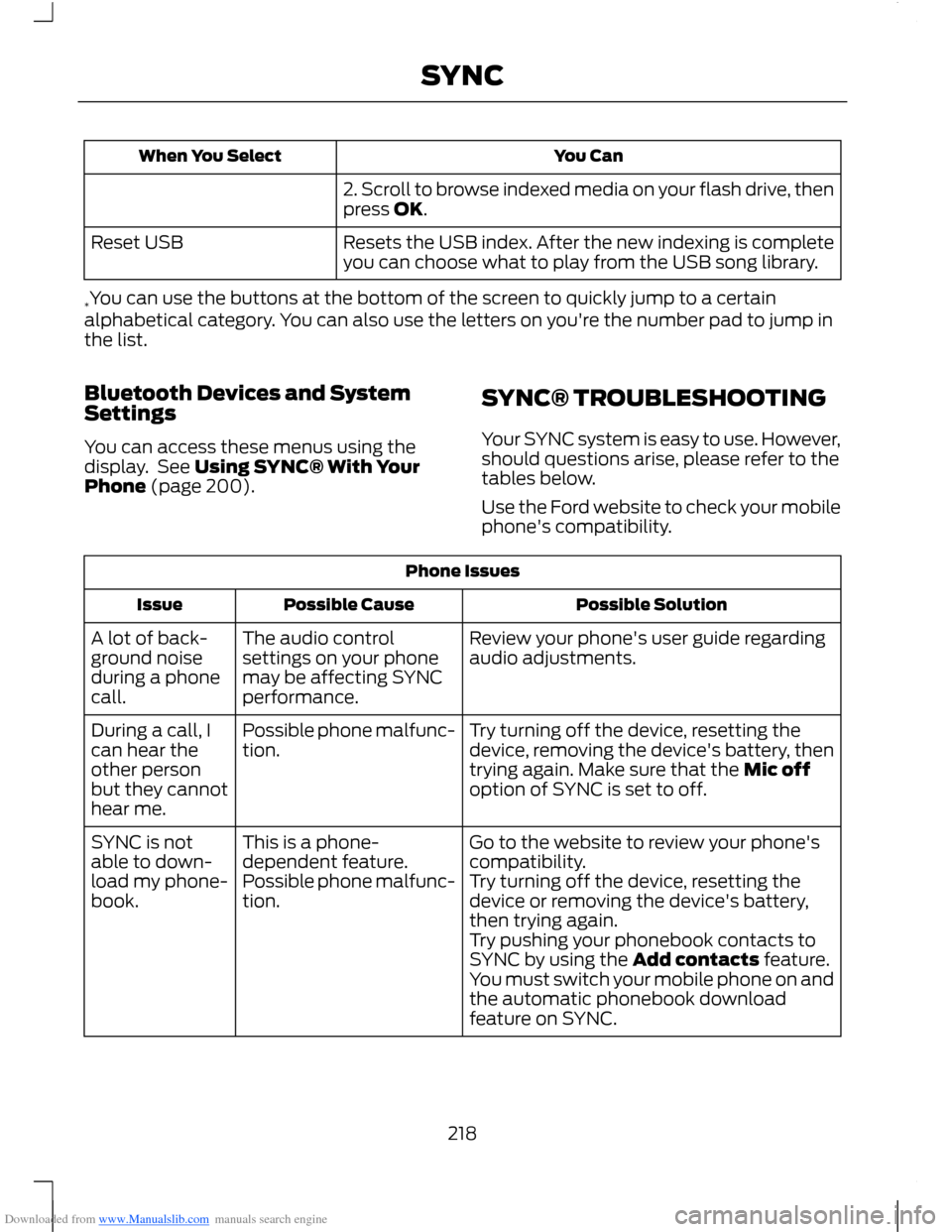
Downloaded from www.Manualslib.com manuals search engine You CanWhen You Select
2. Scroll to browse indexed media on your flash drive, thenpress OK.
Resets the USB index. After the new indexing is completeyou can choose what to play from the USB song library.Reset USB
*You can use the buttons at the bottom of the screen to quickly jump to a certainalphabetical category. You can also use the letters on you're the number pad to jump inthe list.
Bluetooth Devices and SystemSettings
You can access these menus using thedisplay. See Using SYNC® With YourPhone (page 200).
SYNC® TROUBLESHOOTING
Your SYNC system is easy to use. However,should questions arise, please refer to thetables below.
Use the Ford website to check your mobilephone's compatibility.
Phone Issues
Possible SolutionPossible CauseIssue
Review your phone's user guide regardingaudio adjustments.The audio controlsettings on your phonemay be affecting SYNCperformance.
A lot of back-ground noiseduring a phonecall.
Try turning off the device, resetting thedevice, removing the device's battery, thentrying again. Make sure that the Mic offoption of SYNC is set to off.
Possible phone malfunc-tion.During a call, Ican hear theother personbut they cannothear me.
Go to the website to review your phone'scompatibility.This is a phone-dependent feature.SYNC is notable to down-load my phone-book.Try turning off the device, resetting thedevice or removing the device's battery,then trying again.
Possible phone malfunc-tion.
Try pushing your phonebook contacts toSYNC by using the Add contacts feature.You must switch your mobile phone on andthe automatic phonebook downloadfeature on SYNC.
218SYNC
Page 222 of 256
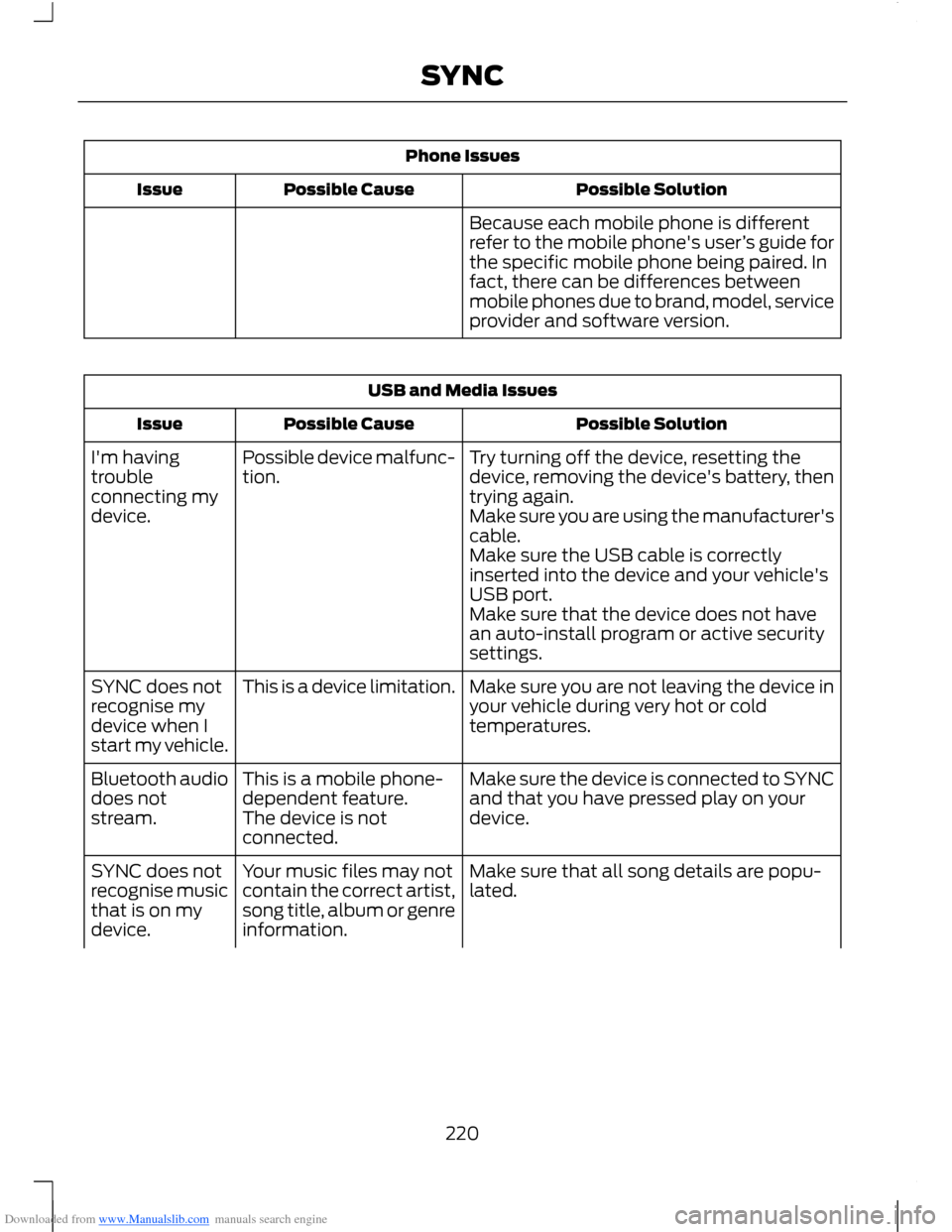
Downloaded from www.Manualslib.com manuals search engine Phone Issues
Possible SolutionPossible CauseIssue
Because each mobile phone is differentrefer to the mobile phone's user’s guide forthe specific mobile phone being paired. Infact, there can be differences betweenmobile phones due to brand, model, serviceprovider and software version.
USB and Media Issues
Possible SolutionPossible CauseIssue
Try turning off the device, resetting thedevice, removing the device's battery, thentrying again.
Possible device malfunc-tion.I'm havingtroubleconnecting mydevice.Make sure you are using the manufacturer'scable.Make sure the USB cable is correctlyinserted into the device and your vehicle'sUSB port.Make sure that the device does not havean auto-install program or active securitysettings.
Make sure you are not leaving the device inyour vehicle during very hot or coldtemperatures.
This is a device limitation.SYNC does notrecognise mydevice when Istart my vehicle.
Make sure the device is connected to SYNCand that you have pressed play on yourdevice.
This is a mobile phone-dependent feature.The device is notconnected.
Bluetooth audiodoes notstream.
Make sure that all song details are popu-lated.Your music files may notcontain the correct artist,song title, album or genreinformation.
SYNC does notrecognise musicthat is on mydevice.
220SYNC
Page 223 of 256
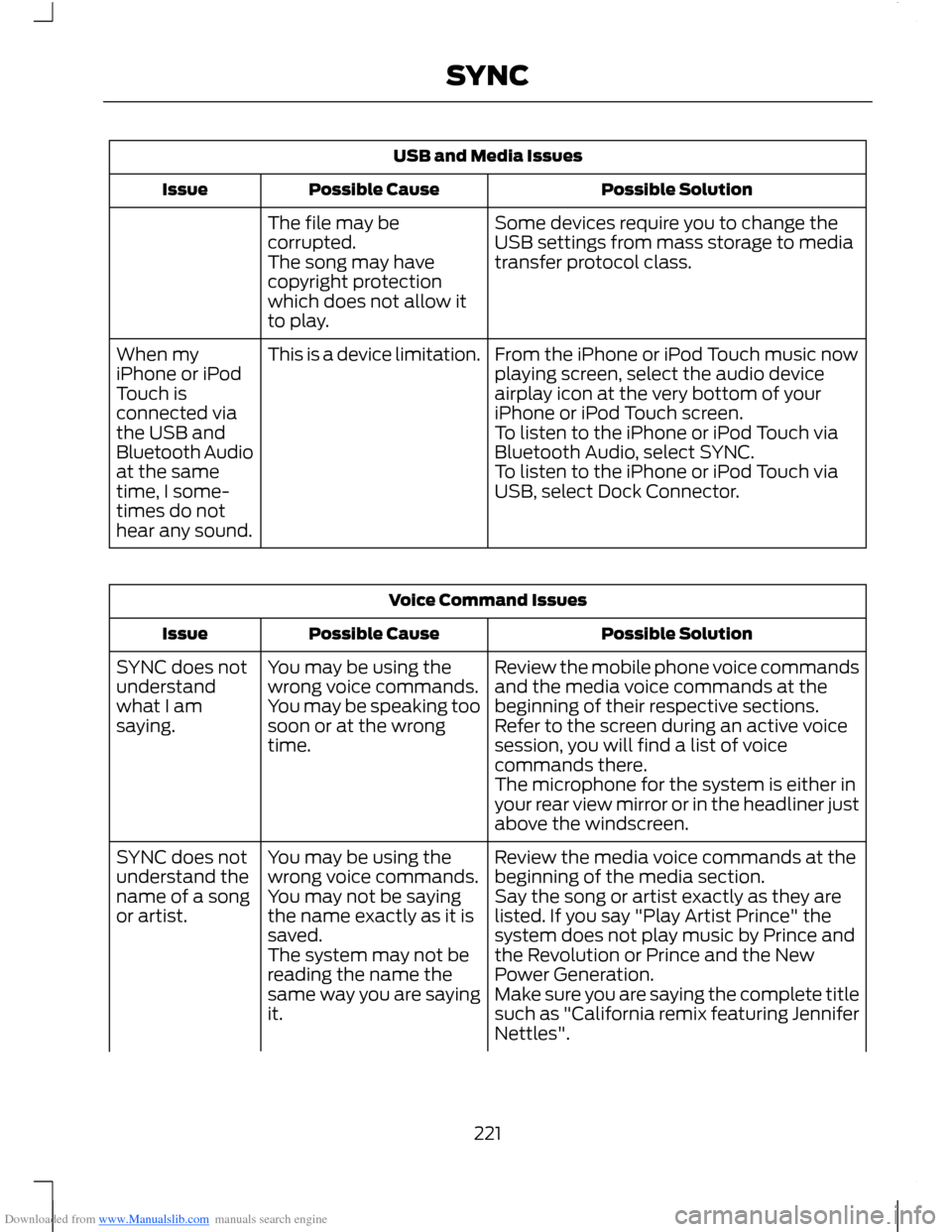
Downloaded from www.Manualslib.com manuals search engine USB and Media Issues
Possible SolutionPossible CauseIssue
Some devices require you to change theUSB settings from mass storage to mediatransfer protocol class.
The file may becorrupted.The song may havecopyright protectionwhich does not allow itto play.
From the iPhone or iPod Touch music nowplaying screen, select the audio deviceairplay icon at the very bottom of youriPhone or iPod Touch screen.
This is a device limitation.When myiPhone or iPodTouch isconnected viathe USB andBluetooth Audioat the sametime, I some-times do nothear any sound.
To listen to the iPhone or iPod Touch viaBluetooth Audio, select SYNC.To listen to the iPhone or iPod Touch viaUSB, select Dock Connector.
Voice Command Issues
Possible SolutionPossible CauseIssue
Review the mobile phone voice commandsand the media voice commands at thebeginning of their respective sections.
You may be using thewrong voice commands.You may be speaking toosoon or at the wrongtime.
SYNC does notunderstandwhat I amsaying.Refer to the screen during an active voicesession, you will find a list of voicecommands there.The microphone for the system is either inyour rear view mirror or in the headliner justabove the windscreen.
Review the media voice commands at thebeginning of the media section.You may be using thewrong voice commands.SYNC does notunderstand thename of a songor artist.Say the song or artist exactly as they arelisted. If you say "Play Artist Prince" thesystem does not play music by Prince andthe Revolution or Prince and the NewPower Generation.
You may not be sayingthe name exactly as it issaved.The system may not bereading the name thesame way you are sayingit.Make sure you are saying the complete titlesuch as "California remix featuring JenniferNettles".
221SYNC
Page 226 of 256
Downloaded from www.Manualslib.com manuals search engine General
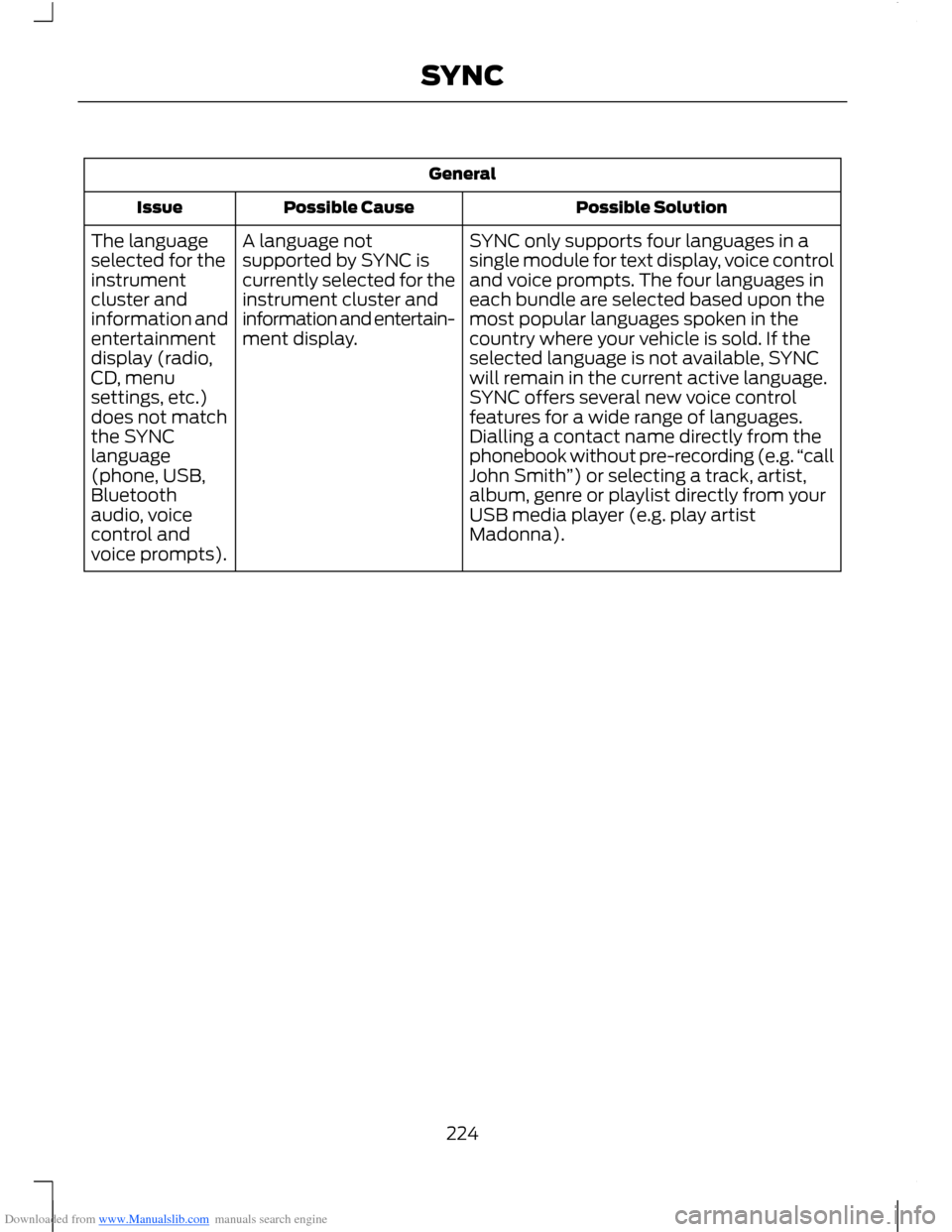
Possible SolutionPossible CauseIssue
SYNC only supports four languages in asingle module for text display, voice controland voice prompts. The four languages ineach bundle are selected based upon themost popular languages spoken in thecountry where your vehicle is sold. If theselected language is not available, SYNCwill remain in the current active language.
A language notsupported by SYNC iscurrently selected for theinstrument cluster andinformation and entertain-ment display.
The languageselected for theinstrumentcluster andinformation andentertainmentdisplay (radio,CD, menuSYNC offers several new voice controlfeatures for a wide range of languages.Dialling a contact name directly from thephonebook without pre-recording (e.g.“callJohn Smith”) or selecting a track, artist,album, genre or playlist directly from yourUSB media player (e.g. play artistMadonna).
settings, etc.)does not matchthe SYNClanguage(phone, USB,Bluetoothaudio, voicecontrol andvoice prompts).
224SYNC
Page 232 of 256
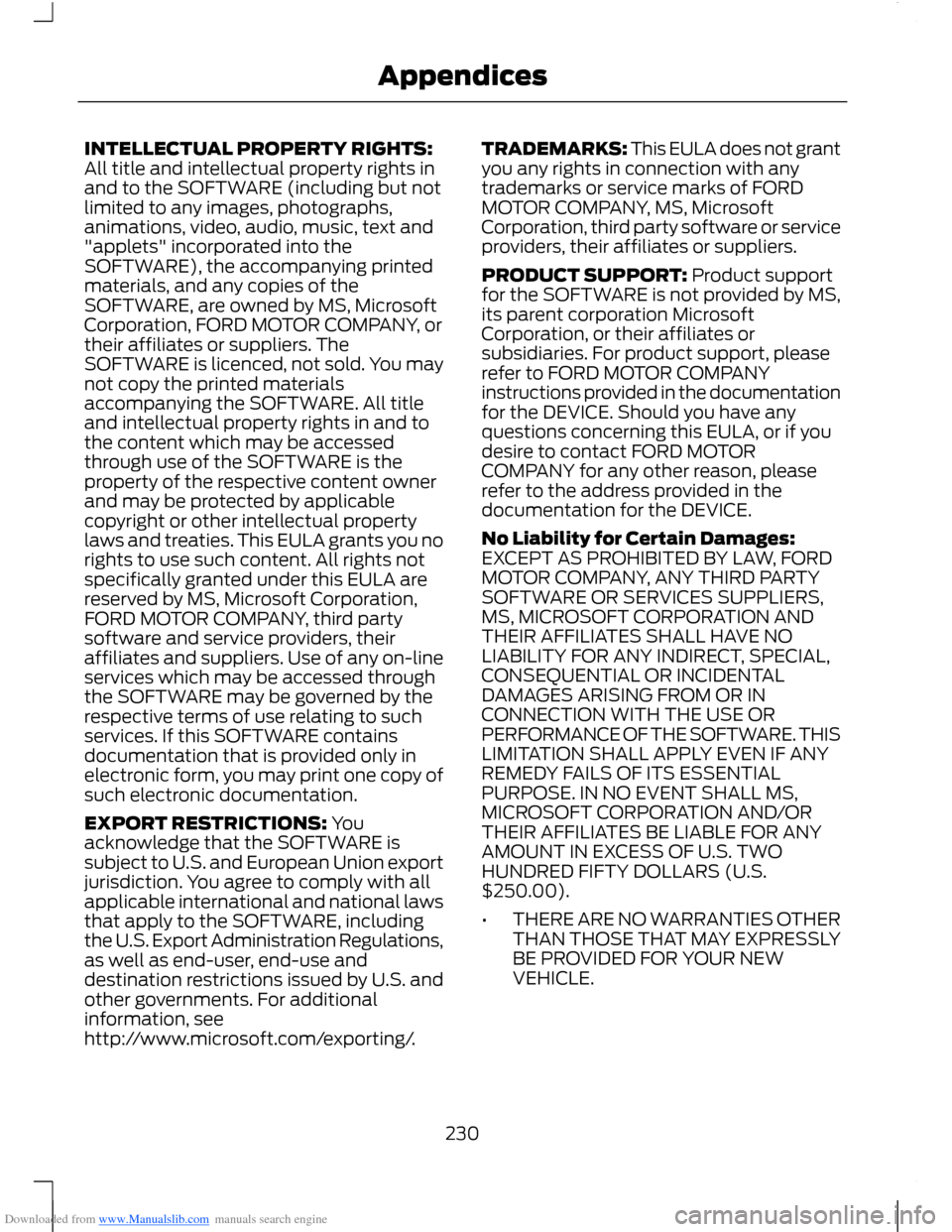
Downloaded from www.Manualslib.com manuals search engine INTELLECTUAL PROPERTY RIGHTS:All title and intellectual property rights inand to the SOFTWARE (including but notlimited to any images, photographs,animations, video, audio, music, text and"applets" incorporated into theSOFTWARE), the accompanying printedmaterials, and any copies of theSOFTWARE, are owned by MS, MicrosoftCorporation, FORD MOTOR COMPANY, ortheir affiliates or suppliers. TheSOFTWARE is licenced, not sold. You maynot copy the printed materialsaccompanying the SOFTWARE. All titleand intellectual property rights in and tothe content which may be accessedthrough use of the SOFTWARE is theproperty of the respective content ownerand may be protected by applicablecopyright or other intellectual propertylaws and treaties. This EULA grants you norights to use such content. All rights notspecifically granted under this EULA arereserved by MS, Microsoft Corporation,FORD MOTOR COMPANY, third partysoftware and service providers, theiraffiliates and suppliers. Use of any on-lineservices which may be accessed throughthe SOFTWARE may be governed by therespective terms of use relating to suchservices. If this SOFTWARE containsdocumentation that is provided only inelectronic form, you may print one copy ofsuch electronic documentation.
EXPORT RESTRICTIONS: Youacknowledge that the SOFTWARE issubject to U.S. and European Union exportjurisdiction. You agree to comply with allapplicable international and national lawsthat apply to the SOFTWARE, includingthe U.S. Export Administration Regulations,as well as end-user, end-use anddestination restrictions issued by U.S. andother governments. For additionalinformation, seehttp://www.microsoft.com/exporting/.
TRADEMARKS: This EULA does not grantyou any rights in connection with anytrademarks or service marks of FORDMOTOR COMPANY, MS, MicrosoftCorporation, third party software or serviceproviders, their affiliates or suppliers.
PRODUCT SUPPORT: Product supportfor the SOFTWARE is not provided by MS,its parent corporation MicrosoftCorporation, or their affiliates orsubsidiaries. For product support, pleaserefer to FORD MOTOR COMPANYinstructions provided in the documentationfor the DEVICE. Should you have anyquestions concerning this EULA, or if youdesire to contact FORD MOTORCOMPANY for any other reason, pleaserefer to the address provided in thedocumentation for the DEVICE.
No Liability for Certain Damages:EXCEPT AS PROHIBITED BY LAW, FORDMOTOR COMPANY, ANY THIRD PARTYSOFTWARE OR SERVICES SUPPLIERS,MS, MICROSOFT CORPORATION ANDTHEIR AFFILIATES SHALL HAVE NOLIABILITY FOR ANY INDIRECT, SPECIAL,CONSEQUENTIAL OR INCIDENTALDAMAGES ARISING FROM OR INCONNECTION WITH THE USE ORPERFORMANCE OF THE SOFTWARE. THISLIMITATION SHALL APPLY EVEN IF ANYREMEDY FAILS OF ITS ESSENTIALPURPOSE. IN NO EVENT SHALL MS,MICROSOFT CORPORATION AND/ORTHEIR AFFILIATES BE LIABLE FOR ANYAMOUNT IN EXCESS OF U.S. TWOHUNDRED FIFTY DOLLARS (U.S.$250.00).
•THERE ARE NO WARRANTIES OTHERTHAN THOSE THAT MAY EXPRESSLYBE PROVIDED FOR YOUR NEWVEHICLE.
230Appendices