phone FORD B MAX 2012 1.G Owner's Guide
[x] Cancel search | Manufacturer: FORD, Model Year: 2012, Model line: B MAX, Model: FORD B MAX 2012 1.GPages: 256, PDF Size: 19.67 MB
Page 222 of 256
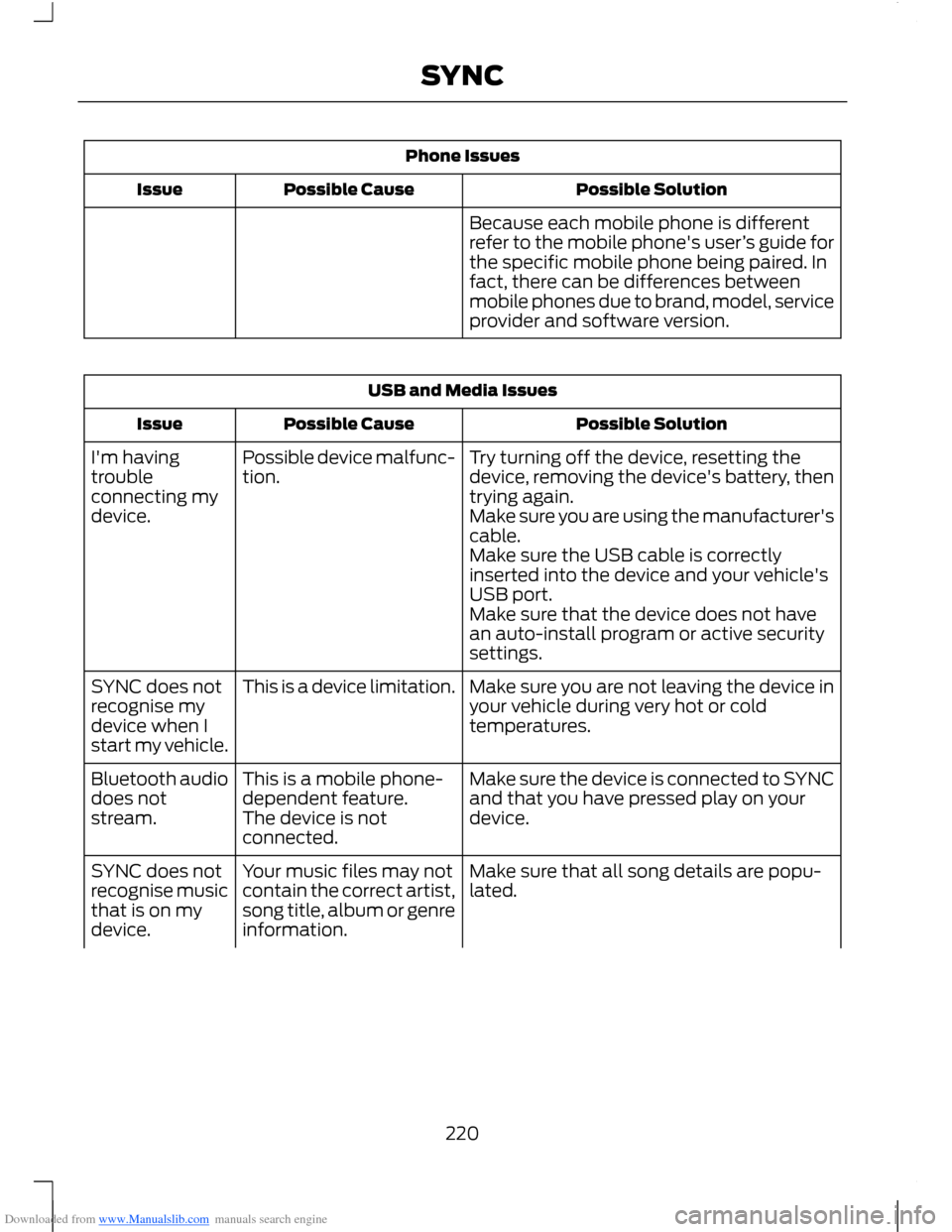
Downloaded from www.Manualslib.com manuals search engine Phone Issues
Possible SolutionPossible CauseIssue
Because each mobile phone is differentrefer to the mobile phone's user’s guide forthe specific mobile phone being paired. Infact, there can be differences betweenmobile phones due to brand, model, serviceprovider and software version.
USB and Media Issues
Possible SolutionPossible CauseIssue
Try turning off the device, resetting thedevice, removing the device's battery, thentrying again.
Possible device malfunc-tion.I'm havingtroubleconnecting mydevice.Make sure you are using the manufacturer'scable.Make sure the USB cable is correctlyinserted into the device and your vehicle'sUSB port.Make sure that the device does not havean auto-install program or active securitysettings.
Make sure you are not leaving the device inyour vehicle during very hot or coldtemperatures.
This is a device limitation.SYNC does notrecognise mydevice when Istart my vehicle.
Make sure the device is connected to SYNCand that you have pressed play on yourdevice.
This is a mobile phone-dependent feature.The device is notconnected.
Bluetooth audiodoes notstream.
Make sure that all song details are popu-lated.Your music files may notcontain the correct artist,song title, album or genreinformation.
SYNC does notrecognise musicthat is on mydevice.
220SYNC
Page 223 of 256
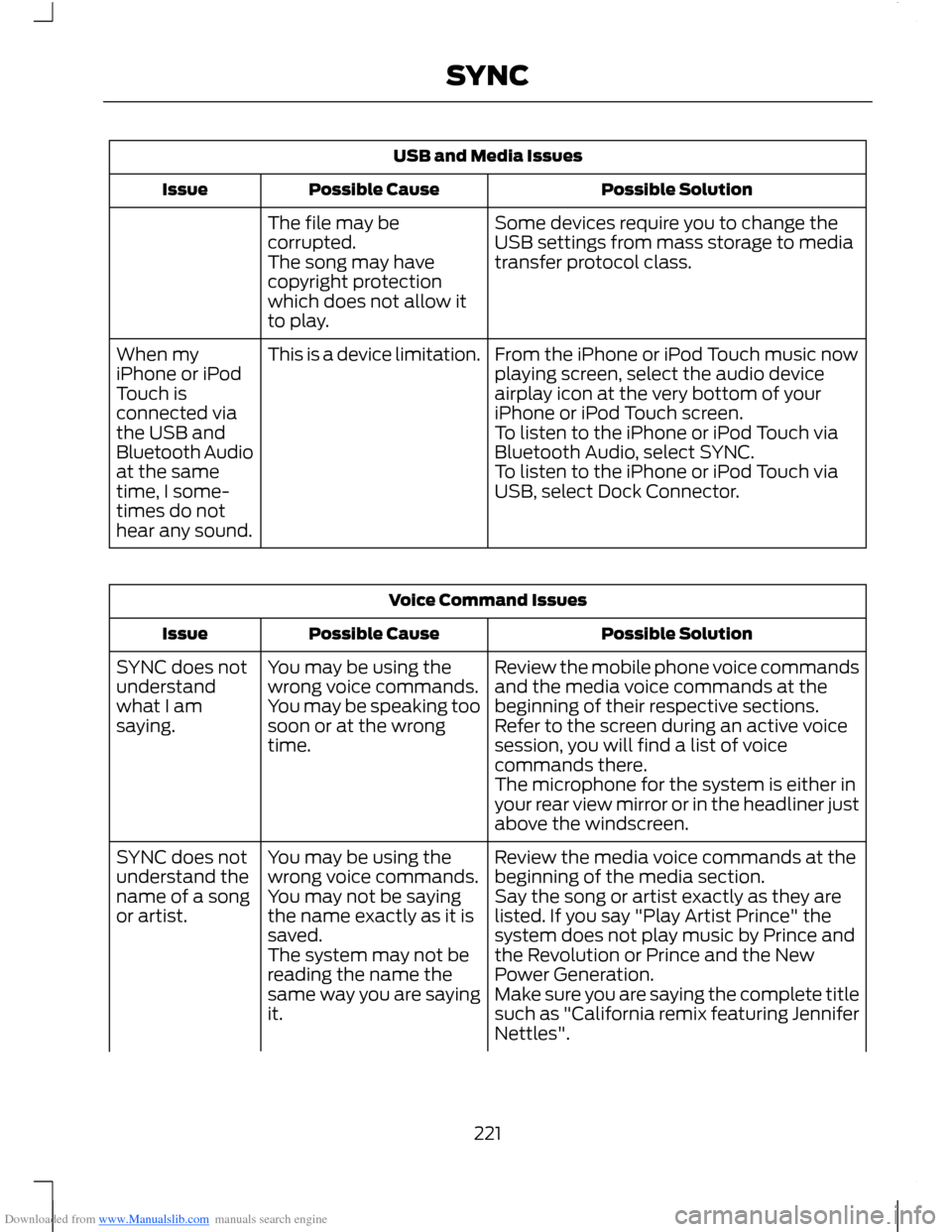
Downloaded from www.Manualslib.com manuals search engine USB and Media Issues
Possible SolutionPossible CauseIssue
Some devices require you to change theUSB settings from mass storage to mediatransfer protocol class.
The file may becorrupted.The song may havecopyright protectionwhich does not allow itto play.
From the iPhone or iPod Touch music nowplaying screen, select the audio deviceairplay icon at the very bottom of youriPhone or iPod Touch screen.
This is a device limitation.When myiPhone or iPodTouch isconnected viathe USB andBluetooth Audioat the sametime, I some-times do nothear any sound.
To listen to the iPhone or iPod Touch viaBluetooth Audio, select SYNC.To listen to the iPhone or iPod Touch viaUSB, select Dock Connector.
Voice Command Issues
Possible SolutionPossible CauseIssue
Review the mobile phone voice commandsand the media voice commands at thebeginning of their respective sections.
You may be using thewrong voice commands.You may be speaking toosoon or at the wrongtime.
SYNC does notunderstandwhat I amsaying.Refer to the screen during an active voicesession, you will find a list of voicecommands there.The microphone for the system is either inyour rear view mirror or in the headliner justabove the windscreen.
Review the media voice commands at thebeginning of the media section.You may be using thewrong voice commands.SYNC does notunderstand thename of a songor artist.Say the song or artist exactly as they arelisted. If you say "Play Artist Prince" thesystem does not play music by Prince andthe Revolution or Prince and the NewPower Generation.
You may not be sayingthe name exactly as it issaved.The system may not bereading the name thesame way you are sayingit.Make sure you are saying the complete titlesuch as "California remix featuring JenniferNettles".
221SYNC
Page 224 of 256
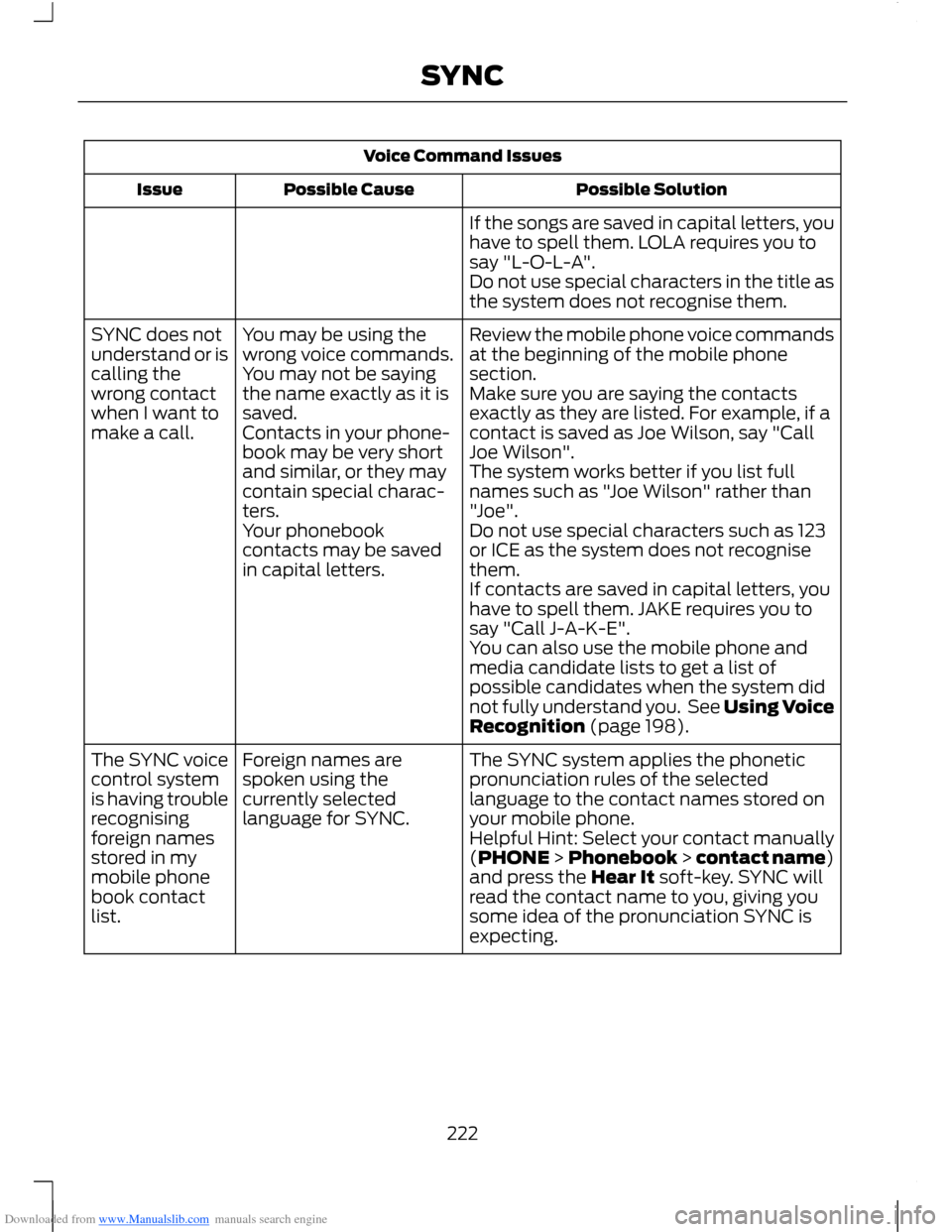
Downloaded from www.Manualslib.com manuals search engine Voice Command Issues
Possible SolutionPossible CauseIssue
If the songs are saved in capital letters, youhave to spell them. LOLA requires you tosay "L-O-L-A".Do not use special characters in the title asthe system does not recognise them.
Review the mobile phone voice commandsat the beginning of the mobile phonesection.
You may be using thewrong voice commands.You may not be sayingthe name exactly as it issaved.
SYNC does notunderstand or iscalling thewrong contactwhen I want tomake a call.
Make sure you are saying the contactsexactly as they are listed. For example, if acontact is saved as Joe Wilson, say "CallJoe Wilson".Contacts in your phone-book may be very shortand similar, or they maycontain special charac-ters.
The system works better if you list fullnames such as "Joe Wilson" rather than"Joe".Your phonebookcontacts may be savedin capital letters.
Do not use special characters such as 123or ICE as the system does not recognisethem.If contacts are saved in capital letters, youhave to spell them. JAKE requires you tosay "Call J-A-K-E".You can also use the mobile phone andmedia candidate lists to get a list ofpossible candidates when the system didnot fully understand you. See Using VoiceRecognition (page 198).
The SYNC system applies the phoneticpronunciation rules of the selectedlanguage to the contact names stored onyour mobile phone.
Foreign names arespoken using thecurrently selectedlanguage for SYNC.
The SYNC voicecontrol systemis having troublerecognisingforeign namesstored in mymobile phonebook contactlist.
Helpful Hint: Select your contact manually(PHONE > Phonebook > contact name)and press the Hear It soft-key. SYNC willread the contact name to you, giving yousome idea of the pronunciation SYNC isexpecting.
222SYNC
Page 225 of 256
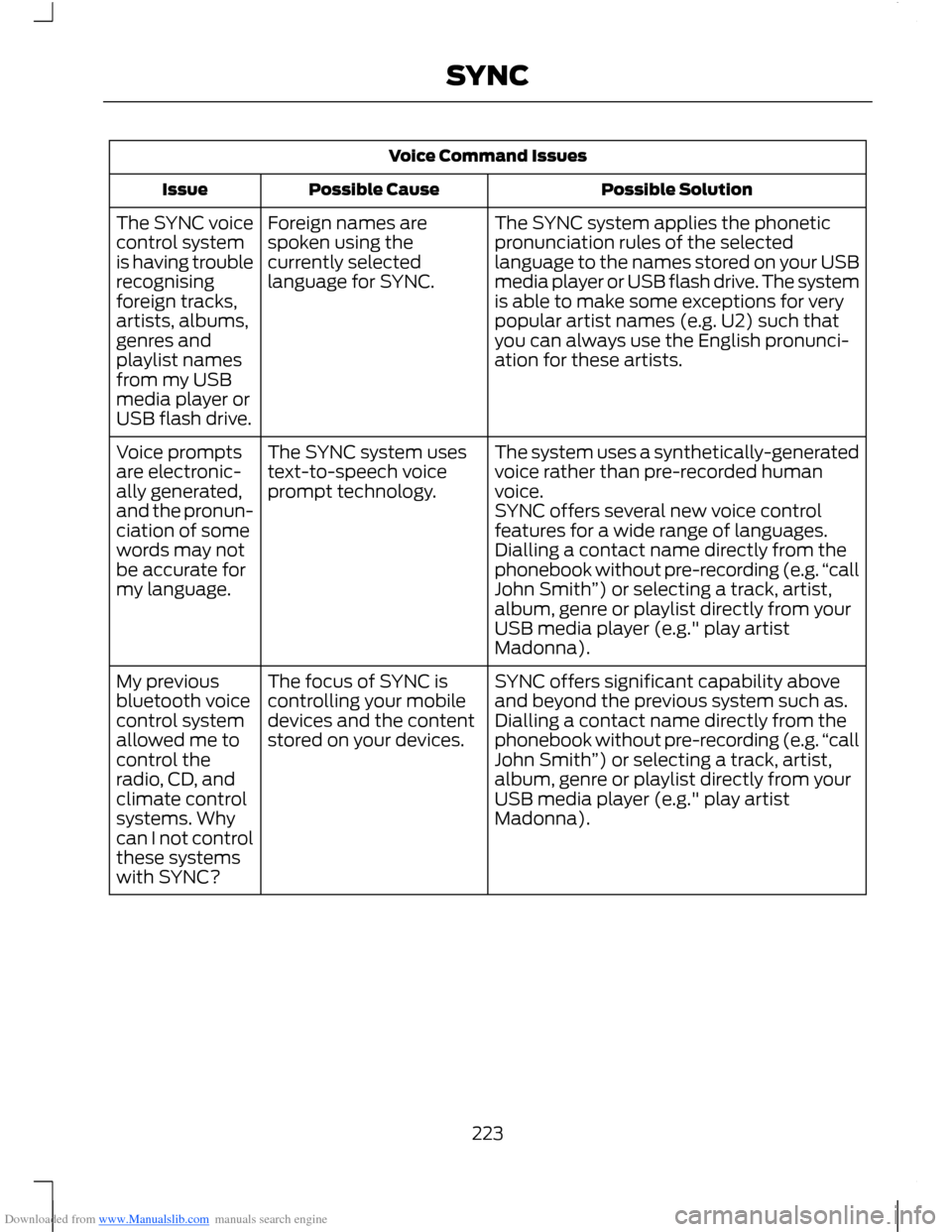
Downloaded from www.Manualslib.com manuals search engine Voice Command Issues
Possible SolutionPossible CauseIssue
The SYNC system applies the phoneticpronunciation rules of the selectedlanguage to the names stored on your USBmedia player or USB flash drive. The systemis able to make some exceptions for verypopular artist names (e.g. U2) such thatyou can always use the English pronunci-ation for these artists.
Foreign names arespoken using thecurrently selectedlanguage for SYNC.
The SYNC voicecontrol systemis having troublerecognisingforeign tracks,artists, albums,genres andplaylist namesfrom my USBmedia player orUSB flash drive.
The system uses a synthetically-generatedvoice rather than pre-recorded humanvoice.
The SYNC system usestext-to-speech voiceprompt technology.
Voice promptsare electronic-ally generated,and the pronun-ciation of somewords may notbe accurate formy language.
SYNC offers several new voice controlfeatures for a wide range of languages.Dialling a contact name directly from thephonebook without pre-recording (e.g.“callJohn Smith”) or selecting a track, artist,album, genre or playlist directly from yourUSB media player (e.g." play artistMadonna).
SYNC offers significant capability aboveand beyond the previous system such as.The focus of SYNC iscontrolling your mobiledevices and the contentstored on your devices.
My previousbluetooth voicecontrol systemallowed me tocontrol theradio, CD, andclimate controlsystems. Whycan I not controlthese systemswith SYNC?
Dialling a contact name directly from thephonebook without pre-recording (e.g.“callJohn Smith”) or selecting a track, artist,album, genre or playlist directly from yourUSB media player (e.g." play artistMadonna).
223SYNC
Page 226 of 256
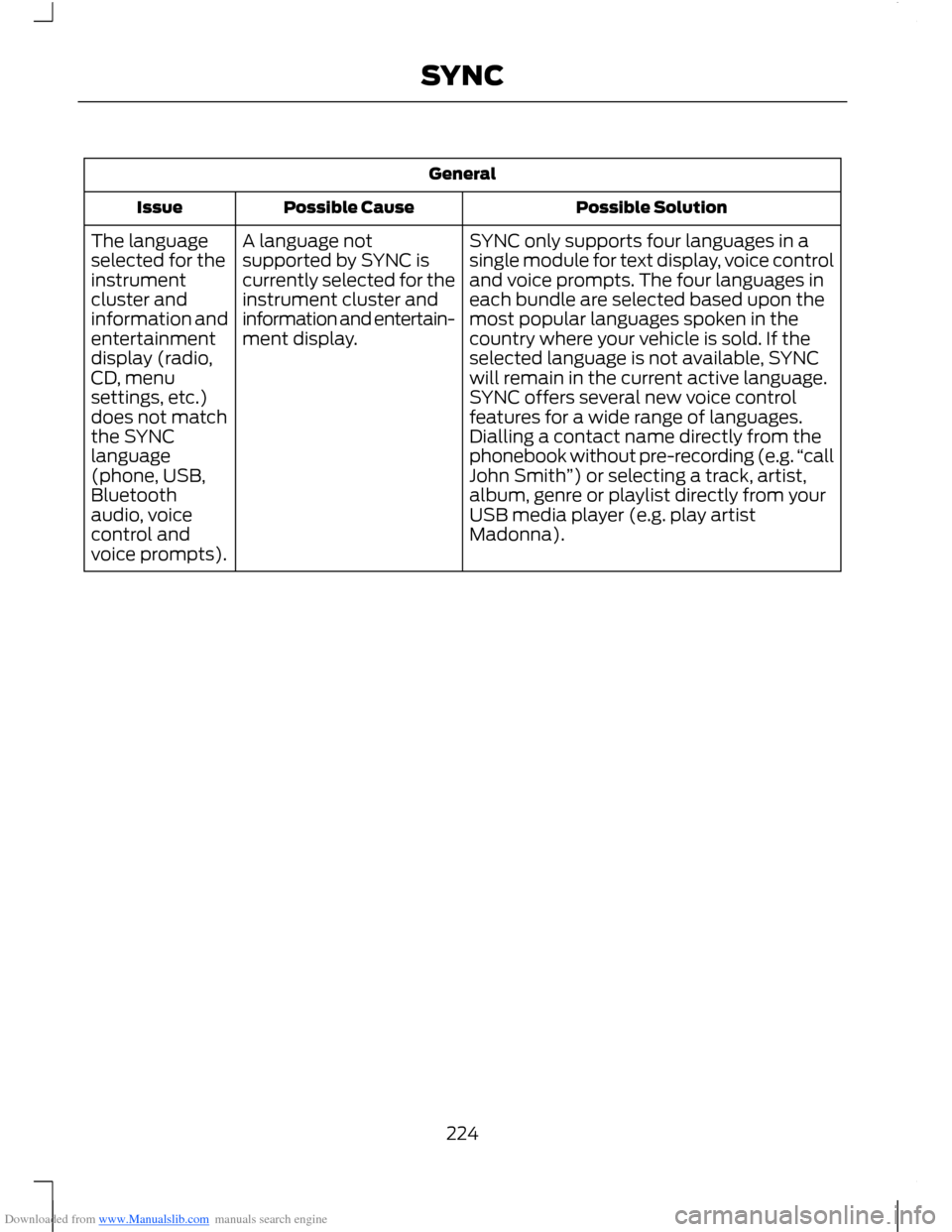
Downloaded from www.Manualslib.com manuals search engine General
Possible SolutionPossible CauseIssue
SYNC only supports four languages in asingle module for text display, voice controland voice prompts. The four languages ineach bundle are selected based upon themost popular languages spoken in thecountry where your vehicle is sold. If theselected language is not available, SYNCwill remain in the current active language.
A language notsupported by SYNC iscurrently selected for theinstrument cluster andinformation and entertain-ment display.
The languageselected for theinstrumentcluster andinformation andentertainmentdisplay (radio,CD, menuSYNC offers several new voice controlfeatures for a wide range of languages.Dialling a contact name directly from thephonebook without pre-recording (e.g.“callJohn Smith”) or selecting a track, artist,album, genre or playlist directly from yourUSB media player (e.g. play artistMadonna).
settings, etc.)does not matchthe SYNClanguage(phone, USB,Bluetoothaudio, voicecontrol andvoice prompts).
224SYNC
Page 227 of 256
Downloaded from www.Manualslib.com manuals search engine ELECTROMAGNETIC
COMPATIBILITY
WARNINGS
Your vehicle has been tested andcertified to legislations relating toelectromagnetic compatibility(72/245/EEC, UN ECE Regulation 10 orother applicable local requirements). It isyour responsibility to make sure that anyequipment you have fitted complies withapplicable local legislations. Have anyequipment fitted by an authorised dealer.
WARNINGS
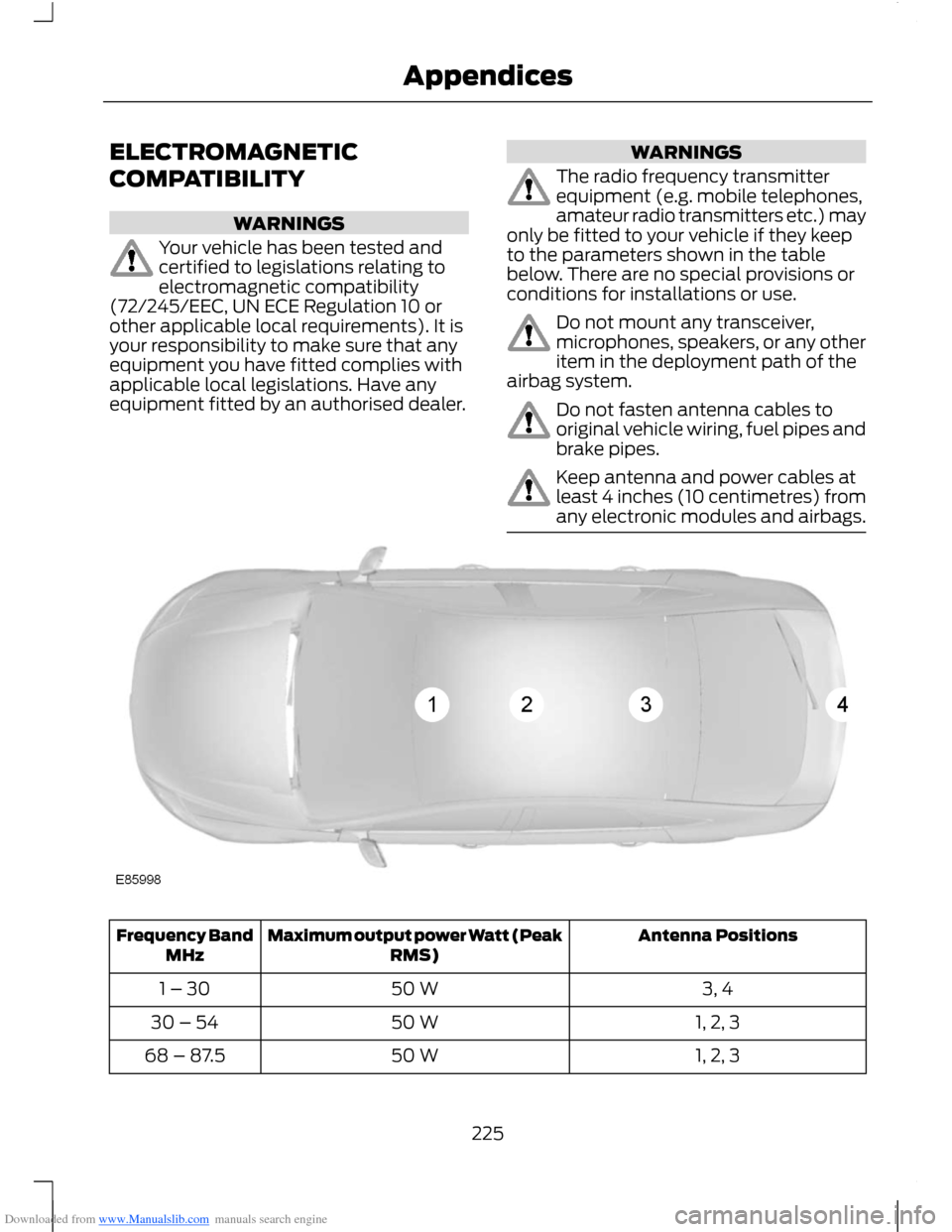
The radio frequency transmitterequipment (e.g. mobile telephones,amateur radio transmitters etc.) mayonly be fitted to your vehicle if they keepto the parameters shown in the tablebelow. There are no special provisions orconditions for installations or use.
Do not mount any transceiver,microphones, speakers, or any otheritem in the deployment path of theairbag system.
Do not fasten antenna cables tooriginal vehicle wiring, fuel pipes andbrake pipes.
Keep antenna and power cables atleast 4 inches (10 centimetres) fromany electronic modules and airbags.
Antenna PositionsMaximum output power Watt (PeakRMS)Frequency BandMHz
3, 450 W1 – 30
1, 2, 350 W30 – 54
1, 2, 350 W68 – 87.5
225Appendices
Page 240 of 256
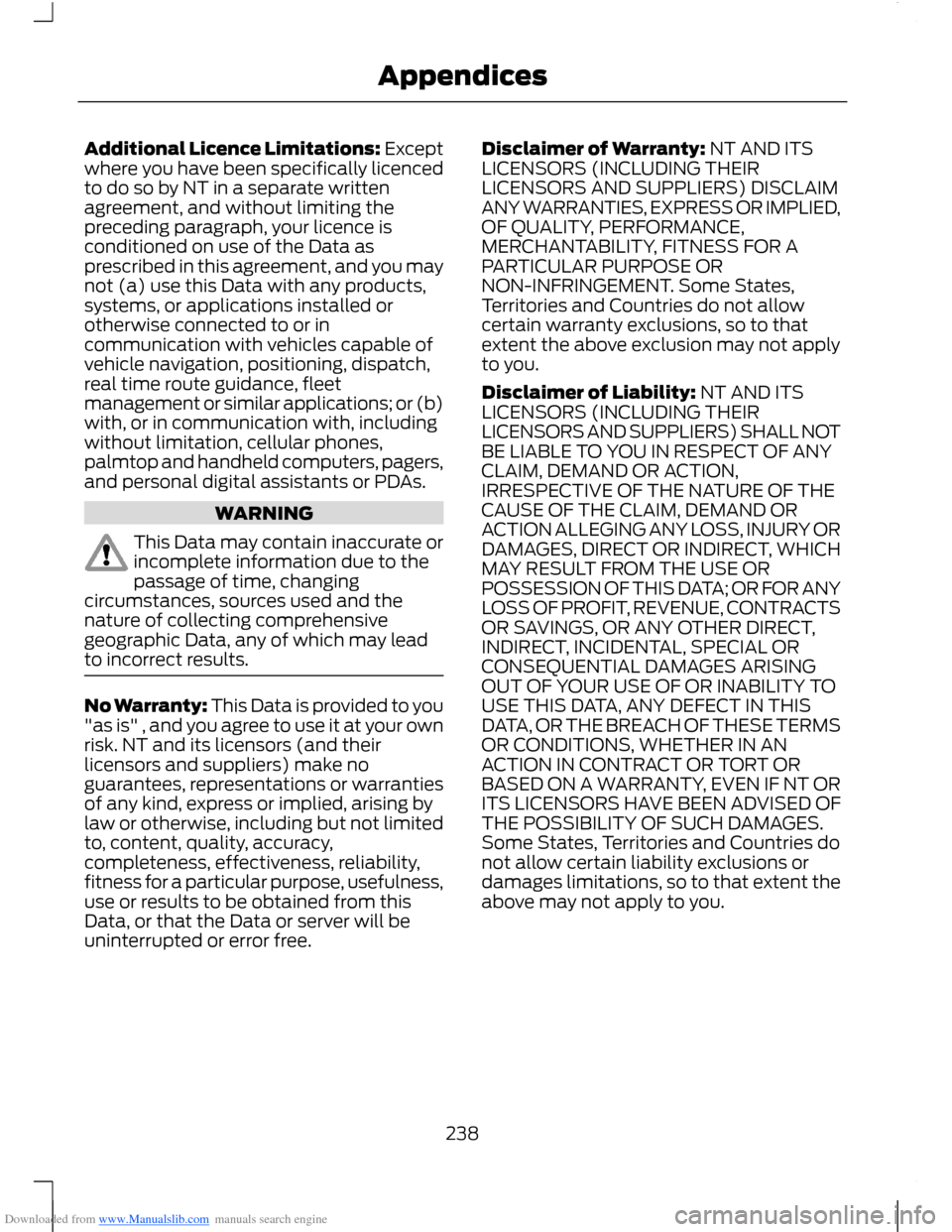
Downloaded from www.Manualslib.com manuals search engine Additional Licence Limitations: Exceptwhere you have been specifically licencedto do so by NT in a separate writtenagreement, and without limiting thepreceding paragraph, your licence isconditioned on use of the Data asprescribed in this agreement, and you maynot (a) use this Data with any products,systems, or applications installed orotherwise connected to or incommunication with vehicles capable ofvehicle navigation, positioning, dispatch,real time route guidance, fleetmanagement or similar applications; or (b)with, or in communication with, includingwithout limitation, cellular phones,palmtop and handheld computers, pagers,and personal digital assistants or PDAs.
WARNING
This Data may contain inaccurate orincomplete information due to thepassage of time, changingcircumstances, sources used and thenature of collecting comprehensivegeographic Data, any of which may leadto incorrect results.
No Warranty: This Data is provided to you"as is" , and you agree to use it at your ownrisk. NT and its licensors (and theirlicensors and suppliers) make noguarantees, representations or warrantiesof any kind, express or implied, arising bylaw or otherwise, including but not limitedto, content, quality, accuracy,completeness, effectiveness, reliability,fitness for a particular purpose, usefulness,use or results to be obtained from thisData, or that the Data or server will beuninterrupted or error free.
Disclaimer of Warranty: NT AND ITSLICENSORS (INCLUDING THEIRLICENSORS AND SUPPLIERS) DISCLAIMANY WARRANTIES, EXPRESS OR IMPLIED,OF QUALITY, PERFORMANCE,MERCHANTABILITY, FITNESS FOR APARTICULAR PURPOSE ORNON-INFRINGEMENT. Some States,Territories and Countries do not allowcertain warranty exclusions, so to thatextent the above exclusion may not applyto you.
Disclaimer of Liability: NT AND ITSLICENSORS (INCLUDING THEIRLICENSORS AND SUPPLIERS) SHALL NOTBE LIABLE TO YOU IN RESPECT OF ANYCLAIM, DEMAND OR ACTION,IRRESPECTIVE OF THE NATURE OF THECAUSE OF THE CLAIM, DEMAND ORACTION ALLEGING ANY LOSS, INJURY ORDAMAGES, DIRECT OR INDIRECT, WHICHMAY RESULT FROM THE USE ORPOSSESSION OF THIS DATA; OR FOR ANYLOSS OF PROFIT, REVENUE, CONTRACTSOR SAVINGS, OR ANY OTHER DIRECT,INDIRECT, INCIDENTAL, SPECIAL ORCONSEQUENTIAL DAMAGES ARISINGOUT OF YOUR USE OF OR INABILITY TOUSE THIS DATA, ANY DEFECT IN THISDATA, OR THE BREACH OF THESE TERMSOR CONDITIONS, WHETHER IN ANACTION IN CONTRACT OR TORT ORBASED ON A WARRANTY, EVEN IF NT ORITS LICENSORS HAVE BEEN ADVISED OFTHE POSSIBILITY OF SUCH DAMAGES.Some States, Territories and Countries donot allow certain liability exclusions ordamages limitations, so to that extent theabove may not apply to you.
238Appendices
Page 252 of 256
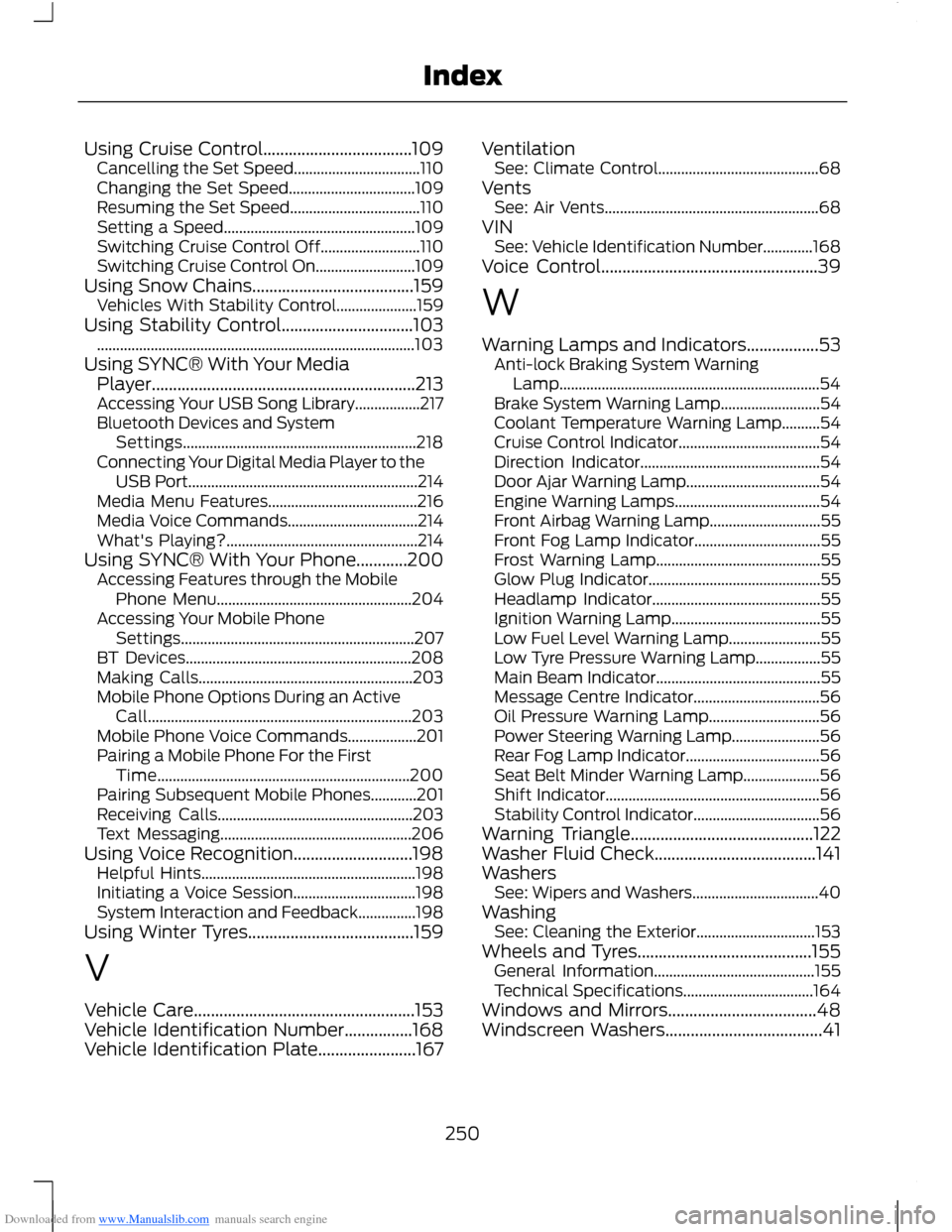
Downloaded from www.Manualslib.com manuals search engine Using Cruise Control...................................109Cancelling the Set Speed.................................110Changing the Set Speed.................................109Resuming the Set Speed..................................110Setting a Speed..................................................109Switching Cruise Control Off..........................110Switching Cruise Control On..........................109Using Snow Chains......................................159Vehicles With Stability Control.....................159Using Stability Control...............................103...................................................................................103Using SYNC® With Your MediaPlayer..............................................................213Accessing Your USB Song Library.................217Bluetooth Devices and SystemSettings.............................................................218Connecting Your Digital Media Player to theUSB Port............................................................214Media Menu Features.......................................216Media Voice Commands..................................214What's Playing?..................................................214Using SYNC® With Your Phone............200Accessing Features through the MobilePhone Menu...................................................204Accessing Your Mobile PhoneSettings.............................................................207BT Devices...........................................................208Making Calls........................................................203Mobile Phone Options During an ActiveCall.....................................................................203Mobile Phone Voice Commands..................201Pairing a Mobile Phone For the FirstTime..................................................................200Pairing Subsequent Mobile Phones............201Receiving Calls...................................................203Text Messaging..................................................206Using Voice Recognition............................198Helpful Hints........................................................198Initiating a Voice Session................................198System Interaction and Feedback...............198Using Winter Tyres.......................................159
V
Vehicle Care....................................................153Vehicle Identification Number................168Vehicle Identification Plate.......................167
VentilationSee: Climate Control..........................................68VentsSee: Air Vents........................................................68VINSee: Vehicle Identification Number.............168Voice Control...................................................39
W
Warning Lamps and Indicators.................53Anti-lock Braking System WarningLamp....................................................................54Brake System Warning Lamp..........................54Coolant Temperature Warning Lamp..........54Cruise Control Indicator.....................................54Direction Indicator...............................................54Door Ajar Warning Lamp...................................54Engine Warning Lamps......................................54Front Airbag Warning Lamp.............................55Front Fog Lamp Indicator.................................55Frost Warning Lamp...........................................55Glow Plug Indicator.............................................55Headlamp Indicator............................................55Ignition Warning Lamp.......................................55Low Fuel Level Warning Lamp........................55Low Tyre Pressure Warning Lamp.................55Main Beam Indicator...........................................55Message Centre Indicator.................................56Oil Pressure Warning Lamp.............................56Power Steering Warning Lamp.......................56Rear Fog Lamp Indicator...................................56Seat Belt Minder Warning Lamp....................56Shift Indicator........................................................56Stability Control Indicator.................................56Warning Triangle...........................................122Washer Fluid Check......................................141WashersSee: Wipers and Washers.................................40WashingSee: Cleaning the Exterior...............................153Wheels and Tyres.........................................155General Information..........................................155Technical Specifications..................................164Windows and Mirrors...................................48Windscreen Washers.....................................41
250Index