Eco FORD B MAX 2013 1.G Owners Manual
[x] Cancel search | Manufacturer: FORD, Model Year: 2013, Model line: B MAX, Model: FORD B MAX 2013 1.GPages: 298, PDF Size: 20.63 MB
Page 241 of 298
Downloaded from www.Manualslib.com manuals search engine GENERAL INFORMATION
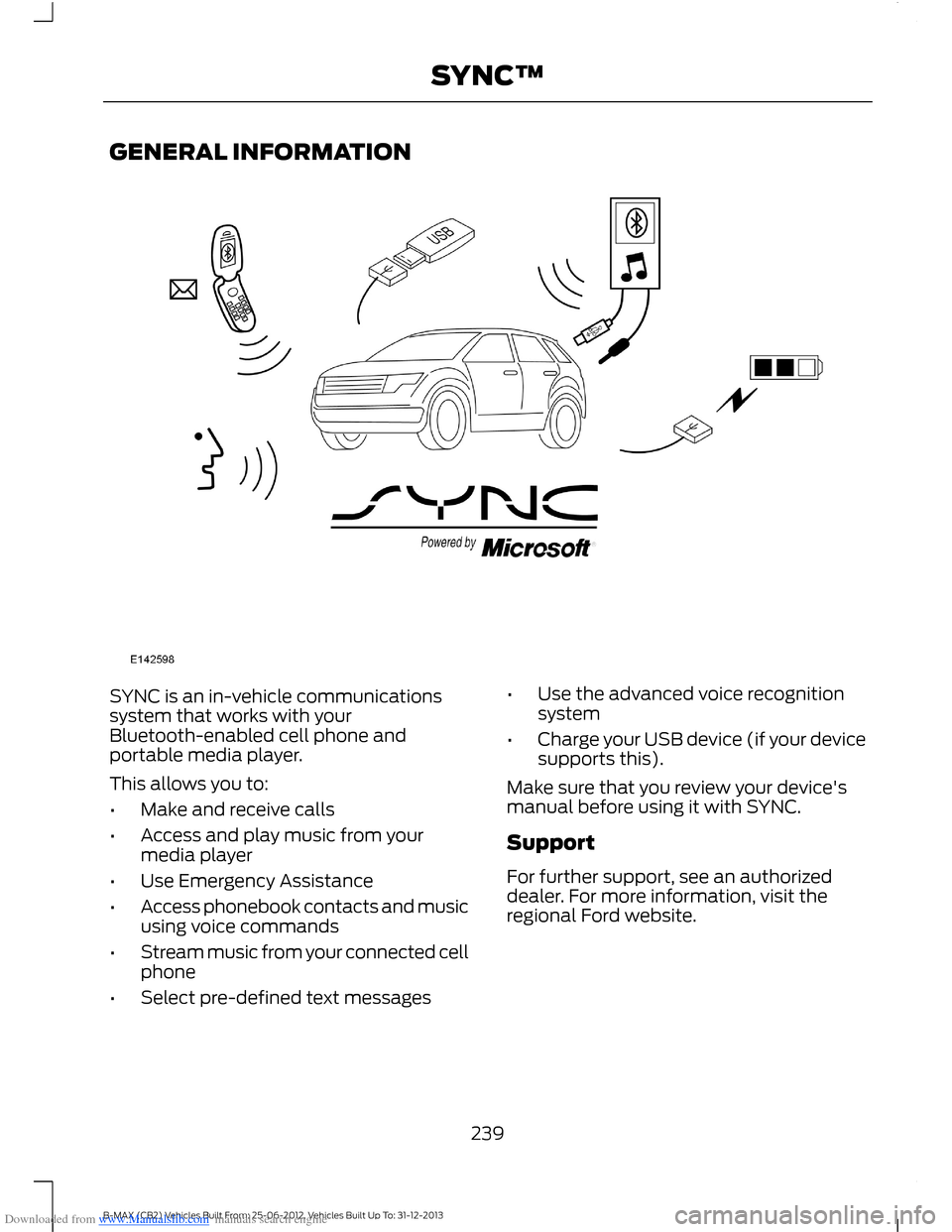
SYNC is an in-vehicle communicationssystem that works with yourBluetooth-enabled cell phone andportable media player.
This allows you to:
•Make and receive calls
•Access and play music from yourmedia player
•Use Emergency Assistance
•Access phonebook contacts and musicusing voice commands
•Stream music from your connected cellphone
•Select pre-defined text messages
•Use the advanced voice recognitionsystem
•Charge your USB device (if your devicesupports this).
Make sure that you review your device'smanual before using it with SYNC.
Support
For further support, see an authorizeddealer. For more information, visit theregional Ford website.
239B-MAX (CB2) Vehicles Built From: 25-06-2012, Vehicles Built Up To: 31-12-2013SYNC™
Page 242 of 298
Downloaded from www.Manualslib.com manuals search engine Safety Information
WARNING
Driving while distracted can result inloss of vehicle control, crash andinjury. We strongly recommend thatyou use extreme caution when using anydevice that may take your focus off theroad. Your primary responsibility is the safeoperation of your vehicle. We recommendagainst the use of any hand-held devicewhile driving and encourage the use ofvoice-operated systems when possible.Make sure you are aware of all applicablelocal laws that may affect the use ofelectronic devices while driving.
When using SYNC:
•Do not operate playing devices if thepower cords or cables are broken, splitor damaged. Carefully place cords andcables where you cannot step on themor they do not interfere with theoperation of pedals, seats,compartments or safe driving abilities.
•Do not leave playing devices in yourvehicle during extreme conditions as itcould cause them damage. Refer toyour device's manual for furtherinformation.
•Do not attempt to service or repair thesystem. See an authorized dealer.
Privacy Information
When a cell phone is connected to SYNC,the system creates a profile that is linkedto that cell phone. The system creates theprofile to offer you more mobile featuresand to operate more efficiently. Amongother things, this profile may contain dataabout your phonebook, text messages(read and unread) and call history. Thiswill include the history of calls when yourcell phone was not connected to thesystem. If you connect a media player, thesystem creates and retains an index of
supported media content. The system alsorecords a short development log ofapproximately 10 minutes of all recentsystem activity. The log profile and othersystem data may be used to improve thesystem and help diagnose any problemsthat may occur.
The cell phone profile, media player indexand development log will remain in thesystem unless deleted. They are generallyaccessible in your vehicle only when youconnect your cell phone or media player.If you no longer plan to use the system oryour vehicle, we recommend you completea master reset to erase all storedinformation. See Information Displays(page 63).
Special equipment is required to accesssystem data. Access to your vehicle'sSYNC module is also required. We will notaccess the system data for any purposeother than as described without consent.Examples where system data can beaccessed are for a court order, whererequired by law enforcement, othergovernment authorities or other thirdparties acting with lawful authority. Otherparties may seek to access the informationindependently of us. Further privacyinformation is available. See SYNC™Applications and Services (page 253).
USING VOICE RECOGNITION
This system helps you control manyfeatures using voice commands. Thisallows you to keep your hands on thesteering wheel and focus on what is aroundyou.
Helpful Hints
Make sure the interior of your vehicle is asquiet as possible. Wind noise from openwindows and road vibrations may preventthe system from correctly recognizingspoken commands.
240B-MAX (CB2) Vehicles Built From: 25-06-2012, Vehicles Built Up To: 31-12-2013SYNC™
Page 243 of 298
Downloaded from www.Manualslib.com manuals search engine Before giving a voice command, wait forthe system announcement to finishfollowed by a single beep. Any commandspoken before this does not register withthe system.
Speak naturally, without long pausesbetween words.
You can interrupt the system at any timewhile it is speaking by pressing the voicebutton. You can also cancel a voice sessionat any time by pressing and holding thevoice button.
Initiating a Voice Session
Press the voice button. A list ofavailable commands appears inthe display.
If you want toSay
Stream audio from your cell phone."Bluetooth Audio"
Cancel the requested action."Cancel"
Access the device connected to the auxiliary input jack."Line in"
Make calls."Phone"
Return to the main menu."SYNC"
Access the device connected to your USB port."USB"
Adjust the level of voice interaction and feedback."Voice settings"
Hear a list of voice commands available in the currentmode."Help"
System Interaction and Feedback
The system provides feedback throughaudible tones, prompts, questions andspoken confirmations depending on thesituation and your chosen level ofinteraction. You can customize the voicerecognition system to provide more or lessinstruction and feedback.
The default setting is to a higher level ofinteraction in order to help you learn to usethe system. You can change these settingsat any time.
Adjusting the Interaction Level
Press the voice button. Say"Voice settings" when prompted,then any of the following:
The systemWhen you say
Provides less audible interaction and moretone prompts."Interaction mode advanced"
Provides more detailed interaction andguidance."Interaction mode standard"
The system defaults to the standard interaction mode.
241B-MAX (CB2) Vehicles Built From: 25-06-2012, Vehicles Built Up To: 31-12-2013SYNC™
Page 244 of 298
Downloaded from www.Manualslib.com manuals search engine Confirmation prompts are short questionsthe system asks when it is not sure of yourrequest or when there is more than onepossible response to your request. Forexample, the system may ask if the
command phone is correct.
Press the voice button to change theconfirmation prompt setting. Say "Voicesettings" when prompted, then any of thefollowing:
The systemWhen you say
Makes a best guess from the command.You may still occasionally be asked toconfirm settings."Confirmation prompts off"
Clarifies your voice command with a shortquestion."Confirmation prompts on"
The system creates suggestion lists whenit has the same confidence level of severaloptions based on your voice commands.When switched on, the system mayprompt you with as many as fourpossibilities for clarification.
For example, say "one" after the tone tocall John Doe at home. Say "two" after thetone to call Johnny Doe on mobile. Say"three" after the tone to call Jane Doe athome.
The same logic applies to media content.For example, say, "one" after the tone toplay John Doe. Say "two" after the tone toplay Johnny Doe. Say "three" after the toneto play Jane Doe.
The systemWhen you say
Makes a best guess from the mediasuggestion list. The system may occasion-ally ask you questions."Media candidate lists off"
Clarifies your voice command for mediasuggestions."Media candidate lists on"
Makes a best guess from the cell phonesuggestion list. The system may occasion-ally ask you questions."Phone candidate lists off"
Clarifies your voice command for cell phonesuggestions."Phone candidate lists on"
Changing the Voice Settings
You can change the voice settings usingthe information and entertainment display.
1.Press the MENU button.
2.Select SYNC-Settings.
3.Select Voice Settings.
242B-MAX (CB2) Vehicles Built From: 25-06-2012, Vehicles Built Up To: 31-12-2013SYNC™
Page 248 of 298
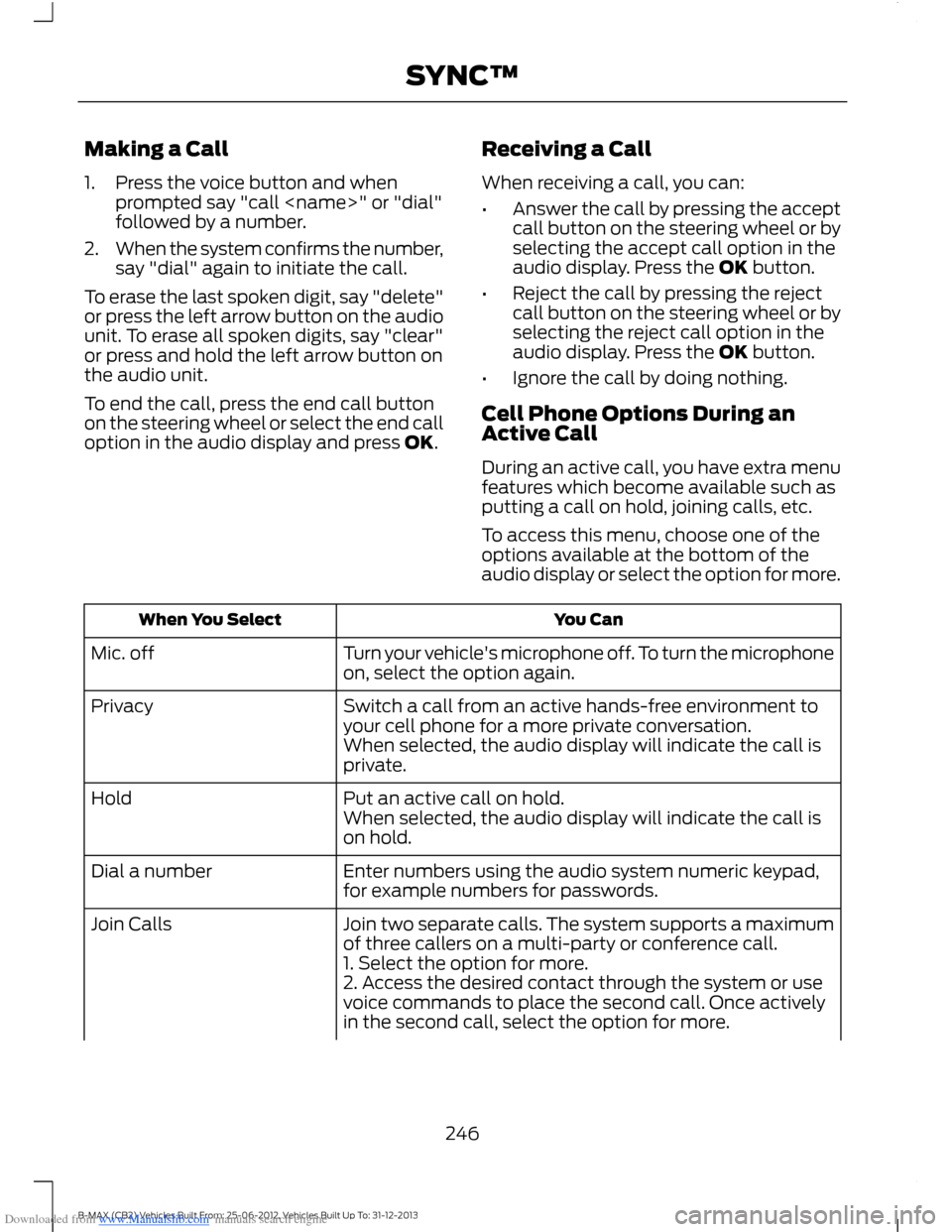
Downloaded from www.Manualslib.com manuals search engine Making a Call
1.Press the voice button and whenprompted say "call
2.When the system confirms the number,say "dial" again to initiate the call.
To erase the last spoken digit, say "delete"or press the left arrow button on the audiounit. To erase all spoken digits, say "clear"or press and hold the left arrow button onthe audio unit.
To end the call, press the end call buttonon the steering wheel or select the end calloption in the audio display and press OK.
Receiving a Call
When receiving a call, you can:
•Answer the call by pressing the acceptcall button on the steering wheel or byselecting the accept call option in theaudio display. Press the OK button.
•Reject the call by pressing the rejectcall button on the steering wheel or byselecting the reject call option in theaudio display. Press the OK button.
•Ignore the call by doing nothing.
Cell Phone Options During anActive Call
During an active call, you have extra menufeatures which become available such asputting a call on hold, joining calls, etc.
To access this menu, choose one of theoptions available at the bottom of theaudio display or select the option for more.
You CanWhen You Select
Turn your vehicle's microphone off. To turn the microphoneon, select the option again.Mic. off
Switch a call from an active hands-free environment toyour cell phone for a more private conversation.Privacy
When selected, the audio display will indicate the call isprivate.
Put an active call on hold.HoldWhen selected, the audio display will indicate the call ison hold.
Enter numbers using the audio system numeric keypad,for example numbers for passwords.Dial a number
Join two separate calls. The system supports a maximumof three callers on a multi-party or conference call.Join Calls
1. Select the option for more.2. Access the desired contact through the system or usevoice commands to place the second call. Once activelyin the second call, select the option for more.
246B-MAX (CB2) Vehicles Built From: 25-06-2012, Vehicles Built Up To: 31-12-2013SYNC™
Page 250 of 298
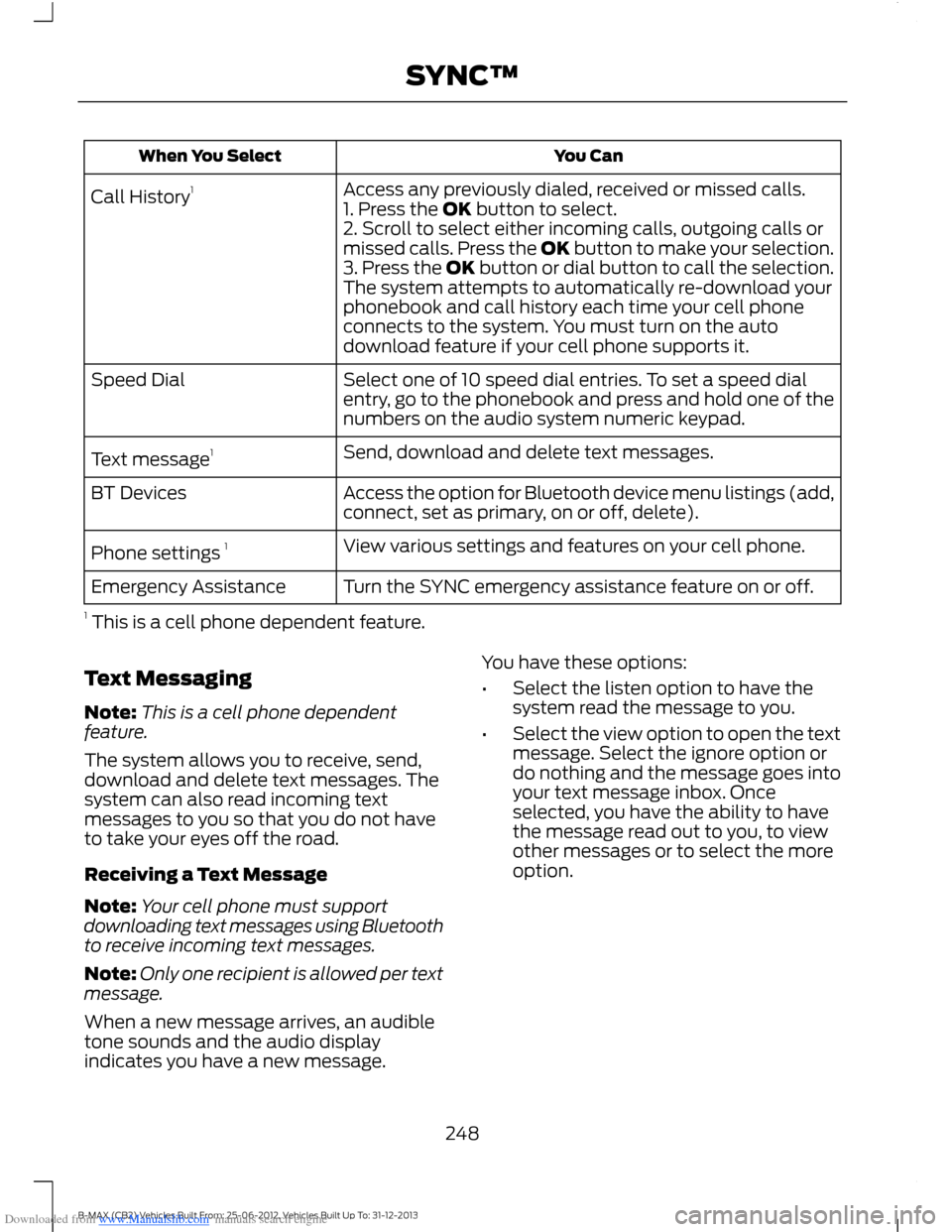
Downloaded from www.Manualslib.com manuals search engine You CanWhen You Select
Access any previously dialed, received or missed calls.Call History11. Press the OK button to select.2. Scroll to select either incoming calls, outgoing calls ormissed calls. Press the OK button to make your selection.3. Press the OK button or dial button to call the selection.The system attempts to automatically re-download yourphonebook and call history each time your cell phoneconnects to the system. You must turn on the autodownload feature if your cell phone supports it.
Select one of 10 speed dial entries. To set a speed dialentry, go to the phonebook and press and hold one of thenumbers on the audio system numeric keypad.
Speed Dial
Send, download and delete text messages.Text message1
Access the option for Bluetooth device menu listings (add,connect, set as primary, on or off, delete).BT Devices
View various settings and features on your cell phone.Phone settings 1
Turn the SYNC emergency assistance feature on or off.Emergency Assistance
1 This is a cell phone dependent feature.
Text Messaging
Note:This is a cell phone dependentfeature.
The system allows you to receive, send,download and delete text messages. Thesystem can also read incoming textmessages to you so that you do not haveto take your eyes off the road.
Receiving a Text Message
Note:Your cell phone must supportdownloading text messages using Bluetoothto receive incoming text messages.
Note:Only one recipient is allowed per textmessage.
When a new message arrives, an audibletone sounds and the audio displayindicates you have a new message.
You have these options:
•Select the listen option to have thesystem read the message to you.
•Select the view option to open the textmessage. Select the ignore option ordo nothing and the message goes intoyour text message inbox. Onceselected, you have the ability to havethe message read out to you, to viewother messages or to select the moreoption.
248B-MAX (CB2) Vehicles Built From: 25-06-2012, Vehicles Built Up To: 31-12-2013SYNC™
Page 253 of 298
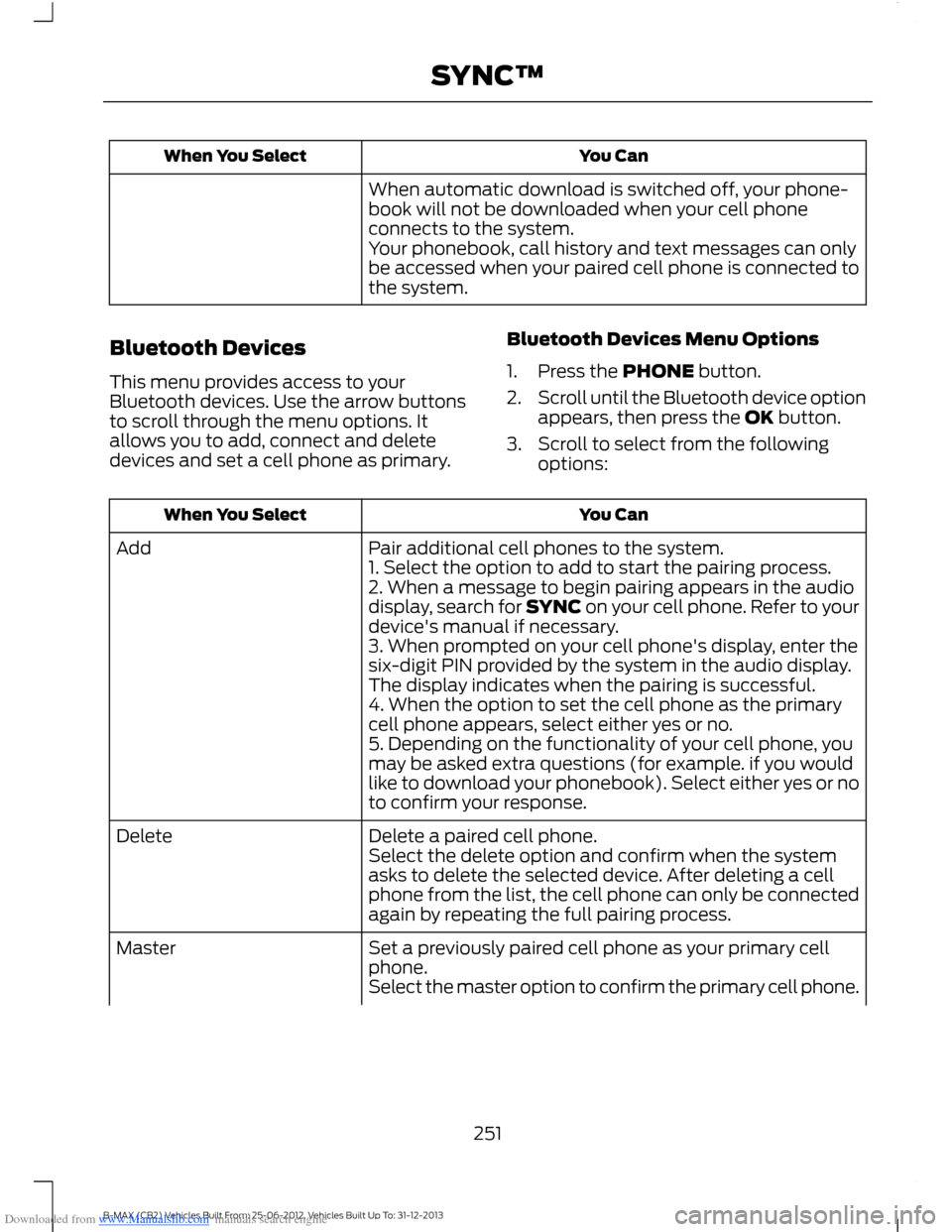
Downloaded from www.Manualslib.com manuals search engine You CanWhen You Select
When automatic download is switched off, your phone-book will not be downloaded when your cell phoneconnects to the system.Your phonebook, call history and text messages can onlybe accessed when your paired cell phone is connected tothe system.
Bluetooth Devices
This menu provides access to yourBluetooth devices. Use the arrow buttonsto scroll through the menu options. Itallows you to add, connect and deletedevices and set a cell phone as primary.
Bluetooth Devices Menu Options
1.Press the PHONE button.
2.Scroll until the Bluetooth device optionappears, then press the OK button.
3.Scroll to select from the followingoptions:
You CanWhen You Select
Pair additional cell phones to the system.Add1. Select the option to add to start the pairing process.2. When a message to begin pairing appears in the audiodisplay, search for SYNC on your cell phone. Refer to yourdevice's manual if necessary.3. When prompted on your cell phone's display, enter thesix-digit PIN provided by the system in the audio display.The display indicates when the pairing is successful.4. When the option to set the cell phone as the primarycell phone appears, select either yes or no.5. Depending on the functionality of your cell phone, youmay be asked extra questions (for example. if you wouldlike to download your phonebook). Select either yes or noto confirm your response.
Delete a paired cell phone.DeleteSelect the delete option and confirm when the systemasks to delete the selected device. After deleting a cellphone from the list, the cell phone can only be connectedagain by repeating the full pairing process.
Set a previously paired cell phone as your primary cellphone.Master
Select the master option to confirm the primary cell phone.
251B-MAX (CB2) Vehicles Built From: 25-06-2012, Vehicles Built Up To: 31-12-2013SYNC™
Page 255 of 298
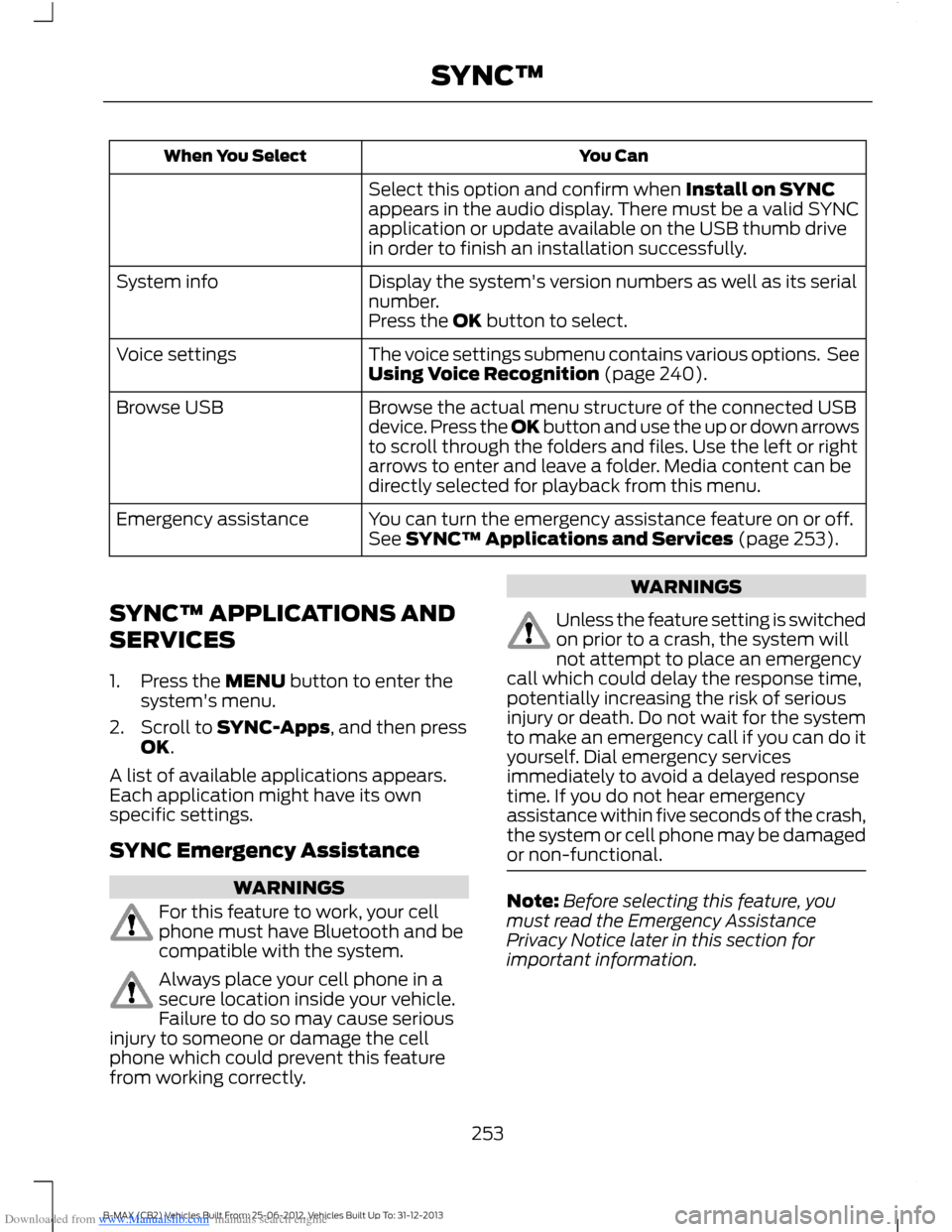
Downloaded from www.Manualslib.com manuals search engine You CanWhen You Select
Select this option and confirm when Install on SYNCappears in the audio display. There must be a valid SYNCapplication or update available on the USB thumb drivein order to finish an installation successfully.
Display the system's version numbers as well as its serialnumber.System info
Press the OK button to select.
The voice settings submenu contains various options. SeeUsing Voice Recognition (page 240).Voice settings
Browse the actual menu structure of the connected USBdevice. Press the OK button and use the up or down arrowsto scroll through the folders and files. Use the left or rightarrows to enter and leave a folder. Media content can bedirectly selected for playback from this menu.
Browse USB
You can turn the emergency assistance feature on or off.See SYNC™ Applications and Services (page 253).Emergency assistance
SYNC™ APPLICATIONS AND
SERVICES
1.Press the MENU button to enter thesystem's menu.
2.Scroll to SYNC-Apps, and then pressOK.
A list of available applications appears.Each application might have its ownspecific settings.
SYNC Emergency Assistance
WARNINGS
For this feature to work, your cellphone must have Bluetooth and becompatible with the system.
Always place your cell phone in asecure location inside your vehicle.Failure to do so may cause seriousinjury to someone or damage the cellphone which could prevent this featurefrom working correctly.
WARNINGS
Unless the feature setting is switchedon prior to a crash, the system willnot attempt to place an emergencycall which could delay the response time,potentially increasing the risk of seriousinjury or death. Do not wait for the systemto make an emergency call if you can do ityourself. Dial emergency servicesimmediately to avoid a delayed responsetime. If you do not hear emergencyassistance within five seconds of the crash,the system or cell phone may be damagedor non-functional.
Note:Before selecting this feature, youmust read the Emergency AssistancePrivacy Notice later in this section forimportant information.
253B-MAX (CB2) Vehicles Built From: 25-06-2012, Vehicles Built Up To: 31-12-2013SYNC™
Page 256 of 298
Downloaded from www.Manualslib.com manuals search engine Note:When you switch this feature on oroff, that setting applies for all paired cellphones. If you have turned this feature offand a previously paired phone connectswhen you switch on the ignition, either avoice message plays, a display message oricon is shown or both.
Note:Every cell phone operates differently.While this feature works with most cellphones, some cell phones may experiencedifficulties using this feature.
Note:Make sure you are familiar with theinformation about airbag deployment. SeeSupplementary Restraints System (page23).
If a crash deploys an airbag or triggers thefuel pump shut off, the system maycontact emergency services by dialing 112(the wireless emergency number thatworks in most European countries) througha paired and connected cell phone. Formore information about the system andEmergency Assistance, visit the regionalFord website.
Switching Emergency AssistanceOn and Off
1.Press the PHONE button to enter thecell phone menu.
2.Select the Emergency Assistanceoption and press OK.
3.Select the option you require and pressOK.
Display Options
If you switch on this feature, a confirmationmessage appears in the display.
If you switch off this feature, a dialogappears in the display, which allows youto set a voice reminder.
Off with voice reminder provides a displayand voice reminder when your cell phoneconnects and your vehicle starts.
Off without voice reminder provides adisplay reminder only without a voicereminder when your cell phone connects.
To make sure that Emergency Assistanceworks correctly:
•The system must have power and beworking correctly at the time of thecrash and during feature activation anduse.
•You must switch on the feature beforea crash.
•You must have a cell phone connectedto the system.
•In certain countries, it may benecessary to have a valid andregistered SIM card with credit in orderto place and maintain an emergencycall.
•A connected cell phone must have theability to make and maintain anoutgoing call at the time of the crash.
•A connected cell phone must haveadequate network coverage, batterypower and signal strength.
•Your vehicle must have battery power.
Note:This feature only works in a Europeancountry or region where SYNC EmergencyAssistance can call the local emergencyservices. Visit the regional Ford website fordetails.
In the Event of a Crash
Note:Not every crash deploys an airbag ortriggers the fuel pump shut off (which mayturn on Emergency Assistance). However,if Emergency Assistance is triggered thesystem tries to contact the emergencyservices. If a connected cell phone sustainsdamage or loses connection to the system,it searches for and tries to connect to anyavailable previously paired cell phone. Thesystem attempts to dial 112.
254B-MAX (CB2) Vehicles Built From: 25-06-2012, Vehicles Built Up To: 31-12-2013SYNC™
Page 257 of 298
Downloaded from www.Manualslib.com manuals search engine Before making a call:
•If you do not cancel the call and SYNCmakes a successful call, anintroductory message plays for theemergency operator. After thismessage, there is hands-freecommunication between your vehicle'soccupants and the operator.
•The system provides a short windowof time (approximately 10 seconds) tocancel the call. If you do not cancel thecall, the system attempts to dial 112.
•The system plays a message lettingyou know when it attempts to make anemergency call. You can cancel the callby selecting the relevant icon in thedisplay or by pressing the hang upbutton on your cell phone.
During a call:
•Emergency assistance uses yourvehicle GPS or cellular networkinformation when available todetermine the most appropriatelanguage to use. It alerts theemergency operator of the crash anddelivers the introductory message. Thismay include your vehicle GPScoordinates.
•The language the system uses tointeract with the occupants of yourvehicle may differ from the languageused to deliver information to theemergency operator.
•After the delivery of the introductorymessage the voice line opens so thatyou can speak hands-free with theemergency operator.
•When the line is connected, you mustbe prepared to provide your name,phone number and locationinformation immediately.
Note:While the system providesinformation to the emergency operator, thesystem plays a message letting you knowit is sending important information. It thenlets you know when the line is open to starthands-free communication.
Note:During an Emergency Assistance call,an emergency priority screen appears whichcontains vehicle GPS coordinates whenavailable.
Note:It is possible that GPS locationinformation is not available at the time ofthe crash; in this case, EmergencyAssistance will still attempt to place anemergency call.
Note:It is possible that the emergencyservices will not receive the GPScoordinates; in this case, hands-freecommunication with an emergency operatoris available.
Note:The emergency operator may alsoreceive information from the cellularnetwork such as cell phone number, cellphone location and cell phone carrier nameindependent from SYNC EmergencyAssistance.
Emergency assistance may not work if:
•Your cell phone or EmergencyAssistance hardware sustains damagein the crash.
•The vehicle battery or the system hasno power.
•A crash ejects your cell phone fromyour vehicle.
•You do not have a valid and registeredSIM card with credit in your cell phone.
•You are in a European country or regionwhere the SYNC Emergency Assistancecannot place the call. Visit the regionalFord website for details.
255B-MAX (CB2) Vehicles Built From: 25-06-2012, Vehicles Built Up To: 31-12-2013SYNC™