CD player FORD B MAX 2013 1.G User Guide
[x] Cancel search | Manufacturer: FORD, Model Year: 2013, Model line: B MAX, Model: FORD B MAX 2013 1.GPages: 298, PDF Size: 20.63 MB
Page 262 of 298
Downloaded from www.Manualslib.com manuals search engine You canWhen you select
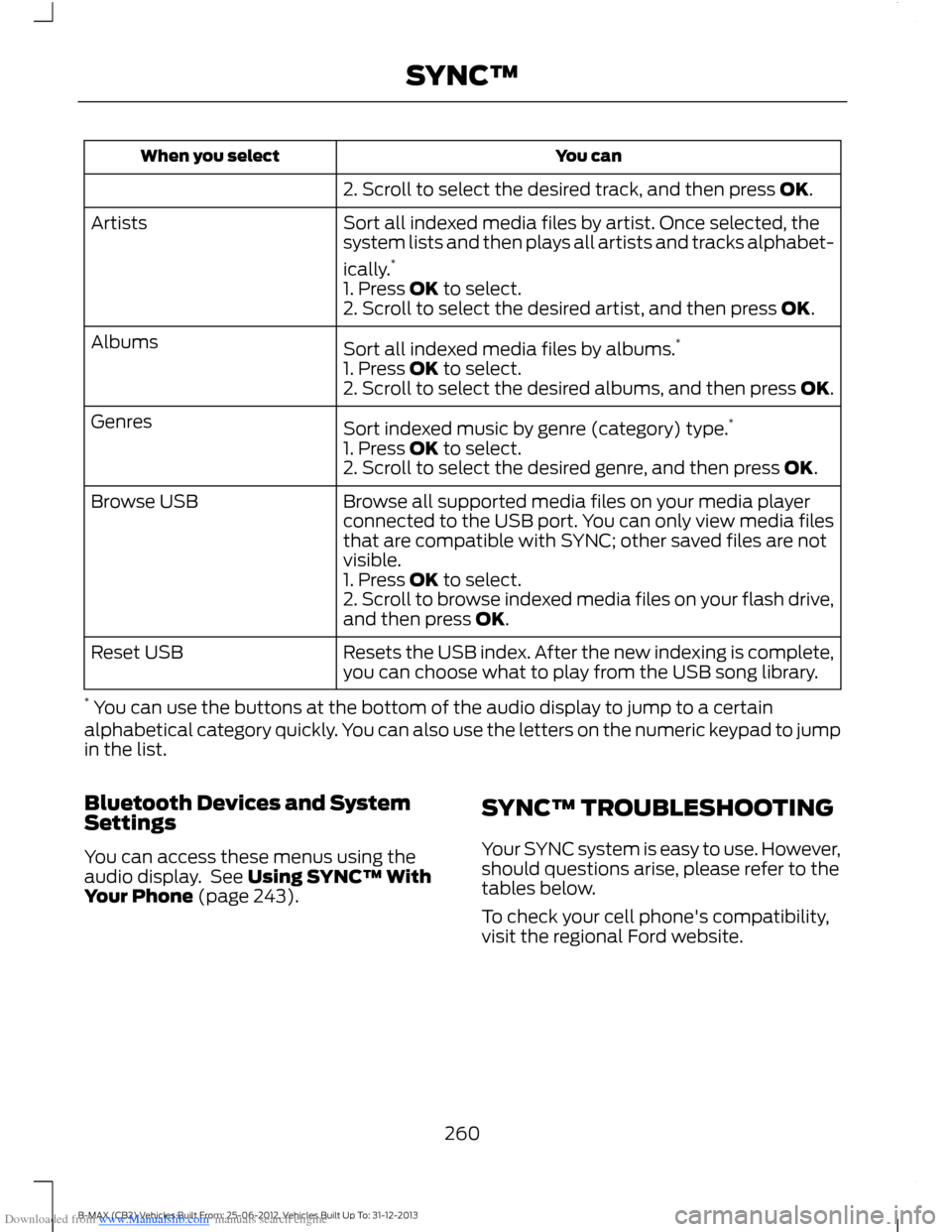
2. Scroll to select the desired track, and then press OK.
Sort all indexed media files by artist. Once selected, thesystem lists and then plays all artists and tracks alphabet-
ically.*
Artists
1. Press OK to select.2. Scroll to select the desired artist, and then press OK.
Sort all indexed media files by albums.*Albums
1. Press OK to select.2. Scroll to select the desired albums, and then press OK.
Sort indexed music by genre (category) type.*Genres
1. Press OK to select.2. Scroll to select the desired genre, and then press OK.
Browse all supported media files on your media playerconnected to the USB port. You can only view media filesthat are compatible with SYNC; other saved files are notvisible.
Browse USB
1. Press OK to select.2. Scroll to browse indexed media files on your flash drive,and then press OK.
Resets the USB index. After the new indexing is complete,you can choose what to play from the USB song library.Reset USB
* You can use the buttons at the bottom of the audio display to jump to a certainalphabetical category quickly. You can also use the letters on the numeric keypad to jumpin the list.
Bluetooth Devices and SystemSettings
You can access these menus using theaudio display. See Using SYNC™ WithYour Phone (page 243).
SYNC™ TROUBLESHOOTING
Your SYNC system is easy to use. However,should questions arise, please refer to thetables below.
To check your cell phone's compatibility,visit the regional Ford website.
260B-MAX (CB2) Vehicles Built From: 25-06-2012, Vehicles Built Up To: 31-12-2013SYNC™
Page 267 of 298
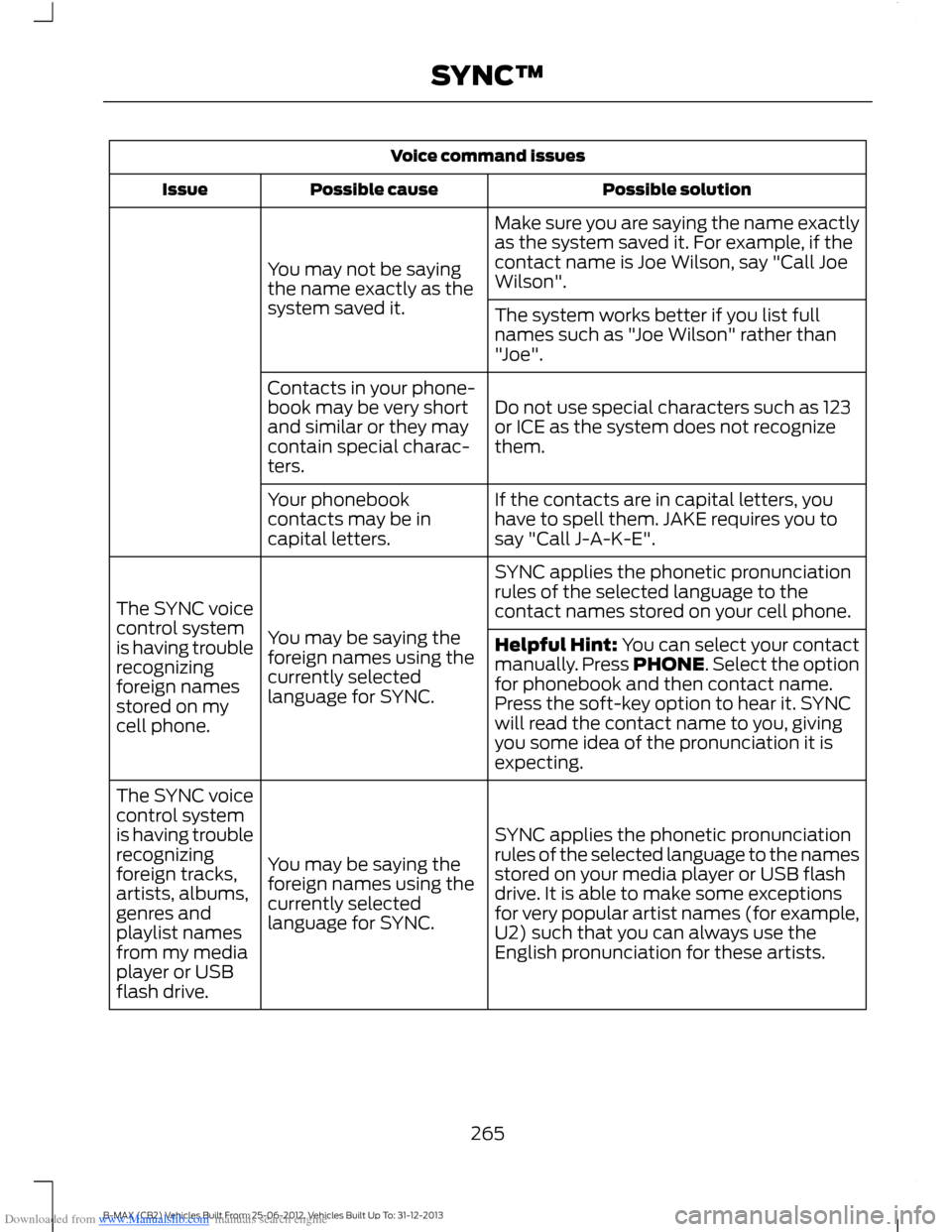
Downloaded from www.Manualslib.com manuals search engine Voice command issues
Possible solutionPossible causeIssue
Make sure you are saying the name exactlyas the system saved it. For example, if thecontact name is Joe Wilson, say "Call JoeWilson".You may not be sayingthe name exactly as thesystem saved it.The system works better if you list fullnames such as "Joe Wilson" rather than"Joe".
Do not use special characters such as 123or ICE as the system does not recognizethem.
Contacts in your phone-book may be very shortand similar or they maycontain special charac-ters.
If the contacts are in capital letters, youhave to spell them. JAKE requires you tosay "Call J-A-K-E".
Your phonebookcontacts may be incapital letters.
SYNC applies the phonetic pronunciationrules of the selected language to thecontact names stored on your cell phone.
You may be saying theforeign names using thecurrently selectedlanguage for SYNC.
The SYNC voicecontrol systemis having troublerecognizingforeign namesstored on mycell phone.
Helpful Hint: You can select your contactmanually. Press PHONE. Select the optionfor phonebook and then contact name.Press the soft-key option to hear it. SYNCwill read the contact name to you, givingyou some idea of the pronunciation it isexpecting.
SYNC applies the phonetic pronunciationrules of the selected language to the namesstored on your media player or USB flashdrive. It is able to make some exceptionsfor very popular artist names (for example,U2) such that you can always use theEnglish pronunciation for these artists.
You may be saying theforeign names using thecurrently selectedlanguage for SYNC.
The SYNC voicecontrol systemis having troublerecognizingforeign tracks,artists, albums,genres andplaylist namesfrom my mediaplayer or USBflash drive.
265B-MAX (CB2) Vehicles Built From: 25-06-2012, Vehicles Built Up To: 31-12-2013SYNC™
Page 268 of 298
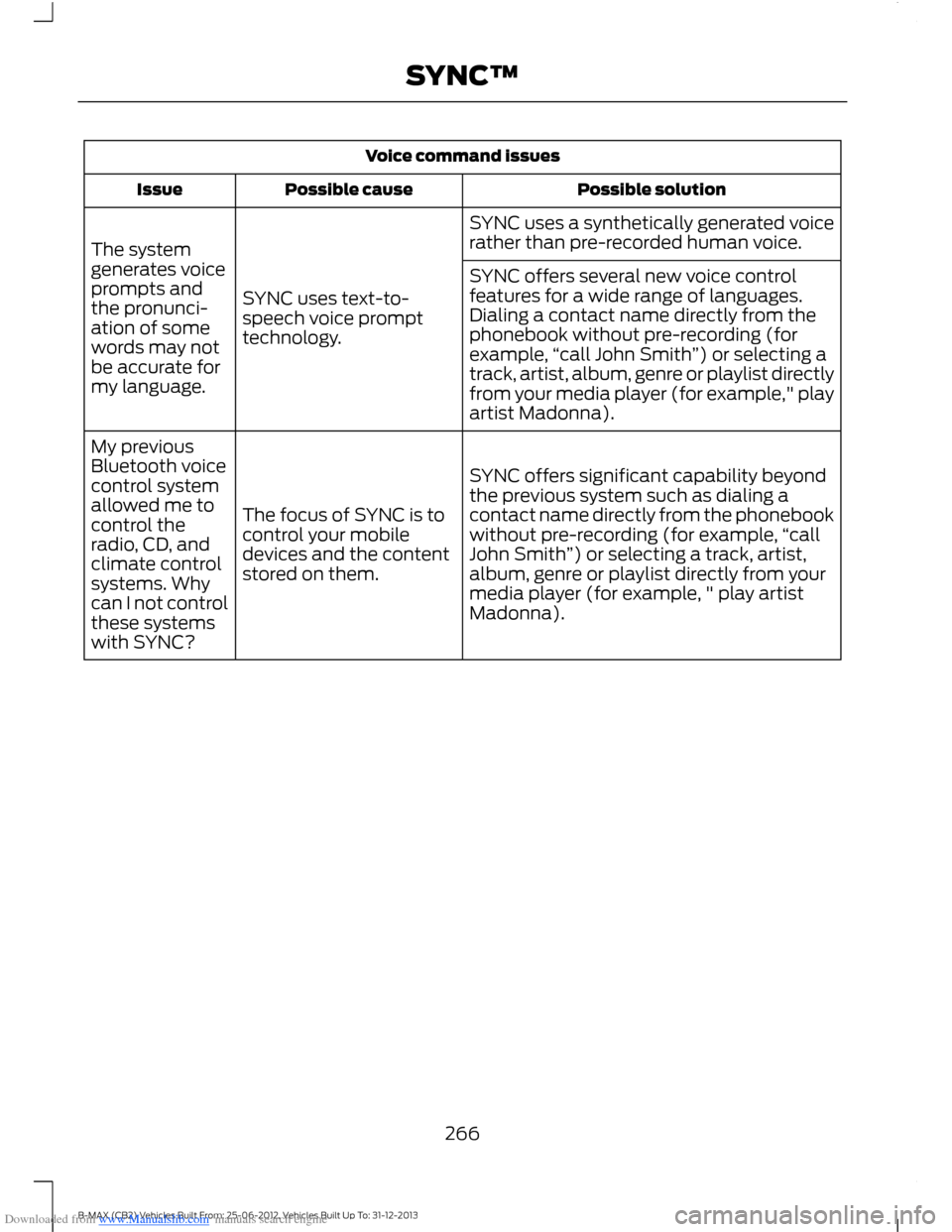
Downloaded from www.Manualslib.com manuals search engine Voice command issues
Possible solutionPossible causeIssue
SYNC uses a synthetically generated voicerather than pre-recorded human voice.
SYNC uses text-to-speech voice prompttechnology.
The systemgenerates voiceprompts andthe pronunci-ation of somewords may notbe accurate formy language.
SYNC offers several new voice controlfeatures for a wide range of languages.Dialing a contact name directly from thephonebook without pre-recording (forexample,“call John Smith”) or selecting atrack, artist, album, genre or playlist directlyfrom your media player (for example," playartist Madonna).
SYNC offers significant capability beyondthe previous system such as dialing acontact name directly from the phonebookwithout pre-recording (for example,“callJohn Smith”) or selecting a track, artist,album, genre or playlist directly from yourmedia player (for example, " play artistMadonna).
The focus of SYNC is tocontrol your mobiledevices and the contentstored on them.
My previousBluetooth voicecontrol systemallowed me tocontrol theradio, CD, andclimate controlsystems. Whycan I not controlthese systemswith SYNC?
266B-MAX (CB2) Vehicles Built From: 25-06-2012, Vehicles Built Up To: 31-12-2013SYNC™
Page 269 of 298
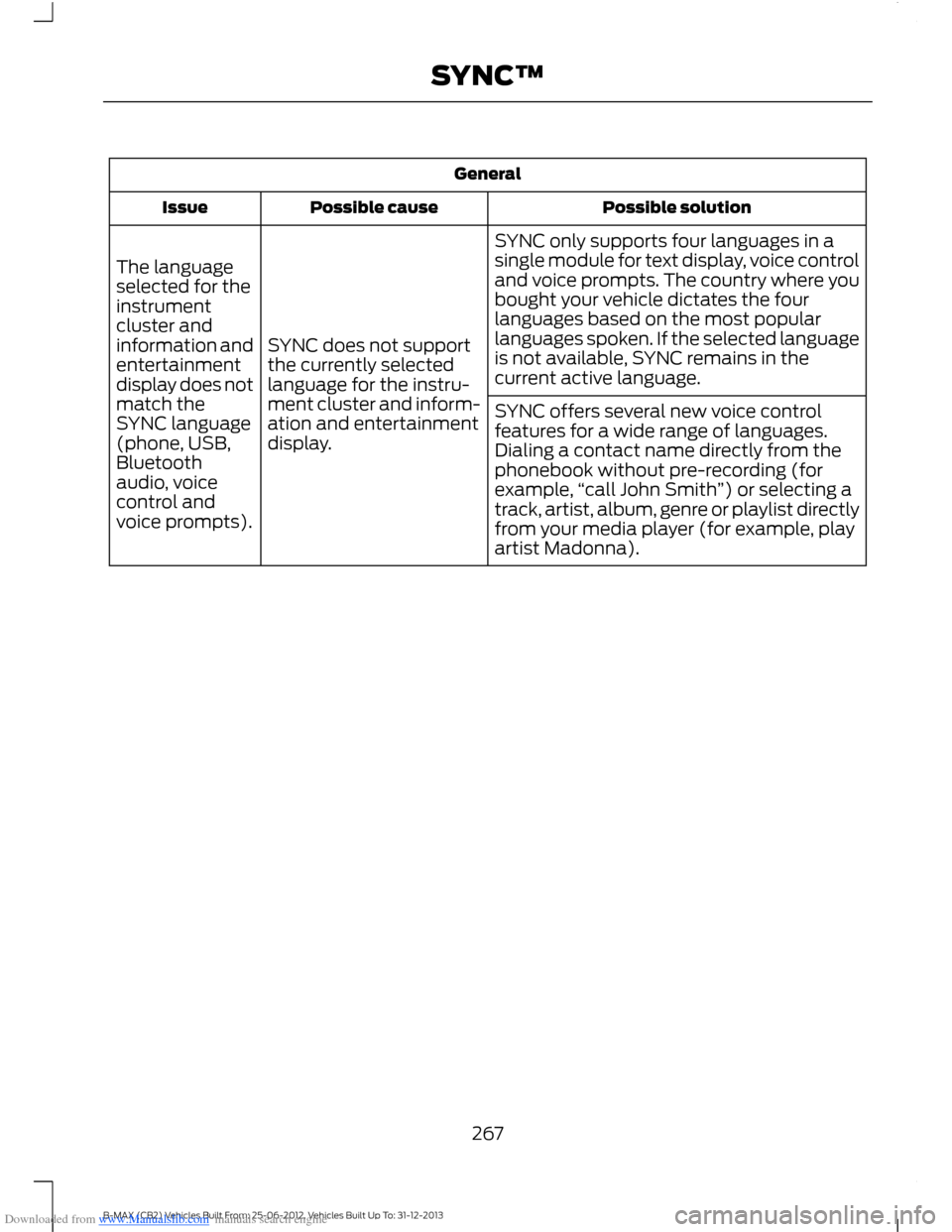
Downloaded from www.Manualslib.com manuals search engine General
Possible solutionPossible causeIssue
SYNC only supports four languages in asingle module for text display, voice controland voice prompts. The country where youbought your vehicle dictates the fourlanguages based on the most popularlanguages spoken. If the selected languageis not available, SYNC remains in thecurrent active language.
SYNC does not supportthe currently selectedlanguage for the instru-ment cluster and inform-ation and entertainmentdisplay.
The languageselected for theinstrumentcluster andinformation andentertainmentdisplay does notmatch theSYNC language(phone, USB,Bluetoothaudio, voicecontrol andvoice prompts).
SYNC offers several new voice controlfeatures for a wide range of languages.Dialing a contact name directly from thephonebook without pre-recording (forexample,“call John Smith”) or selecting atrack, artist, album, genre or playlist directlyfrom your media player (for example, playartist Madonna).
267B-MAX (CB2) Vehicles Built From: 25-06-2012, Vehicles Built Up To: 31-12-2013SYNC™
Page 276 of 298
![FORD B MAX 2013 1.G User Guide Downloaded from www.Manualslib.com manuals search engine Adobe
Contains Adobe® [Flash® Player] or[AIR®] technology by Adobe SystemsIncorporated. This [Licensee Product]contains [Adobe® Flash® Pla](/img/11/5480/w960_5480-275.png "FORD B MAX 2013 1.G User Guide Downloaded from www.Manualslib.com manuals search engine Adobe
Contains Adobe® [Flash® Player] or[AIR®] technology by Adobe SystemsIncorporated. This [Licensee Product]contains [Adobe® Flash® Pla")
Downloaded from www.Manualslib.com manuals search engine Adobe
Contains Adobe® [Flash® Player] or[AIR®] technology by Adobe SystemsIncorporated. This [Licensee Product]contains [Adobe® Flash® Player][Adobe® AIR®] software under licensefrom Adobe Systems Incorporated,Copyright ©1995-2009 AdobeMacromedia Software LLC. All rightsreserved. Adobe, Flash and AIR aretrademarks of Adobe SystemsIncorporated.
End User Notice
Microsoft® Windows® Mobile forAutomotive Important SafetyInformation
This system Ford SYNC™ containssoftware that is licensed to ManufacturerFORD MOTOR COMPANY by an affiliateof Microsoft Corporation pursuant to alicense agreement. Any removal,reproduction, reverse engineering or otherunauthorized use of the software from thissystem in violation of the licenseagreement is strictly prohibited and maysubject you to legal action.
Read and follow instructions: Beforeusing your Windows Automotive- basedsystem, read and follow all instructionsand safety information provided in this enduser manual ("User's Guide"). Notfollowing precautions found in this User'sGuide can lead to an accident or otherserious consequences.
Keep User's Guide in vehicle: When keptin the vehicle, the User's Guide will be aready reference for you and other usersunfamiliar with the WindowsAutomotive-based system. Please makecertain that before using the system forthe first time, all persons have access tothe User's Guide and read its instructionsand safety information carefully.
WARNING
Operating certain parts of thissystem while driving can distractyour attention away from the road,and possibly cause an accident or otherserious consequences. Do not changesystem settings or enter data non-verbally(using your hands) while driving. Stop thevehicle in a safe and legal manner beforeattempting these operations. This isimportant since while setting up orchanging some functions you might berequired to distract your attention awayfrom the road and remove your hands fromthe wheel.
General Operation
Voice Command Control: Functionswithin the Windows Automotive-basedsystem may be accomplished using onlyvoice commands. Using voice commandswhile driving allows you to operate thesystem without removing your hands fromthe wheel.
Prolonged Views of Screen: Do notaccess any function requiring a prolongedview of the screen while you are driving.Pull over in a safe and legal manner beforeattempting to access a function of thesystem requiring prolonged attention. Evenoccasional short scans to the screen maybe hazardous if your attention has beendiverted away from your driving task at acritical time.
Volume Setting: Do not raise the volumeexcessively. Keep the volume at a levelwhere you can still hear outside traffic andemergency signals while driving. Drivingwhile unable to hear these sounds couldcause an accident.
274B-MAX (CB2) Vehicles Built From: 25-06-2012, Vehicles Built Up To: 31-12-2013Appendices
Page 289 of 298
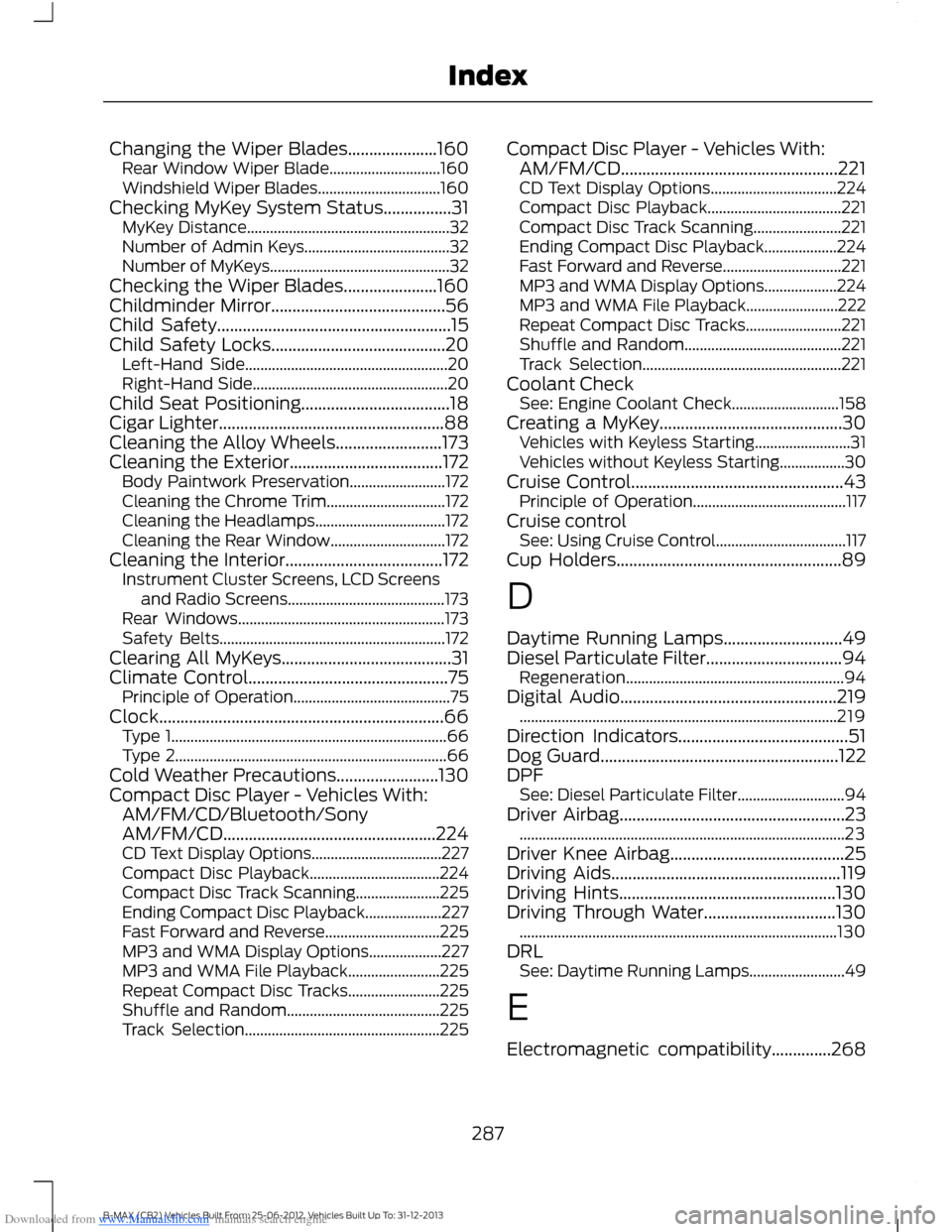
Downloaded from www.Manualslib.com manuals search engine Changing the Wiper Blades.....................160Rear Window Wiper Blade.............................160Windshield Wiper Blades................................160Checking MyKey System Status................31MyKey Distance.....................................................32Number of Admin Keys......................................32Number of MyKeys...............................................32Checking the Wiper Blades......................160Childminder Mirror.........................................56Child Safety.......................................................15Child Safety Locks.........................................20Left-Hand Side.....................................................20Right-Hand Side...................................................20Child Seat Positioning...................................18Cigar Lighter.....................................................88Cleaning the Alloy Wheels.........................173Cleaning the Exterior....................................172Body Paintwork Preservation.........................172Cleaning the Chrome Trim...............................172Cleaning the Headlamps..................................172Cleaning the Rear Window..............................172Cleaning the Interior.....................................172Instrument Cluster Screens, LCD Screensand Radio Screens.........................................173Rear Windows......................................................173Safety Belts...........................................................172Clearing All MyKeys........................................31Climate Control...............................................75Principle of Operation.........................................75Clock...................................................................66Type 1........................................................................66Type 2.......................................................................66Cold Weather Precautions........................130Compact Disc Player - Vehicles With:AM/FM/CD/Bluetooth/SonyAM/FM/CD..................................................224CD Text Display Options..................................227Compact Disc Playback..................................224Compact Disc Track Scanning......................225Ending Compact Disc Playback....................227Fast Forward and Reverse..............................225MP3 and WMA Display Options...................227MP3 and WMA File Playback........................225Repeat Compact Disc Tracks........................225Shuffle and Random........................................225Track Selection...................................................225
Compact Disc Player - Vehicles With:AM/FM/CD...................................................221CD Text Display Options.................................224Compact Disc Playback...................................221Compact Disc Track Scanning.......................221Ending Compact Disc Playback...................224Fast Forward and Reverse...............................221MP3 and WMA Display Options...................224MP3 and WMA File Playback........................222Repeat Compact Disc Tracks.........................221Shuffle and Random.........................................221Track Selection....................................................221Coolant CheckSee: Engine Coolant Check............................158Creating a MyKey...........................................30Vehicles with Keyless Starting.........................31Vehicles without Keyless Starting.................30Cruise Control..................................................43Principle of Operation........................................117Cruise controlSee: Using Cruise Control..................................117Cup Holders.....................................................89
D
Daytime Running Lamps............................49Diesel Particulate Filter................................94Regeneration.........................................................94Digital Audio...................................................219...................................................................................219Direction Indicators........................................51Dog Guard........................................................122DPFSee: Diesel Particulate Filter............................94Driver Airbag.....................................................23.....................................................................................23Driver Knee Airbag.........................................25Driving Aids......................................................119Driving Hints...................................................130Driving Through Water...............................130...................................................................................130DRLSee: Daytime Running Lamps.........................49
E
Electromagnetic compatibility..............268
287B-MAX (CB2) Vehicles Built From: 25-06-2012, Vehicles Built Up To: 31-12-2013Index
Page 294 of 298
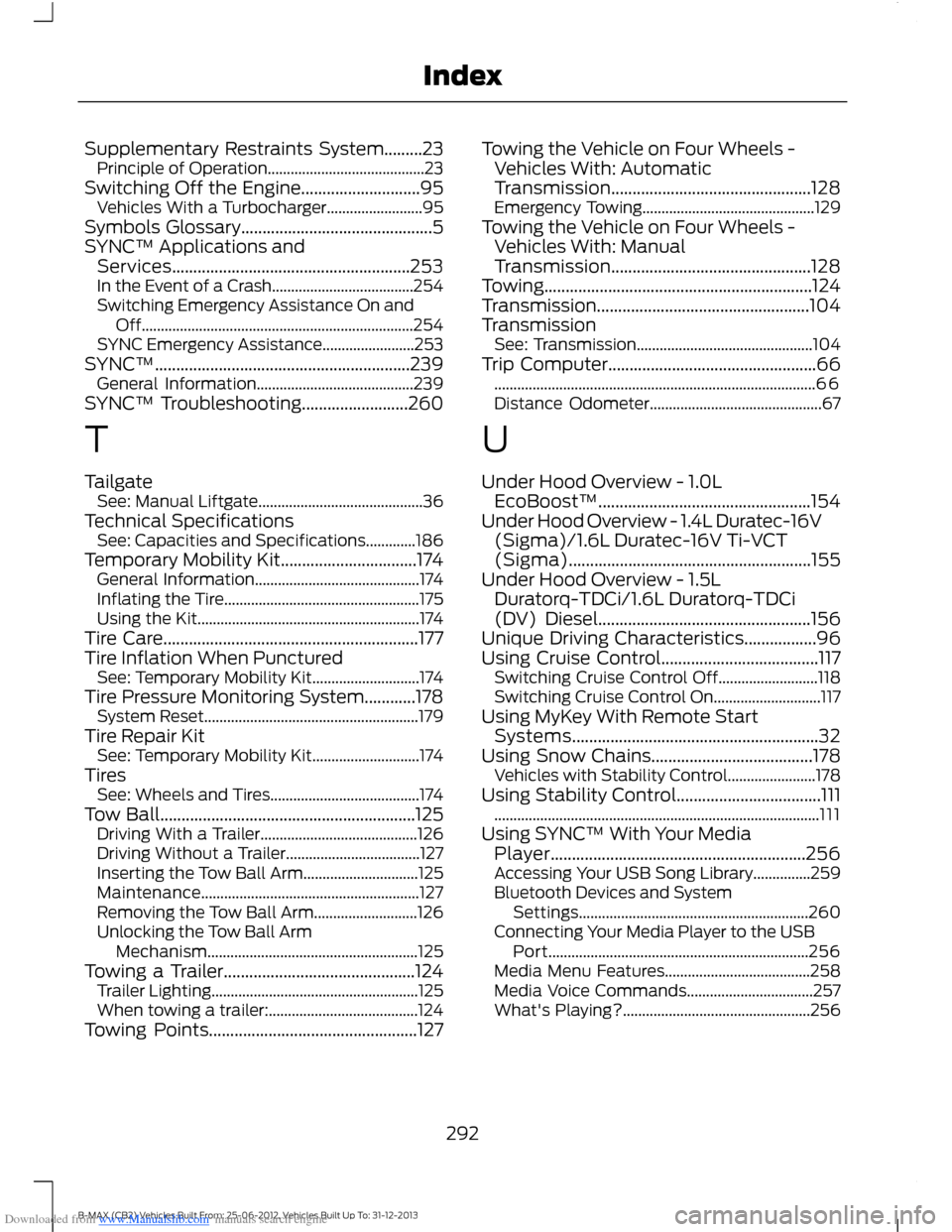
Downloaded from www.Manualslib.com manuals search engine Supplementary Restraints System.........23Principle of Operation.........................................23Switching Off the Engine............................95Vehicles With a Turbocharger.........................95Symbols Glossary.............................................5SYNC™ Applications andServices........................................................253In the Event of a Crash.....................................254Switching Emergency Assistance On andOff.......................................................................254SYNC Emergency Assistance........................253SYNC™............................................................239General Information.........................................239SYNC™ Troubleshooting.........................260
T
TailgateSee: Manual Liftgate...........................................36Technical SpecificationsSee: Capacities and Specifications.............186Temporary Mobility Kit................................174General Information...........................................174Inflating the Tire...................................................175Using the Kit..........................................................174Tire Care............................................................177Tire Inflation When PuncturedSee: Temporary Mobility Kit............................174Tire Pressure Monitoring System............178System Reset........................................................179Tire Repair KitSee: Temporary Mobility Kit............................174TiresSee: Wheels and Tires.......................................174Tow Ball............................................................125Driving With a Trailer.........................................126Driving Without a Trailer...................................127Inserting the Tow Ball Arm..............................125Maintenance.........................................................127Removing the Tow Ball Arm...........................126Unlocking the Tow Ball ArmMechanism.......................................................125Towing a Trailer.............................................124Trailer Lighting......................................................125When towing a trailer:.......................................124Towing Points.................................................127
Towing the Vehicle on Four Wheels -Vehicles With: AutomaticTransmission...............................................128Emergency Towing.............................................129Towing the Vehicle on Four Wheels -Vehicles With: ManualTransmission...............................................128Towing...............................................................124Transmission..................................................104TransmissionSee: Transmission..............................................104Trip Computer.................................................66....................................................................................66Distance Odometer.............................................67
U
Under Hood Overview - 1.0LEcoBoost™..................................................154Under Hood Overview - 1.4L Duratec-16V(Sigma)/1.6L Duratec-16V Ti-VCT(Sigma).........................................................155Under Hood Overview - 1.5LDuratorq-TDCi/1.6L Duratorq-TDCi(DV) Diesel..................................................156Unique Driving Characteristics.................96Using Cruise Control.....................................117Switching Cruise Control Off..........................118Switching Cruise Control On............................117Using MyKey With Remote StartSystems..........................................................32Using Snow Chains......................................178Vehicles with Stability Control.......................178Using Stability Control..................................111.....................................................................................111Using SYNC™ With Your MediaPlayer............................................................256Accessing Your USB Song Library...............259Bluetooth Devices and SystemSettings............................................................260Connecting Your Media Player to the USBPort....................................................................256Media Menu Features......................................258Media Voice Commands.................................257What's Playing?.................................................256
292B-MAX (CB2) Vehicles Built From: 25-06-2012, Vehicles Built Up To: 31-12-2013Index