automatic transmission FORD B MAX 2013 1.G Owner's Manual
[x] Cancel search | Manufacturer: FORD, Model Year: 2013, Model line: B MAX, Model: FORD B MAX 2013 1.GPages: 298, PDF Size: 20.63 MB
Page 139 of 298
Downloaded from www.Manualslib.com manuals search engine Circuits protectedFuse ratingFuse
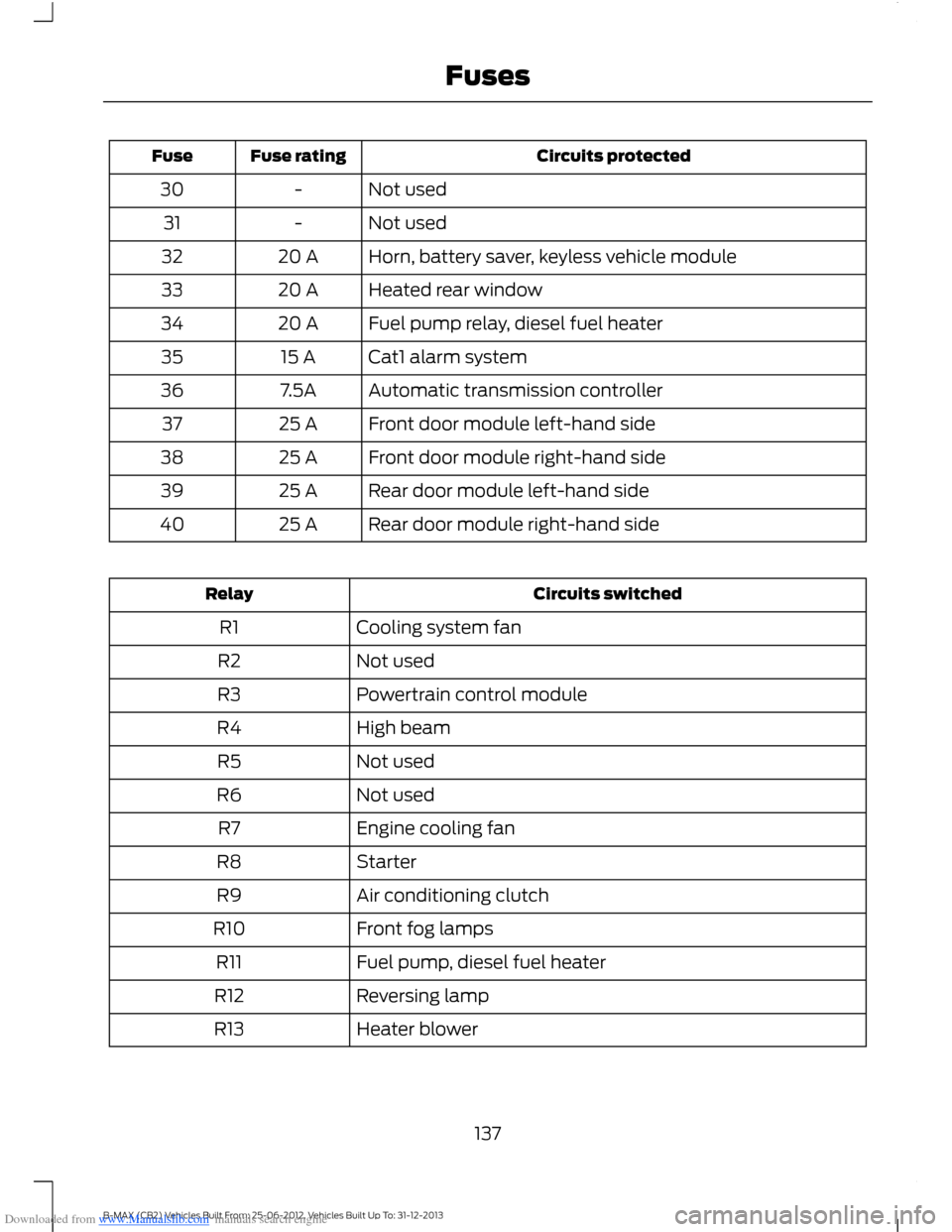
Not used-30
Not used-31
Horn, battery saver, keyless vehicle module20 A32
Heated rear window20 A33
Fuel pump relay, diesel fuel heater20 A34
Cat1 alarm system15 A35
Automatic transmission controller7.5A36
Front door module left-hand side25 A37
Front door module right-hand side25 A38
Rear door module left-hand side25 A39
Rear door module right-hand side25 A40
Circuits switchedRelay
Cooling system fanR1
Not usedR2
Powertrain control moduleR3
High beamR4
Not usedR5
Not usedR6
Engine cooling fanR7
StarterR8
Air conditioning clutchR9
Front fog lampsR10
Fuel pump, diesel fuel heaterR11
Reversing lampR12
Heater blowerR13
137B-MAX (CB2) Vehicles Built From: 25-06-2012, Vehicles Built Up To: 31-12-2013Fuses
Page 148 of 298
Downloaded from www.Manualslib.com manuals search engine Circuits protectedFuse ratingFuse
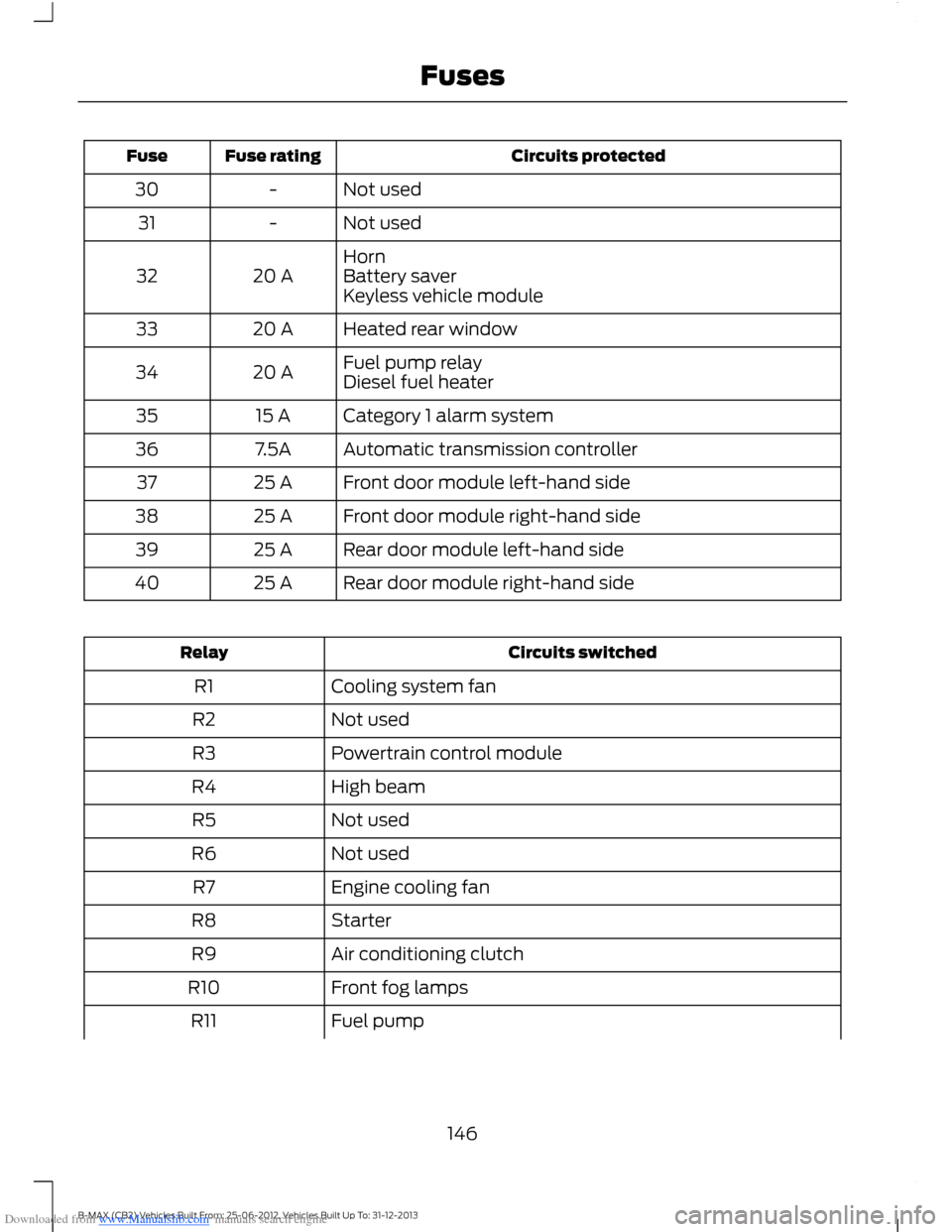
Not used-30
Not used-31
Horn20 A32Battery saverKeyless vehicle module
Heated rear window20 A33
Fuel pump relay20 A34Diesel fuel heater
Category 1 alarm system15 A35
Automatic transmission controller7.5A36
Front door module left-hand side25 A37
Front door module right-hand side25 A38
Rear door module left-hand side25 A39
Rear door module right-hand side25 A40
Circuits switchedRelay
Cooling system fanR1
Not usedR2
Powertrain control moduleR3
High beamR4
Not usedR5
Not usedR6
Engine cooling fanR7
StarterR8
Air conditioning clutchR9
Front fog lampsR10
Fuel pumpR11
146B-MAX (CB2) Vehicles Built From: 25-06-2012, Vehicles Built Up To: 31-12-2013Fuses
Page 184 of 298
Downloaded from www.Manualslib.com manuals search engine Note:Make sure that you pull the wheeltrim remover at right angles to the trim.
Removing a Road Wheel
WARNINGS
Park your vehicle in such a positionthat neither the traffic nor you arehindered or endangered.
Set up a warning triangle.
Make sure that your vehicle is on firm,level ground with the wheels pointingstraight ahead.
Switch the ignition off and apply theparking brake.
If your vehicle has a manualtransmission, move the selector leverto first or reverse gear. If it has anautomatic transmission, move the selectorlever to position (P).
Have the passengers leave yourvehicle.
Secure the diagonally oppositewheel with an appropriate block orwheel chock.
Make sure that the arrows ondirectional tires point in the directionof rotation when your vehicle ismoving forward. If you have to fit a sparewheel with the arrows pointing in theopposite direction, have the tire refitted inthe correct direction by an authorizeddealer.
Do not work underneath your vehiclewhen it is supported only by a jack.
Make sure that the jack is vertical tothe jacking point and the base is flaton the ground.
Note:Do not lay alloy wheels face downon the ground, this will damage the paint.
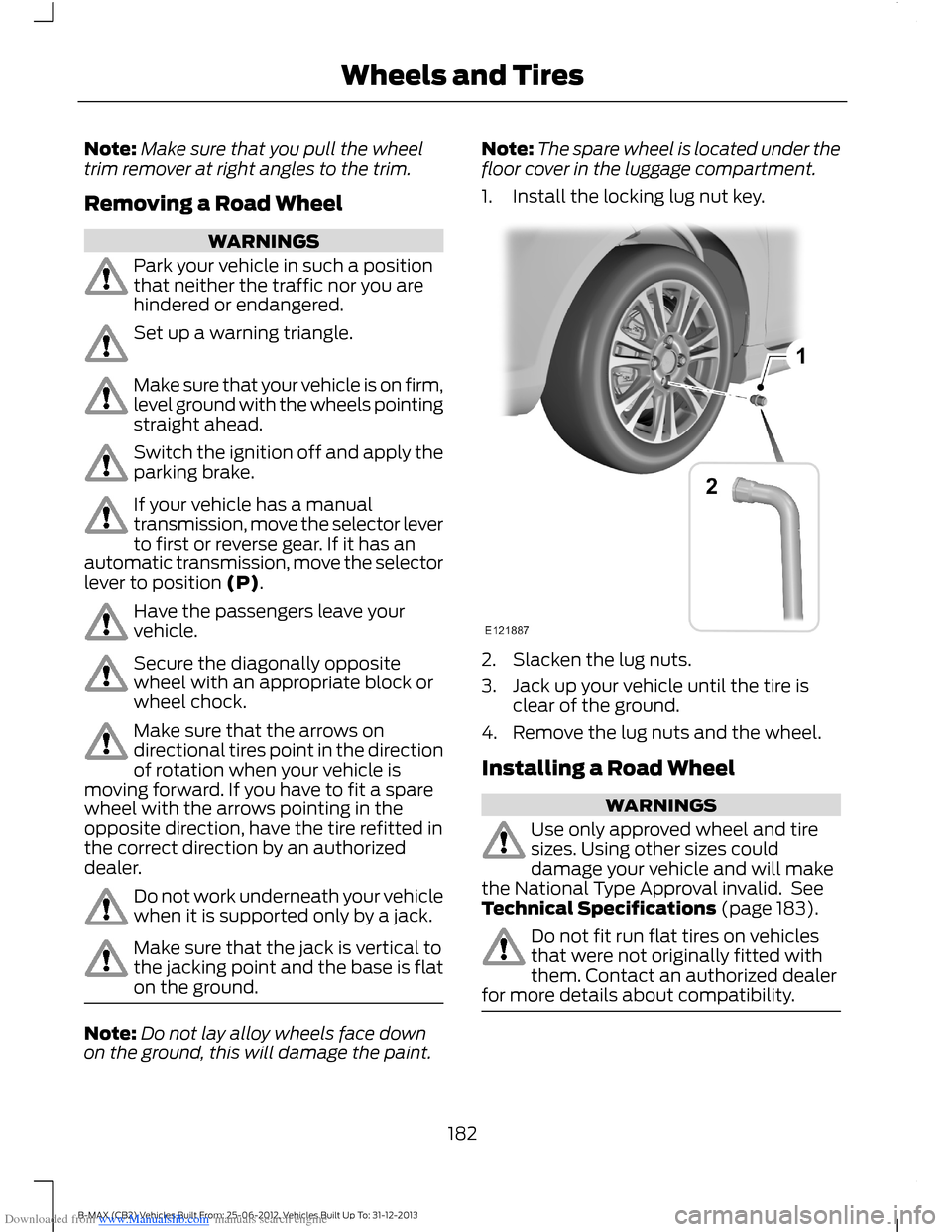
Note:The spare wheel is located under thefloor cover in the luggage compartment.
1.Install the locking lug nut key.
2.Slacken the lug nuts.
3.Jack up your vehicle until the tire isclear of the ground.
4.Remove the lug nuts and the wheel.
Installing a Road Wheel
WARNINGS
Use only approved wheel and tiresizes. Using other sizes coulddamage your vehicle and will makethe National Type Approval invalid. SeeTechnical Specifications (page 183).
Do not fit run flat tires on vehiclesthat were not originally fitted withthem. Contact an authorized dealerfor more details about compatibility.
182B-MAX (CB2) Vehicles Built From: 25-06-2012, Vehicles Built Up To: 31-12-2013Wheels and Tires
Page 203 of 298
Downloaded from www.Manualslib.com manuals search engine Ending Traffic Announcements
The audio unit will return to normaloperation at the end of each trafficannouncement. To end the announcementprematurely, press TA or TRAFFIC duringthe announcement.
Note:If you press TA or TRAFFIC at anyother time it will switch all announcementsoff.
Automatic Volume Control
When available, automatic volume controladjusts the volume level to compensatefor engine noise and road speed noise.
1.Press the MENU button and selectAUDIO or AUDIO SETTINGS.
2.Select AVC LEVEL or ADAPTIVEVOL.
3.Use the left or right arrow button toadjust the setting.
4.Press the OK button to confirm yourselection.
5.Press the MENU button to return.
News Broadcasts
Your audio unit may interrupt normalreception to broadcast news bulletins fromstations on the FM waveband, radio datasystem or other enhanced network linkedstations.
The display will indicate there is anincoming announcement, during newsbroadcasts. When the audio unit interruptsfor a news broadcast the preset volumelevel will be the same as trafficannouncements.
1.Press the MENU button.
2.Select AUDIO or AUDIO SETTINGS.
3.Scroll to NEWS and turn on or off withthe OK button.
4.Press the MENU button to return.
Alternative Frequencies
The majority of programs that broadcaston the FM waveband have a programidentification code, it can be recognized byaudio units.
When your vehicle moves from onetransmission area to another with thealternative frequencies tuning switchedon, this function will search for thestrongest station signal.
Under certain conditions, alternativefrequencies tuning may temporarily disruptnormal reception.
When selected, the unit continuallyevaluates signal strength and, if a bettersignal becomes available, the unit willswitch to that alternative. It mutes whileit checks a list of alternative frequenciesand if necessary, it will search once acrossthe selected waveband for a genuinealternative frequency.
It will restore radio reception when it findsone or if one is not found, the unit willreturn to the original stored frequency.
When selected, AF will be shown in thedisplay.
1.Press the MENU button.
2.Select AUDIO or AUDIO SETTINGS.
3.Scroll to ALTERNAT FREQ. orALTERNATIVE FREQ. and turn on oroff with the OK button.
4.Press the MENU button to return.
Regional Mode
Regional mode controls the behavior ofalternative frequencies switching betweenregionally related networks of a parentbroadcaster. A broadcaster may run a fairlylarge network across a large part of thecountry. At various times of the day this
201B-MAX (CB2) Vehicles Built From: 25-06-2012, Vehicles Built Up To: 31-12-2013Audio System
Page 221 of 298
Downloaded from www.Manualslib.com manuals search engine 2.Select AUDIO or AUDIO SETTINGS.
3.Scroll to NEWS and turn on or off withthe OK button.
4.Press the MENU button to return.
Alternative Frequencies
The majority of programs that broadcaston the FM waveband have a programidentification code, it can be recognized byaudio units.
When your vehicle moves from onetransmission area to another with thealternative frequencies tuning switchedon, this function will search for thestrongest station signal.
Under certain conditions, however,alternative frequencies tuning maytemporarily disrupt normal reception.
When selected, the unit continuallyevaluates signal strength and, if a bettersignal becomes available, the unit willswitch to that alternative. It mutes whileit checks a list of alternative frequenciesand if necessary, it will search once acrossthe selected waveband for a genuinealternative frequency.
It will restore radio reception when it findsone or if one is not found, the unit willreturn to the original stored frequency.
When selected,AF will be shown in thedisplay.
1.Press the MENU button.
2.Select AUDIO or AUDIO SETTINGS.
3.Scroll to ALTERNAT FREQ. orALTERNATIVE FREQ. and turn on oroff with the OK button.
4.Press the MENU button to return.
Regional Mode
Regional mode controls the behavior ofalternative frequencies switching betweenregionally related networks of a parentbroadcaster. A broadcaster may run a fairlylarge network across a large part of thecountry. At various times of the day thislarge network may be broken down into anumber of smaller regional networks,typically centered on major towns or cities.When the network is not split into regionalvariants, the whole network carries thesame programming.
Regional mode ON: This prevents randomalternative frequency switches whenneighboring regional networks are notcarrying the same programming.
Regional mode OFF: This allows a largercoverage area if neighboring regionalnetworks are carrying the sameprogramming, but can cause randomalternative frequency switches if they arenot.
1.Press the MENU button.
2.Select AUDIO or AUDIO SETTINGS.
3.Scroll to RDS REGIONAL and turn onor off with the OK button.
4.Press the MENU button to return.
AUDIO SYSTEM SECURITY
Each unit incorporates a unique code thatis linked to the vehicle identificationnumber. The system will automaticallycheck that the audio unit and vehiclematch before allowing operation.
If a security code message appears, see anauthorized dealer.
DIGITAL AUDIO
The system allows you to listen to DAB(Digital Audio Broadcast) radio stations.
219B-MAX (CB2) Vehicles Built From: 25-06-2012, Vehicles Built Up To: 31-12-2013Audio System
Page 287 of 298
Downloaded from www.Manualslib.com manuals search engine A
A/CSee: Climate Control...........................................75About This Manual...........................................5Protecting the Environment...............................5ABSSee: Brakes...........................................................109ABS driving hintsSee: Hints on Driving With Anti-LockBrakes................................................................109AccessoriesSee: Replacement PartsRecommendation..............................................7Active City Stop..............................................119General Information...........................................119Laser Sensor Information................................120Using Active City Stop.......................................119Adjusting the Headlamps..........................161Adjusting the Steering Wheel....................42Air ConditioningSee: Climate Control...........................................75Air Vents.............................................................75Center Air Vents....................................................75Side Air Vent...........................................................75AlarmSee: Anti-Theft Alarm........................................39Anti-Theft Alarm............................................39Alarm System........................................................39Arming the Alarm................................................40Disarming the Alarm..........................................40Full and Reduced Guard...................................40Triggering the Alarm...........................................40Appendices....................................................268At a Glance..........................................................9Front Exterior Overview........................................9Instrument Panel Overview................................11Rear Exterior Overview........................................14Vehicle Interior Overview...................................10Audible Warnings and Indicators..............61Automatic Transmission....................................61Headlamps On.......................................................61Key Outside Car.....................................................61Low Fuel...................................................................61Safety Belt Minder...............................................62Audio Control...................................................42.....................................................................................42
Audio System................................................190General Information..........................................190Audio System Security...............................219Audio Troubleshooting..............................229Audio unit - Vehicles With:AM/FM/CD/Bluetooth............................196Alternative Frequencies...................................201Automatic Volume Control.............................201Autostore Control.............................................200News Broadcasts...............................................201Regional Mode.....................................................201Sound Button......................................................199Station Preset Buttons...................................200Station Tuning Control.....................................199Traffic Information Control............................200Waveband Button..............................................199Audio unit - Vehicles With:AM/FM/CD/Navigation System..........202Alternative Frequencies...................................207Automatic Volume Control...........................206Autostore Control.............................................206News Broadcasts..............................................206Regional Mode....................................................207Station Preset Buttons....................................205Station Tuning Control....................................205Traffic Information Control............................206Waveband Button.............................................205Audio unit - Vehicles With:AM/FM/CD....................................................191Alternative Frequencies...................................195Automatic Volume Control.............................194Autostore Control...............................................194News Broadcasts...............................................195Regional Mode.....................................................195Sound Button.......................................................193Station Preset Buttons.....................................193Station Tuning Control.....................................193Traffic Information Control.............................194Waveband Button..............................................193
285B-MAX (CB2) Vehicles Built From: 25-06-2012, Vehicles Built Up To: 31-12-2013Index
Page 288 of 298
Downloaded from www.Manualslib.com manuals search engine Audio unit - Vehicles With: NavigationSystem/Sony AM/FM/CD......................214Alternative Frequencies...................................219Automatic Volume Control.............................218Autostore Control................................................217Digital Signal Processing.................................218News Broadcasts................................................218Regional Mode.....................................................219Sound Button.......................................................216Station Preset Buttons......................................217Station Tuning Control.....................................216Traffic Information Control..............................217Waveband Button..............................................216Audio unit - Vehicles With: SonyAM/FM/CD.................................................208Alternative Frequencies....................................213Automatic Volume Control.............................212Autostore Control................................................211Digital Signal Processing..................................212News Broadcasts................................................212Regional Mode.....................................................213Sound Button.......................................................210Station Preset Buttons......................................211Station Tuning Control.....................................210Traffic Information Control...............................211Waveband Button..............................................210Autolamps........................................................48Automatic Climate Control.........................77Temperature Control...........................................79Automatic Transmission...........................104Emergency Park Position ReleaseLever...................................................................106Hints on Driving With an AutomaticTransmission...................................................106Selector Lever Positions..................................104Sport Mode and Manual Shifting.................105Auto-Start-Stop.............................................96To Re-Start the Engine.......................................97To Stop the Engine..............................................96Using Start-Stop..................................................96Autowipers.......................................................44Auxiliary Input Jack.....................................228Auxiliary Power Points.................................8812 Volt DC Power Point......................................88Location...................................................................88
B
Bonnet LockSee: Opening and Closing the Hood...........152Brake and Clutch Fluid Check..................159Brakes...............................................................109General Information..........................................109Breaking-In.....................................................130Brakes and Clutch..............................................130Engine.....................................................................130Tires.........................................................................130Bulb Specification Chart...........................168
C
Capacities and Specifications................186Technical Specifications..................................187Cargo Nets.......................................................122Installing and Removing the Net...................122Car WashSee: Cleaning the Exterior................................172Catalytic Converter.....................................100Driving with a Catalytic Converter...............100Changing a Bulb............................................162Approach Lamp..................................................164Central High Mounted Brake Lamp.............166Front Fog Lamps................................................164Headlamp..............................................................162Interior Lamp........................................................167Licence Plate Lamp............................................167Luggage Compartment Lamp, FootwellLamp and Liftgate Lamp............................168Reading Lamps....................................................167Rear Lamps...........................................................165Side Lamp.............................................................163Side Repeater......................................................163Changing a Fuse...........................................150Changing a Road Wheel............................179Assembling the Wheel Brace.........................181Installing a Road Wheel...................................182Jacking and Lifting Points...............................180Lug Nuts.................................................................179Removing a Road Wheel.................................182Removing the Wheel Trim................................181Vehicle Jack...........................................................179Vehicles With a Spare Wheel.........................179Changing the 12V Battery..........................159
286B-MAX (CB2) Vehicles Built From: 25-06-2012, Vehicles Built Up To: 31-12-2013Index
Page 291 of 298
Downloaded from www.Manualslib.com manuals search engine Hill Start Assist..............................................107Switching the System On and Off................107Using Hill Start Assist........................................107Hints on Controlling the InteriorClimate............................................................79Cooling the Interior Quickly.............................80General Hints.........................................................79Heating the Interior Quickly.............................80Maximum Cooling Performance inInstrument Panel or Instrument Paneland Footwell Positions.................................82Recommended Settings for Cooling ............81Recommended Settings for Heating...........80Side Window Defogging in ColdWeather...............................................................81Vehicle Stationary for Extended PeriodsDuring Extreme High AmbientTemperatures....................................................81Hints on Driving With Anti-LockBrakes............................................................109Hood LockSee: Opening and Closing the Hood...........152
I
Ignition Switch................................................90Information Displays.....................................63General Information............................................63Information Messages..................................67Installing Child Seats.....................................15Attaching a Child Seat with TopTethers..................................................................17Booster Seats.........................................................16Child Seats for Different Mass Groups..........15ISOFIX Anchor Points...........................................17Top Tether Anchor Points...................................17Instrument Cluster........................................58Instrument Lighting Dimmer.....................49.....................................................................................49Interior Lamps..................................................51Courtesy Lamp.......................................................51Reading Lamps.....................................................52Interior Mirror...................................................55Auto-Dimming Mirror..........................................55Introduction........................................................5
J
Jump-Starting the Vehicle.........................132To Connect the Booster Cables.....................132To Start the Engine.............................................133
K
Keyless Entry....................................................36Disabled Keys........................................................38General Information............................................36Locking and Unlocking the Doors with theKey Blade............................................................38Locking Your Vehicle............................................37Passive Key..............................................................37Unlocking Your Vehicle......................................38Keyless Starting.............................................90Failure to Start........................................................91Ignition On...............................................................91Starting a Diesel Engine.....................................91Starting With AutomaticTransmission......................................................91Starting With Manual Transmission..............91Stopping the Engine When Your Vehicle isMoving.................................................................92Stopping the Engine When Your Vehicle isStationary...........................................................92Keys and Remote Controls.........................26
L
Lighting Control...............................................47Headlamp Flasher...............................................48High Beams............................................................48Lighting Control Positions.................................47Parking Lamps.......................................................47Lighting...............................................................47General Information............................................47Load Carrying..................................................121General Information............................................121Locking and Unlocking.................................34Locking and Unlocking the Doors FromInside....................................................................34Locking and Unlocking the Doors With theKey........................................................................34Power Door Locks................................................34Remote Control....................................................34Locks...................................................................34
289B-MAX (CB2) Vehicles Built From: 25-06-2012, Vehicles Built Up To: 31-12-2013Index
Page 292 of 298
Downloaded from www.Manualslib.com manuals search engine Luggage Anchor Points................................121Luggage Covers.............................................122Removing the Cover...........................................122Lug NutsSee: Changing a Road Wheel.........................179
M
Maintenance...................................................152General Information..........................................152Technical Specifications..................................169Manual Climate Control..............................76Manual Liftgate...............................................36Opening and Closing the Liftgate..................36Manual Seats..................................................85Adjusting the Height of the Driver’sSeat......................................................................85Adjusting the Lumbar Support.......................85Folding the Passenger's SeatForward...............................................................85Moving the Seat Backward andForward...............................................................85Recline Adjustment.............................................85Manual Transmission.................................104Selecting Reverse Gear....................................104Message CenterSee: Information Displays.................................63MirrorsSee: Heated Windows and Mirrors................82See: Windows and Mirrors................................53Mobile Communications Equipment........8MyKey Troubleshooting...............................32All Vehicles..............................................................32Vehicles With Push Button Start....................33MyKey™.............................................................30Principle of Operation........................................30
N
Navigation......................................................230Hazard Spot Warning.......................................237Information..........................................................234Loading Map Data.............................................230Menu Structure....................................................231Navigation Map Updates................................238Road Safety.........................................................230Route Options.....................................................233Setting a Route....................................................231Setting Your Navigation Preferences.........234Type Approvals...................................................238
O
Oil CheckSee: Engine Oil Check........................................157Opening and Closing the Hood...............152Closing the Hood................................................153Opening the Hood..............................................152
P
Parking Aid.......................................................112Front and Rear Sensing System.....................113Rear Sensing System..........................................113Parking Aids.....................................................112Principle of Operation........................................112Parking Brake.................................................109All Vehicles.............................................................110Vehicles With AutomaticTransmission...................................................109Vehicles With Manual Transmission...........109Passenger Airbag...........................................24.....................................................................................24Switching the Passenger Airbag Off.............24Switching the Passenger Airbag On..............24Passive Anti-Theft System.........................39Arming the Engine Immobilizer......................39Coded Keys.............................................................39Disarming the Engine Immobilizer................39Principle of Operation........................................39PATSSee: Passive Anti-Theft System.....................39Personalized Settings...................................67Measure Units........................................................67Switching Chimes Off.........................................67
290B-MAX (CB2) Vehicles Built From: 25-06-2012, Vehicles Built Up To: 31-12-2013Index
Page 294 of 298
Downloaded from www.Manualslib.com manuals search engine Supplementary Restraints System.........23Principle of Operation.........................................23Switching Off the Engine............................95Vehicles With a Turbocharger.........................95Symbols Glossary.............................................5SYNC™ Applications andServices........................................................253In the Event of a Crash.....................................254Switching Emergency Assistance On andOff.......................................................................254SYNC Emergency Assistance........................253SYNC™............................................................239General Information.........................................239SYNC™ Troubleshooting.........................260
T
TailgateSee: Manual Liftgate...........................................36Technical SpecificationsSee: Capacities and Specifications.............186Temporary Mobility Kit................................174General Information...........................................174Inflating the Tire...................................................175Using the Kit..........................................................174Tire Care............................................................177Tire Inflation When PuncturedSee: Temporary Mobility Kit............................174Tire Pressure Monitoring System............178System Reset........................................................179Tire Repair KitSee: Temporary Mobility Kit............................174TiresSee: Wheels and Tires.......................................174Tow Ball............................................................125Driving With a Trailer.........................................126Driving Without a Trailer...................................127Inserting the Tow Ball Arm..............................125Maintenance.........................................................127Removing the Tow Ball Arm...........................126Unlocking the Tow Ball ArmMechanism.......................................................125Towing a Trailer.............................................124Trailer Lighting......................................................125When towing a trailer:.......................................124Towing Points.................................................127
Towing the Vehicle on Four Wheels -Vehicles With: AutomaticTransmission...............................................128Emergency Towing.............................................129Towing the Vehicle on Four Wheels -Vehicles With: ManualTransmission...............................................128Towing...............................................................124Transmission..................................................104TransmissionSee: Transmission..............................................104Trip Computer.................................................66....................................................................................66Distance Odometer.............................................67
U
Under Hood Overview - 1.0LEcoBoost™..................................................154Under Hood Overview - 1.4L Duratec-16V(Sigma)/1.6L Duratec-16V Ti-VCT(Sigma).........................................................155Under Hood Overview - 1.5LDuratorq-TDCi/1.6L Duratorq-TDCi(DV) Diesel..................................................156Unique Driving Characteristics.................96Using Cruise Control.....................................117Switching Cruise Control Off..........................118Switching Cruise Control On............................117Using MyKey With Remote StartSystems..........................................................32Using Snow Chains......................................178Vehicles with Stability Control.......................178Using Stability Control..................................111.....................................................................................111Using SYNC™ With Your MediaPlayer............................................................256Accessing Your USB Song Library...............259Bluetooth Devices and SystemSettings............................................................260Connecting Your Media Player to the USBPort....................................................................256Media Menu Features......................................258Media Voice Commands.................................257What's Playing?.................................................256
292B-MAX (CB2) Vehicles Built From: 25-06-2012, Vehicles Built Up To: 31-12-2013Index