ignition FORD B MAX 2013 1.G Owner's Manual
[x] Cancel search | Manufacturer: FORD, Model Year: 2013, Model line: B MAX, Model: FORD B MAX 2013 1.GPages: 298, PDF Size: 20.63 MB
Page 61 of 298
Downloaded from www.Manualslib.com manuals search engine •Oil pressure.
•Power steering.
•Stability control.
When a warning lamp or indicator does notilluminate once you have switched theignition on, it indicates a malfunction. Havethe system checked by an authorizeddealer.
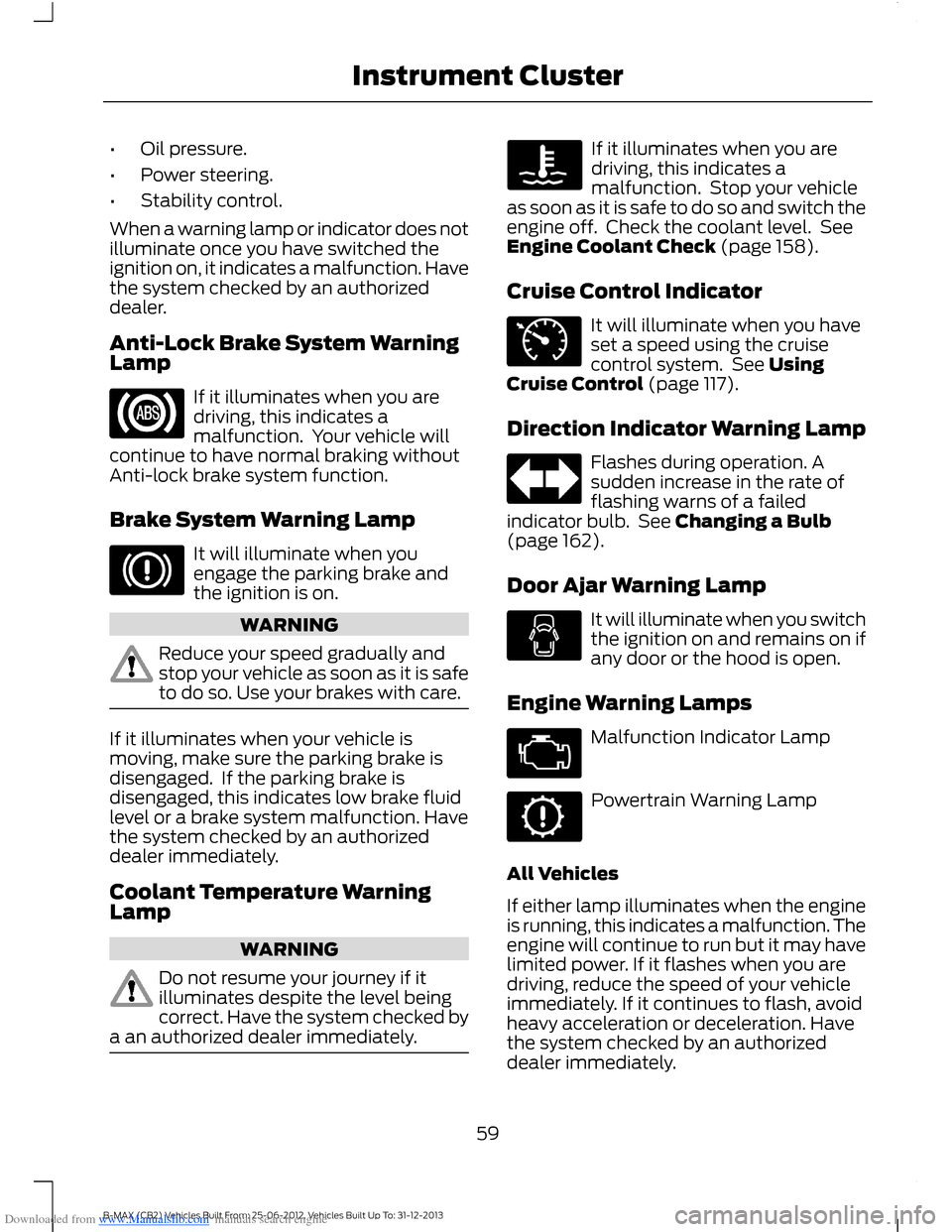
Anti-Lock Brake System WarningLamp
If it illuminates when you aredriving, this indicates amalfunction. Your vehicle willcontinue to have normal braking withoutAnti-lock brake system function.
Brake System Warning Lamp
It will illuminate when youengage the parking brake andthe ignition is on.
WARNING
Reduce your speed gradually andstop your vehicle as soon as it is safeto do so. Use your brakes with care.
If it illuminates when your vehicle ismoving, make sure the parking brake isdisengaged. If the parking brake isdisengaged, this indicates low brake fluidlevel or a brake system malfunction. Havethe system checked by an authorizeddealer immediately.
Coolant Temperature WarningLamp
WARNING
Do not resume your journey if itilluminates despite the level beingcorrect. Have the system checked bya an authorized dealer immediately.
If it illuminates when you aredriving, this indicates amalfunction. Stop your vehicleas soon as it is safe to do so and switch theengine off. Check the coolant level. SeeEngine Coolant Check (page 158).
Cruise Control Indicator
It will illuminate when you haveset a speed using the cruisecontrol system. See UsingCruise Control (page 117).
Direction Indicator Warning Lamp
Flashes during operation. Asudden increase in the rate offlashing warns of a failedindicator bulb. See Changing a Bulb(page 162).
Door Ajar Warning Lamp
It will illuminate when you switchthe ignition on and remains on ifany door or the hood is open.
Engine Warning Lamps
Malfunction Indicator Lamp
Powertrain Warning Lamp
All Vehicles
If either lamp illuminates when the engineis running, this indicates a malfunction. Theengine will continue to run but it may havelimited power. If it flashes when you aredriving, reduce the speed of your vehicleimmediately. If it continues to flash, avoidheavy acceleration or deceleration. Havethe system checked by an authorizeddealer immediately.
59B-MAX (CB2) Vehicles Built From: 25-06-2012, Vehicles Built Up To: 31-12-2013Instrument Cluster
Page 62 of 298
Downloaded from www.Manualslib.com manuals search engine WARNING
Have this checked immediately.
If both lamps illuminate together, stop yourvehicle as soon as it is safe to do so(continued use may cause reduced powerand cause the engine to stop). Switch theignition off and attempt to restart theengine. If the engine restarts have thesystem checked by an authorized dealerimmediately.
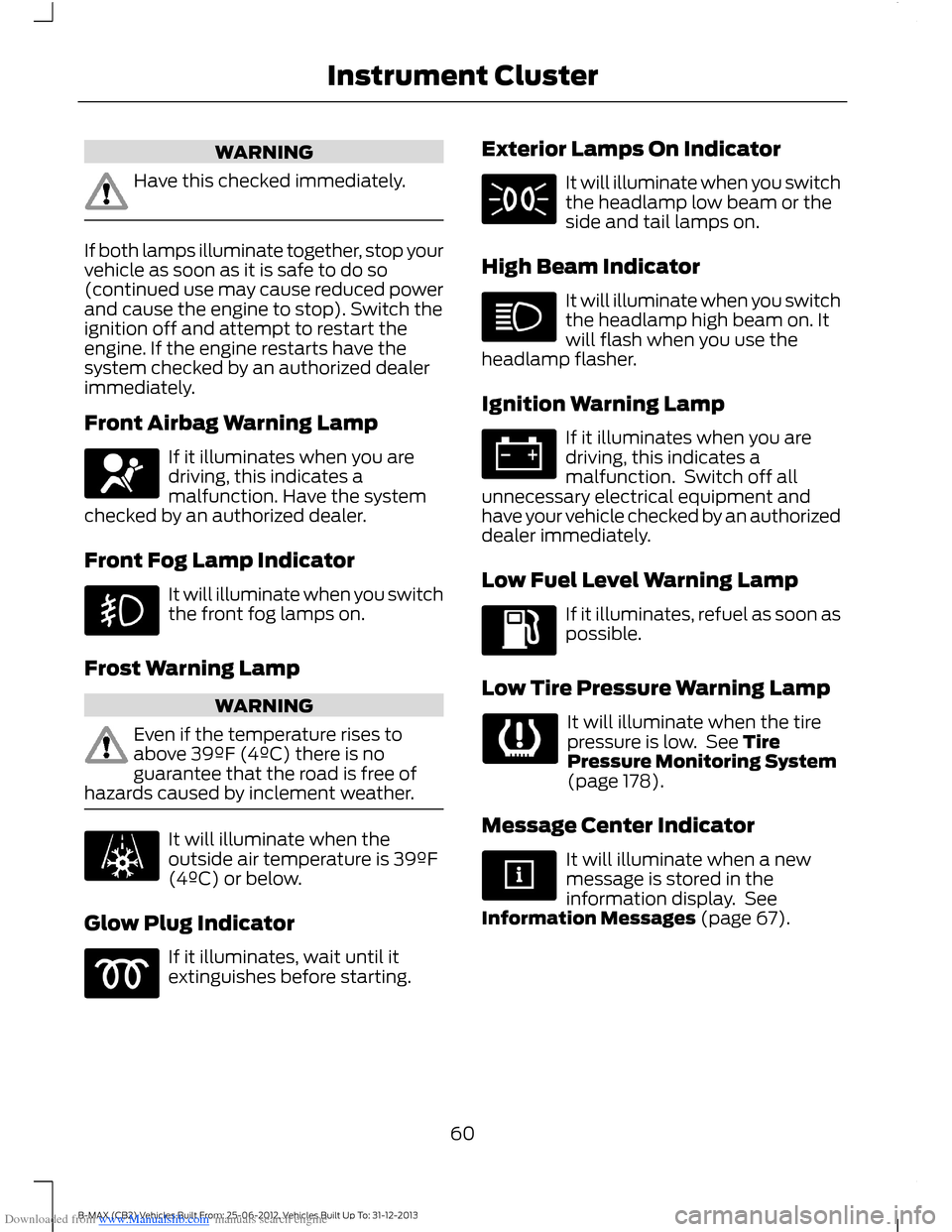
Front Airbag Warning Lamp
If it illuminates when you aredriving, this indicates amalfunction. Have the systemchecked by an authorized dealer.
Front Fog Lamp Indicator
It will illuminate when you switchthe front fog lamps on.
Frost Warning Lamp
WARNING
Even if the temperature rises toabove 39ºF (4ºC) there is noguarantee that the road is free ofhazards caused by inclement weather.
It will illuminate when theoutside air temperature is 39ºF(4ºC) or below.
Glow Plug Indicator
If it illuminates, wait until itextinguishes before starting.
Exterior Lamps On Indicator
It will illuminate when you switchthe headlamp low beam or theside and tail lamps on.
High Beam Indicator
It will illuminate when you switchthe headlamp high beam on. Itwill flash when you use theheadlamp flasher.
Ignition Warning Lamp
If it illuminates when you aredriving, this indicates amalfunction. Switch off allunnecessary electrical equipment andhave your vehicle checked by an authorizeddealer immediately.
Low Fuel Level Warning Lamp
If it illuminates, refuel as soon aspossible.
Low Tire Pressure Warning Lamp
It will illuminate when the tirepressure is low. See TirePressure Monitoring System(page 178).
Message Center Indicator
It will illuminate when a newmessage is stored in theinformation display. SeeInformation Messages (page 67).
60B-MAX (CB2) Vehicles Built From: 25-06-2012, Vehicles Built Up To: 31-12-2013Instrument Cluster
Page 63 of 298
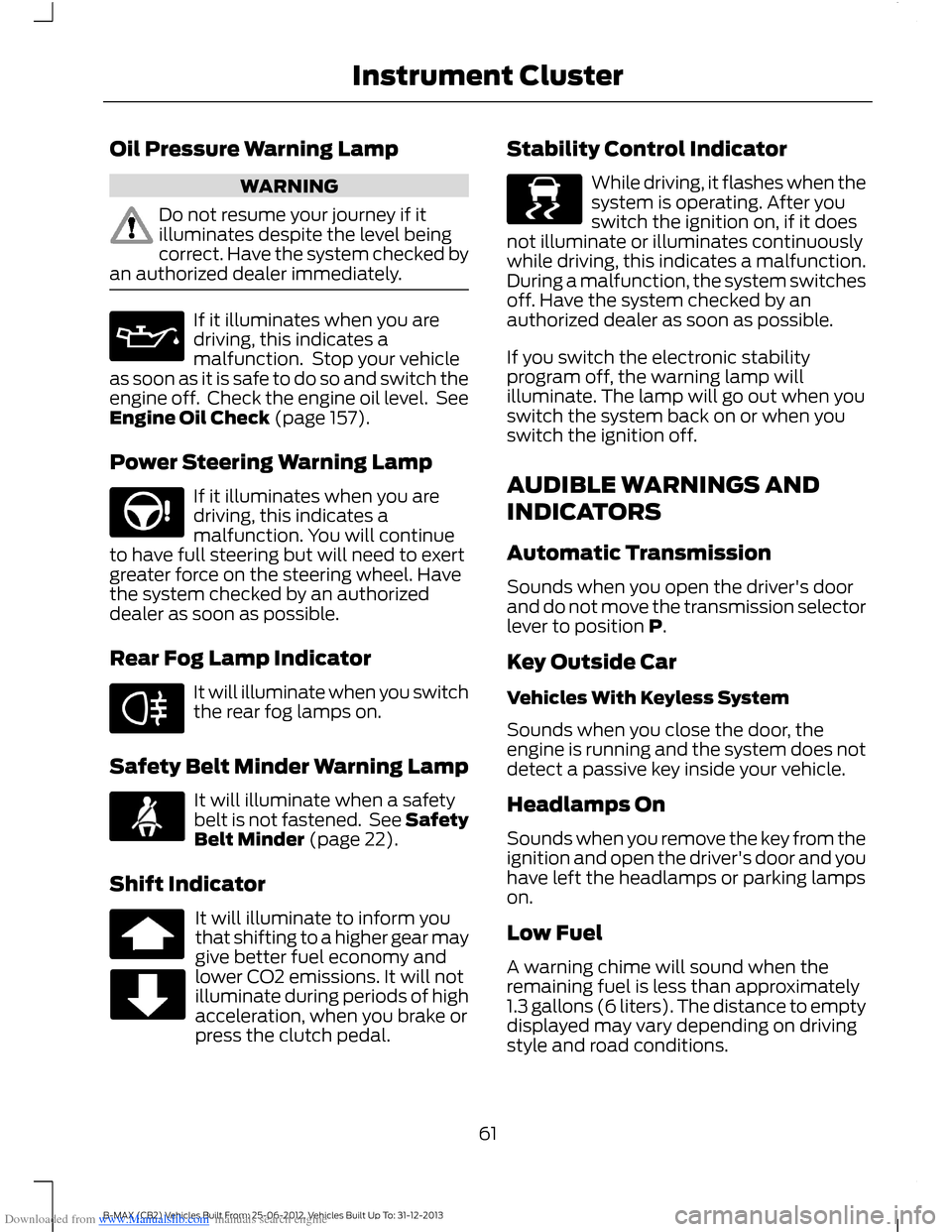
Downloaded from www.Manualslib.com manuals search engine Oil Pressure Warning Lamp
WARNING
Do not resume your journey if itilluminates despite the level beingcorrect. Have the system checked byan authorized dealer immediately.
If it illuminates when you aredriving, this indicates amalfunction. Stop your vehicleas soon as it is safe to do so and switch theengine off. Check the engine oil level. SeeEngine Oil Check (page 157).
Power Steering Warning Lamp
If it illuminates when you aredriving, this indicates amalfunction. You will continueto have full steering but will need to exertgreater force on the steering wheel. Havethe system checked by an authorizeddealer as soon as possible.
Rear Fog Lamp Indicator
It will illuminate when you switchthe rear fog lamps on.
Safety Belt Minder Warning Lamp
It will illuminate when a safetybelt is not fastened. See SafetyBelt Minder (page 22).
Shift Indicator
It will illuminate to inform youthat shifting to a higher gear maygive better fuel economy andlower CO2 emissions. It will notilluminate during periods of highacceleration, when you brake orpress the clutch pedal.
Stability Control Indicator
While driving, it flashes when thesystem is operating. After youswitch the ignition on, if it doesnot illuminate or illuminates continuouslywhile driving, this indicates a malfunction.During a malfunction, the system switchesoff. Have the system checked by anauthorized dealer as soon as possible.
If you switch the electronic stabilityprogram off, the warning lamp willilluminate. The lamp will go out when youswitch the system back on or when youswitch the ignition off.
AUDIBLE WARNINGS AND
INDICATORS
Automatic Transmission
Sounds when you open the driver's doorand do not move the transmission selectorlever to position P.
Key Outside Car
Vehicles With Keyless System
Sounds when you close the door, theengine is running and the system does notdetect a passive key inside your vehicle.
Headlamps On
Sounds when you remove the key from theignition and open the driver's door and youhave left the headlamps or parking lampson.
Low Fuel
A warning chime will sound when theremaining fuel is less than approximately1.3 gallons (6 liters). The distance to emptydisplayed may vary depending on drivingstyle and road conditions.
61B-MAX (CB2) Vehicles Built From: 25-06-2012, Vehicles Built Up To: 31-12-2013Instrument Cluster
Page 65 of 298
Downloaded from www.Manualslib.com manuals search engine GENERAL INFORMATION
WARNING
Driving while distracted can result inloss of vehicle control, crash andinjury. We strongly recommend thatyou use extreme caution when using anydevice that may take your focus off theroad. Your primary responsibility is the safeoperation of your vehicle. We recommendagainst the use of any hand-held devicewhile driving and encourage the use ofvoice-operated systems when possible.Make sure you are aware of all applicablelocal laws that may affect the use ofelectronic devices while driving.
Note:The information display will remainon for several minutes after you switch theignition off.
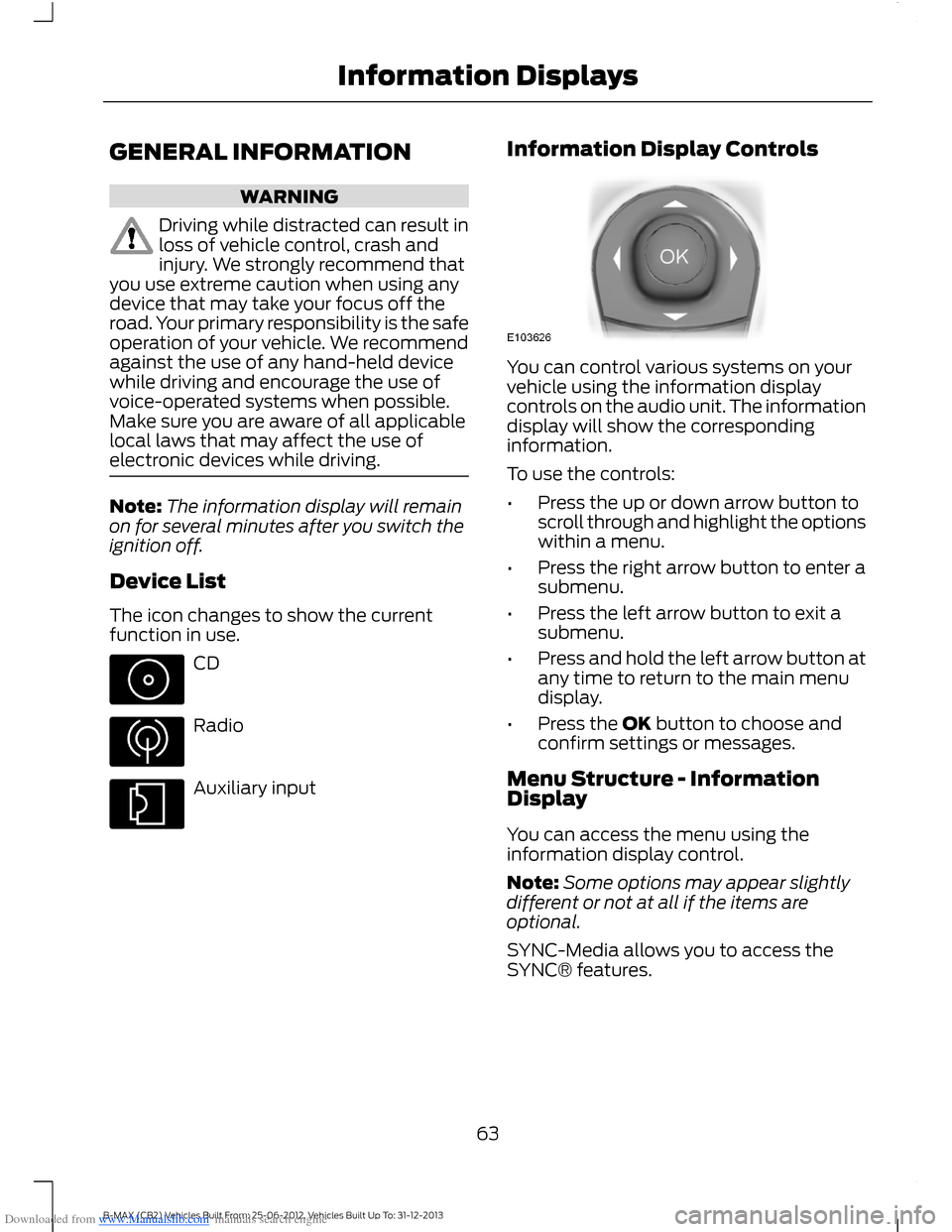
Device List
The icon changes to show the currentfunction in use.
CD
Radio
Auxiliary input
Information Display Controls
You can control various systems on yourvehicle using the information displaycontrols on the audio unit. The informationdisplay will show the correspondinginformation.
To use the controls:
•Press the up or down arrow button toscroll through and highlight the optionswithin a menu.
•Press the right arrow button to enter asubmenu.
•Press the left arrow button to exit asubmenu.
•Press and hold the left arrow button atany time to return to the main menudisplay.
•Press the OK button to choose andconfirm settings or messages.
Menu Structure - InformationDisplay
You can access the menu using theinformation display control.
Note:Some options may appear slightlydifferent or not at all if the items areoptional.
SYNC-Media allows you to access theSYNC® features.
63B-MAX (CB2) Vehicles Built From: 25-06-2012, Vehicles Built Up To: 31-12-2013Information Displays
Page 68 of 298
Downloaded from www.Manualslib.com manuals search engine Menu
Active City Stop
Speed limit
Speed warning
Volume limit
Information
Clear all MyKeys
InformationMyKey active
System Check
All active warnings will display first ifapplicable. The system check menu mayappear different based upon equipmentoptions and current vehicle status. Pressthe up or down arrow button to scrollthrough the list.
CLOCK
Type 1
To adjust the clock, switch the ignition onand press buttons H or M on theinformation and entertainment display asnecessary.
Type 2
Note:Use the information display to adjustthe clock. See General Information (page63).
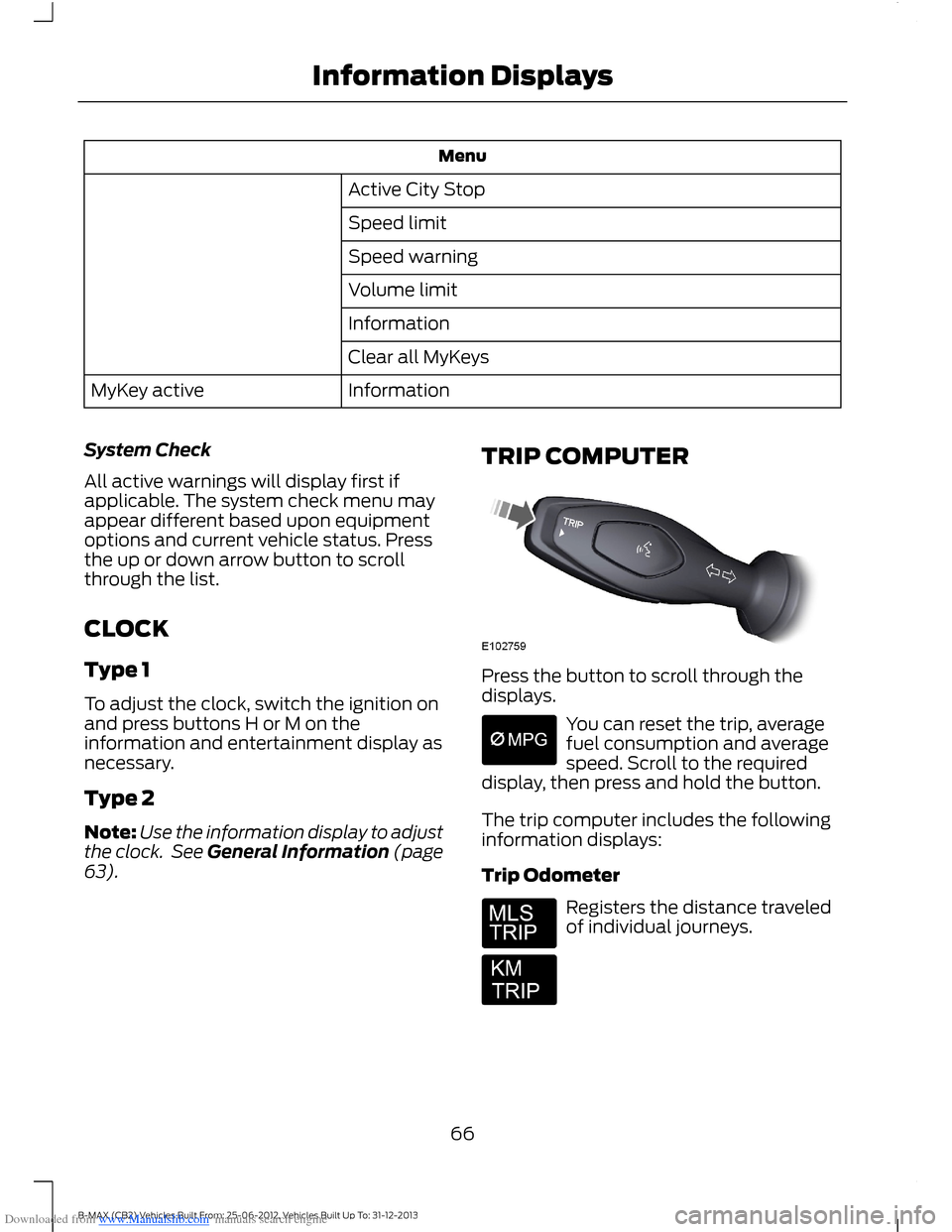
TRIP COMPUTER
Press the button to scroll through thedisplays.
You can reset the trip, averagefuel consumption and averagespeed. Scroll to the requireddisplay, then press and hold the button.
The trip computer includes the followinginformation displays:
Trip Odometer
Registers the distance traveledof individual journeys.
66B-MAX (CB2) Vehicles Built From: 25-06-2012, Vehicles Built Up To: 31-12-2013Information Displays
Page 72 of 298
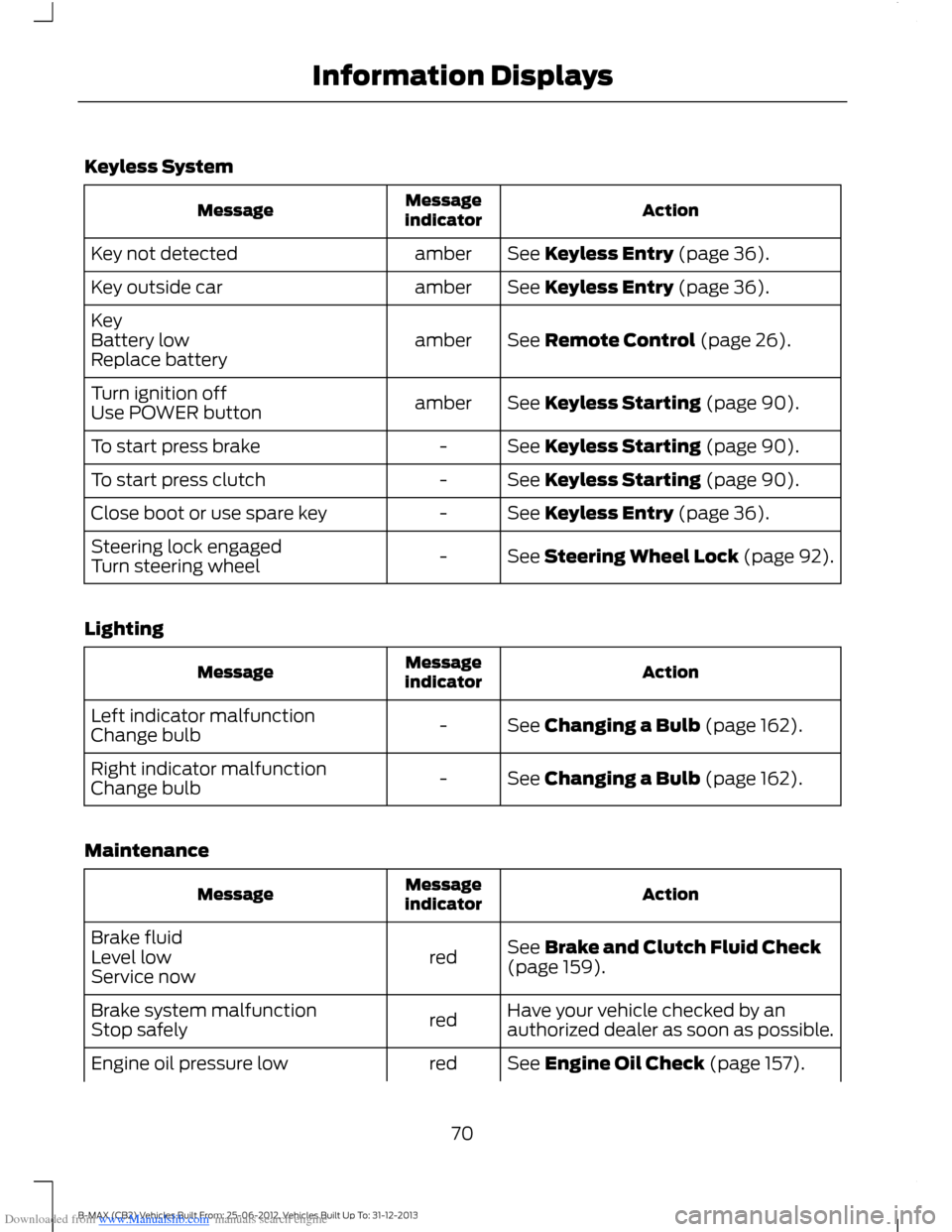
Downloaded from www.Manualslib.com manuals search engine Keyless System
ActionMessageindicatorMessage
See Keyless Entry (page 36).amberKey not detected
See Keyless Entry (page 36).amberKey outside car
See Remote Control (page 26).amberKeyBattery lowReplace battery
See Keyless Starting (page 90).amberTurn ignition offUse POWER button
See Keyless Starting (page 90).-To start press brake
See Keyless Starting (page 90).-To start press clutch
See Keyless Entry (page 36).-Close boot or use spare key
See Steering Wheel Lock (page 92).-Steering lock engagedTurn steering wheel
Lighting
ActionMessageindicatorMessage
See Changing a Bulb (page 162).-Left indicator malfunctionChange bulb
See Changing a Bulb (page 162).-Right indicator malfunctionChange bulb
Maintenance
ActionMessageindicatorMessage
See Brake and Clutch Fluid Check(page 159).redBrake fluidLevel lowService now
Have your vehicle checked by anauthorized dealer as soon as possible.redBrake system malfunctionStop safely
See Engine Oil Check (page 157).redEngine oil pressure low
70B-MAX (CB2) Vehicles Built From: 25-06-2012, Vehicles Built Up To: 31-12-2013Information Displays
Page 75 of 298
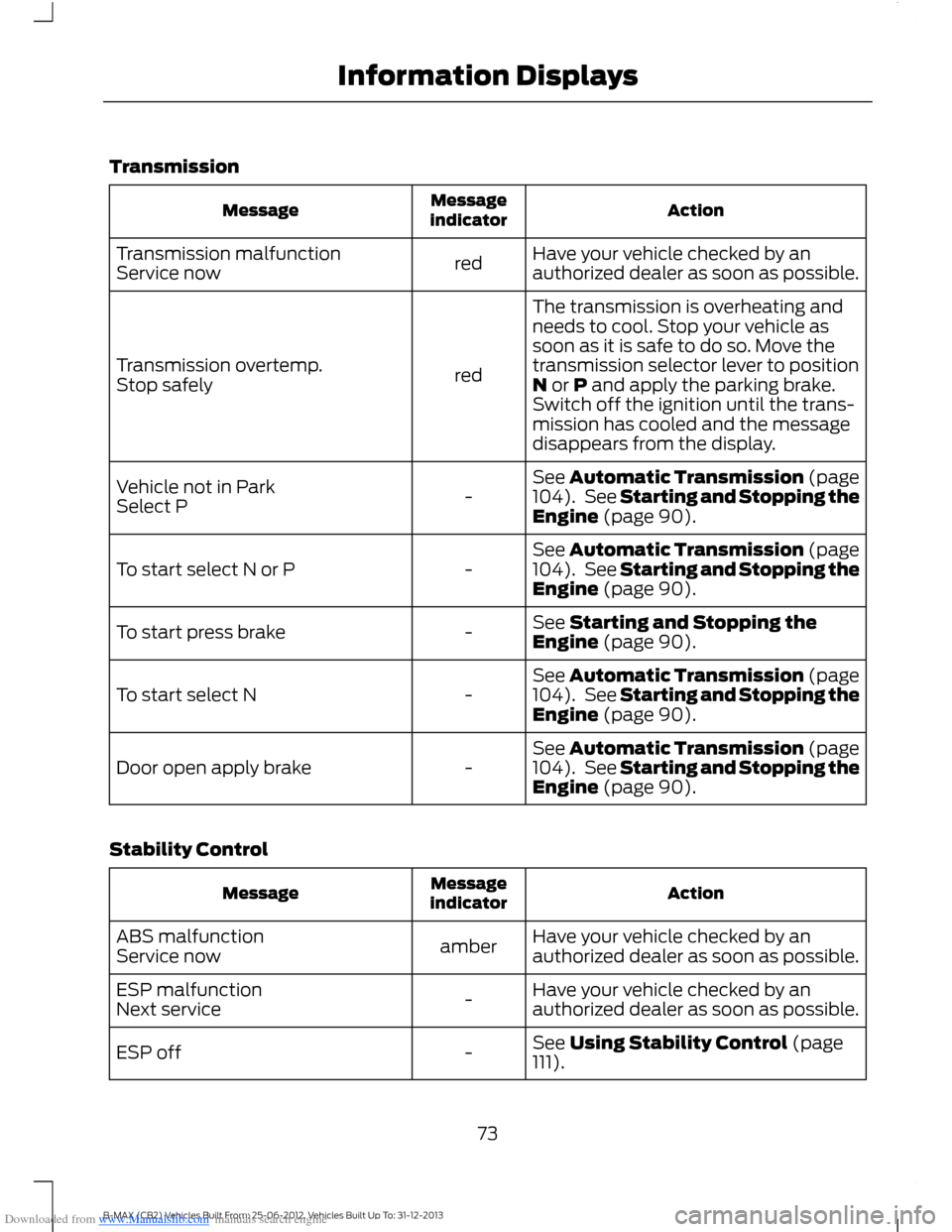
Downloaded from www.Manualslib.com manuals search engine Transmission
ActionMessageindicatorMessage
Have your vehicle checked by anauthorized dealer as soon as possible.redTransmission malfunctionService now
The transmission is overheating andneeds to cool. Stop your vehicle assoon as it is safe to do so. Move thetransmission selector lever to positionN or P and apply the parking brake.Switch off the ignition until the trans-mission has cooled and the messagedisappears from the display.
redTransmission overtemp.Stop safely
See Automatic Transmission (page104). See Starting and Stopping theEngine (page 90).-Vehicle not in ParkSelect P
See Automatic Transmission (page104). See Starting and Stopping theEngine (page 90).-To start select N or P
See Starting and Stopping theEngine (page 90).-To start press brake
See Automatic Transmission (page104). See Starting and Stopping theEngine (page 90).-To start select N
See Automatic Transmission (page104). See Starting and Stopping theEngine (page 90).-Door open apply brake
Stability Control
ActionMessageindicatorMessage
Have your vehicle checked by anauthorized dealer as soon as possible.amberABS malfunctionService now
Have your vehicle checked by anauthorized dealer as soon as possible.-ESP malfunctionNext service
See Using Stability Control (page111).-ESP off
73B-MAX (CB2) Vehicles Built From: 25-06-2012, Vehicles Built Up To: 31-12-2013Information Displays
Page 89 of 298
Downloaded from www.Manualslib.com manuals search engine HEATED SEATS
WARNING
People who are unable to feel painto their skin because of advancedage, chronic illness, diabetes, spinalcord injury, medication, alcohol use,exhaustion or other physical conditions,must exercise care when using the heatedseat. The heated seat may cause burnseven at low temperatures, especially ifused for long periods of time. Do not placeanything on the seat that insulates againstheat, such as a blanket or cushion. Thismay cause the heated seat to overheat.Do not puncture the seat with pins, needlesor other pointed objects. This may damagethe heating element which may cause theheated seat to overheat. An overheatedseat may cause serious personal injury.
Do not do the following:
•Place heavy objects on the seat.
•Operate the heated seat if water or anyother liquid is spilled on the seat. Allowthe seat to dry thoroughly.
•Operate the heated seats unless theengine is running. Doing so could drainyour vehicle battery.
For item location: See Climate Control(page 75).
The heated seat will only operate with theignition switched on.
The maximum temperature is reachedafter five or six minutes. It is regulatedthermostatically.
The heated seat will remain on until eitherthe heated seat switch or the ignition isswitched off.
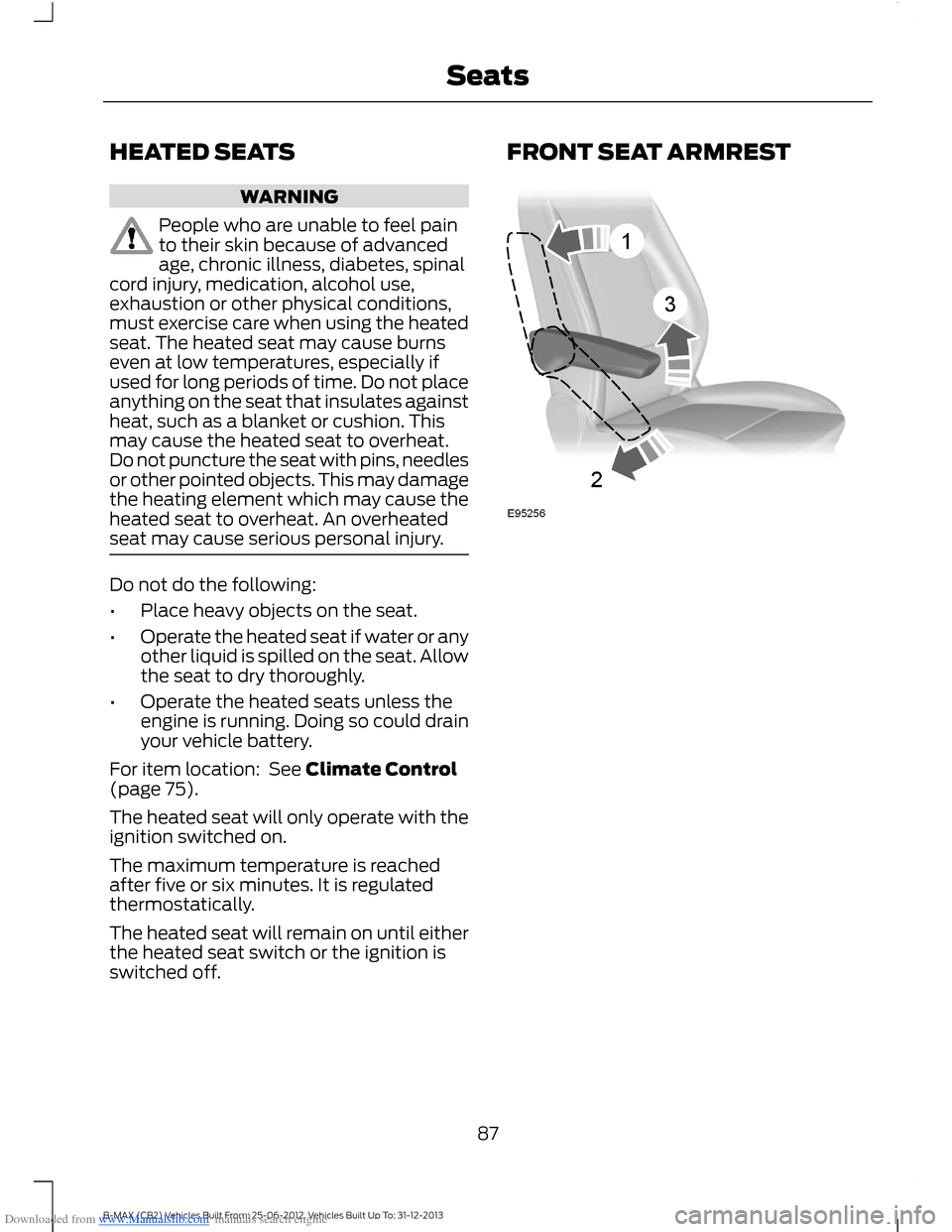
FRONT SEAT ARMREST
87B-MAX (CB2) Vehicles Built From: 25-06-2012, Vehicles Built Up To: 31-12-2013Seats
Page 90 of 298
Downloaded from www.Manualslib.com manuals search engine 12 Volt DC Power Point
WARNING
Do not plug optional electricalaccessories into the cigar lightersocket. Incorrect use of the lightercan cause damage not covered by yourwarranty, and can result in fire or seriousinjury.
Note:When you switch the ignition on, youcan use the socket to power 12 voltappliances with a maximum current ratingof 20 amps.
After you switch the ignition off the powersupply will only work for a maximum of 30minutes.Note:Do not insert objects other than anaccessory plug into the power point. Thiswill damage the outlet and blow the fuse.
Note:Do not hang any type of accessory oraccessory bracket from the plug.
Note:Do not use the power point over thevehicle capacity of 12 volt DC 180 watt or afuse may blow.
Note:Do not use the power point foroperating a cigar lighter element.
Note:Incorrect use of the power point cancause damage not covered by yourwarranty.
Note:Always keep the power point capsclosed when not in use.
Run the engine for full capacity use of thepower point.
To prevent the battery from running out ofcharge:
•Do not use the power point longer thannecessary when the engine is notrunning.
•Do not leave devices plugged inovernight or when your vehicle isparked for extended periods.
Location
Power points may be found:
•on the center console
•on the rear of the center console.
CIGAR LIGHTER
Note:Do not hold the cigar lighter elementpressed in.
Note:If you use the socket when the engineis not running, the battery may lose charge.
Note:When you switch the ignition on, youcan use the socket to power 12 voltappliances with a maximum current ratingof 20 amps.
Note:After you switch the ignition off thepower supply will only work for a maximumof 30 minutes.
Note:Use only Ford accessory connectorsor connectors specified for use with SAEstandard sockets.
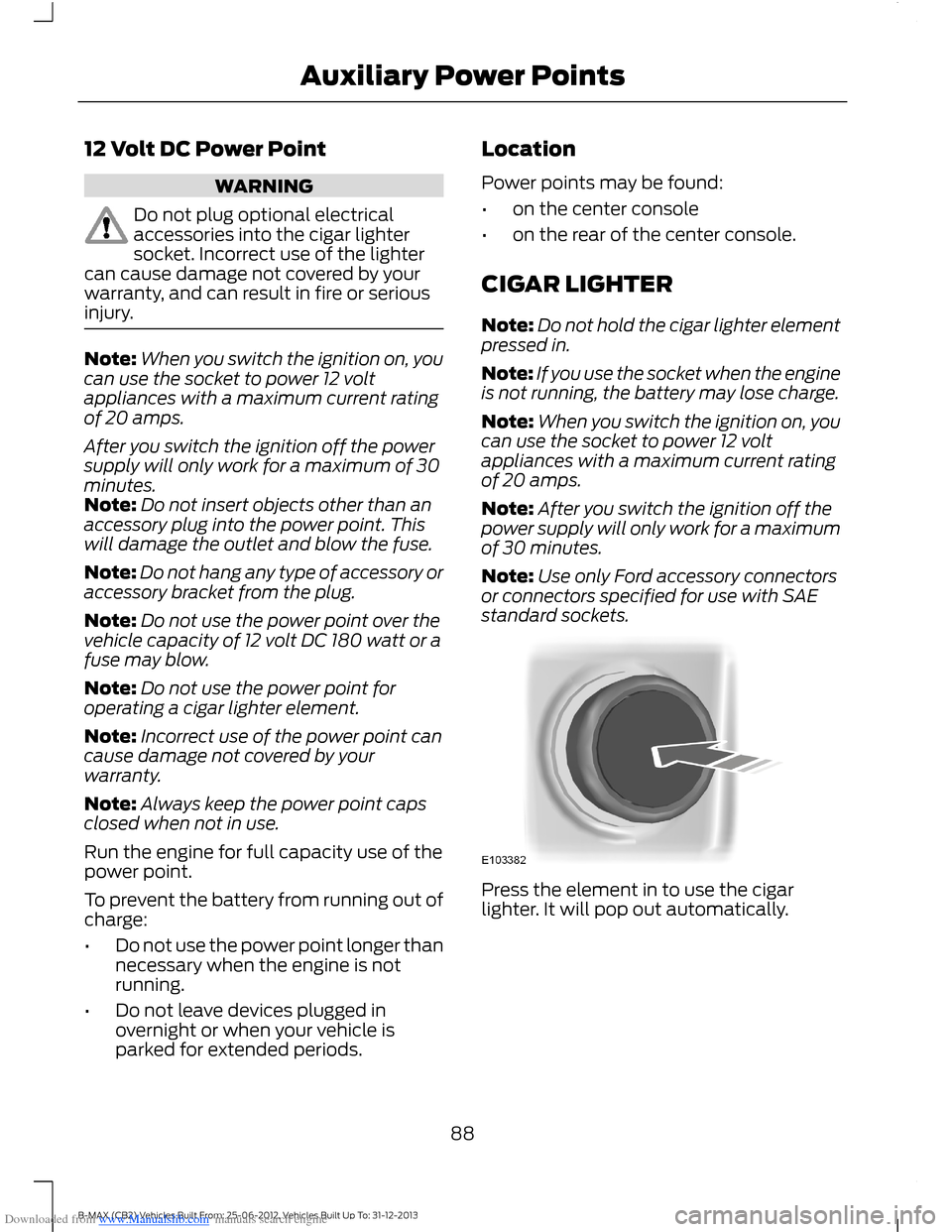
Press the element in to use the cigarlighter. It will pop out automatically.
88B-MAX (CB2) Vehicles Built From: 25-06-2012, Vehicles Built Up To: 31-12-2013Auxiliary Power Points
Page 92 of 298
Downloaded from www.Manualslib.com manuals search engine GENERAL INFORMATION
WARNINGS
Extended idling at high enginespeeds can produce very hightemperatures in the engine andexhaust system, creating the risk of fire orother damage.
Do not park, idle or drive your vehicleon dry grass or other dry groundcover. The emission system heats upthe engine compartment and exhaustsystem, creating the risk of fire.
Do not start the engine in a closedgarage or in other enclosed areas.Exhaust fumes can be toxic. Alwaysopen the garage door before you start theengine.
If you smell exhaust fumes insideyour vehicle, have your vehiclechecked by an authorized dealerimmediately. Do not drive your vehicle ifyou smell exhaust fumes.
If you disconnect the battery, your vehiclemay exhibit some unusual drivingcharacteristics for approximately 5 miles(8 kilometers) after you reconnect it. Thisis because the engine management systemmust realign itself with the engine. You candisregard any unusual drivingcharacteristics during this period.
The powertrain control system meets allCanadian interference-causing equipmentstandard requirements regulating theimpulse electrical field or radio noise.
When you start the engine, avoid pressingthe accelerator pedal before and duringoperation. Only use the accelerator pedalwhen you have difficulty starting theengine.
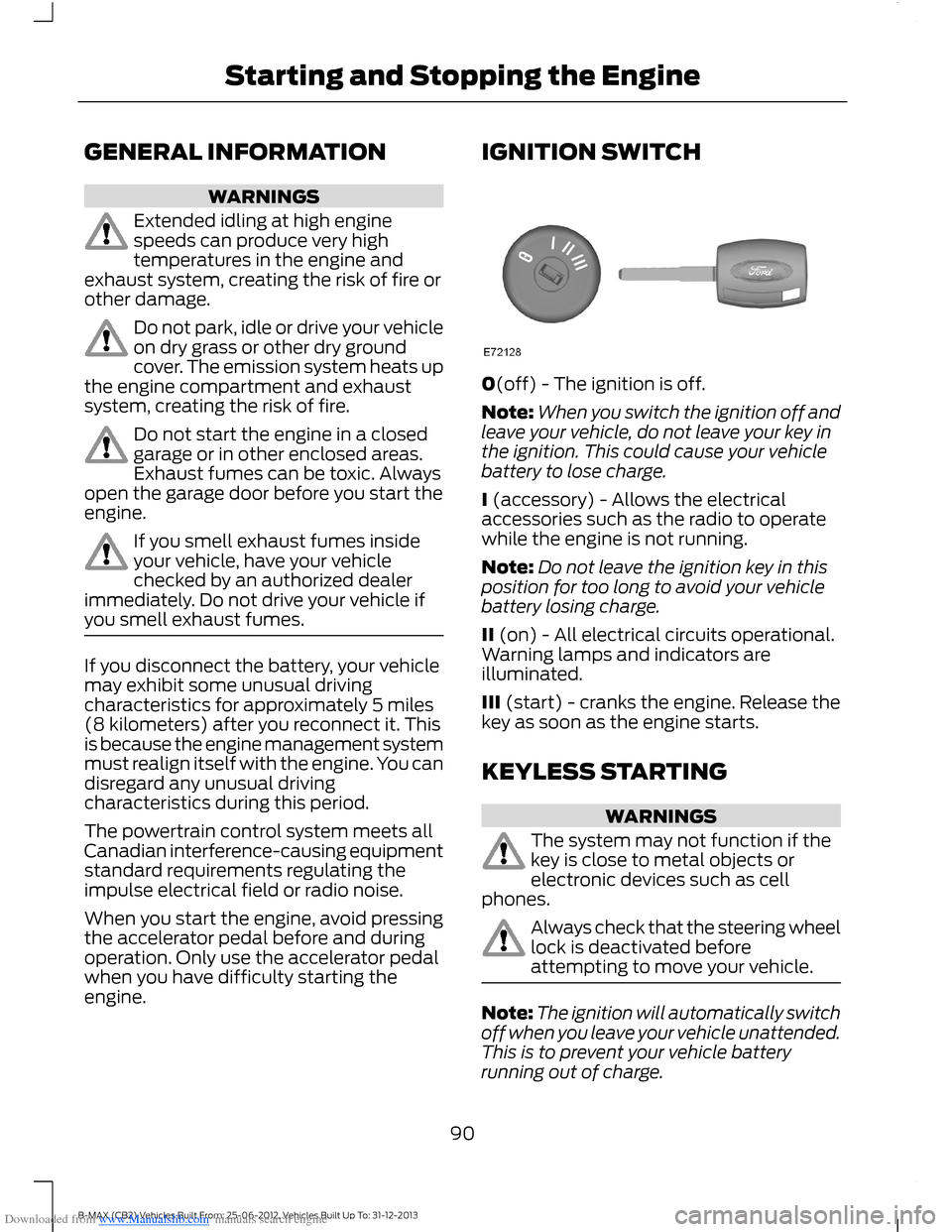
IGNITION SWITCH
0(off) - The ignition is off.
Note:When you switch the ignition off andleave your vehicle, do not leave your key inthe ignition. This could cause your vehiclebattery to lose charge.
I (accessory) - Allows the electricalaccessories such as the radio to operatewhile the engine is not running.
Note:Do not leave the ignition key in thisposition for too long to avoid your vehiclebattery losing charge.
II (on) - All electrical circuits operational.Warning lamps and indicators areilluminated.
III (start) - cranks the engine. Release thekey as soon as the engine starts.
KEYLESS STARTING
WARNINGS
The system may not function if thekey is close to metal objects orelectronic devices such as cellphones.
Always check that the steering wheellock is deactivated beforeattempting to move your vehicle.
Note:The ignition will automatically switchoff when you leave your vehicle unattended.This is to prevent your vehicle batteryrunning out of charge.
90B-MAX (CB2) Vehicles Built From: 25-06-2012, Vehicles Built Up To: 31-12-2013Starting and Stopping the Engine