ignition FORD B MAX 2013 1.G Repair Manual
[x] Cancel search | Manufacturer: FORD, Model Year: 2013, Model line: B MAX, Model: FORD B MAX 2013 1.GPages: 298, PDF Size: 20.63 MB
Page 181 of 298
Downloaded from www.Manualslib.com manuals search engine System Reset
Note:Do not reset the system when yourvehicle is moving.
Note:You should reset the systemfollowing any adjustment to the tirepressures or any changing of tires.
1.Switch the ignition on.
2.Using the information display control,navigate to Menu > Vehicle settings> Deflation detection.
3.Press and hold the OK button untilconfirmation appears.
CHANGING A ROAD WHEEL
Lug Nuts
You can obtain a replacement locking lugnut key and replacement locking lug nutsfrom your dealer using the referencenumber certificate.
Vehicles With a Spare Wheel
If the spare wheel is exactly the same typeand size as the other fitted road wheels,you can replace the existing road wheelwith the spare wheel and continue to drivein the normal manner.
If the spare wheel is different to the otherroad wheels, it will carry a yellow label withthe appropriate speed limit.
Refer to the following information beforechanging the road wheel.
WARNINGS
Drive the shortest possible distances.
Do not fit more than one spare wheelon your vehicle at any one time.
Do not carry out any tire repairs on aspare wheel.
WARNINGS
Do not drive through an automaticcar wash.
If you are unsure what type of sparewheel you have do not exceed 80km/h (50 mph).
Only fit snow chains to specifiedtires. See Technical Specifications(page 183).
The ground clearance of your vehiclemay be reduced. Take care whenparking next to a curb.
Note:Your vehicle may exhibit someunusual driving characteristics.
Vehicle Jack
WARNINGS
The vehicle jack supplied with yourvehicle should only be used whenchanging a wheel in emergencysituations.
Before using the vehicle jack, checkthat it is not damaged or deformedand that the thread is lubricated andfree from foreign matter.
Never place anything between thejack and the ground, or the jack andyour vehicle.
Note:Vehicles with a temporary mobilitykit do not have a vehicle jack or a wheelbrace.
It is recommended to use a workshop typehydraulic jack for changing betweensummer and winter tires.
Note:Use a jack with a minimum liftingcapacity of 1.5 tonnes and a lifting plate witha minimum diameter of 3.1 inches (80millimeters).
179B-MAX (CB2) Vehicles Built From: 25-06-2012, Vehicles Built Up To: 31-12-2013Wheels and Tires
Page 184 of 298
Downloaded from www.Manualslib.com manuals search engine Note:Make sure that you pull the wheeltrim remover at right angles to the trim.
Removing a Road Wheel
WARNINGS
Park your vehicle in such a positionthat neither the traffic nor you arehindered or endangered.
Set up a warning triangle.
Make sure that your vehicle is on firm,level ground with the wheels pointingstraight ahead.
Switch the ignition off and apply theparking brake.
If your vehicle has a manualtransmission, move the selector leverto first or reverse gear. If it has anautomatic transmission, move the selectorlever to position (P).
Have the passengers leave yourvehicle.
Secure the diagonally oppositewheel with an appropriate block orwheel chock.
Make sure that the arrows ondirectional tires point in the directionof rotation when your vehicle ismoving forward. If you have to fit a sparewheel with the arrows pointing in theopposite direction, have the tire refitted inthe correct direction by an authorizeddealer.
Do not work underneath your vehiclewhen it is supported only by a jack.
Make sure that the jack is vertical tothe jacking point and the base is flaton the ground.
Note:Do not lay alloy wheels face downon the ground, this will damage the paint.
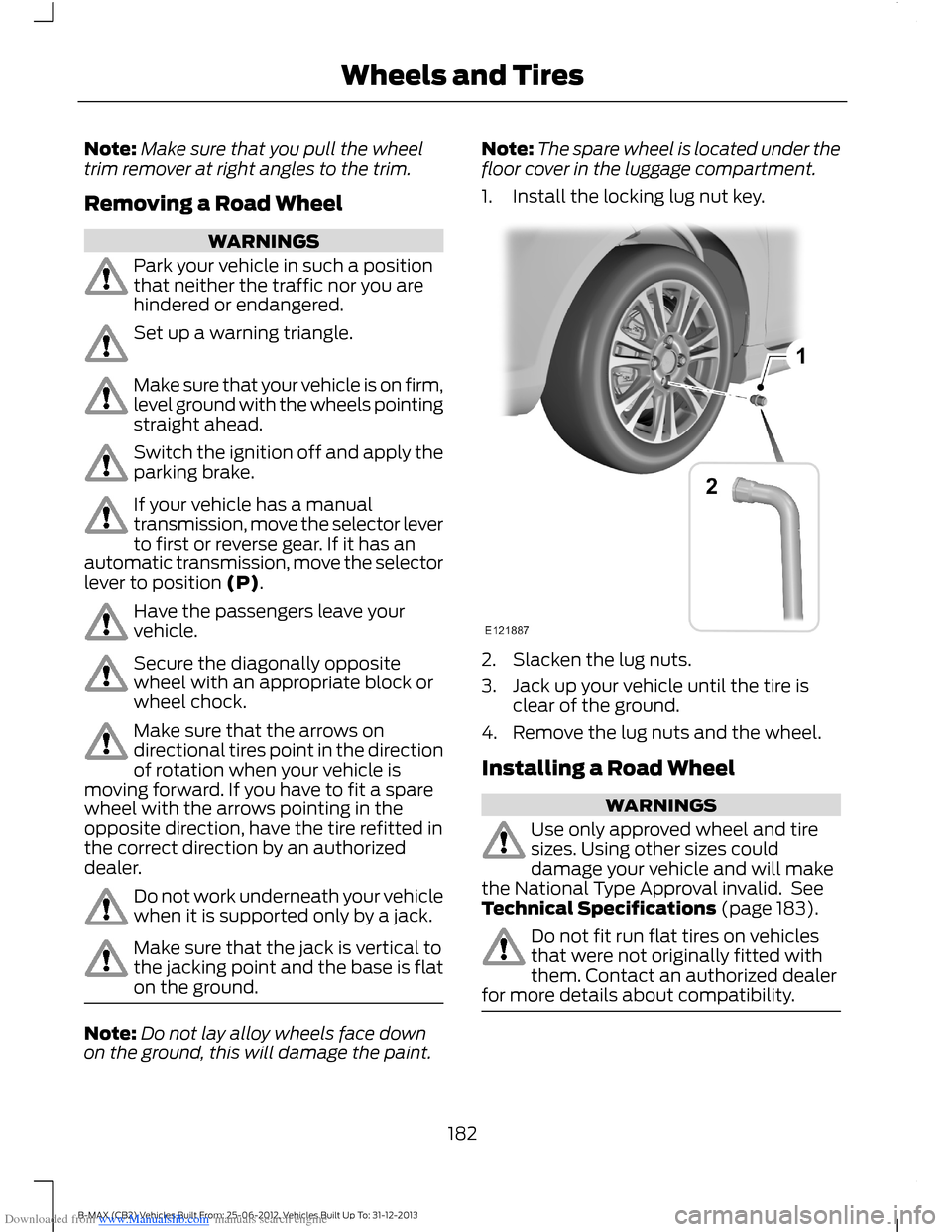
Note:The spare wheel is located under thefloor cover in the luggage compartment.
1.Install the locking lug nut key.
2.Slacken the lug nuts.
3.Jack up your vehicle until the tire isclear of the ground.
4.Remove the lug nuts and the wheel.
Installing a Road Wheel
WARNINGS
Use only approved wheel and tiresizes. Using other sizes coulddamage your vehicle and will makethe National Type Approval invalid. SeeTechnical Specifications (page 183).
Do not fit run flat tires on vehiclesthat were not originally fitted withthem. Contact an authorized dealerfor more details about compatibility.
182B-MAX (CB2) Vehicles Built From: 25-06-2012, Vehicles Built Up To: 31-12-2013Wheels and Tires
Page 201 of 298
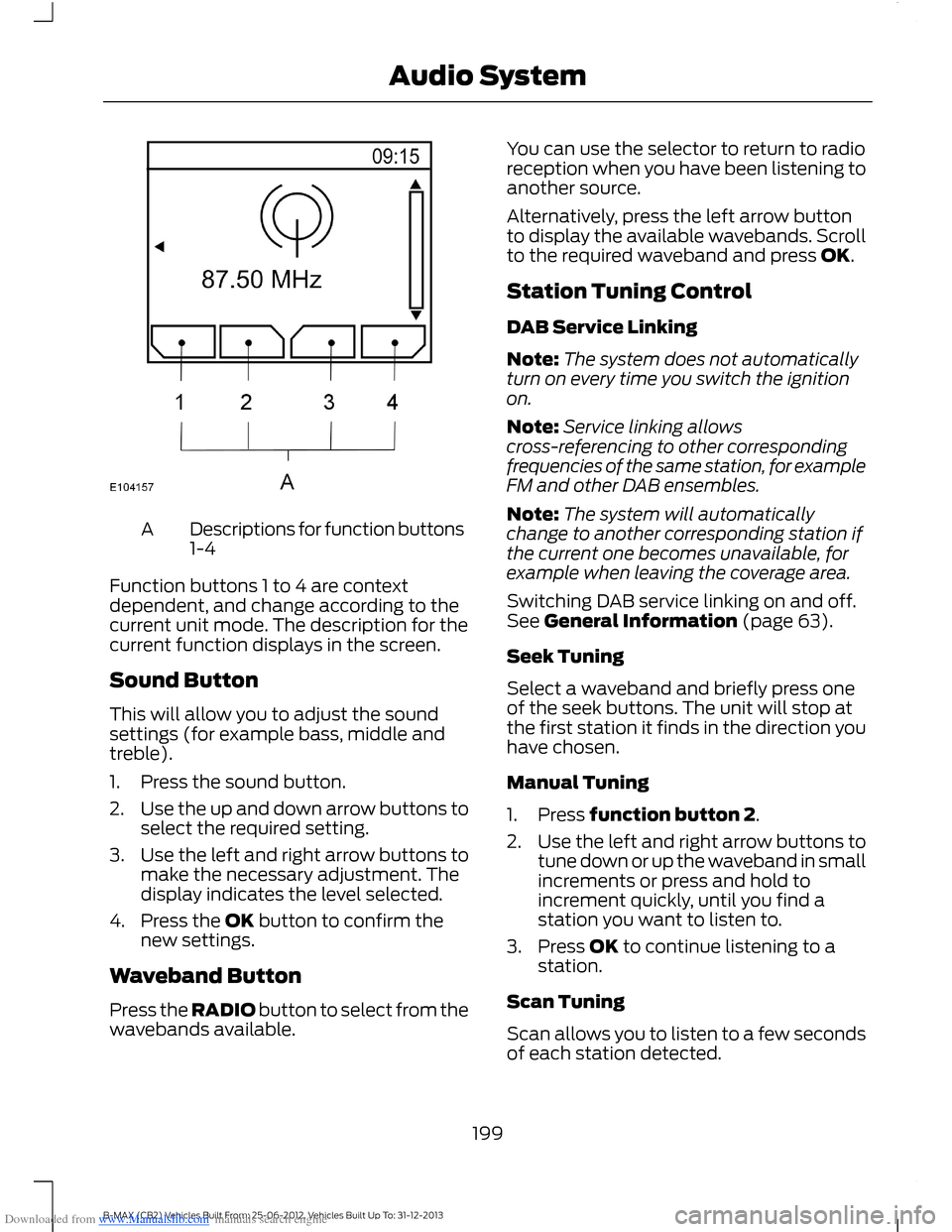
Downloaded from www.Manualslib.com manuals search engine Descriptions for function buttons1-4A
Function buttons 1 to 4 are contextdependent, and change according to thecurrent unit mode. The description for thecurrent function displays in the screen.
Sound Button
This will allow you to adjust the soundsettings (for example bass, middle andtreble).
1.Press the sound button.
2.Use the up and down arrow buttons toselect the required setting.
3.Use the left and right arrow buttons tomake the necessary adjustment. Thedisplay indicates the level selected.
4.Press the OK button to confirm thenew settings.
Waveband Button
Press the RADIO button to select from thewavebands available.
You can use the selector to return to radioreception when you have been listening toanother source.
Alternatively, press the left arrow buttonto display the available wavebands. Scrollto the required waveband and press OK.
Station Tuning Control
DAB Service Linking
Note:The system does not automaticallyturn on every time you switch the ignitionon.
Note:Service linking allowscross-referencing to other correspondingfrequencies of the same station, for exampleFM and other DAB ensembles.
Note:The system will automaticallychange to another corresponding station ifthe current one becomes unavailable, forexample when leaving the coverage area.
Switching DAB service linking on and off.See General Information (page 63).
Seek Tuning
Select a waveband and briefly press oneof the seek buttons. The unit will stop atthe first station it finds in the direction youhave chosen.
Manual Tuning
1.Press function button 2.
2.Use the left and right arrow buttons totune down or up the waveband in smallincrements or press and hold toincrement quickly, until you find astation you want to listen to.
3.Press OK to continue listening to astation.
Scan Tuning
Scan allows you to listen to a few secondsof each station detected.
199B-MAX (CB2) Vehicles Built From: 25-06-2012, Vehicles Built Up To: 31-12-2013Audio System
Page 212 of 298
Downloaded from www.Manualslib.com manuals search engine Seek down: Press the button to go to the next station down the radio frequencyband or the previous track on a CD, When in CD mode. In phone mode use thebutton to begin a phone call. An incoming phone call can be accepted.
V
RADIO: Press the button to select different radio bands, it will also cancel themenu or list browsing.W
CD: Press the button to change source to CD, it will also cancel the menu orlist browsing.X
Volume: Turn the dial to adjust the volume.Y
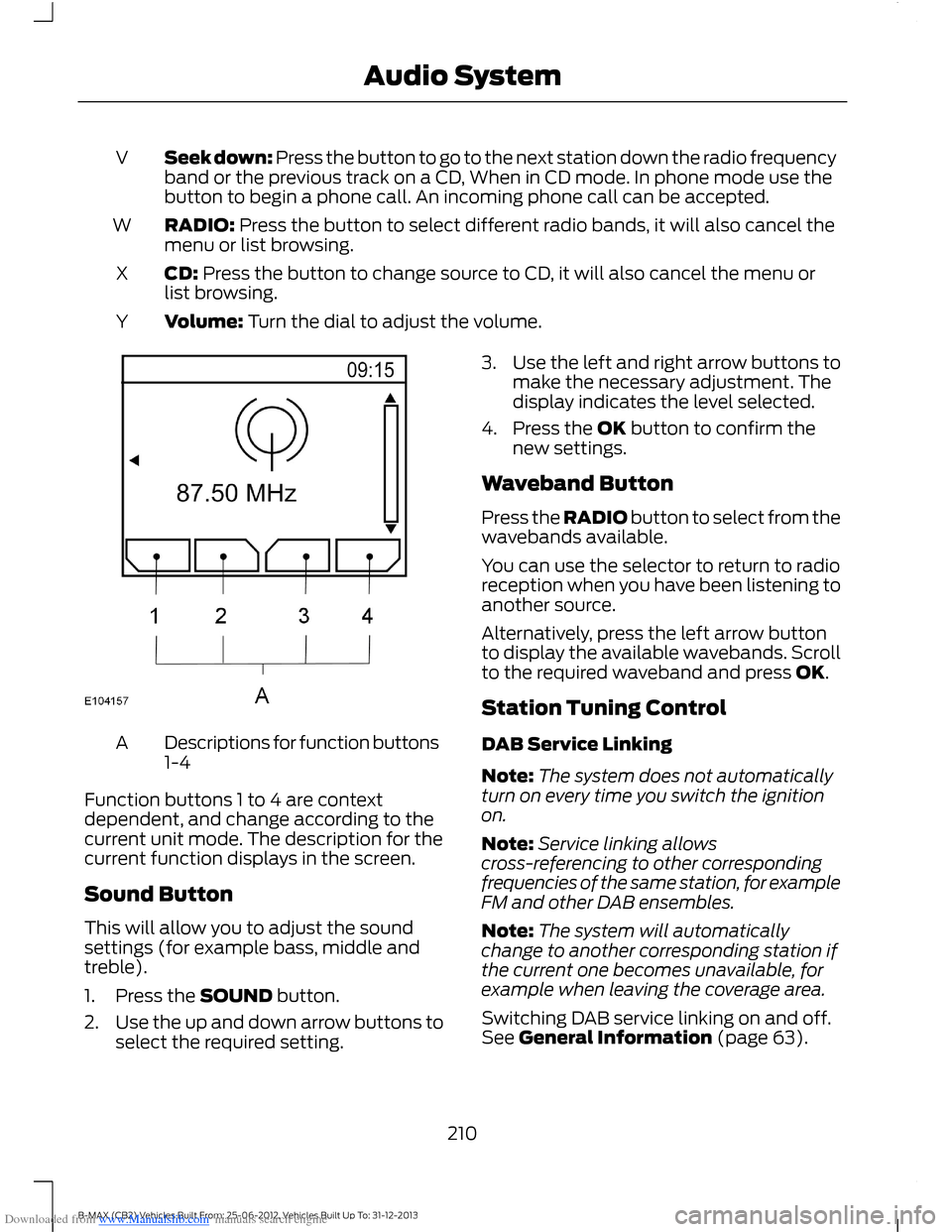
Descriptions for function buttons1-4A
Function buttons 1 to 4 are contextdependent, and change according to thecurrent unit mode. The description for thecurrent function displays in the screen.
Sound Button
This will allow you to adjust the soundsettings (for example bass, middle andtreble).
1.Press the SOUND button.
2.Use the up and down arrow buttons toselect the required setting.
3.Use the left and right arrow buttons tomake the necessary adjustment. Thedisplay indicates the level selected.
4.Press the OK button to confirm thenew settings.
Waveband Button
Press the RADIO button to select from thewavebands available.
You can use the selector to return to radioreception when you have been listening toanother source.
Alternatively, press the left arrow buttonto display the available wavebands. Scrollto the required waveband and press OK.
Station Tuning Control
DAB Service Linking
Note:The system does not automaticallyturn on every time you switch the ignitionon.
Note:Service linking allowscross-referencing to other correspondingfrequencies of the same station, for exampleFM and other DAB ensembles.
Note:The system will automaticallychange to another corresponding station ifthe current one becomes unavailable, forexample when leaving the coverage area.
Switching DAB service linking on and off.See General Information (page 63).
210B-MAX (CB2) Vehicles Built From: 25-06-2012, Vehicles Built Up To: 31-12-2013Audio System
Page 218 of 298
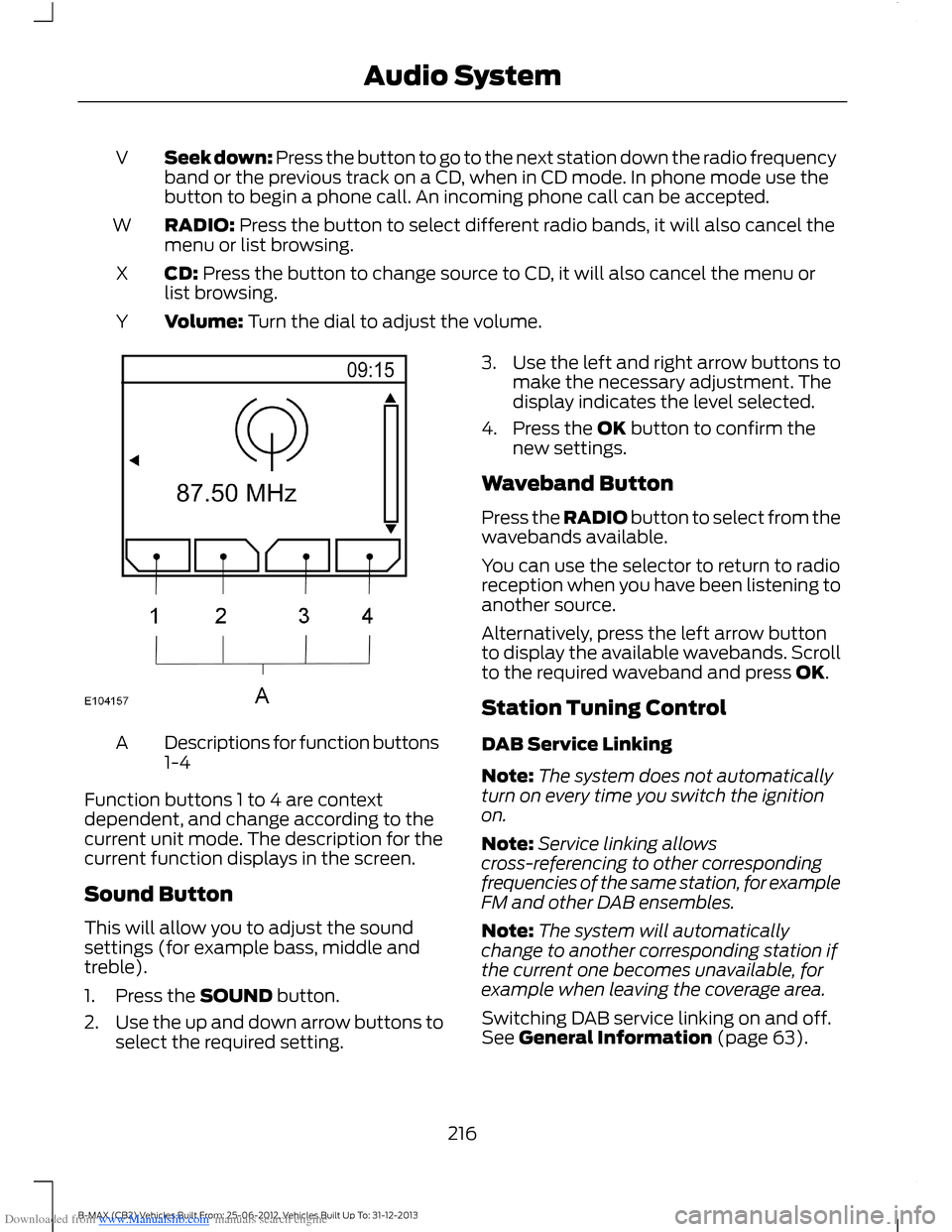
Downloaded from www.Manualslib.com manuals search engine Seek down: Press the button to go to the next station down the radio frequencyband or the previous track on a CD, when in CD mode. In phone mode use thebutton to begin a phone call. An incoming phone call can be accepted.
V
RADIO: Press the button to select different radio bands, it will also cancel themenu or list browsing.W
CD: Press the button to change source to CD, it will also cancel the menu orlist browsing.X
Volume: Turn the dial to adjust the volume.Y
Descriptions for function buttons1-4A
Function buttons 1 to 4 are contextdependent, and change according to thecurrent unit mode. The description for thecurrent function displays in the screen.
Sound Button
This will allow you to adjust the soundsettings (for example bass, middle andtreble).
1.Press the SOUND button.
2.Use the up and down arrow buttons toselect the required setting.
3.Use the left and right arrow buttons tomake the necessary adjustment. Thedisplay indicates the level selected.
4.Press the OK button to confirm thenew settings.
Waveband Button
Press the RADIO button to select from thewavebands available.
You can use the selector to return to radioreception when you have been listening toanother source.
Alternatively, press the left arrow buttonto display the available wavebands. Scrollto the required waveband and press OK.
Station Tuning Control
DAB Service Linking
Note:The system does not automaticallyturn on every time you switch the ignitionon.
Note:Service linking allowscross-referencing to other correspondingfrequencies of the same station, for exampleFM and other DAB ensembles.
Note:The system will automaticallychange to another corresponding station ifthe current one becomes unavailable, forexample when leaving the coverage area.
Switching DAB service linking on and off.See General Information (page 63).
216B-MAX (CB2) Vehicles Built From: 25-06-2012, Vehicles Built Up To: 31-12-2013Audio System
Page 232 of 298
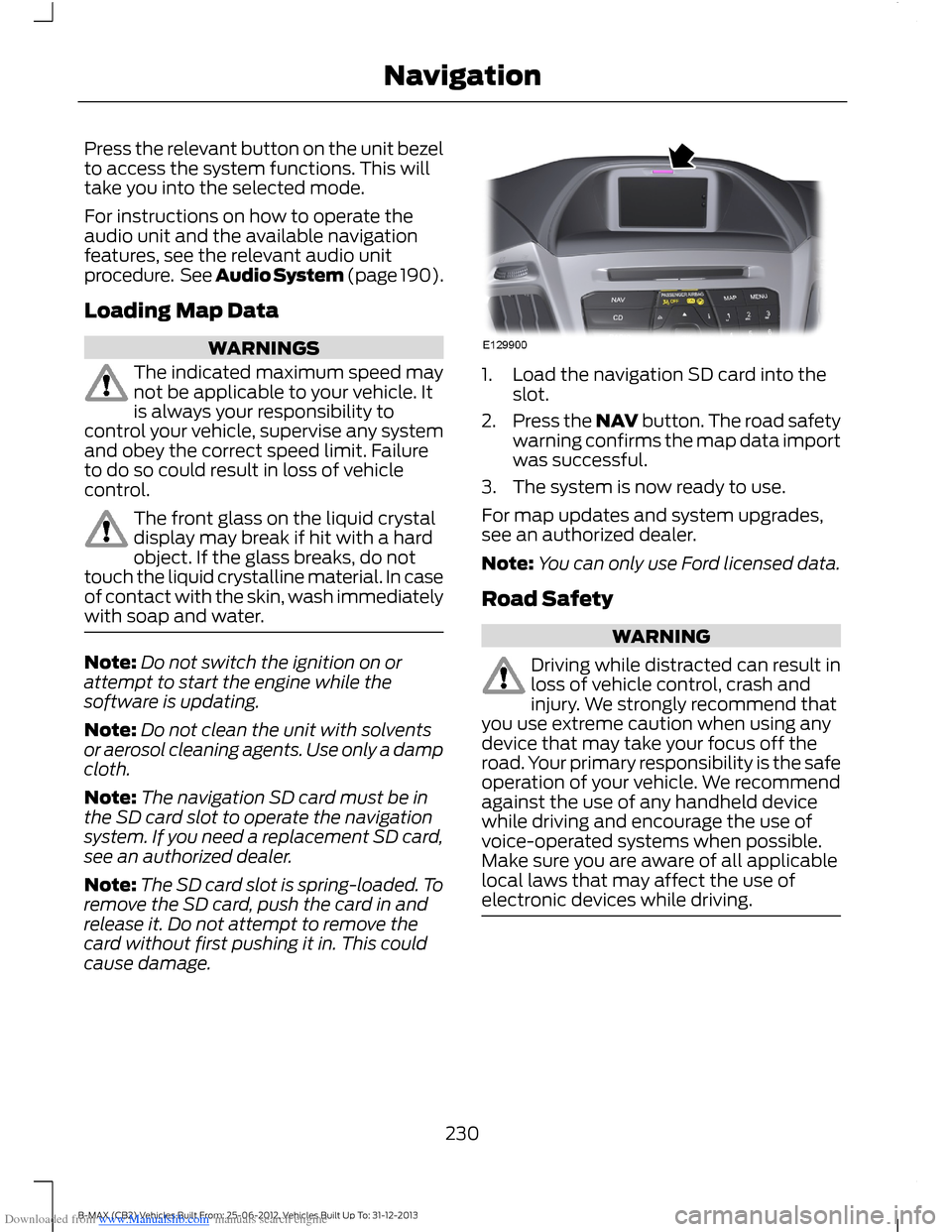
Downloaded from www.Manualslib.com manuals search engine Press the relevant button on the unit bezelto access the system functions. This willtake you into the selected mode.
For instructions on how to operate theaudio unit and the available navigationfeatures, see the relevant audio unitprocedure. See Audio System (page 190).
Loading Map Data
WARNINGS
The indicated maximum speed maynot be applicable to your vehicle. Itis always your responsibility tocontrol your vehicle, supervise any systemand obey the correct speed limit. Failureto do so could result in loss of vehiclecontrol.
The front glass on the liquid crystaldisplay may break if hit with a hardobject. If the glass breaks, do nottouch the liquid crystalline material. In caseof contact with the skin, wash immediatelywith soap and water.
Note:Do not switch the ignition on orattempt to start the engine while thesoftware is updating.
Note:Do not clean the unit with solventsor aerosol cleaning agents. Use only a dampcloth.
Note:The navigation SD card must be inthe SD card slot to operate the navigationsystem. If you need a replacement SD card,see an authorized dealer.
Note:The SD card slot is spring-loaded. Toremove the SD card, push the card in andrelease it. Do not attempt to remove thecard without first pushing it in. This couldcause damage.
1.Load the navigation SD card into theslot.
2.Press the NAV button. The road safetywarning confirms the map data importwas successful.
3.The system is now ready to use.
For map updates and system upgrades,see an authorized dealer.
Note:You can only use Ford licensed data.
Road Safety
WARNING
Driving while distracted can result inloss of vehicle control, crash andinjury. We strongly recommend thatyou use extreme caution when using anydevice that may take your focus off theroad. Your primary responsibility is the safeoperation of your vehicle. We recommendagainst the use of any handheld devicewhile driving and encourage the use ofvoice-operated systems when possible.Make sure you are aware of all applicablelocal laws that may affect the use ofelectronic devices while driving.
230B-MAX (CB2) Vehicles Built From: 25-06-2012, Vehicles Built Up To: 31-12-2013Navigation
Page 245 of 298
Downloaded from www.Manualslib.com manuals search engine USING SYNC™ WITH YOUR
PHONE
Hands-free calling is one of the mainfeatures of SYNC. While the systemsupports a variety of features, many aredependent on your cell phone'sfunctionality.
At a minimum, most cell phones withBluetooth wireless technology support thefollowing functions:
•Answering an incoming call.
•Ending a call.
•Using privacy mode.
•Dialing a number.
•Redialing.
•Call waiting notification.
•Caller ID.
Other features such as text messagingusing Bluetooth and automatic phonebookdownload are cell phone dependentfeatures. To check your cell phone'scompatibility, refer to your device's manualor visit the regional Ford website.
Pairing a Cell Phone For the FirstTime
Note:You must switch the ignition andradio on.
Note:To scroll through the menus, pressthe up or down arrows on your audio system.
Wirelessly pairing your cell phone with thesystem allows you to make and receivehands-free calls.
1.Make sure the Bluetooth feature onyour cell phone is switched on beforestarting the search. Refer to yourdevice's manual if necessary.
2.Press the PHONE button. When theaudio display indicates that no phonesare paired, select the option to add.
3.When a message to begin pairingappears in the audio display, search forSYNC on your cell phone to start thepairing process.
4.When prompted on your cell phone'sdisplay, enter the six-digit PIN providedby the system in the audio display. Thedisplay indicates when the pairing issuccessful.
Depending on your cell phone's capabilityand your market, the system may promptyou with questions such as setting thecurrent cell phone as the primary cellphone (the cell phone the systemautomatically tries to connect with firstwhen you switch the ignition on),downloading your phonebook, etc.
Pairing Subsequent Cell Phones
Note:You must switch the ignition andradio on.
Note:To scroll through the menus, pressthe up or down arrows on your audio system.
1.Make sure the Bluetooth feature onyour cell phone is switched on beforestarting the search. Refer to yourdevice's manual if necessary.
2.Press the PHONE button.
3.Select the option for Bluetooth devices.
4.Press the OK button.
5.Select the option to add. This startsthe pairing process.
6.When a message to begin pairingappears in the audio display, search forSYNC on your device to start thepairing process.
7.When prompted on your cell phone'sdisplay, enter the six-digit PIN providedby the system in the audio display. Thedisplay indicates when the pairing issuccessful.
243B-MAX (CB2) Vehicles Built From: 25-06-2012, Vehicles Built Up To: 31-12-2013SYNC™
Page 254 of 298
Downloaded from www.Manualslib.com manuals search engine You CanWhen You Select
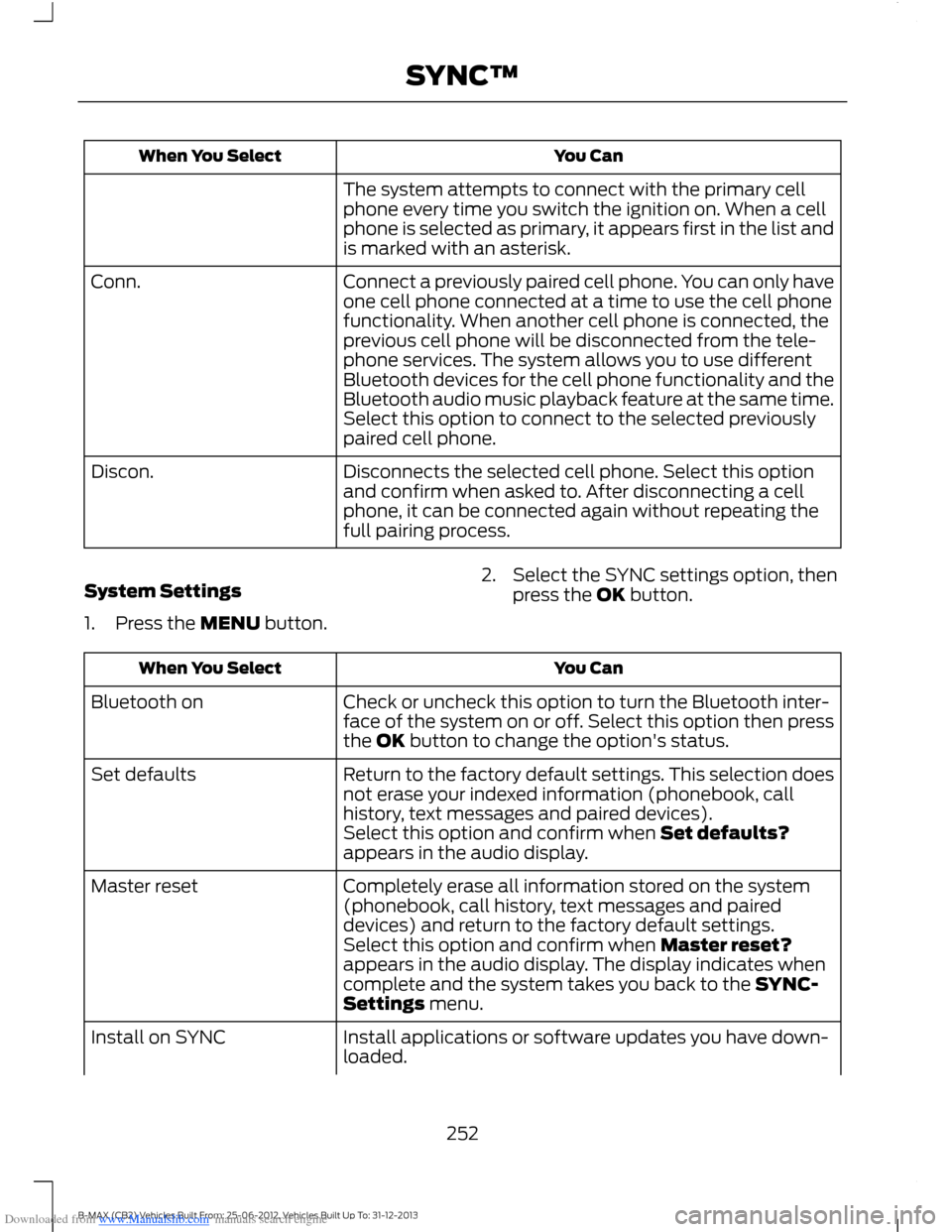
The system attempts to connect with the primary cellphone every time you switch the ignition on. When a cellphone is selected as primary, it appears first in the list andis marked with an asterisk.
Connect a previously paired cell phone. You can only haveone cell phone connected at a time to use the cell phonefunctionality. When another cell phone is connected, theprevious cell phone will be disconnected from the tele-phone services. The system allows you to use differentBluetooth devices for the cell phone functionality and theBluetooth audio music playback feature at the same time.
Conn.
Select this option to connect to the selected previouslypaired cell phone.
Disconnects the selected cell phone. Select this optionand confirm when asked to. After disconnecting a cellphone, it can be connected again without repeating thefull pairing process.
Discon.
System Settings
1.Press the MENU button.
2.Select the SYNC settings option, thenpress the OK button.
You CanWhen You Select
Check or uncheck this option to turn the Bluetooth inter-face of the system on or off. Select this option then pressthe OK button to change the option's status.
Bluetooth on
Return to the factory default settings. This selection doesnot erase your indexed information (phonebook, callhistory, text messages and paired devices).
Set defaults
Select this option and confirm when Set defaults?appears in the audio display.
Completely erase all information stored on the system(phonebook, call history, text messages and paireddevices) and return to the factory default settings.
Master reset
Select this option and confirm when Master reset?appears in the audio display. The display indicates whencomplete and the system takes you back to the SYNC-Settings menu.
Install applications or software updates you have down-loaded.Install on SYNC
252B-MAX (CB2) Vehicles Built From: 25-06-2012, Vehicles Built Up To: 31-12-2013SYNC™
Page 256 of 298
Downloaded from www.Manualslib.com manuals search engine Note:When you switch this feature on oroff, that setting applies for all paired cellphones. If you have turned this feature offand a previously paired phone connectswhen you switch on the ignition, either avoice message plays, a display message oricon is shown or both.
Note:Every cell phone operates differently.While this feature works with most cellphones, some cell phones may experiencedifficulties using this feature.
Note:Make sure you are familiar with theinformation about airbag deployment. SeeSupplementary Restraints System (page23).
If a crash deploys an airbag or triggers thefuel pump shut off, the system maycontact emergency services by dialing 112(the wireless emergency number thatworks in most European countries) througha paired and connected cell phone. Formore information about the system andEmergency Assistance, visit the regionalFord website.
Switching Emergency AssistanceOn and Off
1.Press the PHONE button to enter thecell phone menu.
2.Select the Emergency Assistanceoption and press OK.
3.Select the option you require and pressOK.
Display Options
If you switch on this feature, a confirmationmessage appears in the display.
If you switch off this feature, a dialogappears in the display, which allows youto set a voice reminder.
Off with voice reminder provides a displayand voice reminder when your cell phoneconnects and your vehicle starts.
Off without voice reminder provides adisplay reminder only without a voicereminder when your cell phone connects.
To make sure that Emergency Assistanceworks correctly:
•The system must have power and beworking correctly at the time of thecrash and during feature activation anduse.
•You must switch on the feature beforea crash.
•You must have a cell phone connectedto the system.
•In certain countries, it may benecessary to have a valid andregistered SIM card with credit in orderto place and maintain an emergencycall.
•A connected cell phone must have theability to make and maintain anoutgoing call at the time of the crash.
•A connected cell phone must haveadequate network coverage, batterypower and signal strength.
•Your vehicle must have battery power.
Note:This feature only works in a Europeancountry or region where SYNC EmergencyAssistance can call the local emergencyservices. Visit the regional Ford website fordetails.
In the Event of a Crash
Note:Not every crash deploys an airbag ortriggers the fuel pump shut off (which mayturn on Emergency Assistance). However,if Emergency Assistance is triggered thesystem tries to contact the emergencyservices. If a connected cell phone sustainsdamage or loses connection to the system,it searches for and tries to connect to anyavailable previously paired cell phone. Thesystem attempts to dial 112.
254B-MAX (CB2) Vehicles Built From: 25-06-2012, Vehicles Built Up To: 31-12-2013SYNC™
Page 271 of 298
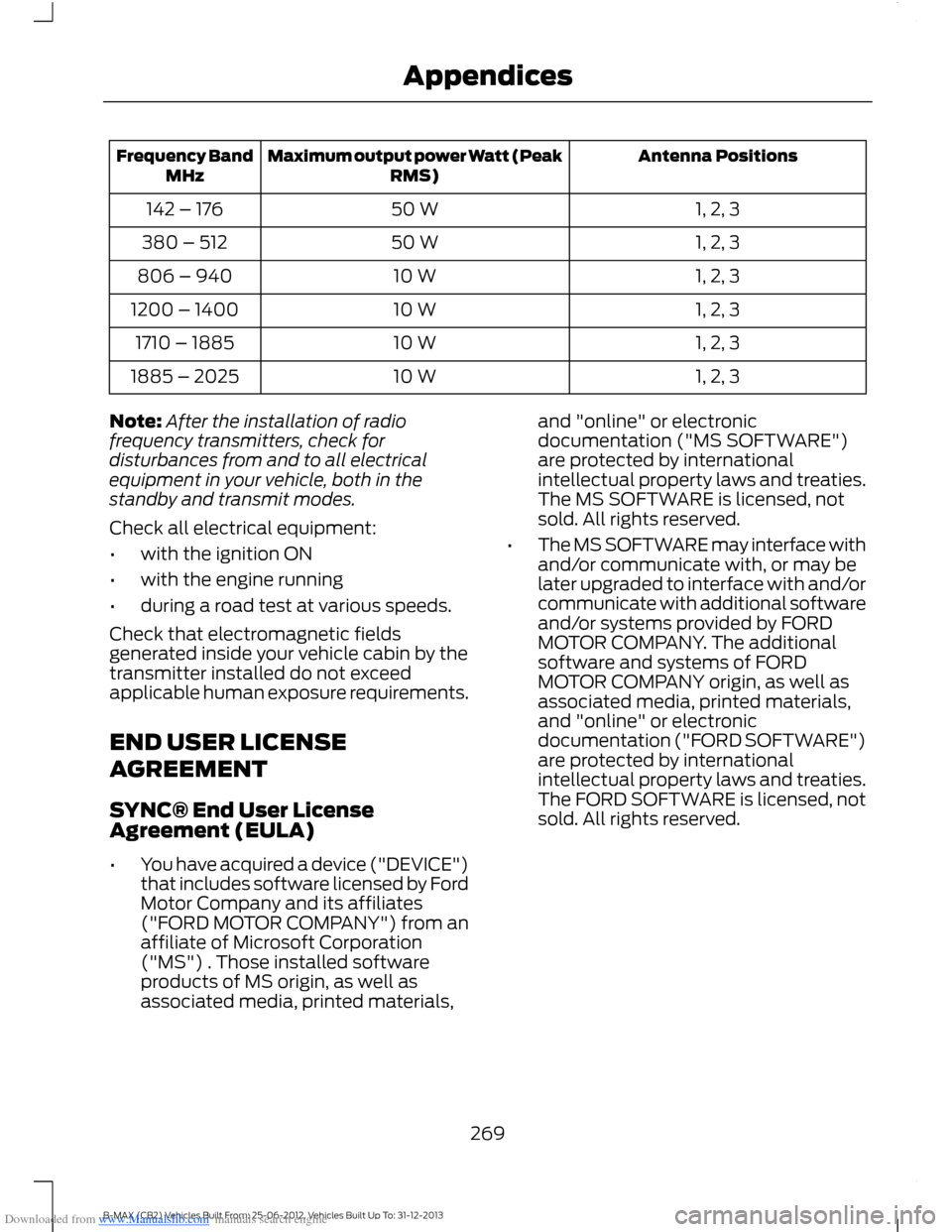
Downloaded from www.Manualslib.com manuals search engine Antenna PositionsMaximum output power Watt (PeakRMS)Frequency BandMHz
1, 2, 350 W142 – 176
1, 2, 350 W380 – 512
1, 2, 310 W806 – 940
1, 2, 310 W1200 – 1400
1, 2, 310 W1710 – 1885
1, 2, 310 W1885 – 2025
Note:After the installation of radiofrequency transmitters, check fordisturbances from and to all electricalequipment in your vehicle, both in thestandby and transmit modes.
Check all electrical equipment:
•with the ignition ON
•with the engine running
•during a road test at various speeds.
Check that electromagnetic fieldsgenerated inside your vehicle cabin by thetransmitter installed do not exceedapplicable human exposure requirements.
END USER LICENSE
AGREEMENT
SYNC® End User LicenseAgreement (EULA)
•You have acquired a device ("DEVICE")that includes software licensed by FordMotor Company and its affiliates("FORD MOTOR COMPANY") from anaffiliate of Microsoft Corporation("MS") . Those installed softwareproducts of MS origin, as well asassociated media, printed materials,
and "online" or electronicdocumentation ("MS SOFTWARE")are protected by internationalintellectual property laws and treaties.The MS SOFTWARE is licensed, notsold. All rights reserved.
•The MS SOFTWARE may interface withand/or communicate with, or may belater upgraded to interface with and/orcommunicate with additional softwareand/or systems provided by FORDMOTOR COMPANY. The additionalsoftware and systems of FORDMOTOR COMPANY origin, as well asassociated media, printed materials,and "online" or electronicdocumentation ("FORD SOFTWARE")are protected by internationalintellectual property laws and treaties.The FORD SOFTWARE is licensed, notsold. All rights reserved.
269B-MAX (CB2) Vehicles Built From: 25-06-2012, Vehicles Built Up To: 31-12-2013Appendices