Exterior mirror FORD BRONCO 2022 User Guide
[x] Cancel search | Manufacturer: FORD, Model Year: 2022, Model line: BRONCO, Model: FORD BRONCO 2022Pages: 562, PDF Size: 73 MB
Page 260 of 562
WHAT IS BLIND SPOT
INFORMATION SYSTEM
Blind spot information system detectsvehicles that may have entered the blindspot zone.
HOW DOES BLIND SPOT
INFORMATION SYSTEM WORK
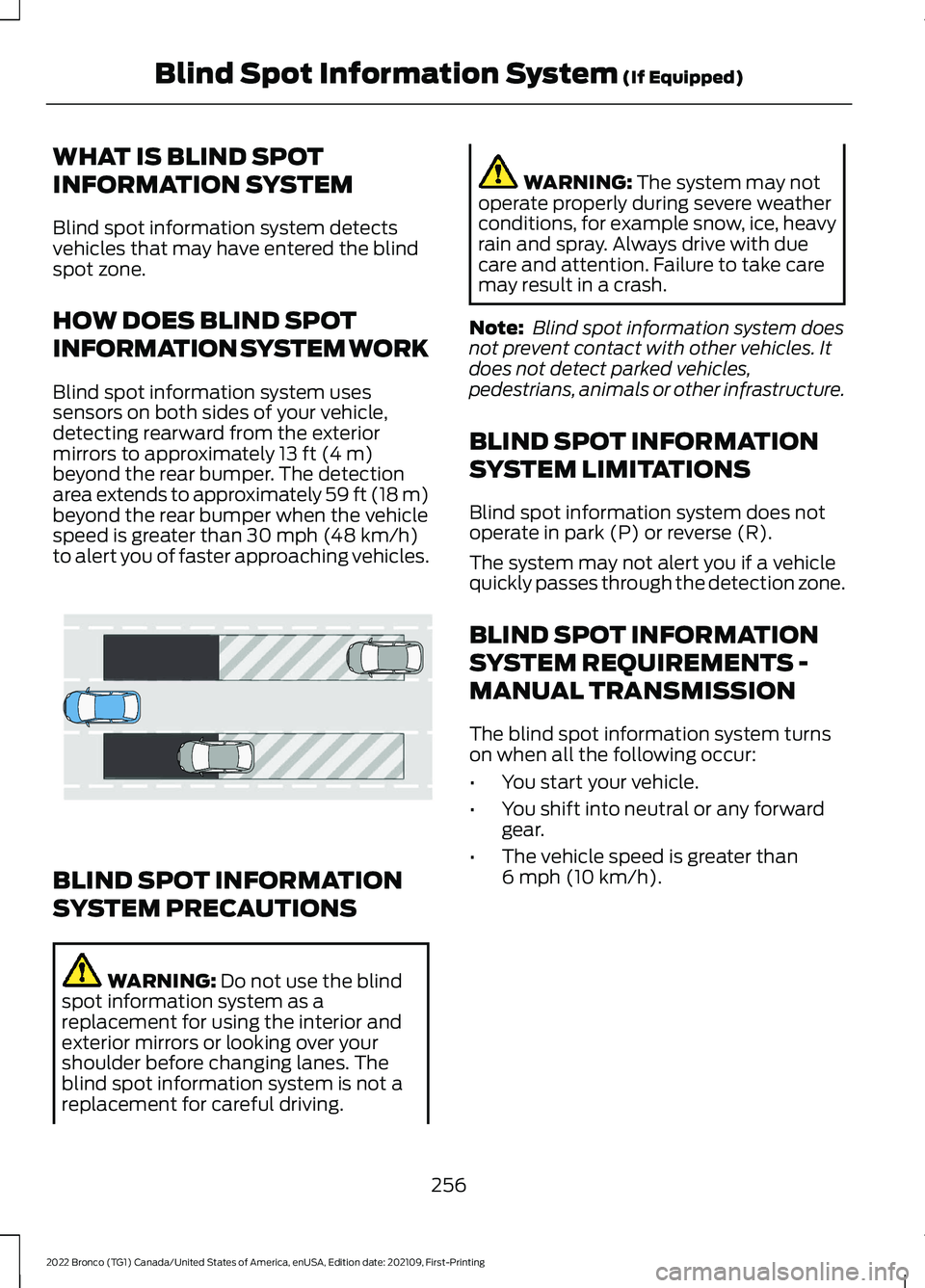
Blind spot information system usessensors on both sides of your vehicle,detecting rearward from the exteriormirrors to approximately 13 ft (4 m)beyond the rear bumper. The detectionarea extends to approximately 59 ft (18 m)beyond the rear bumper when the vehiclespeed is greater than 30 mph (48 km/h)to alert you of faster approaching vehicles.
BLIND SPOT INFORMATION
SYSTEM PRECAUTIONS
WARNING: Do not use the blindspot information system as areplacement for using the interior andexterior mirrors or looking over yourshoulder before changing lanes. Theblind spot information system is not areplacement for careful driving.
WARNING: The system may notoperate properly during severe weatherconditions, for example snow, ice, heavyrain and spray. Always drive with duecare and attention. Failure to take caremay result in a crash.
Note: Blind spot information system doesnot prevent contact with other vehicles. Itdoes not detect parked vehicles,pedestrians, animals or other infrastructure.
BLIND SPOT INFORMATION
SYSTEM LIMITATIONS
Blind spot information system does notoperate in park (P) or reverse (R).
The system may not alert you if a vehiclequickly passes through the detection zone.
BLIND SPOT INFORMATION
SYSTEM REQUIREMENTS -
MANUAL TRANSMISSION
The blind spot information system turnson when all the following occur:
•You start your vehicle.
•You shift into neutral or any forwardgear.
•The vehicle speed is greater than6 mph (10 km/h).
256
2022 Bronco (TG1) Canada/United States of America, enUSA, Edition date: 202109, First-PrintingBlind Spot Information System (If Equipped)E255695
Page 262 of 562
BLIND SPOT INFORMATION
SYSTEM INDICATORS
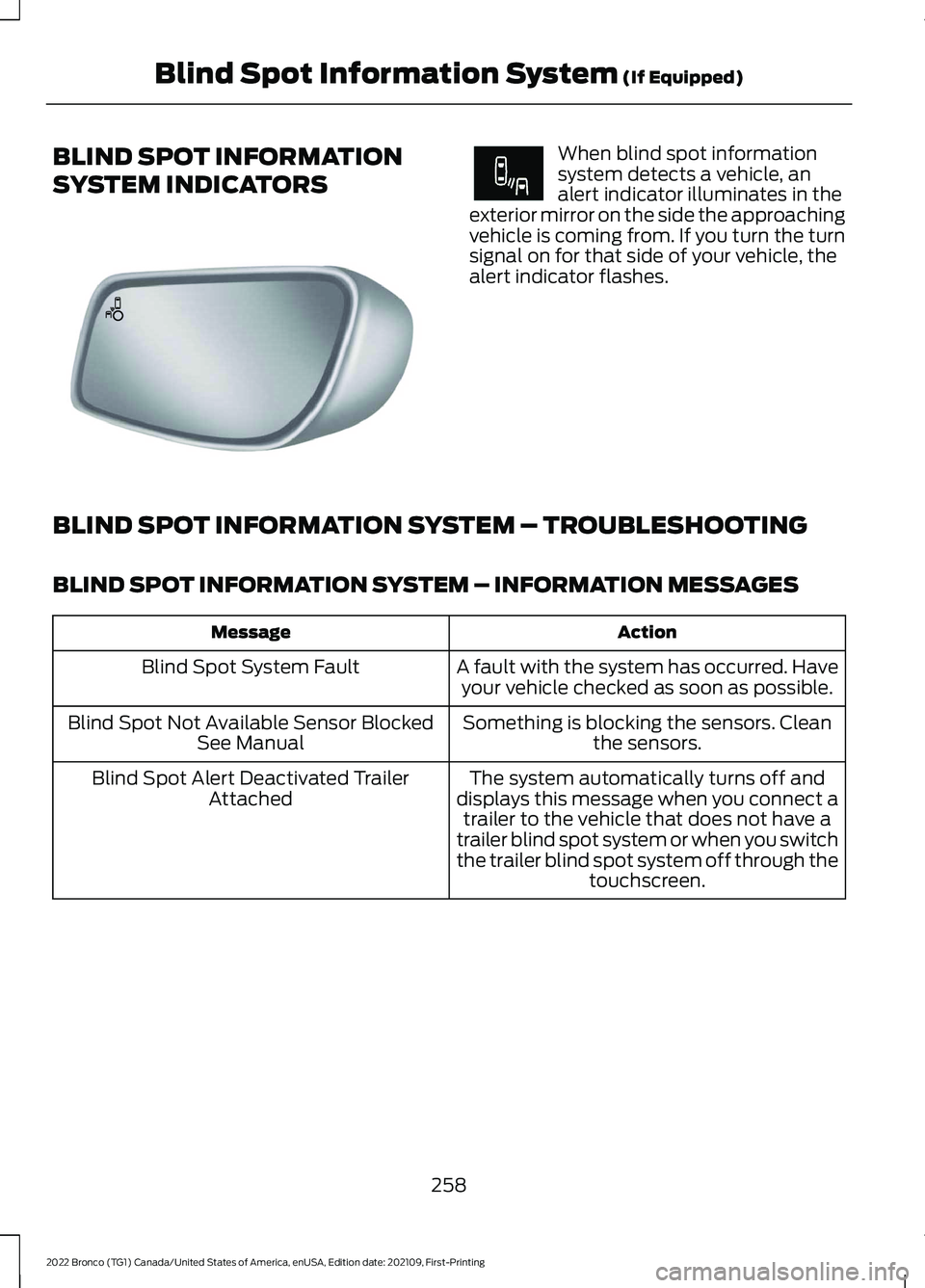
When blind spot informationsystem detects a vehicle, analert indicator illuminates in theexterior mirror on the side the approachingvehicle is coming from. If you turn the turnsignal on for that side of your vehicle, thealert indicator flashes.
BLIND SPOT INFORMATION SYSTEM – TROUBLESHOOTING
BLIND SPOT INFORMATION SYSTEM – INFORMATION MESSAGES
ActionMessage
A fault with the system has occurred. Haveyour vehicle checked as soon as possible.Blind Spot System Fault
Something is blocking the sensors. Cleanthe sensors.Blind Spot Not Available Sensor BlockedSee Manual
The system automatically turns off anddisplays this message when you connect atrailer to the vehicle that does not have atrailer blind spot system or when you switchthe trailer blind spot system off through thetouchscreen.
Blind Spot Alert Deactivated TrailerAttached
258
2022 Bronco (TG1) Canada/United States of America, enUSA, Edition date: 202109, First-PrintingBlind Spot Information System (If Equipped)E142442 E249861E249861
Page 263 of 562
WHAT IS CROSS TRAFFIC
ALERT
The system alerts you of vehiclesapproaching from the sides behind yourvehicle when you shift into reverse (R).
HOW DOES CROSS TRAFFIC
ALERT WORK
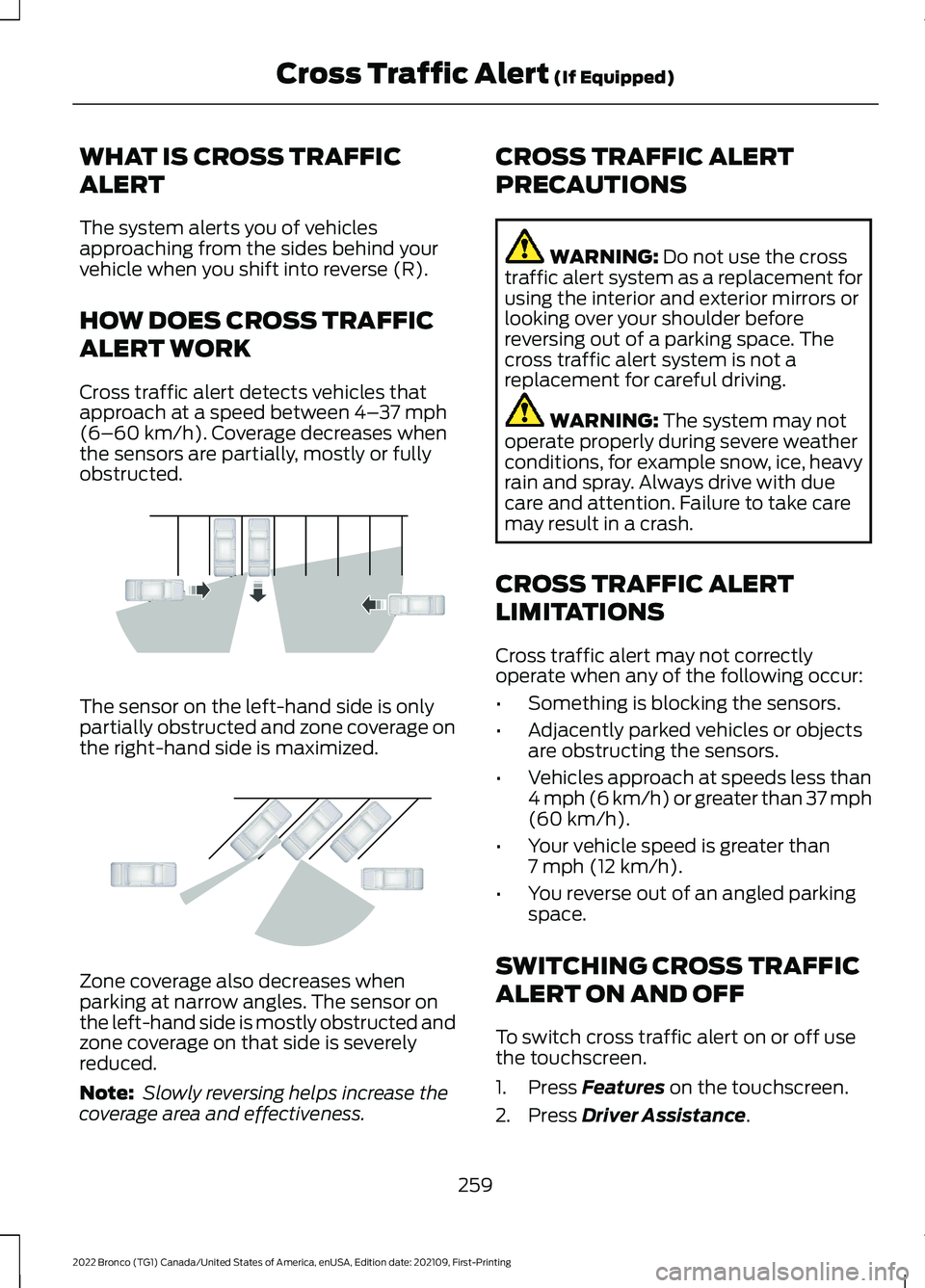
Cross traffic alert detects vehicles thatapproach at a speed between 4–37 mph(6–60 km/h). Coverage decreases whenthe sensors are partially, mostly or fullyobstructed.
The sensor on the left-hand side is onlypartially obstructed and zone coverage onthe right-hand side is maximized.
Zone coverage also decreases whenparking at narrow angles. The sensor onthe left-hand side is mostly obstructed andzone coverage on that side is severelyreduced.
Note: Slowly reversing helps increase thecoverage area and effectiveness.
CROSS TRAFFIC ALERT
PRECAUTIONS
WARNING: Do not use the crosstraffic alert system as a replacement forusing the interior and exterior mirrors orlooking over your shoulder beforereversing out of a parking space. Thecross traffic alert system is not areplacement for careful driving.
WARNING: The system may notoperate properly during severe weatherconditions, for example snow, ice, heavyrain and spray. Always drive with duecare and attention. Failure to take caremay result in a crash.
CROSS TRAFFIC ALERT
LIMITATIONS
Cross traffic alert may not correctlyoperate when any of the following occur:
•Something is blocking the sensors.
•Adjacently parked vehicles or objectsare obstructing the sensors.
•Vehicles approach at speeds less than4 mph (6 km/h) or greater than 37 mph(60 km/h).
•Your vehicle speed is greater than7 mph (12 km/h).
•You reverse out of an angled parkingspace.
SWITCHING CROSS TRAFFIC
ALERT ON AND OFF
To switch cross traffic alert on or off usethe touchscreen.
1.Press Features on the touchscreen.
2.Press Driver Assistance.
259
2022 Bronco (TG1) Canada/United States of America, enUSA, Edition date: 202109, First-PrintingCross Traffic Alert (If Equipped)E142440 E142441
Page 264 of 562
3.Switch Cross Traffic Alert on or off.
Note:The system switches on every timeyou switch the ignition on. To permanentlyswitch the system off, contact an authorizeddealer.
LOCATING THE CROSS
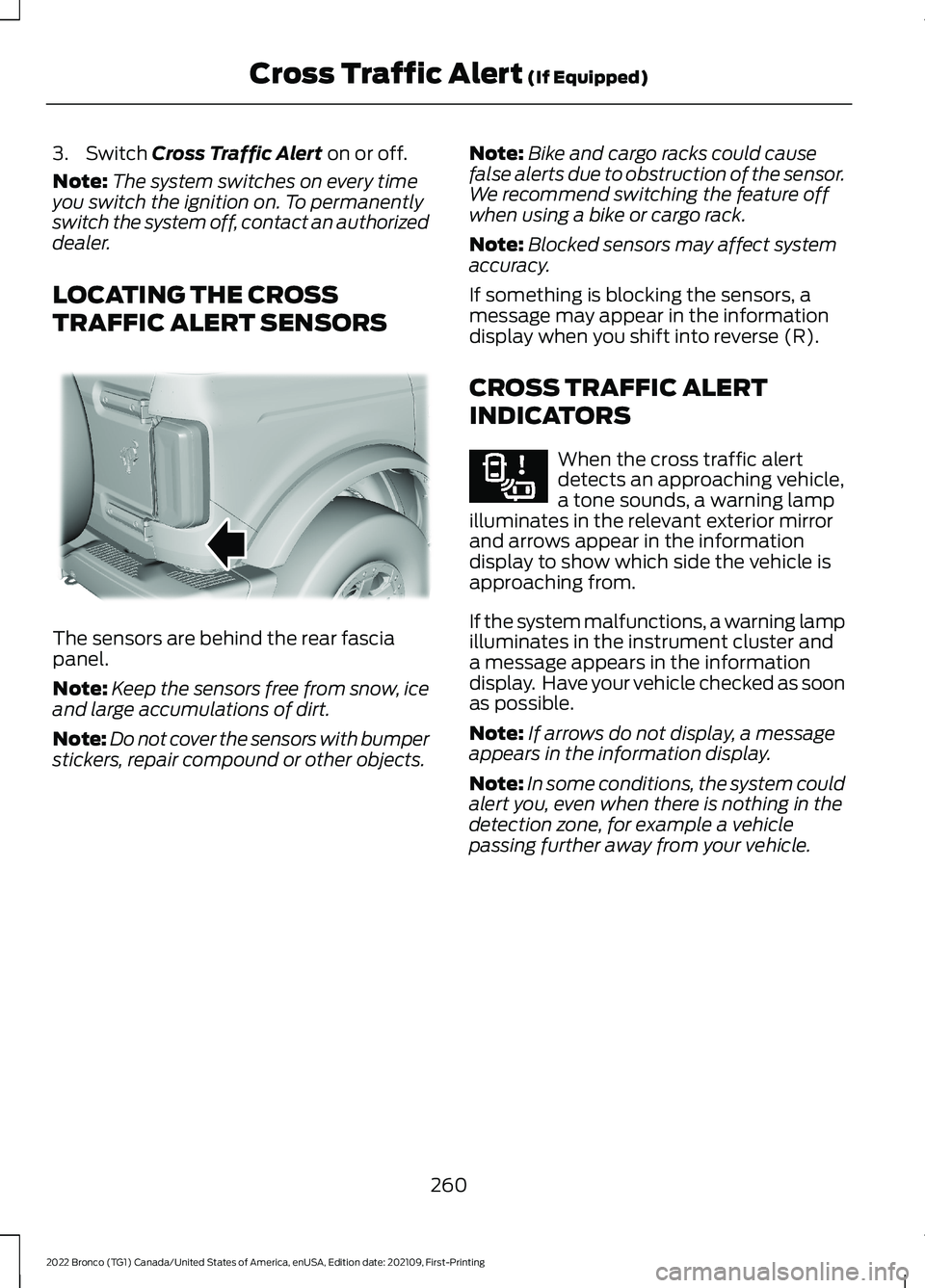
TRAFFIC ALERT SENSORS
The sensors are behind the rear fasciapanel.
Note:Keep the sensors free from snow, iceand large accumulations of dirt.
Note:Do not cover the sensors with bumperstickers, repair compound or other objects.
Note:Bike and cargo racks could causefalse alerts due to obstruction of the sensor.We recommend switching the feature offwhen using a bike or cargo rack.
Note:Blocked sensors may affect systemaccuracy.
If something is blocking the sensors, amessage may appear in the informationdisplay when you shift into reverse (R).
CROSS TRAFFIC ALERT
INDICATORS
When the cross traffic alertdetects an approaching vehicle,a tone sounds, a warning lampilluminates in the relevant exterior mirrorand arrows appear in the informationdisplay to show which side the vehicle isapproaching from.
If the system malfunctions, a warning lampilluminates in the instrument cluster anda message appears in the informationdisplay. Have your vehicle checked as soonas possible.
Note:If arrows do not display, a messageappears in the information display.
Note:In some conditions, the system couldalert you, even when there is nothing in thedetection zone, for example a vehiclepassing further away from your vehicle.
260
2022 Bronco (TG1) Canada/United States of America, enUSA, Edition date: 202109, First-PrintingCross Traffic Alert (If Equipped)E339014 E268294
Page 321 of 562
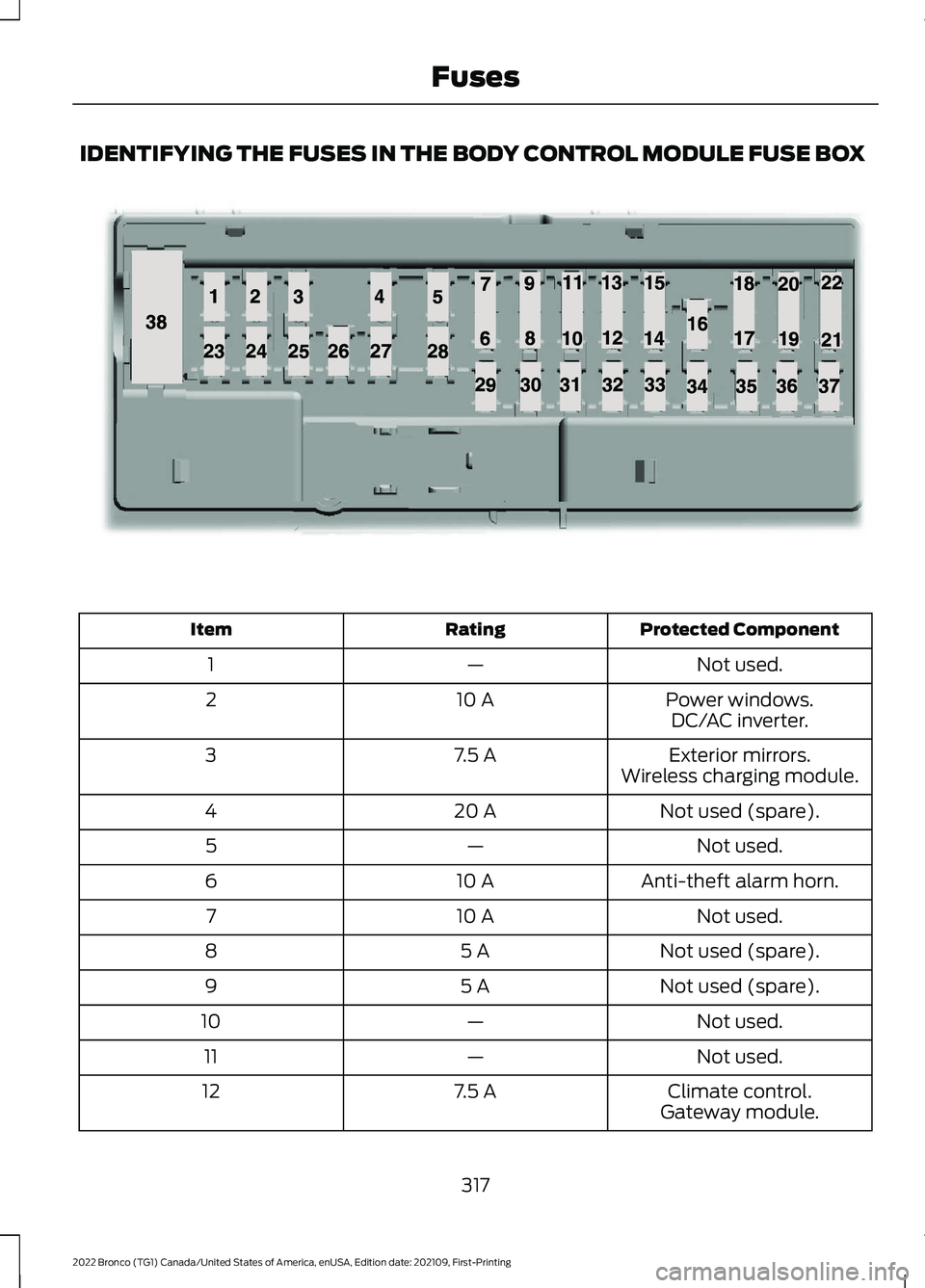
IDENTIFYING THE FUSES IN THE BODY CONTROL MODULE FUSE BOX
Protected ComponentRatingItem
Not used.—1
Power windows.10 A2DC/AC inverter.
Exterior mirrors.7.5 A3Wireless charging module.
Not used (spare).20 A4
Not used.—5
Anti-theft alarm horn.10 A6
Not used.10 A7
Not used (spare).5 A8
Not used (spare).5 A9
Not used.—10
Not used.—11
Climate control.7.5 A12Gateway module.
317
2022 Bronco (TG1) Canada/United States of America, enUSA, Edition date: 202109, First-PrintingFusesE145984
Page 541 of 562
1
12V Battery.....................................................32912V Battery Precautions..................................329Battery Management SystemLimitations......................................................330How Does the Battery ManagementSystem Work..................................................330Recycling and Disposing of the 12VBattery..............................................................330Resetting the Battery Sensor........................330What Is the Battery ManagementSystem..............................................................32912V Battery – Troubleshooting...............33012V Battery – Information Messages..........33112V Battery – Warning Lamps......................330
3
360 Degree Camera...................................229360 Degree Camera Settings.........................231360 Degree Camera Guide Lines..........230360 Degree Camera Limitations...........229360 Degree Camera Precautions..........229360 Degree Camera Settings..................231Switching the 360 Degree Camera On andOff........................................................................231Switching the 360 Degree CameraView.....................................................................231
4
4WDSee: Four-Wheel Drive......................................182
9
911 Assist...........................................................68
A
A/CSee: Climate Control - Vehicles With:Automatic Temperature Control..............118See: Climate Control - Vehicles With: ManualTemperature Control....................................123About This Publication..................................17
ABSSee: Brakes...........................................................194Accessing Apps............................................444Accessing Navigation.................................447Accessing the Passive Key BackupPosition.........................................................156Accessories....................................................452Adaptive Cruise Control............................234Adaptive Cruise Control –Troubleshooting............................................240Adaptive Cruise Control Indicators.......239Adaptive Cruise ControlLimitations...................................................235Adaptive Cruise ControlPrecautions.................................................234Adaptive Cruise Control –Troubleshooting........................................240Adaptive Cruise Control – InformationMessages.........................................................240Adjusting the Exterior Mirrors..................106Adjusting the Headlamps.........................333Adjusting the Instrument Panel LightingBrightness....................................................102Adjusting the Map.......................................447Changing the Format of the Map................447Zooming the Map In and Out........................447Adjusting the Seatbelts DuringPregnancy......................................................54Adjusting the Sound Settings.................423Adjusting the Steering Wheel...................89Adjusting the Volume.................................423Aid Mode..........................................................251How Does Aid Mode Work...............................251What Is Aid Mode................................................251Airbag Precautions.........................................61Airbags...............................................................59Front Passenger Sensing System..................63Air ConditioningSee: Climate Control - Vehicles With:Automatic Temperature Control..............118See: Climate Control - Vehicles With: ManualTemperature Control....................................123Air Conditioning System Capacity andSpecification...............................................410Air FilterSee: Changing the Engine Air Filter.............328Alert and Aid Mode......................................251How Does Alert and Aid Mode Work..........252
537
2022 Bronco (TG1) Canada/United States of America, enUSA, Edition date: 202109, First-PrintingIndex
Page 547 of 562
Headlamps.............................................................94Headlamps – Troubleshooting.......................94Exterior Mirrors..............................................106Exterior Zone Lighting...................................97Exterior Zone Lighting Settings.......................97Using the Exterior Zone Lighting.....................97What Is Exterior Zone Lighting........................97
F
Fastening and Unfastening theSeatbelts........................................................53Feature Bar....................................................434Fender Anchor Points.................................279Fender Anchor Point LoadCapacities........................................................279Locating the Fender Anchor Points............279Flat TireSee: Changing a Flat Tire................................395Floor Mats......................................................299Folding the Exterior Mirrors......................106Ford Protect...................................................457Four-Wheel Drive.........................................182Four-Wheel Drive Modes................................186Four-Wheel Drive – Troubleshooting..........187Four-Wheel Drive Indicators.....................187Four-Wheel Drive Limitations.................183Four-Wheel Drive Modes..........................186Four-Wheel Drive Auto....................................186Four-Wheel Drive High.....................................186Four-Wheel Drive Low......................................186Two-Wheel Drive High.....................................186Four-Wheel Drive Precautions................182Four-Wheel Drive –Troubleshooting.........................................187Four-Wheel Drive – InformationMessages..........................................................187Four-Wheel Drive – Warning Lamps...........187Front Axle Fluid Capacity andSpecification...............................................414Front Exterior - 2-Door.................................34Front Exterior - 4-Door, Vehicles With:Hard Top.........................................................35Front Exterior - 4-Door, Vehicles With:Soft Top..........................................................36Front Parking Aid..........................................223Front Parking Aid Audible Warnings...........224Front Parking Aid Limitations........................224
Locating the Front Parking AidSensors.............................................................224What is the Front Parking Aid........................223Front Passenger Sensing System............63Front Passenger Sensing SystemIndicators............................................................65Front Passenger Sensing SystemPrecautions.......................................................65How Does the Front Passenger SensingSystem Work.....................................................63What Is the Front Passenger SensingSystem................................................................63Front Seat Precautions...............................127Front Seats......................................................127Heated Seats........................................................133Manual Seats.......................................................128Power Seats.........................................................130Fuel and Refueling.......................................166Fuel and Refueling – Troubleshooting.........171Fuel Quality...........................................................167Refueling................................................................169Running Out of Fuel..........................................168Fuel and Refueling Precautions.............166Fuel and Refueling –Troubleshooting..........................................171Fuel and Refueling – InformationMessages............................................................171Fuel and Refueling – Warning Lamps..........171Fuel Gauge......................................................107Fuel Gauge Limitations....................................108Locating the Fuel Filler Door..........................108What Is Distance to Empty.............................108What Is the Fuel Gauge....................................107What Is the Low Fuel Reminder...................108Fuel Quality.....................................................167Selecting the Correct Fuel...............................167Fuel Tank Capacity........................................171Fuse Precautions..........................................312Fuses..................................................................312Body Control Module Fuse Box.....................316Fuses – Troubleshooting.................................319Under Hood Fuse Box.......................................312Fuses – Troubleshooting...........................319Fuses – Frequently Asked Questions.........319
543
2022 Bronco (TG1) Canada/United States of America, enUSA, Edition date: 202109, First-PrintingIndex
Page 550 of 562
Keys and Remote Controls –Troubleshooting...........................................73Keys and Remote Controls – InformationMessages............................................................73
L
Lane Keeping System Indicators...........252Lane Keeping System................................249Aid Mode................................................................251Alert and Aid Mode............................................251Alert Mode...........................................................250Lane Keeping System –Troubleshooting............................................253Lane Keeping System Limitations........249Lane Keeping SystemPrecautions.................................................249Lane Keeping System –Troubleshooting........................................253Lane Keeping System – Frequently AskedQuestions........................................................254Lane Keeping System – InformationMessages.........................................................253Launching or Retrieving a Boat orPersonal Watercraft................................286Live Traffic......................................................447Switching Live Traffic On and Off................447What Is Live Traffic............................................447Load Carrying..................................................271Fender Anchor Points.......................................279Roof Rack..............................................................276Load Carrying Precautions........................271Loading Your Trailer....................................284Locating the 360 DegreeCameras.......................................................230Locating the Auxiliary Switches.............454Locating the Auxiliary SwitchWiring............................................................454Locating the Blind Spot InformationSystem Sensors.........................................257Locating the Brake Fluid Reservoir - 2.3LEcoBoost™..................................................194Locating the Brake Fluid Reservoir - 2.7LEcoBoost™..................................................194Locating the Cross Traffic AlertSensors........................................................260Locating the Fuel Filler Funnel.................167Locating the Power Outlets......................145
Locating the Pre-Collision AssistSensors.........................................................264Locating the Rear View Camera............226Locating the Safety ComplianceCertification Labels..................................272Locating the Tire label...............................376Locating the USB Ports..............................143Locating the Wireless AccessoryCharger..........................................................148Locating Your Vehicle...................................70Locking and Unlocking the Tailgate........84Locking the Rear WindowControls........................................................104
M
Maintenance.................................................32012V Battery...........................................................32912V Battery – Troubleshooting.....................330Engine Oil..............................................................323Exterior Bulbs......................................................334Interior Bulbs.......................................................336Maintenance Precautions........................320Making and Receiving a PhoneCall................................................................440Manually Dimming the InteriorMirror..............................................................105Manually Releasing the Electric ParkingBrake..............................................................198Manually Shifting Gears.............................179Shifting Using the Buttons on the SelectorLever....................................................................179Manual Seats.................................................128Adjusting the Head Restraint.........................128Adjusting the Seat Backrest...........................130Folding the Seats................................................135Head Restraint Components.........................128Installing the Head Restraint.........................129Moving the Seat Backward andForward.............................................................129Removing the Head Restraint........................129Unfolding the Seats...........................................136Manual Transmission Fluid Capacity andSpecification................................................176Manual Transmission..................................174Crawler Gear.........................................................174Manual Transmission –Troubleshooting..............................................177
546
2022 Bronco (TG1) Canada/United States of America, enUSA, Edition date: 202109, First-PrintingIndex