brake sensor FORD BRONCO 2022 User Guide
[x] Cancel search | Manufacturer: FORD, Model Year: 2022, Model line: BRONCO, Model: FORD BRONCO 2022Pages: 562, PDF Size: 73 MB
Page 334 of 562
HOW DOES THE BATTERYMANAGEMENT SYSTEM WORK
If excessive battery drain is detected, thesystem temporarily disables someelectrical systems to protect the battery.
Systems included are:
•Heated rear window.
•Heated seats.
•Climate control.
•Heated steering wheel.
•Audio unit.
•Navigation system.
A message could appear in the informationdisplay to alert you that battery protectionactions are active. This message is only fornotification that an action is taking place,and not intended to indicate an electricalproblem or that the battery requiresreplacement.
BATTERY MANAGEMENT SYSTEMLIMITATIONS
After battery replacement, or in somecases after charging the battery with anexternal charger, the battery managementsystem requires eight hours of vehicle sleeptime to relearn the battery state of charge.During this time, your vehicle must remainfully locked with the ignition switched off.
Note:Prior to relearning the battery stateof charge, the battery management systemcould temporarily disable some electricalsystems.
Electrical Accessory Installation
To make sure the battery managementsystem works correctly, do not connect anelectrical device ground connectiondirectly to the battery negative post. Thiscan cause inaccurate measurements ofthe battery condition and potentialincorrect system operation.
Note:If you add electrical accessories orcomponents to the vehicle, it couldadversely affect battery performance anddurability. This could also affect theperformance of other electrical systems inthe vehicle.
RESETTING THE BATTERYSENSOR
When you install a new battery, reset thebattery sensor by doing the following:
1.Switch the ignition on, and leave theengine off.
Note:Complete Steps 2 and 3 within 10seconds.
2.Flash the high beam headlamps fivetimes, ending with the high beams off.
3.Press and release the brake pedal threetimes.
The battery warning lamp flashes threetimes to confirm that the reset issuccessful.
RECYCLING AND DISPOSING OFTHE 12V BATTERY
Make sure that you dispose ofold batteries in anenvironmentally friendly way.Seek advice from your local authorityabout recycling old batteries.
12V BATTERY –
TROUBLESHOOTING
12V BATTERY – WARNING LAMPS
If it illuminates when the greenready to drive indicator isactivated, this indicates yourvehicle requires service. Have your vehiclechecked as soon as possible.
330
2022 Bronco (TG1) Canada/United States of America, enUSA, Edition date: 202109, First-PrintingMaintenanceE107998
Page 336 of 562
We recommend that you disconnect thenegative battery cable terminal from thebattery if you plan to store your vehicle foran extended period.
Note:If you only disconnect the negativebattery cable terminal, make sure it isisolated or placed away from the batteryterminal to avoid unintended connection orarcing.
To maintain correct operation of thebattery management system, if you addany electrical devices to your vehicle, donot connect the ground connection directlyto the negative battery terminal. Aconnection at the negative battery terminalcan cause inaccurate measurements ofthe battery condition and potentialincorrect system operation.
Note:If you add electrical accessories orcomponents to your vehicle this mayadversely affect battery performance,durability and the performance of otherelectrical systems on your vehicle.
If you replace the battery make sure itmatches the electrical requirements ofyour vehicle.
If you disconnect or replace the batteryand your vehicle has an automatictransmission, it must relearn its adaptivestrategy. Because of this, the transmissionmay shift firmly when first driven. This isnormal operation while the transmissionfully updates its operation to optimumshift feel.
Remove and Reinstall the Battery
To disconnect or remove the battery, dothe following:
1.Apply the parking brake and switch theignition off.
2.Switch all electrical equipment off, forexample lights and radio.
3.Wait a minimum of two minutes beforedisconnecting the battery.
Note:The engine management system hasa power hold function and remains poweredfor a period of time after you switch theignition off. This is to allow diagnostic andadaptive tables to be stored. Disconnectingthe battery without waiting can causedamage not covered by the vehicleWarranty.
4.Disconnect the negative battery cableterminal.
5.Disconnect the positive battery cableterminal.
6.Remove the battery securing clamp.
7.Remove the battery.
8.To install, reverse the removalprocedure.
Note:Before reconnecting the battery,make sure the ignition remains switched off.
Note:Make sure the battery cable terminalsare fully tightened.
Note:After cleaning or replacing thebattery, make sure you reinstall the batterycover or shield.
If you disconnect or replace the vehiclebattery, you must reset the followingfeatures:
•Window bounce-back. See Windows(page 103).
•Clock settings.
•Pre-set radio stations.
•Steering angle sensor.
Note:To calibrate the steering anglesensor, drive the vehicle above 30 mph(50 km/h) for a minimum of 1.2 mi (2 km).Make sure to drive straight ahead for aminimum of 30 seconds. Several vehiclefunctions are disabled and a warning lightcould appear until the sensor is calibrated.
332
2022 Bronco (TG1) Canada/United States of America, enUSA, Edition date: 202109, First-PrintingMaintenance
Page 399 of 562
CHANGING A FLAT TIRE
Note:You should only use tire sealants inroadside emergencies as they may causedamage to the tire pressure monitoringsystem sensor.
Note:The tire pressure monitoring systemindicator light illuminates when the sparetire is in use. To restore the full function ofthe monitoring system, all road wheelsequipped with tire pressure monitoringsensors must be mounted on the vehicle.
If you get a flat tire when driving, do notapply the brake heavily. Instead, graduallydecrease your speed, hold the steeringwheel firmly, and slowly move to a safeplace on the side of the road.
Have your flat serviced by an authorizeddealer in order to prevent damage to thetire pressure monitoring system sensors.Replace the spare tire with a road tire assoon as possible. During repairing orreplacing of the flat tire, have theauthorized dealer inspect the tire pressuremonitoring system sensor for damage.
Tire Change Procedure
WARNING: Failure to follow theseguidelines could result in an increasedrisk of loss of vehicle control, injury ordeath.
WARNING: Do not get under avehicle that is supported by a jack.
WARNING: The jack supplied withthis vehicle is only intended for changinga flat tire in an emergency. Do notattempt to do any other work on yourvehicle when it is supported by the jack,as your vehicle could slip off the jack.Failure to follow this instruction couldresult in personal injury or death.
WARNING: To help prevent yourvehicle from moving when changing awheel, shift the transmission into park(P), set the parking brake and use anappropriate block or wheel chock tosecure the wheel diagonally opposite tothe wheel being changed. For example,when changing the front left wheel,place an appropriate block or wheelchock on the right rear wheel.
WARNING: Only use the jackprovided as original equipment with yourvehicle.
WARNING: Only use the specifiedjacking points. If you use any otherlocations you could damage vehiclecomponents, such as brake lines.
WARNING: Never place anythingbetween the vehicle jack and yourvehicle.
WARNING: Never place anythingbetween the vehicle jack and the ground.
WARNING: Do not attempt tochange a tire on the side of the vehicleclose to moving traffic. Pull far enoughoff the road to not obstruct the flow oftraffic and avoid the danger of being hitwhen operating the jack or changing thewheel.
WARNING: Do not attempt tochange a tire on the side of the vehicleclose to moving traffic. Pull far enoughoff the road to not obstruct the flow oftraffic and avoid the danger of being hitwhen operating the jack or changing thewheel.
395
2022 Bronco (TG1) Canada/United States of America, enUSA, Edition date: 202109, First-PrintingChanging a Road Wheel
Page 404 of 562
WHEEL NUTS
Wheel Nut Torque Specifications
WARNING: When you install a wheel, always remove any corrosion, dirt or foreignmaterials present on the mounting surfaces of the wheel or the surface of the wheelhub, brake drum or brake disc that contacts the wheel. Make sure to secure any fastenersthat attach the rotor to the hub so they do not interfere with the mounting surfaces ofthe wheel. Installing wheels without correct metal-to-metal contact at the wheelmounting surfaces can cause the wheel nuts to loosen and the wheel to come off whileyour vehicle is in motion, resulting in loss of vehicle control, personal injury or death.
WARNING: If the tire pressure monitor sensor becomes damaged it may notfunction.
lb.ft (Nm)*Bolt size
100 lb.ft (135 Nm)M12 X 1.5
*Torque specifications are for nut and bolt threads free of dirt and rust. Use only ourrecommended replacement fasteners.
Retighten the lug nuts to the specified torque within 100 mi (160 km) after any wheeldisturbance (such as tire rotation, changing a flat tire, wheel removal).
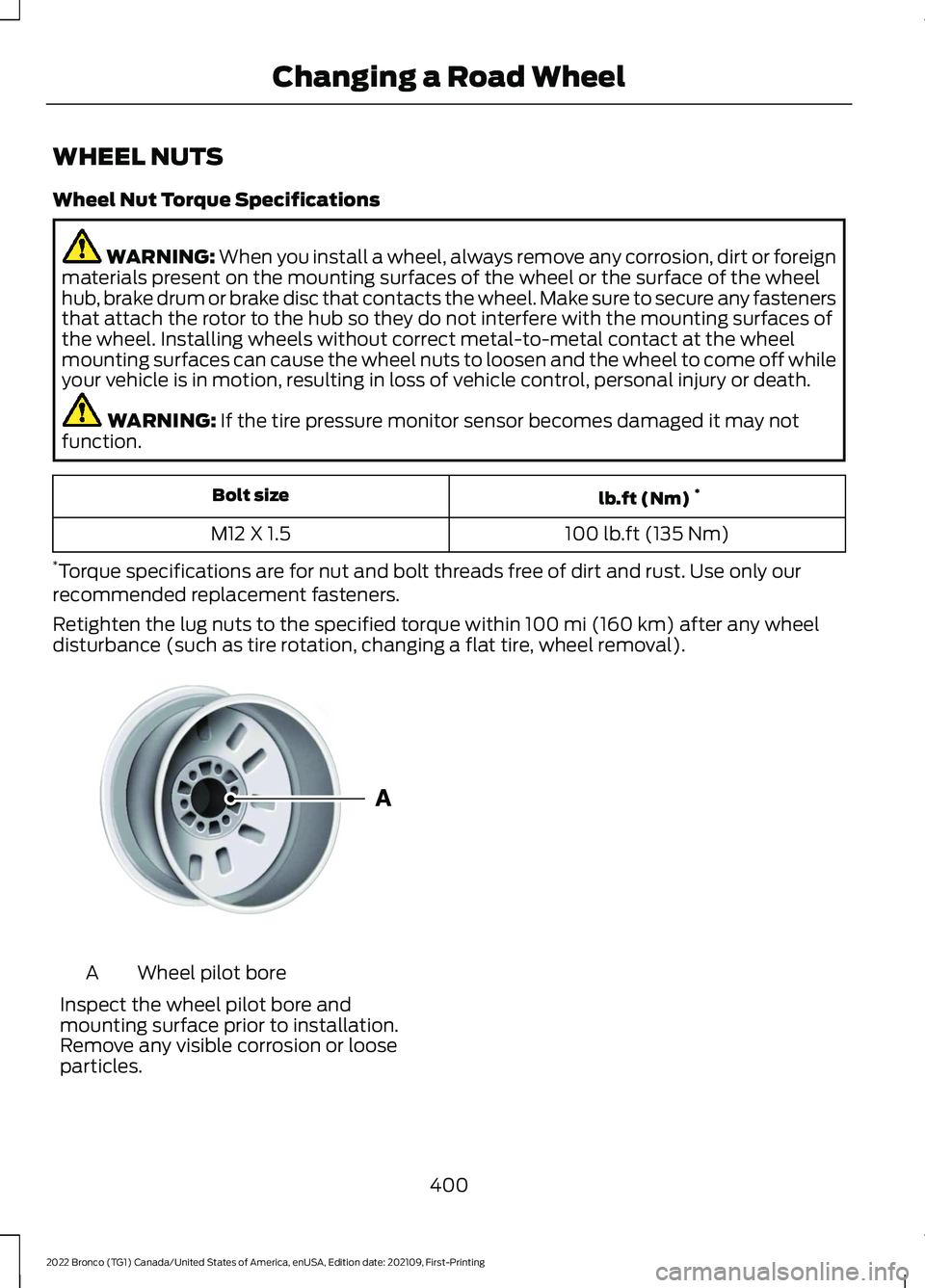
Wheel pilot boreA
Inspect the wheel pilot bore andmounting surface prior to installation.Remove any visible corrosion or looseparticles.
400
2022 Bronco (TG1) Canada/United States of America, enUSA, Edition date: 202109, First-PrintingChanging a Road WheelE145950
Page 541 of 562
1
12V Battery.....................................................32912V Battery Precautions..................................329Battery Management SystemLimitations......................................................330How Does the Battery ManagementSystem Work..................................................330Recycling and Disposing of the 12VBattery..............................................................330Resetting the Battery Sensor........................330What Is the Battery ManagementSystem..............................................................32912V Battery – Troubleshooting...............33012V Battery – Information Messages..........33112V Battery – Warning Lamps......................330
3
360 Degree Camera...................................229360 Degree Camera Settings.........................231360 Degree Camera Guide Lines..........230360 Degree Camera Limitations...........229360 Degree Camera Precautions..........229360 Degree Camera Settings..................231Switching the 360 Degree Camera On andOff........................................................................231Switching the 360 Degree CameraView.....................................................................231
4
4WDSee: Four-Wheel Drive......................................182
9
911 Assist...........................................................68
A
A/CSee: Climate Control - Vehicles With:Automatic Temperature Control..............118See: Climate Control - Vehicles With: ManualTemperature Control....................................123About This Publication..................................17
ABSSee: Brakes...........................................................194Accessing Apps............................................444Accessing Navigation.................................447Accessing the Passive Key BackupPosition.........................................................156Accessories....................................................452Adaptive Cruise Control............................234Adaptive Cruise Control –Troubleshooting............................................240Adaptive Cruise Control Indicators.......239Adaptive Cruise ControlLimitations...................................................235Adaptive Cruise ControlPrecautions.................................................234Adaptive Cruise Control –Troubleshooting........................................240Adaptive Cruise Control – InformationMessages.........................................................240Adjusting the Exterior Mirrors..................106Adjusting the Headlamps.........................333Adjusting the Instrument Panel LightingBrightness....................................................102Adjusting the Map.......................................447Changing the Format of the Map................447Zooming the Map In and Out........................447Adjusting the Seatbelts DuringPregnancy......................................................54Adjusting the Sound Settings.................423Adjusting the Steering Wheel...................89Adjusting the Volume.................................423Aid Mode..........................................................251How Does Aid Mode Work...............................251What Is Aid Mode................................................251Airbag Precautions.........................................61Airbags...............................................................59Front Passenger Sensing System..................63Air ConditioningSee: Climate Control - Vehicles With:Automatic Temperature Control..............118See: Climate Control - Vehicles With: ManualTemperature Control....................................123Air Conditioning System Capacity andSpecification...............................................410Air FilterSee: Changing the Engine Air Filter.............328Alert and Aid Mode......................................251How Does Alert and Aid Mode Work..........252
537
2022 Bronco (TG1) Canada/United States of America, enUSA, Edition date: 202109, First-PrintingIndex
Page 544 of 562
Catalytic Converter –Troubleshooting.........................................173Catalytic Converter – WarningLamps.................................................................173Center Console - AutomaticTransmission..................................................31Center Console..............................................149Locking the Center Console...........................149Opening the Center Console..........................149Center Console - ManualTransmission................................................30Center Display Limitations.......................433Center Display Overview...........................433Center Display Precautions.....................433Changing a Flat Tire...................................395Changing a Road Wheel...........................395Changing the 12V Battery..........................331Changing the Engine Air Filter................328Changing the Fuel Filter............................329Changing the Remote ControlBattery.............................................................70Changing the Vehicle Wi-Fi HotspotName or Password..................................420Charging a Device.........................................144Charging a Wireless Device......................148Checking MyKey System Status...............76Checking the Brake Fluid...........................194Checking the Clutch Fluid Level..............176Checking the Coolant.................................324Checking the Manual Transmission FluidLevel................................................................176Checking the Seatbelts...............................56Checking the Tire Pressures....................387Checking the Wiper Blades.........................91Children and Airbags....................................62Child Restraint Anchor Points....................41Locating the Child Restraint Lower AnchorPoints....................................................................41Locating the Child Restraint Top TetherAnchor Points...................................................42What Are the Child Restraint AnchorPoints....................................................................41Child Restraints...............................................42Child Restraint Position Information.............42Child Restraints Recommendation...............44Child Safety......................................................40Child Restraint Anchor Points..........................41Child Restraints.....................................................42
Installing Child Restraints.................................44Child Safety Locks.........................................50Child Safety Precautions............................40Cleaning Products......................................368Cleaning the Exterior..................................368Cleaning Camera Lenses andSensors.............................................................370Cleaning Chrome, Aluminium or StainlessSteel..................................................................369Cleaning Headlamps and RearLamps...............................................................369Cleaning Stripes or Graphics.........................370Cleaning the Convertible Top........................370Cleaning the Engine Compartment...........369Cleaning the Exterior Precautions..............368Cleaning the Hard Top.......................................371Cleaning the Underbody..................................371Cleaning Wheels................................................369Cleaning Windows and WiperBlades...............................................................369Cleaning the Interior.....................................371Cleaning Carpets and Floor Mats.................372Cleaning Displays and Screens......................371Cleaning Fabric Seats andHeadliners........................................................372Cleaning Leather and Vinyl.............................372Cleaning Plastic...................................................371Cleaning Seatbelts............................................373Cleaning the Instrument Panel......................371Clearing All MyKeys.......................................75Clearing the Garage Door Opener...........141Climate Control..............................................118Auto Mode.............................................................120Climate Control Hints...................................121Closing the Tailgate......................................84Closing the Tailgate From Outside YourVehicle.................................................................84Clutch Fluid Capacity andSpecification................................................176Cold Weather Precautions.......................298Connected Vehicle.......................................417Connected Vehicle –Troubleshooting.............................................418Connecting the Vehicle to a MobileNetwork.............................................................417Connected Vehicle Data..............................24Connected Vehicle Limitations................417Connected Vehicle Requirements..........417
540
2022 Bronco (TG1) Canada/United States of America, enUSA, Edition date: 202109, First-PrintingIndex
Page 550 of 562
Keys and Remote Controls –Troubleshooting...........................................73Keys and Remote Controls – InformationMessages............................................................73
L
Lane Keeping System Indicators...........252Lane Keeping System................................249Aid Mode................................................................251Alert and Aid Mode............................................251Alert Mode...........................................................250Lane Keeping System –Troubleshooting............................................253Lane Keeping System Limitations........249Lane Keeping SystemPrecautions.................................................249Lane Keeping System –Troubleshooting........................................253Lane Keeping System – Frequently AskedQuestions........................................................254Lane Keeping System – InformationMessages.........................................................253Launching or Retrieving a Boat orPersonal Watercraft................................286Live Traffic......................................................447Switching Live Traffic On and Off................447What Is Live Traffic............................................447Load Carrying..................................................271Fender Anchor Points.......................................279Roof Rack..............................................................276Load Carrying Precautions........................271Loading Your Trailer....................................284Locating the 360 DegreeCameras.......................................................230Locating the Auxiliary Switches.............454Locating the Auxiliary SwitchWiring............................................................454Locating the Blind Spot InformationSystem Sensors.........................................257Locating the Brake Fluid Reservoir - 2.3LEcoBoost™..................................................194Locating the Brake Fluid Reservoir - 2.7LEcoBoost™..................................................194Locating the Cross Traffic AlertSensors........................................................260Locating the Fuel Filler Funnel.................167Locating the Power Outlets......................145
Locating the Pre-Collision AssistSensors.........................................................264Locating the Rear View Camera............226Locating the Safety ComplianceCertification Labels..................................272Locating the Tire label...............................376Locating the USB Ports..............................143Locating the Wireless AccessoryCharger..........................................................148Locating Your Vehicle...................................70Locking and Unlocking the Tailgate........84Locking the Rear WindowControls........................................................104
M
Maintenance.................................................32012V Battery...........................................................32912V Battery – Troubleshooting.....................330Engine Oil..............................................................323Exterior Bulbs......................................................334Interior Bulbs.......................................................336Maintenance Precautions........................320Making and Receiving a PhoneCall................................................................440Manually Dimming the InteriorMirror..............................................................105Manually Releasing the Electric ParkingBrake..............................................................198Manually Shifting Gears.............................179Shifting Using the Buttons on the SelectorLever....................................................................179Manual Seats.................................................128Adjusting the Head Restraint.........................128Adjusting the Seat Backrest...........................130Folding the Seats................................................135Head Restraint Components.........................128Installing the Head Restraint.........................129Moving the Seat Backward andForward.............................................................129Removing the Head Restraint........................129Unfolding the Seats...........................................136Manual Transmission Fluid Capacity andSpecification................................................176Manual Transmission..................................174Crawler Gear.........................................................174Manual Transmission –Troubleshooting..............................................177
546
2022 Bronco (TG1) Canada/United States of America, enUSA, Edition date: 202109, First-PrintingIndex
Page 553 of 562
Rear Cargo Area Anchor PointPrecautions....................................................280Rear Cargo Area...........................................280Rear Cargo Area Anchor Points...................280Rear Exterior - 2-Door...................................37Rear Exterior - 4-Door, Vehicles With:Hard Top.........................................................38Rear Exterior - 4-Door, Vehicles With:Soft Top..........................................................39Rear Occupant Alert System AudibleWarnings.......................................................138Rear Occupant Alert SystemIndicators......................................................138Rear Occupant Alert SystemLimitations....................................................137Rear Occupant Alert SystemPrecautions..................................................137Rear Occupant Alert System....................137Rear Parking Aid...........................................223Locating the Rear Parking AidSensors.............................................................223Rear Parking Aid Audible Warnings.............223Rear Parking Aid Limitations.........................223What is the Rear Parking Aid.........................223Rear Seats.......................................................134Manual Seats.......................................................134Rear View Camera Guide Lines..............226Rear View Camera Object DistanceIndicators......................................................227Rear View Camera Precautions.............226Rear View Camera.......................................226Rear View Camera Settings............................227Rear View Camera Settings.....................227Switching Rear View Camera Delay On andOff.......................................................................228Zooming the Rear View Camera In andOut......................................................................227Recommended Shift Speeds...................175Recovery Towing..........................................305Accessing the Front Towing Point..............305Accessing the Rear Towing Point................306Recreationally Towing Your Vehicle -Automatic Transmission.......................309Recreationally Towing Your Vehicle -Manual Transmission.............................308Refueling.........................................................169Manually Opening the Fuel FillerDoor....................................................................170
Refueling System Overview...........................169Refueling Your Vehicle......................................169Releasing the Electric Parking Brake ifthe Vehicle Battery Has Run Out ofCharge...........................................................199Remote Control Limitations......................69Remotely Starting and Stopping theVehicle............................................................115Remote Start Limitations...........................115Remote Start Precautions.........................115Remote Start Remote ControlIndicators.......................................................116Remote Start...................................................115Remote Start Settings.......................................116Remote Start Settings.................................116Setting the Remote Start Duration...............117Switching Climate Control Auto Mode Onand Off................................................................116Switching Climate Control Last SettingsOn and Off........................................................116Switching the Heated Seat Settings On andOff........................................................................116Switching the Heated Steering WheelSettings On and Off.......................................116Removable Doors........................................342Doors and Locks Audible Warnings............349Removing and Installing the Doors.............342Removable Fenders...................................358Removable Fender Precautions..................358Removing the Fender Flares.........................359Removable Hard Top.................................354Removing and Installing the HardTop.....................................................................354Removable Roof Panels...........................350Removable Roof Panel Precautions..........350Removing and Installing the Center RoofPanel...................................................................351Removing and Installing the Front RoofPanel.................................................................350Removing and Installing the Rear RoofPanel...................................................................351Removable Soft Top..................................354Opening and Closing the Soft Top..............354Removing and Installing the SoftTop......................................................................357Removable Vehicle Components..........338Removable Doors..............................................342Removable Fenders.........................................358
549
2022 Bronco (TG1) Canada/United States of America, enUSA, Edition date: 202109, First-PrintingIndex