clutch FORD BRONCO 2022 User Guide
[x] Cancel search | Manufacturer: FORD, Model Year: 2022, Model line: BRONCO, Model: FORD BRONCO 2022Pages: 562, PDF Size: 73 MB
Page 180 of 562
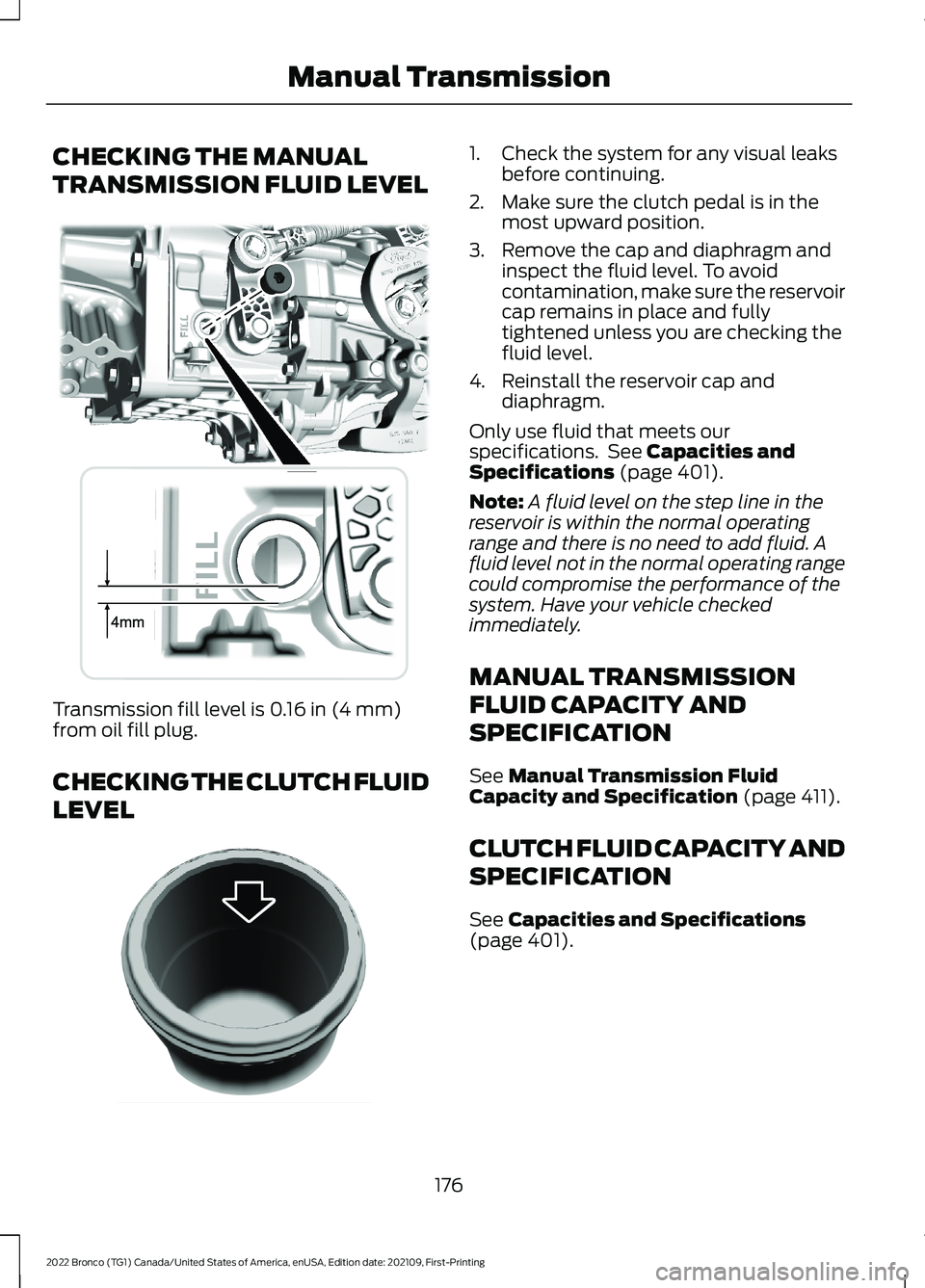
CHECKING THE MANUAL
TRANSMISSION FLUID LEVEL
Transmission fill level is 0.16 in (4 mm)from oil fill plug.
CHECKING THE CLUTCH FLUID
LEVEL
1.Check the system for any visual leaksbefore continuing.
2.Make sure the clutch pedal is in themost upward position.
3.Remove the cap and diaphragm andinspect the fluid level. To avoidcontamination, make sure the reservoircap remains in place and fullytightened unless you are checking thefluid level.
4.Reinstall the reservoir cap anddiaphragm.
Only use fluid that meets ourspecifications. See Capacities andSpecifications (page 401).
Note:A fluid level on the step line in thereservoir is within the normal operatingrange and there is no need to add fluid. Afluid level not in the normal operating rangecould compromise the performance of thesystem. Have your vehicle checkedimmediately.
MANUAL TRANSMISSION
FLUID CAPACITY AND
SPECIFICATION
See Manual Transmission FluidCapacity and Specification (page 411).
CLUTCH FLUID CAPACITY AND
SPECIFICATION
See Capacities and Specifications(page 401).
176
2022 Bronco (TG1) Canada/United States of America, enUSA, Edition date: 202109, First-PrintingManual TransmissionE339771 E310419
Page 183 of 562
Note:We recommend using this mode fordriving on hilly or mountainous roads orwhen towing a trailer. See Towing a Trailer(page 283).
SPORT (S)
In sport (S) your vehicle holds gears longer.
Note:We recommend using this mode fora sportier feel or when driving on hilly ormountainous roads.
SHIFTING YOUR VEHICLE INTO
GEAR
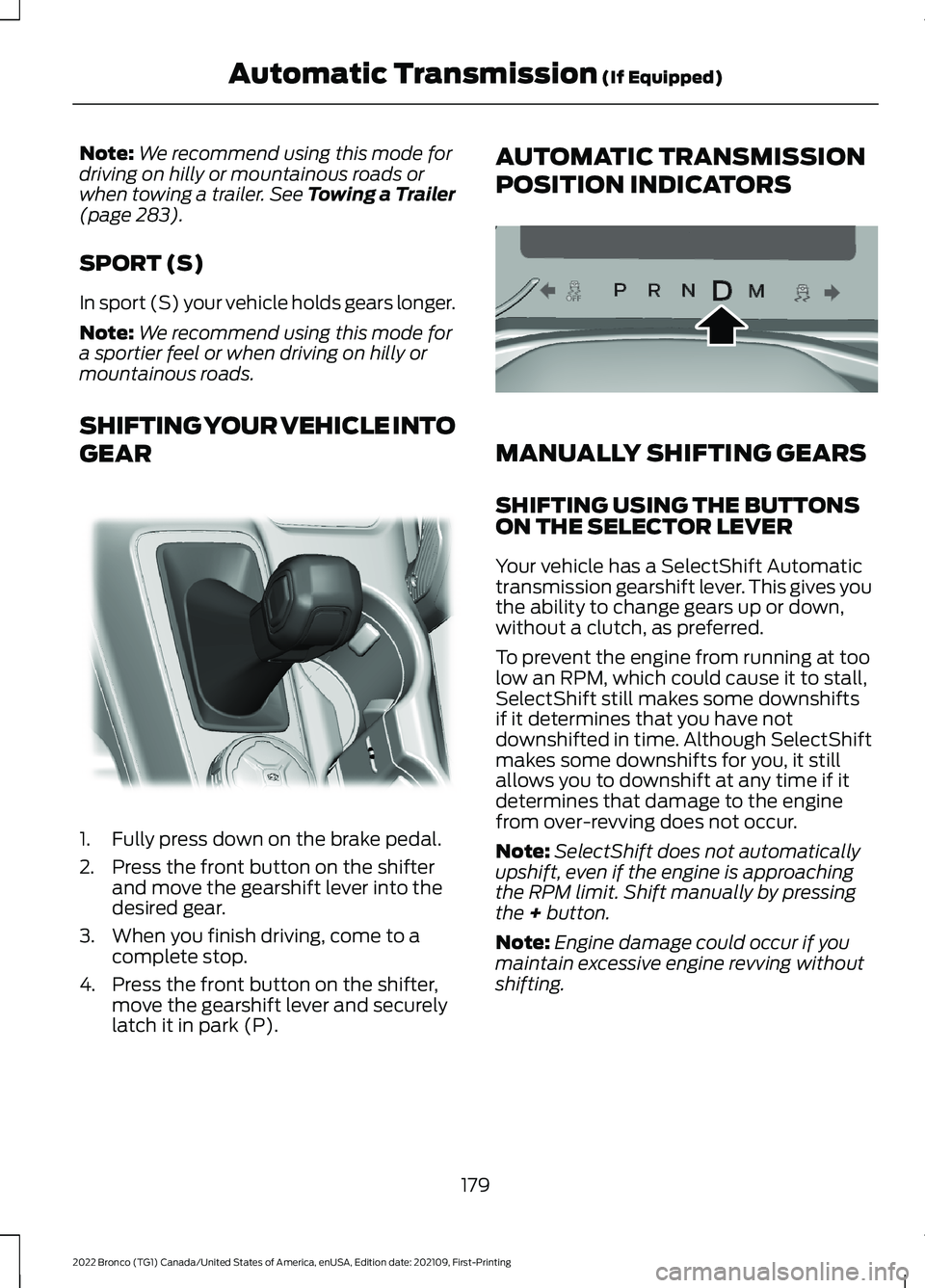
1.Fully press down on the brake pedal.
2.Press the front button on the shifterand move the gearshift lever into thedesired gear.
3.When you finish driving, come to acomplete stop.
4.Press the front button on the shifter,move the gearshift lever and securelylatch it in park (P).
AUTOMATIC TRANSMISSION
POSITION INDICATORS
MANUALLY SHIFTING GEARS
SHIFTING USING THE BUTTONSON THE SELECTOR LEVER
Your vehicle has a SelectShift Automatictransmission gearshift lever. This gives youthe ability to change gears up or down,without a clutch, as preferred.
To prevent the engine from running at toolow an RPM, which could cause it to stall,SelectShift still makes some downshiftsif it determines that you have notdownshifted in time. Although SelectShiftmakes some downshifts for you, it stillallows you to downshift at any time if itdetermines that damage to the enginefrom over-revving does not occur.
Note:SelectShift does not automaticallyupshift, even if the engine is approachingthe RPM limit. Shift manually by pressingthe + button.
Note:Engine damage could occur if youmaintain excessive engine revving withoutshifting.
179
2022 Bronco (TG1) Canada/United States of America, enUSA, Edition date: 202109, First-PrintingAutomatic Transmission (If Equipped)E324063 E324267
Page 188 of 562
For vehicles with an electronicshift-on-the-fly transfer case, whenshifting into two-wheel drive high on dry,hard surfaced roads, we recommend thatyou follow the following procedure toreduce the likelihood of a mechanical shiftblock:
1.When driving straight, come to acomplete stop on a flat, horizontalsurface.
2.For vehicles with an automatictransmission, shift into park (P). Forvehicles with a manual transmission,press the clutch.
3.Select 2H and wait for the 2H LED tobecome solid.
4.For vehicles with an automatictransmission, shift into reverse (R). Forvehicles with a manual transmission,select reverse (R) and release theclutch. Let the vehicle roll backward upto 3 ft (1 m) and press the brake.
5.For vehicles with an automatictransmission, shift into drive (D). Forvehicles with a manual transmission,press the clutch in again, select aforward gear and release the clutch.Let the vehicle roll forward up to 3 ft(1 m).
If the system is mechanically blocked, oneor more of the following actions can relievethe mechanical shift block:
•Momentary acceleration.
•Momentary braking.
•Bringing the vehicle to a stop.
•Shifting the transmission to neutral andback to drive.
•Shifting the transmission to reverseand back to drive.
•Driving the vehicle around a tight turnat a slow speed.
SWITCHING FOUR-WHEEL
DRIVE ON AND OFF
A vehicle that comes with four-wheel drive,when selected, has the ability to use allfour wheels to power itself. This increasestraction, which may enable you to safelydrive over terrain and road conditions thata conventional two-wheel drive vehiclecannot.
On some four-wheel drive models, theinitial shift from two-wheel drive tofour-wheel drive while the vehicle ismoving can cause a momentary clunk andratcheting sound. These sounds are normalas the front drivetrain comes up to speedand are not cause for concern.
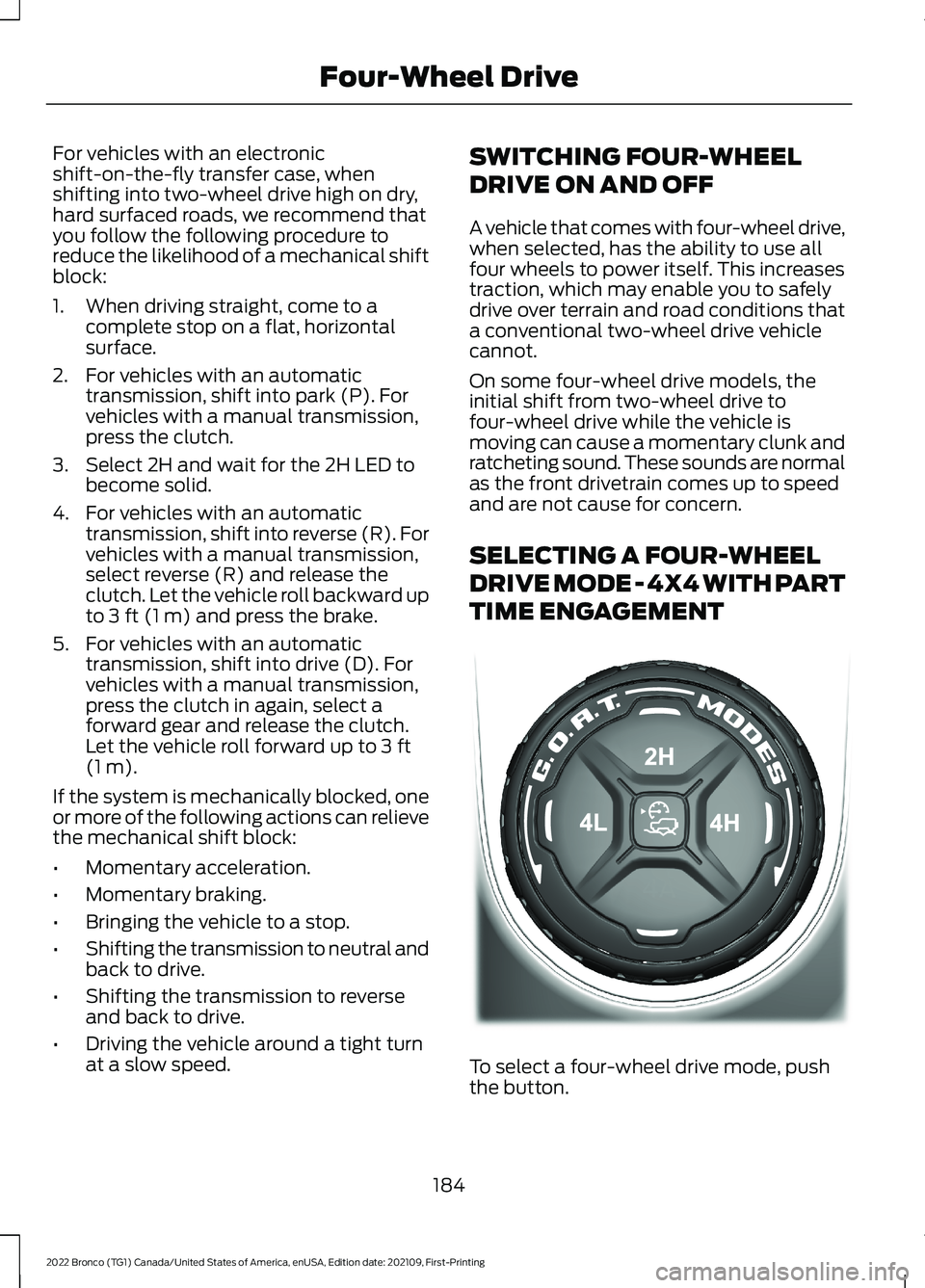
SELECTING A FOUR-WHEEL
DRIVE MODE - 4X4 WITH PART
TIME ENGAGEMENT
To select a four-wheel drive mode, pushthe button.
184
2022 Bronco (TG1) Canada/United States of America, enUSA, Edition date: 202109, First-PrintingFour-Wheel DriveE345849
Page 189 of 562
•2H - Two-wheel drive high.
•4H - Four-wheel drive high. SeeFour-Wheel Drive High (page 186).
•4L - Four-wheel drive low. SeeFour-Wheel Drive Low (page 186).
Shifting to or from Four-WheelDrive Low
Note:Do not perform this operation if therear wheels are slipping or when applyingthe accelerator pedal or when driving in atight turn.
Note:Momentarily releasing the acceleratorpedal when a shift in progress messagedisplays can improve engagement ordisengagement performance.
1.Bring your vehicle to a speed of 0 mph(0 km/h).
2.For vehicles with an automatictransmission, place in neutral (N). Forvehicles with a manual transmission,fully depress the clutch pedal.
3.Push the 4L on the four-wheel drivemode selector.
Note: A 4x4 Shift in Progress messageappears in the information display indicatingthe shift is in progress. If any of the previousshift conditions are not met, the shift shouldnot occur and the information display canguide the driver through the proper shiftingprocedures.
Note:If Shift Delayed Drive Forwarddisplays in the information display, placethe transmission in a forward gear, moveyour vehicle forward approximately 5 ft(1.5 m), and shift the transmission back toneutral (N) to allow the transfer case tocomplete the range shift.
Note:When the light is solid, the systemhas achieved the desired four-wheel drivemode. When a selected four-wheel drivemode light is blinking, the system isattempting to shift to that specificfour-wheel drive mode.
Note:When you achieve recreationaltowing, all lights are off and the instrumentcluster displays Neutral Tow Enabled LeaveTransmission in Neutral.
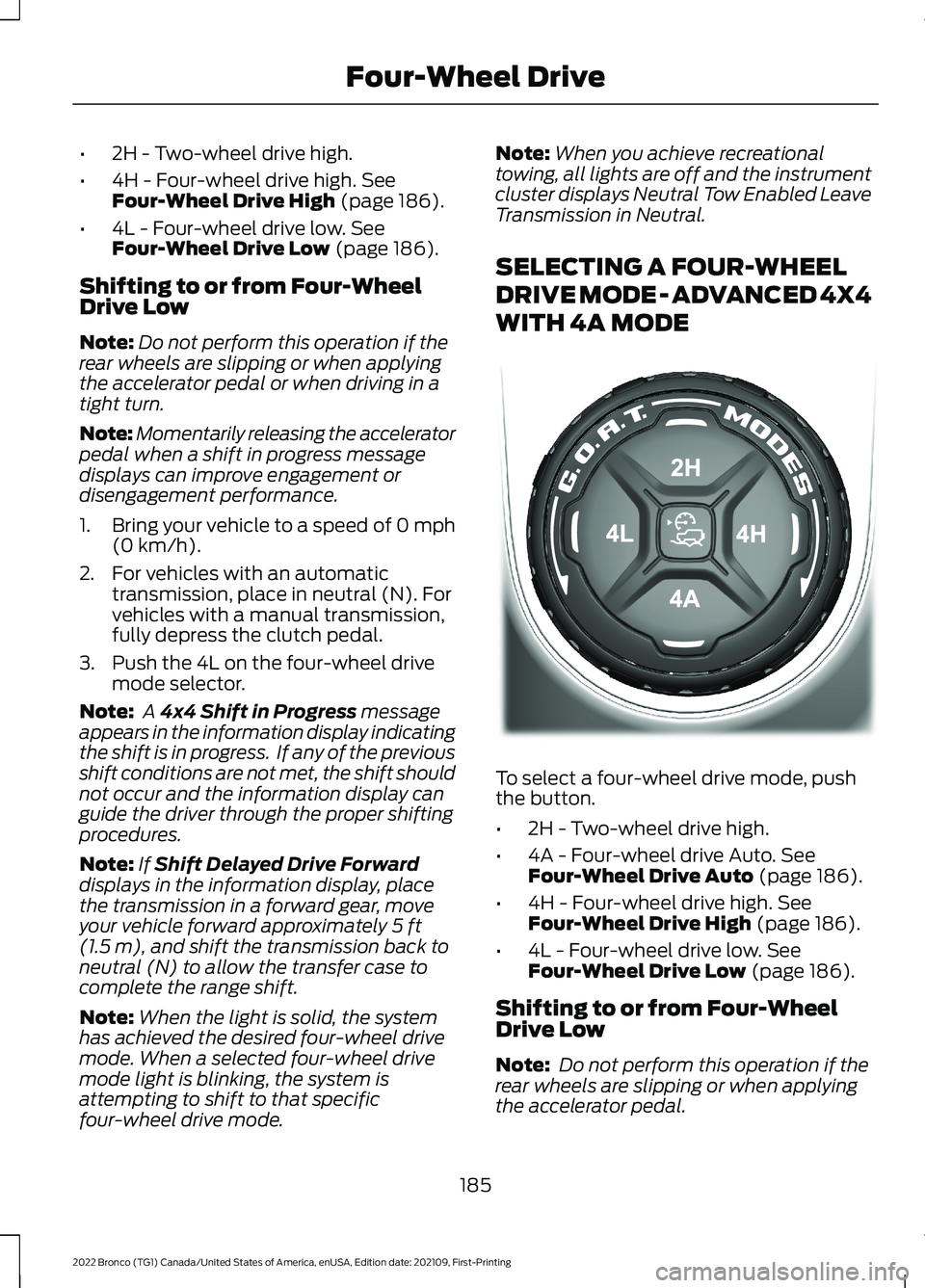
SELECTING A FOUR-WHEEL
DRIVE MODE - ADVANCED 4X4
WITH 4A MODE
To select a four-wheel drive mode, pushthe button.
•2H - Two-wheel drive high.
•4A - Four-wheel drive Auto. SeeFour-Wheel Drive Auto (page 186).
•4H - Four-wheel drive high. SeeFour-Wheel Drive High (page 186).
•4L - Four-wheel drive low. SeeFour-Wheel Drive Low (page 186).
Shifting to or from Four-WheelDrive Low
Note: Do not perform this operation if therear wheels are slipping or when applyingthe accelerator pedal.
185
2022 Bronco (TG1) Canada/United States of America, enUSA, Edition date: 202109, First-PrintingFour-Wheel DriveE324543
Page 190 of 562
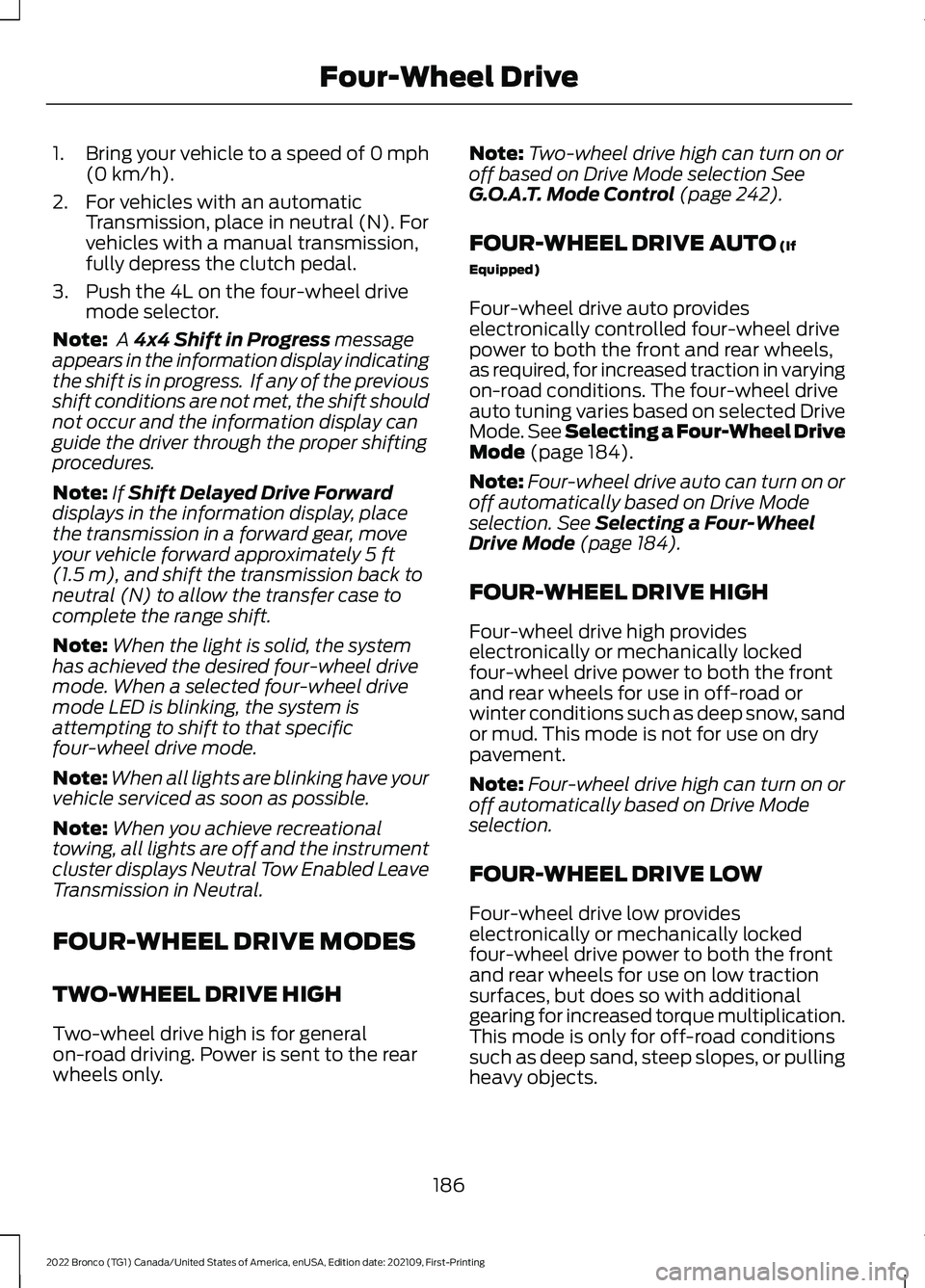
1.Bring your vehicle to a speed of 0 mph(0 km/h).
2.For vehicles with an automaticTransmission, place in neutral (N). Forvehicles with a manual transmission,fully depress the clutch pedal.
3.Push the 4L on the four-wheel drivemode selector.
Note: A 4x4 Shift in Progress messageappears in the information display indicatingthe shift is in progress. If any of the previousshift conditions are not met, the shift shouldnot occur and the information display canguide the driver through the proper shiftingprocedures.
Note:If Shift Delayed Drive Forwarddisplays in the information display, placethe transmission in a forward gear, moveyour vehicle forward approximately 5 ft(1.5 m), and shift the transmission back toneutral (N) to allow the transfer case tocomplete the range shift.
Note:When the light is solid, the systemhas achieved the desired four-wheel drivemode. When a selected four-wheel drivemode LED is blinking, the system isattempting to shift to that specificfour-wheel drive mode.
Note:When all lights are blinking have yourvehicle serviced as soon as possible.
Note:When you achieve recreationaltowing, all lights are off and the instrumentcluster displays Neutral Tow Enabled LeaveTransmission in Neutral.
FOUR-WHEEL DRIVE MODES
TWO-WHEEL DRIVE HIGH
Two-wheel drive high is for generalon-road driving. Power is sent to the rearwheels only.
Note:Two-wheel drive high can turn on oroff based on Drive Mode selection SeeG.O.A.T. Mode Control (page 242).
FOUR-WHEEL DRIVE AUTO (If
Equipped)
Four-wheel drive auto provideselectronically controlled four-wheel drivepower to both the front and rear wheels,as required, for increased traction in varyingon-road conditions. The four-wheel driveauto tuning varies based on selected DriveMode. See Selecting a Four-Wheel DriveMode (page 184).
Note:Four-wheel drive auto can turn on oroff automatically based on Drive Modeselection. See Selecting a Four-WheelDrive Mode (page 184).
FOUR-WHEEL DRIVE HIGH
Four-wheel drive high provideselectronically or mechanically lockedfour-wheel drive power to both the frontand rear wheels for use in off-road orwinter conditions such as deep snow, sandor mud. This mode is not for use on drypavement.
Note:Four-wheel drive high can turn on oroff automatically based on Drive Modeselection.
FOUR-WHEEL DRIVE LOW
Four-wheel drive low provideselectronically or mechanically lockedfour-wheel drive power to both the frontand rear wheels for use on low tractionsurfaces, but does so with additionalgearing for increased torque multiplication.This mode is only for off-road conditionssuch as deep sand, steep slopes, or pullingheavy objects.
186
2022 Bronco (TG1) Canada/United States of America, enUSA, Edition date: 202109, First-PrintingFour-Wheel Drive
Page 191 of 562
Note:Four-wheel drive low can turn on oroff automatically based on drive modeselection.
FOUR-WHEEL DRIVE
INDICATORS
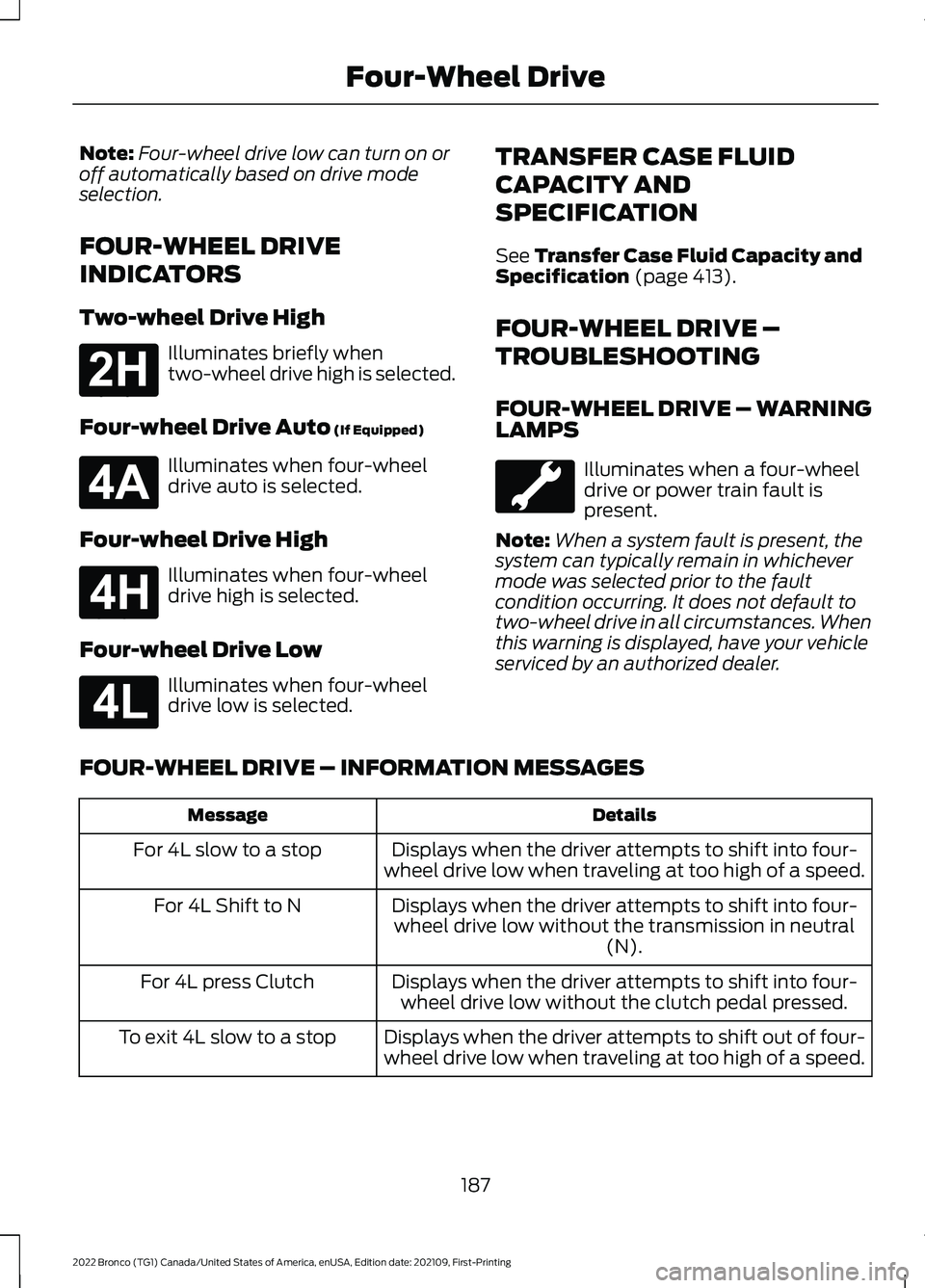
Two-wheel Drive High
Illuminates briefly whentwo-wheel drive high is selected.
Four-wheel Drive Auto (If Equipped)
Illuminates when four-wheeldrive auto is selected.
Four-wheel Drive High
Illuminates when four-wheeldrive high is selected.
Four-wheel Drive Low
Illuminates when four-wheeldrive low is selected.
TRANSFER CASE FLUID
CAPACITY AND
SPECIFICATION
See Transfer Case Fluid Capacity andSpecification (page 413).
FOUR-WHEEL DRIVE –
TROUBLESHOOTING
FOUR-WHEEL DRIVE – WARNINGLAMPS
Illuminates when a four-wheeldrive or power train fault ispresent.
Note:When a system fault is present, thesystem can typically remain in whichevermode was selected prior to the faultcondition occurring. It does not default totwo-wheel drive in all circumstances. Whenthis warning is displayed, have your vehicleserviced by an authorized dealer.
FOUR-WHEEL DRIVE – INFORMATION MESSAGES
DetailsMessage
Displays when the driver attempts to shift into four-wheel drive low when traveling at too high of a speed.For 4L slow to a stop
Displays when the driver attempts to shift into four-wheel drive low without the transmission in neutral(N).
For 4L Shift to N
Displays when the driver attempts to shift into four-wheel drive low without the clutch pedal pressed.For 4L press Clutch
Displays when the driver attempts to shift out of four-wheel drive low when traveling at too high of a speed.To exit 4L slow to a stop
187
2022 Bronco (TG1) Canada/United States of America, enUSA, Edition date: 202109, First-PrintingFour-Wheel DriveE181778 E181781 E181779 E181780
Page 192 of 562
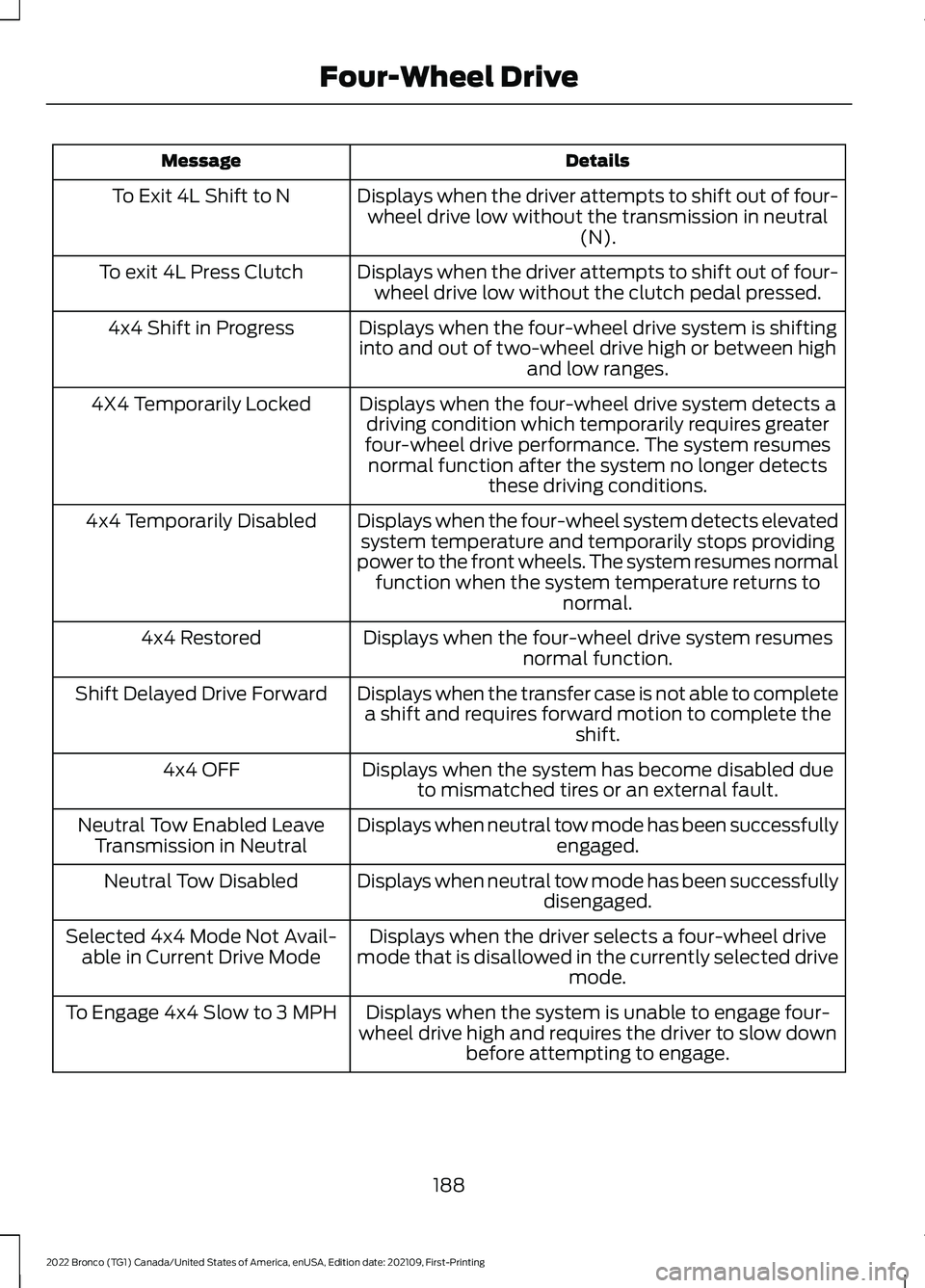
DetailsMessage
Displays when the driver attempts to shift out of four-wheel drive low without the transmission in neutral(N).
To Exit 4L Shift to N
Displays when the driver attempts to shift out of four-wheel drive low without the clutch pedal pressed.To exit 4L Press Clutch
Displays when the four-wheel drive system is shiftinginto and out of two-wheel drive high or between highand low ranges.
4x4 Shift in Progress
Displays when the four-wheel drive system detects adriving condition which temporarily requires greaterfour-wheel drive performance. The system resumesnormal function after the system no longer detectsthese driving conditions.
4X4 Temporarily Locked
Displays when the four-wheel system detects elevatedsystem temperature and temporarily stops providingpower to the front wheels. The system resumes normalfunction when the system temperature returns tonormal.
4x4 Temporarily Disabled
Displays when the four-wheel drive system resumesnormal function.4x4 Restored
Displays when the transfer case is not able to completea shift and requires forward motion to complete theshift.
Shift Delayed Drive Forward
Displays when the system has become disabled dueto mismatched tires or an external fault.4x4 OFF
Displays when neutral tow mode has been successfullyengaged.Neutral Tow Enabled LeaveTransmission in Neutral
Displays when neutral tow mode has been successfullydisengaged.Neutral Tow Disabled
Displays when the driver selects a four-wheel drivemode that is disallowed in the currently selected drivemode.
Selected 4x4 Mode Not Avail-able in Current Drive Mode
Displays when the system is unable to engage four-wheel drive high and requires the driver to slow downbefore attempting to engage.
To Engage 4x4 Slow to 3 MPH
188
2022 Bronco (TG1) Canada/United States of America, enUSA, Edition date: 202109, First-PrintingFour-Wheel Drive
Page 297 of 562
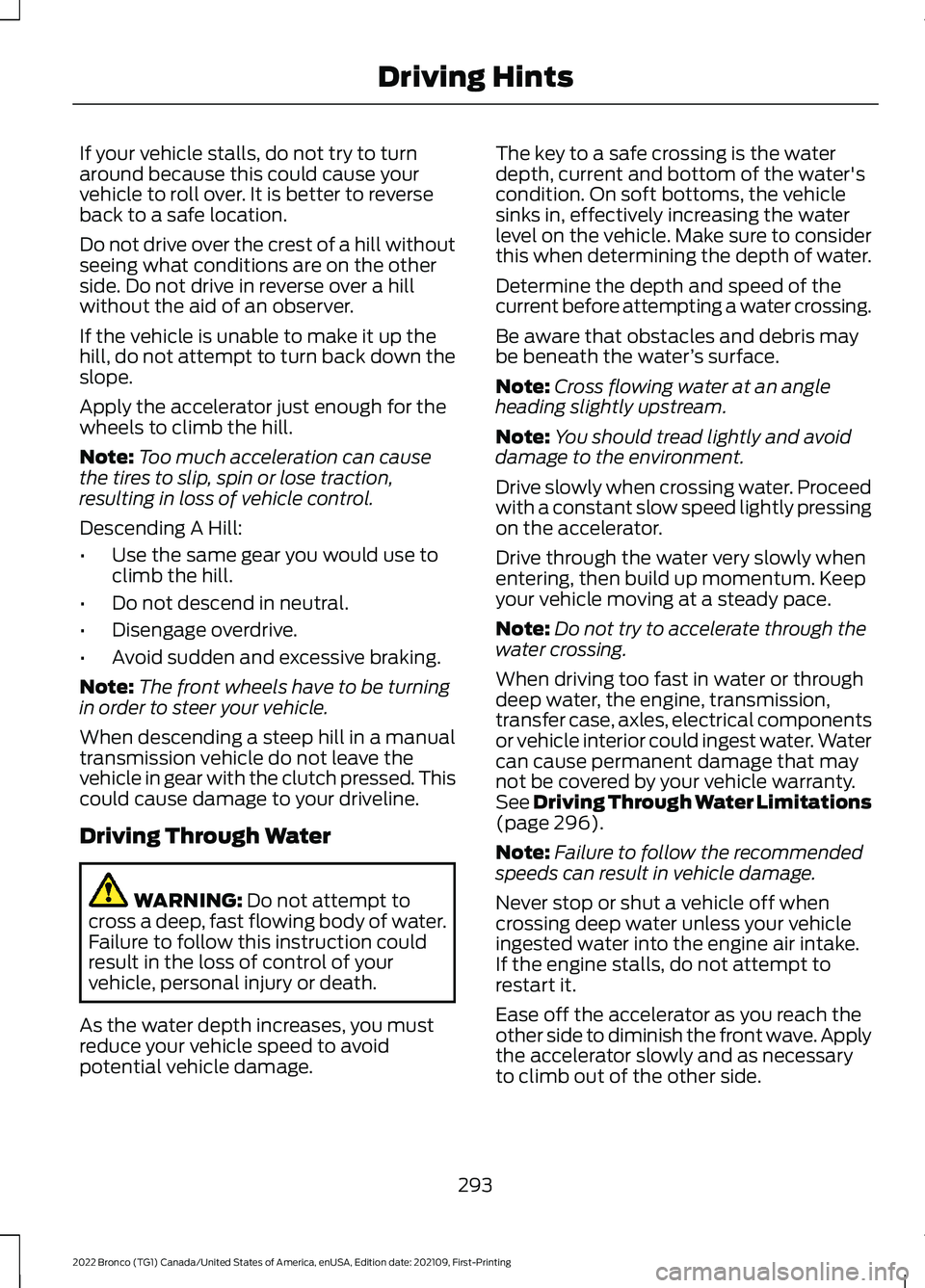
If your vehicle stalls, do not try to turnaround because this could cause yourvehicle to roll over. It is better to reverseback to a safe location.
Do not drive over the crest of a hill withoutseeing what conditions are on the otherside. Do not drive in reverse over a hillwithout the aid of an observer.
If the vehicle is unable to make it up thehill, do not attempt to turn back down theslope.
Apply the accelerator just enough for thewheels to climb the hill.
Note:Too much acceleration can causethe tires to slip, spin or lose traction,resulting in loss of vehicle control.
Descending A Hill:
•Use the same gear you would use toclimb the hill.
•Do not descend in neutral.
•Disengage overdrive.
•Avoid sudden and excessive braking.
Note:The front wheels have to be turningin order to steer your vehicle.
When descending a steep hill in a manualtransmission vehicle do not leave thevehicle in gear with the clutch pressed. Thiscould cause damage to your driveline.
Driving Through Water
WARNING: Do not attempt tocross a deep, fast flowing body of water.Failure to follow this instruction couldresult in the loss of control of yourvehicle, personal injury or death.
As the water depth increases, you mustreduce your vehicle speed to avoidpotential vehicle damage.
The key to a safe crossing is the waterdepth, current and bottom of the water'scondition. On soft bottoms, the vehiclesinks in, effectively increasing the waterlevel on the vehicle. Make sure to considerthis when determining the depth of water.
Determine the depth and speed of thecurrent before attempting a water crossing.
Be aware that obstacles and debris maybe beneath the water’s surface.
Note:Cross flowing water at an angleheading slightly upstream.
Note:You should tread lightly and avoiddamage to the environment.
Drive slowly when crossing water. Proceedwith a constant slow speed lightly pressingon the accelerator.
Drive through the water very slowly whenentering, then build up momentum. Keepyour vehicle moving at a steady pace.
Note:Do not try to accelerate through thewater crossing.
When driving too fast in water or throughdeep water, the engine, transmission,transfer case, axles, electrical componentsor vehicle interior could ingest water. Watercan cause permanent damage that maynot be covered by your vehicle warranty.See Driving Through Water Limitations(page 296).
Note:Failure to follow the recommendedspeeds can result in vehicle damage.
Never stop or shut a vehicle off whencrossing deep water unless your vehicleingested water into the engine air intake.If the engine stalls, do not attempt torestart it.
Ease off the accelerator as you reach theother side to diminish the front wave. Applythe accelerator slowly and as necessaryto climb out of the other side.
293
2022 Bronco (TG1) Canada/United States of America, enUSA, Edition date: 202109, First-PrintingDriving Hints
Page 312 of 562
TOWING YOUR VEHICLE
PRECAUTIONS
Use the following guidelines when towingyour vehicle. Failure to follow thisinstruction could result in vehicle damagenot covered by the vehicle warranty.
Note:Make sure you properly secure yourvehicle to the tow vehicle.
Note:If you are unsure of the vehicle’sconfiguration, contact an authorized dealer.
RECREATIONALLY TOWING
YOUR VEHICLE - MANUAL
TRANSMISSION
WARNING: Do not disconnect thebattery when recreationally towing yourvehicle. This prevents the transfer casefrom shifting properly and could causethe vehicle to roll, even if thetransmission is in gear.
WARNING: Placing the transfercase in its neutral position could causeyour vehicle to freely roll. Make sure youpress and hold the brake pedal and thevehicle is in a secure, safe position whenyou place the transfer case in its neutralposition.
Follow these guidelines if you have a needfor recreational towing. An example ofrecreational towing would be towing yourvehicle behind a motorhome. Theseguidelines are to make sure that you donot damage the transmission.
You can only tow your vehicle with all fourwheels on the ground by placing thetransfer case in its neutral position byengaging the recreational tow feature.Perform the following steps afterpositioning your vehicle behind the towvehicle and properly securing themtogether.
Note:Put your climate control system inrecirculated air mode to prevent exhaustfumes from entering your vehicle.
Note:Failure to put the transfer case in itsneutral position can damage vehiclecomponents.
Note: You can check the towing status atany time by opening the driver door orturning the ignition to the accessory or onposition.Neutral Tow Enabled LeaveTransmission in Neutral appears in theinstrument cluster display to confirm youcan recreationally tow your vehicle.
Note:If your vehicle has an anti-theftalarm, make sure you switch perimetersensing on when towing.
Note:A tone could sound for up to 30minutes if you recreationally tow with thedoors removed.
Switching Neutral Tow On
1.Switch your vehicle to accessory modeby pressing the push button ignitionswitch without pressing any pedals.
2.Press the 2H button on the four-wheeldrive mode control.
3.Leave the gearshift lever in the neutralposition and fully press and hold boththe clutch and the brake pedal.
4.Using the instrument cluster controlson the steering wheel, select Settings.
5.Select Neutral Tow.
6.Press and hold the OK button until aconfirmation message appears in theinformation display.
308
2022 Bronco (TG1) Canada/United States of America, enUSA, Edition date: 202109, First-PrintingTowing Your Vehicle
Page 313 of 562
Note: If completed successfully, theinformation display shows Neutral TowEnabled Leave Transmission in Neutral.This indicates that your vehicle is safe totow with all wheels on the ground.
Note:If you do not see a confirmationmessage in the instrument cluster display,you must perform the procedure again fromthe beginning.
Note:You may hear noise as the transfercase shifts into its neutral position. This isnormal.
7.Release both the clutch and the brakepedals and leave the gearshift lever inthe neutral position.
8.Switch your vehicle off by pressing thepush button ignition switch oncewithout pressing any pedals.
Switching Neutral Tow Off
1.With your vehicle properly secured tothe tow vehicle, switch your vehicle toaccessory mode by pressing the pushbutton ignition switch without pressingany pedals.
2.Starting with both the brake and clutchpedal released, fully press and holdboth pedals at the same time forapproximately seven seconds.Continue holding both pedals until theinstrument cluster display shows 2Hand Neutral Tow Disabled.
Note:If completed successfully, theinstrument cluster displays 2H and NeutralTow Disabled.
Note:You must perform the switchingneutral tow on and switching neutral towoff procedures again from the beginning ifthe indicator light and message do notdisplay.
Note:You may hear a noise as the transfercase shifts out of its neutral position. Thisis normal.
3.Release the pedals.
4.Apply the parking brake, thendisconnect your vehicle from the towvehicle.
5.Release the parking brake, start yourvehicle, and shift into either a forwardor a reverse gear to make sure thetransfer case is out of the neutral towposition.
6.If the transfer case did not successfullyshift out of its neutral position, set theparking brake. Have your vehiclechecked as soon as possible.
Resolving the Shift Delayed DriveForward Message
1.Fully press and hold both the brake andthe clutch pedals.
2.Press the push button ignition switch.
3.With the vehicle running, shift into aforward gear and release the clutch.Let the vehicle roll forward up to 3 ft(1 m).
Note:You may hear a noise as the transfercase shifts out of its neutral position. Thisis normal.
4.Make sure the instrument clusterdisplays Neutral Tow Disabled.
RECREATIONALLY TOWING
YOUR VEHICLE - AUTOMATIC
TRANSMISSION
WARNING: Do not disconnect thebattery when recreationally towing yourvehicle. This prevents the transfer casefrom shifting properly and could causethe vehicle to roll, even if thetransmission is in park (P).
309
2022 Bronco (TG1) Canada/United States of America, enUSA, Edition date: 202109, First-PrintingTowing Your Vehicle