clock FORD BRONCO 2022 Owner's Manual
[x] Cancel search | Manufacturer: FORD, Model Year: 2022, Model line: BRONCO, Model: FORD BRONCO 2022Pages: 562, PDF Size: 73 MB
Page 400 of 562
WARNING: Always fully apply theparking brake. Failure to follow thisinstruction could result in personal injuryor death.
WARNING: The jack should beused on level firm ground whereverpossible.
Note:Make sure all passengers are out ofyour vehicle.
Note:Jack at the specified locations toavoid damage to the vehicle.
Note:No maintenance or additionallubrication of your jack is required over theservice life of your vehicle.
1.Park the vehicle on a level, firm surfaceand activate the hazard flashers.
2.Apply the parking brake, and place thetransmission in park (P) for anautomatic transmission or reverse (R)for a manual transmission and turn theengine off.
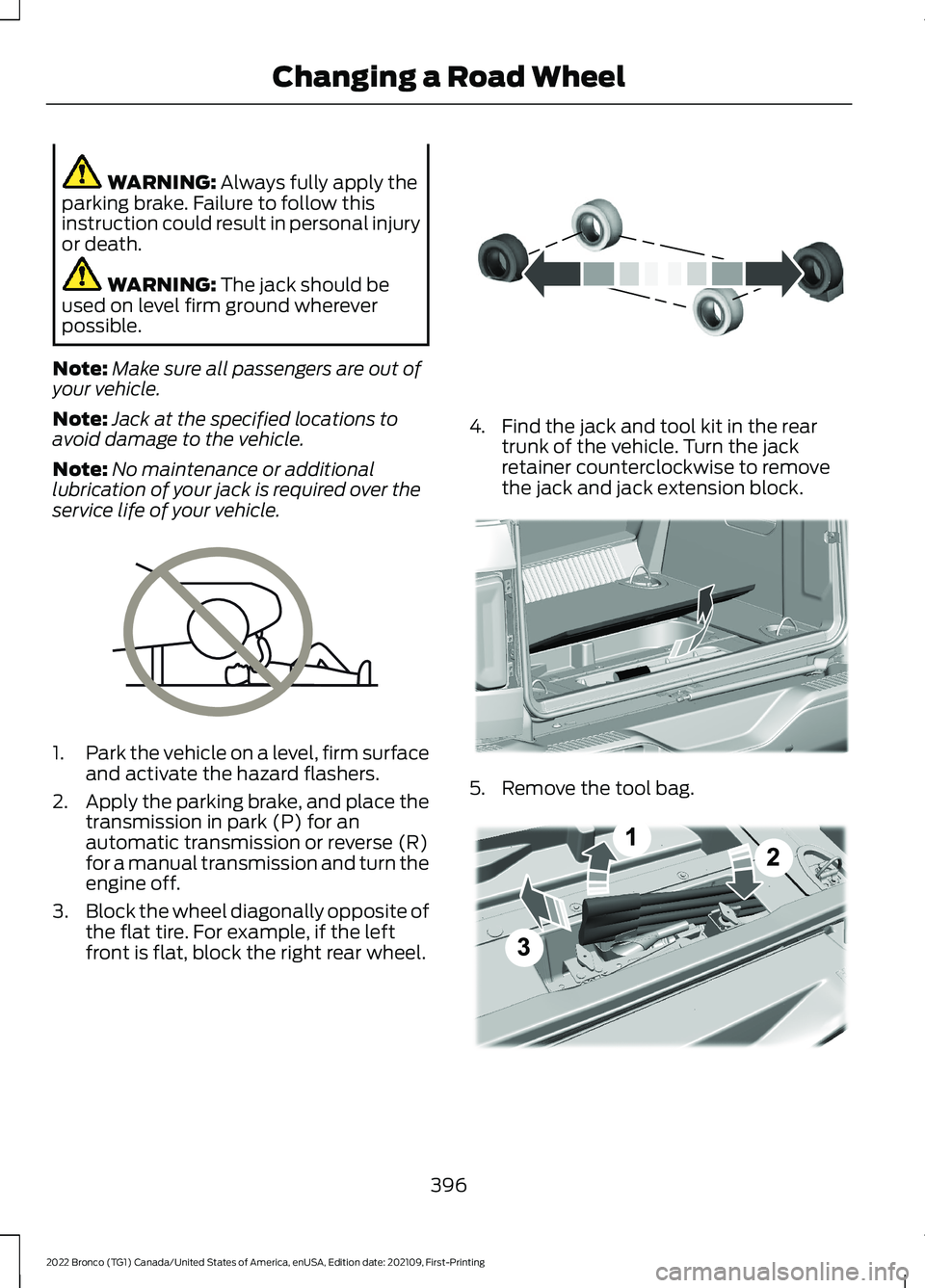
3.Block the wheel diagonally opposite ofthe flat tire. For example, if the leftfront is flat, block the right rear wheel.
4.Find the jack and tool kit in the reartrunk of the vehicle. Turn the jackretainer counterclockwise to removethe jack and jack extension block.
5.Remove the tool bag.
396
2022 Bronco (TG1) Canada/United States of America, enUSA, Edition date: 202109, First-PrintingChanging a Road WheelE166722 E142551 E324358 E343390
Page 401 of 562
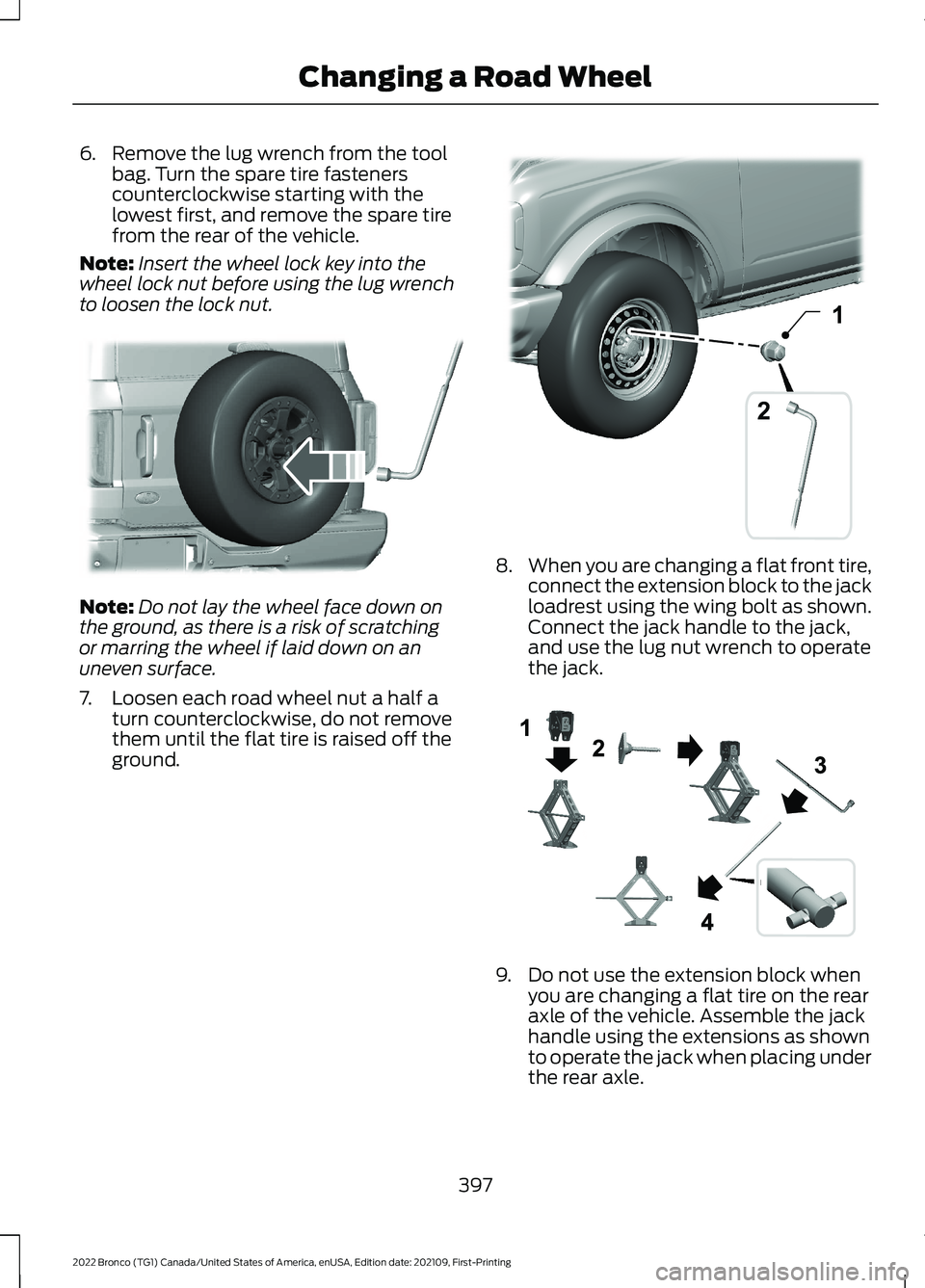
6.Remove the lug wrench from the toolbag. Turn the spare tire fastenerscounterclockwise starting with thelowest first, and remove the spare tirefrom the rear of the vehicle.
Note:Insert the wheel lock key into thewheel lock nut before using the lug wrenchto loosen the lock nut.
Note:Do not lay the wheel face down onthe ground, as there is a risk of scratchingor marring the wheel if laid down on anuneven surface.
7.Loosen each road wheel nut a half aturn counterclockwise, do not removethem until the flat tire is raised off theground.
8.When you are changing a flat front tire,connect the extension block to the jackloadrest using the wing bolt as shown.Connect the jack handle to the jack,and use the lug nut wrench to operatethe jack.
9.Do not use the extension block whenyou are changing a flat tire on the rearaxle of the vehicle. Assemble the jackhandle using the extensions as shownto operate the jack when placing underthe rear axle.
397
2022 Bronco (TG1) Canada/United States of America, enUSA, Edition date: 202109, First-PrintingChanging a Road WheelE328591 12E328732 E330077
Page 402 of 562
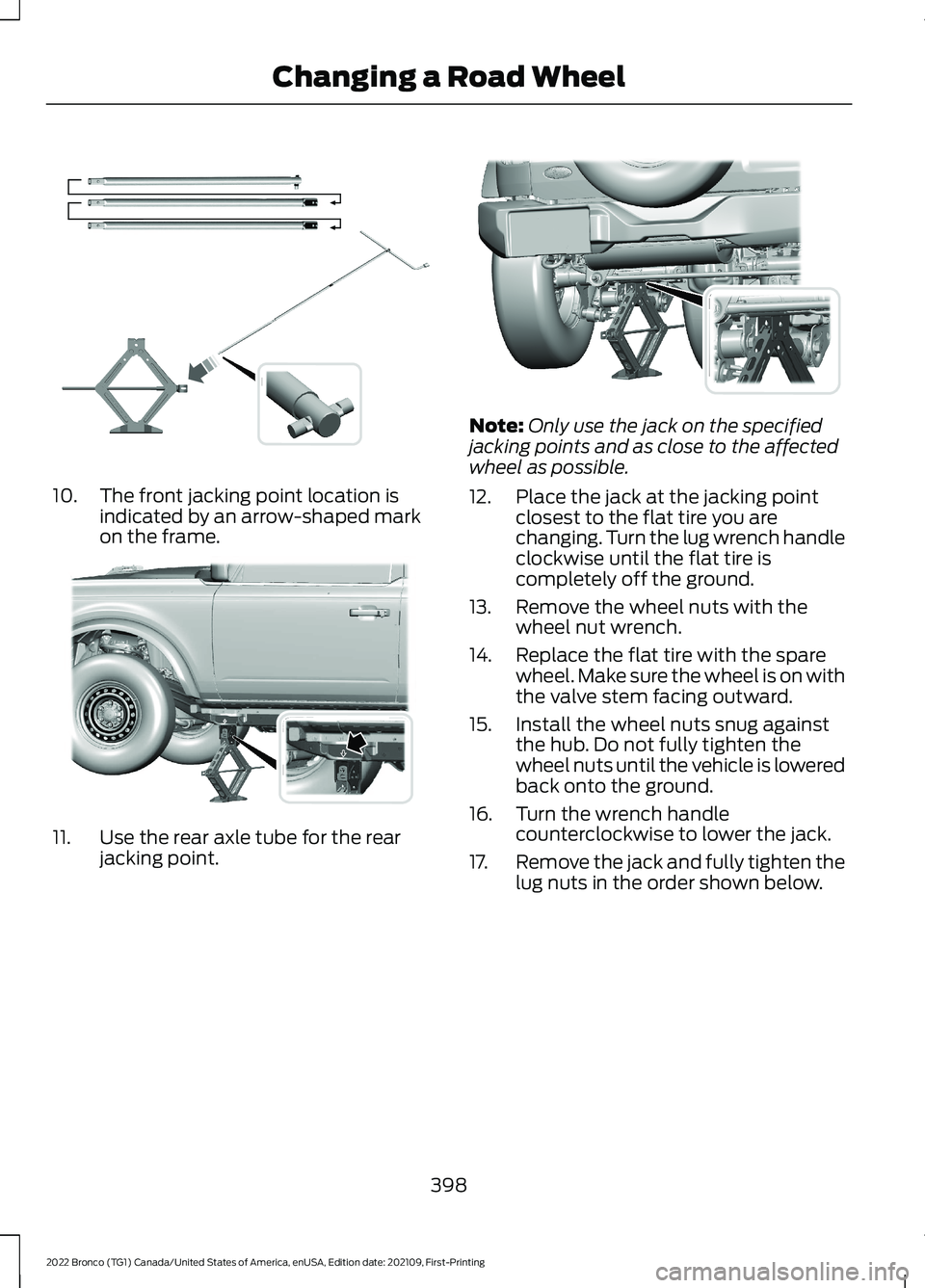
10.The front jacking point location isindicated by an arrow-shaped markon the frame.
11.Use the rear axle tube for the rearjacking point.
Note:Only use the jack on the specifiedjacking points and as close to the affectedwheel as possible.
12.Place the jack at the jacking pointclosest to the flat tire you arechanging. Turn the lug wrench handleclockwise until the flat tire iscompletely off the ground.
13.Remove the wheel nuts with thewheel nut wrench.
14.Replace the flat tire with the sparewheel. Make sure the wheel is on withthe valve stem facing outward.
15.Install the wheel nuts snug againstthe hub. Do not fully tighten thewheel nuts until the vehicle is loweredback onto the ground.
16.Turn the wrench handlecounterclockwise to lower the jack.
17.Remove the jack and fully tighten thelug nuts in the order shown below.
398
2022 Bronco (TG1) Canada/United States of America, enUSA, Edition date: 202109, First-PrintingChanging a Road WheelE330076 E343635 E330074
Page 403 of 562
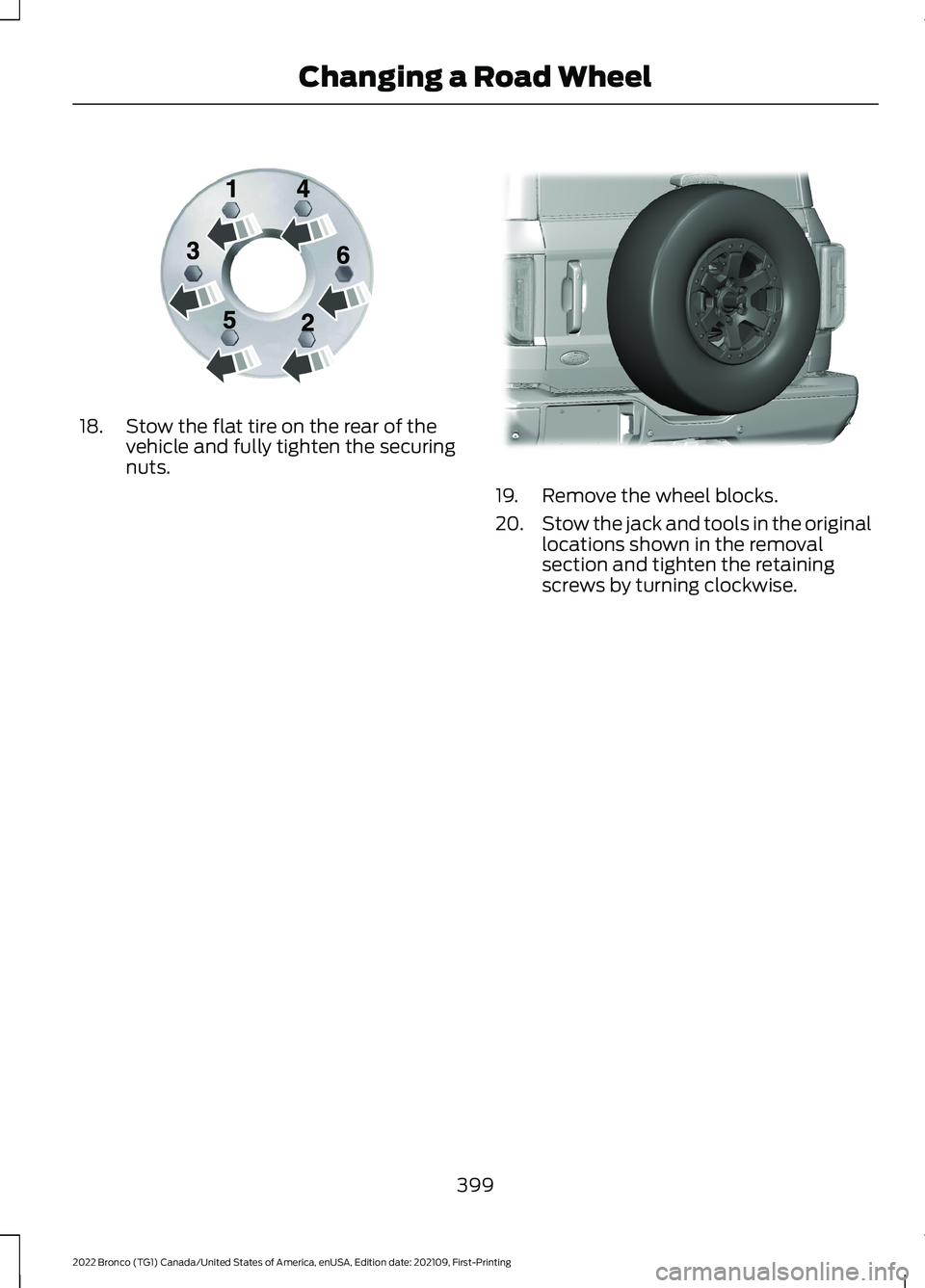
18.Stow the flat tire on the rear of thevehicle and fully tighten the securingnuts.
19.Remove the wheel blocks.
20.Stow the jack and tools in the originallocations shown in the removalsection and tighten the retainingscrews by turning clockwise.
399
2022 Bronco (TG1) Canada/United States of America, enUSA, Edition date: 202109, First-PrintingChanging a Road WheelE166719 E324079
Page 428 of 562
4.Press a setting.
Occupancy Mode (If Equipped)
1.Press Settings on the touchscreen.
2.Press Sound Settings.
3.Press Occupancy Mode.
4.Press a setting.
Sound Mode (If Equipped)
1.Press Settings on the touchscreen.
2.Press Sound Settings.
3.Press Sound Mode.
4.Press a setting.
SETTING THE CLOCK AND
DATE
1.Press Settings on the touchscreen.
2.Press Clock Settings.
3.Set the time.
Note:The AM and PM options are notavailable if 24-hour mode is on.
Switching Automatic TimeUpdates On and Off
1.Press Settings on the touchscreen.
2.Press Clock Settings.
3.Switch Automatic time zone updateon or off.
AM/FM RADIO
AM/FM RADIO LIMITATIONS
The further you travel from an AM or FMstation, the weaker the signal and theweaker the reception.
Hills, mountains, tall buildings, bridges,tunnels, freeway overpasses, parkinggarages, dense tree foliage andthunderstorms can interfere with thereception.
When you pass a ground-based broadcastrepeating tower, a stronger signal mayovertake a weaker one and result in theaudio system muting.
SELECTING A RADIO STATION
Manually Selecting a RadioStation
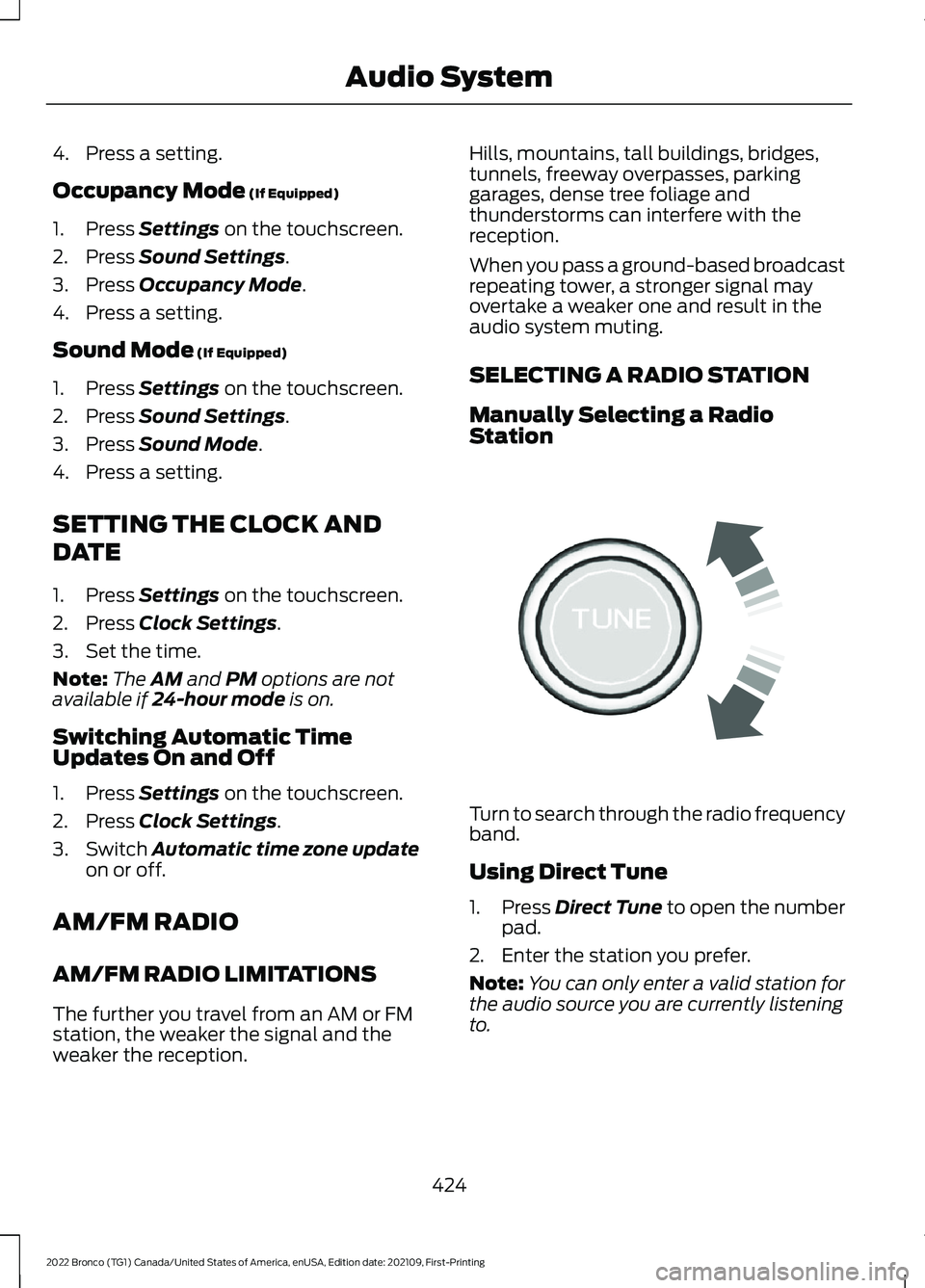
Turn to search through the radio frequencyband.
Using Direct Tune
1.Press Direct Tune to open the numberpad.
2.Enter the station you prefer.
Note:You can only enter a valid station forthe audio source you are currently listeningto.
424
2022 Bronco (TG1) Canada/United States of America, enUSA, Edition date: 202109, First-PrintingAudio SystemE270235
Page 555 of 562
What is Sensitive Locking Mode.....................53Service Data.....................................................23Setting a Destination..................................447Setting a Destination Using a Point ofInterest.............................................................448Setting a Destination Using a PredictiveDestination.....................................................448Setting a Destination Using a RecentDestination.....................................................448Setting a Destination Using a SavedDestination.....................................................448Setting a Destination Using the MapScreen..............................................................448Setting a Destination Using the Text EntryScreen...............................................................447Setting a Memory Preset..........................423Settings Data...................................................24Setting the Adaptive Cruise ControlGap.................................................................238Setting the Adaptive Cruise ControlSpeed.............................................................237Setting the Blower Motor Speed.............119Setting the Clock and Date......................424Setting the Cruise Control Speed..........232Setting the Hill Descent Speed................217Setting the Temperature............................119Setting the Trail Control Speed..............207Shifting Into Reverse....................................174Shifting Your Vehicle Into Gear................179Sitting in the Correct Position...................127Sounding the Panic Alarm..........................70Special Operating Conditions ScheduledMaintenance..............................................464Speed ControlSee: Cruise Control............................................232Speedometer.................................................107Stability Control Indicator........................206Stability Control...........................................204Stabilizer Bar DisconnectIndicators......................................................215Stabilizer Bar DisconnectPrecautions..................................................214Stabilizer Bar Disconnect..........................214Stabilizer Bar Disconnect –Troubleshooting.............................................215
Stabilizer Bar Disconnect –Troubleshooting.........................................215Stabilizer Bar Disconnect – FrequentlyAsked Questions............................................216Stabilizer Bar Disconnect – InformationMessages..........................................................215Starting and Stopping the Engine –Precautions...................................................151Starting and Stopping the Engine...........151Automatic Engine Stop....................................155Engine Block Heater..........................................153Starting and Stopping the Engine –Troubleshooting.............................................156Starting the Engine............................................152Stopping the Engine..........................................154Starting and Stopping the Engine –Troubleshooting.........................................156Starting and Stopping the Engine –Frequently Asked Questions.....................158Starting and Stopping the Engine –Information Messages..................................157Starting and Stopping the Engine –Warning Lamps..............................................156Start in Gear Limitations...........................159Start in Gear Precautions..........................159Start in Gear...................................................159Start in Gear – Troubleshooting...................160Start in Gear – Troubleshooting.............160Start in Gear – Frequently AskedQuestions.........................................................160Start in Gear – InformationMessages.........................................................160Starting the Engine......................................152Restarting the Engine After Stoppingit............................................................................152Starting a Gasoline Engine..............................152Status Bar.......................................................433Steering............................................................219Electric Power Steering....................................219Steering – Troubleshooting...........................220Steering – Troubleshooting.....................220Steering – Frequently AskedQuestions..........................................................221Steering – Information Messages...............220Steering Wheel...............................................89Steering Wheel - Vehicles With: AdaptiveCruise Control................................................27
551
2022 Bronco (TG1) Canada/United States of America, enUSA, Edition date: 202109, First-PrintingIndex