mirror FORD BRONCO 2022 Owner's Manual
[x] Cancel search | Manufacturer: FORD, Model Year: 2022, Model line: BRONCO, Model: FORD BRONCO 2022Pages: 562, PDF Size: 73 MB
Page 260 of 562
WHAT IS BLIND SPOT
INFORMATION SYSTEM
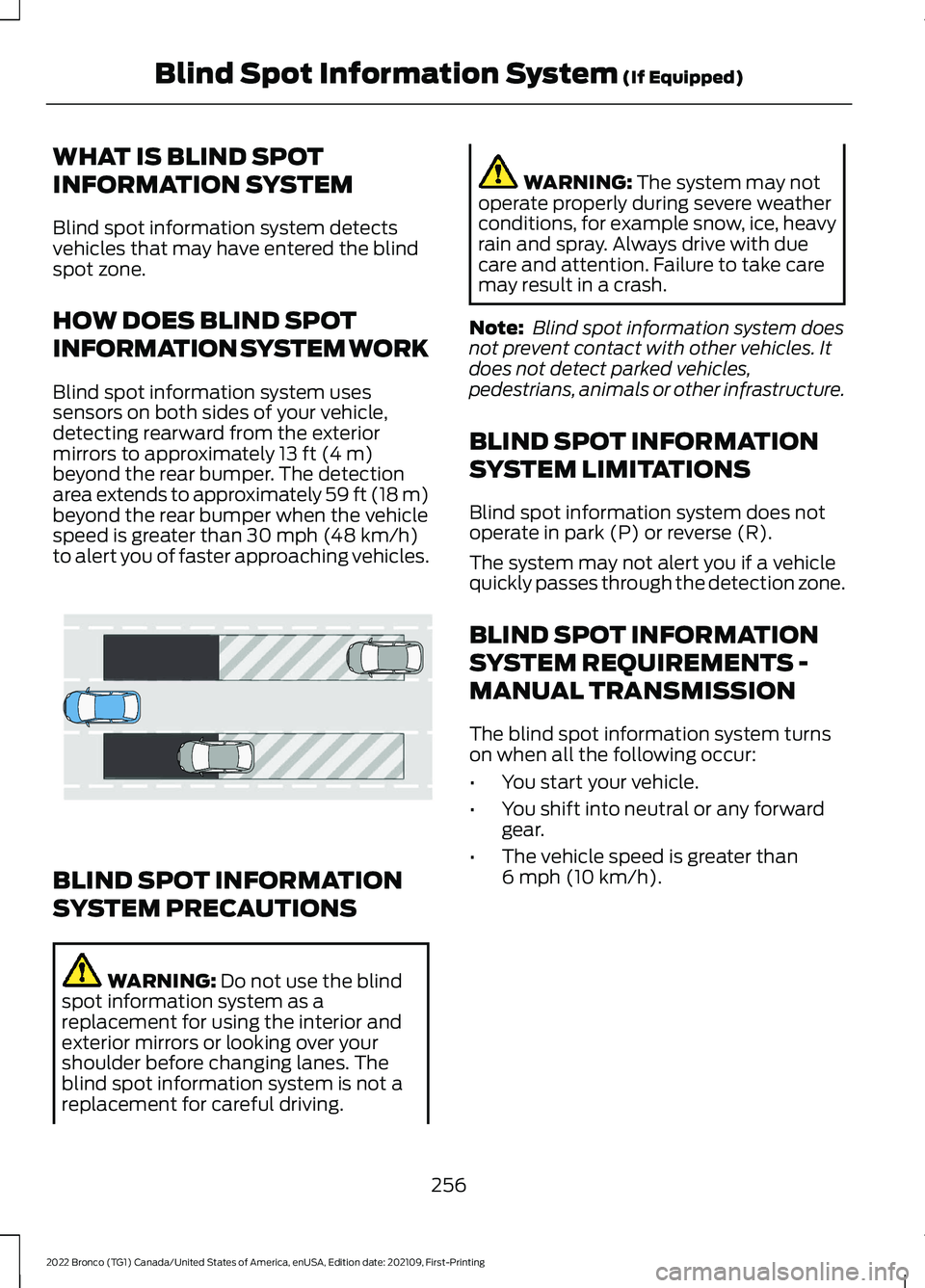
Blind spot information system detectsvehicles that may have entered the blindspot zone.
HOW DOES BLIND SPOT
INFORMATION SYSTEM WORK
Blind spot information system usessensors on both sides of your vehicle,detecting rearward from the exteriormirrors to approximately 13 ft (4 m)beyond the rear bumper. The detectionarea extends to approximately 59 ft (18 m)beyond the rear bumper when the vehiclespeed is greater than 30 mph (48 km/h)to alert you of faster approaching vehicles.
BLIND SPOT INFORMATION
SYSTEM PRECAUTIONS
WARNING: Do not use the blindspot information system as areplacement for using the interior andexterior mirrors or looking over yourshoulder before changing lanes. Theblind spot information system is not areplacement for careful driving.
WARNING: The system may notoperate properly during severe weatherconditions, for example snow, ice, heavyrain and spray. Always drive with duecare and attention. Failure to take caremay result in a crash.
Note: Blind spot information system doesnot prevent contact with other vehicles. Itdoes not detect parked vehicles,pedestrians, animals or other infrastructure.
BLIND SPOT INFORMATION
SYSTEM LIMITATIONS
Blind spot information system does notoperate in park (P) or reverse (R).
The system may not alert you if a vehiclequickly passes through the detection zone.
BLIND SPOT INFORMATION
SYSTEM REQUIREMENTS -
MANUAL TRANSMISSION
The blind spot information system turnson when all the following occur:
•You start your vehicle.
•You shift into neutral or any forwardgear.
•The vehicle speed is greater than6 mph (10 km/h).
256
2022 Bronco (TG1) Canada/United States of America, enUSA, Edition date: 202109, First-PrintingBlind Spot Information System (If Equipped)E255695
Page 262 of 562
BLIND SPOT INFORMATION
SYSTEM INDICATORS
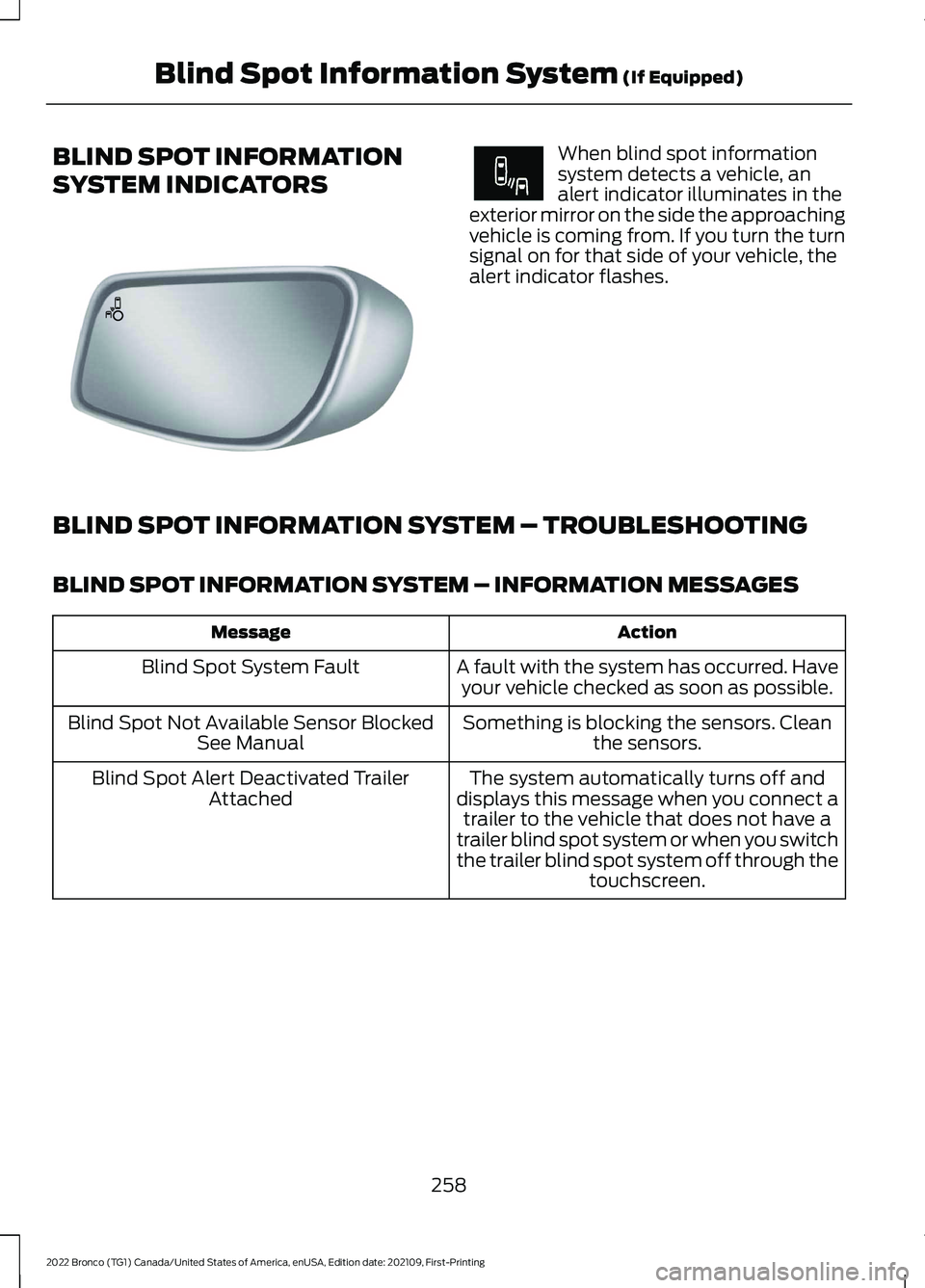
When blind spot informationsystem detects a vehicle, analert indicator illuminates in theexterior mirror on the side the approachingvehicle is coming from. If you turn the turnsignal on for that side of your vehicle, thealert indicator flashes.
BLIND SPOT INFORMATION SYSTEM – TROUBLESHOOTING
BLIND SPOT INFORMATION SYSTEM – INFORMATION MESSAGES
ActionMessage
A fault with the system has occurred. Haveyour vehicle checked as soon as possible.Blind Spot System Fault
Something is blocking the sensors. Cleanthe sensors.Blind Spot Not Available Sensor BlockedSee Manual
The system automatically turns off anddisplays this message when you connect atrailer to the vehicle that does not have atrailer blind spot system or when you switchthe trailer blind spot system off through thetouchscreen.
Blind Spot Alert Deactivated TrailerAttached
258
2022 Bronco (TG1) Canada/United States of America, enUSA, Edition date: 202109, First-PrintingBlind Spot Information System (If Equipped)E142442 E249861E249861
Page 263 of 562
WHAT IS CROSS TRAFFIC
ALERT
The system alerts you of vehiclesapproaching from the sides behind yourvehicle when you shift into reverse (R).
HOW DOES CROSS TRAFFIC
ALERT WORK
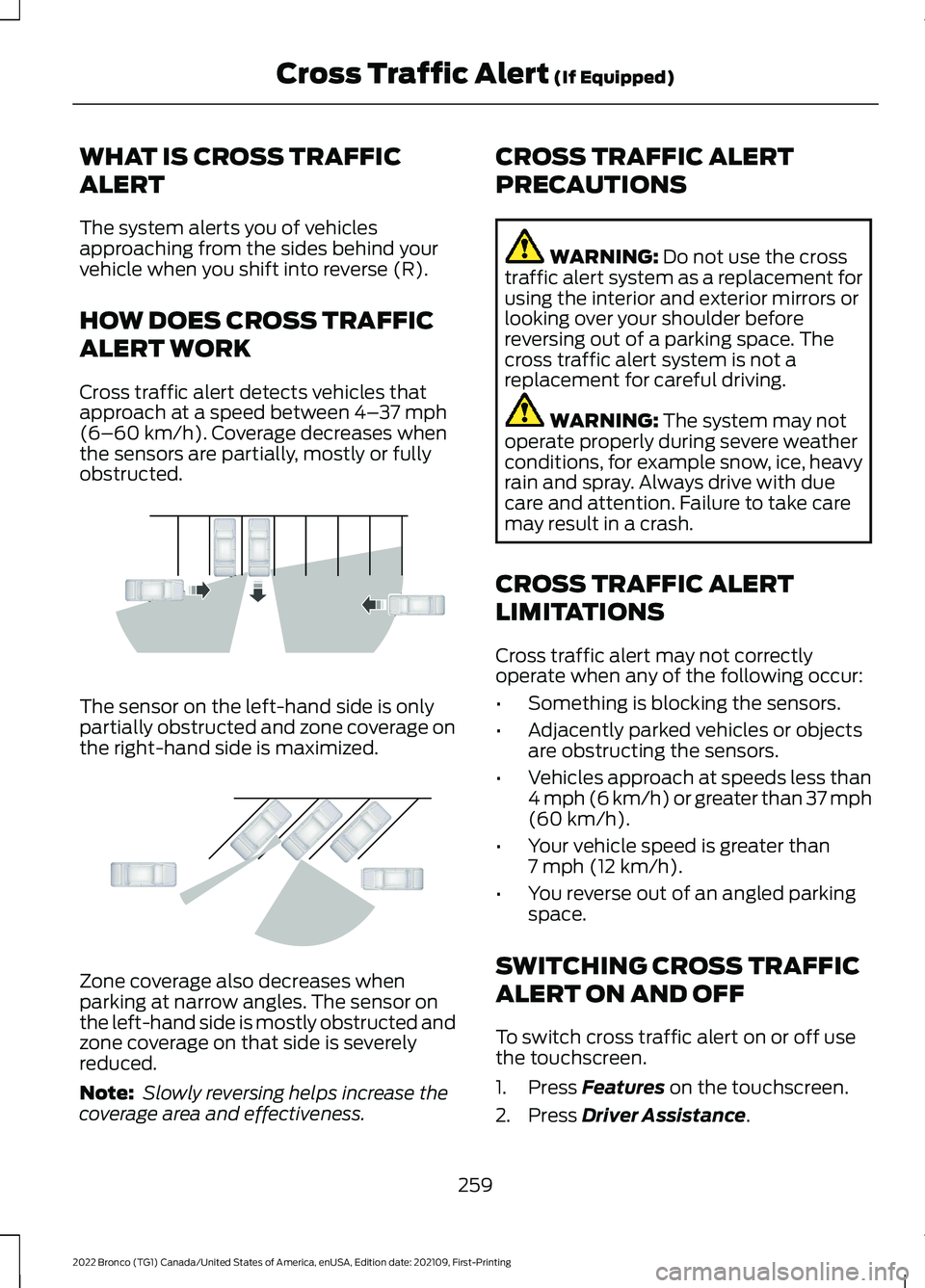
Cross traffic alert detects vehicles thatapproach at a speed between 4–37 mph(6–60 km/h). Coverage decreases whenthe sensors are partially, mostly or fullyobstructed.
The sensor on the left-hand side is onlypartially obstructed and zone coverage onthe right-hand side is maximized.
Zone coverage also decreases whenparking at narrow angles. The sensor onthe left-hand side is mostly obstructed andzone coverage on that side is severelyreduced.
Note: Slowly reversing helps increase thecoverage area and effectiveness.
CROSS TRAFFIC ALERT
PRECAUTIONS
WARNING: Do not use the crosstraffic alert system as a replacement forusing the interior and exterior mirrors orlooking over your shoulder beforereversing out of a parking space. Thecross traffic alert system is not areplacement for careful driving.
WARNING: The system may notoperate properly during severe weatherconditions, for example snow, ice, heavyrain and spray. Always drive with duecare and attention. Failure to take caremay result in a crash.
CROSS TRAFFIC ALERT
LIMITATIONS
Cross traffic alert may not correctlyoperate when any of the following occur:
•Something is blocking the sensors.
•Adjacently parked vehicles or objectsare obstructing the sensors.
•Vehicles approach at speeds less than4 mph (6 km/h) or greater than 37 mph(60 km/h).
•Your vehicle speed is greater than7 mph (12 km/h).
•You reverse out of an angled parkingspace.
SWITCHING CROSS TRAFFIC
ALERT ON AND OFF
To switch cross traffic alert on or off usethe touchscreen.
1.Press Features on the touchscreen.
2.Press Driver Assistance.
259
2022 Bronco (TG1) Canada/United States of America, enUSA, Edition date: 202109, First-PrintingCross Traffic Alert (If Equipped)E142440 E142441
Page 264 of 562
3.Switch Cross Traffic Alert on or off.
Note:The system switches on every timeyou switch the ignition on. To permanentlyswitch the system off, contact an authorizeddealer.
LOCATING THE CROSS
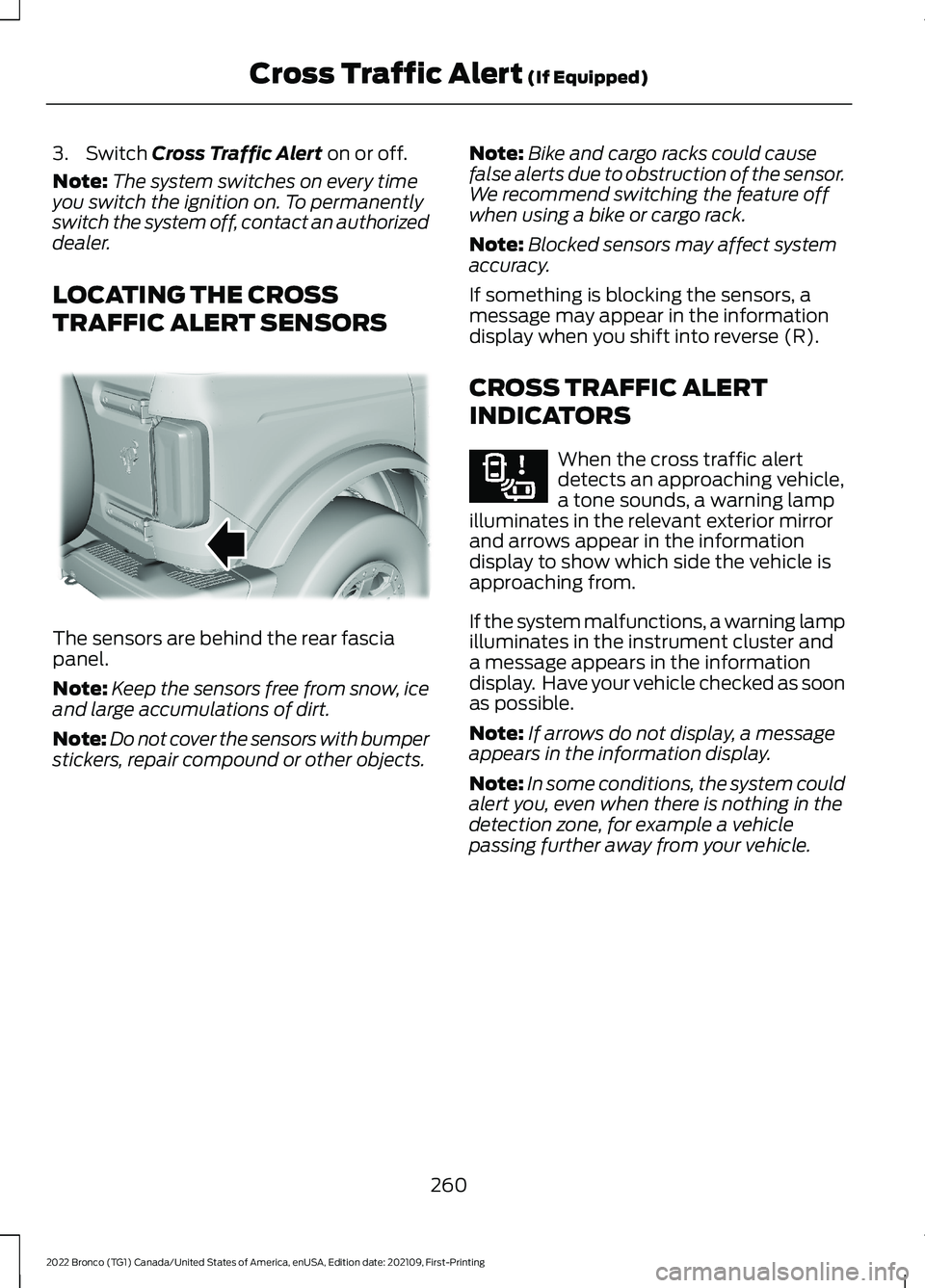
TRAFFIC ALERT SENSORS
The sensors are behind the rear fasciapanel.
Note:Keep the sensors free from snow, iceand large accumulations of dirt.
Note:Do not cover the sensors with bumperstickers, repair compound or other objects.
Note:Bike and cargo racks could causefalse alerts due to obstruction of the sensor.We recommend switching the feature offwhen using a bike or cargo rack.
Note:Blocked sensors may affect systemaccuracy.
If something is blocking the sensors, amessage may appear in the informationdisplay when you shift into reverse (R).
CROSS TRAFFIC ALERT
INDICATORS
When the cross traffic alertdetects an approaching vehicle,a tone sounds, a warning lampilluminates in the relevant exterior mirrorand arrows appear in the informationdisplay to show which side the vehicle isapproaching from.
If the system malfunctions, a warning lampilluminates in the instrument cluster anda message appears in the informationdisplay. Have your vehicle checked as soonas possible.
Note:If arrows do not display, a messageappears in the information display.
Note:In some conditions, the system couldalert you, even when there is nothing in thedetection zone, for example a vehiclepassing further away from your vehicle.
260
2022 Bronco (TG1) Canada/United States of America, enUSA, Edition date: 202109, First-PrintingCross Traffic Alert (If Equipped)E339014 E268294
Page 273 of 562
WHAT IS DRIVER ALERT
Driver alert alerts you if it determines thatyou are becoming drowsy or if your drivingdeteriorates.
HOW DOES DRIVER ALERT
WORK
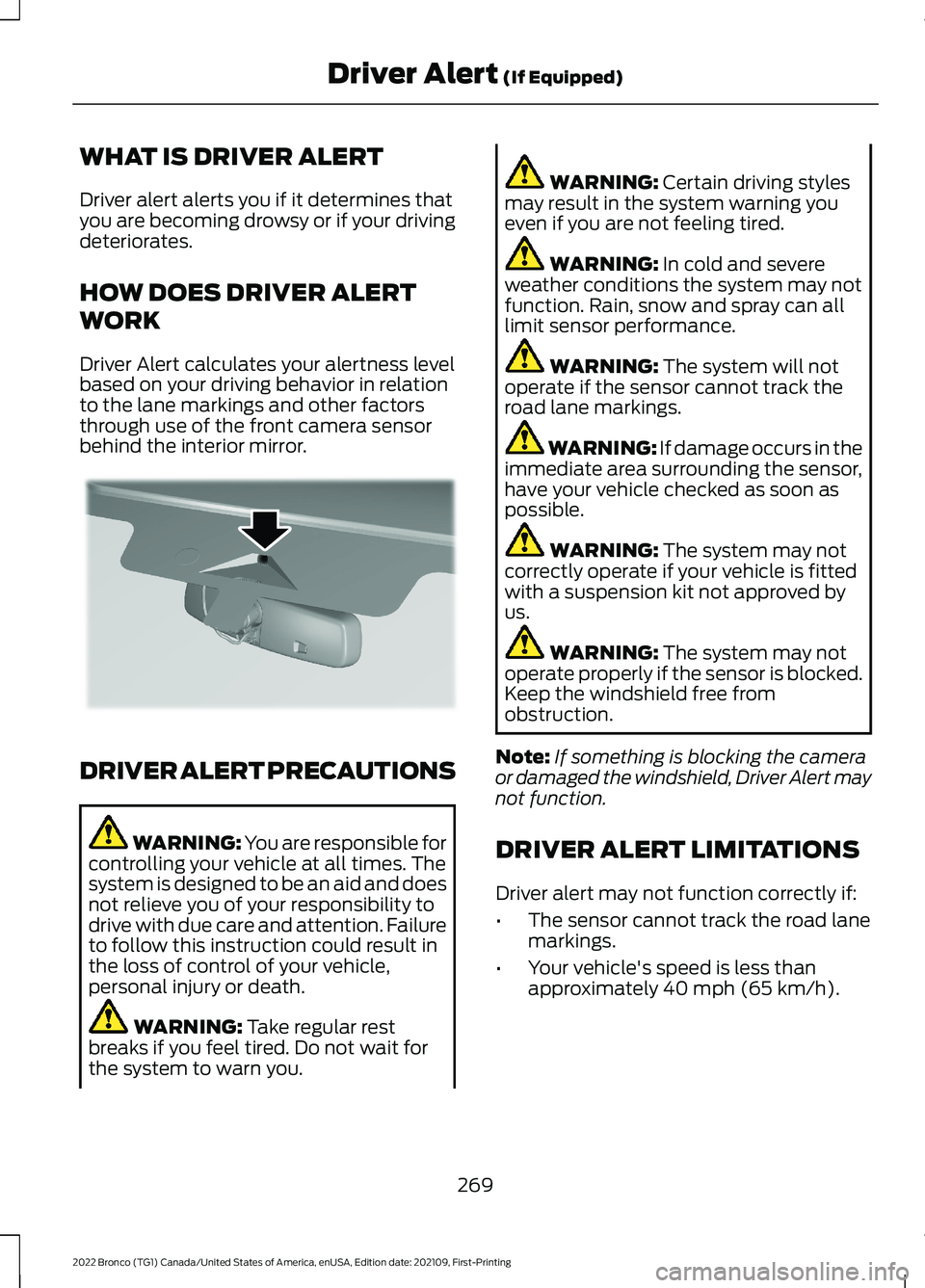
Driver Alert calculates your alertness levelbased on your driving behavior in relationto the lane markings and other factorsthrough use of the front camera sensorbehind the interior mirror.
DRIVER ALERT PRECAUTIONS
WARNING: You are responsible forcontrolling your vehicle at all times. Thesystem is designed to be an aid and doesnot relieve you of your responsibility todrive with due care and attention. Failureto follow this instruction could result inthe loss of control of your vehicle,personal injury or death.
WARNING: Take regular restbreaks if you feel tired. Do not wait forthe system to warn you.
WARNING: Certain driving stylesmay result in the system warning youeven if you are not feeling tired.
WARNING: In cold and severeweather conditions the system may notfunction. Rain, snow and spray can alllimit sensor performance.
WARNING: The system will notoperate if the sensor cannot track theroad lane markings.
WARNING: If damage occurs in theimmediate area surrounding the sensor,have your vehicle checked as soon aspossible.
WARNING: The system may notcorrectly operate if your vehicle is fittedwith a suspension kit not approved byus.
WARNING: The system may notoperate properly if the sensor is blocked.Keep the windshield free fromobstruction.
Note:If something is blocking the cameraor damaged the windshield, Driver Alert maynot function.
DRIVER ALERT LIMITATIONS
Driver alert may not function correctly if:
•The sensor cannot track the road lanemarkings.
•Your vehicle's speed is less thanapproximately 40 mph (65 km/h).
269
2022 Bronco (TG1) Canada/United States of America, enUSA, Edition date: 202109, First-PrintingDriver Alert (If Equipped)E309385
Page 321 of 562
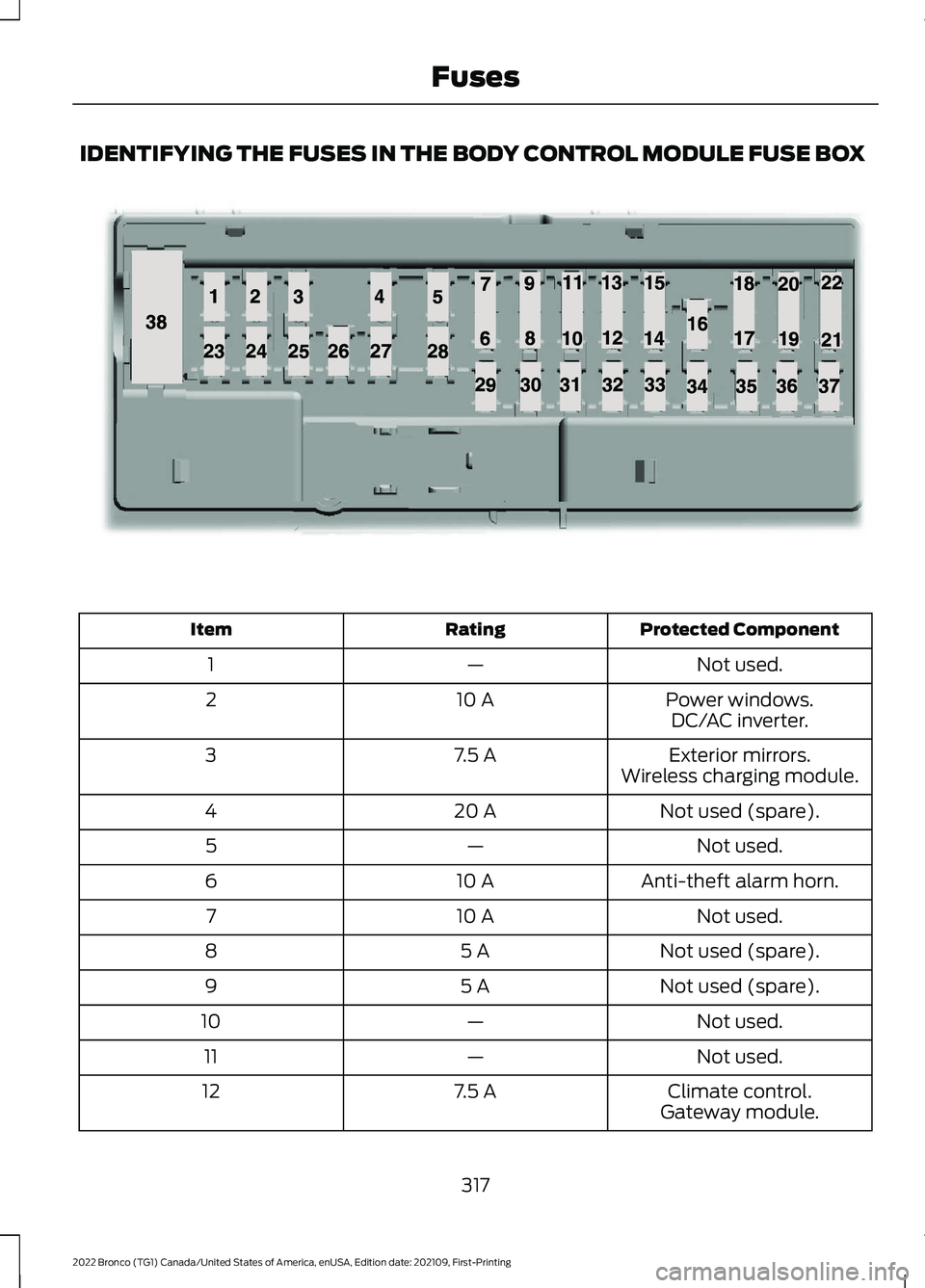
IDENTIFYING THE FUSES IN THE BODY CONTROL MODULE FUSE BOX
Protected ComponentRatingItem
Not used.—1
Power windows.10 A2DC/AC inverter.
Exterior mirrors.7.5 A3Wireless charging module.
Not used (spare).20 A4
Not used.—5
Anti-theft alarm horn.10 A6
Not used.10 A7
Not used (spare).5 A8
Not used (spare).5 A9
Not used.—10
Not used.—11
Climate control.7.5 A12Gateway module.
317
2022 Bronco (TG1) Canada/United States of America, enUSA, Edition date: 202109, First-PrintingFusesE145984
Page 323 of 562
Protected ComponentRatingItem
Not used.—33
Run/start relay.30 A34
Not used (spare).5 A35
Automatic high beam.15 A36Image processing module A.
Auto-dimming interiormirror.20 A37
Parking assist controlmodule.Heated steering wheel.
Not used.30 A Circuit Breaker38
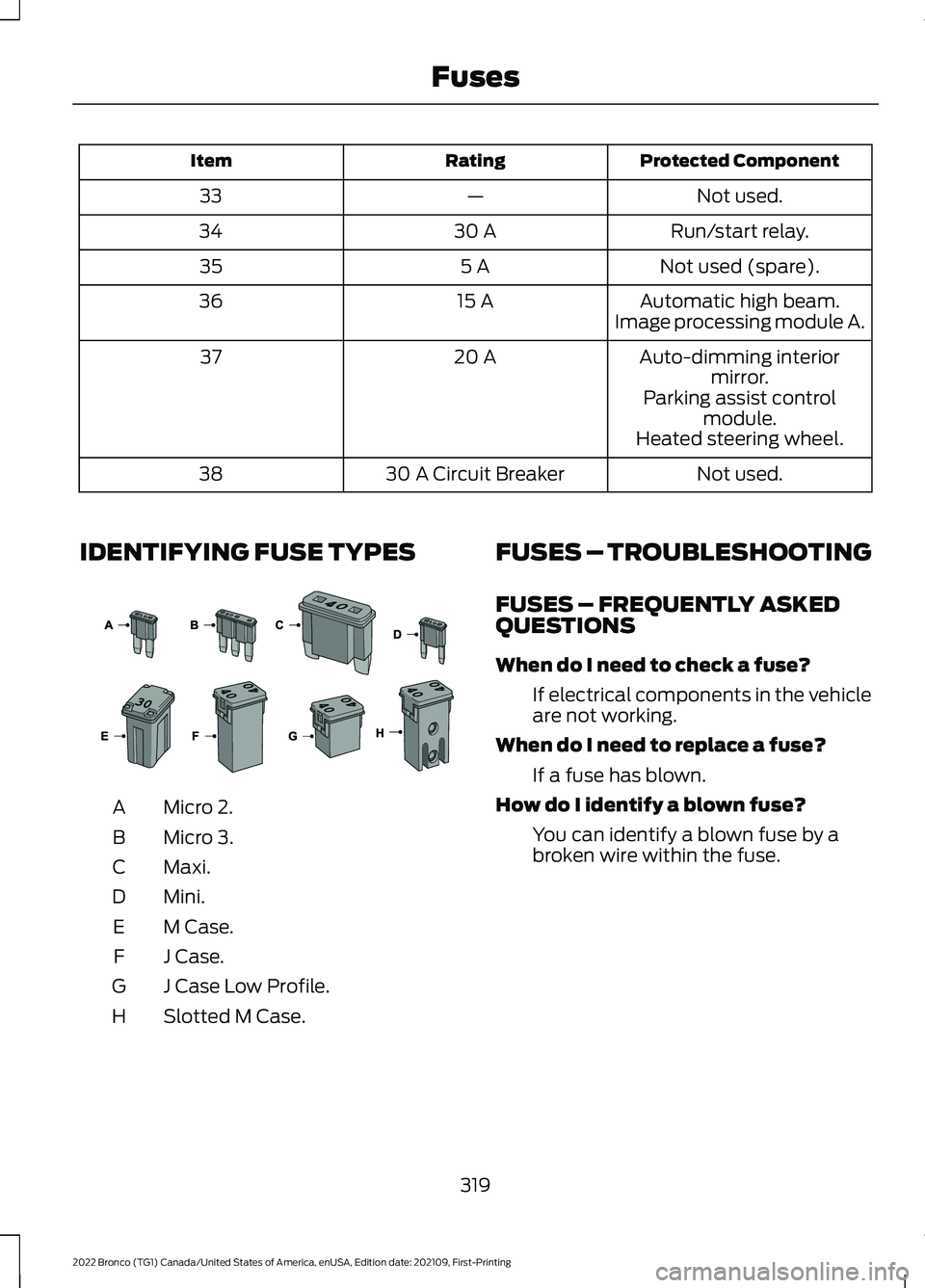
IDENTIFYING FUSE TYPES
Micro 2.A
Micro 3.B
Maxi.C
Mini.D
M Case.E
J Case.F
J Case Low Profile.G
Slotted M Case.H
FUSES – TROUBLESHOOTING
FUSES – FREQUENTLY ASKEDQUESTIONS
When do I need to check a fuse?
If electrical components in the vehicleare not working.
When do I need to replace a fuse?
If a fuse has blown.
How do I identify a blown fuse?
You can identify a blown fuse by abroken wire within the fuse.
319
2022 Bronco (TG1) Canada/United States of America, enUSA, Edition date: 202109, First-PrintingFuses E267379
Page 346 of 562
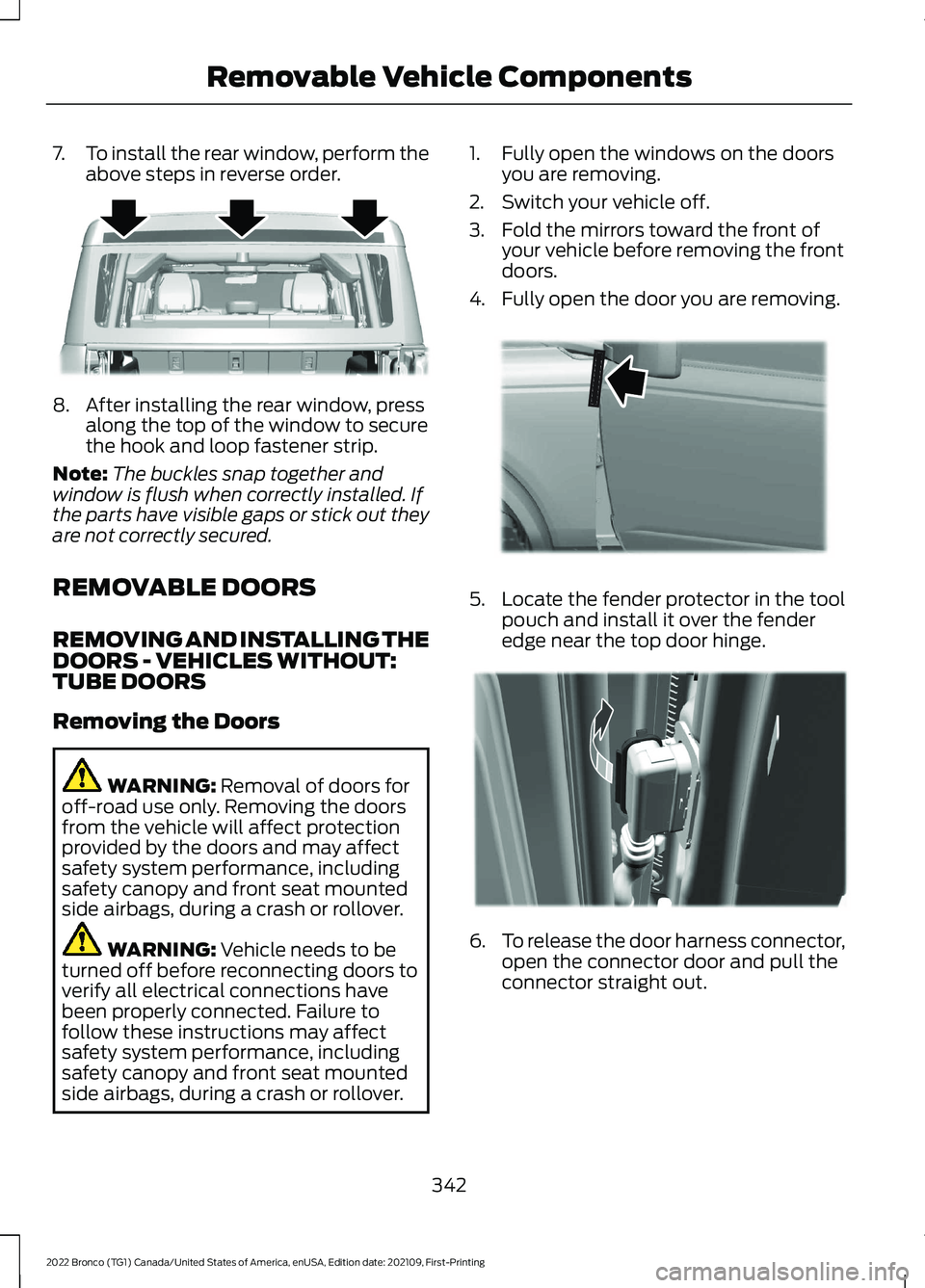
7.To install the rear window, perform theabove steps in reverse order.
8.After installing the rear window, pressalong the top of the window to securethe hook and loop fastener strip.
Note:The buckles snap together andwindow is flush when correctly installed. Ifthe parts have visible gaps or stick out theyare not correctly secured.
REMOVABLE DOORS
REMOVING AND INSTALLING THEDOORS - VEHICLES WITHOUT:TUBE DOORS
Removing the Doors
WARNING: Removal of doors foroff-road use only. Removing the doorsfrom the vehicle will affect protectionprovided by the doors and may affectsafety system performance, includingsafety canopy and front seat mountedside airbags, during a crash or rollover.
WARNING: Vehicle needs to beturned off before reconnecting doors toverify all electrical connections havebeen properly connected. Failure tofollow these instructions may affectsafety system performance, includingsafety canopy and front seat mountedside airbags, during a crash or rollover.
1.Fully open the windows on the doorsyou are removing.
2.Switch your vehicle off.
3.Fold the mirrors toward the front ofyour vehicle before removing the frontdoors.
4.Fully open the door you are removing.
5.Locate the fender protector in the toolpouch and install it over the fenderedge near the top door hinge.
6.To release the door harness connector,open the connector door and pull theconnector straight out.
342
2022 Bronco (TG1) Canada/United States of America, enUSA, Edition date: 202109, First-PrintingRemovable Vehicle ComponentsE347147 E347602 E328722
Page 348 of 562
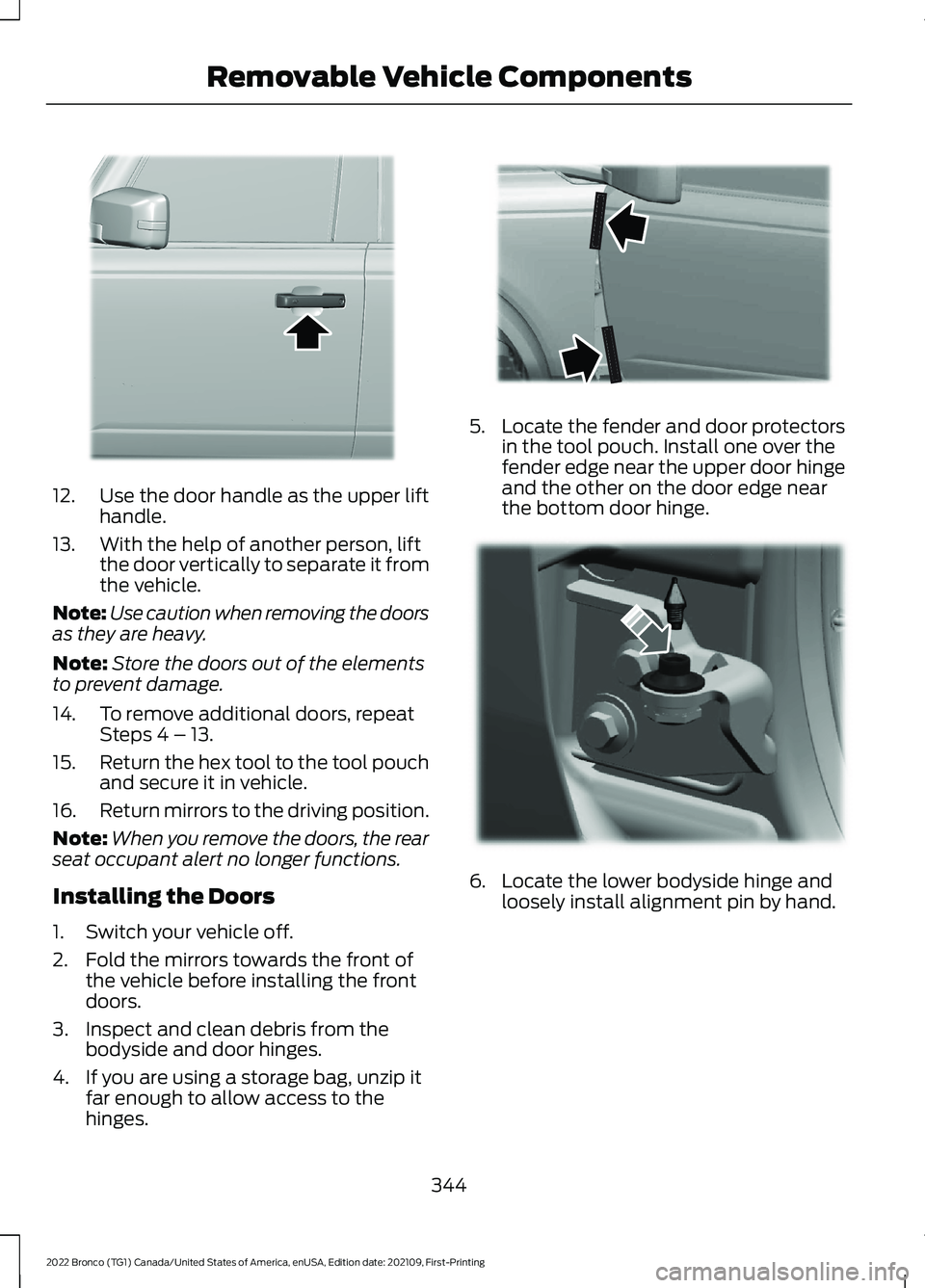
12.Use the door handle as the upper lifthandle.
13.With the help of another person, liftthe door vertically to separate it fromthe vehicle.
Note:Use caution when removing the doorsas they are heavy.
Note:Store the doors out of the elementsto prevent damage.
14.To remove additional doors, repeatSteps 4 – 13.
15.Return the hex tool to the tool pouchand secure it in vehicle.
16.Return mirrors to the driving position.
Note:When you remove the doors, the rearseat occupant alert no longer functions.
Installing the Doors
1.Switch your vehicle off.
2.Fold the mirrors towards the front ofthe vehicle before installing the frontdoors.
3.Inspect and clean debris from thebodyside and door hinges.
4.If you are using a storage bag, unzip itfar enough to allow access to thehinges.
5.Locate the fender and door protectorsin the tool pouch. Install one over thefender edge near the upper door hingeand the other on the door edge nearthe bottom door hinge.
6.Locate the lower bodyside hinge andloosely install alignment pin by hand.
344
2022 Bronco (TG1) Canada/United States of America, enUSA, Edition date: 202109, First-PrintingRemovable Vehicle ComponentsE346854 E347604 E347537
Page 350 of 562
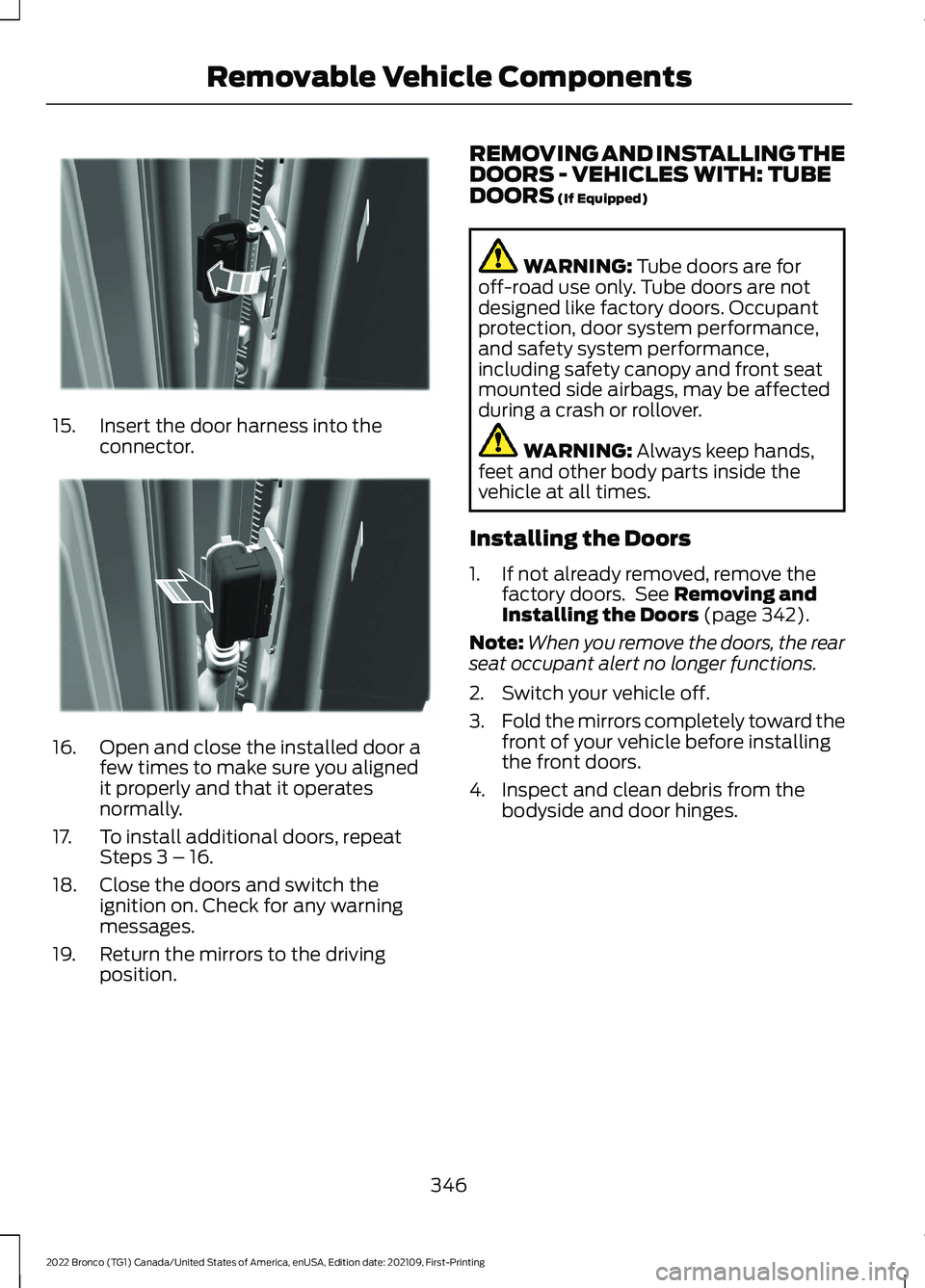
15.Insert the door harness into theconnector.
16.Open and close the installed door afew times to make sure you alignedit properly and that it operatesnormally.
17.To install additional doors, repeatSteps 3 – 16.
18.Close the doors and switch theignition on. Check for any warningmessages.
19.Return the mirrors to the drivingposition.
REMOVING AND INSTALLING THEDOORS - VEHICLES WITH: TUBEDOORS (If Equipped)
WARNING: Tube doors are foroff-road use only. Tube doors are notdesigned like factory doors. Occupantprotection, door system performance,and safety system performance,including safety canopy and front seatmounted side airbags, may be affectedduring a crash or rollover.
WARNING: Always keep hands,feet and other body parts inside thevehicle at all times.
Installing the Doors
1.If not already removed, remove thefactory doors. See Removing andInstalling the Doors (page 342).
Note:When you remove the doors, the rearseat occupant alert no longer functions.
2.Switch your vehicle off.
3.Fold the mirrors completely toward thefront of your vehicle before installingthe front doors.
4.Inspect and clean debris from thebodyside and door hinges.
346
2022 Bronco (TG1) Canada/United States of America, enUSA, Edition date: 202109, First-PrintingRemovable Vehicle ComponentsE328723 E328726