transmission FORD BRONCO 2022 Workshop Manual
[x] Cancel search | Manufacturer: FORD, Model Year: 2022, Model line: BRONCO, Model: FORD BRONCO 2022Pages: 562, PDF Size: 73 MB
Page 232 of 562
SWITCHING REAR VIEW CAMERADELAY ON AND OFF
1.Press Features on the touchscreen.
2.Press Driver Assistance.
3.Press Rear View Camera.
4.Switch Rear View Camera Delay on oroff.
When shifting the transmission out ofreverse (R) and into any gear other thanpark (P), the camera image remains in thedisplay until:
•Your vehicle speed reachesapproximately 5 mph (8 km/h).
•You shift your vehicle into park (P).
228
2022 Bronco (TG1) Canada/United States of America, enUSA, Edition date: 202109, First-PrintingRear View Camera
Page 233 of 562
WHAT IS THE 360 DEGREE
CAMERA
The 360 degree camera system providesvisibility around your vehicle in parkingmaneuvers such as:
•Centering in a parking space.
•Obstacles near your vehicle.
•Parallel parking.
The 360 degree camera system consistsof front, side and rear cameras.
HOW DOES THE 360 DEGREE
CAMERA WORK
The 360 degree camera system:
•Allows you to see what is directly infront of or behind your vehicle.
•Helps you when parallel parking andcentering in a parking space.
•Provides a cross traffic view in front ofand behind your vehicle.
•Allows you to see a top-down view ofthe area outside your vehicle, includingthe blind spots and obstacles near yourvehicle.
360 DEGREE CAMERA
PRECAUTIONS
WARNING: The 360 degreecamera system still requires the driverto use it in conjunction with looking outof the windows, and checking the interiorand exterior mirrors for maximumcoverage.
WARNING: Objects that are closeto either corner of the bumper or underthe bumper, might not be seen on thescreen due to the limited coverage of thecamera system.
WARNING: Use caution whenturning camera features on or off whenthe transmission is not in park (P). Makesure your vehicle is not moving.
WARNING: You are responsible forcontrolling your vehicle at all times. Thesystem is designed to be an aid and doesnot relieve you of your responsibility todrive with due care and attention. Failureto follow this instruction could result inthe loss of control of your vehicle,personal injury or death.
WARNING: Use caution when therear cargo door is ajar. If the rear cargodoor is ajar, the camera will be out ofposition and the video image could beincorrect. All guide lines disappear whenthe rear cargo door is ajar. Failure tofollow this instruction could result inpersonal injury.
WARNING: When manual zoom ison, the full area behind your vehicle maynot show. Be aware of your surroundingswhen using the manual zoom feature.
360 DEGREE CAMERA
LIMITATIONS
Note:Use caution if a door is ajar. The 360degree camera could be out of position andthe image could be incorrect.
229
2022 Bronco (TG1) Canada/United States of America, enUSA, Edition date: 202109, First-Printing360 Degree Camera (If Equipped)
Page 234 of 562
LOCATING THE 360 DEGREE
CAMERAS
Rear View Camera
The rear view camera is in the spare tirecarrier. It provides an image of the areabehind your vehicle.
Front View Camera
The front video camera is in the grille. Itprovides a video image of the area in frontof your vehicle. To use the front camerasystem, place the transmission in any gearexcept reverse (R) and press the cameraicon in the corner of the screen.
Note:The front camera system switcheson when you are in mud/sand, rock crawl,or baja mode.
Side View Camera
The side view cameras are on the outsidemirrors. They provide a video image of thearea on the sides of your vehicle to aid youwhen parking.
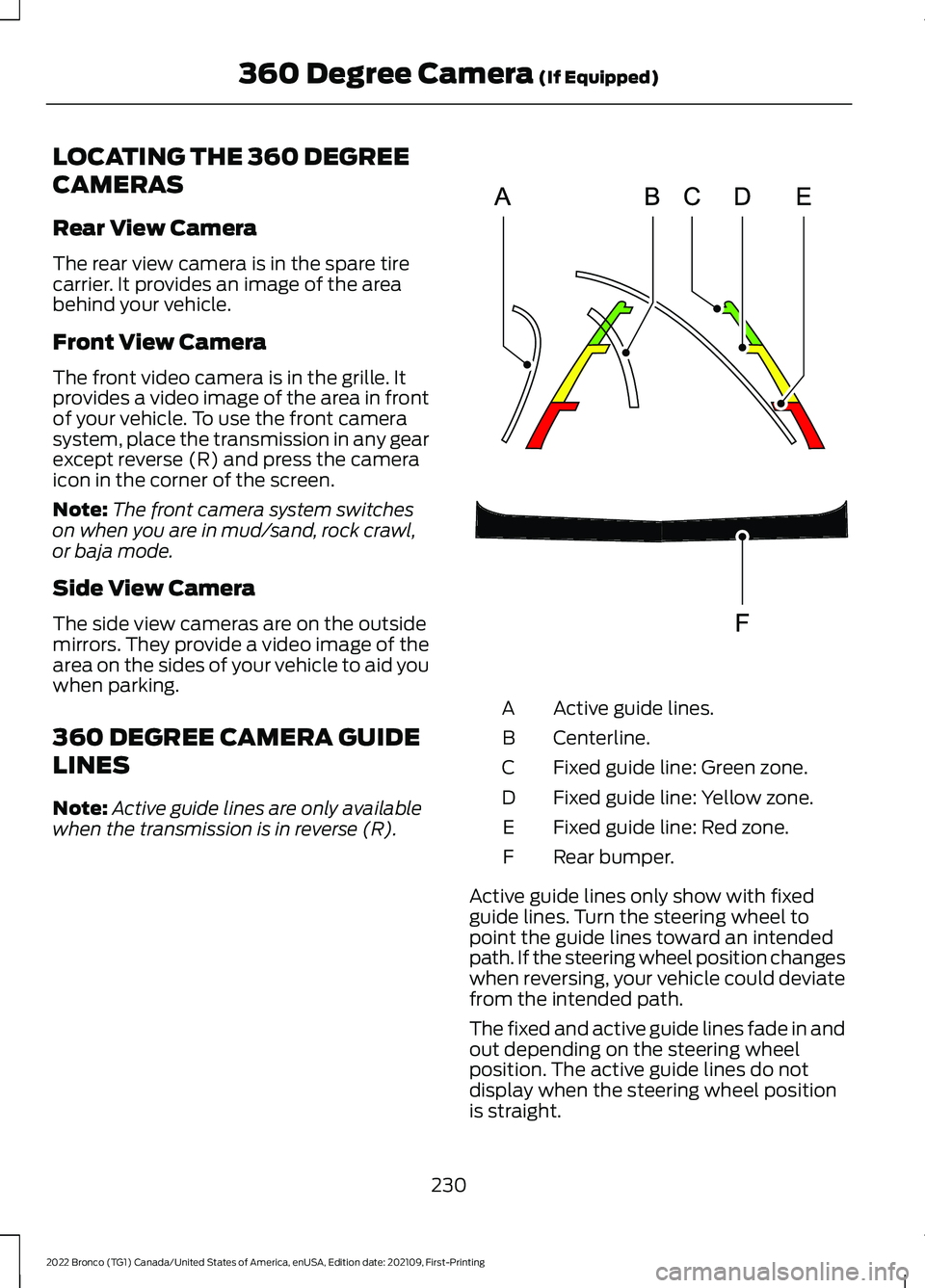
360 DEGREE CAMERA GUIDE
LINES
Note:Active guide lines are only availablewhen the transmission is in reverse (R).
Active guide lines.A
Centerline.B
Fixed guide line: Green zone.C
Fixed guide line: Yellow zone.D
Fixed guide line: Red zone.E
Rear bumper.F
Active guide lines only show with fixedguide lines. Turn the steering wheel topoint the guide lines toward an intendedpath. If the steering wheel position changeswhen reversing, your vehicle could deviatefrom the intended path.
The fixed and active guide lines fade in andout depending on the steering wheelposition. The active guide lines do notdisplay when the steering wheel positionis straight.
230
2022 Bronco (TG1) Canada/United States of America, enUSA, Edition date: 202109, First-Printing360 Degree Camera (If Equipped)E306774
Page 246 of 562
WHAT IS G.O.A.T. MODE
CONTROL
Your vehicle has several goes overany-type of terrain (G.O.A.T.) modes thatyou can select for different drivingconditions. Depending on the mode thatyou select, the system adjusts variousvehicle settings.
HOW DOES G.O.A.T. MODE
CONTROL WORK
Each selectable mode changes variouselectronic and mechanical settings withinyour vehicle to tailor its performance anddriving characteristics to on-road oroff-road driving conditions. The systemmay alter steering feel and effort, tractioncontrol, stability control, chassis controls,powertrain response, transmission shiftpoints, four-wheel driveline setting,exhaust noise level and suspensiondampening to predetermined settings,depending upon the mode that you select.
The system reverts to the normal modeeach time you start your vehicle. At startupthe system also displays a prompt on theinstrument cluster display that gives youthe option to return to the previouslyselected drive mode during the last ignitioncycle. If you select yes, the system returnsto the last selected drive mode and thedefault driveline settings associated withthat mode. If you select no or do not makea selection within a short time, the systemremains in normal mode and the drivelinesettings remain the same as selected inthe prior ignition cycle.
Note:Your vehicle has diagnostic checksthat continuously monitor all systems forproper operation. If a mode is unavailabledue to a system fault, your vehicle defaultsto normal mode and the driveline remainsin the four-wheel drive setting that you lastselected prior to the system fault.
SELECTING A G.O.A.T. MODE
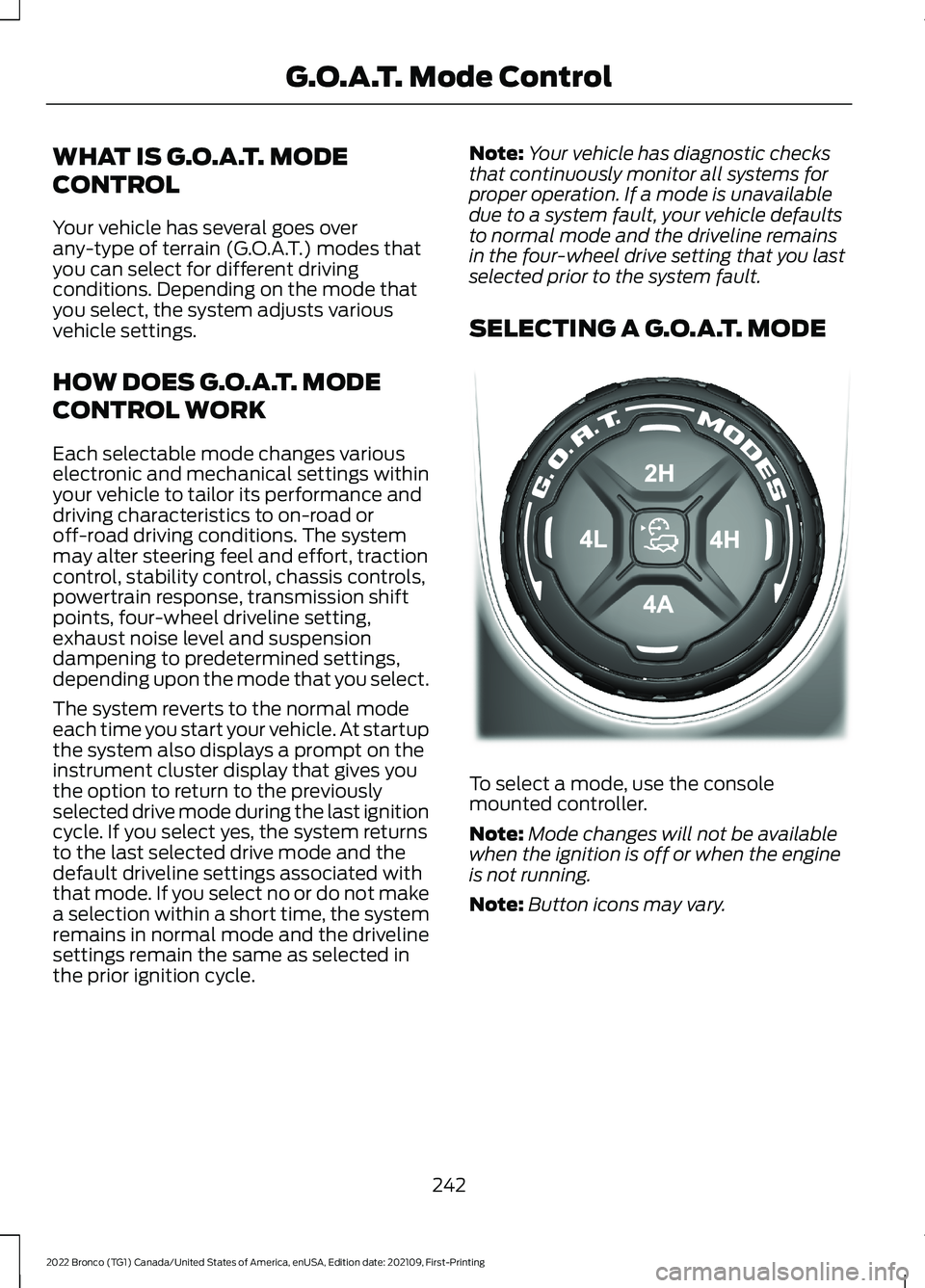
To select a mode, use the consolemounted controller.
Note:Mode changes will not be availablewhen the ignition is off or when the engineis not running.
Note:Button icons may vary.
242
2022 Bronco (TG1) Canada/United States of America, enUSA, Edition date: 202109, First-PrintingG.O.A.T. Mode ControlE324543
Page 248 of 562
NORMAL
For everyday driving. This modeis the perfect balance ofexcitement, comfort andconvenience. This is the default mode aftereach ignition cycle, the driveline settingsremain the same prior to the ignition cycle.
Two-wheel drive high (2H) is the defaultfour-wheel drive mode. All four-wheel drivemodes are selectable when in normalmode.
The front electronic locking differential isavailable below 25 mph (40 km/h) whenin four-wheel drive low (4L). The rearelectronic locking differential is availablebelow 25 mph (40 km/h).
Note:The rear electronic locking differentialis available at any speed when in four-wheeldrive low (4L).
The stabilizer bar disconnect is availablein four-wheel drive high (4H) or four-wheeldrive low (4L).
ROCK CRAWL
For off-road driving andoptimum rock-climbing ability.Rock crawl mode optimizes thethrottle and transmission response toprovide you additional control of yourvehicle.
Four-wheel drive low (4L) is the onlydriveline configuration available in rockcrawl, the system prompts you to put yourvehicle into four-wheel drive low (4L) uponselection.
The front electronic locking differential isavailable below 25 mph (40 km/h) whenin four-wheel drive low (4L). The rearelectronic locking differential is engagedwhen in rock crawl mode and is availableat any speed.
The stabilizer bar disconnects when in rockcrawl mode.
Note:When using rock crawl mode ondry/hard pavement, your vehicle couldexperience vibration, driveline bind up,damage and potential excessive tire andvehicle wear.
SAND
For off-road driving on soft, drysand or deep snow. This modemay help get your vehicleunstuck from deep snow or sand.
Four-wheel drive high (4H) is the defaultfour-wheel drive mode. Four-wheel drivelow (4L) is selectable in sand mode.
The front electronic locking differential isavailable below 25 mph (40 km/h) whenin four-wheel drive low (4L). The rearelectronic locking differential is engagedwhen in sand mode and is available at anyspeed in all selectable four-wheel drivemodes.
The stabilizer bar disconnect is availablein four-wheel drive high (4H) or four-wheeldrive low (4L).
Note:The front camera system switcheson when you are in sand mode and yourspeed is less than 15 mph (24 km/h). If youexceed 15 mph (24 km/h), the camera shutsoff until your vehicle speed is below 12 mph(20 km/h).
Note:When using Sand mode on dry/hardpavement, your vehicle could experiencevibration, driveline bind up, damage andpotential excessive tire and vehicle wear.
Note:Sand mode is not intended for useon firm, slippery surfaces, such as pavedroads covered with snow or ice. For slippery,firm surfaces use slippery mode.
244
2022 Bronco (TG1) Canada/United States of America, enUSA, Edition date: 202109, First-PrintingG.O.A.T. Mode ControlE317283 E322413 E332185
Page 260 of 562
WHAT IS BLIND SPOT
INFORMATION SYSTEM
Blind spot information system detectsvehicles that may have entered the blindspot zone.
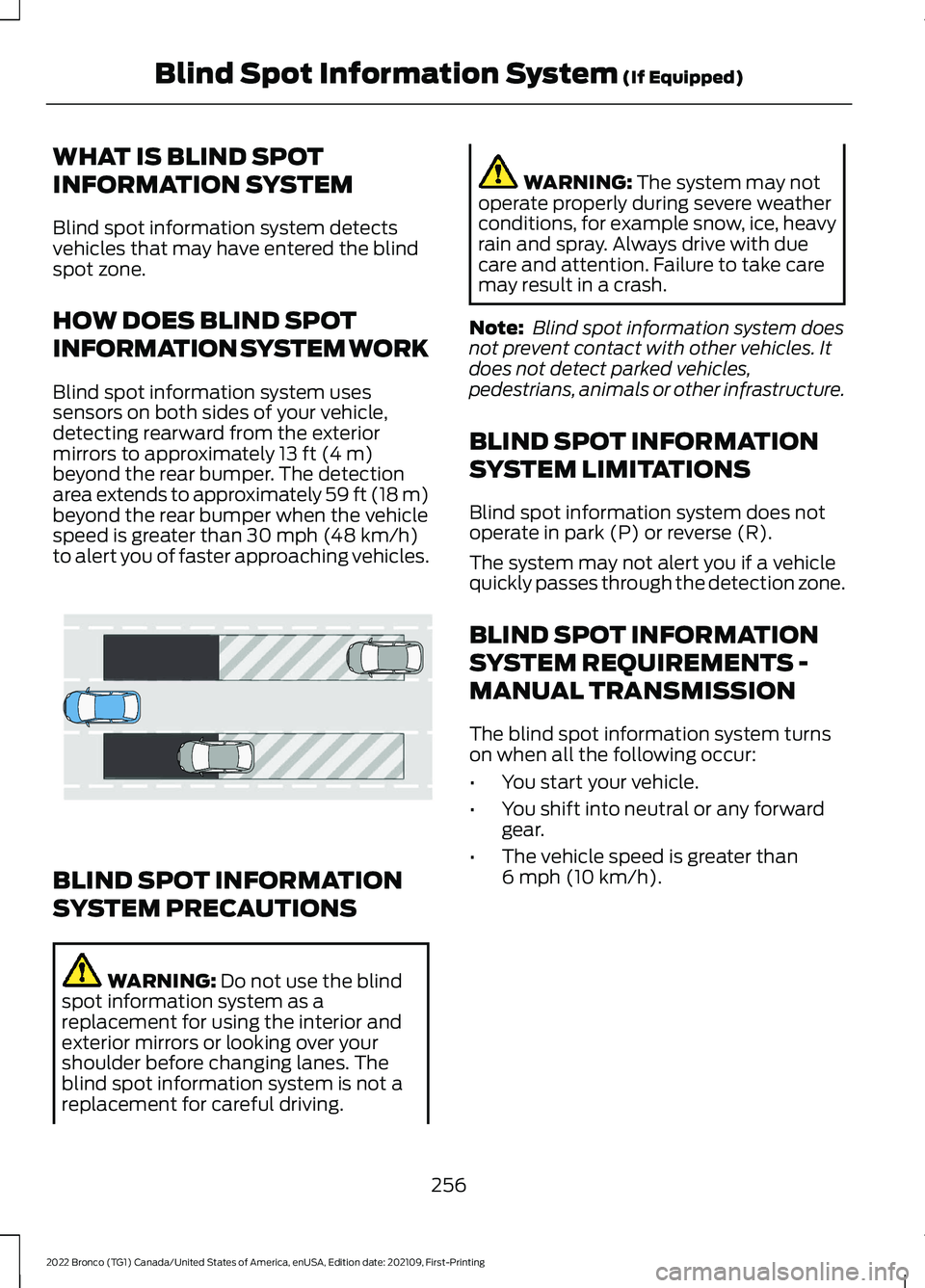
HOW DOES BLIND SPOT
INFORMATION SYSTEM WORK
Blind spot information system usessensors on both sides of your vehicle,detecting rearward from the exteriormirrors to approximately 13 ft (4 m)beyond the rear bumper. The detectionarea extends to approximately 59 ft (18 m)beyond the rear bumper when the vehiclespeed is greater than 30 mph (48 km/h)to alert you of faster approaching vehicles.
BLIND SPOT INFORMATION
SYSTEM PRECAUTIONS
WARNING: Do not use the blindspot information system as areplacement for using the interior andexterior mirrors or looking over yourshoulder before changing lanes. Theblind spot information system is not areplacement for careful driving.
WARNING: The system may notoperate properly during severe weatherconditions, for example snow, ice, heavyrain and spray. Always drive with duecare and attention. Failure to take caremay result in a crash.
Note: Blind spot information system doesnot prevent contact with other vehicles. Itdoes not detect parked vehicles,pedestrians, animals or other infrastructure.
BLIND SPOT INFORMATION
SYSTEM LIMITATIONS
Blind spot information system does notoperate in park (P) or reverse (R).
The system may not alert you if a vehiclequickly passes through the detection zone.
BLIND SPOT INFORMATION
SYSTEM REQUIREMENTS -
MANUAL TRANSMISSION
The blind spot information system turnson when all the following occur:
•You start your vehicle.
•You shift into neutral or any forwardgear.
•The vehicle speed is greater than6 mph (10 km/h).
256
2022 Bronco (TG1) Canada/United States of America, enUSA, Edition date: 202109, First-PrintingBlind Spot Information System (If Equipped)E255695
Page 261 of 562
BLIND SPOT INFORMATION
SYSTEM REQUIREMENTS -
AUTOMATIC TRANSMISSION
Blind spot information system turns onwhen all the following occur:
•You start your vehicle.
•You shift into drive (D).
•The vehicle speed is greater than6 mph (10 km/h).
SWITCHING BLIND SPOT
INFORMATION SYSTEM ON
AND OFF
To switch blind spot information systemon or off, use the touchscreen:
1.Press Features on the touchscreen.
2.Press Driver Assistance.
3.Press Blind Spot Information System.
4.Switch the feature on or off.
When you switch blind spot informationsystem off, a warning lamp illuminates anda message displays. When you switch thesystem on or off, the alert indicators flashtwice.
Note:The system remembers the lastsetting when you start your vehicle.
To permanently switch the system off,contact an authorized dealer.
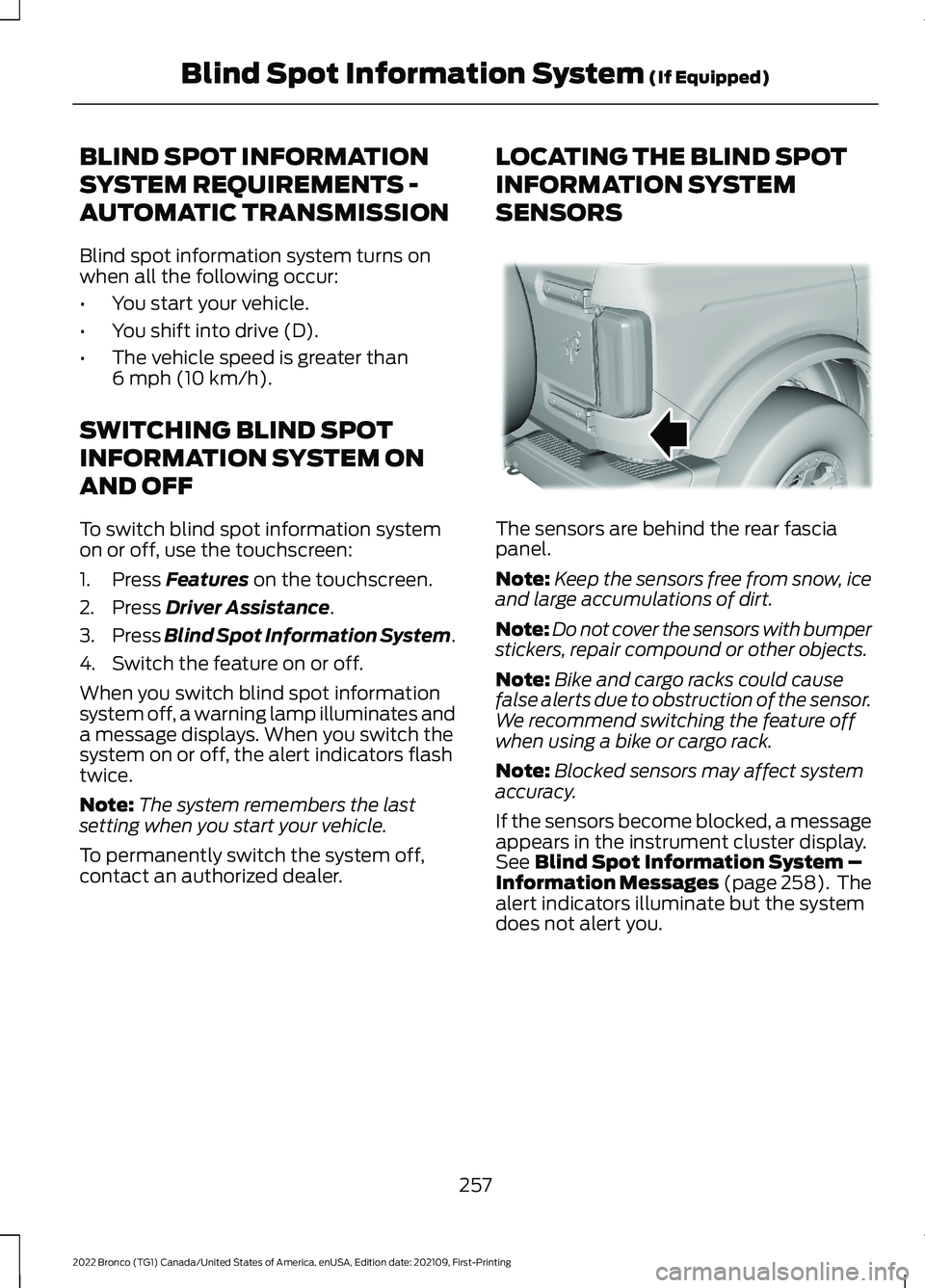
LOCATING THE BLIND SPOT
INFORMATION SYSTEM
SENSORS
The sensors are behind the rear fasciapanel.
Note:Keep the sensors free from snow, iceand large accumulations of dirt.
Note:Do not cover the sensors with bumperstickers, repair compound or other objects.
Note:Bike and cargo racks could causefalse alerts due to obstruction of the sensor.We recommend switching the feature offwhen using a bike or cargo rack.
Note:Blocked sensors may affect systemaccuracy.
If the sensors become blocked, a messageappears in the instrument cluster display.See Blind Spot Information System –Information Messages (page 258). Thealert indicators illuminate but the systemdoes not alert you.
257
2022 Bronco (TG1) Canada/United States of America, enUSA, Edition date: 202109, First-PrintingBlind Spot Information System (If Equipped)E339014
Page 287 of 562
TOWING A TRAILER
PRECAUTIONS
WARNING: Do not exceedthe GVWR or the GAWRspecified on the certificationlabel.
WARNING: Towing trailersbeyond the maximumrecommended gross trailerweight exceeds the limit of yourvehicle and could result in enginedamage, transmission damage,structural damage, loss ofvehicle control, vehicle rolloverand personal injury.
WARNING: Do not exceedthe lowest rating capacity foryour vehicle or trailer hitch.Overloading your vehicle ortrailer hitch can impair yourvehicle stability and handling.Failure to follow this instructioncould result in the loss of controlof your vehicle, personal injury ordeath.
WARNING: Make sure thatthe vertical load on the tow ballis between the minimum andmaximum recommended weightat all times. Failure to follow thisinstruction could result in theloss of control of your vehicle,personal injury or death.
WARNING: Do not cut,drill, weld or modify the trailerhitch. Modifying the trailer hitchcould reduce the hitch rating.
WARNING: The anti-lockbrake system does not controlthe trailer brakes.
TRAILER BRAKE
PRECAUTIONS
WARNING: Do not connect atrailer's hydraulic brake system directlyto your vehicle's brake system. Yourvehicle may not have enough brakingpower and your chances of having acollision greatly increase.
WARNING: Do not tow a trailerfitted with electric trailer brakes unlessyour vehicle is fitted with a compatibleaftermarket electronic trailer brakecontroller. Failure to follow thisinstruction could result in the loss ofcontrol of your vehicle, personal injury ordeath. For additional information andassistance, we recommend that youcontact an authorized dealer.
Electric brakes and manual, automatic orsurge-type trailer brakes are safe if youinstall them properly and adjust them tothe manufacturer's specifications. Thetrailer brakes must meet local and federalregulations.
The rating for the tow vehicle's brakingsystem operation is at the gross vehicleweight rating, not the gross combinedweight rating.
283
2022 Bronco (TG1) Canada/United States of America, enUSA, Edition date: 202109, First-PrintingTowing a Trailer
Page 288 of 562
Certain states require functioning trailerbrakes for trailers over a specified weight.Be sure to check state regulations for thisspecified weight.
Ford Motor Company recommendsseparate functioning brake systems fortrailers weighing more than 1,500 lb(680 kg) when loaded.
TOWING A TRAILER
LIMITATIONS
The vehicle's load capacitydesignation is by weight, not byvolume, so you cannot necessarilyuse all available space whenloading a vehicle or trailer.
Note:Your vehicle could havereduced performance whenoperating at high altitudes andwhen heavily loaded or towing a
trailer. When driving at elevation,to match driving performance asperceived at sea level, reduce grossvehicle weight and grosscombination weight by 2% per1,000 ft (300 m) elevation.
LOADING YOUR TRAILER
To help minimize how trailermovement affects your vehiclewhen driving:
•Load the heaviest items closestto the trailer floor.
•Load the heaviest itemscentered between the left andright side trailer tires.
•Load the heaviest items abovethe trailer axles or just slightlyforward toward the trailertongue. Do not allow the finaltrailer tongue weight to goabove or below 10-15% of theloaded trailer weight. Thetrailer tongue weight shouldnever exceed 10% of themaximum towing capacity.
•Select a ball mount with thecorrect rise or drop. When boththe loaded vehicle and trailerare connected, the trailer frameshould be level, or slightlyangled down toward yourvehicle, when viewed from theside.
TRAILER TOWING HINTS -
MANUAL TRANSMISSION
Towing a trailer places an extra load onyour vehicle's engine, transmission, axle,brakes, tires and suspension. Periodicallyinspect these components during and afterany towing operation.
When driving with a trailer or payload, aslight takeoff vibration or shudder may befelt due to the increased payload weight.
Your vehicle may have a temporary orconventional spare tire. A temporary sparetire is different in diameter or width, treadtype, or from a different manufacturer thanthe road tires on your vehicle. Consultinformation on the tire label or SafetyCompliance label for limitations whenusing.
284
2022 Bronco (TG1) Canada/United States of America, enUSA, Edition date: 202109, First-PrintingTowing a Trailer
Page 289 of 562
When towing a trailer:
•Obey country specific regulations fortowing a trailer.
•Do not drive faster than 70 mph(113 km/h) during the first 500 mi(800 km).
•Do not make full-throttle starts.
•Check your hitch, electrical connectionsand trailer wheel lug nuts thoroughlyafter you have traveled 50 mi (80 km).
•Place the transmission in neutral (N)when stopped in congested or heavytraffic during hot weather. This will aidin engine and transmission cooling andto help A/C performance.
•Turn off the speed control with heavyloads or in hilly terrain. The speedcontrol may turn off when you aretowing on long, steep slopes.
•Shift to a lower gear when driving downa long or steep hill. Do not continuouslyapply the brakes, as they may overheatand become less effective.
•If your transmission has Grade Assistor Tow/Haul, use this feature whentowing. This provides engine brakingand helps eliminate excessivetransmission shifting for optimum fueleconomy and transmission cooling.
•Your vehicle has AdvanceTrac with rollstability control. When towing a trailer,additional loads could cause theAdvanceTrac system to engage duringcornering maneuvers. Reduce corneringspeeds to make sure that you canmaintain control of the vehicle andtrailer if the AdvanceTrac systemengages.
•Allow more distance for stopping witha trailer attached. Anticipate stops andgradually brake.
•Avoid parking on a slope. However, ifyou must park on a slope. Turn thesteering wheel to point your vehicletires away from traffic flow. Set yourvehicle parking brake. Place thetransmission in a low gear. Place wheelchocks in front and back of the trailerwheels.
Note:Chocks are not included with yourvehicle.
TRAILER TOWING HINTS -
AUTOMATIC TRANSMISSION
Towing a trailer places an extra load onyour vehicle's engine, transmission, axle,brakes, tires and suspension. Periodicallyinspect these components during and afterany towing operation.
When driving with a trailer or payload, aslight takeoff vibration or shudder may bepresent due to the increased payloadweight.
Your vehicle may have a temporary orconventional spare tire. A temporary sparetire is different in diameter or width,tread-type, or is from a differentmanufacturer than the road tires on yourvehicle. Consult information on the tirelabel or Safety Compliance label forlimitations when using.
When towing a trailer:
•Obey country specific regulations fortowing a trailer.
•Do not drive faster than 70 mph(113 km/h) during the first 500 mi(800 km).
•Do not make full-throttle starts.
•Check your hitch, electrical connectionsand trailer wheel lug nuts thoroughlyafter you have traveled 50 mi (80 km).
285
2022 Bronco (TG1) Canada/United States of America, enUSA, Edition date: 202109, First-PrintingTowing a Trailer