transmission FORD BRONCO 2022 Manual Online
[x] Cancel search | Manufacturer: FORD, Model Year: 2022, Model line: BRONCO, Model: FORD BRONCO 2022Pages: 562, PDF Size: 73 MB
Page 466 of 562
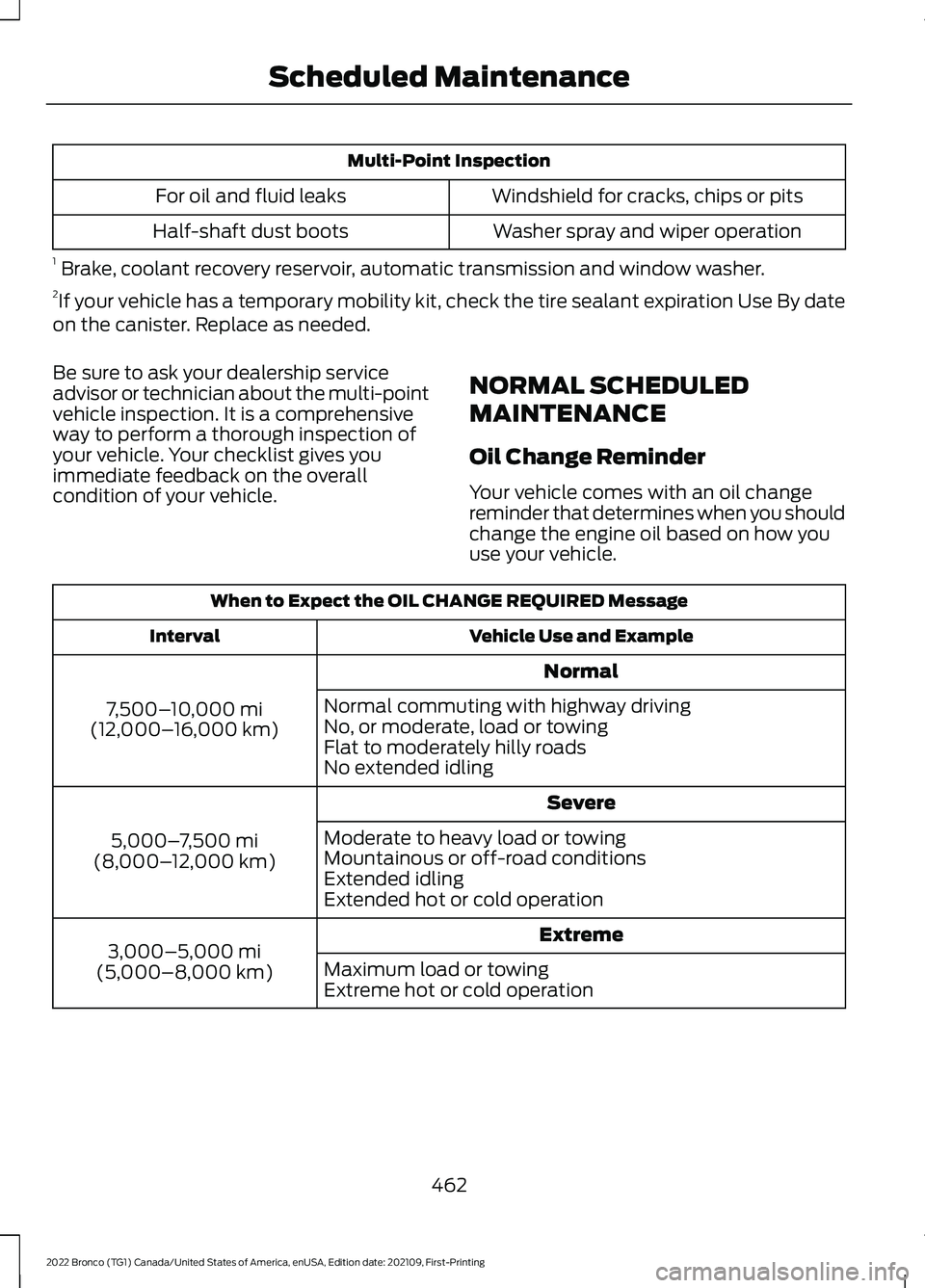
Multi-Point Inspection
Windshield for cracks, chips or pitsFor oil and fluid leaks
Washer spray and wiper operationHalf-shaft dust boots
1 Brake, coolant recovery reservoir, automatic transmission and window washer.2If your vehicle has a temporary mobility kit, check the tire sealant expiration Use By dateon the canister. Replace as needed.
Be sure to ask your dealership serviceadvisor or technician about the multi-pointvehicle inspection. It is a comprehensiveway to perform a thorough inspection ofyour vehicle. Your checklist gives youimmediate feedback on the overallcondition of your vehicle.
NORMAL SCHEDULED
MAINTENANCE
Oil Change Reminder
Your vehicle comes with an oil changereminder that determines when you shouldchange the engine oil based on how youuse your vehicle.
When to Expect the OIL CHANGE REQUIRED Message
Vehicle Use and ExampleInterval
Normal
7,500–10,000 mi(12,000–16,000 km)
Normal commuting with highway drivingNo, or moderate, load or towingFlat to moderately hilly roadsNo extended idling
Severe
5,000–7,500 mi(8,000–12,000 km)
Moderate to heavy load or towingMountainous or off-road conditionsExtended idlingExtended hot or cold operation
Extreme3,000–5,000 mi(5,000–8,000 km)Maximum load or towingExtreme hot or cold operation
462
2022 Bronco (TG1) Canada/United States of America, enUSA, Edition date: 202109, First-PrintingScheduled Maintenance
Page 467 of 562
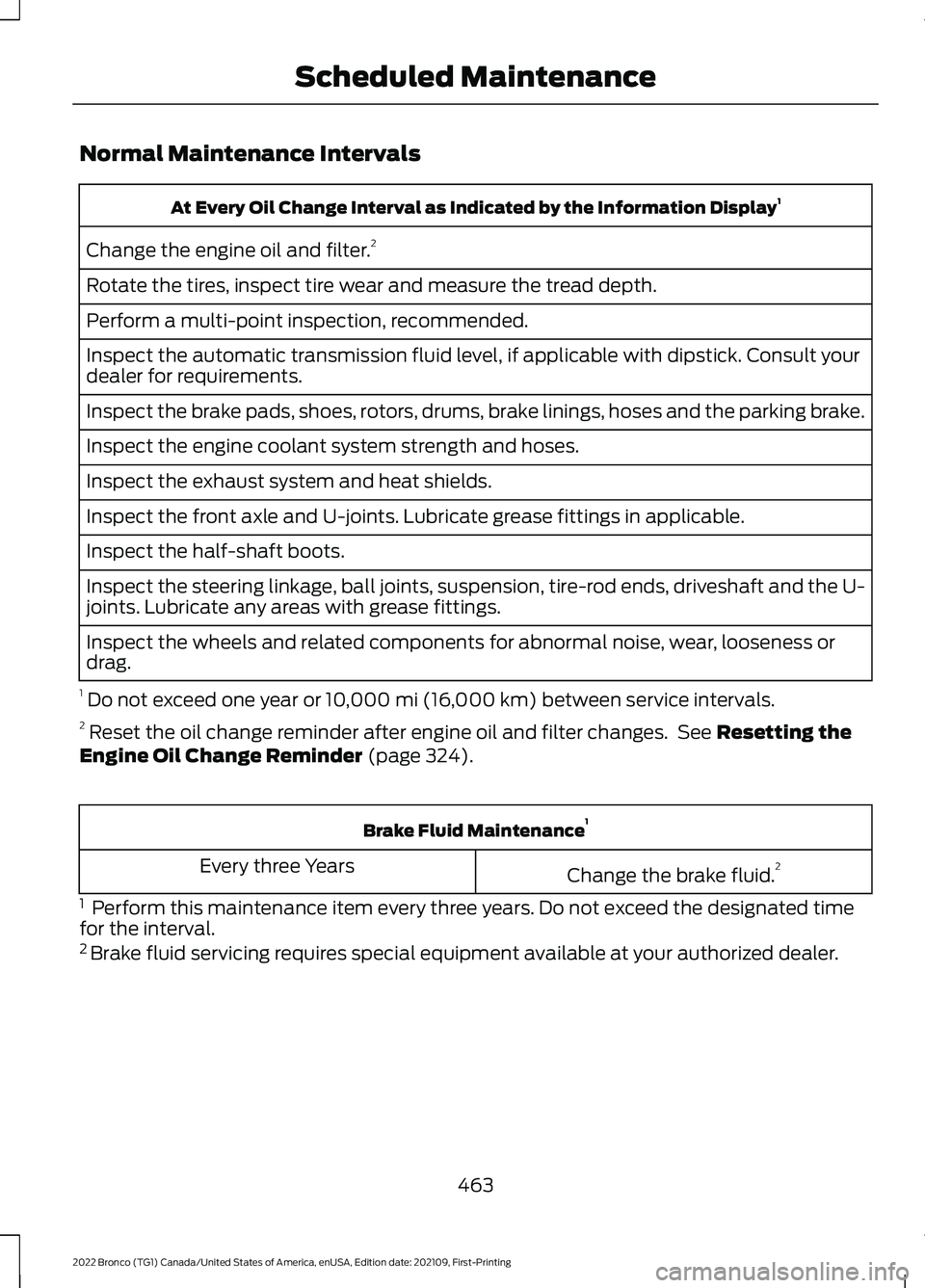
Normal Maintenance Intervals
At Every Oil Change Interval as Indicated by the Information Display1
Change the engine oil and filter.2
Rotate the tires, inspect tire wear and measure the tread depth.
Perform a multi-point inspection, recommended.
Inspect the automatic transmission fluid level, if applicable with dipstick. Consult yourdealer for requirements.
Inspect the brake pads, shoes, rotors, drums, brake linings, hoses and the parking brake.
Inspect the engine coolant system strength and hoses.
Inspect the exhaust system and heat shields.
Inspect the front axle and U-joints. Lubricate grease fittings in applicable.
Inspect the half-shaft boots.
Inspect the steering linkage, ball joints, suspension, tire-rod ends, driveshaft and the U-joints. Lubricate any areas with grease fittings.
Inspect the wheels and related components for abnormal noise, wear, looseness ordrag.
1 Do not exceed one year or 10,000 mi (16,000 km) between service intervals.2 Reset the oil change reminder after engine oil and filter changes. See Resetting theEngine Oil Change Reminder (page 324).
Brake Fluid Maintenance1
Change the brake fluid.2Every three Years
1 Perform this maintenance item every three years. Do not exceed the designated timefor the interval.2 Brake fluid servicing requires special equipment available at your authorized dealer.
463
2022 Bronco (TG1) Canada/United States of America, enUSA, Edition date: 202109, First-PrintingScheduled Maintenance
Page 468 of 562
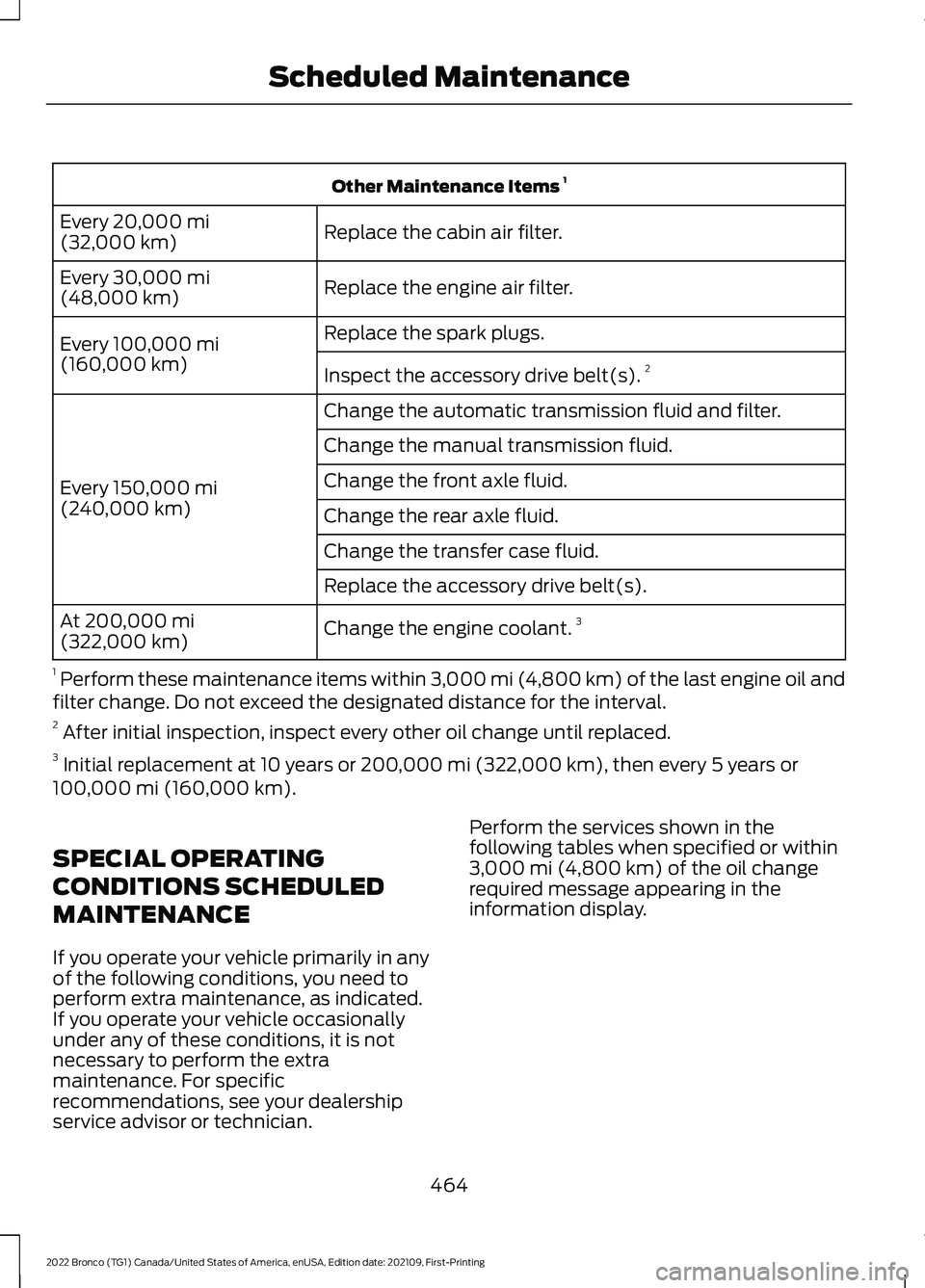
Other Maintenance Items 1
Replace the cabin air filter.Every 20,000 mi(32,000 km)
Replace the engine air filter.Every 30,000 mi(48,000 km)
Replace the spark plugs.Every 100,000 mi(160,000 km)Inspect the accessory drive belt(s).2
Change the automatic transmission fluid and filter.
Every 150,000 mi(240,000 km)
Change the manual transmission fluid.
Change the front axle fluid.
Change the rear axle fluid.
Change the transfer case fluid.
Replace the accessory drive belt(s).
Change the engine coolant.3At 200,000 mi(322,000 km)
1 Perform these maintenance items within 3,000 mi (4,800 km) of the last engine oil andfilter change. Do not exceed the designated distance for the interval.2 After initial inspection, inspect every other oil change until replaced.3 Initial replacement at 10 years or 200,000 mi (322,000 km), then every 5 years or100,000 mi (160,000 km).
SPECIAL OPERATING
CONDITIONS SCHEDULED
MAINTENANCE
If you operate your vehicle primarily in anyof the following conditions, you need toperform extra maintenance, as indicated.If you operate your vehicle occasionallyunder any of these conditions, it is notnecessary to perform the extramaintenance. For specificrecommendations, see your dealershipservice advisor or technician.
Perform the services shown in thefollowing tables when specified or within3,000 mi (4,800 km) of the oil changerequired message appearing in theinformation display.
464
2022 Bronco (TG1) Canada/United States of America, enUSA, Edition date: 202109, First-PrintingScheduled Maintenance
Page 469 of 562
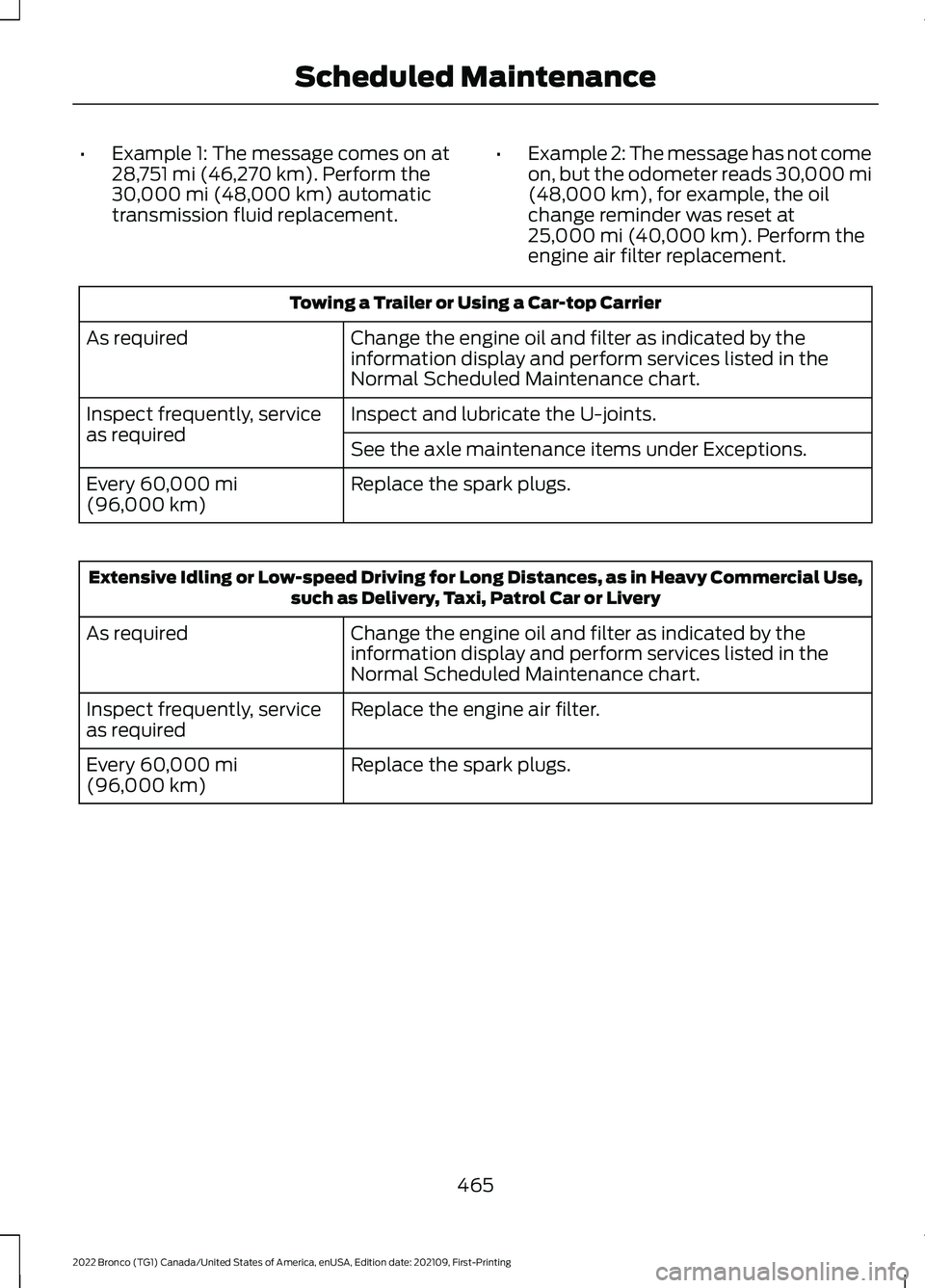
•Example 1: The message comes on at28,751 mi (46,270 km). Perform the30,000 mi (48,000 km) automatictransmission fluid replacement.
•Example 2: The message has not comeon, but the odometer reads 30,000 mi(48,000 km), for example, the oilchange reminder was reset at25,000 mi (40,000 km). Perform theengine air filter replacement.
Towing a Trailer or Using a Car-top Carrier
Change the engine oil and filter as indicated by theinformation display and perform services listed in theNormal Scheduled Maintenance chart.
As required
Inspect and lubricate the U-joints.Inspect frequently, serviceas requiredSee the axle maintenance items under Exceptions.
Replace the spark plugs.Every 60,000 mi(96,000 km)
Extensive Idling or Low-speed Driving for Long Distances, as in Heavy Commercial Use,such as Delivery, Taxi, Patrol Car or Livery
Change the engine oil and filter as indicated by theinformation display and perform services listed in theNormal Scheduled Maintenance chart.
As required
Replace the engine air filter.Inspect frequently, serviceas required
Replace the spark plugs.Every 60,000 mi(96,000 km)
465
2022 Bronco (TG1) Canada/United States of America, enUSA, Edition date: 202109, First-PrintingScheduled Maintenance
Page 511 of 562
•Additional Software/Services: TheSOFTWARE may permit FORD MOTORCOMPANY, third party software andservice suppliers, its affiliates and/orits designated agent to provide or makeavailable to you SOFTWARE updates,supplements, add-on components, orInternet-based services componentsof the SOFTWARE after the date youobtain your initial copy of theSOFTWARE ("SupplementalComponents".) SOFTWARE updatesmay cause you to incur additionalcharges from your wireless serviceprovider. If FORD MOTOR COMPANYor third party software and servicessuppliers provide or make available toyou Supplemental Components andno other EULA terms are providedalong with the SupplementalComponents, then the terms of thisEULA shall apply. FORD MOTORCOMPANY, its affiliates and/or itsdesignated agent reserve the right todiscontinue without liability anyInternet-based services provided toyou or made available to you throughthe use of the SOFTWARE.
•Links to Third Party Sites: TheSOFTWARE may provide you with theability to link to third party sites. Thethird party sites are not under thecontrol of FORD MOTOR COMPANY,its affiliates and/or its designatedagent. Neither FORD MOTORCOMPANY nor its affiliates nor itsdesignated agent are responsible for(I) the contents of any third party sites,any links contained in third party sites,or any changes or updates to thirdparty sites, or (ii) webcasting or anyother form of transmission receivedfrom any third party sites. If theSOFTWARE provides links to thirdparty sites, those links are provided toyou only as a convenience, and theinclusion of any link does not imply anendorsement of the third party site byFORD MOTOR COMPANY, its affiliatesand/or its designated agent.
•Obligation to Drive Responsibly:You recognize your obligation to driveresponsibly and keep attention on theroad. You will read and abide with theDEVICES operating instructionsparticularly as they pertain to safetyand you agree to assume any riskassociated with the use of theDEVICES.
UPGRADES AND RECOVERY MEDIA:If the SOFTWARE is provided by FORDMOTOR COMPANY separate from theDEVICES on media such as a ROM chip,CD ROM disk(s) or via web download orother means, and is labeled "For UpgradePurposes Only" or "For Recovery PurposesOnly" you may install one (1) copy of suchSOFTWARE onto the DEVICES as areplacement copy for the existingSOFTWARE, and use it in accordance withthis EULA, including any additional EULAterms accompanying the upgradeSOFTWARE.
507
2022 Bronco (TG1) Canada/United States of America, enUSA, Edition date: 202109, First-PrintingCustomer Information
Page 529 of 562
DISRUPTION OF SERVICE PROVIDEDHEREUNDER, IS LIMITED TO PAYMENTOF DAMAGES IN AN AMOUNT NOT TOEXCEED THE AMOUNT PAID BY END USERFOR THE SERVICES DURING THETWO-MONTH PERIOD PRECEDING THEDATE THE CLAIM AROSE.
(ii) END USER AGREES TO INDEMNIFYAND HOLD HARMLESS THE UNDERLYINGWIRELESS SERVICE CARRIER AND ITSOFFICERS, EMPLOYEES, AND AGENTSAGAINST ANY AND ALL CLAIMS,INCLUDING WITHOUT LIMITATIONCLAIMS FOR LIBEL, SLANDER, OR ANYPROPERTY DAMAGE, PERSONAL INJURYOR DEATH, ARISING IN ANY WAY,DIRECTLY OR INDIRECTLY, INCONNECTION WITH THIS AGREEMENTOR THE USE, FAILURE TO USE, ORINABILITY TO USE THE DEVICE EXCEPTWHERE THE CLAIMS RESULT FROM THEUNDERLYING CARRIER’S GROSSNEGLIGENCE OR WILLFUL MISCONDUCT.THIS INDEMNITY WILL SURVIVE THETERMINATION OF THE AGREEMENT.
(iii) END USER HAS NO PROPERTY RIGHTIN ANY NUMBER ASSIGNED TO THEDEVICE.
(iv) END USER UNDERSTANDS THATFORD AND THE UNDERLYING CARRIERCANNOT GUARANTY THE SECURITY OFWIRELESS TRANSMISSIONS, AND WILLNOT BE LIABLE FOR ANY LACK OFSECURITY RELATING TO THE USE OF THESERVICES
THE SERVICE IS FOR [END USER’S] USEONLY AND END USER MAY NOT RESELLTHE SERVICE TO ANY OTHER PARTY ENDUSER UNDERSTANDS THAT THEUNDERLYING CARRIER DOES NOTGUARANTEE ANY END USERUNINTERRUPTED SERVICE ORCOVERAGE. THE UNDERLYING CARRIERDOES NOT WARRANT THAT END USERSCAN OR WILL BE LOCATED USING THESERVICE. THE UNDERLYING CARRIER
MAKES NO WARRANTY, EXPRESS ORIMPLIED, OF MERCHANTABILITY ORFITNESS FOR A PARTICULAR PURPOSE,SUITABILITY, OR PERFORMANCEREGARDING ANY SERVICES OR GOODS,AND IN NO EVENT SHALL AT&T BELIABLE, WHETHER OR NOT DUE TO ITSOWN NEGLIGENCE, FOR ANY: (A) ACT OROMISSION OF A THIRD PARTY; (B)MISTAKES, OMISSIONS, INTERRUPTIONS,ERRORS, FAILURES TO TRANSMIT,DELAYS, OR DEFECTS IN THE SERVICEPROVIDED BY OR THROUGH THEUNDERLYING CARRIER; (C) DAMAGE ORINJURY CAUSED BY SUSPENSION ORTERMINATION BY THE UNDERLYINGCARRIER; OR (D) DAMAGE OR INJURYCAUSED BY A FAILURE OR DELAY INCONNECTING A CALL TO ANY ENTITY,INCLUDING 911 OR ANY OTHEREMERGENCY SERVICE. TO THE FULLEXTENT ALLOWED BY LAW, THE ENDUSER RELEASES, INDEMNIFIES ANDHOLDS THE UNDERLYING CARRIERHARMLESS FROM AND AGAINST ANYAND ALL CLAIMS OF ANY PERSON ORENTITY FOR DAMAGES OF ANY NATUREARISING IN ANY WAY FROM OR RELATINGTO, DIRECTLY OR INDIRECTLY, SERVICESPROVIDED BY THE UNDERLYING CARRIEROR ANY PERSON’S USE THEREOF,INCLUDING CLAIMS ARISING IN WHOLEOR IN PART FROM THE ALLEGEDNEGLIGENCE OF THE UNDERLYINGCARRIER.
VII. China Territory
Personal Use Only
You agree to use this Data together with[insert name of Client Application] for thesolely personal, non-commercial purposesfor which you were licensed, and not forservice bureau, time-sharing or othersimilar purposes. Accordingly, but subjectto the restrictions set forth in the followingparagraphs, you may copy this Data onlyas necessary for your personal use to (i)
525
2022 Bronco (TG1) Canada/United States of America, enUSA, Edition date: 202109, First-PrintingCustomer Information
Page 542 of 562
What Is Alert and Aid Mode............................251Alert Mode.....................................................250Adjusting the Steering Wheel VibrationIntensity.............................................................251How Does Alert Mode Work...........................251What Is Alert Mode...........................................250AM/FM Radio................................................424AM/FM Radio Limitations..............................424Selecting a Radio Station...............................424Ambient Lighting..........................................102Adjusting Ambient Lighting............................102Switching Ambient Lighting On andOff.......................................................................102Anti-Lock Braking System........................194Anti-Lock Braking SystemLimitations.......................................................194Appendices....................................................533Applying the Electric ParkingBrake..............................................................198Applying the Electric Parking Brake in anEmergency...................................................198App Precautions..........................................444App Requirements......................................444Apps.................................................................444Audio System................................................422AM/FM Radio......................................................424Audio System – Troubleshooting................429Digital Radio........................................................425Satellite Radio....................................................426Audio System Precautions.......................422Audio System – Troubleshooting..........429Audio System – InformationMessages.........................................................429Auto-Dimming Interior Mirror..................105Auto-Dimming Interior MirrorLimitations.......................................................105What Is the Auto-Dimming InteriorMirror..................................................................105Autolamps........................................................95Autolamp Settings..............................................95What Are Autolamps..........................................95Autolock.............................................................79Autolock Requirements.....................................79What Is Autolock..................................................79Automatically Releasing the ElectricParking Brake..............................................198
Automatic Crash Shutoff.........................305Automatic Crash ShutoffPrecautions.....................................................305Re-Enabling Your Vehicle...............................305What Is Automatic Crash Shutoff...............305Automatic Emergency Braking..............266Switching Automatic Emergency BrakingOn and Off......................................................266What Is Automatic EmergencyBraking..............................................................266Automatic Engine Stop..............................155How Does Automatic Engine StopWork....................................................................155Overriding Automatic Engine Stop..............156Switching Automatic Engine Stop On andOff.......................................................................156What Is Automatic Engine Stop....................155Automatic High Beam Control.................98Automatic High Beam ControlIndicators...........................................................99Automatic High Beam ControlLimitations.........................................................99Automatic High Beam ControlPrecautions.......................................................98Automatic High Beam ControlRequirements...................................................99How Does Automatic High Beam ControlWork.....................................................................98Overriding Automatic High BeamControl................................................................99Switching Automatic High Beam ControlOn and Off.........................................................99Automatic High Beam Control –Troubleshooting........................................100Automatic High Beam Control –Information Messages................................100Automatic Locking Mode............................54Disengaging Automatic Locking Mode........54Engaging Automatic Locking Mode..............54What Is Automatic Locking Mode.................54Automatic Transmission AudibleWarnings......................................................180Automatic Transmission............................178Automatic Transmission Positions..............178Brake Shift Interlock..........................................180Manually Shifting Gears...................................179Automatic Transmission Fluid Capacityand Specification.......................................412
538
2022 Bronco (TG1) Canada/United States of America, enUSA, Edition date: 202109, First-PrintingIndex
Page 543 of 562
Automatic Transmission PositionIndicators......................................................179Automatic Transmission Positions........178Drive (D).................................................................178Manual (M)...........................................................178Neutral (N)............................................................178Park (P)..................................................................178Reverse (R)...........................................................178Sport (S)................................................................179Automatic TransmissionPrecautions..................................................178Auto Mode......................................................120Auto Mode Indicators........................................120Switching Auto Mode On and Off................120Switching Dual Mode On and Off..................121Auto-Start-Stop............................................161Auto-Start-Stop – Troubleshooting...........163Auto-Start-Stop Indicators......................163Auto-Start-Stop Precautions -Automatic Transmission..........................161Auto-Start-Stop Precautions - ManualTransmission................................................161Auto-Start-Stop –Troubleshooting.........................................163Auto-Start-Stop – Frequently AskedQuestions.........................................................165Auto-Start-Stop – InformationMessages..........................................................163Autounlock........................................................78Autounlock Requirements................................79Switching Autounlock On and Off.................79What Is Autounlock.............................................78Auxiliary Switches.......................................454
B
BatterySee: Changing the 12V Battery......................331Blind Spot Information System.............256Blind Spot Information System –Troubleshooting............................................258Blind Spot Information SystemIndicators.....................................................258Blind Spot Information SystemLimitations..................................................256Blind Spot Information SystemPrecautions.................................................256
Blind Spot Information SystemRequirements - AutomaticTransmission...............................................257Blind Spot Information SystemRequirements - ManualTransmission..............................................256Blind Spot Information System –Troubleshooting........................................258Blind Spot Information System –Information Messages................................258Bluetooth®....................................................443Body Control Module Fuse Box...............316Accessing the Body Control Module FuseBox......................................................................316Identifying the Fuses in the Body ControlModule Fuse Box............................................317Locating the Body Control Module FuseBox......................................................................316Bonnet LockSee: Opening and Closing the Hood..........320Booster Seats..................................................48Brake Fluid Specification...........................195Brake Over Accelerator..............................194Brake Precautions........................................194Brakes...............................................................194Anti-Lock Braking System..............................194Brakes – Troubleshooting...............................195Brake Shift Interlock...................................180Brake Shift Interlock Precautions................180Using Brake Shift Interlock.............................180What Is Brake Shift Interlock.........................180Brakes – Troubleshooting.........................195Brakes – Frequently AskedQuestions..........................................................197Brakes – Information Messages...................196Brakes – Warning Lamps................................195Breaking-In....................................................298
C
Calculating Payload....................................274Calculating the Load Limit.......................274Canceling the Set Speed.........................208Capacities and Specifications................401Catalytic Converter.......................................173Catalytic Converter –Troubleshooting..............................................173Catalytic Converter Precautions.............173
539
2022 Bronco (TG1) Canada/United States of America, enUSA, Edition date: 202109, First-PrintingIndex
Page 544 of 562
Catalytic Converter –Troubleshooting.........................................173Catalytic Converter – WarningLamps.................................................................173Center Console - AutomaticTransmission..................................................31Center Console..............................................149Locking the Center Console...........................149Opening the Center Console..........................149Center Console - ManualTransmission................................................30Center Display Limitations.......................433Center Display Overview...........................433Center Display Precautions.....................433Changing a Flat Tire...................................395Changing a Road Wheel...........................395Changing the 12V Battery..........................331Changing the Engine Air Filter................328Changing the Fuel Filter............................329Changing the Remote ControlBattery.............................................................70Changing the Vehicle Wi-Fi HotspotName or Password..................................420Charging a Device.........................................144Charging a Wireless Device......................148Checking MyKey System Status...............76Checking the Brake Fluid...........................194Checking the Clutch Fluid Level..............176Checking the Coolant.................................324Checking the Manual Transmission FluidLevel................................................................176Checking the Seatbelts...............................56Checking the Tire Pressures....................387Checking the Wiper Blades.........................91Children and Airbags....................................62Child Restraint Anchor Points....................41Locating the Child Restraint Lower AnchorPoints....................................................................41Locating the Child Restraint Top TetherAnchor Points...................................................42What Are the Child Restraint AnchorPoints....................................................................41Child Restraints...............................................42Child Restraint Position Information.............42Child Restraints Recommendation...............44Child Safety......................................................40Child Restraint Anchor Points..........................41Child Restraints.....................................................42
Installing Child Restraints.................................44Child Safety Locks.........................................50Child Safety Precautions............................40Cleaning Products......................................368Cleaning the Exterior..................................368Cleaning Camera Lenses andSensors.............................................................370Cleaning Chrome, Aluminium or StainlessSteel..................................................................369Cleaning Headlamps and RearLamps...............................................................369Cleaning Stripes or Graphics.........................370Cleaning the Convertible Top........................370Cleaning the Engine Compartment...........369Cleaning the Exterior Precautions..............368Cleaning the Hard Top.......................................371Cleaning the Underbody..................................371Cleaning Wheels................................................369Cleaning Windows and WiperBlades...............................................................369Cleaning the Interior.....................................371Cleaning Carpets and Floor Mats.................372Cleaning Displays and Screens......................371Cleaning Fabric Seats andHeadliners........................................................372Cleaning Leather and Vinyl.............................372Cleaning Plastic...................................................371Cleaning Seatbelts............................................373Cleaning the Instrument Panel......................371Clearing All MyKeys.......................................75Clearing the Garage Door Opener...........141Climate Control..............................................118Auto Mode.............................................................120Climate Control Hints...................................121Closing the Tailgate......................................84Closing the Tailgate From Outside YourVehicle.................................................................84Clutch Fluid Capacity andSpecification................................................176Cold Weather Precautions.......................298Connected Vehicle.......................................417Connected Vehicle –Troubleshooting.............................................418Connecting the Vehicle to a MobileNetwork.............................................................417Connected Vehicle Data..............................24Connected Vehicle Limitations................417Connected Vehicle Requirements..........417
540
2022 Bronco (TG1) Canada/United States of America, enUSA, Edition date: 202109, First-PrintingIndex
Page 550 of 562
Keys and Remote Controls –Troubleshooting...........................................73Keys and Remote Controls – InformationMessages............................................................73
L
Lane Keeping System Indicators...........252Lane Keeping System................................249Aid Mode................................................................251Alert and Aid Mode............................................251Alert Mode...........................................................250Lane Keeping System –Troubleshooting............................................253Lane Keeping System Limitations........249Lane Keeping SystemPrecautions.................................................249Lane Keeping System –Troubleshooting........................................253Lane Keeping System – Frequently AskedQuestions........................................................254Lane Keeping System – InformationMessages.........................................................253Launching or Retrieving a Boat orPersonal Watercraft................................286Live Traffic......................................................447Switching Live Traffic On and Off................447What Is Live Traffic............................................447Load Carrying..................................................271Fender Anchor Points.......................................279Roof Rack..............................................................276Load Carrying Precautions........................271Loading Your Trailer....................................284Locating the 360 DegreeCameras.......................................................230Locating the Auxiliary Switches.............454Locating the Auxiliary SwitchWiring............................................................454Locating the Blind Spot InformationSystem Sensors.........................................257Locating the Brake Fluid Reservoir - 2.3LEcoBoost™..................................................194Locating the Brake Fluid Reservoir - 2.7LEcoBoost™..................................................194Locating the Cross Traffic AlertSensors........................................................260Locating the Fuel Filler Funnel.................167Locating the Power Outlets......................145
Locating the Pre-Collision AssistSensors.........................................................264Locating the Rear View Camera............226Locating the Safety ComplianceCertification Labels..................................272Locating the Tire label...............................376Locating the USB Ports..............................143Locating the Wireless AccessoryCharger..........................................................148Locating Your Vehicle...................................70Locking and Unlocking the Tailgate........84Locking the Rear WindowControls........................................................104
M
Maintenance.................................................32012V Battery...........................................................32912V Battery – Troubleshooting.....................330Engine Oil..............................................................323Exterior Bulbs......................................................334Interior Bulbs.......................................................336Maintenance Precautions........................320Making and Receiving a PhoneCall................................................................440Manually Dimming the InteriorMirror..............................................................105Manually Releasing the Electric ParkingBrake..............................................................198Manually Shifting Gears.............................179Shifting Using the Buttons on the SelectorLever....................................................................179Manual Seats.................................................128Adjusting the Head Restraint.........................128Adjusting the Seat Backrest...........................130Folding the Seats................................................135Head Restraint Components.........................128Installing the Head Restraint.........................129Moving the Seat Backward andForward.............................................................129Removing the Head Restraint........................129Unfolding the Seats...........................................136Manual Transmission Fluid Capacity andSpecification................................................176Manual Transmission..................................174Crawler Gear.........................................................174Manual Transmission –Troubleshooting..............................................177
546
2022 Bronco (TG1) Canada/United States of America, enUSA, Edition date: 202109, First-PrintingIndex