Rear View Camera FORD BRONCO 2022 Owners Manual
[x] Cancel search | Manufacturer: FORD, Model Year: 2022, Model line: BRONCO, Model: FORD BRONCO 2022Pages: 562, PDF Size: 73 MB
Page 12 of 562
Switching Hill Descent Control On andOff..................................................................217
Setting the Hill Descent Speed...............217
Hill Descent Control Indicator.................217
Hill Descent Control – Troubleshooting.........................................................................218
Steering
Electric Power Steering.............................219
Steering – Troubleshooting....................220
Parking Aids
Parking Aid Precautions...........................222
Switching Parking Aid On and Off........222
Rear Parking Aid..........................................223
Front Parking Aid.........................................223
Parking Aid Indicators...............................225
Parking Aids – Troubleshooting............225
Rear View Camera
What Is the Rear View Camera.............226
Rear View Camera Precautions............226
Locating the Rear View Camera...........226
Rear View Camera Guide Lines.............226
Rear View Camera Object DistanceIndicators....................................................227
Rear View Camera Settings....................227
360 Degree Camera
What Is the 360 Degree Camera..........229
How Does the 360 Degree Camera Work........................................................................229
360 Degree Camera Precautions.........229
360 Degree Camera Limitations..........229
Locating the 360 Degree Cameras......230
360 Degree Camera Guide Lines.........230
360 Degree Camera Settings.................231
Cruise Control
What Is Cruise Control..............................232
Switching Cruise Control On and Off........................................................................232
Setting the Cruise Control Speed.........232
Canceling the Set Speed.........................233
Resuming the Set Speed.........................233
Cruise Control Indicators..........................233
Adaptive Cruise Control
How Does Adaptive Cruise Control Work........................................................................234
Adaptive Cruise Control Precautions........................................................................234
Adaptive Cruise Control Limitations........................................................................235
Switching Adaptive Cruise Control Onand Off........................................................237
Setting the Adaptive Cruise ControlSpeed..........................................................237
Setting the Adaptive Cruise Control Gap........................................................................238
Canceling the Set Speed.........................239
Resuming the Set Speed.........................239
Overriding the Set Speed........................239
Adaptive Cruise Control Indicators......239
Switching From Adaptive Cruise Controlto Cruise Control....................................240
Adaptive Cruise Control –Troubleshooting.....................................240
G.O.A.T. Mode Control
What Is G.O.A.T. Mode Control..............242
How Does G.O.A.T. Mode Control Work........................................................................242
Selecting a G.O.A.T. Mode........................242
G.O.A.T. Modes.............................................243
G.O.A.T. Mode Control – Troubleshooting........................................................................246
Lane Keeping System
What Is the Lane Keeping System.......249
How Does the Lane Keeping SystemWork............................................................249
8
2022 Bronco (TG1) Canada/United States of America, enUSA, Edition date: 202109, First-PrintingTable of Contents
Page 230 of 562
WHAT IS THE REAR VIEW
CAMERA
The rear view camera provides a videoimage of the area behind your vehicle whenthe transmission is in reverse (R).
REAR VIEW CAMERA
PRECAUTIONS
WARNING: The rear view camerasystem is a reverse aid supplementdevice that still requires the driver to useit in conjunction with the interior andexterior mirrors for maximum coverage.
WARNING: Objects that are closeto either corner of the bumper or underthe bumper, might not be seen on thescreen due to the limited coverage of thecamera system.
WARNING: Reverse your vehicleslowly. Failure to follow this instructioncould result in the loss of control of yourvehicle, personal injury or death.
WARNING: Use caution when therear cargo door is ajar. If the rear cargodoor is ajar, the camera will be out ofposition and the video image could beincorrect. All guide lines disappear whenthe rear cargo door is ajar. Failure tofollow this instruction could result inpersonal injury.
WARNING: Use caution whenturning camera features on or off whenthe transmission is not in park (P). Makesure your vehicle is not moving.
Note: When towing, the camera only seeswhat you are towing. This might not provideadequate coverage and you might not seesome objects. In some vehicles, the guidelines may disappear when you connect thetrailer tow connector.
LOCATING THE REAR VIEW
CAMERA
The rear view camera is in the spare tirecarrier.
REAR VIEW CAMERA GUIDE
LINES
Note:Active guide lines and fixed guidelines are only available when thetransmission is in reverse (R).
Note:The centerline is only available if theactive or fixed guide lines are on.
226
2022 Bronco (TG1) Canada/United States of America, enUSA, Edition date: 202109, First-PrintingRear View Camera
Page 231 of 562
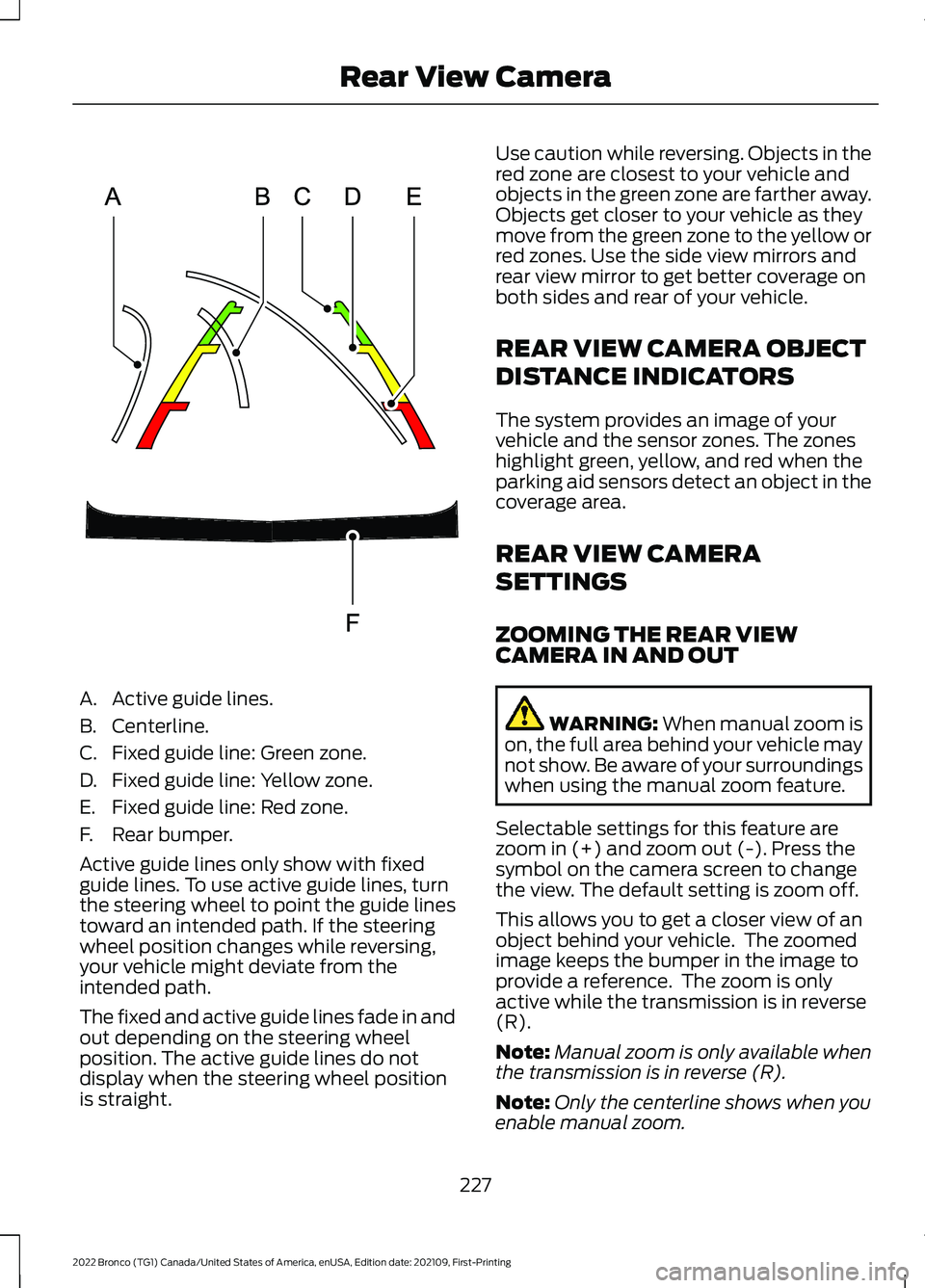
A.Active guide lines.
B.Centerline.
C.Fixed guide line: Green zone.
D.Fixed guide line: Yellow zone.
E.Fixed guide line: Red zone.
F.Rear bumper.
Active guide lines only show with fixedguide lines. To use active guide lines, turnthe steering wheel to point the guide linestoward an intended path. If the steeringwheel position changes while reversing,your vehicle might deviate from theintended path.
The fixed and active guide lines fade in andout depending on the steering wheelposition. The active guide lines do notdisplay when the steering wheel positionis straight.
Use caution while reversing. Objects in thered zone are closest to your vehicle andobjects in the green zone are farther away.Objects get closer to your vehicle as theymove from the green zone to the yellow orred zones. Use the side view mirrors andrear view mirror to get better coverage onboth sides and rear of your vehicle.
REAR VIEW CAMERA OBJECT
DISTANCE INDICATORS
The system provides an image of yourvehicle and the sensor zones. The zoneshighlight green, yellow, and red when theparking aid sensors detect an object in thecoverage area.
REAR VIEW CAMERA
SETTINGS
ZOOMING THE REAR VIEWCAMERA IN AND OUT
WARNING: When manual zoom ison, the full area behind your vehicle maynot show. Be aware of your surroundingswhen using the manual zoom feature.
Selectable settings for this feature arezoom in (+) and zoom out (-). Press thesymbol on the camera screen to changethe view. The default setting is zoom off.
This allows you to get a closer view of anobject behind your vehicle. The zoomedimage keeps the bumper in the image toprovide a reference. The zoom is onlyactive while the transmission is in reverse(R).
Note:Manual zoom is only available whenthe transmission is in reverse (R).
Note:Only the centerline shows when youenable manual zoom.
227
2022 Bronco (TG1) Canada/United States of America, enUSA, Edition date: 202109, First-PrintingRear View CameraE306774
Page 232 of 562
SWITCHING REAR VIEW CAMERADELAY ON AND OFF
1.Press Features on the touchscreen.
2.Press Driver Assistance.
3.Press Rear View Camera.
4.Switch Rear View Camera Delay on oroff.
When shifting the transmission out ofreverse (R) and into any gear other thanpark (P), the camera image remains in thedisplay until:
•Your vehicle speed reachesapproximately 5 mph (8 km/h).
•You shift your vehicle into park (P).
228
2022 Bronco (TG1) Canada/United States of America, enUSA, Edition date: 202109, First-PrintingRear View Camera
Page 233 of 562
WHAT IS THE 360 DEGREE
CAMERA
The 360 degree camera system providesvisibility around your vehicle in parkingmaneuvers such as:
•Centering in a parking space.
•Obstacles near your vehicle.
•Parallel parking.
The 360 degree camera system consistsof front, side and rear cameras.
HOW DOES THE 360 DEGREE
CAMERA WORK
The 360 degree camera system:
•Allows you to see what is directly infront of or behind your vehicle.
•Helps you when parallel parking andcentering in a parking space.
•Provides a cross traffic view in front ofand behind your vehicle.
•Allows you to see a top-down view ofthe area outside your vehicle, includingthe blind spots and obstacles near yourvehicle.
360 DEGREE CAMERA
PRECAUTIONS
WARNING: The 360 degreecamera system still requires the driverto use it in conjunction with looking outof the windows, and checking the interiorand exterior mirrors for maximumcoverage.
WARNING: Objects that are closeto either corner of the bumper or underthe bumper, might not be seen on thescreen due to the limited coverage of thecamera system.
WARNING: Use caution whenturning camera features on or off whenthe transmission is not in park (P). Makesure your vehicle is not moving.
WARNING: You are responsible forcontrolling your vehicle at all times. Thesystem is designed to be an aid and doesnot relieve you of your responsibility todrive with due care and attention. Failureto follow this instruction could result inthe loss of control of your vehicle,personal injury or death.
WARNING: Use caution when therear cargo door is ajar. If the rear cargodoor is ajar, the camera will be out ofposition and the video image could beincorrect. All guide lines disappear whenthe rear cargo door is ajar. Failure tofollow this instruction could result inpersonal injury.
WARNING: When manual zoom ison, the full area behind your vehicle maynot show. Be aware of your surroundingswhen using the manual zoom feature.
360 DEGREE CAMERA
LIMITATIONS
Note:Use caution if a door is ajar. The 360degree camera could be out of position andthe image could be incorrect.
229
2022 Bronco (TG1) Canada/United States of America, enUSA, Edition date: 202109, First-Printing360 Degree Camera (If Equipped)
Page 234 of 562
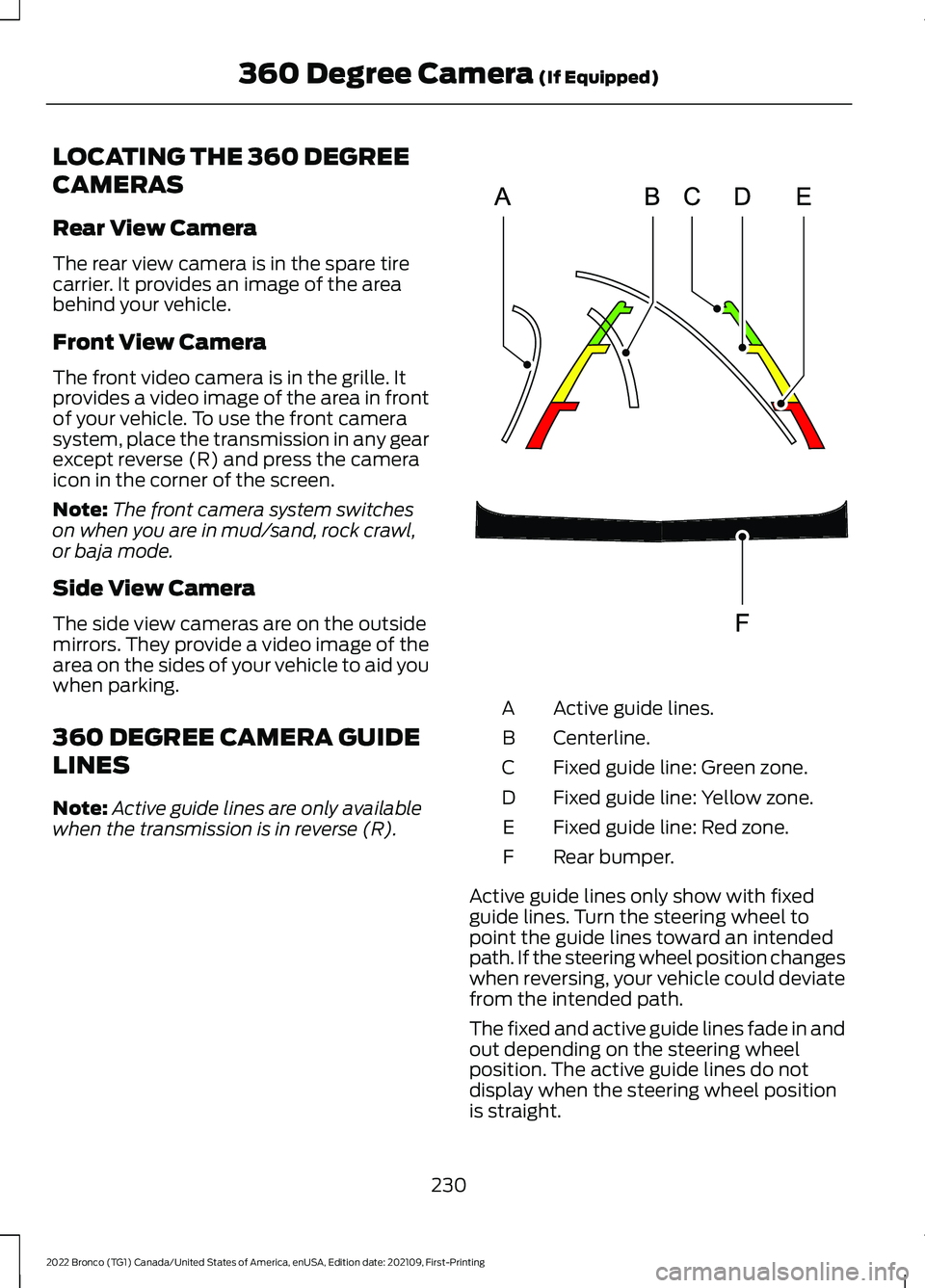
LOCATING THE 360 DEGREE
CAMERAS
Rear View Camera
The rear view camera is in the spare tirecarrier. It provides an image of the areabehind your vehicle.
Front View Camera
The front video camera is in the grille. Itprovides a video image of the area in frontof your vehicle. To use the front camerasystem, place the transmission in any gearexcept reverse (R) and press the cameraicon in the corner of the screen.
Note:The front camera system switcheson when you are in mud/sand, rock crawl,or baja mode.
Side View Camera
The side view cameras are on the outsidemirrors. They provide a video image of thearea on the sides of your vehicle to aid youwhen parking.
360 DEGREE CAMERA GUIDE
LINES
Note:Active guide lines are only availablewhen the transmission is in reverse (R).
Active guide lines.A
Centerline.B
Fixed guide line: Green zone.C
Fixed guide line: Yellow zone.D
Fixed guide line: Red zone.E
Rear bumper.F
Active guide lines only show with fixedguide lines. Turn the steering wheel topoint the guide lines toward an intendedpath. If the steering wheel position changeswhen reversing, your vehicle could deviatefrom the intended path.
The fixed and active guide lines fade in andout depending on the steering wheelposition. The active guide lines do notdisplay when the steering wheel positionis straight.
230
2022 Bronco (TG1) Canada/United States of America, enUSA, Edition date: 202109, First-Printing360 Degree Camera (If Equipped)E306774
Page 235 of 562
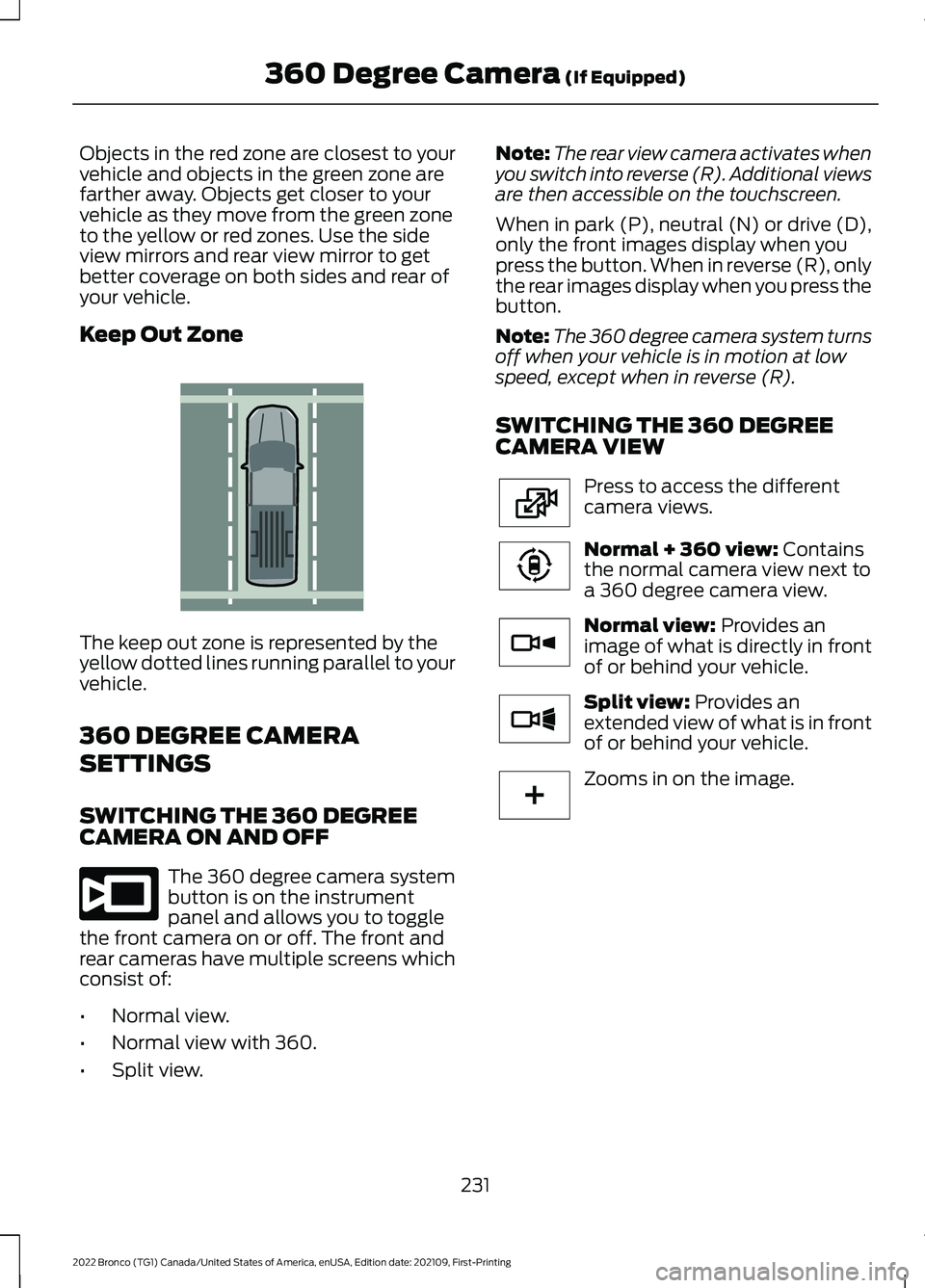
Objects in the red zone are closest to yourvehicle and objects in the green zone arefarther away. Objects get closer to yourvehicle as they move from the green zoneto the yellow or red zones. Use the sideview mirrors and rear view mirror to getbetter coverage on both sides and rear ofyour vehicle.
Keep Out Zone
The keep out zone is represented by theyellow dotted lines running parallel to yourvehicle.
360 DEGREE CAMERA
SETTINGS
SWITCHING THE 360 DEGREECAMERA ON AND OFF
The 360 degree camera systembutton is on the instrumentpanel and allows you to togglethe front camera on or off. The front andrear cameras have multiple screens whichconsist of:
•Normal view.
•Normal view with 360.
•Split view.
Note:The rear view camera activates whenyou switch into reverse (R). Additional viewsare then accessible on the touchscreen.
When in park (P), neutral (N) or drive (D),only the front images display when youpress the button. When in reverse (R), onlythe rear images display when you press thebutton.
Note:The 360 degree camera system turnsoff when your vehicle is in motion at lowspeed, except when in reverse (R).
SWITCHING THE 360 DEGREECAMERA VIEW
Press to access the differentcamera views.
Normal + 360 view: Containsthe normal camera view next toa 360 degree camera view.
Normal view: Provides animage of what is directly in frontof or behind your vehicle.
Split view: Provides anextended view of what is in frontof or behind your vehicle.
Zooms in on the image.
231
2022 Bronco (TG1) Canada/United States of America, enUSA, Edition date: 202109, First-Printing360 Degree Camera (If Equipped)E310341 E332186 E224483 E224783 E224784 E224785 E224485
Page 318 of 562
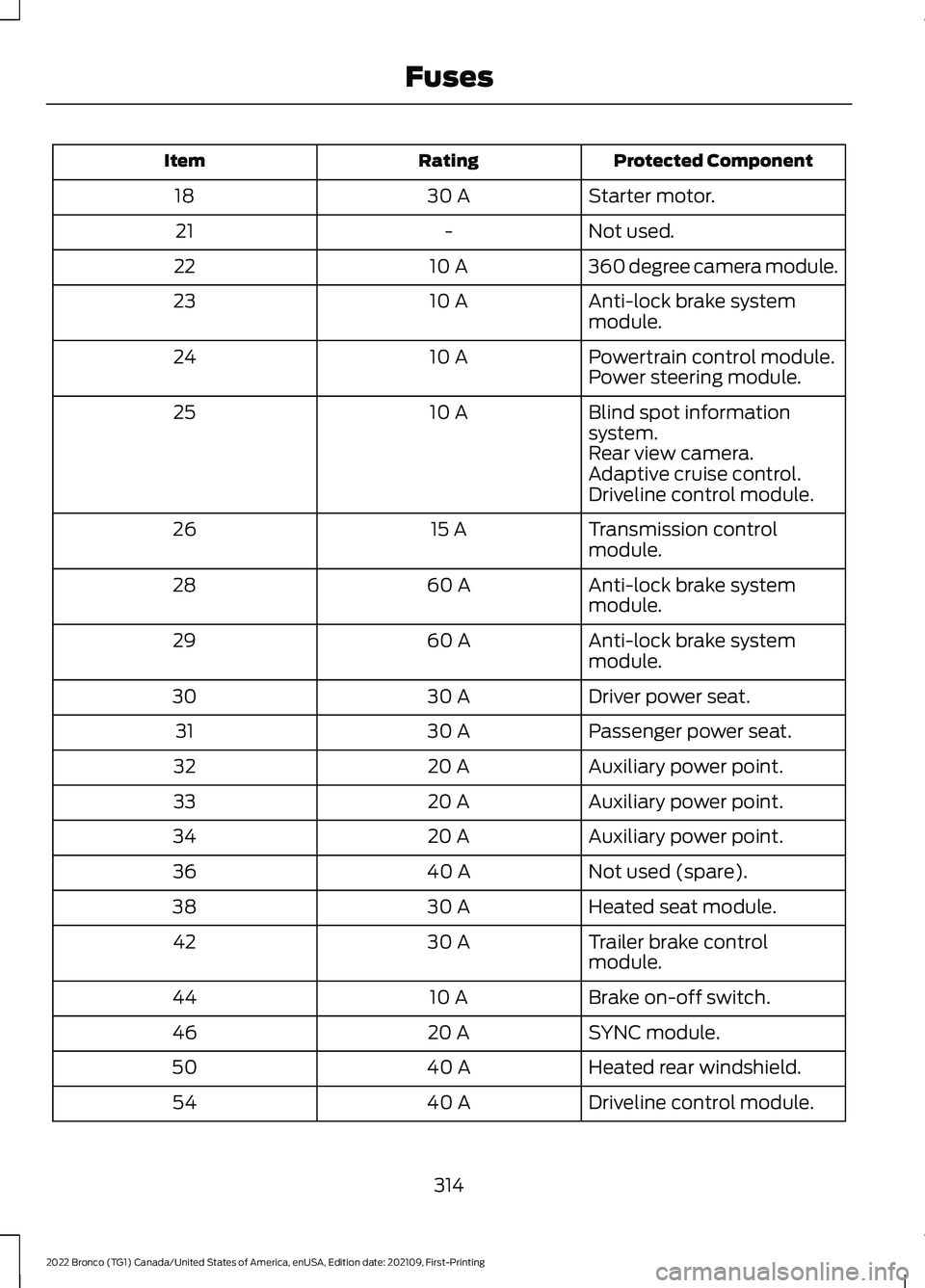
Protected ComponentRatingItem
Starter motor.30 A18
Not used.-21
360 degree camera module.10 A22
Anti-lock brake systemmodule.10 A23
Powertrain control module.10 A24Power steering module.
Blind spot informationsystem.10 A25
Rear view camera.Adaptive cruise control.Driveline control module.
Transmission controlmodule.15 A26
Anti-lock brake systemmodule.60 A28
Anti-lock brake systemmodule.60 A29
Driver power seat.30 A30
Passenger power seat.30 A31
Auxiliary power point.20 A32
Auxiliary power point.20 A33
Auxiliary power point.20 A34
Not used (spare).40 A36
Heated seat module.30 A38
Trailer brake controlmodule.30 A42
Brake on-off switch.10 A44
SYNC module.20 A46
Heated rear windshield.40 A50
Driveline control module.40 A54
314
2022 Bronco (TG1) Canada/United States of America, enUSA, Edition date: 202109, First-PrintingFuses
Page 544 of 562
Catalytic Converter –Troubleshooting.........................................173Catalytic Converter – WarningLamps.................................................................173Center Console - AutomaticTransmission..................................................31Center Console..............................................149Locking the Center Console...........................149Opening the Center Console..........................149Center Console - ManualTransmission................................................30Center Display Limitations.......................433Center Display Overview...........................433Center Display Precautions.....................433Changing a Flat Tire...................................395Changing a Road Wheel...........................395Changing the 12V Battery..........................331Changing the Engine Air Filter................328Changing the Fuel Filter............................329Changing the Remote ControlBattery.............................................................70Changing the Vehicle Wi-Fi HotspotName or Password..................................420Charging a Device.........................................144Charging a Wireless Device......................148Checking MyKey System Status...............76Checking the Brake Fluid...........................194Checking the Clutch Fluid Level..............176Checking the Coolant.................................324Checking the Manual Transmission FluidLevel................................................................176Checking the Seatbelts...............................56Checking the Tire Pressures....................387Checking the Wiper Blades.........................91Children and Airbags....................................62Child Restraint Anchor Points....................41Locating the Child Restraint Lower AnchorPoints....................................................................41Locating the Child Restraint Top TetherAnchor Points...................................................42What Are the Child Restraint AnchorPoints....................................................................41Child Restraints...............................................42Child Restraint Position Information.............42Child Restraints Recommendation...............44Child Safety......................................................40Child Restraint Anchor Points..........................41Child Restraints.....................................................42
Installing Child Restraints.................................44Child Safety Locks.........................................50Child Safety Precautions............................40Cleaning Products......................................368Cleaning the Exterior..................................368Cleaning Camera Lenses andSensors.............................................................370Cleaning Chrome, Aluminium or StainlessSteel..................................................................369Cleaning Headlamps and RearLamps...............................................................369Cleaning Stripes or Graphics.........................370Cleaning the Convertible Top........................370Cleaning the Engine Compartment...........369Cleaning the Exterior Precautions..............368Cleaning the Hard Top.......................................371Cleaning the Underbody..................................371Cleaning Wheels................................................369Cleaning Windows and WiperBlades...............................................................369Cleaning the Interior.....................................371Cleaning Carpets and Floor Mats.................372Cleaning Displays and Screens......................371Cleaning Fabric Seats andHeadliners........................................................372Cleaning Leather and Vinyl.............................372Cleaning Plastic...................................................371Cleaning Seatbelts............................................373Cleaning the Instrument Panel......................371Clearing All MyKeys.......................................75Clearing the Garage Door Opener...........141Climate Control..............................................118Auto Mode.............................................................120Climate Control Hints...................................121Closing the Tailgate......................................84Closing the Tailgate From Outside YourVehicle.................................................................84Clutch Fluid Capacity andSpecification................................................176Cold Weather Precautions.......................298Connected Vehicle.......................................417Connected Vehicle –Troubleshooting.............................................418Connecting the Vehicle to a MobileNetwork.............................................................417Connected Vehicle Data..............................24Connected Vehicle Limitations................417Connected Vehicle Requirements..........417
540
2022 Bronco (TG1) Canada/United States of America, enUSA, Edition date: 202109, First-PrintingIndex
Page 549 of 562
How Does Stability Control Work.........204How Does the 360 Degree CameraWork...............................................................229How Does the Garage Door OpenerWork...............................................................139How Does the Lane Keeping SystemWork..............................................................249How Does the Personal Safety SystemWork.................................................................58How Does the Rear Occupant AlertSystem Work................................................137How Does the Safety Canopy™Work................................................................60How Does Traction Control Work..........202How Does Trailer Sway ControlWork..............................................................289How Do the Front Airbags Work...............59How Do the Side Airbags Work................59
I
Identifying Fuse Types................................319Identifying the Audio Unit.........................422Identifying the Auxiliary SwitchWiring............................................................456Identifying the Climate ControlUnit..................................................................118Inflating the Tires.........................................387Information On Demand Screen -Vehicles With: 12.3 Inch Screen...........435Information on the Tire Sidewall............377Inspecting the Tire for Damage.............388Inspecting the Tire for Wear....................388Inspecting the Wheel ValveStems...........................................................389Installing Child Restraints...........................44Combining the Seatbelt and Lower Anchorsfor Attaching Child Restraints.....................47Installing a Child Restraint in a CenterSeat.......................................................................47Using Lower Anchors and Tethers forChildren...............................................................46Using Seatbelts....................................................44Using Tether Straps............................................48Instrument Cluster Display........................113Personalized Settings........................................114Trip Computer.......................................................114
Instrument Cluster Display MainMenu................................................................113Instrument Cluster Indicators...................110Instrument Cluster.......................................107Fuel Gauge............................................................107Instrument Cluster Overview...................107Instrument Cluster WarningLamps............................................................109Instrument Panel...........................................29Interior Air Quality........................................126Interior Bulbs.................................................336Interior Bulb Specification Chart.................336Interior Lamp Function................................101Switching the Interior Lamp Function Onand Off...............................................................101What Is the Interior Lamp Function.............101Interior Lighting..............................................101Ambient Lighting................................................102Interior Lamp Function......................................101Interior Lighting – Troubleshooting.............102Interior Lighting – Troubleshooting.......102Interior Lighting – Frequently AskedQuestions.........................................................102Interior Mirror.................................................105Auto-Dimming Interior Mirror........................105Interior Mirror Precautions........................105Introduction.......................................................17
J
Jump Starting the Vehicle........................302Jump Starting Precautions............................302Jump Starting the Vehicle..............................303Preparing the Vehicle.......................................303
K
Keyless Entry....................................................82Keyless Entry – Troubleshooting....................83Keyless Entry Limitations............................82Keyless Entry Settings..................................82Keyless Entry – Troubleshooting.............83Keyless Entry – Frequently AskedQuestions...........................................................83Keys and Remote Controls........................69Keys and Remote Controls –Troubleshooting...............................................73
545
2022 Bronco (TG1) Canada/United States of America, enUSA, Edition date: 202109, First-PrintingIndex