power steering FORD BRONCO 2023 User Guide
[x] Cancel search | Manufacturer: FORD, Model Year: 2023, Model line: BRONCO, Model: FORD BRONCO 2023Pages: 642, PDF Size: 14.71 MB
Page 272 of 642
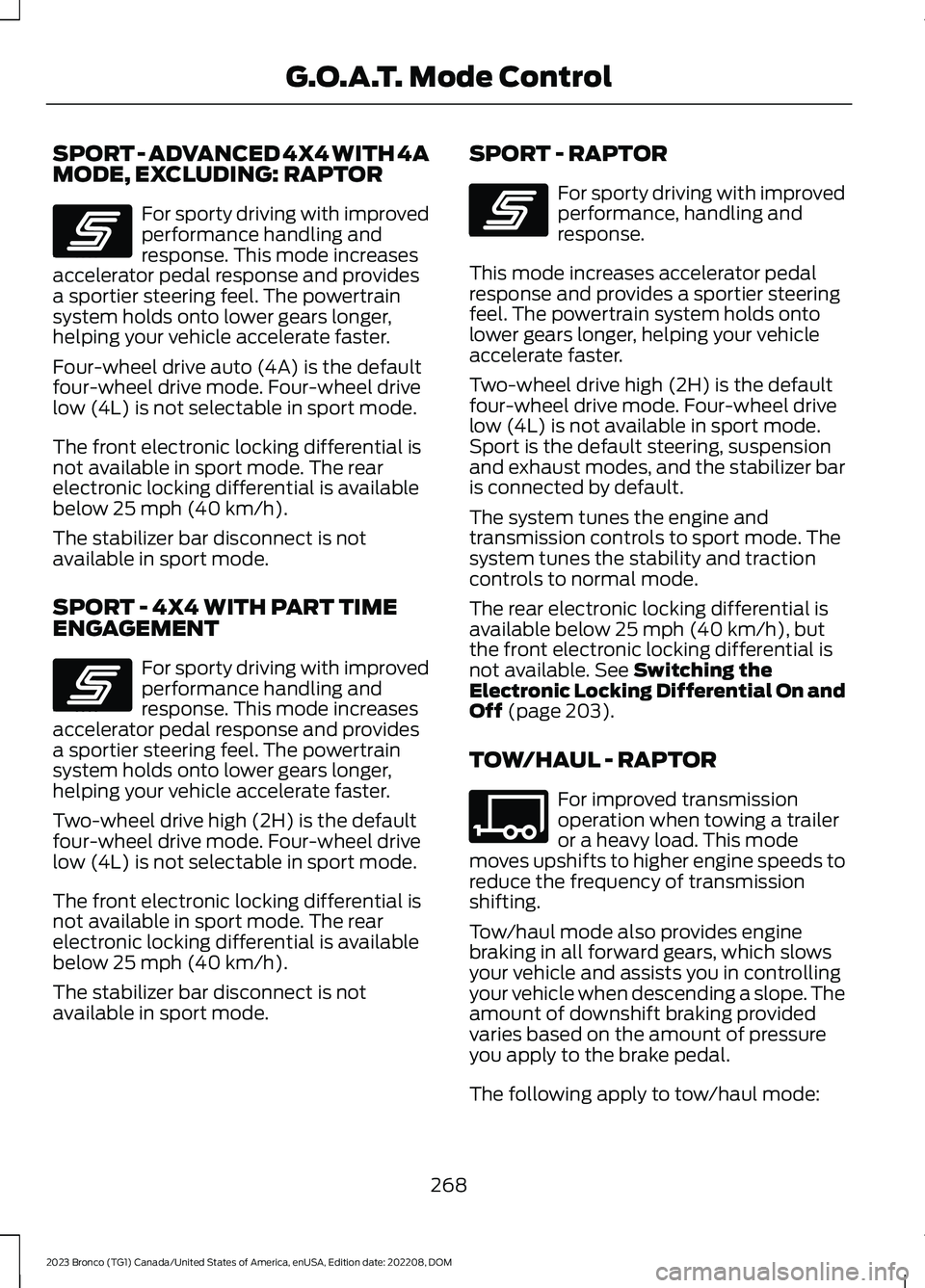
SPORT - ADVANCED 4X4 WITH 4AMODE, EXCLUDING: RAPTOR
For sporty driving with improvedperformance handling andresponse. This mode increasesaccelerator pedal response and providesa sportier steering feel. The powertrainsystem holds onto lower gears longer,helping your vehicle accelerate faster.
Four-wheel drive auto (4A) is the defaultfour-wheel drive mode. Four-wheel drivelow (4L) is not selectable in sport mode.
The front electronic locking differential isnot available in sport mode. The rearelectronic locking differential is availablebelow 25 mph (40 km/h).
The stabilizer bar disconnect is notavailable in sport mode.
SPORT - 4X4 WITH PART TIMEENGAGEMENT
For sporty driving with improvedperformance handling andresponse. This mode increasesaccelerator pedal response and providesa sportier steering feel. The powertrainsystem holds onto lower gears longer,helping your vehicle accelerate faster.
Two-wheel drive high (2H) is the defaultfour-wheel drive mode. Four-wheel drivelow (4L) is not selectable in sport mode.
The front electronic locking differential isnot available in sport mode. The rearelectronic locking differential is availablebelow 25 mph (40 km/h).
The stabilizer bar disconnect is notavailable in sport mode.
SPORT - RAPTOR
For sporty driving with improvedperformance, handling andresponse.
This mode increases accelerator pedalresponse and provides a sportier steeringfeel. The powertrain system holds ontolower gears longer, helping your vehicleaccelerate faster.
Two-wheel drive high (2H) is the defaultfour-wheel drive mode. Four-wheel drivelow (4L) is not available in sport mode.Sport is the default steering, suspensionand exhaust modes, and the stabilizer baris connected by default.
The system tunes the engine andtransmission controls to sport mode. Thesystem tunes the stability and tractioncontrols to normal mode.
The rear electronic locking differential isavailable below 25 mph (40 km/h), butthe front electronic locking differential isnot available. See Switching theElectronic Locking Differential On andOff (page 203).
TOW/HAUL - RAPTOR
For improved transmissionoperation when towing a traileror a heavy load. This modemoves upshifts to higher engine speeds toreduce the frequency of transmissionshifting.
Tow/haul mode also provides enginebraking in all forward gears, which slowsyour vehicle and assists you in controllingyour vehicle when descending a slope. Theamount of downshift braking providedvaries based on the amount of pressureyou apply to the brake pedal.
The following apply to tow/haul mode:
268
2023 Bronco (TG1) Canada/United States of America, enUSA, Edition date: 202208, DOMG.O.A.T. Mode ControlE246593 E246593 E246593 E347108
Page 323 of 642
Look ahead on your route noting upcomingobstacles, surface texture or color changesor any other factors which may indicate achange in available traction. Adjust thevehicle speed and route to avoid a loss intraction. Conditions can change causingthe course to vary day to day. Markobstacles with GPS markers to avoidpotential vehicle damage. Wherenecessary, get out of your vehicle andcheck the terrain.
When driving off-road, if the front or rearsuspension is bottoming-out or excessivecontact with the skid-plates is happening,reduce the vehicle's speed to avoidpotential damage to your vehicle.
If you are driving in a dusty area, be sure toleave ample distance between your vehicleand any other vehicles to allow foradequate vision.
When driving off-road verify that yourwipers and washers are working properlyand reduce your speed for better visibility.
When driving in desert conditions, werecommend driving with your headlampson to help other drivers easily see you.
When convoying with other vehicles, werecommend that communication is used,and the lead vehicle notify other vehiclesof upcoming obstacles.
Keep available ground clearance in mindand pick a route that minimizes the risk ofcatching the underside of the vehicle onan obstacle.
When negotiating low speed obstacles,applying light brake pressure in conjunctionwith the throttle allows you to negotiatethe obstacle in a more controlled manner.
Driving off-road requires a high amount ofconcentration. Even if your local law doesnot prohibit drinking alcohol when drivingoff-road we do not recommend it.
DRIVING OFF-ROAD
Driving In Snow and Ice
WARNING: If you are driving inslippery conditions that require tirechains or cables, then it is critical thatyou drive cautiously. Keep speeds down,allow for longer stopping distances andavoid aggressive steering to reduce thechances of a loss of vehicle controlwhich can lead to serious injury or death.If the rear end of your vehicle slides whilecornering, steer in the direction of theslide until you regain control of yourvehicle.
Four-wheel drive vehicles have advantagesover two-wheel drive vehicles in snow andice but can skid like any other vehicle. Ifyour vehicle slides when driving on snowyor icy roads, turn the steering wheel in thedirection of the slide until you regaincontrol. Avoid sudden applications ofpower and quick changes of direction onsnow and ice. Slowly and steadily applythe accelerator when starting from a fullstop. Avoid sudden braking.
WARNING: Do not becomeoverconfident in the ability of four-wheeldrive vehicles. Although a four-wheeldrive vehicle may accelerate better thana two-wheel drive vehicle in low tractionsituations, it won't stop any faster thantwo-wheel drive vehicles. Always driveat a safe speed.
Make sure you allow sufficient distancebetween your vehicle and other vehiclesfor stopping.
In emergency stopping situations, do notpump the brake pedal, apply the brakefirmly.
319
2023 Bronco (TG1) Canada/United States of America, enUSA, Edition date: 202208, DOMDriving Hints
Page 330 of 642
Note:If you have removed the impactedmaterial from the wheels and your vehiclestill has a vibration check your vehicle fordamage or see an authorized dealer.
Inspect the exhaust system for damage orlooseness.
Make sure that the brakes are in properworking order and free of any mud, stonesand debris, which can become trappedaround the brake rotor, backing plate andcaliper.
Inspect the wheels for dents, cracks, orother damage.
Inspect undercarriage fasteners. If any areloose or damaged, tighten or replaceensuring that the proper torquespecification is used.
Inspect for torn or punctured boots on balljoints, half shafts, steering gears.
Refit the front license plate if removedpreviously.
COLD WEATHER
PRECAUTIONS
The functional operation of somecomponents and systems can be affectedat temperatures below approximately-13°F (-25°C).
BREAKING-IN
Your vehicle requires a break-in period. Forthe first 1,000 mi (1,600 km), avoid drivingat high speeds, heavy braking, aggressiveshifting or using your vehicle to tow. Duringthis time, your vehicle may exhibit someunusual driving characteristics.
DRIVING ECONOMICALLY
The following helps to improve fuelconsumption:
•Drive smoothly, accelerate gently andanticipate the road ahead to avoidheavy braking.
•Regularly check your tire pressures andmake sure that they are inflated to thecorrect pressure.
•Follow the recommended maintenanceschedule and carry out therecommended checks.
•Plan your journey and check the trafficbefore you set off. It is more efficientto combine errands into a single tripwhenever possible.
•Avoid idling the engine in cold weatheror for extended periods. Start theengine only when you are ready to setoff.
•Do not carry unnecessary weight in yourvehicle as extra weight wastes fuel.
•Do not add unnecessary accessoriesto the exterior of your vehicle, forexample running boards. If you use aroof rack, remember to fold it down orremove it when not in use.
•Do not shift into neutral when you arebraking or when your vehicle is slowingdown.
•Shut all windows when driving at highspeeds.
•Switch off all electric systems whennot in use, for example air conditioning.Make sure that you unplug anyaccessories from the auxiliary powerpoints when not in use.
326
2023 Bronco (TG1) Canada/United States of America, enUSA, Edition date: 202208, DOMDriving Hints
Page 347 of 642
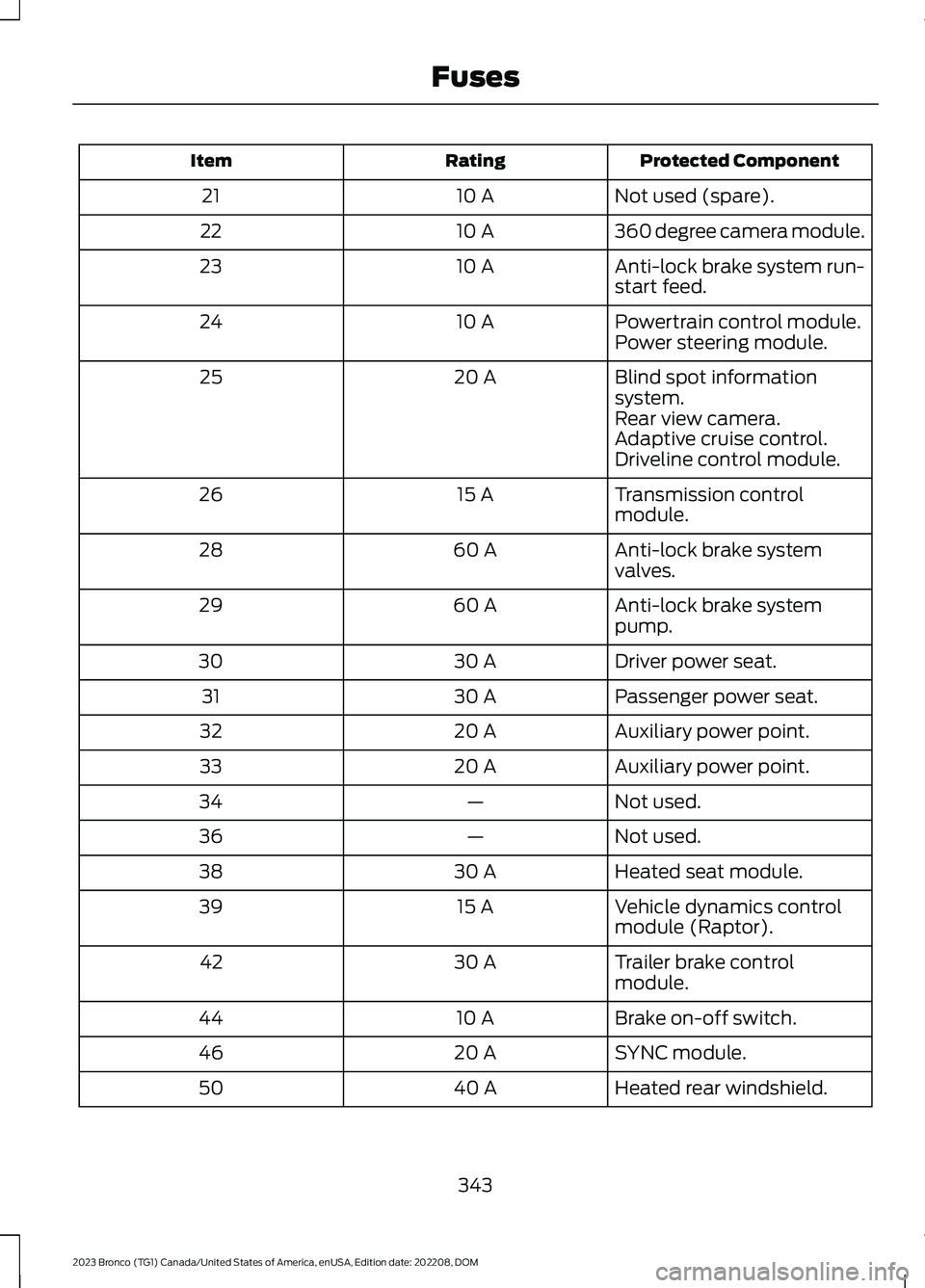
Protected ComponentRatingItem
Not used (spare).10 A21
360 degree camera module.10 A22
Anti-lock brake system run-start feed.10 A23
Powertrain control module.10 A24Power steering module.
Blind spot informationsystem.20 A25
Rear view camera.Adaptive cruise control.Driveline control module.
Transmission controlmodule.15 A26
Anti-lock brake systemvalves.60 A28
Anti-lock brake systempump.60 A29
Driver power seat.30 A30
Passenger power seat.30 A31
Auxiliary power point.20 A32
Auxiliary power point.20 A33
Not used.—34
Not used.—36
Heated seat module.30 A38
Vehicle dynamics controlmodule (Raptor).15 A39
Trailer brake controlmodule.30 A42
Brake on-off switch.10 A44
SYNC module.20 A46
Heated rear windshield.40 A50
343
2023 Bronco (TG1) Canada/United States of America, enUSA, Edition date: 202208, DOMFuses
Page 362 of 642
Continued operation increases the enginetemperature, causing the engine tocompletely shut down. Your steering andbraking effort increases in this situation.
When the engine temperature cools, youcan re-start the engine. Have your vehiclechecked as soon as possible to minimizeengine damage.
When Fail-Safe Mode Is Activated
WARNING: Fail-safe mode is foruse during emergencies only. Operateyour vehicle in fail-safe mode only aslong as necessary to bring your vehicleto rest in a safe location and seekimmediate repairs. When in fail-safemode, your vehicle will have limitedpower, will not be able to maintainhigh-speed operation, and maycompletely shut down without warning,potentially losing engine power, powersteering assist, and power brake assist,which may increase the possibility of acrash resulting in serious injury.
WARNING: Do not remove thecoolant reservoir cap when the engine ison or the cooling system is hot. Wait 10minutes for the cooling system to cooldown. Cover the coolant reservoir capwith a thick cloth to prevent thepossibility of scalding and slowly removethe cap. Failure to follow this instructioncould result in personal injury.
Your vehicle has limited engine powerwhen in the fail-safe mode, drive yourvehicle with caution. Your vehicle does notmaintain high-speed operation and theengine could operate poorly.
Remember that the engine is capable ofautomatically shutting down to preventengine damage. In this situation:
1.Pull off the road as soon as safelypossible and switch the engine off.
2.If you are a member of a roadsideassistance program, we recommendthat you contact your roadsideassistance service provider.
3.If this is not possible, wait for a shortperiod of time for the engine to cool.
4.Check the coolant level. If the coolantlevel is at or below the minimum mark,add prediluted coolant immediately.
5.When the engine temperature cools,you can re-start the engine. Have yourvehicle checked as soon as possible tominimize engine damage.
Note:If you continue to drive your vehiclein fail-safe mode without repairing it, youwill damage your engine.
Engine Coolant TemperatureManagement (If Equipped)
WARNING: To reduce the risk ofcrash and injury, be prepared that thevehicle speed may reduce and thevehicle may not be able to acceleratewith full power until the coolanttemperature reduces.
If you tow a trailer with your vehicle, theengine may temporarily reach a highertemperature during severe operatingconditions, for example ascending a longor steep grade in high ambienttemperatures.
At this time, you may notice the coolanttemperature gauge moves toward the redzone and a message may appear in theinformation display.
358
2023 Bronco (TG1) Canada/United States of America, enUSA, Edition date: 202208, DOMMaintenance
Page 366 of 642
WARNING: This vehicle may havemore than one battery. Removing thebattery cables from only one batterydoes not disconnect your vehicleelectrical system. Make sure youdisconnect the battery cables from allbatteries when disconnecting power.Failure to do so may cause seriouspersonal injury or property damage.
WARNING: For vehicles withAuto-Start-Stop the battery requirementis different. You must replace the batterywith one of exactly the samespecification.
WHAT IS THE BATTERYMANAGEMENT SYSTEM
The battery management system monitorsbattery conditions and takes actions toextend battery life.
HOW DOES THE BATTERYMANAGEMENT SYSTEM WORK
If excessive battery drain is detected, thesystem temporarily disables someelectrical systems to protect the battery.
Systems included are:
•Heated rear window.
•Heated seats.
•Climate control.
•Heated steering wheel.
•Audio unit.
•Navigation system.
A message could appear in the informationdisplay to alert you that battery protectionactions are active. This message is only fornotification that an action is taking place,and not intended to indicate an electricalproblem or that the battery requiresreplacement.
BATTERY MANAGEMENT SYSTEMLIMITATIONS
After battery replacement, or in somecases after charging the battery with anexternal charger, the battery managementsystem requires eight hours of vehicle sleeptime to relearn the battery state of charge.During this time, your vehicle must remainfully locked with the ignition switched off.
Note:Prior to relearning the battery stateof charge, the battery management systemcould temporarily disable some electricalsystems.
Electrical Accessory Installation
To make sure the battery managementsystem works correctly, do not connect anelectrical device ground connectiondirectly to the battery negative post. Thiscan cause inaccurate measurements ofthe battery condition and potentialincorrect system operation.
Note:If you add electrical accessories orcomponents to the vehicle, it couldadversely affect battery performance anddurability. This could also affect theperformance of other electrical systems inthe vehicle.
CHANGING THE 12V BATTERY
The battery is in the engine compartment.See Maintenance (page 349).
Your vehicle has a maintenance-freebattery. It does not require additionalwater during service.
If the vehicle battery has a cover, makesure you correctly install it after cleaningor replacing the battery.
362
2023 Bronco (TG1) Canada/United States of America, enUSA, Edition date: 202208, DOMMaintenance
Page 428 of 642
CLEANING STRIPES ORGRAPHICS
It is recommended to wash your vehicle byhand however, pressure washing may beused under the following conditions:
•Use a spray with a 40° wide sprayangle pattern.
•Keep the nozzle at a 12 in (305 mm)distance and 90° angle to yourvehicle's surface.
•Do not use water pressure higher than2,000 psi (14,000 kPa).
•Do not use water hotter than 179°F(82°C).
Note:Holding the pressure washer nozzleat an angle to the vehicle's surface maydamage graphics and cause the edges topeel away from the vehicle's surface.
CLEANING CAMERA LENSES ANDSENSORS
We recommend that you only uselukewarm or cold water and a soft clothto clean the camera lens and sensors.
Note:Do not pressure wash camera lensand sensors.
CLEANING THE HARD TOP
We recommend that you only clean thehard top in the following way:
1.Use a sponge to remove dust and loosedirt on the hard top surface.
2.Wipe the surface with a soft, dampcloth and a mild soap and watersolution. Dry the area with a clean, softcloth.
3.Make sure the surface of your hard topis dry before applying a small amountof conditioner or spray wax.
4.For additional information andassistance, we recommend that youcontact an authorized dealer.
Note:Test any conditioner or spray wax onan inconspicuous area before applyingbroadly.
Note:Do not use alcohol containing cleaneror any type of solvent on the hard topsurface.
Note:Do not use power tools, paste waxor polish on the hard top surface.
CLEANING THE UNDERBODY
Regularly clean the underside of yourvehicle using water. Keep body and doordrain holes free of debris or foreignmaterial.
CLEANING THE INTERIOR
CLEANING THE INSTRUMENTPANEL
WARNING: Do not use chemicalsolvents or strong detergents whencleaning the steering wheel orinstrument panel to avoid contaminationof the airbag system.
We recommend that you only clean theinstrument panel and cluster lens with adamp soft cloth. Dry the area with a clean,soft cloth.
For additional information and assistance,we recommend that you contact anauthorized dealer.
Note:Avoid cleaners or polishes thatincrease the gloss of the upper portion ofthe instrument panel. The dull finish in thisarea helps protect you from undesirablewindshield reflection.
424
2023 Bronco (TG1) Canada/United States of America, enUSA, Edition date: 202208, DOMVehicle Care
Page 504 of 642
REBOOTING THE CENTER
DISPLAY
You can reboot the center display usingthe controls on the steering wheel.
1.Simultaneously press and hold theseek forward and audio system powerbutton for 10 seconds.
500
2023 Bronco (TG1) Canada/United States of America, enUSA, Edition date: 202208, DOMCenter Display Overview
Page 624 of 642
Mislock.....................................................................89Operating the Doors From Inside YourVehicle.................................................................88Operating the Doors From Outside YourVehicle.................................................................88Doors and Locks –Troubleshooting..........................................89Doors and Locks – Frequently AskedQuestions..........................................................90Doors and Locks – InformationMessages...........................................................89Doors and Locks – Warning Lamps..............89Drive Belt Routing - 2.3LEcoBoost™.................................................369Drive Belt Routing - 2.7L EcoBoost™/3.0L EcoBoost™.......................................370Driver Alert......................................................293Driver Alert – Troubleshooting.....................294Driver Alert Indicators................................294Driver Alert Limitations..............................293Driver Alert Precautions............................293Driver Alert – Troubleshooting...............294Driver Alert – Information Messages.........294Driving Economically..................................326Driving Hints...................................................318Off-Road Driving.................................................318
E
Electric Parking Brake AudibleWarning.........................................................214Electric Parking Brake..................................213Electric Parking Brake –Troubleshooting.............................................214Electric Parking Brake –Troubleshooting.........................................214Electric Parking Brake – InformationMessages..........................................................215Electric Parking Brake – WarningLamps................................................................214Electric Power Steering..............................237Electric Power Steering Precautions...........237How Does Electric Power SteeringWork...................................................................237Electromagnetic Compatibility...............612Electronic Locking Differential...............203Electronic Locking Differential –Troubleshooting............................................207
Electronic Locking DifferentialIndicators.....................................................206Electronic Locking Differential –Troubleshooting........................................207Electronic Locking Differential –Information Messages................................207Emergency Call Limitations.......................78Emergency Call Requirements..................77Emergency Call System Data....................26Emergency Towing.....................................340Emission Law...............................................609Enabling Apps on an AndroidDevice..............................................................511Enabling Apps on an iOS Device.............511Enabling Remote Start...............................129End User License Agreement.................584Engine Block Heater....................................166Engine Block Heater Precautions.................166How Does the Engine Block HeaterWork...................................................................166Using the Engine Block Heater......................167Engine Coolant TemperatureGauge..............................................................119Engine Oil Capacity and Specification -2.3L EcoBoost™........................................467Engine Oil Capacity and Specification -2.7L EcoBoost™.......................................468Engine Oil Capacity and Specification -3.0L EcoBoost™.......................................470Engine Oil.......................................................354Adding Engine Oil..............................................354Checking the Engine Oil Level......................354Engine Oil Capacity andSpecification...................................................355Engine Oil Dipstick Overview........................354Resetting the Intelligent Oil LifeMonitor.............................................................355Engine Specifications - 2.3LEcoBoost™..................................................461Engine Specifications - 2.7LEcoBoost™.................................................462Engine Specifications - 3.0LEcoBoost™.................................................463Environment.....................................................27Evasive Steering Assist.............................290Evasive Steering Assist Limitations.............291Switching Evasive Steering Assist On andOff........................................................................291
620
2023 Bronco (TG1) Canada/United States of America, enUSA, Edition date: 202208, DOMIndex
Page 625 of 642
What Is Evasive Steering Assist...................290Event Data........................................................24Export Unique Options..............................610Exterior Bulbs................................................367Changing a Rear Lamp Bulb.........................369Exterior Bulb Specification Chart................367Removing a Rear Lamp Assembly..............368Exterior Lamps..............................................105Exterior Lamps On Audible Warning...........107Switching Off Road Driving Lamps On andOff........................................................................107Switching the Daytime Running Lamps Onand Off..............................................................106Switching the Spot Lamps On andOff........................................................................107Using the Front Fog Lamps............................106Using the Turn Signal Lamps.........................105Exterior Lighting Control............................104Exterior Lighting............................................104Autolamps............................................................105Automatic High Beam Control......................108Automatic High Beam Control –Troubleshooting..............................................110Exterior Lamps....................................................105Exterior Zone Lighting.......................................107Headlamps...........................................................104Headlamps – Troubleshooting.....................104Exterior Mirrors...............................................116Exterior Zone Lighting.................................107Exterior Zone Lighting Settings....................108Using the Exterior Zone Lighting...................107What Is Exterior Zone Lighting.......................107
F
Fastening and Unfastening theSeatbelts........................................................62Feature Bar....................................................499Federal Highway AdministrationRegulation...................................................583Fender Anchor Points................................303Fender Anchor Point LoadCapacities.......................................................303Locating the Fender Anchor Points............303Flat TireSee: Changing a Flat Tire - Excluding:Raptor...............................................................449See: Changing a Flat Tire - Raptor..............453
Floor Mats.......................................................327Folding the Exterior Mirrors........................116Ford Assistant...............................................501Ford Assistant – Frequently AskedQuestions.........................................................501Ford Assistant Settings....................................501Using Ford Assistant.........................................501Ford Performance...........................................15Ford Power-UpSee: Software Update Settings.....................517See: Vehicle Software Updates.....................517Ford Protect...................................................526Four-Wheel Drive.........................................195Four-Wheel Drive Modes................................199Four-Wheel Drive –Troubleshooting...........................................200Four-Wheel Drive Indicators...................200Four-Wheel Drive Limitations.................196Four-Wheel Drive Modes..........................199Four-Wheel Drive Auto....................................199Four-Wheel Drive High.....................................199Four-Wheel Drive Low....................................200Two-Wheel Drive High.....................................199Four-Wheel Drive Precautions................195Four-Wheel Drive –Troubleshooting.......................................200Four-Wheel Drive – InformationMessages..........................................................201Four-Wheel Drive – Warning Lamps.........200Front Axle Fluid Capacity andSpecification - Excluding:Raptor..........................................................480Front Axle Fluid Capacity andSpecification - Raptor............................480Front Exterior - 2-Door.................................42Front Exterior - 4-Door, Vehicles With:Hard Top, Excluding: Raptor...................39Front Exterior - 4-Door, Vehicles With:Soft Top..........................................................40Front Exterior - Raptor..................................41Front Parking Aid..........................................241Front Parking Aid Audible Warnings...........242Front Parking Aid Limitations........................242Locating the Front Parking AidSensors.............................................................242What is the Front Parking Aid........................241
621
2023 Bronco (TG1) Canada/United States of America, enUSA, Edition date: 202208, DOMIndex