wiring FORD BRONCO 2023 User Guide
[x] Cancel search | Manufacturer: FORD, Model Year: 2023, Model line: BRONCO, Model: FORD BRONCO 2023Pages: 642, PDF Size: 14.71 MB
Page 393 of 642
REMOVING AND INSTALLING THEREAR ROOF PANEL - RAPTOR, 4-DOOR
WARNING: Do not remove ormodify the B-Pillar brace or trim. Doingso could affect safety systemperformance, including safety canopyand front seat mounted side airbags,during a crash or rollover.
Do not remove or modify the C-pillar brace.
Remove the front panels and center panelbefore removing the rear roof panel.
1.Open the rear doors.
2.Open the tailgate window. SeeOpening and Closing the Windows(page 113).
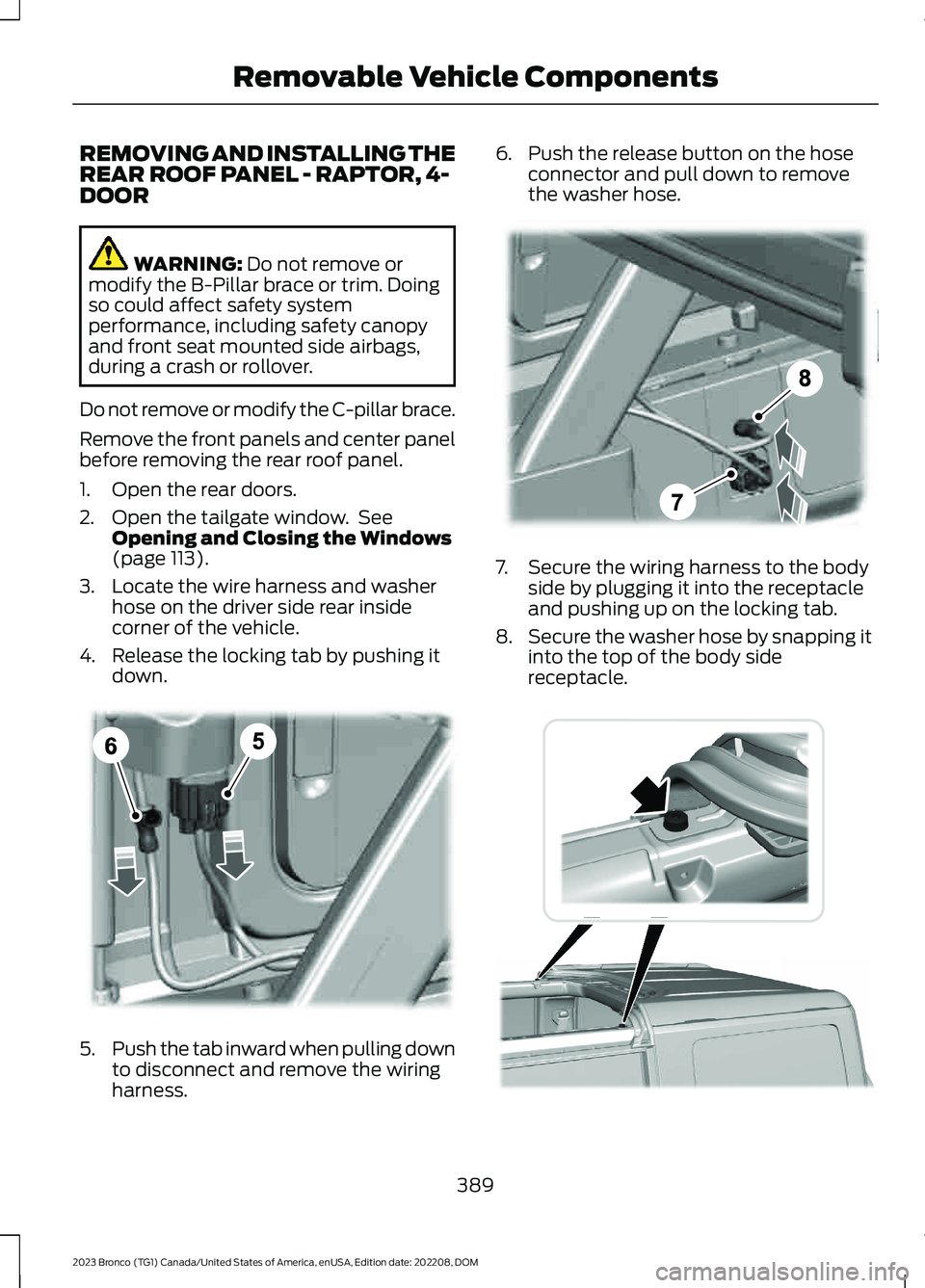
3.Locate the wire harness and washerhose on the driver side rear insidecorner of the vehicle.
4.Release the locking tab by pushing itdown.
5.Push the tab inward when pulling downto disconnect and remove the wiringharness.
6.Push the release button on the hoseconnector and pull down to removethe washer hose.
7.Secure the wiring harness to the bodyside by plugging it into the receptacleand pushing up on the locking tab.
8.Secure the washer hose by snapping itinto the top of the body sidereceptacle.
389
2023 Bronco (TG1) Canada/United States of America, enUSA, Edition date: 202208, DOMRemovable Vehicle ComponentsE335339 E335340 E345383
Page 394 of 642
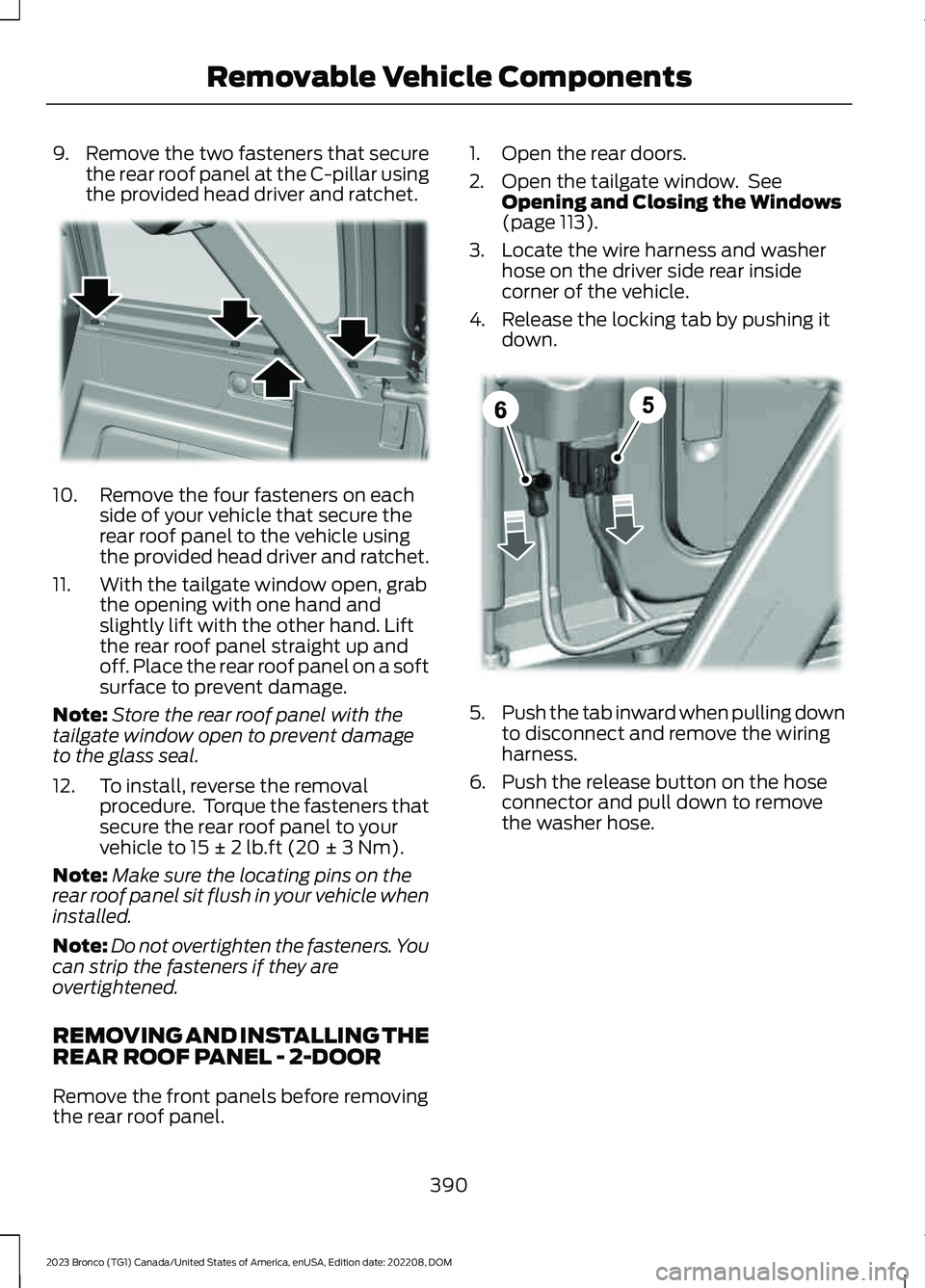
9.Remove the two fasteners that securethe rear roof panel at the C-pillar usingthe provided head driver and ratchet.
10.Remove the four fasteners on eachside of your vehicle that secure therear roof panel to the vehicle usingthe provided head driver and ratchet.
11.With the tailgate window open, grabthe opening with one hand andslightly lift with the other hand. Liftthe rear roof panel straight up andoff. Place the rear roof panel on a softsurface to prevent damage.
Note:Store the rear roof panel with thetailgate window open to prevent damageto the glass seal.
12.To install, reverse the removalprocedure. Torque the fasteners thatsecure the rear roof panel to yourvehicle to 15 ± 2 lb.ft (20 ± 3 Nm).
Note:Make sure the locating pins on therear roof panel sit flush in your vehicle wheninstalled.
Note:Do not overtighten the fasteners. Youcan strip the fasteners if they areovertightened.
REMOVING AND INSTALLING THEREAR ROOF PANEL - 2-DOOR
Remove the front panels before removingthe rear roof panel.
1.Open the rear doors.
2.Open the tailgate window. SeeOpening and Closing the Windows(page 113).
3.Locate the wire harness and washerhose on the driver side rear insidecorner of the vehicle.
4.Release the locking tab by pushing itdown.
5.Push the tab inward when pulling downto disconnect and remove the wiringharness.
6.Push the release button on the hoseconnector and pull down to removethe washer hose.
390
2023 Bronco (TG1) Canada/United States of America, enUSA, Edition date: 202208, DOMRemovable Vehicle ComponentsE333997 E335339
Page 395 of 642
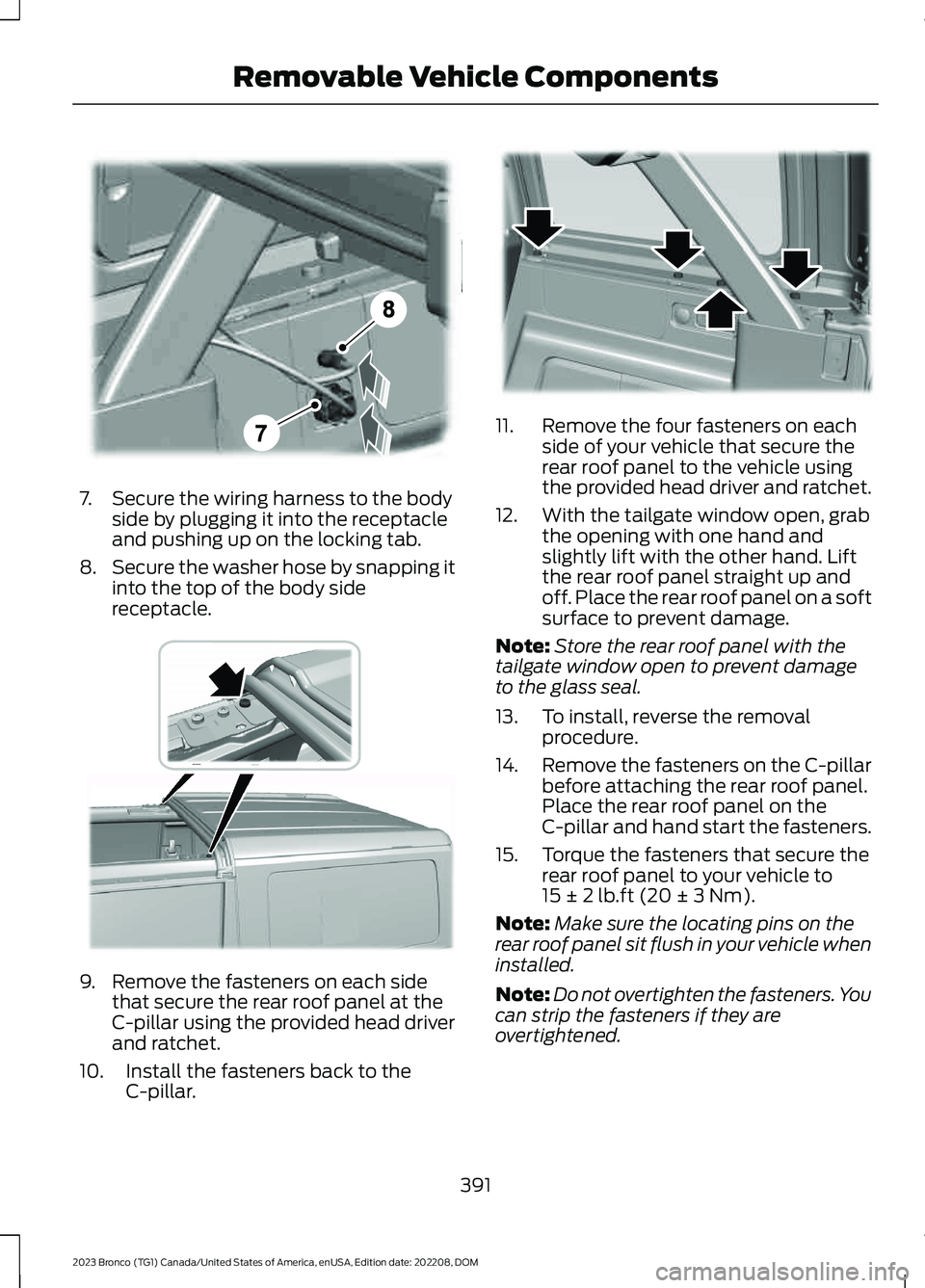
7.Secure the wiring harness to the bodyside by plugging it into the receptacleand pushing up on the locking tab.
8.Secure the washer hose by snapping itinto the top of the body sidereceptacle.
9.Remove the fasteners on each sidethat secure the rear roof panel at theC-pillar using the provided head driverand ratchet.
10.Install the fasteners back to theC-pillar.
11.Remove the four fasteners on eachside of your vehicle that secure therear roof panel to the vehicle usingthe provided head driver and ratchet.
12.With the tailgate window open, grabthe opening with one hand andslightly lift with the other hand. Liftthe rear roof panel straight up andoff. Place the rear roof panel on a softsurface to prevent damage.
Note:Store the rear roof panel with thetailgate window open to prevent damageto the glass seal.
13.To install, reverse the removalprocedure.
14.Remove the fasteners on the C-pillarbefore attaching the rear roof panel.Place the rear roof panel on theC-pillar and hand start the fasteners.
15.Torque the fasteners that secure therear roof panel to your vehicle to15 ± 2 lb.ft (20 ± 3 Nm).
Note:Make sure the locating pins on therear roof panel sit flush in your vehicle wheninstalled.
Note:Do not overtighten the fasteners. Youcan strip the fasteners if they areovertightened.
391
2023 Bronco (TG1) Canada/United States of America, enUSA, Edition date: 202208, DOMRemovable Vehicle ComponentsE335340 E376079 E333997
Page 408 of 642
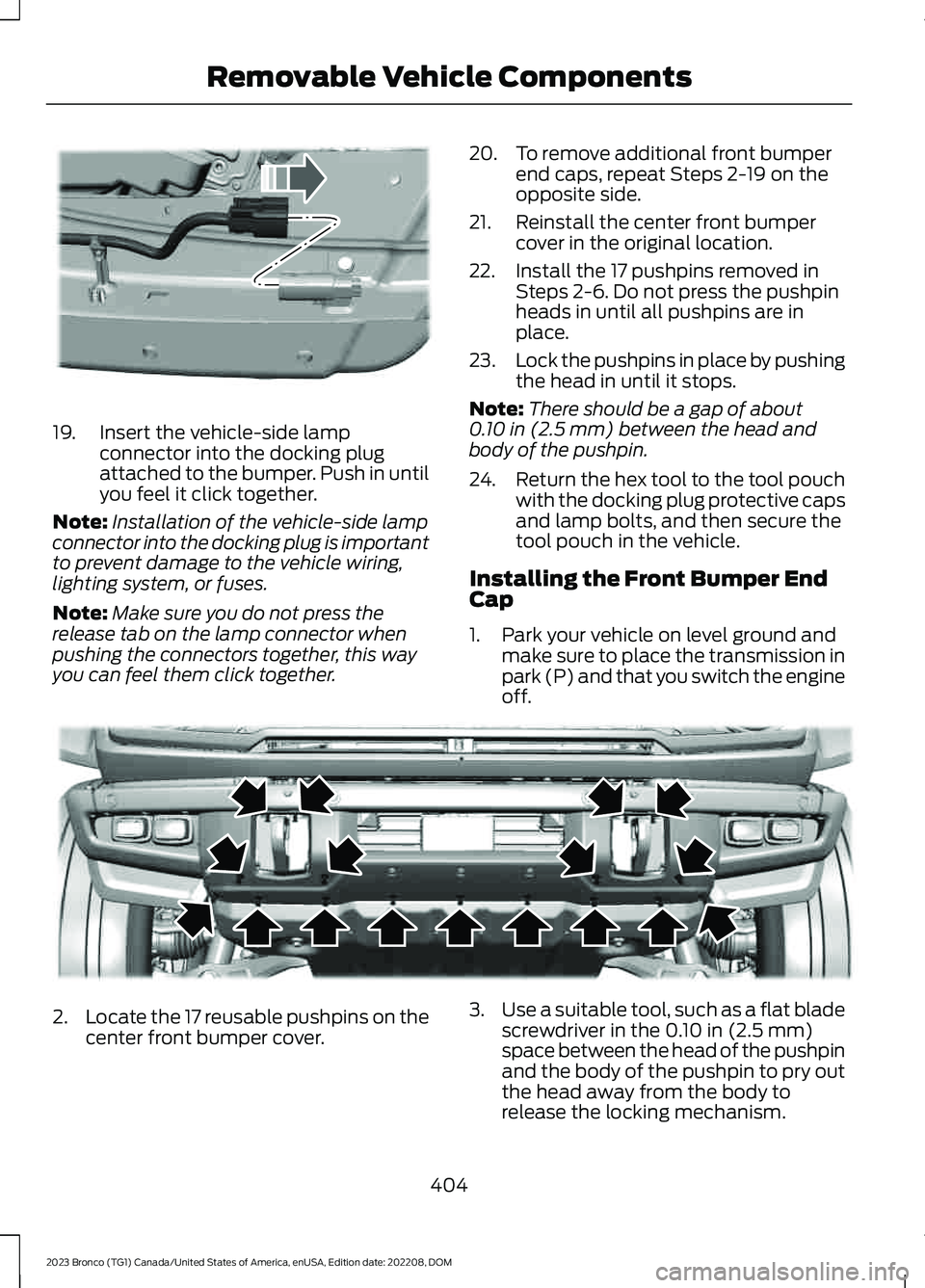
19.Insert the vehicle-side lampconnector into the docking plugattached to the bumper. Push in untilyou feel it click together.
Note:Installation of the vehicle-side lampconnector into the docking plug is importantto prevent damage to the vehicle wiring,lighting system, or fuses.
Note:Make sure you do not press therelease tab on the lamp connector whenpushing the connectors together, this wayyou can feel them click together.
20.To remove additional front bumperend caps, repeat Steps 2-19 on theopposite side.
21.Reinstall the center front bumpercover in the original location.
22.Install the 17 pushpins removed inSteps 2-6. Do not press the pushpinheads in until all pushpins are inplace.
23.Lock the pushpins in place by pushingthe head in until it stops.
Note:There should be a gap of about0.10 in (2.5 mm) between the head andbody of the pushpin.
24.Return the hex tool to the tool pouchwith the docking plug protective capsand lamp bolts, and then secure thetool pouch in the vehicle.
Installing the Front Bumper EndCap
1.Park your vehicle on level ground andmake sure to place the transmission inpark (P) and that you switch the engineoff.
2.Locate the 17 reusable pushpins on thecenter front bumper cover.
3.Use a suitable tool, such as a flat bladescrewdriver in the 0.10 in (2.5 mm)space between the head of the pushpinand the body of the pushpin to pry outthe head away from the body torelease the locking mechanism.
404
2023 Bronco (TG1) Canada/United States of America, enUSA, Edition date: 202208, DOMRemovable Vehicle ComponentsE366953 E366945
Page 411 of 642
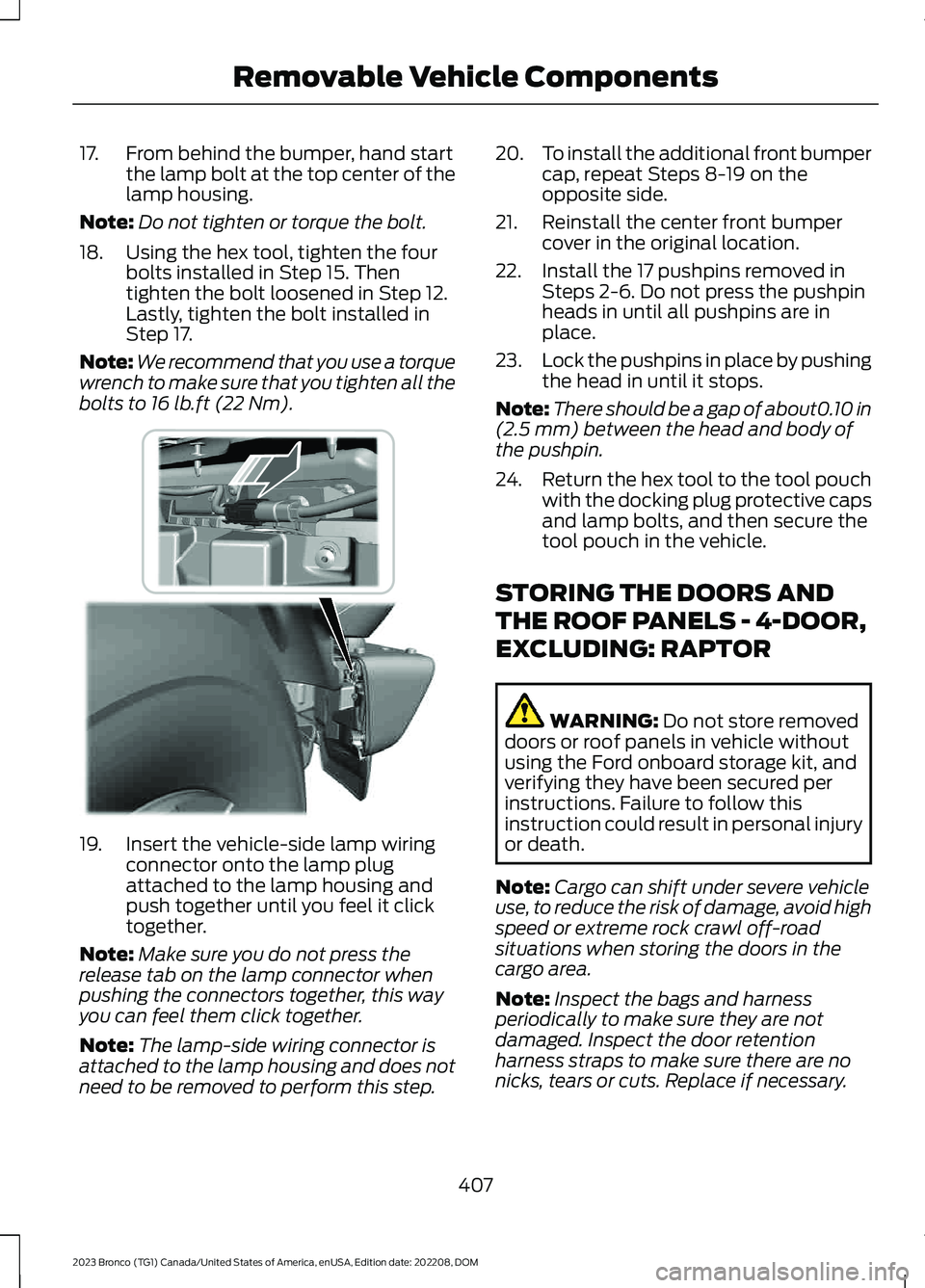
17.From behind the bumper, hand startthe lamp bolt at the top center of thelamp housing.
Note:Do not tighten or torque the bolt.
18.Using the hex tool, tighten the fourbolts installed in Step 15. Thentighten the bolt loosened in Step 12.Lastly, tighten the bolt installed inStep 17.
Note:We recommend that you use a torquewrench to make sure that you tighten all thebolts to 16 lb.ft (22 Nm).
19.Insert the vehicle-side lamp wiringconnector onto the lamp plugattached to the lamp housing andpush together until you feel it clicktogether.
Note:Make sure you do not press therelease tab on the lamp connector whenpushing the connectors together, this wayyou can feel them click together.
Note:The lamp-side wiring connector isattached to the lamp housing and does notneed to be removed to perform this step.
20.To install the additional front bumpercap, repeat Steps 8-19 on theopposite side.
21.Reinstall the center front bumpercover in the original location.
22.Install the 17 pushpins removed inSteps 2-6. Do not press the pushpinheads in until all pushpins are inplace.
23.Lock the pushpins in place by pushingthe head in until it stops.
Note:There should be a gap of about0.10 in(2.5 mm) between the head and body ofthe pushpin.
24.Return the hex tool to the tool pouchwith the docking plug protective capsand lamp bolts, and then secure thetool pouch in the vehicle.
STORING THE DOORS AND
THE ROOF PANELS - 4-DOOR,
EXCLUDING: RAPTOR
WARNING: Do not store removeddoors or roof panels in vehicle withoutusing the Ford onboard storage kit, andverifying they have been secured perinstructions. Failure to follow thisinstruction could result in personal injuryor death.
Note:Cargo can shift under severe vehicleuse, to reduce the risk of damage, avoid highspeed or extreme rock crawl off-roadsituations when storing the doors in thecargo area.
Note:Inspect the bags and harnessperiodically to make sure they are notdamaged. Inspect the door retentionharness straps to make sure there are nonicks, tears or cuts. Replace if necessary.
407
2023 Bronco (TG1) Canada/United States of America, enUSA, Edition date: 202208, DOMRemovable Vehicle Components E366958
Page 526 of 642
WHAT ARE THE AUXILIARY
SWITCHES
The auxiliary switchboard on the overheadconsole makes aftermarket customizationeasier with six prewired switchesconnected to the power distribution box.Each circuit is individually fused forconnection of electrical accessories.
For maximum vehicle performance, keepthe following information in mind whenadding accessories or equipment to yourvehicle:
•When adding accessories, equipment,passengers and luggage to yourvehicle, do not exceed the total weightcapacity of the vehicle or of the frontor rear axle (GVWR or GAWR asindicated on the safety compliancecertification label). Ask an authorizeddealer for specific weight information.
•It is your responsibility to ensure thatany equipment you have fittedcomplies with applicable locallegislation.
•An authorized dealer needs to installmobile communication systems.Improper installation may harm theoperation of your vehicle, particularlyif the manufacturer did not design themobile communication systemspecifically for automotive use.
•If you or an authorized dealer add anyelectrical or electronic accessories orcomponents not produced by us toyour vehicle, you may adversely affectbattery performance and durability. Inaddition, you may also adversely affectthe performance of the other electricalsystems in the vehicle.
LOCATING THE AUXILIARY
SWITCHES
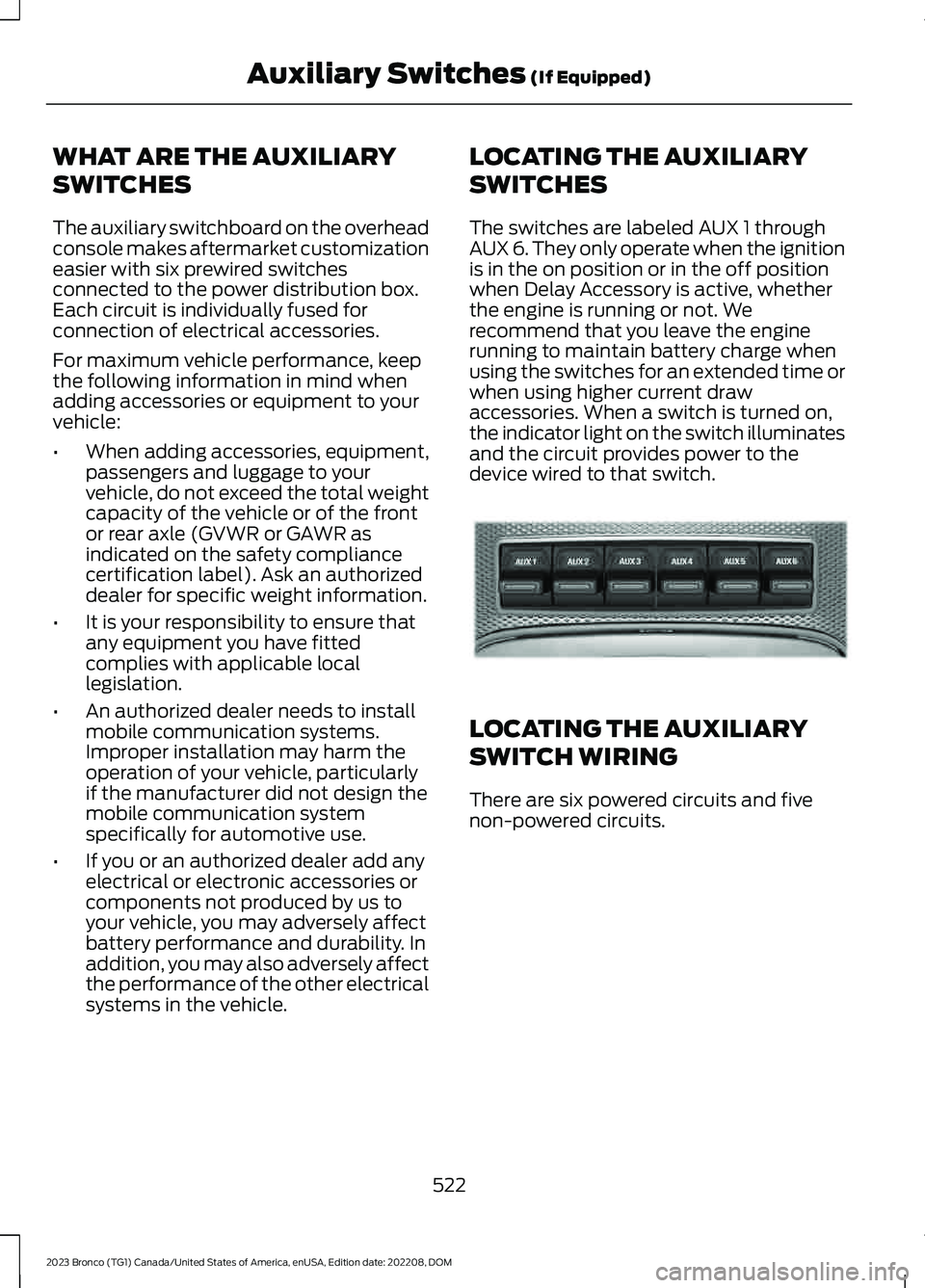
The switches are labeled AUX 1 throughAUX 6. They only operate when the ignitionis in the on position or in the off positionwhen Delay Accessory is active, whetherthe engine is running or not. Werecommend that you leave the enginerunning to maintain battery charge whenusing the switches for an extended time orwhen using higher current drawaccessories. When a switch is turned on,the indicator light on the switch illuminatesand the circuit provides power to thedevice wired to that switch.
LOCATING THE AUXILIARY
SWITCH WIRING
There are six powered circuits and fivenon-powered circuits.
522
2023 Bronco (TG1) Canada/United States of America, enUSA, Edition date: 202208, DOMAuxiliary Switches (If Equipped)E220728
Page 528 of 642
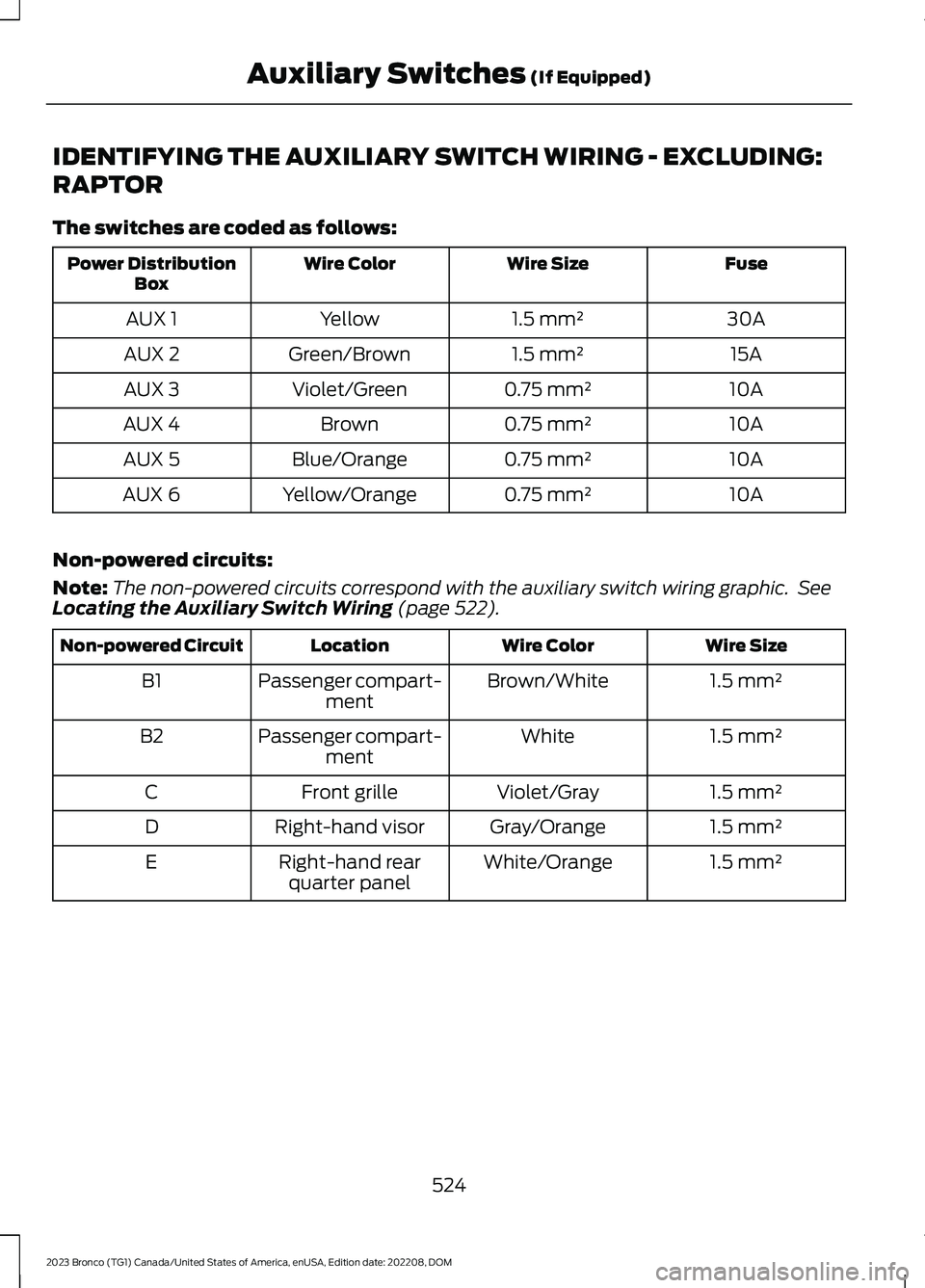
IDENTIFYING THE AUXILIARY SWITCH WIRING - EXCLUDING:
RAPTOR
The switches are coded as follows:
FuseWire SizeWire ColorPower DistributionBox
30A1.5 mm²YellowAUX 1
15A1.5 mm²Green/BrownAUX 2
10A0.75 mm²Violet/GreenAUX 3
10A0.75 mm²BrownAUX 4
10A0.75 mm²Blue/OrangeAUX 5
10A0.75 mm²Yellow/OrangeAUX 6
Non-powered circuits:
Note:The non-powered circuits correspond with the auxiliary switch wiring graphic. SeeLocating the Auxiliary Switch Wiring (page 522).
Wire SizeWire ColorLocationNon-powered Circuit
1.5 mm²Brown/WhitePassenger compart-mentB1
1.5 mm²WhitePassenger compart-mentB2
1.5 mm²Violet/GrayFront grilleC
1.5 mm²Gray/OrangeRight-hand visorD
1.5 mm²White/OrangeRight-hand rearquarter panelE
524
2023 Bronco (TG1) Canada/United States of America, enUSA, Edition date: 202208, DOMAuxiliary Switches (If Equipped)
Page 529 of 642
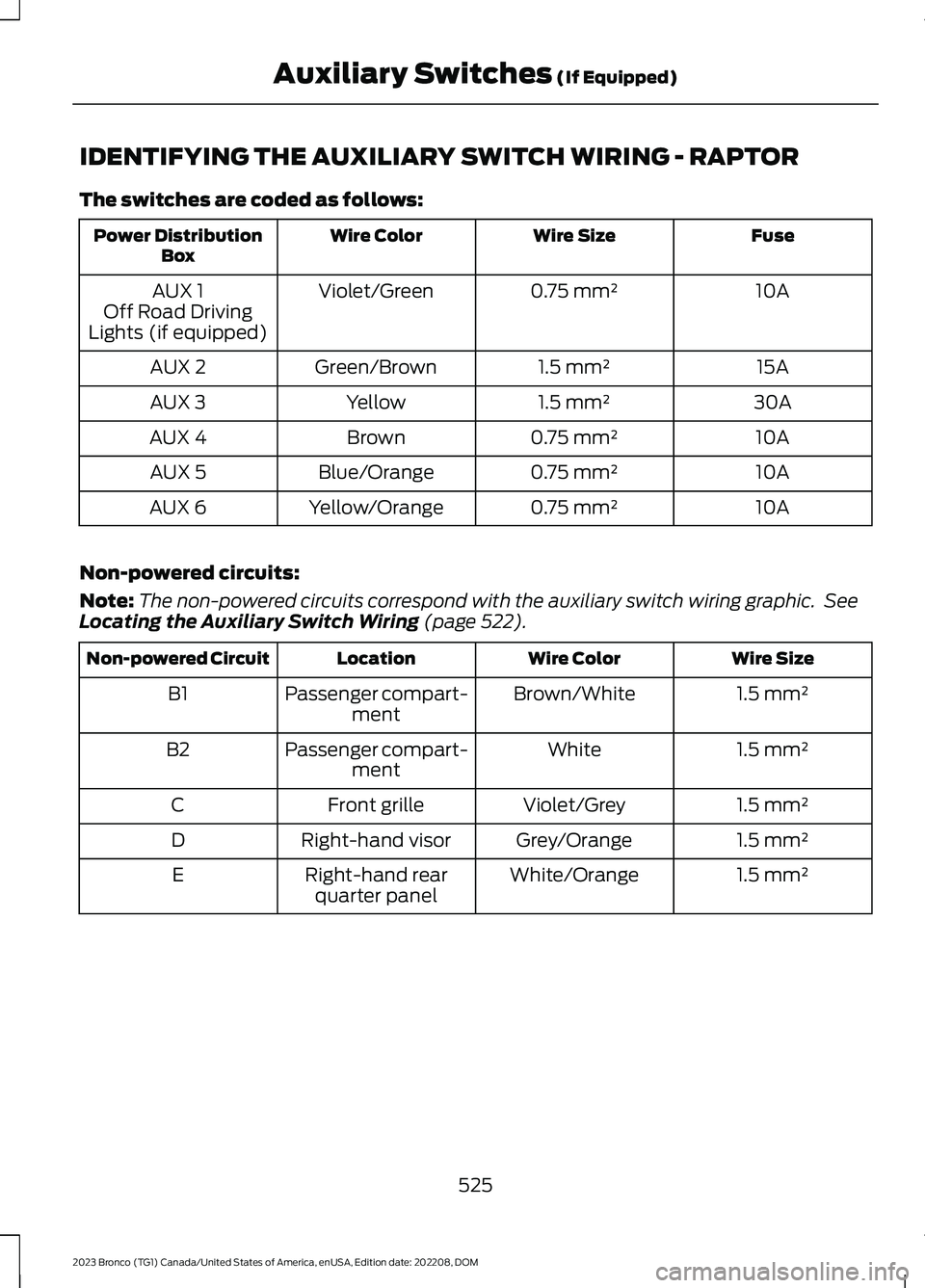
IDENTIFYING THE AUXILIARY SWITCH WIRING - RAPTOR
The switches are coded as follows:
FuseWire SizeWire ColorPower DistributionBox
10A0.75 mm²Violet/GreenAUX 1Off Road DrivingLights (if equipped)
15A1.5 mm²Green/BrownAUX 2
30A1.5 mm²YellowAUX 3
10A0.75 mm²BrownAUX 4
10A0.75 mm²Blue/OrangeAUX 5
10A0.75 mm²Yellow/OrangeAUX 6
Non-powered circuits:
Note:The non-powered circuits correspond with the auxiliary switch wiring graphic. SeeLocating the Auxiliary Switch Wiring (page 522).
Wire SizeWire ColorLocationNon-powered Circuit
1.5 mm²Brown/WhitePassenger compart-mentB1
1.5 mm²WhitePassenger compart-mentB2
1.5 mm²Violet/GreyFront grilleC
1.5 mm²Grey/OrangeRight-hand visorD
1.5 mm²White/OrangeRight-hand rearquarter panelE
525
2023 Bronco (TG1) Canada/United States of America, enUSA, Edition date: 202208, DOMAuxiliary Switches (If Equipped)
Page 616 of 642
ELECTROMAGNETIC
COMPATIBILITY
WARNING: Do not place objectsor mount equipment on or near theairbag cover, on the side of the front orrear seatbacks, or in areas that maycome into contact with a deployingairbag. Failure to follow theseinstructions may increase the risk ofpersonal injury in the event of a crash.
WARNING: Do not fasten antennacables to vehicle wiring, fuel pipes andbrake pipes.
WARNING: Keep antenna andpower cables at least 4 in (10 cm) fromany electronic modules and airbags.
Note:We test and certify your vehicle tomeet electromagnetic compatibilitylegislation. It is your responsibility to makesure that any equipment an authorizeddealer installs on your vehicle complies withapplicable local legislation and otherrequirements. Installation of someaftermarket electronic devices coulddegrade the performance of vehiclefunctions, which use radio frequency signalssuch as broadcast radio receiver, tirepressure monitoring system, push buttonstart,Bluetooth® connectivity or satellitenavigation.
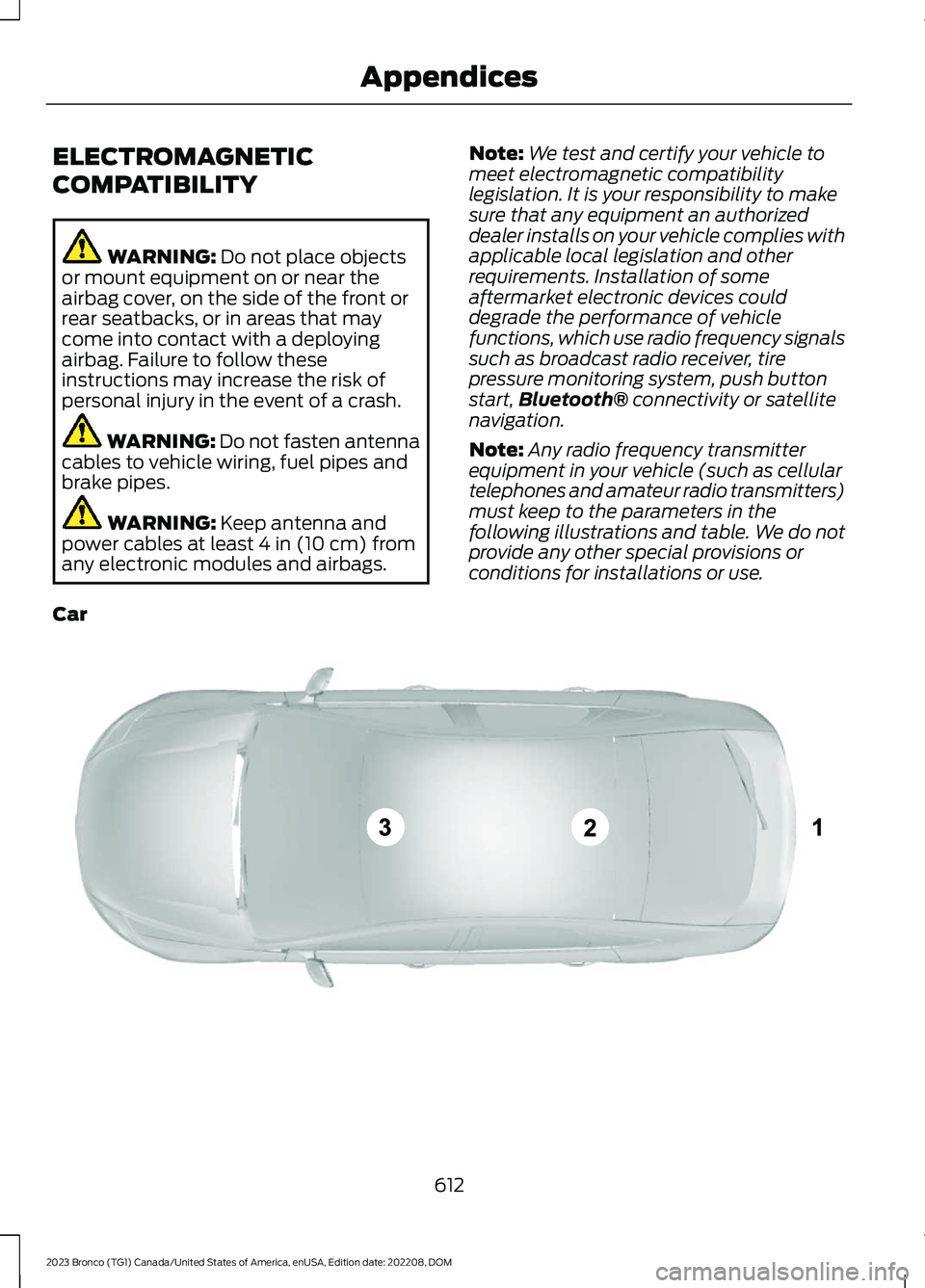
Note:Any radio frequency transmitterequipment in your vehicle (such as cellulartelephones and amateur radio transmitters)must keep to the parameters in thefollowing illustrations and table. We do notprovide any other special provisions orconditions for installations or use.
Car
612
2023 Bronco (TG1) Canada/United States of America, enUSA, Edition date: 202208, DOMAppendicesE239120
Page 627 of 642
Heated Seats.................................................146Heated Seat Precautions................................146Switching the Heated Seats On andOff.......................................................................146HeatingSee: Climate Control - Vehicles With:Automatic Temperature Control...............131See: Climate Control - Vehicles With: ManualTemperature Control....................................136Hill Descent Control....................................235Hill Descent Control –Troubleshooting............................................236Hill Descent Control Indicator.................235Hill Descent Control Precautions..........235Hill Descent Control –Troubleshooting........................................236Hill Descent Control – InformationMessages.........................................................236Hill Start Assist..............................................216Hill Start Assist – Troubleshooting..............216Hill Start Assist Precautions.....................216Hill Start Assist – Troubleshooting........216Hill Start Assist – InformationMessages..........................................................216Hood LockSee: Opening and Closing the Hood..........349See: Opening and Closing the Hood -Raptor...............................................................350Horn....................................................................99How Does 911 Assist Work...........................77How Does Adaptive Cruise ControlWork...............................................................252How Does Blind Spot InformationSystem Work..............................................279How Does Cross Traffic AlertWork..............................................................283How Does Driver Alert Work....................293How Does Four-Wheel Drive Work - 4x4with Part Time Engagement.................195How Does Four-Wheel Drive Work -Advanced 4x4 with 4A Mode...............195How Does G.O.A.T. Mode ControlWork..............................................................260How Does Hill Descent ControlWork...............................................................235How Does Hill Start Assist Work............216How Does Pre-Collision AssistWork..............................................................286
How Does Stability Control Work...........219How Does the 360 Degree CameraWork...............................................................247How Does the Lane Keeping SystemWork...............................................................272How Does the Personal Safety SystemWork.................................................................67How Does the Rear Occupant AlertSystem Work...............................................150How Does the Safety Canopy™Work.................................................................69How Does Traction Control Work...........217How Does Trailer Sway ControlWork................................................................313How Do the Front Airbags Work..............68How Do the Side Airbags Work................68
I
Identifying Fuse Types..............................348Identifying the Audio Unit........................488Identifying the Auxiliary Switch Wiring -Excluding: Raptor.....................................524Identifying the Auxiliary Switch Wiring -Raptor...........................................................525Identifying the Climate Control Unit......131Inflating the Tires..........................................441Information On Demand Screen -Vehicles With: 12 Inch Screen..............499Information on the Tire Sidewall............431Inspecting the Tire for Damage.............442Inspecting the Tire for Wear....................442Inspecting the Wheel ValveStems............................................................443Installing Child Restraints...........................53Combining the Seatbelt and Lower Anchorsfor Attaching Child Restraints....................56Installing a Child Restraint in a CenterSeat......................................................................56Using Lower Anchors and Tethers forChildren...............................................................55Using Seatbelts.....................................................53Using Tether Straps.............................................57Instrument Cluster Display.......................126Personalized Settings.......................................128Trip Computer.......................................................127Instrument Cluster Display Main Menu -Excluding: Raptor......................................126
623
2023 Bronco (TG1) Canada/United States of America, enUSA, Edition date: 202208, DOMIndex