instrument cluster FORD BRONCO 2023 Owner's Manual
[x] Cancel search | Manufacturer: FORD, Model Year: 2023, Model line: BRONCO, Model: FORD BRONCO 2023Pages: 642, PDF Size: 14.71 MB
Page 130 of 642
USING THE INSTRUMENT
CLUSTER DISPLAY CONTROLS
WARNING: Driving while distractedcan result in loss of vehicle control, crashand injury. We strongly recommend thatyou use extreme caution when using anydevice that may take your focus off theroad. Your primary responsibility is thesafe operation of your vehicle. Werecommend against the use of anyhand-held device while driving andencourage the use of voice-operatedsystems when possible. Make sure youare aware of all applicable local lawsthat may affect the use of electronicdevices while driving.
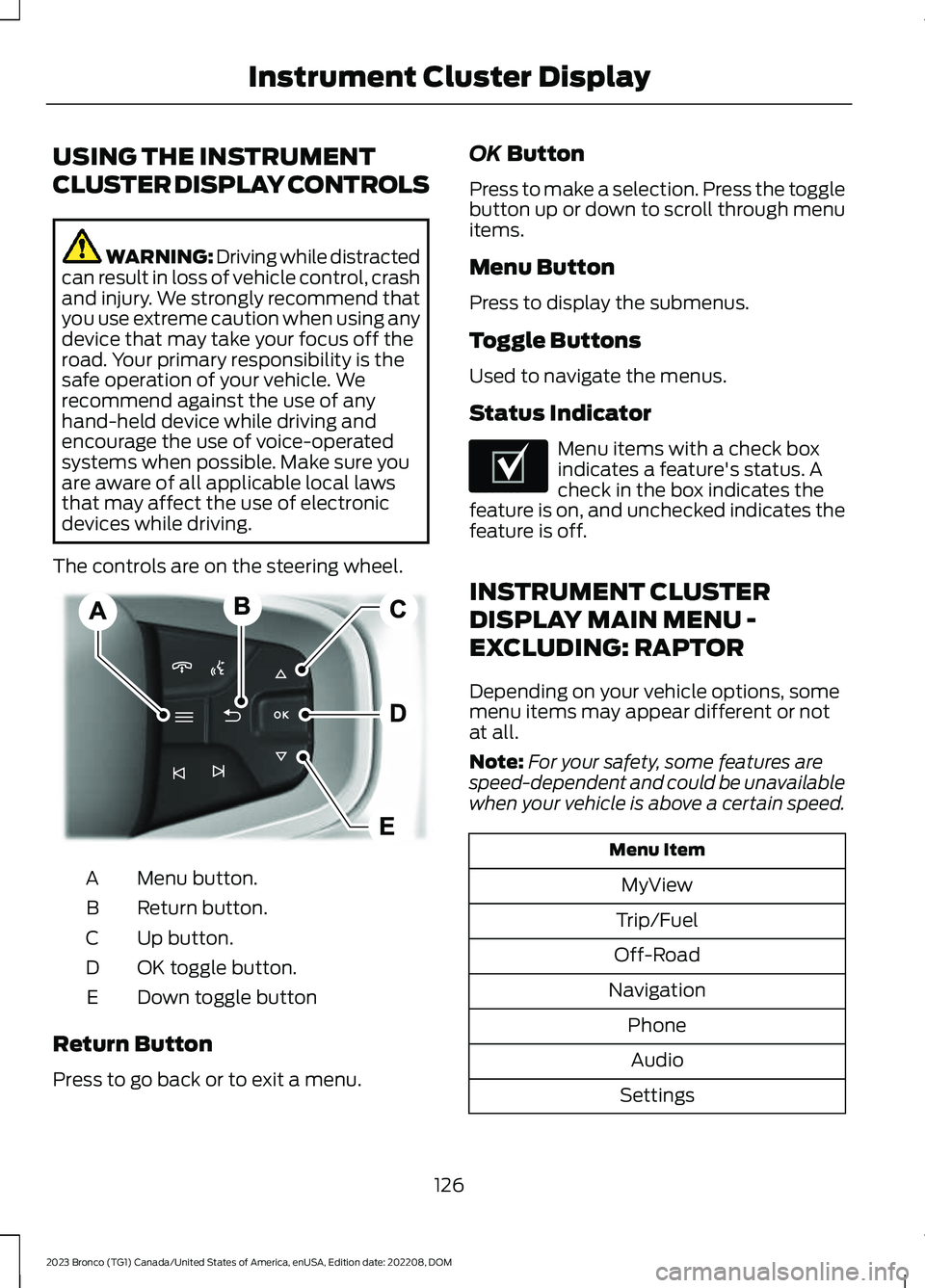
The controls are on the steering wheel.
Menu button.A
Return button.B
Up button.C
OK toggle button.D
Down toggle buttonE
Return Button
Press to go back or to exit a menu.
OK Button
Press to make a selection. Press the togglebutton up or down to scroll through menuitems.
Menu Button
Press to display the submenus.
Toggle Buttons
Used to navigate the menus.
Status Indicator
Menu items with a check boxindicates a feature's status. Acheck in the box indicates thefeature is on, and unchecked indicates thefeature is off.
INSTRUMENT CLUSTER
DISPLAY MAIN MENU -
EXCLUDING: RAPTOR
Depending on your vehicle options, somemenu items may appear different or notat all.
Note:For your safety, some features arespeed-dependent and could be unavailablewhen your vehicle is above a certain speed.
Menu Item
MyView
Trip/Fuel
Off-Road
Navigation
Phone
Audio
Settings
126
2023 Bronco (TG1) Canada/United States of America, enUSA, Edition date: 202208, DOMInstrument Cluster DisplayE326969 E204495
Page 131 of 642
INSTRUMENT CLUSTER
DISPLAY MAIN MENU -
RAPTOR
Depending on your vehicle options, somemenu items can appear different or not atall.
Note:For your safety, some features arespeed-dependent and could be unavailablewhen your vehicle is above a certain speed.
Menu Item
MyView
Trip/Fuel
Raptor Information
Navigation
Phone
Audio
Settings
TRIP COMPUTER
ACCESSING THE TRIP COMPUTER
1.Select Trip/Fuel.
2.Select Fuel Economy,Trip 1 or Trip 2.
RESETTING THE TRIP COMPUTER
1.Select Trip/Fuel.
2.Press and hold the OK button for a fewseconds.
RESETTING THE INDIVIDUAL TRIPVALUES
1.Select Trip/Fuel.
2.Select Trip 1 or Trip 2.
3.Press and hold the OK button for a fewseconds.
CUSTOMIZING THE
INSTRUMENT CLUSTER
DISPLAY
Adding Screens Using MyView
1.Using the information display controlson the steering wheel, select MyView.
2.Select Configure MyView.
3.Select a screen.
4.Press the OK button.
Note:The number of screens you can addis limited. If the selected screen does notappear you must deselect screens from theMyView menu.
Adding Screens Using SelectScreens
1.Select Select Screens.
2.Use the controls on the steering wheelto highlight a screen to add.
3.Press the OK button.
Note:The number of screens you can addis limited. If the selected screen does notappear you must deselect screens from theSelect Screens menu.
Configuring Gauges
1.Select Settings.
2.Select Configure Gauges.
3.Select to swap or change left-handside and right-hand side gauges.
127
2023 Bronco (TG1) Canada/United States of America, enUSA, Edition date: 202208, DOMInstrument Cluster Display
Page 132 of 642
PERSONALIZED SETTINGS
CHANGING THE INSTRUMENTCLUSTER DISPLAY LANGUAGE
Note:Available languages vary by region.
1.Press Settings on the touchscreen.
2.Press General.
3.Press Language.
4.Select a language.
CHANGING THE MEASUREMENTUNIT
1.Press Settings on the touchscreen.
2.Press General.
3.Press Measure Units.
4.Select a measurement unit.
CHANGING THE TEMPERATUREUNIT
1.Press Settings on the touchscreen.
2.Press General.
3.Press Temperature Units.
4.Select Fahrenheit or Celsius.
CHANGING THE TIRE PRESSUREUNIT
1.Press Settings on the touchscreen.
2.Press General.
3.Press Tire Pressure Units.
4.Select a pressure unit.
128
2023 Bronco (TG1) Canada/United States of America, enUSA, Edition date: 202208, DOMInstrument Cluster Display
Page 172 of 642
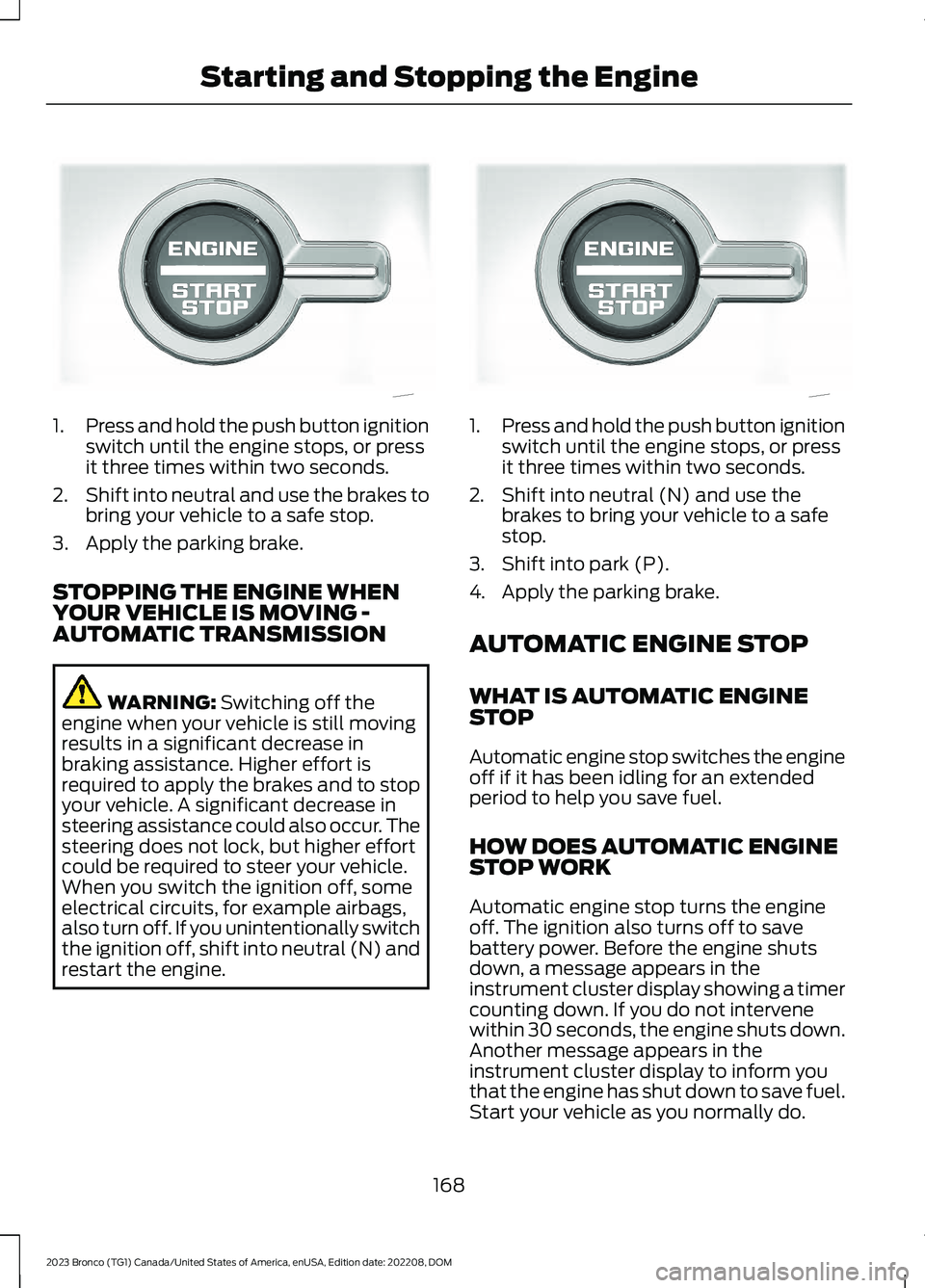
1.Press and hold the push button ignitionswitch until the engine stops, or pressit three times within two seconds.
2.Shift into neutral and use the brakes tobring your vehicle to a safe stop.
3.Apply the parking brake.
STOPPING THE ENGINE WHENYOUR VEHICLE IS MOVING -AUTOMATIC TRANSMISSION
WARNING: Switching off theengine when your vehicle is still movingresults in a significant decrease inbraking assistance. Higher effort isrequired to apply the brakes and to stopyour vehicle. A significant decrease insteering assistance could also occur. Thesteering does not lock, but higher effortcould be required to steer your vehicle.When you switch the ignition off, someelectrical circuits, for example airbags,also turn off. If you unintentionally switchthe ignition off, shift into neutral (N) andrestart the engine.
1.Press and hold the push button ignitionswitch until the engine stops, or pressit three times within two seconds.
2.Shift into neutral (N) and use thebrakes to bring your vehicle to a safestop.
3.Shift into park (P).
4.Apply the parking brake.
AUTOMATIC ENGINE STOP
WHAT IS AUTOMATIC ENGINESTOP
Automatic engine stop switches the engineoff if it has been idling for an extendedperiod to help you save fuel.
HOW DOES AUTOMATIC ENGINESTOP WORK
Automatic engine stop turns the engineoff. The ignition also turns off to savebattery power. Before the engine shutsdown, a message appears in theinstrument cluster display showing a timercounting down. If you do not intervenewithin 30 seconds, the engine shuts down.Another message appears in theinstrument cluster display to inform youthat the engine has shut down to save fuel.Start your vehicle as you normally do.
168
2023 Bronco (TG1) Canada/United States of America, enUSA, Edition date: 202208, DOMStarting and Stopping the EngineE340581 E340581
Page 176 of 642
WHAT IS START IN GEAR
Crank in gear allows the driver to restartthe engine and launch the vehicle afterstalling in four-wheel drive low (4L). Usethe instrument cluster display to direct youwhen to apply the brake and push the startbutton. While driving off road, it is possibleto stall the engine trying to maneuverterrains. Trying to restart your vehicle byusing the clutch or shifting into neutral torestart the engine can be difficult andcause potential roll back situations whendriving uphill.
Note:Crank in gear is an alternate namefor the feature.
START IN GEAR
PRECAUTIONS
Always press the brake pedal whenstarting the vehicle to prevent unwantedvehicle movement, and release afterstarting to drive away. Start in gear is onlypossible with the brake pedal pressed.
START IN GEAR LIMITATIONS
You can only use start in gear in four-wheeldrive low (4L).
USING START IN GEAR
When driving difficult terrains in four-wheeldrive low (4L), it is possible to stall theengine when your vehicle is not able tomaintain speed. To easily start the engineand launch your vehicle, perform thefollowing steps:
1.After the vehicle stalls an informationmessage displays in the cluster,Tostart in gear select YES and pressOK.
2.Firmly press the brake pedal when ingear and press and hold the Startbutton.
3.When the engine starts and yourvehicle begins to move, release thebrake pedal.
172
2023 Bronco (TG1) Canada/United States of America, enUSA, Edition date: 202208, DOMStart in Gear - Manual Transmission
Page 177 of 642
START IN GEAR –
TROUBLESHOOTING
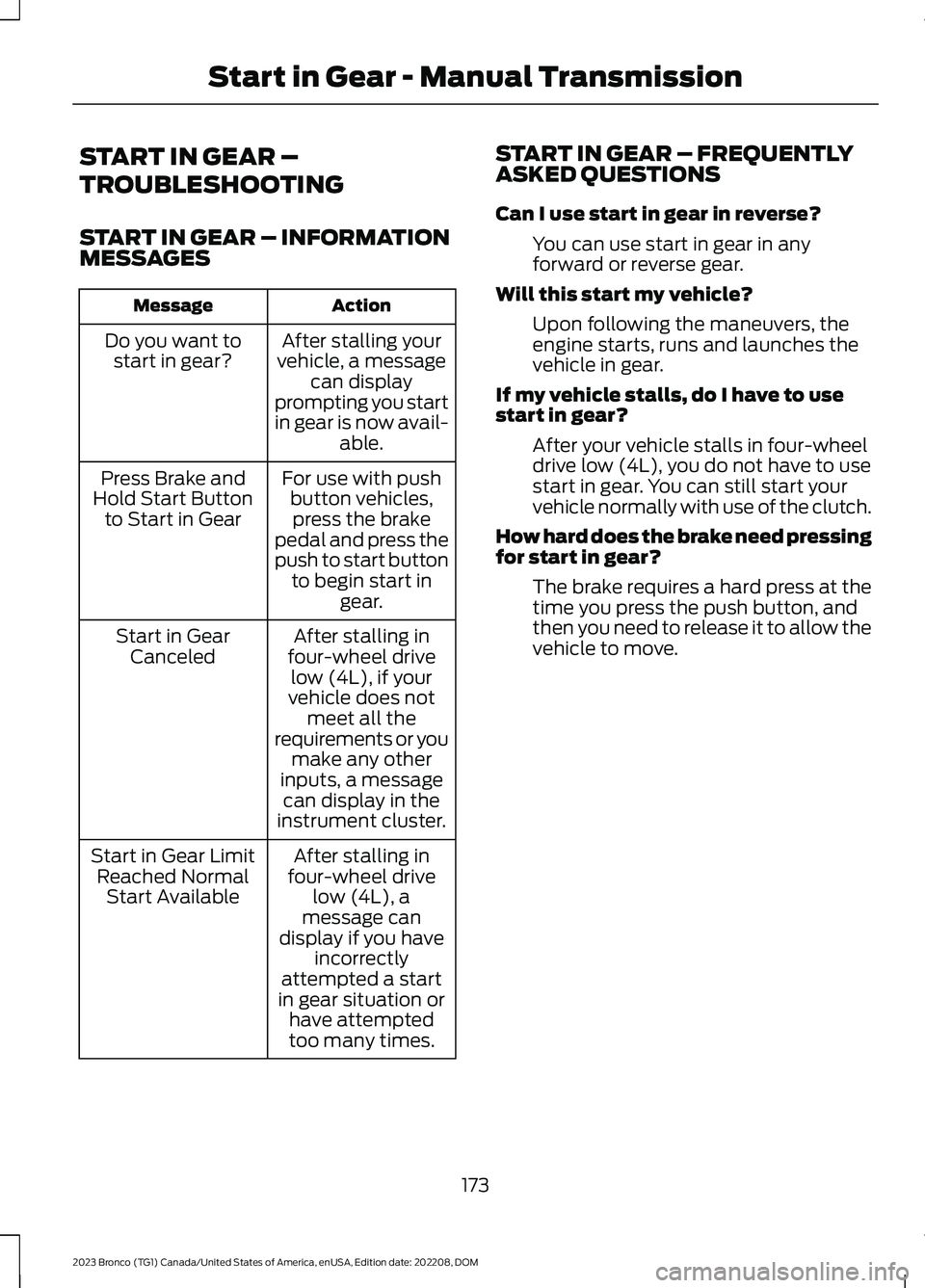
START IN GEAR – INFORMATIONMESSAGES
ActionMessage
After stalling yourvehicle, a messagecan displayprompting you startin gear is now avail-able.
Do you want tostart in gear?
For use with pushbutton vehicles,press the brakepedal and press thepush to start buttonto begin start ingear.
Press Brake andHold Start Buttonto Start in Gear
After stalling infour-wheel drivelow (4L), if yourvehicle does notmeet all therequirements or youmake any otherinputs, a messagecan display in theinstrument cluster.
Start in GearCanceled
After stalling infour-wheel drivelow (4L), amessage candisplay if you haveincorrectlyattempted a startin gear situation orhave attemptedtoo many times.
Start in Gear LimitReached NormalStart Available
START IN GEAR – FREQUENTLYASKED QUESTIONS
Can I use start in gear in reverse?
You can use start in gear in anyforward or reverse gear.
Will this start my vehicle?
Upon following the maneuvers, theengine starts, runs and launches thevehicle in gear.
If my vehicle stalls, do I have to usestart in gear?
After your vehicle stalls in four-wheeldrive low (4L), you do not have to usestart in gear. You can still start yourvehicle normally with use of the clutch.
How hard does the brake need pressingfor start in gear?
The brake requires a hard press at thetime you press the push button, andthen you need to release it to allow thevehicle to move.
173
2023 Bronco (TG1) Canada/United States of America, enUSA, Edition date: 202208, DOMStart in Gear - Manual Transmission
Page 179 of 642
STOPPING THE ENGINE -
AUTOMATIC TRANSMISSION
Stop your vehicle, keep your foot on thebrake pedal and the transmission in drive(D).
RESTARTING THE ENGINE -
MANUAL TRANSMISSION
Press the clutch pedal.
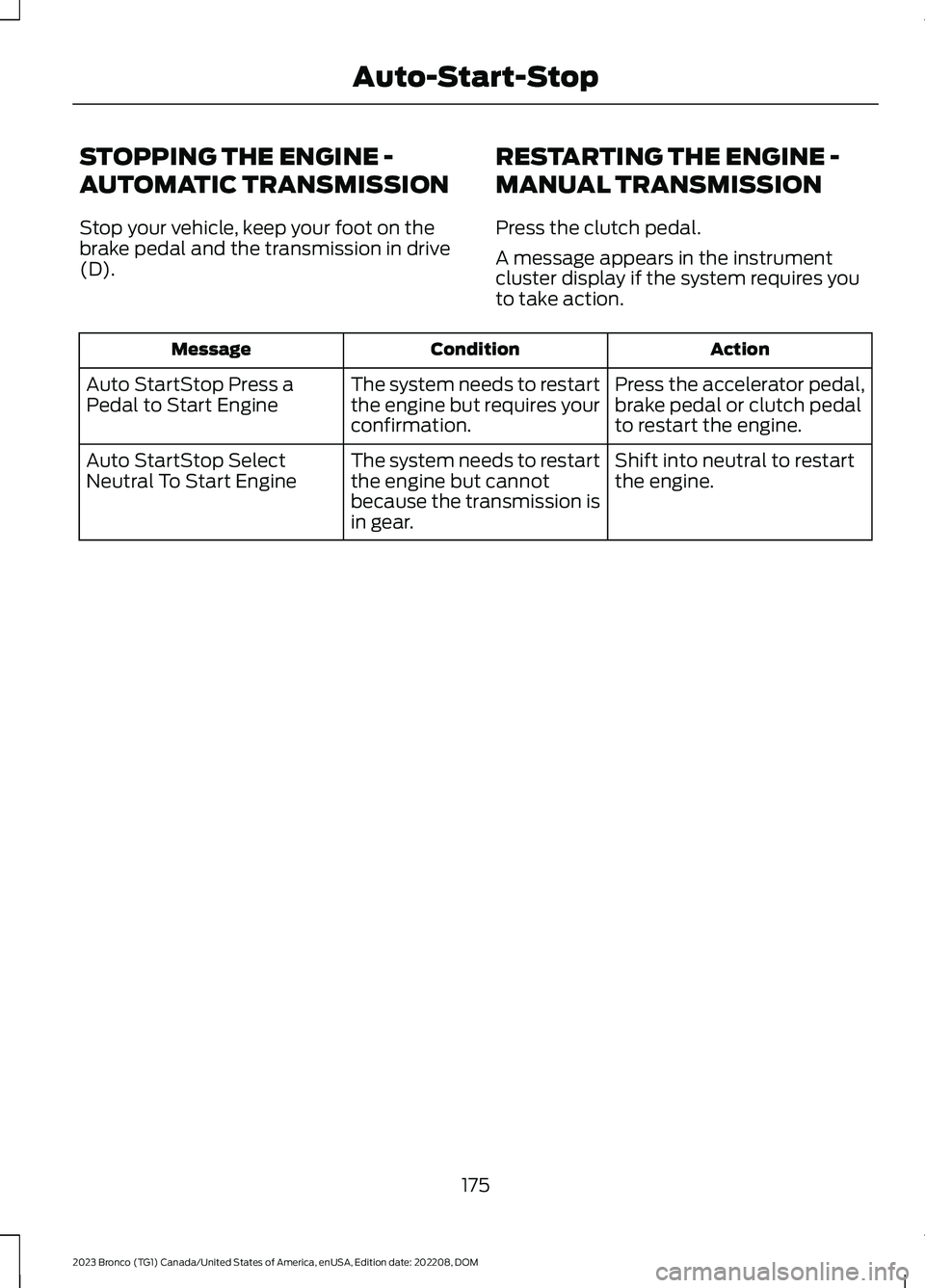
A message appears in the instrumentcluster display if the system requires youto take action.
ActionConditionMessage
Press the accelerator pedal,brake pedal or clutch pedalto restart the engine.
The system needs to restartthe engine but requires yourconfirmation.
Auto StartStop Press aPedal to Start Engine
Shift into neutral to restartthe engine.The system needs to restartthe engine but cannotbecause the transmission isin gear.
Auto StartStop SelectNeutral To Start Engine
175
2023 Bronco (TG1) Canada/United States of America, enUSA, Edition date: 202208, DOMAuto-Start-Stop
Page 180 of 642
RESTARTING THE ENGINE -
AUTOMATIC TRANSMISSION
Release the brake pedal or press theaccelerator pedal.
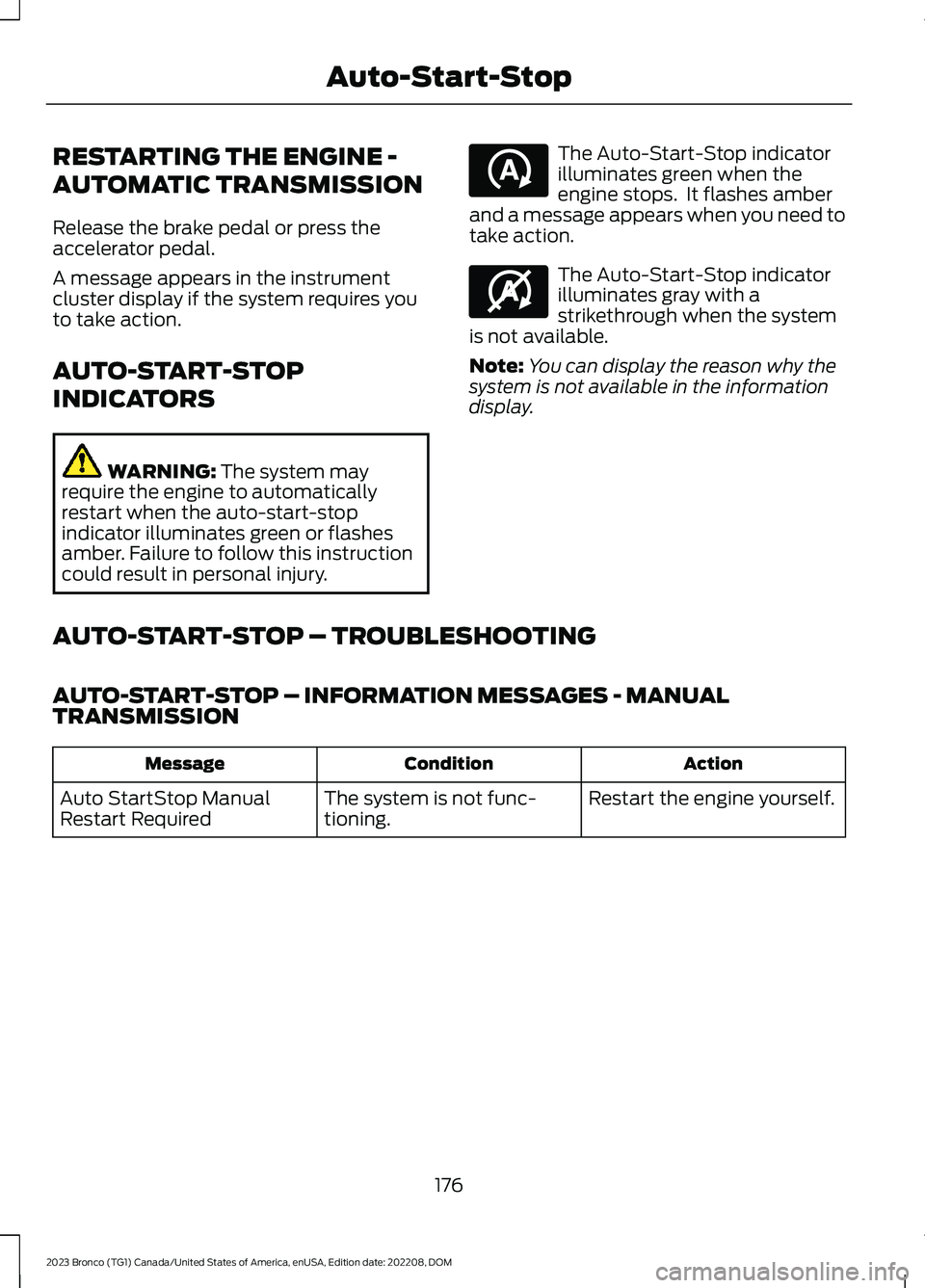
A message appears in the instrumentcluster display if the system requires youto take action.
AUTO-START-STOP
INDICATORS
WARNING: The system mayrequire the engine to automaticallyrestart when the auto-start-stopindicator illuminates green or flashesamber. Failure to follow this instructioncould result in personal injury.
The Auto-Start-Stop indicatorilluminates green when theengine stops. It flashes amberand a message appears when you need totake action.
The Auto-Start-Stop indicatorilluminates gray with astrikethrough when the systemis not available.
Note:You can display the reason why thesystem is not available in the informationdisplay.
AUTO-START-STOP – TROUBLESHOOTING
AUTO-START-STOP – INFORMATION MESSAGES - MANUALTRANSMISSION
ActionConditionMessage
Restart the engine yourself.The system is not func-tioning.Auto StartStop ManualRestart Required
176
2023 Bronco (TG1) Canada/United States of America, enUSA, Edition date: 202208, DOMAuto-Start-StopE121377 E146361
Page 188 of 642
Note:The amount of fuel in the emptyreserve varies and should not be relied uponto increase driving range.
FUEL AND REFUELING –
TROUBLESHOOTING
FUEL AND REFUELING –WARNING LAMPS
If it illuminates when you aredriving, refuel as soon aspossible.
FUEL AND REFUELING –INFORMATION MESSAGES
Refueling System Warning
If the fuel tank filler valve does not fullyclose, a message could appear in theinstrument cluster display.
Message
Check Fuel Fill Inlet
If the message appears, do the following:
1.Stop your vehicle as soon as it is safeto do so and switch the engine off.
2.Shift into park (P) or neutral (N).
3.Apply the parking brake.
4.Fully open the fuel filler door.
5.Check the fuel tank filler valve for anydebris that may be restricting itsmovement.
6.Remove any debris from the fuel tankfiller valve.
7.Fully insert a fuel pump nozzle or thefuel filler funnel provided with yourvehicle into the fuel filler pipe. SeeLocating the Fuel Filler Funnel(page 180). This action should dislodgeany debris that may be preventing thefuel tank filler valve from fully closing.
8.Remove the fuel pump nozzle or fuelfiller funnel from the fuel filler pipe.
9.Fully close the fuel filler door.
Note:The message may not immediatelyreset. If the message continues to appearand a warning lamp illuminates, have yourvehicle checked as soon as possible.
184
2023 Bronco (TG1) Canada/United States of America, enUSA, Edition date: 202208, DOMFuel and Refueling
Page 195 of 642
MANUAL (M)
In manual (M) you can select a specificgear. See Manually Shifting Gears (page191).
Note:We recommend using this mode fordriving on hilly or mountainous roads orwhen towing a trailer. See Towing a Trailer(page 307).
SPORT (S)
In sport (S) your vehicle holds gears longer.
Note:We recommend using this mode fora sportier feel or when driving on hilly ormountainous roads.
SHIFTING YOUR VEHICLE INTO
GEAR
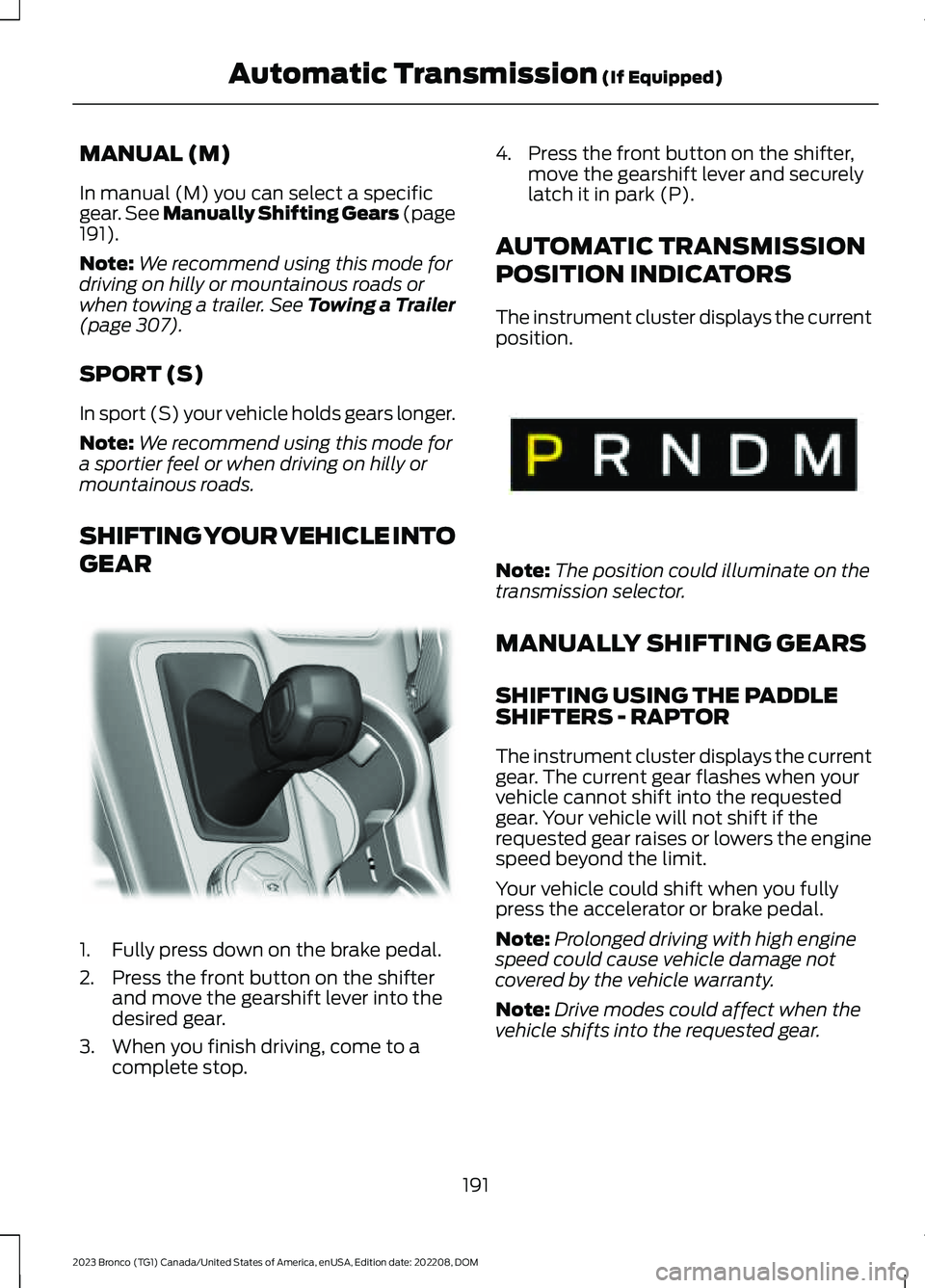
1.Fully press down on the brake pedal.
2.Press the front button on the shifterand move the gearshift lever into thedesired gear.
3.When you finish driving, come to acomplete stop.
4.Press the front button on the shifter,move the gearshift lever and securelylatch it in park (P).
AUTOMATIC TRANSMISSION
POSITION INDICATORS
The instrument cluster displays the currentposition.
Note:The position could illuminate on thetransmission selector.
MANUALLY SHIFTING GEARS
SHIFTING USING THE PADDLESHIFTERS - RAPTOR
The instrument cluster displays the currentgear. The current gear flashes when yourvehicle cannot shift into the requestedgear. Your vehicle will not shift if therequested gear raises or lowers the enginespeed beyond the limit.
Your vehicle could shift when you fullypress the accelerator or brake pedal.
Note:Prolonged driving with high enginespeed could cause vehicle damage notcovered by the vehicle warranty.
Note:Drive modes could affect when thevehicle shifts into the requested gear.
191
2023 Bronco (TG1) Canada/United States of America, enUSA, Edition date: 202208, DOMAutomatic Transmission (If Equipped)E324063 E341776