parking brake FORD BRONCO 2023 Owner's Manual
[x] Cancel search | Manufacturer: FORD, Model Year: 2023, Model line: BRONCO, Model: FORD BRONCO 2023Pages: 642, PDF Size: 14.71 MB
Page 220 of 642
WHAT IS HILL START ASSIST
Hill Start Assist
This feature applies the brakes to hold yourvehicle after you bring the vehicle to a stopon a slope.
HOW DOES HILL START
ASSIST WORK
When the system activates, your vehicleremains stationary for a few seconds afteryou release the brake pedal. This gives youtime to move your foot from the brakepedal to the accelerator pedal. The brakesrelease when you apply the acceleratorpedal and the vehicle begins to moveforward, or the vehicle is stationary beyondthe Hill Start Assist hold time.
The system activates when your vehicle isin any forward gear and facing uphill, orwhen your vehicle is in reverse (R) andfacing downhill.
HILL START ASSIST
PRECAUTIONS
WARNING: The system does notreplace the parking brake. When youleave your vehicle, always apply theparking brake.
WARNING: You must remain inyour vehicle when the system turns on.At all times you are responsible forcontrolling your vehicle, supervising thesystem, and intervening if required.Failure to follow this instruction couldresult in the loss of control of yourvehicle, personal injury or death.
SWITCHING HILL START
ASSIST ON AND OFF -
MANUAL TRANSMISSION
You can switch hill start assist on and offon the touchscreen:
1.Press Features on the touchscreen.
2.Press Driver Assistance.
3.Switch Hill Start Assist on or off.
Note:The system remembers the lastsetting when you start your vehicle.
SWITCHING HILL START
ASSIST ON AND OFF -
AUTOMATIC TRANSMISSION
Hill start assist is active when you switchthe ignition on. You cannot switch thesystem on or off.
HILL START ASSIST –
TROUBLESHOOTING
HILL START ASSIST –INFORMATION MESSAGES
ActionMessage
Displays whensystem is not avail-able. Have yourvehicle checked assoon as possible.
Hill Start Assist NotAvailable
216
2023 Bronco (TG1) Canada/United States of America, enUSA, Edition date: 202208, DOMHill Start Assist
Page 227 of 642
Press the button to set ordecrease the set speed. Pressand hold to adjust the speed inlarger increments.
Note:The indicator changes color.
You can also adjust the set speed bybraking, then pressing the + or - button.
Note:Pressing the brake pedal does notswitch off the system.
CANCELING THE SET SPEED
Press the button on the steeringwheel to cancel the set speed.
Note:If your vehicle has trail one pedaldrive and you are in four-wheel drive high(4H) or four-wheel drive low (4L) mode,cancelling the set speed activates thisfeature.
TRAIL CONTROL INDICATORS
TRAIL ONE PEDAL DRIVE (IF
EQUIPPED)
WHAT IS TRAIL ONE PEDAL DRIVE
Trail one pedal drive allows you toaccelerate and brake using only theaccelerator pedal. The system assistswhen driving through difficult off-roadterrain. Pressing the accelerator pedaldown accelerates your vehicle andreleasing pressure on the accelerator
pedal, with your foot still on the pedal,slows your vehicle down. Releasing theaccelerator pedal may allow your vehicleto come to a complete stop, somesituations may require you to press thebrake pedal to come to a complete stop.
TRAIL ONE PEDAL DRIVEPRECAUTIONS
WARNING: This system is an extradriving aid. It does not replace yourattention and judgment, or the need toapply the brakes. This system does NOTautomatically brake your vehicle. If youfail to press the brake pedal whennecessary, you may collide with anothervehicle.
Shifting into drive (D) or reverse (R) doesnot cause the vehicle to move.
You can press the brake pedal to increasebraking. This does not turn the system off.
Trail one pedal drive could apply theparking brake when your vehicle is notmoving and not in park (P).
Note:Always check the transmissionselection before accelerating.
Note:Only use trail one pedal drive onslippery or loose surfaces. Using trail onepedal drive on dry, hard surfaces couldproduce some vibration, driveline bind upand potential excessive tire and vehiclewear.
223
2023 Bronco (TG1) Canada/United States of America, enUSA, Edition date: 202208, DOMTrail Control (If Equipped)E246885 E318506
Page 239 of 642
WHAT IS HILL DESCENT
CONTROL
Hill descent control allows the driver to setand maintain vehicle speed whiledescending steep slopes in various surfaceconditions.
HOW DOES HILL DESCENT
CONTROL WORK
Hill descent control can maintain vehiclespeeds on downhill slopes between2–20 mph (3–32 km/h). Above 20 mph(32 km/h), the system remains on but thedescent speed cannot be set ormaintained.
Note:The system does not function below2 mph (3 km/h).
The system requires a cool down intervalafter a period of sustained use. Hill descentcontrol provides a warning in the messagecenter and a tone sounds when the systemis about to disengage for cooling. At thistime, manually apply the brakes as neededto maintain descent speed.
Note:The amount of time that the systemcan remain active before cooling varies withconditions.
HILL DESCENT CONTROL
PRECAUTIONS
WARNING: The system does notcontrol speed in low traction conditionsor extremely steep slopes. The systemis designed to be an aid and does notrelieve you of your responsibility to drivewith due care and attention. Failure tofollow this instruction could result inpersonal injury.
WARNING: The system does notreplace the parking brake. When youleave your vehicle, always apply theparking brake.
SWITCHING HILL DESCENT
CONTROL ON AND OFF
Bronco Off-Road Features
Press the button on the centerconsole. A light in the instrumentcluster illuminates when thesystem is active.
SETTING THE HILL DESCENT
SPEED
To increase or decrease the descent speed,press the accelerator or brake pedal, or usethe SET + and SET - buttons on thesteering wheel. Once you reach thepreferred speed remove your feet from thepedals.
HILL DESCENT CONTROL
INDICATOR
Illuminates when you switch hilldescent control on.
235
2023 Bronco (TG1) Canada/United States of America, enUSA, Edition date: 202208, DOMHill Descent Control - Manual TransmissionE328593 E328593
Page 244 of 642
PARKING AID PRECAUTIONS
WARNING: To help avoid personalinjury, always use caution when inreverse (R) and when using the sensingsystem.
WARNING: The system may notdetect objects with surfaces that absorbreflection. Always drive with due careand attention. Failure to take care mayresult in a crash.
WARNING: Traffic control systems,fluorescent lamps, inclement weather,air brakes, external motors and fans mayaffect the correct operation of thesensing system. This may cause reducedperformance or false alerts.
WARNING: The system may notdetect small or moving objects,particularly those close to the ground.
WARNING: The parking aid systemcan only assist you to detect objectswhen your vehicle is moving at parkingspeeds. To help avoid personal injury youmust take care when using the parkingaid system.
WARNING: The system may notfunction if the sensor is blocked.
WARNING: In cold and severeweather conditions the system may notfunction. Rain, snow and spray can alllimit sensor performance.
WARNING: If damage occurs in theimmediate area surrounding the sensor,have your vehicle checked as soon aspossible.
Note:If your vehicle sustains damageleaving the sensors misaligned, this willcause inaccurate measurements or falsealerts.
When you connect a trailer to your vehicle,the rear parking aid detects the trailer andprovides an alert. Disable the parking aidwhen you connect a trailer to prevent thealert.
Note:Connected trailers might be detectedby the vehicle and parking aid turns offautomatically in those instances.
Note:Certain add-on devices installedaround the bumper or fascia may createfalse alerts, for example, large trailerhitches, bike or surfboard racks, license platebrackets, bumper covers or any other devicethat could block the normal detection zoneof the parking aid system. Aftermarket sparetires or spare tire covers mounted to the reartailgate could cause false alerts from thepark aid system. Remove the add-on deviceto prevent false alerts.
Note: Keep the sensors free from snow, iceand large accumulations of dirt. If thesensors are covered, the system's accuracycan be affected.
Do not clean the sensors with sharpobjects.
Note: When using a programmed MyKey,you cannot switch the parking aids off. SeeMyKey™ (page 84).
SWITCHING PARKING AID ON
AND OFF
Press the parking aid button toswitch the system on and off.
Switching Parking Aid On and OffLong-Term
The system can be set to stay disabled inbetween ignition cycles.
240
2023 Bronco (TG1) Canada/United States of America, enUSA, Edition date: 202208, DOMParking AidsE139213
Page 259 of 642
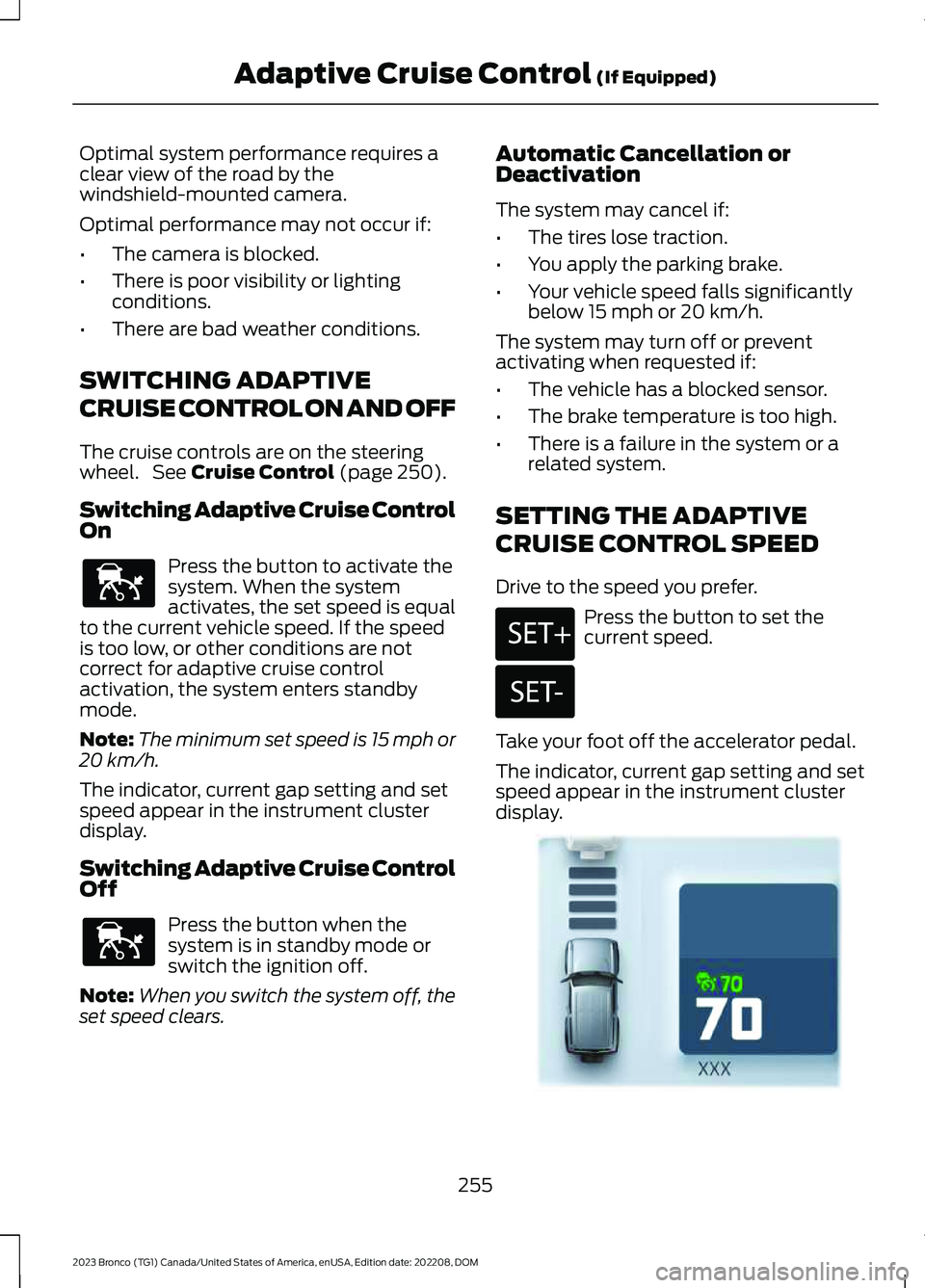
Optimal system performance requires aclear view of the road by thewindshield-mounted camera.
Optimal performance may not occur if:
•The camera is blocked.
•There is poor visibility or lightingconditions.
•There are bad weather conditions.
SWITCHING ADAPTIVE
CRUISE CONTROL ON AND OFF
The cruise controls are on the steeringwheel. See Cruise Control (page 250).
Switching Adaptive Cruise ControlOn
Press the button to activate thesystem. When the systemactivates, the set speed is equalto the current vehicle speed. If the speedis too low, or other conditions are notcorrect for adaptive cruise controlactivation, the system enters standbymode.
Note:The minimum set speed is 15 mph or20 km/h.
The indicator, current gap setting and setspeed appear in the instrument clusterdisplay.
Switching Adaptive Cruise ControlOff
Press the button when thesystem is in standby mode orswitch the ignition off.
Note:When you switch the system off, theset speed clears.
Automatic Cancellation orDeactivation
The system may cancel if:
•The tires lose traction.
•You apply the parking brake.
•Your vehicle speed falls significantlybelow 15 mph or 20 km/h.
The system may turn off or preventactivating when requested if:
•The vehicle has a blocked sensor.
•The brake temperature is too high.
•There is a failure in the system or arelated system.
SETTING THE ADAPTIVE
CRUISE CONTROL SPEED
Drive to the speed you prefer.
Press the button to set thecurrent speed.
Take your foot off the accelerator pedal.
The indicator, current gap setting and setspeed appear in the instrument clusterdisplay.
255
2023 Bronco (TG1) Canada/United States of America, enUSA, Edition date: 202208, DOMAdaptive Cruise Control (If Equipped)E144529 E144529 E246884 E246885 E355963
Page 313 of 642
When towing a trailer:
•Obey country specific regulations fortowing a trailer.
•Do not drive faster than 70 mph(113 km/h) during the first 500 mi(800 km).
•Do not make full-throttle starts.
•Check your hitch, electrical connectionsand trailer wheel lug nuts thoroughlyafter you have traveled 50 mi (80 km).
•Place the transmission in neutral (N)when stopped in congested or heavytraffic during hot weather. This will aidin engine and transmission cooling andto help A/C performance.
•Turn off the speed control with heavyloads or in hilly terrain. The speedcontrol may turn off when you aretowing on long, steep slopes.
•Shift to a lower gear when driving downa long or steep hill. Do not continuouslyapply the brakes, as they may overheatand become less effective.
•If your transmission has Grade Assistor Tow/Haul, use this feature whentowing. This provides engine brakingand helps eliminate excessivetransmission shifting for optimum fueleconomy and transmission cooling.
•Your vehicle has AdvanceTrac with rollstability control. When towing a trailer,additional loads could cause theAdvanceTrac system to engage duringcornering maneuvers. Reduce corneringspeeds to make sure that you canmaintain control of the vehicle andtrailer if the AdvanceTrac systemengages.
•Allow more distance for stopping witha trailer attached. Anticipate stops andgradually brake.
•Avoid parking on a slope. However, ifyou must park on a slope. Turn thesteering wheel to point your vehicletires away from traffic flow. Set yourvehicle parking brake. Place thetransmission in a low gear. Place wheelchocks in front and back of the trailerwheels.
Note:Chocks are not included with yourvehicle.
TRAILER TOWING HINTS -
AUTOMATIC TRANSMISSION
Towing a trailer places an extra load onyour vehicle's engine, transmission, axle,brakes, tires and suspension. Periodicallyinspect these components during and afterany towing operation.
When driving with a trailer or payload, aslight takeoff vibration or shudder may bepresent due to the increased payloadweight.
Your vehicle may have a temporary orconventional spare tire. A temporary sparetire is different in diameter or width,tread-type, or is from a differentmanufacturer than the road tires on yourvehicle. Consult information on the tirelabel or Safety Compliance label forlimitations when using.
When towing a trailer:
•Obey country specific regulations fortowing a trailer.
•Do not drive faster than 70 mph(113 km/h) during the first 500 mi(800 km).
•Do not make full-throttle starts.
•Check your hitch, electrical connectionsand trailer wheel lug nuts thoroughlyafter you have traveled 50 mi (80 km).
309
2023 Bronco (TG1) Canada/United States of America, enUSA, Edition date: 202208, DOMTowing a Trailer
Page 314 of 642
•When stopped in congested or heavytraffic during hot weather, place thetransmission in park (P) to aid engineand transmission cooling and to helpA/C performance.
•Turn off the speed control with heavyloads or in hilly terrain. The speedcontrol may turn off when you aretowing on long, steep slopes.
•Shift to a lower gear when driving downa long or steep hill. Do not continuouslyapply the brakes, as they may overheatand become less effective.
•If your transmission has Grade Assistor Tow/Haul, use this feature whentowing. This provides engine brakingand helps eliminate excessivetransmission shifting for optimum fueleconomy and transmission cooling.
•Your vehicle has AdvanceTrac with rollstability control. When towing a trailer,additional loads could cause theAdvanceTrac system to engage duringcornering maneuvers. Reduce corneringspeeds to make sure that you canmaintain control of the vehicle andtrailer if the AdvanceTrac systemengages.
•Allow more distance for stopping witha trailer attached. Anticipate stops andgradually brake.
•Avoid parking on a slope. However, ifyou must park on a slope, turn thesteering wheel to point your vehicletires away from traffic flow, set theparking brake, place the transmissionin park (P) and place wheel chocks infront and back of the trailer wheels.
Note:Chocks are not included with yourvehicle.
LAUNCHING OR RETRIEVING
A BOAT OR PERSONAL
WATERCRAFT
When backing down a ramp during boatlaunching or retrieval:
•Do not allow the static water level torise above the bottom edge of the rearbumper.
•Do not allow waves to break higherthan 6 in (15 cm) above the bottomedge of the rear bumper.
Exceeding 6 in (15 cm) could allow waterto enter vehicle components, causinginternal damage to the components andaffecting driveability, emissions andreliability.
Note:Replace the rear axle lubricantanytime the rear axle has been submergedin water.
Note:Disconnect the trailer wiringconnector before backing the trailer into thewater.
Note:Reconnect the trailer wiringconnector after removing the trailer fromthe water.
310
2023 Bronco (TG1) Canada/United States of America, enUSA, Edition date: 202208, DOMTowing a Trailer
Page 342 of 642
Note: If completed successfully, theinformation display shows Neutral TowEnabled Leave Transmission in Neutral.This indicates that your vehicle is safe totow with all wheels on the ground.
Note:If you do not see a confirmationmessage in the instrument cluster display,you must perform the procedure again fromthe beginning.
Note:You may hear noise as the transfercase shifts into its neutral position. This isnormal.
7.Release both the clutch and the brakepedals and leave the gearshift lever inthe neutral position.
8.Switch your vehicle off by pressing thepush button ignition switch oncewithout pressing any pedals.
Switching Neutral Tow Off
1.With your vehicle properly secured tothe tow vehicle, switch your vehicle toaccessory mode by pressing the pushbutton ignition switch without pressingany pedals.
2.Starting with both the brake and clutchpedal released, fully press and holdboth pedals at the same time forapproximately seven seconds.Continue holding both pedals until theinstrument cluster display shows 2Hand Neutral Tow Disabled.
Note:If completed successfully, theinstrument cluster displays 2H and NeutralTow Disabled.
Note:You must perform the switchingneutral tow on and switching neutral towoff procedures again from the beginning ifthe indicator light and message do notdisplay.
Note:You may hear a noise as the transfercase shifts out of its neutral position. Thisis normal.
3.Release the pedals.
4.Apply the parking brake, thendisconnect your vehicle from the towvehicle.
5.Release the parking brake, start yourvehicle, and shift into either a forwardor a reverse gear to make sure thetransfer case is out of the neutral towposition.
6.If the transfer case did not successfullyshift out of its neutral position, set theparking brake. Have your vehiclechecked as soon as possible.
Resolving the Shift Delayed DriveForward Message
1.Fully press and hold both the brake andthe clutch pedals.
2.Press the push button ignition switch.
3.With the vehicle running, shift into aforward gear and release the clutch.Let the vehicle roll forward up to 3 ft(1 m).
Note:You may hear a noise as the transfercase shifts out of its neutral position. Thisis normal.
4.Make sure the instrument clusterdisplays Neutral Tow Disabled.
RECREATIONALLY TOWING
YOUR VEHICLE - AUTOMATIC
TRANSMISSION
WARNING: Do not disconnect thebattery when recreationally towing yourvehicle. This prevents the transfer casefrom shifting properly and could causethe vehicle to roll, even if thetransmission is in park (P).
338
2023 Bronco (TG1) Canada/United States of America, enUSA, Edition date: 202208, DOMTowing Your Vehicle
Page 344 of 642
2.Starting with the brake pedal releasedand the transmission in neutral (N),fully press and hold the brake pedal forapproximately seven seconds and shiftthe transmission to park (P). Continueholding the brake pedal until theinstrument cluster display shows 2Hand Neutral Tow Disabled.
Note:If completed successfully, theinstrument cluster displays 2H and NeutralTow Disabled.
Note:Perform the switching neutral towon and switching neutral tow off proceduresagain from the beginning if the indicatorlight and message do not display.
Note:You could hear a noise as the transfercase shifts out of its neutral position. Thisis normal.
3.Release the brake pedal.
4.Apply the parking brake, thendisconnect your vehicle from the towvehicle.
5.Release the parking brake, start yourvehicle, and shift into either drive (D)or reverse (R) to make sure the transfercase is out of the neutral tow position.
6.If the transfer case did not successfullyshift out of its neutral position, set theparking brake. Have your vehiclechecked as soon as possible.
Resolving the Shift Delayed DriveForward Message
1.Fully press and hold the brake pedal.
2.Press the push button ignition switch.
3.With the vehicle running, shift into drive(D). Let the vehicle roll forward up to3 ft (1 m).
Note:You could hear a noise as the transfercase shifts out of its neutral position. Thisis normal.
4.Make sure the instrument clusterdisplays Neutral Tow Disabled.
EMERGENCY TOWING
If you need to tow your vehicle, contact aprofessional towing service or, if you are amember of a roadside assistance program,your roadside assistance service provider.
TOWING YOUR VEHICLE – TROUBLESHOOTING
TOWING YOUR VEHICLE – INFORMATION MESSAGES
DescriptionMessage
The transfer case is in the neutral position and your vehicleis safe to tow with all four wheels on the ground.Neutral Tow EnabledLeave Transmission inNeutral
There is a transfer case gear tooth blockage present. Withyour vehicle on, shift the transmission into drive (D) and letthe vehicle roll forward, up to 3 ft (1 m).
Shift Delayed DriveForward
The transfer case is not in the neutral position and your vehicleis not safe to tow with all four wheels on the ground.Neutral Tow Disabled
340
2023 Bronco (TG1) Canada/United States of America, enUSA, Edition date: 202208, DOMTowing Your Vehicle
Page 353 of 642
MAINTENANCE PRECAUTIONS
Service your vehicle regularly to helpmaintain its roadworthiness and resalevalue. There is a large network ofauthorized dealers that are there to helpyou with their professional servicingexpertise. We believe that their speciallytrained technicians are best qualified toservice your vehicle properly and expertly.They are supported by a wide range ofhighly specialized tools developedspecifically for servicing your vehicle.
If your vehicle requires professional service,an authorized dealer can provide thenecessary parts and service. Check yourwarranty information to find out whichparts and services are covered.
Use only recommended fuels, lubricants,fluids and service parts conforming tospecifications. See Capacities andSpecifications (page 461).
•Do not work on a hot engine.
•Make sure that nothing gets caught inmoving parts.
•Do not work on a vehicle with theengine running in an enclosed space,unless you are sure you have enoughventilation.
•Keep all open flames and other burningmaterial, such as cigarettes, away fromthe battery and all fuel related parts.
•Set the parking brake, shift thetransmission to park (P) and block thewheels.
OPENING AND CLOSING THE
HOOD
Opening the Hood
1.Pull the hood release handle under theleft-hand side of the instrument panel.
2.Release the hood latch by pushing thesecondary release lever to yourleft-hand side.
349
2023 Bronco (TG1) Canada/United States of America, enUSA, Edition date: 202208, DOMMaintenanceE331612 E331900