sensor FORD BRONCO 2023 Workshop Manual
[x] Cancel search | Manufacturer: FORD, Model Year: 2023, Model line: BRONCO, Model: FORD BRONCO 2023Pages: 642, PDF Size: 14.71 MB
Page 453 of 642
CHANGING A FLAT TIRE -
EXCLUDING: RAPTOR
Note:You should only use tire sealants inroadside emergencies as they may causedamage to the tire pressure monitoringsystem sensor.
Note:The tire pressure monitoring systemindicator light illuminates when the sparetire is in use. To restore the full function ofthe monitoring system, all road wheelsequipped with tire pressure monitoringsensors must be mounted on the vehicle.
If you get a flat tire when driving, do notapply the brake heavily. Instead, graduallydecrease your speed, hold the steeringwheel firmly, and slowly move to a safeplace on the side of the road.
Have your flat serviced by an authorizeddealer in order to prevent damage to thetire pressure monitoring system sensors.Replace the spare tire with a road tire assoon as possible. During repairing orreplacing of the flat tire, have theauthorized dealer inspect the tire pressuremonitoring system sensor for damage.
Tire Change Procedure
WARNING: Failure to follow theseguidelines could result in an increasedrisk of loss of vehicle control, injury ordeath.
WARNING: Do not get under avehicle that is supported by a jack.
WARNING: The jack supplied withthis vehicle is only intended for changinga flat tire in an emergency. Do notattempt to do any other work on yourvehicle when it is supported by the jack,as your vehicle could slip off the jack.Failure to follow this instruction couldresult in personal injury or death.
WARNING: To help prevent yourvehicle from moving when changing awheel, shift the transmission into park(P), set the parking brake and use anappropriate block or wheel chock tosecure the wheel diagonally opposite tothe wheel being changed. For example,when changing the front left wheel,place an appropriate block or wheelchock on the right rear wheel.
WARNING: Only use the jackprovided as original equipment with yourvehicle.
WARNING: Only use the specifiedjacking points. If you use any otherlocations you could damage vehiclecomponents, such as brake lines.
WARNING: Never place anythingbetween the vehicle jack and yourvehicle.
WARNING: Never place anythingbetween the vehicle jack and the ground.
WARNING: Do not attempt tochange a tire on the side of the vehicleclose to moving traffic. Pull far enoughoff the road to not obstruct the flow oftraffic and avoid the danger of being hitwhen operating the jack or changing thewheel.
WARNING: Always fully apply theparking brake. Failure to follow thisinstruction could result in personal injuryor death.
WARNING: The jack should beused on level firm ground whereverpossible.
449
2023 Bronco (TG1) Canada/United States of America, enUSA, Edition date: 202208, DOMChanging a Road Wheel
Page 457 of 642
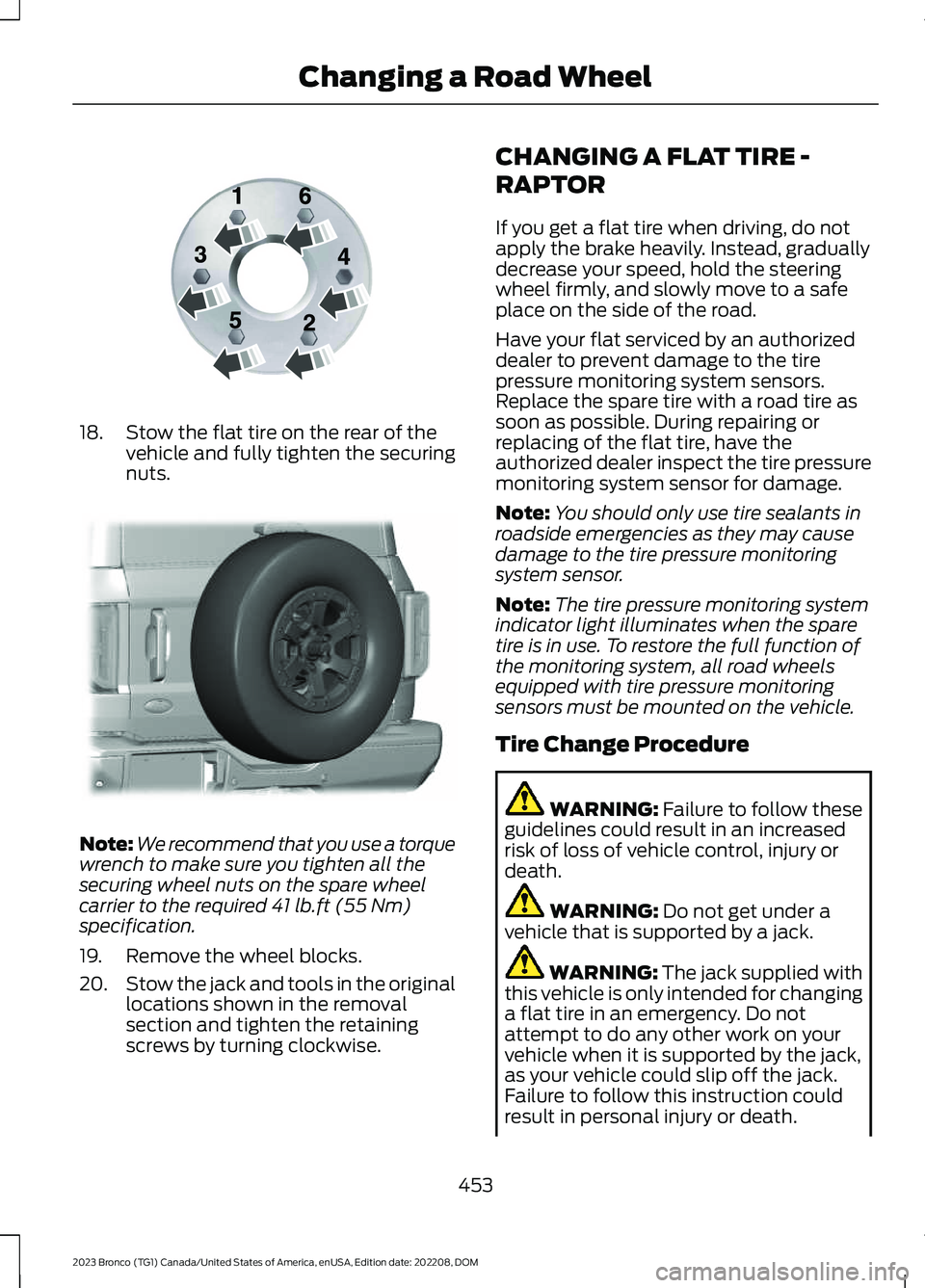
18.Stow the flat tire on the rear of thevehicle and fully tighten the securingnuts.
Note:We recommend that you use a torquewrench to make sure you tighten all thesecuring wheel nuts on the spare wheelcarrier to the required 41 lb.ft (55 Nm)specification.
19.Remove the wheel blocks.
20.Stow the jack and tools in the originallocations shown in the removalsection and tighten the retainingscrews by turning clockwise.
CHANGING A FLAT TIRE -
RAPTOR
If you get a flat tire when driving, do notapply the brake heavily. Instead, graduallydecrease your speed, hold the steeringwheel firmly, and slowly move to a safeplace on the side of the road.
Have your flat serviced by an authorizeddealer to prevent damage to the tirepressure monitoring system sensors.Replace the spare tire with a road tire assoon as possible. During repairing orreplacing of the flat tire, have theauthorized dealer inspect the tire pressuremonitoring system sensor for damage.
Note:You should only use tire sealants inroadside emergencies as they may causedamage to the tire pressure monitoringsystem sensor.
Note:The tire pressure monitoring systemindicator light illuminates when the sparetire is in use. To restore the full function ofthe monitoring system, all road wheelsequipped with tire pressure monitoringsensors must be mounted on the vehicle.
Tire Change Procedure
WARNING: Failure to follow theseguidelines could result in an increasedrisk of loss of vehicle control, injury ordeath.
WARNING: Do not get under avehicle that is supported by a jack.
WARNING: The jack supplied withthis vehicle is only intended for changinga flat tire in an emergency. Do notattempt to do any other work on yourvehicle when it is supported by the jack,as your vehicle could slip off the jack.Failure to follow this instruction couldresult in personal injury or death.
453
2023 Bronco (TG1) Canada/United States of America, enUSA, Edition date: 202208, DOMChanging a Road WheelE166719 E324079
Page 462 of 642
22.Stow the jack and tools in the originallocations shown in the removalsection and tighten the retainingscrews by turning clockwise.
WHEEL NUTS - EXCLUDING: RAPTOR
Wheel Nut Torque Specifications
WARNING: When you install a wheel, always remove any corrosion, dirt or foreignmaterials present on the mounting surfaces of the wheel or the surface of the wheelhub, brake drum or brake disc that contacts the wheel. Make sure to secure any fastenersthat attach the rotor to the hub so they do not interfere with the mounting surfaces ofthe wheel. Installing wheels without correct metal-to-metal contact at the wheelmounting surfaces can cause the wheel nuts to loosen and the wheel to come off whileyour vehicle is in motion, resulting in loss of vehicle control, personal injury or death.
WARNING: If the tire pressure monitor sensor becomes damaged it may notfunction.
lb.ft (Nm)*Bolt size
100 lb.ft (135 Nm)M12 X 1.5
*Torque specifications are for nut and bolt threads free of dirt and rust. Use only ourrecommended replacement fasteners.
Retighten the lug nuts to the specified torque within 100 mi (160 km) after any wheeldisturbance (such as tire rotation, changing a flat tire, wheel removal).
458
2023 Bronco (TG1) Canada/United States of America, enUSA, Edition date: 202208, DOMChanging a Road Wheel
Page 546 of 642
THIRD PARTY SOFTWARE
COPYRIGHT
ACKNOWLEDGMENT
Your vehicle could have components thatuse open source software. For additionalinformation, visit http://corporate.ford.com/ford-open-source.html.
RADIO FREQUENCY
CERTIFICATION LABELS
BLIND SPOT INFORMATIONSYSTEM SENSORS
Argentina
Belarus
Brazil
Canada
Short Range Radar Sensor SRR3-B
IC ID: 4135A-SRR3B
542
2023 Bronco (TG1) Canada/United States of America, enUSA, Edition date: 202208, DOMCustomer InformationE363578 E253816 E340204
Page 574 of 642
South Africa
Vietnam
TIRE PRESSURE MONITORINGSYSTEM SENSORS - VEHICLESWITH: 315 MHZ SENSORS
Argentina
Brazil
Jamaica
570
2023 Bronco (TG1) Canada/United States of America, enUSA, Edition date: 202208, DOMCustomer InformationE363451 E278262 E338008 E338010 E338213
Page 575 of 642
Mexico
Paraguay
United Kingdom
United States and Canada
WARNING: Changes ormodifications not expressively approvedby the party responsible for compliancecould void the user's authority to operatethe equipment. The term "IC:" before theradio certification number only signifiesthat Industry Canada technicalspecifications were met.
FCC ID: MRXFP3
IC: 2546A-FP3
This device complies with Part 15 of theFCC Rules and with Innovation, Scienceand Economic Development Canada’slicence-exempt RSS(s). Operation issubject to the following two conditions:
1.This device may not cause harmfulinterference, and
2.This device must accept anyinterference received, includinginterference that may cause undesiredoperation.
TIRE PRESSURE MONITORINGSYSTEM SENSORS - VEHICLESWITH: 433 MHZ SENSORS
Argentina
571
2023 Bronco (TG1) Canada/United States of America, enUSA, Edition date: 202208, DOMCustomer InformationE338212 E338214 E362840 E338009
Page 613 of 642
Services even if Intelematics or a Supplierhas been advised of the possibility of suchdamages. You also acknowledge thatneither Intelematics nor any Supplierguarantees nor make any warranties thatrelate to the availability, accuracy orcompleteness of SUNA Products and/orServices, and to the extent which it islawful to do so, both Intelematics and eachSupplier excludes any warranties whichmight otherwise be implied by any Stateor Federal legislation in relation to SUNAProducts and/or Services.
7. Please Note
Great care has been taken in preparing thismanual. Constant product developmentmay mean that some information is notentirely up-to-date. The information in thisdocument is subject to change withoutnotice.
EMISSION LAW
WARNING: Do not remove or alterthe original equipment floor covering orinsulation between it and the metal floorof the vehicle. The floor covering andinsulation protect occupants of thevehicle from the engine and exhaustsystem heat and noise. On vehicles withno original equipment floor coveringinsulation, do not carry passengers in amanner that permits prolonged skincontact with the metal floor. Failure tofollow these instructions may result infire or personal injury.
U.S. federal laws and certain state lawsprohibit removing or rendering inoperativeemission control system components.Similar federal or provincial laws mayapply in Canada. We do not approve of anyvehicle modification without firstdetermining applicable laws.
Tampering with emissionscontrol systems includingrelated sensors or the DieselExhaust Fluid system can result in reducedengine power and the illumination of theservice engine soon light.
Tampering With a Noise ControlSystem
Federal laws prohibit the following acts:
•Removal or rendering inoperative byany person other than for purposes ofmaintenance.
•Repair or replacement of any device orelement of the design incorporated intoa new vehicle for the purpose of noisecontrol prior to its sale or delivery tothe ultimate purchaser or while it is inuse.
•The use of the vehicle after any personremoves or renders inoperative anydevice or element of the design.
The U.S. Environmental Protection Agencymay presume to constitute tampering asfollows:
•Removal of hood blanket, fender apronabsorbers, fender apron barriers,underbody noise shields or acousticallyabsorptive material.
•Tampering or rendering inoperative theengine speed governor, to allow enginespeed to exceed manufacturerspecifications.
If the engine does not start, runs rough,experiences a decrease in engineperformance, experiences excess fuelconsumption or produces excessiveexhaust smoke, check for the following:
•A plugged or disconnected air inletsystem hose.
•A plugged engine air filter element.
•Water in the fuel filter and waterseparator.
609
2023 Bronco (TG1) Canada/United States of America, enUSA, Edition date: 202208, DOMCustomer InformationE67028
Page 614 of 642
•A clogged fuel filter.
•Contaminated fuel.
•Air in the fuel system, due to looseconnections.
•An open or pinched sensor hose.
•Incorrect engine oil level.
•Incorrect fuel for climatic conditions.
•Incorrect engine oil viscosity forclimactic conditions.
Note:Some vehicles have a lifetime fuelfilter that is integrated with the fuel tank.Regular maintenance or replacement is notneeded.
Note:If these checks do not help youcorrect the concern, have your vehiclechecked as soon as possible.
Noise Emissions Warranty,Prohibited Tampering Acts andMaintenance
On January 1, 1978, Federal regulationbecame effective governing the noiseemission on trucks over 10,000 lb(4,536 kg) Gross Vehicle Weight Rating(GVWR). The preceding statementsconcerning prohibited tampering acts andmaintenance, and the noise warrantyfound in the Warranty Guide, areapplicable to complete chassis cabs over10,000 lb (4,536 kg) GVWR.
EXPORT UNIQUE OPTIONS
For your particular global region, yourvehicle may be equipped with features andoptions that are different from the featuresand options that are described in thisOwner’s Manual. A market uniquesupplement may be supplied thatcomplements this book. By referring to themarket unique supplement, if provided,you can properly identify those features,recommendations and specifications thatare unique to your vehicle. This Owner’s
Manual is written primarily for the U.S. andCanadian markets. Features or equipmentlisted as standard may be different on unitsbuilt for export.Refer to this Owner’sManual for all other requiredinformation and warnings.
WARRANTY INFORMATION
The following warranties may apply to yourvehicle:
•New vehicle limited warranties.
•Emissions warranties, if applicable.(Note: Fully-electric vehicles are noteligible for emissions warranties.)
•Other warranties, if applicable.
Detailed warranty information specific toyour vehicle can be found in the WarrantyGuide at www.owner.ford.com.
The following California WarrantyStatement, required by Californiaregulations, applies to vehicles certified toCalifornia emissions standards andregistered in a state that requires Californiaemissions warranty. If applicable,additional California Emissions Warrantiescan be found in the Warranty Guide atwww.owner.ford.com.
CALIFORNIA EMISSION CONTROLWARRANTY STATEMENT
YOUR WARRANTY RIGHTS ANDOBLIGATIONS
The California Air Resources Board andFord Motor Company are pleased toexplain the emission control systemwarranty on your (year) vehicle. InCalifornia, new motor vehicles must bedesignated, built and equipped to meet
610
2023 Bronco (TG1) Canada/United States of America, enUSA, Edition date: 202208, DOMCustomer Information
Page 619 of 642
1
12V Battery......................................................36112V Battery Precautions...................................361Battery Management SystemLimitations......................................................362Changing the 12V Battery...............................362Charging the 12V Battery................................364How Does the Battery ManagementSystem Work..................................................362Recycling and Disposing of the 12VBattery..............................................................364Resetting the Battery Sensor........................363What Is the Battery ManagementSystem..............................................................36212V Battery – Troubleshooting...............36412V Battery – Information Messages.........36412V Battery – Warning Lamps......................364
3
360 Degree Camera....................................247360 Degree Camera Settings.......................249360 Degree Camera Guide Lines..........248360 Degree Camera Precautions..........247360 Degree Camera Settings.................249Switching the 360 Degree Camera On andOff......................................................................249Switching the 360 Degree CameraView...................................................................249
4
4WDSee: Four-Wheel Drive.....................................195
9
911 Assist............................................................77
A
A/CSee: Climate Control - Vehicles With:Automatic Temperature Control...............131See: Climate Control - Vehicles With: ManualTemperature Control....................................136About This Publication.................................18
About Us.............................................................15ABSSee: Brakes..........................................................209Accessing Apps..............................................511Accessing Navigation..................................514Accessing the Passive Key BackupPosition.........................................................169Accessories....................................................520Adaptive Cruise Control............................252Adaptive Cruise Control –Troubleshooting............................................258Adaptive Cruise Control Indicators........257Adaptive Cruise ControlLimitations...................................................253Adaptive Cruise ControlPrecautions.................................................252Adaptive Cruise Control –Troubleshooting........................................258Adaptive Cruise Control – InformationMessages.........................................................258Adjusting the Exterior Mirrors....................116Adjusting the Headlamps........................365Adjusting the Instrument Panel LightingBrightness......................................................112Adjusting the Map........................................514Changing the Format of the Map.................514Zooming the Map In and Out.........................514Adjusting the Seatbelts DuringPregnancy......................................................63Adjusting the Sound Settings................489Adjusting the Steering Wheel...................99Adjusting the Volume................................489Aid Mode.........................................................274How Does Aid Mode Work..............................274What Is Aid Mode...............................................274Airbag Precautions........................................70Airbags...............................................................68Front Passenger Sensing System...................72Air ConditioningSee: Climate Control - Vehicles With:Automatic Temperature Control...............131See: Climate Control - Vehicles With: ManualTemperature Control....................................136Air Conditioning System Capacity andSpecification - 2.3L EcoBoost™/2.7LEcoBoost™.................................................476Air Conditioning System Capacity andSpecification - 3.0L EcoBoost™.........475
615
2023 Bronco (TG1) Canada/United States of America, enUSA, Edition date: 202208, DOMIndex
Page 622 of 642
Calculating the Load Limit.......................298Canceling the Set Speed..........................223Capacities and Specifications.................461Catalytic Converter......................................185Catalytic Converter –Troubleshooting.............................................185Catalytic Converter Precautions.............185Catalytic Converter –Troubleshooting.........................................185Catalytic Converter – WarningLamps................................................................185Center Console - AutomaticTransmission.................................................35Center Console..............................................162Locking the Center Console............................162Opening the Center Console..........................162Center Console - ManualTransmission.................................................34Center Display Limitations......................498Center Display Overview..........................498Center Display Precautions.....................498Changing a Flat Tire - Excluding:Raptor...........................................................449Changing a Flat Tire - Raptor..................453Changing a Road Wheel...........................449Changing the Engine Air Filter - 2.3LEcoBoost™/2.7L EcoBoost™..............359Changing the Engine Air Filter - 3.0LEcoBoost™................................................360Changing the Fuel Filter.............................361Changing the Remote ControlBattery............................................................80Changing the Vehicle Wi-Fi HotspotName or Password..................................486Charging a Device.........................................156Charging a Wireless Device.......................161Checking MyKey System Status..............86Checking the Brake Fluid..........................209Checking the Clutch Fluid Level.............188Checking the Coolant................................355Checking the Manual Transmission FluidLevel...............................................................188Checking the Seatbelts...............................65Checking the Tire Pressures.....................441Checking the Wiper Blades.......................101Children and Airbags......................................71
Child Restraint Anchor Points...................50Locating the Child Restraint Lower AnchorPoints...................................................................50Locating the Child Restraint Top TetherAnchor Points....................................................51What Are the Child Restraint AnchorPoints...................................................................50Child Restraints................................................51Child Restraint Position Information..............51Child Restraints Recommendation...............53Child Safety......................................................49Child Restraint Anchor Points.........................50Child Restraints......................................................51Installing Child Restraints.................................53Child Safety Locks.........................................59Child Safety Precautions.............................49Cleaning Products........................................421Cleaning the Exterior..................................422Cleaning Camera Lenses andSensors.............................................................424Cleaning Chrome, Aluminium or StainlessSteel...................................................................422Cleaning Headlamps and RearLamps...............................................................422Cleaning Stripes or Graphics.........................424Cleaning the Convertible Top........................423Cleaning the Engine Compartment............423Cleaning the Exterior Precautions...............422Cleaning the Hard Top.....................................424Cleaning the Underbody.................................424Cleaning Wheels................................................422Cleaning Windows and WiperBlades...............................................................422Cleaning the Interior...................................424Cleaning Carpets and Floor Mats................426Cleaning Displays and Screens....................425Cleaning Fabric...................................................425Cleaning Leather................................................425Cleaning Plastic..................................................425Cleaning Seatbelts............................................426Cleaning the Instrument Panel....................424Cleaning Vinyl.....................................................426Clearing All MyKeys.......................................86Climate Control..............................................131Auto Mode.............................................................133Climate Control Hints.................................134
618
2023 Bronco (TG1) Canada/United States of America, enUSA, Edition date: 202208, DOMIndex