steering FORD BRONCO 2023 Manual Online
[x] Cancel search | Manufacturer: FORD, Model Year: 2023, Model line: BRONCO, Model: FORD BRONCO 2023Pages: 642, PDF Size: 14.71 MB
Page 505 of 642
FORD ASSISTANT
USING FORD ASSISTANT
The digital assistant allows you to controlvehicle features using conversationalrequests.
To begin a voice interaction using the wakeword, say the selected wake word, thensay your command.
Press the voice interactionbutton on the steering wheel. Atone sounds before you can sayyour command.
Note:You may need to enable yourvehicle's modem to use certain voicecommands. See Enabling and Disablingthe Modem (page 483).
Note:When you are not driving, additionalcommands are available by using popularchat applications. Use FordPass to setup aconversation with your Ford assistant.
Voice Command Examples
To see examples of what voice commandsyou can use with different features:
Press the button on thetouchscreen.
1.Press Ford Assistant.
2.Press Voice Command Help.
3.Select a feature.
FORD ASSISTANT SETTINGS
To access the settings menu:
Press the button on thetouchscreen.
1.Press Ford Assistant.
From the settings menu you can do thefollowing:
•Switch listen for wake word on or off.
•Set the preferred wake word.
•Switch advance mode on or off.
•Switch phone confirmation on or off.
•Switch the commands list on or off.
•View the commands help menu.
Press the button next to a menuoption for more information.
FORD ASSISTANT – FREQUENTLYASKED QUESTIONS
Why does the system notunderstand what I am saying?
•You are speaking too soon. When usingthe button of the steering wheel, waitfor the tone before you speak.
Why does the system notunderstand the name of a track orartist?
•Bluetooth® does not support voicecommands.Connect your device to aUSB port.
•You are not saying the name exactlyas it appears on your device. Say thename of the track or artist exactly as itappears on your device. Spell out anyabbreviations in the name.
•The system does not recognize somespecial characters contained in thename of a song or artist, for example*, - or +. Rename the files on yourdevice or use the touchscreen to selectand play the track.
501
2023 Bronco (TG1) Canada/United States of America, enUSA, Edition date: 202208, DOMVoice InteractionE142599 E280315 E280315 E366956
Page 507 of 642
WHAT IS ALEXA BUILT-IN
Allows you to use Alexa in your vehicle forauto specific use cases on the road andgives you access to an ever evolvingnumber of skills that help to make your lifemore productive, entertaining, andconnected while using your vehicle.
ALEXA BUILT-IN
REQUIREMENTS
To use Alexa, all of the following mustoccur:
•Your vehicle modem is enabled.
•You are logged into an existing Amazonaccount.
•Vehicle location services are enabled.
•Vehicle connectivity and vehicle datasharing is enabled.
SIGNING INTO YOUR
ACCOUNT
Press the button in the statusbar and follow the on-screenprompts.
To sign in using the settings menu:
1.Press Settings on the touchscreen.
2.Press Amazon Alexa.
3.Press Get Started.
4.Sign into your account by eitherscanning the QR code or entering theon-screen code into the Amazonwebsite.
5.Once logged in, follow the on-screenprompts.
6.When complete, the vehicle informsyou that Alexa is ready to be used inthe vehicle.
Signing Out of Your Account
1.Press Settings on the touchscreen.
2.Press Amazon Alexa.
3.Press Sign Out.
USING ALEXA BUILT-IN
To use Alexa, say “Alexa” or press the voiceinteraction button on the steering wheeland then say “Alexa” to invoke Alexa tostart listening.
Note:If the wake word is not enabled, youcan only use the voice interaction button.
You can use Alexa for the following andmore:
•Entertainment.
•Hands-free calling.
•Traffic and navigation.
•Vehicle controls.
•Smart home device control.
•Weather and news information.
ALEXA BUILT-IN SETTINGS
Enabling the Wake Word
1.Press Settings on the touchscreen.
2.Press Amazon Alexa.
3.Switch Listen for Wake Word on or off.
Note:If the wake word is not enabled, youcan only use the voice interaction button.
Contact List
Displays a list of connected phones andcontact sharing status for each phone.
To change the contact sharing status:
1.Press Settings on the touchscreen.
2.Press Amazon Alexa.
3.Press Contact List.
503
2023 Bronco (TG1) Canada/United States of America, enUSA, Edition date: 202208, DOMAlexa Built-InE368039
Page 511 of 642
MAKING AND RECEIVING A
PHONE CALL
Making Calls
To call a number in your contacts,select:
Action and DescriptionMenu Item
You can then select thename of the contact youwant to call. Any numbersstored for that contactdisplay along with anystored contact photos. Youcan then select thenumber that you want tocall. The system begins thecall.
Contacts
To call a number from your recent calls,select:
Action and DescriptionMenu Item
You can then select anentry that you want to call.The system begins the call.
Recent CallList
To call a number from your favorites,select:
Action and DescriptionMenu Item
You can then select anentry that you want to call.The system begins the call.
Favorites
To call a number that is not stored inyour phone, select:
Action and DescriptionMenu Item
Select the digits of thenumber you wish to call.PhoneKeypad
The system begins the call.Call
Pressing the backspace button deletes thelast digit you typed.
Receiving Calls
During an incoming call, an audible tonesounds. Caller information appears in thedisplay if it is available.
To accept the call, select:
Menu Item
Accept
Note:You can also accept the call bypressing the phone button on the steeringwheel.
To reject the call, select:
Menu Item
Reject
Ignore the call by doing nothing. Thesystem logs it as a missed call.
During a Phone Call
During a phone call, the contacts nameand number display on the screen alongwith the call duration.
The phone status items are also visible:
•Signal Strength.
•Battery.
You can select any of the following duringan active phone call:
507
2023 Bronco (TG1) Canada/United States of America, enUSA, Edition date: 202208, DOMPhone
Page 512 of 642
Item
Immediately end aphone call. You canalso press thebutton on thesteering wheel.
End Call
Press this to accessthe phone keypad.Keypad
Item
MuteYou can switch themicrophone off sothe caller does nothear you.
Transfer the phonecall audio to thecell phone or backto the touchscreen.
Privacy
SENDING AND RECEIVING A TEXT MESSAGE
DescriptionMenu Item
Hear the text message.Hear It
View the text message.View
Call the sender.Call
Reply to the text message with a standard text message.Reply
508
2023 Bronco (TG1) Canada/United States of America, enUSA, Edition date: 202208, DOMPhone
Page 534 of 642
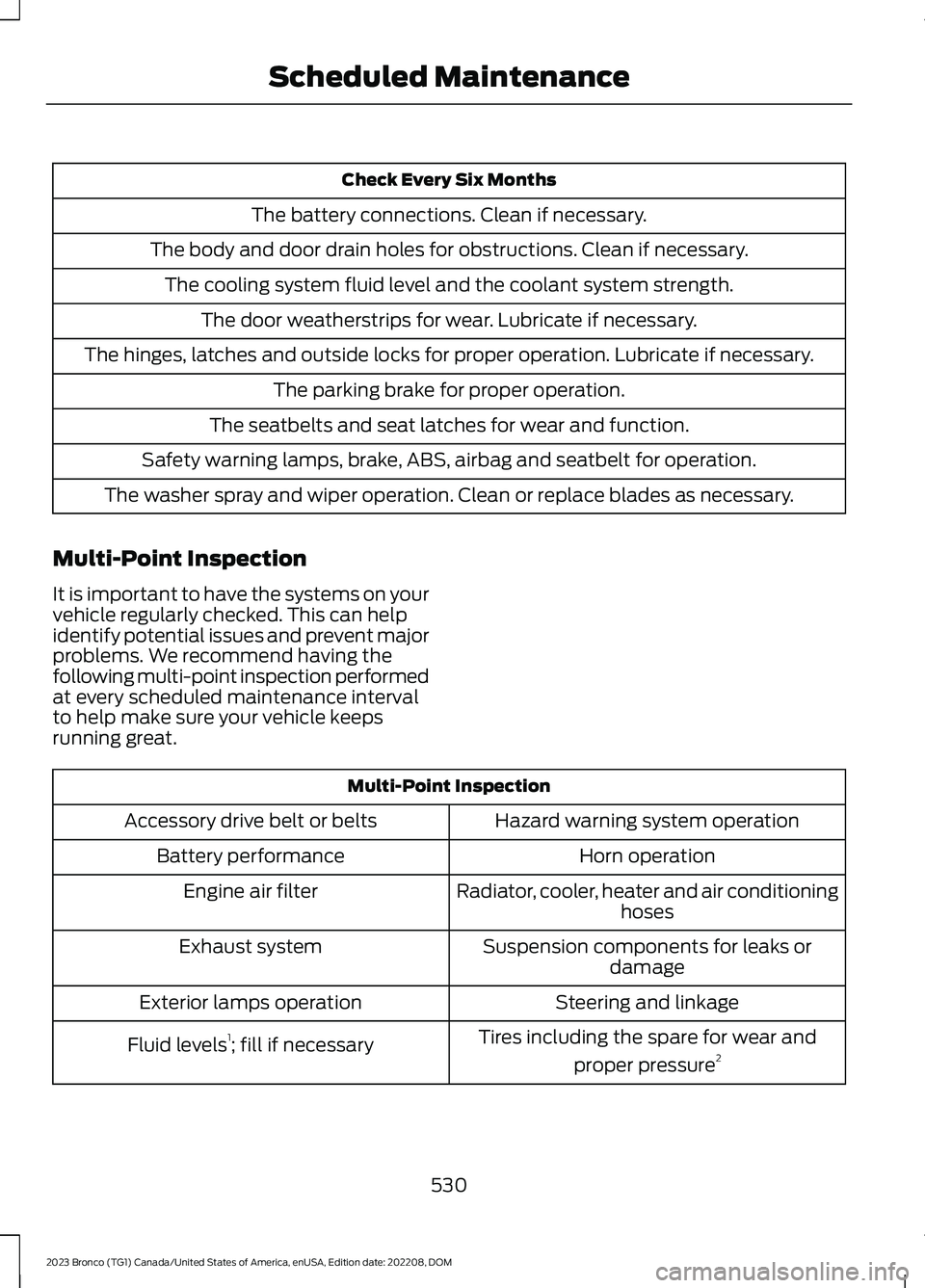
Check Every Six Months
The battery connections. Clean if necessary.
The body and door drain holes for obstructions. Clean if necessary.
The cooling system fluid level and the coolant system strength.
The door weatherstrips for wear. Lubricate if necessary.
The hinges, latches and outside locks for proper operation. Lubricate if necessary.
The parking brake for proper operation.
The seatbelts and seat latches for wear and function.
Safety warning lamps, brake, ABS, airbag and seatbelt for operation.
The washer spray and wiper operation. Clean or replace blades as necessary.
Multi-Point Inspection
It is important to have the systems on yourvehicle regularly checked. This can helpidentify potential issues and prevent majorproblems. We recommend having thefollowing multi-point inspection performedat every scheduled maintenance intervalto help make sure your vehicle keepsrunning great.
Multi-Point Inspection
Hazard warning system operationAccessory drive belt or belts
Horn operationBattery performance
Radiator, cooler, heater and air conditioninghosesEngine air filter
Suspension components for leaks ordamageExhaust system
Steering and linkageExterior lamps operation
Tires including the spare for wear and
proper pressure2Fluid levels1; fill if necessary
530
2023 Bronco (TG1) Canada/United States of America, enUSA, Edition date: 202208, DOMScheduled Maintenance
Page 536 of 642
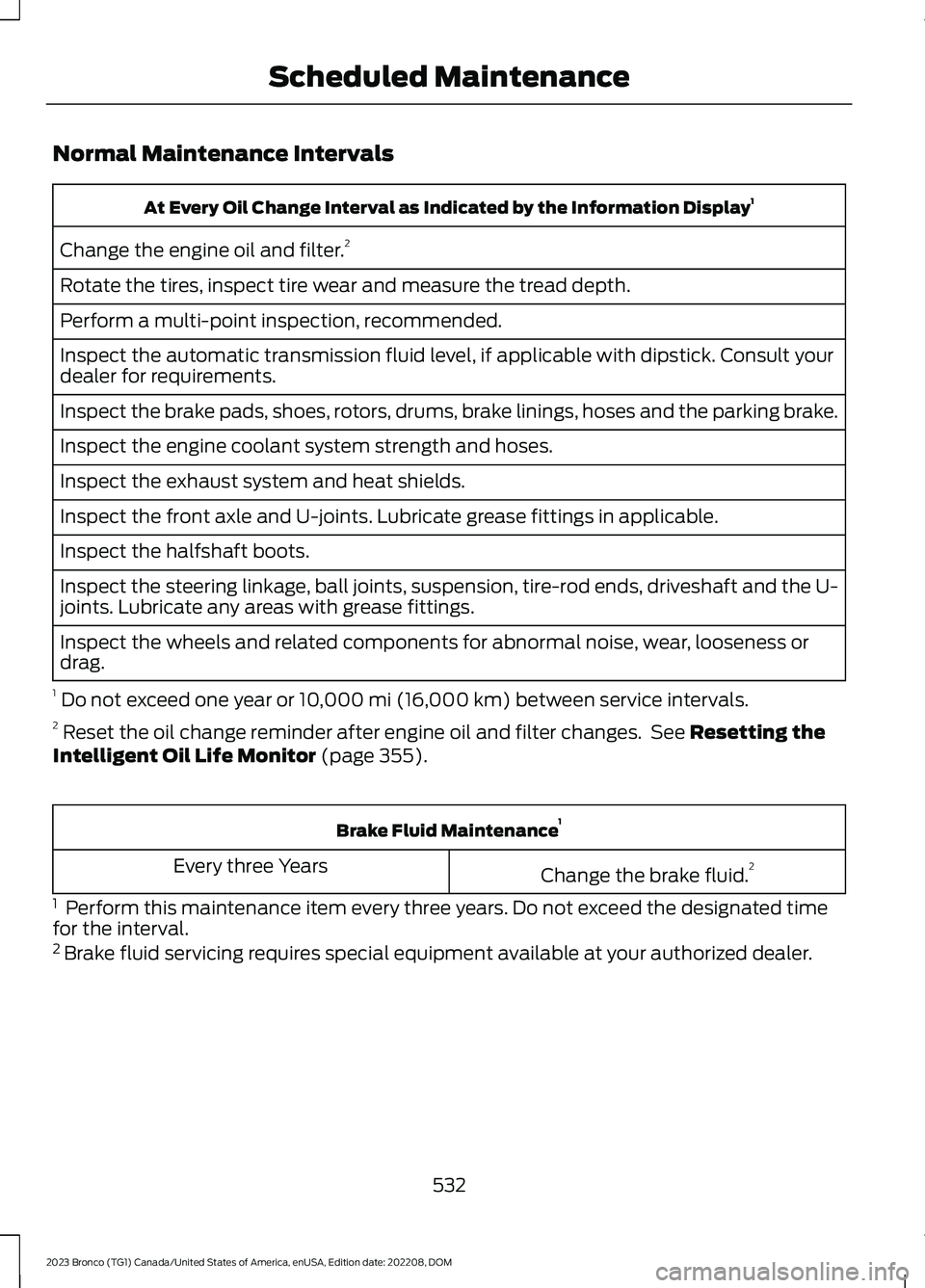
Normal Maintenance Intervals
At Every Oil Change Interval as Indicated by the Information Display1
Change the engine oil and filter.2
Rotate the tires, inspect tire wear and measure the tread depth.
Perform a multi-point inspection, recommended.
Inspect the automatic transmission fluid level, if applicable with dipstick. Consult yourdealer for requirements.
Inspect the brake pads, shoes, rotors, drums, brake linings, hoses and the parking brake.
Inspect the engine coolant system strength and hoses.
Inspect the exhaust system and heat shields.
Inspect the front axle and U-joints. Lubricate grease fittings in applicable.
Inspect the halfshaft boots.
Inspect the steering linkage, ball joints, suspension, tire-rod ends, driveshaft and the U-joints. Lubricate any areas with grease fittings.
Inspect the wheels and related components for abnormal noise, wear, looseness ordrag.
1 Do not exceed one year or 10,000 mi (16,000 km) between service intervals.2 Reset the oil change reminder after engine oil and filter changes. See Resetting theIntelligent Oil Life Monitor (page 355).
Brake Fluid Maintenance1
Change the brake fluid.2Every three Years
1 Perform this maintenance item every three years. Do not exceed the designated timefor the interval.2 Brake fluid servicing requires special equipment available at your authorized dealer.
532
2023 Bronco (TG1) Canada/United States of America, enUSA, Edition date: 202208, DOMScheduled Maintenance
Page 539 of 642
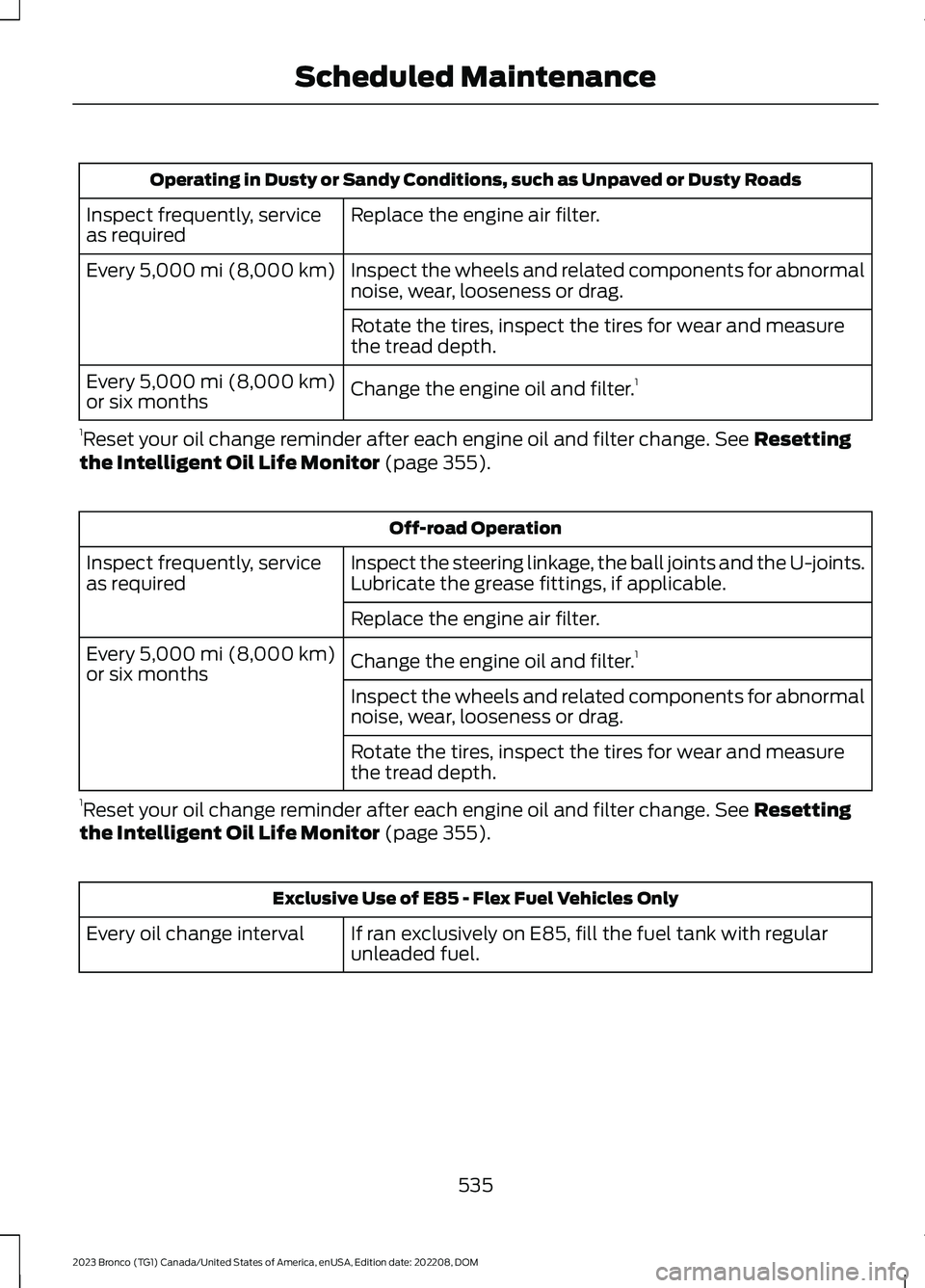
Operating in Dusty or Sandy Conditions, such as Unpaved or Dusty Roads
Replace the engine air filter.Inspect frequently, serviceas required
Inspect the wheels and related components for abnormalnoise, wear, looseness or drag.Every 5,000 mi (8,000 km)
Rotate the tires, inspect the tires for wear and measurethe tread depth.
Change the engine oil and filter.1Every 5,000 mi (8,000 km)or six months
1Reset your oil change reminder after each engine oil and filter change. See Resettingthe Intelligent Oil Life Monitor (page 355).
Off-road Operation
Inspect the steering linkage, the ball joints and the U-joints.Lubricate the grease fittings, if applicable.Inspect frequently, serviceas required
Replace the engine air filter.
Change the engine oil and filter.1Every 5,000 mi (8,000 km)or six monthsInspect the wheels and related components for abnormalnoise, wear, looseness or drag.
Rotate the tires, inspect the tires for wear and measurethe tread depth.
1Reset your oil change reminder after each engine oil and filter change. See Resettingthe Intelligent Oil Life Monitor (page 355).
Exclusive Use of E85 - Flex Fuel Vehicles Only
If ran exclusively on E85, fill the fuel tank with regularunleaded fuel.Every oil change interval
535
2023 Bronco (TG1) Canada/United States of America, enUSA, Edition date: 202208, DOMScheduled Maintenance
Page 540 of 642
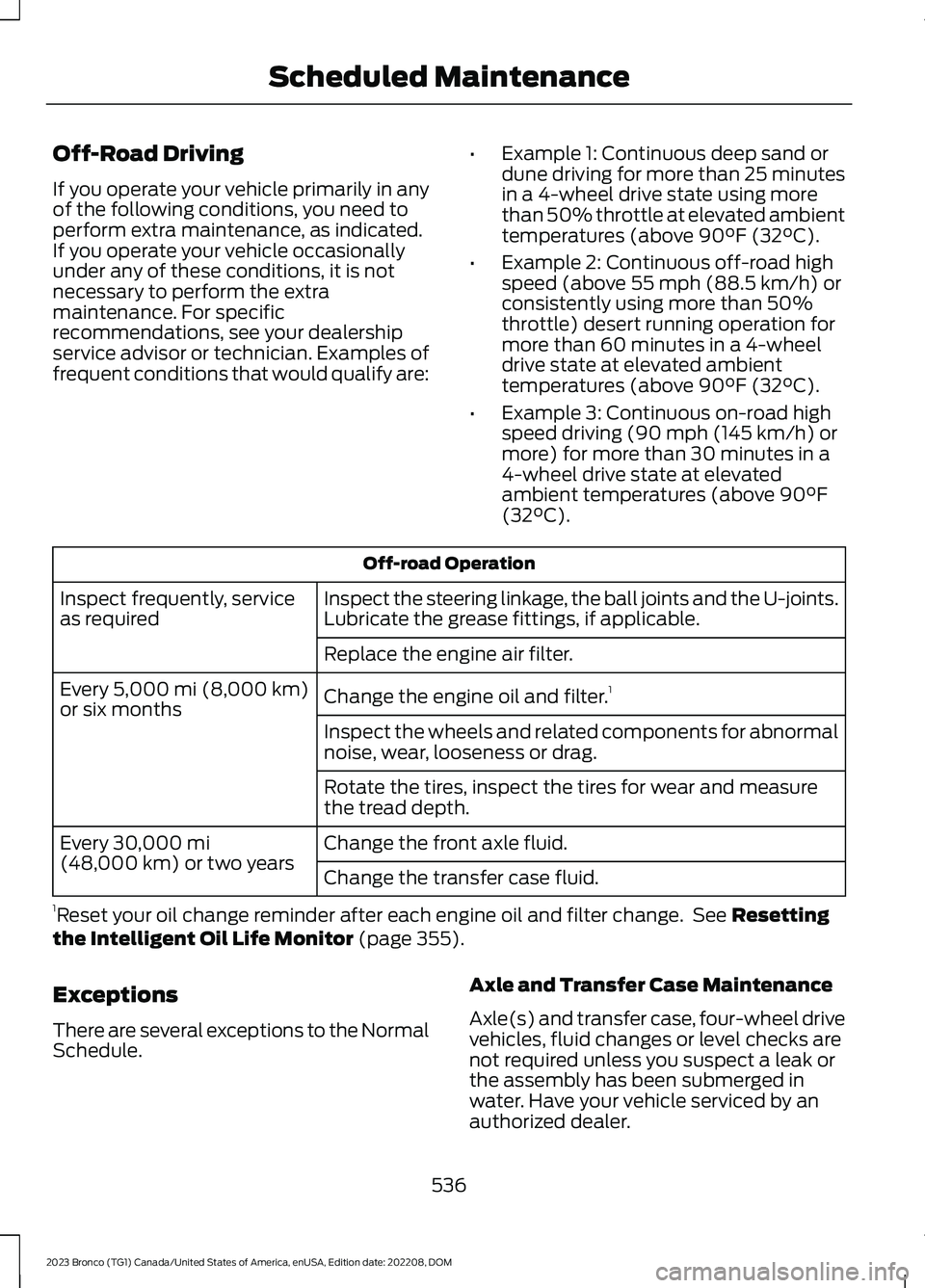
Off-Road Driving
If you operate your vehicle primarily in anyof the following conditions, you need toperform extra maintenance, as indicated.If you operate your vehicle occasionallyunder any of these conditions, it is notnecessary to perform the extramaintenance. For specificrecommendations, see your dealershipservice advisor or technician. Examples offrequent conditions that would qualify are:
•Example 1: Continuous deep sand ordune driving for more than 25 minutesin a 4-wheel drive state using morethan 50% throttle at elevated ambienttemperatures (above 90°F (32°C).
•Example 2: Continuous off-road highspeed (above 55 mph (88.5 km/h) orconsistently using more than 50%throttle) desert running operation formore than 60 minutes in a 4-wheeldrive state at elevated ambienttemperatures (above 90°F (32°C).
•Example 3: Continuous on-road highspeed driving (90 mph (145 km/h) ormore) for more than 30 minutes in a4-wheel drive state at elevatedambient temperatures (above 90°F(32°C).
Off-road Operation
Inspect the steering linkage, the ball joints and the U-joints.Lubricate the grease fittings, if applicable.Inspect frequently, serviceas required
Replace the engine air filter.
Change the engine oil and filter.1Every 5,000 mi (8,000 km)or six monthsInspect the wheels and related components for abnormalnoise, wear, looseness or drag.
Rotate the tires, inspect the tires for wear and measurethe tread depth.
Change the front axle fluid.Every 30,000 mi(48,000 km) or two yearsChange the transfer case fluid.
1Reset your oil change reminder after each engine oil and filter change. See Resettingthe Intelligent Oil Life Monitor (page 355).
Exceptions
There are several exceptions to the NormalSchedule.
Axle and Transfer Case Maintenance
Axle(s) and transfer case, four-wheel drivevehicles, fluid changes or level checks arenot required unless you suspect a leak orthe assembly has been submerged inwater. Have your vehicle serviced by anauthorized dealer.
536
2023 Bronco (TG1) Canada/United States of America, enUSA, Edition date: 202208, DOMScheduled Maintenance
Page 542 of 642
ROLLOVER WARNING
WARNING: Utility vehicles have asignificantly higher rollover rate thanother types of vehicles.
WARNING: Vehicles with a highercenter of gravity (utility and four-wheeldrive vehicles) handle differently thanvehicles with a lower center of gravity(passenger cars). Avoid sharp turns,excessive speed and abrupt steering inthese vehicles. Failure to drive cautiouslyincreases the risk of losing control of yourvehicle, vehicle rollover, personal injuryand death.
WARNING: In a rollover crash, anunbelted person is significantly morelikely to die than a person wearing aseatbelt.
WARNING: Do not becomeoverconfident in the ability of four-wheeldrive vehicles. Although a four-wheeldrive vehicle may accelerate better thana two-wheel drive vehicle in low tractionsituations, it won't stop any faster thantwo-wheel drive vehicles. Always driveat a safe speed.
Utility vehicles and trucks handledifferently than passenger cars in thevarious driving conditions that areencountered on streets, highways andoff-road. Utility vehicles and trucks are notdesigned for cornering at speeds as highas passenger cars any more than low-slungsports cars are designed to performsatisfactorily under off-road conditions.
THE BETTER BUSINESS
BUREAU AUTO LINE
PROGRAM - UNITED STATES
OF AMERICA
Your satisfaction is important to FordMotor Company and to your dealer. If awarranty concern has not been resolvedusing the three-step procedure outlinedearlier in this chapter in the Getting theServices you need section, you may beeligible to participate in the BBB AUTOLINE program.
The BBB AUTO LINE program consists oftwo parts – mediation and arbitration.During mediation, a representative of theBBB will contact both you and Ford MotorCompany to explore options for settlementof the claim. If an agreement is not reachedduring mediation or you do not want toparticipate in mediation, and if your claimis eligible, you may participate in thearbitration process. An arbitration hearingwill be scheduled so that you can presentyour case in an informal setting before animpartial person. The arbitrator considersthe testimony provided and makes adecision after the hearing.
Disputes submitted to the BBB AUTO LINEprogram are usually decided within 40days after you file your claim with the BBB.You are not bound by the decision, andmay reject the decision and proceed tocourt where all findings of the BBB AutoLine dispute, and decision, are admissiblein the court action. Should you choose toaccept the BBB AUTO LINE decision, Fordis then bound by the decision, and mustcomply with the decision within 30 daysof receipt of your acceptance letter.
538
2023 Bronco (TG1) Canada/United States of America, enUSA, Edition date: 202208, DOMCustomer Information
Page 619 of 642
1
12V Battery......................................................36112V Battery Precautions...................................361Battery Management SystemLimitations......................................................362Changing the 12V Battery...............................362Charging the 12V Battery................................364How Does the Battery ManagementSystem Work..................................................362Recycling and Disposing of the 12VBattery..............................................................364Resetting the Battery Sensor........................363What Is the Battery ManagementSystem..............................................................36212V Battery – Troubleshooting...............36412V Battery – Information Messages.........36412V Battery – Warning Lamps......................364
3
360 Degree Camera....................................247360 Degree Camera Settings.......................249360 Degree Camera Guide Lines..........248360 Degree Camera Precautions..........247360 Degree Camera Settings.................249Switching the 360 Degree Camera On andOff......................................................................249Switching the 360 Degree CameraView...................................................................249
4
4WDSee: Four-Wheel Drive.....................................195
9
911 Assist............................................................77
A
A/CSee: Climate Control - Vehicles With:Automatic Temperature Control...............131See: Climate Control - Vehicles With: ManualTemperature Control....................................136About This Publication.................................18
About Us.............................................................15ABSSee: Brakes..........................................................209Accessing Apps..............................................511Accessing Navigation..................................514Accessing the Passive Key BackupPosition.........................................................169Accessories....................................................520Adaptive Cruise Control............................252Adaptive Cruise Control –Troubleshooting............................................258Adaptive Cruise Control Indicators........257Adaptive Cruise ControlLimitations...................................................253Adaptive Cruise ControlPrecautions.................................................252Adaptive Cruise Control –Troubleshooting........................................258Adaptive Cruise Control – InformationMessages.........................................................258Adjusting the Exterior Mirrors....................116Adjusting the Headlamps........................365Adjusting the Instrument Panel LightingBrightness......................................................112Adjusting the Map........................................514Changing the Format of the Map.................514Zooming the Map In and Out.........................514Adjusting the Seatbelts DuringPregnancy......................................................63Adjusting the Sound Settings................489Adjusting the Steering Wheel...................99Adjusting the Volume................................489Aid Mode.........................................................274How Does Aid Mode Work..............................274What Is Aid Mode...............................................274Airbag Precautions........................................70Airbags...............................................................68Front Passenger Sensing System...................72Air ConditioningSee: Climate Control - Vehicles With:Automatic Temperature Control...............131See: Climate Control - Vehicles With: ManualTemperature Control....................................136Air Conditioning System Capacity andSpecification - 2.3L EcoBoost™/2.7LEcoBoost™.................................................476Air Conditioning System Capacity andSpecification - 3.0L EcoBoost™.........475
615
2023 Bronco (TG1) Canada/United States of America, enUSA, Edition date: 202208, DOMIndex