511 FORD BRONCO 2023 Owners Manual
[x] Cancel search | Manufacturer: FORD, Model Year: 2023, Model line: BRONCO, Model: FORD BRONCO 2023Pages: 642, PDF Size: 14.71 MB
Page 17 of 642
Rear Axle Fluid Capacity andSpecification.............................................481
Vehicle Identification
Vehicle Identification Number...............482
Connected Vehicle
What Is a Connected Vehicle.................483
Connected Vehicle Requirements.......483
Connected Vehicle Limitations.............483
Connecting the Vehicle to a MobileNetwork.....................................................483
Connecting the Vehicle to a Wi-FiNetwork.....................................................483
Connected Vehicle – Troubleshooting.......................................................................484
Vehicle Wi-Fi Hotspot
Creating a Vehicle Wi-Fi Hotspot........486
Changing the Vehicle Wi-Fi HotspotName or Password................................486
Vehicle Wi-Fi Hotspot – Troubleshooting........................................................................487
Audio System
Audio System Precautions.....................488
Identifying the Audio Unit.......................488
Switching the Audio Unit On and Off.......................................................................488
Selecting the Audio Source....................488
Playing or Pausing the Audio Source.......................................................................488
Adjusting the Volume...............................489
Switching Shuffle Mode On and Off.......................................................................489
Switching Repeat Mode On and Off.......................................................................489
Setting a Memory Preset........................489
Muting the Audio........................................489
Adjusting the Sound Settings...............489
Setting the Clock and Date....................490
AM/FM Radio..............................................490
Switching the Display On and Off........491
Digital Radio..................................................491
Satellite Radio.............................................492
Audio System – Troubleshooting........494
Center Display Overview
Center Display Precautions....................498
Center Display Limitations.....................498
Status Bar.....................................................498
Feature Bar...................................................499
Information On Demand Screen -Vehicles With: 12 Inch Screen............499
Rebooting the Center Display...............500
Voice Interaction
Ford Assistant..............................................501
Alexa Built-In
What is Alexa Built-In...............................503
Alexa Built-In Requirements..................503
Signing Into Your Account.......................503
Using Alexa Built-In...................................503
Alexa Built-In Settings..............................503
Phone
Phone Precautions....................................505
Connecting Your Phone...........................505
Phone Menu.................................................505
Making and Receiving a Phone Call.....507
Sending and Receiving a Text Message.......................................................................508
Switching Text Message Notification Onand Off.......................................................509
Bluetooth®
Connecting a Bluetooth® Device..........510
Playing Media Using Bluetooth®..........510
Apps
App Precautions............................................511
13
2023 Bronco (TG1) Canada/United States of America, enUSA, Edition date: 202208, DOMTable of Contents
Page 18 of 642
App Requirements.......................................511
Accessing Apps.............................................511
Enabling Apps on an iOS Device............511
Enabling Apps on an Android Device..........................................................................511
Switching Apple CarPlay On and Off.........................................................................512
Switching Android Auto On and Off......512
Navigation
Connected Navigation...............................514
Accessing Navigation.................................514
Navigation Map Updates..........................514
Adjusting the Map.......................................514
Live Traffic......................................................514
Setting a Destination.................................515
Waypoints......................................................515
Route Guidance...........................................516
Vehicle Software Updates
Vehicle Software Updates........................517
Software Update Settings........................517
Software Update Indicators....................518
Vehicle System Reset
Performing a System Reset.....................519
Accessories
Accessories...................................................520
Auxiliary Switches
What Are the Auxiliary Switches...........522
Locating the Auxiliary Switches............522
Locating the Auxiliary Switch Wiring........................................................................522
Identifying the Auxiliary Switch Wiring -Excluding: Raptor...................................524
Identifying the Auxiliary Switch Wiring -Raptor.........................................................525
Ford Protect
What Is Ford Protect.................................526
Scheduled Maintenance
General Maintenance Information......528
Normal Scheduled Maintenance..........531
Special Operating Conditions ScheduledMaintenance............................................533
Customer Information
Rollover Warning........................................538
The Better Business Bureau Auto LineProgram - United States of America........................................................................538
The Mediation and Arbitration Program- Canada....................................................539
Ordering a Canadian French Owner'sManual.......................................................539
Reporting Safety Defects in the UnitedStates.........................................................540
Reporting Safety Defects in Canada.......................................................................540
Third Party Software CopyrightAcknowledgment...................................542
Radio Frequency Certification Labels........................................................................542
Perchlorate....................................................582
Replacement Parts Recommendation........................................................................582
Mobile Communications Equipment........................................................................583
Federal Highway AdministrationRegulation.................................................583
End User License Agreement................584
Emission Law..............................................609
Export Unique Options.............................610
Warranty Information................................610
Appendices
Electromagnetic Compatibility..............612
14
2023 Bronco (TG1) Canada/United States of America, enUSA, Edition date: 202208, DOMTable of Contents
Page 30 of 642
MOBILE DEVICE DATA
If you connect a mobile device to yourvehicle, you can display data from yourdevice on the touchscreen for example,music and album art. You can share yourvehicle data with mobile apps on yourdevice through the system. See AppRequirements (page 511).
The mobile apps function operates by yourconnected device sending data to us in theUnited States. The data is encrypted andincludes, for example, the vehicleidentification number of your vehicle, theSYNC module serial number, odometer,enabled apps, usage statistics anddebugging information. We retain it onlyas long as necessary to provide the service,to troubleshoot, for continuousimprovement and to offer you productsand services that may be of interest to youaccording to your preferences and whereallowed by law.
If you connect a cell phone to the system,the system creates a profile that links tothat cell phone. The cell phone profileenables more mobile features and efficientoperation. The profile contains, forexample data from your phonebook, readand unread text messages and call history,including history of calls when your cellphone was not connected to the system.
If you connect a media device, the systemcreates and retains a media device indexof supported media content. The systemalso records a short diagnostic log ofapproximately 10 minutes of all recentsystem activity.
The cell phone profile, media device indexand diagnostic log remain in your vehicleunless you delete them and are generallyaccessible only in your vehicle when youconnect your cell phone or media device.If you no longer plan to use the system oryour vehicle, we recommend you use themaster reset function to erase the storedinformation. See Performing a SystemReset (page 519).
System data cannot be accessed withoutspecial equipment and access to yourvehicle's module.
For additional information about ourprivacy policy, refer to the local Fordwebsite.
Note:To find out if your vehicle hasconnectivity technology, visitwww.FordConnected.com.
EMERGENCY CALL SYSTEM
DATA
When the emergency call system is active,it may disclose to emergency services thatyour vehicle has been in a crash involvingthe deployment of an airbag or activationof the fuel pump shut-off. Certain versionsor updates to the emergency call systemmay also be capable of electronically orverbally disclosing to emergency servicesoperators your vehicle location or otherdetails about your vehicle or crash to assistemergency services operators to providethe most appropriate emergency services.If you do not want to disclose thisinformation, do not activate the emergencycall system.
Note:You cannot deactivate emergencycall systems that are required by law.
26
2023 Bronco (TG1) Canada/United States of America, enUSA, Edition date: 202208, DOMData Privacy
Page 72 of 642
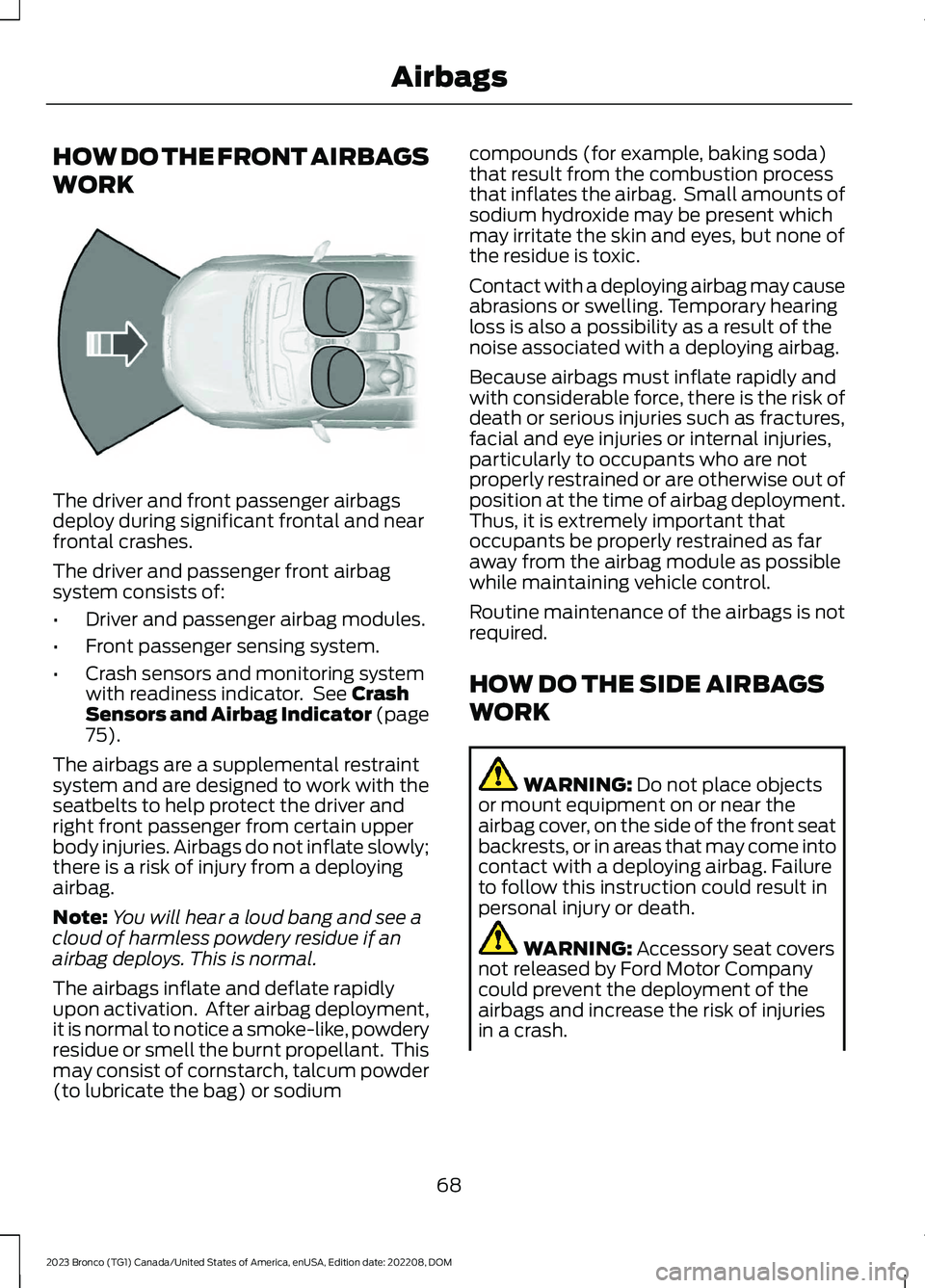
HOW DO THE FRONT AIRBAGS
WORK
The driver and front passenger airbagsdeploy during significant frontal and nearfrontal crashes.
The driver and passenger front airbagsystem consists of:
•Driver and passenger airbag modules.
•Front passenger sensing system.
•Crash sensors and monitoring systemwith readiness indicator. See CrashSensors and Airbag Indicator (page75).
The airbags are a supplemental restraintsystem and are designed to work with theseatbelts to help protect the driver andright front passenger from certain upperbody injuries. Airbags do not inflate slowly;there is a risk of injury from a deployingairbag.
Note:You will hear a loud bang and see acloud of harmless powdery residue if anairbag deploys. This is normal.
The airbags inflate and deflate rapidlyupon activation. After airbag deployment,it is normal to notice a smoke-like, powderyresidue or smell the burnt propellant. Thismay consist of cornstarch, talcum powder(to lubricate the bag) or sodium
compounds (for example, baking soda)that result from the combustion processthat inflates the airbag. Small amounts ofsodium hydroxide may be present whichmay irritate the skin and eyes, but none ofthe residue is toxic.
Contact with a deploying airbag may causeabrasions or swelling. Temporary hearingloss is also a possibility as a result of thenoise associated with a deploying airbag.
Because airbags must inflate rapidly andwith considerable force, there is the risk ofdeath or serious injuries such as fractures,facial and eye injuries or internal injuries,particularly to occupants who are notproperly restrained or are otherwise out ofposition at the time of airbag deployment.Thus, it is extremely important thatoccupants be properly restrained as faraway from the airbag module as possiblewhile maintaining vehicle control.
Routine maintenance of the airbags is notrequired.
HOW DO THE SIDE AIRBAGS
WORK
WARNING: Do not place objectsor mount equipment on or near theairbag cover, on the side of the front seatbackrests, or in areas that may come intocontact with a deploying airbag. Failureto follow this instruction could result inpersonal injury or death.
WARNING: Accessory seat coversnot released by Ford Motor Companycould prevent the deployment of theairbags and increase the risk of injuriesin a crash.
68
2023 Bronco (TG1) Canada/United States of America, enUSA, Edition date: 202208, DOMAirbagsE151127
Page 515 of 642
APP PRECAUTIONS
WARNING: Driving while distractedcan result in loss of vehicle control, crashand injury. We strongly recommend thatyou use extreme caution when using anydevice that may take your focus off theroad. Your primary responsibility is thesafe operation of your vehicle. Werecommend against the use of anyhand-held device while driving andencourage the use of voice-operatedsystems when possible. Make sure youare aware of all applicable local lawsthat may affect the use of electronicdevices while driving.
APP REQUIREMENTS
When you start an app through the systemfor the first time, you could be asked togrant certain permissions. You can reviewand change the permissions that you havegranted at any time when your vehicle isnot moving. We recommend that youcheck your data plan before using yourapps through the system. Using themcould result in additional charges. We alsorecommend that you check the appprovider's terms and conditions andprivacy policy before using their app. Makesure that you have an active account forapps that you want to use through thesystem. Some apps will work with nosetup. Others require you to configuresome personal settings before you can usethem.
ACCESSING APPS
Select the apps option on thefeature bar.
ENABLING APPS ON AN IOS
DEVICE
Select the apps option on thefeature bar.
1.Select Mobile Apps Help.
2.Follow the instructions to pair andconnect your device via Bluetooth® orwith a USB cable.
3.Start the apps on your device that youwant to use.
4.Select the app that you want to use onthe touchscreen.
Note:Some apps may run through AppleCarPlay if it is enabled.
Note:Closing an app on your device willclose it on the touchscreen.
Note:For troubleshooting assistance selectCompatible Apps List or My App Isn't Listedunder Mobile Apps Help.
ENABLING APPS ON AN
ANDROID DEVICE
Select the apps option on thefeature bar.
1.Select Mobile Apps Help.
2.Follow the instructions to pair andconnect your device via Bluetooth® orwith a USB cable.
3.Start the apps on your device that youwant to use.
4.Select Find Mobile Apps.
5.Select the app that you want to use onthe touchscreen.
Note:To enable apps when pairing with aUSB cable, switch on Android Apps via USBin Settings.
511
2023 Bronco (TG1) Canada/United States of America, enUSA, Edition date: 202208, DOMApps
Page 555 of 642
Zambia
CRUISE CONTROL MODULE
Argentina
Brazil
Djibouti
Ghana
Indonesia
Jamaica
551
2023 Bronco (TG1) Canada/United States of America, enUSA, Edition date: 202208, DOMCustomer InformationE340511 E308030 E340118 E342394 E340191 E342395 E340518
Page 567 of 642
SYNC
Argentina
Brazil
Djibouti
563
2023 Bronco (TG1) Canada/United States of America, enUSA, Edition date: 202208, DOMCustomer InformationE338546 E338545 E342398 E342510 E342399 E342511
Page 572 of 642
United States and Canada
WARNING: Changes ormodifications not expressively approvedby the party responsible for compliancecould void the user's authority to operatethe equipment. The term "IC:" before theradio certification number only signifiesthat Industry Canada technicalspecifications were met.
FCC ID: KMH-SYNCG4
FCC ID: KMH-SYNCG4L
IC: 1422A-SYNCG4
IC: 1422A-SYNCG4L
This device complies with Part 15 of theFCC Rules and with Innovation, Scienceand Economic Development Canada’slicence-exempt RSS(s). Operation issubject to the following two conditions:
1.This device may not cause harmfulinterference, and
2.This device must accept anyinterference received, includinginterference that may cause undesiredoperation.
Zambia
TELEMATICS CONTROL UNIT
Argentina
C-28150
Brazil
568
2023 Bronco (TG1) Canada/United States of America, enUSA, Edition date: 202208, DOMCustomer InformationE342406 E342516 E380327 E365116
Page 619 of 642
1
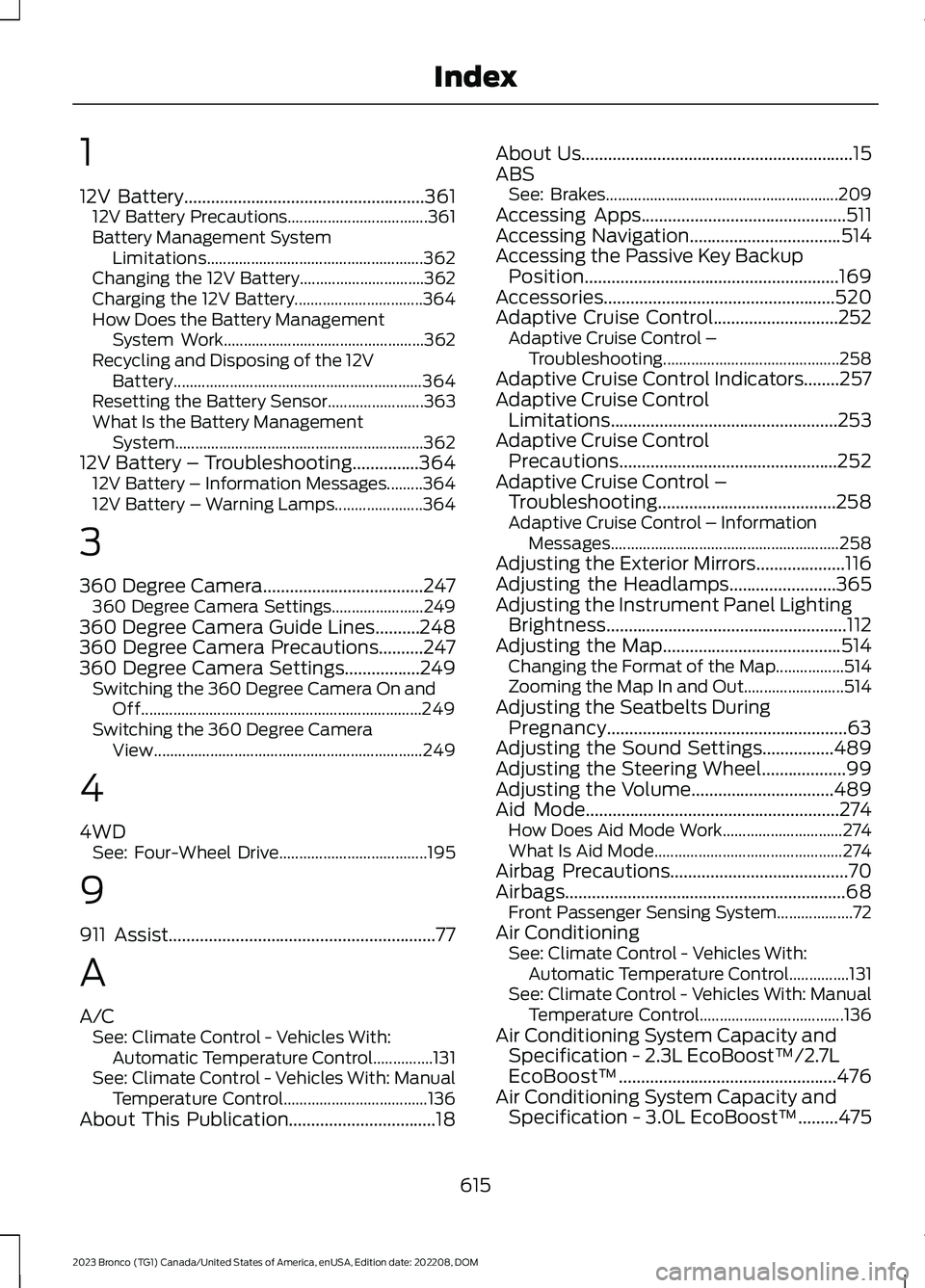
12V Battery......................................................36112V Battery Precautions...................................361Battery Management SystemLimitations......................................................362Changing the 12V Battery...............................362Charging the 12V Battery................................364How Does the Battery ManagementSystem Work..................................................362Recycling and Disposing of the 12VBattery..............................................................364Resetting the Battery Sensor........................363What Is the Battery ManagementSystem..............................................................36212V Battery – Troubleshooting...............36412V Battery – Information Messages.........36412V Battery – Warning Lamps......................364
3
360 Degree Camera....................................247360 Degree Camera Settings.......................249360 Degree Camera Guide Lines..........248360 Degree Camera Precautions..........247360 Degree Camera Settings.................249Switching the 360 Degree Camera On andOff......................................................................249Switching the 360 Degree CameraView...................................................................249
4
4WDSee: Four-Wheel Drive.....................................195
9
911 Assist............................................................77
A
A/CSee: Climate Control - Vehicles With:Automatic Temperature Control...............131See: Climate Control - Vehicles With: ManualTemperature Control....................................136About This Publication.................................18
About Us.............................................................15ABSSee: Brakes..........................................................209Accessing Apps..............................................511Accessing Navigation..................................514Accessing the Passive Key BackupPosition.........................................................169Accessories....................................................520Adaptive Cruise Control............................252Adaptive Cruise Control –Troubleshooting............................................258Adaptive Cruise Control Indicators........257Adaptive Cruise ControlLimitations...................................................253Adaptive Cruise ControlPrecautions.................................................252Adaptive Cruise Control –Troubleshooting........................................258Adaptive Cruise Control – InformationMessages.........................................................258Adjusting the Exterior Mirrors....................116Adjusting the Headlamps........................365Adjusting the Instrument Panel LightingBrightness......................................................112Adjusting the Map........................................514Changing the Format of the Map.................514Zooming the Map In and Out.........................514Adjusting the Seatbelts DuringPregnancy......................................................63Adjusting the Sound Settings................489Adjusting the Steering Wheel...................99Adjusting the Volume................................489Aid Mode.........................................................274How Does Aid Mode Work..............................274What Is Aid Mode...............................................274Airbag Precautions........................................70Airbags...............................................................68Front Passenger Sensing System...................72Air ConditioningSee: Climate Control - Vehicles With:Automatic Temperature Control...............131See: Climate Control - Vehicles With: ManualTemperature Control....................................136Air Conditioning System Capacity andSpecification - 2.3L EcoBoost™/2.7LEcoBoost™.................................................476Air Conditioning System Capacity andSpecification - 3.0L EcoBoost™.........475
615
2023 Bronco (TG1) Canada/United States of America, enUSA, Edition date: 202208, DOMIndex
Page 620 of 642
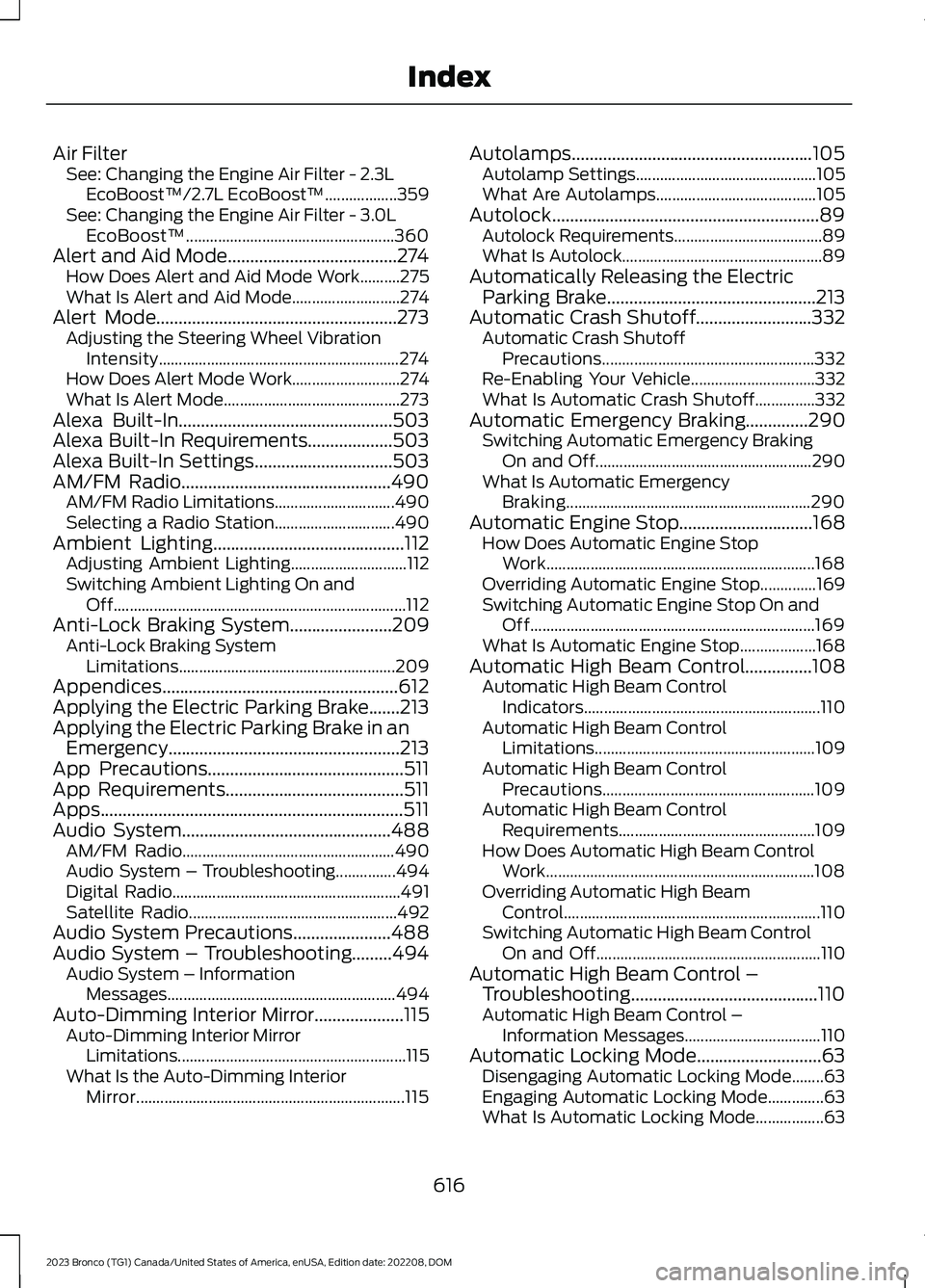
Air FilterSee: Changing the Engine Air Filter - 2.3LEcoBoost™/2.7L EcoBoost™..................359See: Changing the Engine Air Filter - 3.0LEcoBoost™....................................................360Alert and Aid Mode......................................274How Does Alert and Aid Mode Work..........275What Is Alert and Aid Mode...........................274Alert Mode......................................................273Adjusting the Steering Wheel VibrationIntensity............................................................274How Does Alert Mode Work...........................274What Is Alert Mode............................................273Alexa Built-In................................................503Alexa Built-In Requirements...................503Alexa Built-In Settings...............................503AM/FM Radio...............................................490AM/FM Radio Limitations..............................490Selecting a Radio Station..............................490Ambient Lighting...........................................112Adjusting Ambient Lighting.............................112Switching Ambient Lighting On andOff.........................................................................112Anti-Lock Braking System.......................209Anti-Lock Braking SystemLimitations......................................................209Appendices.....................................................612Applying the Electric Parking Brake.......213Applying the Electric Parking Brake in anEmergency....................................................213App Precautions............................................511App Requirements........................................511Apps....................................................................511Audio System...............................................488AM/FM Radio.....................................................490Audio System – Troubleshooting...............494Digital Radio.........................................................491Satellite Radio....................................................492Audio System Precautions......................488Audio System – Troubleshooting.........494Audio System – InformationMessages.........................................................494Auto-Dimming Interior Mirror....................115Auto-Dimming Interior MirrorLimitations.........................................................115What Is the Auto-Dimming InteriorMirror...................................................................115
Autolamps......................................................105Autolamp Settings.............................................105What Are Autolamps........................................105Autolock............................................................89Autolock Requirements.....................................89What Is Autolock..................................................89Automatically Releasing the ElectricParking Brake...............................................213Automatic Crash Shutoff..........................332Automatic Crash ShutoffPrecautions.....................................................332Re-Enabling Your Vehicle...............................332What Is Automatic Crash Shutoff...............332Automatic Emergency Braking..............290Switching Automatic Emergency BrakingOn and Off......................................................290What Is Automatic EmergencyBraking.............................................................290Automatic Engine Stop..............................168How Does Automatic Engine StopWork...................................................................168Overriding Automatic Engine Stop..............169Switching Automatic Engine Stop On andOff.......................................................................169What Is Automatic Engine Stop...................168Automatic High Beam Control...............108Automatic High Beam ControlIndicators...........................................................110Automatic High Beam ControlLimitations.......................................................109Automatic High Beam ControlPrecautions.....................................................109Automatic High Beam ControlRequirements.................................................109How Does Automatic High Beam ControlWork...................................................................108Overriding Automatic High BeamControl................................................................110Switching Automatic High Beam ControlOn and Off........................................................110Automatic High Beam Control –Troubleshooting..........................................110Automatic High Beam Control –Information Messages..................................110Automatic Locking Mode............................63Disengaging Automatic Locking Mode........63Engaging Automatic Locking Mode..............63What Is Automatic Locking Mode.................63
616
2023 Bronco (TG1) Canada/United States of America, enUSA, Edition date: 202208, DOMIndex