change time FORD BRONCO 2023 Owners Manual
[x] Cancel search | Manufacturer: FORD, Model Year: 2023, Model line: BRONCO, Model: FORD BRONCO 2023Pages: 642, PDF Size: 14.71 MB
Page 3 of 642
The information contained in this publication was correct at the time of release. In the interest of continuousdevelopment, we reserve the right to change specifications, design or equipment at any time withoutnotice or obligation. No part of this publication may be reproduced, transmitted, stored in a retrievalsystem or translated into any language in any form by any means without our written permission. Errorsand omissions excepted.© Ford Motor Company 2022
All rights reserved.Part Number: -202208-20220819161437
California Proposition 65
WARNING: Operating, servicing and maintaining a passenger vehicle or off-highway motor vehiclecan expose you to chemicals including engine exhaust, carbon monoxide, phthalates, and lead, whichare known to the State of California to cause cancer and birth defects or other reproductive harm. Tominimize exposure, avoid breathing exhaust, do not idle the engine except as necessary, service yourvehicle in a well-ventilated area and wear gloves or wash your hands frequently when servicing yourvehicle. For more information go to www.P65Warnings.ca.gov/passenger-vehicle.
WARNING: Battery posts, terminals and
related accessories contain lead and lead
compounds, chemicals known to the State of
California to cause cancer and reproductive harm.
Wash your hands after handling.
Page 27 of 642
WARNING: Do not connectwireless plug-in devices to the data linkconnector. Unauthorized third partiescould gain access to vehicle data andimpair the performance of safety relatedsystems. Only allow repair facilities thatfollow our service and repair instructionsto connect their equipment to the datalink connector.
We respect your privacy and arecommitted to protecting it. Theinformation contained in this publicationwas correct at the time of release, but astechnology rapidly changes, werecommend that you visit the local Fordwebsite for the latest information.
Your vehicle has electronic control unitsthat have data recording functionality andthe ability to permanently or temporarilystore data. This data could includeinformation on the condition and status ofyour vehicle, vehicle maintenancerequirements, events and malfunctions.The types of data that can be recorded aredescribed in this section. Some of the datarecorded is stored in event logs or errorlogs.
Note:Error logs are reset following a serviceor repair.
Note:We may provide information inresponse to requests from law enforcement,other government authorities and thirdparties acting with lawful authority orthrough a legal process. Such informationcould be used by them in legal proceedings.
Data recorded includes, for example:
•Operating states of systemcomponents, for example fuel level,tire pressure and battery charge level.
•Vehicle and component status, forexample wheel speed, deceleration,lateral acceleration and seatbeltstatus.
•Events or errors in essential systems,for example headlamps and brakes.
•System responses to driving situations,for example airbag deployment andstability control.
•Environmental conditions, for exampletemperature.
Some of this data, when used incombination with other information, forexample an accident report, damage to avehicle or eyewitness statements, couldbe associated with a specific person.
Services That We Provide
If you use our services, we collect and usedata, for example account information,vehicle location and driving characteristics,that could identify you. We transmit thisdata through a dedicated, protectedconnection. We only collect and use datato enable your use of our services to whichyou have subscribed, with your consent orwhere permitted by law. For additionalinformation, see the terms and conditionsof the services to which you havesubscribed.
For additional information about ourprivacy policy, refer to the local Fordwebsite.
Services That Third PartiesProvide
We recommend that you review the termsand conditions and data privacyinformation for any services equipped withyour vehicle or to which you subscribe. Wetake no responsibility for services that thirdparties provide.
Where equipped, SiriusXM with 360L coulduse the modem. To disable, turn off theSiriusXM with 360L or Vehicle Connectivitysetting. See Enabling and Disabling theModem (page 483).
23
2023 Bronco (TG1) Canada/United States of America, enUSA, Edition date: 202208, DOMData Privacy
Page 108 of 642
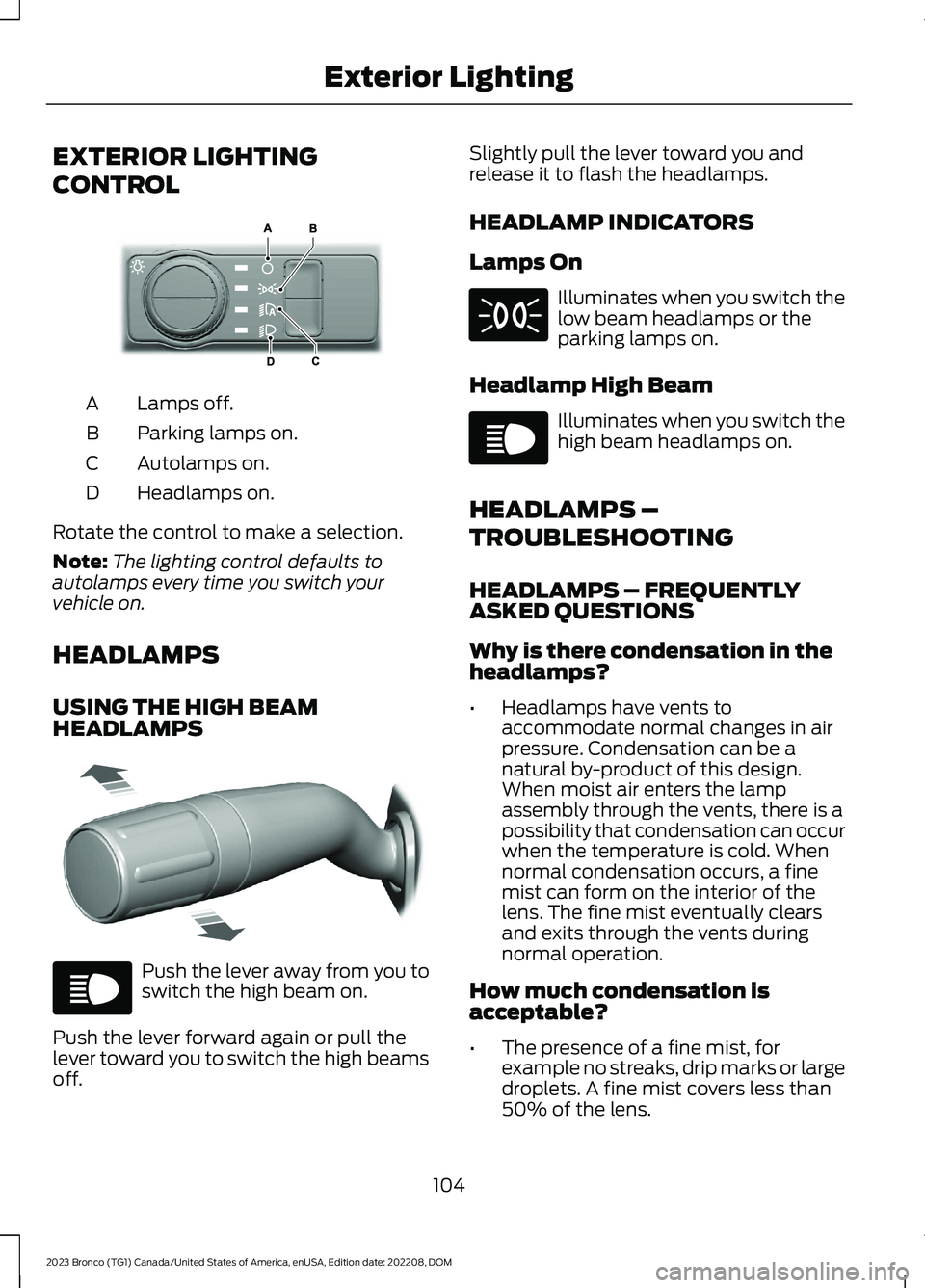
EXTERIOR LIGHTING
CONTROL
Lamps off.A
Parking lamps on.B
Autolamps on.C
Headlamps on.D
Rotate the control to make a selection.
Note:The lighting control defaults toautolamps every time you switch yourvehicle on.
HEADLAMPS
USING THE HIGH BEAMHEADLAMPS
Push the lever away from you toswitch the high beam on.
Push the lever forward again or pull thelever toward you to switch the high beamsoff.
Slightly pull the lever toward you andrelease it to flash the headlamps.
HEADLAMP INDICATORS
Lamps On
Illuminates when you switch thelow beam headlamps or theparking lamps on.
Headlamp High Beam
Illuminates when you switch thehigh beam headlamps on.
HEADLAMPS –
TROUBLESHOOTING
HEADLAMPS – FREQUENTLYASKED QUESTIONS
Why is there condensation in theheadlamps?
•Headlamps have vents toaccommodate normal changes in airpressure. Condensation can be anatural by-product of this design.When moist air enters the lampassembly through the vents, there is apossibility that condensation can occurwhen the temperature is cold. Whennormal condensation occurs, a finemist can form on the interior of thelens. The fine mist eventually clearsand exits through the vents duringnormal operation.
How much condensation isacceptable?
•The presence of a fine mist, forexample no streaks, drip marks or largedroplets. A fine mist covers less than50% of the lens.
104
2023 Bronco (TG1) Canada/United States of America, enUSA, Edition date: 202208, DOMExterior LightingE327629 E327570 E67019 E71341 E67019
Page 112 of 642
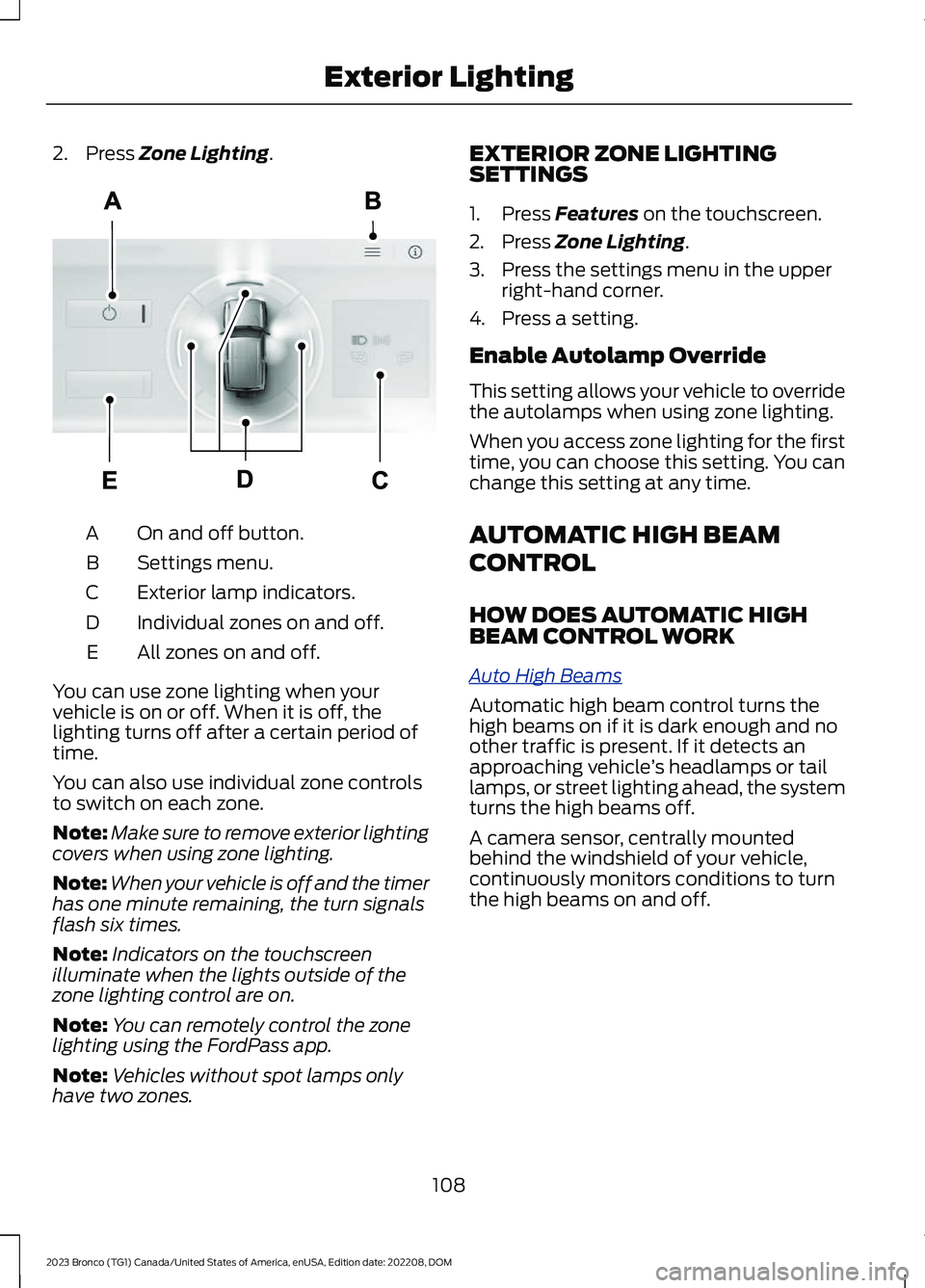
2.Press Zone Lighting.
On and off button.A
Settings menu.B
Exterior lamp indicators.C
Individual zones on and off.D
All zones on and off.E
You can use zone lighting when yourvehicle is on or off. When it is off, thelighting turns off after a certain period oftime.
You can also use individual zone controlsto switch on each zone.
Note:Make sure to remove exterior lightingcovers when using zone lighting.
Note:When your vehicle is off and the timerhas one minute remaining, the turn signalsflash six times.
Note:Indicators on the touchscreenilluminate when the lights outside of thezone lighting control are on.
Note:You can remotely control the zonelighting using the FordPass app.
Note:Vehicles without spot lamps onlyhave two zones.
EXTERIOR ZONE LIGHTINGSETTINGS
1.Press Features on the touchscreen.
2.Press Zone Lighting.
3.Press the settings menu in the upperright-hand corner.
4.Press a setting.
Enable Autolamp Override
This setting allows your vehicle to overridethe autolamps when using zone lighting.
When you access zone lighting for the firsttime, you can choose this setting. You canchange this setting at any time.
AUTOMATIC HIGH BEAM
CONTROL
HOW DOES AUTOMATIC HIGHBEAM CONTROL WORK
Auto High Beams
Automatic high beam control turns thehigh beams on if it is dark enough and noother traffic is present. If it detects anapproaching vehicle’s headlamps or taillamps, or street lighting ahead, the systemturns the high beams off.
A camera sensor, centrally mountedbehind the windshield of your vehicle,continuously monitors conditions to turnthe high beams on and off.
108
2023 Bronco (TG1) Canada/United States of America, enUSA, Edition date: 202208, DOMExterior LightingE343474
Page 123 of 642
FUEL GAUGE LIMITATIONS
The fuel gauge may not provide anaccurate reading when your vehicle is onan incline.
LOCATING THE FUEL FILLERDOOR
The arrow adjacent to the fuel pumpsymbol indicates on which side of yourvehicle the fuel filler door is located.
WHAT IS THE LOW FUELREMINDER
A low fuel level reminder displays andsounds when the distance to emptyreaches 75 mi (120 km) to empty forMyKey, and at 50 mi (80 km),25 mi(40 km),12 mi (20 km) and 0 mi (0 km)for all vehicle keys.
Note:The low fuel reminder can appear atdifferent fuel gauge positions depending onfuel economy conditions. This variation isnormal.
WHAT IS DISTANCE TO EMPTY
Indicates the approximate distance yourvehicle can travel on the fuel remaining inthe tank. Changes in driving pattern cancause the value to not only decrease butalso increase or stay constant for periodsof time.
ENGINE COOLANT
TEMPERATURE GAUGE
Indicates the engine coolant temperature.
TRANSMISSION FLUID
TEMPERATURE GAUGE
Indicates the transmission fluidtemperature.
Special operating conditions can causehigher than normal operatingtemperatures. See Special OperatingConditions Scheduled Maintenance(page 533).
Note:This is a configurable gauge.
TURBO BOOST GAUGE - 2.3L
ECOBOOST™
Indicates the amount of manifold airpressure in the engine.
Note:This is a configurable gauge.
WHAT IS THE INFORMATION
BAR
Displays information for navigation, outsideair temperature, odometer and distanceto empty.
WHAT ARE THE INSTRUMENT
CLUSTER WARNING LAMPS
Warning lamps alert you to a vehiclecondition that could become serious.Some lamps illuminate when you startyour vehicle to make sure they work. If anylamps remain on after starting your vehicle,refer to the respective system warninglamp for further information.
119
2023 Bronco (TG1) Canada/United States of America, enUSA, Edition date: 202208, DOMInstrument Cluster
Page 156 of 642
GARAGE DOOR OPENER
INTRODUCTION
HomeLink Wireless ControlSystem
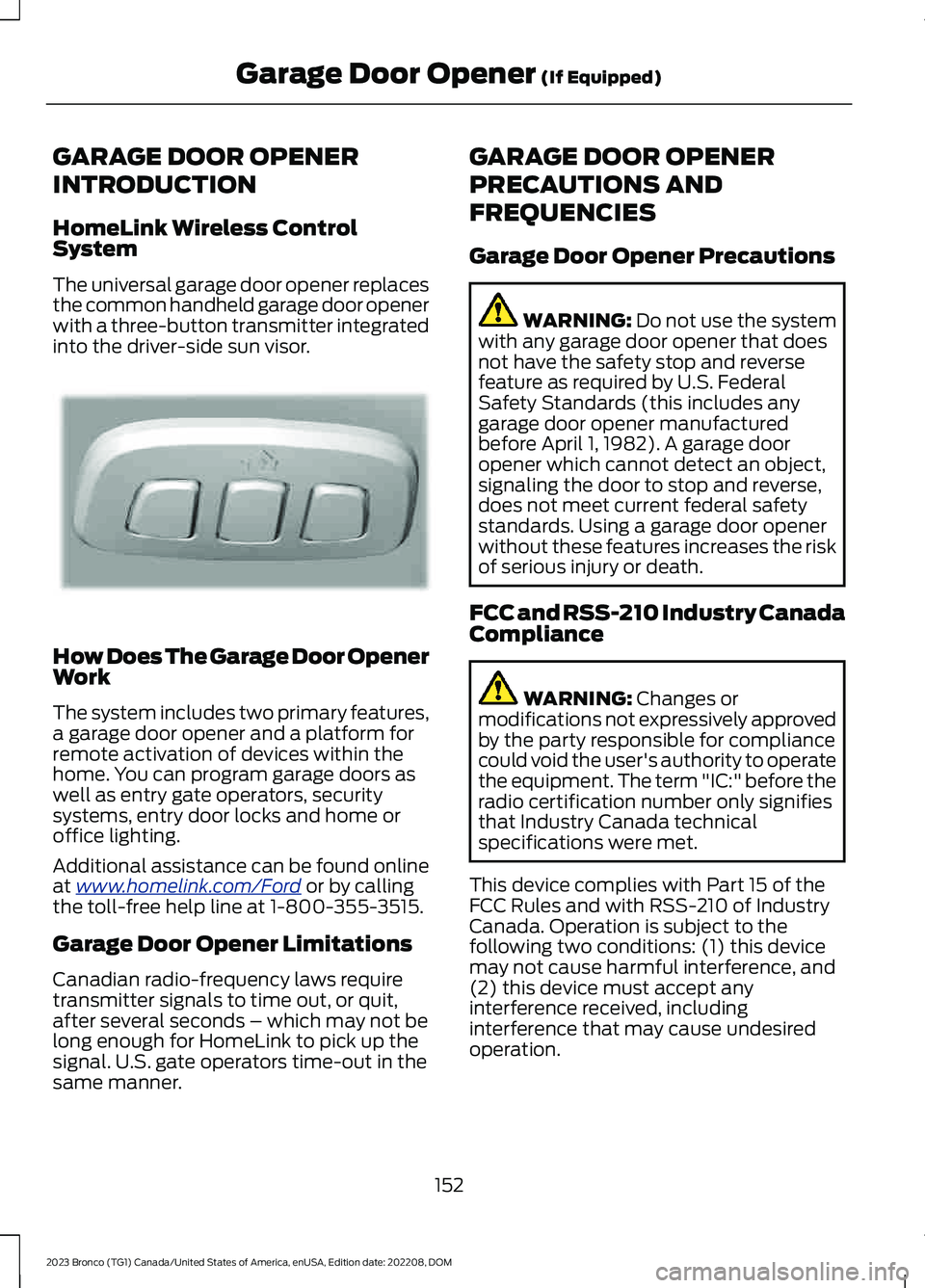
The universal garage door opener replacesthe common handheld garage door openerwith a three-button transmitter integratedinto the driver-side sun visor.
How Does The Garage Door OpenerWork
The system includes two primary features,a garage door opener and a platform forremote activation of devices within thehome. You can program garage doors aswell as entry gate operators, securitysystems, entry door locks and home oroffice lighting.
Additional assistance can be found onlineat www.homelink.com/Ford or by callingthe toll-free help line at 1-800-355-3515.
Garage Door Opener Limitations
Canadian radio-frequency laws requiretransmitter signals to time out, or quit,after several seconds – which may not belong enough for HomeLink to pick up thesignal. U.S. gate operators time-out in thesame manner.
GARAGE DOOR OPENER
PRECAUTIONS AND
FREQUENCIES
Garage Door Opener Precautions
WARNING: Do not use the systemwith any garage door opener that doesnot have the safety stop and reversefeature as required by U.S. FederalSafety Standards (this includes anygarage door opener manufacturedbefore April 1, 1982). A garage dooropener which cannot detect an object,signaling the door to stop and reverse,does not meet current federal safetystandards. Using a garage door openerwithout these features increases the riskof serious injury or death.
FCC and RSS-210 Industry CanadaCompliance
WARNING: Changes ormodifications not expressively approvedby the party responsible for compliancecould void the user's authority to operatethe equipment. The term "IC:" before theradio certification number only signifiesthat Industry Canada technicalspecifications were met.
This device complies with Part 15 of theFCC Rules and with RSS-210 of IndustryCanada. Operation is subject to thefollowing two conditions: (1) this devicemay not cause harmful interference, and(2) this device must accept anyinterference received, includinginterference that may cause undesiredoperation.
152
2023 Bronco (TG1) Canada/United States of America, enUSA, Edition date: 202208, DOMGarage Door Opener (If Equipped)E188211
Page 189 of 642
WHAT IS THE CATALYTIC
CONVERTER
The catalytic converter is part of yourvehicle's emissions system and filtersharmful pollutants from the exhaust gas.
CATALYTIC CONVERTER
PRECAUTIONS
WARNING: Do not park, idle ordrive your vehicle on dry grass or otherdry ground cover. The emission systemheats up the engine compartment andexhaust system, creating the risk of fire.
WARNING: The normal operatingtemperature of the exhaust system isvery high. Never work around or attemptto repair any part of the exhaust systemuntil it has cooled. Use special care whenworking around the catalytic converter.The catalytic converter heats up to a veryhigh temperature after only a shortperiod of engine operation and stays hotafter the engine is switched off.
WARNING: Exhaust leaks mayresult in entry of harmful and potentiallylethal fumes into the passengercompartment. If you smell exhaustfumes inside your vehicle, have yourvehicle inspected immediately. Do notdrive if you smell exhaust fumes.
To avoid damaging the catalytic converter:
•Do not crank the engine for more than10 seconds at a time.
•Do not run the engine with a spark pluglead disconnected.
•Do not push-start or tow-start yourvehicle. Use booster cables. See JumpStarting the Vehicle (page 330).
•Use the correct fuel. See Fuel andRefueling (page 179).
•Do not switch the ignition off when yourvehicle is moving.
•Avoid running out of fuel.
•Have the items listed in scheduledmaintenance information performedaccording to the specified schedule.
Note:Do not make any unauthorizedchanges to your vehicle or engine. By law,vehicle owners and anyone whomanufactures, repairs, or services a fleet ofvehicles are not permitted to intentionallyremove an emission control device orprevent it from working.
CATALYTIC CONVERTER –
TROUBLESHOOTING
CATALYTIC CONVERTER –WARNING LAMPS
Your vehicle has an on-board diagnosticssystem that monitors the emission controlsystem. If any of the following warninglamps illuminate, this may indicate thatthe on-board diagnostics system hasdetected an emission control systemmalfunction.
Continuing to drive your vehicle may causereduced power or the engine to stop.Failure to respond to a warning lamp maycause damage that your vehicle Warrantymay not cover. Have your vehicle checkedas soon as possible.
185
2023 Bronco (TG1) Canada/United States of America, enUSA, Edition date: 202208, DOMCatalytic ConverterE103308 E67021 E67028
Page 196 of 642
Manually Shifting Gears in Drive (D)
Use this feature to temporarily changegears.
Note:We recommend using this feature forengine braking or driving on hilly ormountainous roads.
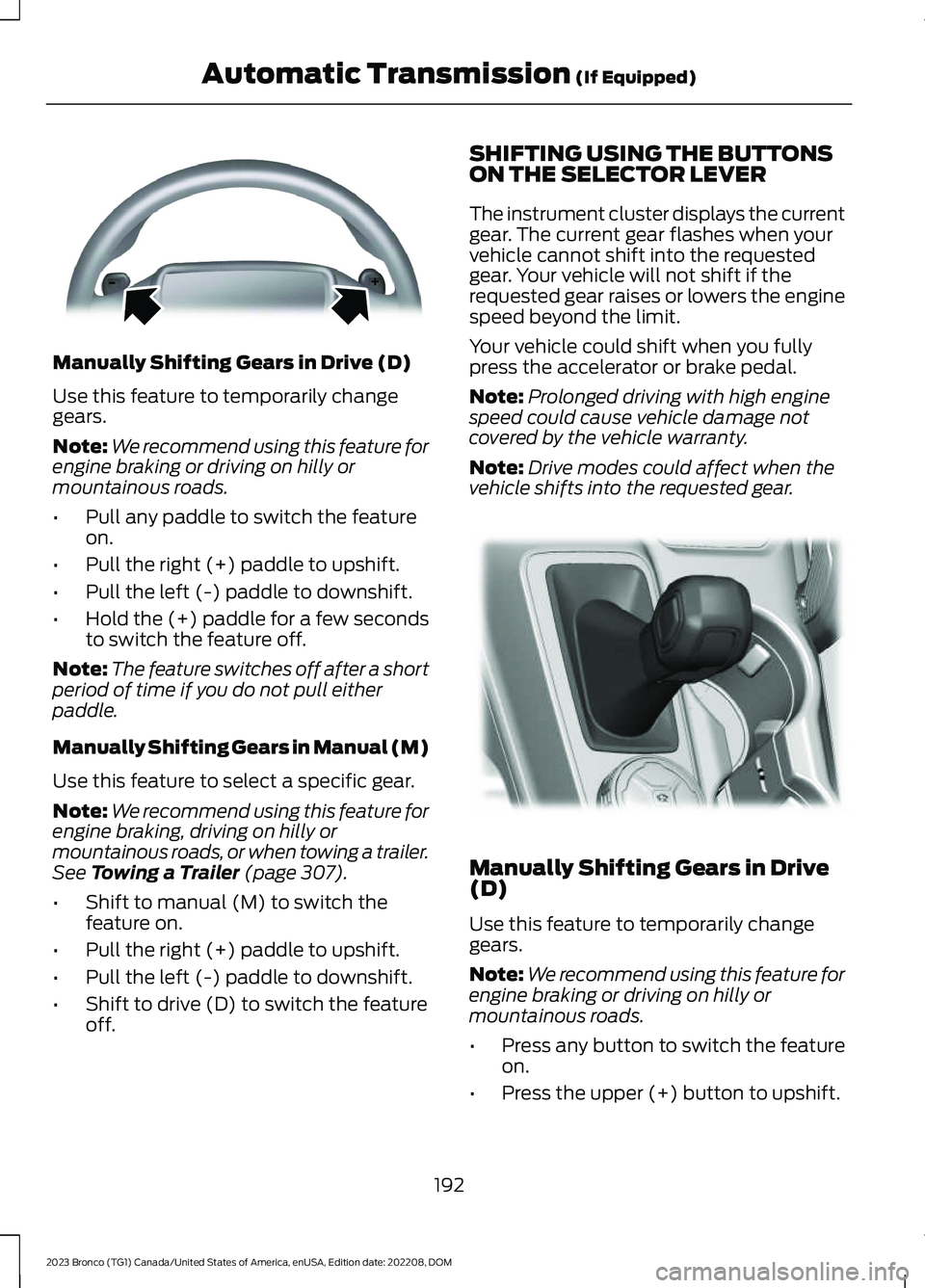
•Pull any paddle to switch the featureon.
•Pull the right (+) paddle to upshift.
•Pull the left (-) paddle to downshift.
•Hold the (+) paddle for a few secondsto switch the feature off.
Note:The feature switches off after a shortperiod of time if you do not pull eitherpaddle.
Manually Shifting Gears in Manual (M)
Use this feature to select a specific gear.
Note:We recommend using this feature forengine braking, driving on hilly ormountainous roads, or when towing a trailer.See Towing a Trailer (page 307).
•Shift to manual (M) to switch thefeature on.
•Pull the right (+) paddle to upshift.
•Pull the left (-) paddle to downshift.
•Shift to drive (D) to switch the featureoff.
SHIFTING USING THE BUTTONSON THE SELECTOR LEVER
The instrument cluster displays the currentgear. The current gear flashes when yourvehicle cannot shift into the requestedgear. Your vehicle will not shift if therequested gear raises or lowers the enginespeed beyond the limit.
Your vehicle could shift when you fullypress the accelerator or brake pedal.
Note:Prolonged driving with high enginespeed could cause vehicle damage notcovered by the vehicle warranty.
Note:Drive modes could affect when thevehicle shifts into the requested gear.
Manually Shifting Gears in Drive(D)
Use this feature to temporarily changegears.
Note:We recommend using this feature forengine braking or driving on hilly ormountainous roads.
•Press any button to switch the featureon.
•Press the upper (+) button to upshift.
192
2023 Bronco (TG1) Canada/United States of America, enUSA, Edition date: 202208, DOMAutomatic Transmission (If Equipped)E144821 E324063
Page 223 of 642
HOW DOES STABILITY
CONTROL WORK
WARNING: Vehicle modificationsinvolving braking system, aftermarketroof racks, suspension, steering system,tire construction and wheel and tire sizemay change the handling characteristicsof your vehicle and may adversely affectthe performance of the electronicstability control system. In addition,installing any stereo speakers mayinterfere with and adversely affect theelectronic stability control system.Reducing the effectiveness of theelectronic stability control system couldlead to an increased risk of loss of vehiclecontrol, vehicle rollover, personal injuryand death.
WARNING: Remember that evenadvanced technology cannot defy thelaws of physics. It's always possible tolose control of a vehicle due toinappropriate driver input for theconditions. Aggressive driving on anyroad condition can cause you to losecontrol of your vehicle increasing the riskof personal injury or property damage.Activation of the electronic stabilitycontrol system is an indication that atleast some of the tires have exceededtheir ability to grip the road; this couldreduce the operator's ability to controlthe vehicle potentially resulting in a lossof vehicle control, vehicle rollover,personal injury and death.
WARNING: You are responsible forcontrolling your vehicle at all times. Thesystem is designed to be an aid and doesnot relieve you of your responsibility todrive with due care and attention. Failureto follow this instruction could result inthe loss of control of your vehicle,personal injury or death.
If a driving condition activates either thestability control or traction control you mayexperience the following conditions:
•The stability and traction control lightflashes.
•Your vehicle slows down.
•Reduced engine power.
The stability control system has severalfeatures built into it to help you maintaincontrol of your vehicle:
Electronic Stability Control
Electronic stability control enhances yourvehicle’s ability to prevent skids or lateralslides by applying brakes to one or moreof the wheels individually and, if necessary,reducing engine power.
Roll Stability Control
Roll stability control enhances yourvehicle’s ability to prevent rollovers bydetecting your vehicle’s roll motion andthe rate at which it changes by applyingthe brakes to one or more wheelsindividually.
Curve Control
Curve control enhances your vehicle’sability to follow the road when corneringseverely or avoiding objects in the roadway.Curve control operates by reducing enginepower and, if necessary, applying brakesto one or more of the wheels individually.
219
2023 Bronco (TG1) Canada/United States of America, enUSA, Edition date: 202208, DOMStability Control
Page 235 of 642
Note:The gray indicator stays on untileither the vehicle speed reduces and thestabilizer bar disconnects, or the systemturns off.
The stabilizer bar system also turns on anddisconnects when you select the RockCrawl drive mode. See Selecting aG.O.A.T. Mode (page 260).
Note:The stabilizer bar disconnect is notavailable in certain drive modes. SeeSelecting a G.O.A.T. Mode (page 260).
Note:The stabilizer bar disconnect couldbe delayed during wheel slippage, dynamicmaneuvers, dynamic cornering or whenthere is an anti-lock brake system orelectronic stability control event in progress.
Switching the Stabilizer BarDisconnect Off
Switch the system off by pressing thestabilizer bar disconnect button, whichreconnects the stabilizer bar if currentlydisconnected.
The stabilizer bar disconnect system alsoturns off when any of the following occur:
•The engine is switched off.
•You switch out of four-wheel drive low(4L) or four-wheel drive high (4H).
•You select a drive mode that does notallow the stabilizer bar to disconnect.
Note:The stabilizer bar can be reconnectedat any time. It is not necessary for thevehicle to be on a level surface as thestabilizer bar self-aligns.
STABILIZER BAR DISCONNECT
INDICATORS
An indicator illuminates whenyou switch the stabilizer bardisconnect system on. The colorof the indicator changes to indicate thesystem status.
Amber indicates that the stabilizer bar isdisconnected.
Grey indicates that the stabilizer bar isconnected and in standby.
Red indicates that there is a fault with thesystem, have the system checked as soonas possible.
STABILIZER BAR DISCONNECT
– TROUBLESHOOTING
STABILIZER BAR DISCONNECT –INFORMATION MESSAGES -EXCLUDING: RAPTOR
ActionMessage
The selected drivemode does notallow you to turn onthe stabilizer bardisconnect feature.See G.O.A.T.Mode Control(page 260).
Sta-Bar DisconnectNot Available InSelected DriveMode
The stabilizer barhas been discon-nected.
Sta-Bar Discon-nected Sta-BarReconnects over 20MPH
Sta-Bar Discon-nected Sta-BarReconnects over 32km/h
The stabilizer bardisconnect is avail-able below 20 mph(32 km/h).
Sta-Bar DisconnectAvailable Below 20MPH
Sta-Bar DisconnectAvailable Below 32km/h
231
2023 Bronco (TG1) Canada/United States of America, enUSA, Edition date: 202208, DOMStabilizer Bar Disconnect (If Equipped)E329476