jump start FORD BRONCO 2023 Owners Manual
[x] Cancel search | Manufacturer: FORD, Model Year: 2023, Model line: BRONCO, Model: FORD BRONCO 2023Pages: 642, PDF Size: 14.71 MB
Page 15 of 642
Crash and BreakdownInformation
Roadside Assistance.................................328
Switching the Hazard Flashers On andOff................................................................329
Jump Starting the Vehicle.......................329
Post-Crash Alert System..........................331
Post Impact Braking...................................331
Automatic Crash Shutoff.........................332
Recovery Towing.........................................332
Transporting the Vehicle..........................335
Towing Your Vehicle
Towing Your Vehicle Precautions..........337
Recreationally Towing Your Vehicle -Manual Transmission............................337
Recreationally Towing Your Vehicle -Automatic Transmission.....................338
Emergency Towing....................................340
Towing Your Vehicle – Troubleshooting.......................................................................340
Fuses
Fuse Precautions.........................................341
Under Hood Fuse Box................................341
Body Control Module Fuse Box.............345
Identifying Fuse Types.............................348
Fuses – Troubleshooting.........................348
Maintenance
Maintenance Precautions.......................349
Opening and Closing the Hood.............349
Opening and Closing the Hood - Raptor........................................................................350
Under Hood Overview - 2.3L EcoBoost™.........................................................................351
Under Hood Overview - 2.7L EcoBoost™........................................................................352
Under Hood Overview - 3.0L EcoBoost™........................................................................353
Engine Oil......................................................354
Checking the Coolant...............................355
Changing the Engine Air Filter - 2.3LEcoBoost™/2.7L EcoBoost™...........359
Changing the Engine Air Filter - 3.0LEcoBoost™..............................................360
Changing the Fuel Filter............................361
12V Battery.....................................................361
12V Battery – Troubleshooting..............364
Adjusting the Headlamps.......................365
Exterior Bulbs...............................................367
Interior Bulbs................................................369
Drive Belt Routing - 2.3L EcoBoost™.......................................................................369
Drive Belt Routing - 2.7L EcoBoost™/3.0L EcoBoost™.....................................370
Removable VehicleComponents
Removable Windows.................................371
Removable Doors.......................................376
Removable Roof Panels..........................384
Removable Hard Top................................392
Removable Soft Top.................................393
Removable Fenders...................................397
Removable Running Boards - Raptor.......................................................................399
Removable Front Bumper End Caps -Raptor.........................................................401
Storing the Doors and the Roof Panels -4-Door, Excluding: Raptor...................407
Storing the Doors and the Roof Panels -Raptor..........................................................414
Storing the Roof Panels - 2-Door..........419
Vehicle Care
Cleaning Products.......................................421
Cleaning the Exterior.................................422
Cleaning the Interior..................................424
Repairing Minor Paint Damage..............427
Waxing Your Vehicle..................................427
11
2023 Bronco (TG1) Canada/United States of America, enUSA, Edition date: 202208, DOMTable of Contents
Page 189 of 642
WHAT IS THE CATALYTIC
CONVERTER
The catalytic converter is part of yourvehicle's emissions system and filtersharmful pollutants from the exhaust gas.
CATALYTIC CONVERTER
PRECAUTIONS
WARNING: Do not park, idle ordrive your vehicle on dry grass or otherdry ground cover. The emission systemheats up the engine compartment andexhaust system, creating the risk of fire.
WARNING: The normal operatingtemperature of the exhaust system isvery high. Never work around or attemptto repair any part of the exhaust systemuntil it has cooled. Use special care whenworking around the catalytic converter.The catalytic converter heats up to a veryhigh temperature after only a shortperiod of engine operation and stays hotafter the engine is switched off.
WARNING: Exhaust leaks mayresult in entry of harmful and potentiallylethal fumes into the passengercompartment. If you smell exhaustfumes inside your vehicle, have yourvehicle inspected immediately. Do notdrive if you smell exhaust fumes.
To avoid damaging the catalytic converter:
•Do not crank the engine for more than10 seconds at a time.
•Do not run the engine with a spark pluglead disconnected.
•Do not push-start or tow-start yourvehicle. Use booster cables. See JumpStarting the Vehicle (page 330).
•Use the correct fuel. See Fuel andRefueling (page 179).
•Do not switch the ignition off when yourvehicle is moving.
•Avoid running out of fuel.
•Have the items listed in scheduledmaintenance information performedaccording to the specified schedule.
Note:Do not make any unauthorizedchanges to your vehicle or engine. By law,vehicle owners and anyone whomanufactures, repairs, or services a fleet ofvehicles are not permitted to intentionallyremove an emission control device orprevent it from working.
CATALYTIC CONVERTER –
TROUBLESHOOTING
CATALYTIC CONVERTER –WARNING LAMPS
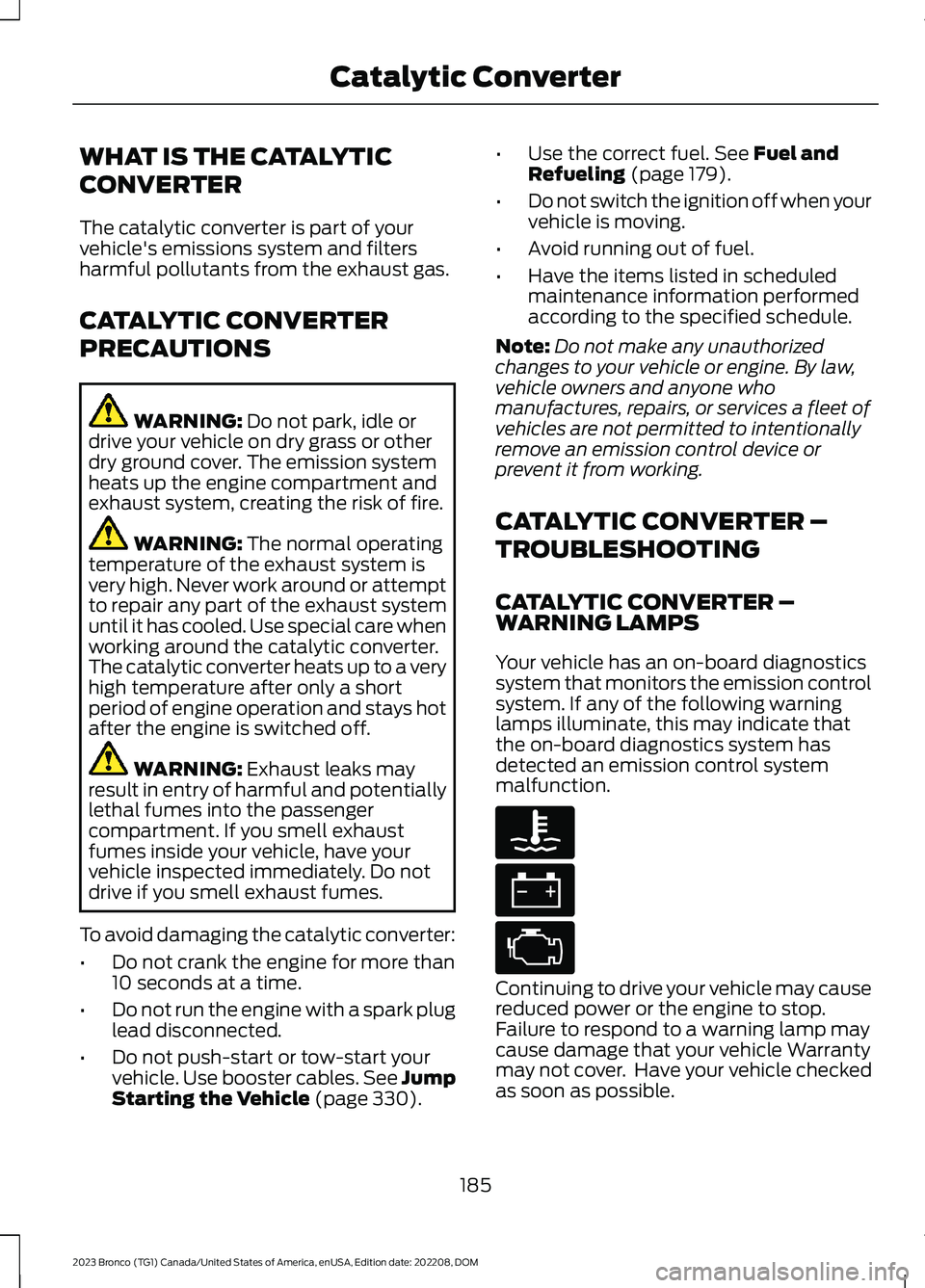
Your vehicle has an on-board diagnosticssystem that monitors the emission controlsystem. If any of the following warninglamps illuminate, this may indicate thatthe on-board diagnostics system hasdetected an emission control systemmalfunction.
Continuing to drive your vehicle may causereduced power or the engine to stop.Failure to respond to a warning lamp maycause damage that your vehicle Warrantymay not cover. Have your vehicle checkedas soon as possible.
185
2023 Bronco (TG1) Canada/United States of America, enUSA, Edition date: 202208, DOMCatalytic ConverterE103308 E67021 E67028
Page 218 of 642
1.Close the driver door.
2.Shift into gear.
3.Press the accelerator pedal and pullaway in a normal manner.
ELECTRIC PARKING BRAKE
AUDIBLE WARNING
Sounds when the parking brake is on andyour vehicle is moving. If the warning tonecontinues after you have released theparking brake, this indicates a malfunction.Have your vehicle checked as soon aspossible.
RELEASING THE ELECTRIC
PARKING BRAKE IF THE
VEHICLE BATTERY HAS RUN
OUT OF CHARGE
WARNING: The electric parkingbrake does not operate if the vehiclebattery has run out of charge.
Connect a booster battery to the vehiclebattery to release the electric parking brakeif the vehicle battery has run out of charge.See Jump Starting the Vehicle (page330).
ELECTRIC PARKING BRAKE –
TROUBLESHOOTING
ELECTRIC PARKING BRAKE –WARNING LAMPS
Brake System
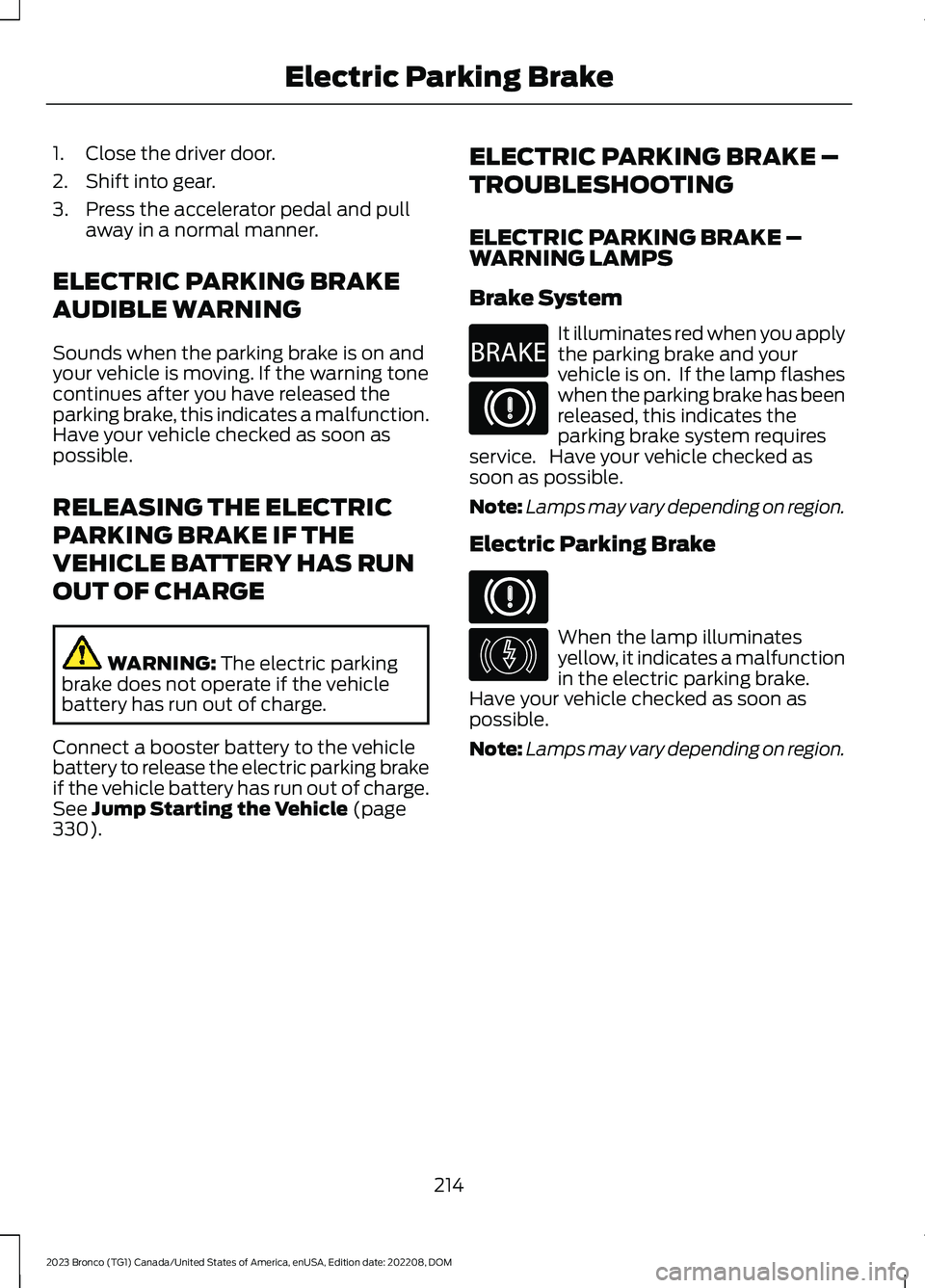
It illuminates red when you applythe parking brake and yourvehicle is on. If the lamp flasheswhen the parking brake has beenreleased, this indicates theparking brake system requiresservice. Have your vehicle checked assoon as possible.
Note:Lamps may vary depending on region.
Electric Parking Brake
When the lamp illuminatesyellow, it indicates a malfunctionin the electric parking brake.Have your vehicle checked as soon aspossible.
Note:Lamps may vary depending on region.
214
2023 Bronco (TG1) Canada/United States of America, enUSA, Edition date: 202208, DOMElectric Parking BrakeE270480 E67024 E67024 E146190
Page 332 of 642
ROADSIDE ASSISTANCE
Vehicles Sold in the United States:Getting Roadside Assistance
To fully assist you should you have avehicle concern, Ford Motor Companyoffers a complimentary roadsideassistance program. This program isseparate from the New Vehicle LimitedWarranty.
The service is available:
•24 hours a day, seven days a week.
•For the coverage period supplied withyour vehicle.
Roadside Assistance covers:
•A flat tire change with a good spare(except vehicles supplied with a tireinflation kit).
•Battery jump start.
•Lock-out assistance (key replacementcost is the customer's responsibility).
•Fuel delivery — independent servicecontractors, if not prohibited by state,local or municipal law, shall deliver upto 2 gal (8 L) of gasoline or 5 gal (20 L)of diesel fuel to a disabled vehicle.Roadside assistance limits fuel deliveryservice to two no-charge occurrenceswithin a 12-month period.
•Winch out — available within 100 ft(30 m) of a paved or countymaintained road, no recoveries.
•Towing — independent servicecontractors, if not prohibited by state,local or municipal law, shall tow Fordeligible vehicles to an authorized dealerwithin 35 mi (56 km) of thedisablement location or to the nearestauthorized dealer. If a memberrequests a tow to an authorized dealerthat is more than 35 mi (56 km) fromthe disablement location, the membershall be responsible for any mileagecosts in excess of 35 mi (56 km).
•Roadside Assistance includes up to$200 for a towed trailer if the disabledeligible vehicle requires service at thenearest authorized dealer. If the towingvehicle is operational but the trailer isnot, then the trailer does not qualify forany roadside services.
Vehicles Sold in the United States:Using Roadside Assistance
Complete the roadside assistanceidentification card and place it in yourwallet for quick reference. This card is inthe Owner's Manual kit.
United States vehicle customers whorequire Roadside Assistance, call1-800-241-3673.
If you need to arrange roadside assistancefor yourself, Ford Motor Companyreimburses a reasonable amount fortowing to the nearest dealership within35 mi (56 km). To obtain reimbursementinformation, United States vehiclecustomers call 1-800-241-3673.Customers need to submit their originalreceipts.
328
2023 Bronco (TG1) Canada/United States of America, enUSA, Edition date: 202208, DOMCrash and Breakdown Information
Page 333 of 642
Vehicles Sold in Canada: GettingRoadside Assistance
To fully assist you should you have avehicle concern, Ford Motor Company ofCanada, Limited offers a complimentaryroadside assistance program. Thisprogram is eligible within Canada or thecontinental United States.
The service is available 24 hours a day,seven days a week.
This program is separate from the NewVehicle Limited Warranty, but the coverageis concurrent with the powertrain coverageperiod of your vehicle. Canadian roadsidecoverage and benefits may differ from theU.S. coverage.
If you require more information, please callus in Canada at 1-800-665-2006, or visitour website at www.ford.ca.
SWITCHING THE HAZARD
FLASHERS ON AND OFF
The hazard flasher button is onthe instrument panel. Press thebutton to switch the hazardflashers on if your vehicle is creating asafety hazard for other road users.
When you switch the hazard flashers on,all front and rear direction indicators flash.
Note:The hazard flashers operate whenthe ignition is in any position, or if the key isnot in the ignition. The battery loses chargeand could have insufficient power to restartyour vehicle.
Press the button again to switch them off.
JUMP STARTING THE VEHICLE
JUMP STARTING PRECAUTIONS
WARNING: Batteries normallyproduce explosive gases which cancause personal injury. Therefore, do notallow flames, sparks or lightedsubstances to come near the battery.When working near the battery, alwaysshield your face and protect your eyes.Always provide correct ventilation.
WARNING: Keep batteries out ofreach of children. Batteries containsulfuric acid. Avoid contact with skin,eyes or clothing. Shield your eyes whenworking near the battery to protectagainst possible splashing of acidsolution. In case of acid contact with skinor eyes, flush immediately with water fora minimum of 15 minutes and get promptmedical attention. If acid is swallowed,call a physician immediately.
WARNING: Use only adequatelysized cables with insulated clamps.
WARNING: Make sure that thecables are clear of any moving parts andfuel delivery system parts.
WARNING: Connect batteries withonly the same nominal voltage.
WARNING: If the engine is runningwhile the hood is open, stay clear ofmoving engine components. Failure tofollow this warning could result in seriouspersonal injury or death.
Do not attempt to push-start an automatictransmission vehicle. This could causetransmission damage.
329
2023 Bronco (TG1) Canada/United States of America, enUSA, Edition date: 202208, DOMCrash and Breakdown InformationE75790
Page 334 of 642
Do not disconnect the battery of thedisabled vehicle. This could damage yourvehicle's electrical system.
PREPARING THE VEHICLE
Use only a 12 volt supply to start yourvehicle.
Park the booster vehicle close to the hoodof the disabled vehicle, making sure thetwo vehicles do not touch.
JUMP STARTING THE VEHICLE
Connecting the Jumper Cables
WARNING: Do not connect thenegative jumper cable to any other partof your vehicle. Use the ground point.
Note:If you are using a jump pack orbooster box, follow the manufacturer'sinstructions.
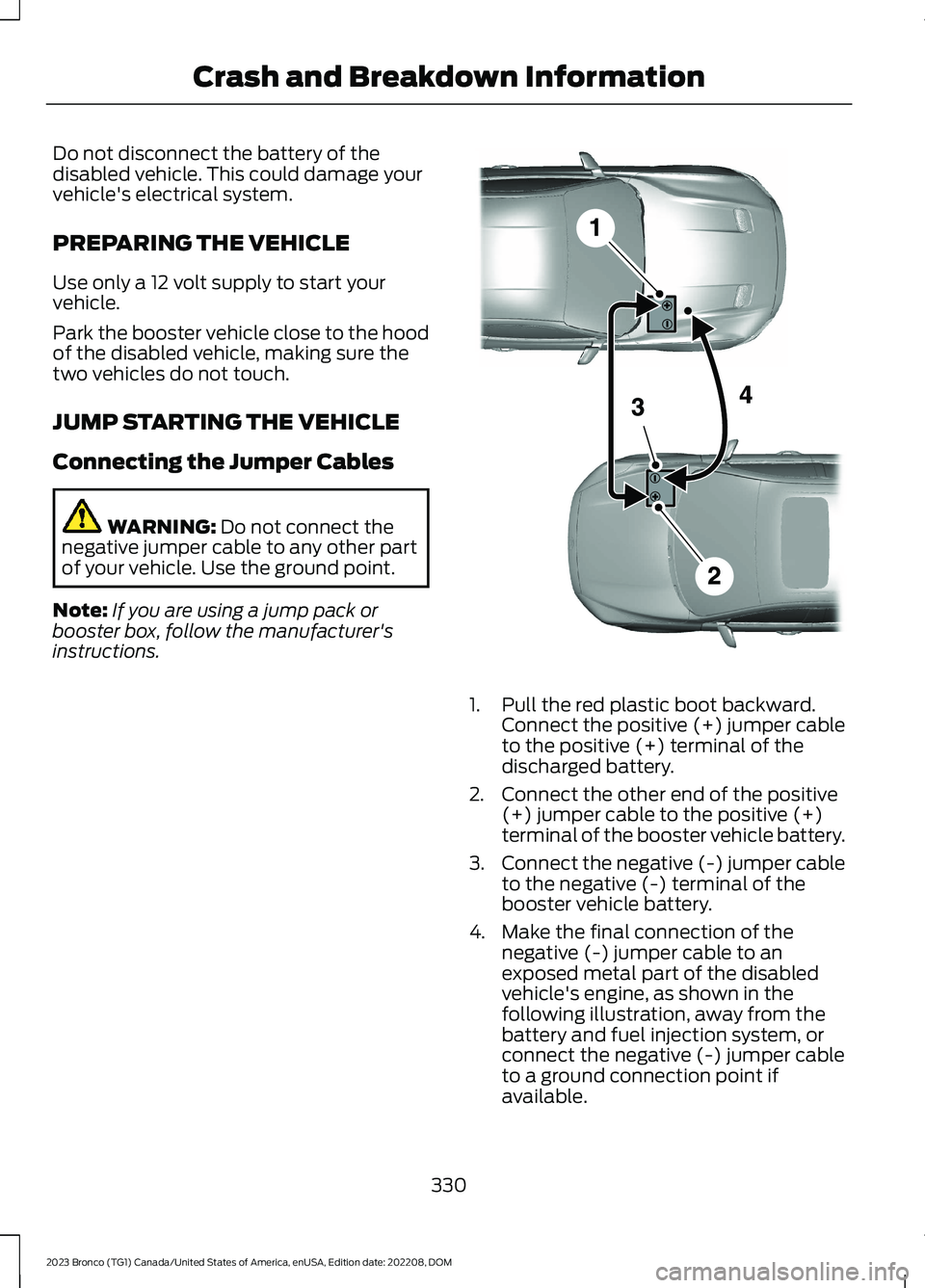
1.Pull the red plastic boot backward.Connect the positive (+) jumper cableto the positive (+) terminal of thedischarged battery.
2.Connect the other end of the positive(+) jumper cable to the positive (+)terminal of the booster vehicle battery.
3.Connect the negative (-) jumper cableto the negative (-) terminal of thebooster vehicle battery.
4.Make the final connection of thenegative (-) jumper cable to anexposed metal part of the disabledvehicle's engine, as shown in thefollowing illustration, away from thebattery and fuel injection system, orconnect the negative (-) jumper cableto a ground connection point ifavailable.
330
2023 Bronco (TG1) Canada/United States of America, enUSA, Edition date: 202208, DOMCrash and Breakdown InformationE281345
Page 335 of 642
Starting the Engine
1.Start the engine of the booster vehicleand moderately rev the engine, orgently press the accelerator to keepthe engine speed between 2000 and3000 RPM, as shown in yourtachometer.
2.Start the engine of the disabled vehicle.
3.Once you start the disabled vehicle, runboth vehicle engines for an additionalthree minutes before disconnecting thejumper cables.
Removing the Jumper Cables
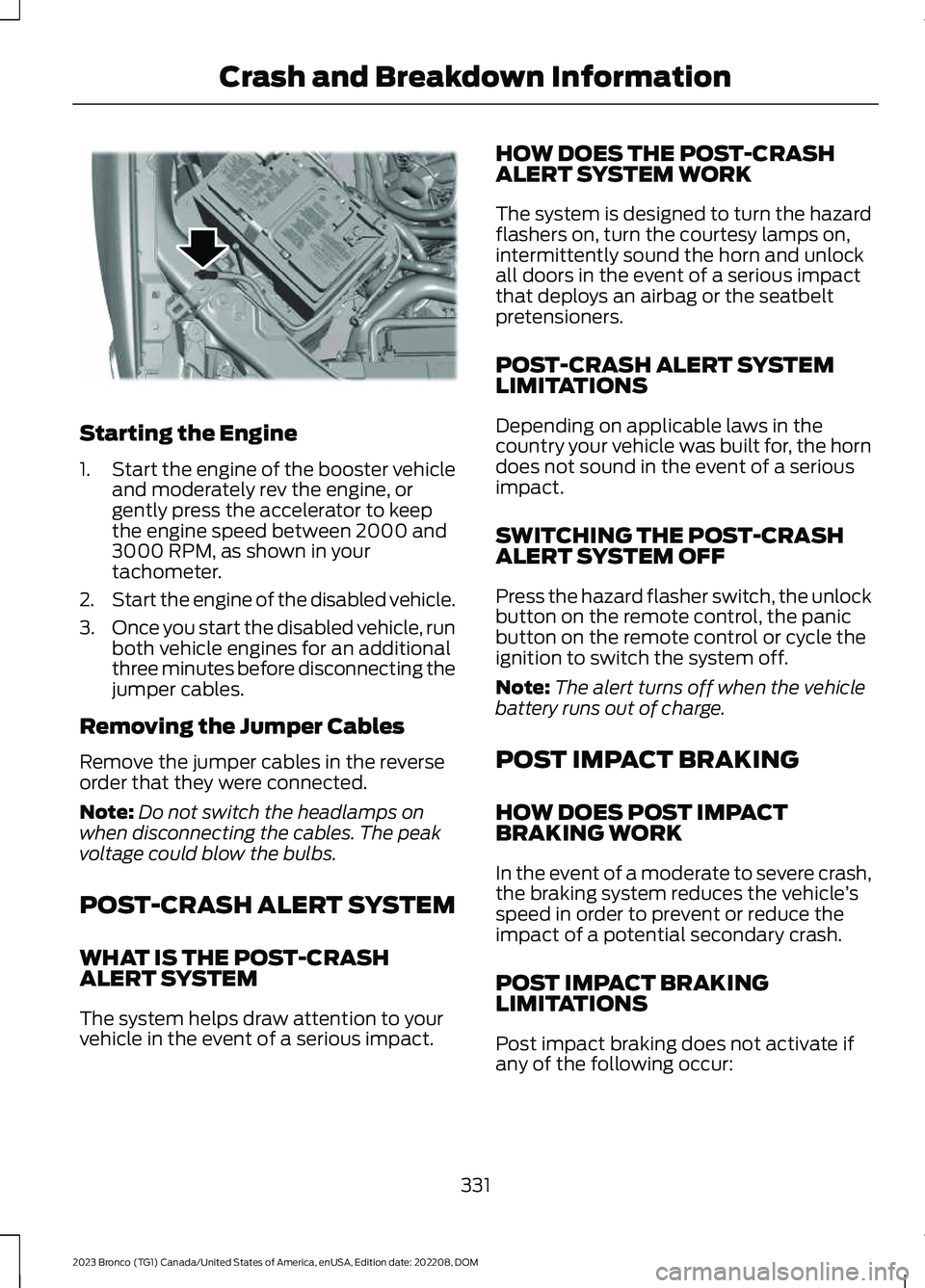
Remove the jumper cables in the reverseorder that they were connected.
Note:Do not switch the headlamps onwhen disconnecting the cables. The peakvoltage could blow the bulbs.
POST-CRASH ALERT SYSTEM
WHAT IS THE POST-CRASHALERT SYSTEM
The system helps draw attention to yourvehicle in the event of a serious impact.
HOW DOES THE POST-CRASHALERT SYSTEM WORK
The system is designed to turn the hazardflashers on, turn the courtesy lamps on,intermittently sound the horn and unlockall doors in the event of a serious impactthat deploys an airbag or the seatbeltpretensioners.
POST-CRASH ALERT SYSTEMLIMITATIONS
Depending on applicable laws in thecountry your vehicle was built for, the horndoes not sound in the event of a seriousimpact.
SWITCHING THE POST-CRASHALERT SYSTEM OFF
Press the hazard flasher switch, the unlockbutton on the remote control, the panicbutton on the remote control or cycle theignition to switch the system off.
Note:The alert turns off when the vehiclebattery runs out of charge.
POST IMPACT BRAKING
HOW DOES POST IMPACTBRAKING WORK
In the event of a moderate to severe crash,the braking system reduces the vehicle’sspeed in order to prevent or reduce theimpact of a potential secondary crash.
POST IMPACT BRAKINGLIMITATIONS
Post impact braking does not activate ifany of the following occur:
331
2023 Bronco (TG1) Canada/United States of America, enUSA, Edition date: 202208, DOMCrash and Breakdown InformationE309115
Page 369 of 642
DetailsMessage
The battery management system determines that the 12Vbattery is at a low state of charge. Start the engine to chargethe battery or charge the battery using an aftermarket batterycharger. Always use the vehicle ground point when connectingthe negative cable of the external battery charger. See JumpStarting the Vehicle (page 330). This message clears onceyou restart your vehicle and the battery state of charge hasrecovered. Do not switch on the ignition when a batterycharger is in use to charge the battery.
Battery State of ChargeLow
The battery management system determines that the batteryis at a low state of charge. Turn the ignition off as soon aspossible to protect the battery. This message will clear oncethe vehicle has been started and the battery state of chargehas recovered. Turning off unnecessary electrical loads willallow faster battery state-of-charge recovery.
Turn Power Off To SaveBattery
Displayed when the battery management system detects anextended low-voltage condition. Various vehicle features willbe disabled to help preserve the battery. Turn off as many ofthe electrical loads as soon as possible to improve systemvoltage. If the system voltage has recovered, the disabledfeatures will operate again as normal.
Electrical Power SaverActive Some FeaturesTurned Off See Manual
ADJUSTING THE HEADLAMPS
Vertical Aim Adjustment
The headlamps on your vehicle areproperly aimed at the assembly plant. Ifyour vehicle has been in an accident,contact an authorized dealer to have yourvehicle headlamps checked for properalignment.
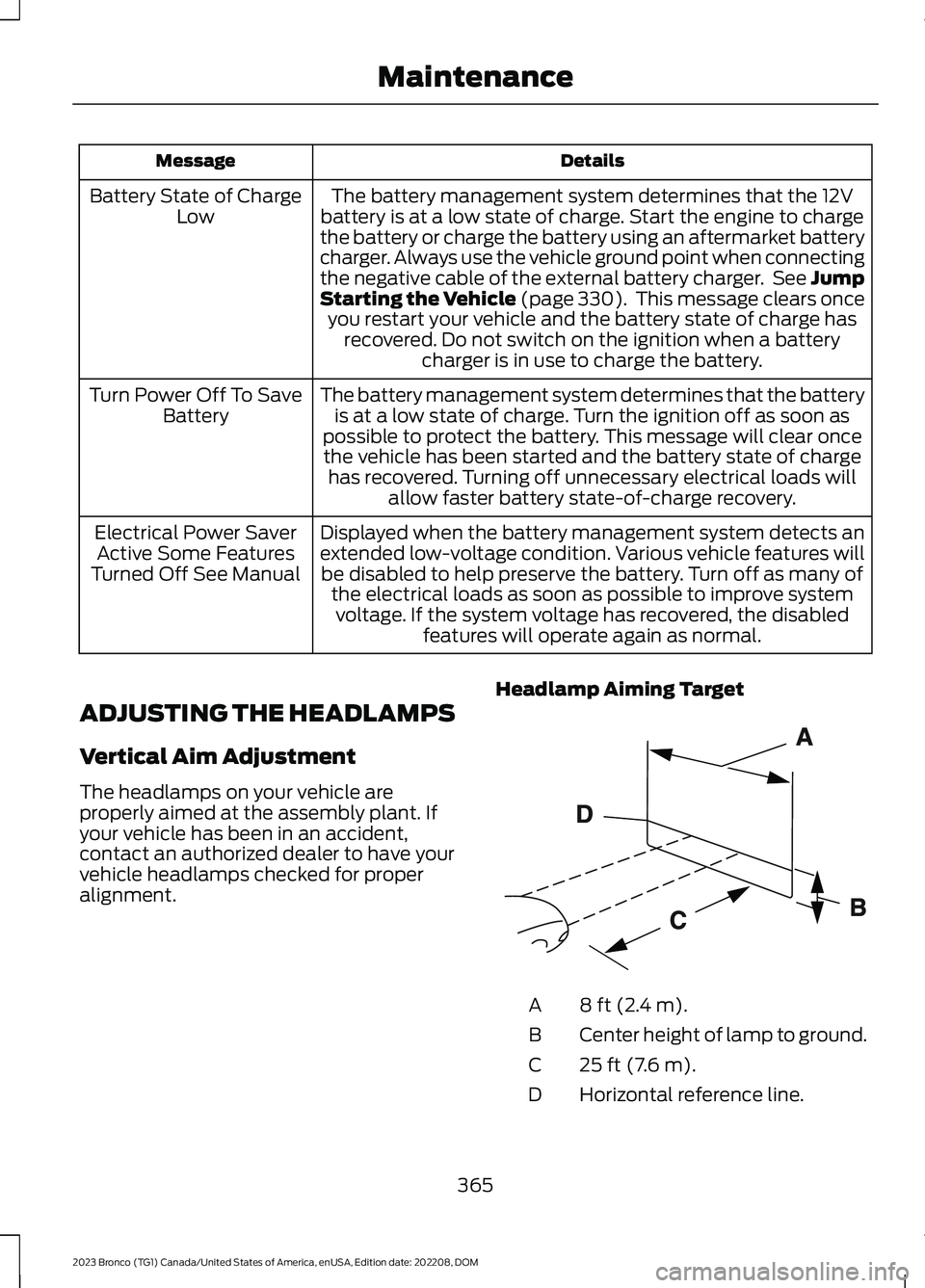
Headlamp Aiming Target
8 ft (2.4 m).A
Center height of lamp to ground.B
25 ft (7.6 m).C
Horizontal reference line.D
365
2023 Bronco (TG1) Canada/United States of America, enUSA, Edition date: 202208, DOMMaintenanceE142592
Page 530 of 642
WHAT IS FORD PROTECT
Protect yourself from the rising cost ofvehicle repairs with a Ford Protectextended service plan.
Ford Protect Extended ServicePlans - United States Only
Ford Protect extended service plans meanpeace of mind. Extended service plans arebacked by Ford Motor Company, andprovide more protection beyond the NewVehicle Limited Warranty coverage. Whenyou visit your Ford Dealer, insist on the FordProtect extended service plan.
Ford Protect Can Quickly Pay for Itself
One trip to the service center could easilyexceed the price of your Ford Protectextended service plan. With the FordProtect extended service plan, youminimize your risk for unexpected repairbills and rising repair costs.
Up to 1,000+ Covered VehicleComponents
There are four mechanical Ford Protectextended service plans with different levelsof coverage. Ask your authorized dealer fordetails.
1.PremiumCARE - Our mostcomprehensive coverage. With over1,000 covered components, this planis so complete it is probably easier tolist what is not covered.
2.ExtraCARE - Covers 113 components,and includes many high-tech items.
3.BaseCARE - Covers 84 components.
4.PowertrainCARE - Covers 29 criticalcomponents.
Ford Protect extended service plans arehonored by all authorized Ford dealers inthe United States, Canada and Mexico.
That means you get:
•Reliable, quality service at any Ford orLincoln dealership.
•Repairs performed by factory trainedtechnicians, using genuine parts.
Rental Car Reimbursement
First Day Rental Benefit
If you bring your car into your dealer forservice, we will give you a rental vehicle touse for the day.
Extended Rental Benefits
If your vehicle is kept overnight for coveredrepairs, you are eligible for rental carcoverage, warranty repairs, and fieldservice actions.
Roadside Assistance
Exclusive 24/7 roadside assistance,including:
•Towing, flat-tire change and batteryjump starts.
•Out of fuel and lock-out assistance.
•Travel expense reimbursement forlodging, meals and rental car.
•Assistance for taxi, shuttle, rental carcoverage or other transportation.
Transferable Coverage
If you sell your vehicle before your FordProtect extended service plan coverageexpires, you can transfer any remainingcoverage to the new owner. This shouldgive you and your potential buyer peace ofmind.
526
2023 Bronco (TG1) Canada/United States of America, enUSA, Edition date: 202208, DOMFord Protect
Page 623 of 642
Closing the Tailgate.......................................93Closing the Tailgate From Outside YourVehicle.................................................................93Clutch Fluid Capacity andSpecification...............................................188Cold Weather Precautions.......................326Connected Navigation................................514Connected Vehicle......................................483Connected Vehicle –Troubleshooting...........................................484Connecting the Vehicle to a MobileNetwork............................................................483Connected Vehicle Data..............................25Connected Vehicle Limitations..............483Connected Vehicle Requirements........483Connected Vehicle –Troubleshooting.......................................484Connected Vehicle – Frequently AskedQuestions........................................................484Connecting a Bluetooth® Device...........510Connecting a Trailer...................................305Connecting a Trailer –Troubleshooting...........................................306Connecting a Trailer Precautions..........305Connecting a Trailer –Troubleshooting.......................................306Connecting a Trailer – InformationMessages........................................................306Connecting the Vehicle to a MobileNetwork.......................................................483Connecting FordPass to the Modem.........483Enabling and Disabling the Modem...........483What Is the Modem..........................................483Connecting the Vehicle to a Wi-FiNetwork.......................................................483Connecting Your Phone............................505Contacting Us...................................................16Cooling System Capacity andSpecification - 2.3L EcoBoost™.........472Cooling System Capacity andSpecification - 2.7L EcoBoost™/3.0LEcoBoost™.................................................473Crash and BreakdownInformation.................................................328Automatic Crash Shutoff................................332Jump Starting the Vehicle..............................329Post-Crash Alert System.................................331Post Impact Braking..........................................331
Recovery Towing................................................332Crash Sensors and Airbag Indicator........75Crawler Gear..................................................186Using Crawler Gear............................................186What Is Crawler Gear........................................186Creating a MyKey...........................................85Creating a Vehicle Wi-Fi Hotspot.........486Cross Traffic Alert........................................283Cross Traffic Alert –Troubleshooting............................................285Cross Traffic Alert Indicators...................284Cross Traffic Alert Limitations................283Cross Traffic Alert Precautions...............283Cross Traffic Alert –Troubleshooting........................................285Cross Traffic Alert – InformationMessages.........................................................285Cruise Control...............................................250Cruise Control Indicators...........................251Customer Information...............................538Radio Frequency CertificationLabels................................................................542Customizing the Instrument ClusterDisplay............................................................127
D
Data Privacy.....................................................23Department of Transportation UniformTire Quality Grades..................................430Digital Radio...................................................491Digital Radio Indicators...................................492Digital Radio Limitations.................................491How Does Digital Radio Work.......................491Switching Digital Radio Reception On andOff......................................................................492What Is Digital Radio........................................491Directing the Flow of Air.............................132Disposing of Airbags.....................................76Distance Indication.....................................289Distance Indication Indicator........................290Switching Distance Indication On andOff......................................................................290What Is Distance Indication..........................289Doors and Locks.............................................88Autolock..................................................................89Autounlock.............................................................88Doors and Locks – Troubleshooting.............89
619
2023 Bronco (TG1) Canada/United States of America, enUSA, Edition date: 202208, DOMIndex