battery FORD BRONCO SPORT 2021 User Guide
[x] Cancel search | Manufacturer: FORD, Model Year: 2021, Model line: BRONCO SPORT, Model: FORD BRONCO SPORT 2021Pages: 471, PDF Size: 7 MB
Page 70 of 471
The lamps turn off if all the doors remain
closed and:
•
Twenty-five seconds have elapsed.
• You lock your vehicle from the outside.
Battery Saver
If you leave the courtesy lamps, interior
lamps or headlamps on, the battery saver
shuts them off 10 minutes after you switch
the ignition off.
Accessory Mode Battery Saver for
Passive Keys (If Equipped)
If you leave the ignition on after leaving
your vehicle, it turns off 15 minutes after
you close all of the doors.
KEYLESS ENTRY (IF EQUIPPED)
SECURICODE™ KEYLESS ENTRY
KEYPAD
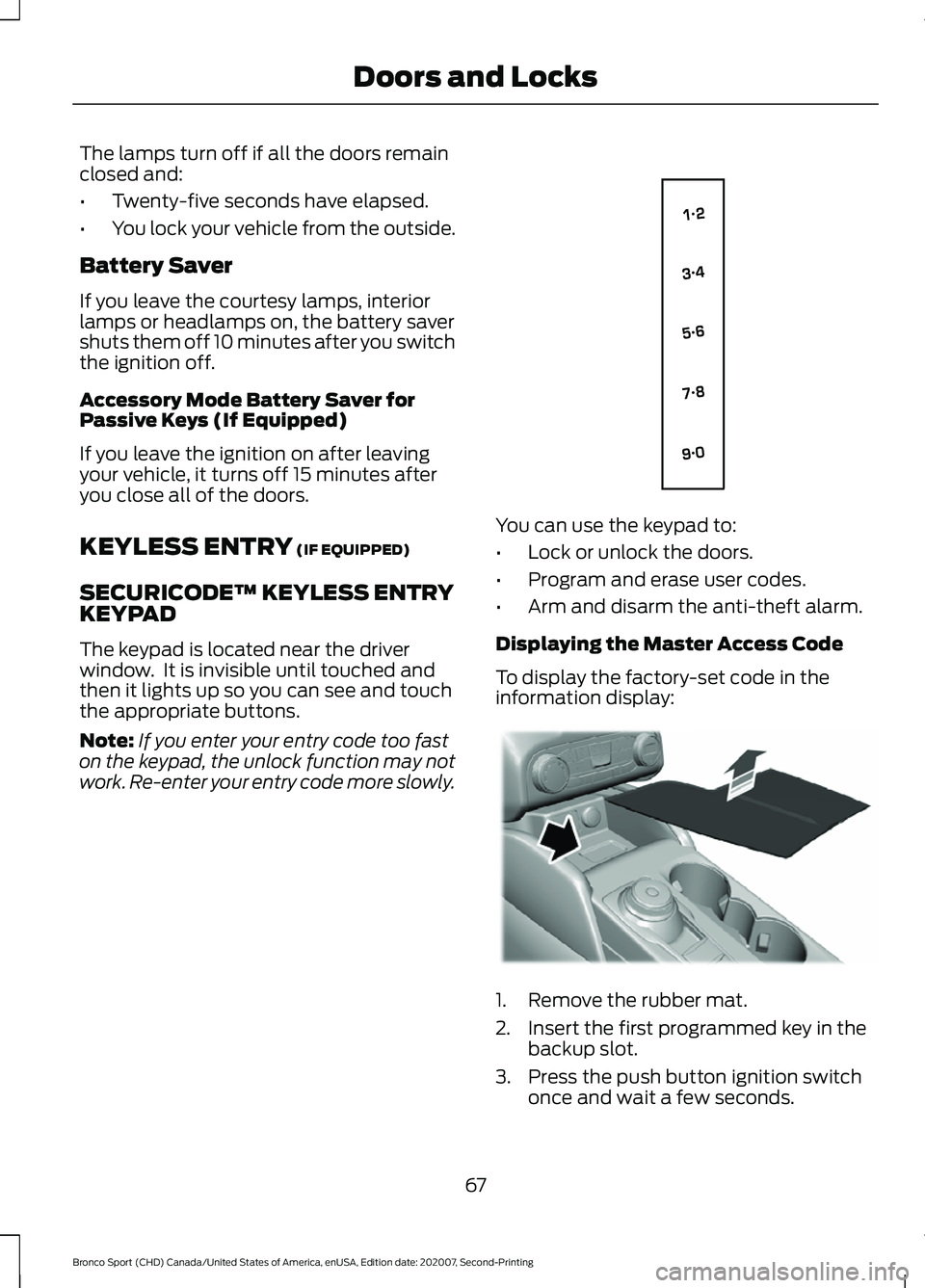
The keypad is located near the driver
window. It is invisible until touched and
then it lights up so you can see and touch
the appropriate buttons.
Note: If you enter your entry code too fast
on the keypad, the unlock function may not
work. Re-enter your entry code more slowly. You can use the keypad to:
•
Lock or unlock the doors.
• Program and erase user codes.
• Arm and disarm the anti-theft alarm.
Displaying the Master Access Code
To display the factory-set code in the
information display: 1. Remove the rubber mat.
2. Insert the first programmed key in the
backup slot.
3. Press the push button ignition switch once and wait a few seconds.
67
Bronco Sport (CHD) Canada/United States of America, enUSA, Edition date: 202007, Second-Printing Doors and LocksE138637 E306769
Page 91 of 471
POWER WINDOWS
WARNING: Do not leave children
unattended in your vehicle and do not
let them play with the power windows.
Failure to follow this instruction could
result in personal injury. WARNING:
When closing the
power windows, verify they are free of
obstruction and make sure that children
and pets are not in the proximity of the
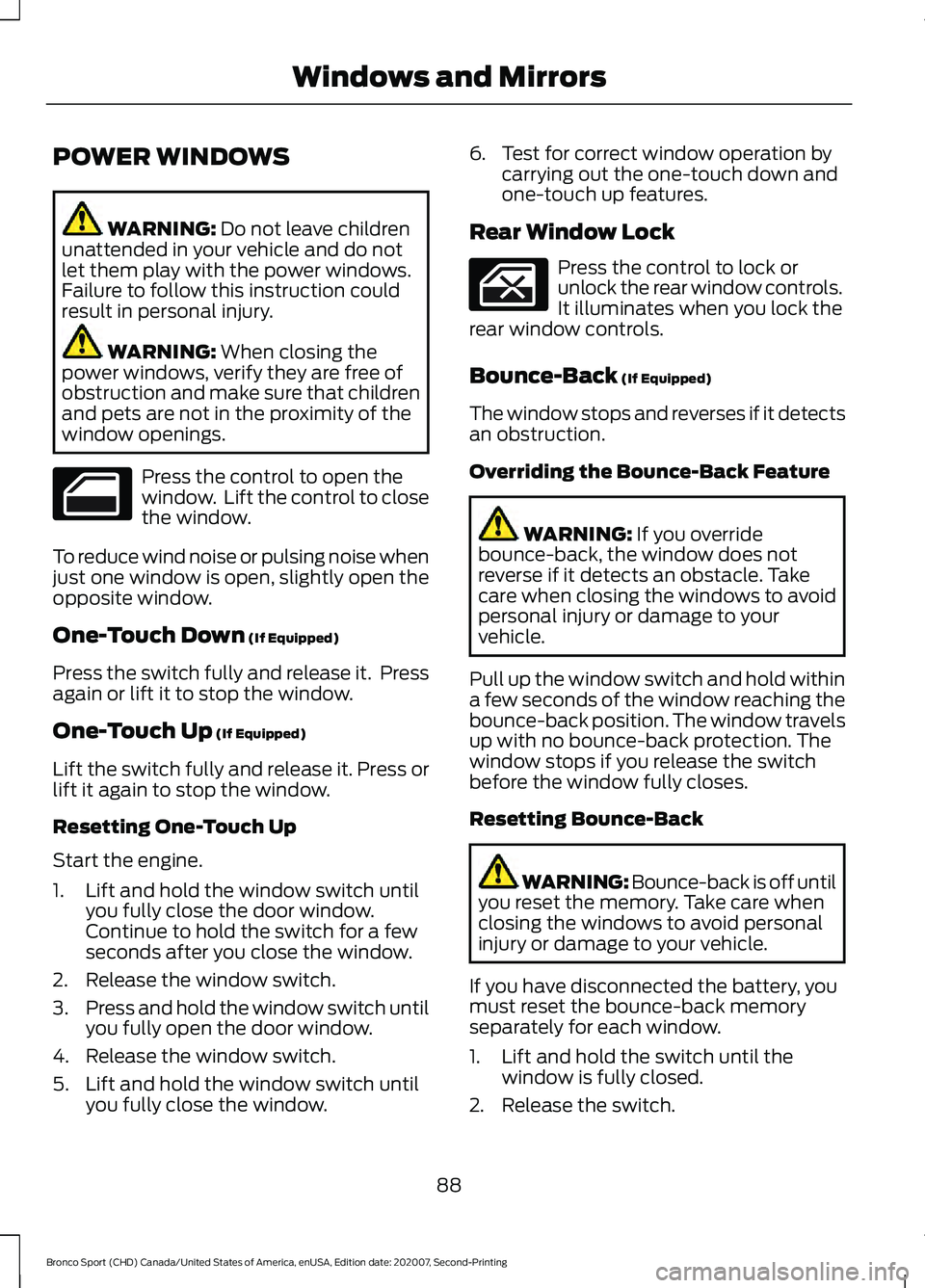
window openings. Press the control to open the
window. Lift the control to close
the window.
To reduce wind noise or pulsing noise when
just one window is open, slightly open the
opposite window.
One-Touch Down
(If Equipped)
Press the switch fully and release it. Press
again or lift it to stop the window.
One-Touch Up
(If Equipped)
Lift the switch fully and release it. Press or
lift it again to stop the window.
Resetting One-Touch Up
Start the engine.
1. Lift and hold the window switch until you fully close the door window.
Continue to hold the switch for a few
seconds after you close the window.
2. Release the window switch.
3. Press and hold the window switch until
you fully open the door window.
4. Release the window switch.
5. Lift and hold the window switch until you fully close the window. 6. Test for correct window operation by
carrying out the one-touch down and
one-touch up features.
Rear Window Lock Press the control to lock or
unlock the rear window controls.
It illuminates when you lock the
rear window controls.
Bounce-Back
(If Equipped)
The window stops and reverses if it detects
an obstruction.
Overriding the Bounce-Back Feature WARNING:
If you override
bounce-back, the window does not
reverse if it detects an obstacle. Take
care when closing the windows to avoid
personal injury or damage to your
vehicle.
Pull up the window switch and hold within
a few seconds of the window reaching the
bounce-back position. The window travels
up with no bounce-back protection. The
window stops if you release the switch
before the window fully closes.
Resetting Bounce-Back WARNING: Bounce-back is off until
you reset the memory. Take care when
closing the windows to avoid personal
injury or damage to your vehicle.
If you have disconnected the battery, you
must reset the bounce-back memory
separately for each window.
1. Lift and hold the switch until the window is fully closed.
2. Release the switch.
88
Bronco Sport (CHD) Canada/United States of America, enUSA, Edition date: 202007, Second-Printing Windows and Mirrors
Page 98 of 471
WARNING LAMPS AND
INDICATORS
The following warning lamps and
indicators alert you to a vehicle condition
that may become serious. Some lamps
illuminate when you start your vehicle to
make sure they work. If any lamps remain
on after starting your vehicle, refer to the
respective system warning lamp for further
information.
Note:
Some warning indicators appear in
the information display and function the
same as a warning lamp, but do not display
when you start your vehicle.
Note: Depending on your vehicle options
and instrument cluster type, not all
indicators display or are available.
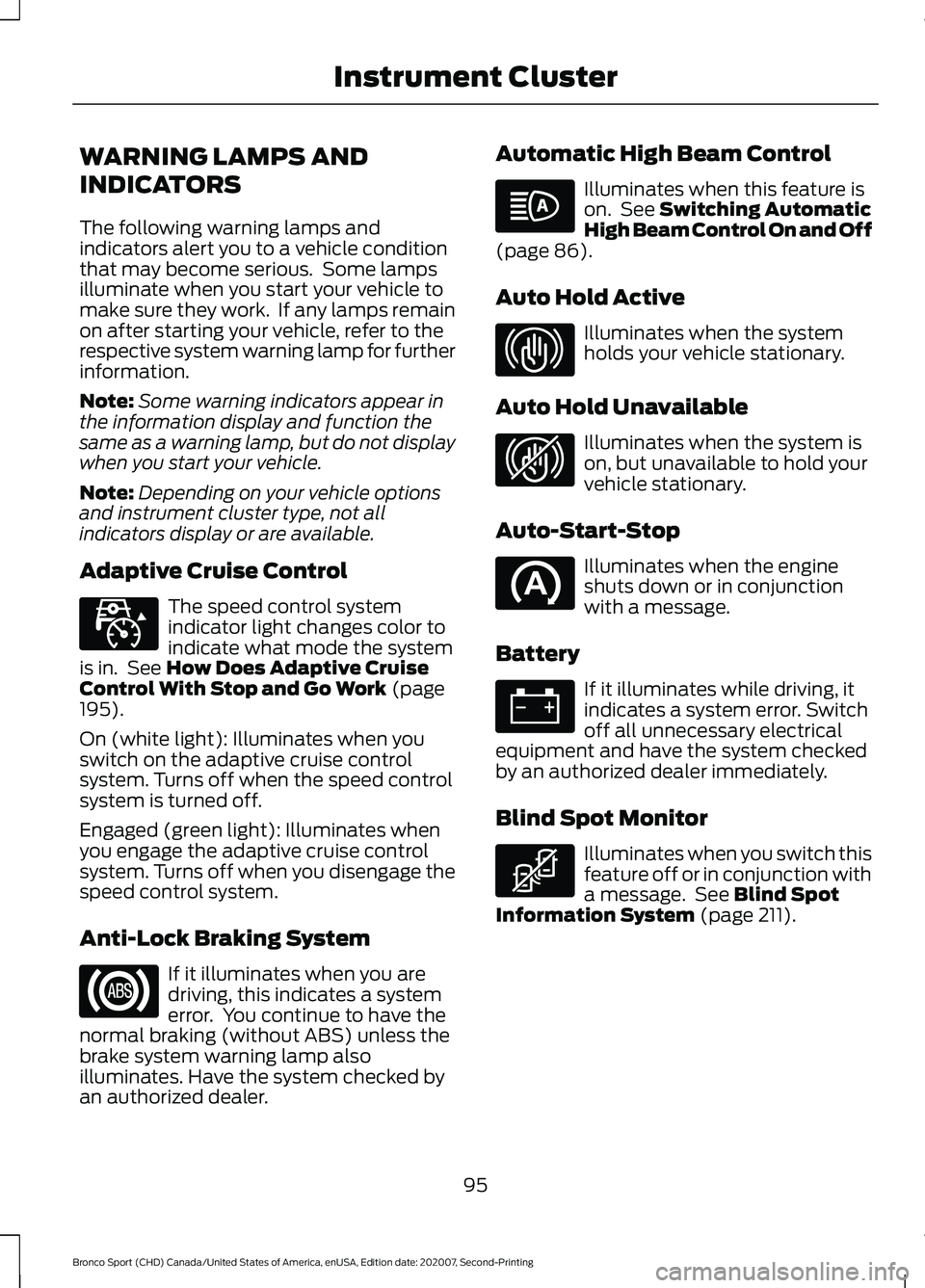
Adaptive Cruise Control The speed control system
indicator light changes color to
indicate what mode the system
is in. See How Does Adaptive Cruise
Control With Stop and Go Work (page
195).
On (white light): Illuminates when you
switch on the adaptive cruise control
system. Turns off when the speed control
system is turned off.
Engaged (green light): Illuminates when
you engage the adaptive cruise control
system. Turns off when you disengage the
speed control system.
Anti-Lock Braking System If it illuminates when you are
driving, this indicates a system
error. You continue to have the
normal braking (without ABS) unless the
brake system warning lamp also
illuminates. Have the system checked by
an authorized dealer. Automatic High Beam Control Illuminates when this feature is
on. See
Switching Automatic
High Beam Control On and Off
(page
86).
Auto Hold Active Illuminates when the system
holds your vehicle stationary.
Auto Hold Unavailable Illuminates when the system is
on, but unavailable to hold your
vehicle stationary.
Auto-Start-Stop Illuminates when the engine
shuts down or in conjunction
with a message.
Battery If it illuminates while driving, it
indicates a system error. Switch
off all unnecessary electrical
equipment and have the system checked
by an authorized dealer immediately.
Blind Spot Monitor Illuminates when you switch this
feature off or in conjunction with
a message. See
Blind Spot
Information System (page 211).
95
Bronco Sport (CHD) Canada/United States of America, enUSA, Edition date: 202007, Second-Printing Instrument ClusterE323440 E323448 E323449 E323450
Page 109 of 471
Action
Message
Select park (P) for the system to restartthe engine.
Auto StartStop Shift to P, then Restart
Engine
The system is not functioning. You need torestart the engine.
Auto StartStop Manual Restart Required
Conditions are not met for the auto-start-stop system to properly function.
Auto StartStop Not Available
Battery and Charging System Action
Message
The charging system needs servicing. If the warning stays on
or continues to come on, contact an authorized dealer as soon as possible.
Check Charging System
The charging system needs servicing. If the warning stays on
or continues to come on, contact an authorized dealer as soon as possible.
Charging System Service
Soon
The charging system needs servicing. Contact an authorized dealer as soon as possible.
Charging System Service
Now
The battery management system determines that the 12V
battery is at a low state of charge. Start the engine to charge
the battery or charge the battery using an aftermarket battery charger. This message clears once you restart your vehicle and the battery state of charge recovers.
Battery State of Charge
Low
The battery management system determines that the batteryis at a low state of charge. Switch the ignition off as soon as
possible to protect the battery. This message clears once you restart your vehicle and the battery state of charge recovers. Turning off unnecessary electrical loads allows for a faster battery state-of-charge recovery.
Turn Power Off To Save
Battery
106
Bronco Sport (CHD) Canada/United States of America, enUSA, Edition date: 202007, Second-Printing Information Displays
Page 113 of 471
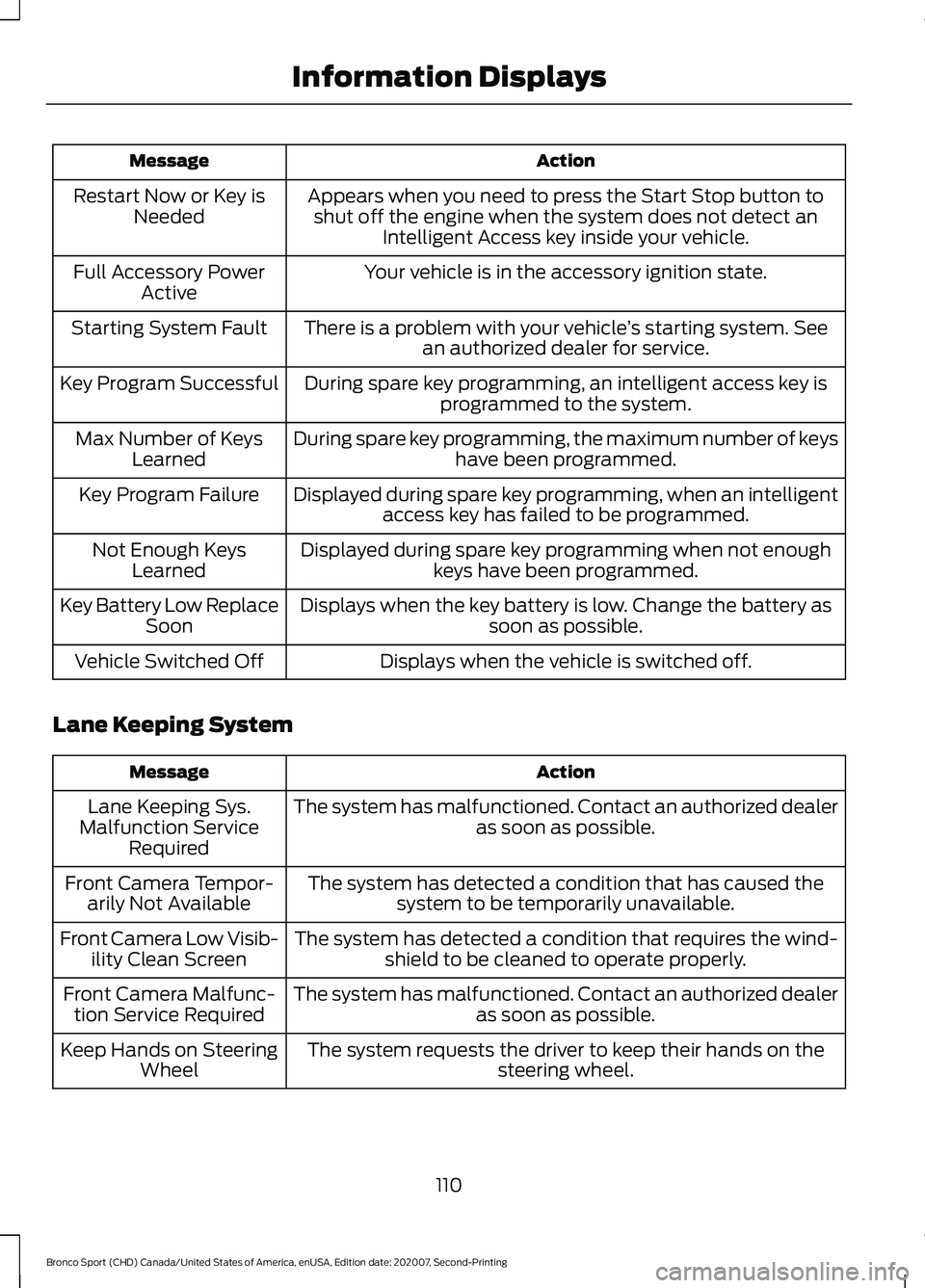
Action
Message
Appears when you need to press the Start Stop button toshut off the engine when the system does not detect an Intelligent Access key inside your vehicle.
Restart Now or Key is
Needed
Your vehicle is in the accessory ignition state.
Full Accessory Power
Active
There is a problem with your vehicle ’s starting system. See
an authorized dealer for service.
Starting System Fault
During spare key programming, an intelligent access key isprogrammed to the system.
Key Program Successful
During spare key programming, the maximum number of keyshave been programmed.
Max Number of Keys
Learned
Displayed during spare key programming, when an intelligentaccess key has failed to be programmed.
Key Program Failure
Displayed during spare key programming when not enoughkeys have been programmed.
Not Enough Keys
Learned
Displays when the key battery is low. Change the battery as soon as possible.
Key Battery Low Replace
Soon
Displays when the vehicle is switched off.
Vehicle Switched Off
Lane Keeping System Action
Message
The system has malfunctioned. Contact an authorized dealer as soon as possible.
Lane Keeping Sys.
Malfunction Service Required
The system has detected a condition that has caused thesystem to be temporarily unavailable.
Front Camera Tempor-
arily Not Available
The system has detected a condition that requires the wind-shield to be cleaned to operate properly.
Front Camera Low Visib-
ility Clean Screen
The system has malfunctioned. Contact an authorized dealeras soon as possible.
Front Camera Malfunc-
tion Service Required
The system requests the driver to keep their hands on thesteering wheel.
Keep Hands on Steering
Wheel
110
Bronco Sport (CHD) Canada/United States of America, enUSA, Edition date: 202007, Second-Printing Information Displays
Page 119 of 471
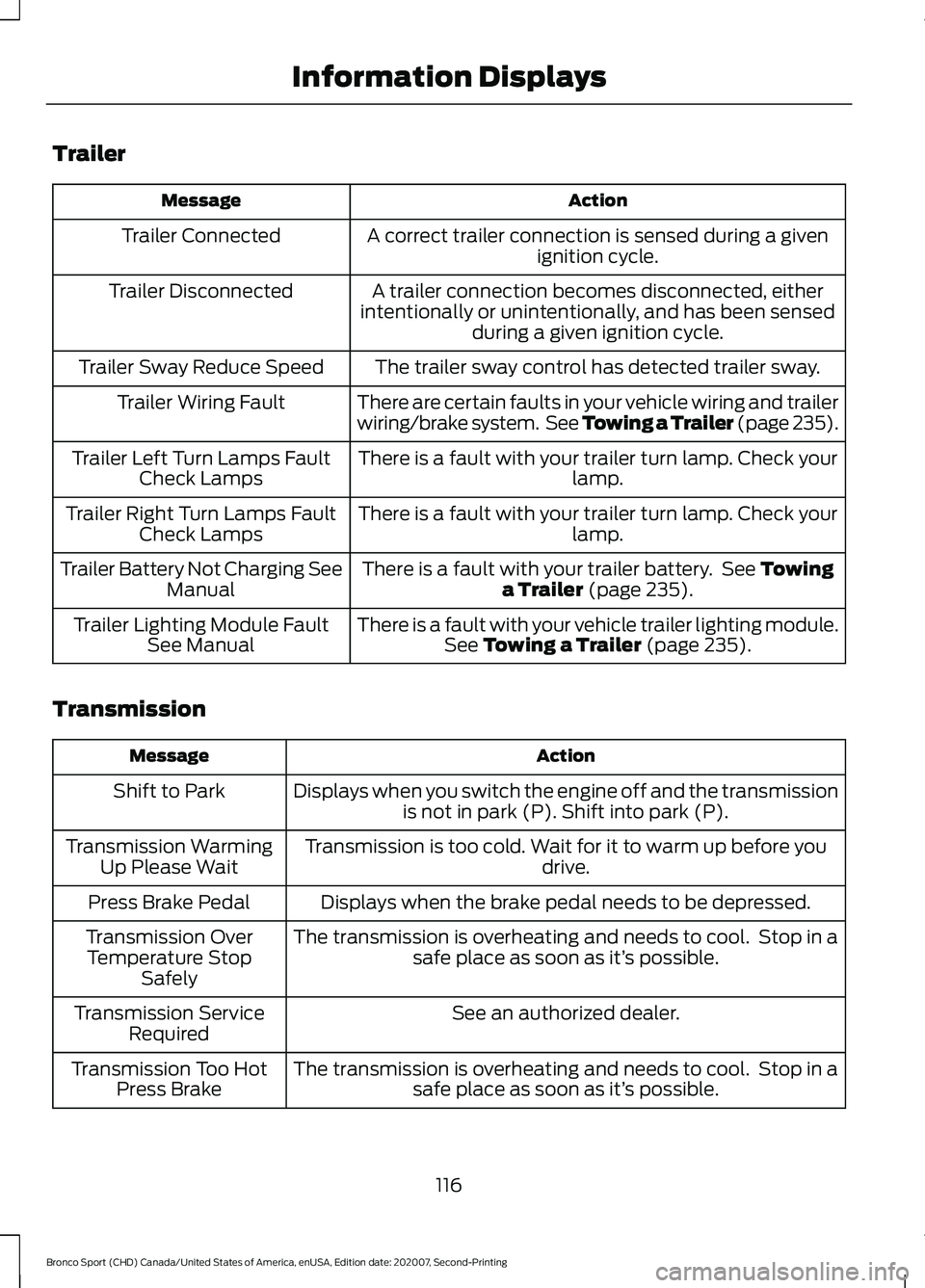
Trailer
Action
Message
A correct trailer connection is sensed during a givenignition cycle.
Trailer Connected
A trailer connection becomes disconnected, either
intentionally or unintentionally, and has been sensed during a given ignition cycle.
Trailer Disconnected
The trailer sway control has detected trailer sway.
Trailer Sway Reduce Speed
There are certain faults in your vehicle wiring and trailer
wiring/brake system. See Towing a Trailer (page 235).
Trailer Wiring Fault
There is a fault with your trailer turn lamp. Check yourlamp.
Trailer Left Turn Lamps Fault
Check Lamps
There is a fault with your trailer turn lamp. Check yourlamp.
Trailer Right Turn Lamps Fault
Check Lamps
There is a fault with your trailer battery. See
Towing
a Trailer (page 235).
Trailer Battery Not Charging See
Manual
There is a fault with your vehicle trailer lighting module.See
Towing a Trailer (page 235).
Trailer Lighting Module Fault
See Manual
Transmission Action
Message
Displays when you switch the engine off and the transmissionis not in park (P). Shift into park (P).
Shift to Park
Transmission is too cold. Wait for it to warm up before you drive.
Transmission Warming
Up Please Wait
Displays when the brake pedal needs to be depressed.
Press Brake Pedal
The transmission is overheating and needs to cool. Stop in asafe place as soon as it’ s possible.
Transmission Over
Temperature Stop Safely
See an authorized dealer.
Transmission Service
Required
The transmission is overheating and needs to cool. Stop in asafe place as soon as it’ s possible.
Transmission Too Hot
Press Brake
116
Bronco Sport (CHD) Canada/United States of America, enUSA, Edition date: 202007, Second-Printing Information Displays
Page 120 of 471
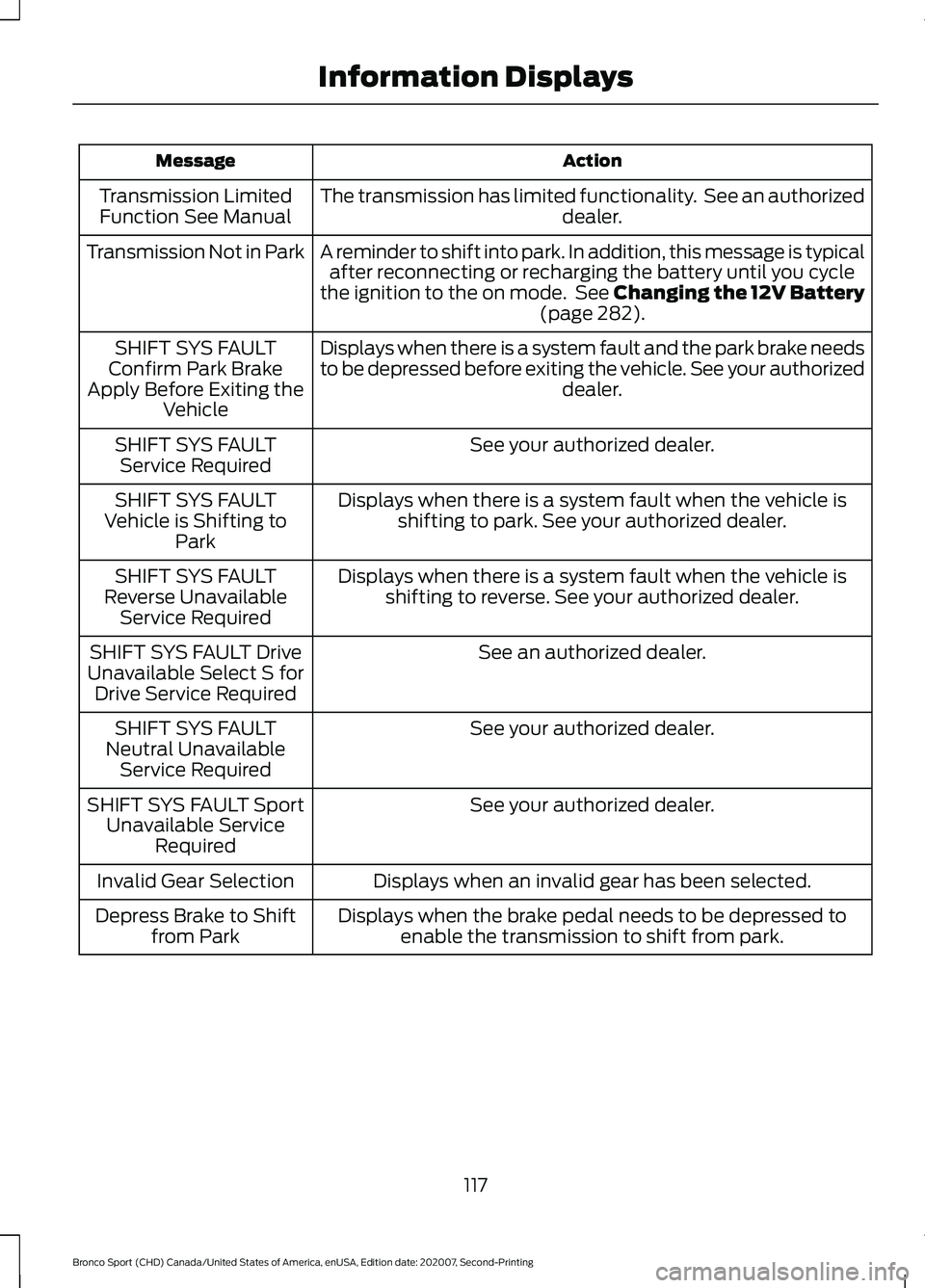
Action
Message
The transmission has limited functionality. See an authorized dealer.
Transmission Limited
Function See Manual
A reminder to shift into park. In addition, this message is typicalafter reconnecting or recharging the battery until you cycle
the ignition to the on mode. See Changing the 12V Battery (page 282).
Transmission Not in Park
Displays when there is a system fault and the park brake needs
to be depressed before exiting the vehicle. See your authorized dealer.
SHIFT SYS FAULT
Confirm Park Brake
Apply Before Exiting the Vehicle
See your authorized dealer.
SHIFT SYS FAULT
Service Required
Displays when there is a system fault when the vehicle isshifting to park. See your authorized dealer.
SHIFT SYS FAULT
Vehicle is Shifting to Park
Displays when there is a system fault when the vehicle isshifting to reverse. See your authorized dealer.
SHIFT SYS FAULT
Reverse Unavailable Service Required
See an authorized dealer.
SHIFT SYS FAULT Drive
Unavailable Select S for Drive Service Required
See your authorized dealer.
SHIFT SYS FAULT
Neutral Unavailable Service Required
See your authorized dealer.
SHIFT SYS FAULT Sport
Unavailable Service Required
Displays when an invalid gear has been selected.
Invalid Gear Selection
Displays when the brake pedal needs to be depressed toenable the transmission to shift from park.
Depress Brake to Shift
from Park
117
Bronco Sport (CHD) Canada/United States of America, enUSA, Edition date: 202007, Second-Printing Information Displays
Page 121 of 471
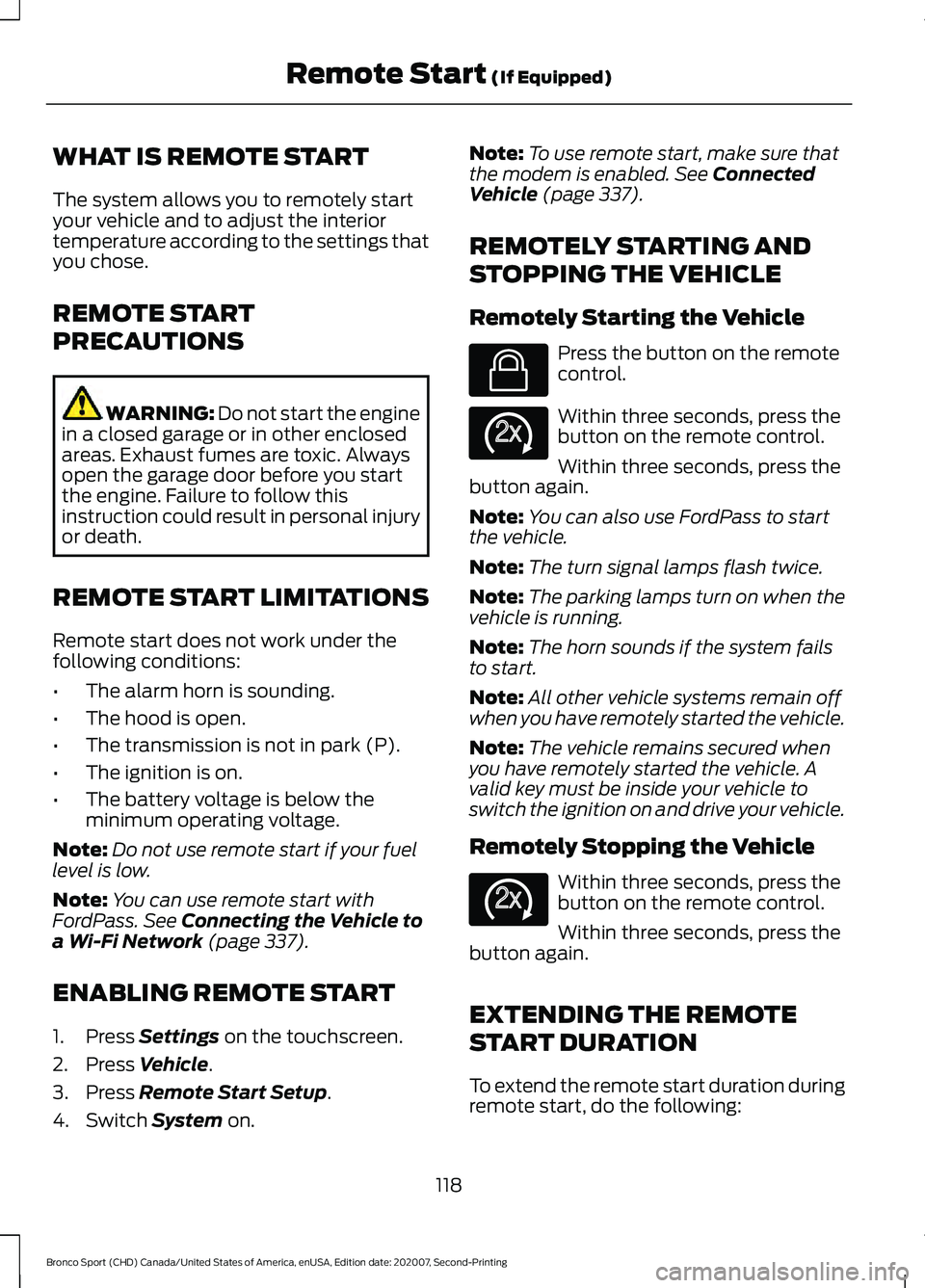
WHAT IS REMOTE START
The system allows you to remotely start
your vehicle and to adjust the interior
temperature according to the settings that
you chose.
REMOTE START
PRECAUTIONS
WARNING: Do not start the engine
in a closed garage or in other enclosed
areas. Exhaust fumes are toxic. Always
open the garage door before you start
the engine. Failure to follow this
instruction could result in personal injury
or death.
REMOTE START LIMITATIONS
Remote start does not work under the
following conditions:
• The alarm horn is sounding.
• The hood is open.
• The transmission is not in park (P).
• The ignition is on.
• The battery voltage is below the
minimum operating voltage.
Note: Do not use remote start if your fuel
level is low.
Note: You can use remote start with
FordPass. See Connecting the Vehicle to
a Wi-Fi Network (page 337).
ENABLING REMOTE START
1. Press
Settings on the touchscreen.
2. Press
Vehicle.
3. Press
Remote Start Setup.
4. Switch
System on. Note:
To use remote start, make sure that
the modem is enabled.
See Connected
Vehicle (page 337).
REMOTELY STARTING AND
STOPPING THE VEHICLE
Remotely Starting the Vehicle Press the button on the remote
control.
Within three seconds, press the
button on the remote control.
Within three seconds, press the
button again.
Note: You can also use FordPass to start
the vehicle.
Note: The turn signal lamps flash twice.
Note: The parking lamps turn on when the
vehicle is running.
Note: The horn sounds if the system fails
to start.
Note: All other vehicle systems remain off
when you have remotely started the vehicle.
Note: The vehicle remains secured when
you have remotely started the vehicle. A
valid key must be inside your vehicle to
switch the ignition on and drive your vehicle.
Remotely Stopping the Vehicle Within three seconds, press the
button on the remote control.
Within three seconds, press the
button again.
EXTENDING THE REMOTE
START DURATION
To extend the remote start duration during
remote start, do the following:
118
Bronco Sport (CHD) Canada/United States of America, enUSA, Edition date: 202007, Second-Printing Remote Start
(If Equipped)E138623 E138625 E138625
Page 145 of 471
WHAT IS THE POWER OUTLET
The power outlet can power devices using
a 12 V outlet adapter.
POWER OUTLET
PRECAUTIONS
When you switch the vehicle on, you can
use the socket to power
12 V appliances
with a maximum current rating of 20 A. Do
not use the power point over the vehicle
capacity of
12 V DC 240 W or a fuse could
blow. Do not plug in any device that
supplies power to the vehicle through the
power points. This could result in damage
to vehicle systems. Do not hang any
accessory from the accessory plug. Always
keep the power point caps closed when
not in use. Do not insert objects other than
an accessory plug into the power point.
To prevent the battery from running out of
charge:
• Do not use the power point longer than
necessary when the vehicle is off.
• Do not leave devices plugged in
overnight or when you park your vehicle
for extended periods.
LOCATING THE POWER
OUTLET
Power outlets are in the following
locations:
• Inside the media bin below the
instrument panel.
• Inside the main center console bin.
• In the cargo area.
142
Bronco Sport (CHD) Canada/United States of America, enUSA, Edition date: 202007, Second-Printing Power Outlet - Vehicles With: 12V Power Outlet
Page 147 of 471
WHAT IS THE WIRELESS
ACCESSORY CHARGER
The wireless accessory charger allows you
to charge one compatible Qi wireless
charging device on the charging area.
WIRELESS ACCESSORY
CHARGER PRECAUTIONS
WARNING: Wireless charging
devices can affect the operation of
implanted medical devices, including
cardiac pacemakers. If you have any
implanted medical devices, we
recommend that you consult with your
physician.
Tests on this equipment show that it
complies with part 18 of the FCC Rules.
• This equipment generates, uses and
can radiate radio frequency energy and
may cause harmful interference to
radio communications. There is no
guarantee that the interference will not
occur in a particular installation. If this
equipment does cause harmful
interference to radio or television
reception, please consult the dealer.
• This product is not end-user
serviceable. WARNING:
Changes or
modifications not expressively approved
by the party responsible for compliance
could void the user's authority to operate
the equipment. The term "IC:" before the
radio certification number only signifies
that Industry Canada technical
specifications were met. This device complies with Industry Canada
licence-exempt RSS standard(s).
Operation is subject to:
•
This device may not cause interference.
• This device must accept any
interference, including interference that
may cause undesired operation of the
device.
Keep the charging area clean and remove
foreign objects prior to charging a device.
Do not place items with a magnetic strip,
for example passports, parking tickets or
credit cards, near the charging area when
charging a device. Damage may occur to
the magnetic strip.
Do not place metal objects, for example
remote controls, coins and candy
wrappers, on or near the charging area
when charging a device. Metal objects may
heat up and degrade the charging
performance, in addition to causing error
messages and interruptions in charging.
Note: During charging, the device and the
charger could heat up, this is normal. If the
battery gets hotter than usual, the device
may stop charging.
LOCATING THE WIRELESS
ACCESSORY CHARGER The charging area is on the
center console or in the media
bin below the instrument panel.
CHARGING A WIRELESS
DEVICE
Place the device on the center of the
charging surface with the charging side
down. The charging stops after your device
reaches a full charge.
144
Bronco Sport (CHD) Canada/United States of America, enUSA, Edition date: 202007, Second-Printing Wireless Accessory Charger
(If Equipped)E297549