panel FORD BRONCO SPORT 2021 User Guide
[x] Cancel search | Manufacturer: FORD, Model Year: 2021, Model line: BRONCO SPORT, Model: FORD BRONCO SPORT 2021Pages: 471, PDF Size: 7 MB
Page 126 of 471
DIRECTING THE FLOW OF AIR
Directing Air to the Windshield Air
Vents
Press the button.
Directing Air to the Instrument
Panel Air Vents Press the button.
Directing Air to the Footwell Air
Vents Press the button.
AUTO MODE
Switching Auto Mode On and Off Press the button to switch auto
mode on. Repeatedly press the
button to adjust auto mode.
Note: When you switch auto mode on,
lights on the blower motor control do not
illuminate to indicate the blower motor
speed.
Adjust the blower motor control or air
distribution control to switch auto mode
off.
Auto Mode Indicators
The indicators are on the Auto Mode
button. Description
Auto Mode Indicator
Status
The blower motor speed is reduced. Use this setting to
minimize the amount of noise from the blower motor. This
setting increases the time taken to cool the interior.
One indicator illumin-
ated.
The blower motor speed is moderate.
Two indicators illumin-
ated.
The blower motor speed is increased. Use this setting to
reduce the time taken to cool the interior. This setting
increases the amount of noise from the blower motor.
Three indicators illumin-
ated.
123
Bronco Sport (CHD) Canada/United States of America, enUSA, Edition date: 202007, Second-Printing Climate Control - Vehicles With: Dual Automatic Temperature
Control (DATC) E244097
Page 127 of 471
Switching Dual Mode On and Off
Press the button.
CLIMATE CONTROL –
TROUBLESHOOTING
Climate Control – Frequently
Asked Questions
Why is the volume of air to the rear
passenger compartment limited ? Objects may obstruct the air direction
to the rear passenger compartment.
Make sure objects have not been
placed under the front seats.
Why is the volume of air from the air
vents reduced? The air intake area at the base of the
windshield could be obstructed. Make
sure the air intake area is free from any
snow, ice or leaves.
What are the recommended settings
for heating the interior? Auto mode on and instrument panel
and side air vents fully open.
How can I quickly heat the interior? Select the highest blower motor
speed, highest temperature and direct
the air to the footwell air vents.
What are the recommended settings
for cooling the interior? Auto mode on.
How can I quickly cool the interior? Switch maximum cooling on, switch
recirculated air on and drive with the
windows open until you feel cold air
through the air vents. How can I reduce the humidity build-up
inside my vehicle?
Do not drive with the system off or
with recirculated air on.
How can I defog the side windows? Switch maximum defrost on.
How can I defog or clear the windshield
of thin ice? Switch maximum defrost on.
Why do I feel air from the footwell air
vents regardless of the air
distribution? This is normal operation. You may feel
a small amount of air from the
footwell air vents regardless of the air
distribution.
What happens if I switch auto mode on
when the outside temperature and
in-vehicle temperature is high? The system temporarily selects
recirculated air to maximize cooling.
What happens if I switch auto mode on
when the outside temperature is low
and the engine is cold? Air is directed to the windshield and
the outer instrument panel air vents.
124
Bronco Sport (CHD) Canada/United States of America, enUSA, Edition date: 202007, Second-Printing Climate Control - Vehicles With: Dual Automatic Temperature
Control (DATC)E265280
Page 128 of 471
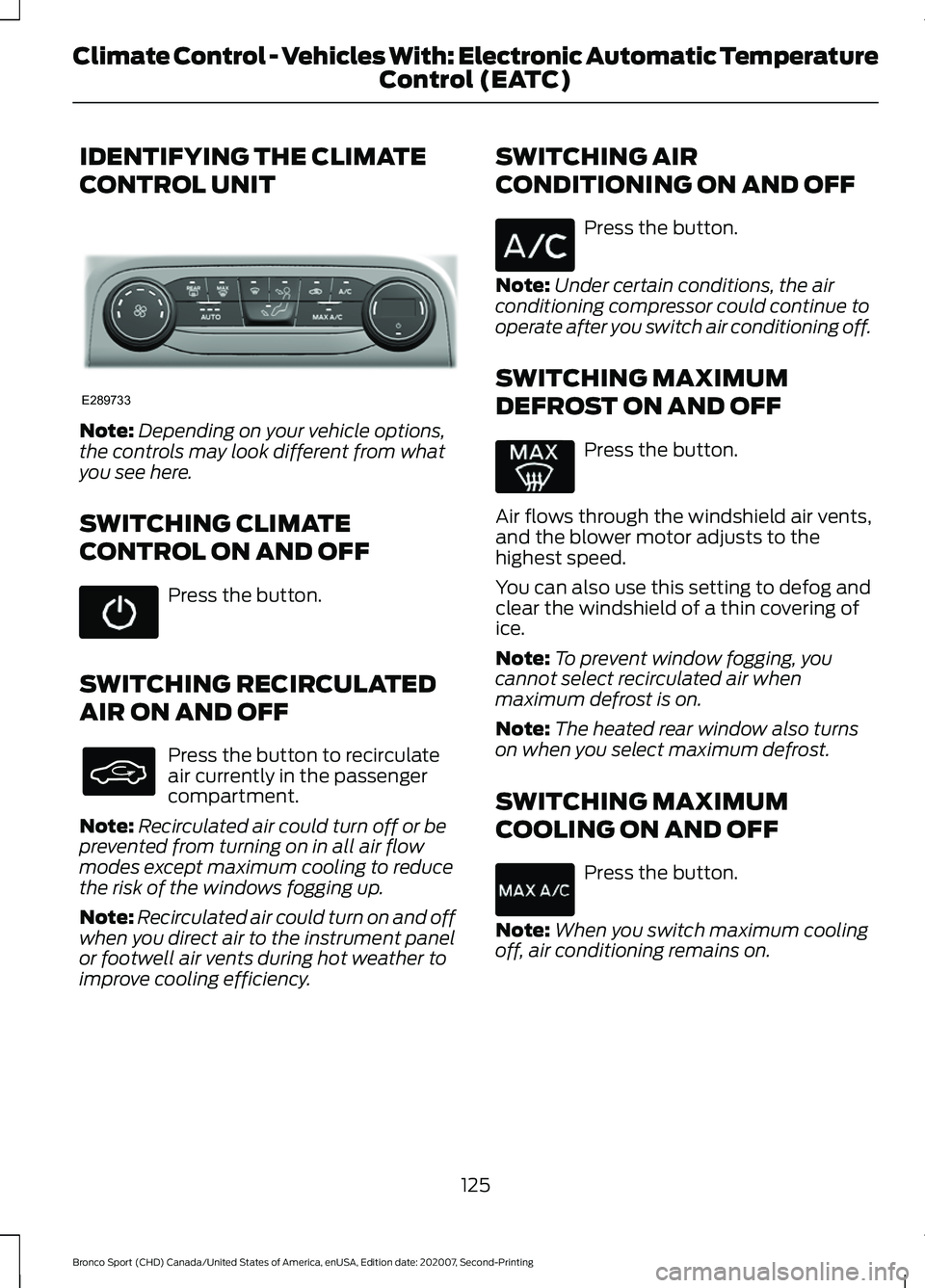
IDENTIFYING THE CLIMATE
CONTROL UNIT
Note:
Depending on your vehicle options,
the controls may look different from what
you see here.
SWITCHING CLIMATE
CONTROL ON AND OFF Press the button.
SWITCHING RECIRCULATED
AIR ON AND OFF Press the button to recirculate
air currently in the passenger
compartment.
Note: Recirculated air could turn off or be
prevented from turning on in all air flow
modes except maximum cooling to reduce
the risk of the windows fogging up.
Note: Recirculated air could turn on and off
when you direct air to the instrument panel
or footwell air vents during hot weather to
improve cooling efficiency. SWITCHING AIR
CONDITIONING ON AND OFF Press the button.
Note: Under certain conditions, the air
conditioning compressor could continue to
operate after you switch air conditioning off.
SWITCHING MAXIMUM
DEFROST ON AND OFF Press the button.
Air flows through the windshield air vents,
and the blower motor adjusts to the
highest speed.
You can also use this setting to defog and
clear the windshield of a thin covering of
ice.
Note: To prevent window fogging, you
cannot select recirculated air when
maximum defrost is on.
Note: The heated rear window also turns
on when you select maximum defrost.
SWITCHING MAXIMUM
COOLING ON AND OFF Press the button.
Note: When you switch maximum cooling
off, air conditioning remains on.
125
Bronco Sport (CHD) Canada/United States of America, enUSA, Edition date: 202007, Second-Printing Climate Control - Vehicles With: Electronic Automatic Temperature Control (EATC)E289733
Page 130 of 471
Turn the temperature control
counterclockwise for cooler temperature
settings.
Turn the temperature control clockwise
for warmer temperature settings.
DIRECTING THE FLOW OF AIR
Directing Air to the Windshield Air
Vents
Press the button.
Directing Air to the Instrument
Panel Air Vents Press the button.
Directing Air to the Footwell Air
Vents Press the button.
AUTO MODE
Switching Auto Mode On and Off Press the button to switch auto
mode on. Repeatedly press the
button to adjust auto mode.
Note: When you switch auto mode on,
lights on the blower motor control do not
illuminate to indicate the blower motor
speed.
Adjust the blower motor control or air
distribution control to switch auto mode
off.
Auto Mode Indicators
The indicators are on the Auto Mode
button. Description
Auto Mode Indicator
Status
The blower motor speed is reduced. Use this setting to
minimize the amount of noise from the blower motor. This
setting increases the time taken to cool the interior.
One indicator illumin-
ated.
The blower motor speed is moderate.
Two indicators illumin-
ated.
The blower motor speed is increased. Use this setting to
reduce the time taken to cool the interior. This setting
increases the amount of noise from the blower motor.
Three indicators illumin-
ated.
127
Bronco Sport (CHD) Canada/United States of America, enUSA, Edition date: 202007, Second-Printing Climate Control - Vehicles With: Electronic Automatic Temperature Control (EATC) E244097
Page 131 of 471
CLIMATE CONTROL –
TROUBLESHOOTING
Climate Control – Frequently
Asked Questions
Why is the volume of air to the rear
passenger compartment limited ?
Objects may obstruct the air direction
to the rear passenger compartment.
Make sure objects have not been
placed under the front seats.
Why is the volume of air from the air
vents reduced? The air intake area at the base of the
windshield could be obstructed. Make
sure the air intake area is free from any
snow, ice or leaves.
What are the recommended settings
for heating the interior? Auto mode on and instrument panel
and side air vents fully open.
How can I quickly heat the interior? Select the highest blower motor
speed, highest temperature and direct
the air to the footwell air vents.
What are the recommended settings
for cooling the interior? Auto mode on.
How can I quickly cool the interior? Switch maximum cooling on, switch
recirculated air on and drive with the
windows open until you feel cold air
through the air vents.
How can I reduce the humidity build-up
inside my vehicle? Do not drive with the system off or
with recirculated air on.
How can I defog the side windows? Switch maximum defrost on. How can I defog or clear the windshield
of thin ice?
Switch maximum defrost on.
Why do I feel air from the footwell air
vents regardless of the air
distribution? This is normal operation. You may feel
a small amount of air from the
footwell air vents regardless of the air
distribution.
What happens if I switch auto mode on
when the outside temperature and
in-vehicle temperature is high? The system temporarily selects
recirculated air to maximize cooling.
What happens if I switch auto mode on
when the outside temperature is low
and the engine is cold? Air is directed to the windshield and
the outer instrument panel air vents.
128
Bronco Sport (CHD) Canada/United States of America, enUSA, Edition date: 202007, Second-Printing Climate Control - Vehicles With: Electronic Automatic Temperature Control (EATC)
Page 132 of 471
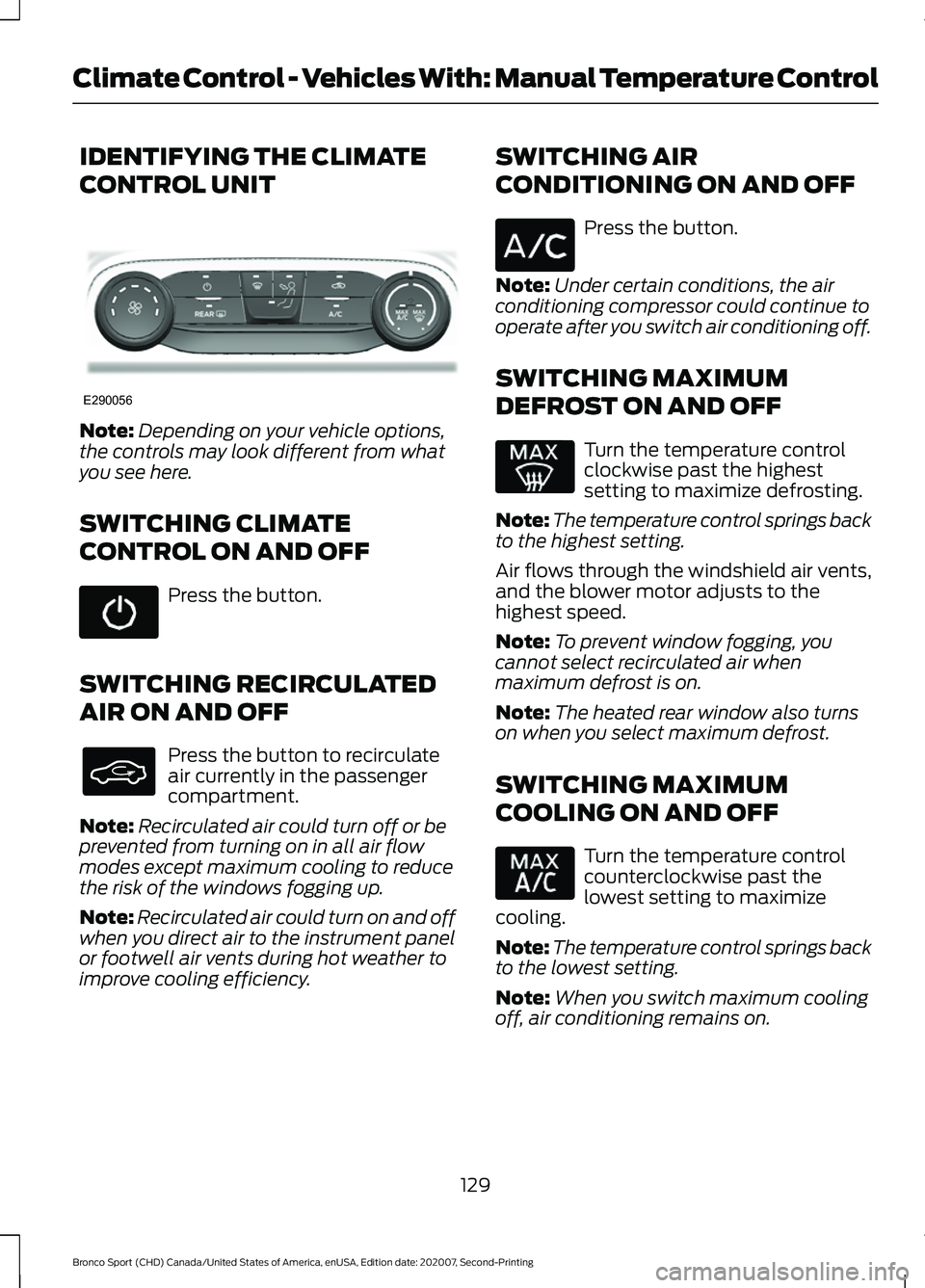
IDENTIFYING THE CLIMATE
CONTROL UNIT
Note:
Depending on your vehicle options,
the controls may look different from what
you see here.
SWITCHING CLIMATE
CONTROL ON AND OFF Press the button.
SWITCHING RECIRCULATED
AIR ON AND OFF Press the button to recirculate
air currently in the passenger
compartment.
Note: Recirculated air could turn off or be
prevented from turning on in all air flow
modes except maximum cooling to reduce
the risk of the windows fogging up.
Note: Recirculated air could turn on and off
when you direct air to the instrument panel
or footwell air vents during hot weather to
improve cooling efficiency. SWITCHING AIR
CONDITIONING ON AND OFF Press the button.
Note: Under certain conditions, the air
conditioning compressor could continue to
operate after you switch air conditioning off.
SWITCHING MAXIMUM
DEFROST ON AND OFF Turn the temperature control
clockwise past the highest
setting to maximize defrosting.
Note: The temperature control springs back
to the highest setting.
Air flows through the windshield air vents,
and the blower motor adjusts to the
highest speed.
Note: To prevent window fogging, you
cannot select recirculated air when
maximum defrost is on.
Note: The heated rear window also turns
on when you select maximum defrost.
SWITCHING MAXIMUM
COOLING ON AND OFF Turn the temperature control
counterclockwise past the
lowest setting to maximize
cooling.
Note: The temperature control springs back
to the lowest setting.
Note: When you switch maximum cooling
off, air conditioning remains on.
129
Bronco Sport (CHD) Canada/United States of America, enUSA, Edition date: 202007, Second-Printing Climate Control - Vehicles With: Manual Temperature ControlE290056
Page 133 of 471
SWITCHING THE HEATED
WIPER PARK ON AND OFF (IF
EQUIPPED) When you switch the heated rear
window on, the heated wiper
park also turns on.
SWITCHING THE HEATED
REAR WINDOW ON AND OFF Press the button to clear the rear
window of thin ice and fog. The
heated rear window turns off
after a short period of time.
Note: Do not use harsh chemicals, razor
blades or other sharp objects to clean or
remove decals from the inside of the heated
rear window as this could cause damage to
the heated rear window grid lines not
covered by the vehicle Warranty.
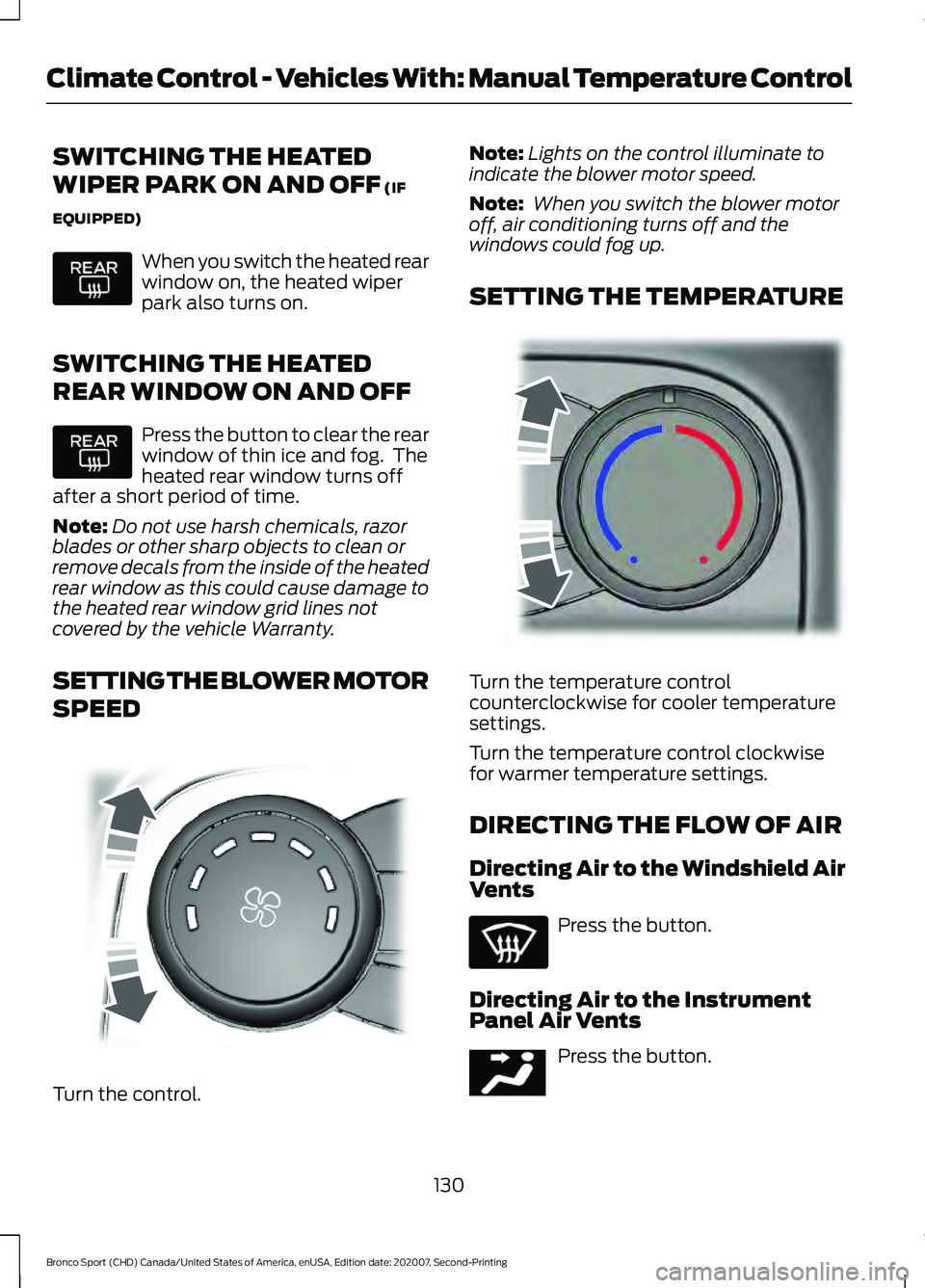
SETTING THE BLOWER MOTOR
SPEED Turn the control. Note:
Lights on the control illuminate to
indicate the blower motor speed.
Note: When you switch the blower motor
off, air conditioning turns off and the
windows could fog up.
SETTING THE TEMPERATURE Turn the temperature control
counterclockwise for cooler temperature
settings.
Turn the temperature control clockwise
for warmer temperature settings.
DIRECTING THE FLOW OF AIR
Directing Air to the Windshield Air
Vents
Press the button.
Directing Air to the Instrument
Panel Air Vents Press the button.
130
Bronco Sport (CHD) Canada/United States of America, enUSA, Edition date: 202007, Second-Printing Climate Control - Vehicles With: Manual Temperature Control E317606 E244106 E244097
Page 145 of 471
WHAT IS THE POWER OUTLET
The power outlet can power devices using
a 12 V outlet adapter.
POWER OUTLET
PRECAUTIONS
When you switch the vehicle on, you can
use the socket to power
12 V appliances
with a maximum current rating of 20 A. Do
not use the power point over the vehicle
capacity of
12 V DC 240 W or a fuse could
blow. Do not plug in any device that
supplies power to the vehicle through the
power points. This could result in damage
to vehicle systems. Do not hang any
accessory from the accessory plug. Always
keep the power point caps closed when
not in use. Do not insert objects other than
an accessory plug into the power point.
To prevent the battery from running out of
charge:
• Do not use the power point longer than
necessary when the vehicle is off.
• Do not leave devices plugged in
overnight or when you park your vehicle
for extended periods.
LOCATING THE POWER
OUTLET
Power outlets are in the following
locations:
• Inside the media bin below the
instrument panel.
• Inside the main center console bin.
• In the cargo area.
142
Bronco Sport (CHD) Canada/United States of America, enUSA, Edition date: 202007, Second-Printing Power Outlet - Vehicles With: 12V Power Outlet
Page 147 of 471
WHAT IS THE WIRELESS
ACCESSORY CHARGER
The wireless accessory charger allows you
to charge one compatible Qi wireless
charging device on the charging area.
WIRELESS ACCESSORY
CHARGER PRECAUTIONS
WARNING: Wireless charging
devices can affect the operation of
implanted medical devices, including
cardiac pacemakers. If you have any
implanted medical devices, we
recommend that you consult with your
physician.
Tests on this equipment show that it
complies with part 18 of the FCC Rules.
• This equipment generates, uses and
can radiate radio frequency energy and
may cause harmful interference to
radio communications. There is no
guarantee that the interference will not
occur in a particular installation. If this
equipment does cause harmful
interference to radio or television
reception, please consult the dealer.
• This product is not end-user
serviceable. WARNING:
Changes or
modifications not expressively approved
by the party responsible for compliance
could void the user's authority to operate
the equipment. The term "IC:" before the
radio certification number only signifies
that Industry Canada technical
specifications were met. This device complies with Industry Canada
licence-exempt RSS standard(s).
Operation is subject to:
•
This device may not cause interference.
• This device must accept any
interference, including interference that
may cause undesired operation of the
device.
Keep the charging area clean and remove
foreign objects prior to charging a device.
Do not place items with a magnetic strip,
for example passports, parking tickets or
credit cards, near the charging area when
charging a device. Damage may occur to
the magnetic strip.
Do not place metal objects, for example
remote controls, coins and candy
wrappers, on or near the charging area
when charging a device. Metal objects may
heat up and degrade the charging
performance, in addition to causing error
messages and interruptions in charging.
Note: During charging, the device and the
charger could heat up, this is normal. If the
battery gets hotter than usual, the device
may stop charging.
LOCATING THE WIRELESS
ACCESSORY CHARGER The charging area is on the
center console or in the media
bin below the instrument panel.
CHARGING A WIRELESS
DEVICE
Place the device on the center of the
charging surface with the charging side
down. The charging stops after your device
reaches a full charge.
144
Bronco Sport (CHD) Canada/United States of America, enUSA, Edition date: 202007, Second-Printing Wireless Accessory Charger
(If Equipped)E297549
Page 157 of 471
•
Your vehicle is moving.
• The interior compartment does not
meet customer comfort when air
conditioning or heat is on.
• Fogging of the windows could occur
and the air conditioning is on.
• The battery is not within optimal
operating conditions.
• You exceed the maximum engine off
time.
• You press the Auto-Start-Stop button
while the engine is stopped.
• The heated windshield is turned on.
Any of the following conditions could result
in an automatic restart of the engine if:
• The blower fan speed increases or the
climate control temperature changes.
• You plug in or switch on an electrical
accessory.
Disabling Auto-Start-Stop
Press the Auto-Start-Stop button on the
instrument panel to switch the system off.
The button illuminates. The system
deactivates for the current ignition cycle
only. Press the button again to restore the
Auto-Start-Stop function.
If your vehicle is in an Auto-Start-Stop
state and you shift the transmission to
reverse without pressing the brake, a
message appears telling you to press the
brake. Press the brake pedal within 60
seconds, or shift into park (P) and
manually restart your vehicle.
Note: If the Shift to P, Restart Engine
message appears and the amber
Auto-Start-Stop indicator light is flashing,
automatic restart is not available. Manually
restart your vehicle. See Information
Displays (page 99).
154
Bronco Sport (CHD) Canada/United States of America, enUSA, Edition date: 202007, Second-Printing Unique Driving Characteristics