remote start FORD BRONCO SPORT 2021 User Guide
[x] Cancel search | Manufacturer: FORD, Model Year: 2021, Model line: BRONCO SPORT, Model: FORD BRONCO SPORT 2021Pages: 471, PDF Size: 7 MB
Page 76 of 471
Take all remote controls to an authorized
dealer if there is any potential alarm
problem with your vehicle.
Arming the Alarm
The alarm is ready to arm when there is
not a key in the ignition. Electronically lock
the vehicle to arm the alarm.
The message indicator flashes
when theft protection is active.
Disarming the Alarm
Disarm the alarm by any of the following
actions:
• Unlock the doors or luggage
compartment with the remote control
or keyless entry keypad.
• Switch the ignition on or start the
vehicle.
• Use a key in the driver ’s door to unlock
the vehicle, then switch the ignition on
within 12 seconds.
Note: Pressing the panic button on the
remote control will stop the horn and signal
indicators, but will not disarm the system.
73
Bronco Sport (CHD) Canada/United States of America, enUSA, Edition date: 202007, Second-Printing Security
Page 92 of 471
3.
Lift and hold the switch again for a few
seconds.
4. Release the switch.
5. Lift and hold the switch again for a few
seconds.
6. Release the switch.
7. Press and hold the switch until the window is fully open.
8. Lift and hold the switch until the window is fully closed.
9. Release the switch.
10. Open the window and then try to close it using one-touch close.
Note: Repeat the procedure if the window
does not close when you use one-touch.
Accessory Delay
You can use the window controls for
several minutes after switching off the
ignition or until opening either front door.
GLOBAL OPENING AND
CLOSING (IF EQUIPPED)
You can use the remote control to open
the windows with the ignition off.
Note: You can enable or disable this feature
in the information display or see an
authorized dealer. See
General
Information (page 99).
Note: To operate this feature, accessory
delay must not be active.
Opening the Windows
You can only open the windows for a short
time after you unlock your vehicle with the
remote control. After you unlock your
vehicle, press and hold the remote control
unlock button to open the windows.
Release the button once movement starts.
Press the lock or unlock button to stop
movement. Closing the Windows WARNING:
When closing the
power windows, verify they are free of
obstruction and make sure that children
and pets are not in the proximity of the
window openings.
To close the windows, press and hold the
remote control lock button. Release the
button once movement starts. Press the
lock or unlock button to stop movement.
EXTERIOR MIRRORS
Power Exterior Mirrors WARNING:
Do not adjust the
mirrors when your vehicle is moving. This
could result in the loss of control of your
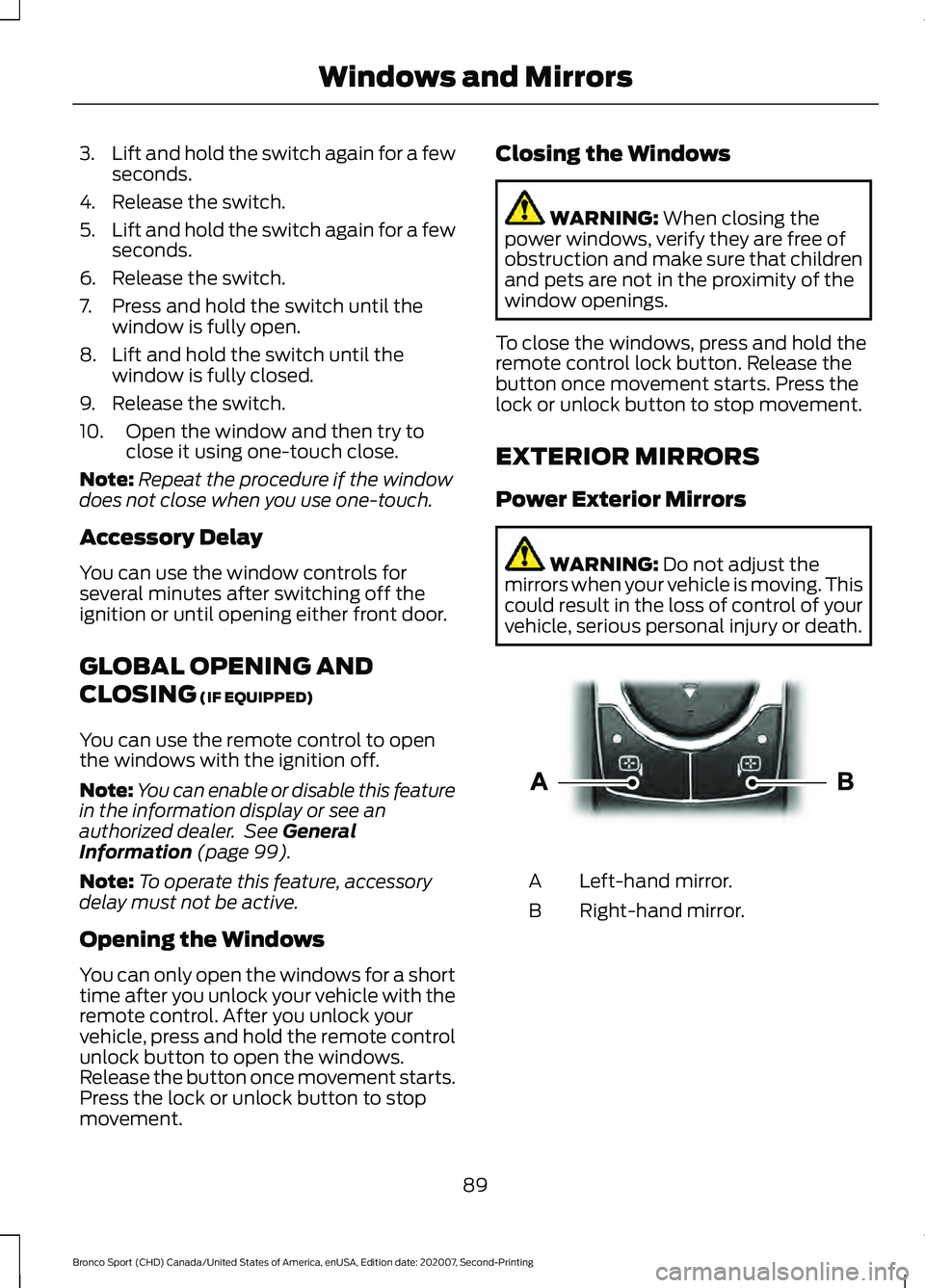
vehicle, serious personal injury or death. Left-hand mirror.
A
Right-hand mirror.
B
89
Bronco Sport (CHD) Canada/United States of America, enUSA, Edition date: 202007, Second-Printing Windows and MirrorsE303926
Page 117 of 471
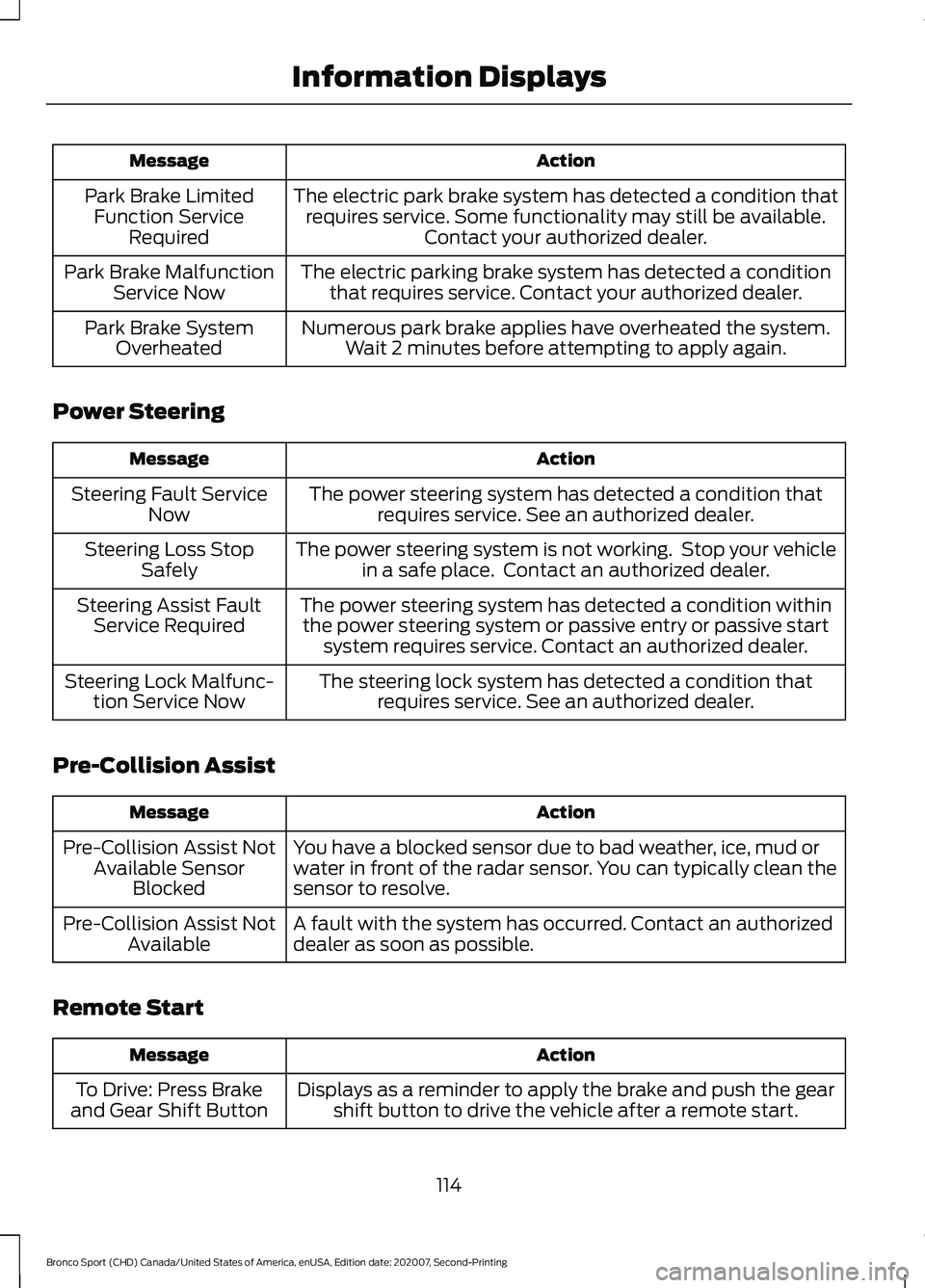
Action
Message
The electric park brake system has detected a condition thatrequires service. Some functionality may still be available. Contact your authorized dealer.
Park Brake Limited
Function Service Required
The electric parking brake system has detected a conditionthat requires service. Contact your authorized dealer.
Park Brake Malfunction
Service Now
Numerous park brake applies have overheated the system.Wait 2 minutes before attempting to apply again.
Park Brake System
Overheated
Power Steering Action
Message
The power steering system has detected a condition thatrequires service. See an authorized dealer.
Steering Fault Service
Now
The power steering system is not working. Stop your vehiclein a safe place. Contact an authorized dealer.
Steering Loss Stop
Safely
The power steering system has detected a condition withinthe power steering system or passive entry or passive start system requires service. Contact an authorized dealer.
Steering Assist Fault
Service Required
The steering lock system has detected a condition thatrequires service. See an authorized dealer.
Steering Lock Malfunc-
tion Service Now
Pre-Collision Assist Action
Message
You have a blocked sensor due to bad weather, ice, mud or
water in front of the radar sensor. You can typically clean the
sensor to resolve.
Pre-Collision Assist Not
Available Sensor Blocked
A fault with the system has occurred. Contact an authorized
dealer as soon as possible.
Pre-Collision Assist Not
Available
Remote Start Action
Message
Displays as a reminder to apply the brake and push the gearshift button to drive the vehicle after a remote start.
To Drive: Press Brake
and Gear Shift Button
114
Bronco Sport (CHD) Canada/United States of America, enUSA, Edition date: 202007, Second-Printing Information Displays
Page 121 of 471
WHAT IS REMOTE START
The system allows you to remotely start
your vehicle and to adjust the interior
temperature according to the settings that
you chose.
REMOTE START
PRECAUTIONS
WARNING: Do not start the engine
in a closed garage or in other enclosed
areas. Exhaust fumes are toxic. Always
open the garage door before you start
the engine. Failure to follow this
instruction could result in personal injury
or death.
REMOTE START LIMITATIONS
Remote start does not work under the
following conditions:
• The alarm horn is sounding.
• The hood is open.
• The transmission is not in park (P).
• The ignition is on.
• The battery voltage is below the
minimum operating voltage.
Note: Do not use remote start if your fuel
level is low.
Note: You can use remote start with
FordPass. See Connecting the Vehicle to
a Wi-Fi Network (page 337).
ENABLING REMOTE START
1. Press
Settings on the touchscreen.
2. Press
Vehicle.
3. Press
Remote Start Setup.
4. Switch
System on. Note:
To use remote start, make sure that
the modem is enabled.
See Connected
Vehicle (page 337).
REMOTELY STARTING AND
STOPPING THE VEHICLE
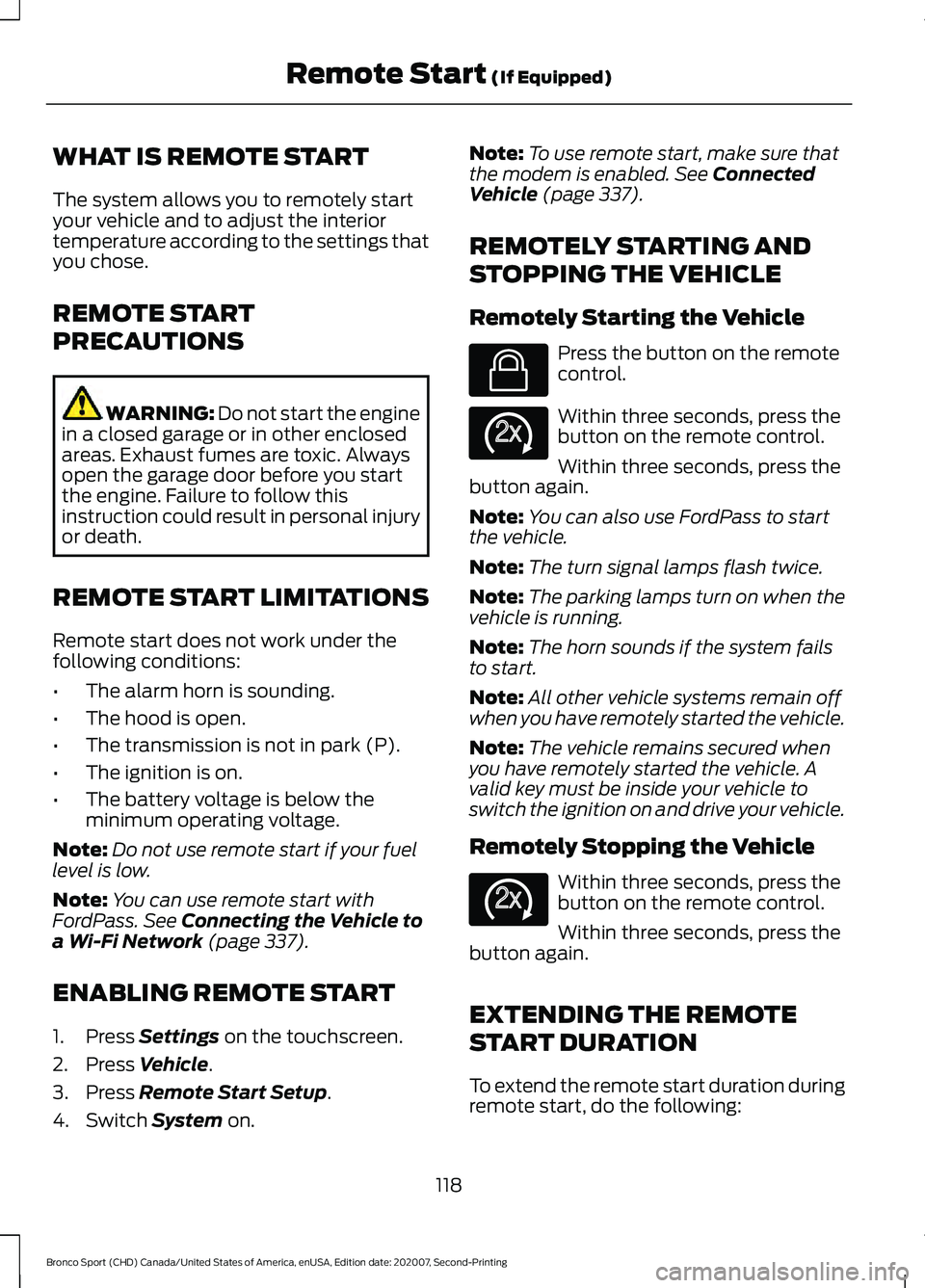
Remotely Starting the Vehicle Press the button on the remote
control.
Within three seconds, press the
button on the remote control.
Within three seconds, press the
button again.
Note: You can also use FordPass to start
the vehicle.
Note: The turn signal lamps flash twice.
Note: The parking lamps turn on when the
vehicle is running.
Note: The horn sounds if the system fails
to start.
Note: All other vehicle systems remain off
when you have remotely started the vehicle.
Note: The vehicle remains secured when
you have remotely started the vehicle. A
valid key must be inside your vehicle to
switch the ignition on and drive your vehicle.
Remotely Stopping the Vehicle Within three seconds, press the
button on the remote control.
Within three seconds, press the
button again.
EXTENDING THE REMOTE
START DURATION
To extend the remote start duration during
remote start, do the following:
118
Bronco Sport (CHD) Canada/United States of America, enUSA, Edition date: 202007, Second-Printing Remote Start
(If Equipped)E138623 E138625 E138625
Page 122 of 471
Press the button on the remote
control.
Within three seconds, press the
button on the remote control.
Within three seconds, press the
button again.
If the duration is set to 15 minutes, the
duration extends by another 15 minutes.
This provides a total of 30 minutes.
Note: Remote start can only be extended
once.
Note: A maximum of two remote starts, or
one remote start with an extension, are
allowed. To reset the restart procedure
switch the vehicle to on, then to off.
REMOTE START REMOTE
CONTROL INDICATORS
Remote Control Feedback
An LED on the remote control provides
status feedback of remote start or stop
commands. Status
LED
Remote startsuccessful.
Solid green.
Remote stopsuccessful.
Solid red.
Request failed or
status not received.
Blinking red.
Status incomplete.
Blinking green.
REMOTE START SETTINGS
Switching Climate Control Auto
Mode On and Off
1. Press Settings on the touchscreen. 2. Press
Remote Start Setup.
3. Press
Climate Control.
4. Select
Vehicle.
5. Switch
Auto on or off.
Note: If you switch the auto mode on, the
system attempts to heat or cool the interior
to
72°F (22°C).
Note: When you switch the ignition on, the
climate control system returns to the last
used settings.
Switching Climate Control Last
Settings On and Off
1. Press
Settings on the touchscreen.
2. Press
Vehicle.
3. Press
Remote Start Setup.
4. Switch
Last settings on.
Note: If you switch the last settings on, the
system remembers the last used settings.
Switching the Heated Seat
Settings On and Off
1. Press
Settings on the touchscreen.
2. Press
Vehicle.
3. Press
Remote Start Setup.
4. Press
Seats.
5. Switch
Auto on or off.
Note: If you switch the heated seat settings
on, the heated seats turn on during cold
weather.
Switching the Heated Steering
Wheel Settings On and Off
1. Press
Settings on the touchscreen.
2. Press
Vehicle.
3. Press
Remote Start Setup.
4. Press
Seats and Steering Wheel.
119
Bronco Sport (CHD) Canada/United States of America, enUSA, Edition date: 202007, Second-Printing Remote Start
(If Equipped)E138623 E138625
Page 123 of 471
5. Switch Auto on or off.
Note: If you switch the heated steering
wheel settings on, the heated steering wheel
turns on during cold weather.
Setting the Remote Start Duration
1. Press
Settings on the touchscreen.
2. Press
Vehicle.
3. Press
Remote Start Setup.
4. Press
Duration.
Note: Wait a few seconds before remotely
starting the vehicle after the vehicle stops
running.
120
Bronco Sport (CHD) Canada/United States of America, enUSA, Edition date: 202007, Second-Printing Remote Start
(If Equipped)
Page 256 of 471
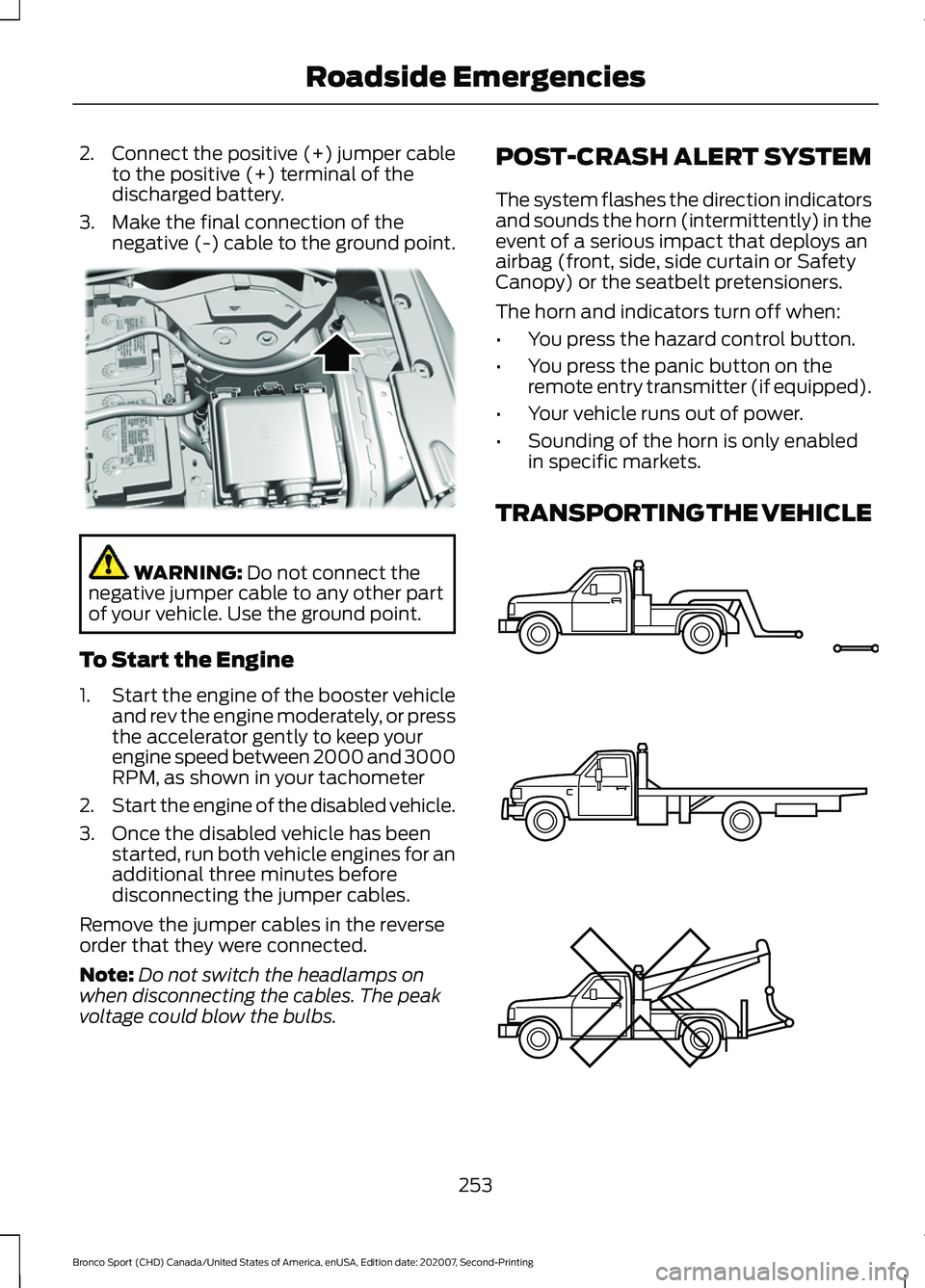
2.
Connect the positive (+) jumper cable
to the positive (+) terminal of the
discharged battery.
3. Make the final connection of the negative (-) cable to the ground point. WARNING: Do not connect the
negative jumper cable to any other part
of your vehicle. Use the ground point.
To Start the Engine
1. Start the engine of the booster vehicle
and rev the engine moderately, or press
the accelerator gently to keep your
engine speed between 2000 and 3000
RPM, as shown in your tachometer
2. Start the engine of the disabled vehicle.
3. Once the disabled vehicle has been started, run both vehicle engines for an
additional three minutes before
disconnecting the jumper cables.
Remove the jumper cables in the reverse
order that they were connected.
Note: Do not switch the headlamps on
when disconnecting the cables. The peak
voltage could blow the bulbs. POST-CRASH ALERT SYSTEM
The system flashes the direction indicators
and sounds the horn (intermittently) in the
event of a serious impact that deploys an
airbag (front, side, side curtain or Safety
Canopy) or the seatbelt pretensioners.
The horn and indicators turn off when:
•
You press the hazard control button.
• You press the panic button on the
remote entry transmitter (if equipped).
• Your vehicle runs out of power.
• Sounding of the horn is only enabled
in specific markets.
TRANSPORTING THE VEHICLE 253
Bronco Sport (CHD) Canada/United States of America, enUSA, Edition date: 202007, Second-Printing Roadside EmergenciesE318342 E143886
Page 394 of 471
Possible Cause and Solution
Symptom
You are using the old linking method.
Personal Profiles does not support your unsaved settings.
My personalized settings do
not save. A different personal profile is active.
Another user changed the settings for the wrong personal
profile.
You did not create a personal profile.
My profile will not recall. Personal Profiles is turned off.
The profile you requested is already active.
You did not link the memory button you are using to a
profile.
You did not link the remote control you are using to a
profile.
You are using the wrong remote control.
You are pressing a button other than the unlock or remote
start on a linked remote control.
You deleted the personal profile.
You switched the personal profiles off.
My preset positions recall,
but my profile does not.
The vehicle is in motion.
My profile recalls but my
preset positions do not. The preset positions are the same as the guest or previ-
ously active profile.
Unlink and relink your remote control in the Personal
Profiles menu. You may need to see your authorized dealer.
I lost a remote control.
You erased and reprogrammed the remote controls. This
could happen if you let a dealership add a new remote
control to replace a lost one.
I lost all profiles.
Someone performed a master reset without your know-
ledge.
391
Bronco Sport (CHD) Canada/United States of America, enUSA, Edition date: 202007, Second-Printing SYNC™ 3
Page 460 of 471
DRL
See: Daytime Running Lamps - Vehicles With:
Configurable Daytime Running
Lamps.................................................................. 82
See: Daytime Running Lamps - Vehicles With: Daytime Running Lamps (DRL)................82
E
Electric Parking Brake..................................177 Applying the Electric Parking Brake..............177
Automatically Releasing the Electric
Parking Brake................................................... 178
Manually Releasing the Electric Parking Brake.................................................................... 177
Releasing the Electric Parking Brake if the Vehicle Battery is Running Out of
Charge................................................................ 178
Electromagnetic Compatibility..............405
Emergency Call Limitations.......................52
Emergency Call Requirements..................51
Emission Law
.................................................162
Noise Emissions Warranty, Prohibited
Tampering Acts and Maintenance..........163
Tampering With a Noise Control System............................................................... 162
Enabling Remote Start
................................118
End User License Agreement.................408 VEHICLE SOFTWARE END USER LICENSE
AGREEMENT (EULA) ................................ 408
Engine Block Heater
.....................................151
Using the Engine Block Heater...................... 152
Engine Coolant Check
................................277
Adding Coolant.................................................... 277
Coolant Change.................................................. 279
Engine Coolant Temperature Management................................................. 280
Fail-Safe Cooling................................................ 279
Recycled Coolant............................................... 278
Severe Climates.................................................. 279
Engine Emission Control............................162
Engine Immobilizer See: Passive Anti-Theft System...................... 72
Engine Oil Capacity and Specification - 1.5L EcoBoost™........................................329
Alternative Engine Oil for Extremely Cold Climates........................................................... 330Engine Oil Capacity and Specification -
2.0L EcoBoost™.......................................328
Alternative Engine Oil for Extremely Cold Climates........................................................... 329
Engine Oil Check
...........................................274
Adding Engine Oil............................................... 274
Engine Oil Dipstick.......................................274
Engine Specifications - 1.5L EcoBoost™.................................................323
Drivebelt Routing............................................... 323
Engine Specifications - 2.0L EcoBoost™.................................................323
Drivebelt Routing............................................... 324
Entertainment..............................................359 AM/FM Radio...................................................... 360
Apps....................................................................... 368
Bluetooth Stereo or USB................................. 367
CD........................................................................\
.... 366
HD Radio ™ Information (If
Available)........................................................ 363
SiriusXM® Satellite Radio (If Activated)......................................................... 361
Sources.................................................................. 359
Supported Media Players, Formats and Metadata Information................................ 368
USB Ports............................................................. 368
Environment.....................................................19
EPB See: Electric Parking Brake.............................. 177
Essential Towing Checks...........................237 Before Towing a Trailer.................................... 239
Hitches................................................................... 238
Launching or Retrieving a Boat or Personal Watercraft (PWC)........................................ 239
Safety Chains...................................................... 238
Trailer Brakes....................................................... 238
Trailer Lamps....................................................... 239
Trailer Towing Connector................................ 238
When Towing a Trailer..................................... 239
Event Data Recording See: Data Recording.............................................. 11
Export Unique Options
.................................18
Extending the Remote Start Duration.........................................................118
Exterior Mirrors
................................................89
Blind Spot Monitor.............................................. 90
Fold-Away Exterior Mirrors.............................. 90
Power Exterior Mirrors........................................ 89
457
Bronco Sport (CHD) Canada/United States of America, enUSA, Edition date: 202007, Second-Printing Index
Page 462 of 471
Head Restraints.............................................133
Folding the Head Restraint............................. 135
Front Seat Head Restraints............................ 134
Installing the Head Restraint.......................... 135
Lowering the Head Restraint.......................... 134
Raising the Head Restraint............................. 134
Removing the Head Restraint........................ 135
Removing the Head Restraints..................... 134
Tilting the Front Seat Head Restraint.........135
Heated Seats
.................................................139
Heating See: Climate Control - Vehicles With: Dual
Automatic Temperature Control
(DATC)................................................................ 121
See: Climate Control - Vehicles With: Electronic Automatic Temperature Control
(EATC)................................................................ 125
See: Climate Control - Vehicles With: Manual Temperature Control.................................... 129
Hill Start Assist
..............................................178
Switching the System On and Off................179
Using Hill Start Assist........................................ 179
Hints on Driving With Anti-Lock Brakes.............................................................176
Hood Lock See: Opening and Closing the Hood............271
Horn.....................................................................75
How Does Adaptive Cruise Control With Stop and Go Work
.....................................195
How Does the Rear Occupant Alert System Work
...............................................140
I
Identifying the Climate Control Unit.......121
Ignition Switch...............................................148
In California (U.S. Only)............................256
Information Display Control
.......................75
Information Displays....................................99 General Information........................................... 99
Information Messages
...............................104
Adaptive Cruise Control................................... 104
AdvanceTrac ™ and Traction Control.........105
Alarm...................................................................... 105
Auto-Start-Stop................................................. 105
Battery and Charging System....................... 106
Blind Spot Information and Cross Traffic Alert System.................................................... 107Doors and Locks..................................................
107
Driver Alert............................................................ 108
Four-Wheel Drive............................................... 108
Fuel........................................................................\
.. 109
Hill Start Assist................................................... 109
Keys and Intelligent Access............................ 109
Lane Keeping System........................................ 110
Maintenance........................................................... 111
MyKey....................................................................... 112
Park Aid.................................................................... 113
Park Brake............................................................... 113
Power Steering..................................................... 114
Pre-Collision Assist............................................. 114
Remote Start......................................................... 114
Seats........................................................................\
. 115
Starting System ................................................... 115
Tire Pressure Monitoring System................... 115
Trailer........................................................................\
116
Transmission......................................................... 116
Installing Child Restraints...........................23 Child Restraints..................................................... 23
Using Lap and Shoulder Belts......................... 23
Using Lower Anchors and Tethers for CHildren (LATCH)............................................ 25
Using Tether Straps............................................. 27
Instrument Cluster
.........................................92
Instrument Lighting Dimmer......................81
Instrument Panel
...........................................20
Interior Air Quality.........................................132
Interior Lamps
.................................................84
Interior Lamp Function...................................... 84
Switching All of the Interior Lamps Off........................................................................\
. 84
Switching All of the Interior Lamps On........................................................................\
. 84
Switching the Front Interior Lamps On and Off........................................................................\
. 84
Switching the Rear Interior Lamps On and Off........................................................................\
. 85
Interior Mirror...................................................90 Automatic Dimming Mirror.............................. 90
Manual Dimming Mirror.................................... 90
Introduction........................................................9
J
Jump Starting the Vehicle........................252 To Connect the Booster Cables.................... 252
459
Bronco Sport (CHD) Canada/United States of America, enUSA, Edition date: 202007, Second-Printing Index