reset FORD BRONCO SPORT 2021 User Guide
[x] Cancel search | Manufacturer: FORD, Model Year: 2021, Model line: BRONCO SPORT, Model: FORD BRONCO SPORT 2021Pages: 471, PDF Size: 7 MB
Page 107 of 471
Note:
When viewing this screen you can
reset your average fuel economy. Hold OK
to reset fuel history and average fuel
economy.
Trip 1 and 2
Provides trip timer, trip average fuel
economy and total trip distance traveled.
For hybrid vehicles, the trip also shows the
distance traveled on electric power only.
INFORMATION MESSAGES
Depending on your vehicle options and
instrument cluster type, not all messages
display or are available. Note:
The system abbreviates or shortens
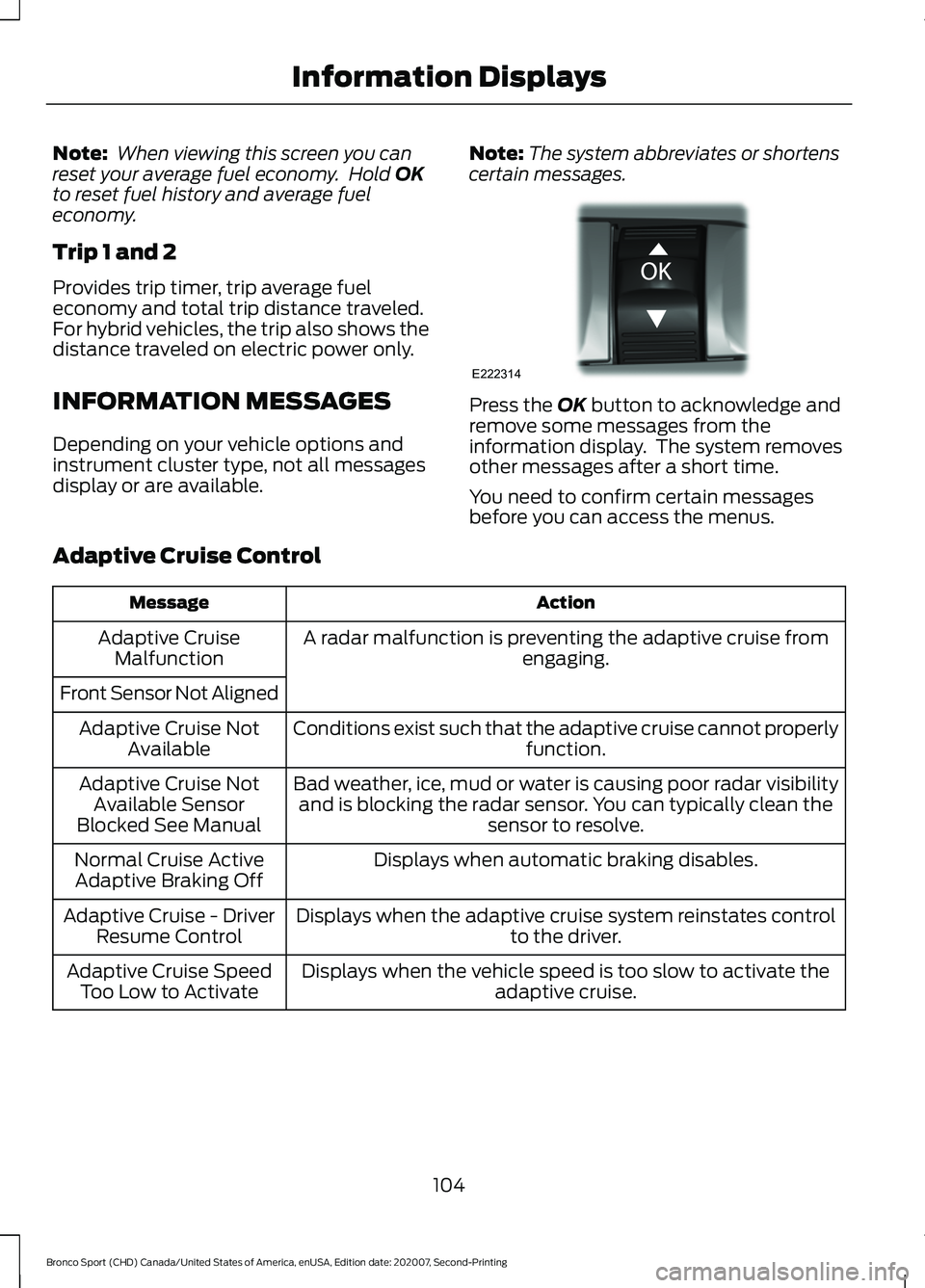
certain messages. Press the
OK button to acknowledge and
remove some messages from the
information display. The system removes
other messages after a short time.
You need to confirm certain messages
before you can access the menus.
Adaptive Cruise Control Action
Message
A radar malfunction is preventing the adaptive cruise from engaging.
Adaptive Cruise
Malfunction
Front Sensor Not Aligned Conditions exist such that the adaptive cruise cannot properlyfunction.
Adaptive Cruise Not
Available
Bad weather, ice, mud or water is causing poor radar visibilityand is blocking the radar sensor. You can typically clean the sensor to resolve.
Adaptive Cruise Not
Available Sensor
Blocked See Manual
Displays when automatic braking disables.
Normal Cruise Active
Adaptive Braking Off
Displays when the adaptive cruise system reinstates controlto the driver.
Adaptive Cruise - Driver
Resume Control
Displays when the vehicle speed is too slow to activate theadaptive cruise.
Adaptive Cruise Speed
Too Low to Activate
104
Bronco Sport (CHD) Canada/United States of America, enUSA, Edition date: 202007, Second-Printing Information DisplaysE222314
Page 111 of 471
Action
Message
The liftgate or liftgate glass is not completely closed.
Liftgate or liftglass ajar
The hood is not completely closed.
Hood Ajar
The factory keypad code appears in the information display
after the system resets the keypad. See Passive Anti-Theft System (page 72).
Factory Keypad Code {X
X X X X}
Driver Alert Action
Message
Stop and rest as soon as it is safe to do so.
Driver Alert Warning Rest
Now
Take a rest soon.
Driver Alert Warning Rest
Suggested
Four-Wheel Drive Action
Message
The four-wheel drive system temporarily turns off to protect itself from overheating.
4WD Temporarily
Disabled
The four-wheel drive system is locking up the torque transferclutch to help reduce clutch temperature.
4WD Temporarily
Locked
The four-wheel drive system temporarily turns off to protect
itself from overheating or if you are using the temporary spare tire.
4WD Off
The four-wheel drive system will resume normal function and
clear this message after driving a short distance with the roadtire re-installed or after the system cools.
4WD Restored
The four-wheel drive system is not operating properly. If thewarning stays on or continues to come on, contact an authorized dealer.
4WD Fault Service
Required
Displays when the power transfer unit fluid requires service.
Change 4WD Power
Transfer Unit Lube
108
Bronco Sport (CHD) Canada/United States of America, enUSA, Edition date: 202007, Second-Printing Information Displays
Page 112 of 471
Action
Message
Displays when you have the power transfer unit fluid changed and reset to new.
4WD Power Transfer
Unit Lube Set to New
The selected drive mode does not allow you to turn on therear differential lock feature.
Rear Differential Lock
Not Available in Current Drive Mode
The selected drive mode requires your vehicle to be in four- wheel drive.
4WD Lock Required in
Current Drive Mode
Fuel Action
Message
An early reminder of a low fuel condition.
Fuel Level Low
The fuel fill inlet may not be properly closed.
Check Fuel Fill Inlet
Wait for up to 15 seconds while the fuel system depressurizes.
Fuel Door Opening
The fuel system has finished depressurizing and you can begin
to refuel.
Fuel Door Open
A reminder to close the fuel door. Failure to follow this
instruction can cause the check engine light to illuminate.
Close Fuel Door to Avoid
""Check Engine"" Light
There is an error in attempting to refill your vehicle.
Refuel Error See Manual
Hill Start Assist Action
Message
Hill start assist is not available. Contact an authorized dealer.See Hill Start Assist (page 178).
Hill Start Assist Not
Available
Keys and Intelligent Access Action
Message
A reminder to press the brake when starting your vehicle.
To START Press Brake
The system does not detect the key. See
Keyless Starting
(page 148).
No Key Detected
109
Bronco Sport (CHD) Canada/United States of America, enUSA, Edition date: 202007, Second-Printing Information Displays
Page 122 of 471
Press the button on the remote
control.
Within three seconds, press the
button on the remote control.
Within three seconds, press the
button again.
If the duration is set to 15 minutes, the
duration extends by another 15 minutes.
This provides a total of 30 minutes.
Note: Remote start can only be extended
once.
Note: A maximum of two remote starts, or
one remote start with an extension, are
allowed. To reset the restart procedure
switch the vehicle to on, then to off.
REMOTE START REMOTE
CONTROL INDICATORS
Remote Control Feedback
An LED on the remote control provides
status feedback of remote start or stop
commands. Status
LED
Remote startsuccessful.
Solid green.
Remote stopsuccessful.
Solid red.
Request failed or
status not received.
Blinking red.
Status incomplete.
Blinking green.
REMOTE START SETTINGS
Switching Climate Control Auto
Mode On and Off
1. Press Settings on the touchscreen. 2. Press
Remote Start Setup.
3. Press
Climate Control.
4. Select
Vehicle.
5. Switch
Auto on or off.
Note: If you switch the auto mode on, the
system attempts to heat or cool the interior
to
72°F (22°C).
Note: When you switch the ignition on, the
climate control system returns to the last
used settings.
Switching Climate Control Last
Settings On and Off
1. Press
Settings on the touchscreen.
2. Press
Vehicle.
3. Press
Remote Start Setup.
4. Switch
Last settings on.
Note: If you switch the last settings on, the
system remembers the last used settings.
Switching the Heated Seat
Settings On and Off
1. Press
Settings on the touchscreen.
2. Press
Vehicle.
3. Press
Remote Start Setup.
4. Press
Seats.
5. Switch
Auto on or off.
Note: If you switch the heated seat settings
on, the heated seats turn on during cold
weather.
Switching the Heated Steering
Wheel Settings On and Off
1. Press
Settings on the touchscreen.
2. Press
Vehicle.
3. Press
Remote Start Setup.
4. Press
Seats and Steering Wheel.
119
Bronco Sport (CHD) Canada/United States of America, enUSA, Edition date: 202007, Second-Printing Remote Start
(If Equipped)E138623 E138625
Page 138 of 471
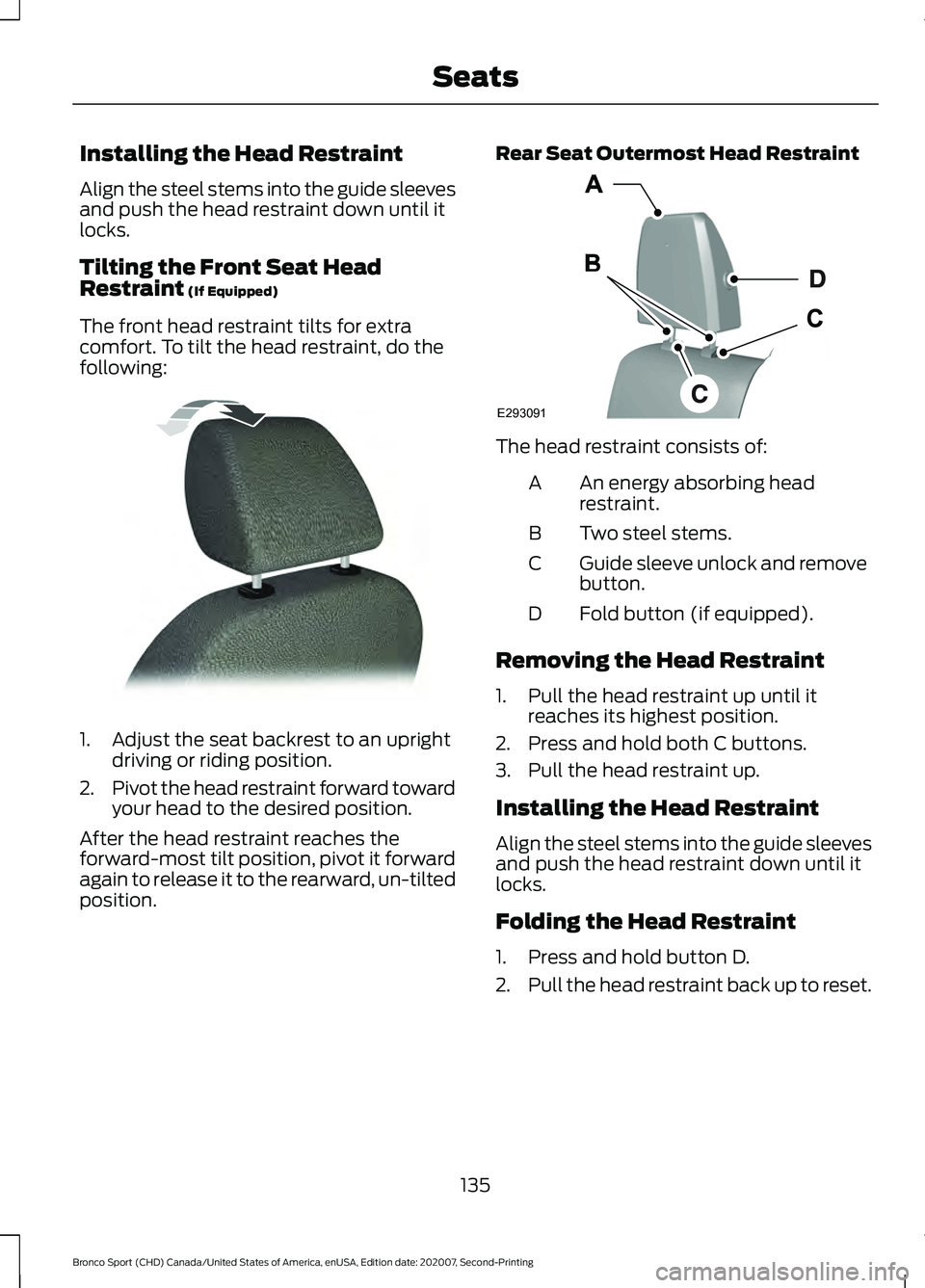
Installing the Head Restraint
Align the steel stems into the guide sleeves
and push the head restraint down until it
locks.
Tilting the Front Seat Head
Restraint (If Equipped)
The front head restraint tilts for extra
comfort. To tilt the head restraint, do the
following: 1. Adjust the seat backrest to an upright
driving or riding position.
2. Pivot the head restraint forward toward
your head to the desired position.
After the head restraint reaches the
forward-most tilt position, pivot it forward
again to release it to the rearward, un-tilted
position. Rear Seat Outermost Head Restraint The head restraint consists of:
An energy absorbing head
restraint.
A
Two steel stems.
B
Guide sleeve unlock and remove
button.
C
Fold button (if equipped).
D
Removing the Head Restraint
1. Pull the head restraint up until it reaches its highest position.
2. Press and hold both C buttons.
3. Pull the head restraint up.
Installing the Head Restraint
Align the steel stems into the guide sleeves
and push the head restraint down until it
locks.
Folding the Head Restraint
1. Press and hold button D.
2. Pull the head restraint back up to reset.
135
Bronco Sport (CHD) Canada/United States of America, enUSA, Edition date: 202007, Second-Printing SeatsE144727 E293091
Page 143 of 471
WHAT IS THE REAR
OCCUPANT ALERT SYSTEM
The rear occupant alert system monitors
vehicle conditions and notifies you to check
for rear seat occupants when you switch
the ignition off.
HOW DOES THE REAR
OCCUPANT ALERT SYSTEM
WORK
The system monitors when rear doors have
been opened and closed to indicate the
potential presence of an occupant in the
rear seat.
A message displays in the information and
entertainment display screen and an
audible warning sounds when you switch
the ignition off after any of the following
conditions have been met:
•
A rear door is opened or closed while
the ignition is on.
• You switch the ignition on within 15
minutes of a rear door opening and
closing.
• You switch the ignition on within 15
minutes of the alert having displayed
or sounded.
REAR OCCUPANT ALERT
SYSTEM PRECAUTIONS WARNING: On hot days, the
temperature inside the vehicle can rise
very quickly. Exposure of people or
animals to these high temperatures for
even a short time can cause death or
serious heat related injuries, including
brain damage. Small children are
particularly at risk. WARNING:
Do not leave children
or pets unattended in your vehicle.
Failure to follow this instruction could
result in personal injury or death.
REAR OCCUPANT ALERT
SYSTEM LIMITATIONS
The system does not detect the presence
of objects or passengers in the rear seat.
It monitors when rear doors are opened
and closed.
Note: It is possible to receive an alert when
there is no rear seat occupant, but alert
conditions are met.
Note: It is possible to receive no alert when
there is an occupant in the rear seat, if alert
conditions are not met. For example, if a rear
seat occupant does not enter the vehicle
through a rear door.
Note: The audible warning does not sound
when the front door is opened before you
switch the ignition off.
SWITCHING REAR OCCUPANT
ALERT SYSTEM ON AND OFF
1. Press
Settings on the touchscreen.
2. Press
Vehicle.
3. Switch
Rear Occupant Alert on or off.
Note: The default setting is on.
Note: Performing a master reset causes the
system to switch on again.
Semiannual Reminder
(If Equipped)
When you switch the system off, a
message appears every six months as a
reminder that the system is off. You can
switch the system back on or leave it off.
140
Bronco Sport (CHD) Canada/United States of America, enUSA, Edition date: 202007, Second-Printing Rear Occupant Alert System
(If Equipped)
Page 146 of 471
WHAT IS THE POWER OUTLET
The power outlet can power devices that
use a household plug.
POWER OUTLET
PRECAUTIONS - 1.5L
ECOBOOST™
WARNING: Do not keep electrical
devices plugged in the power point
whenever the device is not in use. Do not
use any extension cord with the 110 volt
AC power point, since it will defeat the
safety protection design. Doing so may
cause the power point to overload due
to powering multiple devices that can
reach beyond the 150 watt load limit and
could result in fire or serious injury.
POWER OUTLET
PRECAUTIONS - 2.0L
ECOBOOST™ WARNING:
Do not keep electrical
devices plugged in the power point
whenever the device is not in use. Do not
use any extension cord with the 110 volt
AC power point, since it will defeat the
safety protection design. Doing so may
cause the power point to overload due
to powering multiple devices that can
reach beyond the 400 watt load limit
and could result in fire or serious injury.
Note: The vehicle provides up to 400 watts
when in park and up to 300 watts when in
drive mode. This wattage is divided between
multiple outlets when in use at the same
time. LOCATING THE POWER
OUTLET
The power outlets are located on the rear
of the center console, and in the cargo
area.
POWER OUTLET INDICATORS
The power outlet indicator illuminates to
let you know the status of the system.
Description
Indicator Status
The power point is
working, the ignition is on, or the vehicle is in accessory mode.
On
The power point isoff, the ignition is
off, or the vehicle is not in accessory mode.
Off
The power point isin fault mode.
Flashing
Note: Due to different technologies used
on its construction, some devices may
exceed the capacity shown on its label
when they are initially plugged in.
Note: The power outlet temporarily turns
off power when in fault mode if the device
exceeds the Watt limit. Unplug your device
and switch the ignition off. Switch the
ignition back on, but do not plug your device
back in. Let the system cool off and switch
the ignition off to reset the fault mode.
Switch the ignition back on and make sure
the indicator light remains on.
143
Bronco Sport (CHD) Canada/United States of America, enUSA, Edition date: 202007, Second-Printing Power Outlet - Vehicles With: 110V Power Outlet
Page 153 of 471
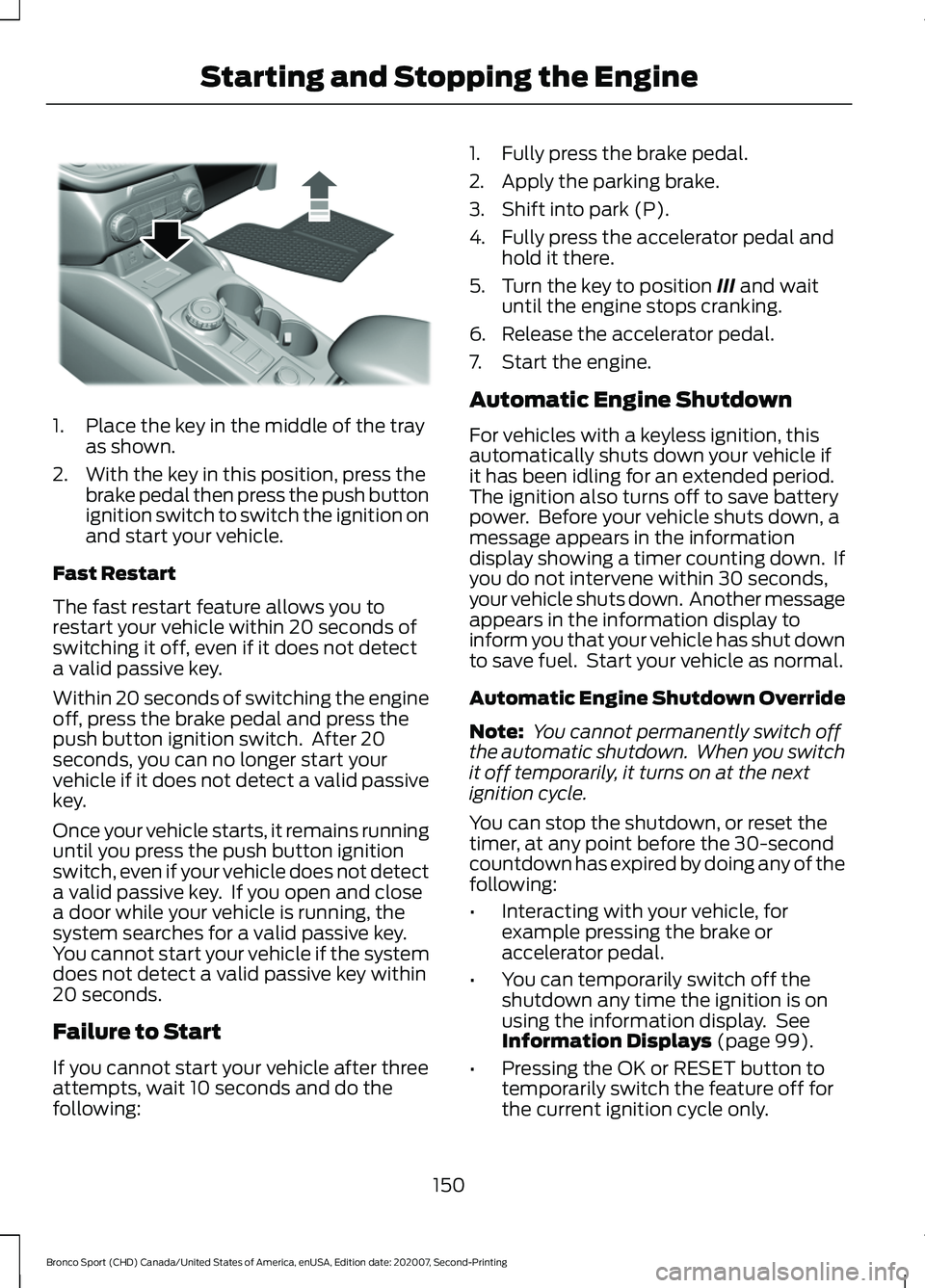
1. Place the key in the middle of the tray
as shown.
2. With the key in this position, press the brake pedal then press the push button
ignition switch to switch the ignition on
and start your vehicle.
Fast Restart
The fast restart feature allows you to
restart your vehicle within 20 seconds of
switching it off, even if it does not detect
a valid passive key.
Within 20 seconds of switching the engine
off, press the brake pedal and press the
push button ignition switch. After 20
seconds, you can no longer start your
vehicle if it does not detect a valid passive
key.
Once your vehicle starts, it remains running
until you press the push button ignition
switch, even if your vehicle does not detect
a valid passive key. If you open and close
a door while your vehicle is running, the
system searches for a valid passive key.
You cannot start your vehicle if the system
does not detect a valid passive key within
20 seconds.
Failure to Start
If you cannot start your vehicle after three
attempts, wait 10 seconds and do the
following: 1. Fully press the brake pedal.
2. Apply the parking brake.
3. Shift into park (P).
4. Fully press the accelerator pedal and
hold it there.
5. Turn the key to position III and wait
until the engine stops cranking.
6. Release the accelerator pedal.
7. Start the engine.
Automatic Engine Shutdown
For vehicles with a keyless ignition, this
automatically shuts down your vehicle if
it has been idling for an extended period.
The ignition also turns off to save battery
power. Before your vehicle shuts down, a
message appears in the information
display showing a timer counting down. If
you do not intervene within 30 seconds,
your vehicle shuts down. Another message
appears in the information display to
inform you that your vehicle has shut down
to save fuel. Start your vehicle as normal.
Automatic Engine Shutdown Override
Note: You cannot permanently switch off
the automatic shutdown. When you switch
it off temporarily, it turns on at the next
ignition cycle.
You can stop the shutdown, or reset the
timer, at any point before the 30-second
countdown has expired by doing any of the
following:
• Interacting with your vehicle, for
example pressing the brake or
accelerator pedal.
• You can temporarily switch off the
shutdown any time the ignition is on
using the information display. See
Information Displays
(page 99).
• Pressing the OK or RESET button to
temporarily switch the feature off for
the current ignition cycle only.
150
Bronco Sport (CHD) Canada/United States of America, enUSA, Edition date: 202007, Second-Printing Starting and Stopping the EngineE336652
Page 163 of 471
1. Stop your vehicle as soon as it is safe
to do so and switch the engine off.
2. Shift into park (P) or neutral (N).
3. Apply the parking brake.
4. Fully open the fuel filler door.
5. Check the fuel tank filler valve for any debris that could be restricting its
movement.
6. Remove any debris from the fuel tank filler valve.
7. Fully insert a fuel pump nozzle or the fuel filler funnel provided with your
vehicle into the fuel filler pipe. See
Fuel Filler Funnel Location (page
156). This action should dislodge any
debris that could be preventing the fuel
tank filler valve from fully closing.
8. Remove the fuel pump nozzle or fuel filler funnel from the fuel filler pipe.
9. Fully close the fuel filler door.
Note: The message may not immediately
reset. If the message continues to appear
and a warning lamp illuminates, have your
vehicle checked as soon as possible.
FUEL CONSUMPTION
Advertised Capacity
The advertised capacity is the maximum
amount of fuel that you can add to the fuel
tank when the fuel gauge indicates empty.
In addition, the fuel tank contains an empty
reserve. The empty reserve is an
unspecified amount of fuel that remains
in the fuel tank when the fuel gauge
indicates empty.
Note: The amount of fuel in the empty
reserve varies and should not be relied upon
to increase driving range. Calculating Fuel Economy
Your vehicle calculates fuel economy
figures through the trip computer average
fuel function.
See Information Displays
(page 99).
The first
1,000 mi (1,600 km) of driving is
the break-in period of the vehicle. A more
accurate measurement is obtained after
2,000– 3,000 mi (3,200–4,800 km)
.
1. Completely fill the fuel tank and record
the initial odometer reading.
See
Refueling (page 158).
2. Each time you fill the fuel tank, record the amount of fuel added.
3. After at least three fill ups, fill the fuel tank and record the current odometer
reading.
4. Subtract your initial odometer reading from the current odometer reading.
To calculate L/100 km (liters per 100
kilometers) fuel consumption, multiply the
liters used by 100, then divide by kilometers
traveled. To calculate MPG (miles per
gallon) fuel consumption, divide miles
traveled by gallons used.
Keep a record for at least one month and
record the type of driving, for example city
or highway. This provides an accurate
estimate of your vehicle ’s fuel economy
under current driving conditions. Keeping
records during summer and winter shows
how temperature impacts fuel economy.
Conditions Influencing Fuel Efficiency
• Carrying unnecessary weight in your
vehicle will reduce fuel efficiency.
• Avoid adding accessories that increase
aerodynamic drag to your vehicle such
as bug deflectors, car top carriers and
ski or bike racks.
• Remove empty roof racks and keep
windows shut at high speeds to reduce
wind resistance and fuel use.
160
Bronco Sport (CHD) Canada/United States of America, enUSA, Edition date: 202007, Second-Printing Fuel and Refueling
Page 210 of 471
The warning system is in two stages. At
first the system issues a temporary warning
that you need to take a rest. This message
only appears for a short time. If the system
detects further reduction in driving
alertness, another warning could be issued
which remains in the information display
for a longer time. Press OK on the steering
wheel control to clear the warning. When
active the system runs in the background
and only issues a warning if required.
Resetting the System
You can reset the system by either:
•
Switching the ignition off and on.
• Stopping the vehicle and then opening
and closing the driver door.
LANE KEEPING SYSTEM WARNING: You are responsible for
controlling your vehicle at all times. The
system is designed to be an aid and does
not relieve you of your responsibility to
drive with due care and attention. Failure
to follow this instruction could result in
the loss of control of your vehicle,
personal injury or death. WARNING: Always drive with due
care and attention when using and
operating the controls and features on
your vehicle. WARNING:
In cold and severe
weather conditions the system may not
function. Rain, snow and spray can all
limit sensor performance. WARNING:
Large contrasts in
outside lighting can limit sensor
performance. WARNING:
The system will not
operate if the sensor cannot track the
road lane markings. WARNING:
The sensor may
incorrectly track lane markings as other
structures or objects. This can result in
a false or missed warning. WARNING:
The system may not
operate properly if the sensor is blocked.
Keep the windshield free from
obstruction. WARNING:
If damage occurs in the
immediate area surrounding the sensor,
have your vehicle checked as soon as
possible. WARNING:
The system may not
correctly operate if your vehicle is fitted
with a suspension kit not approved by
us.
Note: The system works above
40 mph
(64 km/h).
Note: The system works as long as the
camera can detect one lane marking or road
edge.
Note: When you select aid or alert + aid
mode and the system detects no steering
activity for a short period, the system alerts
you to put your hands on the steering wheel.
The system may detect a light grip or
touch on the steering wheel as hands off
driving.
Note: The system may not function if the
camera is blocked, or if the windshield is
damaged or dirty.
207
Bronco Sport (CHD) Canada/United States of America, enUSA, Edition date: 202007, Second-Printing Driving Aids