lock FORD BRONCO SPORT 2021 Manual PDF
[x] Cancel search | Manufacturer: FORD, Model Year: 2021, Model line: BRONCO SPORT, Model: FORD BRONCO SPORT 2021Pages: 471, PDF Size: 7 MB
Page 216 of 471
Blind Spot Information System Information Messages
Action
Message
Displays if the blind spot information system sensors are
blocked.
Blind Spot Not Available
Sensor Blocked See
Manual
Displays if you attach a trailer to your vehicle.
Blis Deactivated Trailer
Attached
The system has detected a fault that requires service. Have
your vehicle checked as soon as possible.
Blind Spot System Fault
CROSS TRAFFIC ALERT WARNING: Do not use the cross
traffic alert system as a replacement for
using the interior and exterior mirrors or
looking over your shoulder before
reversing out of a parking space. The
cross traffic alert system is not a
replacement for careful driving. WARNING:
The system may not
operate properly during severe weather
conditions, for example snow, ice, heavy
rain and spray. Always drive with due
care and attention. Failure to take care
may result in a crash. The system alerts you of vehicles
approaching from the sides behind your
vehicle when you shift into reverse (R).
Using Cross Traffic Alert
The system detects vehicles that approach
at a speed between
4 mph (6 km/h) and
37 mph (60 km/h). Coverage decreases
when the sensors are partially, mostly or
fully obstructed. Slowly reversing helps
increase the coverage area and
effectiveness.
The system turns on when you start the
engine and you shift into reverse (R). The
system turns off when you shift out of
reverse (R).
213
Bronco Sport (CHD) Canada/United States of America, enUSA, Edition date: 202007, Second-Printing Driving Aids
Page 218 of 471
Zone coverage also decreases when
parking at narrow angles. The sensor on
the left-hand side is mostly obstructed and
zone coverage on that side is severely
reduced.
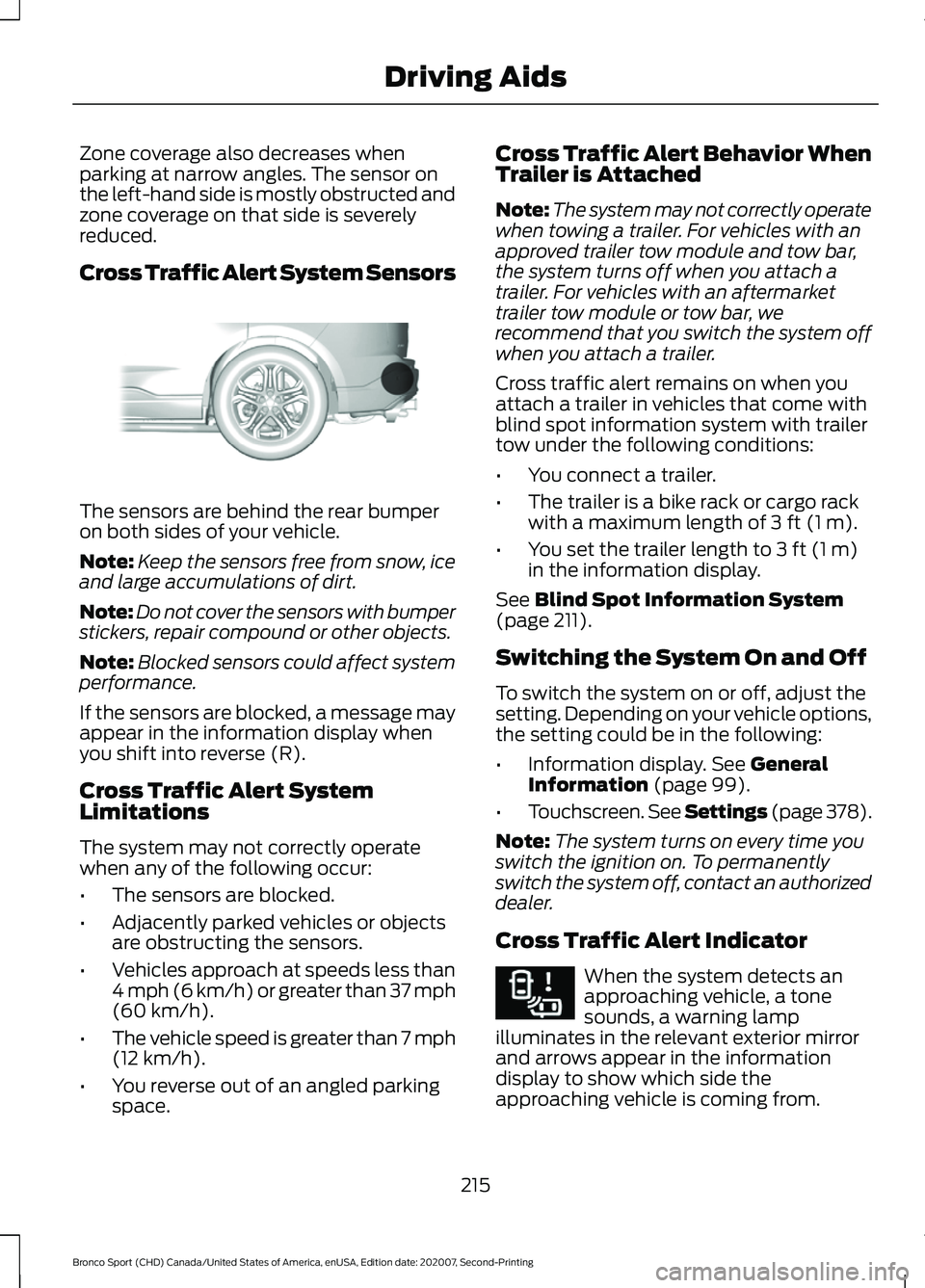
Cross Traffic Alert System Sensors
The sensors are behind the rear bumper
on both sides of your vehicle.
Note:
Keep the sensors free from snow, ice
and large accumulations of dirt.
Note: Do not cover the sensors with bumper
stickers, repair compound or other objects.
Note: Blocked sensors could affect system
performance.
If the sensors are blocked, a message may
appear in the information display when
you shift into reverse (R).
Cross Traffic Alert System
Limitations
The system may not correctly operate
when any of the following occur:
• The sensors are blocked.
• Adjacently parked vehicles or objects
are obstructing the sensors.
• Vehicles approach at speeds less than
4 mph (6 km/h) or greater than 37 mph
(60 km/h).
• The vehicle speed is greater than 7 mph
(12 km/h)
.
• You reverse out of an angled parking
space. Cross Traffic Alert Behavior When
Trailer is Attached
Note:
The system may not correctly operate
when towing a trailer. For vehicles with an
approved trailer tow module and tow bar,
the system turns off when you attach a
trailer. For vehicles with an aftermarket
trailer tow module or tow bar, we
recommend that you switch the system off
when you attach a trailer.
Cross traffic alert remains on when you
attach a trailer in vehicles that come with
blind spot information system with trailer
tow under the following conditions:
• You connect a trailer.
• The trailer is a bike rack or cargo rack
with a maximum length of
3 ft (1 m).
• You set the trailer length to
3 ft (1 m)
in the information display.
See
Blind Spot Information System
(page 211).
Switching the System On and Off
To switch the system on or off, adjust the
setting. Depending on your vehicle options,
the setting could be in the following:
• Information display.
See General
Information (page 99).
• Touchscreen. See Settings (page
378).
Note: The system turns on every time you
switch the ignition on. To permanently
switch the system off, contact an authorized
dealer.
Cross Traffic Alert Indicator When the system detects an
approaching vehicle, a tone
sounds, a warning lamp
illuminates in the relevant exterior mirror
and arrows appear in the information
display to show which side the
approaching vehicle is coming from.
215
Bronco Sport (CHD) Canada/United States of America, enUSA, Edition date: 202007, Second-Printing Driving AidsE205199 E268294
Page 219 of 471
Note:
If arrows do not display, a message
appears in the information display.
If the system malfunctions, a warning lamp
illuminates in the instrument cluster and
a message appears in the information
display. Have your vehicle checked as soon
as possible. Note:
In exceptional conditions, the system
could alert you, even when there is nothing
in the detection zone, for example a vehicle
passing further away from your vehicle.
Cross Traffic Alert Information Messages Action
Message
Displays instead of indication arrows when the system
detects a vehicle. Check for approaching traffic.
Cross Traffic Alert
Indicates blocked cross traffic alert system sensors. Clean
the sensors. If the message continues to appear, have your
vehicle checked as soon as possible.
Cross Traffic Not Avail-
able Sensor Blocked See
Manual
The system has malfunctioned. Have your vehicle checked
as soon as possible.
Cross Traffic System
Fault
Displays if you attach a trailer to your vehicle.
Cross Traffic Alert Deac-
tivated Trailer Attached
SPEED SIGN RECOGNITION (IF
EQUIPPED)
Principle of Operation WARNING: You are responsible for
controlling your vehicle at all times. The
system is designed to be an aid and does
not relieve you of your responsibility to
drive with due care and attention. Failure
to follow this instruction could result in
the loss of control of your vehicle,
personal injury or death. WARNING:
In cold and severe
weather conditions the system may not
function. Rain, snow and spray can all
limit sensor performance. WARNING:
The system may not
operate properly if the sensor is blocked.
Keep the windshield free from
obstruction.
The system is designed to detect speed
limit signs to inform you of the current
speed limit. Detected speed signs appear
in the information display. The sensor is
behind the interior mirror.
Note: Do not carry out windshield repairs
in the immediate area surrounding the
sensor.
Note: Speed sign data provided by the
navigation system contains information
integrated to the data carrier release.
Note: The system may not detect all speed
signs and may incorrectly read signs.
216
Bronco Sport (CHD) Canada/United States of America, enUSA, Edition date: 202007, Second-Printing Driving Aids
Page 224 of 471
After you turn the steering wheel, the
system applies additional steering torque
to help you steer around the vehicle. After
you pass the vehicle, the system applies
steering torque in the opposite direction to
encourage you to steer back into the lane.
The system deactivates after you fully pass
the vehicle.
Note:
The system does not automatically
steer around a vehicle. If you do not turn the
steering wheel, the system does not
activate.
Note: The system does not activate if the
distance to the vehicle ahead is too small
and a crash cannot be avoided.
Adjusting the Pre-Collision Assist
Settings
Depending on your vehicle options, the
pre-collision assist settings may be in the
following:
• Information display. See General
Information (page 99).
• Touchscreen. See Settings (page 378).
You can adjust the following settings:
• Change alert and distance alert
sensitivity to one of three possible
settings.
• Switch distance indication and alert on
or off.
• If required, switch active braking on or
off.
• If required, switch evasive steering
assist on or off.
Note: Active braking and evasive steering
assist turn on every time you switch the
ignition on. Note:
If you switch active braking off,
evasive steering assist turns off.
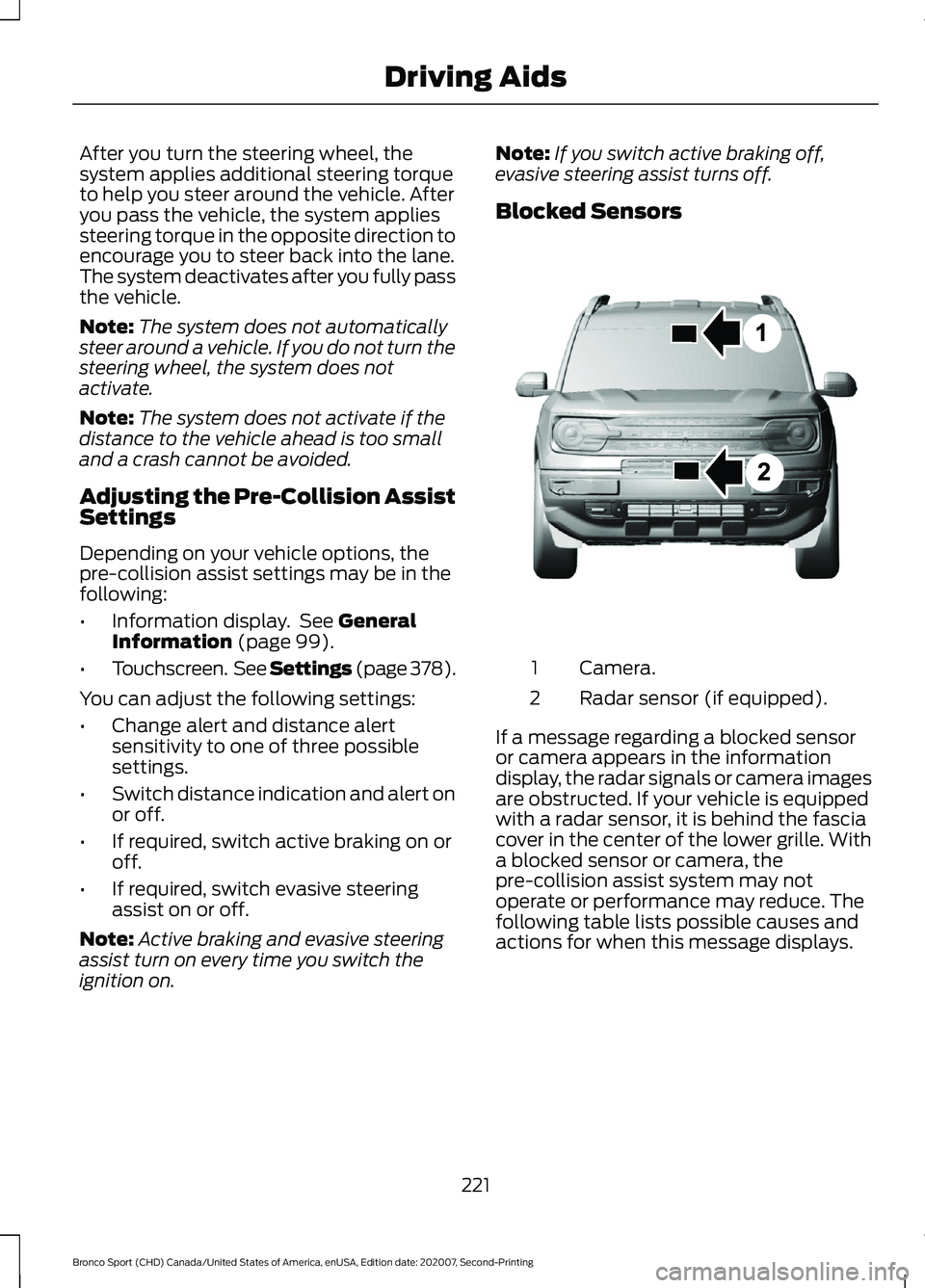
Blocked Sensors Camera.
1
Radar sensor (if equipped).
2
If a message regarding a blocked sensor
or camera appears in the information
display, the radar signals or camera images
are obstructed. If your vehicle is equipped
with a radar sensor, it is behind the fascia
cover in the center of the lower grille. With
a blocked sensor or camera, the
pre-collision assist system may not
operate or performance may reduce. The
following table lists possible causes and
actions for when this message displays.
221
Bronco Sport (CHD) Canada/United States of America, enUSA, Edition date: 202007, Second-Printing Driving AidsE325781
Page 227 of 471
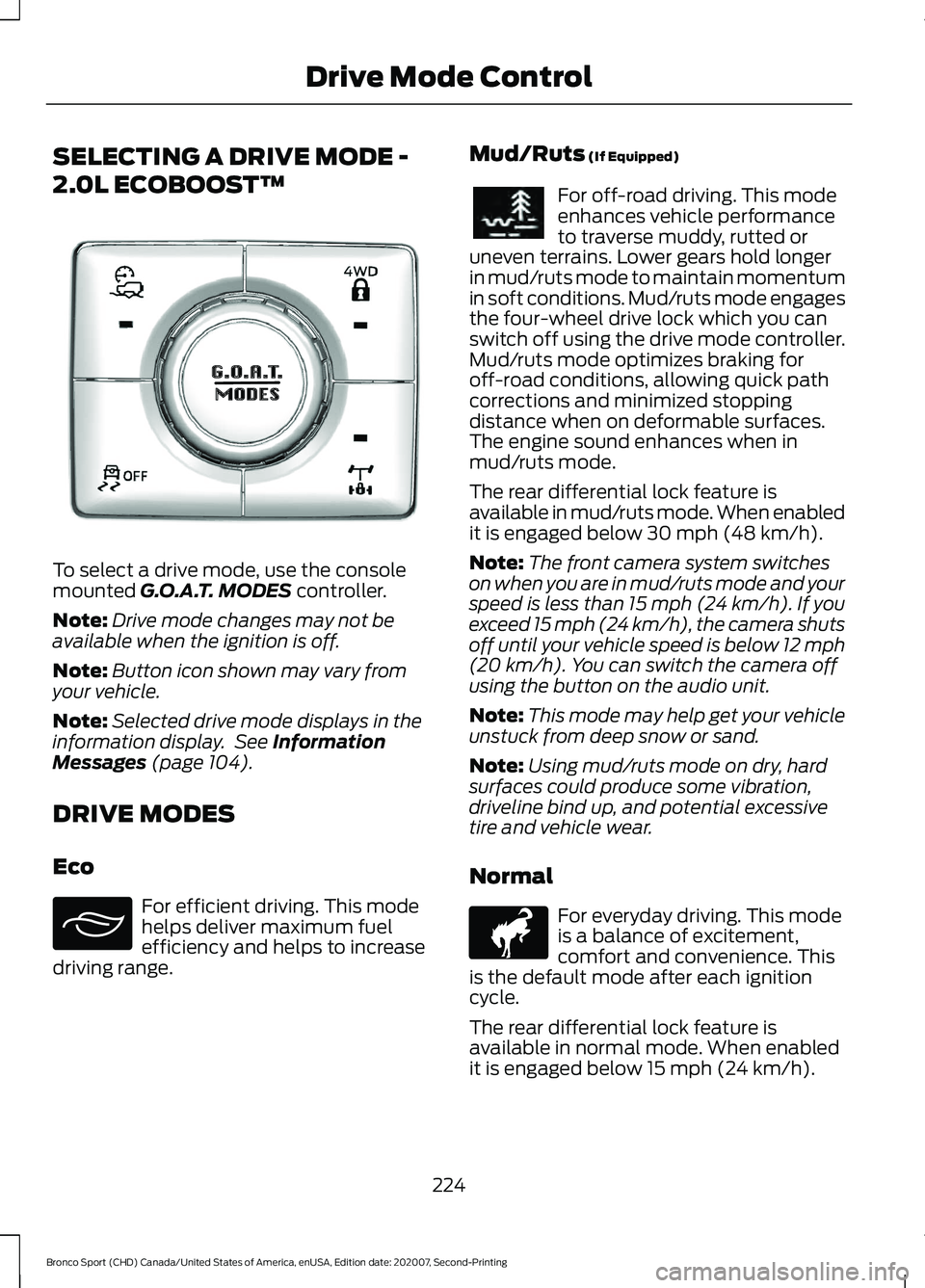
SELECTING A DRIVE MODE -
2.0L ECOBOOST™
To select a drive mode, use the console
mounted G.O.A.T. MODES controller.
Note: Drive mode changes may not be
available when the ignition is off.
Note: Button icon shown may vary from
your vehicle.
Note: Selected drive mode displays in the
information display. See
Information
Messages (page 104).
DRIVE MODES
Eco For efficient driving. This mode
helps deliver maximum fuel
efficiency and helps to increase
driving range. Mud/Ruts
(If Equipped) For off-road driving. This mode
enhances vehicle performance
to traverse muddy, rutted or
uneven terrains. Lower gears hold longer
in mud/ruts mode to maintain momentum
in soft conditions. Mud/ruts mode engages
the four-wheel drive lock which you can
switch off using the drive mode controller.
Mud/ruts mode optimizes braking for
off-road conditions, allowing quick path
corrections and minimized stopping
distance when on deformable surfaces.
The engine sound enhances when in
mud/ruts mode.
The rear differential lock feature is
available in mud/ruts mode. When enabled
it is engaged below
30 mph (48 km/h).
Note: The front camera system switches
on when you are in mud/ruts mode and your
speed is less than 15 mph (24 km/h). If you
exceed 15 mph (24 km/h), the camera shuts
off until your vehicle speed is below 12 mph
(20 km/h)
. You can switch the camera off
using the button on the audio unit.
Note: This mode may help get your vehicle
unstuck from deep snow or sand.
Note: Using mud/ruts mode on dry, hard
surfaces could produce some vibration,
driveline bind up, and potential excessive
tire and vehicle wear.
Normal For everyday driving. This mode
is a balance of excitement,
comfort and convenience. This
is the default mode after each ignition
cycle.
The rear differential lock feature is
available in normal mode. When enabled
it is engaged below
15 mph (24 km/h).
224
Bronco Sport (CHD) Canada/United States of America, enUSA, Edition date: 202007, Second-Printing Drive Mode ControlE339229 E295413 E296606 E317283
Page 228 of 471
Rock Crawl (If Equipped)
For off-road driving. For
optimum rock-climbing ability.
Rock crawl mode engages the
four-wheel drive lock. Rock crawl mode
optimizes the vehicle systems to provide
maximum traction and slow speed
performance. Lower gears hold longer in
rock crawl mode to minimize shifting when
traversing rocks and obstacles. The
accelerator pedal dampens to improve
throttle control and minimize speed
change over rough terrain. The steering
optimizes for less effort with reduced
kick-back. Rock crawl mode optimizes
braking for off-road conditions, allowing
quick path corrections and minimized
stopping distance when on deformable
surfaces. The engine sound enhances
when in rock crawl mode.
The rear differential lock feature enables
in rock crawl mode. When enabled it is
engaged below
30 mph (48 km/h). You
can disable the feature using the drive
mode controller.
Note: The front camera system switches
on when you are in rock crawl mode and
your speed is less than
15 mph (24 km/h).
If you exceed 15 mph (24 km/h), the camera
shuts off until your vehicle speed is below
12 mph (20 km/h)
. You can switch the
camera off using the button on the audio
unit.
Note: This mode may help get your vehicle
unstuck from deep snow or sand.
Note: Do not use this mode on dry, hard
pavement. This could produce some
vibration, driveline bind up, and potential
excessive tire and vehicle wear depending
on the four-wheel drive mode selection. Sand For more spirited off-road
driving. Sand mode is for
off-road driving on soft, dry sand
or deep conditions. Lower gears hold
longer in sand mode to maintain
momentum in soft conditions. Sand mode
engages the four-wheel drive lock, which
you can switch off using the drive mode
controller. Sand mode optimizes braking
for off-road conditions, allowing quick path
corrections and minimized stopping
distance when on deformable surfaces.
The engine sound enhances when in sand
mode.
The rear differential lock feature is
available in sand mode. When enabled it
is engaged below
30 mph (48 km/h).
Note: The front camera system switches
on when you are in sand mode and your
speed is less than 15 mph (24 km/h). If you
exceed 15 mph (24 km/h), the camera shuts
off until your vehicle speed is below 12 mph
(20 km/h)
. You can switch the camera off
using the button on the audio unit.
Note: Using sand mode on dry, hard
surfaces could produce some vibration,
driveline bind up, potential excessive tire
wear and vehicle wear.
Note: Do not use on firm, slippery surfaces,
such as paved roads covered with snow or
ice or driving on packed snow. For slippery,
firm surfaces use slippery mode.
Slippery For less than ideal road
conditions such as snow or ice
covered roads. You can use this
mode for crossing terrain where loose, wet
or slippery materials covers a firm surface.
Slippery mode lowers throttle response
and optimizes shifting for slippery surfaces.
225
Bronco Sport (CHD) Canada/United States of America, enUSA, Edition date: 202007, Second-Printing Drive Mode ControlE322413 E332185 E295414
Page 229 of 471
The rear differential lock feature is
available in slippery mode. When enabled
it is engaged below 15 mph (24 km/h).
Note: Do not use this mode when driving
on dry pavement. This could cause driveline
bind up and damage the system depending
on the four-wheel drive mode selection.
See
Four-Wheel Drive (page 172).
Sport For sporty driving with improved
performance handling and
response. This mode increases
accelerator pedal response and provides
a sportier steering feel. The powertrain
system holds onto lower gears longer,
helping your vehicle accelerate faster. The
steering optimizes for higher effort with
more kick-back. The engine sound
enhances when in sport mode.
226
Bronco Sport (CHD) Canada/United States of America, enUSA, Edition date: 202007, Second-Printing Drive Mode ControlE246593
Page 236 of 471
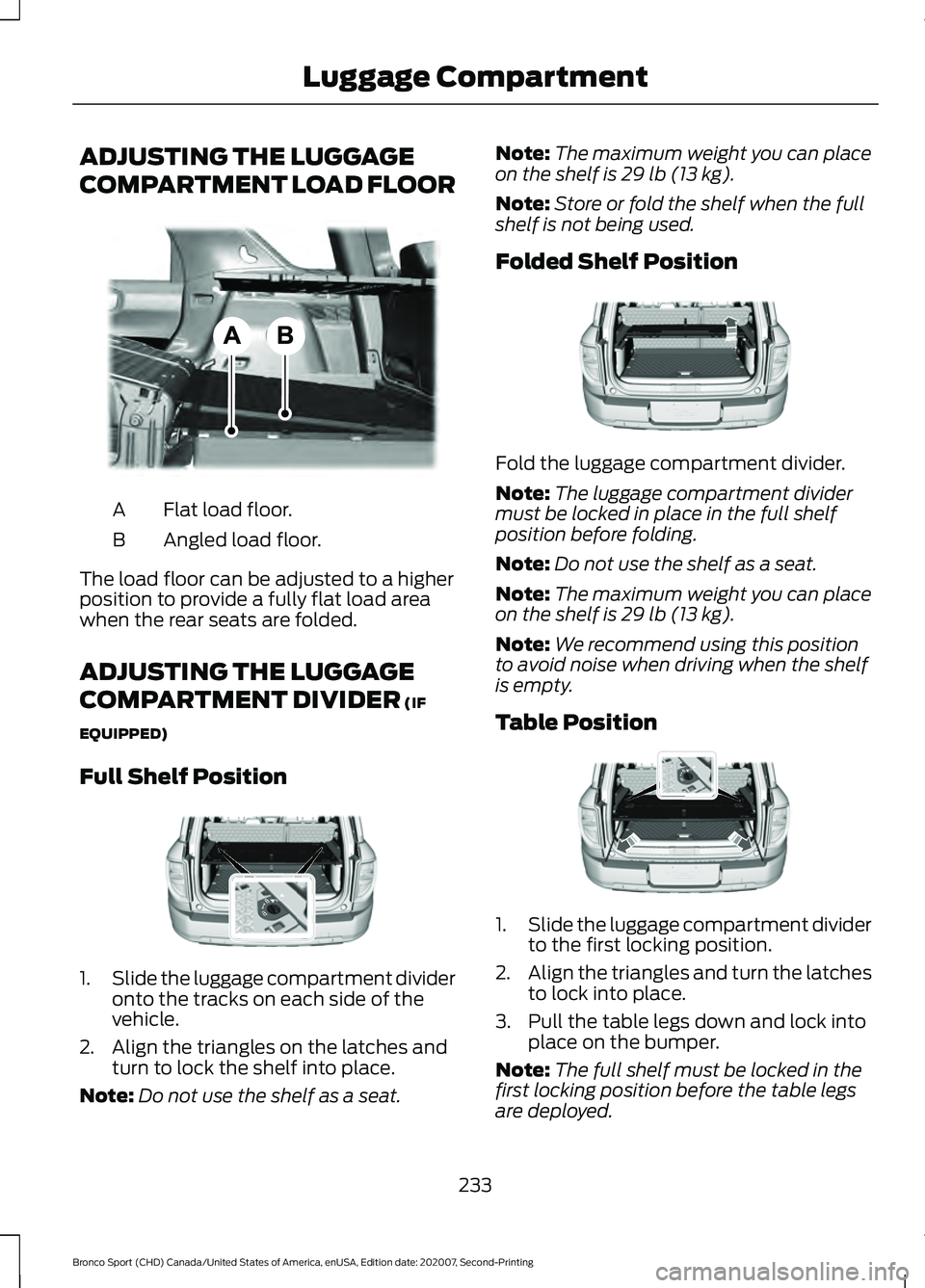
ADJUSTING THE LUGGAGE
COMPARTMENT LOAD FLOOR
Flat load floor.
A
Angled load floor.
B
The load floor can be adjusted to a higher
position to provide a fully flat load area
when the rear seats are folded.
ADJUSTING THE LUGGAGE
COMPARTMENT DIVIDER (IF
EQUIPPED)
Full Shelf Position 1.
Slide the luggage compartment divider
onto the tracks on each side of the
vehicle.
2. Align the triangles on the latches and turn to lock the shelf into place.
Note: Do not use the shelf as a seat. Note:
The maximum weight you can place
on the shelf is
29 lb (13 kg).
Note: Store or fold the shelf when the full
shelf is not being used.
Folded Shelf Position Fold the luggage compartment divider.
Note:
The luggage compartment divider
must be locked in place in the full shelf
position before folding.
Note: Do not use the shelf as a seat.
Note: The maximum weight you can place
on the shelf is
29 lb (13 kg).
Note: We recommend using this position
to avoid noise when driving when the shelf
is empty.
Table Position 1.
Slide the luggage compartment divider
to the first locking position.
2. Align the triangles and turn the latches
to lock into place.
3. Pull the table legs down and lock into place on the bumper.
Note: The full shelf must be locked in the
first locking position before the table legs
are deployed.
233
Bronco Sport (CHD) Canada/United States of America, enUSA, Edition date: 202007, Second-Printing Luggage CompartmentE334915 E322931 E322933 E322932
Page 243 of 471
Exceeding these limits may allow water to
enter vehicle components:
•
Causing internal damage to the
components.
• Affecting driveability, emissions, and
reliability.
Replace the rear axle lubricant anytime
the rear axle has been submerged in water.
Water may have contaminated the rear
axle lubricant, which is not normally
checked or changed unless a leak is
suspected or other axle repair is required.
TOWING THE VEHICLE ON
FOUR WHEELS
Emergency Towing WARNING: If your vehicle has a
steering wheel lock make sure the
ignition is in the accessory or on position
when being towed.
If your vehicle becomes inoperable without
access to wheel dollies or a vehicle
transport trailer, it can be flat-towed with
all wheels on the ground, regardless of the
powertrain and transmission configuration,
under the following conditions:
• Your vehicle is facing forward for
towing in a forward direction.
• Refer to the Manual Park Release
procedure. See
Automatic
Transmission (page 166). Failing to
do so could result in damage to the
transmission.
• Maximum speed is 35 mph (56 km/h).
• Maximum distance is
50 mi (80 km).
Note: If you are unsure of the vehicle ’s
configuration, contact an authorized dealer. Recreational Towing - Front-Wheel
Drive Vehicles
(If Equipped)
You cannot recreational tow your vehicle
with all wheels on the ground because
vehicle or transmission damage could
occur. Place the front wheels on a
two-wheel tow dolly. If you are using a tow
dolly, follow the instructions specified by
the equipment provider.
Recreational Towing - Rear-Wheel
Drive Vehicles
(If Equipped)
You cannot recreational tow your vehicle
with all wheels on the ground because
vehicle or transmission damage could
occur. We recommend towing your vehicle
with all four wheels off the ground, such
as when using a car-hauling trailer.
Otherwise, you cannot recreational tow
your vehicle.
Recreational Towing - All-Wheel
and Four-Wheel Drive Vehicles
(If
Equipped)
You cannot recreational tow your vehicle
with all wheels on the ground because
vehicle or transmission damage could
occur. We recommend towing your vehicle
with all four wheels off the ground, such
as when using a car-hauling trailer.
Otherwise, you cannot recreational tow
your vehicle.
240
Bronco Sport (CHD) Canada/United States of America, enUSA, Edition date: 202007, Second-Printing Towing
Page 249 of 471
Crossing A Ravine, Gully, Ditch,
Washout Or Rut
Review the path ahead before attempting
to cross any obstacle. Review the obstacle
from outside the vehicle for an
understanding of the terrain condition in
front of and behind the obstacle. Approach
obstacles slowly and inch the vehicle over.
Ditches and washouts should be crossed
at a 45 degree angle when possible.
Driving Over Logs
Review the path ahead before attempting
to cross any obstacle. Review the obstacle
from outside the vehicle for an
understanding of the terrain condition in
front of and behind the obstacle.
Approach obstacles slowly and inch the
vehicle over, approaching at a 15 degree
angle.
Note:
It is best to have a front tire on top of
the log when the other begins to climb over.
If a large obstacle near the log such as a
rock cannot be avoided, choose a path that
places the rock directly under the tire
rather than the undercarriage of the
vehicle. This helps prevent damage to the
vehicle.
Driving Through Water Limitations Maximum Wading
Depth
Model
17.7 in (450 mm)
Base
23.6 in (600 mm)
Badlands
When you are driving though water do not
exceed 4 mph (7 km/h). Off-Road Driving Aids
Selecting an Off-Road Drive Mode
Using the appropriate drive mode increases
your vehicle's control.
See What Is Drive
Mode Control (page 223).
Using the Cameras Off-Road
Use the 180 degree camera to enhance
your off-road experience. See 180 Degree
Camera
(page 191).
Using Four-Wheel Drive Lock
Increases four wheel drive performance by
preventing the front and rear axles from
disconnecting. You can activate and
deactivate the four wheel drive lock on the
fly. See
Using Four-Wheel Drive (page
172).
Using Rear Differential Lock
The rear differential lock provides
additional traction to your vehicle when
stuck.
You can activate and deactivate the rear
differential lock on the fly within the
operating speed range.
The rear differential locker disengages
when the vehicle speed exceeds a set
value and it re-engages when the vehicle
speed goes below a set value. See
Using
Four-Wheel Drive (page 172).
Using Trail Control
The system works in a similar manner to
cruise control in off-road conditions. Trail
Control provides you the ability to
maneuver the vehicle without using the
throttle and brake pedals.
246
Bronco Sport (CHD) Canada/United States of America, enUSA, Edition date: 202007, Second-Printing Driving Hints