display FORD BRONCO SPORT 2022 Owner's Manual
[x] Cancel search | Manufacturer: FORD, Model Year: 2022, Model line: BRONCO SPORT, Model: FORD BRONCO SPORT 2022Pages: 494, PDF Size: 8.74 MB
Page 106 of 494
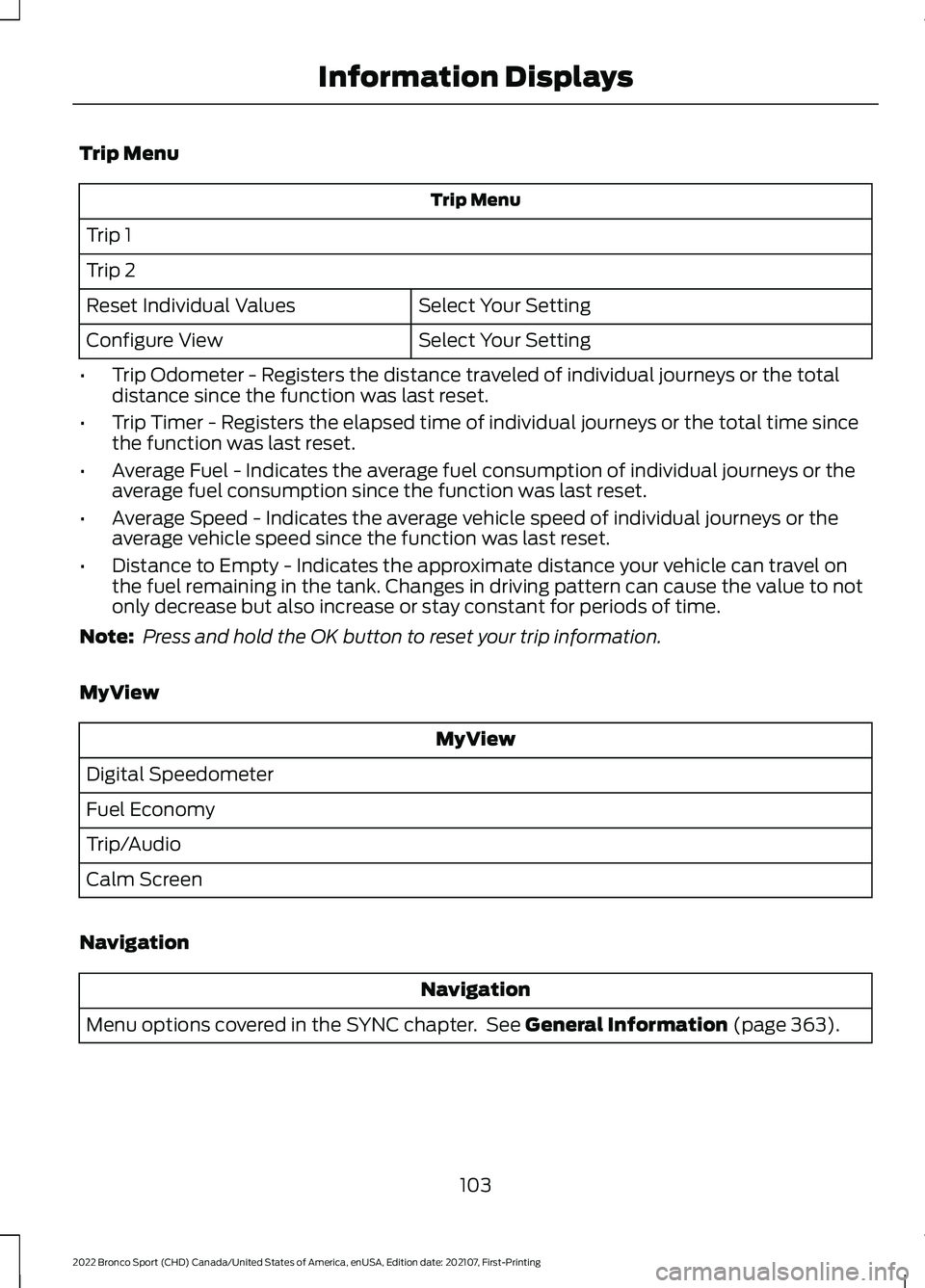
Trip Menu
Trip Menu
Trip 1
Trip 2 Select Your Setting
Reset Individual Values
Select Your Setting
Configure View
• Trip Odometer - Registers the distance traveled of individual journeys or the total
distance since the function was last reset.
• Trip Timer - Registers the elapsed time of individual journeys or the total time since
the function was last reset.
• Average Fuel - Indicates the average fuel consumption of individual journeys or the
average fuel consumption since the function was last reset.
• Average Speed - Indicates the average vehicle speed of individual journeys or the
average vehicle speed since the function was last reset.
• Distance to Empty - Indicates the approximate distance your vehicle can travel on
the fuel remaining in the tank. Changes in driving pattern can cause the value to not
only decrease but also increase or stay constant for periods of time.
Note: Press and hold the OK button to reset your trip information.
MyView MyView
Digital Speedometer
Fuel Economy
Trip/Audio
Calm Screen
Navigation Navigation
Menu options covered in the SYNC chapter. See General Information (page 363).
103
2022 Bronco Sport (CHD) Canada/United States of America, enUSA, Edition date: 202107, First-Printing Information Displays
Page 107 of 494
Audio
Audio
Menu options covered in the SYNC chapter. See General Information (page 363).
Phone Phone
Menu options covered in the SYNC chapter. See
General Information (page 363).
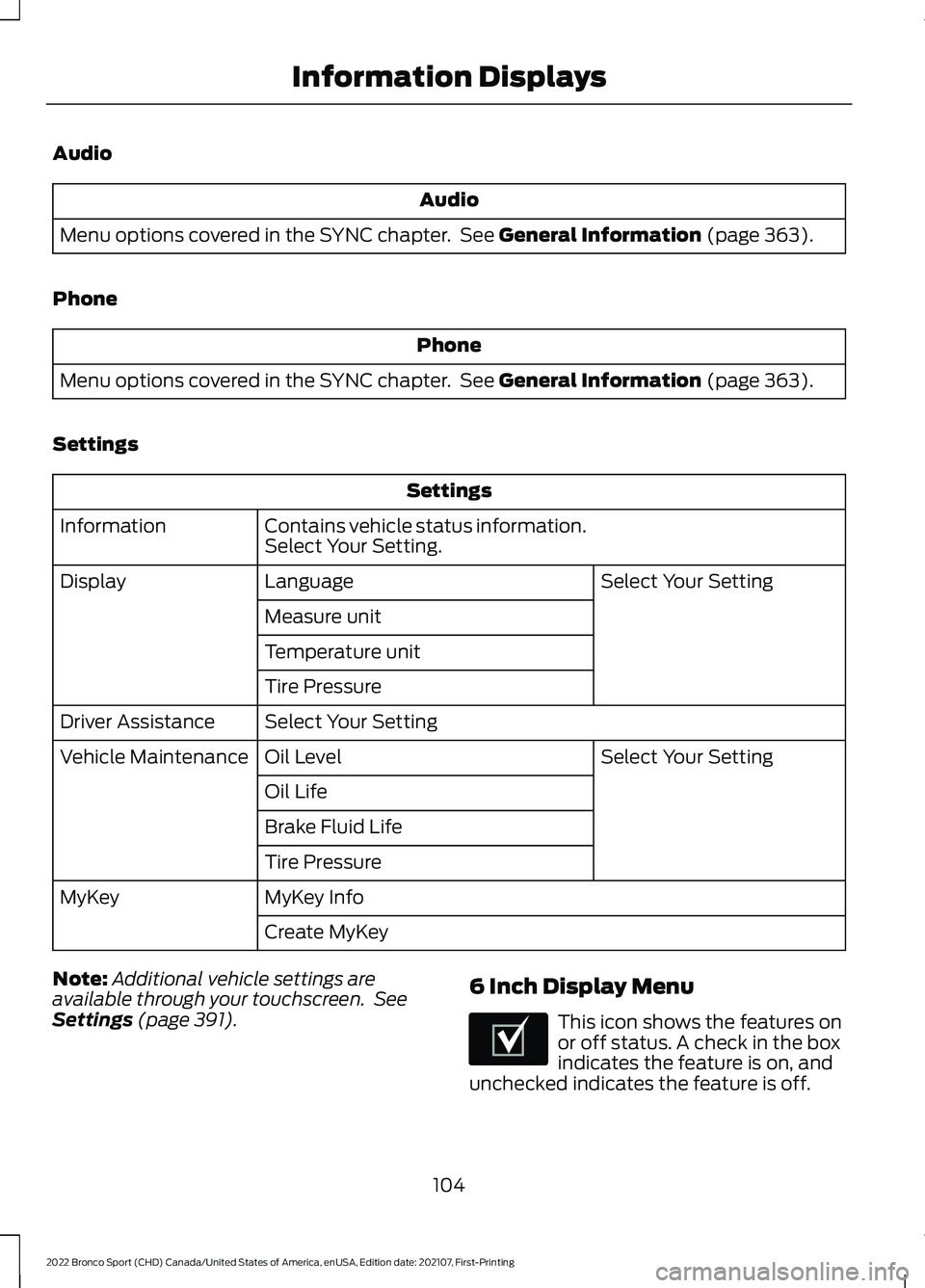
Settings Settings
Contains vehicle status information.
Select Your Setting.
Information
Select Your Setting
Language
Display
Measure unit
Temperature unit
Tire Pressure
Select Your Setting
Driver Assistance
Select Your Setting
Oil Level
Vehicle Maintenance
Oil Life
Brake Fluid Life
Tire Pressure
MyKey Info
MyKey
Create MyKey
Note: Additional vehicle settings are
available through your touchscreen. See
Settings
(page 391). 6 Inch Display Menu This icon shows the features on
or off status. A check in the box
indicates the feature is on, and
unchecked indicates the feature is off.
104
2022 Bronco Sport (CHD) Canada/United States of America, enUSA, Edition date: 202107, First-Printing Information DisplaysE204495
Page 108 of 494
Note:
Some options could appear slightly
different or not at all if the items are
optional. Note:
Some MyKey menu options only
appear if MyKey is enabled and at least one
MyKey is programmed.
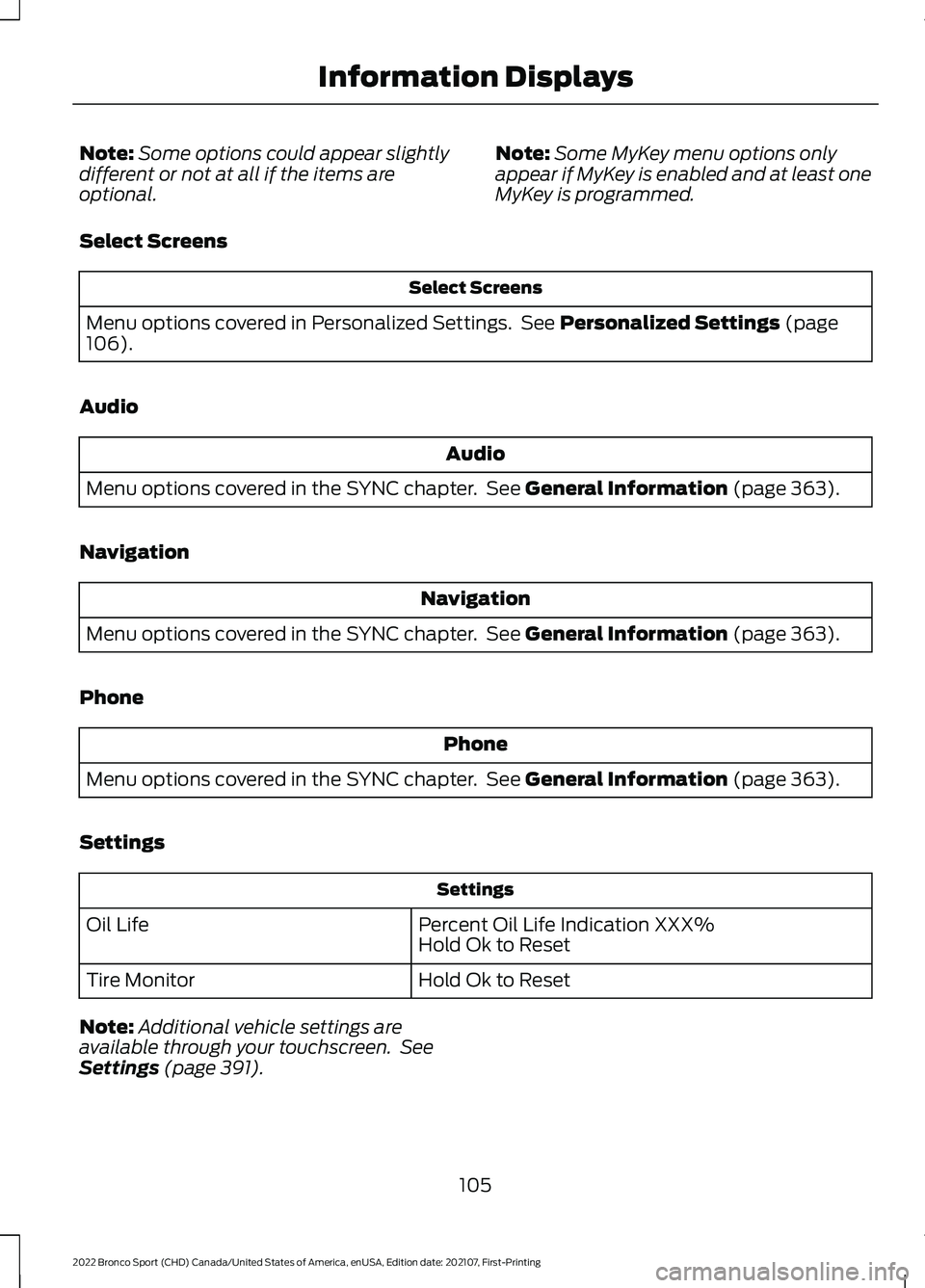
Select Screens Select Screens
Menu options covered in Personalized Settings. See Personalized Settings (page
106).
Audio Audio
Menu options covered in the SYNC chapter. See
General Information (page 363).
Navigation Navigation
Menu options covered in the SYNC chapter. See
General Information (page 363).
Phone Phone
Menu options covered in the SYNC chapter. See
General Information (page 363).
Settings Settings
Percent Oil Life Indication XXX%
Hold Ok to Reset
Oil Life
Hold Ok to Reset
Tire Monitor
Note: Additional vehicle settings are
available through your touchscreen. See
Settings
(page 391).
105
2022 Bronco Sport (CHD) Canada/United States of America, enUSA, Edition date: 202107, First-Printing Information Displays
Page 109 of 494
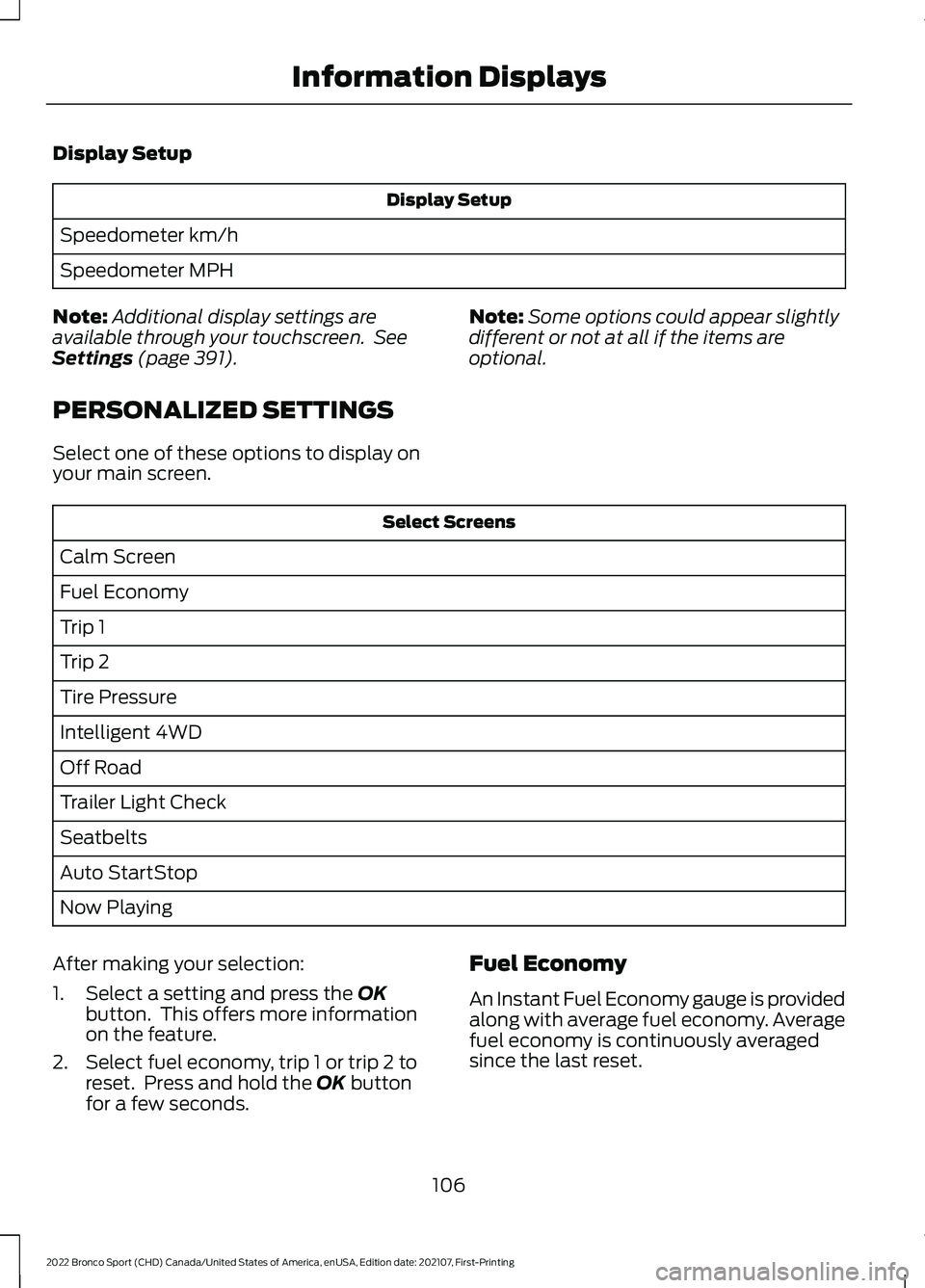
Display Setup
Display Setup
Speedometer km/h
Speedometer MPH
Note: Additional display settings are
available through your touchscreen. See
Settings (page 391).
PERSONALIZED SETTINGS
Select one of these options to display on
your main screen. Note:
Some options could appear slightly
different or not at all if the items are
optional. Select Screens
Calm Screen
Fuel Economy
Trip 1
Trip 2
Tire Pressure
Intelligent 4WD
Off Road
Trailer Light Check
Seatbelts
Auto StartStop
Now Playing
After making your selection:
1. Select a setting and press the
OK
button. This offers more information
on the feature.
2. Select fuel economy, trip 1 or trip 2 to reset. Press and hold the
OK button
for a few seconds. Fuel Economy
An Instant Fuel Economy gauge is provided
along with average fuel economy. Average
fuel economy is continuously averaged
since the last reset.
106
2022 Bronco Sport (CHD) Canada/United States of America, enUSA, Edition date: 202107, First-Printing Information Displays
Page 110 of 494
Note:
When viewing this screen you can
reset your average fuel economy. Hold OK
to reset fuel history and average fuel
economy.
Trip 1 and 2
Provides trip timer, trip average fuel
economy and total trip distance traveled.
For hybrid vehicles, the trip also shows the
distance traveled on electric power only.
INFORMATION MESSAGES
Depending on your vehicle options and
instrument cluster type, not all messages
display or are available. Note:
The system abbreviates or shortens
certain messages. Press the
OK button to acknowledge and
remove some messages from the
information display. The system removes
other messages after a short time.
You need to confirm certain messages
before you can access the menus.
Adaptive Cruise Control Details
Message
A radar malfunction is preventing the adaptive cruise from engaging.
Adaptive Cruise
Malfunction
Front Sensor Not Aligned
Conditions exist such that the adaptive cruise cannot properly function.
Adaptive Cruise
Not Available
Bad weather, ice, mud or water is causing poor radar visibility andis blocking the radar sensor. You can typically clean the sensor to resolve.
Adaptive Cruise
Not Available
Sensor Blocked See Manual
Displays when automatic braking disables.
Normal Cruise
Active Adaptive Braking Off
Displays when the adaptive cruise system reinstates control to the driver.
Adaptive Cruise -
Driver Resume Control
Displays when the vehicle speed is too slow to activate the adaptive cruise.
Adaptive Cruise
Speed Too Low to Activate
107
2022 Bronco Sport (CHD) Canada/United States of America, enUSA, Edition date: 202107, First-Printing Information DisplaysE222314
Page 111 of 494

AdvanceTrac
™ and Traction Control Details
Message
The system detects a condition that requires service. Have thesystem checked soon as possible.
Service Advan-
ceTrac
The status of the AdvanceTrac system after you switched it off.
AdvanceTrac Off
The status of the AdvanceTrac system after you switched it on.
AdvanceTrac On
The status of the traction control system after you switched it off.
Traction Control
Off
The status of the traction control system after you switched it on.
Traction Control
On
Alarm Details
Message
Alarm triggered due to unauthorized entry. See Anti-Theft Alarm (page 75).
Vehicle Alarm To
Stop Alarm, Start Vehicle.
Auto-Start-Stop Details
Message
You need to restart the engine and pressthe brake pedal to start.
Auto StartStop Press Brake to Start Engine
You need to restart the engine and pressthe brake pedal harder to start.
Auto StartStop Press Brake Harder to
Activate
You need to restart the engine and pressany pedal to start.
Auto StartStop Press a Pedal to Start
Engine
Select neutral (N) for the system to restartthe engine.
Auto StartStop Select Neutral To Start
Engine
108
2022 Bronco Sport (CHD) Canada/United States of America, enUSA, Edition date: 202107, First-Printing Information Displays
Page 112 of 494
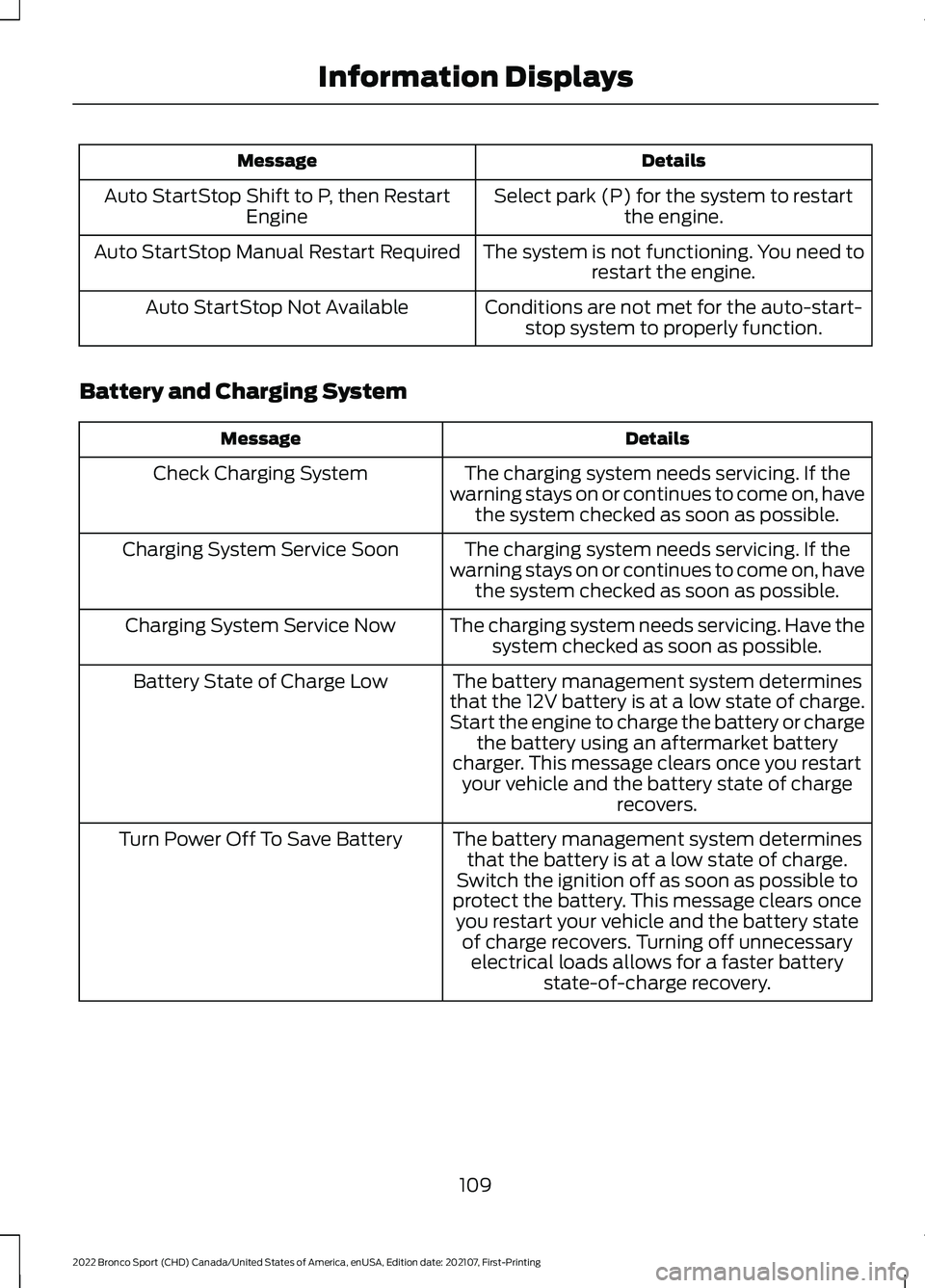
Details
Message
Select park (P) for the system to restartthe engine.
Auto StartStop Shift to P, then Restart
Engine
The system is not functioning. You need torestart the engine.
Auto StartStop Manual Restart Required
Conditions are not met for the auto-start-stop system to properly function.
Auto StartStop Not Available
Battery and Charging System Details
Message
The charging system needs servicing. If the
warning stays on or continues to come on, have the system checked as soon as possible.
Check Charging System
The charging system needs servicing. If the
warning stays on or continues to come on, have the system checked as soon as possible.
Charging System Service Soon
The charging system needs servicing. Have thesystem checked as soon as possible.
Charging System Service Now
The battery management system determines
that the 12V battery is at a low state of charge.
Start the engine to charge the battery or charge the battery using an aftermarket battery
charger. This message clears once you restart your vehicle and the battery state of charge recovers.
Battery State of Charge Low
The battery management system determinesthat the battery is at a low state of charge.
Switch the ignition off as soon as possible to
protect the battery. This message clears once you restart your vehicle and the battery state of charge recovers. Turning off unnecessary electrical loads allows for a faster battery state-of-charge recovery.
Turn Power Off To Save Battery
109
2022 Bronco Sport (CHD) Canada/United States of America, enUSA, Edition date: 202107, First-Printing Information Displays
Page 113 of 494
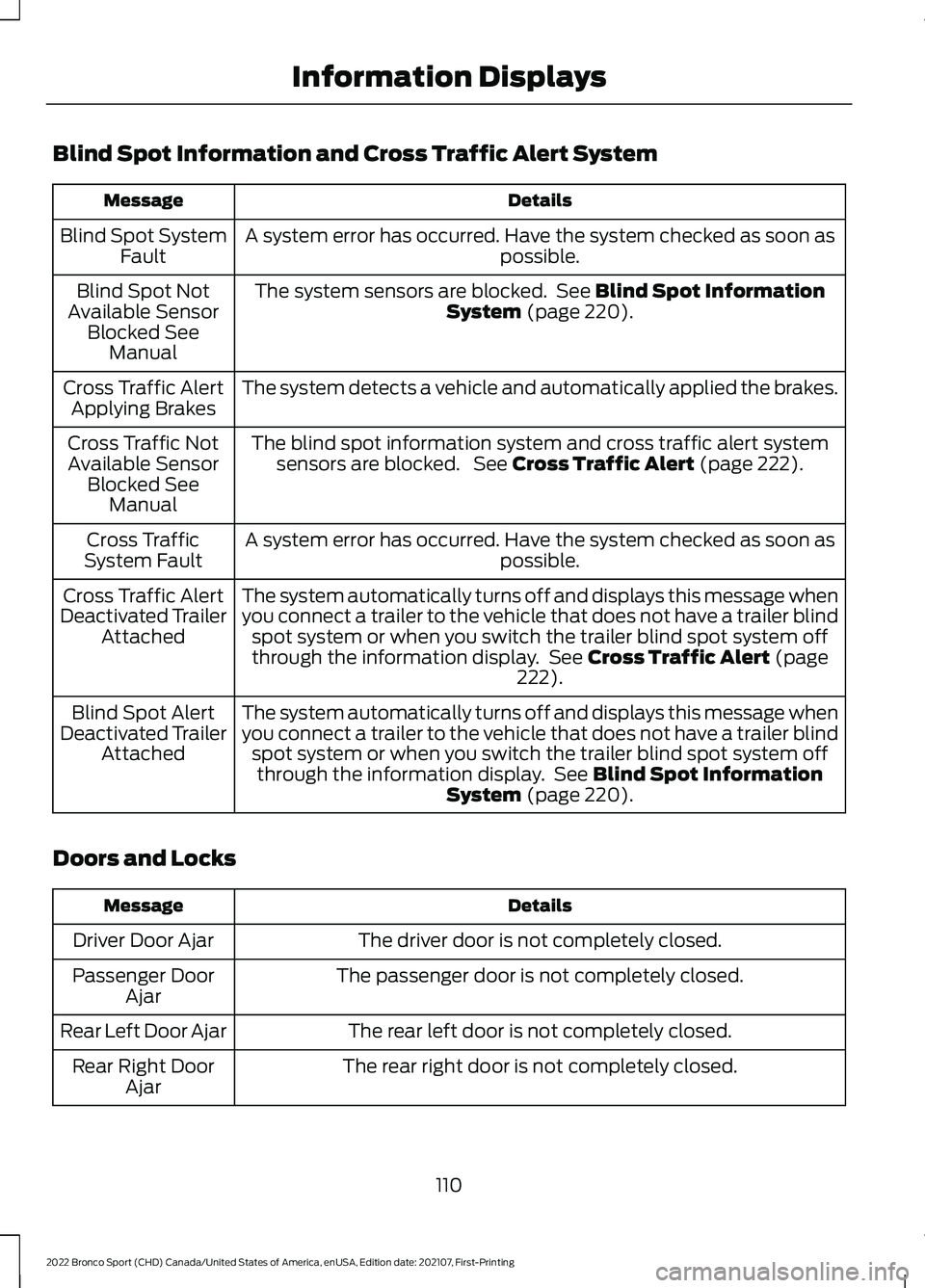
Blind Spot Information and Cross Traffic Alert System
Details
Message
A system error has occurred. Have the system checked as soon as possible.
Blind Spot System
Fault
The system sensors are blocked. See Blind Spot Information
System (page 220).
Blind Spot Not
Available Sensor Blocked See Manual
The system detects a vehicle and automatically applied the brakes.
Cross Traffic Alert
Applying Brakes
The blind spot information system and cross traffic alert systemsensors are blocked. See
Cross Traffic Alert (page 222).
Cross Traffic Not
Available Sensor Blocked See Manual
A system error has occurred. Have the system checked as soon as possible.
Cross Traffic
System Fault
The system automatically turns off and displays this message when
you connect a trailer to the vehicle that does not have a trailer blindspot system or when you switch the trailer blind spot system off
through the information display. See
Cross Traffic Alert (page
222).
Cross Traffic Alert
Deactivated Trailer Attached
The system automatically turns off and displays this message when
you connect a trailer to the vehicle that does not have a trailer blindspot system or when you switch the trailer blind spot system offthrough the information display. See
Blind Spot Information
System (page 220).
Blind Spot Alert
Deactivated Trailer Attached
Doors and Locks Details
Message
The driver door is not completely closed.
Driver Door Ajar
The passenger door is not completely closed.
Passenger Door
Ajar
The rear left door is not completely closed.
Rear Left Door Ajar
The rear right door is not completely closed.
Rear Right Door
Ajar
110
2022 Bronco Sport (CHD) Canada/United States of America, enUSA, Edition date: 202107, First-Printing Information Displays
Page 114 of 494
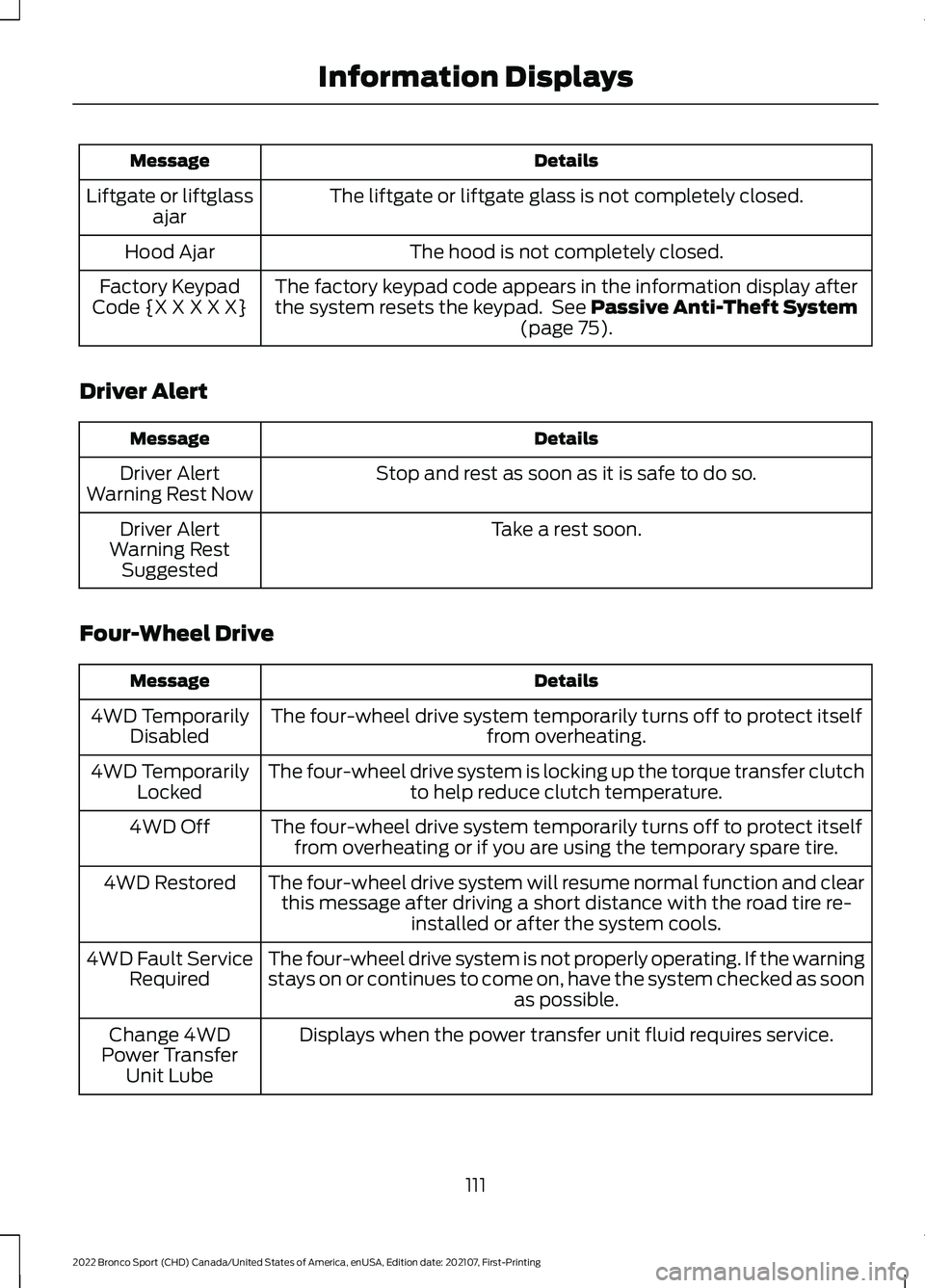
Details
Message
The liftgate or liftgate glass is not completely closed.
Liftgate or liftglass
ajar
The hood is not completely closed.
Hood Ajar
The factory keypad code appears in the information display after
the system resets the keypad. See Passive Anti-Theft System
(page 75).
Factory Keypad
Code {X X X X X}
Driver Alert Details
Message
Stop and rest as soon as it is safe to do so.
Driver Alert
Warning Rest Now
Take a rest soon.
Driver Alert
Warning Rest Suggested
Four-Wheel Drive Details
Message
The four-wheel drive system temporarily turns off to protect itself from overheating.
4WD Temporarily
Disabled
The four-wheel drive system is locking up the torque transfer clutch to help reduce clutch temperature.
4WD Temporarily
Locked
The four-wheel drive system temporarily turns off to protect itselffrom overheating or if you are using the temporary spare tire.
4WD Off
The four-wheel drive system will resume normal function and clearthis message after driving a short distance with the road tire re- installed or after the system cools.
4WD Restored
The four-wheel drive system is not properly operating. If the warning
stays on or continues to come on, have the system checked as soon as possible.
4WD Fault Service
Required
Displays when the power transfer unit fluid requires service.
Change 4WD
Power Transfer Unit Lube
111
2022 Bronco Sport (CHD) Canada/United States of America, enUSA, Edition date: 202107, First-Printing Information Displays
Page 115 of 494
Details
Message
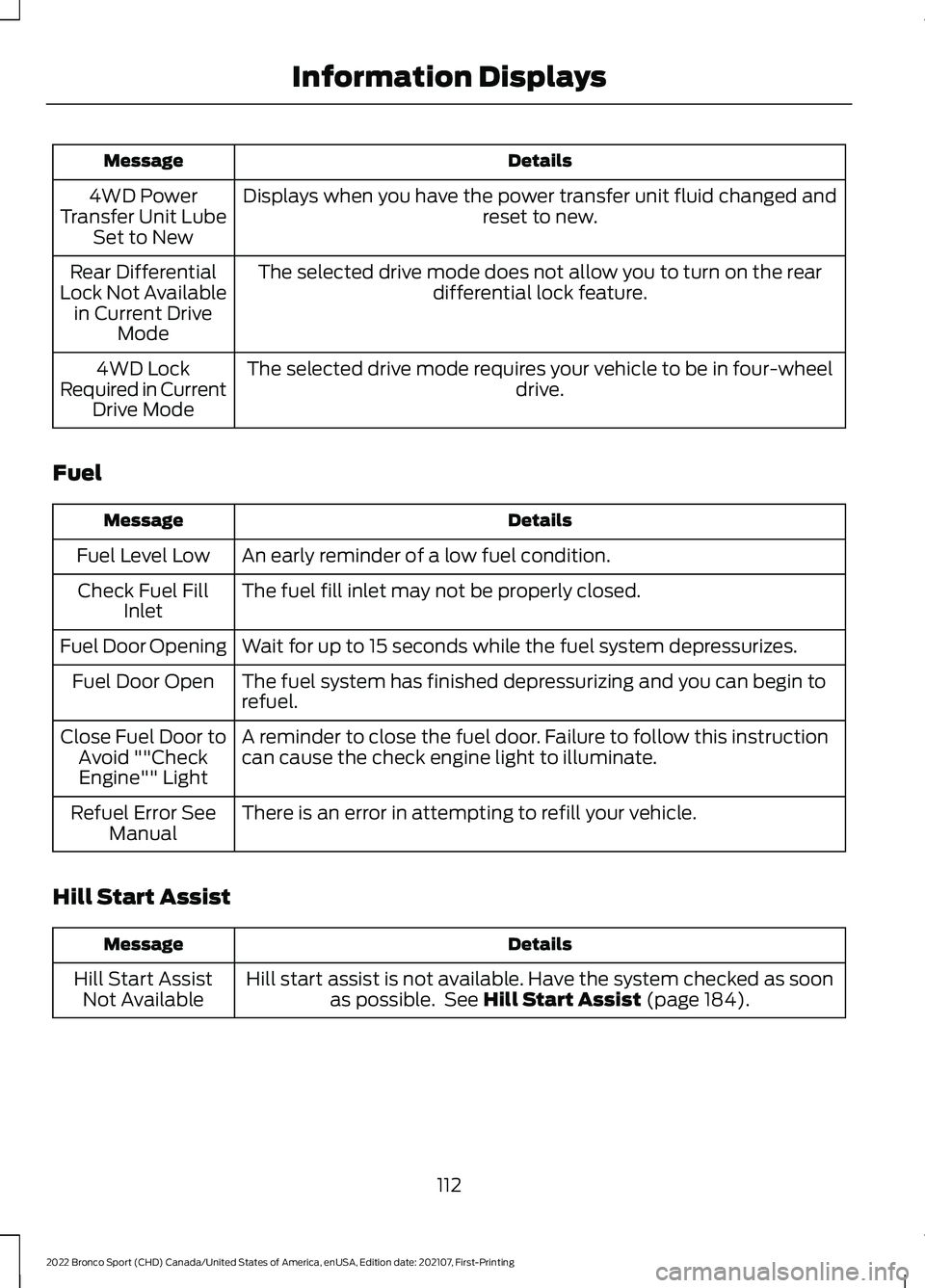
Displays when you have the power transfer unit fluid changed and reset to new.
4WD Power
Transfer Unit Lube Set to New
The selected drive mode does not allow you to turn on the rear differential lock feature.
Rear Differential
Lock Not Available in Current Drive Mode
The selected drive mode requires your vehicle to be in four-wheel drive.
4WD Lock
Required in Current Drive Mode
Fuel Details
Message
An early reminder of a low fuel condition.
Fuel Level Low
The fuel fill inlet may not be properly closed.
Check Fuel Fill
Inlet
Wait for up to 15 seconds while the fuel system depressurizes.
Fuel Door Opening
The fuel system has finished depressurizing and you can begin to
refuel.
Fuel Door Open
A reminder to close the fuel door. Failure to follow this instruction
can cause the check engine light to illuminate.
Close Fuel Door to
Avoid ""CheckEngine"" Light
There is an error in attempting to refill your vehicle.
Refuel Error See
Manual
Hill Start Assist Details
Message
Hill start assist is not available. Have the system checked as soonas possible. See Hill Start Assist (page 184).
Hill Start Assist
Not Available
112
2022 Bronco Sport (CHD) Canada/United States of America, enUSA, Edition date: 202107, First-Printing Information Displays